


STAY UP TO DATE
The Grey Blog


FEATURED ARTICLES

How money moves across Africa: cash, mobile money and cross-border payments
From cash and M-Pesa to mobile wallets and PAPSS, see how money really moves across Africa, and send it across borders for less with Grey. Send.

Tunde Aladeloba
•
6 min read
In Douala’s busy markets, a supplier’s next order depends on getting paid for the last one. Not long ago, a trader sending money across a border might have relied on a travelling relative, a trusted intermediary or a bank transfer that took days to clear. Today, digital payment services are changing that reality, allowing money to move across borders in seconds along supported payment routes.
The significance goes beyond speed. When a trader can pay a supplier on time, stock arrives sooner. When a freelancer receives an international payment and can access the money locally, distance becomes less of a barrier to earning a living. These are everyday transactions, but together they are changing how people work, trade and do business across Africa.
Grey is part of this shift, connecting international transfers with local financial systems, including mobile money in supported markets such as Cameroon. For users, the value is practical: paying a collaborator, restocking a shop or supporting family abroad without having to navigate the process alone.
Africa’s money-moving story has travelled from cash carried on buses to transfers initiated on a phone. Yet the digital economy presents an interesting contrast: information can cross the world almost instantly, but moving money still involves national borders, different currencies, regulations and financial networks. The next chapter is not simply about making payments faster. It is about making cross-border transactions work as naturally as the trade, work and family relationships that already connect the continent.
A brief history of money in Africa
Money has always moved across Africa, but the systems for moving it have rarely been simple.
For much of the continent's history, formal banking was concentrated in major cities and commercial centres. Large parts of the population operated outside the formal financial system, relying heavily on cash and informal networks to earn, save and transfer money.
Then there is the question of currency. Africa is home to more than 40 currencies, each operating within different monetary systems and financial regulations. Moving money between two African countries can involve currency conversion, intermediary banks and additional transaction fees. For example, Cameroon uses the Central African CFA franc (XAF), Côte d’Ivoire uses the West African CFA franc (XOF), while Rwanda uses the Rwandan franc (RWF). To make cross-border transactions easier, Grey has expanded into these markets, supporting regional currencies such as XAF and XOF and enabling users to move money across borders.
That fragmentation has had consequences for ordinary people as well as businesses. A family might have relatives living in another country. A trader might buy stock from across the border. Someone working in a city might earn their income hundreds of kilometres away from where their family lives.
How Africa found ways to move money across borders
As Africans moved across borders for work, trade and family, money had to follow. A trader in Lagos paying a supplier in Accra, for instance, could face currency conversion, intermediary banks and transfer fees before the money reached its destination. Historically, people relied on travelling relatives, traders and informal agents to bridge this gap.
Digital payments have changed how money moves, but sending money across African borders can still be costly and complicated. Grey helps simplify this process by enabling users to hold and exchange multiple currencies and make international transfers without relying on the traditional chain of intermediaries for every transaction. The goal is to make moving money across borders more accessible, convenient and transparent.
Mobile money, digital wallets and cross-border fintech
The arrival of mobile money changed the African financial landscape.
Mobile money has transformed financial access across Africa, and Kenya’s M-Pesa is one of its most successful examples. Launched in 2007, it allows people to send, receive and store money using their phones, with local agents providing cash-in and cash-out services. By March 2022, M-Pesa had reached 52.4 million customers across its African markets, processing more than 19 billion transactions that year. Its growth shows how mobile technology, agent networks and everyday payment services can bring financial services to people beyond traditional bank branches.
But sending money within Kenya is different from paying someone in another country. A freelancer in Nairobi paying a supplier in London or supporting family in Lagos needs a way to convert shillings and deliver the money to a foreign bank account. Grey lets users in Kenya fund their accounts through M-Pesa or a bank transfer and send money internationally. This includes Kenyan shillings to British pounds, euros to 30 European countries through SEPA, and Nigerian naira. SEPA, or the Single Euro Payments Area, is a payment network that standardises euro bank transfers across participating countries. Grey shows the exchange rate and fee before users confirm the transfer.
At the same time, infrastructure such as the Pan-African Payment and Settlement System (PAPSS), is being developed to make payments between African countries easier and reduce some of the dependence on international intermediary currencies.
The result is a financial system that looks increasingly different from the one that existed just two decades ago.
How sending money works in Nigeria, Ghana, Kenya, Rwanda and South Africa
There is no single African way of sending money.
In Nigeria, instant bank transfers have become part of everyday life. The country’s fintech industry has also created a large network of digital payment services and agent banking, making it possible to move between bank accounts, wallets and cash.
Kenya’s story is more closely associated with mobile money. M-Pesa became deeply embedded in everyday transactions, from sending money to family to paying businesses.
In Rwanda, services such as MTN MoMo allow people to send money, pay bills and make purchases using their phones. The country’s 2024 FinScope survey found that 86% of Rwandans had used mobile money, showing how widely these services have been adopted. For international transfers, Grey supports sending money to Rwanda, making it easier to move funds across borders.
Ghana has also embraced mobile money, with approximately 73 million registered accounts by the end of 2024. Its payment infrastructure allows users to transfer funds across different mobile money providers and bank accounts. Grey also supports transfers to Ghana, connecting international payments with local receiving methods.
In South Africa, where bank transfers are already part of everyday life, the next step is to make it easier to move money out of the country. Grey enables users to send and receive money internationally without relying solely on traditional banking channels.
A person sending money from Nigeria may be using a bank account. The recipient in Cameroon may be using MTN MoMo. Someone in Kenya may expect the money to arrive through M-Pesa.
For the payment to work smoothly, all those systems have to communicate.
Why sending money differs across African Markets
The differences are not accidental.
Each country has developed its payment ecosystem around its own regulations, infrastructure, economy and consumer behaviour.
Kenya’s mobile-money success was helped by an environment in which telecommunications companies could play a major role in financial services. Other markets have placed greater emphasis on commercial banks and licensed fintech companies.
Infrastructure also shapes behaviour. Where bank branches and formal financial services are easily accessible, consumers have more options. Where banking access is limited, mobile money agents can become a practical alternative.
Currency conditions matter too.
In countries experiencing significant currency volatility, people may look for ways to hold or receive money in stronger foreign currencies. For businesses operating across borders, access to foreign-currency accounts and efficient conversion can become particularly important.
This is why there cannot be a single solution for the entire continent. A payment product has to fit the market it enters, and increasingly, it also has to connect that market to others.
What sending money means in everyday African life
Behind all this infrastructure are very ordinary transactions.
A parent sends money to a child studying in another city. Someone working in construction sends part of their wages home. A trader pays a supplier. A family member abroad sends money to relatives. A small business receives payment from a customer in another country.
The amounts may vary enormously, but the importance of the transaction does not necessarily depend on its size. For someone running a market stall, a delayed payment can mean missing the chance to buy stock. For a family, it can mean waiting for money needed for food, transport or school fees. This is why the development of digital payments has been so significant. It is not simply making financial transactions faster. It is changing how people organise their economic lives across distance.
The future of cross-border payments: PAPSS, Grey and Francophone Africa
The next challenge is connecting all these systems.
Cameroon provides a useful example. Mobile-money services such as MTN MoMo and Orange Money have become important parts of the country's financial ecosystem. International remittance services can increasingly connect people outside Cameroon with recipients using these local wallets.
That creates a very different experience from the traditional bank wire. A recipient does not necessarily need a conventional bank account. Money can be deposited directly into the mobile wallet already used for everyday transactions. Grey is part of this emerging cross-border infrastructure, enabling supported users to send money to Cameroon via local payment networks, including MTN and Orange mobile money wallets.
One of the biggest challenges when moving money across Africa is that cross-border payments can be more complicated than they should be. A Nigerian business paying a supplier in Cameroon, for example, may face currency conversion requirements, intermediary banks, additional fees and delays, depending on the banks and payment route involved.
The Pan-African Payment and Settlement System (PAPSS), developed by Afreximbank in collaboration with the African Union, was created to address this problem. It connects participating banks and payment systems, allowing payments between African countries to be processed in local currencies without always routing them through third-party currencies such as the US dollar. PAPSS is expanding its network of participating countries and financial institutions to make cross-border payments easier and support trade under the African Continental Free Trade Area (AfCFTA). The goal is to make it easier for African businesses to buy and sell across borders without the cost and complexity of traditional international payment routes.
The significance of these developments goes beyond remittances. If money can move more easily between African countries, businesses can trade more easily. Freelancers can work for clients in other markets. Families can support relatives across borders. Traders can buy stock without relying on someone to physically carry cash. Africa’s payments story began with people finding ways to move money when formal systems could not do so easily.
It moved from cash carried by people, to money sent through mobile phones, to digital wallets and increasingly connected payment networks. The next stage is not simply about making transfers faster. It is about making the continent’s different financial systems work together.
And when that happens, sending money across Africa may finally become less about crossing borders, and more about simply moving money where it is needed.
ALL ARTICLES
.jpg)
You can now send money to Türkiye and Saudi Arabia with Grey
Need to send money to Türkiye or Saudi Arabia? Send TRY or SAR from Grey directly to local bank accounts with simple flat fees.
Priscila Marotti
•
September 14, 2026
•
6 min read
Maybe you’re visiting family in Türkiye, paying a freelancer you work with, or taking care of an expense while you’re abroad. Maybe you’re heading to Saudi Arabia for Hajj or Umrah and need to sort out accommodation and transport.
Whatever the reason, you can now send money to Türkiye and Saudi Arabia directly from Grey, in Turkish lira (TRY) and Saudi riyal (SAR).
Whether you’re managing work across borders or you simply need to get money to someone in either country, you can now do it from Grey without moving money between multiple services.
Sending money to Türkiye just got easier
If you have someone to pay in Türkiye, you can now send Turkish lira directly to their local bank account from Grey.
You could be visiting for a holiday, supporting family, paying a freelancer or vendor, or handling an expense from abroad. With Grey, you can now send TRY directly to bank accounts across Türkiye. Transfers are supported across operating banks in Türkiye for both personal and business accounts.
The fee is $1.50 + 0.10% per transfer, and you can send between TRY 10 and TRY 200,000 at a time.
Transfers are processed within 24 hours from Monday to Friday, with a 13:00 GMT cut-off time. So, once you have the recipient’s bank details, you can send the money without needing them to sign up for Grey or use a separate wallet.
You can also send Saudi riyals directly to a bank account
We’ve added Saudi Arabia too.
You can now send Saudi riyals directly to personal and business bank accounts across operating banks in the country.
This can come in handy in plenty of situations. You might need to send money to someone living in Saudi Arabia, cover part of a family member’s expenses or pay someone you work with there.
Each transfer costs a flat $3.50, with a minimum of SAR 1 and a maximum of SAR 20,000 per transaction.
Transfers are processed within 24 hours from Monday to Friday, with a 10:00 GMT cut-off time.
Start with the money you already have in Grey
You don’t need to hold Turkish lira or Saudi riyals in your Grey account before you send money.
If you already have money in a supported Grey balance, you can use it to send TRY or SAR to the recipient.
Simply choose the destination, add the recipient’s bank details and enter how much you want to send. You’ll be able to see the transfer details before confirming.
The person receiving the money doesn’t need a Grey account. The money goes to their local bank account in Türkiye or Saudi Arabia.
So when your money needs to reach someone in Türkiye or Saudi Arabia, you can send it directly from Grey.
Open Grey and send TRY or SAR directly to a bank account today.
Frequently asked questions about sending money to Türkiye and Saudi Arabia
Can I send Turkish lira with Grey?
Yes. You can send Turkish lira (TRY) directly to personal and business bank accounts in Türkiye.
How much does it cost to send money to Türkiye?
Grey charges $1.50 + 0.10% per transaction. The 0.10% fee has a minimum of $0.80. You’ll see the fee and exchange rate before you confirm your transfer.
How much TRY can I send?
You can send between TRY 10 and TRY 200,000 in a single transaction.
Can I send Saudi riyals with Grey?
Yes. You can send Saudi riyals (SAR) directly to personal and business bank accounts in Saudi Arabia.
How much does it cost to send money to Saudi Arabia?
Each transfer to Saudi Arabia costs a flat $3.50.
How much SAR can I send?
You can send from SAR 1 up to SAR 20,000 in a single transaction.
How long do transfers to Türkiye and Saudi Arabia take?
Transfers to both countries are processed within 24 hours from Monday to Friday. Cut-off times apply: 13:00 GMT for Türkiye and 10:00 GMT for Saudi Arabia.
Does the person receiving the money need a Grey account?
No. You send the money directly to their local bank account, so they don’t need to have a Grey account to receive it.
.jpg)
You can now send CNY to China with Grey
Grey lets you send CNY to bank accounts across China. Learn about transfer fees, sending limits, processing times and supported balances.
Priscila Marotti
•
September 7, 2026
•
6 min read
Your Grey balance just got a new destination. Send CNY directly to personal and business bank accounts in China using the USD, EUR, GBP, or stablecoins you already have in Grey.
We will handle the conversion, and you’ll see all the details before you send.
Here’s what you need to know before making your first transfer.
Send CNY directly to Chinese bank accounts
With the new CNY transfer option, you can send money straight to your recipient’s bank account in China.
Bank transfers are available for both personal and business accounts across operating banks in the country. So, you can use Grey to send money to friends and family, pay for services, or make payments to businesses in China.
And because you can send from a balance you already have in Grey, there’s no need to convert your money to CNY somewhere else first.
How much does it cost to send CNY with Grey?
Each CNY bank transfer costs a flat $2.80.
There’s no percentage-based transfer fee, so the cost stays the same regardless of how much you send within the available limits.
Before you confirm your transfer, you’ll see the exchange rate, fee and how much your recipient will get. This way, you know exactly what to expect before the money leaves your account.
How much CNY can you send?
You can send from 50 CNY up to 21,000 CNY in a single bank transfer.
It's enough flexibility for everything from paying a contractor to sending money to someone back home. How long does it take to send CNY to China?
CNY bank transfers are typically completed within 24 hours, Monday to Friday.
There’s a 10:00 GMT cutoff time, so keep this in mind if you need your money to arrive by a particular day. Transfers made after the cutoff may take longer to reach the recipient.
Processing times can also vary depending on banking days and other factors outside Grey’s control.
Which Grey balances can you send from?
You don’t need to hold CNY before sending money to China.
You can make your transfer using money from your USD, EUR, GBP or stablecoin balance.
Choose the balance you want to use, enter the amount you’d like your recipient to get in CNY and review the conversion before confirming.
It’s a simple way to use money you already have in Grey to send money to China.
How to send CNY to China with Grey
Sending CNY takes just a few steps:
- Log in to your Grey account and go to Send money.
- Select CNY as the currency you want to send.
- Choose bank transfer.
- Add your recipient’s bank details and the amount you want to send.
- Choose the Grey balance you want to send from.
- Review the exchange rate, fees, and the amount your recipient will receive.
- Confirm your transfer.
Once everything looks right, confirm your transfer, and Grey will take it from there.
Send money to China from your Grey account
Your Grey balance can now take you one country further.
You can send CNY directly to Chinese suppliers, contractors, and partners in China from your USD, EUR, GBP, or stablecoin balance, at a flat $2.80 transfer fee. If you live and work outside China, you can also use CNY payouts to send money directly to family and friends in China.
So the next time you need to send money to China, you can do it while keeping your money and your payments in one place.
Open Grey and make your first CNY transfer today.
.jpg)
Send money to Rwanda, Cameroon, Senegal and Côte d’Ivoire with Grey
Grey now lets you send money to Rwanda, Cameroon, Senegal and Côte d’Ivoire through local bank accounts and mobile money wallets.
Priscila Marotti
•
September 7, 2026
•
6 min read
You already use Grey to receive, hold and manage your money. Now, we’re giving you more places to send it too.
Have family in Rwanda? Someone you need to pay in Cameroon? Or maybe you regularly send money to Senegal or Côte d’Ivoire?
You can now do it directly from Grey.
We’ve added Rwandan francs (RWF), Central African CFA francs (XAF) and West African CFA francs (XOF), so you can send money to people in these four countries using their local bank account or mobile money wallet, depending on the destination.
It’s one more way to use the money you already have in Grey, without having to move it somewhere else first.
Here’s where you can send money and how.
Send Rwandan francs directly to a bank account
Need to send money to someone in Rwanda? You can now send Rwandan francs (RWF) from Grey directly to their local bank account.
Bank transfers are available to personal and business accounts across operating banks in Rwanda, so your recipient can get the money in the account they already use.
Transfers cost a flat $1.30 and are processed within 24 hours.
You can send between RWF 1,000 and RWF 5,000,000 in a single transaction.
That gives you plenty of flexibility, from sending a little money home to covering a larger expense or paying someone you work with.
Send money to mobile wallets in Cameroon
In Cameroon, mobile money is part of everyday life. So instead of asking someone to use a different way to receive your money, you can send it to a wallet they already use.
Grey now lets you send Central African CFA francs (XAF) to:
- MTN Mobile Money
- Orange Money
Transfers are almost instant and cost a flat $1.80.
You can send from XAF 500 up to XAF 400,000 in a single transaction.
So, if your family needs money for an urgent expense or you need to pay someone in Cameroon, you can send it straight to their mobile wallet without waiting for a traditional international bank transfer.
More ways to send money to Senegal
If you’re sending money to Senegal, you can now choose between a bank account and several popular mobile money wallets.
You can now send West African CFA francs (XOF) to personal and business accounts across operating banks in Senegal.
You can also send money to:
- E-Money
- Free
- Expresso
- Orange
- Wave
- Wizall Money
Bank transfers cost a flat $2, while mobile money transfers cost $3.
Mobile money transfers are almost instant. Bank transfers are processed on the same business day, Monday to Friday, when sent before the 12:00 GMT cut-off time.
You can send between XOF 1,000 and XOF 1,500,000 per transaction.
That means the person receiving your money can choose what works best for them, rather than having to open a new account or change how they normally manage their money.
Send money to Côte d’Ivoire by bank or mobile money
Grey is also making it easier to send West African CFA francs (XOF) to Côte d’Ivoire.
You can send directly to a local bank account or choose one of these mobile money options:
- MTN
- Orange
- Moov
Mobile money transfers cost a flat $1.80 and are almost instant. Bank transfers cost $2 and are processed on the same business day from Monday to Friday when sent before the 12:00 GMT cut-off time.
The minimum amount is XOF 1,000, and you can send up to XOF 1,500,000 per transaction.
So, from helping family with everyday expenses to sending money to someone you work with, you have different ways to get it to them.
Send from the money you already have in Grey
You don’t need to already have RWF, XAF or XOF in your Grey account before sending.
You can start with money in your USD, EUR or GBP balance, choose who you want to send money to and enter the amount. Grey converts it into the recipient’s local currency as part of the process.
Before you confirm, you’ll be able to review the details of your transfer.
This means the money you receive and keep in Grey can now go further across Africa, without needing to move it through several different services first.
More places, more ways to send with Grey
Your next transfer could be for family, work or something that wasn’t even on your radar yesterday. Whatever takes your money across borders, you now have more ways to send it with Grey.
With RWF, XAF and XOF now supported, you can send money to Rwanda, Cameroon, Senegal and Côte d’Ivoire through local bank accounts or mobile money, depending on the destination.
Open Grey and make your first transfer today.
Frequently asked questions
Can I send money to Rwanda with Grey?
Yes. You can send Rwandan francs (RWF) directly to personal and business bank accounts in Rwanda. Transfers cost $1.30 and are processed within 24 hours.
Can I send money to Cameroon with Grey?
Yes. You can send Central African CFA francs (XAF) to MTN and Orange mobile money wallets in Cameroon. Transfers cost $1.80 and are almost instant.
How can I send money to Senegal with Grey?
You can send West African CFA francs (XOF) to a local bank account or mobile money wallet in Senegal. Supported mobile money options include E-Money, Free, Expresso, Orange, Wave and Wizall Money.
How can I send money to Côte d’Ivoire with Grey?
You can send West African CFA francs (XOF) directly to a local bank account or to MTN, Orange or Moov mobile money wallets.
Do I need to have RWF, XAF or XOF in my Grey account first?
No. You can send using money from your supported Grey balances, including USD, EUR and GBP. The money is converted into the local currency when you send it.
How long does it take for the money to arrive?
It depends on the country and how you send it. Mobile money transfers to Cameroon, Senegal and Côte d’Ivoire are almost instant. Bank transfers to Rwanda are processed within 24 hours, while eligible bank transfers to Senegal and Côte d’Ivoire are processed on the same business day, subject to the stated weekday cut-off time.
How much does it cost to send money?
Fees depend on the destination and how the recipient gets the money. Rwanda bank transfers cost $1.30, Cameroon mobile money transfers cost $1.80, and transfers to Senegal and Côte d’Ivoire range from $1.80 to $3.
You’ll be able to review your transfer details before confirming.
-compressed.jpg)
Plan ahead with Pouch, spend and earn with Lifestyle
Pouch and Lifestyle are now in Grey, with new ways to organise your money, handle everyday expenses, and earn rewards from your Grey virtual card.
Priscila Marotti
•
August 25, 2026
•
6 min read
Money can mean different things. It might be your next flight, this month’s bills, an emergency fund, or something you’ve been saving toward for months.
Until now, Grey has been the place your money passes through. Now, you can do more with it while it’s here, with Pouch and Lifestyle.
Lifestyle brings everyday services and rewards into one place, while Pouch gives you a simple way to split your balance and organise your money around your plans. Together, they give you more to do with your Grey balance, from spending and earning rewards to preparing for what’s next.
More ways to spend and earn with Lifestyle
Lifestyle brings everyday digital services and rewards together in the Grey app.
Instead of only using Grey to receive, send, and spend money, you can now use your balance for more of the things you need day to day. From the Lifestyle tab, you can get eSIMs and, where available, buy airtime and data or pay supported bills.
.png)
Your spending can also earn you rewards. Eligible Grey card payments earn points you can track directly in Lifestyle and redeem for available rewards.
So, the next time you need data for your phone, an eSIM for a trip, or want to check the rewards you’ve earned from using your Grey card, you can find it all in Lifestyle.
Services vary by location, so check the Lifestyle tab in your Grey app to see what’s available to you.
Give every goal its own Pouch
Maybe you’re planning your next adventure, building an emergency fund, buying something special, or preparing for future investments.
Create different Pouches for the things that matter to you, give each one a name, and choose how much you want to keep aside. Having separate spaces for different goals makes it easier to see what you’re working on and stay connected to your plans.
Instead of looking at one balance and trying to remember what you can and can’t spend, you can split your balance and give each amount a purpose. And because plans change, your money isn’t locked away. You can move it back to your Grey balance when you need it.
.png)
Hold funds in dollars, pounds and euros
For people who earn, spend, or move money across currencies, you can also decide what works best for you. If you receive money in USD, EUR, or GBP, you can create a Pouch in that same currency without converting first.
Use your USD for your next adventure, your EUR for a big purchase, or keep your GBP ready for something important you’re planning.
Put Round-ups on autopilot
Sometimes the easiest way to reach a goal is to make it part of something you already do.
With Round-ups, the spare change from eligible Grey card payments can automatically go into a Pouch you choose. Every time you use your Grey card, you can put a little extra aside for your goal.
For example, if you spend $8.60 on your Grey card, your payment is rounded up to $9, and the remaining $0.40 goes into your Pouch.
Small amounts, collected over time, can help you keep moving closer to the things you want.
Everything you need, in one place
Grey already helps you receive, hold, send, and spend money across currencies. Now, Pouch and Lifestyle give you even more ways to use and manage your money without needing a separate app.
So whether you’re keeping money ready for what’s next, getting connected in a new city, paying a bill back home, or picking up something you need, you can do more of it without leaving Grey.
Your money can stay where it is, while more of your life happens around it.
Open your Grey app to explore Lifestyle and create your first Pouch today.
Frequently Asked Questions
What is Pouch?
Pouch is a Grey feature that helps you set aside money for specific goals. You can create separate Pouches for your plans, choose your preferred currency, and track your progress in one place.
Which currencies can I use for Pouch?
You can create Pouches in USD, EUR, and GBP.
Can I create more than one Pouch?
Yes. You can create multiple Pouches for different goals, such as travel, an emergency fund, a big purchase, or future plans.
Does Pouch earn interest?
Not yet. Pouch currently holds your funds separately and does not earn interest.
What are Round-ups?
Round-ups automatically move the spare change from eligible Grey card payments into a Pouch you choose. It’s a simple way to make progress as you spend.
Do I need a new Grey account to use Pouch?
No. Pouch is already part of the Grey app, so you can use it with your existing account.
Can I keep money without converting my currency?
Yes. With Pouch, you can hold funds in USD, EUR, or GBP, so you can set aside money in the currency you already hold.
Can I take money out of a Pouch whenever I want?
Yes, you can.
What is Lifestyle on Grey?
Lifestyle is a space in the Grey app where you can access everyday services and rewards. Depending on availability in your location, you can get eSIMs, buy airtime and data, pay supported bills, and access rewards.
How do Grey points work?
You can earn points on eligible Grey card payments. You can view your points balance in Lifestyle and redeem them for available rewards.
Is Lifestyle available everywhere?
Availability varies by service and location. Open the Lifestyle tab in your Grey app to see the services currently available to you.

What’s new when you send money with Grey
Sending money with Grey is now simpler. Start with your recipient, save beneficiaries, choose relevant payment options, and send with confidence.
Priscila Marotti
•
July 28, 2026
•
6 min read
Every time you send money, you already have a plan in mind. You know who you're paying, how much you want to send, and what you want them to receive.
That’s why we’ve redesigned the send flow to work the way you naturally think about transfers. Our previous send flow asked you to start somewhere else. Before choosing a recipient, you first had to pick a send option based on the payment network behind the scenes. It worked, but it didn't match the way most people think about sending money.
Now, you’ll start with your recipient, see only the payment options available for that transfer, and move through the rest of the process with fewer choices along the way.
Start with who you're sending money to
.png)
When you're sending money, the first question is usually simple: Who am I sending this to?
That's now the first step in the app.
Instead of choosing a send option first, you'll begin by selecting who you want to send money to. If you're sending money to someone from your transfer history, you can skip the payment method and enter the amount. If it's a new recipient, Grey will show only the payment options available for your chosen currency and destination.
That means you spend less time sorting through options and more time completing your transfer.
Payment options now match your transfer
.png)
Previously, every send option was displayed upfront, even though some of them only worked for specific currencies.
Now the Grey filters those choices for you.
When you send money to a new recipient, you'll only see the payment methods that support the currency and destination you've selected. That means a shorter, clearer list, making it quicker to choose the right option and complete your transfer.
Save recipients for faster transfers
.png)
When you regularly send money to the same people, keeping your recipient list organised makes every transfer faster.
As you add a recipient, you can now save them as a beneficiary. Beneficiaries appear at the top of your recipient list, making it quicker to find the people you send money to most.
Whether it's family, friends, clients, or suppliers, your most important recipients are always within easy reach, so you can start repeat transfers even faster.
Choose how you want to calculate your transfer
.png)
People don't all send money the same way.
Sometimes you know exactly how much you want your recipient to receive. Other times, you know the amount you want to send and want to see what arrives after fees and conversion.
The updated amount screen makes both options simple. You can edit either amount field, and the transfer updates instantly, so it's easier to understand exactly what you're sending and what your recipient will receive.
Clearer guidance from start to finish
You'll also notice a different tone throughout the flow.
Instead of presenting technical terms first, the app now guides you with questions that mirror the decisions you're already making:
- Who do I want to send money to?
- How do I want to send it?
- What currency should my recipient receive?
It makes the process easier to follow without needing to think about the payment infrastructure behind the scenes.
A simpler way to send money
This update is all about making sending money feel easier.
Starting with your recipient, filtering payment options automatically, remembering the people you send money to most, and making transfer amounts easier to understand all help make the experience feel smoother from beginning to end.
The next time you send money with Grey, you'll notice that the process will feel more familiar: choose who you're paying, enter the amount, confirm the details, and you’re done.
Update your Grey app to start sending money with a simpler, more intuitive way to send money from the very first tap.

Grey now supports transfers to Argentina, Thailand, Ethiopia, and Chile
Four new destinations are now live on Grey. Send money to Argentina, Thailand, Ethiopia, and Chile with transparent pricing, local currency delivery, and fees from just $1.
Priscila Marotti
•
June 10, 2026
•
6 min read
One of the most common requests from our community has been for more ways to send money directly to local bank accounts around the world. We're happy to say those options have just expanded.
Starting today, you can send money to Argentina, Chile, Thailand, and Ethiopia directly from your Grey balance. Whether you're supporting family, paying contractors, or sending business payments abroad, your money arrives the way it's actually used on the other side, in local currency and through local payment rails.
Fees start from $1, and the rate you see is exactly what your recipient receives.
Sending money to Argentina
Argentina is one of the most requested destinations among our community, but sending money there hasn't always offered many good options. Wise and Revolut don't currently support transfers in Argentine pesos, while a $500 transfer through Western Union can cost around $24.99 in fees. Grey fills that gap, giving you a direct way to send ARS with transparent pricing and local currency delivery.
You can send from your USD, EUR, or GBP balance directly to any operating bank in Argentina, personal or business. The fee is $2 plus 0.20% per transaction, which works out to around $3 on a $500 transfer. Transfers process instantly on weekdays before 18:00 GMT, with a minimum of 1,000 ARS and a maximum of 7,000,000 ARS per transaction.
How to send money to Argentina on Grey:
- Open the Grey app and go to Send Money
- Select Argentina as your destination
- Enter your recipient's bank details
- Enter the amount you want to send
- Review the fee and exchange rate
- Hit Send. Your recipient gets the money in minutes
Start sending money to Argentina
Sending money to Thailand
Thailand is home to one of the largest freelance and digital nomad communities in the world. Annual remittances to the country now exceed $12.3 billion and continue to grow. As more people work, hire, and do business across borders, the need for simple, affordable transfers continues to grow. With Grey, you can now send Thai baht directly to local bank accounts.
You can send from your USD, EUR, or GBP balance to any operating bank in Thailand, personal or business, for a flat fee of $1.80 per transfer. That is 93% cheaper than Western Union and 69% cheaper than Wise on a $500 transfer. Transfers arrive the next business day before 18:00 local time, with a minimum of 10 THB and a maximum of 49,999 THB per transaction.
How to send money to Thailand on Grey:
- Open the Grey app and go to Send Money
- Select Thailand as your destination
- Enter your recipient's bank details
- Enter the amount you want to send
- Review the fee and exchange rate
- Hit Send. Your recipient receives the money the next business day
Start sending money to Thailand
Sending money to Ethiopia
More people than ever are sending money to Ethiopia. The country receives over $6 billion in remittances each year, with volumes growing by 50% year on year. From supporting family back home to paying freelancers and business partners, Grey now lets you send money directly to Ethiopia.
What makes Grey's Ethiopia transfer particularly useful is mobile money support. In addition to bank transfers, you can send directly to Telebirr and Safaricom M-Pesa, and those payments settle in real time. For families and individuals who rely on mobile wallets for everyday spending, this makes a real difference.
The fee is a flat $2 per transfer for both bank and mobile money transfers, which is 83% cheaper than Wise and up to 92% cheaper than a bank wire. The minimum transfer is 100 ETB and the maximum is 150,000 ETB per transaction.
How to send money to Ethiopia on Grey:
- Open the Grey app and go to Send Money
- Select Ethiopia as your destination
- Choose whether you want to send to a bank account or a mobile money wallet
- For mobile money, enter your recipient's Telebirr or Safaricom M-Pesa number. For bank transfers, enter their bank details
- Review the fee and exchange rate
- Hit Send. Mobile money transfers arrive in real time. Bank transfers arrive the next business day
Start sending money to Ethiopia
Sending money to Chile
Chile has become an important destination for remote work, freelancing, and international business. As more money moves between Chile and the rest of the world, Grey now gives you a direct way to send Chilean pesos to local bank accounts.
You can send from your USD, EUR, or GBP balance to any operating bank in Chile, personal or business, for a flat fee of just $1 per transfer. That is the lowest fee in this launch, 87% cheaper than Western Union and 85% cheaper than Wise on a $500 transfer. Transfers arrive the next business day before 18:00 local time, with a minimum of 100 CLP and a maximum of 4,500,000 CLP per transaction.
How to send money to Chile on Grey:
- Open the Grey app and go to Send Money
- Select Chile as your destination
- Enter your recipient's bank details
- Enter the amount you want to send
- Review the fee and exchange rate
- Hit Send. Your recipient receives the money the next business day
Why Grey for international transfers?
Grey was built for people who live and work across borders. Every transfer shows you the real rate and the exact fee before you confirm. No surprises, no percentage markups on top of a hidden spread.
With these four new currencies, Grey now covers even more of the world's most important money corridors. Whether you are a business paying global contractors or an individual sending money home, you keep more of what you earn.
Start sending today. Open your Grey account or update the app to access all four new currencies.
Frequently asked questions
Can I send to both personal and business bank accounts?Yes. All four currencies support transfers to personal and business bank accounts.
Are there any hidden fees on top of the flat rate?No. The fee shown before you confirm is the only fee Grey charges. The exchange rate you see is the rate your recipient receives.
What currencies can I send from?You can send from your USD, EUR, or GBP balance on Grey.
How do I send to a mobile money account in Ethiopia?Select Ethiopia as your destination, choose mobile money as the transfer method, and enter your recipient's Telebirr or Safaricom M-Pesa number. Mobile money transfers settle in real time.
Do transfers happen on weekends?All four currencies process on business days, Monday to Friday. Transfers submitted after the daily cut-off time or over the weekend will be processed on the next business day.
Exchange rates are indicative and change in real time. Always check the Grey app for the live rate before sending.

Receive USD payments in seconds with FedNow on Grey
Receive USD payments instantly with FedNow on Grey. Eligible transfers can now arrive in seconds, 24/7.
Priscila Marotti
•
May 21, 2026
•
6 min read
At Grey, we’re constantly looking for ways to remove the small delays and frustrations that come with moving money internationally.
That’s why we’re excited to announce something new for USD transfers.
You can now receive USD payments instantly with FedNow on Grey. This means your money arrives in seconds, not days and it’s available any time of the day, including weekends and holidays
Why Grey added FedNow for faster USD payments
For many people using Grey, international payments are tied to real-life moments that cannot always wait until “business hours”. Freelancers need access to funds before deadlines. Businesses need to pay for tools, ads, suppliers, or contractors quickly. Travellers and remote workers may need to move money while on the go.
This update is part of our ongoing effort to make global banking feel more responsive, more flexible, and more aligned with real life.
How to send money with FedNow with Grey
FedNow works automatically in the background for eligible USD transfers, so there’s nothing new you need to set up or enable on your Grey account.
- Make sure your sender uses a bank that supports FedNow (e.g. Lead Bank, Chase, Wells Fargo) to send USD.
- When they send, your Grey US account receives the funds instantly.
- You don't have to take any extra step to send money via FedNow, it just works automatically.
How much do FedNow transfers cost on Grey?
FedNow transfer fees on Grey are the same as Grey's standard ACH transfer fees.
| Account type | Fee |
|---|---|
| Individual accounts | 0.8% per transaction (minimum $2, maximum $10) |
| Business accounts | Flat $2 per transaction |
Faster access to your USD payments
Faster USD transfers are part of Grey’s effort to make global money movement quicker and more accessible. As more financial institutions adopt FedNow, eligible USD payments sent to your Grey account can arrive in seconds, any time of the day.
Ready to receive USD payments faster? Open your free Grey account or sign in to start managing funds like a local.

Is Grey legit and safe to use? Honest review for 2026
Grey is registered with FinCEN and FINTRAC. It has served hundreds of thousands of users across Nigeria, Kenya, Ghana, and 30+ countries. Here is an honest breakdown of what Grey does well and what to know before signing up.
Olayoyin Olorunmota
•
March 31, 2026
•
6 min read
We built Grey to make it easier for people and businesses to receive, manage, and spend money across borders.
With Grey, you can hold foreign currencies, convert between them, spend with a linked card, and send money internationally, all from one platform.
But when it comes to financial services, the important question of trust always comes up.
If you’re considering using Grey to receive payments, hold foreign currency, or manage international transactions, it’s completely normal to ask questions.
Here’s a clear breakdown of how Grey works and the systems we put in place to keep your money and data secure.
Is Grey safe?
Grey is a fintech platform that provides multi-currency accounts and payment infrastructure. We’re not a bank, and it’s important to be clear about that upfront. You can hold USD, EUR, and GBP, convert between currencies, spend using cards, and withdraw funds to your local bank account.
As a financial service provider, we operate within compliance frameworks designed to protect users and ensure accountability. These include:
- KYC (Know Your Customer) requirements
- AML (Anti-Money Laundering) regulations
- Ongoing transaction monitoring and compliance checks
These frameworks are standard across the financial industry and are essential for preventing fraud and illegal activity.
We also work with regulated partner institutions to provide our services.
Website and app security
We designed Grey primarily for online and in-app use, so we built security into every layer of the experience.
To open an account, you must complete a verification process and set secure login credentials. Once active, your account is protected with:
- Two-factor authentication
- Device-level security (such as biometrics)
- Continuous system monitoring
Behind the scenes, we run security checks and monitoring systems to detect and prevent suspicious activity.
On your end, you can:
- Monitor transactions in real time
- Freeze or unfreeze cards instantly
- Manage multiple cards for different use cases
- Track balances across currencies
These features give you transparency and control over your finances.
Is it safe to send money with Grey?
Yes, Grey is safe for sending money internationally.
To make a transfer, you need to verify your account first. This ensures that all transactions are tied to verified identities, reducing the risk of fraud.
Your payments are processed through secure financial networks, and you can track the transactions within the app.
If you need help with anything, you can reach out to support@grey.co for assistance with transactions or account-related issues.
Is it safe to leave money in your Grey account?
When you hold funds in your Grey account, they aren’t mixed with our operational finances. Instead, we hold them with regulated partner institutions in segregated accounts.
This means:
- Your money always remains separate from company funds
- Your funds are available when you need them
- You can convert, spend, or withdraw at any time
Unlike traditional banks, Grey does not use customer funds for lending. Our focus is on enabling access, movement, and control of money, not leveraging deposits.
Also read: Why creators move away from Payoneer and PayPal
Why does verification matter?
Why do you need to submit identity documents, proof of address, and sometimes additional information about income sources or business activities?
The answer is regulation. Financial services are legally required to verify the identity of their customers. This is KYC (Know Your Customer) compliance, designed to prevent money laundering, fraud, and other financial crimes. Every legitimate bank, fintech platform, or payment processor must do this.
When we ask for your ID, proof of address, or business documentation for Grey Business, we’re complying with the law and keeping you safe.
Also read: How to budget in foreign currencies using the Grey card
Where does Grey Business fit in?
We designed Grey Business for SMEs, agencies, startups, and growing teams that need proper business-level financial infrastructure for international operations.
This way, there’s a clearer separation between personal and business finances, which is important for accounting, tax compliance, and professional credibility.
For businesses, compliance and structure matter even more than for individuals. You’re managing company funds, potentially with partners, investors, or regulatory obligations. With this reality in mind, Grey Business offers USD and USDC accounts, bulk pay outs in multiple currencies and access to multiple virtual USD cards.
Also read: Meet Grey Business: the growth engine for global finances
LDMAG1
When Grey might not be the right fit for you
If you need traditional banking services like loans, mortgages, or overdrafts, we don’t provide those. Our focus is on multi-currency accounts and payments, not full-service banking.
If you operate entirely in one currency and never deal with international payments, Grey probably isn’t necessary.
If you’re uncomfortable with digital-only financial services and prefer in-person banking, Grey won’t suit you. You can mange everything through the app and our 24/7 online support.
So, is Grey legit and safe?
Is it legit? Yes. Is it safe? Yes
The question shouldn’t be whether Grey is safe in some absolute sense, it’s whether it’s the right tool for your needs. If you’re managing foreign currency, receiving international payments, or running a business with cross-border operations, Grey is perfect.
Trust takes time to build, and that’s fair. Start small if you’re cautious. Use Grey for one payment, see how it works, and decide from there.
Open your free Grey account or explore Grey Business if you’re ready to manage international payments with proper infrastructure behind them.

Send Canadian dollars with Grey
Grey now supports CAD payments. Send Canadian Dollars directly to freelancers, family, and businesses in Canada.
Olayoyin Olorunmota
•
March 25, 2026
•
6 min read
Everything we do at Grey is aimed at making it easier for you to make global payments.
We’re excited to announce that Grey now supports Canadian dollars (CAD) payments, which means you can send money to Canada directly from your Grey account via Interac e-Transfer.
You can pay freelancers, send money to family, or make cross-border payments to Canadian businesses right from your phone.
What exactly does this mean for you?
Send money to Canada easily
Because we’ve integrated with Interac e-Transfer, you can send money directly to any Canadian bank account. You’ll only pay a flat $3 fee, regardless of how much you’re sending.
Expand your global operations with less friction
CAD joins our growing list of supported currencies, giving you more flexibility when operating across borders.
No additional setup required
It’s the same Grey account you already have. Sending CAD works exactly like sending any other currency through Grey. There’s no confusion about exchange rates and no need for the recipients to sign up for anything.
How does sending CAD work with Grey?
We’ve kept things simple. Here’s how to send Canadian Dollars using Grey:
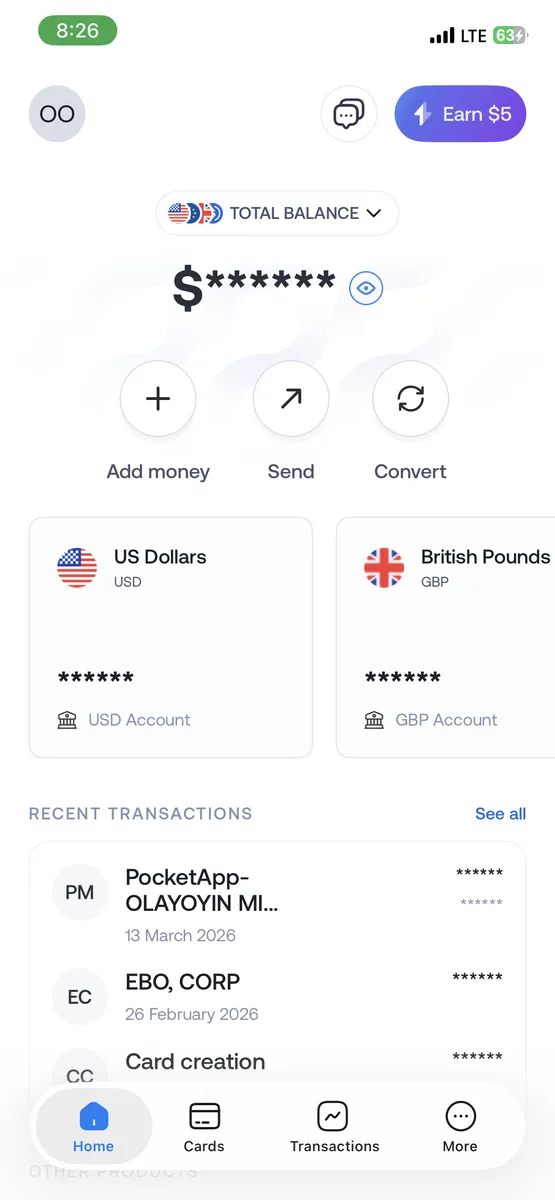
- Log in to your Grey account.
- Click “Send”.
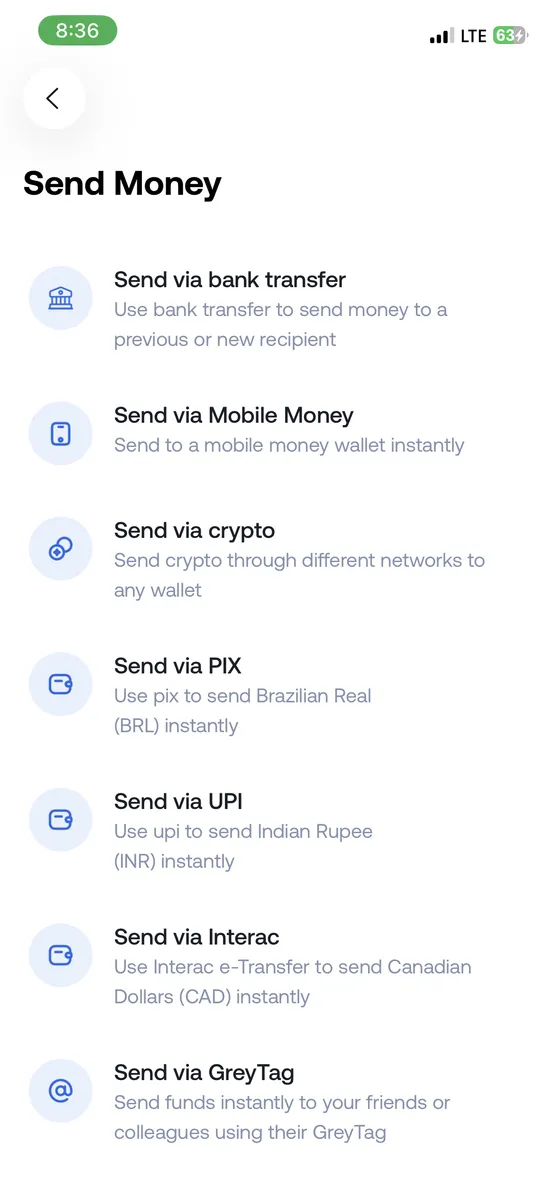
2. On the “Send Money” tab, select “Send via Interac”.
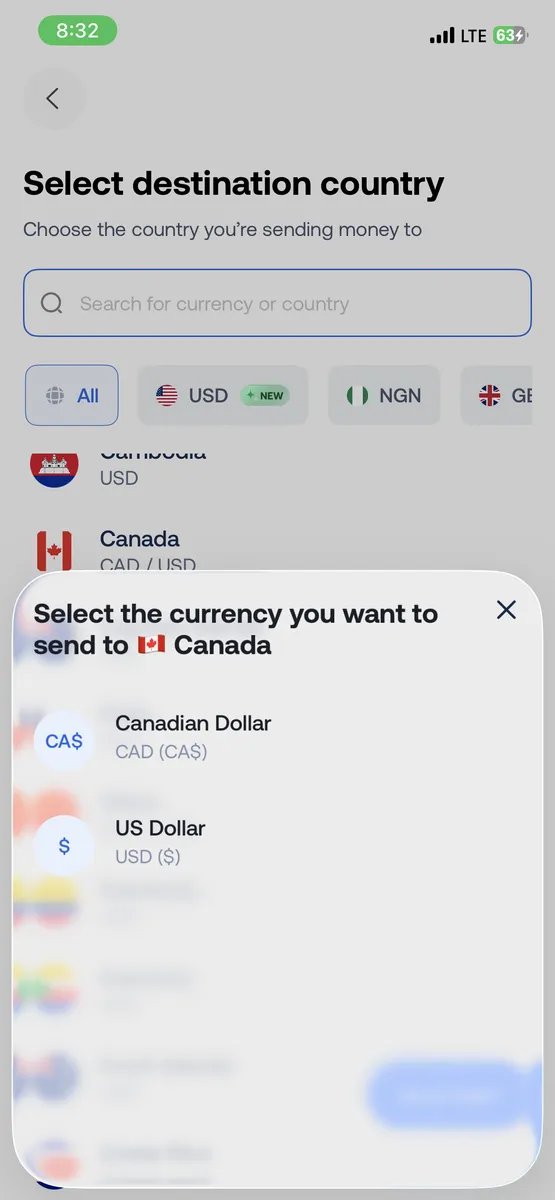
3. Select Canada as the destination and choose CAD as the currency.
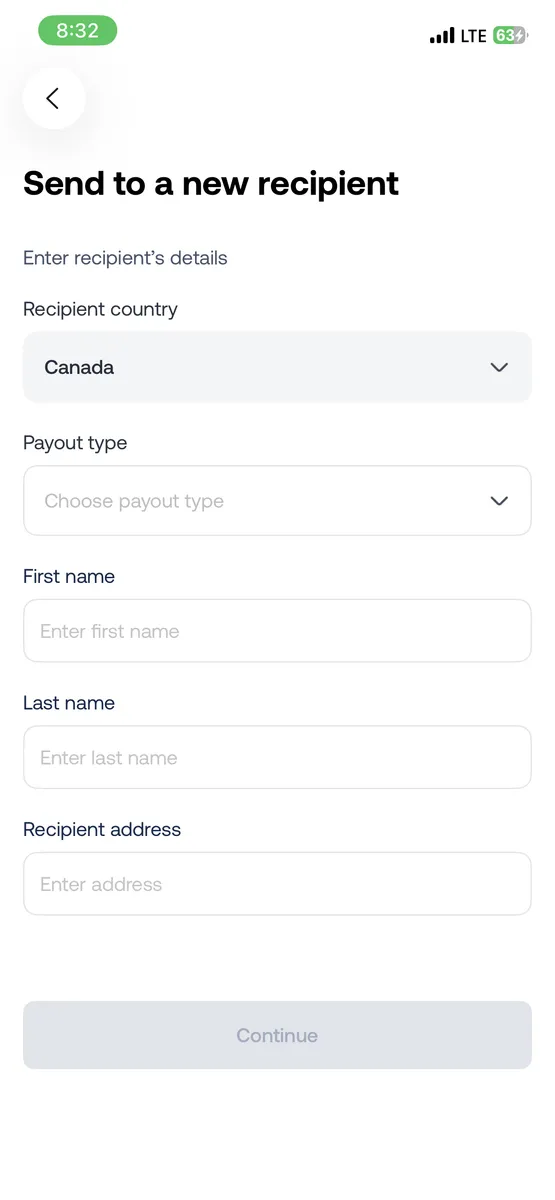
4. Enter the recipient’s details and confirm the transfer.
Enjoy global payments with Grey
At Grey, our mission is to make globalisation work for everyone. Supporting payments in Canadian Dollars takes us closer towards achieving that goal.
We want more freelancers, businesses, and remote workers to operate internationally without friction.
More currencies, more countries, and more ways to manage money across borders, that’s where we’re headed.
Open a free Grey account today, or download the app to get started.
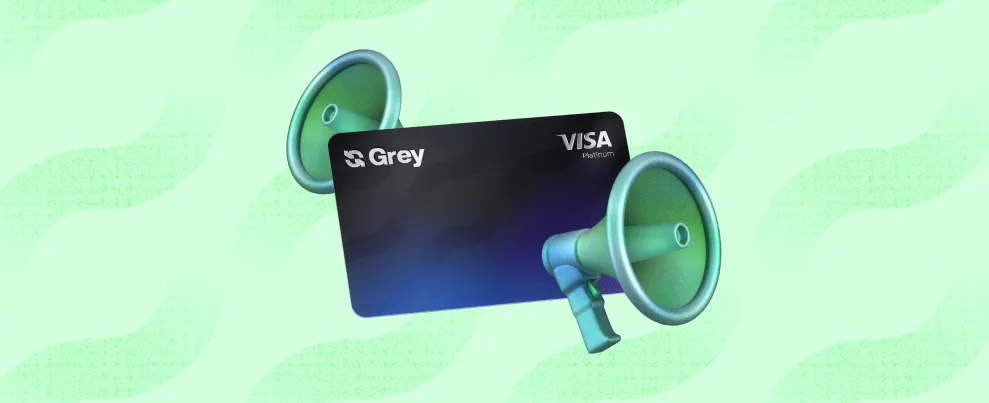
How to pay for ads easily with your Grey card
See how the Grey Card stacks up against Wise, Revolut, Payoneer, and more, with a clear look at features, perks, and limitations.
Olayoyin Olorunmota
•
February 22, 2026
•
6 min read
Last month, my friend called me in a panic. He’d just launched a big Meta Ads campaign. He’d spent days tweaking it, and right in the middle of a strong performance spike, the worst thing happened. His payment failed.
Meta paused the entire campaign, and he lost momentum, leads, and a potential client renewal. All because his bank randomly declined an international payment at 2 am.
If you’ve ever run ads before, you know this story almost too well.
There are a few things a paid ads manager dislikes more than payments disrupting their ads. Even for creators, freelancers, and small businesses who depend on continuous campaigns, this is annoying and expensive.
This is exactly where the Grey card becomes a practical lifesaver, and I’ll explain here.
Why paying for ads can be difficult sometimes
People don’t always talk about it, but most ad buyers run into the same problems:
1. International cards get declined
Many local bank cards struggle with platforms like Google Ads or Facebook because they’re billed in USD or EUR, depending on your country.
2. Currency headaches
If you earn in your local currency, say naira, but pay for ads in dollars, fees and conversion delays can throw off your budget.
3. Too many campaigns, one payment method
Freelancers running multiple client campaigns often use a single card, which can become a budgeting nightmare.
4. Ad platforms are strict
If your payment fails, the platform pauses your campaign immediately. You lose reach, data, and momentum.
The Grey Visa card was made to solve these exact pain points.
How your Grey helps you run ads without stress
Spend directly from your available balances
Your Grey card automatically pulls funds from your available accounts in the order USD → USDC → the next highest currency, eliminating the need for manual top-ups or wallet selection.
For example, if an ad platform charges $50, the payment is automatically deducted from the available balance, ensuring campaigns run uninterrupted.
Supports Apple Pay and Google Pay
For people who prefer not typing their card details into every ad account, this is a blessing. Just tap, approve, and your campaign goes live.
Create multiple cards to stay organised
You can create separate cards for:
- Google Ads
- Meta Ads
- TikTok
- Client-specific campaigns
Multiple cards now still work seamlessly from the same unified wallet structure, so you don’t have to worry about linking different currencies or crypto separately.
This makes reconciliation significantly easier and provides peace of mind if one card needs to be frozen or replaced.
Instant freeze/unfreeze and spending limits
If you want to pause a campaign, you can freeze the card without accessing the ad platform. To control costs, you can simply set a monthly limit.
LDMAG1
How to start paying for ads with your Grey card
1. Get your Grey card
You can sign up on Grey, go to the cards section and create your card. This will cost $5.
2. Add it to your ad account
Link it to Google Ads, Meta, TikTok, LinkedIn or wherever you run campaigns.
3. Set a spending limit
This helps with client budgets, personal campaigns, or one-off experiments.
4. Track your payments in the Grey app
Every charge, every retry, every refund is neatly organised right on the app.
Tips to run ads more smoothly with Grey
- Use separate cards for each client or campaign category.
- Freeze cards to instantly pause campaigns when needed.
- Add your card to Apple Pay or Google Pay for fast approvals.
Your ads deserve stability
Running ads is stressful enough. You shouldn’t also have to worry about whether your card will work when Meta tries to charge you at dawn.
If you’re ready for smoother campaigns, fewer declines, and easier budgeting, you can create your Grey Visa card and set up your first ad payment in minutes.

