


STAY UP TO DATE
The Grey Blog


FEATURED ARTICLES

Virtual cards in Egypt for online payments
Grey, EverTry, Card-Y, Fyatu, and AstroPay: Here is how virtual cards work for online payments in Egypt and your top options.

Adeolu Titus Adekunle
•
6 min read
It is one thing to have the funds for online payments; it is another thing to have the means to complete the payment without getting frustrated. Managing international payments in Egypt can be quite a hassle. If you’ve tried paying for an international subscription, a work tool, online shopping, or an online course from Egypt, perhaps you can relate to the struggle. Local Egyptian bank cards are often restricted from international transactions, offer poor exchange rates, or aren’t supported by global platforms.
Virtual cards exist mostly to solve these problems, and they have become one of the most efficient options for anyone who shops online, pays for subscriptions, or needs a reliable way to spend in foreign currency without the limitations of a standard local bank card.
This article explains how virtual cards work, who they are for, and the main options available to people in Egypt right now.
What is a virtual card, and how does it work?
A virtual card is a digital payment card that works just like a traditional debit or credit card, except it exists only electronically. Instead of receiving a plastic card, you get the card details instantly on your phone or computer, including the card number, expiration date, and CVV security code.
Because virtual cards are issued digitally, they are typically available within minutes, unlike physical cards that must be printed and delivered.
Most virtual cards operate as prepaid or debit cards, meaning you spend funds you already have. In many cases, the card is connected to a multi-currency account, so payments are deducted directly from your balance in currencies such as USD, GBP, or EUR. This eliminates the need to manually top up the card before each purchase.
For example, Grey virtual cards are linked directly to your foreign currency balance, allowing you to pay online or in apps without transferring funds to the card first.
In practice, using a virtual card is no different from using a physical one. You simply enter the card details at checkout when making online payments, subscriptions, or international purchases. Many virtual cards can also be added to Apple Pay or Google Pay, enabling secure contactless payments with your phone wherever mobile wallets are supported.
Also read: Managing USD income as a remote worker in Egypt
What to look for when choosing
Not all virtual cards work the same way. The best option for you will depend on how you plan to use it, which currencies you deal with most often, and how frequently you make international payments. Before choosing a provider, it’s worth looking closely at a few key factors.
Currency support. Many virtual cards are designed primarily for USD payments, but international platforms often charge in other currencies such as EUR or GBP. If you regularly use services based in Europe or the UK, a card that supports multiple currencies can help you avoid additional conversion fees. Choosing a provider with a multi-currency account allows you to hold and spend different currencies more efficiently.
Funding options. Different platforms allow you to add funds in different ways. Some accept local bank transfers, others allow crypto deposits such as USDT, and some link directly to a multi-currency account balance, like Grey. Before signing up, check that the funding method available actually works for your situation and location.
Platform compatibility. Not every virtual card works equally well across all international platforms. Some services, particularly advertising platforms or large marketplaces, may reject certain cards depending on the issuing network or region. If you plan to use your card for a specific purpose, such as paying for Google Ads or cloud hosting, it’s worth confirming that the card is widely accepted on those platforms.
Fees and exchange rates. Virtual card costs can vary significantly between providers. Some charge a card creation fee, others add transaction fees, and most apply a small markup on currency conversions. A card that appears free at first glance may become more expensive if the exchange rate spread is high. Always look at the total cost of using the card, not just the upfront fee.
Security and regulation. Security should always be a priority when choosing a financial platform. Look for providers that follow proper identity verification processes and operate with licensed financial partners. Features such as two-factor authentication, transaction alerts, spending limits, and the ability to instantly freeze your card add an important layer of protection.
Contactless payments. Some virtual cards can be added to mobile wallets like Apple Pay or Google Pay, allowing you to make contactless payments with your phone. This can be particularly useful when travelling or making in-store purchases abroad. If this feature matters to you, make sure the card supports mobile wallet integration in your region.
Taking a few minutes to compare these factors can help you choose a virtual card that fits your spending habits and avoids unnecessary fees or payment issues later.
The top virtual cards in Egypt for online payments
While cards issued by local banks work well for domestic spending, they are not always reliable for international payments. Here is a list of the top virtual cards in Egypt for online payments.
Grey
Grey offers virtual cards linked to a multi-currency account that supports USD, EUR, and GBP. You can create multiple cards for various uses to properly plan your finances. One card can be for online shopping while another could be for subscriptions and or online course. Grey cards are globally accepted and works with the full range of international platforms
You can receive international payments into your Grey USD, GBP, or EUR account or fund your account in EGP and convert to USD to spend on your cards directly.
Fees: Grey virtual USD cards cost a one-time creation fee of $4, plus a minimum of $1 to fund the card, totalling $5 to get started. There are no monthly maintenance fees.
EverTry
EverTry offers a solution for international payment restrictions in Egypt through their virtual dollar card platform. It allows Egyptian users to pay for global services that often decline local bank cards. It supports funding in local currency and USDT, making it accessible to users who are comfortable with crypto. The card works across a wide range of international platforms, including Netflix, Spotify, AWS, DigitalOcean, Namecheap, Facebook Ads, and Google Ads.
Fees: Card creation typically costs $2.5, with no monthly maintenance fees.
Card-Y
Card-Y is a fintech platform that offers multi-currency global accounts with a linked virtual card, designed for Egyptian freelancers and remote workers. It offers USD and EUR account details for receiving international payments, with a free virtual card included that draws from those account balances. It also issues local Egyptian bank cards to subscribers.
Fees: Card-Y offers virtual Mastercard issuance for a $20 USD fee, which is valid for one year and does not add to the card balance. The service features a $1 monthly maintenance fee, a 1% USD transaction fee ($1 min/$5 max), and a 1.5% foreign currency conversion fee.
Fyatu
Fyatu provides instant virtual Mastercards with support for multiple currencies, aimed at users who need to make global payments and manage international subscriptions. Onboarding is digital, and card issuance is immediate. It is a straightforward option for users whose primary need is an international spending card rather than a full suite of banking features.
Fees: Fyatu virtual card costs include a 1.5% fee for card usage (for either withdrawal or payments), with card replacement fees of $5 for World cards and $10 for Platinum cards. A $1.00 fee applies to declined transactions. Funding methods vary, with fees such as 3% for MTN MoMo and various percentages for online wallets like PayPal (3.5% + $0.30).
AstroPay
AstroPay is a globally recognised digital wallet and virtual card platform, available in over 150 countries, including Egypt. It has been around since 2009 and has a particularly strong footprint in emerging markets across Africa, Latin America, and Asia. The platform supports more than 50 currencies, issues virtual prepaid cards instantly, and does not require a traditional bank account to sign up.
For Egyptian users, AstroPay works as a prepaid spending tool. You load funds onto your wallet using a local payment method, then use the virtual card for international purchases on platforms that accept Visa or Mastercard. Card details are issued instantly through the app, and the platform supports one-time or multi-use cards depending on the denomination.
However, bank withdrawals from AstroPay can attract fees of up to 6% depending on the institution. There is a margin of 1% to 3% on exchange rate.
Fees: No card purchase or maintenance fee. No annual fee. Transaction fees of 2–5% depending on the payment method used. FX markup of approximately 1–3% on non-native currency transactions. Withdrawals to a bank account: up to 6%.
Comparison of the top virtual cards in Egypt
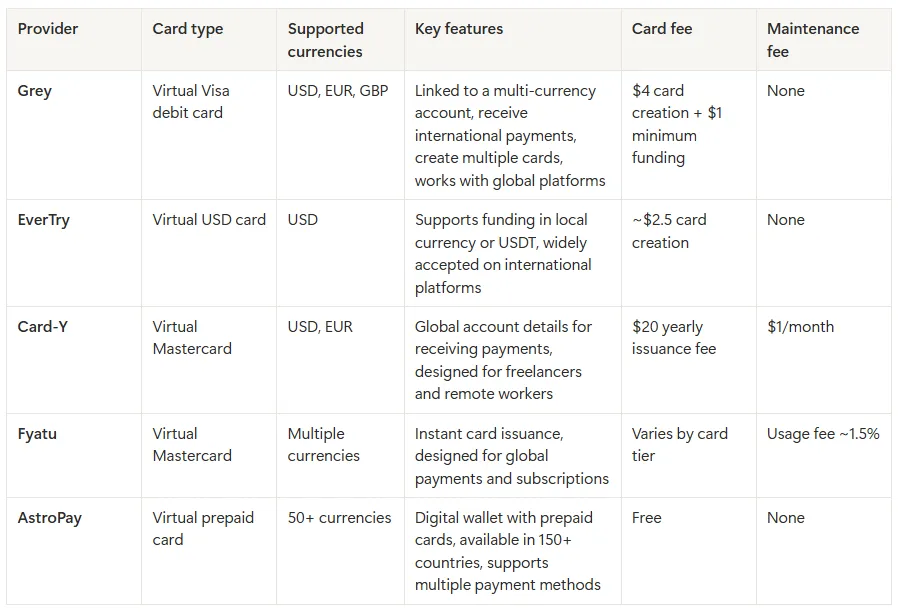
Before exploring each option in detail, the table below summarises some of the key differences between the most popular virtual cards available to users in Egypt, including supported currencies, card type, and typical fees.
Quick recommendations
If you’re not sure which virtual card to choose, here’s a quick guide based on common use cases in Egypt.
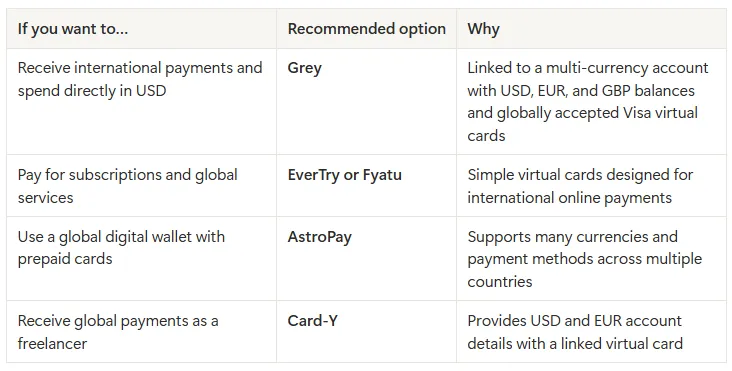
For most freelancers, remote workers, and online entrepreneurs in Egypt, a virtual card linked to a multi-currency account is often the most practical option. It allows you to receive money from abroad, hold foreign currencies, and pay for global services without converting funds every time you make a transaction.
Also read: Grey card vs other virtual cards: What you should know
Make international payments with Grey
The advent of virtual cards has brought significant flexibility to managing international payments. Grey gives Egyptians a virtual card linked to your multi-currency account. This allows you to receive international payments and spend internationally from the same platform. Whether you are paying for software subscriptions, running digital ads, shopping on international platforms, or managing online tools for your work, Grey's virtual card is accepted globally and straightforward to set up.
Ready to get your virtual card? Sign up on Grey and download the app to create your virtual USD card in minutes.
ALL ARTICLES
Should you use a business or personal bank account as a freelancer?
Should freelancers use a business or personal bank account? The key differences, tax implications, and which option makes more sense for you. Read now.
Olayoyin Olorunmota
•
September 22, 2026
•
6 min read
When I started out as a freelancer, I wasn’t sure if I needed a different bank account for my new “business”, if I could even call it that. I mean, my personal account was right there. Did I really need to do anything more complicated?
Most freelancers are not legally required to use a business bank account unless they are registered as a company. However, keeping freelance income separate from personal spending makes tax reporting significantly easier, reduces errors, and looks more professional to clients. A separate account, whether labelled business or not, is strongly advisable from day one.
In this article, I cover the instances where you may require a business account, what the differences are, and what to look for if you decide to keep your freelance income separate.
Do freelancers need a business bank account?
Whether you are legally required to use a business bank account depends on how your freelance practice is structured.
In the United States, for example, sole proprietors have no legal obligation to maintain a separate business bank account. If you freelance under your own name and haven’t formed a separate legal entity, you and your business are the same entity in the eyes of the law. You can receive client payments into your personal account without violating any rules. If you have formed a Limited Liability Company (LLC), the situation changes. For LLC owners, a separate account is necessary to maintain legal protection.
In the United Kingdom, sole traders face the same position as US sole proprietors: no legal requirement for a business account. HMRC does not mandate one. However, if you operate as a limited company in the UK, your company is a separate legal entity from you as an individual. The company’s money is not your money until you pay yourself a salary or dividend, and mixing the two in a personal account creates both a legal problem and a significant accounting headache.
For freelancers who don’t yet know whether they want to operate as a sole trader or through a limited company, our guide on freelancing vs full-time employment covers how different structures affect your taxes and liability in more detail.
The practical summary: if you’re a sole proprietor or sole trader, you don’t legally need a business account. If you’re a limited company or LLC, you do. Either way, keeping freelance income separate from personal spending is strongly advisable, and the next section explains why.
Business account vs personal account: key differences
If you do open a dedicated account for your freelance income, you’ll face a choice between a traditional business bank account and a personal account used exclusively for freelance purposes.
Generally, business accounts at traditional banks cost more, offer fewer consumer protections, and provide features (invoicing tools, accountant access) that most freelancers handle through separate software anyway. The primary advantage of a labelled business account is the psychological and practical clarity that comes from a clean separation between business income and personal spending.
A dedicated personal account used exclusively for freelance income offers most practical benefits at a lower cost, except for company-name branding on statements and the formal accountant access features that some clients or accountants prefer.
Why separating your finances matters even if it is not required
When your freelance income and your personal spending share an account, every bank statement becomes a sorting exercise. Which transactions were business expenses? Which were personal? The takeaway you bought on a Tuesday: was that a client meeting or lunch? The software subscription: was that for client work or personal use? Without separation, these questions require memory, receipts, and time, at exactly the moment when tax season is already stressful.
A separate account means every transaction is cleanly categorised. Income that enters the freelance account is business income. Transfers from the freelance account to your personal account are your pay. Expenses charged to the freelance account are business expenses. The logic is automatic rather than reconstructed retrospectively.
Here’s a simple system that works from day one:
- Open a dedicated account for freelance income: This is the account you put on every invoice.
- Receive client income into the freelance account: Every payment from every client lands here. If you have international clients paying in different currencies, this account should support multi-currency receipts.
- Pay yourself a regular transfer to your personal account: On a fixed date each month, transfer a set amount to your personal account as your salary. This is what you live on. It separates your business cash flow from your personal spending clearly.
- Hold tax savings in a third account or Pouch: Set aside a percentage of every payment received for tax. A rough starting point for most freelancers is 20 to 30%, depending on your income level and jurisdiction. Treat this as untouchable until your tax bill arrives.
For guidance on structuring your income before this point, our piece on how to set your freelance rates covers how to price your work to make this system financially viable.
What to look for in a bank account for freelancers
Monthly fees
A freelancer starting out doesn’t need a £15 per month business account. Free accounts exist that provide everything necessary. Monthly fees add up, and a new freelancer spending £180 per year on a bank account that is largely empty in the early months is an unnecessary cost.
Multi-currency support
If any of your clients pay in USD, EUR, GBP, or another currency, you need an account that can receive those payments without forcing an immediate conversion at a poor rate. Most traditional bank accounts convert foreign payments upon receipt at the bank's margin, typically 2 to 4% above the mid-market rate. Multi-currency accounts let you hold income in the currency it arrived in and convert when you choose.
A virtual card for online subscriptions
Many freelancers pay for project management tools, design software, cloud storage, AI subscriptions, and domain hosting. A virtual card linked to your freelance account keeps all of these expenses on one statement, separate from personal card spending, and protects your main account details from exposure on subscription platforms.
Fast account opening with no fixed address requirement
Traditional business accounts often require proof of a registered business address, company documents, and a branch visit. For a freelancer, particularly one who works remotely or lives in multiple places, these requirements are a barrier that digital-first accounts don’t impose.
Invoicing integration or export capability
You don’t necessarily need invoicing built into the account, but your account should be able to export transactions in a format your accounting software can read. Clean data export saves significant time at tax season.
Grey covers all of these for international freelancers. Open a Grey account for your freelance income and receive payments in USD, EUR, and GBP from international clients without losing money on forced conversion.
As the scope of your work expands, you can also open a Grey business account, which gives you both USD and USD accounts, access to bulk payouts, and multiple virtual cards.
Frequently asked questions
Can I use my personal account for freelance work?
Yes, in most cases. Sole proprietors in the US and sole traders in the UK are not legally required to use a separate business account. You can receive client payments into a personal account without breaking any rules. The practical problem is that mixing personal and business transactions in one account makes tax reporting significantly harder and increases the risk of errors. A dedicated account, whether officially labelled business or not, is strongly advisable even if it’s not legally required.
Do I need a business account to invoice clients?
No. You can invoice clients and direct them to pay into any account you hold, including a personal account. Invoices are documents you issue, not something that depends on the type of bank account you hold. What your invoice needs is a valid account number and sort code (or routing number and account number for US payments), your name or trading name, and a unique invoice number. The type of account those details belong to is irrelevant to the invoice’s validity.
What is the best bank account for freelancers?
The best account for a freelancer depends on how they work. For freelancers with only domestic clients in a single currency, a free personal account used exclusively for freelance income covers most practical needs. For freelancers with international clients paying in multiple currencies, a multi-currency account that receives USD, EUR, and GBP without forced conversion is more suitable. Grey provides multi-currency accounts with local banking details (US routing numbers, EUR IBANs, UK sort codes) that let international freelancers receive payments as if they were local vendors in each market.
Can I open a business account without a registered company?
At most traditional banks, a business account requires proof of a registered company: a company registration number, a registered address, and in some cases a minimum trading history. As a sole trader or sole proprietor, you typically cannot open a business account at a traditional bank without a formal business registration. Digital-first accounts and some multi-currency platforms generally have lighter requirements and can be opened by individual freelancers without a registered company.
Is it illegal to use a personal account for business?
For sole traders and sole proprietors, no. There is no law in the UK or US that prohibits receiving business income into a personal account for unincorporated freelancers. Some banks include terms in their personal account agreements that technically restrict business use, but this is a contractual matter rather than a legal one and enforcement is rare. For limited company directors in the UK and LLC members in the US, mixing company and personal funds in a personal account creates legal and tax problems that go beyond a contractual breach.
How do I separate my freelance finances?
The simplest system has three parts: one account that receives all client income and nothing else; one account for personal spending that receives a regular transfer from the freelance account as your salary; and a separate savings balance or account for taxes. Open the freelance account before your first invoice goes out. Put that account number on every invoice from day one. Transfer a set amount to your personal account on a fixed date each month. Set aside a percentage of every payment for tax immediately on receipt. That system, applied consistently, solves the vast majority of freelance financial admin problems.
Grey charges fees on deposits, conversions, and withdrawals. Deposits via ACH, SEPA, or FPS incur a 0.8% fee (minimum $2/€2/£2, maximum $10/€10/£10). Currency conversions are charged at 1%, capped at $6. Withdrawal fees vary by currency. Exchange rates are variable and include a margin over the mid-market rate. Always review fees and the rate before confirming a transaction.
Open a Grey account and keep your freelance income separate from day one, in any currency your clients pay in.

Proforma invoice: What it is, when to use it, and how to create one
What is a proforma invoice, when to use one, and how to create it? A plain-language guide for freelancers and businesses globally. Read now.
Tunde Aladeloba
•
September 20, 2026
•
6 min read
A client can ask for an invoice before you have even started the work. You may have agreed on the service and settled on a price, but the work has not begun, the final costs are not yet known, or there is still something to confirm before you can send a proper bill. So what exactly are you supposed to send?
A proforma invoice is a preliminary bill sent to a buyer or client before the final invoice. It confirms the details of a transaction, including products or services, quantities, and agreed price, but does not create a legal payment obligation. It is commonly used for customs, import and export, advance payments, and client approvals.
For a freelancer, business owner, or company dealing with international clients, knowing the difference matters. A client may need the document to approve a purchase, arrange payment, or clear goods through customs, while you may not yet be ready to issue the final invoice. Understanding what a proforma invoice should contain, when to use one, and how to create it can save you from confusion later.
What is a proforma invoice?
A proforma invoice can look almost identical to a regular invoice, which is why it is easy to assume that it is a formal request for payment. It is not. Instead, it is a good-faith statement of what a buyer can expect to be billed, based on the products or services, quantities, prices, and other agreed details.
That distinction becomes important in several situations. For cross-border shipments, a proforma invoice can provide customs authorities with the information needed for import declarations. A business may also send one to a new client when requesting an advance payment before work begins.
It can also serve as a quote presented in an invoice format, giving the client a clear view of the expected costs before agreeing to the work. In larger organisations, the buyer may need a document before raising a purchase order, making a proforma invoice useful for internal approval processes.
So while it resembles an invoice, its purpose is to outline the proposed transaction before the final bill is issued, rather than formally demand payment.
Also read: How to invoice international clients from Lagos
Proforma invoice vs invoice: What is the difference?
The easiest way to understand the difference is to look at what each document does, when it is used, and whether it creates a payment or tax obligation.
When should you send a proforma invoice?
Five specific situations where a proforma invoice is the right document to send. If you're unsure whether to use a proforma or a standard invoice, see also the freelance contract guide for how invoicing fits into the broader client agreement.
- Before shipping physical goods internationally. Customs authorities in the receiving country need to know the declared value of the shipment before it arrives. A proforma invoice provides that. In Nigeria, the CBN requires it as supporting documentation for Form M (the mandatory import document). Without it, your goods may be held at the port.
- When asking a new client for an upfront deposit. Sending a pro forma invoice before work begins formalizes the cost and provides the client with a document to process. It's especially useful for freelancers taking on large projects where a 25 to 50 percent deposit is standard.
- When a client needs internal approval before committing. Corporate clients often can't approve spending without a formal document. A proforma gives their procurement or finance team something to sign off on. This is common when working with larger organizations where the person you're dealing with isn't the person who authorizes payment. For more on setting the right price before issuing one, see how to set your freelance rates.
- When the final scope or price isn't confirmed yet. If the project is still being scoped but the client wants a ballpark estimate, a pro forma invoice lets you state the expected cost without locking in a final number. You can adjust it when the scope is confirmed.
- When the client requires a document reference before raising a purchase order. Some companies can't issue a PO without an invoice number. A proforma invoice provides that reference number without triggering a payment obligation.
What to include in a proforma invoice
A proforma invoice should give the client enough information to understand exactly what you are proposing before the final invoice is issued. Keep the document clear and include these details:
- Invoice title or number: Clearly label it as a proforma invoice and give it a unique reference number.
- Date issued: Show when the document was created.
- Your details: Include your name, business name, address, email, and other relevant contact details.
- Client details: Add the client’s name, business name, and address.
- Goods or services: Describe exactly what you are providing.
- Quantity: State how many units, hours, or items are included.
- Unit price: Show the price for each item or service.
- Total amount: Clearly state the expected total.
- Currency: Specify whether the amount is in USD, EUR, GBP, or another currency.
- Payment terms: State when and how payment should be made.
- Validity period: State how long the quoted terms remain valid, often 30 days.
- Proforma note: Clearly state that the document is not a tax invoice.
Keeping these details accurate can also help you avoid the common billing mistakes freelancers make, especially when quoting international clients.
How to create and send a Proforma invoice with Grey
Creating an invoice on Grey starts from your account dashboard. Before publishing this step, verify with Product whether Grey currently supports a dedicated proforma template or whether a standard invoice can be marked as proforma.
- Log in: Open your Grey account on the web or mobile app and select invoices.
- Create the invoice: Choose Create New on the web or create an invoice on mobile, then enter your client and transaction details.
- Choose the currency: Select the currency you want to bill in, such as USD, GBP, or EUR. Grey supports receiving payments in all three.
- Add payment terms: Enter the agreed payment terms and review the invoice details.
- Preview and send: Select Proceed to Preview, check the information, then send the invoice to your client. Grey also provides each invoice with a unique URL that can be shared with the customer. You can sign up for Grey or download the app to get started.
Frequently asked questions about proforma invoices
Is a proforma invoice legally binding?
Generally, no. A proforma invoice is usually a preliminary document outlining proposed goods, services, prices, and terms. It does not normally create the same payment obligation as a final invoice. However, the legal effect can depend on the agreement between the parties and the laws that apply.
Does a proforma invoice need to be paid?
A proforma invoice is not normally a formal demand for payment, so it does not automatically need to be paid. However, a seller may use one to request an upfront deposit or advance payment before starting work, depending on the agreed payment terms.
What is the difference between a proforma invoice and a purchase order?
A proforma invoice is issued by the seller to outline a proposed transaction, including expected prices and quantities. A purchase order is issued by the buyer to formally request goods or services. The two documents can work together during a purchasing and approval process.
How long is a proforma invoice valid?
There is no universal validity period for a proforma invoice. The seller can set a period based on how long the quoted prices and terms are expected to remain available. Many businesses use 30 days, but the appropriate period depends on the transaction and agreement.
Can I charge VAT on a proforma invoice?
A proforma invoice can show an estimated VAT amount where applicable, but whether VAT is actually due depends on the relevant tax rules and when the taxable supply occurs. The proforma itself does not necessarily create a VAT liability, so check the rules in your jurisdiction.
What happens after a proforma invoice is accepted?
Once the client accepts, the pro forma invoice becomes the agreed-upon terms for the transaction. You proceed with the work or shipment. When the goods are delivered or the work is complete, you issue a final commercial invoice (a real invoice) referencing the pro forma number. The client pays against the commercial invoice. In Nigeria, for imports, the accepted proforma is used to obtain Form M from an authorized dealer bank before the goods are shipped. See send money internationally from Nigeria for how international payments work from the Nigerian side.
FIRC certificate: What it is, how to get one, and what every Indian freelancer needs to know
What is a FIRC certificate? Learn what a Foreign Inward Remittance Certificate is, who needs one, how to get your e-FIRC, and how it affects your taxes and GST refunds in India.
Priscila Marotti
•
September 18, 2026
•
6 min read
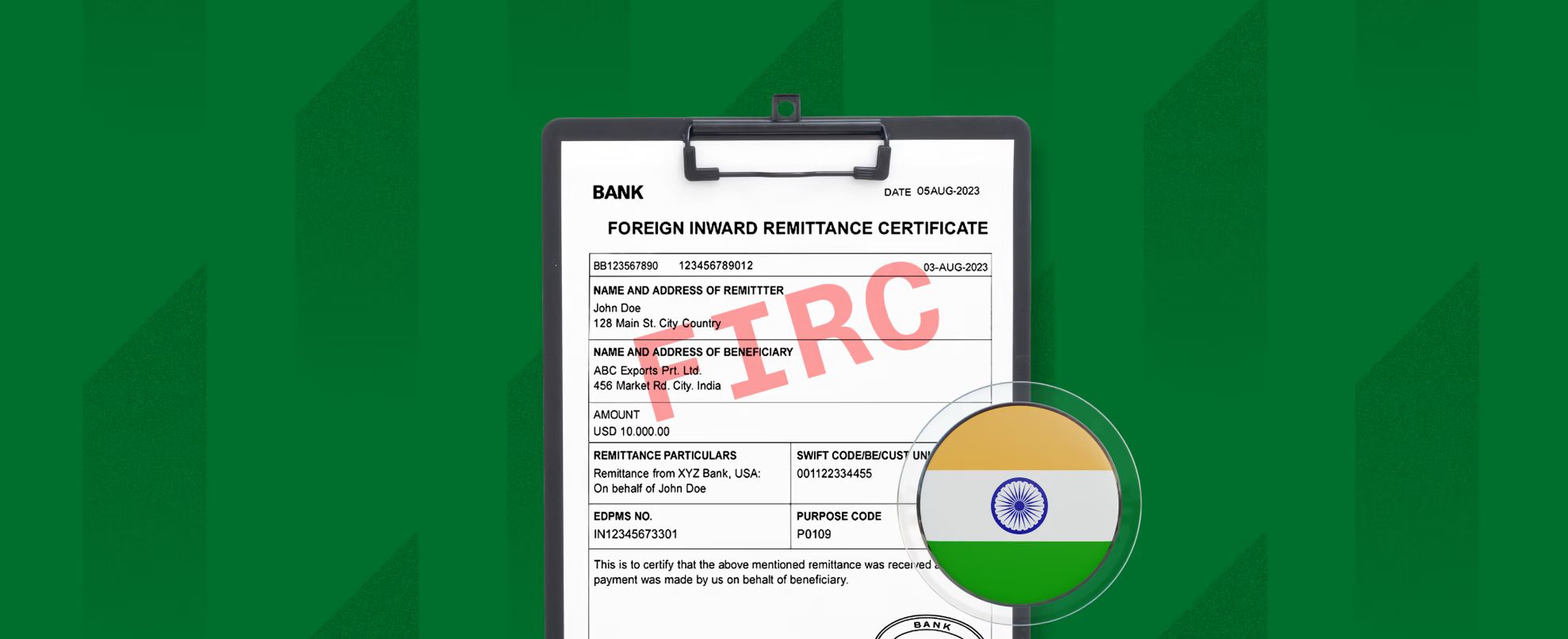
A FIRC certificate (Foreign Inward Remittance Certificate) is an official document issued by authorised dealer banks in India that proves you received a payment from abroad. It records the foreign currency amount, the INR equivalent, the exchange rate applied, and the sender's details. For freelancers, exporters, and businesses receiving international payments in India, an FIRC can be important for proving receipt of foreign funds, supporting GST refund claims, and maintaining records for foreign-exchange compliance. Since 2016, most FIRCs have been issued electronically as e-FIRCs through the RBI's Export Data Processing and Monitoring System (EDPMS).
That is the short version. The rest of this guide covers the details that actually matter when you are sitting in front of your CA at tax time, trying to claim a GST refund that has been stuck for months, or figuring out why your bank is asking for documents you have never heard of. If you are looking for the broader picture, start there and come back here for the FIRC specifics.
Who actually needs a FIRC (and who does not)
Not every international payment requires you to obtain a FIRC. The documentation available depends on how the payment reaches India, the bank or payment provider handling it, and what you need the document for.
Freelancers and businesses may need an FIRC, FIRA, BRC, or another form of remittance evidence when documenting export proceeds, supporting certain GST refund claims, or maintaining records of international payments. If you're receiving personal transfers or payments that don't qualify as exports, the requirements may be different.
You probably do not need one if you received a small personal gift from a family member abroad (though it is still wise to keep the documentation if the amount is substantial). You are receiving a salary from an Indian entity that happens to have foreign funding. Or the payment was made entirely in INR through a domestic payment rail.
What a FIRC actually contains
Every FIRC, whether physical or electronic, includes a standard set of fields. Understanding these helps you spot errors before they cause problems during an audit or refund claim.
UTR (Unique Transaction Reference). The transaction identifier assigned by the banking system. This is the single most important number on the document. If you ever need to trace, dispute, or verify the payment, the UTR is what your bank will ask for first.
Transaction amount in foreign currency and INR. Both figures appear on the FIRC. The foreign currency amount matches what your client sent. The INR amount reflects what was credited after conversion. If these do not match your invoice or contract, flag the discrepancy immediately.
Exchange rate applied. The conversion rate used by the bank or payment platform at the time of processing. This is not necessarily the mid-market rate. The difference between the applied rate and the mid-market rate is effectively part of the cost of the transaction.
Date of remittance. When the foreign funds were sent, not when they were credited to your account. The gap between these two dates matters for accounting purposes.
Sender details. Name and country of the person or business that sent the payment. This must match your invoice or contract. Mismatches (for example, a payment coming from a subsidiary entity rather than the client named on your invoice) can complicate audit trails.
RBI Purpose Code. This code identifies the reason for receiving the international payment and is used for regulatory reporting. The correct code depends on the service or transaction involved. For example, software consultancy, data-processing services, business consultancy, advertising, and other professional services can fall under different RBI purpose codes. If you're unsure which one applies, check the current RBI purpose-code list or confirm it with your bank or payment provider.
Recipient details. Your name, address, and bank account details. Verify that these match your records exactly. Typographical errors here create problems during tax assessment.
Also read: 9 best platforms to earn US dollars in India
Physical FIRC vs digital remittance documentation
Foreign-remittance documentation has increasingly moved online, but the exact document you receive depends on the bank or payment provider handling the transaction. You may come across terms including FIRC, FIRA, BRC, and electronic remittance advice.
These documents serve related purposes but shouldn't automatically be treated as interchangeable. If you need proof of an international payment for a GST refund, export documentation, or another regulatory process, check which document is accepted for your specific situation.
Some banks and payment providers now make remittance documentation available digitally, which can make it easier to access and store records without requesting a physical certificate from a branch.
One distinction to keep clear: a FIRC is issued per transaction. A FIRS (Foreign Inward Remittance Statement) is a consolidated statement covering multiple remittances over a period. For GST refund claims and most compliance purposes, you need the individual per-transaction FIRC, not the consolidated FIRS.
How to get your FIRC: two routes
Route 1: Requesting from your bank directly
If you receive foreign payments directly into your Indian bank account (not through a payment platform), you should request the FIRC from the bank that credited the funds.
1. Contact your bank branch or use their online banking portal if available.
2. Provide transaction details: UTR number, sender's name and country, amount received, date of the remittance, RBI purpose code, and your account details.
3. Pay the processing fee. Typically 100-500 rupees, depending on the bank.
4. Wait for processing. 3 to 7 business days in most cases.
The main friction point is purpose codes. If the sender's bank used an incorrect purpose code when initiating the transfer, your FIRC will reflect that error. Correcting it requires a formal amendment request to your bank, accompanied by supporting documentation (your invoice, contract, or engagement letter). This can add another week to the process.
Practical tip: Make sure the correct RBI purpose code is used for your payment. The appropriate code depends on the type of service or transaction, so confirm it with your bank or payment provider if you're unsure.
Route 2: Through a multi-currency account
If you or a cross-border payment platform, the FIRC process is typically handled by the platform and its banking partners.
The workflow: your international client pays into your USD, GBP, or EUR account. You hold the funds in foreign currency until you are ready to convert. When you withdraw to your Indian bank account, the conversion happens, and the inward remittance is processed through the platform's authorised dealer banking partner. The e-FIRC is generated as part of this process.
The advantage of this route is that you do not need to chase your bank. The FIRC is either generated automatically when you withdraw or available on request through the platform's support team. The purpose code is set correctly by default because the platform understands the nature of the transaction.
With Grey, Indian freelancers and businesses receive international payments into a dedicated USD, GBP, or EUR account. When you withdraw to your Indian bank account via bank transfer or UPI, the funds settle instantly (UPI) or next business day (bank transfer), and Grey provides FIRC on request through its banking partners. You are not visiting a branch, filling out forms, or waiting a week for a certificate.
Why your FIRC matters more than you think
Income tax records
If you earn income from overseas clients, keeping clear records of each payment can make tax reporting and reconciliation much easier. Remittance documentation can help establish where a payment came from, the currency involved, and the purpose of the transaction.
Your invoices, contracts, bank statements, and FIRC or FIRA, where available, can form part of that record. The documents you need will depend on your tax situation and how you receive international payments, so consider checking with a chartered accountant if you regularly earn income from abroad.
GST refunds on export of services
This is where FIRC becomes directly connected to your bottom line. Under the GST law, exports of services are zero-rated supplies. You do not charge GST on your export invoices, and you can claim a refund on the input tax credit you paid on goods and services used to deliver your export work.
But to claim this refund, you must prove that payment was received in convertible foreign exchange. The FIRC is this proof. Without it, your refund claim can be rejected. For a freelancer or small business with several lakhs in input tax credits annually, the difference between having FIRCs and not having them is the difference between recovering that money and writing it off.
The process: file your GST returns with export details, submit the refund claim through the GST portal, and attach the FIRC for each transaction as supporting documentation. If you are filing quarterly, batch your FIRCs accordingly. Do not wait until the annual return to collect them.
FEMA compliance
Foreign-exchange transactions in India are governed by the Foreign Exchange Management Act (FEMA) and related RBI regulations. Banks and authorised dealers are responsible for maintaining and reporting relevant information about international transactions.
Keeping your remittance documentation gives you a record of where your funds came from and why they were received. This can be particularly useful for freelancers and small businesses managing multiple international payments without a dedicated finance or compliance team.
Five FIRC mistakes that cost freelancers money
Waiting until tax season to collect FIRCs. This is the most common mistake. If you received a payment in April and you request the FIRC in January of the following year, the bank may take weeks to locate the transaction details and issue the certificate. Some banks charge higher fees for historical FIRC requests. Request within 30 days of each payment.
Not checking the purpose code. Your sender's bank may default to a generic purpose code (P0101, for example, which covers "import of goods") even when your transaction is a service payment. An incorrect purpose code on your FIRC can lead to a mismatch with your GST filing, which triggers manual review and delays your refund by months.
Confusing FIRS with FIRC. Your bank may offer you a Foreign Inward Remittance Statement (FIRS) as a consolidated summary. This is not the same as a FIRC. For GST refund claims and most compliance purposes, you need individual per-transaction FIRCs. A FIRS may be useful for your own record-keeping, but it does not substitute for the transaction-level certificate.
Using a FIRC with errors for a refund claim. If the amount, sender name, or purpose code on your FIRC does not match your invoice, your refund claim will be rejected. Check every FIRC against the corresponding invoice when you receive it. If there is a discrepancy, request an amendment from your bank immediately. Do not submit an incorrect FIRC hoping it will pass.
Not keeping a tracking system. If you receive payments from multiple clients across different platforms and bank accounts, it is easy to lose track of which payments have FIRCs and which do not. Maintain a simple spreadsheet with the following columns: date of payment, client name, amount (foreign currency), amount (INR), UTR number, platform or bank used, FIRC received (yes/no), and FIRC date. Update it with every payment, not once a quarter.
Frequently asked questions
What is a FIRC certificate?
A FIRC (Foreign Inward Remittance Certificate) is an official document issued by authorised dealer banks in India that confirms you received a payment from abroad. It records the foreign currency amount, the INR equivalent, the exchange rate, the sender's details, and the RBI purpose code. You need it for income tax filing, GST refund claims, and FEMA compliance.
Is FIRC the same as a bank statement?
No. A bank statement records money entering your account, while an FIRC or similar remittance document provides additional information about an international payment, which may include its foreign-currency value, sender, purpose, and conversion details. Which document you need depends on what you're using it for.
How long does it take to get a FIRC?
Through a bank directly, typically 3 to 7 business days after you submit your request. With modern payment platforms that automate the process, the e-FIRC is usually available within 24 to 48 hours after the withdrawal is processed. Requesting promptly (within 30 days of payment) avoids delays.
Do freelancers need a FIRC for every payment?
Not necessarily. The documentation you receive depends on the bank or payment provider handling the remittance. Some provide transaction-level documents, while others may issue documentation covering multiple remittances. If you need proof of payment for GST or another compliance purpose, check which document is accepted and make sure all relevant transactions are covered.
What happens if my FIRC has the wrong purpose code?
An incorrect purpose code can cause your GST refund claim to be rejected or trigger a mismatch during tax assessment. Contact the issuing bank immediately with supporting documents (your invoice or contract) and request a formal amendment. To prevent this, share the correct RBI purpose code with your client before they send the payment.
Can I get a FIRC for PayPal payments?
PayPal India provides digital Foreign Inward Remittance Advice (FIRA) for eligible international transactions. Its current system provides a weekly digital FIRA through PayPal Business accounts, covering qualifying withdrawals during that period. If you need documentation for a specific transaction or purpose, check PayPal's current FIRA process and requirements.
Does a FIRC expire?
An FIRC or similar remittance document records a completed transaction and doesn't generally have an expiry date like an identity document. However, tax, GST, and regulatory processes can have their own filing and record-retention requirements, so keep your remittance documents with your financial records.
Is FIRC required for personal gifts from family abroad?
A FIRC is generated for any foreign inward remittance, including gifts. For genuine gifts from specified relatives (parents, siblings, spouse), the amount is typically exempt from tax under Section 56 of the Income Tax Act. However, retaining the FIRC is advisable if the source of funds is questioned during a tax assessment.
How does Grey handle FIRC for Indian users?
Grey provides FIRC on request for users in India who receive international payments into their Grey multi-currency account and withdraw to an Indian bank account. The documentation is handled through Grey's authorised dealer banking partners as part of the withdrawal process. INR payouts settle instantly via UPI or next business day via bank transfer.
Exchange rates on Grey are variable and include a margin over the mid-market rate. Always review the rate before confirming a conversion. Grey is a financial technology company, not a bank. Banking services are provided by licensed banking partners. This article is general information, not financial, tax, or legal advice. Consult a qualified chartered accountant or tax professional for advice specific to your situation.

11 signs it is time to go full-time freelance
Wondering if you are ready to freelance full time? See 11 clear signs and how to get your finances ready before you leap. Start now.
Priscila Marotti
•
September 17, 2026
•
6 min read
The question is never really "should I freelance full-time?" Most people asking already know the answer. The real question is whether the timing is right, the finances are in order, and the pipeline is strong enough to survive the first quarter without a salary. If you are wondering whether you should freelance full-time, here is how to tell.
Signs you are ready to freelance full-time include steady client demand, a healthy financial buffer, income that rivals your salary, and a clear pipeline. Before you leap, build several months of expenses in savings and set up a reliable way to get paid by clients anywhere.
These 11 signs are not aspirational. They are practical checkpoints. If you can tick off eight or more, the jump is likely sound. If you are hitting four or five, keep building on the side. There is no prize for leaping early, and the downside of jumping without preparation is months of financial stress that makes your worst day at a job look comfortable.
11 signs you are ready to freelance full time
1. You are turning down work because of your day job
This is the clearest signal. When clients are reaching out, and you cannot take the project because your 9-to-5 schedule will not allow it, you are leaving money on the table. One or two missed opportunities are normal. But if you are consistently saying no to paid work three or four times a quarter, your side hustle has outgrown its container. The question shifts from "can I afford to leave?" to "can I afford to stay?"
2. Your freelance income has matched 70 to 80% of your salary for three or more months
Not one good month. Not a single large project that inflated the numbers. Three consecutive months where your side income consistently reaches 70 to 80% of your take-home pay. That threshold matters because full-time freelancing comes with costs your salary currently absorbs: health insurance (in the US), retirement contributions, equipment, software, and the time you will spend on invoicing, admin, and finding new work instead of doing billable work. If your freelance income already covers most of your salary before you go full-time, you have a margin for those costs.
3. You have three to six months of living expenses saved
Not three to six months of income. Living expenses. Calculate what you actually spend each month on rent or mortgage, utilities, food, transport, insurance, and minimum debt payments. Multiply by at least three, ideally six. This is your buffer, the money that keeps the lights on if your pipeline dries up for a month or two after you leave. Do not count this fund as "available." It is emergency-only. You will sleep better knowing it exists, and that calm shows in how you negotiate with clients.
4. You have at least two retainer or recurring clients
Project-based freelancing is feast or famine. Retainer clients, those who pay you a set amount monthly for ongoing work, are the foundation of a sustainable freelance business. Two retainers that together cover your essential expenses mean you can survive even if no new projects land for a month. If all your income is project-based, you are one dry spell away from dipping into your buffer before you have even started.
5. You have a system for finding new work that does not depend on luck
Referrals are wonderful, but they are unpredictable. A sustainable freelance business needs at least one reliable channel for generating new leads: a personal website that ranks for your service, a LinkedIn presence that attracts inbound enquiries, a network of collaborators who refer overflow work, or a platform profile (Upwork, Toptal, Contra) with reviews and history. If every project you have ever won came from a friend-of-a-friend, you do not yet have a system. You have luck, and luck is not a business model.
6. You can name your rate without flinching
Confidence in your pricing is a prerequisite, not a perk. If you are still discounting because you feel uncomfortable quoting your real rate, you will underprice yourself as a full-timer and work twice the hours for half the income. The test: can you send a proposal at your target rate, receive pushback, and hold your price without panic? If yes, you are ready. If you fold at the first objection, spend more time on the side hustle, building your portfolio and your confidence before you depend on it for rent.
7. You have a professional network outside your employer
Your colleagues at your day job are not your freelance network. When you leave, those relationships cool quickly. A strong freelance network includes other freelancers in your field (for referrals and overflow), freelancers in adjacent fields (a designer if you are a writer, a developer if you are a designer), past clients who would hire you again, and at least one mentor or peer who has already made the jump. If your entire professional world is inside your current company, spend six months building external relationships before you hand in your notice.
8. You can set boundaries with clients
Full-time freelancing without boundaries is a fast track to burnout. You need to be able to tell a client that a Friday evening request will be handled on Monday, that scope creep requires a revised quote, and that "just one more round of changes" has a cost. If you currently say yes to everything because you are afraid of losing the client, that pattern will intensify when freelancing is your only income. Practice setting boundaries now, while you still have a salary as a safety net.
9. You have a plan for health insurance
In the US, this is the single biggest financial obstacle to leaving a salaried job. Employer-sponsored health insurance costs the average employee roughly $1,400 per year for individual coverage, but the full premium (which you will now pay yourself) is closer to $7,500 to $8,500 per year on the ACA marketplace, more if you are over 40 or have dependents. COBRA lets you keep your employer plan for up to 18 months, but at full cost plus a 2% admin fee. In the UK, the NHS covers healthcare regardless of employment status, so this sign is less relevant for UK freelancers. Either way, do not leap without knowing exactly what your health coverage will cost and where it will come from.
10. You have handled (or have a plan for) taxes
Your employer currently withholds income tax, Social Security, and Medicare (US) or Income Tax and National Insurance (UK) from every pay cheque. As a freelancer, nobody does this for you. In the US, you will need to make quarterly estimated tax payments to the IRS (typically 25 to 30% of your freelance income). Miss a payment, and you face penalties. In the UK, self-assessment requires you to save for a single annual tax bill, plus payments on account for the following year. If you have never set aside money for taxes, practice for three months while you still have a salary: put 30% of every freelance payment into a separate account and do not touch it.
11. You feel ready, not desperate
The worst time to go full-time freelance is when you are running from a bad job. Desperation leads to underpricing, accepting bad clients, and skipping the preparation that makes freelancing sustainable. The best time to jump is when your current situation is tolerable, but your freelance work is pulling you forward. You should feel excited about the possibility, not relieved to be escaping something. If your primary motivation is "I hate my job," fix that first. If your primary motivation is "my freelance business is growing, and I want to give it my full attention," that is the right signal.
Getting your finances ready before you leap
Financial readiness is the difference between a planned transition and a panicked one. Even if you tick every sign above, skipping the money side turns a strong position into a fragile one.
Start with separation. If your freelance income is still flowing into the same account as your salary, split it now. A dedicated account for freelance earnings makes tax reporting cleaner, budgeting simpler, and the psychological shift to "this is my business" more real.
Build your buffer in a place you will not accidentally spend it. Grey's Pouch feature lets you build a freelance buffer fund in a Pouch that is separate from your spending balance, so your emergency savings do not blur into your operating cash. If your clients pay in different currencies, a multi-currency account lets you get paid by clients anywhere without losing money to forced conversion on every invoice.
Set up your invoicing before you need it, not after your first client asks for one. And separate work spending on a virtual card so that software subscriptions, hosting fees, and contractor payments are clearly business expenses from day one.
Ready to go full-time? Build a buffer in a Grey Pouch and get paid by clients anywhere with a Grey account.
Your First 90 Days as a Full-Time Freelancer
The first three months set the tone for everything that follows. Do not treat them as a holiday from employment. Treat them as the launch of a business.
Weeks 1 to 2: Lock in your existing clients. Confirm ongoing projects, agree on deliverables and timelines, and send invoices for any outstanding work. Set your working hours, your communication channels, and your availability. Tell clients when you are and are not reachable.
Weeks 3 to 6: Build your operational rhythm. Set a weekly invoicing day, a monthly accounting review, and a recurring block for business development (pitching, networking, content). Use the best free invoicing tools and best time-tracking apps to systematise what you currently do by hand.
Weeks 7 to 12: Evaluate. Are you hitting your income target? Is your pipeline refilling as fast as you are completing projects? Have you dipped into your buffer? If income is on track and the buffer is untouched, you are in a strong position. If you have already drawn down your savings, investigate why: is it a pipeline problem (not enough leads), a pricing problem (too cheap), or a scope problem (too much unbillable work)?
Frequently Asked Questions
When should I go full-time freelance?
When your freelance income has consistently matched 70 to 80% of your salary for at least three months, you have three to six months of living expenses saved, and you have at least two retainer or recurring clients. Meeting all three conditions simultaneously means you have a financial foundation, not just momentum.
How much savings do I need before going freelance full-time?
Three to six months of living expenses, not income. Calculate your essential monthly costs (rent, food, utilities, insurance, minimum debt payments) and multiply. Six months is safer, especially if you have dependents or live in a high-cost area. This money is your buffer against dry spells, not your operating budget. Do not count it as spendable.
How do I get paid as a freelancer with international clients?
You need an account that can receive payments in the currencies your clients send. If a US client pays in dollars and a UK client pays in pounds, a multi-currency account lets you hold both without forced conversion. This avoids losing 1.5 to 3% on every payment to exchange rate markups. Grey lets you hold USD, GBP, and EUR in one account and convert on your own terms.
What is the biggest mistake people make when going freelance?
Jumping before they have a repeatable system for finding new work. Referrals dry up, one-off projects end, and without a consistent lead generation method, you are back to zero every month. The second biggest mistake is not accounting for taxes: the first quarterly estimated tax bill in the US (or the first self-assessment payment in the UK) catches new freelancers off guard because they have already spent the money.
Should I quit my job before I have any freelance clients?
No. The safest path is to build your freelance income while employed, even if it means working evenings and weekends for six to twelve months. Quitting before you have clients means you are funding a job search from your savings, which creates pressure that leads to underpricing and accepting work you do not want. The exception is if you have been laid off and have severance to bridge the gap, in which case, treat the severance period as your runway to build the client base.
How do I handle health insurance as a freelancer in the US?
You have three main options. COBRA lets you keep your employer plan for up to 18 months, but you pay the full premium (typically $500 to $700 per month for individual coverage) plus a 2% admin fee. The ACA marketplace offers plans starting around $300 per month for basic coverage, with subsidies available depending on your income. A spouse's employer plan is the cheapest option if it is available to you. Budget for health insurance as a fixed monthly cost before you calculate whether your freelance income is "enough."
Ready to go full-time? Build a buffer in a Grey Pouch and get paid by clients anywhere with a Grey account.
Disclaimer: This article is for informational purposes only and does not constitute financial, tax, or employment advice. Tax obligations, health insurance costs, and employment law vary by country and individual circumstance. Consult a qualified professional before making career or financial decisions. Grey is not a bank. Grey is a licensed financial services provider offering multi-currency accounts.
Freelancing vs consulting: What is the difference and which pays more?
Freelancing vs consulting: what separates them, how each is priced differently, and which one pays more for your skill set and goals.
Priscila Marotti
•
September 17, 2026
•
6 min read
A clear breakdown of how freelancers and consultants differ in how they work, what they charge, and how they get paid, with real rate ranges by field and a practical guide to transitioning between the two.
The difference between freelancing and consulting is not just a label. It affects how you price your work, how clients perceive you, how long engagements last, and how much you ultimately earn. If you are considering freelancing vs full-time employment or are already freelancing and wondering whether repositioning as a consultant would increase your income, this guide breaks down the real distinctions.
Freelancers deliver specific outputs, often on a per-project or per-hour basis. Consultants advise on strategy and are typically engaged for longer periods at a higher day rate. Consultants generally earn more because they are selling expertise and outcomes rather than time or deliverables. The distinction affects how you price, contract, and position yourself.
Freelancer vs consultant: What is the difference?
The core difference between a freelancer and a consultant is what the client is paying for. A freelancer is hired to produce something: a website, an article, a logo, a codebase. A consultant is hired to advise on something: a strategy, a process, a decision, a transformation. Both work independently, both can work remotely, and both can earn well. But the nature of the engagement, the pricing model, and the client relationship are fundamentally different.
| Dimension | Freelancer | Consultant |
|---|---|---|
| What the client pays for |
A deliverable: copy, design, code, video | Advice, strategy, or a decision framework |
| Pricing model |
Hourly rate or fixed project fee | Day rate, retainer, or value-based project fee |
| Engagement length | Days to weeks per project; multiple clients simultaneously | Weeks to months per engagement; often one primary client at a time |
| Client relationship |
Vendor: client directs the work | Adviser: the consultant shapes the direction |
| Positioning |
"I build, write, or design this for you" | "I help you decide what to build, write, or design" |
| Typical seniority |
Any level; juniors can freelance | Mid to senior; requires demonstrated expertise |
There is also a third term that causes confusion: contractor. In the US, "independent contractor" is an IRS classification for anyone who is self-employed, whether they freelance or consult. In the UK, "contractor" often refers to someone working through a limited company on a fixed-term engagement, typically in IT or engineering. The consultant vs contractor distinction is mostly about positioning and industry convention, not a legal or tax difference.
Which pays more: freelancing or consulting?
Consultants typically earn more per hour or per day than freelancers in the same field. So, how much do consultants charge compared to freelancers, and why? The reason is not that consulting work is harder. It is that consultants price expertise and outcomes, while freelancers price time and deliverables. A freelance designer who charges $100 per hour to produce a landing page is selling their execution. A design consultant who charges $2,000 per day to audit a company's entire brand system and recommend a redesign strategy is selling their judgment.
The gap varies significantly by industry and seniority. Here are representative ranges:
| Field | Freelancer rate | Consultant rate |
|---|---|---|
| Software development | $75 to $200/hour | $150 to $300/hour or $1,000 to $2,000/day |
| Marketing and content | $50 to $150/hour | $100 to $250/hour or $800 to $1,500/day |
| Design and UX | $60 to $175/hour | $125 to $275/hour or $1,000 to $2,000/day |
| Management and strategy | N/A (rarely freelanced) | $200 to $500+/hour or $1,500 to $3,000+/day |
| Finance and accounting | $50 to $125/hour (bookkeeping, tax prep) | $150 to $350/hour (CFO advisory, M&A) |
The premium reflects two things: consultants typically have more years of experience, and they are positioned as advisers rather than vendors. A freelancer with ten years of experience who repositions as a consultant can often raise their effective rate by 30 to 50% without changing the quality of their work, simply by changing how they frame and price it. For more on pricing strategy, see how to set and raise your rates.
How to know whether to call yourself a freelancer or a consultant
The label you use should match what the client is actually buying. If you deliver tangible outputs (writing, designs, code, videos), you are a freelancer. If you advise on what should be written, designed, built, or changed, you are a consultant. If you do both (which is common), choose the label that reflects the higher-value part of your work.
The label matters because it sets expectations. A client hiring a "freelance copywriter" expects to send a brief and receive finished copy. A client hiring a "content strategy consultant" expects to discuss business goals, receive a content plan, and then possibly commission the writing as a separate deliverable. The consultant vs contractor question is similar: if you are brought in for strategic input, "consultant" positions you correctly. If you are filling a seat on a team for a fixed term, "contractor" is more accurate.
There is no legal distinction between calling yourself a freelancer or a consultant. The IRS and HMRC do not differentiate. The difference is entirely in how you position yourself to clients and, consequently, how much you can charge.
How freelancers can transition to consulting
If you have been freelancing for several years and find that clients increasingly ask for your opinion before you start the work, you are already consulting. You are just not charging for it. Here is how to make the transition deliberate:
- Identify the expertise you are giving away for free. Most experienced freelancers advise clients on strategy, process, or direction during kickoff calls, feedback rounds, or casual conversations. That advice has value. Start noticing when you are doing it.
- Reframe your offer around outcomes, not outputs. Instead of "I will design your website," try "I will audit your current site, identify the three changes most likely to increase conversion, and deliver a redesign brief your team can execute." The deliverable shifts from a website to a strategy.
- Raise your rates to match the new positioning. If you are selling strategic advice, charge a day rate or project fee, not an hourly rate. Hourly pricing commoditises expertise. A day rate of $1,200 signals a different level of engagement than $150 per hour, even though the maths is similar. Your consulting menu might include strategy sessions (60 to 90 minutes, focused on a single decision), audits (a full assessment of the client's current approach with a recommendations report), roadmaps (a multi-month plan with milestones), or ongoing advisory retainers (a monthly fee for regular strategic access).
- Create case studies that emphasise results, not deliverables. "Redesigned the client's checkout flow" is a freelancer case study. "Identified a 23% cart abandonment rate, recommended three UX changes, and helped the client recover $140,000 in annual revenue" is a consulting case study. The second one justifies a higher fee. If you are new to positioning for international clients, see how to land your first international client.
- Start with existing clients. Your first consulting engagement should be with someone who already trusts your work. Propose a strategy session, an audit, or a roadmap as an additional service alongside your usual deliverables. This lets you test consulting without abandoning your freelance income.
Getting paid as a freelancer or consultant working internationally
Whether you bill as a freelancer or a consultant, getting paid by international clients introduces the same friction. A US client sends a wire transfer, and your bank deducts $25 to $45 in receiving fees. A UK client pays in pounds, and your account auto-converts to dollars at a rate 2 to 3% worse than the mid-market rate. A retainer client in Europe pays in euros, and you lose money every month on the conversion without realising it.
These costs compound. On a $5,000 monthly retainer from a UK client, a 2.5% conversion loss is $125 per month, $1,500 per year, quietly disappearing from every invoice. A multi-currency account eliminates this. With Grey, you receive consulting fees in any currency, hold USD, GBP, and EUR in one account, and convert on your own terms. You can also send a professional invoice with Grey and get paid from the US or any other market without losing margin to your bank. For consultants billing higher day rates, even a small percentage lost to conversion fees adds up to thousands per year.
Frequently Asked Questions
What qualifications do I need to be a consultant?
In most fields, none. There is no universal certification or license required to call yourself a consultant. Clients hire consultants for demonstrated expertise and a track record of results, not for credentials. Some industries (management consulting at large firms, financial advisory) value MBAs or professional certifications, but independent consultants working directly with businesses are judged on their portfolio, case studies, and referrals. If you have been solving problems in your field for five or more years and clients already ask for your strategic input, you are qualified.
How do I know if I am undercharging as a consultant?
Three signals suggest you are priced too low. First, clients accept your rate without negotiation more than 80% of the time. Some acceptance is normal, but if nobody ever pushes back, your rate is below what the market will bear. Second, you are billing hourly rather than daily or per project. Hourly billing signals freelance-level positioning and caps your earning potential at the number of hours you can work. Third, competitors with similar experience and specialisation charge 30-50% more. The issue is usually positioning, not skill: they are framing the same expertise as strategic advice, while you are framing it as task execution.
Can I be both a freelancer and a consultant?
Yes, and many people are. A common model is to consult on strategy with one client while freelancing on execution with another. The risk is that juggling both can dilute your positioning. If you want to charge consulting rates, your public-facing brand should lead with the consulting offer, even if freelance execution is still part of your revenue.
How long does the transition from freelancer to consultant take?
Most freelancers take 6 to 12 months to transition fully. The hybrid phase, where you mix freelance execution with consulting engagements, is normal and necessary. It lets you test consulting pricing, build case studies, and develop your advisory skills without abandoning the freelance income that pays your bills. Rushing the transition by dropping all execution work at once creates income instability. A measured approach is to shift 10-20% of your work toward consulting each quarter until the balance tips.
Do consultants charge by the hour or by the day?
Most consultants charge by the day or by the project, not by the hour. Day rates signal a different level of engagement and avoid the perception that the consultant is watching the clock. Retainer arrangements (a fixed monthly fee for ongoing advisory access) are also common, especially for long-term strategic work. Hourly billing is more typical of freelancers.
Do I need a company to consult?
No. In both the US and the UK, you can consult as a sole proprietor or sole trader without forming a company. However, many consultants choose to form an LLC (US) or limited company (UK) for liability protection and tax efficiency, especially once their income exceeds $50,000 to $75,000 per year. The structure does not change the work; it changes the legal and tax wrapper around it.
Open a Grey account and get paid in your client's currency, whether you bill as a freelancer or a consultant.
Disclaimer: This article is for informational purposes only and does not constitute financial, tax, or legal advice. Rate ranges are estimates based on publicly available market data and vary by industry, geography, and seniority. Consult a qualified professional before making career or financial decisions. Grey is not a bank. Grey is a licensed financial services provider offering multi-currency accounts.
7 best time-tracking apps for freelancers
The 7 best time-tracking apps for freelancers ranked by accuracy, reporting, and client billing features. Track every billable hour. Compare now.
Priscila Marotti
•
September 16, 2026
•
6 min read
You finish a two-hour design sprint, close the file, and move straight to the next project. Somewhere between the sprint and the next task, those two hours vanish. They were never logged. By the end of the month, you've done the work, delivered the results, and billed for maybe 70% of the time you actually spent. The other 30% subsidised your clients for free.
The best time-tracking apps for freelancers make it easy to start and stop timers, assign time to clients or projects, generate reports for billing, and export to invoicing tools. Toggl Track and Harvest are the most popular. Clockify is the best free option. Most integrate directly with Stripe, PayPal, or invoicing software.
That gap between hours worked and hours billed isn't a discipline problem. It's a tool problem. The best time-tracking app for freelancers makes capturing every minute so effortless that forgetting to track becomes harder than remembering to track. Here are seven that do exactly that, ranked by how well they close that gap.
What to Look for in a Freelance Time-Tracking App
The best freelance time tracker is the one you actually use. That sounds obvious, but most freelancers abandon their time-tracking software within the first month because it adds friction rather than removing it. Four things separate the tools that stick from the ones that get uninstalled:
One-click start. If starting a timer takes more than a single tap, you won't use it during a quick call or a five-minute email response. Those small gaps are where billable hours disappear.
Client and project tagging. You need to see how much time you spent on Client A versus Client B, and how much of that was the agreed project versus scope creep you haven't billed for yet.
Billing reports that a client can read. A time report should show dates, task descriptions, hours, and rates in a format you can attach to an invoice or send directly. If the report needs translation before a client can understand it, it isn't a billing report.
Invoicing integration. The gold standard is clicking one button and having your tracked hours populate an invoice automatically. Harvest and FreshBooks do this natively. The others integrate with Xero, QuickBooks, or standalone invoicing tools.
The 7 Best Time-Tracking Apps for Freelancers
1. Toggl Track
Toggl is the default recommendation for a reason: it's fast, simple, and stays out of your way. One click to start. One click to stop. Tag the client, tag the project, and you're done.
The desktop app, browser extension, and mobile app all sync instantly. Start a timer on your phone during a call and stop it on your laptop when you sit back down. The free plan covers up to 5 users with unlimited tracking. Paid plans start at $10 per user per month and add billable rates, project budgets, and richer reporting.
Use it if: you want the fastest, cleanest time tracker with no learning curve.
Skip it if: you need invoicing built in (Toggl tracks time but doesn't generate invoices natively).
2. Harvest
Harvest is the strongest choice for freelancers who bill hourly and want their tracked time to flow directly into an invoice without any re-entry. Track your hours, click "Create Invoice," and the invoice auto-populates from your logged time with task descriptions, hours, and rates.
It also shows real-time project budget burn: you can see mid-project whether you're on pace or heading over the hours you quoted, before the invoice surprises anyone. It integrates with Stripe, PayPal, QuickBooks, Xero, and Asana. The free plan covers 1 user and 2 projects. Pro is $13.75 per user per month.
Use it if you want the cleanest tracked time-to-invoice workflow in the category.
Skip it if: you work on more than 2 projects simultaneously and don't want to pay (Clockify or Toggl free tiers are more generous).
3. Clockify
Clockify is the most generous free time tracker available. Unlimited users, unlimited projects, unlimited tracking, forever. No trial period, no "starter plan" that expires.
You get a timer, manual time entry, project and client tagging, team dashboards, and basic reporting without paying anything. Paid plans start at $4.99 per user per month and add invoicing, time approvals, scheduling, and budget tracking. It's functional rather than beautiful, but the price (free) is hard to argue with.
Use it if: you want completely free time tracking with no limits.
Skip it if: you care about design polish or need native invoicing on the free plan.
One thing to know: Clockify's paid plans include optional screenshot monitoring, which is designed for teams but worth being aware of if you ever share your workspace with a client for transparency.
4. Timely
Timely is the only app on this list that tracks time automatically. It runs in the background, monitors which apps, documents, and websites you use, and builds a timeline of your workday. You review the timeline at the end of the day and assign blocks to clients and projects. It eliminates the single biggest problem with time tracking: forgetting to press start. Plans start at $11 per user per month.
Use it if: you consistently forget to start timers and want automatic, AI-assisted tracking.
Skip it if: you're uncomfortable with an app monitoring your screen activity, or you need a free plan (Timely doesn't have one).
5. Everhour
Everhour embeds time tracking directly inside the project management tools you already use: Asana, Trello, Monday, Jira, Basecamp, and Notion. Instead of switching to a separate app, you see a timer button inside each task. Click it, work, stop it when you're done.
This is the strongest option for freelancers who manage their work in a project management tool and want tracking to happen where the work happens. Free for 1 user with up to 5 clients. Paid is $8.50 per user per month.
Use it if: you already live inside Asana, Trello, or Monday and want tracking without context switching.
Skip it if: you don't use a project management tool (Everhour without one is less useful than Toggl or Harvest).
One gotcha: the paid Team plan requires a minimum of 5 seats, so you're paying for 5 even if you work alone.
6. FreshBooks
FreshBooks isn't primarily a time tracker. It's an invoicing and accounting tool with built-in time tracking. But if you already use FreshBooks for invoicing, the built-in timer is solid: start/stop with one click, assign to projects, set billable rates, and convert tracked time into an invoice in the same platform.
No data export, no integration dance. The mobile app is genuinely usable rather than a read-only viewer. You can track time, snap receipt photos, and log mileage for tax deductions while moving between client meetings. The catch: FreshBooks isn't free. Plans start at $19 per month.
Use it if: you already use FreshBooks for invoicing and want everything in one place.
Skip it if: you need a standalone time tracker (Toggl or Clockify is cheaper and better at that specific job).
7. Paymo
Paymo combines project management, time tracking, and invoicing in a single platform. It's less well-known than Toggl or Harvest, but its all-in-one approach suits freelancers who want to plan tasks, track time against them, and generate invoices from the same workspace.
A distinctive feature: Paymo includes a built-in Pomodoro timer through its desktop widget. It breaks your work into focused intervals with automatic break reminders. If you struggle with sustained concentration during deep work sessions, this is the only tool on this list that addresses that directly. The free plan covers 1 user. Paid plans start at $5.95 per user per month and add Gantt charts, recurring tasks, and client portals.
Use it if: you want project management, time tracking, and invoicing in one platform without paying FreshBooks prices.
Skip it if: you only need time tracking (Toggl and Clockify do that specific job better).
How to Track Billable Hours Accurately and Get Paid for All of Them
The biggest problem with billable hours trackers isn't the tool. It's behaviour. Most freelancers undercharge because they round down, forget to track short tasks, or don't bill for time they consider "minor." Here's how to fix each:
Track everything, round at billing, not at tracking. Start the timer for every client interaction: calls, emails, Slack messages, revision rounds, and research. If you spent 7 minutes on an email, log 7 minutes. When you generate the invoice, you can round to the nearest 15-minute block. But if you never logged those 7 minutes, you can't round anything because the time doesn't exist.
Count revision rounds as billable unless your contract says otherwise. "One round of revisions included" should be stated explicitly in your scope. Rounds two, three, and four are additional work, and if you don't track them, you absorb the cost silently.
Use retrospective time entry for meetings and context switches. If you forgot to start the timer during a client call, enter the time manually immediately after. Every tool on this list supports manual entry. The difference between a freelancer who bills accurately and one who routinely undercharges isn't talent or rates. It's the discipline of capturing every hour. For guidance on setting rates that reflect your actual value, see how to set your hourly freelance rate.
From Time Tracked to Invoice Sent
The ideal workflow has three steps, and none of them involves re-entering data:
- Track time against clients and projects in your time-tracking app (any tool on this list).
- Export or sync tracked hours to your invoicing tool. Harvest, FreshBooks, and Paymo handle this natively. Toggl and Clockify export to CSV or integrate with Xero, QuickBooks, and others. If you use Grey for invoicing, you can add your tracked totals manually when creating the invoice. See send a Grey invoice from your tracked hours and the best free invoicing tools for freelancers for the full comparison.
- Send the invoice with a payment link. The client sees the hours, the rates, and a one-click payment button. The money arrives in your account.
The entire chain, from starting a timer to receiving payment, should involve as few manual steps as possible. Every re-entry point is a place where hours get lost, rates get misquoted, or invoices get delayed.
Open a Grey account and send a professional invoice the moment you stop the timer, in any currency your client pays in.
Frequently Asked Questions
What's the best free time-tracking app for freelancers?
Clockify. It offers unlimited tracking, unlimited projects, and unlimited users on its free plan with no time limit or trial period. Toggl Track's free plan is also strong (up to 5 users), with a faster, more polished interface. If you need time-to-invoice in one tool for free, none of the options is perfect: Clockify adds invoicing only on paid plans, and Harvest's free plan limits you to 2 projects.
Does Toggl Track have a free plan?
Yes. Toggl Track's free plan supports up to 5 users with unlimited time tracking and basic reporting. It doesn't include billable rates, project time estimates, or advanced reporting. For a solo freelancer doing straightforward hourly billing, the free plan is usually sufficient. The paid Starter plan ($10 per user per month) adds billable rates and project budgets.
Should freelancers track all their time or just billable time?
Track all of it. Even non-billable time (admin, invoicing, marketing, business development) matters because it shows you how much of your working week is actually generating income. If you discover that only 50% of your hours are billable, you know your effective hourly rate is half your quoted rate. That data changes how you price. Track everything, bill selectively.
How do I track time for multiple clients without getting confused?
Use a tool that supports client and project tagging (all seven on this list do). Create a client for each paying relationship and a project for each scope of work. When you start a timer, tag both. At the end of the week, filter by client to see total hours per client, or filter by project to see where your time went within a single engagement. This also makes invoicing straightforward: pull a client report, and the hours are pre-sorted.
What time-tracking apps integrate with QuickBooks?
Toggl Track, Harvest, Clockify, Everhour, and Paymo all integrate with QuickBooks Online. The integration typically syncs tracked time, billable amounts, or invoices to your QuickBooks account for accounting and tax purposes. FreshBooks has its own accounting system and doesn't integrate with QuickBooks directly. If QuickBooks is your accounting backbone, Harvest or Toggl with the QuickBooks integration is the cleanest setup.
How do I send a timesheet to a client?
Most tools let you generate a time report filtered by client, date range, and project, then export it as a PDF or CSV. Toggl, Harvest, and Clockify all have one-click report exports. You can attach the report to your invoice or send it separately as documentation. For freelancers working across borders, the report format matters: clients in different countries may expect different levels of detail. See freelancing vs consulting for how billing expectations differ between the two. And Grey for freelancers for the full international invoicing setup.
Open a Grey account and send a professional invoice the moment you stop the timer, in any currency your client pays in.
Disclaimer: This article is for informational purposes only. Pricing, free plan limits, and feature availability change frequently. Verify all figures directly with each provider before making a decision. Grey is not a bank. Grey is a licensed financial services provider offering multi-currency accounts.

11 best free invoicing tools
The 11 best free invoicing tools for freelancers ranked by features, currency support, and what is genuinely free. Send your first invoice today. Compare now.
Priscila Marotti
•
September 16, 2026
•
6 min read
Here is the problem with most "free" invoicing tools: they are free until you actually want to get paid. Then a 2.9% transaction fee shows up, or a client cap locks you out, or the feature you need is behind a $19/month paywall. The word "free" is doing a lot of heavy lifting in this category.
The best free invoicing tools let freelancers create, send, and track invoices without a subscription fee. Top options include Wave, Grey, Invoice Ninja, and PayPal. Each has different strengths: Wave suits sole traders doing basic accounting; Grey suits freelancers paid in multiple currencies; Invoice Ninja suits those who need recurring invoices and time tracking.
This guide cuts through the marketing. Eleven tools, ranked by what they genuinely offer at zero cost, where the charges start, and which type of freelancer each one actually fits. The best invoicing software for freelancers is not the one with the longest feature list. It is the one that matches the way you bill.
What to Look for in a Free Invoicing Tool
Before you compare tools, get clear on what "free" actually means in online invoicing for small business contexts. There are three models, and they are not the same thing:
Model 1: Free to send, fees on payment. This is Wave, PayPal, and Stripe. You never pay a subscription, but when a client pays your invoice through the platform, the tool takes a cut. Wave charges 2.9% + $0.60 per card payment. PayPal charges up to 3.49% + a fixed fee. On a $3,000 invoice, that is $87 to $105 gone before the money reaches you. These fees are comparable to what Stripe charges directly, so you are not overpaying, but you are not invoicing for free either.
Model 2: Free up to a limit. Zoho Invoice gives you 1,000 invoices per year for free. Invoice Ninja and Hiveage cap the number of clients on their free plans. These tools are genuinely free if you stay within the ceiling. Once you outgrow it, you pay, or you switch.
Model 3: Free invoicing, paid for other features. Grey and Canva fall here. Invoicing is free because the product earns revenue elsewhere (multi-currency accounts, design subscriptions). No per-invoice fee, no payment processing cut, no client cap on the invoicing feature itself.
Beyond the pricing model, four things matter: whether the tool supports the currencies your clients pay in, whether it sends automatic payment reminders (the single biggest lever for getting paid on time), whether it connects to your accounting software, and whether the free plan stamps the tool's branding on your invoices.
The 11 Best Free Invoicing Tools for Freelancers
Ranked by the strength of their free offering. Paid tools are included only where the trial or all-in-one value genuinely earns a spot. If a tool calls itself free but charges per payment, that is noted up front.
1. Wave
Wave is the tool most freelancers should start with, and many never leave. It is genuinely free: unlimited invoices, unlimited clients, no time limit, no "starter plan" that expires after 30 days. You get invoicing, basic double-entry accounting, receipt scanning, and financial reports without paying a cent. Wave makes money when clients pay through its payment processing (2.9% + $0.60 per card, 1% per ACH). If your clients pay by bank transfer outside Wave, you pay nothing at all.
Use it if: you want invoicing and bookkeeping in one place without spending anything. Skip it if: you need time tracking (Wave does not have it) or you bill in multiple currencies and want to hold those currencies (Wave converts everything).
2. Grey
Grey is the pick for freelancers whose clients pay in different currencies. You create an invoice in USD for your New York client and another in GBP for your London client, and both payments land in your Grey account in those currencies. No forced conversion, no bank markup, no surprise fees on arrival. Invoicing is free and built into the account. Grey earns its revenue from the multi-currency account and virtual card products, not from invoicing. See Grey invoicing for freelancers and get paid from the US.
Use it if: you have international clients paying in USD, GBP, or EUR, and you are tired of losing 2 to 3% on every conversion. Skip it if: you only bill domestic clients in one currency (Wave is simpler for that).
3. Invoice Ninja
The developer's choice. Invoice Ninja is open-source, which means you can self-host it on your own server for free with no limits at all. The hosted cloud version has a free tier with a client cap (check invoiceninja.com for the current number). Either way, you get invoices, quotes, recurring billing, time tracking, a client portal, and over 250 payment gateway integrations.
Use it if: you want full control over your data, or you need time tracking baked into your invoicing workflow.
Skip it if: you are not comfortable with the technical setup (Wave or Grey is more plug-and-play).
4. Zoho Invoice
Zoho gives you 1,000 invoices per year for free, which is roughly 80 per month. That is more headroom than most solo freelancers need. The free plan includes recurring invoices, automated payment reminders (email and SMS), a client portal, time tracking, expense tracking, and multi-currency support. It connects to Zoho Books and the broader Zoho ecosystem if you grow into it.
Use it if: you want polished automation (scheduled sends, automatic follow-ups) without paying, and you might eventually use Zoho's other business tools.
Skip it if: you want something simpler (Zoho's interface can feel heavy for basic invoicing).
5. FreshBooks
FreshBooks is not free. The Lite plan costs $19 per month after a 30-day trial. It is on this list because the invoicing experience is the best in the category, and it is worth knowing what the paid benchmark looks like before you commit to a free tool. Five billable clients, unlimited invoices, time tracking, expense tracking, automatic reminders, and a client portal with a polished "Pay Now" button. An invoice takes 30 seconds to create, and the client gets a professional page, not a PDF attachment.
Use it if: you bill 5 to 30 clients and value UX enough to pay $19/month for it.
Skip it if: you are on a strict $0 budget (use Wave) or you need multi-currency without conversion (use Grey).
6. PayPal Invoicing
PayPal's strength is not the invoicing tool itself. The fact is that nearly every business on the planet can pay a PayPal invoice without signing up for anything new. You create the invoice inside PayPal, the client pays with their PayPal balance, a card, or a bank account, and the money lands in your PayPal account. Free to send. PayPal charges up to 3.49% + a fixed fee when the client pays. On a $5,000 invoice, that is roughly $175.
Use it if: your clients are in multiple countries and you want the lowest-friction payment method they already recognise.
Skip it if: your invoices are consistently large. At $175 per $5,000 invoice, PayPal's fees add up fast.
7. Bonsai
Bonsai is $21 per month (Starter), so it is not free. But it is here because it replaces five separate tools: invoicing, CRM, proposals, contracts with e-sign, and time tracking. If you would otherwise be paying for Wave ($0) plus Calendly ($12) plus DocuSign ($25) plus a proposal tool ($25), Bonsai at $21/month is the cheaper option. The invoicing module alone is not as slick as FreshBooks, but the all-in-one package is hard to beat.
Use it if: you manage 5 to 20 clients and want proposals, contracts, and invoicing in one place.
Skip it if: invoicing is all you need (Wave or Zoho is simpler and free).
8. Canva Invoice
Canva is the simplest free invoice generator on this list, and also the most limited. You pick an invoice template, customise it with drag-and-drop, export as a PDF, and email it yourself. No payment link, no automatic reminders, no tracking, no accounting integration. What it does have: the most visually polished invoice you can send for free. If you are a photographer, designer, or creative whose clients care about brand presentation, a Canva invoice looks better than anything auto-generated by a billing tool.
Use it if: you send fewer than 5 invoices per month and want full visual control.
Skip it if: you need any automation, tracking, or payment processing.
9. Harvest
Harvest is a time tracker first and an invoicing tool second, and that is exactly why it is good. The free plan covers 1 user and 2 projects. Pro is $13.75 per month per seat. The killer feature: you track your hours, click "Create Invoice," and the invoice auto-populates from your logged time. No re-entering hours, no maths, no mistakes. It integrates with Stripe, PayPal, QuickBooks, Xero, and Asana.
Use it if: you bill hourly and want tracked time to flow directly into invoices.
Skip it if: you bill flat-rate or retainer (FreshBooks or Bonsai covers more of that workflow).
10. Stripe Invoicing
If you already use Stripe for payments, adding invoicing takes two minutes. No subscription. Stripe charges 0.4% per paid invoice on top of standard processing (2.9% + $0.30 per card). The invoices are basic: line items, a payment link, and automatic receipts. No time tracking, no recurring automation worth mentioning, no accounting features. It is the simplest path from "I need to bill someone" to "they paid."
Use it if: you send fewer than 10 invoices per month and already live inside Stripe.
Skip it if: you need anything beyond a payment link with line items.
11. Hiveage
Hiveage is the quiet pick for retainer-based freelancers. Free plan available with limits on clients and invoices (check hiveage.com for current terms). It handles recurring invoices, time and expense tracking, multi-currency support, and a client portal. The interface is clean and minimal. Set the billing schedule once, and invoices go out automatically every cycle. No fuss, no complexity.
Use it if: you are on monthly retainers and want set-and-forget billing.
Skip it if: you need time-to-invoice conversion (Harvest is better) or full accounting (Wave is better).
How to Send Your First Invoice as a Freelancer
Whether you use a dedicated invoicing platform or a simple free invoice generator like Canva, every invoice needs the same core information. Miss any of these, and you either look unprofessional or delay your own payment, or both.
- Your full name or business name, address, and contact details. This is the "from" section. If you operate under a business name, use it. If you are a sole proprietor using your personal name, that is fine too.
- Your client's name, company name, and billing address. Get this right. A misspelt company name on an invoice can delay processing in larger organisations where accounts payable matches invoice details against purchase orders.
- A unique invoice number. Start at 001 or INV-001 or whatever system you will maintain consistently. Sequential numbers make it easier to track what has been paid, what is outstanding, and what to report at tax time.
- The invoice date and the payment due date. Do not just write "Net 30." Write "Net 30, due 15 October 2026." A specific date creates a deadline. A payment term creates a calculation that the client will not do.
- An itemised list of services with rates and totals. If you bill hourly, show the hours and the rate. If you bill per project, describe the deliverable and the agreed price. Be specific enough that the client can match the invoice to the work without having to ask questions. For guidance on setting rates, see how to set your freelance rates.
- The total amount due, including any applicable taxes (sales tax, VAT, GST, depending on your jurisdiction).
- Your payment details. Bank account number, routing number or sort code, PayPal address, or a direct payment link. Include the currency. If your client is in a different country, give them the details in their local payment format so they do not have to figure it out.
- Late payment terms. "A fee of 1.5% per month applies to invoices overdue by more than 14 days." Stating this on the invoice (not buried in a contract) significantly improves on-time payment rates.
Getting Paid Faster: What to Put on Your Invoice
The gap between getting paid in 7 days and getting paid in 47 days is almost never about the client's intent. It is about the invoice. Four changes make a measurable difference:
Put a real date on it, not just a payment term. A client who reads "Due 15 October" feels a deadline. A client who reads "Net 30" has to do maths they will not do. Both should appear, but the date is what drives action.
Embed a payment link in the invoice PDF. Every extra step between reading the invoice and completing the payment is a point where the client thinks, "I will do this later." A one-click payment link inside the PDF itself removes all of them.
Invoice in your client's currency. If a US client receives an invoice in GBP, they have to calculate the conversion, wonder about the exchange rate, and navigate their bank's international transfer process. Invoice them in USD, and they pay in five minutes. Grey invoicing for freelancers lets you create invoices in USD, GBP, or EUR and receive the payment in that same currency. If your US clients need a W-8BEN before they can pay you, see how to complete a W-8BEN for US clients.
Put your late payment terms on the invoice, not in a separate contract. The invoice is the document that the accounts payable team actually sees. If the late fee is only in your contract, nobody in the payment queue reads it. Put it where it counts. For a full setup to receive international payments, open a Grey account to receive international payments.
Request a deposit before starting work on new or large projects. A 25 to 50% deposit upfront protects you from non-payment, filters out clients who are not serious, and gives you working capital during the project. State the deposit requirement in your proposal, and send the deposit invoice before you begin.
Open a Grey account and send professional invoices in any currency, for free, from the same place you receive your payments.
Frequently Asked Questions
What is the best free invoicing app for freelancers?
It depends on your situation. Wave if you want free invoicing plus free accounting in one tool. Grey if your clients pay in multiple currencies and you want to hold those currencies without forced conversion. Invoice Ninja, if you are technical and want open-source software, you can self-host. PayPal if you just need the fastest way to bill international clients who already have PayPal accounts. There is no single "best" because invoicing needs vary wildly by billing volume, client geography, and what else you need the tool to do.
How do I handle taxes if I use a free invoicing tool?
Free invoicing tools track what you billed and what you received. They do not calculate, set aside, or file taxes for you. In the US, you need to make quarterly estimated tax payments to the IRS, typically 25 to 30% of your net freelance income. In the UK, self-assessment requires you to save for an annual tax bill plus payments on account. Wave is the only free tool on this list that includes basic accounting to help with tax preparation. Tools like Zoho Invoice and FreshBooks integrate with TurboTax and QuickBooks. But no free invoicing tool files your taxes. Set aside tax money in a separate account from your first invoice.
Can I invoice clients without a registered business?
Yes. In both the US and the UK, you can invoice as a sole proprietor or sole trader without registering a company. Your invoice should include your legal name, address, and tax identification number where required (Social Security number or EIN in the US, National Insurance number in the UK). Some US clients will ask for a W-9 before processing your first payment.
What invoicing tool is best for international clients?
Grey, if you want to invoice and receive in the client's currency without conversion. PayPal, if your clients already have PayPal accounts and you want the lowest-friction option (but watch the fees: up to 3.49% + fixed per transaction). Zoho Invoice supports multi-currency on its free plan, but relies on third-party payment processors to actually collect the money. For large or recurring international invoices, Grey's approach of holding multiple currencies saves more over time than PayPal's convenience.
Do I need accounting software if I just use an invoicing tool?
Not right away, but you will eventually. Invoicing tracks what you billed. Accounting tracks what you spent, what you owe in taxes, and whether you are actually profitable. Wave bridges this gap by bundling free accounting alongside free invoicing, which is why it is the default recommendation for freelancers just starting out. Beyond roughly $30,000 per year in freelance income, connecting your invoicing tool to QuickBooks, Xero, or Zoho Books saves real time at tax season. See Grey for freelancers for how Grey fits into a broader financial setup.
Open a Grey account and send professional invoices in any currency, for free, from the same place you receive your payments.
Disclaimer: This article is for informational purposes only. Pricing, free plan limits, and transaction fees change frequently. Verify all figures directly with each provider before making a financial or business decision. Grey is not a bank. Grey is a licensed financial services provider offering multi-currency accounts.
%20Earnings-compressed.jpg)
How to withdraw your X (Twitter) earnings
Learn how to withdraw your X (Twitter) creator earnings, even where payouts arrive in USD. Receive your money in a USD account. Open yours today.
Tunde Aladeloba
•
August 27, 2026
•
6 min read
X pays eligible creator earnings in US dollars through its payment partner. This can create a practical problem if your local bank account only accepts your domestic currency. Having access to a USD receiving account can make the process smoother.
Once the payout arrives, you can keep the money in USD or convert it into your local currency, depending on what you need. The important thing is to check the payout requirements, supported countries and receiving-account details before requesting your first withdrawal.
Who can earn money on X and qualify for payouts?
The first thing to know is that having a large following does not automatically mean you can earn money on X. Monetisation depends on the programme you want to join, your account history, audience activity, location and whether you meet X’s verification and payment requirements. X also changes these rules, so always check the official X Help Centre before applying.
Creator Subscriptions
Subscriptions are designed for creators who want followers to pay for exclusive content and access. Current minimum requirements include:
- At least 18 years old
- An account active for at least three months
- At least 2,000 active followers with Premium subscriptions
- At least 5 million organic impressions in the previous three months
- An active Premium subscription
- A complete profile, verified email and two-factor authentication
- Identity verification and compliance with X’s rules
Creator Revenue Sharing
Revenue Sharing has a lower follower threshold: you need at least 500 verified followers and 5 million organic impressions over the previous three months, alongside an active Premium subscription and residence in a supported country. X calculates earnings using factors including verified interactions and who views your content
Which countries can receive X Creator Revenue Sharing payouts?
If you are checking whether you can actually get paid by X, the important distinction is between being able to use X’s monetisation features and having a country supported for payouts. X says Creator Revenue Sharing is available globally to eligible creators, but its payment processor only supports payouts in specific countries.
| Region | List of supported payout countries |
|---|---|
| North America | Canada, Mexico, United States |
| Latin America | Argentina, Chile, Colombia, Costa Rica, Ecuador, Peru |
| Europe | France, Germany, Ireland, Italy, Netherlands, Poland, Spain, UK |
| Africa | Egypt, Ghana, Kenya, Nigeria, Senegal, South Africa, Tanzania |
| Middle East | Bahrain, Jordan, Kuwait, Oman, Qatar, Saudi Arabia, UAE |
| Asia-Pacific | Australia, India, Indonesia, Japan, Malaysia, Singapore, South Korea, Thailand |
One important detail is easy to miss: some countries that attract huge amounts of creator attention are not necessarily supported. For example, Mexico, Egypt and Nigeria are currently on X’s payout list, while Brazil does not appear on the current official list.
What currency does X pay creators in?
X creator earnings are paid in US dollars (USD) through its payment partner. That means the money you earn from X starts out as dollars, even if you live somewhere like Nigeria, where your everyday expenses are paid in naira. Your receiving account, therefore, needs to be able to accept USD before the payout can reach you. (help.x.com)
Consider a creator who has earned $100 from X. If their local bank account only accepts naira, they cannot simply assume the $100 will arrive there as a dollar balance. They need a USD-capable receiving account or another supported payout arrangement. Once the money is received, it can then be converted into the currency they actually use for rent, food, bills or other expenses.
That extra step is particularly relevant for creators earning internationally. A USD receiving account lets you receive the payout in dollars first, rather than being forced to convert it immediately. You can then choose when to exchange the money, compare available rates and move the funds into your local currency. Always check X’s latest payout requirements before setting up your payment details, as supported arrangements can change.
Also read: How creators receive payouts from international platforms
How to withdraw your X earnings step by step
Getting your X earnings into your own account is fairly straightforward once your monetisation and payout details are in place. The process mainly comes down to meeting the threshold, setting up your payment details and making sure your identity and banking information match.
- Reach the payout threshold: Earn enough to meet the minimum payout amount for the programme. For X Subscriptions, the current minimum is $50; unpaid earnings roll over until the threshold is reached.
- Connect your payout method: Set up the payment account requested by X, such as Stripe for subscriptions. Your location determines the payout methods available to you.
- Complete verification: Make sure your identity and account information are verified and that your payout details match your records.
- Receive your USD: Once X processes the payment, the money is sent through its payment partner. Bank arrival can take several business days.
- Convert or spend it: If you receive USD but use another currency, you can convert the money afterwards through your bank or a suitable multi-currency account.
X can change the countries and payment arrangements, so check your Monetisation settings and the official X Help Centre before relying on Creator Revenue Sharing as an income source.
How long do X payouts take to arrive?
Once X marks a payout as processed, the money typically takes 3–5 business days to appear in your bank account. In some cases, X says it can take up to 10 business days. This is separate from the payout schedule itself: Creator Revenue Sharing payouts are currently processed every two weeks once you meet the programme’s requirements.
Several things can slow the process down. Incorrect or mismatched bank details are a common issue, and X may require you to re-add your payout information if it does not match the details held by its payment provider. Identity verification must also be completed before eligible Revenue Sharing payouts can be made.
If your payout has been marked as processed but nothing has arrived after 10 business days, X recommends contacting support through the Monetisation section. It is also worth checking your payout account and bank details before assuming the payment has failed. X can change its payout arrangements and programmes, so the Help Centre remains the best place to confirm the latest timing.
Also read: Switching from banks to global accounts: What to know
How to receive your X payout when your bank cannot accept USD
A local bank account can become the awkward part when X sends your creator earnings in USD. If your bank cannot receive dollars directly, Grey gives you a USD account that can receive supported international payments, allowing the payout to arrive in dollars rather than being converted immediately by your local bank.
Once the USD reaches your Grey account, you can keep the balance in dollars or convert it into another supported currency through the Grey app. That gives you more control over when you exchange your earnings and how you move the money afterwards.
The Grey Visa Card then gives you a practical way to use that money. The virtual card is linked directly to your Grey wallets, so eligible users can spend from their available balances for online purchases, subscriptions and other Visa payments. You can create and manage the card from the Grey app, subject to availability in your country.
What taxes apply to X creator earnings?
Money earned through X is generally treated as taxable income, just like income from other online work. Whether it comes from Creator Revenue Sharing, Subscriptions or another monetisation feature, receiving the money does not automatically make it tax-free.
The tax you pay depends on where you are tax resident, how much you earn and how your local tax authority classifies the income. A creator earning regularly may also have reporting or self-employment obligations.
Keep records of your X payouts and relevant business expenses throughout the year. Tax rules differ between countries, so check your local tax authority or speak with a qualified tax professional for advice specific to your circumstances.
Also read: What content platforms offer the best payout rates in 2025?
Frequently asked questions
What is the minimum payout amount on X?
The minimum payout depends on the X monetisation programme you are using. X’s current Creator Revenue Sharing guidance lists a $30 minimum, while other programmes can have different thresholds. Before expecting a payment, check your Monetisation dashboard and the latest X Help Centre guidance for the specific programme available to you.
Why did my X payout fail?
A payout can fail for several reasons, including incorrect payment details, incomplete identity verification, problems with your connected payment account or eligibility issues. Start by checking the payout information in your X Monetisation settings and confirming that your payment provider account is active. X may also request additional verification before releasing funds.
Do you need to be verified to receive X earnings?
Verification requirements depend on the monetisation programme. X generally requires creators to meet specific account, Premium, identity and payment conditions before receiving monetisation payouts. Having a large audience alone is not enough. Check the current requirements for the programme you are enrolled in, as X can change eligibility and verification rules.
Can you withdraw X earnings without a local payout option?
Not necessarily. If X or its payment partner does not support payouts directly to your local bank, you may need an eligible alternative receiving arrangement. For example, a supported USD account may allow you to receive dollar earnings before converting them into your local currency, subject to X’s payout requirements.
How do you change your X payout method?
Your payout method can generally be managed through the monetisation or payout settings associated with your X account and payment provider. You may need to update your bank or payment details and complete verification again. Avoid changing information while a payment is processing, and check X’s latest instructions before making the switch.
Can X earnings be paid into a USD account?
Yes, where the account meets X’s payout requirements and is supported by its payment partner. This can be useful when your local bank does not accept USD. A suitable USD receiving account allows the dollar payment to arrive first, after which you can convert or transfer the money according to your needs.
How do I withdraw X earnings to my bank?
Once you meet the relevant payout threshold and complete the required verification, X sends eligible earnings through its payment partner to your connected payout account. From there, the money can reach your bank according to the provider’s processing times. Check your payout status and account details if a payment does not arrive.

13 places to get remote data entry jobs (no experience needed)
Find legitimate remote data entry jobs for beginners with no experience and no fees, plus how to get paid worldwide. Start earning from anywhere today.
Tunde Aladeloba
•
August 11, 2026
•
6 min read
Remote data entry is one of the easier ways to start working online without needing years of experience or specialised qualifications. If you can type accurately, follow instructions and stay organised, you can find roles that involve entering, checking and updating information from your own home.
The work itself can vary. Some employers need help entering customer details, updating spreadsheets or processing forms, while freelance clients may need someone to organise databases, transfer information between systems or clean up records. This makes data entry suitable for people looking for flexible work around other commitments.
The challenge is finding genuine opportunities. Data entry scams are common, with some listings asking applicants to pay upfront fees or promising unusually high earnings for very little work. Established freelance platforms and reputable job sites are generally safer places to begin. Below, we look at 13 places where you can find legitimate remote data entry jobs, including options that may accept beginners.
Also read: Best non-tech remote jobs that pay in US dollars
What are remote data entry jobs?
Remote data entry jobs involve entering, updating and organising information for a company or client without working from a traditional office. The work is usually straightforward, but accuracy matters because even small mistakes can affect customer records, accounts or business reports. Many entry-level positions do not require previous experience.
Typical tasks include entering information into spreadsheets, updating databases, processing forms, checking records, transcribing basic information and moving data between systems. Depending on the role, you may also be asked to verify information, organise digital files or remove duplicate records. Common tools include Microsoft Excel, Google Sheets, Microsoft Word and cloud-based databases.
Pay varies according to the employer, location, workload and your experience. Entry-level workers may earn around £10–£15 per hour, while experienced freelancers or specialists can charge more. Since many roles are freelance, earnings can also depend on the number of projects you complete.
Do you need experience to start data entry work?
No, you do not always need previous experience to start working in data entry. Many entry-level remote data entry jobs are designed for beginners and focus more on whether you can follow instructions, work independently and handle information carefully. If you are comfortable using a computer and basic office software, you already have many of the skills needed to begin.
Employers typically look for accuracy, typing speed and reliability. You may be expected to enter information without making mistakes, complete tasks within agreed deadlines and communicate clearly if something is unclear. Basic knowledge of tools such as Excel, Google Sheets and Word can also make you more competitive when applying for remote positions.
For beginners, the main challenge is often finding legitimate opportunities rather than learning the work itself. Start with established job boards and freelance platforms, build a simple profile and apply for roles that match your current skills. Small projects can also help you gain experience and strengthen your profile for better-paying opportunities.
Also read: Freelance Data Entry Jobs: 7 Best Platforms to Find Work
Where to find legitimate remote data entry jobs
If you are starting without experience, these platforms offer different ways to find data entry work, from freelance contracts to quick online tasks.
| Platform | Job model | Fee / cost | Best for |
|---|---|---|---|
| Upwork | Bid on contracts | 10% on earnings | Finding long-term clients |
| Fiverr | Clients buy your “Gig” | 20% on earnings | Fixed-price, clear tasks |
| Clickworker | On-demand micro-tasks | Free to join | Working anytime without bidding |
| Amazon MTurk | Human Intelligence Tasks | Free to join | Quick, repetitive tasks |
| FlexJobs | Vetted corporate job board | Paid subscription | Steady, screened employment |
| Freelancer.com | Competitive bidding | 10% on earnings | Bulk data migration projects |
How to spot and avoid data entry scams
Learn the warning signs of fake data entry jobs before sharing your details, paying fees or accepting offers that seem too good to be true.
Never pay upfront
Legitimate employers do not usually ask you to pay registration, training or equipment fees before allowing you to start working.
Check the company
Search the employer independently, review its official website and look for genuine employee reviews before accepting a remote data entry position.
Avoid unrealistic pay
Be cautious when a listing promises unusually high earnings for simple tasks, especially when it requires little experience or offers immediate employment.
Protect your details
Do not send bank details, passwords, identity documents or sensitive personal information until you have verified the employer and confirmed the job is genuine.
Online data entry jobs for students with no experience
For students and first-time job seekers, remote data entry can be a practical way to earn money around lectures, assignments and other commitments. Many tasks are completed online and do not require previous office experience, making them accessible if you have basic computer skills, reliable internet and good attention to detail. You may find work entering information into spreadsheets, updating records, checking documents or completing short online tasks.
The biggest advantage for students is flexibility. Freelance platforms and microtask websites often allow you to choose when you work, meaning you can take on smaller projects during quieter periods and reduce your workload around exams. However, earnings can vary considerably, particularly when you are starting out. Focus on legitimate platforms, read job descriptions carefully and avoid any opportunity asking for upfront payment. Over time, completing smaller assignments can help you build experience, improve your profile and qualify for better-paying remote work.
How to start data entry work from home
Ready to start earning from data entry? Follow these steps to move from creating your profile to completing your first paid assignment.
- Build your profile: Create a simple, professional profile highlighting your typing accuracy, computer skills, attention to detail and familiarity with Excel, Google Sheets or similar tools.
- Take a skills test: Complete any available typing, data entry or platform assessment to demonstrate your accuracy and speed, particularly if you have little previous work experience.
- Apply for jobs: Start with smaller, straightforward projects that match your current abilities. Tailor your applications to each listing instead of sending the same generic response.
- Deliver the work: Follow the client's instructions carefully, check your entries for mistakes and submit everything before the agreed deadline to build a strong reputation.
- Get paid: Once the client approves your completed work, payment is released according to the platform's terms. Keep completing projects to build reviews and attract better opportunities.
How to get paid for remote work from anywhere with Grey
Working remotely gives you access to clients and employers around the world, but getting paid internationally can sometimes be the difficult part. Different currencies, transfer fees and unfavourable exchange rates can reduce what you actually take home.
Grey makes receiving international payments simpler by giving remote workers access to accounts in multiple currencies. You can receive payments in supported currencies, hold your funds and manage your money without needing to open traditional bank accounts in several countries.
When you are ready to use your earnings, Grey also lets you convert between currencies at competitive market rates, helping you get more value from the money you have earned. Whether you are freelancing, working remotely for an overseas company or completing online projects, you can manage your international income in one place. Open a Grey account or download the app to get started.
Frequently asked questions
Are data entry jobs easy?
Data entry is generally straightforward because tasks often involve typing, copying, organising or checking information. However, simple does not mean effortless. You need concentration, patience and accuracy, particularly when handling large amounts of information. Meeting deadlines and maintaining consistent quality can also become challenging during longer or repetitive assignments.
How much do data entry jobs pay?
Data entry pay varies based on the platform, employer, location, experience and complexity of the work. Many entry-level opportunities advertise around $10–$25 per hour, although freelance earnings can fluctuate. Some projects pay by task rather than hourly, so always check the payment structure before accepting an assignment.
Are data entry jobs legitimate?
Yes, many remote data entry jobs are legitimate, but scams are common in this area. Be cautious of employers promising unusually high earnings for minimal work or requesting upfront payments. Never provide sensitive financial information until you have verified the company, job listing and payment arrangements properly.
What are the best platforms for beginners?
Fiverr and Clickworker can be useful starting points for beginners because they offer accessible ways to find online tasks without requiring extensive professional experience. Other established platforms, including Upwork and Freelancer.com, can also provide opportunities, although securing your first projects may require more effort.
Do you need qualifications?
Most data entry positions do not require a university degree or formal qualification. Employers are more interested in practical abilities such as accurate typing, computer literacy, attention to detail and basic spreadsheet skills. Familiarity with tools such as Microsoft Excel or Google Sheets can make you more competitive.
What equipment do you need?
Getting started usually requires a reliable computer, stable internet connection and basic office software. A comfortable keyboard can also make longer typing sessions easier. Depending on the employer or platform, you may need access to tools such as Microsoft Excel, Google Sheets, Word or specific online databases.
How do you avoid data entry scams?
Protect yourself by researching the company before accepting work and avoiding employers requesting upfront payments for training, registration or equipment. Be particularly cautious when someone pressures you to move communication or payments outside a secure platform without a clear reason or verifiable company identity.

Fractional CFO: Do freelancers and SMEs need one?
A fractional CFO offers part-time financial leadership for SMEs and founders. Learn what they do, cost ranges, and whether your business needs one. Compare.
Tunde Aladeloba
•
July 27, 2026
•
6 min read
Growing a business is exciting, but growth often exposes financial problems that weren't obvious in the early days. Higher revenue doesn't always mean stronger cash flow, and hiring more people doesn't guarantee higher profits. As freelancers and SMEs expand, financial decisions become more complex, making strategic planning just as important as winning new customers.
A fractional CFO can make a difference. This is a senior finance professional who works part-time across multiple companies, providing strategic financial leadership without the cost of a full-time hire. Typical engagements run 10 to 40 hours per month at $200 to $500 per hour, or fixed retainers ranging from $3,000 to $15,000 per month.
Instead of waiting until financial challenges become business risks, many growing companies bring in a fractional CFO to improve cash flow, guide expansion, support fundraising and build long-term financial stability. This guide explains when hiring one makes sense, and how to decide if your business is ready.
What is a fractional CFO?
Every growing business reaches a point where knowing how much money came in is no longer enough. Founders begin asking bigger questions: Can we afford to hire? Should we expand? Are we profitable? Those answers don't come from bookkeeping alone but require expert financial strategy. That's where a fractional CFO steps in.
A fractional CFO (Chief Financial Officer) is a senior finance executive who works with multiple businesses on a part-time or contract basis, providing strategic financial leadership without the cost of a full-time hire. Unlike a bookkeeper, who records transactions, or a controller, who oversees financial reporting and compliance, a fractional CFO focuses on forecasting, budgeting, cash flow, growth planning and business decision-making. They help business owners understand not just what happened financially, but what should happen next.
Most fractional CFOs work on monthly retainers, hourly engagements or project-based contracts. They may support a business for a few hours each week or several days each month, depending on its size, stage and financial needs.
What does a fractional CFO do?
Unlike an accountant who records the past, a fractional CFO helps shape the future. Their focus is strategic decision-making that improves financial performance and supports sustainable growth*.*
- Forecast cash flow: Build cash flow forecasts that help business owners anticipate shortages, manage working capital effectively and make informed spending decisions before financial challenges arise.
- Create financial models: Develop financial models for pricing, expansion, hiring, investment and profitability, giving founders reliable data to evaluate opportunities before committing valuable resources.
- Support fundraising: Prepare financial projections, investor materials and due diligence documents while helping founders confidently answer questions from banks, venture capital firms and potential investors.
- Prepare board reports: Turn complex financial data into clear reports and dashboards that help boards, investors, and leadership teams understand business performance and make strategic decisions.
- Build finance teams: Recruit finance professionals, define responsibilities and establish reporting structures that support business growth without creating unnecessary overhead or operational inefficiencies.
- Improve financial systems: Implement budgeting processes, reporting tools and internal controls that strengthen financial management, improve visibility and reduce costly errors as the business grows.
- Plan business scenarios: Analyse best-case, expected and worst-case outcomes, helping business owners prepare for uncertainty, minimise financial risk and make confident long-term strategic decisions.
How much does a fractional CFO cost?
The cost of hiring a fractional CFO depends on your business size, growth stage and the level of financial support you need. Most fractional CFOs charge $200–$500 per hour, while ongoing engagements typically cost $3,000–$15,000 per month. Some startups also negotiate reduced fees in exchange for a small equity stake, particularly during early fundraising stages.
At the lower end, you'll receive support with budgeting, cash flow management and financial reporting. Mid-tier engagements often include forecasting, financial modelling and investor preparation, while premium retainers cover board reporting, strategic planning, finance team leadership and regular executive guidance. Compared with hiring a full-time CFO, which can cost $200,000–$500,000+ per year before bonuses and benefits, a fractional CFO provides senior financial expertise at a fraction of the long-term cost.
Also read: Payment mistakes freelancers make when scaling income
Do you really need a fractional CFO?
Imagine two business owners. Both generate around $300,000 a year in revenue. The first has steady cash flow, simple operations and no immediate plans to hire or raise investment. The second is expanding into new markets, recruiting staff, managing multiple revenue streams and preparing to pitch investors. Although their revenues look similar, their financial needs are completely different.
If your business is still straightforward and you're mainly tracking income, expenses and taxes, a bookkeeper or accountant may be all you need for now. However, once growth accelerates, financial decisions become more complex. A fractional CFO becomes valuable when you're planning rapid expansion, raising capital, managing tighter cash flow, building a finance team or making high-stakes strategic decisions. The question isn't simply how much revenue you make, it's how financially complex your business has become. When complexity starts growing faster than your confidence in financial decisions, it's probably time to bring in a fractional CFO.
Fractional CFO vs full-time CFO vs accountant
| Factor | Fractional CFO | Full-time CFO | Accountant |
|---|---|---|---|
| Typical cost | $3,000–$15,000/month or $200–$500/hour | $200,000–$500,000+ per year, plus benefits and bonuses | $500–$5,000/month or project-based fees |
| Time commitment | 10–40 hours per month | Full-time executive | As needed, monthly or quarterly |
| Primary focus | Financial strategy, forecasting, growth planning and decision-making | Long-term financial leadership across the entire business | Bookkeeping, tax preparation, financial statements and compliance |
| Level of involvement | Works closely with founders on key business decisions without being a full-time employee | Leads the finance function, manages teams and shapes company strategy daily | Supports financial record-keeping and ensures regulatory compliance |
| Best for | Growing SMEs, startups, fundraising, expansion and businesses needing executive expertise without full-time costs | Large or rapidly scaling companies with complex operations requiring dedicated financial leadership | Freelancers and smaller businesses focused on accurate records, tax filing and financial reporting |
Also read: Freelance Writing Rates: Per Word and Per Article
How to find and hire a fractional CFO
Choosing the right fractional CFO is about more than experience. Look for someone who understands your industry, communicates clearly and can support your business at its current stage of growth.
- Search firms: Explore specialist fractional CFO firms that match businesses with experienced finance leaders across industries. These firms usually vet candidates and can recommend professionals with relevant expertise.
- Join networks: Look through advisory networks, founder communities and professional finance associations where experienced fractional CFOs actively work with startups, SMEs and high-growth companies.
- Ask referrals: Request recommendations from investors, accountants, lawyers or other business owners. Referrals often lead to trusted professionals with proven results and relevant industry experience.
- Review experience: Ask about industries served, fundraising support, cash flow management, forecasting, financial systems and measurable business outcomes they've helped clients achieve.
- Discuss engagement: Agree on the expected hours each month, reporting schedule, communication frequency, deliverables, pricing structure and how success will be measured throughout the engagement.
- Start small: Consider beginning with a short-term project or three-month engagement before committing to a longer retainer, allowing both sides to confirm they're a good fit.
How a fractional CFO supports global payments
For businesses serving international customers or paying overseas suppliers, managing money becomes more than tracking income and expenses. A fractional CFO helps build a multi-currency cash flow strategy, monitors foreign exchange (FX) exposure, forecasts the impact of currency fluctuations and works with tax advisers to support international tax planning. They also recommend when to hold, convert or spend different currencies, helping businesses protect margins and make better financial decisions across multiple markets.
Grey complements this strategy by making cross-border payments simpler. Instead of relying solely on traditional international bank transfers, businesses can receive and hold USD, GBP and EUR in dedicated foreign currency accounts, making it easier to invoice global clients, manage cash across currencies and convert funds when exchange rates are more favourable.
Frequently asked questions
When should I hire a fractional CFO?
Consider hiring a fractional CFO when financial decisions become more complex than your current expertise. Common triggers include rapid revenue growth, shrinking cash flow despite strong sales, preparing for fundraising, expanding into new markets or hiring a finance team.
How is a fractional CFO different from a controller?
A controller focuses on financial accuracy, compliance and reporting, ensuring your books are correct and internal controls are effective. A fractional CFO looks ahead, helping you forecast cash flow, improve profitability, plan growth, raise capital and make strategic financial decisions that shape the future of your business.
Can a fractional CFO help me raise funding?
Yes. A fractional CFO helps prepare investor-ready financial models, forecasts, budgets and fundraising materials. They also identify risks, refine your financial story and support due diligence, giving investors greater confidence in your business while helping founders answer difficult financial questions during fundraising conversations.
Do fractional CFOs work with freelancers and solopreneurs?
Many do, particularly those earning significant revenue or managing multiple income streams. A freelancer may not need a fractional CFO every month, but strategic support before expanding, hiring, raising prices or improving profitability can prevent expensive financial mistakes and support sustainable long-term growth.
How long does a fractional CFO engagement usually last?
Most engagements last three to twelve months, although some businesses retain a fractional CFO for several years. The duration depends on your goals, whether that's preparing for investment, improving financial systems, managing rapid growth or receiving ongoing strategic guidance without hiring a full-time executive.
A fractional CFO can help you make smarter financial decisions, improve cash flow and prepare your business for sustainable growth without the cost of a full-time hire. If you're working with international clients or managing cross-border revenue, open a Grey account or download the app to receive and hold USD, GBP and EUR with ease.

