<script type="application/ld+json" data-schema-version="grey-blog-v4"> [{"@context":"https://schema.org","@type":"BlogPosting","@id":"https://grey.co/blog/1099-vs-w2#article","headline":"1099 vs W-2: What is the difference for workers?","description":"1099 vs W-2: understand how each affects your taxes, benefits and take-home pay as a worker, and which one suits you. Compare them now.","inLanguage":"en","url":"https://grey.co/blog/1099-vs-w2","mainEntityOfPage":{"@id":"https://grey.co/blog/1099-vs-w2#webpage"},"datePublished":"2026-08-17T22:13:59.644Z","dateModified":"2026-09-30T02:22:47.865Z","author":{"@type":"Person","@id":"https://grey.co/authors/tunde-aladeloba#person","name":"Tunde Aladeloba","url":"https://grey.co/authors/tunde-aladeloba","jobTitle":"Content Writer","sameAs":["https://ng.linkedin.com/in/aladeloba-babatunde-b1114b100"]},"publisher":{"@type":"Organization","@id":"https://grey.co/#organization","name":"Grey","url":"https://grey.co","logo":{"@type":"ImageObject","url":"https://cdn.prod.website-files.com/6360022338a81bd6fdbb1145/6564ae1077a67e39d3c491a6_Grey%20Logo%20Lockup%20Black.svg"}},"image":{"@type":"ImageObject","@id":"https://grey.co/blog/1099-vs-w2#primaryimage","url":"https://cdn.prod.website-files.com/636a85d290ee58e70c17e1c0/6a8387914c591675b7936eaa_1099%20vs%20W-2%20What%20Is%20the%20Difference%20for%20Workers-compressed.jpg","contentUrl":"https://cdn.prod.website-files.com/636a85d290ee58e70c17e1c0/6a8387914c591675b7936eaa_1099%20vs%20W-2%20What%20Is%20the%20Difference%20for%20Workers-compressed.jpg","width":1200,"height":675}},{"@context":"https://schema.org","@type":"WebPage","@id":"https://grey.co/blog/1099-vs-w2#webpage","url":"https://grey.co/blog/1099-vs-w2","name":"1099 vs W-2: What Is the Difference? | Grey","description":"1099 vs W-2: understand how each affects your taxes, benefits and take-home pay as a worker, and which one suits you. Compare them now.","inLanguage":"en","primaryImageOfPage":{"@id":"https://grey.co/blog/1099-vs-w2#primaryimage"},"breadcrumb":{"@id":"https://grey.co/blog/1099-vs-w2#breadcrumb"}},{"@context":"https://schema.org","@type":"BreadcrumbList","@id":"https://grey.co/blog/1099-vs-w2#breadcrumb","itemListElement":[{"@type":"ListItem","position":1,"name":"Home","item":"https://grey.co/"},{"@type":"ListItem","position":2,"name":"Blog","item":"https://grey.co/blog"},{"@type":"ListItem","position":3,"name":"1099 vs W-2: What is the difference for workers?","item":"https://grey.co/blog/1099-vs-w2"}]},{"@context":"https://schema.org","@type":"FAQPage","@id":"https://grey.co/blog/1099-vs-w2#faq","mainEntity":[{"@type":"Question","name":"Which is better, 1099 or W-2?","acceptedAnswer":{"@type":"Answer","text":"Neither is automatically better. A W-2 job may suit you if you value stable income, employer benefits and simpler tax withholding. A 1099 role may be better if you want greater flexibility, multiple clients and more control over your work."}},{"@type":"Question","name":"Do 1099 workers pay more tax?","acceptedAnswer":{"@type":"Answer","text":"They can, because 1099 contractors generally pay self-employment tax, covering Social Security and Medicare contributions. Unlike W-2 employees, contractors usually pay both the employee and employer portions. However, eligible business deductions can reduce taxable income, so the overall difference depends on your earnings and expenses."}},{"@type":"Question","name":"Can you be both?","acceptedAnswer":{"@type":"Answer","text":"Yes. You can have a W-2 job while earning additional income as a 1099 contractor. For example, you might work for an employer during the week while freelancing for clients in your spare time. You will need to report income from both sources when filing your taxes."}},{"@type":"Question","name":"Do 1099 workers get benefits?","acceptedAnswer":{"@type":"Answer","text":"Generally, 1099 contractors do not receive employee benefits from their clients. This means you usually arrange your own health insurance, retirement savings and paid time off. The trade-off is greater independence and flexibility, although some companies may offer contractors limited benefits depending on the arrangement."}},{"@type":"Question","name":"How do 1099 taxes work?","acceptedAnswer":{"@type":"Answer","text":"1099 contractors generally receive payments without federal income tax being withheld. You are responsible for reporting your income, tracking eligible business expenses and paying the taxes you owe. Depending on your circumstances, you may also need to make estimated tax payments throughout the year."}},{"@type":"Question","name":"How do I get paid as a contractor?","acceptedAnswer":{"@type":"Answer","text":"Contractors usually agree on payment terms with their clients before starting work, then send an invoice when they complete the agreed work or reach a payment milestone. You can receive payments through bank transfers, payment platforms or services such as Grey for international clients."}}]},{"@context":"https://schema.org","@type":"DefinedTermSet","@id":"https://grey.co/blog/1099-vs-w2#terms","name":"1099 vs W-2: What is the difference for workers? glossary","hasDefinedTerm":[{"@type":"DefinedTerm","name":"W-2 employee","description":"A W-2 employee is someone who works for a company as a regular employee rather than as an independent contractor. You may work full-time or part-time, follow your employer’s schedule and responsibilities, and receive a W-2 form each year showing your earnings and taxes paid. For many workers, this is the more familiar employment arrangement.","inDefinedTermSet":{"@id":"https://grey.co/blog/1099-vs-w2#terms"}},{"@type":"DefinedTerm","name":"1099 contractor","description":"A 1099 contractor is a self-employed worker who provides services to a business without becoming its employee.","inDefinedTermSet":{"@id":"https://grey.co/blog/1099-vs-w2#terms"}}]}] </script>

1099 vs W-2: What is the difference for workers?

Tunde Aladeloba

TABLE OF CONTENT

SHARE THIS POST

When you get a job offer, the salary is usually the first thing you look at. But there is another detail that can make a big difference to what you actually take home: whether you are hired as a W-2 employee or a 1099 contractor. The distinction can affect your taxes, benefits, flexibility and even how much responsibility you have once payday comes around.

With a W-2 job, your employer generally takes taxes from your pay and may provide benefits such as health insurance, paid time off or retirement contributions. A 1099 arrangement works differently. You are treated as an independent contractor, usually receive your full payment upfront and take care of your own taxes and benefits.

That extra flexibility can be appealing, but it also means more responsibility. So, before choosing between a 1099 and W-2 job, it helps to understand what each arrangement actually means for your money and working life.

Also read:; Lifestyle Blog: Life Tips for Global Workers

1099 vs W-2: What is the difference for workers?

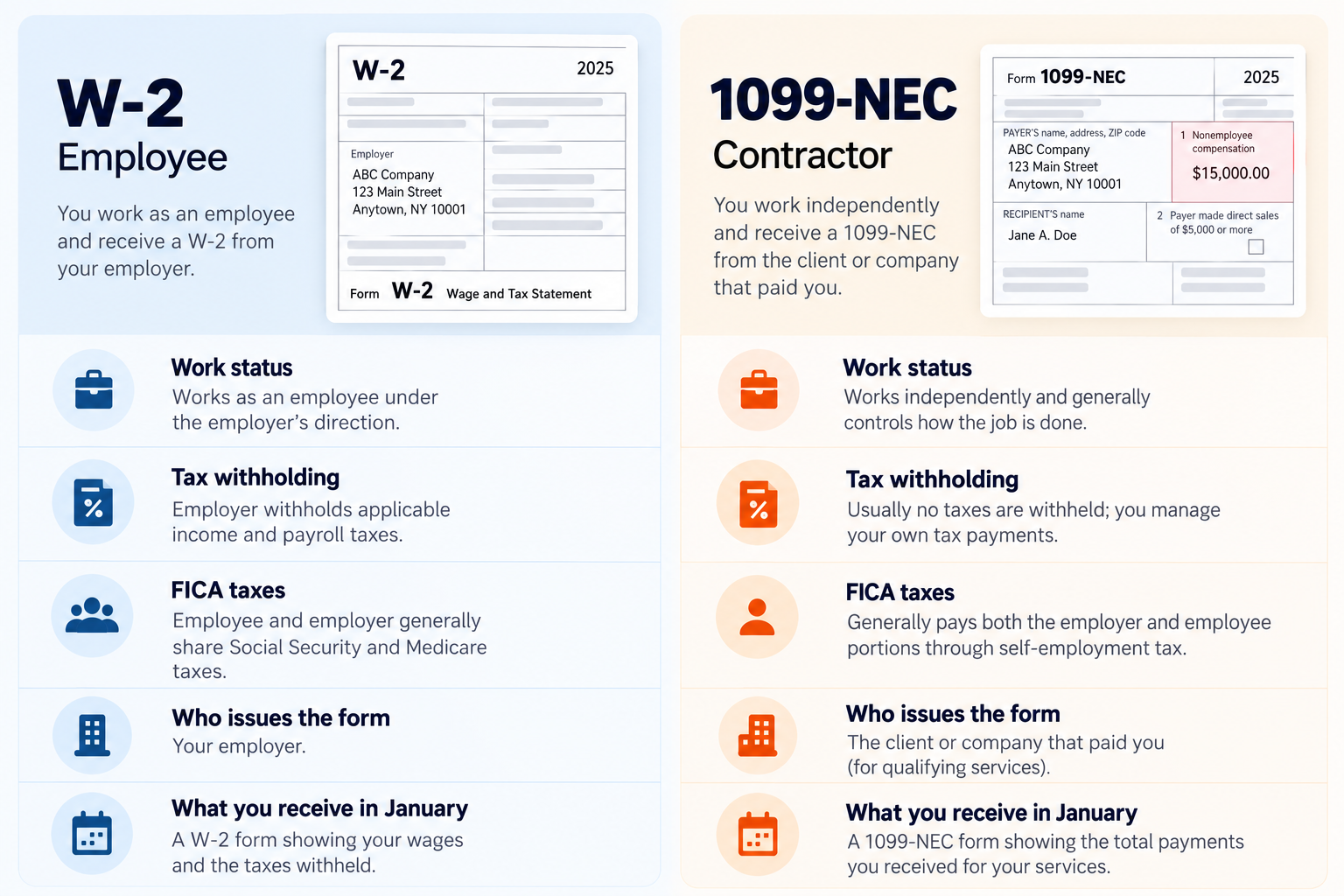
The difference becomes clearer when you look at how each work arrangement handles taxes, benefits, protections and day-to-day flexibility.

What changes W-2 employee 1099 contractor
Tax withholding Employer withholds federal and, where applicable, state and local taxes from your pay. Usually no tax is withheld, so you set money aside and handle your own tax payments.
Benefits May include health insurance, paid leave, retirement plans and other employer-provided benefits. Generally responsible for arranging and paying for your own benefits.
Worker protections Covered by various employment protections and workplace rules that apply to employees. Fewer employee protections because you are an independent contractor.
Flexibility Usually follows an employer's schedule, workplace policies and working arrangements. Often offers greater control over when, where and how you complete your work.
Who pays taxes? Employer and employee generally share payroll tax responsibilities, with the employer handling required withholding. Contractor is generally responsible for income tax and self-employment tax obligations.

What is a W-2 employee?

A W-2 employee is someone who works for a company as a regular employee rather than as an independent contractor. You may work full-time or part-time, follow your employer’s schedule and responsibilities, and receive a W-2 form each year showing your earnings and taxes paid. For many workers, this is the more familiar employment arrangement.

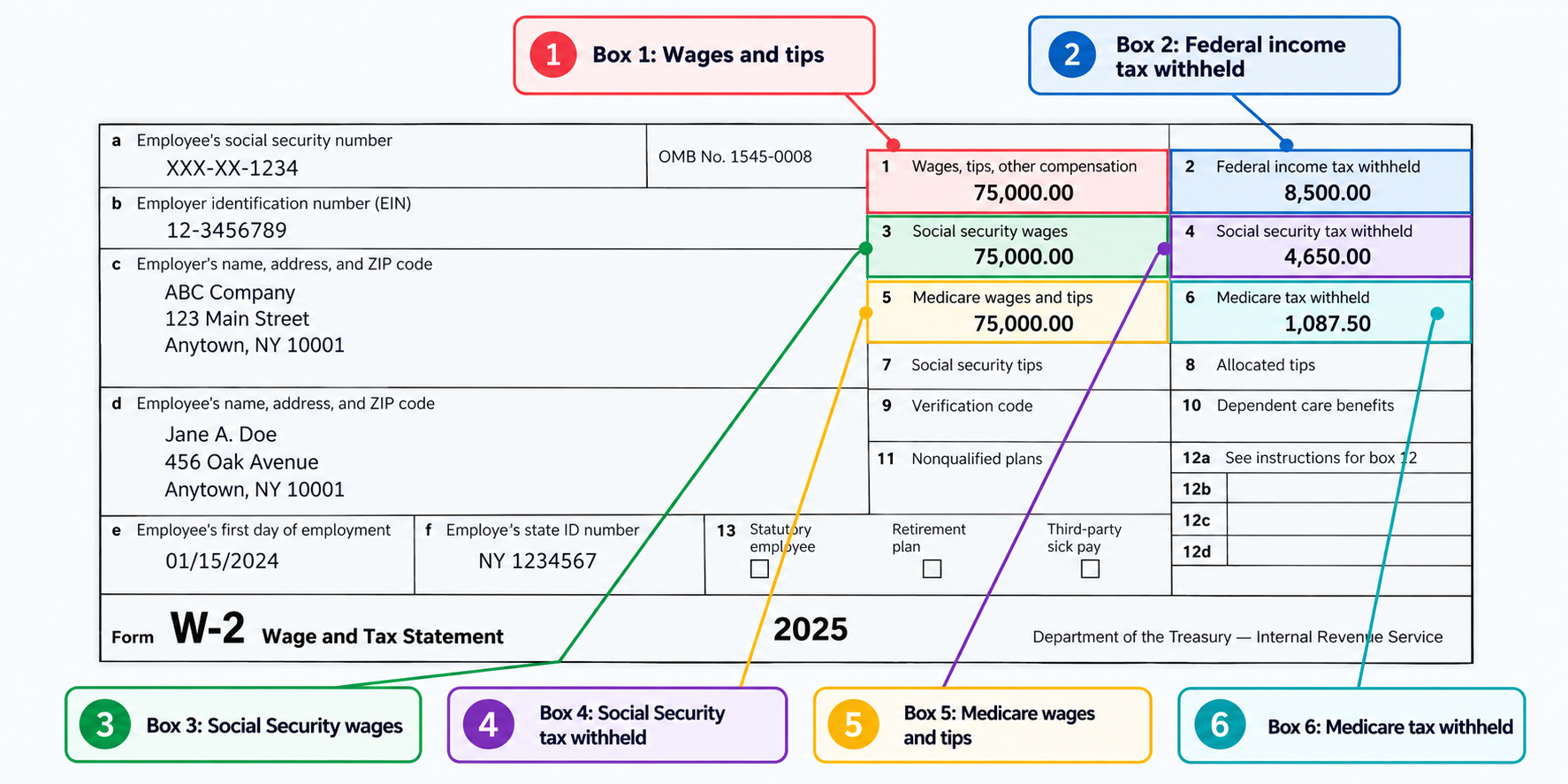
One of the main differences is how taxes are handled. Your employer generally takes federal income tax, Social Security, and Medicare taxes from your pay before you receive it. Depending on where you live and work, state and local taxes may also be withheld. This means you do not usually have to calculate and set aside the full amount yourself.

A W-2 job can also come with benefits and workplace protections that independent contractors typically do not receive. Depending on the employer, these may include health insurance, paid time off, retirement plans and unemployment protection. Your exact benefits will depend on your employment contract and company policy.

What is a 1099 contractor and how does it work?

A 1099 contractor is a self-employed worker who provides services to a business without becoming its employee. Instead of receiving a regular employee payslip, you are generally paid according to the terms agreed with the client. You might work on a specific project, provide ongoing services or take on several clients at the same time.

The biggest difference appears when tax time comes around. Clients generally do not withhold federal income tax, Social Security or Medicare taxes from your payments. Instead, you are responsible for reporting your income and paying the taxes you owe. This can include self-employment tax, which covers Social Security and Medicare contributions.

Being a contractor can also give you more flexibility, but it comes with additional responsibilities. You may be able to claim legitimate business deductions for expenses related to your work, such as equipment, software or certain business costs. Keeping accurate records throughout the year can make managing your taxes much easier.

Also read: What successful remote workers do differently

1099 vs W-2: Key differences that affect your pay

The choice between being an employee or contractor can change what reaches your bank account, what you pay yourself and the security that comes with your work.

  • Take-home pay: W-2 employees usually receive pay after taxes have been withheld, making budgeting easier. 1099 contractors generally receive payments before taxes, so they need to set aside money themselves for future tax bills.
  • Self-employment tax: 1099 contractors generally pay both the employee and employer portions of Social Security and Medicare taxes through self-employment tax. W-2 employees pay their share, while employers cover the employer portion.
  • Benefits: W-2 employees may receive benefits such as health insurance, paid holidays, sick leave and retirement contributions. Contractors generally arrange and pay for their own benefits, which can reduce the value of their headline rate.
  • Job security: W-2 employment generally offers greater stability and access to certain employee protections. Contractors may enjoy more flexibility but can face less predictable income, fewer protections and greater responsibility for finding their next project.

W-2 vs 1099: Which is the better choice for workers?

There is no single winner when comparing a 1099 role with a W-2 job. What works well for one person may not suit another, particularly when you consider taxes, benefits, flexibility and how predictable you want your income to be.

A W-2 job may make more sense if you value stability, employer benefits and having taxes automatically withheld from your pay. It can be easier to plan your finances when you know what you will receive each payday and have access to benefits such as health insurance or paid leave.

A 1099 role can be attractive if you want greater control over your schedule, the freedom to work with different clients or the potential to claim eligible business expenses. However, you will need to manage your own taxes, benefits and periods without work.

Before accepting either, ask: How much will I actually take home? What taxes will I owe? Are benefits included? How predictable is the work? These answers can tell you which arrangement fits your situation.

How 1099 contractors can get paid by international clients

Working as a 1099 contractor often means dealing with clients directly, including sending invoices and making sure you actually receive your money. When your client is overseas, the payment side can become a little more complicated, especially when you are being paid in USD.

This is where Grey can make things easier. You can create and send invoices to international clients, receive your USD payments and keep your earnings in one place. Instead of relying on complicated international transfers every time a client pays you, Grey gives you a simpler way to manage your freelance income.

Once the money arrives, you are not limited to simply receiving it. You can send money, convert currencies and manage your earnings at competitive rates. For 1099 contractors working with clients abroad, it means less time worrying about payments and more time focusing on the work that actually pays you.

Frequently asked questions

Which is better, 1099 or W-2?

Neither is automatically better. A W-2 job may suit you if you value stable income, employer benefits and simpler tax withholding. A 1099 role may be better if you want greater flexibility, multiple clients and more control over your work.

Do 1099 workers pay more tax?

They can, because 1099 contractors generally pay self-employment tax, covering Social Security and Medicare contributions. Unlike W-2 employees, contractors usually pay both the employee and employer portions. However, eligible business deductions can reduce taxable income, so the overall difference depends on your earnings and expenses.

Can you be both?

Yes. You can have a W-2 job while earning additional income as a 1099 contractor. For example, you might work for an employer during the week while freelancing for clients in your spare time. You will need to report income from both sources when filing your taxes.

Do 1099 workers get benefits?

Generally, 1099 contractors do not receive employee benefits from their clients. This means you usually arrange your own health insurance, retirement savings and paid time off. The trade-off is greater independence and flexibility, although some companies may offer contractors limited benefits depending on the arrangement.

How do 1099 taxes work?

1099 contractors generally receive payments without federal income tax being withheld. You are responsible for reporting your income, tracking eligible business expenses and paying the taxes you owe. Depending on your circumstances, you may also need to make estimated tax payments throughout the year.

How do I get paid as a contractor?

Contractors usually agree on payment terms with their clients before starting work, then send an invoice when they complete the agreed work or reach a payment milestone. You can receive payments through bank transfers, payment platforms or services such as Grey for international clients.

Last updated:

October 2, 2026

Open a free Grey account to get startedJoin 1 million digital nomads
IF YOU ENJOYED THIS, CHECK THESE OUT

USDC to USD: How to convert your stablecoin to cash

•

•

2 min read

Converting USDC to USD is one of the most common ways to turn your digital assets into spendable cash. Whether you've been paid in USDC, received crypto from a client, or hold stablecoins as part of your portfolio, knowing how to convert them safely and efficiently helps you access your money when you need it. The process is straightforward, but choosing the right platform can affect how much you pay in fees and how quickly you receive your funds.

To convert USDC to USD, you'll need a crypto exchange or platform that supports USDC. Once your USDC is in your account, you can sell or swap it for USD and withdraw the proceeds to your linked bank account. Depending on the platform, the withdrawal process typically takes between one and three business days, while conversion fees generally range from 0% to around 1.5% of the transaction.

This guide explains how to convert USDC to USD step by step, the fees and timelines you should expect, and the key factors to consider when choosing a reliable platform for your conversion.

Also read: USDC vs. other stablecoins: what's best for global transactions?

What is USDC and how does it work?

USDC (USD Coin) is a stablecoin. It'sa type of cryptocurrency designed to maintain a stable value by being pegged to the US dollar. Unlike cryptocurrencies such as Bitcoin or Ethereum, which can experience significant price swings, one USDC is equal to one US dollar. It's issued by Circle and is backed by reserves of cash and cash-equivalent assets, making it one of the most widely used dollar-backed stablecoins.

USDC maintains its 1:1 peg through a reserve system. When a new USDC is issued, an equivalent value in US dollars or highly liquid assets is held in reserve. Likewise, when USDC is redeemed for cash, the tokens are removed from circulation. This mint-and-redeem process helps keep its value close to one US dollar, while regular reserve attestations provide additional transparency.

Many individuals and businesses hold USDC because it offers the stability of the US dollar while retaining the speed and flexibility of blockchain technology. It's commonly used for international payments, cross-border transfers, online trading, and protecting funds from the price volatility associated with other cryptocurrencies.

How to convert USDC to USD

Converting USDC to USD is a straightforward process if you use a platform that supports stablecoin trading and bank withdrawals. Before you begin, make sure your account is verified, and your bank account is linked.

  1. Choose a platform and sign in: Select a cryptocurrency exchange or payment platform that supports USDC and USD conversions. Create an account if you're new, complete any required identity verification, and log in securely before starting the transaction.
  2. Deposit your USDC: Transfer the amount of USDC you want to convert into your platform account. Double-check the blockchain network and wallet address before sending your funds to avoid irreversible transfer mistakes.
  3. Sell your USDC for USD: Navigate to the trading or conversion section, choose the USDC-to-USD option, review the exchange rate and fees, then confirm the transaction once you're satisfied with the details.
  4. Withdraw the USD to your bank account: After the conversion is complete, request a withdrawal to your linked bank account. Review the withdrawal fee, processing time, and banking details before confirming the transfer.

Also read: Understanding USDC and how it enables safe global payments

How to cash out USDC to your bank account

After converting your USDC to USD, the final step is withdrawing the funds to your bank account.

  • Choose your withdrawal method: Most platforms let you withdraw via ACH or bank wire. ACH transfers are typically cheaper but may take one to three business days, while wire transfers are often faster but usually come with higher fees.
  • Link and verify your bank account: Before withdrawing, you'll need to connect a bank account in your name. Many platforms require identity verification and may ask you to confirm your bank details for security and regulatory compliance.
  • **Check the minimum withdrawal amount:**Some platforms set a minimum USD withdrawal limit. Review the withdrawal page to ensure your balance meets the requirement before submitting your request.
  • Review fees and processing times: Withdrawal fees and timelines differ by provider and payment method. Always check the estimated delivery time and total cost before confirming the transaction to avoid surprises.
  • Confirm the withdrawal and monitor its status: Once you've reviewed the details, submit the withdrawal request. Most platforms provide a transaction status or reference number so you can track the transfer until the funds reach your bank account.

How much does it cost to withdraw USDC to a bank account?

Converting USDC to cash can involve several charges depending on the platform and payment method you choose. Understanding each fee helps you estimate your total cost and identify opportunities to reduce unnecessary expenses before completing your withdrawal.

What it covers Typical cost When it's charged How to reduce it
Platform fee Converting USDC into USD 0%–1.5% of the transaction When you sell or convert USDC Compare conversion rates and fees before trading
Network gas fee Processing the USDC transfer on the blockchain Varies by blockchain network and congestion When transferring USDC to or from a platform Use a lower-cost supported network where available
Bank withdrawal fees Sending USD from the platform to your bank account Free to around $30, depending on the method When withdrawing USD Choose lower-cost withdrawal options, such as ACH where available
Bank charges Fees charged by your receiving or intermediary bank Varies by bank After the transfer is processed Choose providers that use local payment rails and offer transparent fees.

How long does it take to convert USDC to USD?

The time it takes to convert USDC to USD depends on how want to withdraw and where you're sending the funds. Converting USDC to USD within a cryptocurrency exchange or wallet is usually completed instantly or within a few minutes, provided there's enough market liquidity. If you choose an instant cash-out option, such as a supported debit card payout or instant ACH transfer, you could receive your money in as little as 30 minutes, although these services may attract additional fees.

The longest part of the process is typically transferring your USD to a bank account. Standard ACH transfers to US banks generally take one to three business days, while international wire transfers sent through the SWIFT network can take between two and five business days, depending on the receiving bank and country.

Processing times can also be affected by identity verification, bank holidays, compliance checks, blockchain network congestion, and your chosen payment method. Checking these factors before you start can help you avoid delays and receive your funds as quickly as possible.

Also read: How USDC is revolutionising international money transfers

Receiving USD payments internationally with Grey

If you earn in USDC or USD as a freelancer, remote worker, or online business owner, getting your money into your local bank account shouldn't be complicated. While many clients prefer paying in US dollars, accessing those funds locally can involve multiple platforms, high fees, or lengthy processing times. Having reliable foreign account details simplifies the payment process and gives clients a familiar way to pay you.

With Grey, you receive dedicated foreign account details, including US accounts, that you can share with international clients as your payment destination. Clients can send USD directly to these account details just as they would with a local bank account. Once the funds arrive, you can convert your USD to your local currency within Grey and transfer the money to your local bank account when you're ready.

This creates a practical bridge between international earnings and everyday banking. Whether your income comes from freelance projects, remote employment, or clients who prefer paying in USD, Grey helps you receive payments more easily, manage your foreign currency, and access your money without the complexity often associated with cross-border payments.

Frequently asked questions

1. Does USDC always stay at exactly $1?

USDC is designed to maintain a 1:1 value with the US dollar, but its market price can fluctuate slightly due to supply, demand, or market conditions. These movements are usually minimal, and the stablecoin is intended to return close to its one-dollar peg.

2. Do you have to pay tax when converting USDC to USD?

Tax treatment depends on your country of residence. In some jurisdictions, converting USDC to USD may be a taxable event, while in others it may not. If you're unsure, consult your local tax authority or a qualified tax adviser before converting.

3. Can you cash out USDC without using a crypto exchange?

Yes, in some cases. Certain payment providers, crypto wallets, and over-the-counter (OTC) services allow you to convert or redeem USDC without trading through a traditional cryptocurrency exchange. Availability depends on your location and the services supported.

4. Is there a minimum amount required to convert USDC to USD?

Most platforms set a minimum conversion or withdrawal amount, but the limit varies by provider. Before initiating a transaction, check the platform's conversion rules and bank withdrawal requirements to ensure your balance meets the minimum threshold.

5. Is converting USDC to USD safe?

It can be, provided you use a reputable and regulated platform, enable two-factor authentication, and verify all wallet and banking details before confirming a transaction. Avoid sending funds to unknown addresses or using unverified services offering unrealistic exchange rates.

6. Can you receive USD in your Grey account?

Yes. Grey provides foreign account details that allow you to receive USD from international clients. After receiving the funds, you can convert them to your local currency at competitive exchange rates and low fees before transferring the money to your local bank account.

7. Can you convert only part of your USDC balance?

Yes. You don't have to convert your entire balance unless the platform requires it. Most exchanges and payment providers let you choose the exact amount of USDC you want to convert, giving you greater flexibility over when and how much you cash out.

Holding USDC is a smart way to protect the value of your funds while enjoying the flexibility of digital payments. When it's time to receive or manage USD internationally, Grey makes the process simple and seamless. Open a Grey account or download the Grey app today to start receiving USD payments with ease.

How South Africans can pay for international subscriptions without a credit card

•

•

2 min read

Paying for international subscriptions has become a regular part of life for many South Africans. From Netflix, Spotify, and Apple services to Adobe, Canva, online courses, cloud storage, and software tools, most global platforms now bill in foreign currency. The problem is that many South Africans don’t have an international credit card, or their card gets declined due to foreign currency rules, bank limits, or high fees.

Fortunately, you can still pay for your global subscriptions easily and legally without owning a credit card. You simply need the right alternatives that support international merchants, offer transparent fees, and let you pay in the required currency. This guide explains the practical options available to South Africans and how to choose the method that works best for your needs.

Also read: How to pay for subscriptions in US dollars from South Africa

Why South African cards often fail for overseas subscriptions

Many South Africans assume that any debit card should work for international services, but this is not always the case. A few reasons explain the frequent payment failures:

1. Foreign currency restrictions

South African banks must comply with the SARB’s exchange control rules. As a result, some cards have strict limits on overseas transactions or require pre-approval before enabling international spending.

2. High conversion costs

Standard debit cards usually convert ZAR to USD, GBP or EUR at bank-set rates that are significantly higher than the mid-market rate. This makes your monthly subscriptions more expensive than they need to be.

3. Verification issues

Specific platforms, such as software tools, online hosting services, and social media ads, require specific authentication or card issuers. Local cards may not scale through these checks.

4. Automatic renewals are sometimes flagged

Banks sometimes automatically block recurring subscription payments because the system might flag them as suspicious. This leads to payment declines and can be frustrating.

5. Temporary blocks when the rand fluctuates sharply

Sudden changes in the rand often cause banks to revise limits or freeze international payments until they have some clarity.

Also read: Best ways to receive international wire transfers in South Africa

Ways South Africans can pay for international subscriptions without a credit card

With these problems with local cards, many South Africans are on the lookout for ways to pay for international subscriptions without a credit card. Let’s look at some of the top recommendations.

Use a virtual USD debit card

The easiest way to pay for global services without a credit card is to use a virtual USD debit card. These cards work like standard Visa or Mastercard debit cards but are funded digitally. They can be used for a wide range of digital services and are reliable for international subscriptions because they:

  • Allow you to pay directly in the required currency.
  • Avoid bank declines from local restrictions.
  • Let you control how much money you put in to avoid overspending.
  • Reduce fraud and theft risk since the card exists only online.
  • Offer better exchange rates.

Platforms like Grey allow South Africans to easily create virtual cards. You can pay directly from your balance, add them to Google Pay or Apple Pay, paying for international services seamlessly.

Hold foreign currency instead of relying on your ZAR card

Another effective method is to use a multi-currency account that lets you keep USD, EUR, or GBP. Managing the currency your subscription requires simplifies payments, as you don’t have to navigate currency conversion issues. Also, if the rand suddenly loses value, your subscription costs rise. Holding a stable foreign currency prevents this. A multi-currency account also works well for people who earn freelance income from overseas clients and want to use the same funds to pay for tools, ads, or subscriptions.

Use an international payment platform that supports South African users

Some global payment apps and wallets allow South Africans to make international payments without needing a credit card. These platforms typically support subscriptions, e-commerce purchases, software payments, and recurring billing. They also tend to charge lower fees and process payments faster than traditional banks. However, the limitation is that not all wallets are universally accepted by international merchants. In most cases, pairing such an app with a virtual card gives the best coverage.

Also read: Best ways to send money to South Africa for Christmas and New Year

Managing international subscriptions with Grey

South Africans can pay for international subscriptions and online services without a traditional credit card by using virtual debit cards from local banks or by using multi-currency accounts. Grey helps South Africans manage their subscriptions by providing multi-currency accounts supporting USD, EUR, and GBP. You also get a versatile virtual card that integrates well with various payment platforms.

Get started with Grey today to manage your subscriptions seamlessly.

‍

Saving in US dollars vs MAD: what’s best for Moroccans right now?

•

•

2 min read

Today, we seek to solve an age-old puzzle: opting for the liquidity and ease of use that MAD offers, or the stability and hedge against inflation that saving in US dollars provides. To arrive at a resolution, we will look into Morocco’s current economic situation, future economic predictions, and the prospects of saving in either USD or MAD.

So, if you’re wondering which is best for you to save in right now — USD or MAD —, you can get on the trail and let’s find out together. It might get complex, but we will stick to simple terms. Let’s dive right in.

Establishing a baseline: understanding the current currency situation in Morocco

Before we get into the puzzle proper, it’s worth exploring Morocco’s current economic backdrop.

The nation has enjoyed a fairly stable economy in recent times. Inflation has been low and well-controlled. Bank Al-Maghrib has kept its key policy interest rate steady at 2.25% since March 2025, and views it as supportive of economic activity given the low inflation rate. The country’s foreign exchange reserves are doing great. It is a somewhat great economic season.

Meanwhile, Morocco is still subject to global pressures like almost every other country. Since the country uses an ‘intermediate exchange rate regime of fixed parity’,  the currency basket is pegged at 60% to the euro and 40% to the US dollar. There is a ±5% fluctuation allowance. This means that while the dirham is pegged to the USD and EUR, its value is allowed to fluctuate by no more than 5% from the central rate. The Central Bank of Morocco ensures the exchange rate stays within the target band.

If you have made it this far without getting lost, we can just skip to the good part, where we tell you the pros and cons of saving in either USD or MAD.

Also read: Top virtual banking solutions for freelancers in Morocco

Saving in MAD

Saving in MAD is practical and essential for Moroccans in everyday life and domestic financial needs.

Pros

  • Low and stable inflation: Morocco’s inflation rate is currently low and stable, and is projected to remain like that for some time. This means the local economic situation is unlikely to eat into your dirham savings.
  • Official currency: The dirham is the only currency you can use everywhere in Morocco (shops, restaurants, local services). Using USD or EUR directly for everyday transactions will often result in poor exchange rates and significant losses due to conversion fees.
  • Economic stability: Because of how the MAD is pegged to the EUR and USD, as we explained earlier, it provides relative stability and protects it from extreme global currency fluctuations.
  • Accessibility and regulation: Keeping savings in the local currency within the Moroccan banking system is straightforward and compliant with local foreign exchange regulations.
  • Higher yield in returns: The interest rates on MAD savings are generally better than those in USD, even after factoring in the inflation rate.

Cons

  • Limited access to global markets: Due to currency restrictions and the dirham’s less popularity in international financial markets, saving exclusively in MAD might limit flexibility for international investments or major purchases abroad.
  • Volatility risk: While the dirham is currently stable, volatility remains a risk. With the country transitioning to a fully floating exchange rate system in the future, this volatility and risk of depreciation worsen. This can reduce the value of MAD savings when converted to other currencies.
  • Local banking problems for international payments: Traditional banks sometimes struggle with managing international payments. Local cards might not work well with global payment platforms. Currency conversion is sometimes difficult, delayed, or comes with unfair markups. Don’t get us started on the cumbersome paperwork.

Saving in USD

Saving in USD offers greater stability and appears to be an attractive option.

Pros

  • Protects against dirham depreciation: While the MAD has been relatively stable, holding a strong international currency like the USD can provide a hedge if the dirham were to depreciate significantly over the long term due to unforeseen economic shifts.
  • International needs: If you have future plans for international travel, education abroad, or importing goods, having savings in a hard currency like USD helps you avoid conversion costs and exchange rate risks at the time of the expense.
  • Global strength: The USD is easily the world’s most widely used currency. While its performance against the dirham can vary, it has proven to be a reliable long-term store of wealth.
  • Flexibility for foreigners or remittances: If you receive money from abroad (family remittances, freelance income, wages from foreign companies), keeping USD lets you avoid repeated conversion losses.

Also read: How to open US, UK and Euro bank accounts in Morocco

Cons

  • Limited liquidity: You can only spend MAD in Morocco. So, if you’re saving in USD, you cannot spend it in Morocco without converting to dirhams first.
  • Transaction costs: Depending on the platform you use, you will incur various fees when managing USD savings from Morocco, including:
    • Currency conversion fees.
    • Account maintenance fees
    • Wire transfer fees
    • ATM withdrawal fees
  • Low interest rates: Foreign currency accounts usually offer low or no interest, unlike local savings accounts. This means your savings might not grow enough to outpace inflation or account fees.

Also read: How freelancers in Morocco can switch from traditional banks to Grey

Saving in US dollars vs MAD: what’s best for Moroccans right now?

Now that we have all the pieces of the puzzle in place, what’s best for Moroccans right now — saving in USD or MAD?

Saving in USD or MAD each has advantages and drawbacks. Saving in USD as a Moroccan resident means that you might be hedging against MAD devaluation, but face limited liquidity. Saving in MAD offers more local financial liquidity and interest yield, but risks devaluation.

In the end, striking a balance between both currencies is the most reasonable way to solve this puzzle. This way, you are not keeping all your eggs in one basket. You can milk the benefits of either currency while minimising the impact of their individual drawbacks.

It gets better. Using a platform that allows you to manage both currencies seamlessly is a game-changer. With low transaction fees, fair exchange rates, and swift processing, Grey provides Moroccans with access to multi-currency accounts supporting USD, EUR, and GBP. You can easily withdraw MAD to your local bank account and access a virtual USD debit card for your international purchases.

Get started on Grey today and manage your finances the smarter way.

‍

Simple money tips for students living abroad

•

•

2 min read

iving abroad as an international student can be a life-changing experience, exposing you to new cultures, a great learning environment, and networks. However, managing financing in a new country can be complex and negatively impact your experience,  especially when you’re dealing with unfamiliar currencies, exchange rates, and living costs. With the appropriate information and lifestyle adjustments, you can manage your finances better. Here are some simple money tips to help students living abroad make the best of the opportunity.

1. Set a realistic monthly budget

A realistic budget might be all you need to maximise your experience as an international student. Before anything else, figure out how much you can afford to spend each month and be disciplined enough to stay within that expectation. List your fixed expenses, such as rent, transport, groceries, and tuition. Then set aside an amount for leisure and for emergency savings. Use budgeting apps like YNAB or a spreadsheet to track your spending and see where your money goes. A clear budget helps you avoid running out of funds before your next income.

2. Open a local or multi-currency account

Traditional bank accounts often charge high fees for international transactions and withdrawals. Instead, open a local bank account in your host country or a multi-currency account that lets you hold, send, and spend in different currencies. Platforms like Grey are ideal because you can receive and hold multiple currencies (GBP, USD, EUR), easily convert and withdraw funds at mid-market exchange rates. This makes your spending cheaper and simpler.

3. Avoid using credit cards for daily spending

Credit cards are great for emergencies or building a credit score, but not for everyday use abroad. Otherwise, you’ll have to deal with foreign transaction fees (usually 2–3%), poor exchange rates and high-interest rates. Use a debit card or digital wallet instead, and keep your credit card strictly for urgent situations.

4. Understand the local payment culture

The truth is that various countries offer preferable payment options. Carrying cash is a more prudent choice than card payments in some countries. Note whatever is obtainable in your environment by learning how locals pay for things,  whether it’s contactless, QR codes, or cash. Set up the option that’s most convenient for you to avoid awkward moments at checkouts or in restaurants.

5. Avoid airport and hotel currency exchanges

Airport and hotel exchange counters are convenient but notoriously expensive. They offer poor exchange rates and high conversion fees. Also, the chances of getting scammed are high in some countries if they think you are a newbie. If you need cash on arrival, withdraw a small amount at an ATM or use a platform like Grey to convert currency before travelling. This ensures you get fair rates and avoid unnecessary costs.

6. Cook more, eat out less

Food is one of the most significant expenses for international students. Eating out regularly might be convenient, but it will tank your finances if you are not mindful. Save money by cooking at home on most days and storing food for days you might feel up to cooking. Shopping at local markets or discount grocery stores saves money on your purchases. It is also healthier to cook at home most of the time than to opt for processed fast foods. Make eating out more of a guilty pleasure than an everyday thing.

7. Take advantage of student discounts

Many countries offer student discounts on public transport, museums, cinemas, and even restaurants. Always carry your student ID or use platforms like UNiDAYS and ISIC to access verified offers. These small discounts can help your budget further in the long run.

8. Save a little each month

Even on a tight student budget, aim to save something. It builds good financial habits and helps during emergencies and for making big purchases. You can automate your transfers to a savings account or use a budgeting app with a round-up feature that saves spare change from each purchase.

9. Earn extra income wisely

If your visa allows (e.g., up to 20 hours/week), part-time work can supplement your budget. Here are some great work options for international students:

  • Campus jobs: Look for roles like library assistant or tutor, which fit around studies and often pay above minimum wage.
  • Freelance or gigs: Platforms like Upwork or local apps for tutoring English can provide flexible income without long-term commitments.
  • Internships: Paid opportunities, such as work placements and internships aligned with your course, can bring in some money. Many institutions offer career services to help navigate this.

Always check visa rules to avoid penalties.

Managing your finances with Grey

Living abroad as a student is an educational adventure, but managing your money wisely helps you make the most of it. If you’re studying overseas, consider opening a Grey account to manage multiple currencies, receive money from home, and pay locally at competitive exchange rates. Grey’s virtual USD debit card also makes it easy to pay globally.

Get started on Grey today and spend smartly wherever your studies take you.

‍

How to get paid by overseas clients as a freelancer in the UK

•

•

2 min read

There are few things as exciting as landing an overseas client. The email arrives, you sign the contract, deliver the work, and wait for the reassuring “Payment received” notification.

That’s at least how it should be. In reality, the transfer can take ages, the fees may be outrageous, and by the time the money finally lands, it’s a lot less than you envisaged.

That’s why it’s so important to understand your options. Let’s break down the best ways to receive international payments in the UK and explore how different platforms facilitate this process.

Understanding how overseas payments work

Getting paid from overseas isn’t the same as receiving a local bank transfer. Most clients outside the UK pay in their own currency, with USD, EUR and AUD being the most common. When those funds move through traditional banking systems, they’re routed via SWIFT transfers. That process can take anywhere from one to five business days, and each bank along the chain charges its own fee.

Then there’s the issue of exchange rates and hidden fees. Let’s say your client sends $1,000; by the time it’s converted into pounds, you may only receive $950.

This is why many freelancers are always seeking the best payment methods to receive payments faster, more cost-effectively, and with less friction.

Also read: How Grey differs from a UK bank

Common methods freelancers use to get paid

Let’s go through the most popular options freelancers in the UK rely on and what you should know before picking one.

1. International bank transfers (SWIFT transfers)

Traditional, reliable, but often frustrating.

If your client’s paying directly from their bank account, it’ll most likely go through the SWIFT network, which connects over 11,000 financial institutions worldwide. You’ll need to share your IBAN, BIC, and other banking details.

Pros:

  • It is globally accepted and relatively secure.
  • It works well for clients who prefer using traditional banks.
  • The funds are deposited directly into your UK account, with no middleman interference.

Cons:

  • Delivery usually takes 1-5 business days.
  • High transfer fees (both sender and receiver pay).
  • There are poor exchange rates, as banks often add a 2–5% markup.
  • It’s difficult to track. You can’t easily see where the money is mid-transfer.

If you’re working with multiple overseas clients, these fees can add up quickly. It’s worth using international transfers only for large payments or recurring clients whose invoices can shoulder the cost.

2. PayPal and other payment processors

PayPal has long been the go-to for freelancers, mainly because it’s convenient and globally recognised. Setting up an account is simple, and clients can pay instantly using just your email address.

The downside is that the fees can sting a bit. You’ll lose around 4- 5% per transaction once you factor in service charges and currency conversion fees. For example, if a client sends you $1,000, you could easily end up with around $950 — or less — by the time it reaches your account.

Pros:

  • Easy to set up and use.
  • Widely accepted globally.
  • Instant payments for most transactions.

Cons:

  • High transaction and conversion fees.
  • Delays when withdrawing to your UK bank.
  • Exchange rates are less favourable than fintech platforms.

For small or one-off projects, PayPal’s convenience might outweigh the fees. But if you’re earning consistently from abroad, there are cheaper, faster options.

3. Freelance platforms (Upwork, Fiverr, PeoplePerHour, etc.)

If you’re using platforms like Upwork, Fiverr, or Toptal, the payment process is mainly automated. Clients pay through the platform, which holds the funds in escrow until the work is approved. Once released, you can withdraw to your local bank, PayPal, or another linked account.

Pros:

  • Secure and built-in payment protection.
  • Reliable for new freelancers or short-term projects.
  • Payments are released automatically once approved.

Cons:

  • Platform fees are steep (Upwork takes up to 15% per project).
  • Withdrawals can take a few days.
  • There’s limited flexibility with payout currencies.

While these platforms simplify the process, they also limit how much control you have over your money. Once you build trust with your clients, you may want to move payments off-platform to reduce fees. However, Upwork has strict rules on how to move clients outside the platform to avoid suspension.

4. Wise

Wise has become a freelancer favourite for its transparency. You can open a multi-currency account, receive USD or EUR, and convert them to GBP at decent rates.

Pros:

  • Excellent exchange rates and low transfer fees.
  • Multi-currency account with local details in several countries.
  • Fast, usually within 1–2 business days.

Cons:

  • Occasional verification delays.

Wise is ideal if you work with clients in multiple countries and want control over when to convert your earnings.

5. Revolut

Revolut offers similar perks, although it’s more akin to a hybrid between a digital bank and a budgeting app. You can receive money in various currencies, hold it, and convert when rates are most favourable.

Pros:

  • Real-time conversion at interbank rates.
  • Integrated financial tools like budgeting and saving.
  • Quick transfers between Revolut users.

Cons:

  • Fees for exceeding monthly exchange limits.
  • Slower transfers for non-Revolut users.

It’s handy for managing personal and freelance income in one place, but Revolut’s business accounts may still have limitations for larger, recurring international payments.

6. Grey — for freelancers who want control and convenience

If you're looking for an all-in-one solution, specifically designed for freelancers who work internationally, Grey is your best bet.

With Grey, you can open USD, EUR, and GBP foreign accounts in your name without needing to register a company or go through endless paperwork. You can receive money directly from clients abroad, hold it in foreign currency, convert when rates are best, and withdraw instantly to your UK account.

Here’s why I love it:

  • Transparent rates and low fees.
  • Fast transfers
  • Seamless multi-currency management.
  • It’s easy for clients to pay you like a local.

You no longer have to worry about conversion losses, delayed wires, or complicated SWIFT forms. With Grey, your money moves globally but feels local.

Open your free Grey account today and start receiving payments like a pro.

Also read: How to send and receive euros in the UK

LDMAG1

Tips for smooth overseas payments

Even with the right platform, a few habits make life as a freelancer much easier:

  • Agree on payment terms upfront: Always specify currency, payment method, and due dates in your contracts.
  • Invoice clearly: Utilise the right invoicing tools, such as Grey, to document and structure transactions.
  • Avoid unnecessary conversions: Keep payments in USD or EUR until rates are favourable, then convert to GBP.
  • Track everything: Maintain digital records of invoices and receipts for tax and accounting purposes.

Also read: Why multi-currency bank accounts get frozen and how to choose a reliable platform

Taxes and record-keeping

Freelancers in the UK must declare foreign income to HMRC as part of their self-assessment tax return. The great thing is that tools like Grey make tracking your income simple with downloadable statements and currency summaries.

Always keep a record of:

  • Invoices and client contracts.
  • Bank or payment processor statements.
  • Currency conversion records.

These make filing taxes easier and help you stay compliant with UK tax laws.

Simplify your freelance payments with Grey

Getting paid as a freelancer is now simpler. With tools like Grey, you can say goodbye to hidden fees, slow transfers, and poor conversion rates.

Instead of juggling multiple platforms, you can receive USD or EUR, hold it in your account, convert at the best time, and spend freely, all in one place.

Global work deserves a global solution.

Open your Grey account today or download the app and take control of your freelance income.

‍

How to plan your 2026 financial goals before January starts

•

•

2 min read

Before you start drawing up financial plans for 2026, how did your 2025 plans go? We sometimes get caught in the web of making financial plans we won’t stick to beyond the first quarter. Unexpected circumstances come into the scene, and pfft, all plans go with the wind. Something has to change this new year if you are really going to have a great financial year. And that starts with planning your 2026 financial goals before January begins. As the year winds up, we are here to show you that you have to put structures in place to meet your 2026 financial goals.

Also read: Best USD savings accounts for freelancers and remote workers

Review your current financial state

Before you plan for the future, you must take stock of the present. This entails reviewing your finances this year and having an honest assessment of where you stand. Review your 2025 bank statements and understand your spending patterns. Estimate your monthly income and expenses.

Calculate your net worth by adding up all your assets (savings accounts, investments, property) and subtracting your liabilities (credit card debt, loans, mortgage) to get a clear picture of your financial starting point. List all outstanding debts and their interest rates because you must prioritise paying off high-interest ones that can drain your purse.

Note the avoidable expenses that drained your finances in 2025, and be conscious about cutting them down in 2026.

LDMAG1

Set SMART goals for 2026

Once you have a clear view of your finances, you can define your objectives. Goals should be Specific, Measurable, Achievable, Relevant, and Time-bound (SMART). This model is tested and trusted.

Specific: Clearly define your goals, answering the who, what, where, when, and why.

Measurable: Add numbers to your goals to make it easy to track your progress.

Achievable: Ensure your goals are realistic by considering your income and expenses.

Relevant: Make sure your goals align with your core values and long-term vision. Don’t just institute financial plans because they are trendy.

Time-bound: Set clear deadlines for achieving these goals. It is even better to have milestones along the line.

So, instead of vague goals like "save more money this year," with the SMART model, you have something like "have $3,000 in my emergency savings by December 2026 by reducing monthly eatouts by 20%."

Create a realistic budget

Your plan is incomplete without a realistic budget. The 50/30/20 rule is one of the most widely used budgeting models. This entails allocating 50% of your earnings to needs, 30% to wants, and 20% to savings/debt repayment. Using apps or spreadsheets to monitor your income and expenses in real-time can help you stay on track. You can also easily adjust for any economic variables you did not foresee.

It is advisable to include buffers for uncertainties. Regularly review your progress to ensure consistency and trim what you don't need

Also read: A complete guide to budgeting as a remote worker

Automate your finances

Automating your finances guarantees your commitment. It makes sure that sticking to the plan is no longer a matter of convenience but a necessity. Use savings automations to lock a percentage of your earnings, and pay yourself first. Keep emergency savings to cover 3-6 months of expenses

Keep financial records and manage your taxes

Ensure you factor your taxes into your budget. Check out various options to reduce your tax liability, including filing your deductions and paying into your pension account. Regularly review your progress monthly or quarterly by keeping accurate financial records to see what's working and adjust your plan as needed. Ensure your plan can adapt to life changes.

Also read: Best countries to work remotely from in 2026

Managing your 2026 finances with Grey

In 2026, you must plan to have a flexible financial system that enables you to manage cross-border transactions with ease. Saving in stable currencies like USD, EUR, and GBP also lets you hedge against local currency valuation. The volatility of many local currencies makes it impossible to predict the value of your savings at year-end. This is why signing up on Grey to save in USD, EUR, and GBP is a great financial plan. This way, you can receive payments from international clients in various currencies with ease and keep your money safe from local currency declines.

Get started on Grey’s website or download the mobile app to manage your finances seamlessly.

‍

Arrow (up)

Back to top