


<script type="application/ld+json">[{"@context":"https://schema.org","@type":"BlogPosting","@id":"https://grey.co/blog/how-to-receive-and-convert-foreign-currencies-to-usdc-in-hungary#article","headline":"How to receive and convert foreign currencies to USDC in Hungary","description":"Discover how freelancers in Hungary can receive foreign payments and convert them to USDC easily with Grey.","inLanguage":"en","url":"https://grey.co/blog/how-to-receive-and-convert-foreign-currencies-to-usdc-in-hungary","mainEntityOfPage":"https://grey.co/blog/how-to-receive-and-convert-foreign-currencies-to-usdc-in-hungary","datePublished":"2024-11-29T13:17:48.798Z","dateModified":"2026-06-15T17:42:20.743Z","author":{"@type":"Person","name":"Olayoyin Olorunmota"},"publisher":{"@type":"Organization","@id":"https://grey.co/#organization","name":"Grey","url":"https://grey.co"},"image":"https://cdn.prod.website-files.com/636a85d290ee58e70c17e1c0/6a301853589086d012b5c392_6a3018531d9ad575b4c9441c_how-to-receive-and-convert-foreign-currencies-to-usdc-in-hungary__header-image.webp"},{"@context":"https://schema.org","@type":"BreadcrumbList","@id":"https://grey.co/blog/how-to-receive-and-convert-foreign-currencies-to-usdc-in-hungary#breadcrumb","itemListElement":[{"@type":"ListItem","position":1,"name":"Home","item":"https://grey.co/"},{"@type":"ListItem","position":2,"name":"Blog","item":"https://grey.co/blog"},{"@type":"ListItem","position":3,"name":"How to receive and convert foreign currencies to USDC in Hungary","item":"https://grey.co/blog/how-to-receive-and-convert-foreign-currencies-to-usdc-in-hungary"}]}]</script>

How to receive and convert foreign currencies to USDC in Hungary

Olayoyin Olorunmota

TABLE OF CONTENT

SHARE THIS POST

Hungary is the birthplace of the Rubik’s cube, a really fun puzzle that I just can’t wrap my head around.

However, for freelancers in Hungary, solving the puzzle of managing foreign payments isn’t nearly as complicated. USD Coin (USDC), a stable and efficient digital currency, offers a straightforward solution.

This guide explains how freelancers in Hungary can receive foreign payments, convert them to USDC, and manage their funds with Grey.

Also read: How to receive and convert foreign currencies to USDC

Why convert foreign payments to USDC as a freelancer in Hungary?

For freelancers working with international clients, converting foreign currencies to USDC comes with several advantages:

Stable value: As a stablecoin tied to the U.S. dollar, USDC provides a predictable value, helping freelancers avoid the volatility of other cryptocurrencies.

Low fees: USDC transactions are cost-effective, especially for cross-border payments.

Quick access to funds: Blockchain technology allows for near-instant transfers, so you can have quick access to their funds.

Flexible conversion: You can hold USDC and convert it to Hungarian Forint (HUF) or other currencies when the exchange rates are in your favour.

Also read: How to receive and convert foreign currencies to USDC in Estonia

How to receive and convert foreign currency to USDC

Grey offers a secure, straightforward method for freelancers to manage USDC payments. Here’s how you can send and convert USDC using Grey:

Open the Grey app

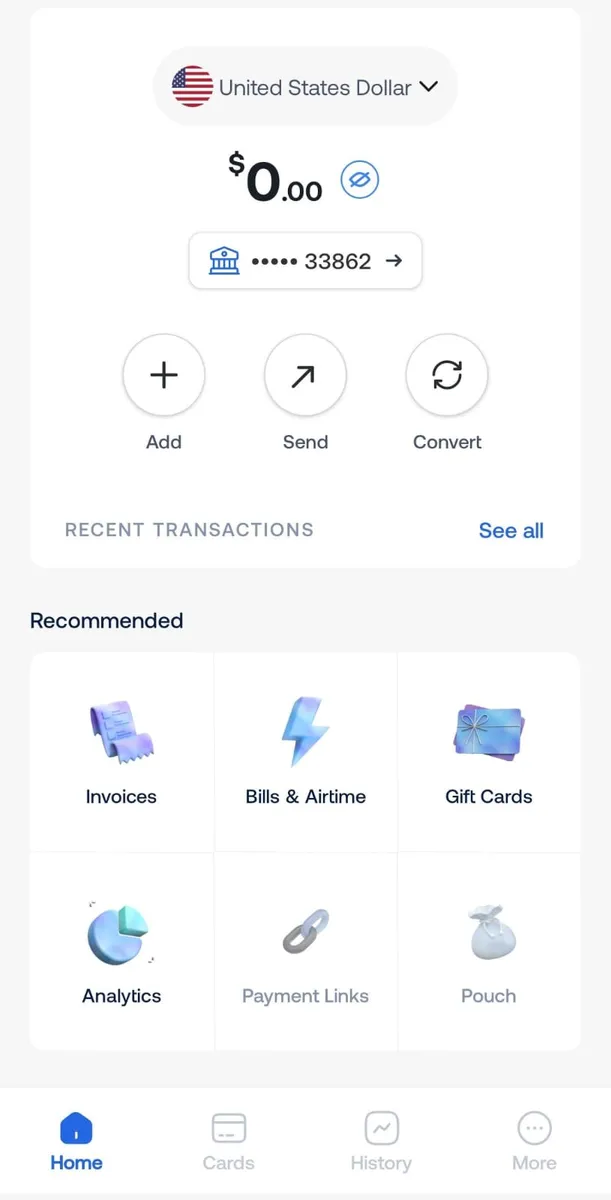
Log in to your Grey account through the app or website for secure access to your USD and other currency balances.

Select your USD balance

Navigate to the “Accounts” section and select your USD balance. This will serve as the starting point for initiating USDC transfers.

673354a9d3571067ebfd35a5 673353440ccb1e0b6c5ff3aa send usdc with grey1

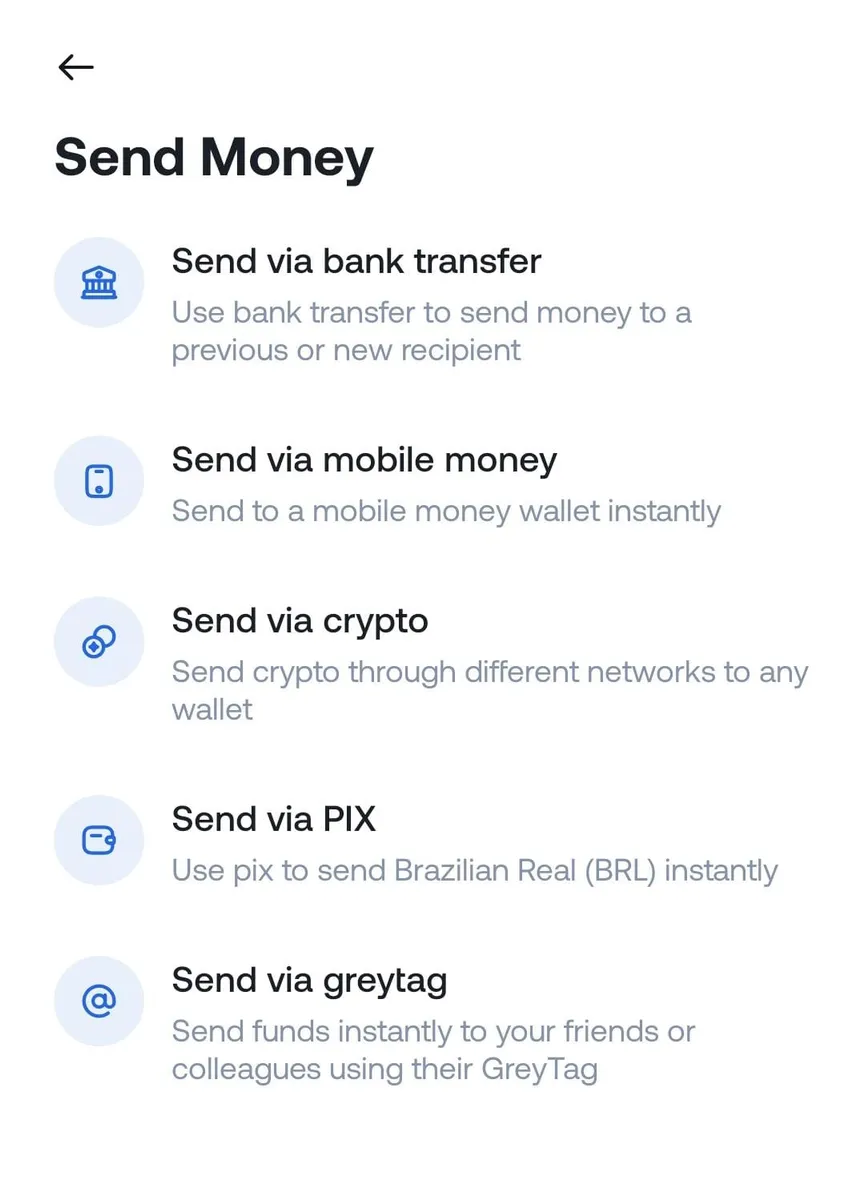
Tap “Send via crypto”

Choose the “Send money” option, then select “Send via crypto” to begin the USDC transfer process.

How to receive and convert foreign currencies to USDC in Hungary

Enter transaction details

Carefully input the recipient’s wallet address and select the correct network. Grey supports Solana (SOL) and Binance Smart Chain (BEP-20).

How to receive and convert foreign currencies to USDC in Hungary

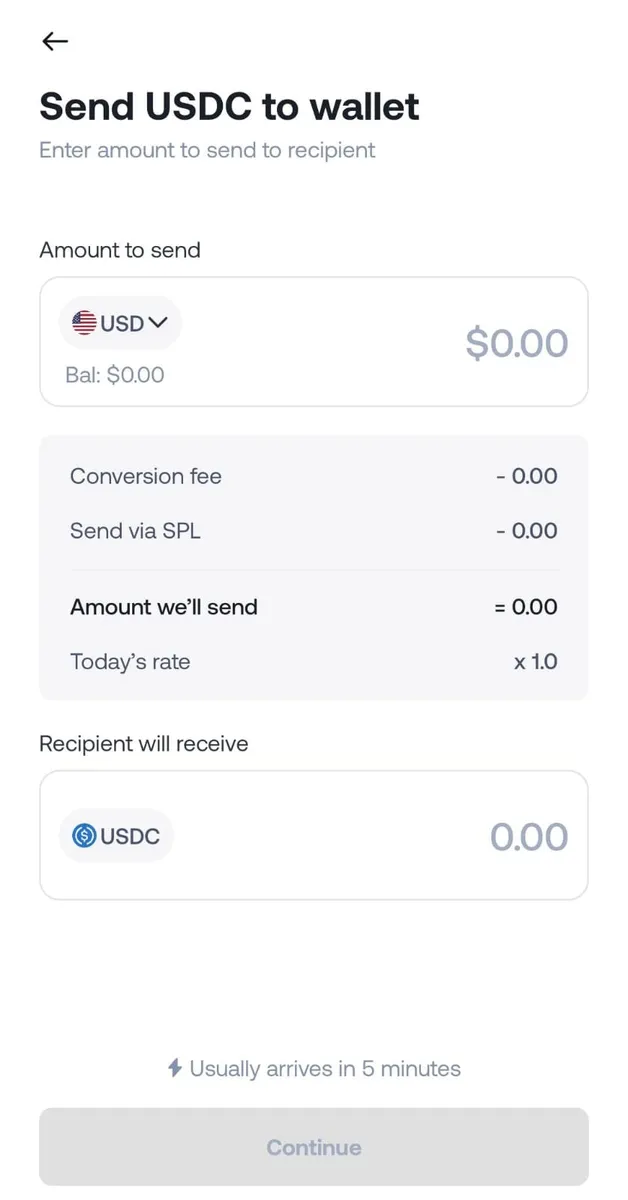
Input the transfer amount and review the details

Specify the USDC amount to send and double-check all transaction details, including the wallet address and network, to avoid errors.

How to receive and convert foreign currencies to USDC in Hungary

Confirm and complete the transfer

Once satisfied with the details, tap “Send.” Grey will prompt you to enter your two-factor authentication (2FA) code for added security.

Transaction success

The USDC will arrive in the recipient’s wallet after processing. The recipient can keep the USDC, convert it into local currency, or use it as needed.

Also read: How to receive and convert foreign currencies to USDC in Bulgaria

How to convert USDC to Hungarian forint

To convert USDC into Hungarian forint (HUF), use a crypto exchange or a local service that supports USDC-to-HUF transactions. Some platforms offer direct exchange, while others may require intermediary trades via USD or EUR.

Also read: How to receive and convert foreign currencies to USDC in Portugal

What are the considerations for freelancers holding and converting USDC?

While holding USDC may be convenient, there are a few factors to consider:

Network compatibility: Ensure the network used for USDC matches your wallet and conversion services to avoid transaction issues.

Fee awareness: Although USDC has low transaction fees, network fees may vary depending on the blockchain.

Tax compliance: Hungary’s tax laws treat cryptocurrencies as taxable assets. Consult a local tax advisor to understand your reporting obligations when holding or converting USDC.

Using Grey to simplify USDC management

With Grey, you can securely send USDC to supported wallets, manage funds with ease, and take advantage of robust security measures like two-factor authentication (2FA).

Grey makes receiving and managing USDC payouts effortless for freelancers in Hungary. Start today by creating your Grey account and unlock the benefits of global financial freedom.

The future of global banking is here, designed for you to carry your dreams across borders.

‍

Last updated:

September 17, 2026

Open a free Grey account to get startedJoin 1 million digital nomads
IF YOU ENJOYED THIS, CHECK THESE OUT

7 best banks to get US dollar account in the UK

•

•

2 min read

If you earn in US dollars, pay for USD-billed services regularly, or do business with American clients, having a USD account as a UK resident makes practical and financial sense. Converting every dollar payment to sterling on arrival, at your bank’s rate, costs money every time. A USD account lets you hold the dollars, spend from them, and convert only what you need, when you need it.

The options available to UK residents vary significantly: some provide real US banking details that allow ACH payments from American clients, others hold USD but only receive via SWIFT, and a few have minimum balance requirements that make them unsuitable for most freelancers and remote workers.

This guide covers the seven best USD accounts for UK residents with verified fees and honest limitations for each, so you can find the one that suits your specific situation. For a fuller overview of opening USD accounts as a UK resident, see our full guide to opening a USD account in the UK. For what a foreign currency account actually is, see our explainer on what a foreign currency account is.

What to look for in a USD account as a UK resident

Usually, the most important thing to look out for is whether the account provides a real US routing number and account number, or only receives USD via SWIFT.

A real US routing number and account number let US clients and employers pay you via ACH, the standard US domestic payment method. ACH is free or near-free for the sender, arrives in one to two business days, and requires no manual international wire process. If your account only receives USD via SWIFT, US senders must initiate an international wire, which costs $25 to $50 to send and may incur additional funds for correspondent bank deductions in transit.

Beyond ACH capability, four other things that are important in deciding factors are: whether there is a USD debit card for spending, what the monthly account fee is, what the USD-to-GBP conversion spread is when you do need to convert, and whether the account can be opened without an existing banking relationship or a high minimum balance.

The 7 best USD accounts for UK residents

1. Grey

Grey provides UK residents with a full USD account backed by a real US routing number, account number, and SWIFT code, issued through Grey's US partner bank infrastructure. US clients pay via ACH, the standard domestic transfer method. The full amount arrives in your Grey USD balance in one to two business days, with no correspondent bank deductions.

Key features:

  • US routing number and account number for ACH receipt
  • SWIFT code for international wire receipt
  • No monthly maintenance fee
  • Virtual USD card for spending on USD-billed platforms
  • Multi-currency: also provides EUR IBAN and GBP sort code and account number
  • Conversion fee: 1% capped at $6
  • Deposit fee via ACH: 0.8%, capped at $10

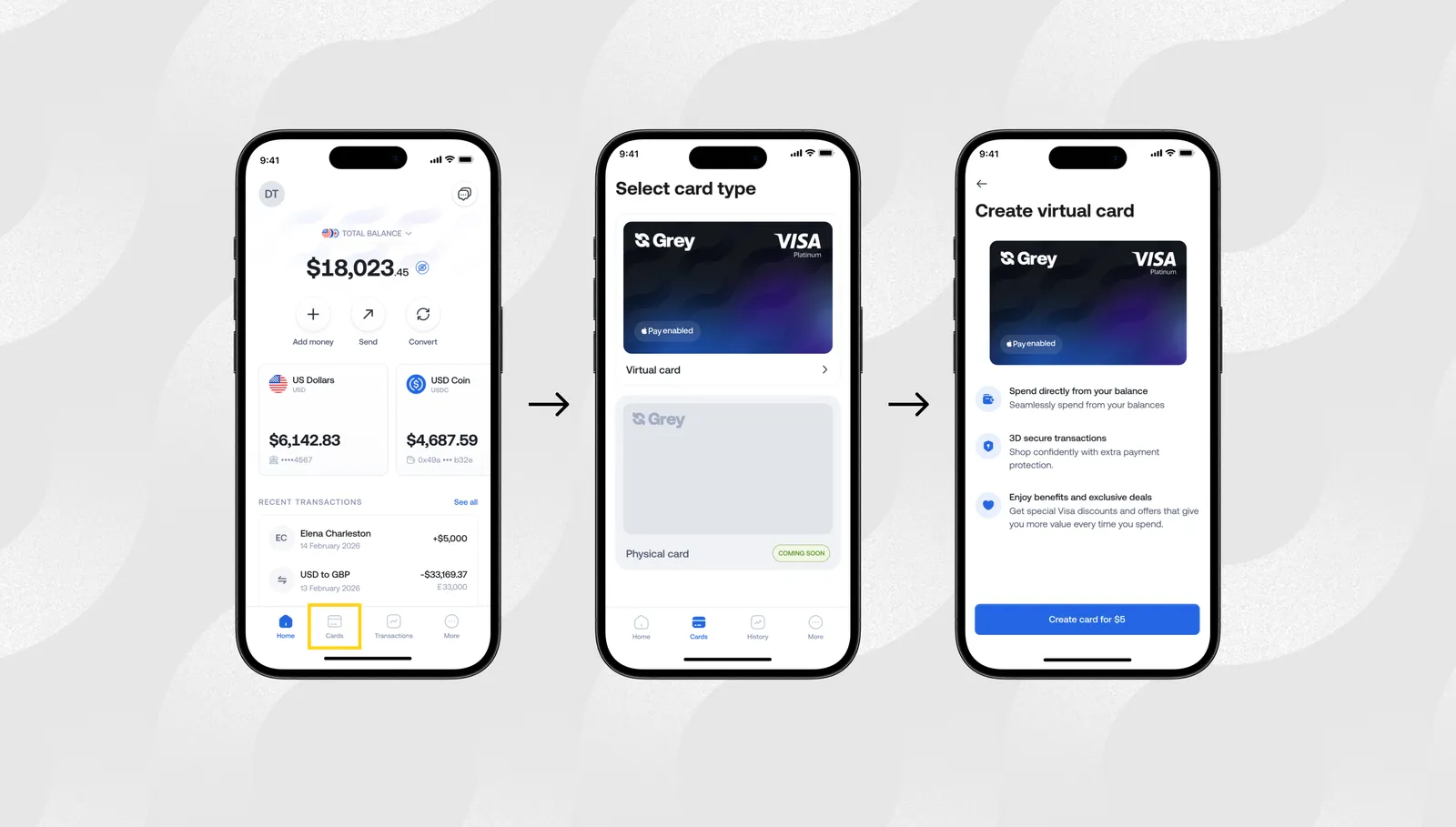
Fees: No monthly fee. Deposit fee 0.8% (min $2, max $10). Conversion 1% capped at $6. Virtual card creation is $5.

Best for: UK-based freelancers and remote workers receiving regular USD payments from US clients, and anyone who wants to receive details in EUR and GBP from a single account.

Open a Grey USD account

2. Wise

Wise provides UK residents with a USD account that includes both an ACH routing number and a wire routing number, as well as a linked Wise debit card. ACH receipt is free, while receiving a domestic wire costs $6.11. Wise generally uses the mid-market rate for all conversions and charges a transparent flat fee, typically 0.43 to 0.57% of the converted amount, making it one of the cheapest options for USD-to-GBP conversion.

Key features:

  • Real US ACH routing number and wire routing number
  • ACH receipt: free
  • Domestic wire receipt: $6.11
  • Wise debit card available (Wise card; check availability for UK accounts)
  • Conversion: mid-market rate plus flat fee from ~0.43%
  • 40+ currencies supported
  • No monthly fee

Fees: No monthly fee. ACH receipt is free. Wire receipt costs $6.11. Conversion charge is about 0.43% of the amount.

Best for: UK freelancers and remote workers who want the lowest USD-to-GBP conversion margin and a wide multi-currency account. Strong choice alongside Grey for those who need to convert regularly.

3. Revolut

Revolut’s situation for UK personal account holders requires an important clarification. Revolut UK personal accounts receive USD via SWIFT rather than via US local ACH, so US clients cannot pay via standard domestic ACH transfers. This matters for freelancers: US clients paying via SWIFT face a $25 to $50 outbound wire fee, and the transfer takes three to five business days rather than one to two.

Revolut does provide USD accounts with local US ACH details to US-registered users and to UK business users with US incorporation. For most UK personal account holders, however, Revolut’s USD account is a currency holding and SWIFT receipt account rather than a true ACH-capable US account.

Standard plan holders can exchange up to £1,000 per month for free, with a 1% fair usage fee above that.

Key features:

  • USD currency account available for UK personal and business customers
  • UK personal accounts: USD received via SWIFT only, not ACH
  • Revolut debit card for spending in USD
  • Standard plan: no monthly fee, £1,000/month free exchange
  • Premium plan: £7.99/month, £3,000/month free exchange
  • Exchange above monthly limit: 0.5% fair usage fee

Fees: Standard plan: free. Premium: £7.99/month. Exchange: free within monthly limit, 0.5% above.

Best for: UK residents who want to hold and spend USD with a card and are comfortable receiving via SWIFT, or businesses with US incorporation needing ACH capability.

4. Barclays foreign currency account

Barclays offers USD accounts to both personal and business customers through its foreign currency account product. For personal customers, USD accounts are available through Barclays International Banking, which requires holding a minimum of £100,000 with Barclays to qualify. This makes it inaccessible for most freelancers and early-stage remote workers.

For business customers, Barclays offers a foreign currency account without the minimum balance requirement that applies to existing business banking customers. No debit card is issued with the foreign currency account, which limits its use for day-to-day USD spending.

Key features:

  • USD account available for existing Barclays customers
  • Personal: minimum £100,000 balance requirement for Barclays International Banking
  • Business: available to existing business customers without the same minimum requirements
  • No debit card issued with a foreign currency account
  • SWIFT wire receipt
  • Transfers between Barclays accounts are fee-free

Fees: Varies by account type.

Best for: Existing Barclays business customers who need a USD holding account for international trade and already have a Barclays business relationship.

5. HSBC Expat (Jersey)

HSBC Expat, based in Jersey, provides multi-currency accounts including USD to UK residents and expatriates. It supports around 19 currencies, including GBP, USD, and EUR, and is designed for internationally mobile clients who want a relationship-based banking experience with a dedicated account manager.

The trade-off is the high minimum balance requirement and fees. HSBC Expat expects significant deposits or salary thresholds and applies an exchange adjustment of approximately 2.75% to non-sterling card payments and withdrawals. This makes regular USD-to-GBP conversion expensive compared to fintech alternatives.

Key features:

  • 19 currencies supported, including USD
  • Relationship manager and personal service
  • Fee-free global transfers under qualifying conditions
  • ~2.75% exchange adjustment on non-sterling card use
  • High balance or salary thresholds to qualify
  • SWIFT wire receipt

Fees: Monthly fees apply depending on the account package; minimum balance thresholds are required. Verify current requirements directly with HSBC Expat.

Best for: High-net-worth UK residents and expats who want a relationship banking experience, personal service, and multi-currency management alongside significant GBP and USD balances.

6. Citibank UK

Citibank UK offers international banking services to UK residents, including USD accounts. Citibank’s global network is one of its primary advantages: clients can access accounts and services across Citibank’s international presence, which is useful for those who live and work across multiple countries.

Citibank UK’s private banking and international personal banking services are positioned for higher-income clients. Eligibility requirements and minimum balance thresholds apply, making it less accessible for freelancers or remote workers with moderate USD income.

Key features:

  • USD accounts available alongside GBP and other currencies
  • Global account access via Citibank’s international network
  • Relationship banking with dedicated support
  • SWIFT wire receipt for international payments
  • Minimum balance and income thresholds apply

Fees: Varies by product tier. Contact Citibank UK directly for current eligibility and fee requirements.

Best for: UK residents with significant international banking needs who want a global bank with multi-country account access and are comfortable meeting higher eligibility thresholds.

7. Starling Business (USD add-on)

Starling Bank offers a USD account add-on for existing Starling business account holders. The USD account costs £5 per month and allows business customers to hold and receive USD alongside their GBP business account. Note that at the time of research, Starling has paused issuing new USD accounts: check directly with Starling before applying, as availability may have changed.

The Starling USD account does not provide local US ACH routing numbers. USD receipts come in via SWIFT rather than ACH. It is also only available to businesses with a registered UK entity, not to sole traders.

Key features:

  • USD account add-on for Starling Business account holders
  • £5 per month
  • Requires an existing GBP Starling Business account
  • Available to registered UK businesses, not sole traders
  • SWIFT wire receipt, not ACH
  • No local US routing number

Fees: £5 per month for the USD add-on, plus the Starling Business account fee.

Best for: UK-registered businesses that already use Starling for their GBP operations and want a simple USD holding account alongside it, with ACH not required.

Which USD account is best for UK freelancers?

For UK freelancers earning USD from US clients, the single most important feature is a real US ACH routing number and account number. Without one, your US client must send an international wire, which costs them $25 to $50 and takes three to five business days. With one, they pay via ACH as if you were a US-based vendor: free, fast, and fully automated in their accounting system.

Of the seven options above, only Grey and Wise provide UK residents with full US ACH routing details as personal account holders. Revolut UK personal accounts receive USD via SWIFT only, which defeats the purpose for freelancers billing US clients. Traditional banks (Barclays, HSBC, Citibank) have minimum balance requirements or relationship thresholds that make them inaccessible for most freelancers.

Between Grey and Wise, both are strong options. Grey's fee caps (deposit capped at $10, conversion capped at $6) make it more cost-effective for larger individual payments. Wise’s lower percentage conversion fee (0.43%) makes it cheaper for smaller, more frequent conversions. Many UK freelancers use both.

For a fuller picture of how to get paid by clients based in the US, see our guide on how UK freelancers get paid by overseas clients. If you also work with European clients, our piece on how to open a euro account in the UK covers the EUR equivalent of this comparison.

Open a Grey account and get a real USD account number and routing number in minutes, from anywhere in the UK.

Frequently asked questions

Can I get a real US bank account as a UK resident?

Yes. Grey and Wise both provide UK residents with real US account numbers and ACH routing numbers without requiring a US address, US entity, or a visit to the US. These accounts function like domestic US bank accounts for payment purposes: US clients and employers can pay via ACH as a standard domestic transfer. Traditional US banks generally require a US address and in-person opening, which makes them inaccessible to most UK residents.

Which is better, Wise or Grey, for a USD account?

Both provide real ACH routing details and are the strongest options for UK freelancers receiving USD from US clients. Wise charges a conversion fee of approximately 0.43% of the amount, with no cap, using the mid-market rate. Grey charges a 0.8% deposit fee, capped at $10, and a 1% conversion fee, capped at $6. For smaller, frequent conversions, Wise’s lower percentage rate is cheaper. For larger individual payments above approximately $1,000, Grey's fee caps mean a lower total cost. Many users hold both accounts.

Does Revolut give UK residents a real USD account number?

Revolut UK personal accounts offer USD accounts, but inbound USD payments for UK account holders are received via SWIFT rather than via local US ACH. This means US clients cannot pay via standard ACH transfer and must send an international wire instead. Revolut Business accounts with US incorporation can access local US ACH details. For UK personal account holders who need ACH capability, Grey or Wise are the more suitable options.

Can I receive ACH payments into a UK USD account?

Yes, if the account provides real US ACH routing details. Grey and Wise both provide UK residents with ACH routing numbers and US account numbers that accept domestic ACH payments from US senders. Revolut UK personal accounts, Barclays foreign currency accounts, and Starling USD business accounts do not provide local US ACH details and receive USD only via SWIFT.

What is the cheapest USD account for UK residents?

For no monthly fee and low conversion costs, Grey and Wise are both strong options. Grey has no monthly fee, charges 0.8% on deposits capped at $10, and 1% on conversion capped at $6. Wise has no monthly fee, charges nothing to receive via ACH, and converts at approximately 0.43% above the mid-market rate. Revolut’s Standard plan is free but has monthly exchange limits of £1,000 before a 0.5% fair usage fee applies, and UK personal accounts don’t provide ACH details. Traditional bank USD accounts (Barclays, HSBC, Citibank) tend to have higher fees and minimum balance requirements.

BBVA Mexico SWIFT code: How to find and use it

•

•

2 min read

Trying to send money to a BBVA account in Mexico without the SWIFT code is like trying to mail a package without an address. A SWIFT code is a short combination of letters and numbers that informs the international banking system exactly where your money needs to go.

The SWIFT code for BBVA Mexico (BBVA Bancomer) is BCMRMXMM, used to route international transfers to a BBVA account in Mexico. You need it, along with the recipient's account number or CLABE, to send money from abroad. Always confirm the code with the recipient or BBVA before sending.

BBVA Mexico SWIFT/BIC code: BCMRMXMM

If you are sending money internationally to a BBVA Mexico account, whether to pay a supplier, support family, or settle a personal transaction, you need this code to route the transfer correctly. This guide explains what the code means, how to find it yourself, and what else you need to complete a successful transfer.

What is the BBVA Mexico SWIFT code?

BBVA Mexico is Mexico’s largest financial institution, established in 1932 with its headquarters in Mexico City.  It is the most profitable overseas subsidiary of BBVA Spain, its parent institution.

BBVA Mexico's SWIFT/BIC code is BCMRMXMM
You may also see it written as BCMRMXMMXXX, where the XXX identifies the head office. Both formats can be accepted for international transfers.

A SWIFT code is also called a Bank Identifier Code (BIC). It refers to an 8 to 11-character code that identifies a bank when sending money internationally. It tells the sending bank where to send the transfer. It may also specify the branch and location to route the transfer to.

BBVA Mexico was formerly known as BBVA Bancomer until 2019, when the bank rebranded. However, the SWIFT code BCMRMXMM remained unchanged after the rebranding. Only the bank’s name changed from BBVA Bancomer to BBVA Mexico, S.A. So, if you see older documentation referencing "BBVA Bancomer," the SWIFT code shown there is still valid.

BBVA Mexico's code (BCMRMXMM) is different from BBVA Spain’s code (BBVAESMMXXX). These are separate entities, even though BBVA Spain is the parent institution. If you're sending money to a Mexican BBVA account, use the Mexico-specific code. If you use BBVA Spain’s code instead, your money will be routed to the wrong account and may not be recoverable.

How to find the SWIFT code yourself

If you're unsure which SWIFT code to use, you can check:

  • Through online or mobile banking: If you or the recipient has access to BBVA Mexico's online banking or mobile app, the SWIFT/BIC code is usually listed under account details or international transfer information.
  • On a bank statement: Some BBVA Mexico statements include the SWIFT code with your account information.
  • On BBVA's official website: Check BBVA Mexico's website to confirm the current SWIFT codes for international transfers.
  • Directly from the recipient: If you're sending money to someone with a BBVA Mexico account, ask them to confirm their banking details before making the transfer. Some branches may have an extended SWIFT code.

SWIFT code vs CLABE: what is the difference?

If you're sending money to a BBVA Mexico account, you may need both the SWIFT code and CLABE, but they serve different purposes.

  • The SWIFT code (BCMRMXMM) identifies the bank in Mexico that receives the payment and how to route the transfer from the sending bank to BBVA Mexico. Think of it as the bank's international address that tells the international banking network where to send the money.
  • The CLABE (Clave Bancaria Estandarizada) is an 18-digit standardised interbank code unique to Mexico. It is required for all electronic transfers within the Mexican banking system. It identifies the specific account within BBVA Mexico where the funds should be paid. Think of it as identifying the specific mailbox at the address the SWIFT code points you to.

For an international wire transfer to a BBVA Mexico account, you generally need both the SWIFT code to route the transfer to the correct bank and the CLABE to ensure the funds land in the correct account.

How to use it to send or receive money

Once you have the recipient's details, sending the money is straightforward.

Step 1: Confirm all the recipient's details

You need the recipient's full legal name, their CLABE (18 digits), the SWIFT code (BCMRMXMM, or the specific branch code if provided), and the bank's name and address.

Step 2: Initiate the transfer through your bank

Log in to your bank's online platform or visit a branch. Select international wire transfer and enter the recipient's details exactly as provided, including the SWIFT code and CLABE.

Step 3: Enter the details

Enter the recipient's information exactly as provided. Double-check the SWIFT code and CLABE before continuing.

Step 4: Confirm the transfer currency

Depending on your bank and the recipient's account, you may be able to send USD or MXN. Confirm which currency the recipient expects before sending.

Step 5: Review fees before confirming

Your sending bank will typically charge an outgoing wire fee, commonly $25 to $50 for international wires from US banks. Correspondent banks in the routing chain may deduct additional fees before the funds reach BBVA Mexico.

Step 6: Track the transfer

Save the transfer reference your bank provides so you can track the payment if there is a delay. Many banks now support SWIFT GPI tracking, which shows where the transfer is in the routing chain and its estimated arrival time.

International wire transfers to Mexico typically take 1 to 5 business days, depending on the sending bank, the currency, and whether the transfer passes through one or more correspondent banks.

If you regularly send to Mexico, opening a multi-currency account can simplify the process rather than using international wires each time. You can hold money in your preferred currency before converting it for a transfer to Mexico.

A cheaper way to send money to Mexico

Traditional SWIFT transfers can come with several fees. Your bank may charge an outgoing wire fee, correspondent banks may deduct undisclosed fees along the way, and the exchange rate may include an additional 1-5% markup. These costs can reduce the amount your recipient receives.

Sending money from the US to Mexico with Grey offers a transparent alternative. You can see the exchange rate and transfer fee before confirming, so you know how much your recipient will receive in Mexican pesos. This is particularly useful for regular transfers, whether supporting family, paying a Mexican contractor, or handling personal finances across the two countries.

If you're planning a trip and sending money, our guide on the best time to visit Mexico covers weather, seasons, and money tips.

Send money to Mexico with Grey and avoid international wire fees, correspondent bank charges, and hidden exchange-rate markups.

Frequently asked questions about BBVA Mexico’s SWIFT code

What is BBVA Mexico's SWIFT code?

BBVA Mexico's SWIFT/BIC code is BCMRMXMM, sometimes shown as BCMRMXMMXXX. This code identifies BBVA Mexico's head office for international wire transfers. Some branches may have extended codes (such as BCMRMXMMPYM), so it's always best to confirm with the recipient before sending.

Is BBVA the same as Bancomer?

Yes, in the sense that BBVA Mexico was formerly branded as BBVA Bancomer before a 2019 rebrand. It is the same institution with the same SWIFT code (BCMRMXMM) as before the name change. If you have older documentation or contacts referencing "Bancomer," the bank details remain accurate; only the name has updated.

Do I need the CLABE too?

Yes. The SWIFT code alone routes your transfer to BBVA Mexico as an institution, but it does not identify a specific account. The 18-digit CLABE (Clave Bancaria Estandarizada) identifies the exact account the funds should be credited to. Both are required for a complete and accurate international transfer to a Mexican bank account.

How long does a transfer take?

International wire transfers to BBVA Mexico typically take one to five business days, depending on your sending bank, the currency used, and whether the transfer passes through one or more correspondent banks in transit. Transfers sent through platforms using local payment networks rather than the full SWIFT correspondent chain can settle faster.

What are the fees?

Standard SWIFT wires from US banks typically incur an outgoing fee of $25 to $50, plus potential correspondent bank deductions of $15 to $30 in transit, and a currency conversion margin if the transfer is converted to Mexican pesos, generally 1% to 5% above the mid-market rate. These costs are not always fully disclosed before you send.

Is there a cheaper alternative to a SWIFT wire?

Yes. Platforms like Grey process international transfers with fees and exchange rates disclosed before you confirm. They often route payments through local payment networks rather than the traditional SWIFT correspondent-bank chain. This avoids the additional costs of a standard bank wire. This is often a cheaper alternative to a SWIFT wire, especially for regular transfers to Mexico.

What is the currency of Switzerland? Franc symbol and code

•

•

2 min read

If you have always thought the currency used in Switzerland is the euro, it is unlikely you are the only wrong person in the room. Switzerland's currency is the Swiss franc (currency code CHF), issued by the Swiss National Bank and divided into 100 centimes. Switzerland and Liechtenstein both use it. Despite being surrounded by the eurozone, Switzerland has kept the franc, which is widely seen as a stable, safe-haven currency.

So, if you are planning a trip or business dealings involving the country, it is good that you didn't assume Switzerland uses the euro because of its central European location. This guide explains what the Swiss franc actually is, why Switzerland has kept its own currency, and what to know before spending or sending money there.

What is the currency of Switzerland?

Switzerland's official currency is the Swiss franc, issued and managed by the Swiss National Bank (SNB), Switzerland's independent central bank

Switzerland is not a member of the European Union and has deliberately chosen to remain outside the eurozone. The country has maintained its independent currency and monetary policy despite being geographically surrounded by eurozone countries (France, Germany, Italy, and Austria).

This is closely tied to Switzerland’s political and economic independence. It has maintained long-standing neutrality and is not a member of the EU. The people and policymakers made this choice.

The Swiss franc symbol and code

The ISO 4217 currency code for the Swiss franc is CHF. The code combines “CH”, from the Latin name for Switzerland, Confoederatio Helvetica, with “F” for franc. It is Latin for the Swiss Confederation. This is why the code uses "CH" rather than an abbreviation of "Switzerland" in English.

You may also see the franc written as Fr. or SFr. in Switzerland, depending on the region and language. Switzerland has four official languages: German, French, Italian, and Romansh.

  • German regions (Standarddeutsch): Use Fr. or CHF. The currency is called Franken, and the smaller unit (cents) is called Rappen (Rp.).
  • French regions (Romandie): Use Fr. or CHF. The currency is called franc, and the cents are called centime (ct.).
  • Italian regions (Svizzera italiana): Use Fr. or CHF. The currency is called franco, and the cents are called centesimo (ct.).
  • Romansh regions (Rumantschia): Use Fr. or CHF. The currency is called franc, and the cents are called rap (rp.).

The Swiss franc is subdivided into 100 centimes (in French-speaking areas) or Rappen (in German-speaking areas), similar to how a dollar is divided into cents.

Depending on the local language, the placement of the code changes on official documents:

  • German and English: The code or symbol usually goes before the amount (e.g., CHF 100 or Fr. 100).
  • French and Italian: The code or symbol usually goes after the amount, separated by a space (e.g., 100 CHF or 100 fr.

How prices are typically written:

  • CHF 100 - the standard international format)
  • Fr. 100 or 100 - (common within Switzerland)
  • SFr. 100 - (an older but still recognised format)
Denomination Type
10 francs Banknote
20 francs Banknote
50 francs Banknote
100 francs Banknote
200 francs Banknote
1000 francs Banknote (one of the highest-value circulating banknotes in the world)
5 francs Coin
2 francs Coin
1 franc Coin
50 centimes/rappen Coin

Notably, the 1000-franc note is one of the highest-denomination banknotes in active circulation globally.

Which countries use the Swiss franc?

Switzerland is not the only country using the Swiss franc. Liechtenstein, a small country between Switzerland and Austria, also officially uses the Swiss franc as its currency. These countries have a formal currency union agreement and have close economic and monetary ties.

A smaller and less widely known place where CHF is also used is Campione d'Italia. It is a small Italian municipality near Lugano, entirely surrounded by Swiss territory. Because of its isolation from the rest of Italy, it has been more practical to work with the Swiss economy. As a result, the Swiss franc circulates widely there alongside the euro.

You may also find Swiss francs accepted informally in some border areas near Switzerland, but the euro or local currency is normally used there.

Since German is one of Switzerland's official languages alongside French, Italian, and Romansh, see our guide to countries that speak German,

Franc to US dollar and euro

The Swiss franc is known as a safe-haven currency. This means investors worldwide often buy it during economic or political uncertainty because Switzerland is seen as relatively stable with low inflation rates and a remarkable banking system.

Its value against currencies such as the US dollar and euro changes regularly based on interest rates, economic conditions and investor confidence. If you need to know how much one US dollar is worth in Swiss francs, check a live exchange rate before travelling or sending money. Exchange rates can change throughout the day.

Getting and spending francs as a traveller

Switzerland is one of the more expensive countries to visit, so it is worth planning your spending before travelling.

You can generally pay with your card across Switzerland, including at restaurants, shops, hotels, and even many smaller establishments. Contactless payment is very common and widely expected.

You can use cash for smaller transactions at local markets and in some rural areas. Although CHF 1,000 exists, it's best to stick to smaller denominations. However, Switzerland remains one of Europe's more card-friendly countries.

ATMs are widely available and generally accept Visa and Mastercard. As with most international travel, your home bank may apply a foreign transaction fee, and the ATM operator may add its own fee on top.

Switzerland is expensive. A simple meal at a casual restaurant can cost significantly more than the equivalent in most neighbouring European countries. Set a realistic daily budget before you travel to avoid unpleasant surprises and find ways to maximise your funds.

One way to reduce costs is to minimise additional fees on every transaction. Spending abroad with a Grey card linked to a foreign currency balance avoids the layered foreign transaction fees many home bank cards charge.

Read our guide on avoiding foreign transaction fees before your trip.

If you need to send money from the US to Switzerland, or vice versa, whether for business or personal reasons, sending money internationally with Grey shows the exchange rate and fee before you confirm.

Planning a trip to Switzerland? Spend abroad with a Grey card using your foreign currency balance and avoid unnecessary conversion costs.

Frequently asked questions about the currency of Switzerland

Does Switzerland use the euro?

No. Switzerland uses the Swiss franc and is not part of the eurozone. Some businesses in tourist areas may accept euros, but paying in Swiss francs is usually more straightforward.

What is the symbol for the Swiss franc?

There is no single symbol used everywhere. You will commonly see CHF, Fr., or SFr. when prices are shown in Swiss francs.

Which countries use the franc?

Switzerland and Liechtenstein officially use the Swiss franc. It is also widely used in Campione d'Italia, an Italian town surrounded by Switzerland.

How much is 1 dollar in francs?

The dollar-to-franc exchange rate changes continuously with market conditions. So, check a live currency converter or financial data source before travelling or transferring money.

Is Switzerland expensive?

Yes, Switzerland is one of the most expensive countries in the world. It is generally more expensive than many other European countries, particularly for accommodation, food and transport. Set a higher daily budget when planning a trip.

Can I use my card in Switzerland?

Yes. Visa and Mastercard are widely accepted, including at most hotels, restaurants and shops. Contactless payments are also common. Keeping some cash is still useful for smaller purchases.

What is CHAPS? UK same-day payments

•

•

2 min read

You might not come across CHAPS in everyday banking, but when you need to move a large amount of money quickly, it can become an important option. It’s particularly common when buying a property, making a large business payment, or completing another high-value transaction.

CHAPS is a UK payment system for sending large sums on the same working day with no upper limit. People often use it for high-value payments, such as buying a house. Banks usually charge a fee and have a same-day cut-off time. Unlike Faster Payments, CHAPS has no transaction cap.

If you have been told to make a "CHAPS payment" by your solicitor, bank, or estate agent, particularly when completing a property purchase, this guide explains exactly what CHAPS is, how it works, and when it makes sense to use it rather than the alternatives.

What does CHAPS stand for?

CHAPS stands for the Clearing House Automated Payment System. It is a UK sterling payment system operated in partnership between the Bank of England and the banking industry.

CHAPS is for large-volume, time-sensitive payments that must be completed on the same working day. Unlike some other UK payment systems, CHAPS transfers are settled individually and in real time, rather than in batches. This difference makes them faster and better suited to large, urgent transactions.

CHAPS has operated since 1984 and remains the standard payment method for the largest and most time-sensitive payments in the UK, including property purchases.

How a CHAPS transfer works

A CHAPS transfer moves money from one UK bank account to another on the same working day, as long as you send it before your bank's cut-off time.

Here are some details on how a CHAPS transfer works.

  • Same-day settlement: CHAPS payments are processed one by one in real time throughout the working day. This differs from other payment systems, where transactions are batched and processed in bulk. Once processed, CHAPS transfers are final and cannot be recalled. This is one reason CHAPS is trusted for high-value, legally significant transactions like property completions.
  • No upper limit: Unlike Faster Payments, CHAPS has no maximum transaction value. This makes it suited for very large payments.
  • Cut-off times: Each bank has its own cut-off time for same-day CHAPS processing, typically in the early to mid-afternoon (commonly around 2 pm to 3.30 pm, though this varies by bank). Payments submitted after the cut-off are processed the next working day.
  • Details needed: To send a CHAPS payment, you need the recipient's account number and sort code, their full name, the amount, and typically a reference. Your bank processes the payment through the CHAPS system on your behalf; you do not interact with CHAPS directly.

When to use CHAPS

CHAPS is best suited when the payment needs to arrive the same day, and this certainty is more important than the transaction cost. Here are some scenarios you should consider CHAPS:

  • Property purchases: CHAPS is commonly used in the UK for property purchases because the funds need to arrive on the agreed completion date.
  • Large, time-critical business payments: It can be useful for large invoices, business acquisitions, or other payments where a delay could lead to additional charges or contract issues.
  • Payments above the Faster Payments limit. If the amount you need to send exceeds your bank's Faster Payments limit (commonly £250,000 to £1 million, depending on the bank), CHAPS is often the only same-day option available.
  • When completion matters: Because CHAPS payments are settled individually and are generally irrevocable once processed, they provide greater certainty for high-value transactions.

CHAPS vs Faster Payments vs BACS

Feature CHAPS Faster Payments BACS
Speed Same working day
before the cut-off
Usually within seconds to hours Usually 3 working days
Maximum amount No upper limit Usually £250,000 to £1 million, depending on the bank No formal cap, but not designed for very large payments
Typical cost £20 to £35 per transaction Usually free Usually free
Best for Property purchases and large, urgent payments Everyday personal and business transfers Payroll, direct debits and recurring payments
How payments are processed Individual, real-time, irrevocable Almost instant,
processed in batches
Processed in batches over three days
Availability Business hours
subject to cut-off
Generally 24/7 Business days only

For most everyday payments, Faster Payments is the better option because it is usually free, fast and available 24/7. CHAPS is mainly useful when you need to send a large amount that exceeds your bank's Faster Payments limit or when same-day settlement is essential, such as for a property purchase.

Costs and alternatives for sending abroad

Most UK banks charge £20 to £35 per outgoing CHAPS payment, although some banks with premium account tiers may offer free CHAPS transfer. Receiving a CHAPS payment is typically free to receive.

The higher fee compared to Faster Payments and BACS is due to the transfer speed, individual payment processing, and the certainty that the transaction will be completed on the same day.

CHAPS works only for domestic transactions within the UK. It is important to understand that CHAPS operates exclusively within the UK sterling payment system. It cannot be used to send money internationally. If you need to move money abroad, whether in GBP or another currency, you need a different payment system entirely. People typically use an international wire transfer via SWIFT or an international payment platform.

International wire transfers entail initiating a SWIFT payment through a traditional bank. The sender is charged about $15-$40 (or the GBP equivalent). This payment passes through one or more banks, which deduct correspondent fees before the funds reach the recipient’s bank. The receiving banks convert the money to their local currency at an exchange rate with 1-4% hidden margins.

Using a cross-border payment service gives you access to a foreign currency account. This means international transactions are processed like domestic payments. This avoids the fees associated with international wire transfers, and the recipient receives the funds in the original currency. This means they can convert whenever they like.

Sending money internationally with Grey shows the exchange rate and fee before you confirm. So, you are not worried about hidden fees and high exchange-rate margins that a standard international bank wire often entails. Whether you are sending money from the UK for business, family support, or property purchases abroad, most payments are completed within minutes or a couple of days.

For anyone managing money across multiple currencies, holding and sending multiple currencies from one account avoids the need to convert repeatedly through your main bank at an undisclosed rate.

Send money abroad from the UK with Grey with transparent fees and exchange rates shown before you confirm.

Frequently asked questions about CHAPS

What is a CHAPS payment?

A CHAPS payment is a UK same-day sterling transfer processed through the Clearing House Automated Payment System, operated in partnership between the Bank of England and UK banks. It is designed for high-value, time-critical payments, most commonly used for residential property completions, with no upper limit on the amount that can be sent.

How long does CHAPS take?

A CHAPS payment settles on the same working day, provided it is submitted before your bank's specific cut-off time, typically in the early to mid-afternoon. Payments submitted after the cut-off are processed on the next working day. Once settled, CHAPS payments are final and cannot be recalled.

Is there a limit?

No, CHAPS has no maximum transaction value, which distinguishes it from Faster Payments (typically capped between £250,000 and £1 million depending on the bank). This makes CHAPS the standard choice for very large payments, including most property completions and significant business transactions.

How much does CHAPS cost?

Most UK banks charge between £20 and £35 for an outgoing CHAPS payment, though some premium account tiers waive this fee. Receiving a CHAPS payment is typically free. The fee reflects the same-day, individually settled nature of the transaction compared to free alternatives like Faster Payments.

CHAPS vs Faster Payments: which should I use?

For most everyday transfers, particularly below £250,000, Faster Payments is faster in practice (often settling within minutes), free, and available around the clock. CHAPS becomes the appropriate choice specifically when the amount exceeds your Faster Payments limit, or when an absolute guaranteed same-day settlement is a legal or contractual requirement, as is standard for UK property completions.

Can I use CHAPS to send money abroad?

No. CHAPS is a UK domestic sterling payment system and cannot be used for international transfers. To send money abroad, whether in GBP or another currency, you need a separate international payment method, such as a SWIFT wire transfer through your bank, or a specialist international transfer provider like Grey, which shows the exchange rate and fee before you confirm.

Zelle limits: How much you can send per day

•

•

2 min read

Zelle, Venmo, Cash App, and PayPal are leading peer-to-peer payment platforms that let you send and receive money using a phone number, email, or username. But unlike most other P2P services that have digital wallets, Zelle integrates with your bank app for bank-to-bank transfers.

One other clear distinction between Zelle and other platforms is the transfer limit. Zelle send limits are set by your bank, not by Zelle, so they vary widely. Many large banks allow a few thousand dollars per day and a higher monthly cap, while some smaller banks set lower limits. There is no receiving limit, and you usually can't request higher limits.

If you tried to send a larger payment through Zelle and hit an unexpected limit, the explanation lies with your bank, not Zelle. This guide explains how Zelle limits work, what typical ranges look like across major banks, and your options for sending larger amounts or transferring money internationally.

What is the Zelle limit?

Zelle does not have one standard sending limit for everyone. Zelle limits are set individually by each participating bank or credit union. Your Zelle limit depends entirely on the bank your Zelle is connected to. So two people using Zelle can have significantly different limits just because they use different banks.

Your bank sets the Zelle limit, which is capped at a specific daily or monthly amount based on its risk management policies, your account history, and sometimes your account tier.

There is also generally no receiving limit. Most banks allow you to receive money through Zelle without a specific cap, although very large payments may be reviewed for fraud or compliance reasons.

Daily and monthly limits

Zelle limits typically apply on both a daily and rolling monthly (often described as 30-day) basis, and the specific figures vary meaningfully between institutions.

The typical daily limits across major US banks generally range from $500 to $10,000. However, some banks may set higher or lower rates. Some accounts, particularly newer accounts or those without extensive transaction history, may start with lower limits that can increase over time as the bank builds confidence in how the user transacts.

Some banks tie their Zelle limit to a fixed number of transactions. For example, Bank of America allows $500 over 10 transactions for new Zelle users. Business accounts often have higher Zelle limits than personal accounts.

Daily limits usually reset at midnight, though the exact time may vary by bank. Some banks also use a rolling 30-day limit instead of a calendar-month limit. This means your available limit depends on your total sent in the previous 30 days, not the calendar month.

Always verify your current limits in your banking app or by contacting your bank, as each bank sets and can change these limits at any time.

Zelle limits by bank

The table below gives a general idea of the limits you may see at some major US banks for personal accounts. Business accounts usually have higher limits. These figures can vary by the account tier and are subject to change. Always confirm your current limit in your bank’s app or by contacting your bank’s support.

Bank Typical daily limit Typical monthly limit
Bank of America $500 to $3,500/10 transactions Up to $20,000/60 transactions
Chase $500 to $15,000 Unstipulated
Wells Fargo Up to $3,500 Up to $20,000
Citibank $500 - $5,000 $2,500 - $20,000
PNC Bank Varies Varies
Credit unions (general) Depends, Often lower, $500 to $2,500 Often lower, $2,000 to $10,000

Credit unions like Truity have a weekly transaction limit (Up to $3000)

Verify with your specific bank before relying on these figures. Zelle limits change over time and can also vary within the same bank based on your account type, tenure, and transaction history. The most reliable way to confirm your current limit is directly within your bank's Zelle interface, in your banking app, or by contacting customer service.

Can you increase your Zelle limit?

You may be able to increase your Zelle limit, depending on your bank’s specifications.

Your bank may increase your limit automatically after you use your account regularly and build a transaction history. Some banks also allow customers to request a higher limit through customer service or their banking app.

However, some account types have fixed limits that cannot be increased. Moving to a different account tier may increase your limit, but it depends on the bank.

You cannot ask Zelle to increase your limit because Zelle doesn't set individual sending limits. Any increase has to come from your bank or credit union.

Sending larger amounts of money abroad

If you need to send more than your Zelle limit, you may need to wait for your limit to reset or split the payment across multiple days. This can be uncomfortable, especially when you need to complete the payment immediately. You might need to find an alternative payment option for a large domestic transfer.

Zelle doesn’t support international transfers. Zelle only works between eligible US bank accounts, so you cannot use it to send money to an international bank account. If you need to send money internationally, you'll need an alternative.

For larger domestic transfers within the US, you can use a same-day ACH or FedNow transfer through your bank. Your bank's ACH and FedNow limits are often higher than Zelle limits. You can also initiate a wire transfer for very large or time-critical amounts if you think the transfer fee is worth it.

For international transfers, you need a cross-border payment service to send money outside the US or to a non-US bank account. Traditional international wire transfers can be expensive because the sending bank, intermediary banks, and receiving bank may each charge fees. The receiving bank may also apply a markup when converting the money into the recipient’s currency. These transfers can also take up to five business days to arrive.

Sending money abroad from the US can be cheaper with cross-border payment solutions like Grey, which offers USD, EUR, and GBP accounts. The cost of sending money internationally with Grey depends on the currency. However, Grey displays the exchange rate and fees before you confirm the transaction. USD, EUR, and GBP transfers using local rails cost 0.5% (minimum: 2 USD/GBP/EUR). The general maximum limit for international money withdrawals and sending is $10,000 equivalent per day and $30,000 equivalent per month.

If you spend internationally, shop from global markets, or pay for subscriptions in foreign currencies, a Grey card linked to your foreign currency balance lets you pay directly in the currency you hold, helping you avoid repeated foreign transaction fees.

Need to send money abroad? Send money abroad with Grey, with access to USD, EUR, and GBP accounts and higher transfer limits.

Frequently asked questions about Zelle limits

What is the Zelle daily limit?

There is no single Zelle daily limit that applies universally; each participating bank sets its own limit, generally ranging from $500 to $10,000 depending on the institution, account type, and account history. Check your current limit directly within your bank's Zelle interface, since it varies significantly by bank.

Does Zelle have a receiving limit?

Most banks do not impose a specific limit on how much you can receive via Zelle, unlike sending, which is capped daily and monthly. However, unusually large incoming amounts may occasionally trigger a review for compliance or fraud prevention purposes, even without a formal receiving cap.

Can I increase my limit?

Sometimes. Some banks automatically raise limits over time as you build a longer, consistent transaction history on the account. Others let you request an increase directly, though approval depends on the bank's policies and isn't guaranteed. Some entry-level account types have hard limits that cannot be increased regardless of request.

Why do limits differ by bank?

Zelle does not set user-level sending limits; each participating bank sets its own limits based on its risk management policies, fraud-prevention approach, and account-tier structure. This is why the same person can experience very different limits simply by having accounts at different banks.

Can I use Zelle internationally?

No. Zelle is a US domestic payment service that only works between enrolled US bank accounts. It cannot be used to send money to international bank accounts or to recipients outside the United States, regardless of the amount. For international transfers, you need a dedicated cross-border payment service.

How do I send more than the limit?

Options include waiting for your daily limit to reset (typically at midnight) and splitting the payment across multiple days, using a same-day ACH transfer through your bank if the amount fits within your bank's ACH limits, or using a wire transfer for very large or time-critical domestic amounts. For international transfers, Zelle isn't an option regardless of the amount; you'll need a dedicated international transfer service like Grey instead.

7 places to find high paying remote jobs in Kenya

•

•

2 min read

Not long ago, landing a well-paying job often came with battling Nairobi traffic, navigating endless office corridors, or waiting months for interview calls that never came. But times have changed. Today, a growing number of Kenyan professionals are closing deals with British startups, designing for European brands, or writing for global media from their living rooms in Kisumu, Nakuru, or Mombasa.

Whether you’re a software developer, designer, marketer, writer, or virtual assistant, there’s a global gig with your name on it.

In this guide, we’ll explain the best platforms to find remote jobs in Kenya — and how to get paid like a global professional.

1. Upwork – Build a strong freelance profile and land global gigs

Best for: Freelancers with experience and a professional portfolio.

Type of work: Writing, design, tech, admin, and more.

Why it stands out:

Upwork is one of the most well-established freelance platforms globally. Kenyan professionals can create detailed profiles, showcase past projects, and apply for jobs posted by clients worldwide. The platform also offers long-term contract opportunities and supports hourly or fixed-price arrangements.

Pro tip: Take time to polish your profile and earn a few early reviews; it helps you land better-paying gigs.

Also read: High-paying remote jobs you can land without experience

2. Remote OK – Find remote tech and digital roles with ease

Best for: Tech professionals and digital creatives.

Type of work: Programming, marketing, product management.

Why it stands out:

Remote OK curates remote job listings from multiple sources, with a focus on digital roles. Many listings are full-time positions with international companies, making it ideal if you’re looking for career growth rather than one-off gigs.

Pro tip: Filter listings by time zone or region to find jobs that suit your schedule.

3. FlexJobs – Access premium, vetted remote job listings

Best for: Serious remote job seekers looking for vetted listings.

Type of work: Customer service, project management, writing, education.

Why it stands out:

FlexJobs is a subscription-based platform, but it’s well worth the cost for its thoroughly vetted listings. The platform avoids scams and focuses on high-quality remote opportunities, including part-time and freelance options.

Pro tip: Opt in for the trial period first to explore available options in your niche.

4. LinkedIn – Use your network to discover remote opportunities

Best for: Networking and full-time remote roles.

Type of work: Across all industries.

Why it stands out:

LinkedIn isn’t just for networking; it’s also a great source for remote job listings. Use the search filter to find “remote” or “work-from-home” opportunities and follow companies hiring globally. Many employers now list remote roles explicitly in their job postings.

Pro tip: Turn on the “Open to work” feature and update your profile with remote-specific keywords.

5. Toptal – Join a global network of elite freelancers

Best for: Highly experienced professionals in tech and finance.

Type of work: Software development, finance, product design.

Why it stands out:

Toptal connects top freelancers with top-tier clients. While it’s not for beginners — their vetting process is intense — it offers access to high-paying, long-term projects. If you’ve got a strong background in tech or business, this is a solid platform to consider.

Pro tip: Prepare thoroughly for the application process; Toptal only accepts a small percentage of applicants.

6. We Work Remotely – Discover top-tier remote jobs across industries

Best for: Skilled professionals looking for global companies.

Type of work: Development, customer support, design, sales.

Why it stands out:

This platform focuses exclusively on remote work and attracts companies like GitHub, Shopify, and Basecamp. It’s great for tech-savvy Kenyans looking to land jobs with companies that embrace remote work culture.

Pro tip: Check the site regularly. Listings go fast!

You may also like: The best digital nomad jobs to earn from anywhere in Kenya

7. Fiverr – Sell your skills through microservices and creative gigs

Best for: Creative professionals and microservices.

Type of work: Graphic design, writing, video editing, translation.

Why it stands out:

Fiverr allows you to set up “gigs” offering services starting from $5 (hence the name). It’s perfect for creatives and those looking to turn a specific skill into a source of income. Fiverr is especially useful if you want to build multiple income streams.

Pro tip: Use SEO-friendly gig descriptions and eye-catching visuals to attract buyers.

Bonus: Use Facebook and WhatsApp local communities for quick wins

Best for: Quick gigs and community support.

Why it stands out:

While not a traditional job platform, there are several local groups dedicated to freelance and remote job opportunities in Kenya. These communities often share job leads, advice, and reviews about clients and platforms.

Pro tip: Always verify opportunities and avoid groups that regularly post vague or unverified jobs.

Get paid like a global professional

One of the biggest challenges Kenyan freelancers face is how to get paid. Job boards and platforms often pay in GBP or EUR — but local banks may charge high fees or offer poor exchange rates.

With Grey, you can access global banking designed for freelancers, remote workers and digital nomads.

  • Open free EUR or GBP accounts
  • Receive payments directly from platforms like Upwork, Fiverr, or clients abroad.
  • Convert your earnings to Kenyan Shillings at competitive rates.
  • Withdraw to your local bank or Mobile Money account with ease.
  • Get a globally accepted virtual dollar Mastercard to pay for tools and subscriptions anywhere.

Your remote career starts now

Remote work has created a level playing field for talented professionals across the globe. With the right skills, platforms, and tools like Grey, Kenyan freelancers can tap into international markets and earn like global pros.

Open a free Grey account and get paid for your remote work, wherever you are in Kenya.

‍

Arrow (up)

Back to top