<script type="application/ld+json" data-schema-version="grey-blog-v4"> [{"@context":"https://schema.org","@type":"BlogPosting","@id":"https://grey.co/blog/free-virtual-dollar-cards#article","headline":"Free virtual dollar cards: Best options and what they cost","description":"Compare free virtual dollar cards, what \"free\" really means, the hidden costs to check, and how to get one that works online. Compare.","inLanguage":"en","url":"https://grey.co/blog/free-virtual-dollar-cards","mainEntityOfPage":{"@id":"https://grey.co/blog/free-virtual-dollar-cards#webpage"},"datePublished":"2026-09-04T19:17:31.668Z","dateModified":"2026-09-04T19:17:45.115Z","author":{"@type":"Person","@id":"https://grey.co/authors/tunde-aladeloba#person","name":"Tunde Aladeloba","url":"https://grey.co/authors/tunde-aladeloba","jobTitle":"Content Writer","sameAs":["https://ng.linkedin.com/in/aladeloba-babatunde-b1114b100"]},"publisher":{"@type":"Organization","@id":"https://grey.co/#organization","name":"Grey","url":"https://grey.co","logo":{"@type":"ImageObject","url":"https://cdn.prod.website-files.com/6360022338a81bd6fdbb1145/6564ae1077a67e39d3c491a6_Grey%20Logo%20Lockup%20Black.svg"}},"image":{"@type":"ImageObject","@id":"https://grey.co/blog/free-virtual-dollar-cards#primaryimage","url":"https://cdn.prod.website-files.com/636a85d290ee58e70c17e1c0/6a9b19366c7dc6458d20a4e2_Free%20Virtual%20Dollar%20Cards%20Best%20Options%20and%20What%20They%20Cost-compressed.jpg","contentUrl":"https://cdn.prod.website-files.com/636a85d290ee58e70c17e1c0/6a9b19366c7dc6458d20a4e2_Free%20Virtual%20Dollar%20Cards%20Best%20Options%20and%20What%20They%20Cost-compressed.jpg","width":1200,"height":675}},{"@context":"https://schema.org","@type":"WebPage","@id":"https://grey.co/blog/free-virtual-dollar-cards#webpage","url":"https://grey.co/blog/free-virtual-dollar-cards","name":"Free Virtual Dollar Cards: Best Options and Costs","description":"Compare free virtual dollar cards, what \"free\" really means, the hidden costs to check, and how to get one that works online. Compare.","inLanguage":"en","primaryImageOfPage":{"@id":"https://grey.co/blog/free-virtual-dollar-cards#primaryimage"},"breadcrumb":{"@id":"https://grey.co/blog/free-virtual-dollar-cards#breadcrumb"}},{"@context":"https://schema.org","@type":"BreadcrumbList","@id":"https://grey.co/blog/free-virtual-dollar-cards#breadcrumb","itemListElement":[{"@type":"ListItem","position":1,"name":"Home","item":"https://grey.co/"},{"@type":"ListItem","position":2,"name":"Blog","item":"https://grey.co/blog"},{"@type":"ListItem","position":3,"name":"Free virtual dollar cards: Best options and what they cost","item":"https://grey.co/blog/free-virtual-dollar-cards"}]},{"@context":"https://schema.org","@type":"FAQPage","@id":"https://grey.co/blog/free-virtual-dollar-cards#faq","mainEntity":[{"@type":"Question","name":"Which virtual dollar card is free?","acceptedAnswer":{"@type":"Answer","text":"Some providers offer virtual cards with no issuance fee, including Revolut Standard, N26 Standard, Zil US and Openbank for eligible users. However, a free card does not always mean free transactions. Depending on the provider, you may still pay for funding, currency conversion, declined payments or inactivity, so it’s worth comparing the total cost before choosing one."}},{"@type":"Question","name":"Are free virtual cards safe?","acceptedAnswer":{"@type":"Answer","text":"Yes, virtual cards can be a secure way to make online payments. Look for providers that use security features such as 3D Secure, transaction alerts and card controls. Disposable card details can also provide additional protection by making the original card information harder to reuse."}},{"@type":"Question","name":"Can I use one for subscriptions?","acceptedAnswer":{"@type":"Answer","text":"Yes, virtual cards can be used for subscriptions such as Netflix, Spotify and other digital services where the card network is accepted. However, keep enough money available for recurring payments. If a payment fails because of insufficient funds, some providers may charge a decline fee."}},{"@type":"Question","name":"How do I fund it?","acceptedAnswer":{"@type":"Answer","text":"Link your local bank account or debit card where the provider supports it. Complete your identity verification, transfer money into your wallet and convert your local currency into USD if needed. The exact funding options and conversion fees depend on the provider you choose."}},{"@type":"Question","name":"Can I use a virtual dollar card abroad?","acceptedAnswer":{"@type":"Answer","text":"Yes, you can use a virtual dollar card abroad for eligible online payments where Visa or Mastercard is accepted. However, check the provider's foreign exchange fees before spending in another currency. A card that supports multiple currencies can also make international spending easier to manage."}}]},{"@context":"https://schema.org","@type":"DefinedTermSet","@id":"https://grey.co/blog/free-virtual-dollar-cards#terms","name":"Free virtual dollar cards: Best options and what they cost glossary","hasDefinedTerm":[{"@type":"DefinedTerm","name":"free virtual dollar card","description":"A free virtual dollar card is a digital payment card that gives you USD card details without charging a fee to issue it. You do not receive a plastic card in the post. Instead, the card number, expiry date and security code are provided digitally and can be used for eligible online payments, particularly with merchants that charge in US dollars.","inDefinedTermSet":{"@id":"https://grey.co/blog/free-virtual-dollar-cards#terms"}}]},{"@context":"https://schema.org","@type":"ItemList","@id":"https://grey.co/blog/free-virtual-dollar-cards#list","name":"Free virtual dollar cards: Best options and what they cost","numberOfItems":5,"itemListElement":[{"@type":"ListItem","position":1,"name":"Revolut (Standard)"},{"@type":"ListItem","position":2,"name":"N26 (Standard)"},{"@type":"ListItem","position":3,"name":"Zil US"},{"@type":"ListItem","position":4,"name":"Skrill"},{"@type":"ListItem","position":5,"name":"Openbank"}]}] </script>

Free virtual dollar cards: Best options and what they cost

Tunde Aladeloba

TABLE OF CONTENT

SHARE THIS POST

Paying for a US subscription, online service, or digital product can be frustrating when your local card comes with extra charges or simply does not work. A free virtual dollar card can give you a USD card number for online payments without the cost of ordering a physical card, making it useful for everything from software subscriptions to international shopping.

A free virtual dollar card is a USD card number issued at no cost, used for online payments and subscriptions billed in dollars. "Free" usually means no issuance fee, but check for funding, FX, and maintenance costs. The best options combine no issuance fee with fair rates and reliable acceptance.

In this guide, we look at the best free virtual dollar card options, what each one costs to use and the fees worth checking before you sign up. The aim is to help you find a card that is genuinely affordable, not simply free at first glance.

What is a free virtual dollar card?

A free virtual dollar card is a digital payment card that gives you USD card details without charging a fee to issue it. You do not receive a plastic card in the post. Instead, the card number, expiry date and security code are provided digitally and can be used for eligible online payments, particularly with merchants that charge in US dollars.

When a provider says a virtual dollar card is free, it usually refers to the cost of creating or issuing the card. It does not necessarily mean that every transaction is free. You may still pay a fee when adding money, converting another currency into USD, making certain transactions or keeping the account active. Some providers may also apply spending limits or other conditions to their free cards.

So, when comparing a free virtual dollar card, look beyond the word “free”. Check the full fee structure, how you fund the card, the exchange rate you receive and where the card can be used before choosing an option.

Free virtual dollar cards worth considering

Looking for a free virtual dollar card? Here’s how popular options compare on upfront cost, monthly fees, currencies and everyday use.

Provider Card issuance fee Monthly maintenance Supported currencies Best use case
Revolut (Standard) Free $0 30+ fiat currencies Online shopping and managing digital spending
N26 (Standard) Free $0 EUR and other supported currencies European and international travel
Zil US Free $0 USD US invoicing and dollar subscriptions
Skrill Free for the first card $0 if active Major global currencies Digital commerce and online payments
Openbank Free $0 EUR Everyday spending and online payments

‍

What does a free virtual dollar card really cost?

A free virtual dollar card may cost nothing to create, but that does not always mean you can use it without paying anything.

Funding fees: Adding local fiat currency to your wallet may incur a processing fee, with some providers charging between 1% and 3% of the deposit amount. This means the amount available to spend can be lower than the amount you initially add.

Foreign exchange (FX) margins: When you convert money into USD, the provider may add a markup to the exchange rate rather than using the interbank rate. These markups can range from 1.5% to 4.5% on some cross-border transactions, increasing the cost of international spending.

Decline fees: An empty card can become costly if a subscription repeatedly attempts to charge it. Some providers may charge around $0.10 to $0.50 for each declined payment, particularly when recurring payments continue after your balance runs out.

Inactivity fees: Leaving a card unused for six to 12 months may trigger an inactivity charge with some providers, potentially costing $1 to $3 per month while the card remains dormant. Check the terms if you plan to keep the card as a backup.

How to choose and get a virtual dollar card

Choosing a virtual dollar card is about more than finding one that costs nothing to create. Look at what happens when a payment fails, how much the provider charges when you spend in another currency and whether the card runs on a widely accepted network such as Visa or Mastercard.

A provider with zero decline fees and low FX markups can save you more over time than a card advertised as “free”. It is also worth checking whether the card can be added to Apple Pay or Google Wallet, especially if you want to use it across different online and contactless payment services.

How to sign up and fund

  • Download the provider's official app.
  • Create an account and complete the required KYC verification with a government-issued ID.
  • Link your local debit card or bank account to fund your wallet.
  • Convert your funds into USD where supported.
  • Once funded, your virtual card is ready to use.

Grey is an ideal option for eligible users who need a virtual dollar card linked to their multi-currency account. You can hold supported currencies, create multiple virtual cards and use your available balance for eligible online payments.

Frequently asked questions about free virtual dollar cards

Which virtual dollar card is free?

Some providers offer virtual cards with no issuance fee, including Revolut Standard, N26 Standard, Zil US and Openbank for eligible users. However, a free card does not always mean free transactions. Depending on the provider, you may still pay for funding, currency conversion, declined payments or inactivity, so it’s worth comparing the total cost before choosing one.

Are free virtual cards safe?

Yes, virtual cards can be a secure way to make online payments. Look for providers that use security features such as 3D Secure, transaction alerts and card controls. Disposable card details can also provide additional protection by making the original card information harder to reuse.

Can I use one for subscriptions?

Yes, virtual cards can be used for subscriptions such as Netflix, Spotify and other digital services where the card network is accepted. However, keep enough money available for recurring payments. If a payment fails because of insufficient funds, some providers may charge a decline fee.

How do I fund it?

Link your local bank account or debit card where the provider supports it. Complete your identity verification, transfer money into your wallet and convert your local currency into USD if needed. The exact funding options and conversion fees depend on the provider you choose.

Can I use a virtual dollar card abroad?

Yes, you can use a virtual dollar card abroad for eligible online payments where Visa or Mastercard is accepted. However, check the provider's foreign exchange fees before spending in another currency. A card that supports multiple currencies can also make international spending easier to manage.

Last updated:

October 2, 2026

Open a free Grey account to get startedJoin 1 million digital nomads
IF YOU ENJOYED THIS, CHECK THESE OUT

How to convert an eSIM back to a physical SIM

•

•

2 min read

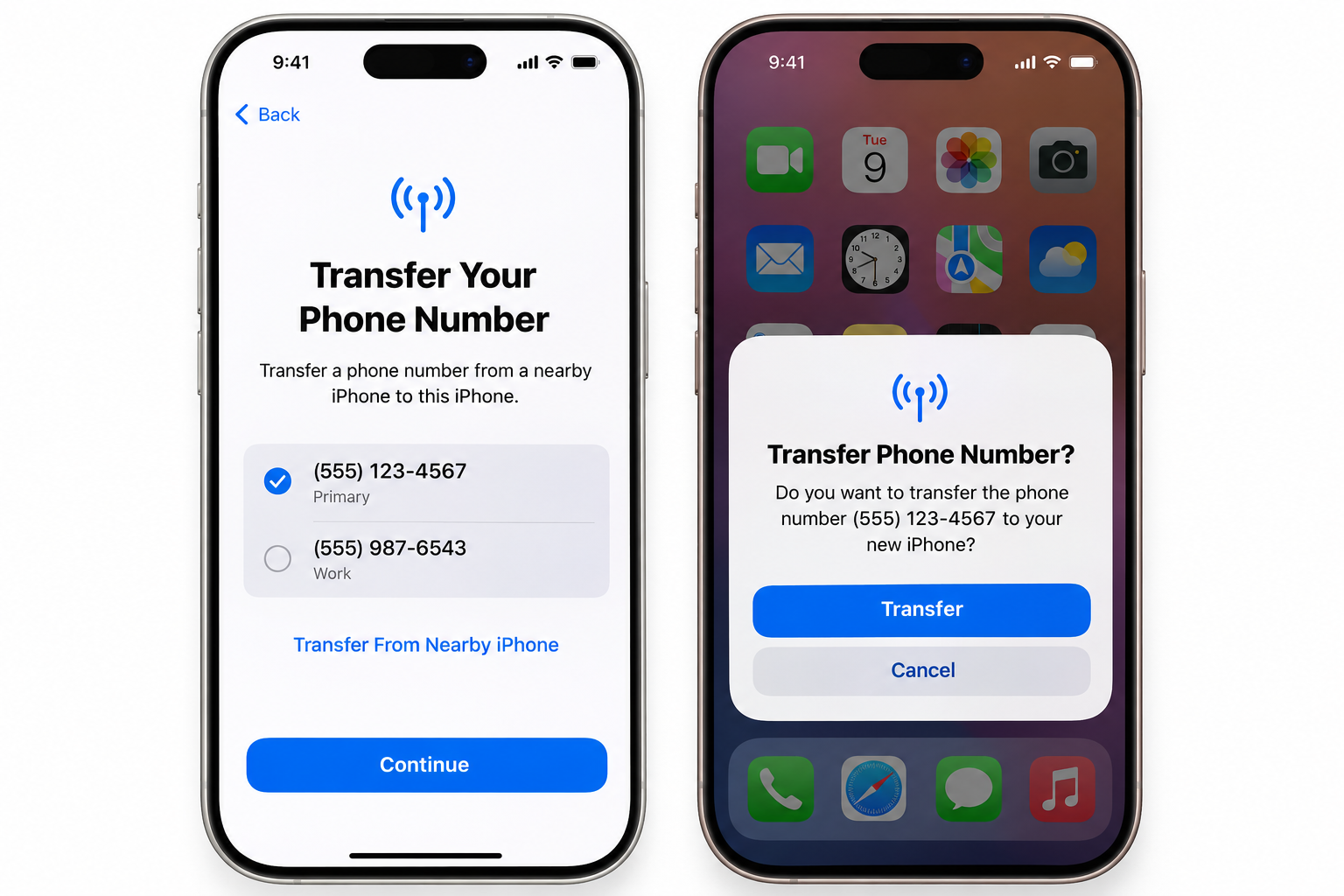
A phone upgrade is usually a straightforward process, until the SIM becomes part of the equation. Let's say the new device supports an eSIM, the number transfers successfully, and everything seems ready to go, then comes a trip abroad, a change of network or an older mobile phone that only accepts a physical SIM card.

At that point, the question is simple: what happens to the eSIM?

Unlike changing a setting on the phone, moving from an eSIM back to a physical SIM is handled by the mobile carrier. The network provider needs to deactivate the existing eSIM and issue a replacement physical SIM linked to the same mobile number. The exact process can vary, but most carriers allow the request through an app, over the phone or at a physical store.

The switch itself is usually straightforward once the replacement SIM arrives. After activation, the physical SIM takes over the number and the old eSIM profile can be removed from the device.

Also read: How to activate an eSIM: Step-by-step guide

Can you convert an eSIM back to a physical SIM?

Yes, you can switch from an eSIM to a physical SIM through your mobile carrier. However, your phone cannot make this conversion on its own. You'll need to contact your carrier to request a physical SIM card and transfer your number to it.

An eSIM is a digital SIM profile stored securely within the phone, while a physical SIM is a separate chip that needs to be issued and activated by the mobile network. Your carrier controls the connection between your mobile number, account and SIM credentials, so the switch has to happen on the network provider’s side.

The process is usually treated as a SIM swap or SIM replacement. Your carrier deactivates the existing eSIM and issues a physical SIM linked to the same number and account. Depending on the provider, the request may be available through its app, customer service team or a physical store.

Once the replacement SIM is activated, the old eSIM can be removed from your device.

How to request a physical SIM from your carrier

Requesting a physical SIM from your mobile carrier usually involves choosing a replacement method, completing an identity check, receiving the SIM and activating it on your existing number.

  1. Request a physical SIM through the carrier app
  2. Open your carrier’s app and look for options such as “Replace SIM”, “SIM swap” or “Get a physical SIM”. Follow the instructions and provide any information requested to verify your account.
  3. Call your carrier’s customer service team
  4. Contact your network provider and explain that you want to switch from an eSIM to a physical SIM while keeping your existing number. The representative will explain the available replacement options and the delivery process.
  5. Visit a carrier store
  6. A nearby carrier shop can process the SIM replacement in person. Bring your phone and a valid form of identification, as the staff may need to confirm that you are the account holder.
  7. Complete the identity checks
  8. Expect security checks before the physical SIM is issued or activated. Depending on the carrier, these may include account details, passwords, identification documents or other verification questions.
  9. Activate the replacement SIM
  10. Once the physical SIM arrives or is issued, follow your carrier’s activation instructions. Your number can then move from the eSIM to the physical SIM.

How to delete the eSIM profile once the physical SIM works

Before removing your eSIM, make sure the replacement physical SIM is fully activated and working. Test it by making a call, sending a text message and checking that mobile data works. Deleting the eSIM too early could leave your phone without cellular service if the physical SIM has not yet been activated.

On iPhone

The wording can vary slightly depending on your iOS version and region:

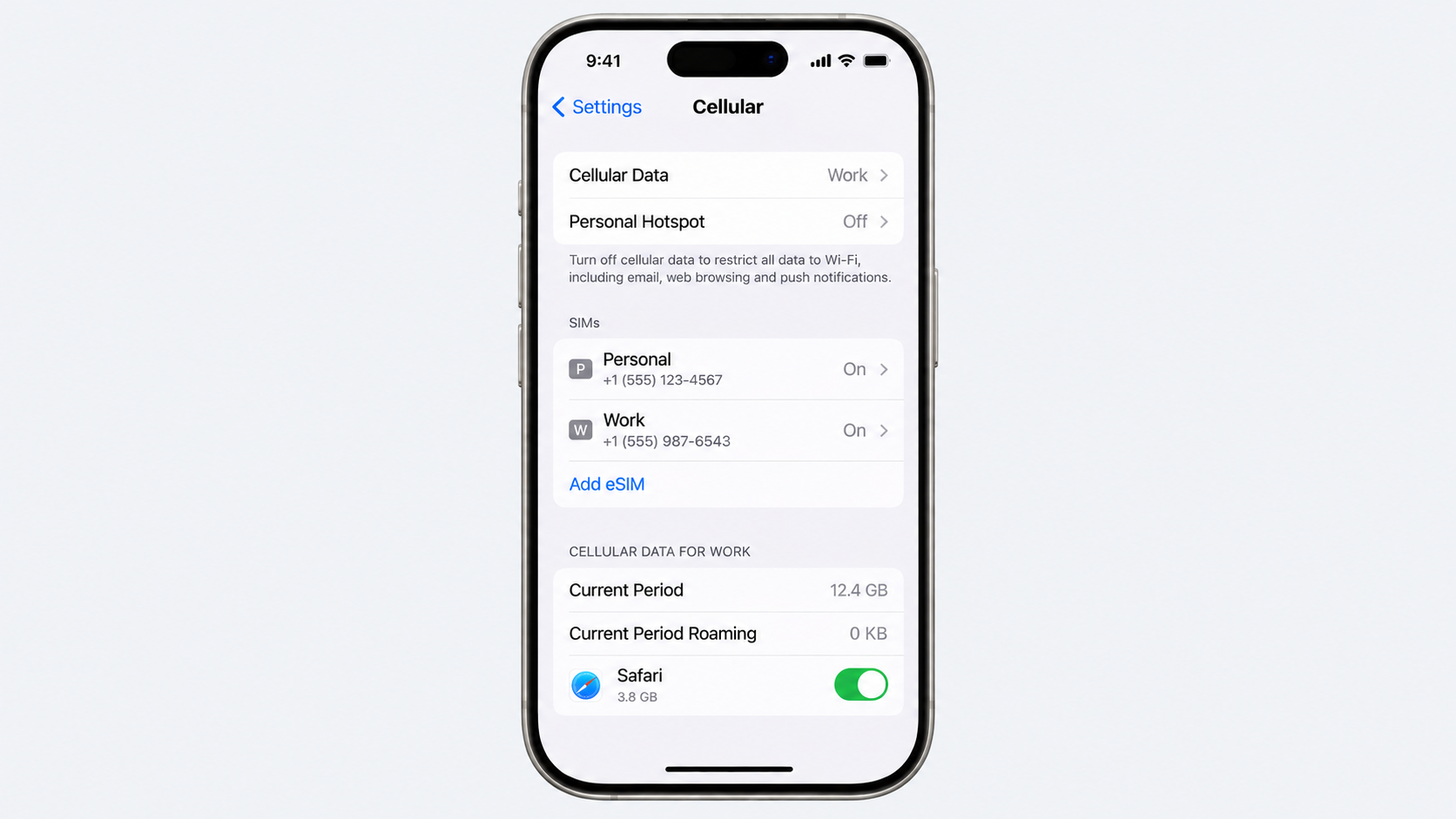
  1. Open Settings.
  2. Tap Cellular or Mobile Service.
  3. Select the eSIM or cellular plan you want to remove.
  4. Tap "Delete eSIM" or "Remove Cellular Plan".
  5. Confirm the removal when prompted.

On Android

Android settings differ between manufacturers, so the menu names may not be identical on every device:

  1. Open Settings.
  2. Tap Connections or Network & Internet.
  3. Select SIM manager, SIMs or a similar option.
  4. Choose the eSIM profile you want to remove.
  5. Tap Remove, Delete SIM or the equivalent option, then confirm.

Afterwards, check that your physical SIM remains selected for calls, texts and mobile data. If anything stops working, contact your carrier before making further changes.

Also read: eSIM vs Google Fit: Which is better for international travel?

When is a physical SIM the better choice?

Choosing between an eSIM vs a physical SIM often comes down to how, where and why a phone is being used. An eSIM is convenient for digital setup and travel, but a physical SIM still has practical advantages that can make it the better option in certain situations.

Selling or handing down a handset is one example. A physical SIM can simply be removed before the phone changes hands, leaving the new owner to insert their own SIM. This makes the separation between your mobile number and the device straightforward, particularly when the phone is being resold.

Travel is another consideration. Some dual-SIM phones make it easy to combine a physical SIM with an eSIM, allowing a local travel SIM to work alongside a primary number. This can be useful when moving between countries while keeping the main line active.

In some regions, eSIM support remains limited across carriers, plans and devices. A physical SIM can therefore provide greater flexibility when travelling or changing networks. For anyone comparing eSIM vs physical SIM, checking carrier and country compatibility before switching can prevent unexpected connectivity problems.

What it costs and how long it takes

The quickest way to replace your eSIM with a physical SIM is usually a store visit, but ordering online can be more convenient. Here is what you can generally expect from major US carriers:

  • Verizon: A store visit can mean instant activation, usually at $0 at corporate locations, although independent retailers may charge $10–$25. Online orders typically arrive within 3–5 business days, with no standard hardware fee.
  • AT&T: Visiting a corporate store can provide same-day activation, often for $0, although a $5 fee may apply. Online orders generally take 3–5 business days and carry a $5 replacement fee.
  • T-Mobile: In-store replacement can be activated immediately, but costs can reach $60, including the $25 SIM fee and potential $35 assisted-support fee. Ordering online usually takes 2–5 business days and costs $25, without the assisted-support charge.
  • Mint Mobile: There are no dedicated Mint stores, so replacement is handled online. Delivery generally takes 2–5 business days, with replacement costs typically ranging from 0–10.

While ordering your replacement SIM, you may also need to make a payment. Grey can make that easier, with a multi-currency account and virtual card for international payments. If you're travelling, you can also buy an eSIM through Grey and manage your connectivity and spending from the same platform.

Frequently asked questions about converting an eSIM back to a physical SIM

1. Will I lose my number?

No, your phone number remains exactly the same. Your carrier simply transfers your existing mobile account and number from the eSIM to the new physical SIM. Once the replacement card is activated, you can continue making calls, sending messages and using mobile data as before.

2. How much does a replacement cost?

Replacement fees vary by carrier, location and how you request the SIM. In many cases, you may pay between $0 and $25. Some major networks provide replacement cards free at corporate stores, while budget or prepaid providers may charge a separate SIM replacement fee.

3. Can I keep both active?

No, you generally cannot keep both SIM profiles active on the same number. Your carrier links the number to the newly activated SIM during the replacement process, which deactivates the previous eSIM. Your phone may support two SIMs, but they cannot share one number simultaneously.

4. How long does it take?

An in-store SIM replacement can often be completed within 10 to 15 minutes once your identity and account details have been verified. Ordering a physical SIM online usually takes longer, with standard delivery commonly taking around 3 to 5 business days, depending on your carrier.

5. Should I delete the eSIM early?

No. Keep your eSIM active until the replacement physical SIM has arrived, been activated and successfully connects to the network. Deleting the eSIM too early can leave your phone without mobile service, particularly when the new SIM has not yet been activated.

6. Do all carriers issue physical SIMs?

Many carriers still offer physical SIM cards, but availability depends on the network and your device. Before requesting one, check that your handset has a physical SIM tray. Some newer phones, including certain regional models, are designed as eSIM-only devices and cannot accept a physical card.

What is the currency of Poland? Zloty symbol and code

•

•

2 min read

Unlike many other European countries that have the euro as the official currency, Poland has it's own currency: the Polish złoty.  Its international currency code is PLN but prices are commonly written with the zł symbol. If you are planning a trip, working with Polish clients or simply checking prices online, recognising these two forms makes Polish money much easier to navigate.

The złoty is issued by the National Bank of Poland and is divided into 100 grosz. You will see the currency everywhere, from supermarket price tags to restaurant menus, often written as an amount followed by “zł”. The name itself has an interesting history too: złoty means “golden” in Polish.

Poland is part of the European Union but has retained the złoty instead of adopting the euro. That means visitors arriving from eurozone countries still need to think about exchange rates when paying in Poland.

What is the currency of Poland?

The currency of Poland is the Polish złoty, usually written as zł and identified internationally by the code PLN. If a shop displays a price such as 50 zł, it means 50 Polish złoty. One złoty is divided into 100 grosz, so you may see prices expressed with both złoty and grosz when paying for everyday items.

The currency is issued by the National Bank of Poland, which is responsible for Poland’s monetary policy and the country’s banknotes and coins. The word “złoty” comes from the Polish word for “golden”, reflecting the historical connection between the currency’s name and gold.

So why does Poland use the złoty when it is part of the European Union? EU membership does not automatically mean adopting the euro. Poland has committed to adopting the euro eventually, but it has not yet met all the conditions required to join the eurozone. For now, the złoty remains Poland’s official currency, meaning travellers from other european countries still need to consider the PLN exchange rate when spending there.

Also read: How to send and receive euros in the UK

How to recognise the złoty code and symbol

The Polish złoty can appear in a few forms, which can be confusing when you first encounter Polish prices. The most familiar symbol is zł, while PLN is the three-letter ISO currency code used by banks, exchange services and financial platforms. So, if you see PLN 200 on a currency converter, that is simply 200 Polish złoty.

On menus, shop signs and price labels, you will more often see zł after the amount. A coffee priced at 15 zł means you will pay 15 złoty. Smaller amounts can include grosz, the currency’s subunit, with 1 złoty divided into 100 grosz. You might therefore see a price such as 12,50 zł, which means 12 złoty and 50 grosz.

For travellers, recognising the difference between zł and PLN is useful because you will encounter both depending on where you are paying or checking prices. A card terminal may process a transaction in PLN, while a supermarket shelf simply displays “29,99 zł”. They refer to the same currency; the difference is mainly how the price is presented. When comparing costs with your home currency, use the current PLN exchange rate rather than assuming the number on the price tag tells you what something costs in euros, pounds or dollars.

What Polish banknotes and coins look like

Polish banknotes are designed around the country’s royal history, with each denomination featuring a different Polish monarch. Their colours, sizes and portraits make them easier to tell apart once you have handled a few.

10 zł: Green and brown, featuring Mieszko I. The reverse shows a silver denarius and other references to Poland’s early history.

__wf_reserved_inherit

20 zł: Mainly pink and purple, featuring Bolesław I the Brave, with a denarius and Romanesque architecture on the reverse.

__wf_reserved_inherit

50 zł: Blue, featuring Casimir III the Great. Its reverse includes the royal seal and architectural details.

__wf_reserved_inherit

100 zł: Green and brown, featuring Władysław II Jagiełło, with the White Eagle and Teutonic Knights’ symbolism on the reverse.

__wf_reserved_inherit

200 zł: Brown and yellow, featuring Sigismund I the Old, with the Wawel Castle chapel and royal eagle.

__wf_reserved_inherit

500 zł: Dark blue and brown, featuring John III Sobieski, with the Wilanów Palace and eagle on the reverse.

__wf_reserved_inherit

Coins range from tiny 1 grosz pieces to larger 5 zł coins, with 1 zł, 2 zł and 5 zł being the main złoty denominations.

What’s the exchange value of the złoty vs the USD and EUR?

The Polish złoty does not remain at a single value against the dollar or the euro. Its exchange rate moves as investors react to Poland’s interest rates, inflation, economic data and wider conditions in European markets. For anyone travelling, studying, working or sending money to Poland, even a small movement can change how much your money is worth.

As a guide, recent mid-market exchange rates put US$1 at around PLN 3.69 and €1 at around PLN 4.31, although live rates move throughout the day. The złoty’s performance can also shift against the dollar and euro at different speeds, so it is worth checking the specific pair you need rather than relying on an old conversion.

For the latest rate, you can check live market data on Trading Economics or use a live currency converter before exchanging money. If you are converting a larger amount, also check the provider’s spread and fees, as the rate shown on a market tracker is not necessarily the rate you will receive.

Also read: How to avoid foreign transaction fees when travelling abroad

How to get and spend złoty when travelling in Poland

Arriving in Poland with euros, dollars, or another currency leaves you with a simple decision: exchange some cash, withdraw złoty from an ATM or pay by card. Card payments are widely accepted in cities, hotels, restaurants, shops and transport services, but keeping some cash is useful for smaller purchases or places that do not accept cards.

ATMs make it easy to get złoty when needed, although the exchange rate and fees can differ between providers. If an ATM or card terminal asks whether you want to pay in PLN or convert the transaction into your home currency, choosing PLN is generally the safer option because it lets your card provider handle the conversion rather than accepting the machine’s own rate.

A Grey Card can also be useful for everyday spending in Poland. After downloading the Grey app and setting up your account, you can manage your money digitally and use the card wherever Visa is accepted, subject to applicable restrictions. This gives you another option for paying abroad without carrying large amounts of cash.

Frequently asked questions

Does Poland use the euro?

No. Poland uses the Polish złoty (PLN) for everyday transactions rather than the euro. Although Poland is an EU member, it has not joined the eurozone. Prices in shops, restaurants, hotels and other businesses are therefore normally displayed in złoty, so travellers using euros should check the current PLN exchange rate.

What is the symbol for the złoty?

The Polish złoty is written with the symbol zł, while PLN is its international three-letter currency code. You may see a price such as 50 zł in a Polish shop, while banks and currency platforms may display the same amount as 50 PLN. Both refer to the Polish złoty.

How much is 1 US dollar in Polish złoty?

At the current mid-market rate, US$1 is worth about 3.72 Polish złoty (PLN). Rates move throughout the day, so the amount you actually receive when exchanging money may be slightly different depending on the provider and any fees or markup they apply.

What is grosz?

Grosz is the smaller unit of the Polish złoty. One złoty contains 100 grosz, much like one dollar contains 100 cents. You will see grosz when paying for inexpensive items or when prices include smaller amounts. For example, 12.50 zł means 12 złoty and 50 grosz.

Can I use my card in Poland?

Yes. Visa and Mastercard are widely accepted across Poland, particularly in supermarkets, hotels, restaurants, shops and other businesses in towns and cities. A Grey Card can also be used for eligible purchases wherever Visa is accepted, subject to the card’s terms, giving travellers another way to pay without carrying much cash.

How do I send money to Poland?

Money can be sent to Poland through international bank transfers or online money services. The important thing is to compare the exchange rate, transfer fee and delivery time before choosing a provider. If you use Grey, you can manage supported currencies through the app and send money to Poland.

What is the currency of Turkey? Lira symbol and code

•

•

2 min read

Turkey's currency is the Turkish lira, written as TRY and represented by the symbol ₺. You will see it everywhere, from the price of a coffee in Istanbul to hotel bills along the Mediterranean coast. Knowing the symbol and code makes it easier to understand prices and compare exchange rates when planning a trip.

The lira is issued by the Central Bank of the Republic of Turkey and has been the country’s currency in its modern form since 2005, following a redenomination that removed six zeros from the previous lira. Today, it remains central to everyday spending across the country.

For visitors, however, the lira comes with another consideration: its value has fallen significantly against major currencies in recent years. That makes understanding TRY exchange rates, cash payments and card spending particularly useful before travelling to Turkey.

What you need to know about the Turkish currency

The Turkish Lira (TRY/₺) is highly volatile, with inflation at 31.75% and the currency trading at around 48.06 TRY per USD. For travellers, understanding how to access and spend money can help avoid unnecessary costs, particularly as exchange rates and fees can vary significantly between providers.

Visa and Mastercard are widely useful for hotels, restaurants and larger purchases, but carrying some physical Turkish lira remains important. Cash is often needed for street food, traditional markets, public transport and small tips, where card payments may not always be accepted.

When exchanging money, avoid airport exchange booths and standalone tourist ATMs, which can charge unfavourable rates and high transaction fees. If you use a card, always choose to be charged in Turkish lira (TRY) rather than your home currency. This helps you avoid Dynamic Currency Conversion, which can apply an additional exchange-rate markup at the point of payment.

How to recognise Turkish lira prices when you’re in Turkey

When you are looking at prices in Turkey, the first thing to recognise is the ₺ symbol. It represents the Turkish lira, so a price such as ₺500 simply means 500 Turkish lira. You will see the symbol on restaurant menus, shop signs, hotel websites and receipts, making it one of the easiest ways to spot prices in the local currency.

Its international ISO code TRY, is what you are more likely to see when checking exchange rates or using a banking app. For example, a currency converter might show GBP/TRY or USD/TRY rather than using the ₺ symbol. The lira is issued by the Central Bank of the Republic of Turkey.

Prices in Turkey are generally written with the ₺ symbol before the amount, although you may also see “TL” used in shops, menus and online listings. Once you know the symbol and code, comparing Turkish prices with your home currency becomes much easier.

What do Turkish lira banknotes and coins look like?

Turkey’s banknotes are easy to tell apart once you get used to their colours and the people featured on the reverse. The ₺200 note is the highest denomination currently in circulation, while smaller notes cover everyday spending.

₺5: A purple-toned note featuring scientist Aydın Sayılı, with his contribution to the history of science represented on the reverse.

__wf_reserved_inherit

‍₺10: The pink and red ₺10 note honours mathematician Cahit Arf, one of Turkey’s most influential mathematicians.

__wf_reserved_inherit

₺20: Green in colour, the ₺20 note features architect Mimar Kemaleddin, known for his work in Ottoman and early Republican-era architecture.

__wf_reserved_inherit

₺50: The orange ₺50 note features Fatma Aliye Topuz, a pioneering Turkish novelist and writer.

__wf_reserved_inherit

₺100: Blue and easy to spot, the ₺100 note honours musician and composer Buhurizade Mustafa Itri.

__wf_reserved_inherit

₺200: The violet ₺200 note features the poet and mystic Yunus Emre and is Turkey’s highest-value banknote.

__wf_reserved_inherit

Coins are used alongside these notes for smaller purchases, particularly transport, snacks and everyday items.

Also read: Mastercard exchange rate: How it works and what you actually pay

Turkish lira to US dollar exchange rate: where the lira stands today

The Turkish lira has lost considerable value against the US dollar over the past several years. A rate of 1 USD = 47.89 TRY means one US dollar currently buys 47.89 Turkish lira. For travellers, that figure gives a useful starting point when working out what meals, hotels, transport, and shopping will cost in Turkey.

The lira’s decline has been closely linked to Turkey’s prolonged inflation and wider economic pressures. However, it is worth noting that Turkey operates a floating exchange-rate system, meaning the lira’s value is determined by market supply and demand rather than being fixed at a particular level by the central bank.

Exchange rates can move throughout the day, so the figure you see may differ depending on when and where you convert your money. For the latest official reference rates, check the Central Bank of the Republic of Türkiye’s indicative exchange rates. For a live commercial rate, you can also check your bank or exchange provider before making a conversion.

Also read: How to avoid foreign transaction fees when travelling abroad

How to spend Lira as a traveller in Turkey

Turkey is easy to navigate financially, but the way people pay changes depending on where you are. In Istanbul’s modern restaurants, hotels and shopping centres, cards are widely accepted. Step into a local market, smaller café or neighbourhood shop, however, and cash can still be the easiest option. Keeping some Turkish lira available makes those everyday purchases much simpler.

Exchange offices are common in tourist areas, although rates can vary considerably. Airport counters are convenient but often less competitive, so compare rates before exchanging larger amounts. ATMs are another option, but check the charges and choose TRY when asked whether you want to pay in lira or your home currency.

Grey gives travellers a simple way to manage money across currencies while abroad. With a Grey multi-currency account, you can hold supported currencies, manage your money from one place and send TRY right from your account. The Grey card can then be used for everyday spending wherever Visa is accepted, giving you another option alongside cash.

Frequently asked questions

What is the symbol for the Turkish lira?

The Turkish lira uses the ₺ symbol, which you will see before prices in shops, restaurants and online listings. Its international currency code is TRY, while TL is also commonly used in Turkey. So, a price shown as ₺500 simply means 500 Turkish lira.

How much is 1 dollar in lira?

The USD to TRY exchange rate changes regularly, so the amount you receive can vary throughout the day. A reference rate of $1 = ₺47.89 means one US dollar buys 47.89 Turkish lira. Your bank, card provider or exchange service may offer a slightly different rate.

Is USD accepted in Turkey?

US dollars are accepted in some tourist-focused businesses, particularly certain hotels, tour operators and shops in popular destinations. However, the Turkish lira remains the standard currency for everyday spending. Paying directly in lira usually makes prices easier to compare and helps you avoid unfavourable conversion rates charged by individual businesses.

Should I exchange money before I travel?

There is no need to exchange all your money before travelling to Turkey. Arriving with a small amount of cash can be useful for transport or immediate expenses, while more lira can be obtained locally. Compare exchange rates before converting money, and avoid exchanging large amounts at airport counters.

Can I use my card in Turkey?

Cards are widely accepted across Turkey, particularly in hotels, restaurants, shopping centres, supermarkets and other established businesses. Cash still matters for smaller shops, markets, street food, taxis and places without card terminals. Keeping some Turkish lira alongside your card gives you more flexibility when travelling around the country.

Why is the lira so weak?

The Turkish lira has weakened considerably because of prolonged inflation, economic pressures and monetary-policy decisions that affected confidence in the currency. Although Turkey has moved towards tighter monetary policy, inflation remains high. The result is a currency that buys less internationally, while everyday Turkish prices continue changing as costs rise.

What is the currency of Israel? Shekel symbol and code

•

•

2 min read

In the early 1980s, Israel’s old shekel went completely off the rails. Inflation hit nearly 450%, prices changed daily, and people needed bags full of cash just to buy groceries. By 1985, the government had to take more drastic action. So, chopped off three zeros and introduced the new Israeli shekel.

The currency of Israel is the new Israeli shekel (currency code ILS), often shown with the shekel symbol. It is issued by the Bank of Israel and is divided into 100 agorot. One US dollar is worth a few shekels, though the exact rate changes daily and should be checked live before you travel or transfer.

Many decades down the line, many outsiders are still confused by Israel's currency. Is it the shekel, the new shekel, or the Israeli pound? This guide clarifies the terminology, explains the symbols and denominations, and covers what you need to know about the dollar-to-shekel exchange rate before you travel or send money.

What is the currency of Israel?

Israel's official currency is the new Israeli shekel, commonly shortened to shekel in everyday use. It is issued and managed by the Bank of Israel, the country's central bank.

The current shekel was introduced in 1985 following a period of severe inflation in the Israeli economy. It replaced the earlier currency, also called the shekel. And before that, there was the Israeli pound.

In real life, no one actually calls the currency the "new Israeli shekel." Most people and institutions simply call it the shekel.

The Bank of Israel manages monetary policy for the shekel, including setting interest rates and working to maintain the currency’s stability, much like the Federal Reserve does for the US dollar.

The shekel symbol and code

The shekel's symbol is ₪, a distinctive character that combines the Hebrew letters shin (ש) and het (ח), the first letters of "shekel" and "hadash" (new) in Hebrew.

The ISO 4217 currency code for the shekel is ILS (Israeli new shekel), used in banking, finance, and currency conversion internationally to unambiguously refer to Israel's currency.

The shekel is subdivided into 100 agorot (singular: agora), the Israeli equivalent of cents. In practice, agorot amounts below 10 have become largely obsolete in circulation due to inflation reducing their practical value, and prices are commonly rounded to the nearest 10 agorot or whole shekel in cash transactions.

How prices are typically written:

  • ₪100 (using the shekel symbol)
  • 100 ILS (using the ISO code)

Israeli banknotes and coins

Shekels come in notes and coins, depending on the denomination.

Denomination Type
20 shekels Banknote
50 shekels Banknote
100 shekels Banknote
200 shekels Banknote
10 shekels Coin
5 shekels Coin
2 shekels Coin
1 shekel Coin
50 agorot Coin
10 agorot Coin

Dollar to shekel: the exchange rate

The exchange rate between the US dollar and the Israeli shekel is a freely floating market rate. This means the value of the shekel fluctuates continuously throughout the day, driven by supply and demand in the foreign exchange market, rather than being fixed or tightly controlled by the Bank of Israel.

Several factors influence the dollar-to-shekel rate day to day, including:

  • The interest rate difference between the US Federal Reserve and the Bank of Israel
  • Geopolitical developments in the region
  • Israel's trade balance
  • Other global factors

Because exchange rates can change throughout the day, any fixed rate can quickly become outdated. If you are planning a trip, budgeting, or sending money, check a reputable, live currency converter for the latest dollar-to-shekel rate.

Because the rate moves continuously, any specific figure quoted here would be outdated within hours. Always check a live, reputable financial data source or currency converter for the current dollar-to-shekel rate before making travel plans, budgeting for a trip, or sending money.

Read more about how card exchange rates work

Getting and spending shekels as a traveller

Card payments are popular in Israel. Visa and Mastercard are widely accepted in major cities like Tel Aviv, Jerusalem, Haifa, and most tourist areas, including restaurants, shops, hotels, and taxis. You will still want some cash for smaller vendors, local markets such as Mahane Yehuda in Jerusalem and Carmel Market in Tel Aviv, and some smaller towns.

You can find ATMs throughout Israeli cities, and most accept international cards. Your bank may charge a foreign transaction or cash withdrawal fee, while the ATM operator may also charge a fee. Check your bank’s fees for international ATM withdrawals before your trip so you know what to expect.

Tipping is common in Israeli restaurants, with 10% to 15% generally expected. Tipping taxi drivers is less common, although rounding up the fare is appreciated.

Using your home country’s card for payments in Israel exposes you to foreign transaction fees with undisclosed exchange margins.

Grey gives you access to USD, EUR, and GBP accounts, which you can use to fund your Grey virtual card. If you're travelling to Israel, you can use your Grey card to spend abroad while managing your money in foreign currencies. Before you travel, check out our guide on avoiding foreign transaction fees to understand the potential costs of using your card overseas.

Sending money internationally with Grey lets you see the fee and exchange rate before confirming your transfer, giving you a clear view of the amount your recipient will receive. You can also send money from the US to Israel for family support, property payments, or business expenses.

Spend abroad with a Grey card directly from your foreign currency balance and keep more of your money when paying abroad

Frequently asked questions about Israel’s currency

What is the symbol for the shekel?

The shekel symbol is ₪. It comes from the Hebrew letters shin and het, representing shekel hadash (new shekel). You will see it on price tags, receipts, and other financial documents in Israel. The international currency code is ILS.

How much is 1 dollar in shekels?

The dollar-to-shekel exchange rate changes throughout the day based on market conditions. Instead of relying on a fixed rate, check a live currency converter or financial data source before travelling, budgeting, or sending money. The rate can change even within the same day.

Is USD accepted in Israel?

Some tourist-focused businesses, hotels, and vendors may accept US dollars, but this is not standard practice. The exchange rate offered when paying in dollars may also be less favourable. For most purchases, you will get a more predictable rate by paying in shekels with a card or cash.

What are agorot?

Agorot (singular: agora) are the smaller units of the Israeli shekel, similar to cents for the US dollar. There are 100 agorot in one shekel. Coins worth less than 10 agorot are rarely used today, and cash prices are often rounded.

Can I use my card in Israel?

Yes. Visa and Mastercard are widely accepted at restaurants, shops, hotels, and taxis, particularly in major cities and tourist areas. Cash is still useful for smaller vendors, markets, and less touristy areas. It is also a good idea to let your card issuer know about your travel plans to reduce the risk of transactions being blocked.

Should I exchange money before I travel to Israel?

You generally do not need to exchange a large amount of cash before travelling. Israel has widespread card acceptance and plenty of ATMs. Having a small amount of cash for immediate expenses, such as transport from the airport, can be useful, but paying by card and withdrawing shekels locally will usually be more convenient than exchanging a large amount before your trip.

What is the currency of China? Yuan symbol and code

•

•

2 min read

You might hear “yuan” a lot, but when you search for China's official currency, you will probably see “renminbi”. And this causes a lot of confusion.

China's official currency is the renminbi (RMB), and the yuan is its main unit, so prices are quoted in yuan. The currency code is CNY, and the symbol is the yuan sign. One US dollar is worth several yuan, though the exact rate moves daily. Renminbi means the money itself; yuan is what you count. People use "yuan" and "renminbi" interchangeably in casual conversation.

But that is not the only source of confusion with the Chinese currency. The yuan is written with the symbol ¥ (a Y with two horizontal bars). The same symbol is used for the Japanese yen. And that's why the currency code CNH provides better context when dealing with Chinese money outside mainland China. Read on to learn about China’s currency, the denominations, the conversion rate, and how to send money to China.

What is the currency of China?

China's official currency is the renminbi, abbreviated as RMB. It translates literally as "the people's currency." It is issued and managed by the People's Bank of China (PBOC), the country's central bank. PBOC controls currency's exchange rate and manages the monetary policy.

The unit for counting renminbi is the yuan. This means that when you see a price in China, it will be in yuan, but the underlying currency is the renminbi. Understanding this difference basically clears out all the confusion.

Yuan vs renminbi: what is the difference?

The relationship between the yuan and the renminbi is best understood through an analogy to British currency. Sterling is the name of the currency issued by the United Kingdom, and the pound is the unit in which sterling is counted and spent. You would say "the exchange rate for sterling," but "this costs five pounds," not the other way around.

The same structure applies to Chinese currency. Renminbi is the name of the currency system, similar to sterling. Yuan is the unit, similar to the pound. In practice, this means:

  • "The renminbi has strengthened against the dollar this year" is correct usage.
  • "This meal costs 80 yuan" is correct usage.
  • "The yuan has strengthened" is also commonly used and generally accepted in everyday English, even though it technically blends the two terms.

In everyday spoken Chinese, people commonly use "kuai" (块) as a colloquial term for yuan, similar to how English speakers say "bucks" for dollars. You will hear "kuai" far more often than "yuan" in casual conversation in China.

The yuan symbol and code

The yuan is represented by the symbol ¥, which is also used for the Japanese yen. And this is a problem that causes confusion in the international space. If you find ¥ on a receipt, invoice, or a currency converter without any further details, you cannot tell whether it is the Japanese yen or the Chinese yuan.

To avoid confusion, the ISO 4217 currency code CNY is used to denote the Chinese yuan (renminbi) in international finance, banking, and forex markets. This distinguishes it from JPY, the code for the Japanese yen.

How prices are typically written:

  • ¥100 (in a Chinese context, this means 100 yuan)
  • CNY 100 (unambiguous international format)
  • 元 (the Chinese character for yuan, used alongside or instead of the ¥ symbol on many receipts and price tags in China)

When converting currency or checking exchange rates online, always confirm you are looking at CNY specifically, and not JPY, especially if the source uses only the ¥ symbol without further labelling.

Chinese banknotes and coins

The renminbi comes in both banknotes and coins.

Denomination Type
1 yuan Coin or banknote
5 yuan Banknote
10 yuan Banknote
20 yuan Banknote
50 yuan Banknote
100 yuan Banknote (most common large note)
1 jiao (0.1 yuan) Coin or banknote
5 jiao (0.5 yuan) Coin or banknote

‍

The yuan is divided into jiao (角) and fen (分), similar to how a dollar is subdivided into cents. In practice, fen coins are rarely used in modern transactions due to their negligible value, and most everyday transactions round to the nearest yuan or jiao.

CNH: The offshore yuan

You may also come across CNH, which refers to renminbi traded outside mainland China, particularly in Hong Kong.

China has capital controls that limit how freely its currency can move across its borders. As a result, the offshore renminbi (CNH) can sometimes have a slightly different exchange rate from the onshore renminbi (CNY).

This difference is mainly important for businesses, investors, and financial institutions that deal with Chinese currency internationally. Most travellers and everyday consumers will not need to worry about it.

Yuan to dollar: the exchange rate

The yuan-to-dollar exchange rate does not function like a fully floating currency, such as the euro or the US dollar. The People's Bank of China controls the renminbi's value against a basket of currencies. It sets a daily reference rate and allows the yuan to move within a set range around that rate. This is called a managed float.

This means the yuan's value in the foreign exchange market is influenced by both market conditions and Chinese authorities' decisions.

The exchange rate also fluctuates regularly, so there is no single rate you should rely on. If you need to know how much yuan you can get for your dollars, check a live currency converter or financial data provider.

For context on how the yuan compares to other global currencies in terms of value, see our guide to the least valuable currencies in the world.

Spending and sending money involving China

Card acceptance in China

International Visa and Mastercard cards are not accepted as widely in mainland China as they are in many European or US cities. Mobile payment platforms such as Alipay and WeChat Pay are widely used for everyday purchases.

Major international hotels and some larger shops accept international cards, but you should not assume that every restaurant, shop, or local business will accept one. If you are visiting China, setting up a supported mobile payment app before your trip can make everyday spending much easier.

Sending money internationally

If you need to send money to or from China for business, education expenses, or family support, the transfer cost is an important consideration.  Traditional banks may add fees and exchange-rate margins that are not always obvious upfront.

You can send money internationally with Grey with the fees shown before you confirm the transfer. This makes it easier to understand the total cost before you send.

Avoiding fees when travelling

Foreign transaction fees can also add to the cost of travelling abroad. Your travel prep should include setting up a widely accepted payment option in China that minimises foreign transaction fees.

Learn more about avoiding foreign transaction fees

Grey offers multicurrency accounts supporting USD, EUR, and GBP transactions. A Grey virtual card is directly linked to a foreign currency balance and can help reduce costs when spending abroad. Sending money from the US or any other country is straightforward through the same platform.

Send money internationally with Grey with transparent fees shown before you confirm, and access a Grey virtual card for your online payment.

Frequently asked questions about China’s currency

Is the yuan the same as the renminbi?

Not exactly, though the terms are commonly used interchangeably. Renminbi is the official name of China's currency. It means "the people's currency." Yuan is the unit in which the renminbi is counted and priced. The relationship is similar to sterling and the pound in British currency. Renminbi is the currency, and yuan is the unit.

What is the symbol for the yuan?

The yuan symbol is ¥, the same symbol used for the Japanese yen. Because of this overlap, the ISO currency code CNY is used in international finance and banking to unambiguously refer to the Chinese yuan, distinct from JPY for the Japanese yen.

How much is 1 dollar in yuan?

The exchange rate between the US dollar and the Chinese yuan changes daily and should be checked against a live financial data source rather than a fixed figure, since the rate is not static. China's central bank manages the exchange rate within a controlled band, meaning the rate reflects both market movements and policy decisions.

What is CNH vs CNY?

CNY refers to the onshore renminbi traded within mainland China, subject to China's capital controls. CNH refers to the offshore renminbi traded outside mainland China, primarily in Hong Kong, which is not subject to the same capital controls and can trade at a slightly different rate. This difference is more relevant to businesses, investors, and financial institutions than to individual consumers or travellers.

Can I use my card in China?

International card acceptance in mainland China is more limited than in many other major economies. Major hotels and some large retailers accept international Visa and Mastercard, but mobile payment platforms Alipay and WeChat Pay are more popular in everyday transactions. Some of these apps now allow linking foreign cards for visitors, which is worth setting up before your trip if you plan to travel extensively within China.

How do I send money internationally involving China?

Grey provides international money transfers with transparent fees shown before you confirm the transaction, avoiding the unclear conversion margins that many traditional banks apply. Whether you are supporting family, paying for education, or managing business operations connected to China, checking the total cost upfront before committing to a transfer method is the most reliable way to avoid overpaying.

US banks international transfer daily limit: What you can send

•

•

2 min read

Let’s say you need to send $60,000 abroad for a property purchase. After you log in to your bank’s online portal, enter the recipient details and the amount, and the transfer is declined. After calling the bank, the representative tells you your online international wire limit is $25,000 per day, a limit you had no idea existed.

This is a situation many people discover mid-transaction, often at the worst possible moment, when a deadline is approaching, and a seller or landlord abroad is waiting. International wire transfer limits at US banks are real, sometimes surprisingly low for online transfers, and almost never prominently displayed before you try to send.

This article covers what every major US bank allows on international wire transfers, why the limits exist, how to increase them, and what to do when your bank won’t accommodate what you need to send. Understanding who pays wire transfer fees is useful context before you initiate any large transfer.

Do US banks have daily limits on international wire transfers?

Yes. Every major US bank sets limits on how much you can send via international wire transfer, and those limits vary significantly depending on three things: the bank you use, the account type you hold, and how you initiate the transfer.

The most important distinction is online versus branch-initiated transfers. International wires initiated online typically have limits of $25,000 to $100,000 per day. In-branch wires allow significantly more, often $250,000 to $500,000 or higher, because the bank verifies your identity face-to-face.

Why do these limits exist? Three reasons.

Fraud prevention
Large international wire transfers are a primary target for fraud, including business email compromise scams where criminals impersonate vendors or executives to redirect payments. Automated online systems can’t verify intent the way a human can, so banks apply tighter caps to online-initiated transfers.

Bank Secrecy Act compliance
Transfers of $10,000 or more trigger a mandatory Currency Transaction Report (CTR) to FinCEN, the Financial Crimes Enforcement Network. This doesn’t block your transfer, but it means large transfers receive additional scrutiny. Banks also monitor for structuring, the practice of making multiple transfers just under $10,000 to avoid reporting, which is itself illegal.

Operational risk management
Errors in international wire transfers are difficult and sometimes impossible to reverse. Banks apply limits partly to reduce exposure to irreversible mistakes.

What are the international wire transfer daily limits at major US banks?

Wire transfer limits vary significantly by bank, account type, and whether the transfer is initiated online, by phone, or in person. The table below shows the most current verified figures for international wire transfers at six major US banks.

Bank Online international
wire limit
Branch international
wire limit
Outgoing international
wire fee
How to request a limit increase
Chase $25,000/day online $250,000/day $40 online (USD); $5 online (foreign currency under $5,000) Speak with a representative
Bank of America $1,000/day online (personal); $5,000 (small business) Higher limits available in branch $45 outgoing international Contact branch or call customer service
Wells Fargo Varies; not publicly disclosed. Check online banking for current limit Higher limits at branch $0 to $25 digital; $40 branch Visit a Wells Fargo branch
Citibank $25,000/day; $50,000/month (standard online) Higher limits available $25 to $35 depending on method Contact Citibank directly
TD Bank $25,000/day online Higher limits available $25 to $50 international Contact TD Bank customer service

‍

All figures verified against published bank data and authoritative sources as of May to June 2026. Limits are subject to change and may vary based on account type, account history, and recipient. Always verify your specific limit by logging into online banking or calling your bank before initiating a large transfer.

Why do online wire limits and branch wire limits differ?

The gap between what you can send online and what you can send at a branch reflects how banks manage risk differently across channels.

Online wire transfers are initiated without any human review at the time of submission. The bank’s systems run automated checks against fraud patterns and compliance requirements, but no bank employee sees the transaction before it’s processed. This automated environment increases the risk of fraud, and banks respond by applying tighter limits.

Branch-initiated wire transfers undergo human review. A bank employee verifies your identity in person, may ask about the purpose of the transfer and the relationship to the recipient, and can escalate anything unusual to a compliance officer before the wire goes out. That human review layer justifies higher limits because the bank has a documented process.

Phone-initiated wires, available at some banks, typically sit between online and branch limits. The bank verifies your identity verbally and may ask screening questions, which provides some human review without requiring a branch visit.

The practical implication is that if your transfer exceeds the online limit, a branch visit in most cases resolves the issue without any formal request to increase the limit. You don’t need to apply for a higher limit or wait for approval. You show up, initiate the wire in person, and the branch limit applies.

How to increase your bank’s international wire transfer limit

When a branch visit isn’t practical, and you need to send more than your online limit allows, requesting a temporary or permanent limit increase is the next step. The process varies by bank but follows a similar pattern.

  1. Prepare your documentation
    Have ready the transfer amount, the recipient’s full details, the purpose of the transfer, and documentation of the source of funds if the amount is significant. Banks may ask for proof of funds, a contract, or an invoice, depending on the transfer size and purpose.
  2. Call the right person
    General customer service line agents typically can’t authorise limit increases. Ask specifically for a branch manager, a relationship banker, or a wire transfer specialist. At larger banks with relationship teams for higher-value customers, your relationship manager is the right first call.
  3. Use this script
    "Hi, I’m [name] and I have a [account type] with you. I need to initiate an international wire transfer for [amount], and I understand this exceeds my current online limit. I’d like to request a temporary limit increase. The transfer is for [property purchase/family support/business payment]. I have all the recipient details ready and can provide documentation of the source of funds if needed. Can you help me with this or connect me with someone who can authorise the increase?"
  4. Confirm the limit increase before initiating the transfer
    A verbal approval means nothing if it’s not recorded in the system before you submit. Ask the representative to confirm the increase is active before you log back in and try again.

What to do if your bank won’t increase the limit

If the bank declines your request to increase your limit, or the process takes longer than your transfer timeline allows, four practical options are available.

  1. Split the transfer across multiple days
    If your bank’s online limit is $25,000 and you need to send $75,000, three transfers of $25,000 each across multiple days achieve the same result. This works for many personal transfers. It doesn’t work when timing matters, such as a property purchase with a specific settlement date.
  2. Visit a branch instead of using online banking
    In-branch wires allow significantly higher limits, typically $250,000 to $500,000 or higher. For most transfers that exceed online limits but don’t approach branch limits, this is the simplest solution. No limit increase request needed.
  3. Use a different account at a different bank
    If you hold accounts at multiple institutions, each bank’s limit is independent. A transfer that exceeds Chase’s $25,000 online limit might be within Citibank’s limit for your account type there.
  4. Use an alternative international transfer service
    If you find bank wire limits or fees consistently prohibitive, switching to a lower-cost infrastructure for international transfers makes more sense than repeatedly navigating limit-increase requests.

Frequently asked questions

What is the maximum amount you can wire transfer internationally from the US?

There is no legal maximum on international wire transfers from the US for legitimate purposes. Banks set their own daily limits, which vary by account type and how the transfer is initiated. In-branch international wire transfers at major banks can reach $250,000 to $500,000 per day for standard accounts, with premium banking relationships handling $1,000,000 or more. Transfers above $10,000 trigger mandatory regulatory reporting, but this doesn’t limit or block the transfer.

Can I send $100,000 internationally in one wire transfer?

It depends on your bank and how you initiate the transfer. Chase’s online international wire limit is $25,000, which means a $100,000 transfer requires either a branch visit or a limit increase request. Bank of America’s online personal limit is $1,000, making branch initiation essential for any significant international transfer. At a branch, most major US banks can accommodate $100,000 in a single international wire for standard account holders.

Does Bank of America have a daily international wire limit?

Yes. Bank of America’s online international wire limit for personal accounts is $1,000 per day, and $5,000 for small business accounts. This is among the most restrictive limits on international wire transfers at any major US bank. Customers needing to send larger amounts must initiate the transfer at a branch, where higher limits apply. Bank of America Preferred Rewards customers at higher tiers may have access to increased limits.

How do I increase my Chase international wire transfer limit?

To send more than Chase’s standard daily limit, you need to speak with a representative who can authorise a limit increase. Call your branch directly and ask for a relationship banker or branch manager rather than the general customer service line. Have the transfer amount, recipient details, and purpose of transfer ready. For very large amounts, Chase may ask for source-of-funds documentation. Chase’s standard limit is $250,000 per day for branch-initiated international wires.

Is there a legal limit on how much money I can send abroad from the US?

No. There is no legal ceiling on international wire transfers from the US for legitimate purposes. Transfers of $10,000 or more must be reported to the IRS via a Currency Transaction Report filed by your bank, not by you. The reporting requirement doesn’t restrict or delay the transfer. Banks may also report patterns of transfers just under $10,000, as structuring transactions to avoid reporting thresholds is itself illegal.

Visit grey.co or download the Grey app to enjoy quick and easy transfers.

Arrow (up)

Back to top