


<script type="application/ld+json" data-schema-version="grey-blog-v4"> [{"@context":"https://schema.org","@type":"BlogPosting","@id":"https://grey.co/blog/how-to-open-us-uk-and-euro-bank-accounts-in-slovenia#article","headline":"How to open US, UK and Euro bank accounts in Slovenia","description":"Discover a simple step-by-step guide to opening US, EU, and UK bank accounts while managing your work life from Slovenia.","inLanguage":"en","url":"https://grey.co/blog/how-to-open-us-uk-and-euro-bank-accounts-in-slovenia","mainEntityOfPage":{"@id":"https://grey.co/blog/how-to-open-us-uk-and-euro-bank-accounts-in-slovenia#webpage"},"datePublished":"2024-11-28T19:51:42.680Z","dateModified":"2026-06-15T17:59:09.105Z","author":{"@type":"Person","@id":"https://grey.co/authors/tunde-aladeloba#person","name":"Tunde Aladeloba","url":"https://grey.co/authors/tunde-aladeloba","jobTitle":"Content Writer","sameAs":["https://ng.linkedin.com/in/aladeloba-babatunde-b1114b100"]},"publisher":{"@type":"Organization","@id":"https://grey.co/#organization","name":"Grey","url":"https://grey.co","logo":{"@type":"ImageObject","url":"https://cdn.prod.website-files.com/6360022338a81bd6fdbb1145/6564ae1077a67e39d3c491a6_Grey%20Logo%20Lockup%20Black.svg"}},"image":{"@type":"ImageObject","@id":"https://grey.co/blog/how-to-open-us-uk-and-euro-bank-accounts-in-slovenia#primaryimage","url":"https://cdn.prod.website-files.com/636a85d290ee58e70c17e1c0/6748c9646f0fcbaf7c852fcb_How%20to%20open%20US%2C%20UK%20and%20Euro%20bank%20accounts%20remotely%20in%20Slovenia.webp","contentUrl":"https://cdn.prod.website-files.com/636a85d290ee58e70c17e1c0/6748c9646f0fcbaf7c852fcb_How%20to%20open%20US%2C%20UK%20and%20Euro%20bank%20accounts%20remotely%20in%20Slovenia.webp","width":1200,"height":675}},{"@context":"https://schema.org","@type":"WebPage","@id":"https://grey.co/blog/how-to-open-us-uk-and-euro-bank-accounts-in-slovenia#webpage","url":"https://grey.co/blog/how-to-open-us-uk-and-euro-bank-accounts-in-slovenia","name":"How to open US, UK and Euro bank accounts in Slovenia","description":"Discover a simple step-by-step guide to opening US, EU, and UK bank accounts while managing your work life from Slovenia.","inLanguage":"en","primaryImageOfPage":{"@id":"https://grey.co/blog/how-to-open-us-uk-and-euro-bank-accounts-in-slovenia#primaryimage"},"breadcrumb":{"@id":"https://grey.co/blog/how-to-open-us-uk-and-euro-bank-accounts-in-slovenia#breadcrumb"}},{"@context":"https://schema.org","@type":"BreadcrumbList","@id":"https://grey.co/blog/how-to-open-us-uk-and-euro-bank-accounts-in-slovenia#breadcrumb","itemListElement":[{"@type":"ListItem","position":1,"name":"Home","item":"https://grey.co/"},{"@type":"ListItem","position":2,"name":"Blog","item":"https://grey.co/blog"},{"@type":"ListItem","position":3,"name":"How to open US, UK and Euro bank accounts in Slovenia","item":"https://grey.co/blog/how-to-open-us-uk-and-euro-bank-accounts-in-slovenia"}]}] </script>

How to open US, UK and Euro bank accounts in Slovenia

Tunde Aladeloba

TABLE OF CONTENT

SHARE THIS POST

Slovenia’s growing remote worker population needs a seamless way to manage their finances  while working with international clients. Grey simplifies this easier by allowing freelancers and digital nomads to open US, UK, and EU accounts online.

This guide will show you how to set up your account and simplify global transactions from Slovenia.

Also read: Getting your foreign currency account

Why open US, UK, and EU accounts in Slovenia?

  1. Save on exchange fees: While Slovenia uses the euro, working with with clients in the US or UK can mean high conversion costs. Having accounts in these currencies helps you avoid these extra fees.
  2. Simplify international payments: With a US, UK, or EU account, freelancers and businesses can easily receive and send money without delays, supporting Slovenia’s growing freelance economy.
  3. Access global opportunities: Slovenia’s strategic location in Europe makes it a hub for international trade and remote work. These accounts open up more options for working with clients and partners worldwide.

Also read: Best countries to work in Europe in 2024

Who should have US, UK, and EU accounts in Slovenia?

  • Freelancers and remote workers: If you work with clients in the US, UK, or other European countries, these accounts make receiving payments faster and avoid exchange rate losses.
  • Business owners and entrepreneurs: Companies in Slovenia dealing with international clients or suppliers can manage cross-border transactions more efficiently with multiple currency accounts.
  • Digital nomads: Slovenia’s central location in Europe attracts nomads who need seamless access to their funds while travelling or working remotely.
  • Expats and frequent travellers: Managing finances in multiple currencies is essential for expats in Slovenia or locals frequently visiting the US, UK, or other European countries.

How to open a Grey account

Opening a Grey account is straightforward and can be done in minutes.

  • First, visit grey.co on your browser and sign up by creating an account with your email.
https://cdn.prod.website-files.com/636a85d290ee58e70c17e1c0/671bb64c436b546c4df3ec1a_671bb482c2a42a937d97a4a2_image%2520(10).png
  • Then follow the prompts and ensure you enter your correct details for a seamless setup.
__wf_reserved_inherit
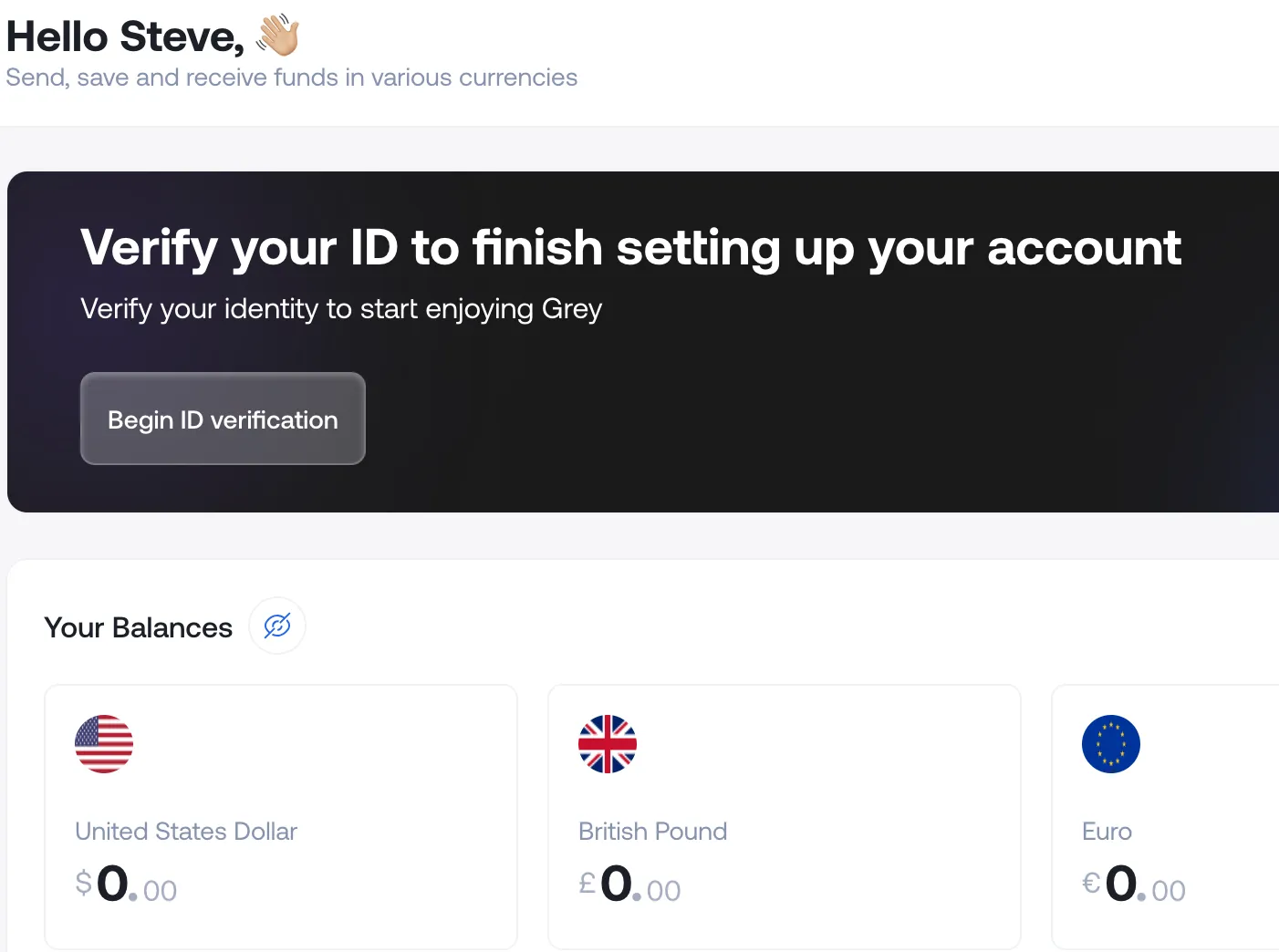
  • Next, you’ll need to verify your identity — a crucial step for meeting regulatory requirements. This process is particularly important for non-U.S. residents, as Grey specialises in providing accounts for individuals outside the United States.
__wf_reserved_inherit

Verification process for Slovenia

To open a US, UK, or Euro account with Grey, you’ll need to complete a simple verification process:

  1. Upload your documents: Provide a valid government-issued ID, such as an international passport, and proof of address, like a utility bill or bank statement. These documents confirm your identity and meet regulatory requirements.
  2. Document review: Grey will review your submissions within minutes or up to 24 hours. To speed up the process, ensure your documents are clear, valid, and up to date.

Once verified, you’ll have access to your Grey account. You can start managing US, UK, and Euro transactions with ease.

Get started today by creating a free Grey account.

‍

Last updated:

October 2, 2026

Open a free Grey account to get startedJoin 1 million digital nomads
IF YOU ENJOYED THIS, CHECK THESE OUT

How international wire transfers work: Fees, speed, and cheaper alternatives

•

•

2 min read

If you’ve ever sent an international wire transfer, you probably know the amount you pay at the start isn’t always the full cost. Your bank might charge around $45 to send the money, the receiving bank may charge another $13, and if the payment passes through an intermediary bank, another $10 to $25 can disappear along the way. All that for a transfer that can still take 1 to 5 business days to arrive.

And those are only the fees you can easily see. Exchange-rate markups and intermediary charges can make the final cost considerably higher than the wire fee your bank advertises. In this guide, we’ll break down where those costs come from, how an international wire transfer actually works, and when paying for one makes sense compared with other ways to send money abroad.

An international wire transfer is an electronic payment sent from one bank to another across national borders, typically via the SWIFT messaging network. The sending bank debits your account, routes a payment instruction through one or more intermediary banks, and the receiving bank credits the recipient’s account. The process can involve currency conversion, compliance screening, and interbank settlement, which can affect both the cost and how long the transfer takes.

How an international wire transfer works, step by step

SWIFT isn't a payment system. It's a messaging network. This distinction matters because it explains why international wires are slow and expensive: SWIFT tells banks what to do, but the actual money moves through a separate settlement process between the banks themselves.

Here's what happens when you wire $1,000 from a US bank account to a recipient in Nigeria:

Step 1: You Initiate the Transfer

You tell your bank to send money internationally. You provide: the recipient's full name (exactly as it appears on their bank account), their bank name, their account number or IBAN, the receiving bank's SWIFT/BIC code, and the amount you want to send. Your bank charges an outgoing wire fee, typically $25 to $50.

Step 2: Your Bank Screens the Transaction

Before sending anything, your bank runs the transfer through compliance checks. In the US, the Office of Foreign Assets Control (OFAC) screens every international wire for connections to sanctioned countries, individuals, or entities. Your bank also checks for compliance with anti-money laundering (AML) rules and may flag transfers over $10,000 for IRS reporting. This screening takes minutes for routine transfers but can hold up unusual or high-value transactions for hours or days.

Step 3: Your Bank Sends a SWIFT Message

Your bank creates a SWIFT message (typically an MT103 for single customer transfers) containing the payment instructions. This message travels through the SWIFT network to the receiving bank. SWIFT assigns every bank a unique 8 or 11-character code called a BIC (Bank Identifier Code). For example, Wells Fargo's SWIFT code is WFBIUS6S. JPMorgan Chase's is CHASUS33. Your bank uses the recipient bank's BIC to route the message correctly.

Step 4: Intermediary Banks Process the Transfer

This is the step most guides skip, and it's where the hidden costs live.

If your bank has a direct relationship (called a correspondent banking relationship) with the recipient's bank, the transfer moves directly. But most banks don't have direct relationships with banks in every country. In that case, the transfer routes through one or two intermediary banks that do have those relationships.

Each intermediary bank can deduct a processing fee from the transfer amount, typically $10 to $25 per intermediary. If your $1,000 transfer passes through two intermediaries, $20 to $50 may be deducted before the money reaches the recipient. You won't see this on your bank statement. Your recipient just received less than you sent, and neither of you knows exactly where the money went.

This is the single biggest frustration with international wire transfers: the sender pays a $45 fee and expects the recipient to get $1,000, but the recipient gets $955 because an intermediary bank took $45 along the way. For a detailed comparison with ACH, see ACH vs wire transfer explained.

Step 5: Currency Conversion

If the sender's currency differs from the recipient's, someone has to convert it. This can happen at the sending bank, at an intermediary bank, or at the receiving bank, depending on the arrangement. Whoever converts the currency adds a markup to the mid-market exchange rate, typically 1-3% for retail customers. On a $1,000 transfer, a 2% markup costs $20 in hidden fees that never appear as a line item. You see it only if you compare the rate you got to the mid-market rate at the time of transfer.

Step 6: The Receiving Bank Credits the Recipient

The recipient's bank receives the SWIFT message, verifies the details, runs its own compliance checks, and credits the recipient's account. The receiving bank may charge an incoming wire fee (median $13 in the US, varies by country). The recipient sees the funds in local currency, minus any intermediary deductions and the receiving bank's fee.

What an international wire transfer actually costs

The stated fee is never the total cost. Here's every layer:

Fee Layer Typical Range Who Pays
Outgoing wire fee (your bank) $25 to $50 Sender
Exchange rate markup 1 to 3% of transfer amount Sender (hidden in rate)
Intermediary bank fee(s) $10 to $25 per intermediary Deducted from transfer
Incoming wire fee (recipient bank) $0 to $20 Recipient
SWIFT messaging fee Included in wire fee Sender (bundled)

‍

Example: $1,000 wire from the US to Nigeria via a major US bank. Outgoing fee: $45. Exchange rate markup at 2.5%: $25. One intermediary deduction: $15. Incoming fee at the Nigerian bank: $10. Total cost: $95. The recipient receives the equivalent of $905 in naira, not $1,000. That's a 9.5% total cost on a $1,000 transfer.

On large transfers ($10,000+), the percentage cost drops because the flat fees become proportionally smaller. Wire transfers become more cost-effective as the amount increases. For small transfers (under $500), the fixed costs make wire transfers extremely expensive as a percentage of the total.

Domestic vs international wire transfer

Feature Domestic Wire International Wire
Network Fedwire (US), CHAPS (UK) SWIFT
Speed Same day (before cutoff) 1 to 5 business days
Typical fee $25 to $30 $35 to $50 + intermediary
Currency conversion None Required (adds cost)
Intermediary banks None 0 to 2 intermediaries
Compliance screening Standard AML OFAC + AML + destination rules
Reversibility Generally irrevocable Generally irrevocable
Tracking Real-time via Fedwire SWIFT GPI (if supported)

‍

Domestic wires are faster, cheaper, and simpler because the money stays within one country's banking system. No currency conversion. No intermediary banks. No cross-border compliance checks. The Fedwire system in the US processes domestic wires in real time during business hours, with final settlement the same day.

International wires are slower because the money crosses multiple banking systems, each with its own compliance requirements, business hours, and settlement schedules. A wire from New York to Lagos may pass through a correspondent bank in London, adding a full business day. Time zone differences mean that a wire initiated at 3 pm in New York arrives after business hours in Lagos, pushing settlement to the next local business day.

When to use a wire transfer and when to skip it

Wire transfers aren't always the right choice. They're designed for specific situations where their unique properties (irrevocability, same-day domestic settlement, no amount cap) justify the cost.

Use a Wire Transfer For

Large, one-off transactions where the fixed fees are a small percentage of the total. Buying property, closing a business acquisition, or paying a large invoice. On a $100,000 transfer, a $45 wire fee is 0.045% of the total. On a $500 transfer, it's 9%.

Time-critical payments where same-day or next-day settlement matters. Contract deadlines, supply chain emergencies, legal settlements. No other standard banking method offers this speed for large amounts.

Payments to countries or banks with no fintech coverage. If the recipient's bank isn't supported by any digital transfer service, a SWIFT wire may be the only option. This is common for transfers to some banks in Central Asia, parts of the Middle East, and smaller institutions in Africa.

Skip the Wire Transfer For

Regular transfers under $5,000. The fixed fees and exchange-rate markups can make wire transfers expensive for smaller amounts. A fintech service like Grey (1% capped at $6 for currencies including NGN, USD and EUR; see the full list of Grey conversion fees), Wise (0.41% to 1.5%), or Remitly ($0 to $4.99) may offer a lower overall cost for transfers under $5,000.

Recurring payments (monthly remittances, contractor payments, subscription invoices). The cost compounds. Twelve wire transfers at $45 each amount to $540/year in bank fees alone, before exchange-rate markups and intermediary deductions. A multi-currency account that receives via ACH or local payment rails eliminates most of this cost. For comparison, see SWIFT code vs routing number.

Payments where you need the recipient to receive the exact amount you quoted. Intermediary deductions are unpredictable. You might send $1,000, and the recipient might get $955 or $980 or $1,000, depending on which intermediaries handle the transfer. If the amount matters (paying an exact invoice, meeting a minimum deposit), a fintech service with transparent, upfront pricing is more reliable.

How to send an international wire transfer

If you've decided a wire is the right choice, here's what you need:

Information required: recipient's full legal name (as it appears on their bank account), recipient's bank name and branch address, recipient's account number or IBAN, receiving bank's SWIFT/BIC code, the amount and currency, and the purpose of the transfer (some banks and countries require this).

Where to initiate: most US banks let you send international wires through online banking, mobile app, by phone, or in-branch. Online is the fastest. Some banks restrict first-time international wires to in-branch or phone for security. Check your bank's policy before you need to send urgently.

Timing: initiate domestic wires at least 1 to 2 hours before your bank's cutoff time (usually 4 to 5 pm ET). For international wires, initiate 3 to 4 hours before the cutoff. Wires initiated after the cutoff are processed the next business day.

Tracking: ask your bank for the SWIFT reference number (also called a UETR under SWIFT GPI). The recipient's bank can use this to trace the transfer if it doesn't arrive within the expected window.

Receiving an international wire transfer

If someone abroad is wiring money to you, they need your bank's SWIFT code, your account number (or IBAN for European accounts), your bank's name and address, and your full name as it appears on the account. Some sending banks also ask for the receiving bank's routing number as a secondary reference.

Your bank may charge an incoming wire fee (ranging from $0 to $20, depending on the bank). The money arrives in the currency the sender specified, or your bank converts it to your local currency, usually at a marked-up rate.

For people outside the US who need to receive USD wires regularly: you don't need a US bank account. Grey provides USD account details (ACH routing number and account number) that can receive incoming transfers from US banks. You can also receive GBP via FPS, CHAPS, or BACS, and EUR via SEPA. The money arrives in your chosen currency, and you decide when to convert. No intermediary bank deductions, no surprise fees. Open a Grey account and share your account details with anyone who needs to pay you. You can also send money from the US through Grey's own transfer rails, bypassing SWIFT entirely.

Frequently asked questions about international wire transfers

How long does an international wire transfer take?

Most international wire transfers take 1 to 3 business days. Some take up to 5 business days if they route through multiple intermediary banks or if the destination country has additional compliance requirements. Domestic wires settle the same business day. Time zone differences, local bank holidays, and enhanced screening on large or unusual transfers can all add delays. Ask your bank for the SWIFT GPI tracking number to monitor the transfer in real time.

How much does an international wire transfer cost?

The median outgoing fee at US banks is $45. The median incoming fee is $13. But the stated fee isn't the total cost. Exchange-rate markups (1-3%) and intermediary bank deductions ($10-$25 per intermediary) can double the effective cost. For a $1,000 transfer, the all-in cost can range from $80 to $100. On large transfers ($10,000+), the percentage cost drops because flat fees are proportionally smaller.

What is a SWIFT code and how do I find one?

A SWIFT code (also called a BIC) is an 8 or 11-character code that identifies a specific bank on the SWIFT network. The format is: 4 letters (bank code) + 2 letters (country) + 2 characters (location) + 3 optional characters (branch). For example, WFBIUS6S is Wells Fargo (WFBI), United States (US), San Francisco (6S). You can find any bank's SWIFT code on its website, by calling the bank, or by searching the SWIFT directory at swift.com.

Can an international wire transfer be reversed?

Generally no. Wire transfers are designed to be irrevocable once processed. If you sent money to the wrong account, contact your bank immediately. They can request a recall through SWIFT, but the receiving bank is not obligated to return the funds, and the process can take weeks. This irrevocability is a feature for recipients (guaranteed funds) but a risk for senders. Always verify the recipient's details twice before confirming a wire.

What is the difference between a wire transfer and an ACH transfer?

Wire transfers are processed individually and settle the same day (domestically). They're irrevocable, have no amount cap, and cost $25 to $50. ACH transfers are batched, settle in 1 to 3 business days, are reversible in some cases, have lower fees (often free or under $3), and may have daily limits. Use wire for large, urgent, one-off payments. Use ACH for recurring transfers, payroll, and smaller amounts. For a detailed comparison, see ACH vs wire transfer explained.

Do I need a bank account to receive an international wire transfer?

You need an account that can receive SWIFT or domestic bank transfers. This can be a traditional bank account or a fintech account with its own banking details. Grey provides USD, GBP, and EUR account details that can receive wire transfers and ACH deposits without requiring a local bank account in the US, UK, or Europe. Open a Grey account to get your own receiving details.

Skip the $45 wire fee. Open a Grey account and receive USD, GBP, and EUR with your own account details. Convert when the rate works for you, and send to 50+ countries.

Disclaimer: This article is for informational purposes only. Wire transfer fees, exchange rates, and processing times vary by bank and may change. Grey isn't a bank. We're a licensed financial services provider offering multi-currency accounts.

SWIFT code vs routing number: What is the difference?

•

•

2 min read

Someone asks for your "routing number." Someone else asks for your "SWIFT code." They sound like they might be the same thing, and the confusion costs people real money. Use the wrong code and your transfer fails, you get charged a fee for the failed attempt, and the money sits in limbo for days while the banks sort it out.

A routing number is a 9-digit code that identifies a US bank for domestic transfers such as ACH and direct deposit. A SWIFT code (also called a BIC) identifies a bank internationally for cross-border transfers. Use a routing number for US payments and a SWIFT code for international payments. Some transactions, like receiving a wire from abroad into a US bank, require both.

The distinction is simple once you see it. This guide covers both codes, shows you exactly when to use each, and explains what to do when someone abroad needs to pay you.

What is a routing number?

A routing number is a 9-digit code assigned by the American Bankers Association (ABA) to every US bank and credit union. It identifies which financial institution holds your account. The system has been in use since 1910, originally designed to process paper cheques. Today it's used for every domestic electronic transfer.

Format: always exactly 9 digits, always numeric. No letters. Example: Wells Fargo California is 121042882. JPMorgan Chase New York is 021000021. Large banks have different routing numbers for different states because they acquired regional banks over the decades and kept the existing infrastructure.

When you need it: setting up direct deposit with your employer, paying bills online, transferring money between US bank accounts (ACH), receiving tax refunds, linking your bank to payment apps (Venmo, Cash App, PayPal). Essentially, any time money moves domestically within the US banking system, a routing number is involved.

Where to find it: bottom left of a paper cheque (first 9 digits in MICR font), in your bank's mobile app under Account Details, on your bank's website, or by calling customer service. For a complete state-by-state list for one of the largest US banks, see "Find a Bank Routing Number".

Key point: routing numbers only work within the United States. They have no function in international transfers. If someone outside the US asks for your routing number, they probably need your SWIFT code instead (or both, if they're sending a wire to your US bank account).

What is a SWIFT/BIC code?

A SWIFT code (also called a BIC, Bank Identifier Code) is an 8 or 11-character alphanumeric code that identifies a specific bank on the global SWIFT network. SWIFT stands for Society for Worldwide Interbank Financial Telecommunication. The network connects over 11,000 financial institutions across 200+ countries and handles the messaging layer for most international wire transfers.

Format: 8 or 11 characters, mixing letters and numbers. The structure tells you exactly what bank, in what country, at what location:

Characters 1 to 4: bank code (letters). Characters 5 to 6: country code (letters). Characters 7 to 8: location code (letters or numbers). Characters 9 to 11 (optional): branch code.

Example: WFBIUS6S is Wells Fargo. WF = Wells Fargo bank code, BI = part of the bank identifier, US = United States, 6S = San Francisco location. CHASUS33 is JPMorgan Chase: CHAS = Chase, US = United States, 33 = New York.

When you need it: sending money from the US to another country, receiving money from someone abroad, making international wire transfers, receiving freelance payments from overseas clients. Any time money crosses a national border via the banking system, a SWIFT code is involved.

Where to find it: your bank's website (usually in the wire transfer or international payments section), on your bank statement, by calling customer service, or by searching the official SWIFT directory at swift.com. Not every bank has a SWIFT code. Smaller credit unions and online-only banks may not participate in the SWIFT network, which can complicate the receipt of international payments.

SWIFT code vs routing number: Side by side

Here's the difference between SWIFT codes and routing numbers at a glance:

Feature Routing Number SWIFT/BIC Code
Purpose Identifies US banks for domestic transfers Identifies banks globally for international transfers
Format 9 digits (numeric only) 8 or 11 characters (letters + numbers)
Scope United States only 200+ countries worldwide
Issued by American Bankers Association (since 1910) SWIFT network (since 1973)
Used for ACH, direct deposit, bill pay, domestic wires International wire transfers, cross-border payments
Example 121042882 (Wells Fargo CA) WFBIUS6S (Wells Fargo)
Where to find Cheque, bank app, bank website Bank website, statements, swift.com
International use None Primary code for cross-border banking

‍

The simplest way to remember: routing number = US domestic, SWIFT code = international. If money stays inside the US, you need a routing number. If money crosses a border, you need a SWIFT code. If money is sent from abroad to a US bank account, the sender usually needs both your SWIFT code (to identify your bank internationally) and your account number (to identify your specific account).

Which do you need for your transfer?

The answer depends entirely on where the money is going and where it's coming from.

Sending money within the US

You need the recipient's routing number and account number. This covers ACH transfers, domestic wire transfers, direct deposit setup, online bill payments, and linking bank accounts to apps. No SWIFT code needed. For domestic-only tasks like filling out payment forms, see how to fill out a money order.

Sending money from the US to another country

You need the recipient's SWIFT code (or BIC) and their account number (or IBAN for European recipients). Your bank initiates the transfer through the SWIFT network. You'll pay an outgoing wire fee ($25 to $50 at most US banks). If something goes wrong, see how to cancel a wire transfer. You can also send money internationally with Grey, which bypasses SWIFT entirely and uses its own transfer rails at lower cost.

Receiving money from abroad into a US bank account

The sender needs your bank's SWIFT code plus your account number. Some sending banks also ask for your bank's routing number as a secondary reference. Provide both to avoid delays. Your bank may charge an incoming wire fee ($10 to $20).

Receiving money from abroad without a US bank

If you're outside the US and need to receive USD, GBP, or EUR from international clients, you don't need a US bank's SWIFT code or routing number. Grey provides account details for each currency: a US routing number + account number for USD, a UK sort code + account number for GBP, and an IBAN for EUR. Your clients send the funds to those details through their normal banking channels, and the money arrives in your Grey account. No SWIFT fees, no intermediary deductions.

Receiving international payments with Grey

The SWIFT code vs routing number question usually comes up when someone abroad is trying to pay you. The traditional answer is: give them your SWIFT code and account number, wait 1 to 5 days, and accept whatever intermediary fees get deducted along the way.

Grey simplifies this. When you open a Grey account, you receive real account details for each currency you hold:

USD: ACH routing number + account number. Clients in the US pay you via ACH (free or near-free for them, no SWIFT involved).

‍GBP: UK sort code + account number. Clients in the UK pay you via Faster Payments (arrives in minutes).

‍EUR: IBAN. Clients in Europe pay you via SEPA (funds arrive within 1 business day).

Each payment arrives through local payment rails, not SWIFT. That means no intermediary bank deductions, no $15 incoming wire fees, and no 3- to 5-day wait. Your clients don't need to know your SWIFT code because they're sending payments through their country's domestic payment system. The money lands in your Grey account in the currency you chose, and you decide when to convert. You can also hold what you receive in multiple currencies.

Receive international payments with a Grey account. Get your own USD routing number, UK sort code, and EUR IBAN. No SWIFT fees, no intermediary deductions.

Frequently asked questions

Is a SWIFT code the same as a routing number?

No. A SWIFT code identifies a bank internationally for cross-border transfers. A routing number identifies a US bank for domestic transfers. They serve similar purposes (identifying the right bank) but operate in different systems. SWIFT codes are 8 or 11 alphanumeric characters long and are used across 200+ countries. Routing numbers are 9 digits long and are used only within the US.

Do I need both a SWIFT code and a routing number?

It depends on the transfer. For US domestic transfers, you only need a routing number. For international transfers from the US, you only need the recipient's SWIFT code. To receive international wires into a US bank account, the sender usually needs your SWIFT code and account number. Some sending banks also request the routing number as a secondary reference. Provide both to avoid delays.

Where do I find my SWIFT code?

Check your bank's website (usually in the international transfers or wire transfer section), your bank statement, your mobile banking app, or search the official SWIFT directory at swift.com. You can also call your bank's customer service. Note that smaller credit unions and some online-only banks may not have a SWIFT code.

Can I use a SWIFT code for domestic US transfers?

No. SWIFT codes are not used for domestic US transactions. For any transfer within the US, including ACH, direct deposit, bill payments, and domestic wires, you need the bank's routing number and the recipient's account number.

What happens if I use the wrong code?

The transfer will typically fail and the money will be returned to the sender, but this can take days. Some banks charge a fee for failed transfers ($10 to $25). In rare cases, the money could be routed to the wrong account. Always double-check the code before confirming any transfer. Verify the SWIFT code or routing number directly with the recipient rather than relying on third-party lookup sites.

Can I receive international payments without a SWIFT code?

Yes. Services like Grey provide local account details (US routing number, UK sort code, EUR IBAN) that your international clients can use to pay via their own domestic payment systems. The payment never touches the SWIFT network, so there are no SWIFT fees or intermediary deductions. This is the simplest way to receive international payments without dealing with SWIFT codes.

Receiving money from abroad? Open a Grey account and share your details to get paid, without the guesswork.

Disclaimer: This article is for informational purposes only. SWIFT codes and routing numbers should be verified directly with your bank before use. Grey isn't a bank. We're a licensed financial services provider offering multi-currency accounts.

7 best AI prompt generators (free and paid)

•

•

2 min read

Most AI prompt generators are just forms. Pick a tone, pick a length, click generate, and out comes a prompt that's marginally better than what a beginner would write on their own. A few, though, do something genuinely useful: they restructure how the AI receives instructions, add constraints that prevent generic output, and let teams reuse tested prompts across dozens of projects. The gap between the best prompt generators and the worst is enormous, and most listicles rank them without ever testing the difference in output quality.

AI prompt generators help you write and refine prompts to get better results from AI tools. The best offer templates, tone controls, and prompt libraries, with free and paid tiers. Popular options include prompt-builder tools built into major AI apps and dedicated prompt marketplaces. Choose one that fits your tasks.

This guide covers 7 tools, what each actually does (not marketing claims), and which ones are worth paying for.

What is an AI prompt generator?

An AI prompt generator takes a simple idea ("write an email to my landlord about a broken pipe") and expands it into a detailed prompt that tells the AI exactly what to produce: the tone, the structure, the length, what to include, what to leave out. Think of it as an automated prompt engineer.

Some tools do this by applying prompt templates. Others optimise your existing prompt by adding structure and specificity. A few are full-featured platforms with prompt libraries, version history, and team collaboration. The simplest are just form-based interfaces that plug your inputs into a pre-written prompt skeleton.

Who needs one? Anyone who uses AI regularly and wants consistent, high-quality results without spending 10 minutes crafting each prompt manually. Freelancers producing client content, marketers running campaigns through AI tools, developers generating code, and teams building AI-powered workflows all benefit. If you write the same types of prompts repeatedly, a generator can save time and improve consistency.

Who doesn't? If you use ChatGPT once a week for casual questions, a prompt generator is overkill. You'll get more value from learning a few prompting principles than from adding another tool to your stack.

The 7 best AI prompt generators compared

Tool Best for Free tier Price (paid)
PromptPerfect Optimising prompts across multiple AI models Yes (limited) From $16.67/mo
ChatGPT (built-in) General-purpose prompt refinement Yes (GPT-4o free tier) $20/mo (Plus)
Claude Projects Reusable prompt systems with context Yes (free tier) $20/mo (Pro)
Taskade Team workflows with prompt automation Yes (limited) From $8/mo
Jotform AI Form-based prompt building for non-technical users Yes From $34/mo
AIPRM Chrome extension with prompt library for ChatGPT Yes (limited) From $9/mo
PromptBase Marketplace for buying and selling tested prompts Browse free Per-prompt ($1.99 to $9.99)

‍

1. PromptPerfect

PromptPerfect takes a prompt you've written and optimises it for a specific AI model. You paste in "write a product description for a water bottle," select your target model (GPT-4, Claude, Midjourney, Stable Diffusion), and PromptPerfect rewrites the prompt with added specificity, formatting instructions, and model-specific syntax. It's not a prompt generator from scratch. It's a prompt improver. Best for people who already write their own prompts but want them tuned for maximum output quality. Free tier is limited to a few optimisations per day.

2. ChatGPT (Built-In Prompt Refinement)

You don't always need a separate tool. ChatGPT itself can generate and refine prompts. Type "help me write a better prompt for [task]" and it'll restructure your request with role assignments, step-by-step instructions, and output formatting. The custom instructions feature lets you set default behaviour (tone, audience, format) so every conversation starts from a better baseline. GPT-4o is available on the free tier. If you're already paying for ChatGPT Plus ($20/mo), this is the zero-friction option.

3. Claude Projects

Anthropic's Claude lets you create Projects: reusable workspaces with uploaded reference documents and custom instructions that persist across conversations. This isn't a prompt generator in the traditional sense. It's a system for building reusable prompt environments. Upload your brand guidelines, your writing samples, and your formatting rules into a Project, and every conversation inside it uses those as context. Best for freelancers and teams who need consistent output across dozens of similar tasks.

4. Taskade

Taskade combines AI prompts with project management. You create AI-powered workflows where each step runs a prompt automatically. For example: step 1 generates a blog outline, step 2 writes the draft, and step 3 creates social media posts from the draft. Each step uses a pre-built or custom prompt. It's more of a workflow automation tool than a standalone prompt generator, but the prompt-building interface is solid. Best for teams that want to chain multiple AI steps into repeatable processes. Free tier covers basic usage. Paid starts at $8/mo.

5. Jotform AI

Jotform built an AI agent system that generates prompts through a form-like interface. You fill in fields (topic, audience, tone, length, format) and it constructs a prompt from your inputs. The output is visible and editable before you run it. It's the most accessible option for people who find writing prompts intimidating. No prompt-engineering knowledge required. The free tier is generous. Paid plans start at $34/mo but include Jotform's full form-building suite, not just the AI features.

6. AIPRM

AIPRM is a Chrome extension that adds a prompt library directly to the ChatGPT interface. It gives you thousands of community-contributed prompt templates organised by category: marketing, coding, writing, SEO, HR. Click a template, fill in the variables, and it inserts the prompt into ChatGPT. The value is the library, not the technology. You're browsing other people's tested prompts rather than writing your own. Quality varies. The best templates are excellent. The worst are no better than what you'd write yourself. The free tier gives limited access. Premium starts at $9/mo.

7. PromptBase

PromptBase is a marketplace, not a generator. People sell tested prompts for $1.99 to $9.99 each. Categories cover GPT, DALL-E, Midjourney, Stable Diffusion, and Claude. The idea is that someone else has already spent hours refining a prompt for a specific use case (say, generating real estate listing photos in Midjourney), and you buy the result instead of building it from scratch. Best for image generation prompts where the right phrasing makes a dramatic difference in output quality. Browsing is free. You pay per prompt.

Free vs paid: What you get

Free tiers are enough for most individual users. ChatGPT's built-in prompt refinement costs nothing. AIPRM's free library covers the most popular categories. PromptPerfect gives you a few optimisations per day for free. If you write fewer than 10 prompts a week, you probably don't need to pay.

Paid plans add three things: volume (more optimisations, more templates, more storage), team features (shared prompt libraries, role-based access, workflow automation), and model support (PromptPerfect's paid plans cover Midjourney, Stable Diffusion, and other image models that the free tier limits).

When to pay: if you're a freelancer or agency producing AI-assisted content daily, the time savings from a paid plan justify the cost. If AI prompting is part of your job, $9 to $20 per month for a prompt tool is a reasonable productivity investment. If you're using AI casually, stick with free.

How to choose the right one

Start with what you're actually doing:

Writing content (blogs, emails, copy)? ChatGPT's built-in features or Claude Projects. Both are free or included in your existing subscription. Build custom instructions once and reuse them across conversations.

Generating images (Midjourney, DALL-E, Stable Diffusion)? PromptPerfect or PromptBase. Image prompts are highly model-specific. The right phrasing can be the difference between a professional result and a blurry mess. Either optimise your own prompts (PromptPerfect) or buy proven ones (PromptBase).

Running team workflows? Taskade. Chain multiple prompts into automated sequences that your whole team can run. The project management layer means prompts live alongside tasks, not in a separate tool.

Just starting out? Jotform AI or AIPRM. Jotform's form interface removes the blank-page problem. AIPRM's template library lets you learn by example. Both are good training wheels that you'll probably outgrow within a few months.

Don't stack multiple prompt tools. Pick one that fits your primary use case and learn it well. A prompt generator is only useful if you use it consistently enough to build muscle memory around how it structures prompts.

Paying for AI tools and getting paid for AI work

Most AI tools are billed in USD. ChatGPT Plus is $20/mo. Midjourney is $10 to $60/mo. Claude Pro is $20/mo. If you're outside the US, your bank's foreign transaction fee (1.5 to 3%) adds a hidden cost to every subscription payment. Over a year, that's $15 to $40 in fees on a single $20/mo subscription.

Pay for AI tools billed in USD with a Grey virtual card. Your subscriptions pull from your USD balance with no per-transaction conversion.

On the earning side: prompt engineering, AI content creation, and AI consulting are growing freelance categories. If you're doing AI work for international clients, you need a way to receive payments in their currency. Get paid for AI work from anywhere with Grey's multi-currency accounts: a US routing number for USD clients, a UK sort code for GBP clients, an IBAN for European clients.

If you're thinking about going full-time freelance as an AI specialist, you'll also need invoicing. See the best free invoicing tools for options that integrate with your payment workflow.

Working with AI tools? Pay for USD-billed subscriptions on a Grey virtual card and get paid by clients anywhere.

Frequently asked questions about AI prompt generators

What is the best AI prompt generator?

It depends on what you're doing. For optimising text prompts across multiple AI models, PromptPerfect is the most focused tool. For general prompt refinement without a separate app, ChatGPT's built-in features are free and effective. For reusable prompt systems with uploaded context, Claude Projects is the strongest option. For team workflows, Taskade chains multiple prompts into automated sequences.

Are there free AI prompt generators?

Yes. ChatGPT (free tier with GPT-4o) can refine prompts in conversation. AIPRM offers a free Chrome extension with limited access to community prompt templates. Jotform AI has a generous free tier with form-based prompt building. PromptPerfect offers a few free optimisations per day. For most individual users, free tiers are sufficient.

Do I need an AI prompt generator?

If you use AI tools daily for work and want consistent results, a prompt generator saves time and improves output quality. If you use AI casually for occasional questions, you don't need one. Learning a few prompting principles (be specific, assign a role, define the output format) will get you most of the way without adding another tool.

Can ChatGPT generate prompts for other AI tools?

Yes. You can ask ChatGPT to write prompts for Midjourney, Stable Diffusion, Claude, or any other AI tool. Describe what you want the output to look like and which tool you're using, and ChatGPT will format the prompt with the right syntax and keywords. This is free and works on the basic tier.

What is the difference between a prompt generator and a prompt marketplace?

A prompt generator creates or optimises prompts from your inputs (PromptPerfect, Taskade, Jotform). A prompt marketplace sells pre-made prompts that other people have tested and refined (PromptBase). Generators are for people who want custom prompts. Marketplaces are for people who want proven prompts without the trial-and-error.

How much do AI prompt generators cost?

Free tiers cover basic individual use. Paid plans range from $8/mo (Taskade) to $34/mo (Jotform, which includes the full form suite). PromptPerfect Pro is $16.67/mo. AIPRM Premium is $9/mo. PromptBase charges per prompt ($1.99 to $9.99) with no subscription. Most freelancers can stay under $20/mo for prompt tooling.

Working with AI tools? Pay for USD-billed subscriptions on a Grey virtual card and get paid by clients anywhere.

Disclaimer: Pricing and features are accurate as of the date of writing and may change. Grey isn't a bank. We're a licensed financial services provider offering multi-currency accounts and virtual cards.

Wells Fargo routing number: All states listed

•

•

2 min read

A payment is ready to go, but the form asks for one more detail: your Wells Fargo routing number. You know your account number and which Wells Fargo branch you use, but finding the right nine-digit number can be less obvious than expected. And getting it wrong can delay the payment or send you back to the form to start again.

Wells Fargo uses different routing numbers depending on the state where the account was opened. The most commonly used numbers are 121042882 for California ACH, 082900736 for the South, and 121000248 for domestic wire transfers across all states. Always confirm your specific routing number in the Wells Fargo app or by calling the number on the back of your card.

Knowing which Wells Fargo routing number to use matters when setting up direct deposits, receiving ACH payments, or sending a domestic wire. The right number depends on the transaction, so checking before submitting your payment details can help you avoid unnecessary delays.

Also read: How to open a Wells Fargo account from outside the US

Wells Fargo ACH Routing Numbers by state

The Wells Fargo routing number you need depends on the state where your account was opened. While some states share the same number, others have their own ACH routing number. The table below lists the routing numbers provided for each state, including the specific number shown for El Paso, Texas. Before using any of these numbers for a payment or direct deposit, check your Wells Fargo account details to confirm that you have the correct routing number for your transaction.

State ACH Routing Number State ACH Routing Number
Alabama 062000080 Montana 092905278
Alaska 125200057 Nebraska 104000058
Arizona 122105278 Nevada 321270742
Arkansas 111900659 New Hampshire 121042882
California 121042882 New Jersey 021200025
Colorado 102000076 New Mexico 107002192
Connecticut 021101108 New York 026012881
Delaware 031100869 North Carolina 053000219
Florida 063107513 North Dakota 091300010
Georgia 061000227 Ohio 041215537
Hawaii 121042882 Oklahoma 121042882
Idaho 124103799 Oregon 123006800
Illinois 071101307 Pennsylvania 031000503
Indiana 074900275 Rhode Island 121042882
Iowa 073000228 South Carolina 053207766
Kansas 101089292 South Dakota 091400046
Kentucky 121042882 Tennessee 064003768
Louisiana 121042882 Texas 111900659 (El Paso: 112000066)
Maine 121042882 Utah 124002971
Maryland 055003201 Vermont 121042882
Massachusetts 121042882 Virginia 051400549
Michigan 091101455 Washington 125008547
Minnesota 091000019 West Virginia 121042882
Mississippi 062203751 Wisconsin 075911988
Missouri 113105449 Wyoming 102301092

Wells Fargo wire transfer Routing number

When you send a domestic wire transfer from your Wells Fargo account, you use a single nationwide routing number rather than a state-specific number. The routing number for domestic wires is 121000248, so you do not need to search for a different number based on where your account was opened.

For an international inbound wire, you will need the Wells Fargo SWIFT code instead. The primary SWIFT code is WFBNDDNYXXXX, which helps identify Wells Fargo when money is being sent internationally. Understanding the difference between a SWIFT code and a routing number becomes important here because each one identifies your bank for a different type of payment.

The same distinction helps when looking at ACH vs wire transfers. ACH payments move through delayed electronic batches using state-specific regional clearinghouses, while wire transfers are processed individually in real time. When you send a wire, the transaction is settled directly through the Federal Reserve system rather than waiting for an ACH batch. That difference in processing is why the correct routing or SWIFT details matter when sending money to your Wells Fargo account.

Where to find your Wells Fargo routing number

Finding your Wells Fargo routing number is usually straightforward, and the quickest method depends on whether you have access to the mobile app, a cheque or online banking.

Check the Wells Fargo mobile app

Open the Wells Fargo app and sign in to your account. Select the account you need, then look for Account Details. Your routing number should appear alongside your account number and other account information.

Look at a Wells Fargo cheque

A Wells Fargo cheque also shows the routing number. Turn the cheque over to the bottom-left section of the front. The first nine-digit number in the sequence is the routing number, followed by your account number and cheque number.

Find it through Wells Fargo online banking

Sign in through the Wells Fargo website and select the relevant account. Open the account details or information section to view the routing number associated with that account. Make sure you are checking the correct account before sharing the details.

Need a USD account without Wells Fargo?

Getting paid by a US client can become frustrating when the payment requires US banking details that you do not have. Opening a traditional US bank account may not be practical either, especially when you live abroad and do not have a US residential address or the documents a local bank expects.

Grey gives eligible users access to USD account details that can be used to receive supported ACH and wire transfers, without requiring a US residential address. So when a client or employer asks for US banking details, you can provide the relevant information without opening a traditional Wells Fargo account.

Once your account is approved, the USD account details are available digitally, giving you a simpler way to receive eligible payments and manage the money online. Sign up for Grey or download the app to get started.

Frequently asked questions about Wells Fargo routing numbers

What is Wells Fargo's routing number for direct deposit?

The routing number for Wells Fargo direct deposit depends on the type of account and payment. Unlike domestic wire transfers, direct deposits use the ACH routing number associated with your account. Check your Wells Fargo account details or cheque rather than assuming the wire routing number applies.

Is the Wells Fargo ACH number different from the wire number?

Yes. ACH payments and domestic wire transfers can use different routing numbers. Wells Fargo uses 121000248 for domestic wire transfers, while your ACH routing number may differ. Checking the payment instructions before sending or receiving money helps ensure the transaction reaches the correct account without unnecessary delays.

Does Wells Fargo have one routing number for all states?

Wells Fargo uses a single routing number for domestic wire transfers nationwide: 121000248. However, ACH routing numbers can vary depending on where your account was opened. That means the answer depends on the type of payment you are making and the specific Wells Fargo account involved.

Where is the routing number on a Wells Fargo cheque?

Your Wells Fargo routing number appears along the bottom of the cheque. It is the first nine-digit number in the sequence, followed by your account number and cheque number. Looking at the bottom-left corner of the cheque makes it easy to identify the routing number quickly.

Can I use my Wells Fargo routing number for international transfers?

A routing number alone is generally not enough for an international wire transfer. International payments usually require Wells Fargo’s SWIFT code, along with your account details. For inbound international wires, Wells Fargo’s primary SWIFT code is WFBNDDNYXXXX, while domestic wires use the routing number.

11 best places to buy gift cards online

•

•

2 min read

Gift cards are one of the most practical purchases you can make online. They’re instant, and they solve the universal problem of not knowing exactly what someone wants but still want them to know that you put in effort. But where you buy a gift card matters almost as much as which card you choose.

Some platforms offer discounts on face value. Others are the only place to buy a specific brand’s card. And if you’re shopping from outside the US, some of the most popular gift card sites will decline your local debit or bank card entirely, and you won’t know until after you’ve tried. This guide covers the 11 best places to buy gift cards online, with honest notes on what each one does well and who it suits.

How to choose where to buy gift cards online

Before getting into the list, these are the four most important things you should check for before choosing a platform.

Delivery speed

Most gift cards bought online are digital and arrive by email within minutes. Physical gift cards will usually take several business days to arrive. If you need the card today, confirm delivery before you pay.

Discounts vs face value

Some platforms sell gift cards at a discount, meaning you pay £45 for a £50 card. This sounds attractive, and often it is, but verify that the platform is legitimate before handing over payment details. Discounted gift cards on unverified marketplaces are one of the most common forms of online fraud.

Payment options

Not all payment methods work on all platforms. US-based gift card sites often require a US-issued card. If you’re outside the US and your local card is declined, a virtual dollar card is the most practical fix.

Buyer protection

Reputable platforms offer some form of guarantee: a refund or replacement if the card doesn’t work. Peer-to-peer marketplaces offer less protection than direct retailer sites, so factor that in when buying discounted cards.

11 best places to buy gift cards online

1. Grey

Right on the Grey app, you can shop for your favourite gift cards, including Amazon, Adidas, and Apple, all directly. You can request a virtual USD card to use on international sites that require a US-issued card, so you can pay in dollars without incurring high conversion fees.

This matters more for gift cards than for most purchases because the largest and most popular gift card catalogues, including Amazon US, iTunes, Google Play US, and major US retail brands, are primarily sold through US-based platforms that require a US card. A Grey virtual dollar card works exactly like a US-issued card from the platform’s perspective.

Beyond solving the payment problem, Grey lets you hold and spend US dollars from a multi-currency account, so you’re not paying a conversion margin every time you shop. The card creation fee is $5 with no monthly fee, and cross-border card fees (non-USD purchases on the USD card) are 2% plus $0.50.

Best for: Anyone outside the US who wants to buy gift cards on US sites without their card being declined.

2. Amazon

Amazon sells gift cards for its own platform and, in some markets, for other retailers through its gift card store. Digital Amazon gift cards are delivered via email within minutes and can be sent directly to a recipient. Physical gift cards are available for delivery or in-store pickup, depending on your location.

Amazon gift card deals appear during major sale events. Amazon Prime Day and Black Friday occasionally feature cashback offers or small bonus credits on gift card purchases, though these promotions vary by market and year.

Best for: buying Amazon gift cards directly, with fast digital delivery and the backing of one of the most trusted retailers online.

3. Best Buy

Best Buy’s online gift card store covers a wide range of brands beyond its own: gaming cards (PlayStation, Xbox, Nintendo), streaming services (Netflix, Hulu, Disney+), and tech brands. Digital delivery is typically instant after purchase.

Best Buy occasionally offers bundle promotions on gaming gift cards, particularly around console launch periods and major gaming releases. Its broad catalogue makes it a useful single destination if you’re buying cards for a gamer who might want options.

Best for: gaming and entertainment gift cards with reliable digital delivery from an established US retailer.

4. Target

Target sells digital and physical gift cards for its own store and for a selection of popular brands, including Apple, Google Play, Amazon, and various restaurant and retail chains. Target Circle members occasionally receive cashback on gift card purchases, effectively reducing the cost below face value.

Target’s gift card section is straightforward and reliable. Digital cards are delivered by email. The main advantage over other major retailers is the occasional Target Circle promotion, which can make Target the cheapest place to buy certain popular brands on specific dates.

Best for: US shoppers who are Target Circle members looking to benefit from periodic gift card promotions.

5. Walmart

Walmart’s online gift card store covers a similar breadth to Target, with cards for major retailers, restaurants, streaming services, and gaming platforms. Digital cards are delivered within minutes. Walmart+ members occasionally receive gift card deals tied to membership benefits.

Walmart’s catalogue is large enough that it’s worth checking before going directly to a brand’s own website, particularly for everyday retail and restaurant gift cards.

Best for: a broad selection of retail and dining gift cards from a reliable retailer.

6. GiftCards.com

GiftCards.com is a dedicated gift card retailer rather than a general marketplace. It sells both branded gift cards (for specific retailers) and open-loop Visa and Mastercard gift cards that can be used anywhere those networks are accepted. This makes it one of the more flexible options for giving a gift card that works like cash.

Visa and Mastercard gift cards from GiftCards.com can be personalised with a custom image and a personal message, giving them a slightly more gift-like feel than a plain digital code. There are fees on open-loop cards, typically a purchase fee of $3 to $6 per card.

Best for: Visa or Mastercard gift cards that work anywhere, or personalised cards for a recipient who’d appreciate a more customised touch.

7. Raise (The Gift Card Exchange)

Raise is a marketplace where people sell unwanted gift cards, typically at a discount to face value. Buyers can find cards for major US retailers at 5 to 25% below face value, depending on the brand and current supply.

The discount is the main draw. The trade-off is that cards come from other users rather than directly from retailers. Raise verifies cards before listing them and offers a money-back guarantee if a card doesn’t work, which makes it more reliable than unverified peer-to-peer platforms.

Best for: US-based buyers who want discounted gift cards for major retailers and are comfortable buying from a verified secondary marketplace.

8. CardCash

CardCash operates similarly to Raise: it buys unwanted gift cards from people and resells them at a discount. The difference is that CardCash acts as both the buyer and seller rather than a peer-to-peer marketplace, so prices are set by CardCash rather than by individual sellers.

Discounts on CardCash typically range from 3% to 15%, depending on the brand. CardCash guarantees card balances for 45 days after purchase. Digital cards are delivered within one to three business days, which is slower than major retailers but reasonable for a discounted purchase.

Best for: discounted gift cards with a platform that takes direct responsibility for the transaction rather than connecting you with an individual seller.

9. Gameflip

Gameflip is a peer-to-peer marketplace focused specifically on gaming and digital goods. It's the most established platform for discounted gaming gift cards: Steam, PlayStation Network, Xbox, Nintendo eShop, Roblox, and similar. Cards are listed by individual sellers at prices they set, usually 2 to 15% below face value.

Because the buyer base is built specifically for gaming, popular gaming cards tend to sell and be available in higher quantities than on general marketplaces. Gameflip charges a buying fee per transaction, and as with any peer-to-peer platform, buyer protection is slightly less straightforward than buying directly from a retailer.

Best for: discounted gaming and digital platform gift cards, particularly for Steam, PlayStation, and Xbox.

10. Google Play Store

Google Play sells its own gift cards directly, with digital delivery to your Google account or by email code. Google Play gift cards can be used for apps, games, subscriptions (YouTube Premium, Google One), and other digital purchases on the Google Play ecosystem.

Buying directly from Google is the safest option for Google Play cards: there's no risk of a deactivated card or a balance that doesn't match what was advertised. Google occasionally offers bonus credit promotions on Play gift card purchases.

Best for: Google Play gift cards for Android users, bought directly from the source with no risk of fraud.

11. Apple (App Store)

Apple sells App Store and iTunes gift cards directly through its website and the Apple Store app. These cards work across the Apple ecosystem: App Store purchases, Apple Music, Apple TV+, iCloud storage, and in-app purchases on iOS.

As with Google Play, buying directly from Apple eliminates fraud risk and guarantees the card balance. Digital codes are delivered immediately. Apple gift cards are among the most universally useful gift cards for anyone in the iOS ecosystem.

Best for: gift cards for iPhone and iPad users, bought directly from Apple with immediate digital delivery.

How to find the best gift card deals

The most reliable way to find gift card deals is to time purchases around major retail events. Amazon Prime Day, Black Friday, and Cyber Monday consistently feature gift card promotions from major retailers, typically in the form of bonus credit (buy a £50 card, receive £5 in account credit) rather than discounted face value.

Secondary marketplaces like Raise and CardCash offer ongoing discounts on popular brands, with the discount percentage varying based on how many people are selling a particular card at any given time. Popular retail brands (Amazon, Target, Walmart) tend to have smaller discounts because demand is high. Niche brands sometimes have larger discounts because they’re harder to sell.

Cashback apps and browser extensions can also reduce the effective cost of a gift card purchase when buying from major retailers. These work by applying cashback to the purchase the same way they would for any other transaction.

How to buy gift cards safely

A few rules can protect you regardless of which platform you use.

Never share a gift card code with someone who asked you to buy it. Legitimate organisations do not ask for payment in gift cards. If someone asks you to buy gift cards and send them the code, it is a scam.

Buy from platforms with verified reviews and clear return policies. Avoid buying gift cards from individuals on general classified ad sites where there’s no verification and no buyer protection.

Check the card before you hand it over as a gift. Scratch-off panels on physical cards should be intact. If the PIN area appears to have been tampered with, don’t use the card and return it to the retailer.

Keep your receipt until the card has been fully redeemed. If a card turns out to have no balance when used, a receipt is what gives you grounds for a refund.

Paying for gift cards from abroad

If you’re outside the US and trying to buy from a US gift card platform, there’s a common and frustrating problem: your local bank card gets declined. This happens because many US retail and gift card sites check the card’s billing country against their supported regions. A Nigerian, Kenyan, Ghanaian, or Indian card will fail this check on many US platforms, even if you have sufficient funds.

The practical solution is a virtual dollar card that registers as a US-issued card for payment purposes. A Grey virtual card does this. It’s a virtual USD that works on international sites the same way a US card does, because it’s issued through Grey's US banking infrastructure.

You hold and spend US dollars from your Grey account, buy the gift card on the US platform, and receive the digital code exactly as a US-based buyer would. No declined transactions, no conversion fees on the purchase itself.

Frequently asked questions

Where is the best place to buy gift cards online?

For US-based shoppers, buying directly from retailers (Amazon, Best Buy, Target) is the most reliable option, with guaranteed delivery and no risk of fraud. For discounted gift cards, Raise and CardCash offer below-face-value purchases with verified balances. For gaming gift cards specifically, Gameflip is the most established secondary marketplace. For shoppers outside the US who need to buy from US platforms, a Grey virtual dollar card solves the card-decline problem that affects most local bank cards.

Can I buy gift cards at a discount?

Yes. Secondary marketplaces like Raise and CardCash sell gift cards below face value because they acquire them from people who received cards they don’t want. Discounts typically range from 3 to 25%, depending on the brand and current supply. Discounted cards from reputable, verified platforms are generally safe. Avoid buying discounted gift cards from unverified individuals on classified ad sites, where the risk of fraud is significant.

Are online gift cards safe?

Buying from official retailer websites and verified platforms is safe. The main risks are on unverified secondary marketplaces where card codes may be invalid, partially used, or fraudulent. Platforms like Raise and CardCash verify balances before listing. Buying directly from Amazon, Google, Apple, or other major retailers eliminates most risk. The FTC advises against buying gift cards at the request of someone you don’t know, as gift card scams are among the most commonly reported forms of payment fraud.

Can I buy US gift cards from abroad?

Yes, but you may need a US-issued card to complete the purchase on some platforms. Many US gift card sites decline non-US cards. A Grey virtual dollar card is issued through the US banking infrastructure and works on US platforms the same way a US card does. Once you have the card, you can buy digital gift cards from US sites and receive the code by email the same way a US-based buyer would.

How do I pay if my card is declined on a gift card site?

The most common reason a card is declined on a US gift card site is that the site requires a US-issued card, and your local card doesn’t pass that check. A Grey Card fixes this because it’s a virtual USD Mastercard that registers as a US-issued card for payment purposes. Create the card in the Grey app, fund it from your USD balance, and use it on the platform where your local card was declined.

Do gift cards expire?

In the US, federal law requires that gift cards not expire for at least five years from the date of purchase, and inactivity fees cannot be charged until the card has been inactive for 12 consecutive months. In other countries, rules vary. Some gift cards, particularly promotional or bonus cards, may have shorter expiry windows stated in the terms. Always check the expiry terms before buying, and use or gift the card well within its valid period.

eSIM vs physical SIM: What is the difference?

•

•

2 min read

If you’ve bought a new phone recently, you may have noticed that some models no longer have the regular SIM card slot. I was so confused the first time I saw it. These days, many phones have the option to pick whichever one you prefer.

For some, the eSIM vs physical SIM conversation has a straightforward answer, but the right choice for any individual depends on what they’re using it for. This guide covers how each works, how they compare on the things that matter most to people, and which one makes more sense depending on your situation.

What is an eSIM?

An eSIM, short for embedded SIM, is a SIM card that is built directly into your phone’s hardware rather than inserted as a removable card. It performs exactly the same function as a physical SIM, connecting your device to a mobile network, but instead of swapping a plastic card when you change carriers or add a plan, you download a profile digitally.

The GSMA, the international body that sets mobile industry standards, defines the eSIM standard and manages the specification that allows any compatible device to connect to any eSIM-compatible carrier. Because the profile is digital, you can have multiple carrier profiles stored on a single eSIM and switch between them without touching the device’s hardware.

In practical terms, this means you can add a local data plan when you land in a new country, switch back to your home plan when you return, and manage all of this from your phone’s settings rather than hunting for a SIM card slot with a pin.

Most flagship smartphones released since 2018 support eSIM, and support has expanded significantly across mid-range devices since then.

What is a physical SIM?

A physical SIM is the small, removable plastic card that has been the standard for connecting a phone to a mobile network since the 1990s. You insert it into a slot on your phone, it identifies you to the network, and your phone connects. When you change carriers or travel to a new country and want a local number, you remove the old card and insert a new one.

Physical SIMs come in three sizes: standard (the original, now rarely used), micro SIM, and nano SIM, which is what most modern phones use. The card contains a small chip with your subscriber identity information and the credentials your network uses to authenticate your connection.

The primary advantage of a physical SIM is universality. Almost every mobile phone ever made has a SIM card slot, including older models that predate eSIM support. If you need to move a SIM between devices, whether lending your plan to someone or transferring it to a backup phone, the SIM can be removed and reinserted. No account access required.

The limitation is the card’s physical nature. It can be lost, damaged, or stolen. Changing plans requires a new card. Travelling internationally with a local SIM requires carrying multiple cards or swapping them at each destination.

eSIM vs physical SIM: the key differences

Here’s how the two options compare across the factors that matter most.

Feature eSIM Physical SIM
Setup Digital: scan a QR code or enter an activation code; profile downloads in minutes Physical: purchase or receive a SIM card; insert into the device
Carrier switching Switch by activating a new downloaded profile; no card swap needed Requires a physical SIM from the new carrier to be inserted
Device compatibility Requires a compatible device (most flagships since 2018) Works with most phones ever made
Multiple profiles Store multiple carrier profiles on one device; switch between them One SIM per slot; dual-SIM phones require two physical cards
Travel Add a local data plan before or after landing, entirely remotely Requires purchasing and inserting a local SIM card on arrival
Security Cannot be physically removed or stolen; tied to device hardware Can be removed; if stolen with the phone, may be used in another device
Loss/damage risk
None; the SIM is embedded in the device Card can be lost, damaged, or bent
Transfer to another device Requires deactivating on current device and reactivating on new one Physical removal and insertion
Availability Requires carrier support; not all networks offer eSIM plans Universally supported by all carriers
Cost
Varies by plan; no physical card cost Varies by plan; sometimes a small card fee

On dual SIM use: many modern phones support both an eSIM and a physical SIM simultaneously, effectively giving you two active numbers or plans on one device. This is useful for keeping a personal and work number separate, or for running a home plan alongside a travel data plan. Some newer iPhone models (specifically in the US) have removed the physical SIM slot entirely and now use dual eSIMs instead.

On security: an eSIM provides a meaningful security advantage in one specific scenario. If your phone is stolen, the thief cannot remove the SIM card and use it in another device to make calls or avoid detection. The eSIM is tied to the device hardware and requires account credentials to transfer. A physical SIM in a stolen phone can be removed and inserted into any compatible device.

Which should you choose?

The answer depends on three things: what you’re using it for, what phone you have, and whether your carrier supports eSIM.

Choose an eSIM if:

  1. You travel internationally with any regularity. The ability to add a local data plan remotely, before you land or upon arrival, without queuing at an airport kiosk or hunting for a convenience store that sells SIM cards, is a genuine practical advantage. You pay for the plan, scan a QR code, and your phone connects to a local network. When you return home, you switch back to your regular plan from your phone’s settings.
  2. You want to run two numbers on one device. Keeping a personal and work number on one phone is cleaner with eSIM than with dual physical SIM, particularly if you want the flexibility to change one of the numbers without visiting a carrier store.
  3. You have a compatible device, and your carrier supports it. If both conditions are met, there’s no reason to prefer a physical SIM for everyday domestic use.

Choose a physical SIM if:

  1. Your phone doesn’t support eSIM. Older devices, budget smartphones, and some mid-range models still lack eSIM compatibility. Check your specific model before assuming the option is available.
  2. You frequently swap your SIM between devices. If you regularly move a SIM card between phones, lending it or switching to a backup device, a physical card is simpler. Transferring an eSIM between devices requires account access and deactivation steps that physical card swapping doesn’t.
  3. Your carrier doesn’t offer eSIM. Not all mobile networks in all countries have rolled out eSIM support. In markets where eSIM carrier availability is limited, a physical SIM remains the only option regardless of whether your device supports eSIM.

Get an eSIM on Grey for your travels

Grey now offers eSIM data plans in more than 100 countries, designed specifically for travellers who want local data rates without international roaming charges or the need to queue for a SIM card at the airport.

Just go to the lifestyle tab on your Grey app, select eSIM, choose the desired country, select the plan you want, and you’re good to go. When your trip ends, you can switch back to your regular plan from your settings.

Grey's eSIM plans are available alongside the full Grey account, which lets you hold and spend multiple currencies while travelling, convert at a rate shown before you confirm, and spend with your Grey virtual card without paying foreign transaction fees on every purchase.

The two products work naturally together for anyone who travels regularly. The eSIM keeps you connected at local rates. The Grey account keeps your money in the right currency without losing a percentage to conversion on every coffee and taxi.

Download the Grey app to get an eSIM:

App Store: https://apps.apple.com/us/app/grey-inclusive-global-banking/id1611983085

Play Store: https://play.google.com/store/apps/details?id=co.grey.mobile.android

Frequently asked questions

Is an eSIM better than a physical SIM?

For most people with a compatible device and a carrier that supports it, an eSIM is more convenient for everyday use and significantly more convenient for travel. You can add plans remotely, switch carriers without visiting a store, and run two numbers on one device. A physical SIM has a practical advantage if you regularly move your SIM between phones or if your carrier doesn’t yet support eSIM. Neither is universally superior: the better option depends on your specific use case and device.

Is an eSIM more secure than a physical SIM?

In one specific scenario, yes. An eSIM cannot be physically removed from a stolen phone and inserted into another device. This reduces the risk that a stolen phone’s SIM can be used independently of the device. For most everyday security concerns, including account protection and unauthorised access, security depends on your carrier’s processes and your own account security rather than the SIM type.

Can I switch from a physical SIM to an eSIM?

Yes, if your phone supports eSIM and your carrier offers an eSIM plan. Most major carriers allow you to convert an existing physical SIM plan to an eSIM digitally, often through the carrier’s app or website. The process typically involves verifying your identity and scanning a QR code. Your number remains the same; only the physical card is replaced by a digital profile.

Do eSIMs work abroad?

Yes, in two ways. First, your existing eSIM plan may include international roaming, in which case it works abroad the same way a physical SIM with roaming does. Second, you can add a separate local eSIM plan for the country you’re visiting, which connects you to a local network at local data rates without roaming charges. This second option is one of the primary practical advantages of eSIM for travellers.

Can I have both an eSIM and a physical SIM in the same phone?

Yes, on most modern smartphones. Many devices support dual SIM with one eSIM slot and one physical SIM slot. Some newer models, including certain iPhone models in the US, support dual eSIM with no physical SIM slot at all. Running both allows you to keep two active plans on one device, a useful setup for separating personal and work numbers or for running a home plan alongside a travel data plan.

Which is better for travel, an eSIM or a physical SIM?

An eSIM is generally more convenient for travel. You can purchase and activate a local data plan before you arrive or immediately upon landing, without needing to visit a carrier store or buy a physical SIM card. When you return home, switching back to your regular plan takes seconds from your phone’s settings. For travellers visiting multiple countries, being able to add and switch between plans digitally, rather than managing multiple physical cards, is a meaningful, practical advantage.

Arrow (up)

Back to top