




A client’s accounts team emails you: before they can pay the next invoice, they need your business name and an EIN. Until now, you’ve invoiced under your own name, and a friend has told you a single-member LLC (sometimes called a single-member LLC) will sort it all out. It gives you a separate legal entity, but it won’t change how you pay tax unless you ask it to. This guide explains what the structure does, how it’s taxed, and the five steps to set one up.
A single-member LLC is a limited liability company with one owner. It limits your personal liability for business debts and, by default, is taxed as a disregarded entity, so profits pass through to your personal tax return. You set one up by filing formation documents with your state and getting an EIN.
What is a single-member LLC?
A single-member LLC is a limited liability company with exactly one owner, called the member, who owns the business and keeps its profits. You create it by filing with a US state, and the state treats the LLC as a legal entity that is separate from you. The member can be an individual or another company.
People also search for this structure as a single-member LLC. It’s the same thing: the name only describes how many owners the company has. Freelancers, consultants, online sellers, and solo founders use it because it adds a legal layer between the owner and the business without the paperwork required for a corporation.
That legal layer is the main reason to form one. An LLC generally limits your personal liability for the business’s debts, so a creditor of the company can normally go after what the company owns, not your home or savings. The protection has limits:
- It can be undone if you mix personal and business money, so keep a separate business bank account.
- It doesn’t cover debts you’ve personally guaranteed, such as a loan or a lease you signed in your own name.
- It doesn’t shield you from liability for your own wrongdoing.
A sole proprietor has no such separation, because the owner and the business are legally the same person. If you’re weighing the two, LLC vs sole proprietorship compares them side by side.
Owners don’t need to live in the US. A non-resident can own a US LLC, which is why many freelancers abroad form one to invoice American clients. The tax and reporting rules for them differ, and the FAQ below covers the basics.
How a single-member LLC is taxed
By default, the IRS treats a single-member LLC as a disregarded entity: it ignores the LLC for income tax and taxes the profit as your own. The LLC doesn’t file a federal income tax return of its own. Per IRS guidance on single-member LLCs, an individual owner reports the business on Schedule C, E, or F of Form 1040, depending on the type of income.
This is what “pass-through” means: the profit passes through the LLC to your personal return and is taxed there, at your personal rate, with no separate tax at the company level.

Self-employment tax
An individual owner also pays self-employment tax on the LLC’s net earnings, the same as a sole proprietor. This is the tax that funds Social Security and Medicare for people who don’t have an employer paying into them, and it’s charged on top of income tax. It’s the part of the bill that the options below can change.
Forms your clients may send
If you’re paid for services by US clients, they may send you a Form 1099-NEC at the end of the year. The 1099 form for contractors records what a client paid you, and it’s a reporting document, not a bill. You report all your business income whether or not a client sends you one, so keep your own invoices and bank records.
Taxed as a corporation or an S corp
A single-member LLC isn’t locked into the default. You can file Form 8832 to elect to be taxed as a corporation, and you can also elect S corporation status. An S corp election can lower self-employment tax because you pay yourself a salary and take the remaining profit as distributions, but it adds payroll, a separate business tax return and more compliance work. S corp vs LLC covers when the switch is worth considering.
One exception applies even to a disregarded LLC. For employment and excise taxes, the IRS treats the LLC as a separate entity, so an LLC with employees reports payroll under its own name and EIN.
This is general guidance, not professional tax advice. Consult a certified tax professional for your specific situation.
How to set up a single-member LLC step by step
You set up a single-member LLC in five steps: choose a name, appoint a registered agent, file formation documents with your state, get an EIN, and open a business bank account. The SBA’s guide to registering a business sets out the same sequence. The details vary by state, so check your state’s Secretary of State or business agency website before you file.
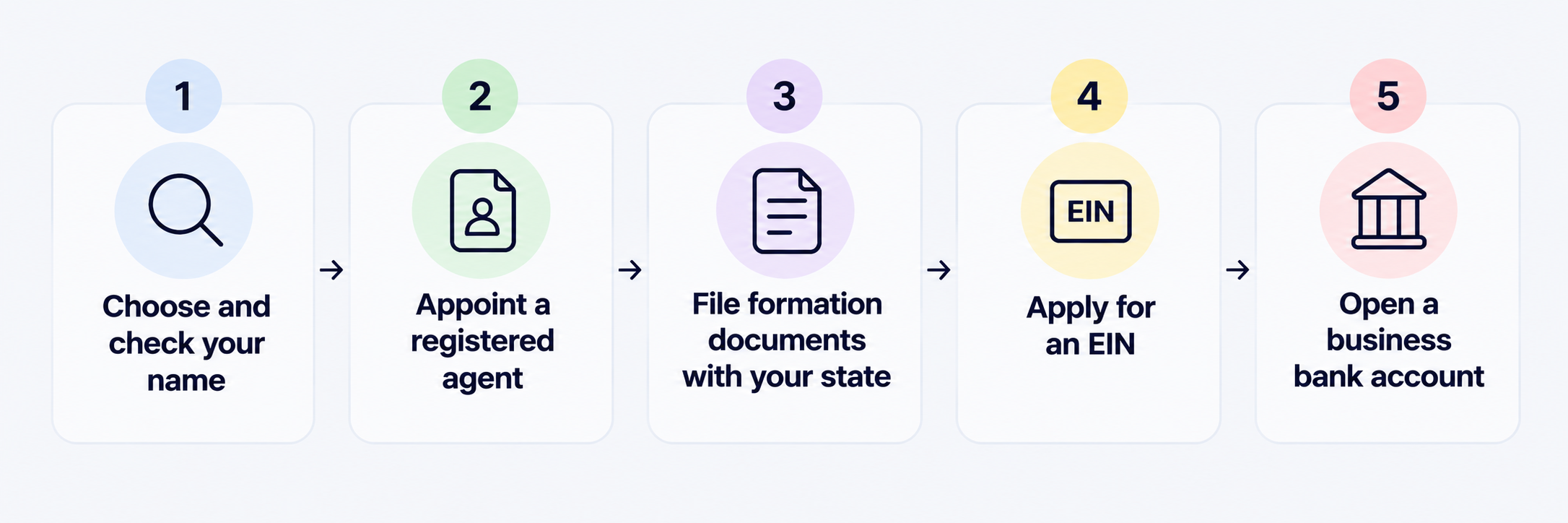
- Choose and check your name: State registration protects your entity name at the state level, and most states won’t let you register a name another business already holds. Search your state’s business register before you commit to one, and check that the matching domain is free.
- Appoint a registered agent: This is the person or service that receives official papers and legal notices for the LLC, and the agent must have an address in the state where the LLC is registered. Many owners pay a registered agent service rather than use their own address.
- File your formation documents: For an LLC, these are usually called the articles of organisation. Most states take them through the Secretary of State or a business agency, some online and some by post. The SBA usually puts the total cost under $300, though fees vary by state. An operating agreement is widely recommended even where your state doesn’t require one: it records how the LLC is run, and for a single owner, it also helps show the LLC is genuinely separate from you.
- Apply for an EIN: An EIN is the IRS’s nine-digit number for your business. Applying is free through the IRS, so avoid any site that charges for it. The IRS says most new single-member LLCs need one, and you’ll need one for employees, for excise taxes, or to open a bank account.
- Open a business bank account: Keep the LLC’s money separate from yours from day one. Banks usually ask for your formation documents and EIN, and a separate account is the simplest way to protect the liability separation described earlier.
After you register, check whether your state wants anything further. Some states require an initial report within 30 to 90 days of registering, and some require a state tax ID depending on their income and employment tax rules. If you operate in more than one state, you may need to register as a foreign LLC in each of them, even if you’re a US resident. That’s a state-law term, not a reference to where you live.
Pros and cons of a single-member LLC
A single-member LLC is worth it when the liability protection and client credibility matter more to you than the added cost and admin, and it’s not worth it if you earn little and have no business debts to protect against. This table weighs each factor from both sides.
The pattern is that the protection and the credibility come with a fixed cost and a regular admin routine. If you’re a freelancer with few assets and a single client, a sole proprietorship may be enough until your income or your risk grows. If you sign contracts, hold stock, employ people or work with larger clients, the case for an LLC gets stronger.
Getting paid as a single-member LLC
Once the LLC and its bank account exist, the next question is how clients pay it. US clients usually pay by bank transfer into a US account, while overseas clients may need to pay in euros or pounds. If your clients are spread across currencies, or you run the LLC from outside the US, a business account that holds several currencies can save you from collecting each payment through a separate route.
You can open a Grey Business account for your LLC to hold USD, EUR and GBP in one place. Grey is a financial technology company, not a bank: banking services are provided by licensed banking partners. Its invoicing tool is free, lets you send an invoice by email or download it as a PDF, and automatically fills in your Grey account details, so a client can pay in the currency they’re sending.
If your clients are in the US, get paid from the US covers how to receive money from the US. If your LLC pays contractors or relatives in India, you can also send money from the US to India. Whichever route you use, keep the business’s income in the business account and pay yourself from it, so your records stay clear for tax time.
Before you move money, check three costs: the fee charged when money arrives, the fee for converting between currencies, and the exchange-rate margin. The margin is built into the rate rather than shown as a line item, so Grey states it up front in the app before you confirm a transaction.
Frequently asked questions
What is a single-member LLC?
A single-member LLC is a limited liability company with one owner. It's a legal entity separate from you that limits your personal liability for business debts, and by default, the IRS ignores it for income tax and taxes the profit on your personal return.
How is a single-member LLC taxed?
By default, it’s taxed as a disregarded entity, so you report the profit on your own return, usually on Schedule C, and pay self-employment tax on net earnings. You can instead elect corporate or S corporation treatment, which changes how profits and salaries are taxed and adds payroll and filing requirements.
Do I need an EIN for a single-member LLC?
Usually, yes. The IRS says most new single-member LLCs need an EIN, and you need one if you have employees or excise tax liability. You’ll also use it to open a business bank account.
How do I set up a single-member LLC?
Choose a name, appoint a registered agent, file your formation documents with your state, apply for an EIN, and open a business bank account. State fees vary, and the SBA usually puts the total cost under $300.
Does a single-member LLC protect my personal assets?
Generally, yes: it limits your personal liability for the LLC’s debts, so creditors of the business normally can’t reach your own property. It doesn’t protect debts you’ve personally guaranteed, and the protection can be lost if you mix personal and business money.
Can a non-resident own a single-member LLC?
Yes, a non-resident can own a US LLC. If you have no US address, the IRS’s online EIN application isn’t available to you, so you apply by phone, fax or post using Form SS-4, and the IRS instructions for Form SS-4 explain how to complete it without an SSN or ITIN. A foreign-owned single-member LLC may also have to file Form 5472 each year, so take advice from a certified tax professional before you form one.
.svg)


