
<script type="application/ld+json" data-schema-version="grey-blog-v4"> [{"@context":"https://schema.org","@type":"BlogPosting","@id":"https://grey.co/blog/us-clients-asking-for-w-8ben-what-indian-freelancers-should-know#article","headline":"US clients asking for W-8BEN: what Indian freelancers should know","description":"Indian freelancers working with US clients may be asked to submit a W-8BEN form. Learn what it is, why it matters, and how to complete it correctly for tax compliance.","inLanguage":"en","url":"https://grey.co/blog/us-clients-asking-for-w-8ben-what-indian-freelancers-should-know","mainEntityOfPage":{"@id":"https://grey.co/blog/us-clients-asking-for-w-8ben-what-indian-freelancers-should-know#webpage"},"datePublished":"2026-02-28T21:10:30.966Z","dateModified":"2026-06-15T14:22:40.066Z","author":{"@type":"Person","@id":"https://grey.co/authors/tunde-aladeloba#person","name":"Tunde Aladeloba","url":"https://grey.co/authors/tunde-aladeloba","jobTitle":"Content Writer","sameAs":["https://ng.linkedin.com/in/aladeloba-babatunde-b1114b100"]},"publisher":{"@type":"Organization","@id":"https://grey.co/#organization","name":"Grey","url":"https://grey.co","logo":{"@type":"ImageObject","url":"https://cdn.prod.website-files.com/6360022338a81bd6fdbb1145/6564ae1077a67e39d3c491a6_Grey%20Logo%20Lockup%20Black.svg"}},"image":{"@type":"ImageObject","@id":"https://grey.co/blog/us-clients-asking-for-w-8ben-what-indian-freelancers-should-know#primaryimage","url":"https://cdn.prod.website-files.com/636a85d290ee58e70c17e1c0/6a300aaf94ad1072191324f4_6a300aaea27379a406dfad49_us-clients-asking-for-w-8ben-what-indian-freelancers-should-know__header-image.webp","contentUrl":"https://cdn.prod.website-files.com/636a85d290ee58e70c17e1c0/6a300aaf94ad1072191324f4_6a300aaea27379a406dfad49_us-clients-asking-for-w-8ben-what-indian-freelancers-should-know__header-image.webp","width":1200,"height":675}},{"@context":"https://schema.org","@type":"WebPage","@id":"https://grey.co/blog/us-clients-asking-for-w-8ben-what-indian-freelancers-should-know#webpage","url":"https://grey.co/blog/us-clients-asking-for-w-8ben-what-indian-freelancers-should-know","name":"US clients asking for W-8BEN: what Indian freelancers should know","description":"Indian freelancers working with US clients may be asked to submit a W-8BEN form. Learn what it is, why it matters, and how to complete it correctly for tax compliance.","inLanguage":"en","primaryImageOfPage":{"@id":"https://grey.co/blog/us-clients-asking-for-w-8ben-what-indian-freelancers-should-know#primaryimage"},"breadcrumb":{"@id":"https://grey.co/blog/us-clients-asking-for-w-8ben-what-indian-freelancers-should-know#breadcrumb"}},{"@context":"https://schema.org","@type":"BreadcrumbList","@id":"https://grey.co/blog/us-clients-asking-for-w-8ben-what-indian-freelancers-should-know#breadcrumb","itemListElement":[{"@type":"ListItem","position":1,"name":"Home","item":"https://grey.co/"},{"@type":"ListItem","position":2,"name":"Blog","item":"https://grey.co/blog"},{"@type":"ListItem","position":3,"name":"US clients asking for W-8BEN: what Indian freelancers should know","item":"https://grey.co/blog/us-clients-asking-for-w-8ben-what-indian-freelancers-should-know"}]}] </script>

US clients asking for W-8BEN: what Indian freelancers should know

Tunde Aladeloba

TABLE OF CONTENT

SHARE THIS POST

How do you feel when you suddenly receive an unfamiliar form, just after celebrating landing a US client? You’re still basking in the excitement of your win, maybe doing a little victory dance, and then a W-8BEN lands in your inbox. The excitement quickly shifts to anxiety. Are you about to lose a major part of your dollars? Is this a US tax trap?

That fear is common, especially when dealing with cross-border clients for the first time. In reality, the W-8BEN form exists to confirm your non-US status and prevent unnecessary tax withholding. Understanding it protects your income and builds credibility. This article explains exactly what Indian freelancers need to know and how to handle it confidently.

Also read: How Indian freelancers grow income year over year

What is the W-8BEN form?

Let me tell you about the W-8BEN form. It' is an official document issued by the US Internal Revenue Service (IRS) that confirms you are a non-US citizen living outside the US earning income from a US company. For Indian freelancers, this form is important because it prevents automatic 30% tax withholding on payments from US clients. By submitting it correctly, you declare that you are not a US taxpayer and may claim treaty benefits, if applicable.

Platforms like Upwork and other US-based marketplaces often require freelancers to complete the W-8BEN before withdrawing earnings. Without it, payments can be delayed or taxed unnecessarily. Understanding how to fill it accurately ensures you receive your full income and remain compliant while working with US clients.

When do US clients request the W-8BEN form?

US clients typically request the W-8BEN form before processing payments to confirm your foreign tax status and compliance.

1. Before issuing your first payment

Most US companies request the W-8BEN before releasing your first invoice payment. Their finance team needs documentation confirming you are a non-US contractor. Without it, they may legally withhold up to 30% tax, even if you are not required to pay US taxes.

2. When onboarding you as a contractor

During onboarding, especially with larger companies, compliance paperwork is standard. Alongside contracts and NDAs, the W-8BEN helps their accounting department classify you correctly as a foreign independent contractor rather than a US employee for tax reporting purposes.

3. When payments exceed reporting thresholds

If your earnings grow beyond certain internal reporting limits, finance teams may formally request tax documentation. This protects the company during audits and ensures they meet IRS reporting requirements for international contractors receiving US-sourced income.

4. When using US-based platforms

Marketplaces like Upwork or other US payment processors require tax forms during account setup or before withdrawals. The platform collects the W-8BEN to prevent automatic withholding and to comply with US tax regulations governing foreign freelancers.

Also read: How Indian freelancers are adapting to global payment trends

What every Indian freelancer should know about the W-8BEN form

Indian freelancers working with US clients should understand how the W-8BEN protects income and supports smooth international payments.

1. Protects your dollar income

The biggest fear is losing 30% of your payment to US tax withholding. The W-8BEN prevents that. By confirming you are an Indian resident and not a US taxpayer, you ensure clients don’t deduct unnecessary tax. That means the full agreed amount is paid to you.

2. Keeps you compliant and professional

Submitting the form shows you understand international business requirements. US clients take compliance seriously, and completing documentation promptly builds trust. Instead of appearing unsure or hesitant, you present yourself as a freelancer who understands global contracts and handles paperwork confidently.

3. Simplifies platform payments

On platforms like Upwork, filling the W-8BEN correctly ensures smooth withdrawals. Without it, payments may be restricted or taxed automatically. Completing it early avoids interruptions and allows you to focus on projects rather than chasing support tickets or worrying about deductions.

4. Strengthens US client relationships

When paperwork is handled properly from the start, clients feel secure continuing the relationship. There are fewer payment issues and no last-minute compliance surprises. For Indian freelancers aiming to build a consistent US income, that stability matters just as much as the rate itself.

Common W-8BEN mistakes to avoid to prevent payment delays

Small mistakes in filling the W-8BEN can delay payments, trigger withholding, or create unnecessary confusion with US clients.

1. Using W-8BEN-E by mistake

Many freelancers accidentally download Form W-8BEN-E because it appears similar. However, that version is strictly for companies and other entities. If you are an individual freelancer in India, always use Form W-8BEN to avoid rejection and payment delays.

2. Listing a US address

Some freelancers enter a US mailing or virtual address, thinking it looks professional. This can create red flags. Your W-8BEN must reflect your true tax residency. Always use your Indian residential address to clearly confirm you are a non-US taxpayer.

3. Leaving PAN blank

Your Permanent Account Number (PAN) strengthens your tax identity as an Indian resident. Leaving Line 6 blank may not always invalidate the form, but including your PAN helps smoother validation and reassures US clients reviewing your documentation.

4. Incorrect treaty claims

Freelancers sometimes try claiming India-US tax treaty benefits unnecessarily. If you perform services entirely from India, you typically do not need to claim treaty benefits. Incorrect claims can confuse finance teams and slow approval of your tax documentation.

5. Submitting W-9 instead

Never submit Form W-9 unless you are a US citizen or resident. The W-9 is strictly for US persons. Sending the wrong form can cause compliance issues and potentially expose you to incorrect tax reporting obligations.

LDMAG1

Understanding the W-8BEN form is crucial for Indian freelancers to receive US payments smoothly and avoid unnecessary tax deductions. Once that’s in place, Grey makes accessing your USD payment simple, with fast, secure transfers, competitive exchange rates, and the option to send or receive USDC. For seamless US payments, sign up on Grey today and take full control of your freelance earnings.

‍

Last updated:

October 12, 2026

Open a free Grey account to get startedJoin 1 million digital nomads
IF YOU ENJOYED THIS, CHECK THESE OUT

What international freelancers should check before signing a payment contract

•

•

2 min read

Before agreeing to a payment contract with international clients, it’s important to consider more than just your rate or project scope. How you receive payments can directly affect your earnings and cash flow.

Cross-border payments often involve hidden fees, delays, and currency conversion challenges. Some platforms may have restrictions depending on the freelancer’s country, while others may not support certain local banks. Failing to check these details beforehand can lead to unexpected costs or slow access to funds.

By understanding the payment methods, associated fees, and local availability, freelancers can make informed decisions. This ensures smoother transactions, timely access to income, and greater confidence when working with international clients.

Also read: Freelance contracts 101: why you need them and what to include

Payment security & terms

Before signing, clearly define the payment currency (USD, EUR, etc.) to avoid losses from fluctuating exchange rates. Specify acceptable payment methods, such as wire transfer, Payoneer, or Grey, and ensure they are reliable in your country. Include milestones and consider requesting a 20–50% upfront deposit to secure partial payment before starting work. Setting these details in the contract protects your earnings, builds trust with the client, and ensures both parties understand when and how payments will be made.

Late payments

Contracts should explicitly address late payments. Include interest fees, usually 1–5%, and clearly define the payment timeline, such as Net-15 or Net-30 terms. This ensures clients understand the consequences of delayed payments and protects your cash flow. By documenting these terms upfront, you reduce uncertainty, minimise disputes, and maintain professional boundaries. Having a formal clause for late payment safeguards your financial stability and encourages clients to prioritise timely transfers.

Scope of work & revisions

Clearly outline the deliverables, project milestones, and any limits on revisions in the contract. Ambiguous terms often lead to scope creep, where clients request additional work without extra compensation. Defining your responsibilities and revision limits protects your time, reduces stress, and ensures fair compensation. This clarity allows you to manage expectations professionally and prevents misunderstandings, giving both you and your client confidence in the agreement.

Taxes & compliance

Understand that foreign clients rarely withhold taxes on payments. As a freelancer, you are responsible for declaring your income, paying local taxes, and managing VAT or GST obligations. Include a note in your financial planning to account for these liabilities, and keep records of all invoices and payments. Knowing your responsibilities ensures compliance, avoids legal penalties, and gives you peace of mind when working with international clients.

Intellectual property  & termination

Specify who owns the work and when ownership transfers in the contract. Define terms for contract termination, including what constitutes a “kill fee” if a project ends early. Clarifying these points protects your creative and professional work, prevents disputes, and ensures fair compensation in unexpected circumstances. Explicit IP and termination clauses provide security for both parties and establish professional expectations before work begins.

Legal jurisdiction

Contracts should state which country’s law governs the agreement. Jurisdiction affects dispute resolution, enforceability, and your legal rights. Knowing this before signing helps you understand which courts, arbitration, or legal processes apply if disagreements arise. For freelancers, choosing a jurisdiction that is reasonable and fair ensures you are not disadvantaged and provides a clear framework for resolving conflicts professionally and efficiently.

Why must freelancers sign contracts before starting work?

Signing a contract protects your work, income, and professional relationship, ensuring clarity and security before starting any freelance or consulting project.

1. Protects your payments

A signed contract guarantees agreed-upon payment terms, rates, and schedules. It secures upfront deposits, prevents disputes, and ensures clients cannot delay or withhold funds without consequences.

2. Defines scope of work

Contracts clearly outline deliverables, responsibilities, and revision limits. This prevents scope creep, overwork, and misunderstandings, keeping the project manageable and professional.

3. Secures intellectual property

Contracts define ownership of work and when it transfers. This protects your creative or professional output and ensures you retain rights until payment is complete.

4. Provides legal recourse

Contracts specify governing law and dispute resolution methods. In case of disagreements, they provide a clear framework to enforce your rights professionally.

Use this table to quickly spot the differences between a good and a bad contract.

__wf_reserved_inherit

Who should sign your freelance or consulting contracts

Only the right people should sign contracts to ensure legal validity, accountability, and protection of your work and income.

1. The freelancer

You, as the service provider, must always sign the contract to confirm agreement to terms, responsibilities, and payment conditions. Your signature legally binds you and protects your rights.

2. The client

The person you’re directly collaborating with should sign to confirm their commitment to the project, deliverables, and payments. This ensures mutual accountability.

3. Company director or CEO

For larger businesses, a director or CEO signing guarantees the contract has executive approval and that funds and obligations are formally committed.

4. Legal manager

Some organisations require a legal or contract manager’s signature to validate compliance with internal policies and mitigate legal risks for both parties.

LDMAG1

Signing a contract is just the first step; ensuring secure, reliable payments is equally important. Grey is an ideal solution for freelancers working with US clients. It offers virtual USD, EUR, and GBP accounts, real bank details for smooth transfers, competitive conversion rates, and fast withdrawals to your local account. Sign up on Grey or download the app to get your banking details instantly.

How Egyptian freelancers receive consulting payments from US clients

•

•

2 min read

A $3,000 consulting invoice from an Egyptian freelancer to a US client can lose $90 to $200 before the money reaches an Egyptian bank account, depending on how the payment is routed. On a SWIFT wire transfer, the sender pays $25 to $50, intermediary banks take their cut, and the receiving bank converts to EGP at a rate 3% to 5% below the mid-market rate. On a $3,000 payment, that exchange rate markup alone can cost $90 to $150.

The payment method you choose is not a minor operational detail. For a consultant billing $3,000 to $5,000 per month, the difference between the most expensive and least expensive option is $1,000 to $2,000 per year. This article compares the five most common ways Egyptian freelancers receive payments from US clients, with specific fee data for each, and helps you choose the right setup based on how often you are paid and how much you typically invoice.

Also read: How freelancers in Egypt can withdraw USD payments easily

Direct bank transfer (SWIFT wire)

A direct wire transfer from your US client's bank to your Egyptian bank account is the most traditional method. It requires only your bank account details and SWIFT/BIC code, and most US clients are familiar with the process.

The costs are significant. The sender typically pays $25 to $50 to initiate the wire. Intermediary banks in the SWIFT chain may deduct an additional $15 to $30. Your Egyptian bank then converts the remaining USD to EGP at its own rate, which is typically 3% to 5% below the mid-market rate, with no option to hold in USD or choose when to convert. On a $3,000 payment, the total cost (sender fees + intermediary fees + conversion markup) can reach $130 to $200. Processing takes 3 to 7 business days.

Direct wire transfers make sense for infrequent, large payments where the client insists on a traditional banking method. For regular consulting income, the cumulative fees make this the most expensive option.

Wise

Wise offers international transfers at the mid-market exchange rate with a transparent, upfront fee. For a USD to EGP transfer, the fee typically ranges from $10 to $22 depending on the payment method and amount. There is no hidden exchange rate markup because Wise uses the mid-market rate (the rate you see on Google or Reuters).

For Egyptian freelancers, Wise allows you to hold funds in multiple currencies and convert when you choose. The main limitation is that Wise's EGP withdrawal options have been intermittently restricted for Egyptian users, and availability can change. Before relying on Wise as your primary payment channel, confirm that EGP withdrawals are currently functioning for your account. When it works, Wise is one of the lowest-cost options for receiving USD from US clients.

Payoneer

Payoneer is widely used by Egyptian freelancers, particularly for payments from platforms like Upwork and Fiverr, as well as direct client payments. It provides a virtual USD receiving account that US clients can pay into. Payoneer charges approximately 1% to receive funds from a client's bank account (payments from Payoneer partner platforms like Upwork are free to receive). When you withdraw to your Egyptian bank account, Payoneer charges 2% to 3% on the currency conversion, and a $1.50 to $3 withdrawal fee applies.

On a $3,000 payment from a direct client, the total cost with Payoneer is approximately $30 receiving fee + $60 to $90 conversion fee, totalling $90 to $120, or 3% to 4%. Payoneer works well for freelancers who receive from multiple sources (platforms and direct clients) and want everything in one place. The conversion cost is higher than Wise or Grey, but the receiving infrastructure is reliable and well-established in Egypt.

Grey

Grey provides USD, GBP, and EUR accounts with real foreign banking details. US clients pay into your Grey USD account via ACH, which appears to them as a standard domestic US transfer. The funds land in your Grey wallet in USD. You hold the balance and convert to EGP when you choose. A deposit fee of 0.8% applies (minimum $2, maximum $10). The conversion fee is 1%, capped at $6 per conversion regardless of the amount. The rate is shown before you confirm. Withdrawal to your Egyptian bank account is supported.

On a $3,000 payment, Grey's total cost is approximately $10 deposit fee (the 0.8% would be $24, but the cap applies at $10) plus $6 conversion fee, totalling $16, or 0.53%. This makes Grey the lowest-cost option for larger consulting payments. The fee caps mean that the effective percentage drops as your invoice amount increases: a $5,000 payment costs the same $16.

Grey also offers virtual cards ($4 creation + $1 funding fee) linked to your balance. If you pay for international tools, subscriptions, or software as part of your consulting work, you can pay directly in USD without converting to EGP first. Grey's invoicing feature lets you create and send invoices in USD from the app, which simplifies billing for direct clients.

Revolut

Revolut is a digital banking platform that supports international payments. Transfers from the US to an Egyptian Revolut account incur a fee of approximately 0.3% of the transfer value. Revolut offers exchange rates close to the mid-market rate and near-instant access to funds once received. On a $3,000 payment, the transfer fee is approximately $9.

Revolut's limitation for Egyptian users is that EGP functionality and withdrawal options may be restricted depending on your account type and Revolut's current availability in Egypt. Some users report that Revolut's service in Egypt is less consistent than in European or US markets. Check current functionality before committing to Revolut as your primary payment channel.

Payment method comparison for Egyptian consultants

Method Receiving Fee Conversion Cost Cost on $3,000 Speed Best For
SWIFT Wire $25-$50 (sender) + $15-$30 (intermediary) 3-5% bank markup $130-$200 (4-7%) 3-7 biz days Infrequent, large payments
Wise $10-$22 (transparent) Mid-market rate (0%) $10-$22 (0.3-0.7%) 1-2 biz days Low-cost; check EGP availability
Payoneer ~1% (direct); free (platform) 2-3% on EGP conversion $90-$120 (3-4%) 2-5 biz days Multiple sources; platform + direct
Grey 0.8% (min $2, max $10) 1%, capped at $6 ~$16 (0.53%) 1-3 biz days Regular consulting; large invoices
Revolut ~0.3% Near mid-market ~$9 (0.3%) Near-instant Speed; check Egypt availability

‍Also read: How Egyptian freelancers manage international income

For a freelancer billing $3,000 per month to US clients, the annual cost difference between the cheapest and most expensive options is substantial. SWIFT wire transfers cost roughly $1,560 to $2,400 per year. Payoneer costs $1,080 to $1,440. Grey costs approximately $192. Wise costs $120 to $264. The platform you choose directly affects your effective hourly rate.

Which payment method fits your situation

If you bill one or two US clients monthly for $2,000 or more: Grey offers the lowest total cost because both the deposit fee ($10 cap) and conversion fee ($6 cap) have maximums. A $5,000 monthly invoice costs the same $16 as a $3,000 invoice. Ask your client to pay via ACH to your Grey USD account details. This appears to them as a domestic US bank transfer, which most US clients prefer.

If you receive payments from multiple freelance platforms and direct clients: Payoneer consolidates everything in one place. Platform payouts (Upwork, Fiverr) are free to receive, and direct client payments cost about 1%. The conversion spread is higher than Grey or Wise, but the convenience of a single dashboard for all income sources has value.

If your priority is the lowest possible conversion cost and EGP withdrawal works in your region: Wise offers mid-market rates with no markup, which is the theoretical minimum conversion cost. Confirm that EGP withdrawals are currently available for Egyptian accounts before making Wise your primary channel.

If your client insists on a traditional bank wire: You can still reduce costs by receiving the wire into a Grey or Wise USD account rather than directly into your Egyptian bank. The wire arrives in your virtual account in USD, and you convert on your terms rather than at your bank's rate.

If you are just starting and invoice under $1,000 per month: Grey's minimum deposit fee of $2 and conversion cap of $6 means the total cost is $8 on a $1,000 invoice, or 0.8%. This is lower than Payoneer's 3% to 4% and substantially lower than a SWIFT wire. Start with Grey or Wise and add Payoneer later if you begin earning from freelance platforms.

What to consider when choosing a payment platform in Egypt

Total cost, not headline fee. Compare the full cost from invoice to EGP in your bank account. A platform that charges no receiving fee but applies a 3% conversion spread is more expensive than one that charges 0.8% to receive and 1% to convert. Always calculate the total cost on your typical invoice amount.

EGP withdrawal reliability. Some platforms that work well globally have intermittent issues with Egyptian withdrawals. Before committing, test with a small payment first. Check recent reviews from other Egyptian freelancers. A platform that is 0.5% cheaper but delays your withdrawal by a week is not actually cheaper.

Transaction and monthly limits. Some services limit how much you can receive per month or per transaction based on your verification tier. If you expect invoices above $5,000 or total monthly volume above $10,000, confirm that your chosen platform supports those amounts without requiring additional documentation or approval.

Client experience. Your payment method should not create friction for your client. US clients are comfortable with ACH transfers (which Grey and Wise support), Payoneer payments, and standard wire transfers. They are less likely to use platforms they have not heard of. Grey's USD account details look like a standard US bank account to the client, which removes any hesitation.

Note: Exchange rates on Grey are variable and include a margin over the mid-market rate. Grey does not charge transfer fees; the cost is reflected in the exchange rate. Always review the rate before confirming a conversion.

Also read: How to start freelancing in Egypt (step by step)

Frequently asked questions

What is the cheapest way to receive USD consulting payments in Egypt?

Based on current fee structures, Grey and Wise offer the lowest total cost for most consulting payment amounts. Grey charges 0.8% to receive (capped at $10) plus 1% to convert (capped at $6), making it particularly cost-effective for invoices above $1,250 where both caps apply. Wise charges $10 to $22 per transfer with no conversion markup, though EGP withdrawal availability should be confirmed. Both are substantially cheaper than SWIFT wire transfers or Payoneer for direct client payments.

How long do international payments take to reach an Egyptian bank account?

SWIFT wire transfers typically take 3 to 7 business days to reach an Egyptian bank account, with occasional delays from intermediary banks or compliance checks. Payments through Grey via ACH typically arrive in the Grey wallet within 1 to 3 business days, after which you can convert and withdraw to your Egyptian bank. Payoneer withdrawals to Egyptian banks take 2 to 5 business days. Wise transfers generally take 1 to 2 business days when EGP withdrawal is available.

Do Egyptian freelancers pay tax on consulting income from US clients?

Yes. Egyptian tax residents are required to declare worldwide income, including consulting fees from foreign clients. Egypt has a progressive income tax system with rates ranging from 0% to 27.5% depending on income level. Freelancers should also check whether Egypt has a double taxation agreement with the US (it does) to avoid being taxed on the same income in both countries. Consult a certified tax professional in Egypt for advice specific to your situation.

Can I hold my consulting payments in USD without converting to EGP?

Yes, with the right platform. Grey, Wise, and Payoneer all allow you to hold a USD balance without automatic conversion. This means you receive the payment in dollars and choose when to convert to EGP based on the exchange rate. Holding in USD also lets you pay for international expenses (software, subscriptions, tools) directly in dollars using a virtual card, which avoids unnecessary double conversion.

What account details should I share with my US client?

For ACH payments (the cheapest method for both you and your client), share your US routing number and account number from your Grey or Wise account. For wire transfers, share your SWIFT/BIC code and account number. Make sure the account name matches your legal name exactly. Always copy and paste account details rather than typing them to avoid errors, and confirm the details with your client before they initiate the first payment.

—

Ready to receive consulting payments from US clients? Sign up at grey.co or download the Grey app to get your USD account details. Share your routing and account number with your client, and start receiving payments with a 0.8% deposit fee (capped at $10) and 1% conversion fee (capped at $6).

How to receive freelance payments in Morocco

•

•

2 min read

Morocco's freelance economy has grown significantly over the past few years. Developers in Casablanca, designers in Rabat, content writers in Marrakech, and marketers across the country are working for clients across Europe, the US, and the Gulf. Such global opportunities can be life-changing. However, despite the high demand for Moroccan freelancers, many still struggle to manage their freelance income.

When working with a Moroccan client, you aren’t quite worried about payments because local transactions are familiar. But when it comes to cross-border payments, currency differences, transaction costs, and currency controls all come into play, and affect how much you actually receive.

This article explains freelance payments in Morocco, the costs of each option, and how to set up a payment system that works.

Why freelance payments are complex in Morocco

Most countries allow residents to hold foreign currency accounts relatively freely. Morocco does not. The dirham (MAD) is a controlled currency. Bank Al-Maghrib, the central bank, regulates the inflow and outflow of foreign currency, and Moroccan commercial banks are required to convert most incoming foreign payments into dirhams upon receipt.

This is a problem for freelancers earning in USD, EUR, or GBP. By the time your freelance payment arrives in your Moroccan bank account, it has been converted to MAD at the bank's rate that day. Most Moroccan banks apply a spread of 2% to 4% above the mid-market rate on foreign currency conversions. On a $2,000 payment, the spread costs you $40 to $80 before transfer fees are factored in.

The implication is that the choice of payment method matters more in Morocco than it does in markets where you can receive foreign currency, hold it, and convert when you choose. Here, the default is conversion on arrival unless you set up infrastructure to hold foreign currency before it reaches a local bank.

Also read: Planning a remote-first career from Morocco

How to receive freelance payments in Morocco

Here are various options for receiving freelance payments in Morocco.

International bank wire transfer to a Moroccan bank account

Most international bank wire transfers use the SWIFT network. Your client initiates a transfer from their bank, and the instruction goes through the SWIFT messaging network to one or more intermediary banks to move the money to your account.

Here is what happens during a wire transfer:

  • Your client pays $25–$50 to initiate the transfer
  • Intermediary banks deduct $10–$30 each along the route
  • Total deductions can reach $35–$80+ before arrival
  • Processing takes 2–5 business days

Once the funds arrive, your bank converts them to MAD. Your Moroccan bank converts the remaining foreign currency to MAD at its rate, typically 2% to 4% below the mid-market rate.

Bank wire transfers to a Moroccan bank account are best suited for large, infrequent payments where the deductions barely make a dent in the payment.

PayPal

PayPal is often the first choice for many international clients because it is familiar and reliable, and it works in Morocco to a point. Moroccan users can create a PayPal account and receive payments from foreign clients. PayPal’s partnership with CashPlus has now made it easier and faster to withdraw funds from your PayPal balance to a local MAD account.

However, this convenience comes at a cost. Here is how PayPal affects your earnings:

  • 4.4% + fixed fee on international payments
  • 3%–5% FX markup on conversion
  • Mandatory conversion to MAD on withdrawal

PayPal, however, remains a popular option because many clients prefer to stick with it regardless of the cost on your end.

Payoneer

Payoneer works in Morocco and supports withdrawals to Moroccan bank accounts in MAD. It is most relevant when working with freelancing platforms like Upwork and Fiverr, which offer Payoneer as an integrated payout option. You are less likely to run into trouble when setting up recurring withdrawals.

Here is what you should expect when using Payoneer to receive freelance payments on Payoneer:

  • Currency conversion fee of 2% to 3.5% when withdrawing to local accounts. On a $1,000 withdrawal you typically lose $20–$30 in conversion costs.
  • Receiving fees for direct client payment can be 1% (ACH) up to 3.99% (cards)
  • Annual account fee of $29.95 for users who receive less than $2,000 in a 12-month period.

It is a reliable option for receiving freelancing platform payouts, but might be expensive for direct client payments.

Wise

Unlike PayPal and Payoneer, Wise offers a transparent fee structure and exchange rates, so you can see upfront how much a transaction would cost.  Wise offers multicurrency accounts that let you keep your earnings  in USD, EUR, or GBP and convert to MAD only when you want. That means you can monitor the conversion rate, the fee, and the exact amount of MAD you will receive before confirming. Wise’s foreign account details are similar to what they have in your client’s country. So, sending you money looks like your client is making a local transfer, which avoids international wire fees and delays.

The conversion fee for transferring to Morocco varies. Using the platform’s fee calculator, a variable fee of $18.81 (roughly 1.9%) is charged when converting $1,000 to MAD.

However, before presenting a Wise account to your clients, you should make a test transfer to confirm it works as expected.

Also read: How freelancers in Morocco can switch from traditional banks to Grey

Grey

Virtual foreign currency accounts like Wise and Grey offer significant improvements when managing cross-border payments with multi-currency accounts. Grey particularly addresses the forced conversion to MAD before you have any say in the matter.

Here is how Grey works:

  • You get USD, GBP, and EUR account details
  • Clients pay via local payment networks (ACH for USD, Faster Payments for GBP, and SEPA for EUR)
  • No forced conversions. Funds arrive in same currency that was sent.
  • Hold USD, EUR, and GBP, convert to MAD and withdraw anytime.
  • 0.8% deposit fee (minimum of £2/€2/$2 and maximum of £10/€10/$10).
  • 1% conversion fee capped at $6
  • Mid-market exchange rates

You can add your Grey account details on freelancing platforms like Upwork and Fiverr to receive your payouts without delays.

Payroll platforms

For Moroccan freelancers in structured, ongoing arrangements with a single international employer, rather than those managing multiple direct clients, contractor platforms like Deel offer a different approach. Your employer or client pays Deel in their currency. Deel handles the currency conversion and deposits your earnings in MAD to your Moroccan bank account.

How the options compare

Putting these options side-by-side, here is a clearer picture of your options for managing freelance payments in Morocco.

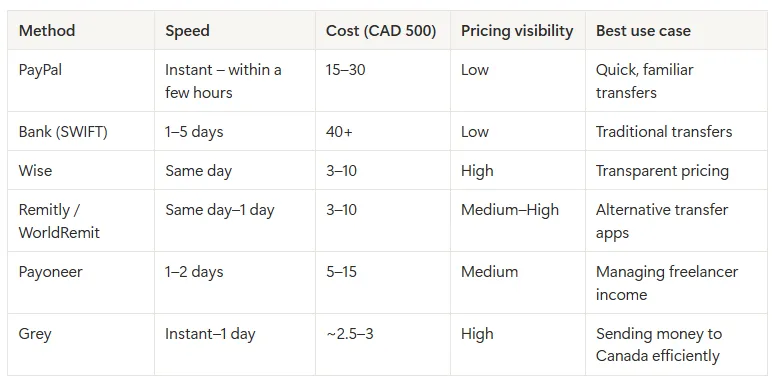
Table comparing payment options in Morocco

Receive international freelance payments with Grey

Your payment option as a Moroccan freelancer determines how much of your earnings you get to keep. You have to consider transaction cost, payment speed, ease of use, and currency conversion. Grey gives Moroccan freelancers virtual USD, GBP, and EUR accounts to receive payments and keep these currencies without forced conversion. Users see how much each transaction costs and can convert to MAD at competitive rates when withdrawing to their Moroccan bank account.

With Grey virtual cards, you can spend directly from your USD, EUR, and GBP balance without top. You can also create multiple cards for various reasons, such as renewing AWS hosting subscriptions or shopping on Amazon. You can also use your Grey account details to withdraw your earnings from global freelancing platforms like Upwork and Fiverr.

Managing your international freelance payments is more seamless with Grey. Sign up on Grey and download the app to get started today.

Frequently asked questions

Can Moroccan freelancers hold foreign currency without immediate conversion to MAD?

Yes, but only with virtual multi-currency accounts like Wise or Grey. Traditional Moroccan banks auto-convert incoming foreign payments to MAD upon receipt due to Bank Al-Maghrib rules.

What is the cheapest way to receive payments from direct clients?

Virtual USD accounts like Grey or Wise. Both let clients pay locally (no SWIFT fees), charge low transparent fees (Grey: 0.8% deposit + capped conversion), and let you hold foreign currency until you’re ready to convert.

Does Grey work with freelancing platforms like Upwork and Fiverr?

Yes. You can add your Grey USD, GBP, or EUR account details directly in the platform’s payout settings for faster, lower-cost withdrawals.

How long do payments usually take?

Within hours for ACH/Faster Payments/SEPA for international bank accounts. Traditional SWIFT wires: 2–5 business days. PayPal (with CashPlus): instant to 1 day.

Are there taxes on freelance income from abroad?

Yes. All foreign income is taxable in Morocco. Keep clear records of payments and consult a tax advisor or use your auto-entrepreneur status correctly. Grey provides downloadable transaction statements to make reporting easier.

Is there any annual fee with these services?

Grey and Wise have none. Payoneer charges $29.95 if your annual volume is under $2,000.

‍

Grey Business vs Grey personal banking

•

•

2 min read

“Should I be using Grey Business, or is my personal Grey account enough?”

It’s a common question, especially once your income starts growing.

At the beginning, everything feels simple. You get paid and you withdraw your money easily. But as your work evolves, whether that’s taking on more clients, earning from multiple platforms, or starting a company, the way you manage money needs to evolve too.

Grey offers two account types for this exact reason: Grey Personal and Grey Business. They are not better or worse than each other. They are built for different stages of your earning process.

This guide breaks down the differences, including fees, features, and when to switch, so you can choose the right setup without second-guessing.

‍Also read: Receiving foreign income as a solo founder

What is a Grey personal account?

A Grey personal account is designed for individuals who receive and manage international payments.

If you are a freelancer, remote worker, or creator earning from global clients or platforms, this is the account you are expected to use.

With a personal account, you can open USD, GBP, and EUR balances with real banking details. This allows clients to pay you as if they were making a local transfer in their own country. Instead of receiving an expensive international wire, you receive money through local rails like ACH, SEPA, and FPS.

Once the money arrives, you can hold it in foreign currency, convert it when the rate works for you, or withdraw it to your local bank account. You can also spend directly using your Grey virtual card without needing to manually move funds around.

The focus here is simplicity. You are managing your own income, and the account is designed to make that as flexible as possible.

What fees does Grey Personal charge?

Understanding fees is where most people get confused, so here’s how it actually works.

When you receive money through ACH, SEPA, or FPS, Grey charges a 0.8% fee, with a minimum of $2, €2, or £2 and a maximum of $10, €10, or £10. This means larger payments become proportionally cheaper because of the cap.

Currency conversion depends on the currency pair. Some routes are free, while others range from 0.5% to 1%. For certain major pairs, the fee is capped at $6. The important detail is that Grey shows the rate before you confirm, so there are no hidden charges after the fact.

Withdrawals vary depending on the country, but for major currencies like EUR and GBP, the fee is typically 0.5%, with a minimum and maximum cap. Other corridors may use fixed fees instead.

For less common deposit methods like Fedwire, BACS, or CHAPS, fixed fees apply. These are generally used less often, since local rails like ACH or FPS are cheaper.

Read more: Grey charges explained: what every transaction costs

What is Grey Business?

Grey Business is designed for companies rather than individuals.

If you are running a registered business, working under a company name, or managing revenue that belongs to a business entity, this is the account structure you need.

Unlike a personal account, a Grey Business account is built for your company. This means you can receive payments on behalf of the business, manage funds at a company level, and keep financial records properly organised for accounting and compliance.

The functionality goes beyond receiving payments. Grey Business allows you to manage team access, assign roles, and give multiple people control over finances without sharing a single login.

You can also pay contractors globally, send payments in local currencies, and handle bulk payouts by uploading recipient details. This becomes important as soon as you are working with a team or scaling operations.

The goal of Grey Business is not just to receive money, but to structure how your business handles it.

What fees does Grey Business charge?

Grey Business follows the same core pricing model as personal accounts.

Receiving payments still comes with the 0.8% fee capped at $10. Conversion fees follow the same tiered structure, and withdrawals depend on the payout country.

The difference is not in lower fees, but in what the account enables.

With Grey Business, you are paying for structure, team management, and the ability to operate at scale without mixing personal and company finances.

Grey Personal vs Grey Business: what is the difference?

The main difference comes down to ownership.

A personal account is for money that belongs to you as an individual. A business account is for money that belongs to a company.

Everything else builds from that.

Grey Personal is simpler, quicker to set up, and designed for individuals managing their own income. Grey Business requires verification of a registered company but provides tools to manage payments, teams, and operations effectively.

If you are working alone and getting paid for your own work, a personal account is enough. If you are invoicing as a company, hiring people, or managing shared finances, you need a business account.

‍Also read: Can non-residents open a US bank account online in 2026?

When should you use Grey for personal use?

You should use a personal account if you are earning in your own name.

This includes freelancers, remote employees, and creators earning from platforms like YouTube, TikTok, or Upwork. At this stage, your income is still personal, even if it comes from multiple sources.

A personal account keeps things simple.

When should you use Grey Business?

You should use Grey Business when your income is no longer just yours.

If you have registered a company, invoice under a business name, or manage revenue that belongs to a business entity, a personal account is no longer the right structure.

This is especially important if you are paying contractors, working with a team, or preparing financial records for accounting and tax purposes.

Can you have both Grey for personal use and Grey Business?

Yes, and in many cases, this is the best setup.

If you run a company but also earn income personally, keeping both accounts separate helps avoid confusion. Your business transactions stay within the business account, while your personal income remains separate.

This makes accounting cleaner and reduces the risk of mixing funds.

Grey for personal use vs Grey Business: key differences

Feature Grey Personal Grey Business
Who it’s for Individuals (freelancers, creators, remote workers) Registered companies, startups, agencies
Account ownership Personal use Business entity
Currencies supported USD, GBP, EUR, USDC USD, USDC (business-focused)
Receiving payments Yes (ACH, SEPA, FPS) Yes (for business transactions)
Team access No Yes (multi-user access with roles)
Bulk payouts No Yes (CSV uploads supported)
Virtual cards Yes (for personal use) Yes (multiple cards for teams, tools, ads)
Best use case Getting paid individually Managing company finances and scaling operations
Setup process Fast (ID verification) More detailed (business verification required)

So, which Grey account should you choose?

Most people overthink this decision, but it comes down to one simple question:

Who does the money belong to?

If you’re earning as an individual, whether that’s freelancing, remote work, or content creation, a Grey Personal account is the right fit. It keeps things simple and flexible while giving you full access to international payments.

If you’re operating as a registered business, invoicing clients under a company name, or managing team payments, Grey Business is the structure you need. It helps you separate finances properly and handle growth without creating confusion later.

If you’re in between, which is common, you can start with a personal account and move to business when your setup requires it. Many users also keep both, using one for personal income and the other for company operations.

The goal isn’t to pick the most advanced option. It’s to choose the one that fits how you earn today and won’t slow you down as you grow.

Getting started with Grey

Opening a Grey Personal account takes just a few minutes. You can sign up in under 5 minutes, and once your identity is verified, you can usually start receiving payments the same day.

Opening Grey Business takes a bit longer because it involves business verification. You’ll need to submit your company registration and ownership details, and approval typically takes 1 to 3 business days, depending on the documents provided. This ensures your account is set up correctly from the start.

Frequently asked questions

What is the difference between Grey for persona use and Grey Business?

Grey Personal is for individuals receiving and managing their own income, such as freelancers, creators, and remote workers. Grey Business is for registered companies that need to manage business revenue, pay contractors, and give team members access to finances.

The main difference is ownership. Personal accounts are for your money. Business accounts are for company funds.

Can I use a Grey Personal account for business payments?

You can use a personal account while you are freelancing under your own name. However, once you register a company or start invoicing under a business name, it is better to switch to Grey Business.

Using a personal account for business transactions can create confusion with accounting, taxes, and financial tracking.

Does Grey Business have different fees from Grey Personal?

Grey Business follows the same core pricing structure as personal accounts. Receiving fees are typically 0.8% with a cap, and conversion fees depend on the currency pair.

The main difference is not pricing, but functionality. Grey Business adds tools for team access, bulk payments, and structured financial management.

Can I have both a Grey Personal and Grey Business account?

Yes. Many users have both accounts.

This is useful if you have personal income, such as freelance work or creator earnings, and also run a registered business. Keeping them separate makes accounting cleaner and easier to manage.

When should I switch from Grey Personal to Grey Business?

You should consider switching when your income becomes business revenue instead of personal income.

This usually happens when you register a company, start invoicing clients as a business, hire contractors, or need proper financial records for tax and reporting purposes.

What documents are required to open a Grey Business account?

To open a Grey Business account, you will need to provide company registration documents, ownership details, and verification information about the business.

The process is more detailed than a personal account because it involves verifying a legal entity.

Is Grey Personal enough for freelancers and creators?

Yes. For most freelancers, remote workers, and creators, Grey Personal is more than enough.

It allows you to receive international payments, hold foreign currency, convert when needed, and withdraw locally without needing business-level setup.

Can I receive USD, GBP, and EUR with both accounts?

Yes. Both Grey Personal and Grey Business support multi-currency functionality.

Personal accounts focus on individual income, while business accounts structure those same capabilities for company use.

Which Grey account is better?

Neither is better. They are designed for different use cases.

Grey Personal is better for individuals managing their own income. Grey Business is better for companies managing business finances and scaling operations.

Ready to get started?

Open your Grey Personal account to start receiving international payments as an individual, or set up Grey Business if you’re managing company finances and need a more structured setup.

How freelancers receive recurring payments from US clients

•

•

2 min read

Freelancing income can be pretty unstable. One month is fully booked with steady client work. The next, you seem to be in a financial mess. This is exactly why many freelancers prefer ongoing gigs over one-time projects. Recurring payments are predictable, invoicing is routine, and you spend less energy taking up new gigs. If you work with US clients, these payments should be the most reliable part of your setup. properly

While managing recurring payments might seem easy on the surface, without the right payment process, you might struggle to chase payments and deal with payment delays. It is even more complicated if you are working with US clients while outside the United States. International transaction fees and currency conversion problems come into play. This article covers the main methods for receiving recurring payments from US clients.

Why do you need a recurring payment setup?

A one-off project payment is just a transaction, and that is all. When transactions are repeated, it becomes a payment system that requires a setup to guarantee efficiency. Here are some scenarios to help you see why you need to structure how you receive recurring payments:

  • If a client sends money to the wrong account once, they are likely to do that again if your payment setup is never corrected.
  • If you use a platform with high conversion fees, the costs pile up with every payment cycle and become significant.
  • If a payment method requires your client to initiate a transfer each month manually, the risk of errors increases with each payment.
  • If the payment terms are not clear enough, you might keep chasing your payment at the end of each payment cycle.

Getting the recurring payment setup right once and for all will save you the stress of running around trying to fix a faulty payment system.

Method 1: ACH direct deposit to a virtual USD account

For most freelancers receiving regular payments from US clients, an ACH payment to a virtual USD account is the most cost-efficient option. Since non-US freelancers don’t have a US address, don’t have a Social Security Number, and cannot visit a bank in person, fintechs offering virtual USD accounts provide a functional alternative.

The Automated Clearing House is a closed-loop network that operates entirely within the US banking system. Money moves directly from the client’s bank to your bank without going through correspondent banks, just like a local transaction. This means no intermediary fees are deducted during payment processing.

  • Open a virtual US account (Grey, Wise, or similar platforms designed for freelancers).
  • Share your routing and account details with the client.
  • Ask them to schedule a monthly ACH transfer in their banking app.
  • Money lands in 1–3 business days with a minimal fee
  • Convert to your local currency and withdraw to your account.

Let’s take Grey as an example. If you earn $2,000 monthly in recurring ACH payments to a Grey USD account, the deposit fee is 0.8% (capped at $10), the conversion is 1% (capped at $6), and withdrawals incur a flat fee depending on the currency.

Also read: How ACH payments work for freelancers outside the US

Method 2: ACH pull via a payment platform

When a client initiates a transaction via an ACH direct deposit, that is a push payment. But there is also an ACH pull that works the other way round. You or your platform initiates the transfer and pulls the money from the client’s account on a scheduled date.

This is just like how Netflix and other subscription services charge directly to your account. Here is the typical flow:

  • A US client agrees to a recurring payment arrangement via a platform such as Stripe or HoneyBook.
  • The platform collects the client’s US bank details once.
  • It automatically initiates an ACH debit on the agreed date each month, without the client taking any action.
  • The funds flow to the platform before being paid out to the freelancer.

Stripe is available in a limited number of countries. If Stripe isn’t available in your country, consider alternatives like HoneyBook, Dubsado, and Bonsai.

Method 3: Automated invoicing with payment links

Several invoicing platforms, including Wave, FreshBooks, QuickBooks, and Grey’s built-in invoicing tool, allow freelancers to send recurring invoices automatically and include a payment link that allows US clients to pay directly from the invoice.

  • Set up a recurring invoice template.
  • Link it to your virtual US account or Stripe.
  • Clients receive the invoice by email on a fixed date each month.
  • They click the payment link and choose their preferred method.
  • The payment processes without a phone call, bank transfer instruction, or any additional communication.

Method 4: Payroll platforms

If the recurring payment is structured as a genuine contractor relationship, platforms like Deel, Remote, and Ripple handle the payment chain on both sides.

  • The client adds you to their Deel or Remote account and schedules recurring payments.
  • The client pays the platform in USD.
  • The platform handles currency conversion and compliance documentation.
  • The freelancer receives funds through local payout methods available in their country, including direct bank transfers in local currency.

Payroll platforms are best suited to single-employer arrangements on a fixed monthly schedule. For freelancers managing multiple clients simultaneously, the added overhead outweighs the benefits.

How the options compare

Let’s have a look at the options and how they compare:

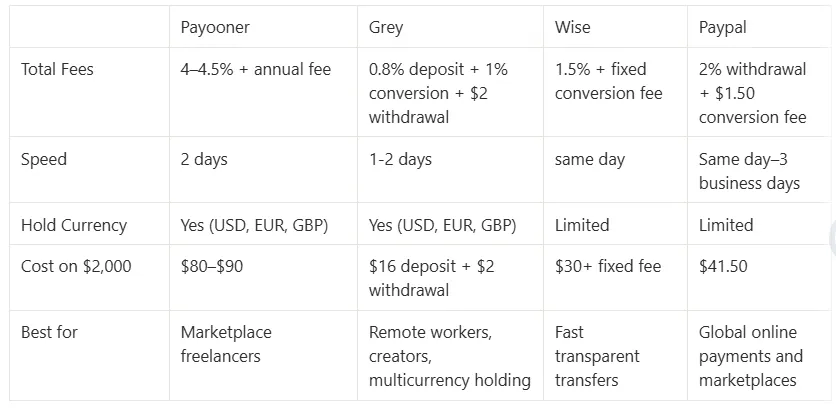
__wf_reserved_inherit

Best practices when managing recurring payments

The goal is to set up a payment system that operates without errors, delays, failed payments, or excessive fees. Here is how to ensure that:

  • Provide complete payment details upfront, in the contract.
  • Ask explicitly whether the client can set up a standing ACH payment.
  • Invoice on a fixed date each month.
  • Follow up on the first late payment immediately.
  • Confirm the payment method is working before the second billing cycle.

Receive recurring payments from US clients with Grey

When it is a one-off payment, you might worry less about inefficiencies. But if you are managing recurring payments with an inefficient payment setup, inefficiencies tend to pile up and clog your cash flow pipeline.

Grey gives freelancers outside the US virtual USD accounts to receive recurring payments. You hold the balance in USD, convert at competitive exchange rates, and withdraw to your local bank account at a flat fee. Grey’s built-in invoicing tool also allows you to send recurring invoices and receive payment directly into your account without a separate platform.

Grey cards offer a unique way to manage international payments by letting you pay directly from your balance, without top-ups, in any currency. The cards also integrate with Apple Pay and Google Pay for fast, contactless payments.

Sign up on Grey and download the app to start managing your recurring payments without troubles.

‍

Wire transfer vs ACH: cheapest way to receive USD

•

•

2 min read

After confirming payment terms with a US client, you will typically receive your payment via wire transfer or ACH. While both options let you receive USD from a US bank account, they share little in common. How the money moves, how much it costs, and how long it takes vary significantly.

Understanding the differences and which option is more affordable is important if you want to keep more of your earnings. For anyone receiving USD from international clients or platforms, this article compares wire transfers and ACH payments to help you decide which is cheaper.

How wire transfers work

A wire transfer is a direct instruction from one bank to another to initiate a transaction. When your US client wants to pay you:

  • The sender bank sends a payment instruction through the SWIFT network.
  • The money passes through one or more intermediary banks
  • Each bank deducts a processing fee before forwarding the remaining funds
  • The money is converted to your local currency at your bank's rate that includes some margins.
  • The money will be deposited into your account in 2 to 5 business days.

Total deductions can range from $30–$75, plus $25–$45 charged by the sender’s bank. Hence, the exact fees are often unpredictable until the money arrives. It is usually difficult to tell how many banks will be involved in a wire transfer. It depends on the specific institutions, the currencies involved, and the destination country.

How ACH transfers work

ACH stands for Automated Clearing House. It is an electronic network that operates entirely within the US  banking system. When a US client sends money to your USD account via ACH, the funds move from their bank to yours via the network.

Unlike SWIFT, ACH is not a messaging system, and money is not being passed through different banks. This means:

  • No intermediary fees between the sender's bank and the recipient's bank.
  • Faster processing, typically within 3 days.
  • Little or no charge on transfers, at most a nominal flat fee under $1.
  • No forced conversion

Many banks now offer same-day ACH, meaning you can receive your payment within a few hours.

If it is that straightforward, why doesn’t every global remote worker use it?

The problem is that ACH only works within the US banking system. For a client to pay you via ACH, you need a USD account with a US routing number and account number. Without those details, ACH is not an option, regardless of how much both parties would prefer it.

Also read: Digital banks vs traditional banks for non-US residents

The cost comparison in real numbers

The difference between wire and ACH becomes more real when you apply it to an actual transaction. So, let’s use some numbers to illustrate.

Let’s say you have sent a $1,500 invoice to a US client and are expecting payment.

Using international wire: your client’s bank charges $35 to initiate the transfer. One correspondent bank deducts $20 in transit. Your receiving bank may charge an inward transfer fee of $10 to $15. The total deducted from that $1,500 before it reaches your account is $65 to $70, close to 5% of the invoice amount.

Using ACH to a virtual USD account: your client pays nothing or a nominal fee under $1. No correspondent banks are involved. The full $1,500 lands in your account, or, let’s say, $ 1,499. Your payment platform may charge a deposit fee, typically 0.35% to 1%. There might be a flat fee for withdrawing the money to your local bank. Total cost on your end: $5.25 to $15 on a $1,500 payment, or 0.35% to 1%.

On a $1,500 transaction, that is a difference of $50 to $65. On $1,500 received monthly, that is $600 to $780 in avoidable costs per year.

Here is a table comparing ACH and wire transfers:

__wf_reserved_inherit

Why wire transfers still exist

If ACH is cheaper and more predictable, you might wonder why anyone still uses wire transfers for international payments. ACH works only in the US. If your client’s bank is in the UK, Germany, or Japan, they cannot initiate an ACH transfer regardless of what account details you provide. For those clients, SWIFT wire is the only direct bank-to-bank option.

For US clients, wire transfers are often used for large transactions, with higher fees accepted as a cost of doing business. For regular freelance or consulting payments of $1,000 to $5,000, wire transfers are rarely the better choice when ACH is available.

Also, some international companies have rigid payment structures built around wire transfers, which can be an administrative hassle to change. They might stick with the traditional wire transfer, which they are more familiar with.

LDMAG1

Getting an account that accepts ACH

Opening a traditional US account requires having a US address and a Social Security Number or an Individual Taxpayer Identification Number. This might not be possible if for a Filipino developer working with a San Francisco startup, a Kenyan designer invoicing a Boston agency, or an Indian consultant serving US clients.

How then can you get a US routing number and account number for ACH transactions?

Virtual USD accounts issued by regulated fintech platforms solve this directly. When you open a virtual USD account through a platform like Grey, Wise, or Raenest, you get a real US routing number and account number from a US banking partner. These details are similar to those for any other US bank account. Your client initiates an ACH transfer from their end, the funds move through the ACH network, and they arrive in your virtual account without any intermediary bank taking a cut.

Also read: Virtual US accounts explained: who they work for

Receiving USD via ACH with Grey

Grey gives freelancers, consultants, and remote workers virtual USD accounts with real US routing numbers and account numbers that accept ACH transfers directly.  The deposit fee on Grey’s USD account is 0.8% of the amount received, capped at $10. You can keep the USD in your account or convert to your local currency at mid-market exchange rates. Grey shows you the exact cost of each transaction and accounts for any deduction. Its multi-currency feature makes it easy to manage GBP and EUR on the same platform.

With a virtual USD bank account, you can now receive ACH payments and maximise your earnings. Sign up on Grey and download the app to get your USD account details today.

‍

Arrow (up)

Back to top