
<script type="application/ld+json" data-schema-version="grey-blog-v4"> [{"@context":"https://schema.org","@type":"BlogPosting","@id":"https://grey.co/blog/receiving-dollar-payments-in-nigeria-best-platforms-and-what-to-avoid#article","headline":"How to receive dollar payments in Nigeria","description":"Comparing Grey, Payoneer, Cleva, Western Union and other options for receiving dollar payments in Nigeria: their fees, how they work, and transaction speeds.","inLanguage":"en","url":"https://grey.co/blog/receiving-dollar-payments-in-nigeria-best-platforms-and-what-to-avoid","mainEntityOfPage":{"@id":"https://grey.co/blog/receiving-dollar-payments-in-nigeria-best-platforms-and-what-to-avoid#webpage"},"datePublished":"2025-08-16T15:43:55.557Z","dateModified":"2026-06-15T14:47:19.657Z","author":{"@type":"Person","@id":"https://grey.co/authors/adeolu-titus-adekunle#person","name":"Adeolu Titus Adekunle","url":"https://grey.co/authors/adeolu-titus-adekunle","jobTitle":"Content Writer","sameAs":["https://www.linkedin.com/in/titusadeoluadekunle/"]},"publisher":{"@type":"Organization","@id":"https://grey.co/#organization","name":"Grey","url":"https://grey.co","logo":{"@type":"ImageObject","url":"https://cdn.prod.website-files.com/6360022338a81bd6fdbb1145/6564ae1077a67e39d3c491a6_Grey%20Logo%20Lockup%20Black.svg"}},"image":{"@type":"ImageObject","@id":"https://grey.co/blog/receiving-dollar-payments-in-nigeria-best-platforms-and-what-to-avoid#primaryimage","url":"https://cdn.prod.website-files.com/636a85d290ee58e70c17e1c0/6a3010774d19e26282128223_6a301076eb742ba6b5e96e8f_receiving-dollar-payments-in-nigeria-best-platforms-and-what-to-avoid__header-image.webp","contentUrl":"https://cdn.prod.website-files.com/636a85d290ee58e70c17e1c0/6a3010774d19e26282128223_6a301076eb742ba6b5e96e8f_receiving-dollar-payments-in-nigeria-best-platforms-and-what-to-avoid__header-image.webp","width":1200,"height":675}},{"@context":"https://schema.org","@type":"WebPage","@id":"https://grey.co/blog/receiving-dollar-payments-in-nigeria-best-platforms-and-what-to-avoid#webpage","url":"https://grey.co/blog/receiving-dollar-payments-in-nigeria-best-platforms-and-what-to-avoid","name":"How to receive dollar payments in Nigeria","description":"Comparing Grey, Payoneer, Cleva, Western Union and other options for receiving dollar payments in Nigeria: their fees, how they work, and transaction speeds.","inLanguage":"en","primaryImageOfPage":{"@id":"https://grey.co/blog/receiving-dollar-payments-in-nigeria-best-platforms-and-what-to-avoid#primaryimage"},"breadcrumb":{"@id":"https://grey.co/blog/receiving-dollar-payments-in-nigeria-best-platforms-and-what-to-avoid#breadcrumb"}},{"@context":"https://schema.org","@type":"BreadcrumbList","@id":"https://grey.co/blog/receiving-dollar-payments-in-nigeria-best-platforms-and-what-to-avoid#breadcrumb","itemListElement":[{"@type":"ListItem","position":1,"name":"Home","item":"https://grey.co/"},{"@type":"ListItem","position":2,"name":"Blog","item":"https://grey.co/blog"},{"@type":"ListItem","position":3,"name":"How to receive dollar payments in Nigeria","item":"https://grey.co/blog/receiving-dollar-payments-in-nigeria-best-platforms-and-what-to-avoid"}]}] </script>

How to receive dollar payments in Nigeria

Adeolu Titus Adekunle

TABLE OF CONTENT

SHARE THIS POST

Someone said the Nigerian dream is to live in a good Nigerian city and earn in dollars. We believe in that dream too. However, amidst government regulations, high rates, and delayed payment, that dream occasionally becomes a nightmare.

In this article, we have curated the best ways you can receive dollar payments in Nigeria and the pitfalls to avoid.

The importance of dollar payments in Nigeria

The comparative difference in the values of USD and naira makes earnings in dollars appealing to many Nigerians. Dollars provide a hedge against inflation and offer higher purchasing power when converted to naira. The volatility of naira also makes it a poor store of wealth.

Whether you’re a freelancer, remote worker, or business person, finding a reliable way to receive dollar payments is a life hack. Unfortunately, traditional banks and some digital platforms impose high fees, slow processing, and restrictive policies. Modern fintech solutions are turning the tide around, offering faster, cheaper, and more reliable ways to receive international payments.

Top platforms for receiving dollar payments in Nigeria

Several platforms cater to Nigerians who receive dollars, each with its unique strengths. Below, we evaluate the best options, with Grey leading due to its affordability, versatility, and user-centric design.

1. Grey: The ultimate solution for dollar payments

Grey is a fintech platform designed to simplify international payments for freelancers, businesses, and remote workers. Its virtual USD, GBP, and EUR accounts, low fees, and intuitive app make it the top choice for receiving dollar payments in Nigeria. Here’s why Grey is a top recommendation:

  • Instant USD accounts: Grey provides an instant USD account for receiving payments from freelancing platforms like Upwork and Fiverr, managing social media earnings on TikTok and AdSense, receiving payments for products on Etsy and Shopify, or direct client transfers.
  • Low-cost transactions: Unlike banks charging high fees per wire transfer, Grey’s fees are minimal, with competitive exchange rates for naira conversions.
  • Multi-currency flexibility: Grey supports USD, GBP, and EUR, allowing you to receive payments in other currencies on the same platform.
  • Stablecoin integration: Grey supports USDC transactions, converting to USD instantly. This bypasses the risky P2P crypto exchanges.

Also read: USDC vs. other stablecoins: what's best for global transactions?

  • Swift transfers: Transactions are swift, and funds can be available within minutes, compared to 2–32 hours for banks, ensuring quick access to your earnings.
  • Secure and user-friendly: Grey utilises advanced encryption and two-factor authentication, along with an app that streamlines account management and withdrawals to Nigerian banks.
  • Virtual USD card: Enjoy more financial flexibility with a USD card that works with most payment gateways. Grey’s USD card supports shopping on global marketplaces and paying for subscriptions.

How to use Grey:

You can sign up on Grey and access a USD account within minutes by following these steps

  1. Visit Grey’s website or download the Grey app from the App Store or Google Play.
  2. Register and verify your identity using a valid ID, proof of your address, and a photograph.
  3. Request for your USD account, and the details will be available for you to share with clients or platforms instantly.
  4. Accept payments via bank transfers, ACH, or stablecoins.
  5. Convert funds to naira or hold in USD for future use.

Grey is optimised for affordability, speed, and innovation, making it the ideal platform for Nigerians seeking efficient dollar payments.

Also read: Best virtual dollar cards in Nigeria

2. Payoneer

Payoneer is a global payment platform offering USD, EUR, and GBP accounts, widely used by freelancers and e-commerce sellers. It integrates with platforms like Upwork, Fiverr, and Amazon, and supports withdrawals to Nigerian banks. However, Payoneer charges high fees, including a $29.95 annual card fee and relatively high currency conversions.

3. Cleva

Cleva is an emerging Nigerian fintech platform offering USD virtual accounts for freelancers and creators. It supports wire transfers and stablecoins, offering low fees, easy onboarding, and a virtual USD card for online spending.

4. Wise

Wise offers transparent fees and mid-market exchange rates, making it a reliable choice for international transfers. The payment solution is another affordable option that supports multiple currencies and processes transfers swiftly. It, however, has some restrictions in Nigeria.

5. WorldRemit

WorldRemit facilitates USD transfers with options for bank deposits, cash pickups, or mobile wallet credits. It partners with Nigerian banks, including Access Bank, Fidelity Bank, FCMB, Polaris, and Zenith, for quick deposits, for which the first three transfers can be free. The fees thereafter can be comparatively higher than other options on this list.

6. MoneyGram and Western Union

Traditional remittance services, such as MoneyGram and Western Union, offer cash pickups and bank deposits, but are less efficient for regular use. There are agent networks across Nigeria for cash access. The downsides include high fees, low transaction limits, and slow processing times. It is, however, a good consideration for unbanked persons.

7. Domiciliary accounts

Domiciliary accounts with traditional banks, such as GTBank, Zenith, or First Bank, allow USD receipt via wire transfers. They are secure for large transactions and widely accepted. Unfortunately, the fees can be cutthroat with slow processing and poor exchange rates. Hence, while it might be great for formal businesses handling large sums, it might not be efficient for small, frequent transactions.

Pitfalls to avoid when receiving dollar payments

To maximise your earnings and ensure security, avoid these common mistakes:

  1. High transaction fees: Traditional banks charge expensive fees with exchange rates that are often far below the parallel market rate, costing you thousands of naira each month.
  2. Unverified platforms: Avoid unofficial agents on social media with unreasonable rates. These often lead to scams or fund losses.
  3. PayPal limitations: PayPal has some restrictions in Nigeria, as it doesn’t support receiving direct USD payments. Working around this restriction risks account bans or falling victim to scams.
  4. Sharing sensitive details: Never disclose your BVN, account numbers, passwords, or OTPs to unverified platforms or individuals.
  5. Ignoring platform limits: Some platforms have low transaction caps and are unsuitable for frequent or large volume payments.

Managing USD payments with Grey

Receiving dollar payments in Nigeria is crucial for accessing the global economy, but high fees, delays, and scams can erode your earnings. By avoiding high-fee banks, unverified P2P platforms, and PayPal’s limitations, you can ensure secure and efficient transactions.

Grey is the ideal platform because it offers instant USD accounts, low fees, stablecoin support, and multi-currency flexibility. Its tailored features and affordability make it the top choice.

Sign up with Grey to streamline your dollar payments and maximise your earnings.

‍

Last updated:

October 13, 2026

Open a free Grey account to get startedJoin 1 million digital nomads
IF YOU ENJOYED THIS, CHECK THESE OUT

ACH vs wire transfer: differences, speed, fees and which to use

•

•

2 min read

After confirming payment terms with a US client, you will typically receive your payment via wire transfer or ACH. While both options let you receive USD from a US bank account, they share little in common. How the money moves, how much it costs, and how long it takes vary significantly.

In short, ACH is cheaper and works within the US banking system, usually taking one to three business days. A wire transfer is faster for urgent or large payments and works internationally, but costs more and is very hard to reverse. This article compares the two on speed, cost, limits and reversibility, and shows which is cheaper if you want to keep more of your earnings.

What is the difference between ACH and wire transfer?

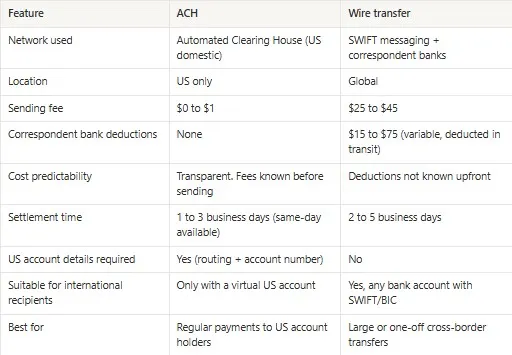
Here is a table that gives you a quick overview of the differences between ACH and wire transfers.

Feature ACH transfer Wire transfer
Processing method Batch processing through ACH network Individual, real-time gross settlement
Speed 1 to 3 business days; Same Day ACH available for qualifying transactions Same day (domestic Fedwire); 1 to 5 days (international SWIFT)
Cost Often free; $0 to $1 for outgoing at most banks; $25 per month for same-day ACH at some banks $15 to $50 (domestic); $25 to $75 (international)
Reversibility Returnable within defined windows (up to 60 days for unauthorised consumer debits) Very difficult to reverse once settled
Domestic / international US domestic only Domestic and international
Transaction limit Daily limits typically $5,000 to $100,000 depending on bank and account type No universal limit; large transfers require documentation
Security Bank-level encryption; regulated by Nacha and Electronic Fund Transfer Act Bank-level encryption; regulated by Fedwire/SWIFT compliance standards
Best for Payroll, bill payment, recurring transfers, everyday business payments Real estate, international payments, urgent large-value transfers

How wire transfers work

A wire transfer is a direct instruction from one bank to another to initiate a transaction. When your US client wants to pay you:

  • The sender bank sends a payment instruction through the SWIFT network.
  • The money passes through one or more intermediary banks
  • Each bank deducts a processing fee before forwarding the remaining funds
  • The money is converted to your local currency at your bank's rate that includes some margins.
  • The money will be deposited into your account in 2 to 5 business days.

Total deductions can range from $30–$75, plus $25–$45 charged by the sender’s bank. Hence, the exact fees are often unpredictable until the money arrives. It is usually difficult to tell how many banks will be involved in a wire transfer. It depends on the specific institutions, the currencies involved, and the destination country.

How ACH transfers work

ACH stands for Automated Clearing House. It is an electronic network that operates entirely within the US  banking system. When a US client sends money to your USD account via ACH, the funds move from their bank to yours via the network.

Unlike SWIFT, ACH is not a messaging system, and money is not being passed through different banks. This means:

  • No intermediary fees between the sender's bank and the recipient's bank.
  • Faster processing, typically within 3 days.
  • Little or no charge on transfers, at most a nominal flat fee under $1.
  • No forced conversion

Many banks now offer same-day ACH, meaning you can receive your payment within a few hours.

If it is that straightforward, why doesn’t every global remote worker use it?

The problem is that ACH only works within the US banking system. For a client to pay you via ACH, you need a USD account with a US routing number and account number. Without those details, ACH is not an option, regardless of how much both parties would prefer it.

Also read: Digital banks vs traditional banks for non-US residents

Which is faster, ACH or wire transfer?

Wire transfers are generally faster than ACH transfers, especially for urgent payments. However, Same Day ACH makes the difference less obvious.

  • Standard ACH: Usually takes one to three business days. The exact timing depends on when the payment is submitted, as ACH transactions are processed in batches several times throughout the business day.
  • Same Day ACH: Eligible payments submitted before the bank's cut-off time (typically around 2:45 pm ET) can settle on the same business day. Availability varies by bank and transaction type.
  • Domestic wire transfers: Processed individually through Fedwire or CHIPS and usually arrive the same business day if sent before the bank's cut-off time (often between 4 pm and 6 pm ET). Once completed, a wire transfer is generally final and cannot be reversed.
  • International wire transfers: Typically take one to five business days, depending on the countries involved, the currencies being transferred, and whether intermediary banks are part of the payment route. Transfers between major currencies such as USD and GBP or USD and EUR often arrive within one to two business days.

So, if speed matters, choose domestic wire transfer or Same Day ACH for urgent payments within the US and international wire transfer for cross-border payments.

If time is on your side, then a standard ACH is usually the better option. It works fine for payrolls, recurring bills, supplier payments, and routine invoices where waiting an extra day or two is not a problem.

The cost comparison in real numbers

The difference between wire and ACH becomes more real when you apply it to an actual transaction. So, let’s use some numbers to illustrate.

Let’s say you have sent a $1,500 invoice to a US client and are expecting payment.

Using international wire: your client’s bank charges $35 to initiate the transfer. One correspondent bank deducts $20 in transit. Your receiving bank may charge an inward transfer fee of $10 to $15. The total deducted from that $1,500 before it reaches your account is $65 to $70, close to 5% of the invoice amount.

Using ACH to a virtual USD account: your client pays nothing or a nominal fee under $1. No correspondent banks are involved. The full $1,500 lands in your account, or, let’s say, $ 1,499. Your payment platform may charge a deposit fee, typically 0.35% to 1%. There might be a flat fee for withdrawing the money to your local bank. Total cost on your end: $5.25 to $15 on a $1,500 payment, or 0.35% to 1%.

On a $1,500 transaction, that is a difference of $50 to $65. On $1,500 received monthly, that is $600 to $780 in avoidable costs per year.

Here is a table comparing ACH and wire transfers:
__wf_reserved_inherit

Why wire transfers still exist

If ACH is cheaper and more predictable, you might wonder why anyone still uses wire transfers for international payments. ACH works only in the US. If your client’s bank is in the UK, Germany, or Japan, they cannot initiate an ACH transfer regardless of what account details you provide. For those clients, SWIFT wire is the only direct bank-to-bank option.

For US clients, wire transfers are often used for large transactions, with higher fees accepted as a cost of doing business. For regular freelance or consulting payments of $1,000 to $5,000, wire transfers are rarely the better choice when ACH is available.

Also, some international companies have rigid payment structures built around wire transfers, which can be an administrative hassle to change. They might stick with the traditional wire transfer, which they are more familiar with.

Getting an account that accepts ACH

Opening a traditional US account requires having a US address and a Social Security Number or an Individual Taxpayer Identification Number. This might not be possible if for a Filipino developer working with a San Francisco startup, a Kenyan designer invoicing a Boston agency, or an Indian consultant serving US clients.

How then can you get a US routing number and account number for ACH transactions?

Virtual USD accounts issued by regulated fintech platforms solve this directly. When you open a virtual USD account through a platform like Grey, Wise, or Raenest, you get a real US routing number and account number from a US banking partner. These details are similar to those for any other US bank account. Your client initiates an ACH transfer from their end, the funds move through the ACH network, and they arrive in your virtual account without any intermediary bank taking a cut.

Also read: Virtual US accounts explained: who they work for

Receiving USD via ACH with Grey

Grey gives freelancers, consultants, and remote workers virtual USD accounts with real US routing numbers and account numbers that accept ACH transfers directly.  The deposit fee on Grey’s USD account is 0.8% of the amount received, capped at $10. You can keep the USD in your account or convert to your local currency at mid-market exchange rates. Grey shows you the exact cost of each transaction and accounts for any deduction. Its multi-currency feature makes it easy to manage GBP and EUR on the same platform.

With a virtual USD bank account, you can now receive ACH payments and maximise your earnings. Sign up on Grey and download the app to get your USD account details today.

Frequently asked questions

Can an ACH transfer be reversed?

Yes, within defined windows. ACH credits (money sent to a recipient) can be reversed within five banking days if they were sent in error. ACH debits (money pulled from a payer's account) can be returned by the receiving bank within two business days for administrative reasons, and consumers have up to 60 days to dispute an unauthorised ACH debit under EFTA protections. Business accounts have shorter windows governed by contract rather than EFTA.

Is a wire transfer safer than ACH?

Both are highly secure, but they have different risk profiles. Wire transfers are final once settled, which protects the recipient against returns but offers the sender no recourse if they make an error or are defrauded. ACH transfers are returnable within defined windows, which gives senders some recourse but also means recipients should wait for transfers to fully clear before releasing goods or services of significant value. For verified, expected transactions, both are safe.

What is the ACH transfer limit per day?

Limits vary by bank and account type. Most US retail bank accounts limit outgoing ACH transfers to $5,000 to $25,000 per day and $25,000 to $100,000 per month for standard accounts. Business accounts typically have higher limits. Premium or verified accounts may have limits up to $500,000 or higher. Contact your bank to confirm your specific account limits.

How do I send a wire transfer internationally?

Contact your bank via online banking, mobile app, or branch visit. You will need: the recipient's full name, their bank account number or IBAN, the bank's SWIFT code or BIC, the bank's name and address, the amount and currency, and your reason for the transfer. Some banks require identity verification or additional documentation for international wires above certain amounts.

Does Grey use ACH or wire transfer?

Grey routes transfer through the most appropriate local payment network for each corridor. For payments to or from US bank accounts, Grey uses ACH. For UK transfers, Grey uses Faster Payments. For EU transfers, Grey uses SEPA. This removes correspondent banks from the chain and avoids the deductions associated with SWIFT international wires. Grey also supports international wire transfers where local network routing is not available.

What happens if a wire transfer is sent to the wrong account?

Contact your sending bank immediately. The bank will initiate a recall process via the SWIFT gpi tracking system or domestic wire network, requesting that the receiving bank return the funds. Recovery success depends on whether the recipient bank is cooperative and whether the funds have been further moved. This process can take weeks and is not guaranteed to succeed. Always verify account details with the recipient before initiating any wire transfer.

Send money internationally with Grey and avoid correspondent bank deductions and undisclosed fees.
How Indian YouTube creators receive overseas earnings in 2026

•

•

2 min read

Does YouTube pay in dollars in India? It depends on the payment currency of your AdSense account. Google says this payment currency cannot be changed, so check which currency your account uses under Payments in AdSense. If your earnings are in USD, your bank converts them into rupees when the payment arrives, and the sections below show how to keep more of that money. Source: YouTube Help: AdSense for YouTube payment process, checked on 13 November 2026.

When many Indian YouTube creators first start earning, the excitement often comes with a surprise: the money doesn’t land in rupees straight away. Whether it’s Google AdSense revenue, Super Chats during live streams, channel memberships, or even YouTube Premium shares, most earnings are generated in USD because YouTube operates globally from the United States.

At first, it feels simple on screen views go up, revenue grows, but behind the scenes, there’s a process that connects those dollars to India. Creators often realise they need a reliable way to receive international payouts, especially when working with overseas brand deals or sponsorships.

That’s where payout systems and banking choices become important. From traditional bank transfers to modern fintech platforms, each option affects how quickly money arrives and how much is lost in conversion fees.

For many creators, learning how to efficiently receive and manage USD earnings becomes just as important as creating content itself.

Also read: Online shopping from abroad for Indians: a simple guide

Payment challenges Indian YouTube creators face

While global YouTube creators have the immense opportunity to earn big, their Indian counterparts face unnecessary hassles that complicate matters or lead to lower earnings. Here are some of those problems.

Exchange rate

One of the biggest challenges is currency conversion. YouTube pays creators in USD through Google AdSense, but the final payout is usually converted into INR when it reaches an Indian bank account. This is where value can be lost. Unfavourable exchange rates or hidden conversion margins reduce the actual earnings creators receive. Even small differences in rates can add up significantly over time, especially for creators earning consistently. Many realise that the number they see in their AdSense dashboard is not the same amount that reflects in their bank account, which creates frustration and impacts long-term income planning.

Tax compliance

Tax obligations also add complexity to YouTube earnings in India. Income from AdSense, brand deals, Super Chats, and memberships is treated as taxable income under “business or professional income.” Creators are required to declare earnings accurately and maintain proper records. In some cases, tax may already be deducted at source (TDS) when payments are processed, especially if PAN details are linked to AdSense. This means creators must stay updated with filings, documentation, and compliance rules. For many beginners, this becomes overwhelming, as they are not only content creators but also responsible for managing financial and regulatory obligations alongside their work.

Verification delays

Payment delays are another common issue creators face. Google AdSense may temporarily hold funds if there are verification requirements, such as identity confirmation, address validation, or updates to bank and tax details. Even small discrepancies in account information can trigger delays. In some cases, policy reviews or compliance checks can also pause payments without warning. Additionally, some third-party payout services may freeze or restrict accounts if suspicious activity is detected or if documentation is incomplete. These delays can disrupt cash flow, especially for creators who rely on monthly payouts to manage personal or business expenses consistently.

Platform dependency risk

Another often overlooked challenge is dependency on a single platform for income. Most creators rely heavily on YouTube and Google AdSense, which means any policy change, algorithm update, or monetisation restriction can directly impact earnings. Sudden demonetisation, reduced ad rates, or shifts in audience reach can significantly affect income stability. Because creators do not control the platform, they are exposed to external decisions that may change without notice. This creates uncertainty, especially for full-time creators. Diversifying income streams, through brand partnerships, digital products, or multiple platforms, becomes essential to reduce risk and build more stable, long-term earnings.

Best ways for Indian YouTube creators to receive overseas earnings

For Indian YouTube creators, getting paid in dollars is exciting, but how that money reaches your account can change what you actually keep.

1. Direct wire transfer / EFT (AdSense)

Bank charges for inward remittance in India vary widely. Some banks, like Axis Bank, charge over ₹400–₹500 per transaction, while others charge around ₹70–₹100 depending on the bank and channel. Creators also need a minimum payout threshold of $100 USD before receiving payments from platforms like AdSense.

For most creators, the process is simple. Earnings appear in USD on the AdSense dashboard, and Google sends them directly to an Indian bank account. The money arrives automatically and is converted into INR without extra steps, making it feel seamless and easy to use.

2. Grey

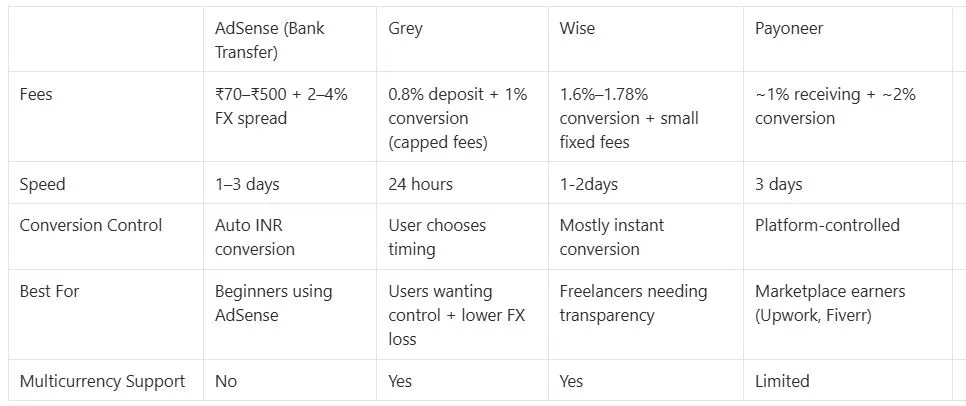
Grey feels different from a traditional bank experience. Instead of your money being converted immediately, it first lands in a USD wallet, giving you control over when to convert. The deposit fee is around 0.8% (capped at $10), and conversion is about 1%, compared to the much higher 2% to 4% spread most Indian banks charge on incoming wire transfers alone, before any additional handling or hidden FX margins. For creators, this creates flexibility. If rates are unfavourable, you can wait; if they improve, you convert later. Withdrawal to an Indian bank account includes the 1% conversion fee (capped at $6) when converting USD to INR

3. Wise

Wise is for creators who want clarity. You don’t guess what you’ll receive, you see it before the money even moves. The platform uses a transparent fee structure with a currency conversion fee of around 1.6%–1.78%, depending on the route and currency.

For international receipts in India, there is also a small e-FIRC/FIRA-related fee of about $2.50–$2.90, when required for compliance. Certain transfers, such as USD wires, may also carry a fixed fee of around $6.11, depending on the payment type.

4. Payoneer

Payoneer often comes into play when creators expand beyond AdSense, brand deals, freelance work, or international partnerships. It acts like a global wallet, holding your USD before you bring it into INR. Fees include around 1% for receiving USD via ACH and about 2% for currency conversion. The experience feels global, but slightly more complex. There are extra checks, verifications, and occasional holds if details don’t match. Still, for creators working with multiple income streams, it becomes a practical bridge between global clients and your Indian bank account.

Payment methods comparison

__wf_reserved_inherit

Key considerations for Indian creators

For Indian YouTube creators earning globally, understanding banking rules, documentation, and timing is key to protecting and maximising overseas income.

  • FIRC (Foreign Inward Remittance Certificate): FIRC is an important document issued by your bank when you receive foreign payments. It serves as proof that your income came from outside India and is classified as an export of services. Many creators use it for tax filing, compliance, and financial records. Without it, explaining international income to tax authorities can become complicated during audits or assessments.
  • Bank charges: When receiving USD earnings through direct wire transfers, banks often apply multiple charges beyond what is immediately visible. These may include intermediary bank fees, conversion margins, and processing costs. While the transfer may appear seamless, the final INR amount is usually lower than expected. Understanding these deductions helps creators better estimate their actual monthly income from YouTube.
  • Optimal timing: Exchange rates fluctuate daily, and timing can significantly impact how much INR you receive from USD earnings. Many creators overlook this and convert automatically when funds arrive. However, monitoring rates allows you to convert when the dollar is stronger, increasing your returns. Over time, even small timing decisions can make a noticeable difference in overall income consistency and value.
  • Document submission: For first-time international payments, banks may request additional details such as a purpose code explains the nature of your income. This helps classify your earnings correctly as services or digital exports. Once submitted, future transfers usually become smoother. Keeping your documentation accurate and consistent reduces delays, minimises verification issues, and helps maintain uninterrupted access to your YouTube earnings.

Also read: Wise vs Payoneer and PayPal: which is better for Indians?

How to receive YouTube creator earnings from India

  • Step 1: Sign in to AdSense, go to Payments, and ensure your YouTube channel is linked to the correct account for receiving earnings.
  • Step 2: Add a payment method, usually a bank transfer or EFT, and select your Indian bank account as the preferred option for payouts.
  • Step 3: Enter accurate bank details, including account number, IFSC code, and bank name exactly as shown in your bank records to avoid issues.
  • Step 4: Verify your account using the test deposit sent by AdSense, then confirm it to activate automatic YouTube earnings transfers.
  • Step 5: After your first payout arrives, request a FIRC (Foreign Inward Remittance Certificate) from your bank. This document confirms that the payment is foreign income and is required for tax filing and compliance.
  • Step 6: Note the purpose code your bank assigns to the incoming transfer. For YouTube or AdSense income, banks typically use codes such as P0802 (software/IT services) or P1007 (advertising services). Always confirm the exact code with your bank, as classifications can vary slightly depending on the institution.

Frequently asked questions

Does YouTube pay in dollars or rupees in India?

It depends on the payment currency of your AdSense account, which Google says cannot be changed. Check the currency shown under Payments in AdSense. If your account is in USD, your bank converts the payment into rupees when it arrives, usually at its own exchange rate plus any fees.

How long does it take for YouTube earnings to reach an Indian bank account?

‍Google issues AdSense for YouTube payments between the 21st and 26th of each month, as long as your balance has reached the payment threshold by the 20th. Google says a bank transfer can then take up to seven working days to complete. Delays can occur due to bank processing, weekends, or verification checks. Fintech platforms may sometimes offer faster settlement depending on the payout method used.

Why is my YouTube payout lower than what I see in AdSense?

If your AdSense account is in USD, it shows gross USD earnings, not the final INR value. Banks apply exchange rates, conversion margins, and possible intermediary fees. This difference often explains why the credited amount appears lower than expected after conversion into rupees.

Do I need FIRC for YouTube earnings in India?

Yes, the FIRC (Foreign Inward Remittance Certificate) helps confirm your income as foreign earnings. It is useful for tax compliance, audits, and record-keeping. Most Indian banks issue it upon request after receiving international payments into your account.

Can I choose when to convert USD to INR?

With traditional bank transfers, conversion happens automatically on receipt. However, some fintech platforms allow you to hold USD and convert when rates are favourable, giving you more control over timing and potentially better returns on earnings.

What is the safest way to receive YouTube earnings in India?

The safest method is using verified AdSense bank transfers linked to a compliant Indian bank account. Ensure accurate details, proper KYC, and trusted payout channels. Avoid unofficial intermediaries to reduce the risk of delays, fraud, or payment issues.

Does Grey support withdrawals to Indian banks like HDFC, ICICI, Axis, and SBI?

Yes, Grey supports withdrawals to major Indian banks including HDFC Bank, ICICI Bank, Axis Bank, and State Bank of India (SBI). Once your USD earnings are converted, you can transfer funds directly to these accounts. Processing is generally smooth, though timelines may vary slightly depending on your bank’s internal settlement and compliance checks.

Is Grey safe for receiving YouTube earnings?

Grey is built for cross-border payments and works with regulated financial partners to ensure secure transactions. Your funds are held in a multi-currency account, giving you flexibility to convert and withdraw when needed.

Also read: How freelancers in India can invoice clients abroad easily

Managing YouTube earnings seamlessly.

When choosing payout options as an Indian YouTube creator, consider convenience, cost, flexibility, speed, and exchange rates.  Grey provides multi-currency accounts that support USD, GBP, and EUR transactions. You can easily integrate your USD account with your YouTube payout page.

If you are collaborating with international clients, you can share your Grey account so they can pay in USD, EUR, or GBP. You can withdraw to your local Indian account at a 1% conversion fee capped at $6 and without delays. Get started with Grey today or download the app and manage your YouTube earnings from one account.

Grey charges fees on deposits, conversions, and withdrawals. Deposits via ACH, SEPA, or FPS incur a 0.8% fee (minimum $2/€2/£2, maximum $10/€10/£10). Currency conversions are charged at 1%, capped at $6. Withdrawal fees vary by currency: ₦35 for NGN, 0.5% for EUR/GBP (minimum €2/£2, maximum €10/£10), a 1% fee is applied when converting USD to INR, capped at $6 and $0.50-$0.65 for KES/UGX/TZS. Cross-border card transactions (non-USD purchases on a USD card) incur a 2% fee plus $0.50. Exchange rates are variable and include a margin over the mid-market rate. Always review fees and the rate before confirming a transaction. Visit grey.co/pricing for current rates.

‍

9 best platforms to earn US dollars in India

•

•

2 min read

You do not need to relocate to earn in dollars. Thousands of Indians are already doing it, working remotely for US companies, freelancing on global platforms, selling digital products, and teaching online. The platforms exist. The demand for Indian talent exists. The only question is how you set yourself up to earn, receive, and keep more of that income.

This guide covers the best platforms to earn US dollars in India, the types of work that pay in USD, and how to withdraw your earnings to your Indian bank account without incurring steep conversion fees or slow bank transfers.

Why earning in USD makes sense for Indians

The Indian rupee has depreciated consistently over the past decade, and inflation continues to pressure salaries and savings. At the same time, global demand for digital services in development, design, writing, marketing, and education continues to grow. Earning in a stable currency like USD gives you a structural advantage.

Beyond currency stability, dollar income gives you stronger purchasing power for international tools, courses, and subscriptions. It gives you better returns when saving or investing. And it gives you more control over when and how you convert, so you can time your conversions around exchange rate movements instead of being forced into bad rates by your bank.

What kind of work pays in USD from India?

Indians are earning dollars in more ways than most people realise. Some of the most common paths include:

  • Freelancing: Writing, web development, video editing, translation, graphic design, and digital marketing on platforms that connect you with international clients.
  • Remote contract jobs: Especially with US-based startups that hire globally for engineering, product, operations, and customer support roles.
  • Online tutoring and teaching: Conversational English, test prep (SAT, GRE, GMAT), and academic subjects through platforms that pay per session or per minute in USD.
  • Content creation: YouTube ad revenue via AdSense, Instagram Reels bonuses, podcast sponsorships, and newsletter monetisation.
  • Selling digital products: Online courses, design templates, printables, stock photography, and music through global marketplaces.
  • Affiliate marketing and dropshipping: Promoting international products and earning commissions in USD.
  • User testing and surveys: Getting paid to review websites, apps, and prototypes for US companies.

Whatever your skill set, there is likely a global market for it, and platforms to help you access it. If you are freelancing for international clients, Grey also lets you invoice clients abroad directly from the app.

Top platforms to earn US dollars in India

Here are 9 platforms Indians use to get paid in USD, with practical details on how each works.

1. Upwork

Upwork is one of the largest freelance marketplaces globally, and Indian professionals regularly secure contracts with US and European clients across fields such as software development, writing, design, data analysis, and virtual assistance. Upwork pays in USD and lets you withdraw via direct bank transfer, PayPal, Payoneer, or wire transfer.

The platform takes a sliding service fee: 20% on the first $500 with each client, dropping to 10% after that, and 5% after $10,000. Long-term contracts are where the real value is. Once you build a relationship with a client and move past the initial fee bracket, Upwork becomes significantly more cost-effective than other platforms.

Best for: Developers, writers, designers, VAs, and marketers with at least some portfolio work to show.

2. Fiverr

Fiverr works differently from Upwork. Instead of bidding on projects, you list fixed-price services ("gigs") and buyers come to you. This suits creatives and service providers who prefer packaging their skills into clear deliverables, such as logo design, video editing, voiceover work, social media management, or website builds.

Fiverr takes a flat 20% commission on every order. Earnings are in USD and can be withdrawn via PayPal, bank transfer, or Fiverr Revenue Card. The key to earning well on Fiverr is niche positioning and strong reviews. Generic gigs get buried.

Best for: Designers, video editors, voiceover artists, and anyone who can package a service into a clear deliverable.

3. Toptal

Toptal is a premium platform that accepts only the top 3% of applicants in software engineering, design, and finance. The vetting process is rigorous (multiple interviews and a test project), but the payoff is access to high-quality, well-paying contracts with major companies. Rates are significantly higher than general freelance platforms, often $60-$150+/hour depending on the role.

Best for: Experienced developers, designers, and finance professionals who can pass the vetting process and want premium rates.

4. Amazon KDP (Kindle Direct Publishing)

If you can write, Amazon KDP lets you self-publish eBooks, paperbacks, and low-content books (journals, planners, workbooks) and earn royalties in USD. Royalties range from 35% to 70%, depending on pricing and distribution. The income is passive once a book is published, and some Indian authors have built meaningful monthly income streams with a catalog of 10-20 books in specific niches.

Best for: Writers, educators, and anyone willing to learn self-publishing. Works well as a side income that compounds over time.

5. YouTube Partner Program

Once your channel hits 1,000 subscribers and 4,000 watch hours (or 10 million Shorts views), you can monetise through Google AdSense. Ad revenue is paid in USD. Indian creators in English-language niches (tech reviews, personal finance, education, productivity) tend to earn higher CPMs than Hindi-language content because advertisers pay more for English-speaking audiences.

Best for: Creators with a niche, consistency, and willingness to build an audience over 6-12 months before meaningful income kicks in.

6. Cambly

Cambly pays you to teach conversational English to learners worldwide. There is no lesson prep required; you simply have conversations. Pay is $0.17/minute ($10.20/hour), paid weekly via PayPal. The sessions are casual and unstructured, which makes it one of the lowest-effort ways to earn USD if you are a fluent English speaker.

Best for: Fluent English speakers looking for flexible, low-commitment side income. Particularly popular with students and professionals with flexible schedules.

7. Teachable and Gumroad

If you have expertise in any subject, you can package it as an online course (Teachable) or as a digital product, such as templates, guides, or design assets (Gumroad). Both platforms serve a global audience and pay in USD. Earning potential scales with your audience and your marketing. Some Indian creators earn $1,000-$5,000+/month from a single well-positioned course.

Best for: Subject matter experts, designers, and educators who can build or already have an audience to sell to.

8. UserTesting and TryMyUI

These platforms pay you to test websites and apps and share your feedback via screen recording. Each test takes 15-20 minutes and pays $4-$10 (UserTesting pays $10 for most tests). Availability depends on your demographic profile matching what companies need, so it works best as supplemental income rather than a primary source of income.

Best for: Anyone with clear English communication skills and a computer with a microphone. Good for side income between other work.

9. Etsy

Even without shipping physical products, you can sell digital downloads on Etsy: printable planners, resume templates, wedding invitations, digital art, and social media templates. Etsy charges a $0.20 listing fee plus a 6.5% transaction fee. Earnings are in USD. The platform has a built-in audience of buyers searching for these products, so you do not need to drive your own traffic.

Best for: Designers and creatives who can produce templates or digital art. Works well as passive income once listings are live.

Also read: Best way to receive euros in India

How to actually receive your USD earnings in India

Landing a client or getting approved on a platform is only half the problem. Withdrawing your earnings to India is where most people lose money.

Traditional Indian banks typically charge 1.5-3% on foreign currency conversion, add wire transfer fees of $15-$30 per transaction, offer exchange rates 2-4% worse than the mid-market rate, take 3-5 business days to process, and require paperwork that slows everything down. PayPal is faster but takes a 3-4% cut when converting USD to INR, in addition to withdrawal fees.

How Grey works for USD earnings in India

Grey gives you a free USD account with US bank details (routing number and account number). You can share these details with clients, connect them to freelance platforms, or use them to receive payments from any US-based source.

Here is how the flow works:

  1. Receive USD: Share your Grey US bank details with your client or platform. Payments arrive as standard ACH transfers.
  2. Hold or convert: Your USD sits in your Grey wallet. No forced conversion. You decide when to move it to INR based on the exchange rate.
  3. Withdraw to India: When you are ready, send to any Indian bank account using the recipient's IFSC code and account number. Grey charges a 1% conversion fee on USD to INR.
  4. Spend in USD: Need to pay for tools, subscriptions, or courses in dollars? Use your Grey virtual USD card to pay directly without converting first.

For a detailed walkthrough with screenshots, see the step-by-step guide to sending money to India. For a full breakdown of costs, check Grey's fees and charges.

Grey vs other ways to receive USD in India

Method Conversion Cost Speed Hold USD?
Grey 1% conversion fee Same day to 1 business day Yes, convert when you choose
Indian bank wire 1.5–3% + wire fee ($15–30) 3–5 business days Requires separate forex account
PayPal 3–4% total (conversion + withdrawal) 1–3 business days Limited, auto-converts
Payoneer Up to 2% + withdrawal fee 2–5 business days Yes, but fees on holding

You can check the current USD-to-INR rate and see the exact amount you would receive using Grey's fee calculator.

Also read: How to receive British pounds in India

Tips to maximise your USD earnings from India

Work directly with clients when possible

Platforms like Upwork and Fiverr take 10-20% in service fees. Once you have built a relationship with a client, consider moving to direct contracts with invoicing. You save the platform fee and get paid faster.

Time your conversions

The USD/INR rate fluctuates daily. If you can hold your dollars in your Grey account and convert when the rate is favourable, you keep more of your earnings. Watch exchange rate trends and convert in batches rather than converting every payment immediately.

Diversify your income sources

Relying on a single platform or client is risky. Combine freelancing with passive income (KDP, digital products) or side income (tutoring, user testing) to stabilise your cash flow.

Track everything

Use a simple Google Sheet or Notion database to track invoices, payment dates, conversion rates, and net INR received. This helps you understand your effective hourly rate across platforms and makes tax filing easier.

Understand the tax implications

Income earned in USD is taxable in India. Freelance income falls under "Income from Business and Profession" and is subject to your applicable income tax slab. You can deduct legitimate business expenses (software, equipment, and internet). If your gross receipts exceed Rs 50 lakh, you may need a tax audit. Consult a CA who understands freelance and foreign income if you regularly earn in USD.

This article is intended for general guidance and does not replace professional tax advice. Readers should consult a chartered accountant for personalised recommendations.

Start earning and receiving USD today. Open a free Grey account and get US bank details you can share with clients and platforms immediately.

Frequently asked questions

How can I earn US dollars from India?

You can earn USD from India through freelancing platforms (Upwork, Fiverr, Toptal), teaching English online (Cambly), selling digital products (Amazon KDP, Gumroad, Etsy), content creation (YouTube), and user testing (UserTesting). Most of these platforms pay in USD and allow you to withdraw to an Indian bank account or a USD account like Grey.

How do I receive USD payments in India?

You can receive USD payments through a Grey USD account, which gives you US bank details (routing number and account number) to share with clients or platforms. When you are ready to withdraw, you can send the funds to any Indian bank account using the recipient's IFSC code and account number. Grey charges a 1% conversion fee.

Is it legal to earn in USD from India?

Yes. Earning foreign currency for services rendered from India is legal under FEMA (Foreign Exchange Management Act) guidelines. You are required to declare the income for tax purposes, and it is taxable under the Indian income tax law based on your slab rate.

Which platform pays the most for freelancers in India?

Toptal pays the highest rates (often $60-$150+/hour) but only accepts the top 3% of applicants. For most freelancers, Upwork offers the best balance of volume and rate, especially once you move past the initial 20% fee bracket with repeat clients.

How do I avoid losing money on USD to INR conversion?

Avoid using traditional bank wires (1.5-3% markup) or PayPal (3-4% total cost). Use a platform like Grey that charges a transparent 1% conversion fee and lets you hold USD until the exchange rate is favourable. Check the exact amount you would receive using the fee calculator before converting.

Can NRIs use Grey to receive USD?

Grey provides USD accounts that NRIs can use to receive payments from US clients or employers. You can hold dollars in the account and send INR to any Indian bank account when you need to transfer money home.

More from Grey:

Everything you need to know about an Algeria holiday visa

•

•

2 min read

Spanning over 2.38 million square kilometres, Algeria is the largest country in Africa. This means travellers will rarely run out of places to explore.

However, the dream of exploring this fascinating country can be hindered by the often complex visa application process. To help you avoid unnecessary stress and delays, we’ve created a comprehensive guide to the Algeria holiday visa. Let’s break down the requirements and steps, ensuring your adventure starts on the right foot.

Do you need a visa to visit Algeria?

Yes, most travellers need a visa to enter Algeria for tourism purposes. However, visa exemptions apply to citizens of a few select countries, including:

  • Libya, Mali, Mauritania, Seychelles, and Tunisia – Visa-free access for up to 90 days.
  • Morocco – Since September 2024, Moroccan passport holders need a visa again.
  • Diplomatic and official passport holders from certain countries – Check with the Algerian embassy for eligibility.

Also read: Egypt visa requirements for EU citizens

Types of Algeria holiday visas

There are two main types of visas for tourism in Algeria:

  1. Single-entry tourist visa: Valid for 30 to 90 days, allowing one-time entry into the country.
  2. Multiple-entry tourist visa: Allows several visits within a designated period, typically granted for travellers who frequently visit Algeria.

Also read: How to avoid scams when sending money to Algeria

Algeria holiday visa requirements

To apply for an Algeria tourist visa, you will need the following:

  • A valid passport: Must be valid for at least six months beyond your travel dates.
  • Completed visa application form: This is available on the website of the Algerian consulate or embassy.
  • Recent passport-sized photos: Usually, two photos with a white background.
  • Travel itinerary: Proof of round-trip flight reservations.
  • Hotel booking or invitation letter: Confirmed accommodation or a letter of invitation from an Algerian resident.
  • Proof of funds: Recent bank statements to demonstrate financial stability during your stay.
  • Travel insurance: Proof of medical insurance coverage for the duration of your trip.
  • Visa fee payment: Fees vary depending on nationality and visa type (typically $85-$160 USD).

Additional documents may be required depending on the embassy’s request.

Also read: Egypt visa requirements for UK citizens

How to apply for an Algeria holiday visa

Determine your visa type

Decide whether you need a single-entry or multiple-entry visa based on your travel plans.

Gather your documents

Ensure all required documents, including passport copies, travel itineraries, and financial proof, are correctly prepared.

Submit your application

Visit the nearest Algerian embassy or consulate in your country. Some embassies may require you to schedule an appointment in advance.

Pay the visa fee

Visa fees vary by nationality and processing speed. Payment is usually made via cash or money order.

Attend an interview (if required)

Some applicants may be asked to attend a short visa interview at the embassy.

Wait for processing

Visa processing takes 10 to 20 business days, depending on the consulate and time of year.

Also read: Algeria visa requirements for UK citizens

Can you extend an Algeria tourist visa?

Yes, visa extensions are possible but require approval from the Algerian authorities. You must apply at the local police station or immigration office before your visa expires, providing a valid reason for the extension.

Tips for travelling to Algeria

  • Currency exchange: The official currency is the Algerian Dinar (DZD). Grey can help with currency exchange.
  • Language: Arabic and Berber are the official languages, but French is widely spoken.
  • Safety: While Algeria is generally safe, travellers should remain aware of local customs and avoid restricted areas.

Managing finances in Algeria with Grey

Travelling in Algeria requires efficient financial management. Grey simplifies international transactions for holidaymakers:

Multi-currency accounts: Hold and manage USD, EUR, GBP, and DZD funds.

Competitive exchange rates: Convert currencies at low fees and real-time rates.

Fast international transfers: Send and receive money seamlessly.

Secure mobile banking: Manage your travel expenses through the Grey app.

How to open a Grey account before travelling to Algeria

  1. Sign up: Register on the Grey website or download the app.
  2. Verify your identity: Submit a valid passport, proof of address, and a selfie for verification.
  3. Access global bank accounts: Instantly receive USD, EUR, and GBP accounts for seamless transactions.

Grey makes financial management in Algeria seamless. Create your Grey account today or download the app to enjoy inclusive global banking, designed to carry your dreams across borders.

‍

Should you use a business or personal bank account as a freelancer?

•

•

2 min read

When I started out as a freelancer, I wasn’t sure if I needed a different bank account for my new “business”, if I could even call it that. I mean, my personal account was right there. Did I really need to do anything more complicated?

Most freelancers are not legally required to use a business bank account unless they are registered as a company. However, keeping freelance income separate from personal spending makes tax reporting significantly easier, reduces errors, and looks more professional to clients. A separate account, whether labelled business or not, is strongly advisable from day one.

In this article, I cover the instances where you may require a business account, what the differences are, and what to look for if you decide to keep your freelance income separate.

Do freelancers need a business bank account?

Whether you are legally required to use a business bank account depends on how your freelance practice is structured.

In the United States, for example, sole proprietors have no legal obligation to maintain a separate business bank account. If you freelance under your own name and haven’t formed a separate legal entity, you and your business are the same entity in the eyes of the law. You can receive client payments into your personal account without violating any rules. If you have formed a Limited Liability Company (LLC), the situation changes. For LLC owners, a separate account is necessary to maintain legal protection.

In the United Kingdom, sole traders face the same position as US sole proprietors: no legal requirement for a business account. HMRC does not mandate one. However, if you operate as a limited company in the UK, your company is a separate legal entity from you as an individual. The company’s money is not your money until you pay yourself a salary or dividend, and mixing the two in a personal account creates both a legal problem and a significant accounting headache.

For freelancers who don’t yet know whether they want to operate as a sole trader or through a limited company, our guide on freelancing vs full-time employment covers how different structures affect your taxes and liability in more detail.

The practical summary: if you’re a sole proprietor or sole trader, you don’t legally need a business account. If you’re a limited company or LLC, you do. Either way, keeping freelance income separate from personal spending is strongly advisable, and the next section explains why.

Business account vs personal account: key differences

If you do open a dedicated account for your freelance income, you’ll face a choice between a traditional business bank account and a personal account used exclusively for freelance purposes.

Feature Traditional business account Personal account (dedicated for freelance)
Monthly fees Often £5–£25/month or higher Usually free
Interest on balance Rarely; some charge for holding funds Often available on personal savings
Overdraft facility Sometimes available; business rates apply Usually available; personal rates apply
Debit card type Business Mastercard or Visa Standard personal debit card
Invoicing tools Some accounts include basic invoicing Usually not included
Accountant access Often available (read-only logins) Rarely offered
IRS / HMRC readiness Transactions clearly categorised as business Requires manual separation
Professional appearance Company or trading name on statements Personal name only
Multi-currency support Limited at traditional banks Limited at traditional banks
Account opening Slower; may require registered company docs Faster; personal ID only

‍

Generally, business accounts at traditional banks cost more, offer fewer consumer protections, and provide features (invoicing tools, accountant access) that most freelancers handle through separate software anyway. The primary advantage of a labelled business account is the psychological and practical clarity that comes from a clean separation between business income and personal spending.

A dedicated personal account used exclusively for freelance income offers most practical benefits at a lower cost, except for company-name branding on statements and the formal accountant access features that some clients or accountants prefer.

Why separating your finances matters even if it is not required

When your freelance income and your personal spending share an account, every bank statement becomes a sorting exercise. Which transactions were business expenses? Which were personal? The takeaway you bought on a Tuesday: was that a client meeting or lunch? The software subscription: was that for client work or personal use? Without separation, these questions require memory, receipts, and time, at exactly the moment when tax season is already stressful.

A separate account means every transaction is cleanly categorised. Income that enters the freelance account is business income. Transfers from the freelance account to your personal account are your pay. Expenses charged to the freelance account are business expenses. The logic is automatic rather than reconstructed retrospectively.

Here’s a simple system that works from day one:

  1. Open a dedicated account for freelance income: This is the account you put on every invoice.
  2. Receive client income into the freelance account: Every payment from every client lands here. If you have international clients paying in different currencies, this account should support multi-currency receipts.
  3. Pay yourself a regular transfer to your personal account: On a fixed date each month, transfer a set amount to your personal account as your salary. This is what you live on. It separates your business cash flow from your personal spending clearly.
  4. Hold tax savings in a third account or Pouch: Set aside a percentage of every payment received for tax. A rough starting point for most freelancers is 20 to 30%, depending on your income level and jurisdiction. Treat this as untouchable until your tax bill arrives.

For guidance on structuring your income before this point, our piece on how to set your freelance rates covers how to price your work to make this system financially viable.

What to look for in a bank account for freelancers

Monthly fees
A freelancer starting out doesn’t need a £15 per month business account. Free accounts exist that provide everything necessary. Monthly fees add up, and a new freelancer spending £180 per year on a bank account that is largely empty in the early months is an unnecessary cost.

Multi-currency support
If any of your clients pay in USD, EUR, GBP, or another currency, you need an account that can receive those payments without forcing an immediate conversion at a poor rate. Most traditional bank accounts convert foreign payments upon receipt at the bank's margin, typically 2 to 4% above the mid-market rate. Multi-currency accounts let you hold income in the currency it arrived in and convert when you choose.

A virtual card for online subscriptions
Many freelancers pay for project management tools, design software, cloud storage, AI subscriptions, and domain hosting. A virtual card linked to your freelance account keeps all of these expenses on one statement, separate from personal card spending, and protects your main account details from exposure on subscription platforms.

Fast account opening with no fixed address requirement
Traditional business accounts often require proof of a registered business address, company documents, and a branch visit. For a freelancer, particularly one who works remotely or lives in multiple places, these requirements are a barrier that digital-first accounts don’t impose.

Invoicing integration or export capability
You don’t necessarily need invoicing built into the account, but your account should be able to export transactions in a format your accounting software can read. Clean data export saves significant time at tax season.

Grey covers all of these for international freelancers. Open a Grey account for your freelance income and receive payments in USD, EUR, and GBP from international clients without losing money on forced conversion.

As the scope of your work expands, you can also open a Grey business account, which gives you both USD and USD accounts, access to bulk payouts, and multiple virtual cards.

Frequently asked questions

Can I use my personal account for freelance work?

Yes, in most cases. Sole proprietors in the US and sole traders in the UK are not legally required to use a separate business account. You can receive client payments into a personal account without breaking any rules. The practical problem is that mixing personal and business transactions in one account makes tax reporting significantly harder and increases the risk of errors. A dedicated account, whether officially labelled business or not, is strongly advisable even if it’s not legally required.

Do I need a business account to invoice clients?

No. You can invoice clients and direct them to pay into any account you hold, including a personal account. Invoices are documents you issue, not something that depends on the type of bank account you hold. What your invoice needs is a valid account number and sort code (or routing number and account number for US payments), your name or trading name, and a unique invoice number. The type of account those details belong to is irrelevant to the invoice’s validity.

What is the best bank account for freelancers?

The best account for a freelancer depends on how they work. For freelancers with only domestic clients in a single currency, a free personal account used exclusively for freelance income covers most practical needs. For freelancers with international clients paying in multiple currencies, a multi-currency account that receives USD, EUR, and GBP without forced conversion is more suitable. Grey provides multi-currency accounts with local banking details (US routing numbers, EUR IBANs, UK sort codes) that let international freelancers receive payments as if they were local vendors in each market.

Can I open a business account without a registered company?

At most traditional banks, a business account requires proof of a registered company: a company registration number, a registered address, and in some cases a minimum trading history. As a sole trader or sole proprietor, you typically cannot open a business account at a traditional bank without a formal business registration. Digital-first accounts and some multi-currency platforms generally have lighter requirements and can be opened by individual freelancers without a registered company.

Is it illegal to use a personal account for business?

For sole traders and sole proprietors, no. There is no law in the UK or US that prohibits receiving business income into a personal account for unincorporated freelancers. Some banks include terms in their personal account agreements that technically restrict business use, but this is a contractual matter rather than a legal one and enforcement is rare. For limited company directors in the UK and LLC members in the US, mixing company and personal funds in a personal account creates legal and tax problems that go beyond a contractual breach.

How do I separate my freelance finances?

The simplest system has three parts: one account that receives all client income and nothing else; one account for personal spending that receives a regular transfer from the freelance account as your salary; and a separate savings balance or account for taxes. Open the freelance account before your first invoice goes out. Put that account number on every invoice from day one. Transfer a set amount to your personal account on a fixed date each month. Set aside a percentage of every payment for tax immediately on receipt. That system, applied consistently, solves the vast majority of freelance financial admin problems.

Grey charges fees on deposits, conversions, and withdrawals. Deposits via ACH, SEPA, or FPS incur a 0.8% fee (minimum $2/€2/£2, maximum $10/€10/£10). Currency conversions are charged at 1%, capped at $6. Withdrawal fees vary by currency. Exchange rates are variable and include a margin over the mid-market rate. Always review fees and the rate before confirming a transaction.

Open a Grey account and keep your freelance income separate from day one, in any currency your clients pay in.

How to send money to Canada as a freelancer

•

•

2 min read

I recently had a reason to send money to Canada.

A close friend of mine in Canada just had a baby, and like most people living far away from the loved ones, I wanted to show up in the way I could. In my case, that meant sending money as a gift.

I’m a freelancer earning in US dollars, so I assumed it would be a simple process. Convert USD to CAD, send the amount I wanted (in my case, CAD 500), done.

But once I started looking into it, I realised it wasn’t so simple. Between different transfer methods, exchange rates, fees, and how money actually moves within Canada, what I thought would take a few minutes turned into actual research.

So if you’re trying to send money to Canada, here’s what I learned and how to do it without losing more than you should.

Why some transfers to Canada cost more than others

If you earn in USD, GBP, or EUR, sending money to Canada involves two key decisions at once: how you convert your money and how you deliver it.

That’s where costs start to build.

For a CAD 500 transfer, the main variables are:

  • Exchange rate markup (often around 2–4%)
  • Transfer fees (flat or percentage-based)
  • Delivery route (local vs international)

Even small differences matter. A 3% markup on the exchange rate already means about CAD 15 lost before any visible fee is applied.

How money actually gets to Canada

When you send money internationally, it moves through different systems before reaching the recipient.

Traditional transfers rely on global banking networks, which can involve multiple intermediaries. Each step can affect speed and cost.

Canada also has a local system, Interac e-Transfer, which allows funds to move directly between bank accounts, often within minutes.

Transfers that connect to local systems tend to be faster and more efficient. Others rely on longer routes that take more time and may involve additional costs.

Top methods to send CAD to Canada (compared)

There are several ways to send money to Canada, but they don’t all work the same way. The differences come down to pricing, exchange rates, and how the money is delivered.

Here’s how the main options compare.

PayPal

PayPal is often the first option freelancers try, especially if they already use it to receive payments.

It’s widely available and quick to set up, but international transfers follow a different cost structure.

When sending money to Canada, PayPal typically applies:

  • A currency conversion markup (around 3–4%)
  • Additional fees depending on how the payment is funded

Part of the cost is built into the exchange rate, which makes the total less visible upfront.

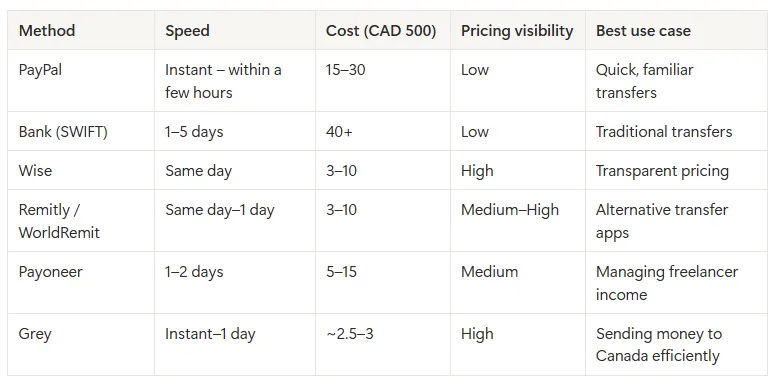
Typical cost (CAD 500):

Around CAD 15–30

How it compares to alternatives:

Compared to platforms like Wise or Remitly, PayPal tends to have higher overall costs for currency conversion.

It’s familiar and easy to use, but not the most cost-efficient option for sending money to Canada.

Wise and similar transfer platforms

Wise is one of the most widely used alternatives for international transfers, particularly because of its pricing transparency and exchange rates that are closer to the market rate.

Other platforms in this category include Remitly, WorldRemit, and OFX.

These services generally follow the same structure:

  • You fund the transfer in USD, GBP, or EUR
  • The platform converts it to CAD
  • The money is delivered to the recipient in Canada

Typical cost (CAD 500):

Around CAD 3–10 depending on provider and speed

What stands out in this category:

  • Clearer pricing compared to PayPal
  • Lower exchange rate markups
  • Faster delivery than traditional bank transfers

What to keep in mind:

  • Fees can vary depending on payment method
  • Some platforms charge more for faster delivery options

It’s a reliable category for international transfers, especially if you want visibility into costs before sending.

Multi-currency platforms for freelancers

Platforms like Payoneer are designed for freelancers and businesses managing income across different currencies.

They allow you to:

  • Receive payments in USD, GBP, or EUR
  • Hold balances without immediate conversion
  • Convert and send funds when needed

Other platforms in this category include Revolut and Skrill.

Typical cost (CAD 500):

Around CAD 5–15 depending on how funds are converted and sent

What stands out in this category:

  • Useful for managing international income
  • Reduces the need for constant currency conversions
  • Combines multiple financial actions in one platform

What to keep in mind:

  • Exchange rates and fees vary depending on usage
  • Sending to Canada may still rely on international transfer routes

This is well-suited for managing earnings, but not always the most efficient option for sending money to Canada.

Grey (built for sending to Canada)

With Grey, the process is structured around people who already operate across currencies and need to move money internationally.

You can:

The main difference is how the funds are delivered:

  • Interac transfer - usually completed within minutes, CAD 3 fee
  • Bank transfer - typically completed within 1 business day, CAD 2.50 fee

Typical cost (CAD 500):

Around CAD 2.50–3 plus exchange rate

What stands out in this category:

  • Flat, predictable fees
  • Access to local Canadian transfer methods
  • Faster delivery compared to international routes

What to keep in mind:

  • Delivery method affects timing (instant vs next business day)

Grey is a strong option for freelancers who want to control both cost and delivery speed when sending money to Canada.

Side-by-side comparison: fees and speed

Table comparing payment methods to send money to Canada

What actually changes the total cost of your transfer

Looking across all methods, three factors consistently determine how much you spend:

  • The exchange rate applied
  • The type of fee (flat vs percentage)
  • The route the money takes into Canada

Reducing unnecessary conversions and avoiding percentage-based fees tends to lower the overall cost.

Why use Grey to send money to Canada?

For freelancers earning in foreign currencies, Grey brings the key elements together in one place.

It allows you to manage multiple currencies, convert when needed, and send money to Canada using delivery methods that prioritise speed or cost depending on your preference.

Grey is also registered with FINTRAC, which means it operates under Canadian financial regulations.

This combination of multi-currency access, clear pricing, and local delivery options makes it particularly relevant for this type of transfer.

How to send money to Canada using Grey

If you’re sending money to Canada through Grey, there are two main ways the funds can be delivered, and each affects speed and cost.

Grey allows you to send CAD to Canada in two ways:

  • Bank transfer: Send directly to any Canadian bank account (personal or business)
  • Interac transfer: Send via Interac, a real-time bank-to-bank system widely used across Canada

The main difference comes down to speed and preference. Interac transfers are typically completed almost instantly, while bank transfers are usually processed within one business day.

What you need before sending

To complete a transfer, you’ll need your recipient’s details. These may vary slightly depending on the method, but generally include:

  • Full name (first and last name)
  • Address
  • Bank details (institution number, transit number, and account number)
  • City and postal code

How the process works

Once your balance is funded, sending money follows a simple flow:

  1. Log in to your account
  2. Select the balance you want to send from (USD, EUR, GBP, or NGN)
  3. Click “Send” and choose your method (bank transfer or Interac)
  4. Add a new recipient or select an existing one
  5. Enter the amount in CAD
  6. Confirm the transfer using your authentication method

After confirmation, the delivery time depends on the method you selected.

This flexibility allows you to prioritise either speed or slightly lower cost depending on the situation.

What I learned trying to send money to Canada

When you break the process down, the differences between transfer methods become easier to evaluate.

For a CAD transfer, most of the variation comes from exchange rates, fee structures, and how the money is delivered in Canada. Once those factors are clear, it becomes easier to choose a method that fits your priorities, whether that is speed, cost, or simplicity.

If you’re already working across currencies and need a reliable way to send money to Canada, opening a free Grey account can help you manage both conversion and transfers in one place.

FAQs about sending money to Canada

What is the best way to send CAD to Canada?

The best option is usually a platform with low exchange rate markup and flat fees, especially one that connects to local Canadian systems like Interac. This helps reduce both conversion costs and transfer fees.

What details do I need to send money to Canada?

To send money to Canada, you’ll usually need the recipient’s full name and either their bank details (institution number, transit number, and account number) or basic contact information if the transfer is sent through local systems like Interac.

How long does it take to send money to Canada?

It depends on the method used:

  • SWIFT transfers: 1–5 business days
  • Online transfer platforms: same day or within 24 hours
  • Interac transfers: often within minutes

Why do I lose money when converting currencies?

Most providers apply a markup to the exchange rate. Even a small difference from the real rate can increase the total cost of your transfer, especially if multiple conversions are involved.

How much does it cost to send CAD 500 to Canada?

Costs vary by provider:

  • PayPal: around CAD 15–30
  • Banks: CAD 40 or more
  • Wise and similar platforms: CAD 3–10
  • Grey:  $2.50 per transfer via bank transfer, and $3 CAD per transfer via Interac.

Is Grey safe to use?

Yes. Grey is registered with FINTRAC, Canada’s financial intelligence agency responsible for monitoring transactions and ensuring compliance with anti-money laundering regulations.

‍

Arrow (up)

Back to top