




When I started out as a freelancer, I wasn’t sure if I needed a different bank account for my new “business”, if I could even call it that. I mean, my personal account was right there. Did I really need to do anything more complicated?
Most freelancers are not legally required to use a business bank account unless they are registered as a company. However, keeping freelance income separate from personal spending makes tax reporting significantly easier, reduces errors, and looks more professional to clients. A separate account, whether labelled business or not, is strongly advisable from day one.
In this article, I cover the instances where you may require a business account, what the differences are, and what to look for if you decide to keep your freelance income separate.
Do freelancers need a business bank account?
Whether you are legally required to use a business bank account depends on how your freelance practice is structured.
In the United States, for example, sole proprietors have no legal obligation to maintain a separate business bank account. If you freelance under your own name and haven’t formed a separate legal entity, you and your business are the same entity in the eyes of the law. You can receive client payments into your personal account without violating any rules. If you have formed a Limited Liability Company (LLC), the situation changes. For LLC owners, a separate account is necessary to maintain legal protection.
In the United Kingdom, sole traders face the same position as US sole proprietors: no legal requirement for a business account. HMRC does not mandate one. However, if you operate as a limited company in the UK, your company is a separate legal entity from you as an individual. The company’s money is not your money until you pay yourself a salary or dividend, and mixing the two in a personal account creates both a legal problem and a significant accounting headache.
For freelancers who don’t yet know whether they want to operate as a sole trader or through a limited company, our guide on freelancing vs full-time employment covers how different structures affect your taxes and liability in more detail.
The practical summary: if you’re a sole proprietor or sole trader, you don’t legally need a business account. If you’re a limited company or LLC, you do. Either way, keeping freelance income separate from personal spending is strongly advisable, and the next section explains why.
Business account vs personal account: key differences
If you do open a dedicated account for your freelance income, you’ll face a choice between a traditional business bank account and a personal account used exclusively for freelance purposes.
| Feature | Traditional business account | Personal account (dedicated for freelance) |
|---|---|---|
| Monthly fees | Often £5–£25/month or higher | Usually free |
| Interest on balance | Rarely; some charge for holding funds | Often available on personal savings |
| Overdraft facility | Sometimes available; business rates apply | Usually available; personal rates apply |
| Debit card type | Business Mastercard or Visa | Standard personal debit card |
| Invoicing tools | Some accounts include basic invoicing | Usually not included |
| Accountant access | Often available (read-only logins) | Rarely offered |
| IRS / HMRC readiness | Transactions clearly categorised as business | Requires manual separation |
| Professional appearance | Company or trading name on statements | Personal name only |
| Multi-currency support | Limited at traditional banks | Limited at traditional banks |
| Account opening | Slower; may require registered company docs | Faster; personal ID only |
Generally, business accounts at traditional banks cost more, offer fewer consumer protections, and provide features (invoicing tools, accountant access) that most freelancers handle through separate software anyway. The primary advantage of a labelled business account is the psychological and practical clarity that comes from a clean separation between business income and personal spending.
A dedicated personal account used exclusively for freelance income offers most practical benefits at a lower cost, except for company-name branding on statements and the formal accountant access features that some clients or accountants prefer.
Why separating your finances matters even if it is not required
When your freelance income and your personal spending share an account, every bank statement becomes a sorting exercise. Which transactions were business expenses? Which were personal? The takeaway you bought on a Tuesday: was that a client meeting or lunch? The software subscription: was that for client work or personal use? Without separation, these questions require memory, receipts, and time, at exactly the moment when tax season is already stressful.
A separate account means every transaction is cleanly categorised. Income that enters the freelance account is business income. Transfers from the freelance account to your personal account are your pay. Expenses charged to the freelance account are business expenses. The logic is automatic rather than reconstructed retrospectively.
Here’s a simple system that works from day one:
- Open a dedicated account for freelance income: This is the account you put on every invoice.
- Receive client income into the freelance account: Every payment from every client lands here. If you have international clients paying in different currencies, this account should support multi-currency receipts.
- Pay yourself a regular transfer to your personal account: On a fixed date each month, transfer a set amount to your personal account as your salary. This is what you live on. It separates your business cash flow from your personal spending clearly.
- Hold tax savings in a third account or Pouch: Set aside a percentage of every payment received for tax. A rough starting point for most freelancers is 20 to 30%, depending on your income level and jurisdiction. Treat this as untouchable until your tax bill arrives.
For guidance on structuring your income before this point, our piece on how to set your freelance rates covers how to price your work to make this system financially viable.
What to look for in a bank account for freelancers
Monthly fees
A freelancer starting out doesn’t need a £15 per month business account. Free accounts exist that provide everything necessary. Monthly fees add up, and a new freelancer spending £180 per year on a bank account that is largely empty in the early months is an unnecessary cost.
Multi-currency support
If any of your clients pay in USD, EUR, GBP, or another currency, you need an account that can receive those payments without forcing an immediate conversion at a poor rate. Most traditional bank accounts convert foreign payments upon receipt at the bank's margin, typically 2 to 4% above the mid-market rate. Multi-currency accounts let you hold income in the currency it arrived in and convert when you choose.
A virtual card for online subscriptions
Many freelancers pay for project management tools, design software, cloud storage, AI subscriptions, and domain hosting. A virtual card linked to your freelance account keeps all of these expenses on one statement, separate from personal card spending, and protects your main account details from exposure on subscription platforms.
Fast account opening with no fixed address requirement
Traditional business accounts often require proof of a registered business address, company documents, and a branch visit. For a freelancer, particularly one who works remotely or lives in multiple places, these requirements are a barrier that digital-first accounts don’t impose.
Invoicing integration or export capability
You don’t necessarily need invoicing built into the account, but your account should be able to export transactions in a format your accounting software can read. Clean data export saves significant time at tax season.
Grey covers all of these for international freelancers. Open a Grey account for your freelance income and receive payments in USD, EUR, and GBP from international clients without losing money on forced conversion.
As the scope of your work expands, you can also open a Grey business account, which gives you both USD and USD accounts, access to bulk payouts, and multiple virtual cards.
Frequently asked questions
Can I use my personal account for freelance work?
Yes, in most cases. Sole proprietors in the US and sole traders in the UK are not legally required to use a separate business account. You can receive client payments into a personal account without breaking any rules. The practical problem is that mixing personal and business transactions in one account makes tax reporting significantly harder and increases the risk of errors. A dedicated account, whether officially labelled business or not, is strongly advisable even if it’s not legally required.
Do I need a business account to invoice clients?
No. You can invoice clients and direct them to pay into any account you hold, including a personal account. Invoices are documents you issue, not something that depends on the type of bank account you hold. What your invoice needs is a valid account number and sort code (or routing number and account number for US payments), your name or trading name, and a unique invoice number. The type of account those details belong to is irrelevant to the invoice’s validity.
What is the best bank account for freelancers?
The best account for a freelancer depends on how they work. For freelancers with only domestic clients in a single currency, a free personal account used exclusively for freelance income covers most practical needs. For freelancers with international clients paying in multiple currencies, a multi-currency account that receives USD, EUR, and GBP without forced conversion is more suitable. Grey provides multi-currency accounts with local banking details (US routing numbers, EUR IBANs, UK sort codes) that let international freelancers receive payments as if they were local vendors in each market.
Can I open a business account without a registered company?
At most traditional banks, a business account requires proof of a registered company: a company registration number, a registered address, and in some cases a minimum trading history. As a sole trader or sole proprietor, you typically cannot open a business account at a traditional bank without a formal business registration. Digital-first accounts and some multi-currency platforms generally have lighter requirements and can be opened by individual freelancers without a registered company.
Is it illegal to use a personal account for business?
For sole traders and sole proprietors, no. There is no law in the UK or US that prohibits receiving business income into a personal account for unincorporated freelancers. Some banks include terms in their personal account agreements that technically restrict business use, but this is a contractual matter rather than a legal one and enforcement is rare. For limited company directors in the UK and LLC members in the US, mixing company and personal funds in a personal account creates legal and tax problems that go beyond a contractual breach.
How do I separate my freelance finances?
The simplest system has three parts: one account that receives all client income and nothing else; one account for personal spending that receives a regular transfer from the freelance account as your salary; and a separate savings balance or account for taxes. Open the freelance account before your first invoice goes out. Put that account number on every invoice from day one. Transfer a set amount to your personal account on a fixed date each month. Set aside a percentage of every payment for tax immediately on receipt. That system, applied consistently, solves the vast majority of freelance financial admin problems.
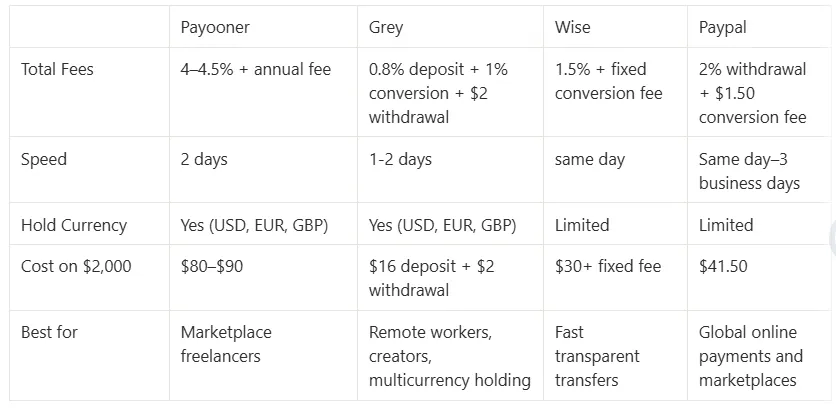
Grey charges fees on deposits, conversions, and withdrawals. Deposits via ACH, SEPA, or FPS incur a 0.8% fee (minimum $2/€2/£2, maximum $10/€10/£10). Currency conversions are charged at 1%, capped at $6. Withdrawal fees vary by currency. Exchange rates are variable and include a margin over the mid-market rate. Always review fees and the rate before confirming a transaction.
Open a Grey account and keep your freelance income separate from day one, in any currency your clients pay in.
.svg)


