<script type="application/ld+json" data-schema-version="grey-blog-v4">
[{"@context":"https://schema.org","@type":"BlogPosting","@id":"https://grey.co/blog/send-money-to-egypt#article","headline":"Sending money to Egypt from abroad","description":"A complete guide to sending money to Egypt from abroad. Compare Western Union, PayPal and Grey. Learn the fees, the timing and the cheapest method.","inLanguage":"en","url":"https://grey.co/blog/send-money-to-egypt","mainEntityOfPage":{"@id":"https://grey.co/blog/send-money-to-egypt#webpage"},"datePublished":"2026-04-16T01:03:40.247Z","dateModified":"2026-10-12T02:26:20.768Z","author":{"@type":"Organization","@id":"https://grey.co/authors/grey-team#person","name":"The Grey Team","url":"https://grey.co/authors/grey-team"},"publisher":{"@type":"Organization","@id":"https://grey.co/#organization","name":"Grey","url":"https://grey.co","logo":{"@type":"ImageObject","url":"https://cdn.prod.website-files.com/6360022338a81bd6fdbb1145/6564ae1077a67e39d3c491a6_Grey%20Logo%20Lockup%20Black.svg"}},"image":{"@type":"ImageObject","@id":"https://grey.co/blog/send-money-to-egypt#primaryimage","url":"https://cdn.prod.website-files.com/636a85d290ee58e70c17e1c0/6a968acbea321335171635f8_Sending%20money%20from%20abroad%20to%20Egypt.avif","contentUrl":"https://cdn.prod.website-files.com/636a85d290ee58e70c17e1c0/6a968acbea321335171635f8_Sending%20money%20from%20abroad%20to%20Egypt.avif","width":1200,"height":675}},{"@context":"https://schema.org","@type":"WebPage","@id":"https://grey.co/blog/send-money-to-egypt#webpage","url":"https://grey.co/blog/send-money-to-egypt","name":"Sending money from abroad to Egypt","description":"A complete guide to sending money to Egypt from abroad. Compare Western Union, PayPal and Grey. Learn the fees, the timing and the cheapest method.","inLanguage":"en","primaryImageOfPage":{"@id":"https://grey.co/blog/send-money-to-egypt#primaryimage"},"breadcrumb":{"@id":"https://grey.co/blog/send-money-to-egypt#breadcrumb"}},{"@context":"https://schema.org","@type":"BreadcrumbList","@id":"https://grey.co/blog/send-money-to-egypt#breadcrumb","itemListElement":[{"@type":"ListItem","position":1,"name":"Home","item":"https://grey.co/"},{"@type":"ListItem","position":2,"name":"Blog","item":"https://grey.co/blog"},{"@type":"ListItem","position":3,"name":"Sending money to Egypt from abroad","item":"https://grey.co/blog/send-money-to-egypt"}]},{"@context":"https://schema.org","@type":"FAQPage","@id":"https://grey.co/blog/send-money-to-egypt#faq","mainEntity":[{"@type":"Question","name":"How long do international transfers to Egypt take?","acceptedAnswer":{"@type":"Answer","text":"The time depends on the method. Western Union: minutes to hours for cash collection. Grey: one to two working days to receive the money, then conversion is instant within the app, and withdrawal to an Egyptian bank takes one to two more days. SWIFT bank transfer: 3 to 5 working days."}},{"@type":"Question","name":"What is the cheapest way to send money to Egypt?","acceptedAnswer":{"@type":"Answer","text":"The total cost includes the sending fee and the exchange rate margin. The cheapest option depends on the amount, the currency and the sending country. For regular transfers (such as freelancers' pay), digital platforms such as Grey or Wise are usually cheaper than Western Union or a bank transfer, because the exchange rate margin is smaller."}},{"@type":"Question","name":"Can I receive money in dollars in Egypt without converting it to pounds straight away?","acceptedAnswer":{"@type":"Answer","text":"Yes. With Grey, you can hold dollars or euros in your account without converting them. This is useful if you want to wait for a better exchange rate, or if some of your spending is in dollars (software subscriptions, online services). You can also spend directly in dollars using the Grey virtual card."}},{"@type":"Question","name":"Does PayPal work for receiving money in Egypt?","acceptedAnswer":{"@type":"Answer","text":"PayPal is available in Egypt but it is not the ideal option for regular transfers. The currency conversion fees are high (3% to 4%), and the options for withdrawing to Egyptian banks are limited. If your client insists on PayPal, you can receive money through it, but for regular transfers, a Grey account with direct bank details costs less."}},{"@type":"Question","name":"Which Egyptian banks does Grey support?","acceptedAnswer":{"@type":"Answer","text":"Grey supports transfers to all the major Egyptian banks, including Commercial International Bank (CIB), the National Bank of Egypt, Banque Misr, Bank of Alexandria and QNB. The time taken for withdrawal is shown in the app before you confirm the transfer."}},{"@type":"Question","name":"Are there taxes on money received from abroad in Egypt?","acceptedAnswer":{"@type":"Answer","text":"Income from foreign sources may be subject to tax in Egypt depending on its nature and amount. We recommend consulting an accountant or a specialist tax advisor to understand your tax obligations. This article does not constitute tax advice."}}]}]
</script>
Grey Guides
•
April 16, 2026
•
8 min read
Sending money to Egypt from abroad
The Grey Team
TABLE OF CONTENT
SHARE THIS POST
Sending money to Egypt from abroad
Sending money to Egypt from abroad is not as simple as it should be. Hidden fees, unclear exchange rates, delays in arrival, and sometimes banking complications make the process frustrating. Whether you are receiving payments from a client in America or Europe, or a family member is sending you money from Saudi Arabia or the UAE, you need to know the options available and the cost of each one clearly.
This guide explains how international transfers to Egypt actually work, compares the real options with specific figures, and helps you choose the method that best suits your situation.
How international transfers to Egypt work
When money is sent from abroad to Egypt, the process goes through several stages. The sender starts with a transfer from their bank or from a money transfer service. The transfer passes through intermediary banks (in the case of SWIFT bank transfers). The amount reaches the receiving bank in Egypt or the recipient's account on the digital platform. The foreign currency is then converted into Egyptian pounds at the prevailing exchange rate.
Each of these steps can add a cost: the transfer fee, intermediary bank fees, and the exchange rate margin. The difference between the cheapest method and the most expensive one can reach thousands of pounds on a single transfer.
Comparing options for sending money to Egypt
International bank transfer (SWIFT): The traditional bank transfer goes through the SWIFT network between banks. The main advantage is that it works with almost any bank in the world. But the cost is high: the transfer fee from the sender's bank (usually $15 to $50), intermediary bank fees ($10 to $30 more in some cases), and the receiving bank's exchange rate, which includes its own margin. The time taken ranges from 3 to 5 working days.
Western Union: Western Union is the most common option for transfers to Egypt, especially from the Gulf states. The advantage is that the amount can be collected in cash from a Western Union branch in Egypt, often the same day. The drawback is that the total cost is high: a fixed sending fee plus a large exchange rate margin. On a transfer of $1,000, you can lose the equivalent of 3% to 7% of the amount between the fees and the exchange rate difference.
PayPal: PayPal is available in Egypt but with restrictions. You can receive money, but the withdrawal options are limited. Withdrawing money to an Egyptian bank takes time and involves a currency conversion fee of between 3% and 4%. PayPal is suitable if your client prefers to pay through it, but it is not the cheapest option for regular transfers.
Wise: Wise offers the real exchange rate (the mid-market rate) with transparent transfer fees shown before confirmation. It is a good option for one-off transfers. But Wise does not offer an Egyptian pound wallet, which means you cannot hold pounds in the app, and the availability of the transfer service to Egypt may change.
Grey: Grey gives you accounts in dollars, euros and pounds sterling, with bank details you can share with your clients or employers. The client sends an ordinary transfer from their side, and the money reaches your Grey account within one to two working days, usually. After that, you choose when to convert into Egyptian pounds. The exchange rate is shown before confirmation. You can withdraw pounds to any major Egyptian bank: Commercial International Bank (CIB), the National Bank of Egypt, Banque Misr, Bank of Alexandria and QNB.
The key advantage is control over timing. Instead of the currency being converted automatically on arrival (as happens with a bank transfer), you can hold the dollars or euros and convert them when the exchange rate suits you.
Exchange rates on Grey are variable and include a margin over the market rate. Grey does not charge a transfer fee; the cost is reflected in the exchange rate. The rate is shown before you confirm any transfer.
Transferring from specific countries
Transferring from Saudi Arabia to Egypt The largest corridor to Egypt. Western Union is the traditional option, with instant collection but a high cost. Saudi banks (Al Rajhi, Al Ahli) offer direct transfers but at an exchange rate that includes a margin. Grey offers a digital alternative: receive in dollars, then convert and withdraw in Egypt.
Transferring from the UAE to Egypt Almost the same options. Local money transfer services in the UAE (such as Al Ansari Exchange) offer transfers to Egypt at competitive rates, but only through branches. Grey works entirely digitally.
Transferring from Kuwait to Egypt Western Union is available. Kuwaiti banks offer SWIFT transfers. Grey accepts transfers from anywhere, as long as the sender can send a bank transfer in dollars or euros.
Transferring from America and the UK
Grey offers accounts with US bank details (routing number + account number) and UK bank details (sort code + account number). The sender uses these details to send an ACH transfer (America) or a Faster Payment (UK). The cost on the sender's side is usually zero or very low.
Getting started with Grey
Sign up at grey.co or download the Grey app on iOS or Android to create your free multi-currency account.
Frequently asked questions
How long do international transfers to Egypt take?
The time depends on the method. Western Union: minutes to hours for cash collection. Grey: one to two working days to receive the money, then conversion is instant within the app, and withdrawal to an Egyptian bank takes one to two more days. SWIFT bank transfer: 3 to 5 working days.
What is the cheapest way to send money to Egypt?
The total cost includes the sending fee and the exchange rate margin. The cheapest option depends on the amount, the currency and the sending country. For regular transfers (such as freelancers' pay), digital platforms such as Grey or Wise are usually cheaper than Western Union or a bank transfer, because the exchange rate margin is smaller.
Can I receive money in dollars in Egypt without converting it to pounds straight away?
Yes. With Grey, you can hold dollars or euros in your account without converting them. This is useful if you want to wait for a better exchange rate, or if some of your spending is in dollars (software subscriptions, online services). You can also spend directly in dollars using the Grey virtual card.
Does PayPal work for receiving money in Egypt?
PayPal is available in Egypt but it is not the ideal option for regular transfers. The currency conversion fees are high (3% to 4%), and the options for withdrawing to Egyptian banks are limited. If your client insists on PayPal, you can receive money through it, but for regular transfers, a Grey account with direct bank details costs less.
Which Egyptian banks does Grey support?
Grey supports transfers to all the major Egyptian banks, including Commercial International Bank (CIB), the National Bank of Egypt, Banque Misr, Bank of Alexandria and QNB. The time taken for withdrawal is shown in the app before you confirm the transfer.
Are there taxes on money received from abroad in Egypt?
Income from foreign sources may be subject to tax in Egypt depending on its nature and amount. We recommend consulting an accountant or a specialist tax advisor to understand your tax obligations. This article does not constitute tax advice.
There’s a specific kind of fatigue that comes from living globally. Not from flights or visas, but from the tiny negotiations of daily life. Figuring out which card will work. Wondering if the terminal will accept it. Keeping mental notes of what to try next.
When you add your Grey virtual card to Apple Pay, you remove one layer of uncertainty. All you need to do is tap, and the payment goes through.
Why your Grey virtual card pairs so well with Apple Pay
If you’ve ever struggled with cards that randomly fail abroad or get blocked on international platforms, you’ll feel the difference immediately. We built the Grey virtual card built for global use, and Apple Pay simply amplifies that experience.
Let's discuss why the Grey card + Apple Pay combination works so seamlessly.
One card that adapts to your life
Your Grey virtual card is directly linked to your balance. There’s no need to top up before paying or shuffle funds between wallets. You choose what you want to buy, Apple Pay handles the tap, and the payment goes through.
Designed for international spending
Fewer card declines. Better compatibility with global merchants. Clearer transactions. Whether you’re paying locally or online, Apple Pay with Grey is consistent and predictable, at home and abroad
Contactless, effortless, and global
Apple Pay is accepted in millions of locations worldwide. From supermarkets and cafés to trains, taxis, and co-working spaces, your phone becomes your payment tool. Combined with Grey’s global card functionality, spending across countries becomes second nature.
Built-in security that travels with you
Apple Pay never shares your full card details with merchants, and the Grey virtual card supports 3D Secure for online transactions. Together, they offer a safer way to shop, subscribe, and spend internationally without constant worry.
Who benefits most from using Apple Pay with the Grey Visa card?
This Grey Card + Apple Pay setup is designed for people who spend often across borders.
Travellers and frequent movers
When your Grey Visa card is added to Apple Pay, you can move through airports, metros, shops, and cafés with just your phone. No fumbling, no cash exchanges, no stress at the counter.
Freelancers and remote professionals
If you earn from international clients or pay for tools hosted abroad, Apple Pay gives you a fast, reliable way to manage everyday spending. Subscriptions, software, ads, and services all become easier to handle.
Business owners and creators
From running ads to paying for platforms like Canva, Google Workspace, or Notion, Apple Pay with Grey keeps your operations smooth and interruption-free.
How to add your Grey Visa card to Apple Pay
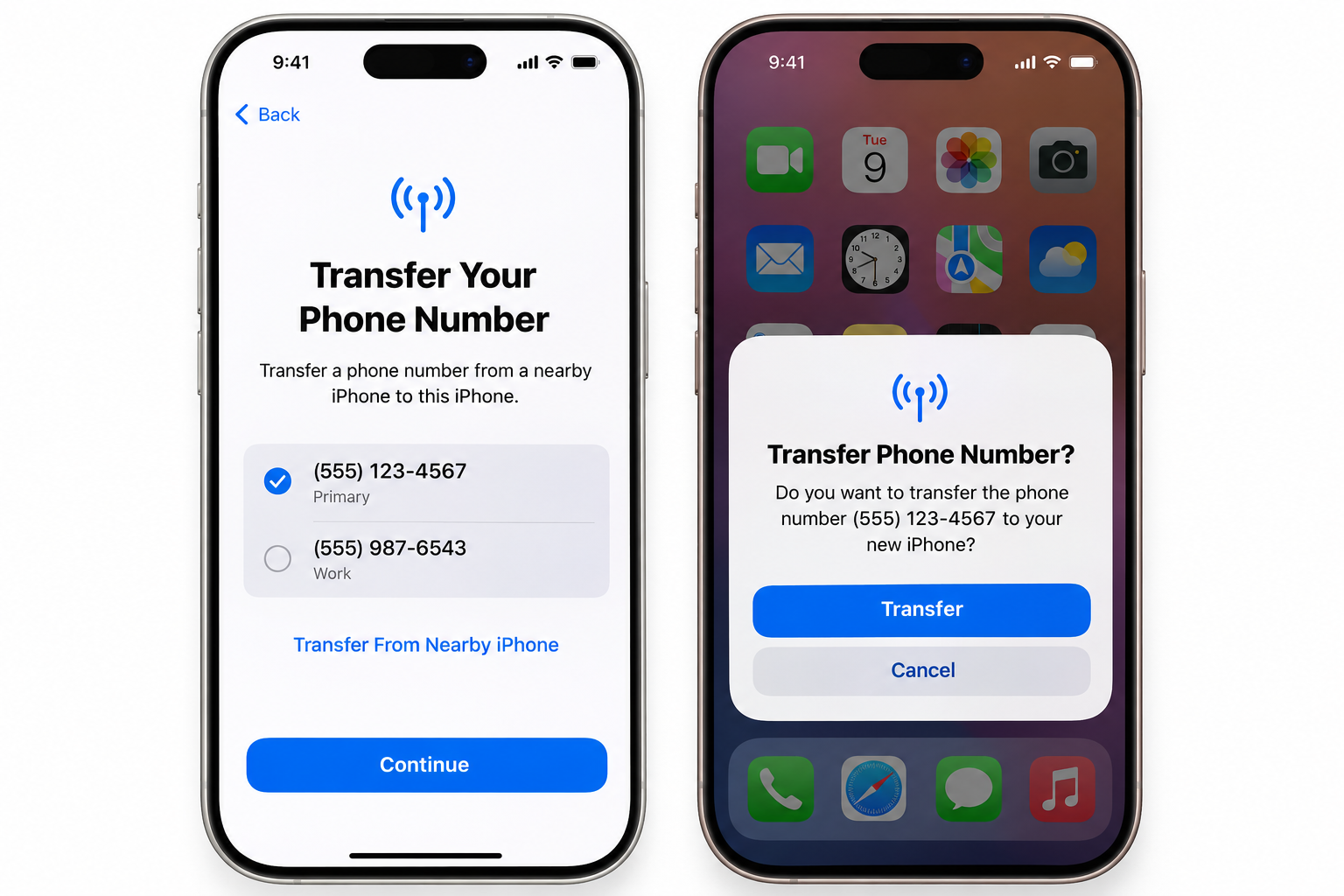
Setting up Apple Pay with your Grey virtual card takes just a minute:
Once added, you can use Apple Pay for in-store contactless payments, online checkouts, in-app purchases, and public transport wherever Apple Pay is accepted.
Where you can use Apple Pay with your Grey virtual card
With Apple Pay accepted in dozens of countries, your Grey virtual card becomes a global companion. You can use it to:
Pay in cafés, shops, and supermarkets worldwide
Book flights, hotels, and short stays
Subscribe to services like Spotify, Apple Music, Netflix, Canva, and YouTube
Pay for transport, food delivery, and everyday essentials
Handle online payments securely across international platforms
Your Grey balance does the heavy lifting, while Apple Pay keeps everything fast and contactless.
Why is it important to use a virtual card with Apple Pay?
Too many people are still dealing with cards that weren’t built for global lives. Unexpected declines. Confusing restrictions. Payments that work one day and fail the next.
The Grey virtual card changes that. Paired with Apple Pay, it creates a payment experience that feels modern, reliable, and genuinely global.
Different virtual cards work differently depending on how you spend, where you shop, and which currencies you use. Some excel at simple travel spending, others at multi-currency holding. Some support crypto, others don’t. Understanding the real differences helps you pick which one works for you.
Today, I’m comparing the Grey card with six other well-known virtual card options, just so you know which one works best for you.
1. Wise multi-currency card
If you’ve ever needed a card that is like a multi-currency wallet first and a spending card, Wise probably fits that bill. Wise is widely used as a borderless account with a card that lets you tap into more than 50 currencies and spend internationally at transparent exchange rates.
For many global workers and travellers, such simplicity is appealing. You get the real exchange rate plus a small, clear fee. There are generally no hidden surprises, and you can hold currencies like USD, EUR, or GBP in one place.
Wise also doesn’t support crypto balances, so if you’re someone who keeps part of your funds in digital assets and wants to spend crypto, your Wise card won’t help.
People who want to hold and spend multiple currencies with clear exchange pricing, especially for everyday purchases and travel, will love the Wise card.
Revolut is one of the most talked-about fintech platforms in the world, and its card ecosystem reflects that breadth. You can have both virtual and physical cards, generate disposable virtual cards for added security, and even manage budgeting, investments, and crypto trading all in one app.
It ticks many boxes: multi-currency support, budgeting tools, and virtual card creation. However, the complexity of features can become a hurdle, especially when key perks are tucked behind paid tiers.
Revolut is strong as part of a broader lifestyle finance app, especially for travellers and users who want added perks like travel insurance, purchase protection, and trip disruption coverage, which are included in higher-tier plans such as Premium, Metal, or Ultra. However, these benefits depend on subscription level and eligibility requirements, and coverage is provided through third-party insurers rather than built directly into the card experience.
Its virtual cards can still face issues on international platforms, and the way it converts currencies, including weekend markups, adds a layer of unpredictability for some users.
3. Payoneer card
Payoneer is a name many freelancers, online sellers, and international businesses know quite well. Its card, especially the virtual prepaid card, is excellent for receiving payments from global marketplaces, handling international transfers, and covering business expenses in multiple currencies.
However, many users report sudden card blocks, limited personal support, and slow resolution times, which can be frustrating when you’re trying to pay for everyday subscriptions or online purchases.
In many regions, Payoneer is ideal for business payouts and marketplace earnings; however, it may not be the best option if you require a card for personal multi-currency spending or flexible international use.
Freelancers and businesses requiring comprehensive currency support with global payouts, especially via marketplaces, will appreciate the Payoneer card.
N26 operates as a digital bank primarily across the EU and EEA. Its cards, both physical and virtual, are built around simplicity, with no foreign transaction fees for many currencies and straightforward Mastercard exchange rates.
It works well for everyday spending both within and outside the Eurozone, and virtual cards can be issued quickly as part of the account opening process.
The big limitation, a practical one, is its availability. N26’s services were pulled back from the U.S. and some other markets in recent years, and it remains focused on European customers.
So if you travel frequently within Europe or spend in EUR, N26 cards can be a solid choice. But outside that context, it’s less flexible, especially for global needs.
LDMAG1
5. Crypto-linked cards
Crypto cards deserve their own mention. Cards like the Coinbase Card and Crypto.com Visa Card allow you to spend cryptocurrency by instantly converting it to fiat at the point of sale. These are especially interesting for people who live or earn in digital assets and want to use them without extra conversion steps.
For example, Binance’s card (in regions where it is still supported) offers significant cashback rewards in BNB, and Coinbase lets you spend multiple crypto assets directly, with rewards in crypto.
The downside is that these cards often tie you into a specific exchange ecosystem, may carry higher fees for some transactions, and their rewards are typically token-based — valuable if you’re bullish on crypto, less so if you’re not.
I’ll recommend these cards for crypto holders who want to spend digital assets with conversion at checkout and enjoy token rewards.
6. Traditional bank virtual cards
There’s a whole category of virtual cards issued by traditional or app-based banks, like Monzo (UK), Starling (UK), or wallet-front cards like Curve.
These are solid for everyday use, especially in their home markets, and often integrate well with Apple Pay/Google Pay. However, international currency support varies widely; some have foreign transaction fees, others rely on slower underlying banking rails, and they’re sometimes limited in where they’ll work for recurring payments or certain ad platforms.
For many users, these cards are excellent backups or complementary payment methods. But if your life or work relies on consistent, global spending, their limitations become noticeable.
7. Grey card offers a more flexible virtual global spending experience
By now, it should be clear: not all virtual cards are the same. Some are designed for holding money, others for daily banking, and others still for specific ecosystems.
Grey’s approach sits in a different space from the others above. Your card works across fiat (USD, EUR, GBP, local currency) and stablecoins (USDC), eliminating the need to get an extra crypto card. Your Grey card automatically pulls funds from your available balances in the following order: USD, USDC, and then the next highest available balance.
You can also create multiple cards for different purposes, such as travel, subscriptions, personal, and business. Still, each card will work seamlessly without requiring you to select which balance to spend from. We built the Grey virtual card for people who:
Spend in multiple currencies regularly
Want predictable outcomes at checkout
Value clear messaging and control
Need support for both fiat and crypto balances
Instead of requiring top-ups or rigid currency conversion steps, your Grey card automatically draws from your available balances, making spending across fiat and stablecoin currencies effortless.
Many of the other options we’ve discussed above are great in their contexts. However, each has trade-offs that make it difficult to be everything to everyone.
There’s no single answer, but here’s a quick way to think about it:
If you want clear, no-nonsense multi-currency holding and spending, Wise or N26 are strong choices.
If you’re looking for a financial super app with perks, Revolut is a great fit.
If you earn or spend in crypto and enjoy token rewards, crypto cards like Coinbase or Crypto.com are worth exploring.
If you want a card that automatically draws from different balances, supports multiple cards, and makes international or multi-currency spending predictable globally, we built Grey for your lifestyle.
Different cards shine in various life scenarios. The key is knowing which trade-offs matter to you, and how your day-to-day spending looks.
Choose with clarity, and let your card work for you, not the other way around. Create your Grey visa card and enjoy a smoother, more inclusive, and more predictable global spending experience.
Budgeting used to be simple. You earned money, spent money, and tracked what was left. At that time, you had only one account with one currency, which required just one mental model.
Then remote work happened.
Now you might earn in EUR, pay for tools in USD, and travel in between. Discipline isn’t enough for budgeting anymore; you also need structure because, without proper structure, even the most careful spender can lose track of where their money is going.
Your Grey card is a practical budgeting tool for people who live, work, earn, and spend across borders. I’ll explain.
Why budgeting in multiple currencies breaks down so easily
Many people who overspend don't do so because they’re irresponsible. But because their money isn’t organised in a way that reflects how they live.
It’s pretty common to be juggling subscriptions in USD, running ads in EUR, buying coffee in GBP, and somehow all on the same card. Eventually, everything blurs together. You can no longer track your Netflix renewal, that Facebook ad campaign, the flight you booked last week, or the coworking space membership. Then one day you check your balance and think, “Where did all that money go?” You know you spent it. You just can’t figure out where, or why, it felt like so much more than you expected.
It’s not that you’re careless. It’s that your money isn’t organised in a way that matches how you actually live and work. And once things start blurring, it’s nearly impossible to untangle without spending an hour combing through statements, converting currencies in your head, and still not feeling certain you’ve caught everything.
What should budgeting look like when you earn and spend globally?
Clarity, separation, and control are the most crucial factors when budgeting across multiple currencies. You should be able to:
See exactly what each type of spending is costing you.
Stop or pause spending instantly when needed.
Protect one part of your budget from another.
Make changes without disrupting everything else.
The Grey card is designed around solving these exact needs.
How does the Grey card help with budgeting?
Use multiple cards to separate your spending
One of the most effective budgeting habits is separation. Instead of using a single card for everything, you can create multiple cards with clear purposes. Your Grey virtual card helps you structure your spending as such.
For example, you can create:
One card for subscriptions and recurring tools
One card for ads and growth experiments
One card for travel or everyday spending
One card per client or project
Each card acts like its own budget lane, pulling from the same balance. You don’t need to guess where the money went because you already know.
This is especially useful if you freelance, manage ads, or run multiple income streams. When spending is separated, budgeting becomes more straightforward.
Freeze cards instantly when spending goes off-track
Budgets fail when you can’t act fast enough.
With the Grey card, you can instantly freeze or unfreeze any card in the app. If a digital ad campaign starts burning through too cash, freeze the card. If a subscription you forgot about renews unexpectedly, freeze the card. If you’re travelling and want to lock down non-essential spending, freeze the card.
Freezing a card doesn’t affect your other cards or balances. It simply stops that specific spending lane, which is precisely how budgeting should work.
Set limits that protect your budget
Budgets can fail when they’re too rigid. Grey’s spending limits work more like guardrails.
You can set daily or monthly limits per card, receive alerts when you’re approaching your limit, and still stay flexible. The goal isn’t to punish spending. I mean, who wants that? It’s to keep you aware before things drift too far.
For shared cards or subscriptions, limits are especially useful. You know exactly how much can be spent, and nothing sneaks past unnoticed.
Track spending clearly in one place
When you’re budgeting across currencies, visibility matters more than perfection. Every Grey card transaction appears clearly in your app, linked to the card you used. That means you’re not just seeing how much you spent, but why you spent it.
When budgeting time comes around, you’re not sitting there trying to remember what that mysterious €47 charge was three weeks ago or why your USD balance dropped. Everything’s already categorised. The structure did the work for you.
Spend confidently across borders
Trust helps with budgeting too. When you’re shopping internationally, paying for ads, or travelling, declined payments and unexpected charges can throw everything off. The Grey Card works across global merchants and even supports Apple Pay and Google Pay, so everyday spending feels normal, even when you’re far from home.
A quick note on protection when spending abroad
An often-overlooked aspect of budgeting is preparing for contingencies in case things go wrong.
When you pay with your Grey card, you have access to Visa benefits, including purchase protection, extended warranties, and price protection, depending on the transaction and your activation status. It’s not something you think about daily, but it adds a layer of reassurance when you’re buying electronics, booking travel, or shopping internationally.
It’s one less thing to worry about while managing money across borders.
What budgeting in foreign currencies is like with the Grey card
When your card and your accounts are aligned, budgeting stops being guesswork. You know what you’re spending, which currency your spend is coming from and more importantly, when something changes.
Instead of constantly reacting to your balance, you’re now making decisions with clarity. And that’s what good budgeting should be like, whether you’re at home, travelling, or working remotely.
If you’re ready to make your budget work wherever you are, create or update your Grey card today and start spending and budgeting in the ways that matter to you.
A few months ago, I was eyeing a pair of sneakers on a US website for weeks. Then the store started running sales and I decided to buy them (hashtag #YOLO), but my bank card declined the payment.
Not once, not twice… but four times!.
The same card that worked perfectly in Nigeria where I live, and the same details I’d used for years. I tried to get another card, but by then, sales had ended, and the sneakers were out of stock. It was annoying, but I just had to accept my L.
If you’ve ever tried to shop internationally, on sites like ASOS UK, Amazon US, Zara EU, or even the Apple Store, you may already be familiar with this pain. Sometimes the website rejects your card. Sometimes your bank blocks the transaction. Sometimes the currency conversion takes too long, and the payment times out.
It shouldn’t be this difficult to buy something online in big 2026… yet for many people, it still is.
But if you use a Grey card, you'll eliminate the uncertainty of thoughts like, “Will this payment go through?”, and transform your international shopping into a simple and predictable process.
Why shopping abroad is often frustrating
Shopping from US or European stores usually comes with these hurdles:
1. Many foreign merchants decline local cards
Some US/UK online stores automatically reject certain African-issued cards, even if you have more than enough balance.
2. Stores bill strictly in USD, GBP, or EUR
If your card requires manual currency conversion, it can cause payment delays that may result in declines.
3. Banks block “suspicious” international transactions
This usually happens when the merchant is unfamiliar.
4. Conversion errors and hidden fees
Some cards convert long after the purchase, leading to surprises on your statement.
These problems are common, but they’re also exactly what Grey card is built to avoid.
How your Grey card makes shopping internationally easy
Smart spending across multiple currencies and USDC
Your Grey card doesn’t require you to pick or switch wallets before paying. Instead, it automatically spends from your balances. Your USD account is debited first; if that’s empty, your USDC, and then the highest of your remaining balances.
This means your payment goes through as long as you have funds available in your account, without requiring you to consider currencies at checkout.
Works across major US and European stores
Your Grey card is an international spend card, so you can pay at 150 million merchants worldwide.
Use Apple Pay and Google Pay
For stores that support mobile wallets, you can simply add your Grey Visa card to Apple Pay or Google Pay. This is more secure and makes for much faster checkouts.
Create multiple cards for better organisation
If you shop frequently or mix personal and business purchases, you can:
Use one card for personal shopping
another for business imports
another for gift purchases
It keeps your spending clean and easy to track.
Freeze and unfreeze anytime
You can always freeze your cards to control your spending.
Better protection for online transactions
You receive real-time notifications, card controls, and instant limits - everything you need for peace of mind when buying from foreign sites.
LDMAG1
How to shop in the US or Europe with your Grey card
1. Request your Grey visa card
Create a Grey account and go to the cards section of your Grey app to request a Grey card for $5.
2. Add your card to the store’s checkout
Enter your card details or simply pay through Apple Pay/Google Pay.
3. Make your purchase normally
Shipping, duties, and taxes will be displayed as they are for every other international shopper.
4. Track everything in your Grey app
Every charge, refund, or verification appears instantly, so there are no surprises later.
Tips for smarter international shopping
Use a separate card for business or bulk purchases so you can easily track expenses.
Keep a bit extra in your wallet for shipping fees and taxes.
Use Apple Pay/Google Pay when available. It’s the most seamless way to tap and pay, and also supports contactless payments.
Shopping abroad doesn’t have to be stressful
Your Grey card helps you shop with confidence. There are no random declines or conversion drama. Ahead of your next international purchase, you can create your Grey card and enjoy a smoother, more predictable shopping experience.
The default way Indian banks handle inbound USD is: receive the wire, convert to INR immediately at their own rate, credit your account in rupees, and deduct fees at every step. You never see the dollars. You never choose the conversion rate. You never decide when to convert. The bank decides all three, and the bank's rate is never the mid-market rate. That automatic conversion is where freelancers, consultants, and remote workers lose the most money on international payments.
The cost of this setup is not small. A 2% to 3% FX spread on every transfer, intermediary deductions on SWIFT wires, and receiving bank charges add up to lakhs lost annually for anyone earning regular USD income. This guide covers the four main ways to receive US dollar payments in India, what each one actually costs on a real invoice, the compliance requirements (purpose codes, FIRC, FEMA) that most payment guides skip entirely, and how to set up an infrastructure that gives you control over when and at what rate your dollars become rupees.
The four main ways to receive USD in India
1. US ACH or Fedwire transfers
ACH (Automated Clearing House) and Fedwire are US domestic transfer systems. When a US client pays you via ACH or Fedwire, the money moves within the US banking system to a US-based account. This is important because US companies strongly prefer paying vendors through their domestic payment rails. Their finance teams process ACH payments the same way they pay local contractors, which means less friction on the client side and faster approval on yours.
ACH transfers typically cost the sender nothing or a small flat fee (usually under $1). Fedwire transfers may cost the sender $15 to $30, depending on their bank. On your end, the cost depends on where the funds land. If you are receiving into a virtual USD account from a fintech provider, the provider charges a deposit fee (Grey charges 0.8%, minimum $2, maximum $10). There is no intermediary bank deduction because the payment never leaves the US banking system.
ACH is best for recurring payments from US-based clients, such as monthly retainers, project milestones, or regular consulting fees. If most of your clients are American, setting up a virtual USD account that supports ACH and Fedwire deposits is typically the lowest-cost option for regular income.
2. International wire transfers (SWIFT)
SWIFT is the global messaging network that banks use to route cross-border payments. When a client outside the US (or a US client whose bank does not support ACH to your provider) sends you a wire transfer, it travels through the SWIFT network. This is the most universally accepted method, but it is also the most expensive.
The costs stack up at multiple points. The sending bank charges a wire fee, typically $20 to $50, depending on the country and bank. If the payment routes through an intermediary (correspondent) bank, that bank deducts another $10 to $25 from the transfer amount. Your receiving bank may charge an additional inward remittance fee of $5 to $15. On a $2,000 invoice, total fees can range from $45 to $90, which is 2.25% to 4.5% before any currency conversion. Settlement takes 2 to 5 business days.
SWIFT makes sense for large, infrequent payments where the fixed fees represent a smaller percentage of the total: invoices above $5,000, corporate contracts, or one-off project payments. For smaller recurring payments, the per-transfer cost makes SWIFT significantly more expensive than ACH.
Payment aggregators collect funds from your client (usually via card or local bank transfer) and remit the proceeds to your Indian bank account. The most common ones Indian freelancers encounter are PayPal, Razorpay (for businesses accepting international payments), and Stripe (with limited availability for payouts in India).
PayPal charges 2.99% on incoming goods and services payments, plus a currency conversion spread of 3% to 4% above mid-market when you withdraw to INR. On a $2,000 payment, that is roughly $60 in transaction fees plus $60 to $80 in conversion loss, totalling $120 to $140. Razorpay's international payment gateway charges 3% per transaction for international cards. These platforms are convenient for clients who prefer paying by card or who are not set up for bank transfers, but the cumulative cost is the highest of all four methods.
Aggregators are best for small, one-off projects where the client insists on paying by card, or for marketplace payouts (Upwork, Fiverr) where the platform dictates the payment method.
4. Cross-border transaction caps
India's cross-border payment framework includes transaction-level limits in certain categories. Some payment setups cap individual cross-border transactions at ₹25 lakh per unit of goods or services. If your invoice size approaches that range, bank-led rails such as SWIFT are usually more suitable than aggregator platforms. Having access to a USD receiving account through a provider like Grey gives you more flexibility when handling higher-value international payments, because the funds arrive in USD first and you control the conversion timing and method.
How the four methods compare
The compliance layer most freelancers overlook
Receiving USD payments in India is regulated under the Foreign Exchange Management Act (FEMA) and RBI reporting guidelines. Getting the compliance right upfront prevents delays, frozen transfers, and problems during audits.
Purpose codes
Indian banks require a purpose code on every inward remittance to classify the transaction under FEMA. Common codes for freelancers include those for software development, consulting, and marketing services. These codes are defined under the RBI purpose code list for inward remittances. Providing the correct code on your invoice and communicating it to your client's bank reduces the risk of your payment being held for manual review. Vague or missing purpose codes are one of the most common reasons for delayed credits.
If you export services (which includes freelancing for foreign clients), you may need a Foreign Inward Remittance Certificate (FIRC or e-FIRC) for GST export documentation, audits, and platform compliance. Only authorised dealer banks issue e-FIRC documentation. Confirm your bank's process for issuing these certificates in advance, because requesting them after the fact can take weeks. If you receive payments through a virtual USD account and then transfer to your Indian bank, the e-FIRC is issued by the Indian bank that receives the final INR credit.
Export realisation timelines
India requires that export proceeds be realised (received in India) within a prescribed period. Long-pending invoices can create compliance issues. Keep your documentation organised and follow up on overdue payments early. For a complete explanation of FIRC requirements, tax implications, and RBI compliance rules, see Grey's guide on FIRC, taxes, and compliance for Indians earning foreign currency.
Which setup is right for your situation
The right payment method depends on three factors: where your clients are located, your average invoice size, and whether you want to hold USD or convert to INR immediately.
For mostclientsintheUS, a virtual USD account that supports ACH and Fedwire is typically the lowest-cost option. Your US client pays you the same way they pay a local vendor. You receive the funds in USD, hold them until you are ready to convert, and withdraw to your Indian bank at a rate and time you choose. SWIFT works as a backup for clients whose banks do not support ACH to their provider.
Global clients across multiple countries: Ensure your account can receive international SWIFT wires without intermediary deductions eating into your payment. A multi-currency account lets you hold USD, GBP, or EUR and convert only when the rate is favourable, rather than accepting your bank's automatic conversion on arrival.
Large invoices ($5,000+): Direct bank rails (SWIFT or Fedwire) are preferable to aggregator platforms. The fixed fees are lower as a percentage of the total than the percentage-based fees aggregators charge. A $10,000 invoice through PayPal costs roughly $600-$700 in combined fees and FX losses. The same invoice received via SWIFT to a virtual USD account costs $10 in deposit fees plus the conversion cost when you move to INR.
Priority is maximising take-home INR. Compare the total cost at every step: incoming transfer fees, deposit fees, FX margin versus the mid-market rate, and withdrawal fees. Small differences in FX margins compound significantly over a year of regular payments. A 1% difference on $3,000 per month is $360 annually.
Relying on a single payment method leaves you exposed if that channel has downtime, compliance issues, or fee changes. The safest setup is ACH or Fedwire as your primary rail with SWIFT as a fallback. Ignoring FX spreads is the most expensive mistake: the difference between mid-market and a 3% markup on $2,000 is $60 per transfer. Waiting until a compliance request arrives to organise your documentation can delay your funds for days or weeks. Sending invoices without detailed service descriptions triggers manual review at Indian banks because the purpose of the remittance is unclear. Include the service type, project reference, and your client's details on every invoice.
How Grey works for Indian freelancers receiving USD
Grey provides Indian freelancers, consultants, and remote professionals with USD, GBP, and EUR foreign currency accounts that can receive payments via ACH, Fedwire, or international SWIFT wire transfers. The setup is fully digital: sign up at grey.co or download the Grey app, complete KYC verification with your PAN card, Aadhaar, and proof of address, and your account details are available within 24 hours.
When a payment arrives via ACH or Fedwire, Grey charges a 0.8% deposit fee (minimum $2, maximum $10). The funds sit in your USD wallet. You can hold them in dollars for as long as you need, which is useful if you want to wait for a more favourable exchange rate or if you have USD expenses (software subscriptions, SaaS tools, advertising spend) that you can pay directly using a Grey virtual card. The virtual card costs $5 to create with no monthly maintenance fee. Transactions on USD-priced sites incur no additional fee; purchases on non-USD websites carry a 2% + $0.50 cross-border fee.
When you are ready to convert to INR, Grey charges a 1% conversion fee capped at $6 per transaction. The conversion rate is displayed before you confirm, so you see exactly how much INR you will receive. Transfers to your Indian bank account require your IFSC code and typically arrive the same day. You can check Grey's fee calculator to see the exact cost for any transaction amount before you commit.
Instead of relying on automatic bank conversions that happen at arrival, or juggling multiple platforms for different currencies, you receive USD through one account, manage your balance in dollars, and convert to INR when the timing and rate suit you.
Grey charges a 0.8% fee on deposits (minimum $2, maximum $10), a 1% conversion fee (capped at $6), and a withdrawal fee that varies by currency. Exchange rates on Grey are variable and include a margin over the mid-market rate. Cross-border card transactions on non-USD websites incur a 2% + $0.50 fee. Always review fees and the conversion rate before confirming a transaction.
I remember my first international payout like it was yesterday. I’d spent months building an audience, finally hit the YouTube monetisation threshold, and eagerly waited for the payment from Google AdSense. When the notification came through saying the money had been sent, I felt brilliant. Proper creator now, getting paid for my work. “Tell Mr Beast to come outside!” I said.
When I checked my account, the platform had sent the money, yes, but somewhere between California and my bank account, a part of it just vanished.
That moment taught me that understanding how you get paid is just as crucial as understanding how to create content people want to watch. Over the years, I’ve learned the hard way how international payouts actually work, where money gets lost, and how to structure things so you keep more of what you earn. This is what I wish someone had told me before that first disappointing payout.
Platforms don’t just send money directly to your bank account like a friend transferring you a tenner. They use intermediaries called payout processors because they’re dealing with millions of creators across dozens of countries, all expecting payment, some even in their local currency.
YouTube pays through Google AdSense. TikTok uses various regional processors. Patreon, Twitch, and Substack all rely on third-party systems to handle the actual movement of money across borders. This makes sense from their perspective. They can’t open bank accounts in every country or navigate every local banking regulation themselves.
LDMAG1
The most common payout methods
I’ve used nearly every payout method available to creators, and each has taught me something different.
Direct bank transfers
Direct bank transfers via wire seemed more professional when I started getting larger payments. But international wire transfers involve multiple banks, each charging fees. I once received a $2,000 payment that cost me nearly $90 in combined bank charges and poor exchange rates. The sender paid $25, an intermediary bank took $20, my bank charged a receiving fee, and then converted USD at a rate significantly worse than the mid-market rate. It added up fast.
Platform-specific systems
Platform-specific systems like Payoneer work better for creators on freelance marketplaces. Payoneer integrates smoothly with platforms like Upwork and Fiverr, and it’s cheaper than PayPal. I still lost 1-2% on currency conversion, though, and withdrawal fees applied depending on how I accessed the money.
Multi-currency fintech accounts
The breakthrough for me came when I discovered multi-currency fintech accounts. Services like Wise, Revolut, and Grey offer virtual bank accounts in multiple currencies, such as USD, EUR, and GBP, so you can receive payments easily. This changed everything for me.
After years of losing money unnecessarily, I finally sorted out a proper system, and it made an immediate difference.
First, I opened a multi-currency account that let me receive USD, EUR, and GBP without forced conversion. I went with Grey because it gave me proper banking details with an account number, sort code, and routing number so that platforms and clients could pay into it directly.
Next, I updated my payout details across every platform. YouTube, Patreon, freelance platforms, and direct clients, I gave them all my new account details. Some platforms required verification periods, others had specific payout cycles. But once everything was switched over, the difference was clear.
Finally, I started converting currency strategically instead of immediately. If I’m not spending the money right away, I hold it in USD until the exchange rate improves. Sometimes this saves me 2-3%, which compounds significantly over months.
I’m not here to give you a sales pitch, but I do want to explain why Grey made such a difference for me specifically.
Grey gives you virtual bank accounts in USD, EUR, and GBP with proper banking details. When a platform or client pays you, the funds are deposited directly into the relevant currency account. There’s no forced conversion, no intermediary banks taking unexpected fees, and no waiting two weeks for international wires to clear.
The exchange rates are transparent. Whenever I convert, I know exactly what I’m paying, as there are no hidden fees buried in exchange-rate spreads.
For creators earning from multiple countries and platforms, having one system that handles everything is genuinely valuable. I used to juggle different platforms, but now everything flows into Grey, and I manage it all in one place.
The clarity this provides also makes tax filing significantly easier. I have clean records of what I earned, in which currency, and when.
Treating your payout infrastructure as part of your overall creator strategy isn’t boring back-office admin. It’s keeping more of the money you’ve worked hard to earn. It’s having control over your finances instead of just accepting whatever arrives in your account. It’s being professional about your business.
The platforms will keep paying you, but they won’t optimise how you receive that money. That’s your job. Understand the fees, use the right tools, and structure your systems intelligently. Your future self will thank you.