


<script type="application/ld+json" data-schema-version="grey-blog-v4"> [{"@context":"https://schema.org","@type":"BlogPosting","@id":"https://grey.co/blog/how-to-receive-and-convert-foreign-currencies-to-usdc-in-zambia#article","headline":"How to receive and convert foreign currencies to USDC in Zambia","description":"Grey offers a reliable solution for remote workers and freelancers in Zambia to receive and convert foreign currencies to USDC easily","inLanguage":"en","url":"https://grey.co/blog/how-to-receive-and-convert-foreign-currencies-to-usdc-in-zambia","mainEntityOfPage":{"@id":"https://grey.co/blog/how-to-receive-and-convert-foreign-currencies-to-usdc-in-zambia#webpage"},"datePublished":"2024-11-27T15:40:15.792Z","dateModified":"2026-06-15T18:02:32.312Z","author":{"@type":"Person","@id":"https://grey.co/authors/tunde-aladeloba#person","name":"Tunde Aladeloba","url":"https://grey.co/authors/tunde-aladeloba","jobTitle":"Content Writer","sameAs":["https://ng.linkedin.com/in/aladeloba-babatunde-b1114b100"]},"publisher":{"@type":"Organization","@id":"https://grey.co/#organization","name":"Grey","url":"https://grey.co","logo":{"@type":"ImageObject","url":"https://cdn.prod.website-files.com/6360022338a81bd6fdbb1145/6564ae1077a67e39d3c491a6_Grey%20Logo%20Lockup%20Black.svg"}},"image":{"@type":"ImageObject","@id":"https://grey.co/blog/how-to-receive-and-convert-foreign-currencies-to-usdc-in-zambia#primaryimage","url":"https://cdn.prod.website-files.com/636a85d290ee58e70c17e1c0/6a3018f1f225af38d558da0d_6a3018f01d9ad575b4c9d874_how-to-receive-and-convert-foreign-currencies-to-usdc-in-zambia__header-image.webp","contentUrl":"https://cdn.prod.website-files.com/636a85d290ee58e70c17e1c0/6a3018f1f225af38d558da0d_6a3018f01d9ad575b4c9d874_how-to-receive-and-convert-foreign-currencies-to-usdc-in-zambia__header-image.webp","width":1200,"height":675}},{"@context":"https://schema.org","@type":"WebPage","@id":"https://grey.co/blog/how-to-receive-and-convert-foreign-currencies-to-usdc-in-zambia#webpage","url":"https://grey.co/blog/how-to-receive-and-convert-foreign-currencies-to-usdc-in-zambia","name":"How to receive and convert foreign currencies to USDC in Zambia","description":"Grey offers a reliable solution for remote workers and freelancers in Zambia to receive and convert foreign currencies to USDC easily","inLanguage":"en","primaryImageOfPage":{"@id":"https://grey.co/blog/how-to-receive-and-convert-foreign-currencies-to-usdc-in-zambia#primaryimage"},"breadcrumb":{"@id":"https://grey.co/blog/how-to-receive-and-convert-foreign-currencies-to-usdc-in-zambia#breadcrumb"}},{"@context":"https://schema.org","@type":"BreadcrumbList","@id":"https://grey.co/blog/how-to-receive-and-convert-foreign-currencies-to-usdc-in-zambia#breadcrumb","itemListElement":[{"@type":"ListItem","position":1,"name":"Home","item":"https://grey.co/"},{"@type":"ListItem","position":2,"name":"Blog","item":"https://grey.co/blog"},{"@type":"ListItem","position":3,"name":"How to receive and convert foreign currencies to USDC in Zambia","item":"https://grey.co/blog/how-to-receive-and-convert-foreign-currencies-to-usdc-in-zambia"}]},{"@context":"https://schema.org","@type":"DefinedTermSet","@id":"https://grey.co/blog/how-to-receive-and-convert-foreign-currencies-to-usdc-in-zambia#terms","name":"How to receive and convert foreign currencies to USDC in Zambia glossary","hasDefinedTerm":[{"@type":"DefinedTerm","name":"USDC","description":"a stablecoin pegged to the US Dollar","inDefinedTermSet":{"@id":"https://grey.co/blog/how-to-receive-and-convert-foreign-currencies-to-usdc-in-zambia#terms"}}]}] </script>

How to receive and convert foreign currencies to USDC in Zambia

Tunde Aladeloba

TABLE OF CONTENT

SHARE THIS POST

For freelancers and remote workers in Zambia working with international clients, USD Coin (USDC), a stablecoin pegged to the US Dollar, offers a reliable way to receive and manage payments. Stablecoins like USDC have become a reliable payment option particularly in countries like Zambia, providing security and convenience for global transactions.

This guide explains how freelancers in Zambia can seamlessly receive payments in USDC and how Grey makes managing these payments simple and stress-free.

Also read: How to receive and convert foreign currencies to USDC

Why freelancers in Zambia should use USDC for international payments

  • Stable value: USDC is tied to the U.S. dollar, so your hard-earned money keeps its value, no matter how the fluctuations of the Zambian Kwacha.
  • Affordable transactions: Unlike traditional banks, USDC offers low-cost international payments, helping you save money on every transaction.
  • Fast access to funds: Tired of waiting days for payments? With USDC powered by blockchain technology, you can receive your money almost instantly, without the delays typical with traditional banks.
  • Global opportunities: Holding USDC opens doors to global financial tools, from crypto investments to digital lending, giving Zambians the chance to explore and grow beyond borders.

Receiving and converting foreign currency to USDC with Grey

At Grey, we’re dedicated to making global transactions easy for freelancers, digital nomads, and remote workers. Now, you can convert foreign currency to USDC and transfer it directly to your crypto wallet in over 40 countries. This feature is perfect for anyone handling cross-border payments, offering secure, efficient, and cost-effective currency exchange.

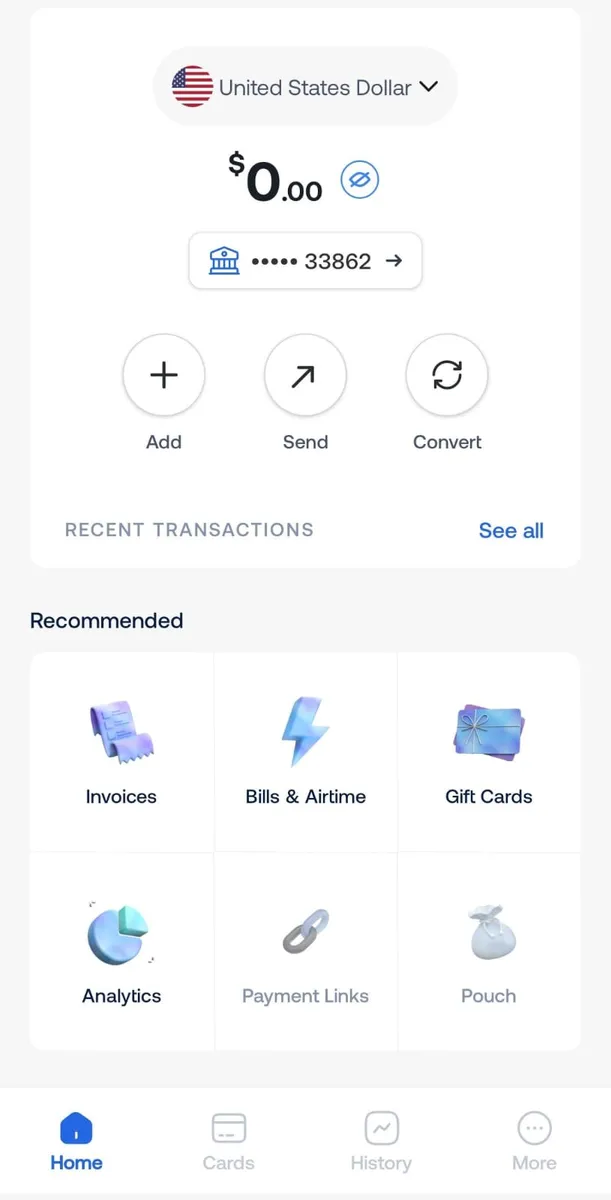
1. Open the Grey app: Log in to your Grey account on the web or mobile app.

2. Select your USD balance: Navigate to the “Accounts” section and select your USD balance.

__wf_reserved_inherit

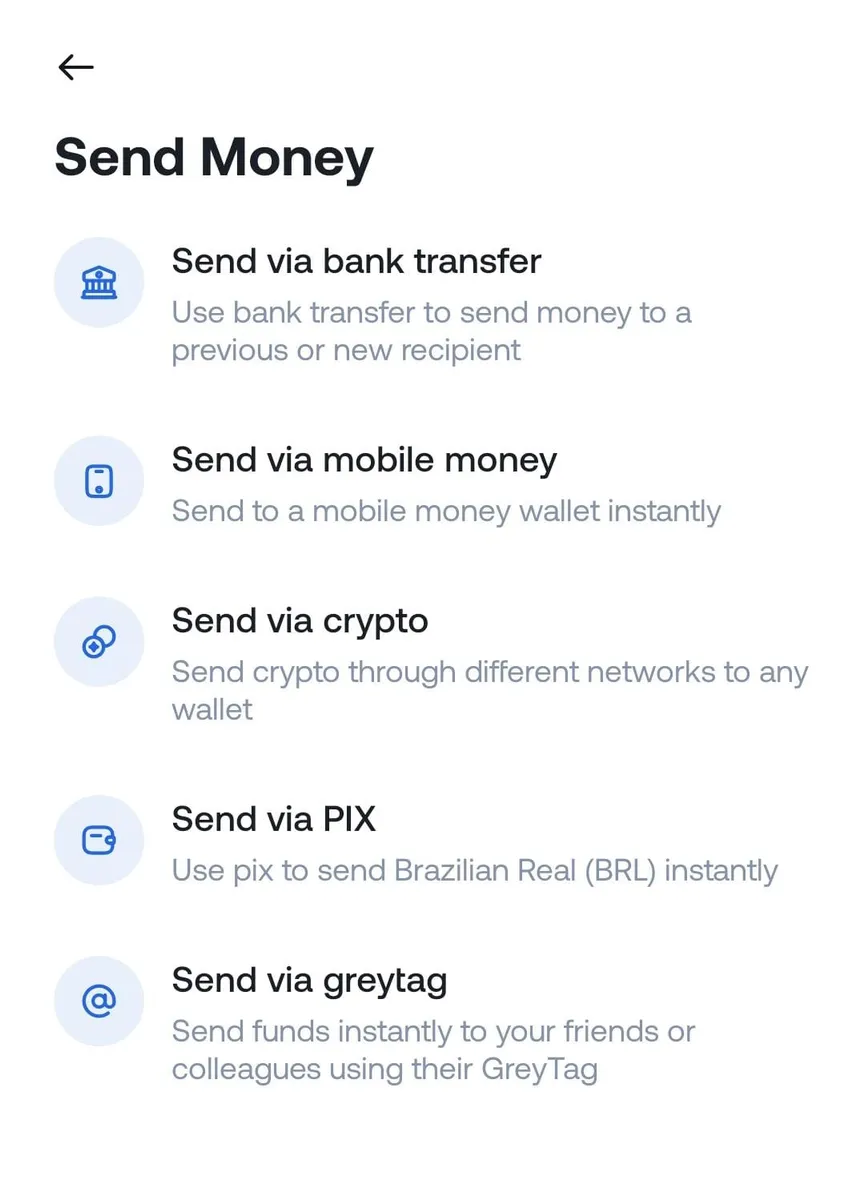
3. Tap “Send via crypto”: Choose the “Send money” option, then select “Send via crypto” to begin sending USDC.

__wf_reserved_inherit

4. Enter transaction details: Carefully fill in the recipient’s wallet address. Choose the correct network, Grey supports Solana (SOL) and Binance Smart Chain (BEP-20) — for successful transfer processing.

__wf_reserved_inherit

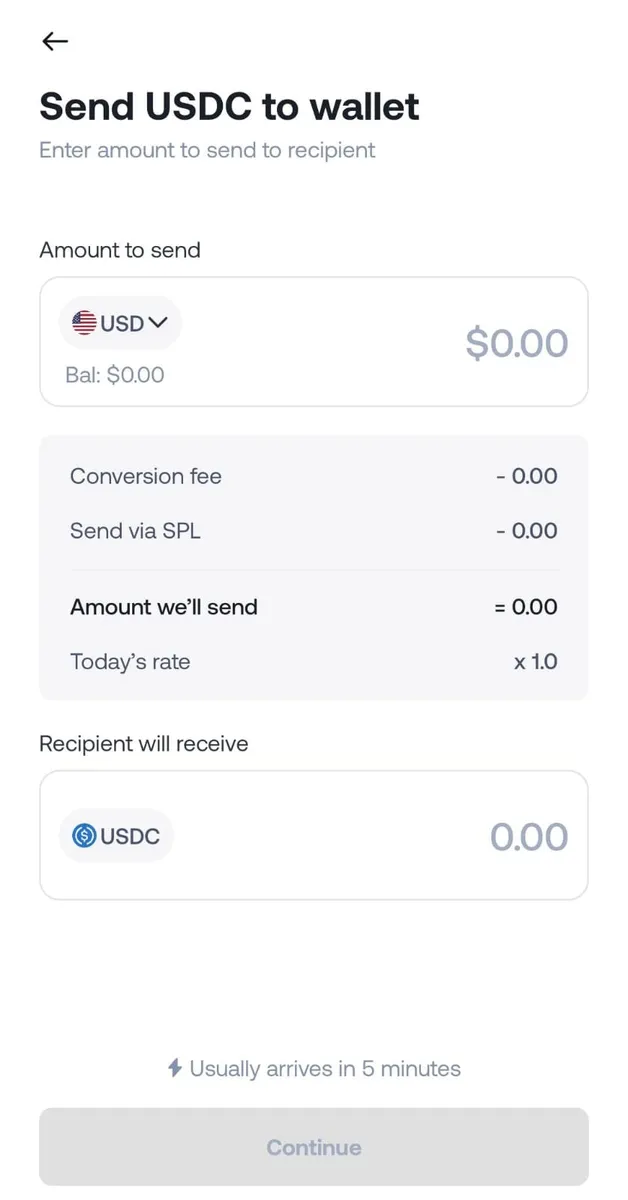
5. Input the transfer amount and review details: Enter the amount to be sent. Double-check all information, including wallet address and network, to avoid transaction errors.

__wf_reserved_inherit

6. Confirm and complete the transfer: Once satisfied with the correct details, tap “Send.” Grey will prompt you to enter your two-factor authentication (2FA) code, adding an extra layer of security.

7. Transaction success: The USDC will arrive in the recipient’s wallet after processing. They can keep the USDC, convert it into local currency, or use it as they wish.

Why choose Grey for USDC payouts?

  • Instant transfers: Your USDC transactions are sent instantly, so your funds arrive without delay.
  • No extra charges: We don’t charge extra withdrawal charges. You are only required to pay the network fee.‍
  • Secure and reliable: Your funds are always protected with industry-standard measures.
  • Global accessibility: USDC can be sent to over 40 countries, making it easier to manage your finances globally.

Considerations for USDC transactions in Zambia

If you’re a freelancer in Zambia, holding and converting USDC can simplify international payments, but there are a few key points to keep in mind:

  • Ensure wallet compatibility: Not all wallets support every network for USDC. Make sure that your wallet is compatible with the network you plan to use for smooth transactions.
  • Consider transfer costs: Transaction fees for USDC vary by network. Comparing these fees can help you choose an affordable option that saves you money on transfers.

How does Grey keep USDC transactions secured?

Your USDC transactions are protected through partnerships with trusted providers, secure blockchain networks, and mandatory two-factor authentication (2FA) for every transaction. These robust security measures ensure your money stays safe and your account is secure.

For freelancers in Zambia, managing international payments has never been simpler. Whether you're receiving payments from global clients or handling cross-border transactions, Grey makes it effortless.  Open your free Grey account today and experience limitless global banking tailored to your needs.

‍

Last updated:

October 2, 2026

Open a free Grey account to get startedJoin 1 million digital nomads
IF YOU ENJOYED THIS, CHECK THESE OUT

How to convert an eSIM back to a physical SIM

•

•

2 min read

A phone upgrade is usually a straightforward process, until the SIM becomes part of the equation. Let's say the new device supports an eSIM, the number transfers successfully, and everything seems ready to go, then comes a trip abroad, a change of network or an older mobile phone that only accepts a physical SIM card.

At that point, the question is simple: what happens to the eSIM?

Unlike changing a setting on the phone, moving from an eSIM back to a physical SIM is handled by the mobile carrier. The network provider needs to deactivate the existing eSIM and issue a replacement physical SIM linked to the same mobile number. The exact process can vary, but most carriers allow the request through an app, over the phone or at a physical store.

The switch itself is usually straightforward once the replacement SIM arrives. After activation, the physical SIM takes over the number and the old eSIM profile can be removed from the device.

Also read: How to activate an eSIM: Step-by-step guide

Can you convert an eSIM back to a physical SIM?

Yes, you can switch from an eSIM to a physical SIM through your mobile carrier. However, your phone cannot make this conversion on its own. You'll need to contact your carrier to request a physical SIM card and transfer your number to it.

An eSIM is a digital SIM profile stored securely within the phone, while a physical SIM is a separate chip that needs to be issued and activated by the mobile network. Your carrier controls the connection between your mobile number, account and SIM credentials, so the switch has to happen on the network provider’s side.

The process is usually treated as a SIM swap or SIM replacement. Your carrier deactivates the existing eSIM and issues a physical SIM linked to the same number and account. Depending on the provider, the request may be available through its app, customer service team or a physical store.

Once the replacement SIM is activated, the old eSIM can be removed from your device.

How to request a physical SIM from your carrier

Requesting a physical SIM from your mobile carrier usually involves choosing a replacement method, completing an identity check, receiving the SIM and activating it on your existing number.

  1. Request a physical SIM through the carrier app
  2. Open your carrier’s app and look for options such as “Replace SIM”, “SIM swap” or “Get a physical SIM”. Follow the instructions and provide any information requested to verify your account.
  3. Call your carrier’s customer service team
  4. Contact your network provider and explain that you want to switch from an eSIM to a physical SIM while keeping your existing number. The representative will explain the available replacement options and the delivery process.
  5. Visit a carrier store
  6. A nearby carrier shop can process the SIM replacement in person. Bring your phone and a valid form of identification, as the staff may need to confirm that you are the account holder.
  7. Complete the identity checks
  8. Expect security checks before the physical SIM is issued or activated. Depending on the carrier, these may include account details, passwords, identification documents or other verification questions.
  9. Activate the replacement SIM
  10. Once the physical SIM arrives or is issued, follow your carrier’s activation instructions. Your number can then move from the eSIM to the physical SIM.

How to delete the eSIM profile once the physical SIM works

Before removing your eSIM, make sure the replacement physical SIM is fully activated and working. Test it by making a call, sending a text message and checking that mobile data works. Deleting the eSIM too early could leave your phone without cellular service if the physical SIM has not yet been activated.

On iPhone

The wording can vary slightly depending on your iOS version and region:

  1. Open Settings.
  2. Tap Cellular or Mobile Service.
  3. Select the eSIM or cellular plan you want to remove.
  4. Tap "Delete eSIM" or "Remove Cellular Plan".
  5. Confirm the removal when prompted.

On Android

Android settings differ between manufacturers, so the menu names may not be identical on every device:

  1. Open Settings.
  2. Tap Connections or Network & Internet.
  3. Select SIM manager, SIMs or a similar option.
  4. Choose the eSIM profile you want to remove.
  5. Tap Remove, Delete SIM or the equivalent option, then confirm.

Afterwards, check that your physical SIM remains selected for calls, texts and mobile data. If anything stops working, contact your carrier before making further changes.

Also read: eSIM vs Google Fit: Which is better for international travel?

When is a physical SIM the better choice?

Choosing between an eSIM vs a physical SIM often comes down to how, where and why a phone is being used. An eSIM is convenient for digital setup and travel, but a physical SIM still has practical advantages that can make it the better option in certain situations.

Selling or handing down a handset is one example. A physical SIM can simply be removed before the phone changes hands, leaving the new owner to insert their own SIM. This makes the separation between your mobile number and the device straightforward, particularly when the phone is being resold.

Travel is another consideration. Some dual-SIM phones make it easy to combine a physical SIM with an eSIM, allowing a local travel SIM to work alongside a primary number. This can be useful when moving between countries while keeping the main line active.

In some regions, eSIM support remains limited across carriers, plans and devices. A physical SIM can therefore provide greater flexibility when travelling or changing networks. For anyone comparing eSIM vs physical SIM, checking carrier and country compatibility before switching can prevent unexpected connectivity problems.

What it costs and how long it takes

The quickest way to replace your eSIM with a physical SIM is usually a store visit, but ordering online can be more convenient. Here is what you can generally expect from major US carriers:

  • Verizon: A store visit can mean instant activation, usually at $0 at corporate locations, although independent retailers may charge $10–$25. Online orders typically arrive within 3–5 business days, with no standard hardware fee.
  • AT&T: Visiting a corporate store can provide same-day activation, often for $0, although a $5 fee may apply. Online orders generally take 3–5 business days and carry a $5 replacement fee.
  • T-Mobile: In-store replacement can be activated immediately, but costs can reach $60, including the $25 SIM fee and potential $35 assisted-support fee. Ordering online usually takes 2–5 business days and costs $25, without the assisted-support charge.
  • Mint Mobile: There are no dedicated Mint stores, so replacement is handled online. Delivery generally takes 2–5 business days, with replacement costs typically ranging from 0–10.

While ordering your replacement SIM, you may also need to make a payment. Grey can make that easier, with a multi-currency account and virtual card for international payments. If you're travelling, you can also buy an eSIM through Grey and manage your connectivity and spending from the same platform.

Frequently asked questions about converting an eSIM back to a physical SIM

1. Will I lose my number?

No, your phone number remains exactly the same. Your carrier simply transfers your existing mobile account and number from the eSIM to the new physical SIM. Once the replacement card is activated, you can continue making calls, sending messages and using mobile data as before.

2. How much does a replacement cost?

Replacement fees vary by carrier, location and how you request the SIM. In many cases, you may pay between $0 and $25. Some major networks provide replacement cards free at corporate stores, while budget or prepaid providers may charge a separate SIM replacement fee.

3. Can I keep both active?

No, you generally cannot keep both SIM profiles active on the same number. Your carrier links the number to the newly activated SIM during the replacement process, which deactivates the previous eSIM. Your phone may support two SIMs, but they cannot share one number simultaneously.

4. How long does it take?

An in-store SIM replacement can often be completed within 10 to 15 minutes once your identity and account details have been verified. Ordering a physical SIM online usually takes longer, with standard delivery commonly taking around 3 to 5 business days, depending on your carrier.

5. Should I delete the eSIM early?

No. Keep your eSIM active until the replacement physical SIM has arrived, been activated and successfully connects to the network. Deleting the eSIM too early can leave your phone without mobile service, particularly when the new SIM has not yet been activated.

6. Do all carriers issue physical SIMs?

Many carriers still offer physical SIM cards, but availability depends on the network and your device. Before requesting one, check that your handset has a physical SIM tray. Some newer phones, including certain regional models, are designed as eSIM-only devices and cannot accept a physical card.

How Nigerians working remotely protect income from FX swings

•

•

2 min read

One of the biggest challenges after getting international clients is protecting your income from exchange rate swings. The ideal sequence is that after you complete a project, you send your invoice, and then receive payment in dollars or pounds. It feels rewarding, but living in Nigeria means constantly thinking about the naira. Should you convert immediately or wait? In a market where FX rates change quickly, even a short delay can significantly affect how much ends up in your account.

From Lagos to Abuja to Port Harcourt, freelancers and tech professionals manage foreign income strategically. Some use domiciliary accounts, while others rely on fintech platforms to hold foreign currency. The goal is to avoid unnecessary conversions and reduce exposure to sudden drops.

This article explains practical methods Nigerians use to manage FX risk and protect the true value of their remote earnings.

How FX swings impact your remote earnings

Foreign exchange (FX) swings happen when the value of the naira rises or falls against currencies like the dollar or pound. In Nigeria, rates can change quickly because of inflation, demand for dollars, government policies, and market pressure. One week, the rate is stable; the next week it shifts sharply. For anyone earning in foreign currency, that movement is never just news, it directly affects your money.

First, FX swings can change how much your income is worth overnight. You might receive $1,000 feeling confident, only to see the rate drop before you convert. That difference can affect rent, family support, or savings plans.

Second, it affects planning. School fees, subscriptions, and travel costs become harder to budget when rates move unpredictably.

Finally, sudden swings create pressure to convert quickly, which can lead to rushed financial decisions and lost value.

Also read: How Nigerian freelancers maximise their foreign earnings

Smart ways to protect your remote income from FX changes

In Nigeria, currency rates can change quickly, and protecting your foreign income takes planning and smart choices.

Earn in foreign currency

One of the easiest ways to avoid losing money to FX swings is to earn in foreign currency. Getting paid in dollars or pounds protects your income from the naira’s ups and downs.

Many Nigerian remote workers now look for international clients so their payments hold value before converting. This way, you keep more of what you earn.  And once you start earning in foreign currency, the next step is knowing the best ways to receive your money safely and without losing value to unnecessary fees.

  • Grey: Grey lets Nigerians receive payments in USD, GBP, and EUR. You get foreign account details, hold funds safely, and convert when rates are favourable.
  • Payoneer: Payoneer allows freelancers to receive international payments from global clients and marketplaces. You can hold foreign currency and withdraw when exchange rates suit you.
  • Wise: Wise provides multi-currency accounts with local bank details abroad. Nigerian remote workers can receive, hold, and convert foreign income with transparent fees.

Monitor market rates

Exchange rates in Nigeria can move fast, and small changes affect your income. Checking the rates regularly, like people watch dollar or gold prices, helps you know when to convert. Converting straight away isn’t always best. Waiting for a better rate can mean keeping thousands of extra naira, especially when receiving bigger payments from overseas clients. Here’s how you can keep an eye on exchange rates.

  • Check both official and parallel market rates regularly to know the true value before converting.
  • Track trends over days or weeks instead of converting immediately for small fluctuations.
  • Set a target rate based on your expenses, like school fees, rent, or household bills, so you convert at the most useful time.

Also read: Managing foreign currency earnings as a remote worker in Nigeria

Invest in foreign markets

Another smart move is to save or invest some of your earnings in foreign assets, like dollars, stocks, or online savings accounts. By keeping part of your money in a stronger currency, you protect it from the naira losing value. This gives you more control, helps cover future expenses, and makes your income safer over the long term.

  • Open a trusted platform that allows Nigerians to buy foreign stocks, ETFs, or hold dollar-based investments.
  • Start small and invest a portion of your income, not everything at once.
  • Focus on stable, long-term options instead of risky**,** quick-profit schemes.
  • Keep records of your investments and review them regularly to ensure they still align with your financial goals.

Myths about FX swings for remote earners

You can always predict the rates: Many Nigerian remote workers think they can time the market perfectly, but FX rates are influenced by government policies, oil prices, and market demand. Even experts struggle to predict sudden changes. Relying on guesses can lead to converting at the wrong time and losing a significant portion of your hard-earned income.

Converting immediately is always best: It’s a common belief that you should convert your foreign earnings as soon as they arrive. In reality, converting immediately can mean losing money if the naira strengthens later. Waiting for a favourable rate, while monitoring trends, often helps you keep more value from international payments.

LDMAG1

Managing foreign earnings with Grey

Managing foreign currency earnings can be challenging as a Nigerian remote worker, especially with fluctuating exchange rates reducing your income. Grey helps protect your earnings from FX swings with multi-currency accounts for USD, GBP, and EUR, competitive exchange rates, virtual USD cards, and fast local withdrawals. You can receive, hold, and convert your income at the right time, keeping more of what you earn.

Download the Grey mobile app today or sign up and safeguard your foreign earnings.

‍

How to budget in foreign currencies using the Grey card

•

•

2 min read

Budgeting used to be simple. You earned money, spent money, and tracked what was left. At that time, you had only one account with one currency, which required just one mental model.

Then remote work happened.

Now you might earn in EUR, pay for tools in USD, and travel in between. Discipline isn’t enough for budgeting anymore; you need structure. Without the right structure, even the most careful spender can lose track of where their money is going.

The Grey card comes in as a practical budgeting tool for people who live and spend across borders. I’ll explain.

Why budgeting in multiple currencies breaks down so easily

Most people don’t overspend because they’re irresponsible. Rather, they overspend because their money isn’t organised in a way that reflects how they live.

Here’s what usually goes wrong.

You’re spending across platforms, clients, and countries, but everything is tied to one card. Subscriptions, ads, one-off purchases, and travel expenses all blur together. When something goes wrong, such as a spike in ad spend or an unexpected renewal, it’s challenging to pinpoint the cause quickly.

Add foreign currencies to the mix, and it gets worse. The charges don’t always settle immediately, and these small amounts seem harmless until they quietly add up.

At that point, your budget is broken.

Also read: How to use your Grey card to manage all your subscriptions

What should budgeting look like when you earn and spend globally?

Clarity, separation, and control are the most crucial factors when budgeting across multiple currencies. You should be able to:

  • See exactly what each type of spending is costing you.
  • Stop or pause spending instantly when needed.
  • Protect one part of your budget from another.
  • Make changes without disrupting everything else.

The Grey card is designed around solving these exact needs.

How does the Grey card help with budgeting?

Use multiple cards to separate your spending

One of the most effective budgeting habits is separation. Instead of using a single card for everything, you can create multiple cards with clear purposes.

For example, you can create:

  • One card for subscriptions and recurring tools
  • One card for ads and growth experiments
  • One card for travel or everyday spending
  • One card per client or project

Each card acts like its own budget lane. You don’t need to guess where the money went; you already know.

This is especially useful if you freelance, manage ads, or run multiple income streams. When spending is separated, budgeting becomes more straightforward.

Also read: How to pay for ads easily with your Grey card

Freeze cards instantly when spending goes off-track

Budgets fail when you can’t act fast enough.

With the Grey card, you can instantly freeze or unfreeze any card in the app. If an ad campaign starts burning cash, freeze the card. If a subscription you forgot about renews unexpectedly, freeze the card. If you’re travelling and want to lock down non-essential spending, freeze the card.

Freezing a card doesn’t affect your other cards or balances. It simply stops that specific spending lane, which is precisely how budgeting should work.

Set limits that protect your budget

Budgets can fail when they’re too rigid. Grey’s spending limits work more like guardrails.

You can set daily or monthly limits per card, receive alerts when you’re approaching your limit, and still stay flexible. The goal isn’t to punish spending. I mean, who wants that? It’s to keep you aware before things drift too far.

For shared cards or subscriptions, limits are especially useful. You know exactly how much can be spent, and nothing sneaks past unnoticed.

Track spending clearly in one place

When you’re budgeting across currencies, visibility matters more than perfection. Every Grey card transaction appears clearly in your app, linked to the card you used. That means you’re not just seeing how much you spent, but why you spent it.

When budgeting time comes around, you’re no longer reconstructing your month from memory. The structure is already there.

Spend confidently across borders

Trust helps with budgeting too. When you’re shopping internationally, paying for ads, or travelling, declined payments and unexpected charges can throw everything off. The Grey Card works across global merchants and even supports Apple Pay and Google Pay, so everyday spending feels normal, even when you’re far from home.

LDMAG1

A quick note on protection when spending abroad

An often-overlooked aspect of budgeting is preparing for contingencies in case things go wrong.

When you pay with your Grey card, you have access to Visa benefits, including purchase protection, extended warranties, and price protection, depending on the transaction and your activation status. It’s not something you think about daily, but it adds a layer of reassurance when you’re buying electronics, booking travel, or shopping internationally.

It’s one less thing to worry about while managing money across borders.

Also read: How to claim your Visa card benefits

What budgeting in foreign currencies is like with the Grey card

When your card and your accounts are aligned, budgeting stops being guesswork. You know what you’re spending, which currency it’s coming from and more importantly, when something changes.

Instead of constantly reacting to your balance, you’re now making decisions with clarity. And that’s what good budgeting should be like, whether you’re at home, travelling, or working remotely.

If you’re ready to make your budget work wherever you are, create or update your Grey card and start spending and budgeting in the ways that matter to you.

‍

How Egyptian creators receive payouts from global platforms

•

•

2 min read

Egypt has many creators who are building strong careers online, including well-known names like Yasmine Sabri and Radwa El Sherbiny. They are making waves and increasing Egypt's visibility across North Africa and beyond. In general, creators earn about $100,000 a year on average, and Egypt ranks among the leaders in Africa for viewership and earnings in the creator economy. Despite this success, many still struggle to receive their payments easily from global platforms.

In this guide, I will show you how to receive payouts smoothly from international platforms, whether you are a TikToker, YouTuber or Instagram creator.

Also read:  Best way for TikTok creators in Egypt to get paid from abroad

Best platforms Egyptian creators use to share content

Egyptian creators use a mix of global platforms, choosing the ones that perform best for their content and audience. Here’s where most of them focus:

1. Facebook

Facebook remains one of the strongest platforms in Egypt and often serves as a creator’s starting point. Many build their first communities here, using pages and groups to grow loyal audiences. It has one of the highest market shares in the country, giving creators a wide reach across different age groups. With monetisation options, live features and strong engagement tools, Facebook continues to help creators maintain influence and consistent visibility.

2. TikTok

TikTok is widely used by Egyptian creators who enjoy short, creative videos. The platform allows them to express ideas quickly and connect with large audiences. Many secure brand deals and benefit from creator funds directly on the app. Creators like Ahmed Ghzayel have built strong personal brands here, especially in fashion and lifestyle, turning viral content into steady income opportunities.

3. Instagram

With more than 18 million users in Egypt, Instagram attracts creators targeting younger audiences. It is especially popular for fashion, lifestyle and marketing content. Reels, stories and sponsored posts make it easier for creators to collaborate with brands and grow their presence. Many use Instagram to present a more polished image, connect with Gen Z followers and drive engagement through visual storytelling and consistent brand partnerships.

Also read: How Egyptians earn foreign currencies online

4. YouTube

YouTube remains the leading platform for long-form content in Egypt. Creators use it for education, vlogs, tech reviews and gaming. It offers stable ad revenue and strong search visibility, helping content stay relevant for years. Popular channels such as 7amoda Gaming show how niche content can attract loyal subscribers and generate income through ads, sponsorships and memberships.

How Egyptian creators can get paid from global platforms

Choosing the right payout method helps ensure your money arrives safely and on time, without unnecessary fees or currency conversion costs.

1. Direct bank transfers

Using SWIFT, brands or organisations can pay creators directly into their bank accounts. You need to provide an IBAN, and funds are converted automatically to your local currency. This method is secure and reliable, but fees and currency conversion costs are usually high, making it better for larger payments rather than frequent small payouts.

2. Grey

Grey is a fast option for Egyptian creators, especially with its multi-currency account. It allows you to receive payments in different currencies from international clients and convert them to EGP easily. Payments are quicker than traditional bank transfers, and you can manage multiple streams of income in one account, reducing delays and simplifying your financial workflow.

3. Wise

Wise is a transparent platform that supports multiple currencies and easy conversion to Egyptian pounds. It shows fees upfront and provides fast transfers from global clients. Many creators use Wise for its reliability and clear pricing, which helps reduce hidden charges while receiving payments from international platforms quickly and safely.

4. Raenest

Raenest is ideal for Egyptian creators who work with multiple international platforms. It supports various currencies and simplifies payment collection. The platform makes it easier to consolidate earnings, access money quickly, and reduce fees compared to traditional bank methods, making it suitable for creators who rely on multiple sources of global income.

Also read: How Egyptian remote workers receive foreign income reliably

Smart ways to reduce fees when receiving payouts

Reducing fees during payouts helps Egyptian creators keep more of their earnings.

  • Get paid in foreign currency first, then convert to EGP later, keeping more of your earnings intact.
  • Handle the conversions yourself instead of clients to reduce hidden fees and retain a larger portion of your money.
  • Combine multiple payouts into fewer withdrawals to minimise processing fees and manage your income more efficiently.
  • Use Grey for fast payouts and excellent exchange rates.

LDMAG1

Managing your creator payout with Grey

Egypt is seeing more creators partnering with brands and organisations across TikTok, YouTube, and Instagram. However, finding the best payout platform remains a challenge. Grey is the ideal solution for Egyptian creators to receive money quickly, convert it securely, and access funds faster. Sign up or download the app today to start managing your earnings with ease.

‍

Comparing global multicurrency platforms for non-US residents

•

•

2 min read

As a non-US resident, one question you’ll often ask is how to receive money while you’re in the US. Should you open a traditional bank account, or hope your local bank works without restrictions? Both options are possible, but they can be stressful and costly due to multiple currency conversions.

A better solution is opening a multicurrency account while in the US. It allows you to receive money in different currencies like GBP and EUR, avoid extra conversions, and manage your funds more easily. With many options available, comparing platforms helps you choose the right one.

Also read: Best banks for non-residents to open UK and US accounts

Key considerations before choosing a multicurrency account as a non-resident

Before exploring options, consider these factors when selecting a multicurrency account:

  • Documentation: The requirements vary by platform. Some may ask for a passport, proof of address, and tax identification, while others have simpler onboarding processes.
  • Fees: Check for account maintenance fees, international transfer costs, and currency conversion charges.
  • Currency support: Make sure the account supports the currencies you need, such as USD, GBP, or EUR.
  • Remote access and usability: Look for robust mobile apps and online platforms that let you manage multiple currencies easily.

Multicurrency platforms for non-US residents: key differences

Comparing multicurrency platforms helps non-US residents choose the best solution for receiving, holding, and managing funds globally with ease.

Supported currencies

  • Wise: Offers over 40 currencies, including USD, GBP, EUR, and others, allowing users to hold, convert, and receive money globally without needing multiple local accounts.
  • Revolut: Supports around 25–30 currencies depending on your plan, covering major currencies for personal and business use, ideal for frequent travellers and international spending.
  • Payoneer: Focuses on major currencies like USD, EUR, GBP, JPY, and AUD, making it suitable for freelancers, marketplaces, and businesses receiving international payments.
  • GrabrFi: Limited to USD, GBP, and EUR, but provides virtual accounts that make receiving funds internationally simpler for non-residents.
  • Grey: Offers USD, GBP, EUR, with virtual account options to manage multiple currencies, ideal for cross-border payments and global payroll.
  • HSBC Expat: Allows holding up to 19 currencies and sending in over 50 currencies, offering traditional banking reliability with global reach.

Also read: How non-US citizens can open a US bank account online

Conversion fees

  • Wise: Charges the mid-market rate plus a small transparent fee (~0.3–0.7%), making it one of the most cost-effective platforms for currency exchange.
  • Revolut: Offers low fees within plan limits, but adds markups (~0.5–1%) for conversions exceeding monthly limits or weekends.
  • Payoneer: Fees vary by currency and payment type; often higher for certain flows, especially card withdrawals or cross-currency transfers.
  • GrabrFi: Competitive FX rates, with minimal hidden fees, providing non-residents an affordable way to receive and convert funds.
  • Grey: Offers market-competitive FX rates, keeping costs low while enabling multi-currency transactions for individuals and businesses.

Countries present

  • Wise: Available in 160+ countries, allowing users worldwide to receive, send, and hold multiple currencies with local account details in key markets.
  • Revolut: Operates in many countries, primarily Europe, the UK, and the US, with limited availability in Asia and Latin America.
  • Payoneer: Covers 190+ countries, ideal for freelancers, businesses, and marketplaces needing international payouts.
  • GrabrFi: Operates in select countries, with a US-centric focus, making it suitable for receiving USD payments from abroad.
  • Grey: Has presence across the US, EU, Africa, Asia, and Latin America, offering wide coverage for cross-border transactions.

Virtual cards

  • Wise: Offers debit cards in supported regions, allowing spending directly from multiple currency balances.
  • Revolut: Provides both virtual and physical cards, useful for online payments, subscriptions, and international transactions.
  • Payoneer: Issues a prepaid Mastercard for virtual and physical transactions, ideal for receiving payments from global clients.
  • GrabrFi: Offers virtual USD and debit cards for seamless online and international spending.
  • Grey: Provides a virtual dollar card to manage cross-border payments efficiently.

Payout scale

  • Wise: Ideal for both small and large amounts with high transparent limits; very good for high‑value transfers without hidden markups.
  • Revolut: Supports small daily transfers easily; higher plans allow larger limits, but basic plans have monthly caps.
  • Payoneer: Designed for freelancing and business payouts; handles both small invoices and large marketplace deposits well.
  • GrabrFi: Best suited for small to medium amounts; may have limits on very high transaction volumes compared with big banks.
  • Grey: Built to support both low and higher cross‑border amounts, with scalability for business payments.

Also read: What non-US residents need to open a US bank account at major banks

LDMAG1

Grey: The ideal multicurrency account for non-residents

Grey is designed for non-residents who need access to US and global banking services.

  • No residency requirement: Open and hold accounts without needing proof of local residency.
  • Competitive fees: Low costs for currency conversion and international transfers, with no hidden charges.
  • User-friendly platform: Intuitive online platform and app make managing multiple currencies simple.
  • Secure: Offers strong security features to protect your funds globally.

For non-US residents, selecting the right multicurrency account is crucial to streamlining international payments and managing multiple currencies effectively. Grey stands out by offering competitive fees and support for major currencies like USD, EUR, and GBP. Its user-friendly platform and secure infrastructure make it an ideal choice for individuals and businesses navigating global financial transactions. Download the mobile app or sign up on the website to manage multicurrency without stress.

How to use your Grey card to manage all your subscriptions

•

•

2 min read

I was so shocked when I saw the news. “Netflix to Acquire Warner Bros.” It’s the kind of industry shift that usually comes with new bundles, price changes, region-specific catalogues, and the inevitable “Your plan has been updated” email.

If you’re already juggling multiple subscriptions, such as streaming platforms, cloud storage, creative tools, productivity apps, and gaming services, any minor hiccup with your payment method can cause everything to collapse at once. A low balance here, a declined international charge there, and suddenly Netflix stops streaming, Spotify logs you out, and your work tools start sending warnings.

Now, where subscription prices keep changing, platforms keep merging, and foreign services dominate the apps we use daily, the real need isn’t more subscriptions; it’s a card that can keep up with them. The Grey card is perfect for this. It’s a flexible and reliable way to manage all your subscriptions, without worrying about currencies, top-ups, or unexpected declines.

Why do subscriptions fail in the first place?

Before discussing the solution, it helps to understand the problem. Most subscription failures come down to:

1. Cards that don’t support international merchants

Some platforms, especially those based in the US or EU, automatically reject certain cards.

2. Low or inconsistent balance

Most cards require you to have the exact amount ready before the subscription date. If you forget to top up, your subscription will pause.

3. Currency conversion issues

If your card is billed in one currency and the service charges are in a different currency, the payment may fail due to delays or conversion errors.

4. Tracking too many subscriptions at once

When everything runs on one card, it’s easy to lose control of what’s being billed and when.

Grey’s card helps smooth out each of these challenges.

Also read: How to use Google Pay worldwide with your Grey virtual card

LDMAG1

How does your Grey card make subscription management easier?

The card is designed to handle everyday payments, recurring charges, and international subscriptions without requiring you to jump through hoops. Here’s how it helps:

Spend from different currency wallets

This is one of the biggest advantages. Most cards are linked to a single currency, but your Grey card isn’t.

Although the card is primarily a USD card, the payment flow depends on the available balance: USD → USDC → the next-highest available balance (GBP or EUR).

Multiple cards for easy organisation

Instead of one card for everything, you can create two or three:

  • one for entertainment subscriptions
  • one for work tools
  • one for shared family plans

This makes it easy to track what’s coming out where, and freeze or cancel only the card linked to a specific group of subscriptions.

Accepted by most global platforms

The Grey card works across major international merchants, streaming services, cloud storage providers, gaming platforms, and productivity tools, so you don’t need multiple payment methods.

Add to Apple Pay or Google Pay

If you prefer not to type card details into every website, you can simply add the card to your mobile wallet and pay securely.

Instant freeze and unfreeze

If one subscription starts misbehaving or you just want to take a break, you can temporarily freeze the card.

Also read: How to pay for ads easily with your Grey card

How to set up your subscriptions with Grey

1. Create or activate your card

If you already have a Grey account, getting a card is simple. Simply go to the cards section to request a card for $5.

2. Add your card to your subscriptions

It could be Netflix, Figma, or iCloud. Simply enter your card details or pay via Apple Pay / Google Pay.

3. Set up spending limits

A small monthly limit can help you stay in control, especially for family or shared cards.

4. Create additional cards if needed

I like to think of them like folders. Each card can represent a spending category.

Enjoy stress-free subscription management

There’s something about managing subscriptions that makes them seem a lot like admin work. Your Grey card helps keep everything organised.

Whenever you’re ready to try it (which I hope will be soon), create your card, link your first subscription, and enjoy the peace of mind that comes with everything just working.

Create your Grey account today to get started.

‍

Arrow (up)

Back to top

