<script type="application/ld+json">[{"@context": "https://schema.org", "@type": "BlogPosting", "@id": "https://grey.co/blog/esim-vs-physical-sim#article", "headline": "eSIM vs Physical SIM: What Is the Difference? | Grey", "description": "eSIM vs physical SIM: see how they compare on setup, security, switching carriers and travel, and find which one suits your next trip. Read on.", "inLanguage": "en", "url": "https://grey.co/blog/esim-vs-physical-sim", "mainEntityOfPage": {"@id": "https://grey.co/blog/esim-vs-physical-sim#webpage"}, "datePublished": "2026-09-24T22:48:24.020Z", "dateModified": "2026-09-24T22:48:45.166Z", "publisher": {"@type": "Organization", "@id": "https://grey.co/#organization", "name": "Grey", "url": "https://grey.co"}, "author": {"@type": "Person", "name": "Olayoyin Olorunmota"}, "image": "https://cdn.prod.website-files.com/636a85d290ee58e70c17e1c0/6ab5a8a2a133dbf60e7292f2_eSIM%20vs%20Physical%20SIM-compressed.jpg"}, {"@context": "https://schema.org", "@type": "BreadcrumbList", "@id": "https://grey.co/blog/esim-vs-physical-sim#breadcrumb", "itemListElement": [{"@type": "ListItem", "position": 1, "name": "Home", "item": "https://grey.co/"}, {"@type": "ListItem", "position": 2, "name": "Blog", "item": "https://grey.co/blog"}, {"@type": "ListItem", "position": 3, "name": "eSIM vs physical SIM: What is the difference?", "item": "https://grey.co/blog/esim-vs-physical-sim"}]}, {"@context": "https://schema.org", "@type": "FAQPage", "@id": "https://grey.co/blog/esim-vs-physical-sim#faq", "mainEntity": [{"@type": "Question", "name": "Is an eSIM better than a physical SIM?", "acceptedAnswer": {"@type": "Answer", "text": "For most people with a compatible device and a carrier that supports it, an eSIM is more convenient for everyday use and significantly more convenient for travel. You can add plans remotely, switch carriers without visiting a store, and run two numbers on one device. A physical SIM has a practical advantage if you regularly move your SIM between phones or if your carrier doesn’t yet support eSIM. Neither is universally superior: the better option depends on your specific use case and device."}}, {"@type": "Question", "name": "Is an eSIM more secure than a physical SIM?", "acceptedAnswer": {"@type": "Answer", "text": "In one specific scenario, yes. An eSIM cannot be physically removed from a stolen phone and inserted into another device. This reduces the risk that a stolen phone’s SIM can be used independently of the device. For most everyday security concerns, including account protection and unauthorised access, security depends on your carrier’s processes and your own account security rather than the SIM type."}}, {"@type": "Question", "name": "Can I switch from a physical SIM to an eSIM?", "acceptedAnswer": {"@type": "Answer", "text": "Yes, if your phone supports eSIM and your carrier offers an eSIM plan. Most major carriers allow you to convert an existing physical SIM plan to an eSIM digitally, often through the carrier’s app or website. The process typically involves verifying your identity and scanning a QR code. Your number remains the same; only the physical card is replaced by a digital profile."}}, {"@type": "Question", "name": "Do eSIMs work abroad?", "acceptedAnswer": {"@type": "Answer", "text": "Yes, in two ways. First, your existing eSIM plan may include international roaming, in which case it works abroad the same way a physical SIM with roaming does. Second, you can add a separate local eSIM plan for the country you’re visiting, which connects you to a local network at local data rates without roaming charges. This second option is one of the primary practical advantages of eSIM for travellers."}}, {"@type": "Question", "name": "Can I have both an eSIM and a physical SIM in the same phone?", "acceptedAnswer": {"@type": "Answer", "text": "Yes, on most modern smartphones. Many devices support dual SIM with one eSIM slot and one physical SIM slot. Some newer models, including certain iPhone models in the US, support dual eSIM with no physical SIM slot at all. Running both allows you to keep two active plans on one device, a useful setup for separating personal and work numbers or for running a home plan alongside a travel data plan."}}, {"@type": "Question", "name": "Which is better for travel, an eSIM or a physical SIM?", "acceptedAnswer": {"@type": "Answer", "text": "An eSIM is generally more convenient for travel. You can purchase and activate a local data plan before you arrive or immediately upon landing, without needing to visit a carrier store or buy a physical SIM card. When you return home, switching back to your regular plan takes seconds from your phone’s settings. For travellers visiting multiple countries, being able to add and switch between plans digitally, rather than managing multiple physical cards, is a meaningful, practical advantage."}}]}, {"@type": "DefinedTermSet", "@id": "https://grey.co/blog/esim-vs-physical-sim#terms", "name": "eSIM vs physical SIM glossary", "hasDefinedTerm": [{"@type": "DefinedTerm", "name": "eSIM", "description": "An eSIM, short for embedded SIM, is a SIM card that is built directly into your phone’s hardware rather than inserted as a removable card. It performs exactly the same function as a physical SIM, connecting your device to a mobile network, but instead of swapping a plastic card when you change carriers or add a plan, you download a profile digitally.", "inDefinedTermSet": {"@id": "https://grey.co/blog/esim-vs-physical-sim#terms"}}, {"@type": "DefinedTerm", "name": "Physical SIM", "description": "A physical SIM is the small, removable plastic card that has been the standard for connecting a phone to a mobile network since the 1990s. You insert it into a slot on your phone, it identifies you to the network, and your phone connects. When you change carriers or travel to a new country and want a local number, you remove the old card and insert a new one.", "inDefinedTermSet": {"@id": "https://grey.co/blog/esim-vs-physical-sim#terms"}}]}]</script>

eSIM vs physical SIM: What is the difference?

Olayoyin Olorunmota

TABLE OF CONTENT

SHARE THIS POST

If you’ve bought a new phone recently, you may have noticed that some models no longer have the regular SIM card slot. I was so confused the first time I saw it. These days, many phones have the option to pick whichever one you prefer.

For some, the eSIM vs physical SIM conversation has a straightforward answer, but the right choice for any individual depends on what they’re using it for. This guide covers how each works, how they compare on the things that matter most to people, and which one makes more sense depending on your situation.

What is an eSIM?

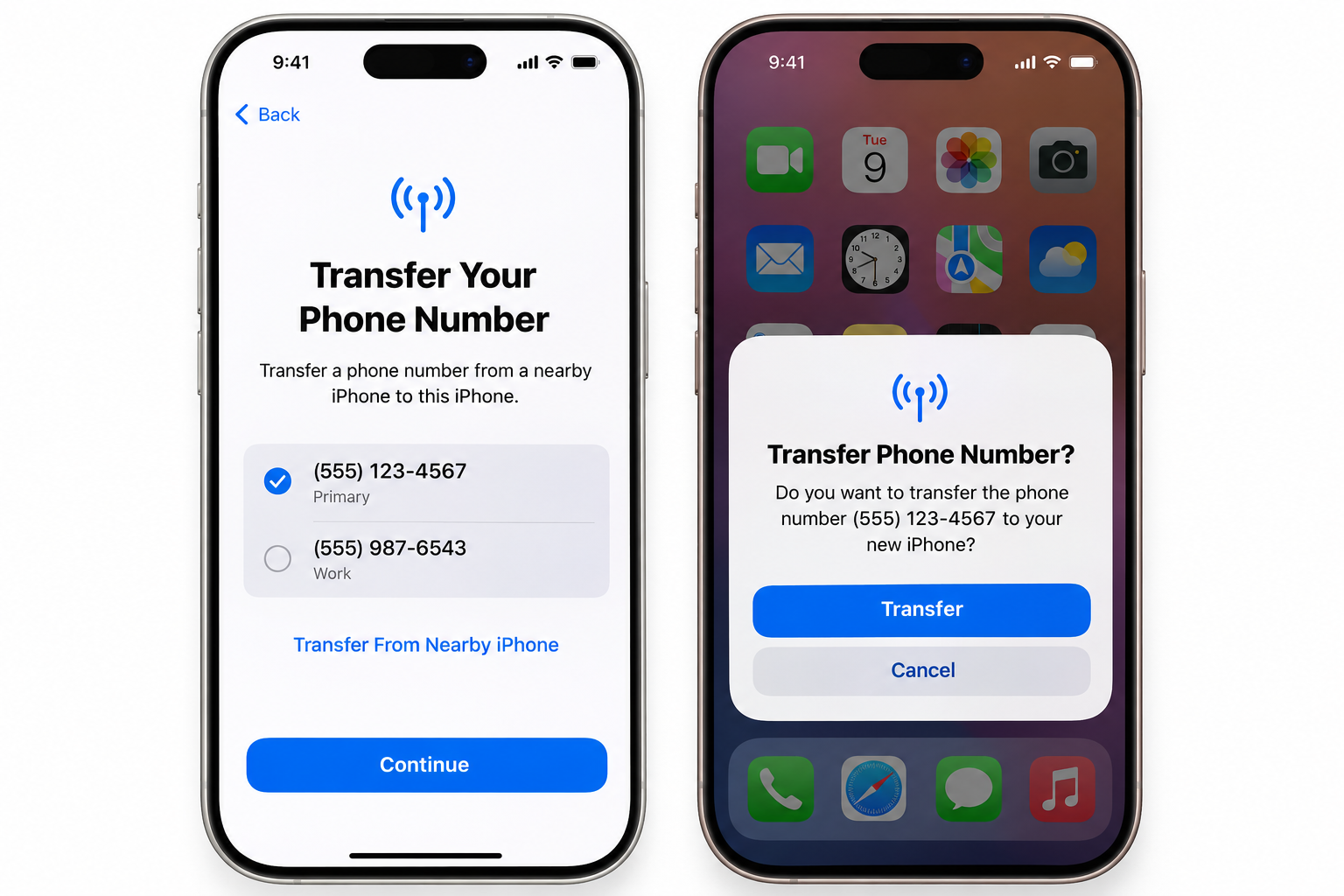
An eSIM, short for embedded SIM, is a SIM card that is built directly into your phone’s hardware rather than inserted as a removable card. It performs exactly the same function as a physical SIM, connecting your device to a mobile network, but instead of swapping a plastic card when you change carriers or add a plan, you download a profile digitally.

The GSMA, the international body that sets mobile industry standards, defines the eSIM standard and manages the specification that allows any compatible device to connect to any eSIM-compatible carrier. Because the profile is digital, you can have multiple carrier profiles stored on a single eSIM and switch between them without touching the device’s hardware.

In practical terms, this means you can add a local data plan when you land in a new country, switch back to your home plan when you return, and manage all of this from your phone’s settings rather than hunting for a SIM card slot with a pin.

Most flagship smartphones released since 2018 support eSIM, and support has expanded significantly across mid-range devices since then.

What is a physical SIM?

A physical SIM is the small, removable plastic card that has been the standard for connecting a phone to a mobile network since the 1990s. You insert it into a slot on your phone, it identifies you to the network, and your phone connects. When you change carriers or travel to a new country and want a local number, you remove the old card and insert a new one.

Physical SIMs come in three sizes: standard (the original, now rarely used), micro SIM, and nano SIM, which is what most modern phones use. The card contains a small chip with your subscriber identity information and the credentials your network uses to authenticate your connection.

The primary advantage of a physical SIM is universality. Almost every mobile phone ever made has a SIM card slot, including older models that predate eSIM support. If you need to move a SIM between devices, whether lending your plan to someone or transferring it to a backup phone, the SIM can be removed and reinserted. No account access required.

The limitation is the card’s physical nature. It can be lost, damaged, or stolen. Changing plans requires a new card. Travelling internationally with a local SIM requires carrying multiple cards or swapping them at each destination.

eSIM vs physical SIM: the key differences

Here’s how the two options compare across the factors that matter most.

Feature eSIM Physical SIM
Setup Digital: scan a QR code or enter an activation code; profile downloads in minutes Physical: purchase or receive a SIM card; insert into the device
Carrier switching Switch by activating a new downloaded profile; no card swap needed Requires a physical SIM from the new carrier to be inserted
Device compatibility Requires a compatible device (most flagships since 2018) Works with most phones ever made
Multiple profiles Store multiple carrier profiles on one device; switch between them One SIM per slot; dual-SIM phones require two physical cards
Travel Add a local data plan before or after landing, entirely remotely Requires purchasing and inserting a local SIM card on arrival
Security Cannot be physically removed or stolen; tied to device hardware Can be removed; if stolen with the phone, may be used in another device
Loss/damage risk
None; the SIM is embedded in the device Card can be lost, damaged, or bent
Transfer to another device Requires deactivating on current device and reactivating on new one Physical removal and insertion
Availability Requires carrier support; not all networks offer eSIM plans Universally supported by all carriers
Cost
Varies by plan; no physical card cost Varies by plan; sometimes a small card fee

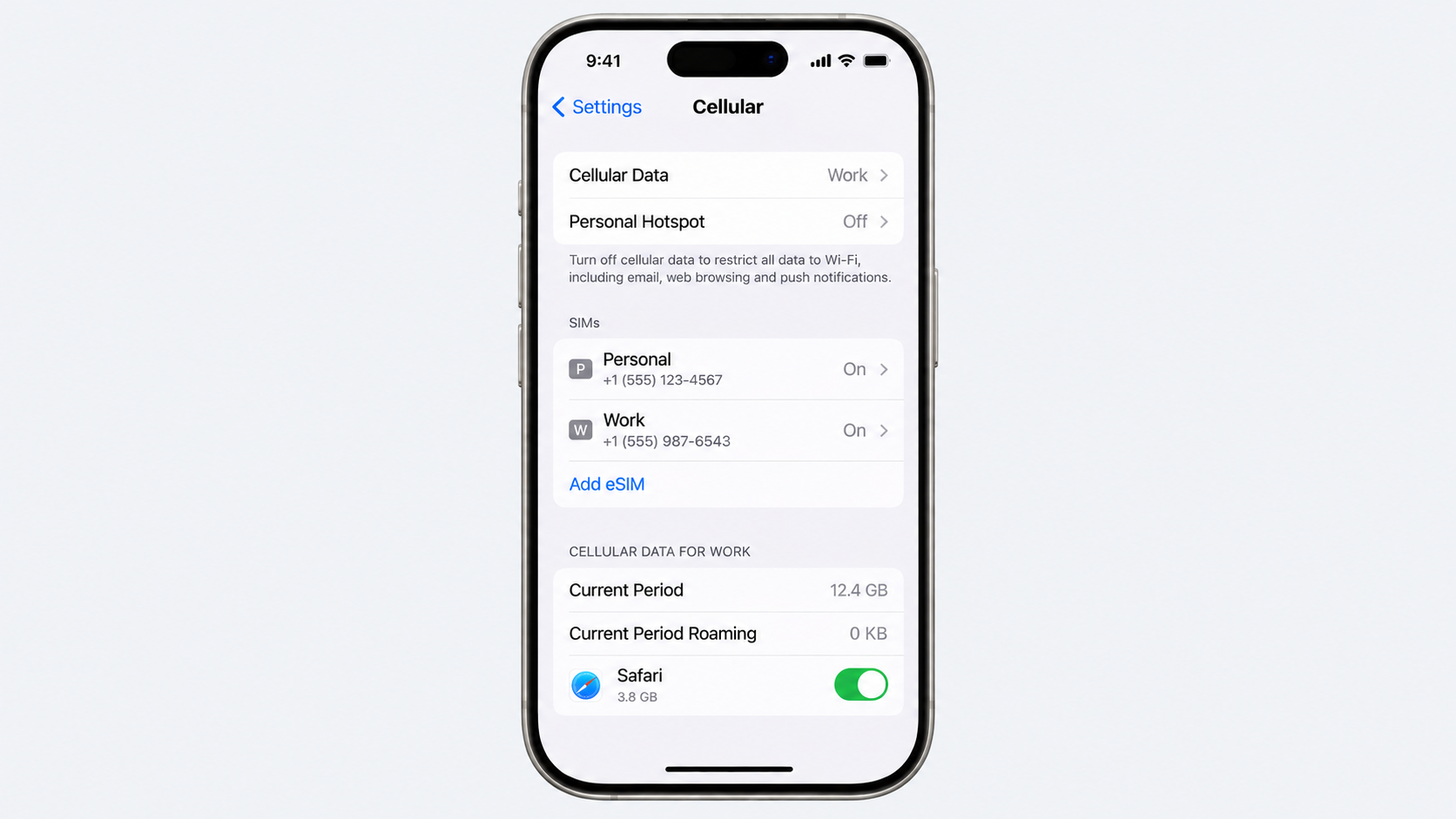
On dual SIM use: many modern phones support both an eSIM and a physical SIM simultaneously, effectively giving you two active numbers or plans on one device. This is useful for keeping a personal and work number separate, or for running a home plan alongside a travel data plan. Some newer iPhone models (specifically in the US) have removed the physical SIM slot entirely and now use dual eSIMs instead.

On security: an eSIM provides a meaningful security advantage in one specific scenario. If your phone is stolen, the thief cannot remove the SIM card and use it in another device to make calls or avoid detection. The eSIM is tied to the device hardware and requires account credentials to transfer. A physical SIM in a stolen phone can be removed and inserted into any compatible device.

Which should you choose?

The answer depends on three things: what you’re using it for, what phone you have, and whether your carrier supports eSIM.

Choose an eSIM if:

  1. You travel internationally with any regularity. The ability to add a local data plan remotely, before you land or upon arrival, without queuing at an airport kiosk or hunting for a convenience store that sells SIM cards, is a genuine practical advantage. You pay for the plan, scan a QR code, and your phone connects to a local network. When you return home, you switch back to your regular plan from your phone’s settings.
  2. You want to run two numbers on one device. Keeping a personal and work number on one phone is cleaner with eSIM than with dual physical SIM, particularly if you want the flexibility to change one of the numbers without visiting a carrier store.
  3. You have a compatible device, and your carrier supports it. If both conditions are met, there’s no reason to prefer a physical SIM for everyday domestic use.

Choose a physical SIM if:

  1. Your phone doesn’t support eSIM. Older devices, budget smartphones, and some mid-range models still lack eSIM compatibility. Check your specific model before assuming the option is available.
  2. You frequently swap your SIM between devices. If you regularly move a SIM card between phones, lending it or switching to a backup device, a physical card is simpler. Transferring an eSIM between devices requires account access and deactivation steps that physical card swapping doesn’t.
  3. Your carrier doesn’t offer eSIM. Not all mobile networks in all countries have rolled out eSIM support. In markets where eSIM carrier availability is limited, a physical SIM remains the only option regardless of whether your device supports eSIM.

Get an eSIM on Grey for your travels

Grey now offers eSIM data plans in more than 100 countries, designed specifically for travellers who want local data rates without international roaming charges or the need to queue for a SIM card at the airport.

Just go to the lifestyle tab on your Grey app, select eSIM, choose the desired country, select the plan you want, and you’re good to go. When your trip ends, you can switch back to your regular plan from your settings.

Grey's eSIM plans are available alongside the full Grey account, which lets you hold and spend multiple currencies while travelling, convert at a rate shown before you confirm, and spend with your Grey virtual card without paying foreign transaction fees on every purchase.

The two products work naturally together for anyone who travels regularly. The eSIM keeps you connected at local rates. The Grey account keeps your money in the right currency without losing a percentage to conversion on every coffee and taxi.

Download the Grey app to get an eSIM:

App Store: https://apps.apple.com/us/app/grey-inclusive-global-banking/id1611983085

Play Store: https://play.google.com/store/apps/details?id=co.grey.mobile.android

Frequently asked questions

Is an eSIM better than a physical SIM?

For most people with a compatible device and a carrier that supports it, an eSIM is more convenient for everyday use and significantly more convenient for travel. You can add plans remotely, switch carriers without visiting a store, and run two numbers on one device. A physical SIM has a practical advantage if you regularly move your SIM between phones or if your carrier doesn’t yet support eSIM. Neither is universally superior: the better option depends on your specific use case and device.

Is an eSIM more secure than a physical SIM?

In one specific scenario, yes. An eSIM cannot be physically removed from a stolen phone and inserted into another device. This reduces the risk that a stolen phone’s SIM can be used independently of the device. For most everyday security concerns, including account protection and unauthorised access, security depends on your carrier’s processes and your own account security rather than the SIM type.

Can I switch from a physical SIM to an eSIM?

Yes, if your phone supports eSIM and your carrier offers an eSIM plan. Most major carriers allow you to convert an existing physical SIM plan to an eSIM digitally, often through the carrier’s app or website. The process typically involves verifying your identity and scanning a QR code. Your number remains the same; only the physical card is replaced by a digital profile.

Do eSIMs work abroad?

Yes, in two ways. First, your existing eSIM plan may include international roaming, in which case it works abroad the same way a physical SIM with roaming does. Second, you can add a separate local eSIM plan for the country you’re visiting, which connects you to a local network at local data rates without roaming charges. This second option is one of the primary practical advantages of eSIM for travellers.

Can I have both an eSIM and a physical SIM in the same phone?

Yes, on most modern smartphones. Many devices support dual SIM with one eSIM slot and one physical SIM slot. Some newer models, including certain iPhone models in the US, support dual eSIM with no physical SIM slot at all. Running both allows you to keep two active plans on one device, a useful setup for separating personal and work numbers or for running a home plan alongside a travel data plan.

Which is better for travel, an eSIM or a physical SIM?

An eSIM is generally more convenient for travel. You can purchase and activate a local data plan before you arrive or immediately upon landing, without needing to visit a carrier store or buy a physical SIM card. When you return home, switching back to your regular plan takes seconds from your phone’s settings. For travellers visiting multiple countries, being able to add and switch between plans digitally, rather than managing multiple physical cards, is a meaningful, practical advantage.

Last updated:

September 25, 2026

Open a free Grey account to get startedJoin 1 million digital nomads
IF YOU ENJOYED THIS, CHECK THESE OUT

Revolut virtual card: how it works and where it is accepted

•

•

2 min read

The Revolut card gives you a digital way to spend without waiting for a physical card to arrive. Virtual cards are created through the Revolut app and can be used for eligible online payments wherever the card’s Visa or Mastercard network is accepted. This makes the card useful for online shopping, subscriptions, travel bookings and other everyday digital spending.

One of the main advantages is control. You can freeze or unfreeze a virtual card when needed, and individual cards can be deleted without affecting the rest of your account. This can be useful when you want to separate different types of spending or stop using a card after a particular purchase.

The features you get depend on your Revolut plan. Standard users have access to virtual cards, while paid plans such as Premium and Metal provide higher allowances and additional benefits. ATM withdrawals are subject to plan limits and fees, so check the current terms before relying on the card for cash abroad.

Also read: 5 Best Travel Debit Cards for UK Residents Abroad

How does the Revolut virtual card work?

A Revolut virtual card is a digital version of a payment card that you can use without carrying a physical card. It is created in the Revolut app and provides card details for eligible online and contactless payments.

To create one, open the Revolut app, go to the Cards tab and follow the request steps. Your virtual card will be generated instantly and remain available in the app, ready to use when you need to pay.

The number of cards available depends on your plan. Standard users get one free multi-use virtual card, while Premium, Metal and Ultra users can have up to five active cards. These paid plans also include unlimited disposable virtual cards, which regenerate after each transaction and can provide extra protection for online payments.

The Revolut card works wherever the Visa or Mastercard network is accepted for eligible online or contactless payments. You can also freeze, unfreeze, or delete individual cards whenever needed.

Where is the Revolut virtual card accepted, and where does it fail?

Revolut virtual cards are designed for online and contactless payments wherever the underlying Visa or Mastercard network is accepted. In practice, this means you can use the card for many online shops, subscriptions, travel bookings and digital services, provided the merchant accepts virtual cards.

However, card acceptance and Revolut account availability are not the same thing. A merchant may accept the card network, while Revolut does not offer accounts or cards to residents of that country.

For example, Revolut has restrictions on where customers can open accounts, so availability is limited in countries such as Nigeria, Ghana and several other markets across sub-Saharan Africa. Restrictions also apply in some Asian countries, including India, Pakistan and Vietnam. Always check Revolut’s current list of supported countries before relying on the card.

Even in a supported country, an individual payment can still be declined. Some merchants block virtual or prepaid card numbers, particularly where they want a traditional physical card. Other platforms use strict address or verification checks and may reject a transaction if the billing details do not match their expectations.

For this reason, having a Revolut card does not guarantee acceptance everywhere. Before travelling or paying for an important service, check both Revolut’s availability in your country and the merchant’s card requirements.

Also read: Grey card vs other virtual cards: What you should know

Revolut plan fees and limits

For most frequent travellers, Premium is worth paying for because £7.99 gives you unlimited weekday FX, a £400 ATM allowance, five active virtual cards and unlimited disposable cards. Metal offers more, but its £14.99 monthly cost only makes sense for heavier users.

Fee / feature Standard Plus Premium Metal
Monthly cost £0 £3.99 £7.99 £14.99
Active virtual cards 1 1 Up to 5 Up to 5
Disposable virtual cards Yes Yes Unlimited Unlimited
Free ATM withdrawals £200 / 5 withdrawals £200 £400 £800
ATM fee after limit 2% or £1 2% or £1 2% or £1 2% or £1
Weekday FX allowance £1,000 £3,000 Unlimited Unlimited
Weekday FX above allowance 1% 0.5% 0% 0%
Weekend FX markup 1% 0.5% 0% 0%
Physical card delivery ~£4.99 Free Free express Free express
International transfer discount — — 20% 40%
Currency conversion 0% within allowance 0% within allowance 0%

Revolut virtual card spending limits

Revolut does not set a standard daily or monthly spending limit specifically for virtual cards. Instead, you can decide how much you are comfortable spending by setting a custom monthly limit for an individual card through the card’s security settings in the Revolut app.

This can be useful if you use separate virtual cards for different types of spending. For example, you might set a lower limit on a card used for subscriptions and a higher one for regular online purchases. The limit gives you an extra layer of control without affecting the rest of your Revolut account.

Once the card reaches its custom spending limit, any further transactions that would exceed the threshold are declined. You can then adjust the limit in the app if you need to make additional payments.

Revolut’s plan tiers do not change the basic spending cap on virtual cards. Instead, the main differences between plans relate to features such as foreign exchange allowances and other account benefits. This means you do not need a higher-tier plan simply to access a larger virtual card spending limit.

Also read: How to use Apple Pay worldwide with your Grey card

Revolut virtual card vs alternatives: how they compare

Feature Revolut (Standard) Grey Wise Monzo
Monthly Fee £0.00 $0.00 $0.00 / £0.00 £0.00
Number of Virtual Cards 1 multi-use + single-use disposable cards Multiple custom cards supported Up to 3 active digital cards concurrently None on free plan (Requires Plus/Max tiers)
Foreign Exchange Fee 0% weekdays (up to £1k limit); 1% markup on weekends 1% conversion fee (capped at ~$6); 2% + $0.50 cross-border on non-USD Mid-market rate + dynamic fee (typically 0.35%–2%) 0% flat markup (Uses standard Mastercard wholesale rate)
ATM Fee Free up to £200/month (max 5 withdrawals); 2% or £1 fee after Not supported (Virtual/digital card services only) First 2 withdrawals free (up to £200/month); 1.75% + £0.50 after Unlimited free withdrawals in UK/EEA; £200/month free limit internationally
Markets Supported EEA, UK, US, Australia, Singapore, Japan Over 80 countries globally Over 160+ countries globally UK residents only (US entities require US residency)
Spending Limits You can set a custom monthly limit on each card. You can change overall limits, but not per individual card. You can set custom spending limits per card.
Max Cards You Can Have Up to 20 active cards at any one time You can create multiple virtual cards for different needs Up to 3 active digital cards at any one time. 1 free virtual card for standard users; up to 5 active cards at any one time on paid plans.
How Is It Linked to Your Bank? Pulls directly from your main multicurrency balance Your Grey virtual card is directly connected to your selected balance Pulls directly from your entire multi-currency account. Can link to separate "Pots." If that Pot runs out, the card stops working.

Revolut suits users who want an all-in-one financial app, while Wise suits users focused on low-cost international transfers and multi-currency spending. Monzo is best for UK residents who want simple everyday banking.

Grey suits freelancers, remote workers and other people in Nigeria, Ghana, Kenya and Egypt who receive or spend money internationally. You can have multiple virtual cards for different payments, and you can download the Grey app to create and access your Visa card.

Frequently asked questions

Is the Revolut virtual card free?

Yes. Revolut lets personal users generate a multi-use virtual card without paying a separate card creation fee. The card is available after you complete account verification, although other Revolut services, currency conversions or plan-related charges may still apply depending on how you use your account.

How many virtual cards can I have on Revolut?

Standard users can have one active multi-use virtual card. Premium, Metal and Ultra users can have up to five active multi-use cards at the same time. Paid plans also offer unlimited disposable virtual cards, which generate new details after eligible transactions for added online security.

Can I use a Revolut virtual card on Amazon and Netflix?

Yes. Revolut virtual cards can be used for eligible online purchases and recurring payments on services such as Amazon and Netflix. However, acceptance depends on the merchant and card type. If a merchant does not accept virtual or prepaid cards, the payment may be declined.

Does Revolut charge fees for virtual card payments?

Revolut does not normally charge a separate fee simply for paying with a virtual card. However, the overall cost can change if your payment involves currency conversion, weekend exchange markups or an exchange transaction above your plan’s fair-use allowance. Check your plan before making frequent international payments.

Does Revolut work in Nigeria or Ghana?

No. Revolut does not currently offer personal accounts to residents of Nigeria or Ghana. This means people living in these countries generally cannot sign up for Revolut or access its virtual cards. Country availability can change, so check Revolut’s supported countries before attempting to open an account.

What is the difference between Revolut Standard and Premium for virtual cards?

Standard includes one active multi-use virtual card, while Premium allows up to five active multi-use cards. Premium also includes unlimited disposable virtual cards and different foreign exchange benefits. The main difference is therefore the number of cards and additional plan benefits, rather than a basic spending limit on virtual cards.

8 best Nigerian banks to open a domiciliary account

•

•

2 min read

Choosing a domiciliary account is not simply about picking a familiar Nigerian bank. The right option needs to work well with the way international payments are received, particularly when the account will be used to hold USD or other foreign currencies. Fees, transfer options and how easily the account can be managed can make a noticeable difference over time.

GTBank, Zenith Bank, First Bank, Access Bank, UBA, Stanbic IBTC, Fidelity Bank and Sterling Bank are among the Nigerian banks worth considering when comparing domiciliary accounts. Each has different requirements and charges, so checking the details before opening an account is important.

Key things to compare include the bank’s SWIFT code for international transfers, minimum opening deposit, inbound transfer fees and online banking options. Requirements can change, so confirm the latest terms directly with the bank before visiting a branch or submitting an application.

What to look for in a domiciliary account bank

A good domiciliary account should make receiving and managing foreign currency relatively straightforward, rather than adding unnecessary delays or costs. These are the four major things you should check before settling on a bank.

  • SWIFT code availability: Confirm that the bank can receive international wire transfers through SWIFT, especially if clients or businesses will be paying from overseas.
  • Minimum opening deposit: Check how much USD or other foreign currency is required to open the account and whether any minimum balance must be maintained.
  • Processing times: Find out how long the account takes to open and how quickly international transfers are normally credited after they arrive.
  • Online account management: A strong mobile or internet banking service makes it easier to monitor balances, receive alerts and manage foreign-currency transactions without visiting a branch.


Comparison of the best domiciliary account banks in Nigeria

Bank One-line summary Minimum deposit SWIFT receiving Account management options Best for
GTBank Digital-forward institution offering seamless everyday global transaction handling. $50 Supported GTWorld mobile app, internet banking, USSD, and physical USD debit cards. Tech-savvy freelancers and remote professionals requiring smooth app access.
Zenith Bank High-liquidity legacy platform built for reliable, high-volume international cash management. $100 Supported Zenith Mobile App, internet banking, phone banking, and nationwide ATMs. Import/export merchants and large-scale businesses executing major trade volumes.
First Bank Nigeria’s oldest bank providing highly trusted multi-currency financial stability. $100 Supported FirstMobile app, FirstOnline platform, and expansive branch-network teller counters. Conservative savers seeking long-term capital safety and institutional stability.
Access Bank Expansive financial group offering wide flexibility across a diverse range of global currencies. $100 Supported AccessMore mobile application, internet banking portals, and secure token transfers. Existing customers seeking varied currency options such as USD, GBP, EUR, and JPY.
UBA Highly accessible pan-African network providing beginner-friendly onboarding frameworks. $100 Supported UBA Mobile Banking, internet banking, Leo Virtual Assistant, and Mastercard debit cards. Beginners and first-time foreign-currency account holders looking for an easy setup.
Stanbic IBTC Premium wealth-management bank built for investment-linked international currency flows. $100 Supported Stanbic Mobile App, physical wealth-management centres, and automated text/email alerts. Corporate entities, expatriates, and high-net-worth investors.
Fidelity Bank Strong retail player featuring specialised structures for foreign-currency balances. $50 Supported Online banking, physical branches, standing orders, and fixed-deposit booking. Diaspora Nigerians and savers interested in foreign-currency savings.
Sterling Bank Innovation-driven bank offering digital tools for managing different types of inflows. $0 to $100 Supported OneBank app, internet banking, and branch services. Users wanting convenient digital access alongside traditional banking services.

The right domiciliary account depends on what matters most to the account holder. GTBank and UBA may appeal to customers who prioritise digital access, while Zenith and Stanbic IBTC are stronger considerations for larger international transactions. First Bank and Fidelity may suit savers who value established banking relationships, while Access Bank offers broader currency flexibility. Sterling provides another digital-first alternative for everyday foreign-currency management

Also read: Best apps to open a USD account in Nigeria

‍
Traditional domiciliary account vs Grey virtual account

Feature Traditional domiciliary account (e.g., GTBank, Zenith) Grey virtual account
Speed to open Often requires physical documentation and bank verification, so opening may take several business days. Digital onboarding makes the process much faster, subject to verification.
Minimum deposit May require an initial deposit, depending on the bank and account type. No mandatory opening balance for eligible users.
SWIFT support Better suited to traditional international bank-to-bank transfers through SWIFT. Designed primarily around supported digital payment networks rather than general SWIFT transfers.
ACH support Traditional Nigerian domiciliary accounts do not provide US ACH receiving details. Eligible USD accounts can provide US receiving details for supported ACH payments.
Inbound fees International transfers may involve bank, correspondent or intermediary charges. Fees depend on the payment method and current Grey pricing.


Grey gives eligible freelancers a digital way to receive and manage international income through a virtual USD account, including US routing details for supported ACH and wire payments. There is no need to visit a branch or maintain a mandatory opening deposit, making it a practical option for those seeking an alternative to a traditional domiciliary account.

Frequently asked questions

Which Nigerian bank is best for receiving international transfers?

GTBank is one of the Nigerian banks commonly considered for receiving international transfers, particularly because of its established banking network and digital services. However, the best option depends on transfer fees, correspondent banking arrangements, supported currencies and how quickly incoming funds are credited.

Do all Nigerian banks have a SWIFT code?

Most Nigerian commercial banks that handle international transfers have their own SWIFT or BIC codes, which identify the institution during cross-border payments. However, having a SWIFT code does not necessarily mean every account or branch can receive every type of international transfer.

What is the minimum deposit for a domiciliary account?

The minimum opening deposit varies between Nigerian banks and account types. Some banks may require around $50 to $100, while others offer accounts with no minimum opening balance. Requirements can change, so it's important to check the bank’s current terms before opening the account.

Can I open a domiciliary account online in Nigeria?

Some Nigerian banks allow customers to apply for domiciliary accounts online via their mobile apps or websites. However, the process may still require additional documentation, verification or a branch visit before the account becomes fully operational. Requirements vary between banks and account types.

How long does it take to receive a SWIFT transfer in Nigeria?

A SWIFT transfer to Nigeria can take two to five business days, though timing varies. The sending bank, Nigerian receiving bank, correspondent institutions, compliance checks, currency and public holidays can all affect when the funds become available.

Getting paid by an international client should not mean having to navigate complicated banking steps every time money arrives. Grey gives eligible users a simpler way to receive dollars, hold multiple currencies and manage international income, with a virtual card for online spending. It is a seamless option for receiving dollar payments in Nigeria.

Domiciliary account vs virtual dollar account: which is better?

•

•

2 min read

Receiving payments from overseas can become unnecessarily complicated when the money has to pass through a banking setup not designed for how international workers are paid. Fees, payment methods, opening requirements and the time it takes to access funds can all affect how much of each payment is actually useful.

For Nigerians earning in USD, a domiciliary account has traditionally been the obvious choice. It allows dollars to be received and held through a Nigerian bank, but opening one can involve a minimum deposit, paperwork and a branch visit. A virtual dollar account offers a more digital alternative, with services such as Grey allowing eligible users to access USD receiving details online.

Though both options receive USD through wire transfers, they are not identical. Virtual dollar accounts may also accept ACH payments and may have lower fees for incoming transfers, making them worth considering for freelancers and remote workers who regularly receive payments from US clients or platforms.

This guide breaks down the domiciliary account vs virtual dollar account difference, including fees, payment methods, accessibility and the option that may make more sense for different types of international income.

What is a domiciliary account?

A domiciliary account gives Nigerians a way to receive, hold and spend foreign currency through a local bank. Instead of converting an international payment into naira as soon as it arrives, funds sent in USD, GBP or EUR can be credited to the corresponding foreign-currency balance. Receiving a payment usually requires the sender to use the bank’s international transfer details, and the bank may charge fees for processing or receiving the funds. Opening the account can also involve identification, paperwork and a minimum deposit, depending on the bank.

What is a virtual dollar account?

A virtual dollar account gives people a digital way to receive and hold US dollars without opening a traditional bank account in the US. FinTech platforms such as Grey can provide eligible users with USD account details, including an account number and routing number, which can be shared with clients or payment platforms.

Once a payment is sent, the dollars are credited to the account and can then be held, managed or transferred as needed. Depending on the provider, payments may arrive through methods such as ACH or wire transfer. This makes virtual dollar accounts particularly useful for freelancers, remote workers and businesses that regularly receive payments from US clients.

Also read: Best dollar account apps in Nigeria compared

Domiciliary account vs virtual dollar account: which is better for your needs?

The differences become clearer when the two options are compared across the parts of banking that matter most, from opening requirements and payment methods to fees, withdrawals and everyday use.

Feature Traditional domiciliary account (e.g., GTBank, Access Bank, UBA) Virtual dollar account (e.g., Grey)
Opening process Heavy documentation, including valid ID, utility bills, passport photos and, depending on the bank, current account referees Digital onboarding with identity verification
Minimum deposit Often $50–$100, depending on the bank $0; no mandatory holding balance
Processing time to open Often takes several business days Typically much faster, depending on verification
SWIFT receiving Native and well suited to international bank-to-bank transfers May support certain international wire routes, but is not designed around generic SWIFT banking
ACH receiving Not supported through a US ACH routing setup Supports US ACH payments through eligible USD account details
Inbound transfer fees Can include sender, correspondent and bank charges Fees are generally more predictable, depending on the payment method
Daily spending card Physical foreign-currency cards may be available, depending on the bank Virtual cards can be used for eligible online payments
Daily limits Can be higher, particularly for business accounts Limits vary according to account and verification level
Withdrawal to naira Conversion through the bank or other available channels Can be converted to naira through the platform, subject to its available rates and features
Best for Businesses, large international transfers and people who need traditional banking services Freelancers, remote workers and businesses receiving regular payments from overseas clients or platforms

Which option makes more sense?

The better option depends largely on where payments come from and what happens after the money arrives. A traditional domiciliary account can be useful if you regularly receive larger international transfers, need SWIFT payments, or prefer having a traditional Nigerian bank relationship. It can also make sense if access to physical foreign currency or branch-based services matters to you.

A virtual dollar account is more suited to freelancers, remote workers and online businesses that mainly receive payments from international clients and digital platforms. ACH support can make receiving USD from US-based companies more convenient, while digital access removes much of the paperwork associated with traditional banking. For someone who rarely needs cash or large SWIFT transfers, the digital option may be more practical.

if your priority is traditional banking, a domiciliary account comes in first place. If your priority is getting paid online with minimal friction, a virtual dollar account may be a better fit.  You also don’t have to choose just one of these; see our alternatives to domiciliary accounts.

Which is better for Nigerian freelancers?

Choosing between a virtual dollar account and a traditional domiciliary account depends on the type of payments a freelancer receives and how the money will be used afterwards. Neither option is automatically better, because each has advantages in different situations.

A virtual dollar account can be more convenient for freelancers who receive regular payments from US clients and online platforms. Digital onboarding, ACH receiving and online access can make everyday international payments easier to manage, while a virtual card can provide a convenient way to spend online.

A traditional domiciliary account may be more suitable for freelancers who receive larger payments, need direct SWIFT transfers or want to hold physical US dollars. It also provides access to established Nigerian banking services and branch support.

The right choice is the one that fits your clients, payment methods, and how you plan to spend your money. Open a Grey account today and receive USD from international clients, no bank branch or minimum deposit required.

Frequently asked questions

Can I have both a domiciliary account and a virtual dollar account?

Yes. Freelancers can use both accounts for different purposes. A virtual dollar account can handle regular payments from international clients and platforms, while a domiciliary account can be used for longer-term foreign-currency savings, larger transfers or access to traditional banking services in Nigeria.

Does Grey accept SWIFT transfers?

Grey’s virtual USD accounts are primarily designed for supported payment networks rather than traditional SWIFT transfers. Depending on the account and payment route, users may receive USD through networks such as ACH. Anyone expecting a SWIFT payment should check Grey’s current supported receiving methods before asking a client to send funds.

Do domiciliary accounts charge fees on inbound transfers?

They can. Nigerian banks may charge inward transfer, telex or other processing fees when foreign-currency payments arrive. In some cases, correspondent or intermediary banks may also deduct charges before the funds reach the recipient. The exact cost depends on the bank, transfer route and currency involved.

Is a virtual dollar account regulated in Nigeria?

The regulatory structure depends on the provider and the financial partners supporting the account. FinTech platforms may work with licensed financial institutions to provide their services, while other regulatory obligations can apply in the jurisdictions where they operate. Checking the provider’s current licensing and safeguarding arrangements is important before using an account.

Which is safer, a domiciliary account or a virtual dollar account?

Safety depends on the provider and how the funds are held. A Nigerian domiciliary account benefits from the established banking system and applicable NDIC protection, subject to its rules and limits. A virtual dollar account may offer strong safeguards through regulated partners, but users should check its specific protections and safeguards.

‍

Cheapest way to send money from Nigeria in 2026

•

•

2 min read

Sending money out of Nigeria has never had more options than it does right now. But more options also mean more ways to overpay if you are not paying attention.

Some apps charge a flat percentage. Others advertise zero fees and make their money on the exchange rate instead. A few do both. The only way to know what you are actually paying is to look past the headline and compare what your recipient gets on the other end.

We did that comparison across four apps that support outbound transfers from Nigeria: Grey, Flutterwave Send, Eversend, and Pesa. Below is what each one costs, what to watch out for, and a few practical ways to keep more of your money in every transfer.

Comparing costs on a $500 transfer from Nigeria 

For this comparison, we looked at the cost of sending the naira equivalent of $500 from Nigeria to a US bank account. This is one of the most common outbound corridors and the easiest to compare across providers, since all four support it

Provider Fee on $500 Fee on $1,000 Fee on $2,000 Rate transparency
Grey $5.00 (1%, capped at $6) $6.00 $6.00 Rate and fee shown upfront
Flutterwave Send $5.00 (1%, no cap) $10.00 $20.00 Rate shown upfront
Pesa $0.00 $0.00 $0.00 Margin in rate, not disclosed
Eversend Shown in-app Shown in-app Shown in-app Rate and fee shown in-app

Fees verified from provider websites and help centers. Exchange rates fluctuate and are not included. Always compare the total amount your recipient receives. Last checked: September 2026.

At $500, Grey and Flutterwave Send cost exactly the same: $5. The difference only appears when you send more. At $1,000, Grey charges $6 (the cap kicks in) while Flutterwave charges $10. At $2,000, it is $6 versus $20. At $5,000, it is $6 versus $50. If you regularly send larger amounts, whether for tuition, rent, supplier payments, or property transactions, the cap is where Grey pulls ahead.

Pesa shows no fee line item at all. That sounds like the cheapest option, and for small transfers it might be. But "no transfer fee" is not the same as "no cost." Pesa builds its margin into the exchange rate, so your recipient gets fewer dollars for the same number of naira. The only way to know whether Pesa is actually cheaper is to compare the final received amount side by side at the moment you send.

Eversend does not publish its personal transfer fees, so a direct comparison is difficult to make in advance. The fee is shown in-app before you confirm, so you can check it at the point of transfer, but you cannot plan ahead based on a published schedule. For business accounts, Eversend starts at 0.49% plus a fixed fee per transfer.

Here's a closer look at each provider

Grey

Grey charges 1% on currency conversion, capped at the naira equivalent of $6 for major pairs like USD, EUR, and GBP. On top of that, there is a flat payout fee that depends on the destination. For US transfers, there is no separate payout fee. For Kenya via mobile money, it is $0.50. For India via bank or UPI, it is $1.50. A full breakdown is in Grey charges explained.

The rate and the fee are both shown on the same screen before you tap send. There is no markup hidden in the exchange rate. What makes Grey particularly useful for Nigeria is the breadth of the product: beyond transfers, you get multi-currency accounts in USD, GBP, and EUR, a virtual Visa card for online payments, and access to over 50 destination countries.

Transfers to the US arrive within 1 to 2 business days. Transfers to India via UPI can arrive within minutes.

Flutterwave Send

Flutterwave Send charges a flat 1% on all outbound transfers from Nigeria, with no published cap. The Swap feature, built in partnership with Kadavra BDC and Wema Bank, handles currency conversion from naira to USD, GBP, or EUR within the app.

For transfers under $600, Flutterwave Send and Grey cost the same. Above that threshold, the absence of a cap means your cost keeps climbing. A $3,000 transfer costs $30 with Flutterwave versus $6 with Grey.

Pesa

Pesa charges no visible transfer fee on any corridor. The cost is built into the exchange rate, which is shown before you confirm, but the markup itself is not broken out separately. This makes Pesa seem like the cheapest option based you the fee, but the real test is always the final amount your recipient receives.

For small, one-off transfers where convenience matters more than optimizing the last percentage point, Pesa's zero-fee model is appealing. For larger or regular transfers, it is worth checking how Pesa's delivered rate compares to the mid-market rate before committing.

Eversend

Eversend is a multi-currency app built for Africans and the diaspora, with over 1.6 million registered users. It supports outbound transfers from Nigeria to USD, GBP, and EUR bank accounts in 18 countries, as well as intra-African routes such as Nigeria to Kenya and Nigeria to Ghana.

The personal transfer fee is displayed in-app before you send, but is not available on the website, which makes it harder to compare in advance. Eversend also supports USDC and USDT stablecoin wallets, which is a genuine differentiator if you work in crypto or receive payments in stablecoins.

What about Wise, Remitly, and WorldRemit?

If you have come across these names in your search, note that none of them support outbound transfers from Nigeria. Wise suspended USD transfers to Nigeria effective November 1, 2022. While it has since resumed inbound naira payouts, it does not support NGN as a sending currency. Remitly, WorldRemit, and LemFi all serve the inbound direction only.

How to send money from Nigeria with Grey

If you have decided Grey is the right fit, here is how to get your first transfer done. The whole process takes a few minutes on your phone.

1. Create your account. Download the Grey app from the App Store or Google Play and sign up with your email. You will need a valid government-issued ID (passport, national ID, or driver's license) and your Bank Verification Number to complete verification. Most accounts are verified within minutes.

2. Fund your wallet. Transfer naira from your Nigerian bank account into your Grey NGN wallet. You can also hold balances in USD, EUR, and GBP if you prefer to convert ahead of time and send later when the rate suits you.

3. Start your transfer. Tap Send, choose your recipient's country, and enter the amount. Grey shows the live exchange rate, the conversion fee, and exactly what your recipient will receive, all on the same screen before you confirm. No surprises after you tap send.

4. Add your recipient and confirm. Enter your recipient's bank details. For a US transfer, that is a routing number and an account number. For the UK, a sort code and account number. For India, a bank account number or UPI ID. Review the summary and confirm.

Transfers to the US typically arrive within 1 to 2 business days. Transfers to India via UPI can take minutes. Your recipient does not need a Grey account to receive the money. Send money from Nigeria to the United States with Grey.

If you also need to make recurring payments for subscriptions, software, or online services, Grey offers a virtual Visa card for a one-time $4 creation fee plus a $1 funding deduction. It works anywhere Visa is accepted online, with no monthly charges.

Three ways to keep your transfer costs down

Compare the received amount, not the fee. A $0 fee means nothing if the exchange rate leaves your recipient 3% worse off than the mid-market rate. Always check what your recipient actually gets in their currency before confirming.

Send larger amounts less frequently. If you send $500 every month, you pay the conversion fee twelve times a year. If you can send $1,500 every quarter instead, you pay the fee four times, and with Grey's $6 cap, your annual conversion cost drops from $60 to $24.

Time your conversion when the rate is favorable. Grey lets you hold naira and convert to USD, GBP, or EUR when you choose. If you do not need to send immediately, converting on a day when the rate is better can save more than any fee difference between providers.

Also read: How to send money from Nigeria to any country in 2026

Frequently asked questions
‍
What is the cheapest app to send money from Nigeria?

For transfers above $600, Grey's 1% fee, capped at the naira equivalent of $6, is the lowest published rate among providers with transparent pricing. For smaller transfers, Pesa's zero-fee model or Eversend's in-app pricing may deliver a lower total cost depending on the exchange rate offered. Always compare the final received amount, not just the headline fee.

Does Pesa really charge no fees?

Pesa does not charge a visible transfer fee. However, the cost of the transfer is embedded in the exchange rate markup. The rate is shown before you send, but the markup itself is not disclosed separately. To know the true cost, compare the amount your recipient receives on Pesa versus what they would receive on a platform that uses the mid-market rate plus a visible fee.

Can I use Wise to send money from Nigeria?

No. Wise does not support NGN as a sending currency. You can receive money in Nigeria through Wise, but you cannot use it to send money out of the country.

How much does it cost to send $1,000 from Nigeria to the US with Grey?

The conversion fee is $6 (1% would be $10, but the $6 cap applies to major currency pairs). There is no separate payout fee for USD transfers to the US. Total cost: $6. Your recipient receives the USD equivalent at the rate shown before you confirm.

Related reading

How to send money from Nigeria to any country in 2026 is the full guide covering which apps work, CBN rules, delivery speeds by destination, and how to get started.

The easiest way for Nigerians abroad to send US dollars home is the reverse: sending money to Nigeria from the UK, the US, or Canada.

Exchange rates on Grey are variable and include a margin over the mid-market rate. Always review the rate before confirming a conversion. Grey is a financial technology company, not a bank. Banking services are provided by licensed banking partners. This article is general information, not financial advice.

Offshore vs onshore banking: what is the difference?

•

•

2 min read

Where you keep your money can affect the currencies you can hold, the banking rules you follow and the way you manage money across borders. For someone who lives and earns in one country, a local bank account may be all they need. But if you work internationally, run a global business or regularly move between countries, a foreign bank account can offer more flexibility.

This is where the key differences between offshore and onshore banking become useful to understand. Onshore banking simply means keeping your account in the country where you live or operate, so the account falls under that country’s banking regulations and tax rules. Offshore banking means holding an account in another country, which can make it easier to manage different currencies or international business finances.

Both types of banking can be completely legal, but they come with different responsibilities. Offshore accounts may involve additional reporting requirements, particularly for US citizens who may need to comply with rules such as FBAR and FATCA. Understanding these differences can help you choose the right setup and avoid unexpected compliance issues.

Also read: Offshore accounts vs fintech platforms: real trade-offs

What is onshore banking?

If you have a bank account in the country where you live or are a tax resident, you are using onshore banking. It is the type of banking most people use for their everyday finances, from receiving a salary and paying bills to saving money and using a local debit card.

An onshore bank account is governed by the banking and tax rules of that country. This usually means your deposits are covered by the local deposit protection scheme, subject to its rules and limits. For example:

  • In the US, eligible deposits are generally protected by the FDIC.
  • In the UK, eligible deposits are generally protected by the FSCS.

Your account will also normally operate in the country’s domestic currency, making local payments straightforward. You can usually access local branches, ATMs and customer support more easily than with a foreign account.

For most people, an onshore account remains their primary bank account because it fits naturally into their day-to-day life and local financial obligations.

Also read:  Offshore accounts vs international bank accounts explained

Offshore bank accounts: benefits and legitimate uses

Offshore bank accounts can give international workers, businesses and individuals more flexibility when managing foreign currencies, overseas payments and assets across different countries.

An offshore bank account is simply a bank account held in a country where the account holder does not normally live. Despite the name, offshore banking is not automatically about hiding money or avoiding tax. There are legitimate reasons for keeping some funds outside the country of residence.

The main benefits include:

  • Currency diversification: Holding currencies such as USD, GBP, or EUR can reduce reliance on a single local currency. This can be particularly useful when the local currency is losing value or when regular income and expenses are in different currencies.
  • Asset diversification: Keeping some money in another country can spread financial risk across different banking systems. This may provide an additional option when economic or political conditions make relying entirely on a home-country bank less attractive.
  • International business payments: An offshore account can make cross-border business transactions easier by allowing businesses to receive payments from overseas clients and pay international suppliers or contractors in commonly used foreign currencies. This can also reduce the need for repeated currency conversions.

Also read: Offshore accounts vs fintech platforms: real trade-offs

Offshore vs onshore banking: side-by-side comparison

The difference between offshore and onshore banking comes down to where the account is held and which rules apply. This comparison looks at the practical differences, from deposit protection and available currencies to tax reporting, account requirements and the types of customers each option typically serves.

Feature Onshore banking Offshore banking
Location Account held in the country where you live or operate Account held in another country
Regulatory oversight Regulated by the financial authorities in your home country Regulated by the financial authorities in the foreign jurisdiction
Deposit protection Usually covered by the local deposit protection scheme, subject to its limits Protection depends on the foreign jurisdiction and its deposit insurance rules
Currencies available Usually focused on the domestic currency, with foreign-currency options depending on the bank Often offers multiple major currencies, depending on the bank
Tax reporting requirements Usually follows standard domestic reporting requirements May involve additional reporting in your country of residence or citizenship
Minimum deposit Often accessible with low or no minimum deposit Some accounts may require higher minimum balances
Who typically uses it Residents, employees, families and local businesses International businesses, investors, expatriates and people with cross-

Who actually needs offshore banking?

Offshore banking makes sense for people who are heavily involved in crossborder finance, but it is not necessary for everyone. High-net-worth individuals may use it to diversify where they hold assets, while international businesses can benefit from accounts that support overseas payments and multiple currencies. It can also be useful for people living in countries where currency instability makes holding foreign currency important.

For most freelancers and global workers, however, opening a traditional offshore bank account may add more cost and paperwork than it is worth. A multi-currency account such as Grey can provide many of the same practical benefits without the complexity of traditional offshore banking.

For freelancers and global workers, Grey offers a simpler way to receive and manage international income. Eligible users can access foreign currency accounts, including USD accounts, so payments can be received and held in the currency they were sent in. The guide to getting a foreign currency account covers the requirements and steps involved.

Frequently asked questions

Is offshore banking legal?

Yes, offshore banking is completely legal when the account is used for legitimate purposes and all required information is disclosed. Legally earned funds can be held in a foreign account, but account holders may still have reporting and tax obligations in their home country. Failing to disclose required information can lead to penalties.

Do I have to report an offshore bank account?

Reporting requirements depend on your country of residence and citizenship. Offshore accounts may need to be included on annual tax returns or other financial disclosures. For US citizens, an FBAR is generally required when the combined value of qualifying foreign financial accounts exceeds $10,000 at any point during the year.

What is the difference between offshore and onshore?

The main difference is where the bank account is held. Onshore banking takes place in the country where you live or operate and follows its local banking rules. Offshore banking involves an account held in another country, which may provide access to different currencies, banking systems or financial services.

Is a foreign currency account the same as an offshore account?

No. A foreign currency account allows money to be held in currencies such as USD, GBP or EUR, but the account itself can still be held with a domestic bank. An offshore account is defined by its location in another country, regardless of whether it holds foreign or local currency.

What countries are best for offshore banking?

The best offshore banking jurisdiction depends on what you need from the account. Switzerland and Singapore are known for established banking systems and wealth management, while jurisdictions such as the Cayman Islands and Belize are often associated with international corporate structures. Account requirements, fees, regulations and tax treatment vary between jurisdictions.

‍

The biggest financial challenges expats face in UK, US and Canada

•

•

2 min read

Moving to a new country brings exciting opportunities but also financial challenges. UK, US, and Canada expats often struggle with banking, currency exchange, taxation, and managing expenses across borders. Understanding these challenges can help expatriates better navigate their financial lives abroad and avoid unnecessary financial stress.

Opening a bank account

One of the first financial hurdles expats face is setting up a local bank account. Many banks require proof of residence, employment, or a credit history, which can be difficult for newcomers.

  • UK: Expats often struggle to provide utility bills or rental agreements in their name since many landlords include rent bills or require long-term residency. Non-resident accounts are available but come with higher fees and limited functionality.
  • US and Canada: Social Security Numbers (SSN) or Social Insurance Numbers (SIN) are required to open an account, and local employment or a permanent address may be necessary. This creates added complexity for those still settling in.

Also read: How to create US and UK bank accounts as a migrant worker

Currency exchange and international transfers

Managing finances across different currencies can be costly. Traditional banks and money transfer services often charge high fees and offer unfavourable exchange rates.

  • High fees: Some banks charge up to 5% in conversion fees, and international wire transfers may have hidden costs.
  • Fluctuating exchange rates: Exchange rate volatility can reduce the value of an expat’s salary or savings when converted to their home currency.

Credit history and access to loans

Credit scores do not transfer between countries, meaning expats must build their credit from scratch.

  • US and Canada: Credit scores heavily influence financial opportunities, making it difficult for expats without a local credit history to access loans, mortgages, or even credit cards.
  • UK: Some banks offer ‘international accounts’ with limited credit options, but they come with higher fees and stricter eligibility requirements.

You may also like: How to create a Grey US virtual card

Taxation complexities

Understanding tax obligations is another major challenge. Expats may be subject to double taxation if both their home country and host country require them to file tax returns.

  • United States: Expats must file annually with the IRS, even if they live abroad, and are subject to worldwide income taxation. However, exclusions like the Foreign Earned Income Exclusion (FEIE) may apply.
  • United Kingdom: Expats pay taxes only on UK-earned income unless they remain domiciled in the UK for tax purposes.
  • Canada: Tax residency is based on ties to the country, meaning expats may still owe taxes even after moving abroad unless they sever most financial and social ties.

Cost of living and financial planning

The cost of living in major cities like London, New York, and Toronto can be significantly higher than in other parts of the world. Expats often underestimate housing, healthcare, and insurance expenses.

  • Housing: In cities like London and New York, rent can consume more than 50% of an individual’s income. Landlords often require multiple months’ rent upfront if the tenant lacks a local credit history.
  • Healthcare: The NHS provides free healthcare in the UK, but some services require out-of-pocket expenses or private insurance. Healthcare is expensive in the US, with many employers offering private insurance. Public healthcare in Canada exists but comes with long waiting times, prompting many to opt for private coverage. For expatriates navigating these healthcare systems, Insured Nomads offers an affordable, flexible health insurance plan designed to provide coverage globally.
  • Pensions and taxes: Expats may need to continue contributing to pensions in their home country or transfer pension benefits to the new country, a process that can be complicated and subject to tax penalties.

Expats may struggle with unexpected costs without careful budgeting, making financial planning essential.

How Grey simplifies financial management for expats

Grey offers a seamless solution to many of these financial challenges, making life easier for expats by providing a modern, borderless banking experience. With a Grey account, expats can:

  • Open international accounts easily: No need for local credit history, permanent residency, or complex paperwork.
  • Send and receive money affordably: Access competitive exchange rates and low fees on international transfers, helping expats save money.
  • Manage multiple currencies: You can hold and exchange money in different currencies without worrying about high conversion costs or exchange rate volatility.
  • Simplify financial transactions: Enjoy fast, secure, and transparent banking without hidden fees, making it easier to manage finances across different countries.

Grey provides a hassle-free way for expats in the UK, US, and Canada to manage finances across borders. It helps them avoid high banking fees, currency exchange losses, and administrative headaches. Open a Grey account today and easily control your international finances.

‍

Arrow (up)

Back to top