<script type="application/ld+json" data-schema-version="grey-blog-v4"> [{"@context":"https://schema.org","@type":"BlogPosting","@id":"https://grey.co/blog/currency-france#article","headline":"What is the currency of France? Euro symbol and code","description":"The currency in France is the euro (EUR, €). See the notes and coins, where the CFP franc still applies, and how to pay without extra fees. Plan ahead.","inLanguage":"en","url":"https://grey.co/blog/currency-france","mainEntityOfPage":{"@id":"https://grey.co/blog/currency-france#webpage"},"datePublished":"2026-10-19T15:28:47.675Z","dateModified":"2026-10-26T02:15:58.593Z","author":{"@type":"Person","@id":"https://grey.co/authors/tunde-aladeloba#person","name":"Tunde Aladeloba","url":"https://grey.co/authors/tunde-aladeloba","jobTitle":"Content Writer","sameAs":["https://ng.linkedin.com/in/aladeloba-babatunde-b1114b100"]},"publisher":{"@type":"Organization","@id":"https://grey.co/#organization","name":"Grey","url":"https://grey.co","logo":{"@type":"ImageObject","url":"https://cdn.prod.website-files.com/6360022338a81bd6fdbb1145/6564ae1077a67e39d3c491a6_Grey%20Logo%20Lockup%20Black.svg"}},"image":{"@type":"ImageObject","@id":"https://grey.co/blog/currency-france#primaryimage","url":"https://cdn.prod.website-files.com/636a85d290ee58e70c17e1c0/6ad638d852906171fc0d523b_What%20Is%20the%20Currency%20of%20France-compressed.jpg","contentUrl":"https://cdn.prod.website-files.com/636a85d290ee58e70c17e1c0/6ad638d852906171fc0d523b_What%20Is%20the%20Currency%20of%20France-compressed.jpg","width":1200,"height":675}},{"@context":"https://schema.org","@type":"WebPage","@id":"https://grey.co/blog/currency-france#webpage","url":"https://grey.co/blog/currency-france","name":"Currency in France: The euro, its symbol and code | Grey","description":"The currency in France is the euro (EUR, €). See the notes and coins, where the CFP franc still applies, and how to pay without extra fees. Plan ahead.","inLanguage":"en","primaryImageOfPage":{"@id":"https://grey.co/blog/currency-france#primaryimage"},"breadcrumb":{"@id":"https://grey.co/blog/currency-france#breadcrumb"}},{"@context":"https://schema.org","@type":"BreadcrumbList","@id":"https://grey.co/blog/currency-france#breadcrumb","itemListElement":[{"@type":"ListItem","position":1,"name":"Home","item":"https://grey.co/"},{"@type":"ListItem","position":2,"name":"Blog","item":"https://grey.co/blog"},{"@type":"ListItem","position":3,"name":"What is the currency of France? Euro symbol and code","item":"https://grey.co/blog/currency-france"}]},{"@context":"https://schema.org","@type":"FAQPage","@id":"https://grey.co/blog/currency-france#faq","inLanguage":"en","mainEntity":[{"@type":"Question","name":"Does France use the euro or the franc?","acceptedAnswer":{"@type":"Answer","text":"France uses the euro as its official currency. The French franc was replaced by euro banknotes and coins in 2002. However, some French Pacific territories still use the CFP franc, a separate currency linked to the euro at a fixed exchange rate."}},{"@type":"Question","name":"What is the euro symbol and code?","acceptedAnswer":{"@type":"Answer","text":"The euro symbol is €, and its three-letter ISO currency code is EUR. You will see the symbol on price tags, receipts and menus across France. For example, €50 means fifty euros. When exchanging money, use EUR to identify the currency correctly."}},{"@type":"Question","name":"Can you use US dollars in France?","acceptedAnswer":{"@type":"Answer","text":"US dollars are not generally accepted for everyday purchases in France. You will usually need euros to pay for meals, transport, shopping and accommodation. Exchange your dollars before travelling or withdraw euros from an ATM. Check conversion rates and fees to manage costs."}},{"@type":"Question","name":"Is card or cash better in France?","acceptedAnswer":{"@type":"Answer","text":"Cards are widely accepted across France, including in hotels, restaurants and shops. Contactless payments are common, making cards convenient for everyday spending. However, cash remains useful at local markets and smaller businesses. Carrying a little of both gives you greater flexibility during your trip."}},{"@type":"Question","name":"What currency is used in French Polynesia?","acceptedAnswer":{"@type":"Answer","text":"French Polynesia uses the CFP franc, abbreviated XPF, rather than the euro for everyday transactions. The currency is pegged to the euro at a fixed rate of €1 = 119.3317 XPF. Check your card’s international payment fees before travelling to the islands."}},{"@type":"Question","name":"How do you send money to France?","acceptedAnswer":{"@type":"Answer","text":"You can send money to France through a bank or an international transfer service. Compare exchange rates, transfer fees and delivery times before choosing. Grey supports cross-border payments, including transfers from the US to France. Confirm service availability and recipient details before sending."}}]}] </script>

What is the currency of France? Euro symbol and code

Tunde Aladeloba

TABLE OF CONTENT

SHARE THIS POST

The currency in France is the euro, represented by the symbol € and the ISO currency code EUR. If you are travelling to Paris, shopping in Lyon or paying for accommodation in Nice, you will use euros for everyday transactions. France replaced the French franc with euro banknotes and coins in 2002, making the euro its official currency.

The euro is used across mainland France and its outermost regions, including Guadeloupe, Martinique, Réunion, French Guiana and Mayotte. However, not all French territories use the euro. French Polynesia, New Caledonia and Wallis and Futuna use the CFP franc (XPF), a separate currency pegged to the euro at a fixed rate.

When budgeting for a trip, remember that prices are generally displayed in euros, whether you are paying for meals, transport or shopping. If your money is in another currency, check the exchange rate and any conversion fees before making payments. Using a suitable travel card or payment service can also help you manage spending abroad.

What currency does France use?

France uses the euro (€), with the ISO currency code EUR. If you are planning a trip to Paris, visiting the French Riviera or shopping in Marseille, you will pay for most goods and services in euros.

France previously used the French franc as its national currency. The country adopted the euro for electronic and financial transactions in 1999, before euro banknotes and coins entered circulation on 1 January 2002. The franc was then gradually withdrawn, completing France’s transition to the shared European currency.

When checking prices during your visit, look for the € symbol, which usually appears before or after the amount depending on the format. For example, €25 represents twenty-five euros. If you are converting money from naira, pounds or US dollars, the amount you receive will depend on the current exchange rate and any fees charged by your bank or payment provider.

Before travelling, compare conversion costs and payment options so you can manage your spending in France more confidently.

Do the French still use the franc anywhere?

France no longer uses the French franc as its official currency. The euro (€), code EUR, replaced it, with euro banknotes and coins introduced in 2002. However, France still uses a different franc in some of its Pacific territories: the CFP franc (XPF).

If you travel to French Polynesia, New Caledonia or Wallis and Futuna, you will encounter the CFP franc rather than the euro for everyday payments. Although these territories are French, they have a separate currency arrangement suited to their regional economies.

The CFP franc is linked to the euro at a fixed exchange rate of €1 = 119.3317 XPF. This means its value against the euro does not fluctuate with ordinary market exchange-rate movements. However, when converting your money from another currency, such as US dollars or Nigerian naira, the amount you receive can still change with exchange rates and provider fees.

If you are visiting these Pacific territories, check whether your bank card supports local payments and compare conversion charges before travelling. The CFP franc remains distinct from the former French franc, despite sharing the name.

Paying in France: notes, coins, cash and cards

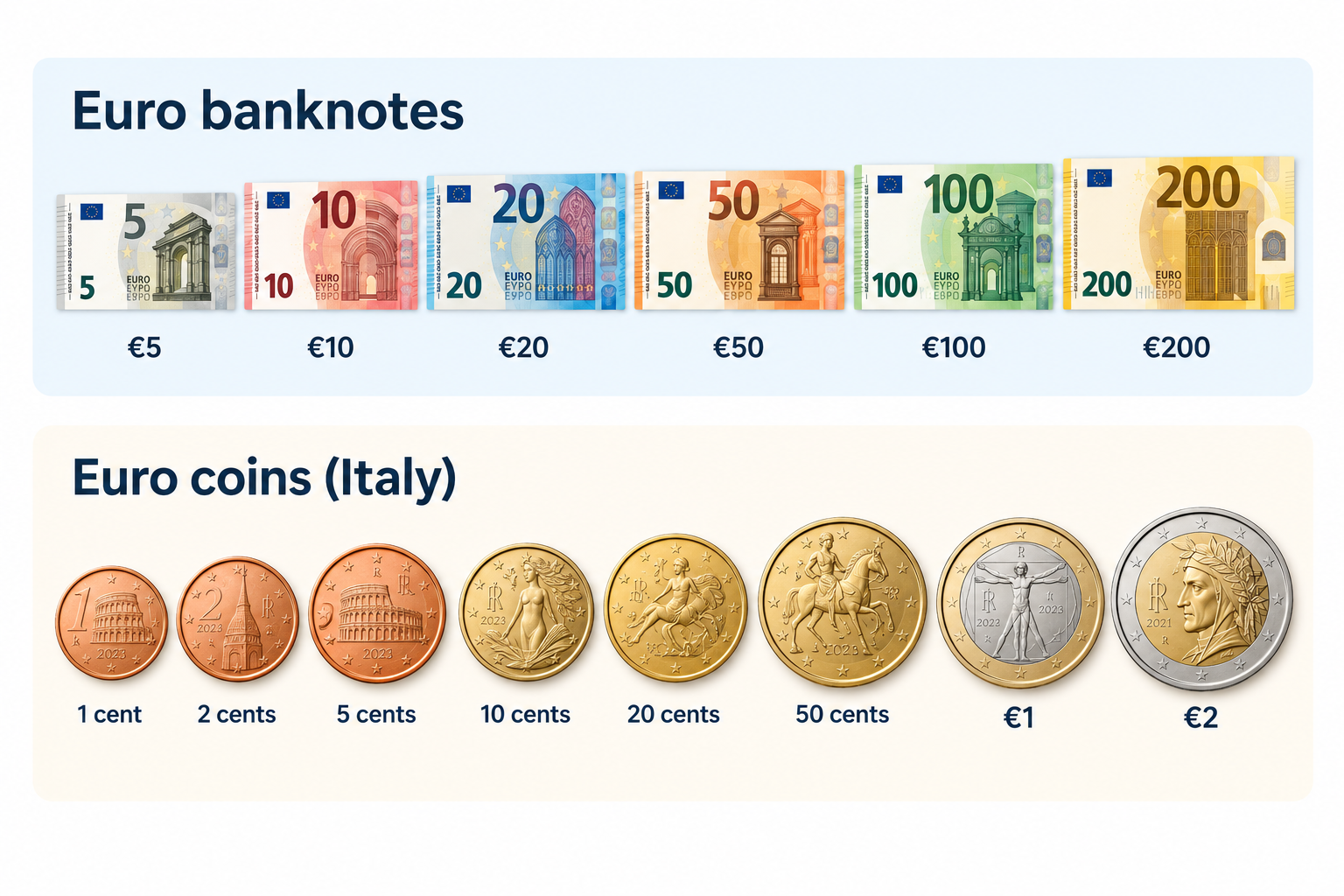
When paying in France, you can use euro banknotes, coins and payment cards. Euro banknotes come in €5, €10, €20, €50, €100 and €200 denominations, while coins range from 1 cent to €2. Prices are displayed in euros, so check the total before paying.

Debit and credit cards are widely accepted in shops, hotels, restaurants and supermarkets. Contactless payments are common, allowing you to tap your card or compatible phone at checkout. However, some transactions may require a PIN, and individual merchants can set minimum card payment amounts where permitted.

Cash remains useful when visiting local markets, buying from smaller vendors, using certain public facilities or making purchases at businesses that do not accept cards. Keeping a little cash available can help you avoid payment difficulties.

If you need a convenient way to pay while travelling, Grey’s virtual card can help you make online and supported card payments in euros. Before your trip, check the card’s currency conversion rates, applicable fees and acceptance conditions so you can plan your spending with confidence.

Also read: Cheapest cities in France for international students

How to get euros for a trip to France

You can get euros for your trip to France through bank ATMs, currency exchange bureaux or your bank before departure. Withdrawing euros from an ATM in France can be convenient, but check your bank’s foreign transaction fees and the ATM operator’s charges. Use ATMs attached to established banks where possible.

Exchange bureaux at airports and tourist areas are easy to find, but they may offer less favourable rates. Compare the final amount you will receive after fees rather than relying only on advertised exchange rates.

When paying by card or withdrawing cash, you may be asked whether you want to pay in euros or your home currency. Choose euros to decline dynamic currency conversion. This usually lets your card provider handle the conversion, which may offer a better rate, although your provider’s fees still apply.

For cross-border payments, Grey offers a way to send money from the US to France. Compare the available exchange rate, transfer fees and delivery times before sending funds, so you can budget for your trip and manage your euros more effectively.

How to send money to France

Whether you are paying rent, covering tuition or supporting family, choosing the right transfer service can help you manage international payments to France. Grey supports cross-border money transfers, allowing you to send money from the UK to France and manage international payments through its platform.

Before sending money, compare exchange rates, transfer fees and delivery times to understand how much your recipient will receive. Bank transfers can include intermediary charges, while card payments may attract foreign transaction fees depending on your provider.

Grey’s multi-currency account helps you hold and manage supported currencies in one place, making it easier to organise international finances. Its virtual card also lets you make eligible online payments and pay for supported purchases in euros. Depending on your card terms and transaction, this may help you avoid certain foreign transaction fees.

Frequently asked questions about the currency of France

1. Does France use the euro or the franc?

France uses the euro as its official currency. The French franc was replaced by euro banknotes and coins in 2002. However, some French Pacific territories still use the CFP franc, a separate currency linked to the euro at a fixed exchange rate.

2. What is the euro symbol and code?

The euro symbol is €, and its three-letter ISO currency code is EUR. You will see the symbol on price tags, receipts and menus across France. For example, €50 means fifty euros. When exchanging money, use EUR to identify the currency correctly.

3. Can you use US dollars in France?

US dollars are not generally accepted for everyday purchases in France. You will usually need euros to pay for meals, transport, shopping and accommodation. Exchange your dollars before travelling or withdraw euros from an ATM. Check conversion rates and fees to manage costs.

4. Is card or cash better in France?

Cards are widely accepted across France, including in hotels, restaurants and shops. Contactless payments are common, making cards convenient for everyday spending. However, cash remains useful at local markets and smaller businesses. Carrying a little of both gives you greater flexibility during your trip.

5. What currency is used in French Polynesia?

French Polynesia uses the CFP franc, abbreviated XPF, rather than the euro for everyday transactions. The currency is pegged to the euro at a fixed rate of €1 = 119.3317 XPF. Check your card’s international payment fees before travelling to the islands.

6. How do you send money to France?

You can send money to France through a bank or an international transfer service. Compare exchange rates, transfer fees and delivery times before choosing. Grey supports cross-border payments, including transfers from the US to France. Confirm service availability and recipient details before sending.

Last updated:

November 18, 2026

Open a free Grey account to get startedJoin 1 million digital nomads
IF YOU ENJOYED THIS, CHECK THESE OUT

Sending money from Europe to Nigeria? Try these 7 apps

•

•

2 min read

Somewhere out there, there is someone trying to pay for a family brunch in Wuse 2 or send euros to a friend in Lagos as a birthday gift. You'd think sending €500 from Paris to Nigeria would be pretty simple. Pick an app, enter the amount, and send.

If you are living in Germany, France, Ireland, the Netherlands, or elsewhere in Europe, try comparing a few services before deciding. Depending on the exchange rates and fees each provider offers, your recipient will receive different amounts in naira when sending euros.

We’ve compared seven of the best apps to send money from Europe to Nigeria. You'll find a breakdown of their fees, transfer times and payout options. We will also show you how much naira €500 can get you, so you can compare before sending.

How to choose an app to send money from Europe to Nigeria

Before downloading another money transfer app, there are a few things worth checking.

  • Exchange rate: How many naira will your recipient get for each euro?
  • Fees: Are there transfer fees, conversion charges, or hidden exchange rate markups?
  • Speed: How long does it take for the money to arrive?
  • Payout options: Can you send directly to a Nigerian bank account, or does the recipient need to collect cash?
  • Availability: Does the app support transfers from your country in Europe?

Here’s something people often overlook: zero transfer fees don’t always mean a cheaper transfer. An app might charge nothing upfront but give you fewer naira per euro.

The easiest way to compare services is to enter the same amount in different apps and check how much your recipient will actually receive.

The 7 best apps to send money from Europe to Nigeria

There are plenty of ways to send money from Europe to Nigeria, but not every app works the same way.

Here’s a quick comparison before we get into the details.

App Fees Delivery time Best for
Grey 1% (capped at $6) EUR to NGN conversion + flat payout fee Typically minutes after funding Receiving, holding and sending money across currencies
LemFi Zero transfer fees on supported routes Usually minutes Regular family transfers
Wise Variable upfront fee, mid-market exchange rate Minutes to working days Transparent exchange rates
Remitly Variable fees; promotional rates available Minutes to several days Flexible payout options
WorldRemit Variable; some zero-fee transfers Minutes to working days International remittances
Western Union Variable fees and exchange rate margin Minutes to several days Cash pickup
MoneyGram Variable fees and exchange rate margin Minutes to working days Bank transfers and cash services
International payment cards +1.5% on base rate +1.5% on base rate +1.5% on base rate
Cash or cheque Free ($0) Free ($0) Free ($0)

Fees and delivery times depend on your country, payment method and transfer amount. Check the final quote before sending.

1. Grey: Best for receiving, holding and sending money across currencies

Getting paid in euros is great. But when you’re living and working in a European city and still handling financial responsibilities in Nigeria, things can get a little complicated.

Grey is built for exactly this kind of situation. Instead of moving money between different apps, you can receive payments in EUR, GBP, or USD, hold your balance in those currencies, and convert to naira whenever you need to send money to Nigeria.

If you receive €1,500 from a client in France, for instance. You don't have to convert everything into naira right away. You can leave €1,000 in your EUR balance for expenses or savings and convert the remaining €500 to send home. Your recipient gets the money directly into their Nigerian bank account, without needing a Grey account.

What are Grey's fees for sending money to Nigeria?

For EUR-to-NGN transfers, Grey charges a 1% conversion fee plus a flat NGN withdrawal fee. If you convert €500, that’s €5 in conversion fees, with the withdrawal fee charged separately.

Receiving money through SEPA also comes with a 0.8% fee, with a €2 minimum and €10 maximum. So, receiving €500 would cost €4.

Before you send, Grey shows you the exchange rate, applicable fees and the final amount your recipient will receive. Once the funds are available in your balance, transfers to Nigerian bank accounts typically arrive within minutes.

Best for: Nigerians in Europe who get paid internationally and want to manage multiple currencies and send money home without constantly switching between platforms.

If you're in Germany, you can send money from Germany to Nigeria using Grey.

2. LemFi: Best for regular transfers to family in Nigeria

If you send money to Nigeria every month, you probably have a familiar routine. Maybe it's money for your parents, school fees for a sibling or a contribution towards household expenses. Whatever the reason, you want an app that makes repeat transfers easy.

LemFi focuses on international money transfers and is particularly popular among Africans living abroad. It supports transfers from several European countries to Nigeria, with recipients receiving naira directly in their bank accounts.

Say you live in the UK and send money to your family in Lagos every month. With LemFi, you can save your recipient's bank details, check the exchange rate and send another transfer without entering everything again.

What are LemFi's fees for sending money to Nigeria?

LemFi offers zero transfer fees on many supported routes, including Nigeria. However, that doesn't automatically mean you’ll receive the best exchange rate.

The amount your recipient gets depends on LemFi's quoted rate at the time of the transaction. For example, if you're sending €500, the app will show how much that converts to in naira before you confirm.

Transfers can arrive within minutes, although processing times depend on the payment method, bank and any additional checks. Availability also varies by European country.

Best for: People in Europe who regularly send money to family or friends in Nigeria and want international transfers.

3. Wise: Best for transparent exchange rates and fees

Ever sent money abroad and wondered why the amount that arrived was lower than you expected? Sometimes the transfer fee looks small, but the exchange rate tells a different story.

Wise makes comparing costs easier by showing its fees separately and using the mid-market exchange rate, the rate you typically see when searching for a currency pair online.

It's particularly useful if you're sending money from Europe and want to understand exactly how much you're paying for the conversion.

For example, if you're sending €500 from Germany to a Nigerian bank account, Wise shows the transfer fee, exchange rate and estimated amount in naira before you pay.

What are Wise’s fees for sending money to Nigeria?

Wise doesn’t charge one fixed fee for every international transfer. Its fees depend on the currencies, amount and payment method.

Bank transfers are often cheaper than using a debit or credit card. The app calculates the total cost before confirmation, so you can compare payment options.

Best for: People who prioritise exchange-rate transparency and want to compare the full cost of international transfers before sending.

4. Remitly: Best for flexible delivery options

Sometimes sending money home isn’t just about finding a good exchange rate. You also want to know when the money will arrive.

Remitly offers different payment and delivery options depending on where you're sending from. It also lets you track the transfer. When sending euros to Nigeria, payouts can be made to local bank accounts and other supported payout methods.

Imagine you're living in France and need to send €300 to your mum in Nigeria. You can enter the amount, choose an available delivery method and see the estimated arrival time before paying. Remitly also lets you track the transfer.

What are Remitly's fees for sending money to Nigeria?

Remitly's fees depend on your sending country, payment method and transfer amount. New customers may qualify for a promotional exchange rate or a fee-free first transfer, but these offers have limits and don't necessarily apply to future payments.

For example, a €500 transfer from France may have a different fee and exchange rate from the same transfer sent from Germany. Paying by card can also affect the total cost.

Before confirming, check the fee, exchange rate and final NGN amount. Some transfers can arrive within minutes, while others take longer depending on the payment and delivery methods.

Best for: Nigerians in Europe who want flexible ways to pay for transfers, track their money and choose from available delivery options.

5. WorldRemit: Best for sending money and mobile airtime

Sometimes your family needs money for groceries or bills. Other times, they just need their phone topped up so they can stay connected. WorldRemit is useful because it offers both international money transfers and mobile airtime top-ups.

You can send money to supported Nigerian bank accounts from several European countries, using the website or mobile app. Depending on the route, you can pay by bank transfer or card.

Say you're living in the Netherlands and want to send €200 to your brother in Nigeria. You can choose a bank deposit, enter his details and check how much he'll receive in naira. If he only needs mobile credit, you can purchase an airtime top-up instead.

What are WorldRemit's fees for sending money to Nigeria?

WorldRemit currently advertises fee-free transfers when sending naira to Nigeria, although the offer and available payout methods should be checked for your particular route.

The exchange rate still matters. Even without a separate transfer fee, the rate offered determines how much naira your recipient receives.

For example, if you're sending €500, compare the NGN amount shown by WorldRemit with the amount offered by other apps for the same €500 payment.

WorldRemit says bank transfers to Nigeria can arrive within an hour, although verification, payment processing and local banking conditions may affect delivery.

Best for: Nigerians in Europe who want to send money to bank accounts and occasionally top up a family member's mobile phone.

6. Western Union: Best for sending money online or in person

Not everyone wants to manage international transfers entirely through an app. Maybe you prefer paying in cash, or you're helping a relative who is more comfortable collecting money in person.

Western Union has been around for generations, and its biggest advantage is flexibility. You can send money to Nigeria online, through its app or at participating agent locations across Europe.

For example, if you're living in Italy and want to send €300 to a relative in Nigeria, you can compare the available payment and delivery methods before choosing one. Depending on the route, you may be able to fund the transfer using a bank account, card or cash.

What are Western Union's fees for sending money to Nigeria?

Western Union doesn't have one standard fee for transfers from Europe to Nigeria. Costs depend on the sending country, amount, payment method and how your recipient receives the money.

For example, sending €500 online from Germany may cost something different from paying €500 in cash at an agent in Italy.

Western Union also earns money through currency conversion, so it's important to check both the transfer fee and the exchange rate. The app shows the estimated amount your recipient will receive before you confirm.

Delivery can take minutes for eligible transfers, but bank deposits and other payment methods may take longer.

Best for: Nigerians in Europe who want the option to send money online or in person, particularly when cash payments or collection options are important.

7. MoneyGram: Best for cash transfers and a large international network

Like Western Union, MoneyGram combines a large international network of physical locations with digital transfers through its website and app.

You can send money from supported European countries to Nigeria, with delivery options that may include bank deposits, cash pickup and mobile wallets, depending on the route.

You can check the available delivery options between both currencies, enter the recipient's details and compare the cost of sending online with the options available at a local MoneyGram location.

What are MoneyGram's fees for sending money to Nigeria?

MoneyGram's fees vary depending on where you're sending from, how much you're transferring, how you pay and how the recipient collects the money.

There's no single fixed fee that applies to every Europe-to-Nigeria transfer.

For example, a €500 bank deposit funded by debit card may have a different total cost from a cash-funded transfer at an agent location. MoneyGram also earns money through currency exchange, so the quoted rate matters.

Before paying, you'll see the transfer fee, exchange rate, estimated delivery time and final amount your recipient should receive.

Some transfers can be available within minutes, while others take longer depending on the delivery method and processing requirements.

Best for: Nigerians in Europe who prefer cash-based transfers or want access to both physical agent locations and digital money transfer services.

Which money transfer app should you choose?

One way to decide is how frequently you would have to send money. If this is a one-time payment, comparing the final payout might be enough. But if you’re regularly receiving euros, holding different currencies, and sending money to Nigeria, other features matter as well.

These options vary as exchange rates fluctuate and are priced by location.

If you want to Consider
Receive euros, hold foreign currency and send NGN Grey
Send money home regularly Grey or LemFi
Compare fees against the mid-market rate Wise
Use a first-transfer promotional rate Remitly
Send money for cash pickup Western Union or MoneyGram

How to send money from Europe to Nigeria with Grey

Sending money from Europe to Nigeria usually takes just a few steps. Here's how to do it with Grey.

  1. Create your Grey account. Sign up and verify your identity.
  2. Set up your EUR account. Users can open a euro account to receive and manage euros.
  3. Add money. Fund your account using a supported method, such as a SEPA transfer.
  4. Choose your recipient. Select an existing beneficiary or add someone new.
  5. Enter the amount. Choose NGN and enter how much you want to send.
  6. Review and confirm. Check the exchange rate, fees and the final amount your recipient will receive.

Once you've confirmed the transfer, you can follow its progress in the app.

If you're in the Netherlands, you can also check how to send money from the Netherlands to Nigeria.

How to get more naira for your euros

Nobody wants to send €500 only to discover they could have got a better deal elsewhere.

Check rates before sending

Exchange rates change, sometimes several times a day. If your transfer isn't urgent, compare a few apps before confirming.

You don't necessarily need to wait for the perfect rate. Just make sure you're comfortable with the amount your recipient will receive.

You can also check official exchange rate information from the Central Bank of Nigeria, although the rate offered by your transfer app may differ.

Watch out for promotional rates

Some apps offer special rates or reduced fees for your first transfer.

That's useful, but if you send money every month, also compare their regular prices. A good first-transfer deal doesn't always mean the best long-term option.

Pay attention to how you fund your transfer

Bank transfers and card payments can have different fees. If you're not in a hurry, check which funding method gives you the best overall price.

And if you send money regularly, even small differences add up. A 1% difference on €500 every month works out to €60 over a year.

Other ways to send money from Europe to Nigeria

Apps are convenient, but they're not your only option.

International bank transfers: You can send money through a European bank using SWIFT, provided the receiving Nigerian account supports the transfer. This can be useful for larger payments or sending foreign currency to a domiciliary account. However, intermediary fees and longer processing times may apply.

Cash pickup: Services such as Western Union and MoneyGram let recipients collect money at eligible locations. This can help when someone doesn't have a suitable bank account, although you'll need to check the available payout currency and identification requirements.

Transfers from the UK: If you're sending from the UK, you'll usually be converting GBP rather than EUR. Fees and rates may be different, so compare the specific corridor. Here's how to send money from the UK to Nigeria.

Send money from Europe to Nigeria with Grey

If you're regularly sending money home, having an app that lets you manage foreign currencies and make transfers can make life easier.

With Grey, you can hold supported foreign currencies, convert funds and send NGN directly to Nigerian bank accounts. You'll see the applicable rate and fees before confirming, so you know what your recipient is expected to receive.

Ready to send? Send money from Europe to Nigeria with Grey.

Frequently asked questions about sending money from Europe to Nigeria

What is the best app to send money from Europe to Nigeria?

Grey is a good choice if you want to manage foreign currencies and send money to Nigerian bank accounts. LemFi, Wise and Remitly are also worth considering. Compare the final NGN amount, fees and transfer speed to find the best option for you.

How long does a transfer from Europe to Nigeria take?

Some transfers arrive within minutes, while others take several working days. The exact time depends on the provider, payment method, verification requirements and receiving bank.

Which app gives the best euro to naira rate?

No single app always offers the best rate. Compare the amount your recipient will receive after fees using the same euro amount across different providers.

Can I send euros to a Nigerian domiciliary account?

Yes, some Nigerian domiciliary accounts accept EUR transfers through supported international banking channels. Check the receiving bank's requirements, SWIFT details and fees before sending.

How much can I send from Europe to Nigeria?

Limits depend on the app, sending country and verification level. Some providers support large transfers, but additional documentation may be required. Check your available limit before sending.

Do I need a European bank account to send money?

Not always. Some apps accept card payments, while services such as Western Union and MoneyGram may support cash-funded transfers at eligible locations. Grey users can fund their accounts through supported payment methods.
How to send money from Dubai to Nigeria

•

•

2 min read

It's salary day. You've already done the maths: AED 3,000 for rent, AED 1,500 for food and transport, AED 2,000 to send home to Lagos. You walk into the exchange house near Al Fahidi metro, take a ticket, and wait.

When your number comes up, you slide your Emirates ID across the counter and say "Nigeria, bank transfer." The receipt shows a fee of AED 15. Looks cheap. What the receipt doesn't show is that the exchange rate they've used is 3% worse than the actual market rate. On AED 2,000, that's another AED 60 gone. You won't see it because it's baked into the rate, not listed as a fee.

That AED 75 total cost isn't the worst deal in Dubai. But it's not the best, either. And if you're sending money home every month, twelve transfers at AED 75 each is AED 900 a year. Enough to matter.

To send money from Dubai to Nigeria, you can use a bank transfer, an exchange house, or a fintech app. Fintech apps are usually the fastest and cheapest, often delivering naira within minutes. Compare the total cost, which includes both the fee and the exchange rate margin, before you send.

This guide walks you through every way to send money from the UAE to Nigeria. It explains the real costs (not just the advertised fees) and shows you how to make sure your recipient gets the most naira possible for every dirham you send.

Ways to send money from Dubai to Nigeria

There are three main ways to transfer money from Dubai to Nigeria. Each suits a different situation. The right one depends on how much you're sending, how fast it needs to arrive, and whether your recipient has a bank account.

1. Bank wire transfer (SWIFT)

Your UAE bank sends the money via the SWIFT network to a Nigerian bank account. This is the route most people think of first, and it's the most expensive for regular transfers.

UAE banks typically charge AED 50-100 as a flat outgoing transfer fee. The receiving Nigerian bank may charge an additional fee upon arrival (typically $10 to $20 or the naira equivalent). And the exchange rate your bank offers for AED to NGN is almost never competitive. Banks aren't in the business of offering tight FX rates on retail transfers. They build their margin into the rate.

Delivery takes 2 to 5 business days. During that window, the exchange rate can fluctuate, so the naira amount your recipient receives may differ from what you saw when you initiated the transfer.

Use it if: you're sending a large amount (above AED 20,000) where the flat fee is a small percentage of the total. Skip it if: you need the money to arrive today, you're sending less than AED 5,000, or you send monthly and want to minimise annual cost.

2. Exchange houses

Al Ansari Exchange, UAE Exchange (now Lulu Exchange), and similar operators are the traditional choice for Dubai residents sending money to Nigeria. You walk in with AED in cash or a debit card, the operator processes the transfer, and your recipient receives naira in a Nigerian bank account or as cash pickup.

The stated fees are low: typically AED 10 to 30. That's the number on the board, and it's designed to look attractive. The real cost is in the exchange rate. Exchange houses buy USD or AED from the wholesale market and sell them to you at a 2-4% markup. On an AED 5,000 transfer, a 3% rate markup is AED 150. Add the AED 15 fee, and your true cost is AED 165, not AED 15.

Delivery is faster than banks: same-day to next business day for bank deposits, and within hours for cash pickup. The cash pickup option is important for recipients who don't have a bank account or who need physical naira urgently.

Use it if your recipient needs cash pickup, you prefer to conduct the transaction in person, or you don't have a smartphone for app-based transfers. Skip it if: you're cost-sensitive and willing to compare rates on an app before sending.

3. Fintech apps

Digital transfer services handle the conversion and delivery through their own network, bypassing some of the traditional banking intermediaries. Fees are typically lower, rates are closer to mid-market, and delivery is faster (minutes to hours). Most require Emirates ID verification on your first transfer. See also virtual dollar cards in the UAE to learn how UAE residents can hold and spend USD digitally.

The advantage is transparency. Most fintech apps show you the exchange rate, the fee, and the exact naira amount the recipient will get before you confirm. There's no mystery about where your money went. The disadvantage is that not all apps are licensed for the UAE-Nigeria corridor, and regulatory coverage varies. Check that your provider is licensed by the UAE Central Bank before sending.

Use it if: you want the lowest total cost, fastest delivery, and full visibility on the rate. Skip it if: you need cash pickup (not all apps support it) or you prefer face-to-face transactions.

Comparing fees, speed, and exchange rates

The single most important lesson in sending money from Dubai to Nigeria: never compare fees without comparing exchange rates. A service that charges AED 0 in fees but marks up the exchange rate by 3% is more expensive than one that charges AED 25 but gives you a rate within 0.5% of mid-market.

The "total cost" is the fee plus the exchange rate margin. Here's what that looks like on an AED 5,000 transfer:

Method Stated fee Rate margin Speed True cost on AED 5,000
Bank wire (SWIFT) AED 50 to 100 1.5 to 3% 2 to 5 business days AED 125 to 250
Exchange house AED 10 to 30 2 to 4% Same day to 2 days AED 110 to 230
Fintech app AED 0 to 25 0.5 to 1.5% Minutes to hours AED 25 to 100
Grey (hold USD, convert to NGN) Flat fee per transfer Grey rate Minutes See grey.co for current rates

‍

Focus on the "true cost"— not just the fee you see. Two exchange houses might charge AED 15 and AED 30, but the one with a better exchange rate could put more naira in your recipient’s hand, even if their fee is higher.

Over 12 monthly transfers of AED 5,000, the gap between the most expensive method (bank wire at AED 250 per transfer) and the cheapest (fintech at AED 50 per transfer) is AED 2,400 per year. That's a flight home.

All numbers here are estimates based on publicly available information from mid-2026. Fees and rates can change quickly, so double-check the total cost right before you send.

Hidden costs most guides skip

The fee and the exchange rate margin aren't the only costs. Three others can reduce what your recipient actually receives:

Intermediary bank charges: SWIFT transfers sometimes pass through one or two intermediary banks on the way to Nigeria. Each intermediary can deduct $5 to $20 from the transfer. You won't know this happened until your recipient reports receiving less than expected. This is most common with bank wires and doesn't apply to fintech apps (which use their own settlement networks).

Receiving bank charges: The Nigerian bank that receives the deposit may deduct its own fee, typically NGN 500-2,000, depending on the bank and the transfer amount. This comes from the naira your recipient receives, not from your dirham total. It's invisible to the sender.

Double conversion: If your provider converts AED to USD first, then USD to NGN, you're paying two conversion margins. This is common with exchange houses that don't offer a direct AED/NGN rate. Ask whether the conversion is direct (AED to NGN) or indirect (AED to USD to NGN). If it's indirect, the true cost is higher than the table above suggests.

Cash pickup markup: If your recipient collects cash rather than receiving a bank deposit, some providers charge a less favourable rate for the cash option. The difference can be 0.5 to 1%. It's rarely disclosed upfront.

Step by step: Sending AED to Naira

Regardless of your chosen method, the process follows the same structure. Here's what to prepare before you start:

  1. Choose your provider. Bank, exchange house, or fintech app. Use the cost comparison above. For first-time digital transfers, you'll need to create an account and verify your identity.
  2. Provide your identification. Emirates ID is mandatory for all UAE-based transfers. Some providers also require your passport. First-time users go through a KYC (Know Your Customer) check that typically takes 10 to 30 minutes. Once verified, subsequent transfers don't require re-verification.
  3. Enter the recipient's details. You need: their full name as it appears on their Nigerian bank account or national ID, their bank name and account number (10 digits for Nigerian banks), and their phone number. For cash pickup, the recipient needs a government-issued ID and the reference number you'll receive after sending.
  4. Enter the amount in AED. The provider shows the exchange rate, the fee, and the exact naira amount the recipient will receive. Check the naira figure carefully. If it looks lower than expected, the rate margin is probably wider than the competition.
  5. Fund the transfer. Options include: bank transfer from your UAE account (free but adds a day), debit card (instant, usually free), credit card (instant, but many providers charge a cash advance fee of 2 to 3% on top), or cash at a physical location.
  6. Confirm and share the reference. You'll get a confirmation with a tracking number. Share it with your recipient so they know the money is on the way and can confirm receipt. Most fintech apps show real-time delivery status in the app.
  7. Keep the receipt. Store the confirmation for your records. If you're in the UAE on a work visa and regularly send money, your employer or immigration authorities may request proof of remittance. It's rare, but having receipts is a good habit.

There's no legal cap on how much you can send from the UAE to Nigeria. But providers impose their own limits. Transfers above a certain threshold (typically AED 10,000 to 35,000 depending on the provider) trigger enhanced due diligence: pay slips, employment letters, or a source-of-funds declaration. This is standard anti-money-laundering procedure, not a sign that anything is wrong.

A simpler way with Grey

The traditional Dubai-to-Nigeria transfer follows a two-conversion path: AED converts to USD (or remains in AED), then to NGN at the receiving end. Each conversion has a margin. Two margins on one transfer is how the total cost compounds without the sender noticing.

Grey changes the flow. You hold USD before you convert, see the USD-to-NGN rate in real time, and send money across borders with Grey when the rate works for you. The rate and the fee are visible before you confirm. No hidden markup layered underneath.

Here's where it gets practical. Say you earn AED 10,000 per month and want to send AED 2,000 home. Instead of walking into the exchange house on payday and accepting whatever rate they're offering, you hold USD in your Grey account and watch the NGN rate. If the rate is strong on Tuesday, you convert and send on Tuesday. If it dips, you wait. The money sits in USD until you're ready.

Over a year, even small improvements in timing can save hundreds of dirhams. You can also track and hold multiple currencies if you're managing money across more than one corridor. For Nigerians in Dubai supporting family in Lagos, parents in Ibadan, and a sibling in Abuja, a single account handles it all.

If you’re sending money to Nigeria, you can hold USD with Grey and send it home whenever the exchange rate looks good — no hidden costs, just clear rates.

Frequently asked questions about sending money from Dubai to Nigeria

What's the cheapest way to send money from Dubai to Nigeria?

Fintech apps typically deliver the lowest total cost when you account for both the fee and the exchange rate margin. Exchange houses appear cheaper because their stated fees are lower (AED 10 to 30), but the 2 to 4% exchange rate markup adds a hidden cost that often exceeds the fee itself. For regular senders, holding USD in a Grey account and converting to NGN when the rate is favourable saves more over a year than any single-transfer comparison.

How long does it take to send money from Dubai to Nigeria?

It depends on the method. Fintech apps deliver in minutes to a few hours. Exchange house bank deposits arrive on the same day or the next business day. Cash pickup can be collected within hours. Bank wire transfers take 2 to 5 business days and can take longer if an intermediary bank is involved. The speed is determined by the method, not the country. A fintech transfer to Nigeria is no slower than one to India or the Philippines.

What documents do I need to send money from the UAE to Nigeria?

Emirates ID is required for all methods. Some providers ask for your passport. First-time digital users complete a KYC verification (10 to 30 minutes, one-time). For large transfers, typically above AED 10,000 to 35,000, depending on the provider, you may need a recent pay slip, an employment letter or contract, and a declaration of the source of funds. Regular senders who've already been verified don't repeat the documentation each time.

Is it legal to send money from Dubai to Nigeria?

Yes, completely. The UAE Central Bank regulates all remittance services operating in the country. Licensed exchange houses, banks, and fintech providers all operate under its supervision. There's no government cap on how much you can send. Individual providers set their own per-transaction and per-month limits, and transfers above certain amounts trigger enhanced checks as a standard regulatory requirement.

Why does the naira amount change between transfers?

Because the AED-to-NGN exchange rate fluctuates daily. The naira has been particularly volatile against the dollar and dirham in recent years. If you sent AED 2,000 last month and your family received NGN X, sending the same AED 2,000 this month might yield a different naira amount, even with the same provider and fee. This is normal FX behaviour. It's also why holding USD and choosing when to convert (rather than converting on payday every time) can make a measurable difference over the course of a year.

Can I send money from Dubai to Nigeria using my phone?

Yes. Most fintech apps and several exchange houses (including Al Ansari and Lulu Exchange) offer mobile apps for UAE-to-Nigeria transfers. Create an account, verify with your Emirates ID, add your recipient's Nigerian bank details, and fund the transfer by card or bank transfer. Once verified, subsequent transfers take under five minutes.

What exchange rate will I get when sending AED to NGN? It depends on the provider and the moment you send. No provider gives you the exact mid-market rate. Fintech apps typically offer rates within 0.5 to 1.5 percentage points of the mid-market rate. Exchange houses are 2-4% off. Banks are 1.5 to 3% off. The only way to know is to compare at least two providers at the exact moment you're ready to send. For a broader look at the Nigeria corridor, see sending money to Nigeria.

Open a Grey account and send money home to Nigeria with clear rates and no hidden margins.

Disclaimer: This article is for informational purposes only. Fees, exchange rates, and transfer limits change frequently. All cost estimates are based on publicly available data as of mid-2026 and should be verified at the point of sending. Grey is not a bank. Grey is a licensed financial services provider offering multi-currency accounts.

How to send money from the US to the Philippines in 2026

•

•

2 min read

The Philippines receives more remittances from the United States than from any other country. Over four million Filipino Americans send money home regularly to cover everything from monthly household expenses and school fees to hospital bills and property payments. The Bangko Sentral ng Pilipinas (BSP) reported record remittance inflows in recent years, with the US remaining the largest source.

The good news is that sending money from the US to the Philippines has become significantly cheaper and faster than it was even five years ago. The bad news is that the cheapest option depends on how your recipient wants to receive: bank transfer, mobile wallet (GCash, Maya), or cash pickup. This guide covers the fees, speed, and delivery methods available in 2026, so you can find the right option for your specific situation. If you also send to other countries, see our broader guide to sending money abroad.

What it costs to send money from the US to the Philippines with Grey

Grey charges a 1% conversion fee when converting USD to PHP, plus a $0.85 payout fee. The payout fee is the same whether you send the money to a Philippine bank account or a supported mobile wallet.

Here’s what the total fees look like at different transfer amounts:

Transfer amount Conversion fee (1%) Payout fee Total fees
$500 $5.00 $0.85 $5.85
$1,000 $10.00 $0.85 $10.85
$2,000 $20.00 $0.85 $20.85

‍

For example, sending $500 costs $5 to convert USD to PHP, plus the $0.85 payout fee, bringing the total fees to $5.85.

You can send PHP by bank transfer or mobile money. Grey supports wallets including GCash and Maya, and both bank and mobile money transfers are typically completed instantly or up to 1 business day. Processing can occasionally take longer depending on the recipient's bank or network conditions.

Bank transfer or mobile wallet: how your recipient gets the money

Bank transfer

Grey delivers PHP to all major Philippine banks. Your recipient needs a peso bank account, and you need their full name (as it appears on the account), the bank name, and the account number. The funds arrive as a standard deposit.

Bank transfer is the right choice for larger payments: hospital bills, tuition fees, property transactions, or any amount where the recipient needs the funds in their bank account. There are no receiving limits on the bank side beyond whatever the bank itself imposes.

Mobile wallets: GCash and Maya

If your recipient uses GCash or Maya, you can send directly to their mobile wallet using their registered name and mobile number. Mobile wallet delivery is often faster than bank transfer for smaller amounts and more convenient for recipients who do not use a bank account regularly.

Mobile wallets typically have per-transaction and monthly receiving limits set by the wallet provider. For larger medical bills or tuition payments, a bank transfer is usually the better option. For regular household support, groceries, or smaller medical expenses, a mobile wallet is practical and fast.

Also read: Best apps to send money internationally from the US in 2026

What Filipino Americans are sending money home for

Understanding the common use cases helps you choose the right delivery method and timing.

Monthly family support. Regular transfers to parents, siblings, or extended family can help cover household expenses, groceries, utilities, and daily needs. Grey charges a 1% conversion fee when converting USD to PHP, plus a $0.85 payout fee. Before sending, you can review the fees and the final PHP amount your recipient will receive.

Medical bills. Philippine hospital bills are typically paid to the hospital's bank account. Ask the hospital for their full business name, bank name, and account number. Send the exact PHP amount of the bill so the hospital receives the full payment without any shortfall from fees. Grey shows the exact amount your recipient will receive before you confirm, so you can match it to the billing statement.

Education and tuition. Philippine universities and schools accept bank transfers. Tuition payments tend to be large and time-sensitive (with fixed due dates). Send via bank transfer and keep the transaction receipt as proof of payment.

Property and investments. Buying property, paying mortgage instalments, or investing in the Philippines from the US can involve larger transfers. For these payments, it helps to check the exchange rate, fees, and recipient details carefully before confirming the transfer.

Emergency expenses. Typhoons, medical emergencies, or unexpected costs. Speed matters. Check whether mobile wallet delivery is instant and whether it fits within the amount limits. For larger emergency amounts, a bank transfer with confirmed delivery timing is more reliable.

How to send money from the US to the Philippines with Grey

1. Open your Grey account. Download the Grey app, sign up, and verify your identity. US residents need a government-issued ID. Grey is licensed by FinCEN as a Money Services Business.

2. Fund your account. Transfer USD from your US bank account into your Grey wallet. You can fund via ACH (free, arrives same day) or wire transfer.

3. Choose your destination. Tap Send, select PHP (Philippine Peso), and choose bank transfer or mobile wallet.

4. Enter your recipient's details. For bank transfer: their full name, bank name, and account number. For mobile wallet: their registered name and mobile number. Grey shows the exchange rate, conversion fee, payout fee, and the exact PHP amount your recipient will receive before you confirm.

5. Confirm and send. Review the summary and confirm with your PIN. Your recipient does not need a Grey account. The funds arrive as a standard deposit in their bank account or mobile wallet.

Three ways to save on US-to-Philippines transfers

Check the total cost before you send. Grey charges a 1% conversion fee when converting USD to PHP, plus a $0.85 payout fee. Before confirming your transfer, you can review the exchange rate, fees, and exact PHP amount your recipient will receive, so there are no surprises after you send.

Use ACH to fund your Grey account. ACH transfers from your US bank to your Grey wallet are free and arrive the same day. Wire transfers cost $25 (SWIFT) and are unnecessary for most users. Fund via ACH unless you need to move a very large sum urgently.

Send the exact PHP amount for bills. When paying a hospital bill, tuition fee, or any fixed-amount obligation, enter the amount in PHP rather than USD. Grey will calculate exactly how much USD is needed to deliver that PHP amount after all fees. This ensures the recipient receives the full bill amount with no shortfall.

You may also like: How to receive an international wire transfer: Fees, timing, and what to tell the sender

Frequently asked questions about sending money from the US to the Philippines

What is the cheapest way to send money from the US to the Philippines?

The cheapest option depends on the amount, exchange rate, fees, and delivery method. With Grey, USD-to-PHP conversions have a 1% conversion fee, plus a $0.85 payout fee. Before confirming, you can see the applicable fees and final PHP amount your recipient will receive, making it easier to compare the total cost with other transfer options.

How long does it take to send money from the US to the Philippines?

Bank transfers to the Philippines typically arrive within 1 to 2 business days. Mobile wallet transfers, including GCash and Maya, may arrive faster. Actual delivery times can vary depending on the recipient’s bank or mobile wallet provider and network conditions.

Can I send money from the US to GCash in the Philippines?

Yes. Grey supports delivery to GCash using the recipient's registered name and mobile number. Per-transaction and monthly limits may apply based on GCash's own policies.

How do I pay a hospital bill in the Philippines from the US?

Ask the hospital for their full business name, bank name, and bank account number. Send the exact PHP amount of the bill through Grey, using the hospital's bank details as the recipient. Grey shows the exact PHP amount your recipient will receive before you confirm, so you can match it to the billing statement. Keep the transaction receipt as proof of payment.

Do I need to pay tax on money sent to the Philippines from the US?

Personal remittances sent from the US to the Philippines are generally not taxable for the sender. The US does not tax outgoing personal transfers. However, if you send more than $16,000 to a single individual in a calendar year, you may need to file a gift tax return (IRS Form 709), though no tax is typically owed until you exceed the lifetime exemption. Consult a tax professional for your specific situation.

What exchange rate does Grey use for USD to PHP?

The exchange rate available for USD to PHP is shown in the Grey app before you confirm the conversion. Grey charges a 1% conversion fee, and you can review the rate, applicable fees, and final PHP amount before completing the transaction.

Exchange rates on Grey are variable and include a margin over the mid-market rate. Always review the rate before confirming a conversion. Grey is a financial technology company, not a bank. Banking services are provided by licensed banking partners. This article is general information, not financial or tax advice. Consult a qualified professional for tax questions.

21 best apps to send money internationally

•

•

2 min read

Sending money internationally can seem fairly simple, well, that's until you reach the payment screen and start comparing fees, exchange rates and delivery times. The app that looks cheapest at first may not be the one that leaves the recipient with the most money.

Your choice can make a noticeable difference, especially when you are sending money regularly to family, paying someone abroad, or moving your own money between countries. Some apps focus on low fees, while others compete on faster delivery, better exchange rates or wider coverage.

The best apps to send money internationally combine low fees, a small exchange rate margin and fast delivery to the country you are sending to. Grey, Wise, Remitly and WorldRemit are strong starting points, but the right option depends on where you are sending money, how much you are transferring and how quickly it needs to arrive.

This guide compares 21 international money transfer apps so you can see what each one offers and choose the option that fits your needs.

How to choose an international money transfer app

Before picking from the best apps for transferring money internationally, check these things:

  • Fees: Look beyond the advertised transfer fee and check the total amount you will pay, including any charges that apply to larger or more frequent transfers.
  • Exchange rate margin: Compare the exchange rate offered with the current market rate, because even a small difference can reduce the amount your recipient receives.
  • Speed: Check how quickly the transfer should arrive, particularly when you are sending money for an urgent bill, family expense, or time-sensitive payment.
  • Payout methods: Check how your recipient can collect the money, whether that means a bank account, mobile wallet, cash pickup, or another available option.
  • Coverage: Make sure the app supports both the country you are sending money from and the destination where your recipient lives.
  • Registration: Check what you need before sending your first transfer, including identity verification, personal information, account details, and any required supporting documents.

The 21 best apps for sending money internationally

These 21 money transfer apps combine lower fees, competitive exchange rates and faster international payments for individuals, freelancers and businesses worldwide

1. Grey

  • Fees: 1% conversion fee capped at $6 for USD/GBP/EUR (uncapped for KES).
  • Rate margin: Competitive real-time market exchange rates with transparent tracking.
  • Speed: Instant for UK/Europe/Kenya; 1–2 business days for US ACH wires.
  • Countries: Supports transfers to 80+ countries including the US, UK, and Eurozone.
  • Best for: Remote workers and freelancers requiring dedicated foreign virtual accounts.

2. Wise

  • Fees: Small variable percentage fee shown upfront.
  • Rate margin: 0% markup using the true mid-market exchange rate.
  • Speed: Real-time processing up to 2 business days.
  • Countries: Operates across 145+ destination countries.
  • Best for: Most affordable bank-to-bank international personal transfers.

3. Remitly

  • Fees: Variable structure tiered by chosen tier (Express vs. Economy).
  • Rate margin: Small retail markup layered on top of mid-market rates.
  • Speed: Instant delivery for Express option; 3 days for Economy.
  • Countries: Sends funds globally to over 150 countries.
  • Best for: Family remittances requiring specific arrival time guarantees.

4. WorldRemit

  • Fees: Flat or percentage fees determined by payout destination.
  • Rate margin: Standard commercial markup added to currency conversions.
  • Speed: Immediate for mobile wallets and physical cash collections.
  • Countries: Extensive coverage across more than 130 countries.
  • Best for: Sending money straight to digital mobile money wallets.

5. LemFi

  • Fees: Zero or ultra-low platform transfer fees.
  • Rate margin: Competitive exchange rates with minimal built-in spread.
  • Speed: Transactions complete within a few minutes.
  • Countries: Diaspora sending from US/UK/Canada to Africa, Asia, and Latin America.
  • Best for: Immigrant communities seeking zero-fee remittance corridors.

6. Eversend

  • Fees: 1.5% to 3.5% currency exchange processing fee.
  • Rate margin: Tight spreads close to official mid-market numbers.
  • Speed: 1-minute mobile money payouts and swift wallet swaps.
  • Countries: Focuses on inter-Africa corridors alongside Western channels.
  • Best for: Managing a robust multi-currency digital wallet in Africa.

7. Revolut

  • Fees: Free standard allowance; weekend currency conversion surcharges apply.
  • Rate margin: Interbank rates with near-zero markups on weekdays.
  • Speed: Instant within network; 1–3 days for traditional banks.
  • Countries: Sends to 160+ countries across 70 currencies.
  • Best for: Tech-forward travelers requiring multi-currency card spending.

8. XE Money Transfer

  • Fees: Free for large transfers; minor fee for small amounts.
  • Rate margin: Tiered markup that drops significantly on massive transactions.
  • Speed: Typically 1 to 4 business days.
  • Countries: Serves over 130 destination countries worldwide.
  • Best for: Tracking live exchange pairs and executing wire transfers.

9. Sendwave

  • Fees: Zero base fee on primary remittance routes.
  • Rate margin: Fixed retail spread built into the rate.
  • Speed: Instant delivery directly into recipient mobile wallets.
  • Countries: Sends from North America and Europe to selective target markets.
  • Best for: No-fuss, instant one-way family remittance payments.

10. Western Union

  • Fees: Scale scales with speed, funding source, and destination.
  • Rate margin: Higher combined markup compared to specialised fintechs.
  • Speed: Minutes for agent pickup; days for bank routing.
  • Countries: Unrivaled footprint spanning over 200 countries.
  • Best for: Reaching recipients located in remote, cash-reliant locations.

11. OFX

  • Fees: Fee-free transfers for major commercial volumes.
  • Rate margin: Declining scale margin optimised for larger amounts.
  • Speed: 1 to 4 business days, depending on location.
  • Countries: Covers international payments across more than 170 countries.
  • Best for: High-value corporate transactions or cross-border property acquisitions.
  1. MoneyGram
  • Fees: Highly dynamic rates depending on credit vs. bank funding.
  • Rate margin: Variable retail spread added over global markets.
  • Speed: Cash payouts clear in minutes; wires take 3 days.
  • Countries: Network extends across more than 200 physical countries.
  • Best for: Urgent retail cash collections via global agent stands.

13. Xoom

  • Fees: Flat fees mapped directly to underlying PayPal integrations.
  • Rate margin: Standard commercial percentage markup added to conversions.
  • Speed: Fast execution when utilising debit cards or bank balances.
  • Countries: Sends across more than 160 countries.
  • Best for: Existing PayPal account holders prioritising transfer convenience

14. Payoneer

  • Fees: Standard receiving fees scaling up to 3%.
  • Rate margin: Competitive foreign exchange conversion spreads applied.
  • Speed: 1 to 3 business days to hit local bank.
  • Countries: Wide availability across 200+ countries and territories.
  • Best for: Marketplace payouts for e-commerce platforms and global networks.

15. Afriex

  • Fees: Zero platform fees for transactions passing standard guidelines.
  • Rate margin: Low-spread markup integrated into structural transfers.
  • Speed: Settles within minutes to bank rails or wallets.
  • Countries: Connects North America and Europe to key African hubs.
  • Best for: Rapid diaspora money transfers with minimal fee overhead.

16. Geegpay

  • Fees: Around 1% processing charge on incoming wallet setups.
  • Rate margin: Competitive, freelancer-focused retail currency exchange spreads.
  • Speed: Local distributions clear instantly; global wires take 3 days.
  • Countries: Supports Western inbound billing routes for African contractors.
  • Best for: African remote workers billing international clients via foreign bank rails.

17. Chipper Cash

  • Fees: Free peer-to-peer domestic and cross-border app transactions.
  • Rate margin: Variable currency conversion margin added on foreign swaps.
  • Speed: Wallet-to-wallet transactions execute instantly across borders.
  • Countries: Operational across core African nations, the US, and UK.
  • Best for: Quick mobile peer-to-peer payments between supported countries.

18. Atlantic Money

  • Fees: Flat fixed cost of £3 or €3 per transaction.
  • Rate margin: Strict 0% markup utilising true live mid-market rates.
  • Speed: 1 to 3 standard business days to settle.
  • Countries: Focused predominantly on UK and Eurozone banking rails.
  • Best for: High-volume transfers within Europe at flat predictable costs.

19. Airwallex

  • Fees: Clear volume pricing geared toward digital company infrastructure.
  • Rate margin: Commercial interbank spreads tailored for wholesale enterprises.
  • Speed: Real-time processing ranging up to 2 days.
  • Countries: Worldwide operational scale covering over 150 countries.
  • Best for: Tech startups managing multi-currency SaaS billing infrastructure.

20. Send App (by Flutterwave)

  • Fees: Clear flat rates depending on the selected currency pair.
  • Rate margin: Structured retail spread built into regional corridors.
  • Speed: Settles within minutes into standard destination bank accounts.
  • Countries: Channels money from Europe and the US into 30+ destinations.
  • Best for: Quick remittance tracking via a major African gateway engine.

21. Sendcash

  • Fees: Free underlying platform interaction charges.
  • Rate margin: Blended rates calculated through crypto-backed payment rails.
  • Speed: Direct bank settlement within 24 hours.
  • Countries: Inbound global remittances targeted toward the Nigerian market.
  • Best for: Sending funds internationally, using underlying digital currency paths.

The best apps for each popular money transfer route

The right app depends on where the money is coming from, where it needs to go and whether speed, exchange rates, fees or flexible payment options matter most.

US to Mexico

Top pick: TapTap Send

  • Why it stands out: TapTap Send focuses on international remittances, with fast transfers to supported Mexican bank accounts and cash-pickup locations.

Alternative: Remitly

  • Why consider it: Remitly offers different delivery speeds and cash-pickup options, giving you flexibility when you need to send money from the US to Mexico.

US to Nigeria

Top pick: Grey

  • Why it stands out: Grey gives eligible users a digital way to manage USD and NGN, making it easier to send money from the US to Nigeria while seeing the applicable rate and fees before confirmation.

Alternative: LemFi

  • Why consider it: LemFi focuses on international remittances and offers a straightforward option for sending money from the US to Nigeria.

UK to India

Top pick: Wise

  • Why it stands out: Wise uses the real exchange rate and shows the conversion fee separately, making the cost easier to understand before you complete the transfer.

Alternative: ZoltMoney and Grey

  • Why consider it: ZoltMoney focuses specifically on transfers between the UK and India, so it is worth comparing its live payout against Wise before choosing. Grey also makes it easy to send money from the UK to India, giving you another simple option for the transfer.

Europe to Africa

Top pick: Grey

  • Why it stands out: Grey is useful when you regularly move money between Europe and Africa because eligible users can receive and hold supported currencies, manage international payments and convert funds when needed.

Alternative: Eversend

  • Why consider it: Eversend supports selected Africa-focused corridors and multiple currencies, depending on your destination and payment needs.

How to avoid hidden fees when converting foreign currency

Check the rate before converting.

Do not look at the advertised fee alone. Check the exchange rate you will actually receive. If the market rate is ₦1,350 per dollar but you receive ₦1,327, the difference reduces the amount you receive per conversion. On $500, a ₦23 difference per dollar means you receive ₦11,500 less than the market rate.

Time your conversions.

You do not always have to convert your money as soon as it arrives. If you receive $500 when the rate is ₦1,327 and it later moves to ₦1,350, waiting could give you about ₦11,500 more. Of course, exchange rates can also move in the opposite direction, so timing only makes sense when you can afford to wait.

Understand where you can hold your money.

Holding foreign currency before converting is only possible on platforms that let you maintain a foreign currency balance. With a platform such as Grey, you can receive USD into your account and decide when to convert it. This gives you more control than receiving a foreign currency payment directly into a bank account where the conversion may happen automatically.

Compare the total cost, not just conversion fees.

Different platforms use different fee structures. One may charge a visible conversion fee, while another may build costs into the exchange rate or charge for receiving or withdrawing funds. Look at the receiving fee, conversion fee, exchange rate and withdrawal cost together to see how much you will actually receive.

Also read: Cheapest way to send money from Nigeria in 2026

A $500 example

Here is a simple example of what happens when you compare the full cost of converting and withdrawing $500 using Grey

Grey is built for freelancers and uses a dedicated virtual receiving account model.

  • Receiving fee: $4.00 (0.8% ACH deposit fee), leaving $496.00 in the wallet.
  • Conversion fee: $4.96 (1% flat conversion fee), leaving $491.04 to convert.
  • Exchange rate: ₦1,327.
  • Bank withdrawal fee: ₦35 flat.
  • Amount received: ₦651,575.

The fees are shown as separate costs, so you can see exactly what is deducted before the money reaches your Nigerian bank account.

Is it safe to send money with an app?

Yes, sending money with a reputable app can be safe, but you should check how the platform protects your money and personal information before using it. Start with registration: use the official app or website, create a strong password and complete any identity checks required. Avoid signing up through links sent by unknown people or messages.

Look for security features such as two-factor authentication, transaction notifications, device verification and encryption. It is also worth checking whether the app is regulated or licensed to provide financial services in the countries where it operates. These safeguards can reduce the risk of someone accessing your account or making a transaction without your knowledge.

Scams are often easier to avoid when you slow down before sending money. Check the recipient's details carefully, especially when making a first payment, and never share your password, PIN or one-time verification code. Be cautious of anyone asking you to send money urgently or promising unusually favourable exchange rates. Use the app's official support channels if something looks suspicious.

Frequently asked questions

1. What is the best app to send money internationally?

The best app depends on your destination, transfer speed, fees and how you want the recipient to receive the money. Compare the exchange rate and total cost before choosing. Grey is an option for freelancers who need to receive and manage international payments across currencies.

2. Which money transfer app has the lowest fees?

There is no single app with the lowest fees for every transfer. Costs can change based on the amount, currency and payment method. Compare the total amount the recipient receives, not just the advertised transfer fee, before deciding which app offers better value.

3. What is the fastest way to send money abroad?

The fastest option depends on the currencies, countries and payout method involved. Some apps can deliver money almost instantly, while bank transfers may take longer. Before sending, check the estimated delivery time shown by the app and whether the recipient can receive funds directly into their bank account.

4. Is it safe to send money with an app?

Yes, reputable money transfer apps use security measures such as encryption, two-factor authentication, identity verification and transaction alerts. You should still protect your login details, verify recipient information and only download apps from official sources. Never share your password, PIN or one-time verification code with anyone.

5. How much can I send internationally with an app?

Transfer limits vary between apps and can depend on your country, currency, account verification level and payment method. Some platforms may also set daily or monthly limits. Check the app's sending limits before starting a large transfer, particularly if you need to send money regularly.

6. Do money transfer apps show the exchange rate before I send?

Most reputable apps show the exchange rate and fees before you confirm a transfer. This lets you see how much you will pay and how much the recipient should receive. Grey also shows the applicable exchange rate and fees before you complete your transaction, helping you understand the total cost upfront.

What is the currency of Italy? Euro symbol and code

•

•

2 min read

The currency of Italy is the euro, identified by the code EUR and the symbol €. If you are planning a trip to Rome, shopping in Milan or sending money to someone in Italy, understanding the local currency can help you manage your money and avoid unnecessary charges.

Imagine arriving in Italy, ready to wander its historic streets, enjoy a meal at a local restaurant or pay for your hotel. You will need euros for everyday purchases, whether you are paying by card or carrying cash. Euro banknotes come in different denominations, while coins are available in cents and euros. Although cards are widely accepted, having some cash can be useful for smaller purchases and places that prefer cash payments.

Currency exchange fees, ATM charges and your bank's foreign transaction fees can increase your spending without you noticing if you always have to convert. If you need to send money to Italy, exchange rates and transfer fees affect how much your recipient receives. This guide explains the Italy currency, its symbol and code, and practical ways to spend and transfer money while keeping costs down.

What is the currency of Italy?

Italy uses the euro (€) as its official currency. Whether you are visiting Rome, shopping in Milan or paying for accommodation in Venice, you will use euros for everyday transactions. The currency is shared by many European countries, making travel and payments across participating nations more convenient.

The euro’s official currency code is EUR, while its symbol is €. You will see the symbol before prices in many Italian shops, restaurants and online stores. One euro is divided into 100 cents. Euro banknotes are available in different denominations, alongside coins ranging from one cent to two euros, which you can use for smaller purchases.

The European Central Bank (ECB), working with the national central banks of eurozone countries, is responsible for monetary policy and maintaining price stability across the euro area. It helps manage the euro’s value by setting key interest rates and using other monetary policy tools.

Italy is a member of the eurozone, the group of European Union countries that use the euro as their official currency. This means you can generally use the same currency when travelling between Italy and other eurozone destinations, although your bank may still charge fees for certain transactions.

Euro notes and coins in Italy

When you visit Italy, you will use euro banknotes and coins for everyday purchases, from buying coffee to paying for meals and transport. Euro banknotes come in denominations of €5, €10, €20, €50, €100 and €200. Although the €500 note is no longer issued, existing notes remain valid. Banknotes share common designs across the eurozone, featuring architectural styles from different periods in European history.

__wf_reserved_inherit

Euro coins come in eight denominations: 1, 2, 5, 10, 20 and 50 cents, plus €1 and €2. Each coin has a common European side and a national side featuring designs selected by its issuing country. All euro coins can be used across the euro area.

Italy’s national coin designs reflect its rich artistic and cultural heritage. The €1 coin features Leonardo da Vinci’s Vitruvian Man, his famous drawing illustrating the proportions of the human body. Other denominations showcase Italian landmarks and masterpieces, including Dante Alighieri, the Colosseum and Sandro Botticelli’s Birth of Venus. These designs celebrate Italy’s contribution to European art and history. The European Central Bank oversees euro banknotes and contributes to maintaining confidence in the currency across participating countries.

Should you pay by cash or card in Italy?

When travelling around Italy, you can pay by card at most hotels, restaurants, supermarkets and shops in major cities, where Visa and Mastercard are widely accepted. However, keeping some euros in your wallet can help when shopping at local markets, making small purchases or visiting places where card payments are unavailable. Before travelling, check your bank’s foreign transaction fees so you know how much you could spend on charges.

You are not expected to tip everywhere in Italy, as tipping is not compulsory, but you can leave a small amount or around 5–10% when you receive particularly good service. Check your bill for any service charge before deciding what to leave.

To manage your spending digitally, you can use a Grey virtual card for eligible purchases in euros, including online bookings and payments at merchants that accept Visa. Depending on your card setup, you may also be able to add it to Apple Pay or Google Pay for contactless payments. Check applicable fees and currency conversion rates before spending.

How to get Euros for a trip to Italy

Before travelling to Italy, decide how you will access euros for meals, transport, shopping and accommodation while keeping exchange costs low. You can exchange money before departure, withdraw euros from ATMs in Italy or use a payment card that supports euro spending.

ATMs operated by established banks are convenient for withdrawing cash, but check your bank’s withdrawal charges and any fee displayed by the ATM before confirming. Exchange bureaux are another option, although you should compare exchange rates and commissions to avoid paying more than necessary.

To avoid unnecessary conversion costs, choose euros rather than your home currency whenever an ATM or card terminal offers dynamic currency conversion. This allows your card provider to handle the conversion instead of accepting the machine’s potentially unfavourable rate. You should also check whether your bank charges foreign transaction fees.

A Grey virtual card offers another way to pay for eligible purchases in euros. Check Grey’s card fees and exchange rates, and compare them with your bank’s charges to find a cost-effective way to spend while travelling.

Also read: Italy digital nomad visa: Requirements, costs and process

How to send money to Italy

Whether you are supporting a family in Italy, paying tuition fees or covering accommodation and other expenses, you need a reliable way to send money in euros without losing track of exchange rates and transfer costs. Grey makes cross-border transfers easier by allowing eligible users to send money from Nigeria to European bank accounts in EUR. You can fund your Grey account, review the available exchange rate and fees, and transfer euros directly to your recipient’s bank account.

Grey is also a multi-currency platform, allowing you to hold and convert supported currencies to manage international payments in one place. This can be useful when you earn in one currency but need to pay expenses in euros. Before confirming a transfer, check the live exchange rate, applicable fees and the final amount your recipient will receive.

Frequently asked questions about the currency of Italy

1. Does Italy use the euro or the lira?

Italy uses the euro (€) as its official currency, not the Italian lira. The lira was replaced by the euro in 1999 for accounting purposes, with euro banknotes and coins entering circulation in 2002. Today, you need euros to pay for everyday purchases, transport, meals and accommodation in Italy.

2. What is the euro symbol and code?

The euro symbol is €, and its official three-letter currency code is EUR. You will see these used on Italian price tags, restaurant menus, receipts and online bookings. One euro is divided into 100 cents. When exchanging money or sending payments to Italy, use EUR to identify the currency correctly.

3. Can you use US dollars in Italy?

US dollars are not generally accepted for everyday purchases in Italy because the euro is the official currency. You should exchange dollars for euros or withdraw euros from an ATM. Some tourist businesses may accept other currencies, but their exchange rates may be unfavourable. Paying in euros usually makes costs easier to compare.

4. Is it better to pay with cash or card in Italy?

Cards are widely accepted in Italian cities, hotels, restaurants and shops, making them convenient for everyday spending. However, carrying some euros is useful for markets, small purchases and places that do not accept cards. Check your bank's foreign transaction fees and choose euros rather than your home currency when prompted at payment terminals.

5. How much cash should you take to Italy?

The amount depends on your travel plans, accommodation and spending habits. For many travellers, carrying around €50–€100 for initial expenses and small purchases is a reasonable starting point, while using a card for larger payments. You can withdraw additional euros as needed, but check ATM charges and your bank's withdrawal limits first.

6. How do you send money to Italy?

You can send money to Italy through a bank transfer or an international money transfer service. Compare exchange rates, transfer fees and delivery times before choosing. Grey supports eligible cross-border transfers and multi-currency services, allowing users to send money in euros to supported destinations. Check availability, fees and recipient requirements before confirming your transfer.

What is the currency of France? Euro symbol and code

•

•

2 min read

The currency in France is the euro, represented by the symbol € and the ISO currency code EUR. If you are travelling to Paris, shopping in Lyon or paying for accommodation in Nice, you will use euros for everyday transactions. France replaced the French franc with euro banknotes and coins in 2002, making the euro its official currency.

The euro is used across mainland France and its outermost regions, including Guadeloupe, Martinique, Réunion, French Guiana and Mayotte. However, not all French territories use the euro. French Polynesia, New Caledonia and Wallis and Futuna use the CFP franc (XPF), a separate currency pegged to the euro at a fixed rate.

When budgeting for a trip, remember that prices are generally displayed in euros, whether you are paying for meals, transport or shopping. If your money is in another currency, check the exchange rate and any conversion fees before making payments. Using a suitable travel card or payment service can also help you manage spending abroad.

What currency does France use?

France uses the euro (€), with the ISO currency code EUR. If you are planning a trip to Paris, visiting the French Riviera or shopping in Marseille, you will pay for most goods and services in euros.

France previously used the French franc as its national currency. The country adopted the euro for electronic and financial transactions in 1999, before euro banknotes and coins entered circulation on 1 January 2002. The franc was then gradually withdrawn, completing France’s transition to the shared European currency.

When checking prices during your visit, look for the € symbol, which usually appears before or after the amount depending on the format. For example, €25 represents twenty-five euros. If you are converting money from naira, pounds or US dollars, the amount you receive will depend on the current exchange rate and any fees charged by your bank or payment provider.

Before travelling, compare conversion costs and payment options so you can manage your spending in France more confidently.

Do the French still use the franc anywhere?

France no longer uses the French franc as its official currency. The euro (€), code EUR, replaced it, with euro banknotes and coins introduced in 2002. However, France still uses a different franc in some of its Pacific territories: the CFP franc (XPF).

If you travel to French Polynesia, New Caledonia or Wallis and Futuna, you will encounter the CFP franc rather than the euro for everyday payments. Although these territories are French, they have a separate currency arrangement suited to their regional economies.

The CFP franc is linked to the euro at a fixed exchange rate of €1 = 119.3317 XPF. This means its value against the euro does not fluctuate with ordinary market exchange-rate movements. However, when converting your money from another currency, such as US dollars or Nigerian naira, the amount you receive can still change with exchange rates and provider fees.

If you are visiting these Pacific territories, check whether your bank card supports local payments and compare conversion charges before travelling. The CFP franc remains distinct from the former French franc, despite sharing the name.

Paying in France: notes, coins, cash and cards

When paying in France, you can use euro banknotes, coins and payment cards. Euro banknotes come in €5, €10, €20, €50, €100 and €200 denominations, while coins range from 1 cent to €2. Prices are displayed in euros, so check the total before paying.

Debit and credit cards are widely accepted in shops, hotels, restaurants and supermarkets. Contactless payments are common, allowing you to tap your card or compatible phone at checkout. However, some transactions may require a PIN, and individual merchants can set minimum card payment amounts where permitted.

Cash remains useful when visiting local markets, buying from smaller vendors, using certain public facilities or making purchases at businesses that do not accept cards. Keeping a little cash available can help you avoid payment difficulties.

If you need a convenient way to pay while travelling, Grey’s virtual card can help you make online and supported card payments in euros. Before your trip, check the card’s currency conversion rates, applicable fees and acceptance conditions so you can plan your spending with confidence.

Also read: Cheapest cities in France for international students

How to get euros for a trip to France

You can get euros for your trip to France through bank ATMs, currency exchange bureaux or your bank before departure. Withdrawing euros from an ATM in France can be convenient, but check your bank’s foreign transaction fees and the ATM operator’s charges. Use ATMs attached to established banks where possible.

Exchange bureaux at airports and tourist areas are easy to find, but they may offer less favourable rates. Compare the final amount you will receive after fees rather than relying only on advertised exchange rates.

When paying by card or withdrawing cash, you may be asked whether you want to pay in euros or your home currency. Choose euros to decline dynamic currency conversion. This usually lets your card provider handle the conversion, which may offer a better rate, although your provider’s fees still apply.

For cross-border payments, Grey offers a way to send money from the US to France. Compare the available exchange rate, transfer fees and delivery times before sending funds, so you can budget for your trip and manage your euros more effectively.

How to send money to France

Whether you are paying rent, covering tuition or supporting family, choosing the right transfer service can help you manage international payments to France. Grey supports cross-border money transfers, allowing you to send money from the UK to France and manage international payments through its platform.

Before sending money, compare exchange rates, transfer fees and delivery times to understand how much your recipient will receive. Bank transfers can include intermediary charges, while card payments may attract foreign transaction fees depending on your provider.

Grey’s multi-currency account helps you hold and manage supported currencies in one place, making it easier to organise international finances. Its virtual card also lets you make eligible online payments and pay for supported purchases in euros. Depending on your card terms and transaction, this may help you avoid certain foreign transaction fees.

Frequently asked questions about the currency of France

1. Does France use the euro or the franc?

France uses the euro as its official currency. The French franc was replaced by euro banknotes and coins in 2002. However, some French Pacific territories still use the CFP franc, a separate currency linked to the euro at a fixed exchange rate.

2. What is the euro symbol and code?

The euro symbol is €, and its three-letter ISO currency code is EUR. You will see the symbol on price tags, receipts and menus across France. For example, €50 means fifty euros. When exchanging money, use EUR to identify the currency correctly.

3. Can you use US dollars in France?

US dollars are not generally accepted for everyday purchases in France. You will usually need euros to pay for meals, transport, shopping and accommodation. Exchange your dollars before travelling or withdraw euros from an ATM. Check conversion rates and fees to manage costs.

4. Is card or cash better in France?

Cards are widely accepted across France, including in hotels, restaurants and shops. Contactless payments are common, making cards convenient for everyday spending. However, cash remains useful at local markets and smaller businesses. Carrying a little of both gives you greater flexibility during your trip.

5. What currency is used in French Polynesia?

French Polynesia uses the CFP franc, abbreviated XPF, rather than the euro for everyday transactions. The currency is pegged to the euro at a fixed rate of €1 = 119.3317 XPF. Check your card’s international payment fees before travelling to the islands.

6. How do you send money to France?

You can send money to France through a bank or an international transfer service. Compare exchange rates, transfer fees and delivery times before choosing. Grey supports cross-border payments, including transfers from the US to France. Confirm service availability and recipient details before sending.

Arrow (up)

Back to top