<script type="application/ld+json" data-schema-version="grey-blog-v4"> [{"@context":"https://schema.org","@type":"BlogPosting","@id":"https://grey.co/blog/freelance-app-developer-guide#article","headline":"Freelance app developer: Rates, platforms and how to get your first client","description":"Want to freelance as an app developer? Learn the rates, platforms (iOS, Android, React Native, Flutter), and how to land clients. Start your first project today.","inLanguage":"en","url":"https://grey.co/blog/freelance-app-developer-guide","mainEntityOfPage":{"@id":"https://grey.co/blog/freelance-app-developer-guide#webpage"},"datePublished":"2026-07-26T22:08:11.671Z","dateModified":"2026-07-28T09:00:00+01:00","author":{"@type":"Person","@id":"https://grey.co/authors/tunde-aladeloba#person","name":"Tunde Aladeloba","url":"https://grey.co/authors/tunde-aladeloba","jobTitle":"Content Writer","sameAs":["https://ng.linkedin.com/in/aladeloba-babatunde-b1114b100"]},"publisher":{"@type":"Organization","@id":"https://grey.co/#organization","name":"Grey","url":"https://grey.co","logo":{"@type":"ImageObject","url":"https://cdn.prod.website-files.com/6360022338a81bd6fdbb1145/6564ae1077a67e39d3c491a6_Grey%20Logo%20Lockup%20Black.svg"}},"image":{"@type":"ImageObject","@id":"https://grey.co/blog/freelance-app-developer-guide#primaryimage","url":"https://cdn.prod.website-files.com/636a85d290ee58e70c17e1c0/6a66853e673ade8eaa819d68_Freelance%20Mobile%20App%20Developer%20Rates%2C%20Platforms%20and%20How%20to%20Get%20Your%20First%20Client-compressed%20(1).jpg","contentUrl":"https://cdn.prod.website-files.com/636a85d290ee58e70c17e1c0/6a66853e673ade8eaa819d68_Freelance%20Mobile%20App%20Developer%20Rates%2C%20Platforms%20and%20How%20to%20Get%20Your%20First%20Client-compressed%20(1).jpg","width":1200,"height":675}},{"@context":"https://schema.org","@type":"WebPage","@id":"https://grey.co/blog/freelance-app-developer-guide#webpage","url":"https://grey.co/blog/freelance-app-developer-guide","name":"Freelance App Developer: Rates, Platforms, Clients | Grey","description":"Want to freelance as an app developer? Learn the rates, platforms (iOS, Android, React Native, Flutter), and how to land clients. Start your first project today.","inLanguage":"en","primaryImageOfPage":{"@id":"https://grey.co/blog/freelance-app-developer-guide#primaryimage"},"breadcrumb":{"@id":"https://grey.co/blog/freelance-app-developer-guide#breadcrumb"}},{"@context":"https://schema.org","@type":"BreadcrumbList","@id":"https://grey.co/blog/freelance-app-developer-guide#breadcrumb","itemListElement":[{"@type":"ListItem","position":1,"name":"Home","item":"https://grey.co/"},{"@type":"ListItem","position":2,"name":"Blog","item":"https://grey.co/blog"},{"@type":"ListItem","position":3,"name":"Freelance app developer: Rates, platforms and how to get your first client","item":"https://grey.co/blog/freelance-app-developer-guide"}]},{"@context":"https://schema.org","@type":"FAQPage","@id":"https://grey.co/blog/freelance-app-developer-guide#faq","mainEntity":[{"@type":"Question","name":"Do you need a computer science degree to become a freelance app developer?","acceptedAnswer":{"@type":"Answer","text":"No. Most clients care more about the apps you've built than your academic qualifications. A strong portfolio, published apps, technical skills and positive client reviews will usually carry far more weight than a degree when you're competing for freelance mobile app development projects."}},{"@type":"Question","name":"How long does it take to build a freelance mobile app project?","acceptedAnswer":{"@type":"Answer","text":"It depends on the complexity. A simple MVP may take 4–8 weeks, while larger business applications can require 3–6 months or longer. Clear requirements, regular client feedback and realistic milestones help keep projects on schedule and minimise costly delays."}},{"@type":"Question","name":"Which platform should beginners learn first: iOS, Android or Flutter?","acceptedAnswer":{"@type":"Answer","text":"Your choice depends on your goals. If you want to reach both iOS and Android clients quickly, Flutter or React Native are excellent starting points. If you plan to specialise in one ecosystem, learn Swift for iOS or Kotlin for Android."}},{"@type":"Question","name":"Which app development framework attracts the most freelance work?","acceptedAnswer":{"@type":"Answer","text":"Today, Flutter and React Native dominate cross-platform freelance projects because they reduce development time and costs. However, native Swift and Kotlin remain highly valuable for businesses that prioritise performance, platform-specific features and premium mobile experiences."}},{"@type":"Question","name":"Will clients expect you to publish their app to the App Store?","acceptedAnswer":{"@type":"Answer","text":"Usually, yes. Many freelance app developers manage the complete launch process, including preparing store assets, meeting Apple and Google guidelines, submitting the app, responding to review feedback and helping clients release future updates after approval."}},{"@type":"Question","name":"What's the easiest way to receive payments from international app clients?","acceptedAnswer":{"@type":"Answer","text":"Most international clients prefer to pay in USD, GBP, or EUR. Using Grey's foreign currency accounts lets you receive payments like a local, avoid expensive international banking fees, and convert your earnings when exchange rates are most favourable. Every successful mobile app starts with a single build, and every freelance career starts with a first client. Focus on creating great apps, building trust and delivering results, and better opportunities will follow."}}]}] </script>

Freelance app developer: Rates, platforms and how to get your first client

Tunde Aladeloba

TABLE OF CONTENT

SHARE THIS POST

In 2009, a small team of developers built a simple mobile app to solve a frustrating problem: hailing a taxi in San Francisco. They weren't trying to change the world; they just wanted a better way to get from one place to another. That app became Uber, transforming an everyday inconvenience into one of the world's largest technology businesses. Behind almost every successful app is the same starting point: someone saw a problem worth solving and a developer turned that idea into reality.

Today, businesses don't need an in-house engineering team to build the next great app. They hire freelance mobile app developers to create everything from fintech platforms and healthcare apps to e-commerce stores and AI-powered tools. Whether using Swift, Kotlin, Flutter or React Native, freelancers are helping companies launch products faster than ever before.

If you want to build apps for clients around the world, this guide will show you how to develop the right skills, price your services confidently and land your first freelance mobile app development projects.

What does a freelance mobile app developer do?

A freelance mobile app developer takes an app from idea to launch. Every project usually begins with requirements gathering, where they meet with the client to understand the problem, define key features and agree on the app's goals. From there, they plan the app's architecture, choose the right technology, such as Swift, Kotlin, Flutter or React Native, and begin writing the code.

Once the core functionality is built, the developer tests the app across different devices, fixes bugs, improves performance and prepares it for submission to the Apple App Store or Google Play Store. After launch, they continue providing updates, security patches, and feature improvements based on user feedback.

Some freelancers specialise in frontend mobile development, focusing on the user interface and experience users interact with. Others work as full-stack app developers, handling both the mobile app and the backend infrastructure, including databases, APIs, authentication and cloud services. The broader your skill set, the more complex and better-paying projects you can take on.

How to become a freelance mobile app developer

The fastest way to become a successful freelance app developer is to build real apps, demonstrate your skills and position yourself as a specialist. Follow these steps to get started.

Master One Platform

Choose one development path before expanding your skills. Focus on iOS (Swift), Android (Kotlin) or a cross-platform framework like Flutter or React Native, then become highly proficient before learning additional technologies.

Launch Real Apps

Build and publish two or three complete apps on the Apple App Store or Google Play Store. Real, downloadable applications carry far more credibility than unfinished GitHub projects or coding exercises.

Create Case Studies

Document each project by explaining the client's problem, your development process, the technologies used, the challenges solved and the final outcome. Strong case studies help clients understand your thinking, not just your coding ability.

Build Your Brand

Create a professional portfolio website, optimise your LinkedIn profile and showcase your published apps, testimonials and technical expertise. Make it easy for potential clients to understand your services and contact you.

Choose a Niche

Rather than building every type of application, specialise in areas such as fintech, healthcare, e-commerce, education or SaaS. A clear niche helps you command higher rates and become the obvious choice for specific clients.

Choosing the right app development platform for your clients

The best platform depends on your client's budget, timeline, performance requirements and long-term goals. Here's when each option makes the most sense.

  • Native iOS (Swift & SwiftUI): Best for apps built exclusively for Apple users. It delivers the strongest performance, seamless integration with iOS features and the best user experience. The downside is that you'll need a separate Android app, increasing development time and cost. Typically commands the highest rates.
  • Native Android (Kotlin): Ideal for businesses targeting Android users, particularly in markets where Android dominates. It offers excellent performance, flexibility and access to Google's latest features. Like iOS, a separate codebase is required if the client later wants an iPhone app. Generally priced similarly to native iOS projects.
  • React Native: A popular choice for startups and businesses wanting one codebase for both iOS and Android. Development is faster and more affordable than native apps, although very complex apps may still require native modules. Well-suited to mid-range budgets.
  • Flutter: Google's cross-platform framework is known for beautiful interfaces, fast performance and consistent design across devices. It's an excellent option for new products, MVPs and scalable business apps. Offers strong value while still attracting competitive freelance rates.

Freelance app development services clients will pay for

Most successful freelance app developers earn more by offering a mix of one-time projects and recurring services. These are some of the most in-demand offers.

  • Build MVP apps: Develop minimum viable products (MVPs) that help startups and founders validate ideas quickly without investing in a full-featured application from day one.
  • Add new features: Expand existing mobile apps by adding payment systems, authentication, chat, notifications, AI features or other functionality as businesses grow.
  • Optimise app stores: Improve an app's visibility in the Apple App Store and Google Play Store by refining titles, descriptions, keywords, screenshots and conversion-focused listings.
  • Boost App performance: Identify and fix slow loading times, crashes, memory issues and poor responsiveness to improve user experience and app store ratings.
  • Perform code audits: Review existing codebases to uncover bugs, security vulnerabilities, scalability issues and technical debt before recommending practical improvements.
  • Provide ongoing maintenance: Offer monthly retainers covering bug fixes, operating system updates, performance monitoring, security patches, and continuous improvements after the app launches.

Freelance app developer pricing: what clients typically pay

App development is one of the highest-paying freelance specialisations because projects require technical expertise, longer delivery timelines and ongoing support. Most developers charge either by the hour, per project, or through a monthly retainer, depending on the engagement.

‍

For larger projects, it's common practice to split payments into milestones, for example, 30% upfront, 40% during development and 30% upon final delivery.

Also read: 11 Best Freelance Websites for Software Development Jobs

Where to find freelance app development clients

The best freelance developers don't wait for opportunities—they build a consistent pipeline. These channels can help you attract higher-quality clients and long-term projects*.*

  • Reach founders: Connect with startup founders on LinkedIn, comment on their posts and send personalised messages explaining how your app development skills can solve a specific business problem.
  • Join communities: Become active in startup, SaaS and founder communities where entrepreneurs regularly discuss new product ideas and look for trusted technical partners to build MVPs.
  • Partner agencies: Many digital agencies outsource mobile app projects when workloads increase or specialised expertise is needed. Building agency relationships can lead to consistent, recurring work.
  • Use platforms: Create a strong profile on reputable freelance marketplaces that specialise in professional services, highlighting published apps, client testimonials and measurable project results.
  • Request referrals: Ask satisfied clients to introduce you to founders, product managers or business owners in their network. Referrals often convert faster than cold outreach.
  • Build publicly: Share development progress, app launches, coding tips and project breakdowns on LinkedIn, X or your website to demonstrate expertise and attract inbound enquiries.

How to invoice international app development clients

International app development projects often run for several weeks or months, so it's best to invoice by development milestones rather than requesting full payment upfront. A typical structure is 30% before development begins, 40% after the core features or beta version are completed, and 30% before the final app is delivered or published. Quoting and invoicing in USD, GBP or EUR also makes it easier for overseas clients to approve payments without worrying about exchange rate calculations.

Once your invoice is approved, Grey helps simplify the payment process. With foreign currency accounts in USD, GBP and EUR, you can receive payments like a local from clients worldwide, avoid the delays and high fees often associated with traditional international transfers, and hold or convert your earnings when exchange rates work in your favour.

Frequently asked questions

Do you need a computer science degree to become a freelance app developer?

No. Most clients care more about the apps you've built than your academic qualifications. A strong portfolio, published apps, technical skills and positive client reviews will usually carry far more weight than a degree when you're competing for freelance mobile app development projects.

How long does it take to build a freelance mobile app project?

It depends on the complexity. A simple MVP may take 4–8 weeks, while larger business applications can require 3–6 months or longer. Clear requirements, regular client feedback and realistic milestones help keep projects on schedule and minimise costly delays.

Which platform should beginners learn first: iOS, Android or Flutter?

Your choice depends on your goals. If you want to reach both iOS and Android clients quickly, Flutter or React Native are excellent starting points. If you plan to specialise in one ecosystem, learn Swift for iOS or Kotlin for Android.

Which app development framework attracts the most freelance work?

Today, Flutter and React Native dominate cross-platform freelance projects because they reduce development time and costs. However, native Swift and Kotlin remain highly valuable for businesses that prioritise performance, platform-specific features and premium mobile experiences.

Will clients expect you to publish their app to the App Store?

Usually, yes. Many freelance app developers manage the complete launch process, including preparing store assets, meeting Apple and Google guidelines, submitting the app, responding to review feedback and helping clients release future updates after approval.

What's the easiest way to receive payments from international app clients?

Most international clients prefer to pay in USD, GBP, or EUR. Using Grey's foreign currency accounts lets you receive payments like a local, avoid expensive international banking fees, and convert your earnings when exchange rates are most favourable.

Every successful mobile app starts with a single build, and every freelance career starts with a first client. Focus on creating great apps, building trust and delivering results, and better opportunities will follow.

When it's time to get paid for your work, open a Grey account or download the app to receive USD, GBP and EUR from clients anywhere in the world.

Last updated:

October 6, 2026

Open a free Grey account to get startedJoin 1 million digital nomads
IF YOU ENJOYED THIS, CHECK THESE OUT

How to Pay for ChatGPT Plus in Nigeria

•

•

2 min read

ChatGPT Plus costs $20 a month. The first problem for most Nigerians is that OpenAI does not accept naira-denominated debit cards, which means your standard Nigerian bank card will be declined at checkout every time.

The solution is a virtual dollar card. With a Grey account, you can create one in minutes and complete the ChatGPT Plus subscription on the same day. This guide covers the full process: what you are paying for, how much it costs in naira, how to set up your Grey card, and exactly how to complete the subscription on desktop and mobile.

What is ChatGPT Plus?

ChatGPT is the AI assistant developed by OpenAI and launched in November 2022. The free version gives you access to a limited version of OpenAI’s models with lower message caps and slower responses during busy periods.

ChatGPT Plus is OpenAI’s paid subscription tier at $20 per month. It gives you significantly more capability across every dimension of the product.

ChatGPT Plus vs Free: what you actually get

Feature Free Plus
GPT-5.5 Instant (standard model) Limited access Expanded access
GPT-5.5 Thinking (reasoning model) Not available Expanded access
Message limits Limited Expanded
Response speed Limited by demand Fast
Voice conversations Yes (basic) Expanded
Voice with video No Yes
Image generation Limited Yes (including with Thinking)
File uploads and data analysis Limited Yes
Deep research and agent mode Limited Expanded
Custom GPT creation No Yes
Tasks and scheduled actions No Yes
Apps connecting to internal tools No Yes
Early access to new features No Yes
Context window (Instant model) 27K tokens (about 12 pages) 54K tokens (about 40 pages)
Price Free $20 per month

Is there a higher-tier plan?

Yes. Above Plus, OpenAI offers ChatGPT Pro at $100 per month (billed in GBP on the UK pricing page; USD equivalent applies for Nigerian users). Pro gives you five to twenty times more usage than Plus, access to GPT-5.5 Pro (the most powerful version), unlimited image generation, maximum deep research and agent mode, and a research preview of new features before they reach Plus.

For most Nigerian users, Plus at $20 per month covers everything. Pro is designed for power users who hit Plus usage limits regularly.

OpenAI does not currently offer annual billing for ChatGPT Plus or Pro. All plans are billed monthly.

How much does ChatGPT Plus cost in naira?

OpenAI charges $20 per month, billed in USD. The naira equivalent shifts with the exchange rate. At typical market rates, $20 works out to roughly N25,000 to N30,000 per month. Verify the current rate in the Grey app before subscribing, since this changes daily.

Because the charge is in USD and your Grey card operates in USD, there is no currency conversion on the ChatGPT transaction itself. You only pay the Grey FX swap fee once, when you convert naira to USD to fund your account.

Why do Nigerian naira cards not work for ChatGPT subscription?

OpenAI processes all payments in USD through Stripe, its payments processor. Stripe requires a card with a valid USD billing relationship. Nigerian naira debit cards issued by local banks are naira-denominated and do not meet this requirement, so they are declined at the payment step regardless of your card balance.

This is not a Grey-specific issue. Any naira card, whether issued by GTBank, Access, Zenith, UBA, First Bank, or any other Nigerian bank, will be declined. The only cards that work are dollar-denominated Visa or Mastercard cards, either physical (from a domiciliary account) or virtual (such as Grey’s virtual dollar card).

OpenAI also does not accept PayPal on the web checkout, gift cards, or prepaid cards without a matching billing address. Apple Pay and Google Pay work on mobile apps only, and only if your Apple or Google account is linked to a valid dollar payment method.

What you need before you subscribe

  • A Grey account (download the Grey app from the App Store or Google Play and complete signup)
  • A Grey virtual dollar card
  • A ChatGPT account, which is free to create at chatgpt.com

Step 1: Create a Grey account

If you already have a Grey account, skip to Step 2.

  1. Download the Grey app from the App Store (iOS) or Google Play (Android).
  2. Open the app and tap Sign Up.
  3. Enter your email address and create a password.
  4. Complete identity verification. Grey requires a valid government-issued ID to comply with financial regulations.
  5. Your account is active once verification is approved.

Step 2: Get a Grey virtual dollar card

If you already have a Grey virtual card, skip to Step 3.

  1. Open the Grey app and tap the Cards section on the dashboard.
  2. Select Create Virtual Card.
  3. Review the card creation fee. A $5 one-time creation fee will be charged. You need a minimum of $5 USD in your account before creating the card.
  4. Confirm, and your card is created immediately. Your card number, expiry date, and CVV appear in the Cards section of the app.

Your Grey virtual dollar card is a Visa card which pulls directly from your USD balance. It’s accepted anywhere Visa is supported internationally, including on ChatGPT and on every major USD-billed subscription platform.

Step 3: Fund your Grey USD balance

You need at least $20 in your USD balance to pay for ChatGPT Plus. The recommended method is to swap naira to USD inside the Grey app.

  1. Open the Grey app and tap “Convert”.
  2. Select NGN to USD and enter the amount. A 1% currency conversion fee (capped at $6) will apply.
  3. Review the rate and confirm. Your USD balance updates immediately.

You can also fund your USD balance via ACH transfer from a US bank account if you have one. The ACH receiving fee is 0.5% (minimum $2, maximum $10). For most Nigerian users, the in-app naira-to-USD swap is the most straightforward route.

Step 4: Subscribe to ChatGPT plus

On a desktop browser (recommended)

  • Go to chatgpt.com and log into your account.
  • Click your profile icon in the bottom-left corner.
  • Select Upgrade Plan.
  • Choose the Plus plan at $20 per month.
  • On the payment screen, enter your Grey virtual card number, expiry date, and CVV. Use the name on your Grey account and any valid billing address.
  • Click Subscribe. Your subscription activates immediately, and $20 is charged to your Grey card balance.

On Android

  • Open the ChatGPT app and go to Settings.
  • Select Upgrade to Plus.
  • Payment is processed through Google Play. Add your Grey virtual card as a payment method on Google Play before proceeding if you have not already done so.

On iOS

  • Open the ChatGPT app and tap the menu at the top.
  • Select Get Plus.
  • Payment goes through Apple’s in-app purchase system. Add your Grey card to your Apple ID payment methods first. You can do this in iPhone Settings under your Apple ID, then Payment and Shipping.

Payment methods: what works and what does not

Method Works? Notes
Grey virtual dollar card (Visa) Yes Recommended. Works on web, Android, and iOS.
Physical dollar card (domiciliary) Yes Works, but requires sourcing USD separately through your bank.
Nigerian naira debit card No OpenAI does not accept naira-denominated cards on any platform.
PayPal Not on web Works on iOS or Android only if PayPal is linked to your Apple or Google account.
Gift cards No OpenAI does not accept gift cards for ChatGPT subscriptions.
Annual billing No OpenAI currently offers monthly billing only for Plus and Pro.

How to manage your ChatGPT subscription

To view your subscription details, invoices, or cancel your plan, log into chatgpt.com, click your profile icon, select Settings, then Account.

To cancel, go to Manage My Subscription and select Cancel Plan. Cancelling stops the next renewal charge. Your Plus access continues until the end of the billing period you have already paid for.

If you subscribed through the iOS app, manage and cancel through iPhone Settings, then your Apple ID, then Subscriptions. The same applies to Android subscriptions managed through Google Play.

What happens at renewal?

ChatGPT Plus renews automatically every month on the same date you first subscribed. OpenAI charges your Grey card for $20 on that date.

If your Grey USD balance is below $20 at renewal time, the charge will fail, and your account will be downgraded to the free plan. You will need to top up your balance and resubscribe. To avoid this, set a reminder to check your Grey balance a few days before each renewal date, or keep a small buffer in your USD balance above the $20 threshold.

OpenAI sends a receipt by email for each billing cycle. If you see an unexpected charge, you can request a refund through OpenAI’s support. Refunds are typically processed within five to ten business days after approval.

Troubleshooting common issues

Payment declined at checkout

  • Check that your Grey USD balance has at least $20 available.
  • Confirm that the card number, expiry date, and CVV are entered correctly from the Grey app.
  • Make sure the billing name matches the name on your Grey account.
  • If using a billing address, use a consistent format. Grey’s registered address works.
  • If the issue persists, contact Grey support through the app.

Subscribed but account still shows “free plan”

  • Log out of ChatGPT on all devices and log back in using the exact email address you used to subscribe.
  • If you subscribed through Apple and used Hide My Email, find the private relay address in your Apple ID settings and use that to sign in.
  • On iOS or Android, go to Settings and tap Restore Purchases to sync your subscription.
  • If none of these work, contact OpenAI support with your receipt or the last four digits of the card charged.

Grey card not accepted on Google Play or Apple

  • On Google Play: go to pay.google.com, add your Grey card as a new payment method, then return to the ChatGPT app to subscribe.
  • On Apple: go to iPhone Settings, tap your name, then Payment and Shipping, and add your Grey card. Once added, it will be available for in-app purchases.

Other USD subscriptions you can pay with your Grey card

Once your Grey virtual dollar card is set up, it works across every major USD-billed subscription platform. You do not need to create a new card for each service.

Service What you can pay for
Adobe Creative Cloud Photoshop, Illustrator, Premiere Pro, Acrobat, the full Creative Cloud suite
Notion AI Notion Plus and AI add-on plans
Canva Pro Canva Pro monthly and annual plans
Spotify Premium Spotify individual and family plans billed in USD
Netflix Netflix plans billed in USD
AWS Amazon Web Services usage and reserved instance billing
Shopify Shopify Basic, Grow, and Advanced plans
Figma Figma Starter and Professional plans
GitHub Copilot GitHub Copilot Individual and Business plans
Midjourney Midjourney AI image generation plans

The smart way to manage dollar subscriptions from Nigeria

A Grey multi-currency account lets you hold a USD balance and spend it directly with a virtual dollar card across all of the above. One account, one card, no currency conversion at the point of payment on any USD-billed service. You convert naira to USD once, at Grey’s 1% rate, and spend from that balance across every subscription you run.

If you also send money internationally, Grey pays out to bank accounts and mobile money in Nigeria, India, Ghana, Kenya, the Philippines, and over 50 other destinations. You can manage everything from one app.

Open a Grey account, create your virtual dollar card, and have ChatGPT Plus running today at grey.co.

Frequently asked questions

Does ChatGPT Plus renew automatically?

Yes. OpenAI charges your card $20 on the same date each month. Make sure your Grey USD balance has at least $20 before each renewal date to avoid the payment failing and your account reverting to free.

Is there a transaction fee when ChatGPT charges my Grey card?

No fee on the card transaction itself. ChatGPT charges in USD, and your Grey card operates in USD, so no currency conversion happens at the point of payment.

What if my card balance is too low at renewal?

OpenAI will attempt the charge. If it fails, your account is downgraded to the free plan. Top up your Grey USD balance and re-subscribe. OpenAI does not automatically retry failed payments, so you need to go back into the subscription flow to reactivate.

Can I use one Grey card for multiple subscriptions?

Yes. Your Grey virtual card is a standard Visa card. Use it for ChatGPT Plus, Adobe, Notion, Canva, AWS, Shopify, and any other USD-billed service simultaneously. There is no limit on the number of services you can subscribe to from one card.

Does the 2% cross-border card fee apply to ChatGPT?

No. The 2% plus $0.50 cross-border card fee applies only when a merchant processes a transaction in a currency other than USD. ChatGPT Plus is billed in USD, so you pay no cross-border fee on this subscription. The same applies to any other service that charges in USD.

Can I get a refund if I cancel ChatGPT Plus?

OpenAI does not automatically refund unused time if you cancel mid-cycle. If you believe you were incorrectly charged, you can submit a refund request through OpenAI’s support pages. Refunds typically take five to ten business days to process after approval.’

Is there a ChatGPT Go plan below Plus?

Yes. OpenAI introduced ChatGPT Go at $7 per month (GBP equivalent on the UK pricing page). Go gives you more access than Free, including more messages and uploads, longer memory, and the ability to create and share custom GPTs. It does not include GPT-5.5 Thinking, deep research tools, or tasks. Go is a middle-ground option if $20 per month is too much. You can pay for it with your Grey card using the same process described in this guide.

Is ChatGPT data private on Plus?

OpenAI may use conversations to improve model performance and safety on all individual plans including Plus. You can opt out of having your data used for training at any time through Settings in your ChatGPT account. Business and Enterprise plans do not use data for training by default.

This article is for general information purposes only. Subscription pricing, plan features, and accepted payment methods are set by OpenAI and may change at any time. Always verify current pricing and terms at chatgpt.com before subscribing. Grey’s fees are accurate as of June 2026; verify current rates in the Grey app before transacting.

How to send money to Canada as a freelancer

•

•

2 min read

I recently had a reason to send money to Canada.

A close friend of mine in Canada just had a baby, and like most people living far away from the loved ones, I wanted to show up in the way I could. In my case, that meant sending money as a gift.

I’m a freelancer earning in US dollars, so I assumed it would be a simple process. Convert USD to CAD, send the amount I wanted (in my case, CAD 500), done.

But once I started looking into it, I realised it wasn’t so simple. Between different transfer methods, exchange rates, fees, and how money actually moves within Canada, what I thought would take a few minutes turned into actual research.

So if you’re trying to send money to Canada, here’s what I learned and how to do it without losing more than you should.

Why some transfers to Canada cost more than others

If you earn in USD, GBP, or EUR, sending money to Canada involves two key decisions at once: how you convert your money and how you deliver it.

That’s where costs start to build.

For a CAD 500 transfer, the main variables are:

  • Exchange rate markup (often around 2–4%)
  • Transfer fees (flat or percentage-based)
  • Delivery route (local vs international)

Even small differences matter. A 3% markup on the exchange rate already means about CAD 15 lost before any visible fee is applied.

How money actually gets to Canada

When you send money internationally, it moves through different systems before reaching the recipient.

Traditional transfers rely on global banking networks, which can involve multiple intermediaries. Each step can affect speed and cost.

Canada also has a local system, Interac e-Transfer, which allows funds to move directly between bank accounts, often within minutes.

Transfers that connect to local systems tend to be faster and more efficient. Others rely on longer routes that take more time and may involve additional costs.

Top methods to send CAD to Canada (compared)

There are several ways to send money to Canada, but they don’t all work the same way. The differences come down to pricing, exchange rates, and how the money is delivered.

Here’s how the main options compare.

PayPal

PayPal is often the first option freelancers try, especially if they already use it to receive payments.

It’s widely available and quick to set up, but international transfers follow a different cost structure.

When sending money to Canada, PayPal typically applies:

  • A currency conversion markup (around 3–4%)
  • Additional fees depending on how the payment is funded

Part of the cost is built into the exchange rate, which makes the total less visible upfront.

Typical cost (CAD 500):

Around CAD 15–30

How it compares to alternatives:

Compared to platforms like Wise or Remitly, PayPal tends to have higher overall costs for currency conversion.

It’s familiar and easy to use, but not the most cost-efficient option for sending money to Canada.

Wise and similar transfer platforms

Wise is one of the most widely used alternatives for international transfers, particularly because of its pricing transparency and exchange rates that are closer to the market rate.

Other platforms in this category include Remitly, WorldRemit, and OFX.

These services generally follow the same structure:

  • You fund the transfer in USD, GBP, or EUR
  • The platform converts it to CAD
  • The money is delivered to the recipient in Canada

Typical cost (CAD 500):

Around CAD 3–10 depending on provider and speed

What stands out in this category:

  • Clearer pricing compared to PayPal
  • Lower exchange rate markups
  • Faster delivery than traditional bank transfers

What to keep in mind:

  • Fees can vary depending on payment method
  • Some platforms charge more for faster delivery options

It’s a reliable category for international transfers, especially if you want visibility into costs before sending.

Multi-currency platforms for freelancers

Platforms like Payoneer are designed for freelancers and businesses managing income across different currencies.

They allow you to:

  • Receive payments in USD, GBP, or EUR
  • Hold balances without immediate conversion
  • Convert and send funds when needed

Other platforms in this category include Revolut and Skrill.

Typical cost (CAD 500):

Around CAD 5–15 depending on how funds are converted and sent

What stands out in this category:

  • Useful for managing international income
  • Reduces the need for constant currency conversions
  • Combines multiple financial actions in one platform

What to keep in mind:

  • Exchange rates and fees vary depending on usage
  • Sending to Canada may still rely on international transfer routes

This is well-suited for managing earnings, but not always the most efficient option for sending money to Canada.

Grey (built for sending to Canada)

With Grey, the process is structured around people who already operate across currencies and need to move money internationally.

You can:

The main difference is how the funds are delivered:

  • Interac transfer - usually completed within minutes, CAD 3 fee
  • Bank transfer - typically completed within 1 business day, CAD 2.50 fee

Typical cost (CAD 500):

Around CAD 2.50–3 plus exchange rate

What stands out in this category:

  • Flat, predictable fees
  • Access to local Canadian transfer methods
  • Faster delivery compared to international routes

What to keep in mind:

  • Delivery method affects timing (instant vs next business day)

Grey is a strong option for freelancers who want to control both cost and delivery speed when sending money to Canada.

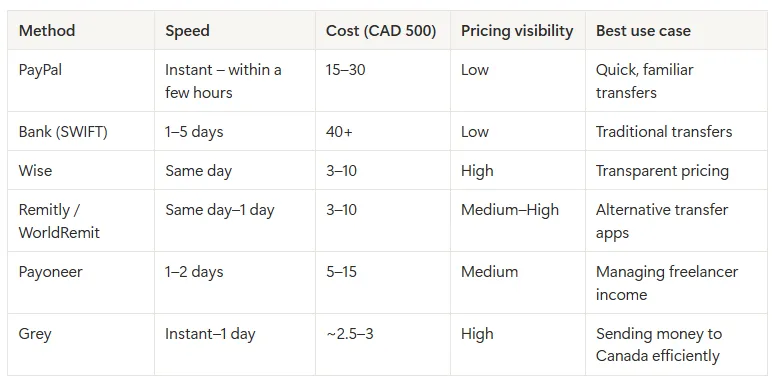
Side-by-side comparison: fees and speed

Table comparing payment methods to send money to Canada

What actually changes the total cost of your transfer

Looking across all methods, three factors consistently determine how much you spend:

  • The exchange rate applied
  • The type of fee (flat vs percentage)
  • The route the money takes into Canada

Reducing unnecessary conversions and avoiding percentage-based fees tends to lower the overall cost.

Why use Grey to send money to Canada?

For freelancers earning in foreign currencies, Grey brings the key elements together in one place.

It allows you to manage multiple currencies, convert when needed, and send money to Canada using delivery methods that prioritise speed or cost depending on your preference.

Grey is also registered with FINTRAC, which means it operates under Canadian financial regulations.

This combination of multi-currency access, clear pricing, and local delivery options makes it particularly relevant for this type of transfer.

How to send money to Canada using Grey

If you’re sending money to Canada through Grey, there are two main ways the funds can be delivered, and each affects speed and cost.

Grey allows you to send CAD to Canada in two ways:

  • Bank transfer: Send directly to any Canadian bank account (personal or business)
  • Interac transfer: Send via Interac, a real-time bank-to-bank system widely used across Canada

The main difference comes down to speed and preference. Interac transfers are typically completed almost instantly, while bank transfers are usually processed within one business day.

What you need before sending

To complete a transfer, you’ll need your recipient’s details. These may vary slightly depending on the method, but generally include:

  • Full name (first and last name)
  • Address
  • Bank details (institution number, transit number, and account number)
  • City and postal code

How the process works

Once your balance is funded, sending money follows a simple flow:

  1. Log in to your account
  2. Select the balance you want to send from (USD, EUR, GBP, or NGN)
  3. Click “Send” and choose your method (bank transfer or Interac)
  4. Add a new recipient or select an existing one
  5. Enter the amount in CAD
  6. Confirm the transfer using your authentication method

After confirmation, the delivery time depends on the method you selected.

This flexibility allows you to prioritise either speed or slightly lower cost depending on the situation.

What I learned trying to send money to Canada

When you break the process down, the differences between transfer methods become easier to evaluate.

For a CAD transfer, most of the variation comes from exchange rates, fee structures, and how the money is delivered in Canada. Once those factors are clear, it becomes easier to choose a method that fits your priorities, whether that is speed, cost, or simplicity.

If you’re already working across currencies and need a reliable way to send money to Canada, opening a free Grey account can help you manage both conversion and transfers in one place.

FAQs about sending money to Canada

What is the best way to send CAD to Canada?

The best option is usually a platform with low exchange rate markup and flat fees, especially one that connects to local Canadian systems like Interac. This helps reduce both conversion costs and transfer fees.

What details do I need to send money to Canada?

To send money to Canada, you’ll usually need the recipient’s full name and either their bank details (institution number, transit number, and account number) or basic contact information if the transfer is sent through local systems like Interac.

How long does it take to send money to Canada?

It depends on the method used:

  • SWIFT transfers: 1–5 business days
  • Online transfer platforms: same day or within 24 hours
  • Interac transfers: often within minutes

Why do I lose money when converting currencies?

Most providers apply a markup to the exchange rate. Even a small difference from the real rate can increase the total cost of your transfer, especially if multiple conversions are involved.

How much does it cost to send CAD 500 to Canada?

Costs vary by provider:

  • PayPal: around CAD 15–30
  • Banks: CAD 40 or more
  • Wise and similar platforms: CAD 3–10
  • Grey:  $2.50 per transfer via bank transfer, and $3 CAD per transfer via Interac.

Is Grey safe to use?

Yes. Grey is registered with FINTRAC, Canada’s financial intelligence agency responsible for monitoring transactions and ensuring compliance with anti-money laundering regulations.

‍

How Moroccan freelancers receive consulting payments from US clients

•

•

2 min read

Morocco’s unique position between Africa and Europe is more than just a geographical advantage. Coupled with a growing bilingual or trilingual (French, Arabic, English) talented workforce, this proximity has made it easy for many Moroccans to integrate well into global workspaces and understand how various regions operate. A good number of consultants in Morocco now work with US clients across strategy, technology, marketing, finance, legal advisory, and UX research. One thing that still lags, however, is how foreign income goes from a client in New York or San Francisco to a consultant in Casablanca or Rabat.

Receiving a consulting payment from a US client is not the same as receiving it from a Moroccan one. The currency, payment processes, regulatory obligations, and costs buried in the conversion process differ, and these differences are often significantly higher than consultants realise when they first set up their payment infrastructure.

This article explains how Moroccan freelancers receive consulting payments from US clients, what each option costs, and how to set up a system that protects your earnings.

How US clients typically pay, and why it matters

Most US clients, whether individuals, startups, or mid-sized businesses, pay via ACH or wire transfer. Understanding the difference is the first step to choosing the right setup.

The Automated Clearing House (ACH) is a payment network that works only within the United States banking system. When a US client initiates an ACH transfer, the funds move directly between US banks, with no correspondent banks involved. Most US banks charge nothing or less than $1 for ACH payments.

For a wire transfer, a payment instruction travels through the SWIFT network to one or more correspondent banks, each of which deducts a fee of $10 to $25. The sender's bank also charges $25 to $45 to initiate the wire. By the time a wire reaches a Moroccan bank account, the total deductions, including correspondent fees and the receiving bank's conversion markup, can become significant.

This means that your payment method determines how much of your earnings actually reaches you, and how much you lose along the way.

Also read: Wire transfer vs ACH: cheapest way to receive USD

Managing USD payments with virtual USD accounts

With traditional banks charging high fees for international wire transfers, virtual USD accounts have become the most cost-effective option for Moroccan consultants receiving regular payments from US clients.

A virtual USD account gives you a real US routing number and account number issued through a regulated fintech platform. When you share those details with a US client, they initiate an ACH transfer as a standard domestic payment. The money moves through the ACH network without correspondent banks and is credited to your virtual USD account in full, typically within 1 to 3 business days.

From there:

  • You hold the balance in USD without it being automatically converted to MAD.
  • You convert when you choose, at a rate you can see before confirming.
  • You withdraw to your Moroccan bank account after the conversion.

That control over conversion timing is the structural advantage over every alternative that routes money directly into a Moroccan bank account. When MAD strengthens against the USD, you can wait. When the rate is favourable, you convert. Your bank does not make that decision for you.

Platforms worth considering for Moroccan consultants:

  • Grey provides virtual USD accounts alongside GBP and EUR, with real foreign banking details for each currency. You can receive USD payments and convert to MAD at competitive rates. The deposit fee is 0.8% of the amount received, with a minimum fee of $2 and a maximum of $10. The currency conversion fee is 1% and capped at $6 per conversion, regardless of the amount. Grey is upfront about their fees, so you can see how much each transaction costs before initiating it, and withdrawals to a local bank account cost a flat fee per transaction. Grey is regulated by FinCEN in the United States and FINTRAC in Canada.
  • Wise applies the mid-market rate with a clearly disclosed fee, typically 0.4% to 1.5% depending on the currency and amount. It also provides local USD account details, a routing number and an account number that accepts ACH payments directly. One of Wise’s selling points is the transparency. You see the exact conversion cost and the amount you will receive before confirming.

Also read: How freelancers in Morocco can switch from traditional banks to Grey

Receiving USD payments with SWIFT wire to a Moroccan bank account

For US clients who insist on wire transfers, a Moroccan commercial bank account that can receive USD is the standard destination. Most Moroccan banks can receive SWIFT transfers in USD, and the funds are converted to MAD upon receipt.

Let’s say you are expecting a $3,000 consulting payment via wire transfer. Here’s what the charges will look like:

  • Client's sending fee: $35 on average
  • Correspondent bank deductions in transit: $20 to $50
  • Receiving bank's conversion markup (2% to 4% below mid-market): $56 to $112
  • Total cost before you access the money: $111 to $197, which is about 3.7% to 6.6%.

Processing takes two to five business days. The exact amount you receive is not known until it arrives, because you cannot be sure how many banks will be involved or how much they will deduct.

This option is better for large, infrequent payments where the fixed costs represent a small percentage of the total.

Managing consulting payments from US clients with Payoneer

Payoneer works in Morocco and supports MAD withdrawals to Moroccan bank accounts. Thanks to its seamless integration feature, it works well with global marketplaces. If you work through Upwork or similar platforms where Payoneer is already a payout option, the integration is already in place and requires no additional setup.

For direct US client payments, the cost structure is the important thing to understand:

  • Payoneer does not charge a visible conversion fee. It includes a margin of 2% to 3% into the exchange rate applied when you withdraw to your Moroccan bank.
  • Withdrawal to a Moroccan bank account carries an additional fee on top.
  • There is an annual account fee of $29.95 if the account receives less than $2,000 in a 12-month period.

LDMAG1

Using PayPal in Morocco for USD payments

PayPal is a household name in global payments, especially among US clients. Moroccan users can receive international payments from foreign PayPal accounts, which means US clients who pay via PayPal can send funds to a Moroccan PayPal account. With CashPlus’s integration, it is now much easier for Moroccans to withdraw from PayPal into their local account.

Let’s take a look at the cost of managing USD payments with PayPal.

  • PayPal charges a 4.4% receiving fee plus a fixed fee for international payments.
  • Withdrawing from a PayPal balance to a Moroccan bank account is at PayPal's currency conversion rate, at 3% to 5% below mid-market.

This means you might be looking at $74 to $94 for a $1,000 transaction.

PayPal is worth accepting if a client insists on it and no alternative is workable. For any client who is flexible on payment method, there are significantly cheaper options.

Considering contractor platforms for USD payments

If you are a consultant in a structured long-term engagement with a single US employer or client, platforms like Deel can handle the payment on both sides. The US client pays Deel in USD. Deel handles the conversion and deposits your earnings in MAD to your Moroccan bank account on a regular schedule. The total fees incurred might not be as clear as with virtual accounts, and there may be hidden margins on conversions.

Deel also handles contractor compliance documentation, which is useful for consultants who want a clean paper trail for their engagements.

Structuring your payment terms with US clients

The payment method is only part of the picture. How you structure the terms of the engagement determines when the money arrives and what recourse you have if it does not.

A few things worth building into every consulting contract with a US client before work begins:

  • Specify the billing currency upfront. USD is the standard for US client work. Stating it clearly in the contract removes any ambiguity about what amount the client owes and prevents a client from attempting to pay in a less favourable currency later.
  • Define who absorbs transfer fees. Including a clause that the client is responsible for ensuring the full invoiced amount arrives net of all transfer costs means you are not absorbing correspondent bank deductions that have nothing to do with the agreed fee.
  • Set a deposit before work starts. For project-based consulting, a 30% to 50% deposit is standard, due before work begins. It protects you from delivering significant work before a payment issue surfaces.
  • State your net terms clearly. Net 14 or Net 15 is reasonable for most US consulting clients and cuts the time between invoice and payment compared to the Net 30 that US businesses often default to.
  • Include a late payment clause. A 1.5% monthly charge on outstanding balances, agreed in the contract before the engagement starts, changes the tone of any follow-up conversation about an overdue invoice.

Also read: Negotiating cross-border freelance contracts: Tips and templates

Receive US consulting payments with Grey

Grey provides Moroccan consultants with virtual USD accounts with real US routing and account numbers. US clients pay via ACH. The full amount arrives without correspondent bank deductions, and you hold the balance in USD until you are ready to convert. Conversion is capped at $6 per transaction, regardless of the amount being converted, and withdrawals to your Moroccan bank account incur a flat fee. GBP and EUR accounts are available on the same platform for any UK or European clients in your portfolio.

If you are shopping on Shein, renewing your AWS hosting subscriptions, or visiting another country, a Grey virtual card helps you spend directly in foreign currencies without manual top-ups. You can create multiple cards for different purposes and link them with Apple Pay and Google Pay.

Grey provides more than virtual USD accounts. It offers a unique opportunity to manage your international finances across various currencies in one place and at affordable rates. Sign up on Grey and download the app to get started.

‍

Best payment methods for freelancers working with US clients

•

•

2 min read

Developers, designers, writers, consultants, virtual assistants, and marketers outside the United States collectively earn billions of dollars from American clients every year. A significant portion of that money is lost quietly to transfer fees, exchange rate markups, and payment infrastructure that was never optimised for the people on the receiving end.

This article covers the main payment methods available to freelancers working with US clients, how each one works at a mechanical level, what each one costs in real numbers, and which situation each one suits best.

What US clients actually use to pay

Before comparing platforms, it helps to understand what US clients typically use when paying a contractor. Most US businesses pay through one of four mechanisms:

  • ACH transfers, the domestic US electronic payment network, are free or near-free for the sender and are processed entirely within the US banking system.
  • Domestic wire transfers, used for larger or more urgent payments, have a sending fee of $25 to $45 from most US banks.
  • International wire transfers via SWIFT for recipients without US bank details, with fees on both ends.
  • Payment platforms like PayPal, Venmo for Business, or Stripe, which US clients often default to for smaller or less formal arrangements.

The payment method available to you depends entirely on the account details you give your client. If you share a US routing number and account number, your client can pay you via ACH as a domestic transfer. If you share SWIFT details, they send an international wire. If you share a PayPal email, they pay via PayPal. The account details you enter on your invoice determine which route the money moves through and, therefore, what it costs.

ACH to a virtual USD account

This is the most cost-effective option for most freelancers working with US clients. The Automated Clearing House is technically the engine room that manages how money moves in the US banking system. It requires both parties to have US bank accounts and routing numbers.

When a US client initiates an ACH transfer using your US routing number and account number, the money moves directly between their bank and the bank holding your account. From the client's perspective, paying you via ACH is like making a local transaction. It is often free or less than $1.

But opening an account with a traditional US bank requires you to live in the US, have a Social Security Number, and visit the bank in person. And since this isn’t possible for many freelancers, virtual USD accounts step in, providing a USD bank account and routing number. So, when you are paid with these details, it looks just like the client is making a local transaction, even though you are in Manila or Lagos.

Here are some virtual USD account options to look into:

Grey

When you open a virtual USD account through a platform like Grey, you receive a real US routing number and account number issued through Grey's licensed US banking partner. You can share this with your client, who then initiates an ACH transfer. The payment amount arrives in your Grey USD account within one to three business days. You keep the money in USD, convert at mid-market rates, and withdraw to your local bank account at a flat fee per transaction.

Here is what Grey’s fees look like:

  • Deposit fee: 0.8%, minimum of $2, maximum of $10
  • Conversion fee: 1%, capped at $6
  • Withdrawal to local bank: flat fee, depending on the currency

All fees are shown up front, so you know how much you are paying, what you are paying for, and how much you will receive.  You can also link this USD account to your freelancing platform to receive payouts directly in USD.

LDMAG1

Wise

Wise gives freelancers local USD account details, including a routing number and an account number, that accept ACH payments from US clients. It applies a mid-market rate to currency conversions, with a clearly disclosed fee of 0.4% to 1.5%, depending on the currency pair and amount.

What works well:

  • The conversion cost is shown before you confirm. There is no markup built into the rate, only a transparent percentage fee.
  • For example, on a $2,000 payment converted to naira, the Wise conversion fee ranges from approximately $8 to $30 at the mid-market rate.
  • Wise also supports GBP and EUR accounts for UK and European clients, which is useful for freelancers working across multiple markets.

Payoneer

Payoneer also provides a virtual USD account, but the platform has built its reputation on integration with major freelance marketplaces. Upwork, Fiverr, Toptal, Amazon, and dozens of other platforms offer Payoneer as a native payout option. If most of your US client income comes from a marketplace where Payoneer is already integrated, then you have nothing to worry about other than the payment structure.

  • Payoneer adds 2% to 3% margin to the exchange rate applied when you withdraw to your local bank account.
  • The annual account fee of $29.95 applies if you receive less than $2,000 in 12 months.
  • The withdrawal fees are 1-4% of the transaction amount. The exact fees usually depend on the transaction volume and region.

PayPal

PayPal is what many US clients reach for first. It is familiar, American consumers trust it, and for small or informal payments, it requires no additional setup on either side. For international freelancers on the receiving end, the experience is considerably less straightforward.

The cost structure:

  • PayPal charges a 4.4% receiving fee plus a fixed fee for international payments. On a $1,000 invoice, that is $44 before anything else happens.
  • Withdrawing to a local bank account triggers PayPal's currency conversion at a rate typically 3% to 5% below the mid-market rate. The remaining $956 costs another $29 to $48.
  • Total cost on a $1,000 payment: $73 to $92, or 7.3% to 9.2% of the invoice.

Beyond cost, PayPal's limitations in certain countries can be a problem. Many countries can receive PayPal payments, but cannot withdraw directly to a local account.

Contractor platforms

If you are working in a structured, long-term arrangement with a single US employer or client, then contractor platforms like Deel, Remote, and Ripple handle the payment infrastructure on both sides. Here is how they work:

  • The US client funds the platform.
  • The platform manages the compliance documentation, the contractor agreement, and the currency conversion.
  • The platform pays freelancers via local payout methods in their country.

Receive payments from US clients with Grey

Grey gives freelancers outside the US virtual USD accounts with real US routing numbers and account numbers that US clients can pay via ACH directly. Grey also supports GBP and EUR accounts for UK and European clients on the same platform. You can receive payments in USD at low and transparent fees, keep your earnings in USD, convert at competitive rates, and withdraw to your local bank.

Grey is regulated by FinCEN in the United States and FINTRAC in Canada, and it uses layers of encryption to protect your data and transactions while complying with global financial standards. With Grey virtual cards, you can create multiple cards for various uses and spend directly from your multi-currency account without manual top-ups or conversions. These cards can also be linked to Google Pay and Apple Pay, making international spending even more seamless.

Virtual accounts save time and money when receiving payments from US clients. Sign up on Grey and download the app to create your virtual USD account today.

‍

How to receive Deel Payments outside the US: Withdrawal and bank transfer guide

•

•

2 min read

Deel has solved multiple problems plaguing the global remote work industry and contractor arrangements. It is a comprehensive global HR and payroll platform designed to help companies hire, manage, and pay international employees and contractors in 150+ countries. It automates compliance with local labour laws, handles payroll, manages benefits, and offers equipment provisioning, allowing businesses to hire globally without setting up local entities.

But today, we are focusing on how Deel is solving the  global payment problem and how you can receive Deel payments outside the US.

Understanding how Deel payments work

Here is what happens when your client uses Deel:

  • The client pays Deel via bank transfer, card, or another supported method on their end.
  • Deel processes the payment and holds it in your Deel balance.
  • You initiate a withdrawal to your chosen destination using whichever method you have set up.
  • The funds move from your Deel balance to the account

Deel doesn’t charge contractors a subscription fee. The costs that apply are withdrawal fees and, in many cases, currency conversion fees charged either by Deel or by the withdrawal platform on the receiving end.

Your Deel balance is held in USD by default. You may choose to withdraw in USD if you have an account that supports USD or convert to your currency when withdrawing to you account.

Also read: How freelancers receive recurring payments from US clients

Receiving Deel payments via local bank transfer

For contractors in countries where Deel supports local bank payouts, this is the most straightforward option. Deel processes payments via local banking rails, converting USD to your local currency and depositing it directly into your bank account.

Deel does not charge a withdrawal fee for local bank transfers in most supported countries, but currency conversion happens on Deel's end. This conversion occurs during withdrawal, and the exchange rate is not always disclosed upfront. So, you are not sure of how much you are losing to exchange rate margins.

Processing your withdrawal typically takes 1 to 5 business days, depending on the country.

Receiving Deel payments via bank transfer

SWIFT is an option for contractors whose country is not supported by Deel's local bank transfer infrastructure, or who hold a foreign currency account.

How it works mechanically:

  • Deel initiates a SWIFT message to the receiving bank via the correspondent banking network.
  • One or more correspondent banks process the transfer in transit, each potentially deducting a handling fee of $10 to $25.
  • The funds arrive at the destination bank within 2 to 5 business days, sometimes sooner than the amount sent if correspondent deductions are applied.

Deel charges $5 to $25 per SWIFT withdrawal, and there is no way to tell how much the correspondent bank(s) will deduct for processing the transaction.

On the other hand, virtual USD accounts like Grey and Wise are considered bank transfer options for Deel withdrawals. However, the mechanism and cost involved are significantly different. We will look more into them.

Also read: Virtual US accounts explained: who they work for

Receiving Deel payments with Wise

Wise is available as a withdrawal destination on Deel for contractors in supported countries. Deel does not charge a withdrawal fee for Wise. The costs on this route are Wise's own conversion fee and any applicable exchange charges on the receiving end.

What makes Wise worth considering:

  • Wise applies the mid-market rate to conversions, with the fee clearly disclosed before confirmation.
  • When converting from USD to a local currency, Wise's fee typically ranges from 0.4% to 1.5%, depending on the currency and amount.
  • Processing is typically within one business day, and in many cases, the same day.

Wise often has restrictions in some climes. It is a good idea to confirm that Wise supports your specific country and currency before relying on it.

Receiving Deel payments with Grey

Grey offers multi-currency accounts, allowing contractors to receive payments in USD, GBP, or EUR and transfer them to their foreign accounts. Withdrawals from Deel usually take 1–2 business days, though they may take longer due to processing or compliance checks.

Grey charges a 0.8% deposit fee on incoming payments (capped at $10 and a minimum of $2).  You can hold USD in Grey or convert to your local currency at competitive rates within the app before withdrawing to your local bank. A flat fee applies for local bank withdrawals.

You can set this up in Deel by selecting "Bank transfer," then selecting the relevant currency, and entering the account details provided by Grey.

Receiving Deel payments with Payoneer

Payoneer is one of the most popular withdrawal options among international contractors on Deel, primarily because it is fast, widely supported, and familiar to people who have used it before. After receiving USD in your Payoneer account, you need to convert and withdraw to your local currency. Deel does not charge a withdrawal fee for Payoneer. But there are fees applied on  Payoneer's side:

  • Payoneer doesn’t charge a visible conversion fee, but it applies a 2% to 3% markup to the exchange rate.
  • Payoneer's withdrawal fee is 2%
  • There is an annual account fee of $29.95 if the account receives less than $2,000 in a 12-month period.

Withdrawing from Deel with the Deel Card

The Deel Card is a virtual prepaid Mastercard that lets verified contractors spend directly from their Deel balance without initiating a withdrawal first. As soon as a payment lands in your Deel balance, it is available to spend on the card.

Key features of the Deel Card:

  • No transaction fees for USD purchases.
  • A 1.25% fee applies to non-USD transactions, such as paying for a local subscription priced in naira or a European vendor priced in EUR.
  • Compatible with Google Pay, Facebook Pay, and Meta Pay.
  • No ATM withdrawal support.
  • Balance held in USD, which shields contractors in volatile currency markets from local currency fluctuations on unspent earnings.

The Deel Card is particularly useful for contractors who want to use their USD earnings for international subscriptions, tools, or online purchases directly. Paying for AWS hosting, a Figma subscription, or a ChatGPT Plus renewal directly from a USD balance avoids the conversion markup that appears when a local currency card is used for USD-priced services.

Receiving Deel payments with PayPal

PayPal is available as a Deel withdrawal method in locations where PayPal supports withdrawals. Deel allows contractors to withdraw funds to PayPal, which generally takes about 1 business day and incurs a 2.5% fee (minimum $0.25 USD). PayPal charges you when withdrawing to a local bank account.

PayPal's conversion from USD to local currency typically applies a rate 3% to 5% below the mid-market rate. For instance, on a $1,000 withdrawal, that amounts to a $30 to $50 loss before adding PayPal’s withdrawal fee. In markets where PayPal's local functionality is limited or account restrictions are common, PayPal is the least reliable withdrawal option.

When linking your PayPal account to your Deel account, it is essential that your email addresses match.

Receiving crypto payments from Deel with Coinbase

For contractors who receive payments in crypto, Deel integrates with Coinbase as a withdrawal option. Supported currencies include Bitcoin (BTC), Ethereum (ETH), Solana (SOL), USD Coin (USDC), and Dash (DASH). Coinbase charges a 1.5% fee to contractors for this option.

While crypto payments are relatively uncommon, they are useful for contractors managing unstable local currencies.

Receive Deel payments with Grey

Grey gives contractors outside the US virtual USD accounts with real US routing numbers and account numbers that work as Deel withdrawal destinations. You can keep your payout in USD or convert at mid-market rates and withdraw to your local bank account at a flat fee whenever you need to.

To set up your Grey account to receive Deel payments

  1. Get a Grey account: Complete your verification and request a virtual USD bank account.
  2. Add method on Deel: In your Deel account, navigate to Settings and then ****Withdraw Methods. Choose to add a new account.
  3. Enter bank details: Select "Bank Transfer" and fill in the ACH routing number and account number provided by Grey.
  4. Verification: Ensure the bank account holder's name on Grey matches the name on your Deel account.

Managing Deel payment with Grey gives you a payment setup that avoids delays, unclear fees and forced conversions. Sign up on Grey and download the app to manage your Deel payment efficiently.

‍

How Algerians in France send money home to Algeria

•

•

2 min read

The relationship between Algeria and France runs deep. Between 132 years of colonisation (1830–1962), a brutal war of independence, and continued cultural and linguistic ties, millions of people share Algerian-French heritage. So, it makes sense that France and Algeria share one of the world's most active remittance relationships.

With over a million Algerians living in France, money constantly flows between the two countries. Algerians in France send money home to support their families, invest in business, or build houses. While remittances contribute significantly to the Algerian economy, many Algerians in France don’t realise how much they are losing on every transfer. This article explores how Algerians in France send money home to Algeria.

Also read: Algeria’s remote tech talent and opportunities abroad

La Banque Postale

La Banque Postale is the primary bank for many Algerians in France. It is accessible, widely used among lower and middle-income households, and has historically been the path of least resistance for remittances to North Africa.

La Banque Postale offers two routes for sending money to Algeria:

  • International wire transfer: Available online via the personal banking portal or in person at a branch. The sender initiates a transfer to an Algerian bank account using the recipient's IBAN or RIB details. Fees vary depending on whether the sender opts for SHA (shared fees) or OUR (sender covers all fees). The OUR option, where the sender pays all charges including correspondent bank fees, ensures the recipient receives the full transferred amount without deductions.
  • Western Union via La Banque Postale: For CCP account holders with eligible Visa cards, Western Union transfers can be initiated online through La Banque Postale's personal banking area or via the LBP app. The maximum transfer limit is €5,000 over three days. The recipient can collect in cash at a Western Union agent location in Algeria upon presenting a valid ID. This is particularly helpful for recipients who don’t have a bank account.

La Banque Postale's international wire transfer is probably the cheapest option for bank-to-bank transfers if you are sending money from France to Algeria. It offers relatively low fees and a low markup on the mid-market exchange rate. than most commercial banks makes it worth checking before automatically switching to a specialist platform, particularly for holders who already bank there.

Remitly

Remitly is another low-cost payment platform supporting remittances from France to Algeria. It offers two payment speed options:

  • Economy transfers: Lower fee, typically settled within three to five business days for bank account delivery.
  • Express transfers: Higher fee, typically arriving the same day or within hours.

For most regular monthly remittances where timing is not critical, the Economy option offers the best cost-to-value ratio on this corridor. New users typically receive a promotional rate on their first transfer, which can make the initial experience meaningfully cheaper than the standard rate.

Payment methods for French senders include:

  • Visa and Mastercard debit and credit cards
  • Apple Pay (available in the EU)
  • Prepaid cards

Recipients in Algeria can receive via direct bank deposit to Algerian bank accounts. The app is available in French, and the interface is clear enough that less tech-comfortable users typically navigate it without difficulty.

Wise

Wise applies the mid-market rate on conversions and charges a clearly disclosed fee before you confirm the transfer. That transparency is its defining feature on any corridor, including France to Algeria.

How it works:

  • You enter the amount in EUR.
  • Wise shows you exactly how much DZD the recipient will receive, the fee being charged, and the exchange rate being applied, all before you confirm.
  • Payment is made via bank transfer from your French bank account.
  • Delivery to Algerian bank accounts typically takes one to two business days.

The fee on EUR-to-DZD transfers via Wise ranges from 0.4% to 1.5%, depending on the amount and method, applied at the mid-market rate with no additional markup built into the rate itself. On a €500 transfer, the total cost is €2 to €7.50.

Revolut

Revolut has been identified as among the cheapest options for bank account transfers to Algeria in recent comparisons, with a transfer fee and a small markup of approximately 0.2% on the DZD exchange rate. For Revolut users who are already on the platform for other purposes, adding Algeria transfers is a natural extension.

A few things worth knowing:

  • On weekdays, conversions within the monthly fair usage limit on the Standard plan are processed at or near the mid-market rate.
  • Weekend transfers attract an additional markup, which can make timing your transfer to a weekday worth the planning.
  • Payment is made via bank transfer from a French bank account or card.
  • The app is clean, the process is straightforward, and real-time tracking shows when the transfer has been received.

Revolut is available to French residents and is regulated across EU markets. Account opening requires identity verification and takes a few minutes online.

Grey

Grey allows you to transfer money from France (EUR) to Algeria (DZD) by converting funds in your account and sending them directly to an Algerian bank account. Grey lets Algerians living in France hold a EUR balance funded directly from any French bank account via SEPA. You then convert to DZD on the platform at competitive rates (1% conversion fee capped at $6) and send DZD straight to any Algerian bank account. Transfers are typically delivered within 5 business days, with a $2.50 fee and a maximum limit of 388,000 DZD per transaction.

Here is how you send money home with Grey:

  • You add EUR from your French account to your Grey EUR balance (SEPA transfers are usually free or low-cost and arrive the same or next business day).
  • In the app, you select your EUR balance, choose “send money,” then “Send via bank transfer.”
  • Pick Algeria as the destination country and DZD as the payout currency.
  • Enter the recipient’s full name, bank name, branch code and account number (RIB).
  • Grey handles the conversion and routes the payment through its local banking partners in Algeria.
  • The Algerian bank receives the funds.

Also read: How to open US, UK and Euro bank accounts in France

Western Union

Western Union's main selling points in when sending money from France to Algeria are speed and cash pickup reach. It has an extensive agent network and partners across Algeria with pickup stations in most cities and many smaller towns. For recipients who do not have a bank account or who need cash immediately, Western Union is consistently among the fastest options.

Key points:

  • Cash pickup transfers can be available within minutes after the sender initiates the transfer online.
  • The recipient collects in DZD at an agent location by presenting a valid ID and the transfer reference number (MTCN).
  • Bank account delivery is also supported for recipients with Algerian bank accounts.
  • Transfers can be initiated entirely online or via the WU app, without visiting an agent in France.

The cost structure includes a visible transfer fee and an exchange rate with a margin above the mid-market rate. The total cost varies by delivery method and transfer amount. For cash pickup specifically, Western Union has been competitive on this corridor in recent comparisons. For bank account delivery, comparing the total DZD amount against Remitly or Wise for the specific amount being sent is worth the sixty seconds it takes.

Sending money to Algeria with Grey

If you are sending money home from France, then you need a payment solution that ensures your loved ones receive more and lose less. And this is just what Grey hopes to achieve with multi-currency accounts offering low transfer fees, competitive exchange rates, and no hidden charges. Apart from EUR, you also get GBP and USD accounts on one platform.

Grey virtual cards are designed to simplify international payments with seamless integrations with Apple Pay and Google Pay. Whether you are shopping for your loved one on Amazon or renewing your subscriptions, you can spend directly from your foreign account balance without topping up manually.

Sign up on Grey  and download the app to start sending money home with ease.

‍

Arrow (up)

Back to top