
Grey Business vs Grey personal banking

Olayoyin Olorunmota

TABLE OF CONTENT

SHARE THIS POST

“Should I be using Grey Business, or is my personal Grey account enough?”

It’s a common question, especially once your income starts growing.

At the beginning, everything feels simple. You get paid and you withdraw your money easily. But as your work evolves, whether that’s taking on more clients, earning from multiple platforms, or starting a company, the way you manage money needs to evolve too.

Grey offers two account types for this exact reason: Grey Personal and Grey Business. They are not better or worse than each other. They are built for different stages of your earning process.

This guide breaks down the differences, including fees, features, and when to switch, so you can choose the right setup without second-guessing.

‍Also read: Receiving foreign income as a solo founder

What is a Grey personal account?

A Grey personal account is designed for individuals who receive and manage international payments.

If you are a freelancer, remote worker, or creator earning from global clients or platforms, this is the account you are expected to use.

With a personal account, you can open USD, GBP, and EUR balances with real banking details. This allows clients to pay you as if they were making a local transfer in their own country. Instead of receiving an expensive international wire, you receive money through local rails like ACH, SEPA, and FPS.

Once the money arrives, you can hold it in foreign currency, convert it when the rate works for you, or withdraw it to your local bank account. You can also spend directly using your Grey virtual card without needing to manually move funds around.

The focus here is simplicity. You are managing your own income, and the account is designed to make that as flexible as possible.

What fees does Grey Personal charge?

Understanding fees is where most people get confused, so here’s how it actually works.

When you receive money through ACH, SEPA, or FPS, Grey charges a 0.8% fee, with a minimum of $2, €2, or £2 and a maximum of $10, €10, or £10. This means larger payments become proportionally cheaper because of the cap.

Currency conversion depends on the currency pair. Some routes are free, while others range from 0.5% to 1%. For certain major pairs, the fee is capped at $6. The important detail is that Grey shows the rate before you confirm, so there are no hidden charges after the fact.

Withdrawals vary depending on the country, but for major currencies like EUR and GBP, the fee is typically 0.5%, with a minimum and maximum cap. Other corridors may use fixed fees instead.

For less common deposit methods like Fedwire, BACS, or CHAPS, fixed fees apply. These are generally used less often, since local rails like ACH or FPS are cheaper.

Read more: Grey charges explained: what every transaction costs

What is Grey Business?

Grey Business is designed for companies rather than individuals.

If you are running a registered business, working under a company name, or managing revenue that belongs to a business entity, this is the account structure you need.

Unlike a personal account, a Grey Business account is built for your company. This means you can receive payments on behalf of the business, manage funds at a company level, and keep financial records properly organised for accounting and compliance.

The functionality goes beyond receiving payments. Grey Business allows you to manage team access, assign roles, and give multiple people control over finances without sharing a single login.

You can also pay contractors globally, send payments in local currencies, and handle bulk payouts by uploading recipient details. This becomes important as soon as you are working with a team or scaling operations.

The goal of Grey Business is not just to receive money, but to structure how your business handles it.

What fees does Grey Business charge?

Grey Business follows the same core pricing model as personal accounts.

Receiving payments still comes with the 0.8% fee capped at $10. Conversion fees follow the same tiered structure, and withdrawals depend on the payout country.

The difference is not in lower fees, but in what the account enables.

With Grey Business, you are paying for structure, team management, and the ability to operate at scale without mixing personal and company finances.

Grey Personal vs Grey Business: what is the difference?

The main difference comes down to ownership.

A personal account is for money that belongs to you as an individual. A business account is for money that belongs to a company.

Everything else builds from that.

Grey Personal is simpler, quicker to set up, and designed for individuals managing their own income. Grey Business requires verification of a registered company but provides tools to manage payments, teams, and operations effectively.

If you are working alone and getting paid for your own work, a personal account is enough. If you are invoicing as a company, hiring people, or managing shared finances, you need a business account.

‍Also read: Can non-residents open a US bank account online in 2026?

When should you use Grey for personal use?

You should use a personal account if you are earning in your own name.

This includes freelancers, remote employees, and creators earning from platforms like YouTube, TikTok, or Upwork. At this stage, your income is still personal, even if it comes from multiple sources.

A personal account keeps things simple.

When should you use Grey Business?

You should use Grey Business when your income is no longer just yours.

If you have registered a company, invoice under a business name, or manage revenue that belongs to a business entity, a personal account is no longer the right structure.

This is especially important if you are paying contractors, working with a team, or preparing financial records for accounting and tax purposes.

Can you have both Grey for personal use and Grey Business?

Yes, and in many cases, this is the best setup.

If you run a company but also earn income personally, keeping both accounts separate helps avoid confusion. Your business transactions stay within the business account, while your personal income remains separate.

This makes accounting cleaner and reduces the risk of mixing funds.

Grey for personal use vs Grey Business: key differences

Feature Grey Personal Grey Business
Who it’s for Individuals (freelancers, creators, remote workers) Registered companies, startups, agencies
Account ownership Personal use Business entity
Currencies supported USD, GBP, EUR, USDC USD, USDC (business-focused)
Receiving payments Yes (ACH, SEPA, FPS) Yes (for business transactions)
Team access No Yes (multi-user access with roles)
Bulk payouts No Yes (CSV uploads supported)
Virtual cards Yes (for personal use) Yes (multiple cards for teams, tools, ads)
Best use case Getting paid individually Managing company finances and scaling operations
Setup process Fast (ID verification) More detailed (business verification required)

So, which Grey account should you choose?

Most people overthink this decision, but it comes down to one simple question:

Who does the money belong to?

If you’re earning as an individual, whether that’s freelancing, remote work, or content creation, a Grey Personal account is the right fit. It keeps things simple and flexible while giving you full access to international payments.

If you’re operating as a registered business, invoicing clients under a company name, or managing team payments, Grey Business is the structure you need. It helps you separate finances properly and handle growth without creating confusion later.

If you’re in between, which is common, you can start with a personal account and move to business when your setup requires it. Many users also keep both, using one for personal income and the other for company operations.

The goal isn’t to pick the most advanced option. It’s to choose the one that fits how you earn today and won’t slow you down as you grow.

Getting started with Grey

Opening a Grey Personal account takes just a few minutes. You can sign up in under 5 minutes, and once your identity is verified, you can usually start receiving payments the same day.

Opening Grey Business takes a bit longer because it involves business verification. You’ll need to submit your company registration and ownership details, and approval typically takes 1 to 3 business days, depending on the documents provided. This ensures your account is set up correctly from the start.

Frequently asked questions

What is the difference between Grey for persona use and Grey Business?

Grey Personal is for individuals receiving and managing their own income, such as freelancers, creators, and remote workers. Grey Business is for registered companies that need to manage business revenue, pay contractors, and give team members access to finances.

The main difference is ownership. Personal accounts are for your money. Business accounts are for company funds.

Can I use a Grey Personal account for business payments?

You can use a personal account while you are freelancing under your own name. However, once you register a company or start invoicing under a business name, it is better to switch to Grey Business.

Using a personal account for business transactions can create confusion with accounting, taxes, and financial tracking.

Does Grey Business have different fees from Grey Personal?

Grey Business follows the same core pricing structure as personal accounts. Receiving fees are typically 0.8% with a cap, and conversion fees depend on the currency pair.

The main difference is not pricing, but functionality. Grey Business adds tools for team access, bulk payments, and structured financial management.

Can I have both a Grey Personal and Grey Business account?

Yes. Many users have both accounts.

This is useful if you have personal income, such as freelance work or creator earnings, and also run a registered business. Keeping them separate makes accounting cleaner and easier to manage.

When should I switch from Grey Personal to Grey Business?

You should consider switching when your income becomes business revenue instead of personal income.

This usually happens when you register a company, start invoicing clients as a business, hire contractors, or need proper financial records for tax and reporting purposes.

What documents are required to open a Grey Business account?

To open a Grey Business account, you will need to provide company registration documents, ownership details, and verification information about the business.

The process is more detailed than a personal account because it involves verifying a legal entity.

Is Grey Personal enough for freelancers and creators?

Yes. For most freelancers, remote workers, and creators, Grey Personal is more than enough.

It allows you to receive international payments, hold foreign currency, convert when needed, and withdraw locally without needing business-level setup.

Can I receive USD, GBP, and EUR with both accounts?

Yes. Both Grey Personal and Grey Business support multi-currency functionality.

Personal accounts focus on individual income, while business accounts structure those same capabilities for company use.

Which Grey account is better?

Neither is better. They are designed for different use cases.

Grey Personal is better for individuals managing their own income. Grey Business is better for companies managing business finances and scaling operations.

Ready to get started?

Open your Grey Personal account to start receiving international payments as an individual, or set up Grey Business if you’re managing company finances and need a more structured setup.

Last updated:

June 15, 2026

Open a free Grey account to get startedJoin 1 million digital nomads
IF YOU ENJOYED THIS, CHECK THESE OUT

11 best LLC formation services: Cheapest ways to file

•

•

2 min read

A business idea can be exciting until the paperwork starts. Choosing a business structure, checking your state’s requirements, paying the filing fee, and making sure everything is submitted correctly can quickly make LLC formation feel more complicated than expected.

The good news is that forming an LLC does not always require paying a company to do it for you. In many cases, you can file directly with your state and pay the required state filing fee. However, handling everything yourself means taking care of the paperwork, registered agent requirements, and other state-specific steps.

For people who prefer convenience, LLC formation services can handle much of this process for an additional fee. Some even advertise free formation, although you may still need to pay the state filing cost and may encounter additional charges for optional services.

With so many providers available, comparing the best LLC formation services means looking beyond the headline price. The registered agent cost, turnaround time, included features, renewal fees, and overall filing process can all affect what you actually pay. This guide compares your options so you can find a formation service that fits your budget and needs.

Also read: How much does it cost to start an LLC?

The cheapest way to form an LLC without paying for extras

Starting an LLC does not have to mean paying a formation company to handle everything for you. The cheapest route is usually filing directly with your state, where your main cost is the required state filing fee. The trade-off is that you are responsible for getting the paperwork right and meeting every state requirement.

When DIY makes sense

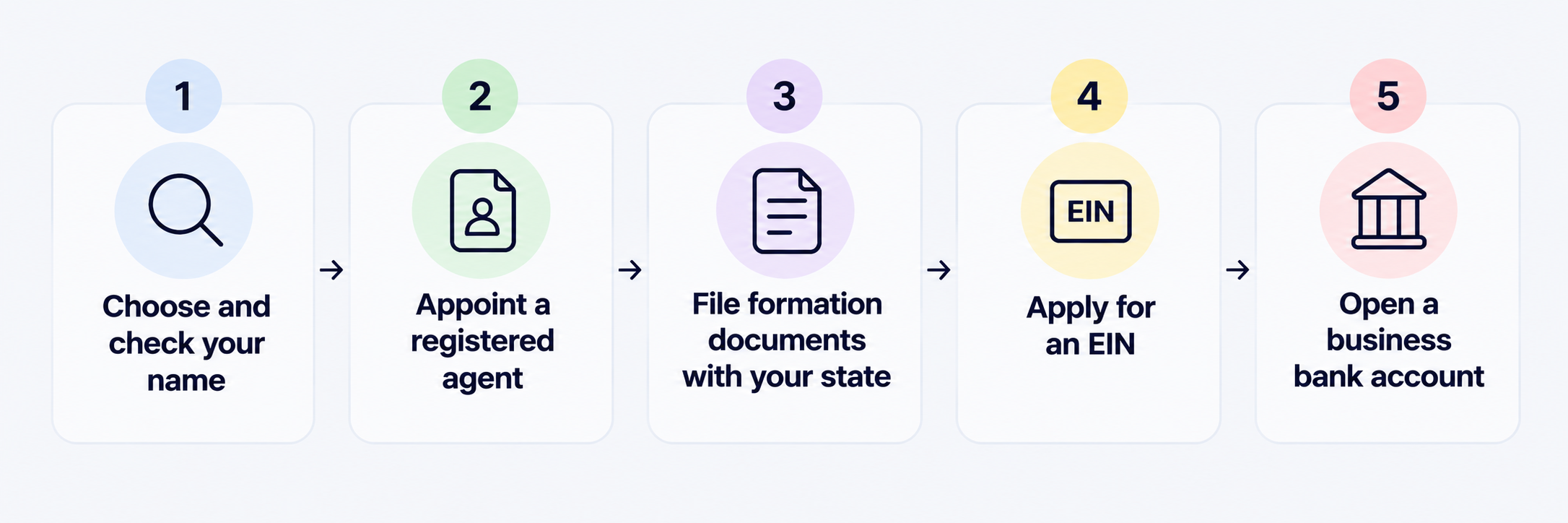
Filing yourself can be a good fit when you have a straightforward business and enough time to handle the process. You will typically need to:

  • Choose and check your LLC name.
  • Prepare and file the required formation documents.
  • Appoint a registered agent where required.
  • Pay the state filing fee.
  • Complete any additional state requirements.

When a formation service makes sense

Paying for a service may be worthwhile when you want someone else to handle the filing or help you avoid administrative mistakes. Some providers offer low-cost or free formation packages, although you still pay the state fee and may be charged for extras such as registered agent services or compliance support.

The right choice comes down to whether saving money or saving time matters more for your situation.

The comparison below looks at base pricing, registered agent costs, processing times, and the features that distinguish each LLC formation service.

Also read: Open a USD business account without a US address

11 best LLC formation services compared

LLC formation service Starting base price Registered agent cost Turnaround / filing time Key extras and distinctive traits
Northwest Registered Agent $39 + state fee 1 year included ($125/year renewal) Same-day / 1–6 days Privacy by Default, which uses its office address on public documents; free corporate email and website.
ZenBusiness $0 + state fee Add-on ($199/year) 1–10 days; rush available Beginner-friendly platform, Velo AI assistant, and compliance protection in higher tiers.
Bizee (formerly Incfile) $0 + state fee 1 year included ($119/year renewal) Standard state time; expedited options Free tax consultation and a $0 base plan, with additional services available as paid extras.
LegalZoom $0 + state fee Add-on ($249/year) 5–14 days; expedited options Comprehensive filing workflow, legal subscription plans, and access to attorneys.
Inc Authority $0 + state fee 1 year included ($249/year renewal) 24–48 hours Free EIN and express filing included in the base tier; additional services are offered as paid upgrades.
Swyft Filings $0 + state fee Add-on ($149/year) 1–5 days, plan dependent Phone support and an unbundled service structure, with additional features available at extra cost.
Tailor Brands $0 + state fee Add-on Up to 14 days Built for creators, with logo creation, brand kits, domain registration, and website-building tools.
CorpNet $99 + state fee Add-on ($149/year) 24 hours to 1 week Multi-state entity management, compliance alerts, and support for more complex business structures.
MyCompanyWorks $79 + state fee Add-on ($119/year) Same-day processing Startup wizard checklist, corporate minutes, and free trademark consultations.
FileNow $49 + state fee 1 year included 24-hour processing Fast internal processing, a 15-minute onboarding process, and fewer secondary features.
Harbor Compliance $99 + state fee Add-on (99–125/year) 1–3 days Compliance software designed for growing companies and businesses operating across multiple states.

Also read: How to File Taxes for an LLC: A Step-by-Step Guide

Where can you form an LLC for the least money?

The cost of forming an LLC can change quite a bit depending on where you file. The formation service may advertise a $0 price, but you still have to pay the state filing fee, and some states charge annual fees that can make a cheap setup more expensive over time.

For the lowest upfront cost, look for a provider with a $0 base fee, such as Bizee or ZenBusiness, then compare the government fee and ongoing costs in your state.

Here are four states with some of the lowest government filing costs:

  • Montana: Bizee or ZenBusiness ($0) + $35 state filing fee; $20 annual upkeep.
  • Kentucky: Bizee or ZenBusiness ($0) + $40 state filing fee; $15 annual upkeep.
  • New Mexico: Bizee or ZenBusiness ($0) + $50 state filing fee; $0 annual upkeep.
  • Missouri: Bizee or ZenBusiness ($0) + $50 online filing fee; $0 annual upkeep.

New Mexico and Missouri can be particularly interesting when you look beyond the initial filing cost because there is no annual report or recurring state fee listed here.

Why California can cost much more than it first appears

California is a good example of why the lowest filing fee does not necessarily mean the least expensive LLC to maintain.

The initial state filing fee is $70, and you must also file a Statement of Information within 90 days, which costs $20. The bigger expense is the $800 annual franchise tax. That means the ongoing cost can quickly outweigh what you saved by choosing a $0 formation service.

Before choosing a state, look at the full cost of keeping the LLC active, not just what it costs to file on day one.

What to check before you pay for an LLC formation service

A formation service can look incredibly cheap when you first land on its pricing page. The number that catches your eye may only cover basic filing, while important services are added at checkout or automatically renewed the following year. Before entering your card details, take a few minutes to check what you are actually paying for.

  • Check renewal prices: A registered agent may be free for the first year but costs $100 or more at renewal. Check the recurring price, not just the introductory offer.
  • Look for upsells: EIN applications, operating agreements, compliance services, business licences, and other extras may be presented during checkout. Decide which ones you actually need.
  • Check what the base plan includes: A $0 formation package may only cover the provider’s service fee, while your state filing fee still applies.
  • Review cancellation terms: Find out whether optional services renew automatically and how to cancel them before the next billing date.

The cheapest price at checkout is not always the cheapest cost over the life of your LLC.

Once your LLC is registered, set up how you will receive and spend money

Getting your LLC approved is an important step, but there is still the practical side of running the business. Once the paperwork is done, you need a reliable way to receive payments, manage business income, and access your money when clients start paying you.

For freelancers and business owners working with US clients, a Grey USD account can give you a way to receive USD income without asking clients to deal with unfamiliar international payment processes. Funds can be managed from your Grey account, giving you a clearer way to separate business income from your personal finances.

The Grey virtual card can also help when you need to spend your business funds online or pay for services and subscriptions. Keeping your income and business spending organised from the beginning can make your finances easier to manage as the company grows.

You can sign up for Grey or download the app to get started and set up your account for international payments.

Frequently asked questions

What is the cheapest way to start an LLC?

The cheapest way is usually filing the Articles of Organization yourself through your state's Secretary of State portal and paying only the mandatory state government fee. You avoid the service fee charged by formation companies, although you remain responsible for completing the paperwork and meeting all state requirements.

Are formation services worth it?

They can be useful if you want to save time, keep your home address off public business records where possible, or get help managing compliance requirements. The value depends on what the service includes and what you would otherwise handle yourself. Compare the upfront price with recurring fees and optional add-ons.

Can I form an LLC myself?

Absolutely. You can generally visit your state's official business registration website, complete the required formation documents, and pay the applicable state filing fee. The exact process varies by state, so check the requirements before submitting your application and make sure you understand any follow-up obligations.

What is a registered agent?

A registered agent is a person or company designated to receive legal documents, official notices, and certain government correspondence for your LLC. The agent generally needs a physical address in the state where your LLC is registered and must be available to receive documents during required business hours.

How long does LLC approval take?

The processing time depends on the state and how you file. Online applications can sometimes be processed within a few business days, while paper filings may take longer. Some states offer expedited processing for an additional fee. Check your state's current processing times before submitting your application.

How much does it cost to maintain an LLC?

The ongoing cost depends on your state. Some states charge annual or biennial report fees, franchise taxes, or other recurring charges, while others have little or no annual upkeep. Check your state’s requirements so you know what you will pay after the initial filing.

Can I change my LLC name after forming it?

Yes. Most states allow you to change your LLC’s legal name by filing an amendment with the appropriate state agency and paying a fee. Before making the change, check your state’s naming rules and confirm that your preferred new name is available.

How to Name Your LLC: Rules, Tips and Examples

•

•

2 min read

Naming your LLC can feel simple until you start writing down the names you like and realise you have to consider much more than whether a name sounds good. Your choice needs to fit your business, meet your state’s rules, and be available when you are ready to file.

An LLC name must include a designator such as LLC or Limited Liability Company, be unique in your state, and not imply it is a bank or government body. Check availability on your state business registry before filing. Pick a name that is clear, memorable, and works as a domain and social handle.

Before settling on one of your llc company names, think about how it will look on your website, invoices, social media pages, and future marketing. A clever name might sound great today but become limiting if your business expands into new products or services.

The safest approach is to shortlist a few names, check each one against your state’s requirements, and see whether the matching domain and social handles are available. That way, you can choose a name you are confident using long after your LLC is registered.

LLC naming rules you need to check before filing

The name you have in mind may sound perfect, but you still need to make sure it meets your state’s naming rules before putting it on your LLC application. The exact requirements vary by state, but a few rules apply in most places.

Include an LLC designator

Your business name generally needs to show that it is an LLC. Depending on your state, you may use LLC, L.L.C., or Limited Liability Company as part of the name.

Make sure the name is available

Your name must usually be distinguishable from other registered businesses in the state. Search your state’s business registry before filing to see whether your preferred name, or something very similar, is already taken.

Be careful with restricted words

Some words may require additional paperwork, licences, or approval. Terms associated with banking, insurance, universities, or professional services can have specific restrictions depending on your state.

Avoid names that mislead people

Your LLC name should not suggest that your business is a government agency, bank, or another organisation when it is not. Check your state’s rules before filing so you do not have to change the name later.

Tips for choosing a strong LLC company name

Once your name meets the legal requirements, the next question is whether it will actually work for your business. A name can be available and still be difficult to remember, hard to spell, or too limiting as your business grows.

Make it easy to remember

Keep the name simple enough for someone to hear it once and remember it later. Avoid complicated spellings or combinations that people may struggle to pronounce or search for online.

Check the domain and social handles

Before you get attached to a name, search for the matching website domain and social media handles. Having an easy-to-find name online can help customers discover your business.

Leave room to grow

Think about where you want the business to be in a few years. A name tied too closely to one product, location, or service can become restrictive if you expand.

Avoid being too narrow

A name like “Austin Web Design LLC” may work well if you only offer web design in Austin, but it could feel limiting if you later add branding services or work with clients elsewhere.

The strongest LLC company names give you room to build, change, and grow without needing a new identity every time your business evolves.

Also read: LLC vs sole proprietorship: Which is right for you?

What could your LLC name look like in different industries?

The right naming style often depends on what you do, so these hese LLC name ideas show how you can combine different words to create a name that fits your industry and business direction.

\begin{table}[] \begin{tabular}{lllll} \hline \multicolumn{1}{c}{\textbf{Industry}} & \multicolumn{1}{c}{\textbf{Naming pattern}} & \multicolumn{1}{c}{\textbf{What the pattern communicates}} & \multicolumn{1}{c}{\textbf{Example LLC company names}} & \\ \hline \textbf{Real estate} & {[}Location / Street{]} + Holdings / Properties + LLC & Gives the business a sense of stability and connects the name to a property or location. & \textit{\begin{tabular}[c]{@{}l@{}}Oak Street Holdings LLC\\ Pacific Coast Properties LLC\end{tabular}} & \\ \textbf{Consulting \& agency} & {[}Founder Name / Concept{]} + Partners / Advisors + LLC & Creates a professional feel and can emphasise expertise, trust, and collaboration. & \textit{\begin{tabular}[c]{@{}l@{}}Vanguard Tech Advisors LLC\\ Miller \& Partners Consulting LLC\end{tabular}} & \\ \textbf{Retail \& e-commerce} & {[}Brand Name / Vibe{]} + Boutique / Shop / Goods + LLC & Creates a more approachable, consumer-friendly identity that can work across products and online channels. & \textit{\begin{tabular}[c]{@{}l@{}}Blue Wave Goods LLC\\ The Velvet Thread Boutique LLC\end{tabular}} & \\ \textbf{Construction \& trade} & {[}Family Name / Core Value{]} + Contracting / Group + LLC & Uses language associated with reliability, strength, and practical expertise. & \textit{\begin{tabular}[c]{@{}l@{}}Apex Contracting Group LLC\\ Ironwood Builders LLC\end{tabular}} & \\ \textbf{Creative \& media} & {[}Abstract Concept / Word{]} + Studios / Media + LLC & Gives you a memorable identity while leaving room to work across different creative services. & \textit{\begin{tabular}[c]{@{}l@{}}Pixel Craft Studios LLC\\ Neon Horizon Media LLC\end{tabular}} & \\ \hline \end{tabular} \end{table}

Also read: How to File Taxes for an LLC: A Step-by-Step Guide

How to check whether your LLC name is available before filing

Finding a name you like is only the first step. Before you pay a filing fee, take a few minutes to make sure the name is actually available and will not create problems for your business later.

Start with your state business registry

Search your state’s Secretary of State or business registration website for the exact name you want. Look for businesses with identical or confusingly similar names, since your LLC generally needs to be distinguishable from existing entities.

Search the trademark database

A name being available in your state does not automatically mean you are free to use it as a brand. Search the USPTO trademark database for similar names, including different spellings and businesses offering related goods or services.

Check your domain and social handles

Search for the matching website domain and social media usernames before you file. A business name may be legally available but difficult to build an online presence for if someone else already controls the digital identity.

Once you have completed these checks, you can move on to comparing the best LLC formation services and choose how you want to file.

What to do after choosing your LLC name

Once you have settled on a name and confirmed it is available, the next step is to get your LLC ready to operate. File your Articles of Organisation, or the equivalent formation document, with your state and pay the required filing fee. After your LLC is approved, apply for an Employer Identification Number (EIN) through the IRS. You may need an EIN for tax purposes, hiring employees, and opening business accounts.

With the legal setup out of the way, think about how clients will pay your business, especially when you work with customers outside the US. A Grey USD account lets you receive eligible USD payments and manage your international business income. You can sign up for [Grey](https://app.grey.co/auth/register?) or download the app to create your account and start receiving international payments.

Frequently asked questions

Does an LLC name have to include LLC?

Yes. Most states require your formal LLC name to include a designator such as “LLC,” “L.L.C.,” or “Limited Liability Company.” The exact naming rules vary by state, so check your state’s requirements before filing. The designator must form part of the registered legal business name.

Can two LLCs have the same name?

Generally, no. Your LLC name must usually be distinguishable from other registered business entities in your state. Even small differences may not be enough if the names are considered confusingly similar. Check your state’s business registry before filing to make sure your preferred name is available.

Can I change my LLC name later?

Yes. You can generally change your LLC’s legal name after formation by filing an amendment with your state and paying the required processing fee. Before changing it, check your state’s requirements and make sure the new name is available. You may also need to update your business records.

What is a DBA or trade name?

A DBA, or “Doing Business As” name, allows your LLC to operate under a name different from its registered legal name. This can be useful when you want a more customer-friendly brand without changing the LLC’s official name. DBA registration requirements vary by state and locality.

How do I protect my name nationally?

Registering an LLC generally protects your business name only within the state where you form the company. If you want broader brand protection, you can consider applying for a federal trademark through the USPTO. Trademark rights depend on the application, registration, and how the mark is used.

How much does it cost to start an LLC?

•

•

2 min read

For someone planning to start a business, the filing fee is only part of the cost of setting up an LLC. The amount you pay depends heavily on the state where you register, while other expenses can appear during the first year and beyond, from registered agent services to annual reports and business documents.

That makes the question of how much does it cost to start an LLC in 2026 more useful when you look beyond the headline filing fee. Some states charge relatively little to form an LLC, while others can cost several hundred dollars before you have even opened the business bank account. Optional services can add to the bill, particularly if you use a professional registered agent or pay someone to prepare your operating agreement. In practice, starting an LLC costs between roughly $35 and $500 in state filing fees, depending on the state. A registered agent may cost another $100 to $300 a year, while an operating agreement and annual report fees can add to the total.

The good news is that some parts of the process cost nothing. For example, the IRS does not charge a fee for obtaining an Employer Identification Number (EIN). Overall, total first-year costs are often around $100 to $800, depending on your state, the services you choose and what your business requires.

How much does it cost to set up an LLC?

Setting up an LLC generally costs $50 to $500 or more in state filing fees, depending on where you register. This filing fee is the main cost of creating the LLC, but your total cost can be higher once optional setup expenses and ongoing state requirements are included.

One-off costs

The main one-off cost is the Articles of Organisation filing fee. This is the document you submit to the state to officially create your LLC. Depending on the state, the fee can range from $50 to $500 or more.

You may also pay for optional services, such as professional formation assistance, reserving your business name or meeting a state publication requirement. These costs vary and may not apply to every LLC.

Recurring costs

Once your LLC is registered, you may have ongoing costs to keep it in good standing. These commonly include:

  • Annual or biennial report fees: Payments for submitting required updates about your LLC.
  • Franchise taxes: State charges that some LLCs must pay for the right to operate.

Together, these recurring costs can range from about $20 to $800 or more each year, depending on the state.

Also read: Open a USD business account without a US address

What you can expect to pay for an LLC

Forming an LLC involves both state fees and optional costs, so the amount you spend can vary depending on where you register and whether you handle the process yourself. The basic state filing fee may be relatively low, but additional expenses can increase the amount you need to budget for when setting up and maintaining the business.

The table below breaks down the main LLC costs, showing which expenses are paid once and which may continue each year.

LLC expense Estimated cost Type ATM fee above allowance What it covers
State filing fee $50 to $500+ One-off N/A The mandatory fee for filing your Articles of Organization with the state and officially creating your LLC.
Registered agent $0 to $300/year Recurring 2% + £0.50 per transaction You can usually act as your own registered agent for free, or pay a service to receive legal and official documents for your business.
Operating agreement $0 to $500+ One-off 2% of the amount withdrawn A document that explains how your LLC will be managed. Templates may be free, while customised legal help can cost more.
EIN $0 One-off 3% of the amount withdrawn An Employer Identification Number issued by the IRS. Applying directly through the IRS is free.
Publication fee $0 to $1,000+ One-off £0.00 abroad; £1.50 at UK domestic ATMs Some states require new LLCs to publish a formation notice in local newspapers, creating an additional cost.
Annual report or franchise tax $20 to $800+/year Recurring Fixed network fee of roughly £1.50 / €2.00 / $2.50 Ongoing state charges that some LLCs must pay to keep the business active and in good standing.

LLC costs by state: the cheapest and most expensive options

LLC costs vary widely by state, with some offering low-cost formation and others imposing significant annual fees or taxes.

Category State Upfront filing fee Annual recurring fee / tax Key takeaway / hidden traps
Cheapest overall Montana $35 $20 One of the lowest initial filing fees, with no general state sales tax.
Cheapest maintenance New Mexico $50 $0 No annual LLC maintenance fee, making it attractive for some online and out-of-state owners.
Most expensive setup Massachusetts $500 $500/year High formation and annual costs can make the first year particularly expensive.
Highest annual tax California $70 $800+/year The state has a mandatory minimum $800 franchise tax, even when an LLC has little or no income.
High entry and maintenance Nevada $425 $350/year Formation and ongoing state fees are relatively high despite Nevada's business-friendly reputation.

How much does it cost to run an LLC in 2026?

The cost of forming an LLC does not always end once your Articles of Organisation have been approved. Depending on your state and how your business operates, you may have ongoing costs that need to be included in your budget.

  • Annual reports: Many states require LLCs to submit an annual or biennial report with updated business information. A filing fee may apply even if your business has not made much money.
  • Franchise tax: Some states charge an annual tax simply for having an LLC registered there. The amount can depend on the state, your business structure or other factors.
  • Compliance costs: You may spend money keeping business records, renewing licences, maintaining a registered agent or getting professional help with tax and legal requirements.
  • Foreign qualification: If your LLC operates in another state, you may need to register there as a foreign LLC and pay additional filing and ongoing fees.

These expenses can make the true cost of running an LLC higher than the initial formation fee.

Funding and running your LLC from anywhere

Running a US LLC from outside the country can become complicated when your business earns money in USD but your personal bank account is in another currency. You need a practical way to receive payments, keep those funds in dollars and pay for business expenses without converting money unnecessarily.

For non-US founders, a USD account can make this process easier. You can receive payments from clients or platforms, keep your money in USD and use those funds when paying business expenses. This can be particularly useful for software subscriptions, advertising, contractors and other services that charge in dollars.

Grey offers cross-border account setup for eligible customers, giving you access to supported USD account details for receiving international payments. The USD accounts are provided through Lead Bank, which means your account details are connected to a US banking partner rather than being a traditional local bank account in your home country.

Once your USD balance is available, Grey also provides a virtual card for eligible users, allowing you to spend from your balance on supported online purchases. This gives non-US founders a simpler way to manage USD income and business spending from wherever they are based.

Frequently asked questions

Is an LLC expensive to maintain?

Maintaining an LLC can be relatively affordable, but the cost depends on your state and business needs. You may need to pay annual report fees, franchise taxes, registered agent fees and licence costs. Some states charge little or nothing each year, while others can make ongoing compliance considerably more expensive.

Is the EIN free?

Yes. The IRS provides an Employer Identification Number (EIN) free of charge. You can apply directly through the IRS without paying a third-party service. Be careful when using formation companies that offer to obtain an EIN for an additional fee, as this is an expense you generally do not need to pay.

What is the cheapest state to form an LLC?

Montana is among the cheapest states for initial LLC formation, with a filing fee of around $35. However, the cheapest state is not always the best choice. Annual fees, taxes, business requirements and where you actually operate can make another state more practical for your business.

Do I need a registered agent?

Yes, an LLC generally needs a registered agent in the state where it is formed. The agent receives official government correspondence and legal documents for the business. You can often act as your own registered agent if permitted, or pay a professional service to handle this responsibility for you.

Does an LLC have annual fees?

Many states require LLCs to pay ongoing fees, although the amount and frequency vary. These may include annual or biennial report fees, franchise taxes or other state charges. Some states have no annual report fee, while others can charge hundreds of dollars each year to keep the LLC active.

Can I form an LLC without living in the US?

Yes. Non-US residents can generally form a US LLC, although the requirements depend on the state and your circumstances. You may need a registered agent and appropriate tax documentation, and forming an LLC does not automatically give you the right to work or live in the United States.

The 6 highest paying digital nomad jobs in the world

•

•

2 min read

The rise of remote work has opened up high-paying opportunities for professionals who want to work from anywhere in the world. While digital nomad jobs vary in salary, some roles stand out for their lucrative earning potential and flexibility. If you’re looking to earn a great income while working remotely, here are six of the highest-paying digital nomad jobs.

1. Software development and engineering

Software developers and engineers are among the highest-paid remote professionals. Companies worldwide seek skilled developers to build applications, websites, and digital products. Whether you’re a front-end, back-end, or full-stack developer, this field offers excellent salaries and job security.

Average salary: £60,000 – £120,000 per year (or more for highly experienced professionals)

Skills required: Proficiency in programming languages like Python, JavaScript, or Java, problem-solving skills, and experience with cloud computing or DevOps.

Why it’s great for digital nomads: High demand, flexible work schedules, and the ability to work for international companies.

2. Data science and analytics

Data scientists and analysts are in high demand as businesses rely on data to drive decisions. This role involves collecting, interpreting, and visualising data to help companies optimise their strategies.

Average salary: £70,000 – £150,000 per year

Skills required: Knowledge of machine learning, statistical analysis, SQL, Python, and data visualisation tools like Tableau.

Why it’s great for digital nomads: High earning potential, project-based work, and opportunities across various industries, including tech, finance, and healthcare.

3. Cybersecurity consulting

With increasing cyber threats, businesses need cybersecurity professionals to protect sensitive data. Cybersecurity consultants assess risks, implement security measures, and ensure compliance with industry regulations.

Average salary: £80,000 – £160,000 per year

Skills required: Cybersecurity certifications (CISSP, CEH, CISM), ethical hacking, network security, and risk assessment.

Why it’s great for digital nomads: High industry demand, remote consulting opportunities, and lucrative salaries.

4. Digital marketing and SEO consultancy

Companies need digital marketing experts to manage online advertising, SEO, and social media. Digital marketers can work remotely for multiple clients or be employed by a single company.

Average salary: £50,000 – £120,000 per year (higher for experienced consultants)

Skills required: SEO, pay-per-click (PPC) advertising, content marketing, social media strategy, and data analytics.

Why it’s great for digital nomads: The ability to work with international clients, freelance opportunities, and passive income potential through affiliate marketing or digital products.

5. Online coaching and consulting

Experts in business, career development, fitness, or personal finance can offer online coaching and consulting services. This industry has grown significantly, with professionals using platforms like Zoom and social media to reach clients worldwide.

Average salary: £50,000 – £200,000 per year (depending on niche and client base)

Skills required: Industry expertise, strong communication skills, marketing knowledge, and the ability to create online courses or coaching packages.

Why it’s great for digital nomads: High-income potential, flexible schedules, and the ability to scale services through online courses and memberships.

6. UX/UI design

User experience (UX) and user interface (UI) designers create visually appealing and user-friendly digital products. They collaborate with developers and product teams to design apps, websites, and software interfaces.

Average salary: £55,000 – £130,000 per year

Skills required: Proficiency in design tools like Figma, Adobe XD, and Sketch, along with user research and wireframing skills.

Why it’s great for digital nomads: High demand, freelance opportunities, and the ability to work with clients worldwide.

Choosing the right digital nomad job for you

While these roles offer high salaries, choosing a job that aligns with your skills and interests is essential. Whether you’re an aspiring digital nomad or looking to transition into a higher-paying remote career, these six jobs offer financial stability and the freedom to work from anywhere in the world.

Ready to start your digital nomad journey? Grey makes it easy to manage cross-border transactions, send and receive payments, and access international banking from one app. Create your free account with Grey now.

‍

How to receive USD payments on Etsy as a seller in Latvia

•

•

2 min read

Selling your unique products on Etsy allows you to reach an international audience, many of whom prefer to  transact in USD. However, with Grey, this doesn't have to be a hassle as you can easily receive USD payments on your Etsy account.

This article is a step-by-step guide on how to receive USD payments on Etsy as a seller in Latvia.

Why choose Etsy as a seller in Latvia?

Creative entrepreneurs in Latvia opt for Etsy for many reasons.

  • International exposure: Etsy provides access to millions of potential buyers worldwide. Many of these buyers appreciate uniquely made products.
  • Good range of product categories: Whether you craft jewellery, clothing, or home décor, Etsy caters to a diverse range of product categories.
  • Supportive community: Join a network of sellers and buyers who value craftsmanship and creativity.

How to receive USD payments on Etsy as a seller in Latvia

Grey is a versatile payment solution for Etsy sellers in Latvia. You can start accepting international payments in these easy steps.

First, create a Grey account.

Visit Grey website or install the mobile to sign up for a Grey account. Complete the Know Your Customer (KYC)verification process.

Read also: How to open US, UK and Euro bank accounts in Latvia

Next, link your Grey account to Etsy

  • Sign into your Etsy seller account to link your Grey account. Navigate to Shop manager > Finances > Payment settings.

Read also: How to set up an Etsy account for beginners

  • Choose how you'll get paid and update your bank's country.
Choose to you will get paid  to receive USD payments on Etsy as a seller in Latvia
  • For tax purpose, select whether you are signing up as a business or an individual.
Select what type of seller you are to receive USD payments on Etsy as a seller in Latvia
  • Enter your personal information, including your name and address.
Enter your personal information to receive USD payments on Etsy as a seller in Latvia
  • Add your Grey USD bank account details.
Add your Grey USD bank account to receive USD payments on Etsy as a seller in Latvia

By linking your Grey account to Etsy, your payments will be processed directly into your international bank account. This helps to streamline your earnings.

You may be required to provide valid identification, address, and a social security number for account verification.

Why Grey is the best payment solution for Etsy sellers in Latvia

Many sellers find Grey a reliable payment platform that integrates seamlessly with Etsy. Here some benefits of using Grey as an Etsy seller in Latvia.

  • Best exchange rates: Grey offers competitive exchange rates. The best exchange rates ensure you maximise your earnings when converting USD to Euros (EUR).
  • Top-notch security: Rest assured that your funds and information are safe on Grey. This is thanks to Grey's robust security, which ensures your protection.
  • Easy withdrawals: You can move your funds to your local bank account swiftly and easily.

Read also: How to withdraw to your local bank account on Grey

Tips for succeeding as an Etsy seller in Latvia

Here are some tips to help you thrive as a Latvian seller on Etsy.

  • Optimise your catalogue: Optimising your product listing makes your products stand out. Use relevant keywords, write compelling descriptions and use high-quality images. Also, complete all sections of your store profile.
  • Provide international shipping: Grow your audience and customer base by offering shipping to other countries.
  • Engage promptly: Respond to inquiries quickly and with professionalism
  • Use social media: Leveraging social media platforms increases your visibility

Conclusion

Esty helps sellers reach a wider international audience with their creative products. Integrating Grey with your Etsy account allows you to efficiently manage your international payments and focus on growing your creative business. Sign up for a Grey account today and unlock new possibilities for your Etsy shop in Latvia.

‍

How to create a foreign currency account in the Middle East and North Africa

•

•

2 min read

The (Middle East and North Africa) MENA region has a rapidly growing, with a  sGDP of over  $4.3 trillion and strong international trade. Having a foreign currency account makes it easier for  individuals and businesses in the Middle East and North Africa transact freely in the global market, as you can hold and transact  in USD, EUR, and GBP without frequent conversions.

However, opening a foreign currency account in MENA could be difficult, especially for expatriates, freelancers, and  business owners dealing with foreign clients. Grey simplifies this process, offering a  cross-border payment solution that allows you open a foreign currency account in the Middle East and North Africa.

This guide will walk you through how to create a foreign currency account in the Middle East and North Africa and introduce an easier, digital alternative with Grey.

Why open a foreign currency account in MENA?

Managing multiple currencies is crucial for individuals and businesses involved in international transactions. Here’s why a foreign currency account is beneficial.

  • Avoid currency conversion losses: Hold foreign currencies without frequent exchange rate fluctuations.
  • Receive international payments easily: Get paid in USD, EUR, or GBP without hassle.
  • Global transactions with ease: Make seamless payments for online services, international suppliers, or investments.
  • Lower transaction costs: Reduce fees compared to local currency conversions.

Read also: Why is international payment so complex for migrant workers?

How to create a foreign currency account in the Middle East and North Africa with Grey

Opening a foreign currency account on Grey is a straightforward process. Follow these steps to get started.

1. Sign up for a Grey account

‍

Visit the Grey website or download the app. Sign up and enter your details to create an account.

2. Complete the verification process

Create a foreign currency account in the Middle East and North Africa with Grey by verifying your account

To activate your account, you must complete a Know Your Customer (KYC) verification. This involves submitting these documents:

  • A valid government-issued ID
  • Proof of address (such as a utility bill or bank statement)
  • A clear selfie for identity verification

Verification is typically quick, and you can start using your account without delay.

3. Request your foreign currency account

Once your account is verified, request a virtual foreign currency account in USD, EUR, or GBP. This enables you to receive payments in these currencies and hold funds.

4. Start receiving and sending money

You can receive international payments from anywhere with your new foreign currency account. You may convert currencies at competitive rates whenever you need. Withdrawing money into your local bank accounts is also swift.

Grey: A simpler way to open a foreign currency account

Grey provides a fully digital solution for managing foreign currencies. Unlike traditional banks, Grey offers:

1. Multi-currency accounts in minutes

You can open USD, EUR, and GBP accounts online. Receive international payments directly into your account without conversion hassles.

2. Competitive exchange rates

Convert currencies at real-time, market-driven rates. Avoid hidden fees and unfair conversions.

3. Instant transactions

Send and receive money quickly and securely.

4. Easy account setup

You can sign up on Grey to get your foreign currency accounts quickly and easily.

Read also: Getting your foreign currency account

5. Virtual USD card

Grey offers a versatile virtual USD card for online payments. The card integrates seamlessly with other payment platforms that accept MasterCard.

Read also: How to get an instant USD debit card online in 2025

Conclusion

Managing multiple currencies is essential for expatriates, freelancers, and business owners in the Middle East and North Africa (MENA). Whether you receive payments from international clients or send money abroad, having a foreign currency account simplifies financial transactions. Grey provides an easy and efficient way to open and manage foreign currency accounts in USD, EUR, and GBP, helping users navigate international payments effortlessly.

Create a Grey account today and simplify your international money management.

‍

Arrow (up)

Back to top