<script type="application/ld+json" data-schema-version="grey-blog-v4">
[{"@context":"https://schema.org","@type":"BlogPosting","@id":"https://grey.co/blog/chase-virtual-card-number#article","headline":"Chase virtual card: How to generate a number for online shopping","description":"Need a Chase virtual card number? Learn how to generate one in the Chase app, where you can use it, and the best alternatives. Start shopping safely today.","inLanguage":"en","url":"https://grey.co/blog/chase-virtual-card-number","mainEntityOfPage":{"@id":"https://grey.co/blog/chase-virtual-card-number#webpage"},"datePublished":"2026-07-30T20:13:40.051Z","dateModified":"2026-08-02T09:00:00+01:00","author":{"@type":"Person","@id":"https://grey.co/authors/adeolu-titus-adekunle#person","name":"Adeolu Titus Adekunle","url":"https://grey.co/authors/adeolu-titus-adekunle","jobTitle":"Content Writer","sameAs":["https://www.linkedin.com/in/titusadeoluadekunle/"]},"publisher":{"@type":"Organization","@id":"https://grey.co/#organization","name":"Grey","url":"https://grey.co","logo":{"@type":"ImageObject","url":"https://cdn.prod.website-files.com/6360022338a81bd6fdbb1145/6564ae1077a67e39d3c491a6_Grey%20Logo%20Lockup%20Black.svg"}},"image":{"@type":"ImageObject","@id":"https://grey.co/blog/chase-virtual-card-number#primaryimage","url":"https://cdn.prod.website-files.com/636a85d290ee58e70c17e1c0/6a6bb064a9a2040f3c60995e_Chase%20Virtual%20Card%20How%20to%20Generate%20a%20Number%20for%20Online%20Shopping-compressed.jpg","contentUrl":"https://cdn.prod.website-files.com/636a85d290ee58e70c17e1c0/6a6bb064a9a2040f3c60995e_Chase%20Virtual%20Card%20How%20to%20Generate%20a%20Number%20for%20Online%20Shopping-compressed.jpg","width":1200,"height":675}},{"@context":"https://schema.org","@type":"WebPage","@id":"https://grey.co/blog/chase-virtual-card-number#webpage","url":"https://grey.co/blog/chase-virtual-card-number","name":"Chase Virtual Card Number: How to Get One Today | Grey","description":"Need a Chase virtual card number? Learn how to generate one in the Chase app, where you can use it, and the best alternatives. Start shopping safely today.","inLanguage":"en","primaryImageOfPage":{"@id":"https://grey.co/blog/chase-virtual-card-number#primaryimage"},"breadcrumb":{"@id":"https://grey.co/blog/chase-virtual-card-number#breadcrumb"}},{"@context":"https://schema.org","@type":"BreadcrumbList","@id":"https://grey.co/blog/chase-virtual-card-number#breadcrumb","itemListElement":[{"@type":"ListItem","position":1,"name":"Home","item":"https://grey.co/"},{"@type":"ListItem","position":2,"name":"Blog","item":"https://grey.co/blog"},{"@type":"ListItem","position":3,"name":"Chase virtual card: How to generate a number for online shopping","item":"https://grey.co/blog/chase-virtual-card-number"}]},{"@context":"https://schema.org","@type":"FAQPage","@id":"https://grey.co/blog/chase-virtual-card-number#faq","mainEntity":[{"@type":"Question","name":"Which Chase cards have virtual card numbers?","acceptedAnswer":{"@type":"Answer","text":"Chase Sapphire Preferred, Chase Sapphire Reserve, Chase Freedom Flex, Chase Freedom Unlimited, and selected Chase Ink Business cards currently support virtual card numbers. The easiest way to check is to open your card in the Chase mobile app and look for the \"Virtual card number\" option under Account services. If the option isn't there, your card isn't currently eligible."}},{"@type":"Question","name":"Does the Chase virtual card number change?","acceptedAnswer":{"@type":"Answer","text":"Yes. Chase generates a new virtual card number each time you request one. The number is temporary and typically expires after a defined period or number of uses. This is a security feature: an expiring number limits how useful it is to anyone who obtains it without your consent."}},{"@type":"Question","name":"Can I use a Chase virtual card abroad?","acceptedAnswer":{"@type":"Answer","text":"You can use a Chase virtual card number for purchases on foreign websites where you pay online. However, if the purchase is in a foreign currency, the same foreign transaction fees that apply to your physical Chase card also apply to the virtual number. Virtual card numbers do not remove foreign transaction fees."}},{"@type":"Question","name":"Does a Chase virtual card work for subscriptions?","acceptedAnswer":{"@type":"Answer","text":"It depends on how the subscription platform handles card validation. Some subscription services accept tokenised numbers and can charge them repeatedly. Others require a long-term card on file and may have issues with numbers that expire. For subscriptions, check whether the virtual number is locked to a single transaction or can be used for recurring charges."}},{"@type":"Question","name":"What is the best multi-currency alternative to a Chase virtual card?","acceptedAnswer":{"@type":"Answer","text":"For shoppers who purchase in multiple currencies or need a virtual card that works independently of an existing US bank account, the Grey Plus Card is a strong option. It is a virtual Visa card connected to USD, GBP, or EUR balances, with no foreign transaction fee for same-currency purchases, and it works in any browser on any device."}},{"@type":"Question","name":"How do I get a Grey virtual card?","acceptedAnswer":{"@type":"Answer","text":"Sign up at grey.co and complete identity verification. Open a USD, GBP, or EUR account. Navigate to the Cards section and create the Grey virtual card. A one-time $5 creation fee applies. Card details are available immediately in the app and ready to enter at any online checkout."}}]},{"@context":"https://schema.org","@type":"DefinedTermSet","@id":"https://grey.co/blog/chase-virtual-card-number#terms","name":"Chase virtual card: How to generate a number for online shopping glossary","hasDefinedTerm":[{"@type":"DefinedTerm","name":"Chase virtual card number","description":"A Chase virtual card number is a temporary card number linked to your eligible Chase card account. You use this temporary number when shopping online instead of your actual card number. The merchant processes the payment normally, but your real card number is never shared.","inDefinedTermSet":{"@id":"https://grey.co/blog/chase-virtual-card-number#terms"}}]}]
</script>
Grey Guides
•
July 30, 2026
•
8 min read
Chase virtual card: How to generate a number for online shopping
Adeolu Titus Adekunle
TABLE OF CONTENT
SHARE THIS POST
If you shop online regularly, you have probably wondered what happens to your card number after entering it at a payment checkout and how safe it is. Even recently, Chick-fil-A and Origin Energy reported breaches that exposed customers’ contact details and partial card numbers. A virtual card number helps reduce that risk by replacing your real card details with a temporary one.
A Chase virtual card number is a temporary card number generated in the Chase mobile app for eligible Chase cards. It lets you shop online without exposing your real card number. To get one, open the Chase app, select your eligible card, tap "Account services" and then "Virtual card number." The virtual number works at most online merchants.
Whether you're shopping with a retailer for the first time, signing up for a free trial, or simply want an extra layer of security, this guide explains how Chase virtual card numbers work, which cards support them, how to generate one, and the best alternatives if your card isn't eligible.
What is a Chase virtual card number?
A Chase virtual card number is a temporary card number linked to your eligible Chase card account. You use this temporary number when shopping online instead of your actual card number. The merchant processes the payment normally, but your real card number is never shared.
Since the merchants never receive your real card details, virtual card numbers add an extra layer of protection against data breaches and card fraud. If the merchant has a breach and the virtual number gets compromised, your physical card number remains hidden. So, your money and account are safe.
According to Chase's official website, the virtual card numbers feature is only available for eligible Chase cards through the Chase mobile app. The temporary number is linked to your real account for just that transaction, so it appears like a normal transaction on your bank statement
Eligible cards include:
Chase Sapphire Preferred and Sapphire Reserve
Chase Freedom Flex and Freedom Unlimited
Chase Ink Business cards (selected products)
Other selected Chase Visa and Mastercard cards
Open the Chase app to check your card type and confirm if the feature is available for your account and card.
How to get a Chase virtual card
If your card is eligible, generating a Chase virtual card barely takes two minutes once you are in the app. Here is how to get a Chase virtual card from your Chase app:
Open the Chase mobile app and log in to your account.
Select the card you want to generate a virtual number for. Make sure it is an eligible card. You will see this option if it is supported.
Tap "Account services." This is usually accessible from the card's main screen or the menu.
Tap "Virtual card number." If your card is eligible, this option appears. If it isn't there, your card doesn't currently support the feature.
Review the virtual card details. Chase displays the temporary card number, expiry date, and CVV. These details replace your real card information at checkout.
Copy the details or use them directly. When checking out online, enter the virtual number, expiry, and CVV in place of your real card information.
The virtual number expires after some time or once you have used it. If you need a new one, simply generate another virtual card number in the app.
Using a Chase virtual card for online shopping
Virtual card numbers are particularly useful in three situations.
Subscriptions on new platforms
If you have ever forgotten to cancel a subscription and got charged, you should understand why a virtual card number is a good idea. When signing up for a subscription on a service you have not used before, using a virtual number means your real card is not stored by that service. So, if you decide to cancel, you do not have to update your card details everywhere.
One-off purchases from unfamiliar stores
If you are buying from a smaller retailer or a site you have not used before, a virtual number limits your exposure if the site ever gets compromised.
Signing up for free trials
Using a virtual card number is a hack when trying to sign up for free trials, and you don’t want to be charged automatically when the trial ends. A virtual card number expires either when you use it or after some time. This means the charge does not go through if you forget to cancel.
Once you have generated the number and you are at the checkout page, here’s what to enter:
The virtual card number in the card number field
The virtual expiry date in the expiry field
The virtual CVV in the security code field.
The billing address is the same as the one on your real Chase account.
Do not enter the actual card details printed on your physical Chase card!
How to pay with a Chase virtual card
There isn't much difference between paying with your physical card and paying with a Chase virtual card. The steps are similar; you are just entering a virtual number instead of your real card number.
Step 1: At the checkout page, select "Credit/debit card" or "Pay by card" as the payment method.
Step 2: Enter the virtual card number, expiry date, and CVV from the Chase app. Again, do not enter the details on your physical card.
Step 3: Enter your billing address as registered with Chase.
Step 4: Complete the purchase.
If your payment is declined
If your virtual card number doesn’t work on a platform, if might be because some merchants don’t accept tokenised or virtual card numbers. This is more common with:
Merchants that verify the card number against a specific format
Hotels or rental car companies that need to hold a card for incidentals
Some subscription platforms that require a card to be stored long-term
If a virtual number is rejected, you can try again with your real card number for that specific merchant.
Chase virtual card limitations
While Chase virtual card numbers can be very useful, they come with some limitations.
Only available for eligible cards: Not all Chase cards support virtual card numbers. If the option does not appear in your app, your card does not have this feature yet.
They are designed for online purchases: Virtual card numbers are for online purchases only. They cannot be used if you are buying from a physical store or using an ATM.
Some merchants do not accept them: Hotels, car rental companies, and certain subscription services may require your physical card instead.
Foreign transaction fees still apply: A virtual card doesn't remove the foreign transaction fees charged by your Chase card when shopping with overseas merchants.
Alternatives to Chase virtual cards
Chase is not the only provider of virtual or temporary card numbers for online shopping. Several banks and fintech platforms offer similar (and in some cases more flexible) tools that protect your real card details while giving you greater control over spending limits, merchant locks, and currency support.
Other bank virtual cards
Many major US banks provide their own versions of virtual card numbers:
Capital One Eno generates unique virtual numbers that can be locked to a specific merchant and set with spending limits or expiration dates.
Citi Virtual Account Numbers let you create temporary numbers tied to your existing Citi credit card.
American Express and some Bank of America products also offer virtual card features on select accounts.
These options work best if you already bank with one of these institutions and primarily shop in US dollars. They keep everything inside your existing credit relationship and usually require no extra account setup. The main limitation is that they are tied to a single currency (almost always USD) and are primarily designed for customers with US residency and a traditional credit card.
Fintech virtual cards
Fintech platforms go further by letting you create virtual cards that draw from multi-currency balances rather than a single-currency account. For example, Grey lets users hold USD, EUR, or GBP balances in one account and generate virtual cards that spend directly from those balances. This is particularly useful for:
Paying for international subscriptions (AWS, ChatGPT, Adobe, Facebook Ads, etc.)
Shopping on US or European websites while living outside the US
Avoiding repeated currency conversion every time you make a purchase
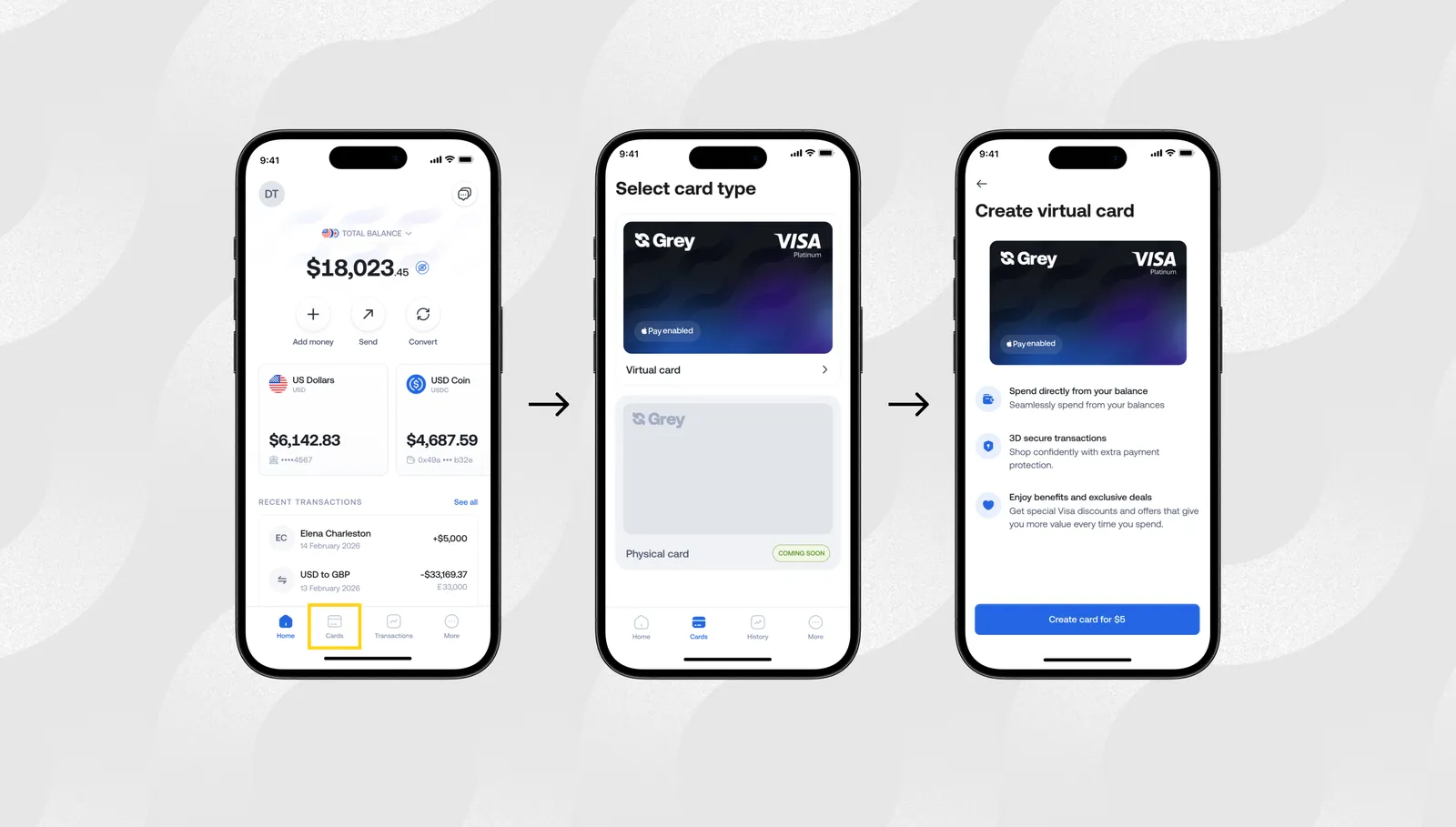
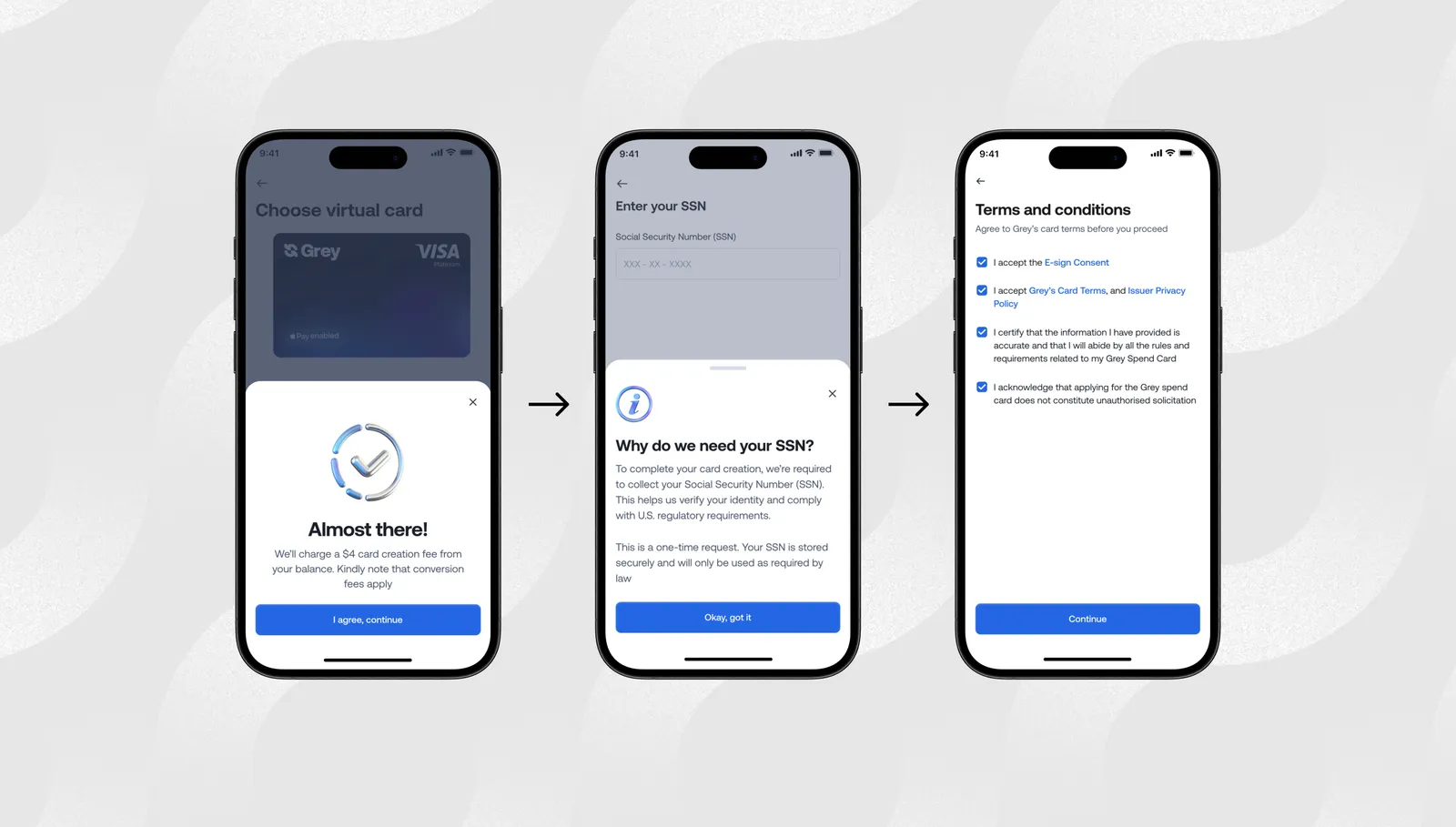
Grey users can create multiple cards for various reasons, freeze or delete a card instantly, and integrate with Apple Pay and Google Pay for contactless payment. Because the card is funded from a multi-currency balance, you control when you convert money into the currency you need to spend. A one-time card creation fee of $5 applies.
Other fintech options, such as Wise and Revolut, also offer virtual or disposable cards depending on the location and currency.
Here is a summary explaining when each option is the better fit:
Situation
Better choice
Why
You already have a Chase credit card and mostly shop in USD
Chase (or Click to Pay)
Simple, no new account needed
You bank with Capital One, Citi, or Amex and want merchant-locked numbers
Capital One Eno / Citi / Amex
Strong native controls inside your existing bank
You need to hold and spend in USD, EUR, or GBP
Grey
Multi-currency balances + virtual cards linked directly to those balances
You live outside the US or earn in foreign currencies
Grey or similar fintech
Avoids reliance on a US credit history or traditional bank account
Chase virtual card numbers (where available) remain convenient for existing customers who stay within the US banking system. Traditional bank alternatives work well if you prefer everything under one credit card relationship. Fintech solutions like Grey become a stronger fit when multi-currency flexibility, international online shopping, or the ability to spend from held foreign balances matter more than staying inside a single US credit product.
Get a Grey virtual card and manage international purchases without manual top-ups and currency conversion.
Frequently asked questions
Which Chase cards have virtual card numbers?
Chase Sapphire Preferred, Chase Sapphire Reserve, Chase Freedom Flex, Chase Freedom Unlimited, and selected Chase Ink Business cards currently support virtual card numbers. The easiest way to check is to open your card in the Chase mobile app and look for the "Virtual card number" option under Account services. If the option isn't there, your card isn't currently eligible.
Does the Chase virtual card number change?
Yes. Chase generates a new virtual card number each time you request one. The number is temporary and typically expires after a defined period or number of uses. This is a security feature: an expiring number limits how useful it is to anyone who obtains it without your consent.
Can I use a Chase virtual card abroad?
You can use a Chase virtual card number for purchases on foreign websites where you pay online. However, if the purchase is in a foreign currency, the same foreign transaction fees that apply to your physical Chase card also apply to the virtual number. Virtual card numbers do not remove foreign transaction fees.
Does a Chase virtual card work for subscriptions?
It depends on how the subscription platform handles card validation. Some subscription services accept tokenised numbers and can charge them repeatedly. Others require a long-term card on file and may have issues with numbers that expire. For subscriptions, check whether the virtual number is locked to a single transaction or can be used for recurring charges.
What is the best multi-currency alternative to a Chase virtual card?
For shoppers who purchase in multiple currencies or need a virtual card that works independently of an existing US bank account, the Grey Plus Card is a strong option. It is a virtual Visa card connected to USD, GBP, or EUR balances, with no foreign transaction fee for same-currency purchases, and it works in any browser on any device.
How do I get a Grey virtual card?
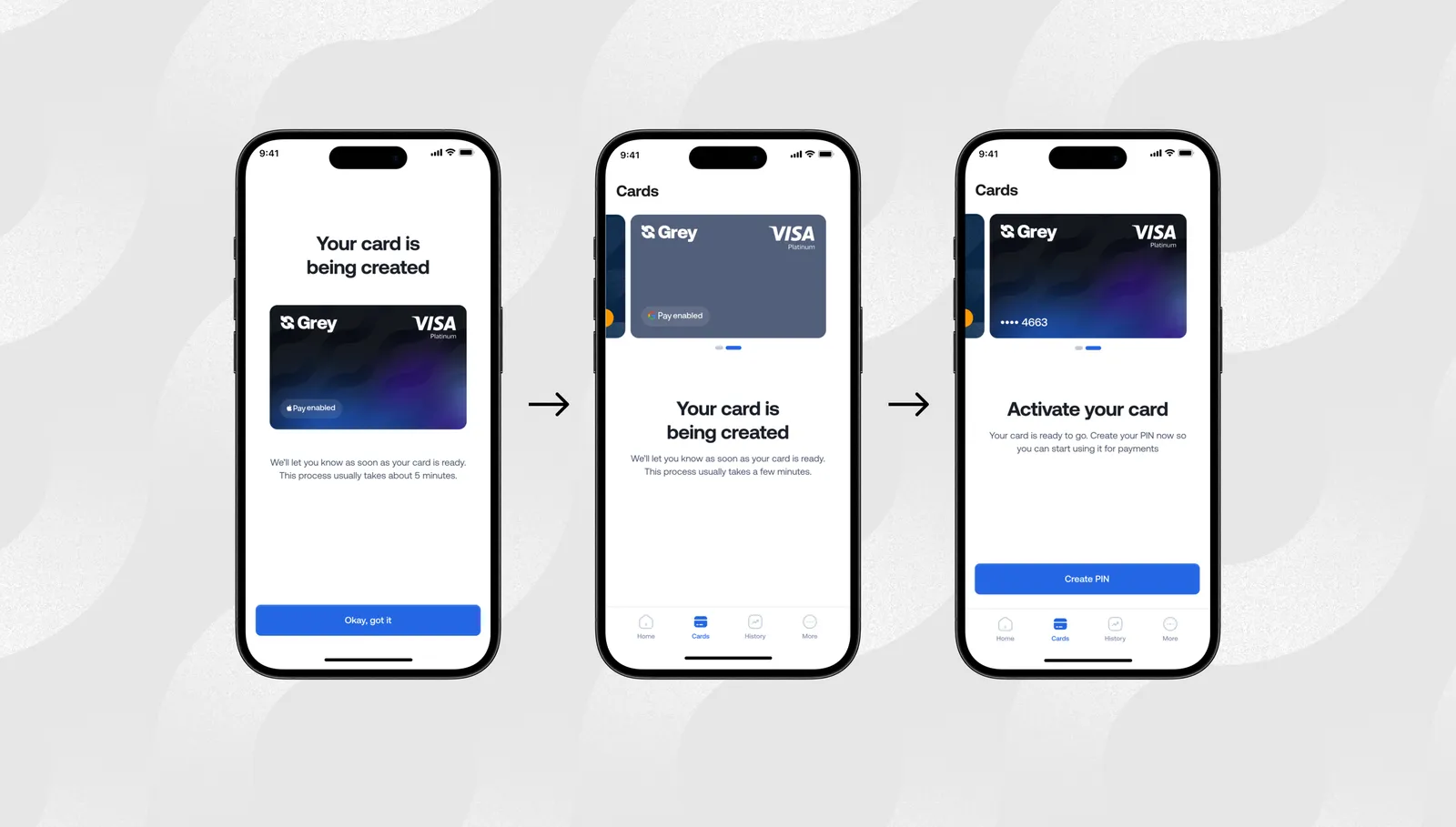
Sign up at grey.co and complete identity verification. Open a USD, GBP, or EUR account. Navigate to the Cards section and create the Grey virtual card. A one-time $5 creation fee applies. Card details are available immediately in the app and ready to enter at any online checkout.
I’ve always loved feeling independent, the kind of person who can move through the world without needing to stop and sort out a dozen little hassles. Maybe that’s why tapping my phone to pay has become one of my favourite tiny freedoms.
If you’re anything like me, you know those moments well. Rushing through an airport with no hands to spare. Grabbing breakfast from a food stall because you’re curious about how the locals eat. Signing up for an online tool at midnight because the timing just felt right.
That’s exactly why learning how to use Google Pay worldwide with your Grey virtual card makes such a difference. Once your card sits snugly inside Google Pay, every payment becomes smoother. No digging through bags, topping up a card before paying, and no declines. Just a quick tap and the quiet satisfaction of knowing you’ve sorted it.
And now that the Grey virtual card has officially landed, this is the perfect time to explore everything it can do to keep your days light, easy, and wonderfully yours.
Why the Grey virtual card works so effortlessly with Google Pay
If you’re looking for a simple, reliable way to use Google Pay worldwide, the Grey virtual card makes the process smoother than ever. With our upgraded virtual card experience now live, Google Pay becomes more than a convenient feature. It becomes the easiest way to spend your foreign currency and crypto balances across countries, platforms, and everyday transactions.
Here’s why using Google Pay with your Grey virtual card is such a seamless match:
One card, multiple balances
Your Grey virtual card connects directly to any balance you choose, including USD, GBP, EUR, or crypto like USDC, USDT, or BTC. No manual top-ups. No switching between wallets. Just direct, instant spending power everywhere Google Pay is accepted.
A smoother global experience
Many people switching to the Grey virtual card do so after dealing with cards that fail on international platforms. This upgraded virtual card was designed to remove that frustration. You get fewer random declines, clearer communication, and fast support whenever you need it, making global payments feel more predictable.
Contactless convenience, everywhere
When you combine Google Pay’s tap-to-pay simplicity with Grey’s global card functionality, you get fast, contactless payments across countries, currencies, and online merchants. Whether you’re shopping locally or paying for international services, everything works with a tap.
Stronger security
The Grey virtual card supports 3D Secure (3DS), giving you added protection during online and in-store transactions. It’s a safer way to shop, travel, and pay globally.
Who benefits most from using Google Pay with the Grey virtual card?
If you’ve been searching for a reliable virtual card that works with Google Pay worldwide, this duo is designed exactly for the way modern global citizens live, earn, and spend.
Digital nomads and travellers
Once your Grey virtual card is added to Google Pay, you can tap your way through airports, metros, cafés, supermarkets, and co-working spaces, anywhere contactless payments are accepted.
Crypto enthusiasts
If you hold or earn in crypto, Google Pay becomes your gateway to everyday fiat spending. Link your Grey virtual card to your crypto balances and pay like a local in any country.
Freelancers and remote workers
Whether you earn in USD, work with clients in Europe, or pay for tools hosted abroad, Google Pay + Grey card gives you a consistent and flexible way to manage global payments without failed transactions or confusing restrictions.
Small business owners
Running ads on Meta, TikTok, or X? Paying for global subscriptions and software? Your Grey virtual card helps every payment go through smoothly, without hidden fees or last-minute surprises.
How to create your Grey virtual card and add it to Google Pay
If you’re learning how to use Google Pay with your Grey virtual card, the setup takes just a few seconds:
Tap to create your Grey card in the app.
Follow the verification steps.
It usually takes a few hours for the card to be created.
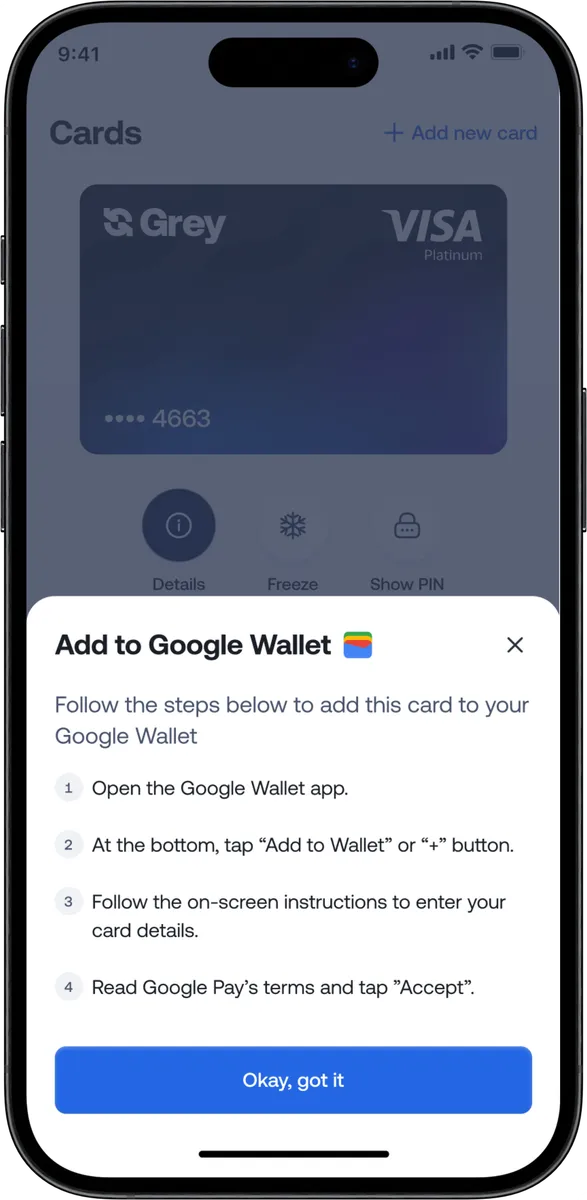
Once your Grey virtual card is ready, you can follow the steps to add it to Google Pay.
Once added, you can use Google Pay for contactless payments, online checkouts, in-app purchases, public transport, and global merchants that support Google Pay.
Where you can use Google Pay with your Grey virtual card worldwide
Google Pay works in dozens of countries and millions of merchant locations. With the Grey virtual card connected, you can:
Book international flights
Pay for Airbnb and travel bookings
Buy coffee and groceries in cities like Barcelona, Nairobi, Accra, Mexico City, or Bali
Subscribe to Amazon, Spotify, Canva, YouTube Premium, and more
Pay for ad platforms like Meta, TikTok, Google Ads, and X
Your Grey Visa card selects the right balance automatically, while Google Pay makes each payment instant and contactless.
Why this upgrade matters now
For years, users dealt with failed payments, poor international compatibility, and unclear card restrictions. The new Grey virtual card was built to fix these problems and make global payments through Google Pay easier than ever.
This upgrade helps you:
Spend globally with fewer limitations
Enjoy reliable virtual card functionality
Avoid unexpected card blocks or errors
Use foreign currency and crypto balances effortlessly
Make international purchases with more confidence
It’s all part of our goal to make international spending feel as easy as local shopping.
If you live or work globally, you deserve a payment setup that travels with you. Google Pay paired with the Grey virtual card removes friction from your everyday life so you can focus on what actually matters.
Everyone talks about the earning part. YouTube money, TikTok coins, Patreon memberships, Gumroad sales. Nobody talks about the part where Google asks for SWIFT details your GTBank account does not have, or TikTok wants a US routing number you have never seen before, or your Patreon balance just sits there because none of the withdrawal options seem to work from Nigeria.
That gap between earning USD and actually holding USD is where Nigerian creators lose money, lose time, and sometimes lose entire payouts. Each platform has its own payout method, thresholds, and account requirements. YouTube pays via wire transfer. TikTok pays via ACH. Patreon offers three different options. Affiliate programmes vary by network. What works for one person does not necessarily work for another, and the wrong setup can lead to delayed payments, rejected transfers, or funds stuck in a dashboard you cannot access.
This guide covers the full payment chain for Nigerian creators earning in USD: how each major platform actually pays out and what account details it requires, which account options exist and what they cost, how to manage your dollars once they arrive, and what the 2026 Nigeria Tax Act means for your creator income. If you are earning from one platform or six, the mechanics start here.
How creator platforms actually pay you
Before choosing a payment account, you need to understand how each platform handles payouts. The payout method determines which account you need, so getting this right first saves you from signing up for one that does not work with your primary income source.
YouTube pays through Google AdSense, which offers two payout methods for Nigerian creators: wire transfer to a bank account or Western Union. The minimum payout threshold is $100. Once you reach it, AdSense processes payment around the 21st of the following month. Wire transfers require a bank account that can receive international SWIFT payments in USD. For Nigerian creators, this means either a domiciliary account at a commercial bank or a virtual USD account from a fintech provider. AdSense does not support Payoneer or PayPal as direct payout methods. The wire transfer takes 3 to 7 business days to arrive after AdSense initiates it. Google deducts a small wire fee (typically around $5) from each payout. If you choose Western Union, you pick up cash at a local branch, but the limit is $5,000 per transaction, and you have to visit in person each time, which is impractical for a regular monthly income.
TikTok Creator Rewards
TikTok requires a US bank account or PayPal to receive Creator Rewards payouts. The minimum withdrawal is $10, and payments are processed within 15 business days. This is the platform that causes the most confusion for Nigerian creators because a regular Nigerian bank account does not qualify. You need a virtual USD account that provides a US routing number and account number (ACH details). Several fintech platforms offer this. When you enter your payout details in TikTok, use the ACH option and input the routing and account numbers from your virtual USD account exactly as they appear in your provider's dashboard. Name mismatches between your TikTok profile and your bank account are the most common reason payouts fail, so confirm both match before submitting.
Instagram and Facebook (Meta)
Meta pays creators through in-stream ads, bonuses, and subscriptions. Payouts go through Meta's payment settings, which accept a US bank account (ACH), PayPal, or a direct deposit to a supported bank. For Nigerian creators, the most reliable method is adding your virtual USD account's ACH details under Payout Settings. The minimum payout is $100, and Meta pays monthly. Processing typically takes 3 to 5 business days after the payout date.
Patreon
Patreon processes payouts on the 1st to 5th of each month and offers several options: direct deposit (ACH to a US bank), PayPal, or Payoneer. Nigerian creators can use either a virtual USD account (via ACH) or Payoneer. Patreon takes a platform fee of 5% to 12%, depending on your plan, plus payment processing fees of around 2.9% + $0.30 per transaction. If you use Payoneer as your payout method, Payoneer charges its own withdrawal and conversion fees on top of the fees it charges. The direct deposit option to a virtual USD account bypasses the Payoneer layer entirely, typically saving 1% to 2% on each payout.
Gumroad pays via direct deposit (ACH to a US bank) or PayPal. Gumroad's platform fee is 10% of each sale. Payouts are processed every Friday for balances above $10. Selar, which is popular among Nigerian creators, pays out in both USD and naira. For USD payouts, Selar transfers to your bank account or virtual USD account. Selar's fee is 3.5% to 5% per transaction, depending on payment method. If you sell digital products through Selar, you can receive naira directly into your local bank account, avoiding conversion entirely for domestic sales. For international sales, the USD payout to a virtual account gives you control over when and at what rate you convert.
Affiliate programmes
Amazon Associates pays via direct deposit (ACH), Amazon gift card, or cheque. The minimum payout for direct deposit is $10. Impact, ShareASale, and CJ Affiliate also pay via ACH or PayPal. Commission rates vary widely, from 1% to 50%, depending on the programme and product category. Amazon Associates pays at the end of the month following the month the commission was earned, with a 60-day holding period. Most affiliate programmes process payouts monthly. For a detailed walkthrough of receiving affiliate earnings in Nigeria, Grey has a dedicated guide to affiliate marketing payouts that covers programme-specific setup.
What account do you need to receive creator payouts
Almost every platform described above requires either a US bank account (ACH or Fedwire details) or a PayPal account. A regular Nigerian bank account, whether it is a savings account at GTBank, Access Bank, or Zenith, does not provide a US routing number and account number. A domiciliary account at a Nigerian bank can receive SWIFT wire transfers (which works for YouTube AdSense), but it does not provide the ACH or Fedwire details that TikTok, Meta, Patreon, and Gumroad require. This is why most Nigerian creators end up using a virtual USD account from a fintech provider.
A virtual USD account gives you a US-based routing number and account number that functions like a local US bank account from the platform's perspective. When TikTok, Patreon, or Gumroad sends your payout via ACH or Fedwire, it arrives in your virtual account just as it would arrive in a Chase or Bank of America account. You then convert to naira and withdraw to your Nigerian bank, or hold the USD and spend it directly using a virtual dollar card.
For a step-by-step walkthrough of setting up your USD account for creator payouts specifically, Grey published a detailed setup guide for Nigerian creators that covers the exact process for each platform.
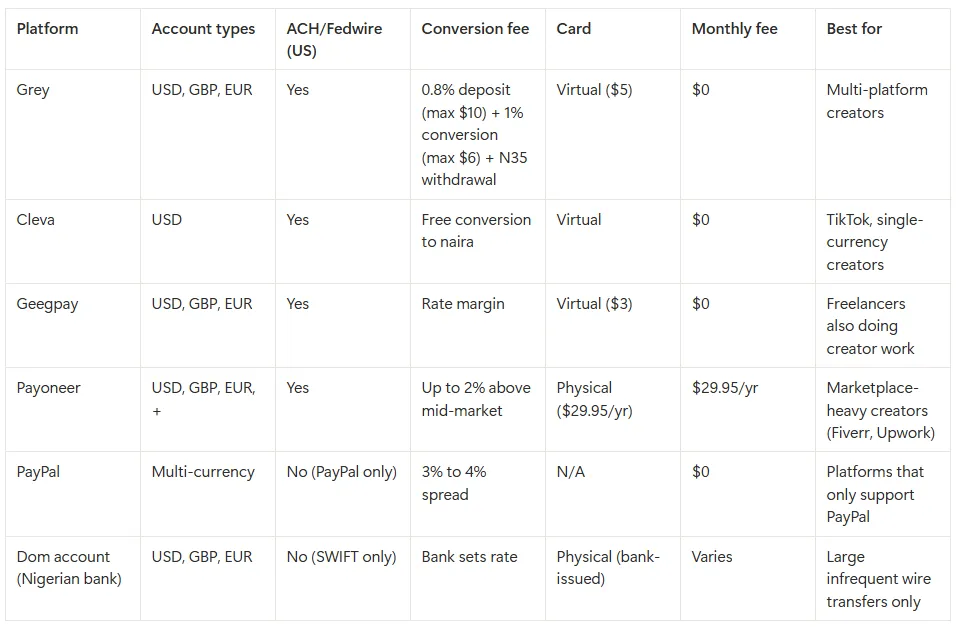
How the main account options compare
The choice depends on where your income comes from. If you earn primarily from YouTube and only need to receive monthly AdSense wire transfers, a domiciliary account works, though the setup requires a branch visit, paperwork, and sometimes a minimum balance. If you earn from TikTok, Patreon, Meta, Gumroad, or affiliate programmes, you need ACH or Fedwire capability, which means a virtual USD account. If you earn from multiple platforms (which most established creators do), a multi-currency virtual account covers the widest range of payout methods from a single provider.
Managing your USD once it arrives
Getting paid is step one. What you do with the money after it lands in your account determines how much of it you actually keep. Nigerian creators who earn in USD have three broad options: convert to naira immediately, hold in USD and convert strategically, or spend directly in USD. Each has trade-offs.
Converting immediately is the simplest approach, but it locks you into the exchange rate available that day. If the rate moves in your favour a week later, you have already lost the upside. Holding in USD gives you control over timing, which matters when the naira is volatile. If your creator expenses (subscriptions, tools, ad spend, hosting) are priced in USD, holding and spending directly avoids conversion entirely. A virtual dollar card lets you pay for Adobe Creative Cloud, Canva Pro, Google Workspace, domain registrations, and ad campaigns directly from your USD balance without converting to naira first.
For a deeper look at conversion timing, fee reduction, and practical strategies for Nigerian remote workers managing foreign currency, Grey's guide to managing foreign currency earnings covers the specifics.
Invoicing direct brand deals and sponsorships
Platform payouts are automatic, but brand deals and sponsorships require you to invoice the client and provide payment details. This is where many Nigerian creators lose money or create delays. A brand in the US will expect to pay via ACH or Fedwire to a routing number and account number. A brand in the UK will expect to pay via FPS or BACS to a sort code and account number. A brand in Europe will expect to pay via SEPA to an IBAN. If you send your Nigerian bank's naira account details instead, the payment may be rejected, delayed, or converted at a poor rate by an intermediary bank.
The cleaner approach is to include the correct Grey account details on your invoice based on where the client is paying from: your USD routing number and account number for US clients (they pay a domestic ACH or Fedwire transfer), your GBP sort code and account number for UK clients (they pay via FPS or BACS), or your EUR IBAN for European clients (they pay via SEPA). In each case, the client makes what appears to be a local transfer on their end, which arrives faster and avoids SWIFT intermediary fees. On the invoice itself, state your preferred payment currency, include a scope summary matching any purchase order the brand issued, and specify payment terms (Net 14 or Net 21 for new clients; Net 30 for established relationships). For detailed guidance on structuring invoices and choosing tools, Grey has a comparison of invoicing tools for freelancers that covers Grey Invoice, Wave, FreshBooks, Zoho, and others.
What the 2026 tax rules mean for Nigerian creators earning in USD
This is the section that every other creator payment guide skips. The 2026 Nigeria Tax Act changed how foreign income is treated for Nigerian tax residents, and if you earn from YouTube, TikTok, Patreon, or any other international platform, it applies to you.
Under the reformed rules, if you spend 183 days or more in Nigeria over a 12-month period (which most Nigerian-based creators do), you are a Nigerian tax resident, and your worldwide income may be taxable. This includes platform payouts from YouTube AdSense, TikTok Creator Rewards, Patreon membership income, Gumroad sales, affiliate commissions, and brand deal payments. Personal remittances (money sent to you as a gift or family support) are not taxable, but creator income is classified as earned income from a trade or vocation.
The practical details: the first N800,000 of annual income is tax-free. Above that threshold, progressive tax bands apply, starting at 15% and increasing to 25% at higher income levels. Foreign income must be converted to naira at the CBN official rate on the date you receive the payment, not the rate you actually converted at. You are required to register for a Tax Identification Number (TIN) and file your annual return by March 31. Penalties for non-registration start at N50,000 for the first month, and penalties for non-filing start at N100,000 for the first month.
If you also pay tax in another country on the same income (for example, US withholding tax deducted from your YouTube AdSense earnings), Nigeria has double taxation agreements with several countries, including the UK, Canada, and South Africa. You can claim a credit for tax paid abroad to avoid being taxed twice on the same income.
Deductible expenses include tools and software you use for content creation (Adobe, Canva, cameras, microphones, lighting), internet costs, workspace expenses, and platform fees. Keeping records of these expenses reduces your taxable income.
This is general guidance, not professional tax advice. The 2026 reforms are new and implementation details are still being clarified. Consult a certified tax professional for your specific situation.
Grey provides virtual USD, GBP, and EUR accounts with the specific details each platform and payment method requires: a US routing number and account number (for ACH or Fedwire) on the USD account, a sort code and account number on the GBP account (for FPS, BACS, or CHAPS), and an IBAN and SWIFT/BIC code on the EUR account (for SEPA transfers). The setup is fully digital: download the Grey app or sign up at grey.co, complete KYC verification with your Nigerian ID (typically takes a few minutes), and your account details are available immediately. You then add the relevant details as your payout method on each platform.
When payouts arrive via ACH or Fedwire, Grey charges a 0.8% deposit fee (minimum $2, maximum $10). The funds then sit in your Grey USD wallet. You can convert to naira and withdraw to any Nigerian bank account (GTBank, Access, Zenith, UBA, First Bank, and others are all supported), or hold in USD if you prefer to convert later. Converting USD to naira incurs a 1% fee capped at $6 per transaction, and the conversion rate is displayed before you confirm, so you see exactly what you will receive. Withdrawing naira to your bank account costs a flat N35 and arrives instantly. Grey also offers virtual dollar cards for spending directly in USD on subscriptions, tools, and ad platforms without converting to naira first. The card costs $5 to create with no monthly maintenance fee, and it supports Apple Pay and Google Pay in supported regions. Transactions on USD-priced sites incur no additional fee; purchases on non-USD websites (EUR, GBP) carry a 2% + $0.50 cross-border fee.
If you invoice brands or clients directly, Grey's built-in invoicing tool lets you generate and send invoices linked to your Grey account. The client pays your Grey USD account details, and the funds arrive without an intermediary.
Grey charges a 0.8% fee on deposits (minimum $2, maximum $10), a 1% conversion fee (capped at $6), and a withdrawal fee that varies by currency (N35 for naira to a Nigerian bank account). Exchange rates on Grey are variable and include a margin over the mid-market rate. Cross-border card transactions on non-USD websites incur a 2% + $0.50 fee. Always review fees and the conversion rate before confirming a transaction.
Frequently asked questions
Can I receive YouTube AdSense payments directly to my Nigerian bank account?
Only if your bank account can receive international SWIFT wire transfers in USD, which typically means a domiciliary account at a commercial bank like GTBank, Access, or Zenith. A regular naira savings or current account will not work. An alternative is using a virtual USD account that supports incoming wire transfers, which avoids the branch visit and paperwork required for a dom account. Google deducts a small wire fee (around $5) from each AdSense payout regardless of which account type you use.
How do I set up TikTok payouts without a US bank account?
TikTok requires ACH bank details (a US routing number and account number). You can get these from a virtual USD account provider like Grey, Cleva, or Geegpay. Once you have your ACH details, enter them in TikTok's payout settings. Make sure the name on your TikTok account matches the name on your virtual USD account exactly, as mismatches cause payouts to fail. Processing typically takes up to 15 business days after you request a withdrawal.
Do Nigerian creators have to pay tax on USD income from platforms?
Under the 2026 Nigeria Tax Act, if you spend 183 days or more in Nigeria in a 12-month period, your worldwide income (including creator earnings from international platforms) is taxable. The first N800,000 annually is tax-free. Above that, progressive bands apply from 15% to 25%. You need a TIN and must file by March 31 each year. This is general guidance; consult a tax professional for your specific situation.
Which is cheaper for regular creator payouts: Payoneer or a virtual USD account?
For creators receiving monthly platform payouts, a virtual USD account is typically cheaper. Payoneer charges an annual fee of $29.95 and applies conversion spreads of up to 2% above mid-market when you withdraw to naira. Grey charges no annual fee; the costs are a 0.8% deposit fee (capped at $10) when your payout arrives, a 1% conversion fee (capped at $6) when you convert USD to naira, and a flat N35 for the naira withdrawal. On a $500 monthly payout, Grey’s total cost is roughly $10 (deposit) + $5 (conversion) + N35, compared to Payoneer’s $2.50 annual fee equivalent plus up to $10 in conversion spread. Run the numbers for your typical payout amount using Grey’s pricing calculator before committing.
Can I use the same USD account for YouTube, TikTok, and Patreon?
Yes. Grey's USD account provides both ACH and Fedwire routing details, which covers YouTube (wire transfer), TikTok, Meta, Patreon, and Gumroad (ACH direct deposit). If you also receive payments from UK or European clients, your Grey GBP account has a sort code and account number for FPS/BACS payments, and your EUR account has an IBAN for SEPA transfers. All payouts across these currencies arrive in one Grey account.
Should I convert my USD to naira immediately or hold it?
That depends on your expenses. If most of your spending is in naira (rent, food, transport), converting when the rate is favourable makes sense. If you have significant USD expenses (software subscriptions, ad spend, online tools, domain renewals), holding in USD and paying directly with a virtual dollar card avoids double conversion. Many Nigerian creators use a hybrid approach: convert enough naira for monthly living expenses and keep the rest in USD for business costs.
Ready to set up your creator payout account? Sign up at grey.co or download the Grey app at https://onelink.to/grey to create your virtual USD account and start receiving platform payouts.
A client in the US pays you $500 through PayPal for a design project. You log in, see the balance, and feel good for about three seconds. Then you try to withdraw it to your Ghanaian bank account. PayPal converts your USD to cedis at its own exchange rate, which includes a 3% to 4% spread above the mid-market rate. By the time the money lands in your account, you have lost $15 to $20 on that single transaction, and that is before your bank applies its own charges on the incoming transfer.
Over a year of regular freelance income, those conversion costs add up to hundreds of dollars. The frustration is not that PayPal is a bad platform. It is reliable, widely accepted, and many international clients prefer it. The problem is that PayPal’s default withdrawal path is one of the most expensive ways to convert USD to cedis. There are better routes, and this guide walks through each of them with real numbers so you can pick the one that makes sense for your situation.
Before looking at alternatives, it is worth understanding exactly where the money goes when you withdraw from PayPal in Ghana. There are typically two layers of cost.
PayPal’s conversion spread: When you withdraw your USD balance to a Ghanaian bank account, PayPal converts the currency using its own exchange rate, which includes a spread of approximately 3% to 4% above the wholesale mid-market rate. On a $1,000 withdrawal, that means $30 to $40 in conversion fees alone. PayPal does not display this as a separate fee; it is baked into the rate you see at the time of withdrawal, which makes it easy to overlook.
Bank receiving charges: Your Ghanaian bank may also apply incoming transfer fees or its own conversion margin on international transfers. These vary by bank and account type, but can add another 1% to 2% to the total cost.
Combined, a freelancer withdrawing $1,000 from PayPal directly to a Ghanaian bank account might lose $40 to $60 in total conversion and transfer costs. That is 4% to 6% of the payment. For someone earning $2,000 to $3,000 a month, the annual cost ranges from $960 to $2,160.
The good news is that none of this is inevitable. The methods below reduce or restructure these costs so you keep more of what you earn.
Xoom is a money transfer service owned by PayPal that lets you send funds from your PayPal balance directly to a Ghanaian bank account or mobile money wallet (MTN MoMo, Vodafone Cash, AirtelTigo Money). Because Xoom is integrated with PayPal, you do not need to set up a separate account; you can initiate the transfer directly within PayPal.
The conversion rate Xoom offers is typically better than PayPal’s standard withdrawal rate, though it still includes a margin above the mid-market rate. Transfer fees vary by amount and delivery method, but for PayPal-funded transfers to Ghana, they are often waived or minimal. Delivery to bank accounts takes 1 to 3 business days; mobile money transfers can arrive within minutes.
Best for: freelancers who want the simplest path from PayPal to cedis without setting up additional accounts. It is not the cheapest option, but it is the most straightforward.
Limitation: you still convert USD to GHS through PayPal/Xoom’s rate, so you have limited control over timing. If the rate is unfavourable on the day you need to withdraw, you cannot hold your USD and wait for a better rate.
Withdraw to a multi-currency USD account first
This is the approach that gives you the most control over your money, and it is the one that typically results in the lowest total cost. Instead of converting your PayPal balance directly to cedis, you withdraw it in USD to a multi-currency account with a provider like Grey. The key difference is that the money arrives in your account still in dollars. You then choose when to convert to cedis, at a rate you can see and confirm before the conversion happens.
The process works like this. You link your Grey USD account details to PayPal as a bank account (Grey provides a US routing number and account number). PayPal sends a small verification deposit, you confirm it, and the link is established. After that, you can withdraw your PayPal balance to Grey in USD with no conversion at the PayPal stage. Once the dollars are in your Grey wallet, you convert to cedis when the rate suits you and withdraw to your Ghanaian bank account or mobile money.
Best for: freelancers who earn regularly in USD and want to control when they convert. This method separates the act of withdrawing from PayPal from the conversion to cedis, so you are not forced to accept whatever rate PayPal offers on the day you need cash.
Limitation: requires setting up a Grey account and linking it to PayPal, which takes a few minutes but is an extra step compared to Xoom.
First National Bank Ghana offers a Foreign Currency Account (FCA) that lets you hold USD in a traditional bank account. If you receive regular payments in dollars, an FNB CFC account means the money lands in your account at the original USD value rather than being auto-converted to cedis. You then convert on your own schedule at the bank’s rate.
The advantage is that your earnings are protected from conversion until you are ready. The disadvantage is that FNB’s conversion rate still includes a bank margin, and the process of opening and maintaining a CFC account involves branch visits, documentation, and potentially minimum balance requirements. It is a traditional banking solution in a world where fintech providers have made the same capability available from a phone app.
Best for: freelancers who prefer a traditional bank and want to hold USD locally. Useful if you also need a bank statement showing USD holdings for business or visa purposes.
Limitation: bank conversion rates are often less favourable than those of fintech providers, and the account setup process is slower. Monthly maintenance fees may apply.
Spend USD directly with a virtual card
If some of your expenses are priced in USD (software subscriptions, online tools, advertising spend, domain registrations), you do not need to convert to cedis at all. You can fund a virtual dollar card from your PayPal balance (via your Grey USD account) and spend directly in dollars. This eliminates the conversion cost entirely for those transactions.
For example, if you earn $500 from a client and $150 of that goes to Adobe, Figma, and hosting costs, you can pay those directly from your USD balance using a Grey virtual card on the Visa network. Only the remaining $350 needs to be converted to cedis. On the portion you spend in USD, you save the full 3% to 6% conversion cost.
Best for: freelancers and creators whose expenses include USD-priced tools and services. The more of your spending that stays in USD, the less you lose to conversion.
Withdrawal methods compared
How to withdraw PayPal funds using a Grey account
Here is the step-by-step process for linking PayPal to Grey and withdrawing your balance in USD.
Step 1: Create your Grey account. Download the Grey app or sign up at grey.co. Select Ghana as your country of residence and complete KYC verification using your Ghana Card or passport. This takes a few minutes.
Step 2: Get your USD account details. Once verified, go to your account section in the Grey app. You will see USD, EUR, and GBP account details, including US routing numbers and account numbers. These are the details you will link to PayPal.
Step 3: Link Grey to PayPal. Log in to PayPal, go to the Wallet section, and select “Link a Bank Account.” Enter the routing number and account number from your Grey USD account. PayPal will send two small verification deposits to your Grey account (typically a few cents each). Check your Grey account for the deposits, then go back to PayPal and confirm the amounts to complete the link.
Step 4: Withdraw your PayPal balance to Grey. Once the link is verified, go to your PayPal balance, select “Transfer to bank,” and choose your Grey account. The funds transfer in USD, so PayPal does not apply its conversion spread. The transfer typically takes 1 to 3 business days.
Step 5: Convert and withdraw to your Ghanaian bank or mobile money. When the USD arrives in your Grey wallet, you can convert to cedis at a time that works for you. The exchange rate is shown before you confirm, so you know exactly what you will receive. Withdraw to your Ghanaian bank account (Ecobank, GCB, Stanbic, Absa, CalBank, Fidelity, and others) or to mobile money.
You can also skip the conversion step for any expenses priced in USD by using your Grey virtual card to pay directly from your dollar balance.
Exchange rates on Grey are variable and include a margin over the mid-market rate. Grey does not charge transfer fees; the cost is reflected in the exchange rate. Always review the rate before confirming a conversion.
Tips for getting a better rate on your withdrawals
Batch your withdrawals. If you receive multiple small PayPal payments throughout the month, let them accumulate and withdraw once. This reduces the number of times you pay transfer fees on the receiving end, and it lets you pick a day when the USD/GHS rate is favourable rather than converting every time a payment arrives.
Keep what you can in USD. If you pay for Canva, ChatGPT, hosting, domains, or any other tool priced in dollars, spend from your USD balance with a virtual card instead of converting to cedis and paying with a local card. Every dollar you spend in USD is a dollar you do not lose 3% to 6% on in conversion.
Check the rate before you convert. With Grey, the exchange rate is displayed before you confirm. If the rate is not where you want it, you can wait. This is the core advantage of holding USD in a multi-currency account rather than letting PayPal auto-convert at the time of withdrawal.
Can I withdraw PayPal funds to mobile money in Ghana?
Not directly from PayPal, but you can through Xoom (PayPal’s transfer service), which supports MTN MoMo, Vodafone Cash, and AirtelTigo Money in Ghana. Alternatively, you can withdraw to a Grey account in USD, convert to cedis, and then transfer the funds to your mobile money wallet via Grey. The Xoom route is faster for small amounts; the Grey route gives you more control over the conversion rate.
How much does PayPal charge to withdraw to a Ghanaian bank?
PayPal does not charge a flat withdrawal fee for standard bank transfers in most markets, but it applies a currency conversion spread of approximately 3% to 4% above the mid-market rate when converting USD to GHS. On a $1,000 withdrawal, that conversion cost is roughly $30 to $40. Your Ghanaian bank may also charge fees for incoming transfers, which vary by bank.
Is it legal to use a multi-currency account to receive PayPal funds in Ghana?
Yes. Linking a US-denominated account to your PayPal is a standard feature of the platform. Grey provides legitimate US bank details (routing and account numbers) through its licensed banking partners. The funds move through standard banking rails. There is nothing unusual or restricted about this process.
How long does it take to withdraw from PayPal to Grey?
Standard PayPal bank transfers to a linked US account typically take 1 to 3 business days. Once the USD is in your Grey wallet, conversion to cedis and withdrawal to your Ghanaian bank account typically takes 1 to 2 additional business days. Mobile money transfers from Grey are generally faster.
Can I hold my PayPal earnings in USD and convert later?
Not within PayPal itself for Ghanaian accounts, because PayPal auto-converts to your default currency on withdrawal. However, if you withdraw to a Grey USD account, the funds remain in dollars until you convert. This lets you time your conversion for when the USD/GHS rate is favourable, which can make a meaningful difference over the course of a year.
Does Grey support withdrawals to all Ghanaian banks?
Grey supports local fiat withdrawal to Ghanaian bank accounts. Major banks, including Ecobank, GCB Bank, Stanbic, Absa, CalBank, and Fidelity Bank, are supported. Grey also supports mobile money withdrawals. Check the Grey app for the full list of supported banks and mobile money providers in Ghana.
Ready to keep more of your PayPal earnings? Sign up at grey.co or download the Grey app to get your USD account details and link to PayPal in minutes.
Upwork is one of the world’s leading freelance platforms, connecting professionals with clients across countries and industries. From designers and writers to developers and consultants, freelancers use Upwork to find steady work, build lasting client relationships, and earn in strong currencies. The platform is easy to register on, simple to navigate, and trusted by businesses seeking reliable talent, making it a top choice for freelancers at every stage.
If you’re already on Upwork, you’ve likely noticed that fees can quietly reduce your earnings. This blog shows simple ways to receive your payments without losing money to unnecessary fees along the way.
Upwork has become a go-to platform for freelancers worldwide, making it easier to find clients, get paid securely, and build a professional reputation without the usual hassles.
Global clients
Imagine landing clients from New York, London, or Tokyo without leaving your home. Upwork opens doors to global businesses, giving freelancers exposure they couldn’t easily access otherwise. This means more opportunities, diverse projects, and higher-paying gigs. Freelancers can work across time zones, explore different industries, and grow an international client base, all from a single platform.
Security
Freelancers often worry about getting paid on time. Upwork removes that stress by holding client funds in escrow before work begins. Once the project is completed and approved, the money is released. This system protects both sides, ensuring clients get quality work while freelancers receive guaranteed payments, creating trust and a safer environment for online collaboration worldwide.
Easy project access
Finding projects can be overwhelming, but Upwork simplifies the process. Freelancers can browse opportunities tailored to their skills, submit proposals, and start working without endless outreach. By reducing the need for cold pitching, Upwork allows professionals to focus on work they excel at, turning the platform into a curated marketplace where opportunity meets preparation.
Inbuilt invoicing
Managing invoices and payments can slow freelancers down, but Upwork handles this automatically. Every completed project generates invoices, tracks payments, and ensures timely delivery to your account. Freelancers don’t have to worry about chasing clients or missing deadlines, allowing them to stay organised, professional, and focused entirely on delivering high-quality work to their global clients.
Your Upwork profile tells a story of experience, reliability, and skill. Ratings, reviews, and badges make it easy for clients to trust you. Over time, freelancers with strong reputations attract higher-paying projects, repeat clients, and long-term contracts. This built-in credibility transforms your profile into a marketing tool, helping your freelance career grow steadily and consistently across international markets.
Best methods to receive Upwork payment from clients
Getting paid on Upwork should be simple, but choosing the right method can make a big difference. Here’s a breakdown of the best ways to receive your money and make the most of your earnings.
Direct to local bank (Outside U.S.)
Upwork lets you send your earnings directly to your local bank if you live outside the U.S. For just $0.99 per transfer, your dollars are converted to local currency and deposited straight into your account. Many freelancers prefer this because it’s straightforward, avoids extra steps, and ensures your Upwork payments land safely where you can use them immediately.
Instant pay (U.S. only)
If you’re in the U.S., Upwork’s Instant Pay is perfect for when you need funds quickly. By connecting your debit card, you can transfer earnings for $2 per transaction, and the money appears instantly. This is ideal for freelancers who want to access their Upwork payments immediately without waiting for standard processing times, keeping cash flow smooth and predictable.
PayPal
Upwork integrates seamlessly with PayPal, making it a popular option for freelancers worldwide. Your payments move quickly from Upwork into your PayPal wallet, giving you flexibility to hold, spend, or transfer the money to your bank. For many, this method is convenient and familiar, especially if you already use PayPal for online purchases or other freelance work outside of Upwork.
Payoneer
Freelancers using Upwork can link Payoneer to receive payments in multiple currencies. This is especially useful if you have clients in different countries and want to manage your earnings in one place. Once received, you can withdraw to your local bank or card, making Payoneer a flexible and reliable way to handle your Upwork funds across borders.
Grey
Grey works directly with your Upwork account to make receiving payments seamless. Your earnings arrive in USD, and you can convert them to your local currency at competitive rates. With fast transfers and multi-currency support, Grey ensures your Upwork income reaches you safely and efficiently, giving freelancers full control over their money every step of the way.
Grey gives you US, UK, and EU bank accounts, so you can receive payments from Upwork without losing fees. Here’s how to get started:
Set up Grey: Create and verify your account on the Grey app or website. Once done, you’ll have access to multicurrency accounts ready to receive international payments.
Get your bank details: In the Grey app, select the currency account you want to use, like USD. You’ll see your account number and ACH routing number, this is what Upwork needs to send your funds.
Link to Upwork: On Upwork, go to Settings > Get Paid > Add Method. This is where your Grey account becomes your payment bridge.
Select payment method: Choose “Direct to U.S. Bank” (or the relevant currency for GBP/EUR). This tells Upwork exactly where to send your earnings.
Enter details: Copy the account number and routing information from Grey into Upwork. Double-check each number to avoid delays.
Verify your name: Ensure the name on your Grey account matches your Upwork profile. A mismatch can cause holds or delays in receiving your money.
LDMAG1
Freelancers on Upwork want to receive their funds without losing a dime, because nothing beats getting paid in full when clients settle up. Grey makes this possible, giving you multi-currency accounts, zero hidden charges, and a simple way to transfer your earnings to your local currency. Ready to take full control of your Upwork payments? Sign up on Grey today
Last month, my friend called me in a panic. He’d just launched a big Meta Ads campaign. He’d spent days tweaking it, and right in the middle of a strong performance spike, the worst thing happened. His payment failed.
Meta paused the entire campaign, and he lost momentum, leads, and a potential client renewal. All because his bank randomly declined an international payment at 2 am.
If you’ve ever run ads before, you know this story almost too well.
There are a few things a paid ads manager dislikes more than payments disrupting their ads. Even for creators, freelancers, and small businesses who depend on continuous campaigns, this is annoying and expensive.
This is exactly where the Grey card becomes a practical lifesaver, and I’ll explain here.
Why paying for ads can be difficult sometimes
People don’t always talk about it, but most ad buyers run into the same problems:
1. International cards get declined
Many local bank cards struggle with platforms like Google Ads or Facebook because they’re billed in USD or EUR, depending on your country.
2. Currency headaches
If you earn in your local currency, say naira, but pay for ads in dollars, fees and conversion delays can throw off your budget.
3. Too many campaigns, one payment method
Freelancers running multiple client campaigns often use a single card, which can become a budgeting nightmare.
4. Ad platforms are strict
If your payment fails, the platform pauses your campaign immediately. You lose reach, data, and momentum.
The Grey Visa card was made to solve these exact pain points.
How your Grey helps you run ads without stress
Spend directly from your available balances
Your Grey card automatically pulls funds from your available accounts in the order USD → USDC → the next highest currency, eliminating the need for manual top-ups or wallet selection.
For example, if an ad platform charges $50, the payment is automatically deducted from the available balance, ensuring campaigns run uninterrupted.
Supports Apple Pay and Google Pay
For people who prefer not typing their card details into every ad account, this is a blessing. Just tap, approve, and your campaign goes live.
Create multiple cards to stay organised
You can create separate cards for:
Google Ads
Meta Ads
TikTok
LinkedIn
Client-specific campaigns
Multiple cards now still work seamlessly from the same unified wallet structure, so you don’t have to worry about linking different currencies or crypto separately.
This makes reconciliation significantly easier and provides peace of mind if one card needs to be frozen or replaced.
Instant freeze/unfreeze and spending limits
If you want to pause a campaign, you can freeze the card without accessing the ad platform. To control costs, you can simply set a monthly limit.
LDMAG1
How to start paying for ads with your Grey card
1. Get your Grey card
You can sign up on Grey, go to the cards section and create your card. This will cost $5.
2. Add it to your ad account
Link it to Google Ads, Meta, TikTok, LinkedIn or wherever you run campaigns.
3. Set a spending limit
This helps with client budgets, personal campaigns, or one-off experiments.
4. Track your payments in the Grey app
Every charge, every retry, every refund is neatly organised right on the app.
Tips to run ads more smoothly with Grey
Use separate cards for each client or campaign category.
Freeze cards to instantly pause campaigns when needed.
Add your card to Apple Pay or Google Pay for fast approvals.
Your ads deserve stability
Running ads is stressful enough. You shouldn’t also have to worry about whether your card will work when Meta tries to charge you at dawn.
If you’re ready for smoother campaigns, fewer declines, and easier budgeting, you can create your Grey Visa card and set up your first ad payment in minutes.
A phone upgrade is usually a straightforward process, until the SIM becomes part of the equation. Let's say the new device supports an eSIM, the number transfers successfully, and everything seems ready to go, then comes a trip abroad, a change of network or an older mobile phone that only accepts a physical SIM card.
At that point, the question is simple: what happens to the eSIM?
Unlike changing a setting on the phone, moving from an eSIM back to a physical SIM is handled by the mobile carrier. The network provider needs to deactivate the existing eSIM and issue a replacement physical SIM linked to the same mobile number. The exact process can vary, but most carriers allow the request through an app, over the phone or at a physical store.
The switch itself is usually straightforward once the replacement SIM arrives. After activation, the physical SIM takes over the number and the old eSIM profile can be removed from the device.
Yes, you can switch from an eSIM to a physical SIM through your mobile carrier. However, your phone cannot make this conversion on its own. You'll need to contact your carrier to request a physical SIM card and transfer your number to it.
An eSIM is a digital SIM profile stored securely within the phone, while a physical SIM is a separate chip that needs to be issued and activated by the mobile network. Your carrier controls the connection between your mobile number, account and SIM credentials, so the switch has to happen on the network provider’s side.
The process is usually treated as a SIM swap or SIM replacement. Your carrier deactivates the existing eSIM and issues a physical SIM linked to the same number and account. Depending on the provider, the request may be available through its app, customer service team or a physical store.
Once the replacement SIM is activated, the old eSIM can be removed from your device.
How to request a physical SIM from your carrier
Requesting a physical SIM from your mobile carrier usually involves choosing a replacement method, completing an identity check, receiving the SIM and activating it on your existing number.
Request a physical SIM through the carrier app
Open your carrier’s app and look for options such as “Replace SIM”, “SIM swap” or “Get a physical SIM”. Follow the instructions and provide any information requested to verify your account.
Call your carrier’s customer service team
Contact your network provider and explain that you want to switch from an eSIM to a physical SIM while keeping your existing number. The representative will explain the available replacement options and the delivery process.
Visit a carrier store
A nearby carrier shop can process the SIM replacement in person. Bring your phone and a valid form of identification, as the staff may need to confirm that you are the account holder.
Complete the identity checks
Expect security checks before the physical SIM is issued or activated. Depending on the carrier, these may include account details, passwords, identification documents or other verification questions.
Activate the replacement SIM
Once the physical SIM arrives or is issued, follow your carrier’s activation instructions. Your number can then move from the eSIM to the physical SIM.
How to delete the eSIM profile once the physical SIM works
Before removing your eSIM, make sure the replacement physical SIM is fully activated and working. Test it by making a call, sending a text message and checking that mobile data works. Deleting the eSIM too early could leave your phone without cellular service if the physical SIM has not yet been activated.
On iPhone
The wording can vary slightly depending on your iOS version and region:
Open Settings.
Tap Cellular or Mobile Service.
Select the eSIM or cellular plan you want to remove.
Tap "Delete eSIM" or "Remove Cellular Plan".
Confirm the removal when prompted.
On Android
Android settings differ between manufacturers, so the menu names may not be identical on every device:
Open Settings.
Tap Connections or Network & Internet.
Select SIM manager, SIMs or a similar option.
Choose the eSIM profile you want to remove.
Tap Remove, Delete SIM or the equivalent option, then confirm.
Afterwards, check that your physical SIM remains selected for calls, texts and mobile data. If anything stops working, contact your carrier before making further changes.
Choosing between an eSIM vs a physical SIM often comes down to how, where and why a phone is being used. An eSIM is convenient for digital setup and travel, but a physical SIM still has practical advantages that can make it the better option in certain situations.
Selling or handing down a handset is one example. A physical SIM can simply be removed before the phone changes hands, leaving the new owner to insert their own SIM. This makes the separation between your mobile number and the device straightforward, particularly when the phone is being resold.
Travel is another consideration. Some dual-SIM phones make it easy to combine a physical SIM with an eSIM, allowing a local travel SIM to work alongside a primary number. This can be useful when moving between countries while keeping the main line active.
In some regions, eSIM support remains limited across carriers, plans and devices. A physical SIM can therefore provide greater flexibility when travelling or changing networks. For anyone comparing eSIM vs physical SIM, checking carrier and country compatibility before switching can prevent unexpected connectivity problems.
What it costs and how long it takes
The quickest way to replace your eSIM with a physical SIM is usually a store visit, but ordering online can be more convenient. Here is what you can generally expect from major US carriers:
Verizon: A store visit can mean instant activation, usually at $0 at corporate locations, although independent retailers may charge $10–$25. Online orders typically arrive within 3–5 business days, with no standard hardware fee.
AT&T: Visiting a corporate store can provide same-day activation, often for $0, although a $5 fee may apply. Online orders generally take 3–5 business days and carry a $5 replacement fee.
T-Mobile: In-store replacement can be activated immediately, but costs can reach $60, including the $25 SIM fee and potential $35 assisted-support fee. Ordering online usually takes 2–5 business days and costs $25, without the assisted-support charge.
Mint Mobile: There are no dedicated Mint stores, so replacement is handled online. Delivery generally takes 2–5 business days, with replacement costs typically ranging from 0–10.
While ordering your replacement SIM, you may also need to make a payment. Grey can make that easier, with a multi-currency account and virtual card for international payments. If you're travelling, you can also buy an eSIM through Grey and manage your connectivity and spending from the same platform.
Frequently asked questions about converting an eSIM back to a physical SIM
1. Will I lose my number?
No, your phone number remains exactly the same. Your carrier simply transfers your existing mobile account and number from the eSIM to the new physical SIM. Once the replacement card is activated, you can continue making calls, sending messages and using mobile data as before.
2. How much does a replacement cost?
Replacement fees vary by carrier, location and how you request the SIM. In many cases, you may pay between $0 and $25. Some major networks provide replacement cards free at corporate stores, while budget or prepaid providers may charge a separate SIM replacement fee.
3. Can I keep both active?
No, you generally cannot keep both SIM profiles active on the same number. Your carrier links the number to the newly activated SIM during the replacement process, which deactivates the previous eSIM. Your phone may support two SIMs, but they cannot share one number simultaneously.
4. How long does it take?
An in-store SIM replacement can often be completed within 10 to 15 minutes once your identity and account details have been verified. Ordering a physical SIM online usually takes longer, with standard delivery commonly taking around 3 to 5 business days, depending on your carrier.
5. Should I delete the eSIM early?
No. Keep your eSIM active until the replacement physical SIM has arrived, been activated and successfully connects to the network. Deleting the eSIM too early can leave your phone without mobile service, particularly when the new SIM has not yet been activated.
6. Do all carriers issue physical SIMs?
Many carriers still offer physical SIM cards, but availability depends on the network and your device. Before requesting one, check that your handset has a physical SIM tray. Some newer phones, including certain regional models, are designed as eSIM-only devices and cannot accept a physical card.






.svg)


