<script type="application/ld+json" data-schema-version="grey-blog-v4"> [{"@context":"https://schema.org","@type":"BlogPosting","@id":"https://grey.co/blog/bank-of-america-virtual-card#article","headline":"Bank of America virtual card: How to set one up","description":"Need a Bank of America virtual card? Learn how to set one up, find your virtual card number, and use it safely online. Start shopping protected today.","inLanguage":"en","url":"https://grey.co/blog/bank-of-america-virtual-card","mainEntityOfPage":{"@id":"https://grey.co/blog/bank-of-america-virtual-card#webpage"},"datePublished":"2026-07-31T22:13:01.205Z","dateModified":"2026-08-02T09:00:00+01:00","author":{"@type":"Person","@id":"https://grey.co/authors/adeolu-titus-adekunle#person","name":"Adeolu Titus Adekunle","url":"https://grey.co/authors/adeolu-titus-adekunle","jobTitle":"Content Writer","sameAs":["https://www.linkedin.com/in/titusadeoluadekunle/"]},"publisher":{"@type":"Organization","@id":"https://grey.co/#organization","name":"Grey","url":"https://grey.co","logo":{"@type":"ImageObject","url":"https://cdn.prod.website-files.com/6360022338a81bd6fdbb1145/6564ae1077a67e39d3c491a6_Grey%20Logo%20Lockup%20Black.svg"}},"image":{"@type":"ImageObject","@id":"https://grey.co/blog/bank-of-america-virtual-card#primaryimage","url":"https://cdn.prod.website-files.com/636a85d290ee58e70c17e1c0/6a6d1d74b52e10040f7c06eb_Bank%20of%20America%20Virtual%20Card%20How%20to%20Set%20One%20Up-compressed.jpg","contentUrl":"https://cdn.prod.website-files.com/636a85d290ee58e70c17e1c0/6a6d1d74b52e10040f7c06eb_Bank%20of%20America%20Virtual%20Card%20How%20to%20Set%20One%20Up-compressed.jpg","width":1200,"height":675}},{"@context":"https://schema.org","@type":"WebPage","@id":"https://grey.co/blog/bank-of-america-virtual-card#webpage","url":"https://grey.co/blog/bank-of-america-virtual-card","name":"Bank of America Virtual Card: How to Set One Up | Grey","description":"Need a Bank of America virtual card? Learn how to set one up, find your virtual card number, and use it safely online. Start shopping protected today.","inLanguage":"en","primaryImageOfPage":{"@id":"https://grey.co/blog/bank-of-america-virtual-card#primaryimage"},"breadcrumb":{"@id":"https://grey.co/blog/bank-of-america-virtual-card#breadcrumb"}},{"@context":"https://schema.org","@type":"BreadcrumbList","@id":"https://grey.co/blog/bank-of-america-virtual-card#breadcrumb","itemListElement":[{"@type":"ListItem","position":1,"name":"Home","item":"https://grey.co/"},{"@type":"ListItem","position":2,"name":"Blog","item":"https://grey.co/blog"},{"@type":"ListItem","position":3,"name":"Bank of America virtual card: How to set one up","item":"https://grey.co/blog/bank-of-america-virtual-card"}]},{"@context":"https://schema.org","@type":"FAQPage","@id":"https://grey.co/blog/bank-of-america-virtual-card#faq","mainEntity":[{"@type":"Question","name":"Is the Bank of America virtual card free?","acceptedAnswer":{"@type":"Answer","text":"Yes. Setting up a BoA virtual card through the mobile app or adding a card to a digital wallet does not cost anything beyond your standard account. There are no fees specific to the virtual card feature. Standard account fees, interest, and transaction charges that apply to your physical card continue to apply to purchases made with the virtual number."}},{"@type":"Question","name":"Can I use the BoA virtual card abroad?","acceptedAnswer":{"@type":"Answer","text":"Yes, for online purchases from international merchants. Enter the virtual number at checkout, just as you would for any other card-not-present purchase. Standard foreign transaction fees that apply to your physical BoA card also apply to international purchases made with the virtual number. These fees are typically 3% on personal cards."}},{"@type":"Question","name":"Does the virtual card number change?","acceptedAnswer":{"@type":"Answer","text":"For BoA cards that generate a static virtual card number, the number does not change with each purchase. It is a fixed alternative number tied to your account. For cards used through digital wallets, the tokenised device account number is static per device but different from your real card number."}},{"@type":"Question","name":"Can I use a BoA virtual card in stores?","acceptedAnswer":{"@type":"Answer","text":"No, you can't use a virtual card number in stores. For in-store use, you need to add your BoA card to Apple Pay, Google Pay, or Samsung Pay and use your phone for contactless payment. This is technically a form of tokenisation similar to a virtual card, but the in-store payment process differs from online checkout."}},{"@type":"Question","name":"What is the best alternative for international shopping?","acceptedAnswer":{"@type":"Answer","text":"For shopping across multiple currencies without paying a 3% foreign transaction fee on each purchase, a multi-currency virtual card is more cost-effective. The Grey Plus Card connects to a USD, GBP, or EUR balance and does not apply a cross-border fee when the purchase currency matches the card's funding currency."}},{"@type":"Question","name":"How do I get a Grey virtual card?","acceptedAnswer":{"@type":"Answer","text":"Sign up at grey.co or download the mobile app and complete identity verification with a valid ID and proof of address. Open a USD, GBP, or EUR account. Navigate to the Cards section and create the Grey virtual card. A one-time $5 creation fee applies. Card details are available immediately in the app and ready to enter at any online checkout."}}]},{"@context":"https://schema.org","@type":"DefinedTermSet","@id":"https://grey.co/blog/bank-of-america-virtual-card#terms","name":"Bank of America virtual card: How to set one up glossary","hasDefinedTerm":[{"@type":"DefinedTerm","name":"Bank of America virtual card","description":"Bank of America doesn't offer standalone virtual card numbers for most consumer credit and debit cards, unlike some other banks. Instead, it supports digital wallets such as Apple Pay, Google Pay, and Samsung Pay, which use tokenisation to protect your real card details during payments.","inDefinedTermSet":{"@id":"https://grey.co/blog/bank-of-america-virtual-card#terms"}}]}] </script>

Bank of America virtual card: How to set one up

Adeolu Titus Adekunle

TABLE OF CONTENT

SHARE THIS POST

Virtual cards are beginning to out-muscle physical cards in terms of functionality and ease. And for times when you might need a physical card, many virtual card providers now link with Google Pay, Apple Pay and Samsung Pay, allowing users to pay via contactless options where available.

A Bank of America virtual card is a digital version of your physical BoA card that you can use for online and in-app purchases. It is set up through the BoA mobile app: open the app, select your card, and tap "Set up digital wallet" or "Virtual card" depending on the card type. The virtual number can be used wherever the physical card is accepted.

This guide explains what the BoA virtual card is, how to set it up, where it works, and what to do if you need more than BoA offers.

What is a Bank of America virtual card?

Bank of America doesn't offer standalone virtual card numbers for most consumer credit and debit cards, unlike some other banks. Instead, it supports digital wallets such as Apple Pay, Google Pay, and Samsung Pay, which use tokenisation to protect your real card details during payments.

When you add an eligible Bank of America card to a digital wallet, your actual card number is replaced with a unique digital token called a device account number. Merchants receive this token instead of your real card number, helping reduce the risk of card fraud if payment data is compromised.

Because the token is linked to your device rather than your physical card, your real card number remains hidden during contactless and supported online purchases.

Which cards are eligible:

  • Bank of America personal debit cards
  • Bank of America personal credit cards (selected products)
  • Bank of America business debit cards
  • Certain co-branded cards may also be eligible

Bank of America virtual cards explained

Bank of America allows eligible customers to generate virtual debit and credit card numbers through the mobile app. While the process looks similar, the two options work differently behind the scenes and suit different situations.

Bank of America virtual debit card

A virtual debit card is linked directly to your Bank of America checking account. In essence, it is an online form of your physical card. When you make a purchase, the funds are immediately withdrawn from your available balance. This transaction doesn’t affect your credit in any way, as it doesn’t involve the credit line.

Your BoA debit card can be added to Apple Pay, Google Pay, or Samsung Pay. When you add the card to a digital wallet, the wallet generates a device account number (a token) that is used for payments instead of your physical debit card number. This tokenised number is what merchants receive during a contactless or in-app purchase.

Bank of America virtual credit card

On the other hand, a virtual credit card is linked to one of your Bank of America credit cards. Transactions are completed using your available credit limit instead of your checking balance. And just like physical credit cards, you still get the usual credit card benefits, including purchase protection, rewards points or cash back, and the ability to dispute charges more easily.

Choosing between a virtual debit card and a virtual credit card

Whether you choose a virtual credit card or a virtual debit card, neither is exactly better than the other. However, each has its best use case

A virtual debit card is better when:

  • You want to keep tight control over your checking balance and avoid any chance of going into debt
  • You’re making everyday online purchases (subscriptions, small orders, digital services)
  • You prefer not to use credit for certain merchants or categories
  • You’re helping someone manage spending without giving them access to a credit card

A virtual credit card is better when:

  • You want to earn rewards or cash back on the purchase
  • You’re buying higher-value items and prefer the extra purchase protection and dispute rights that come with a credit card
  • You want to keep a larger purchase off your checking account until the statement is due
  • You’re shopping with new or less-familiar online stores and value the stronger fraud protections of a credit product

How to get a Bank of America virtual card

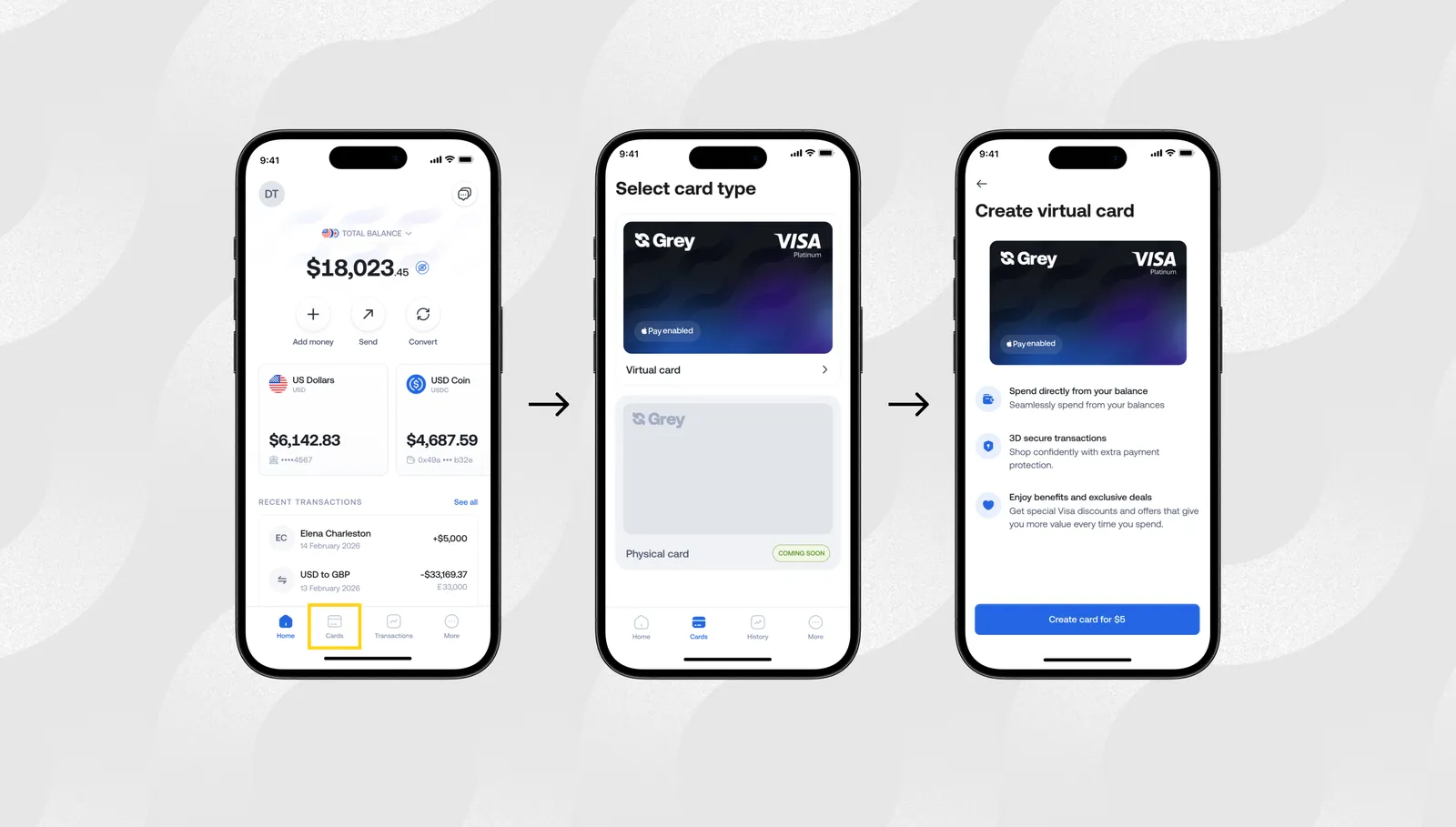
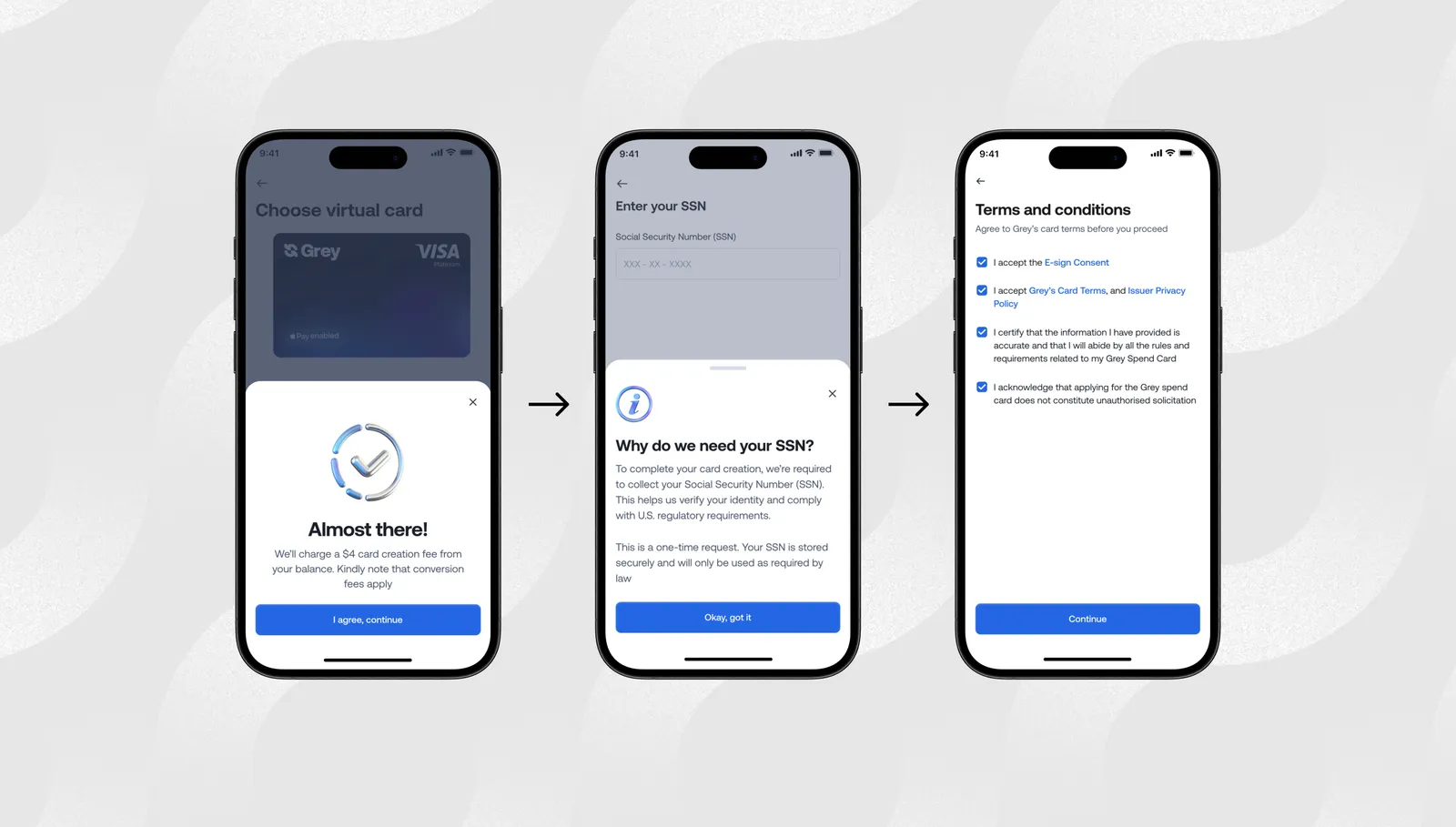
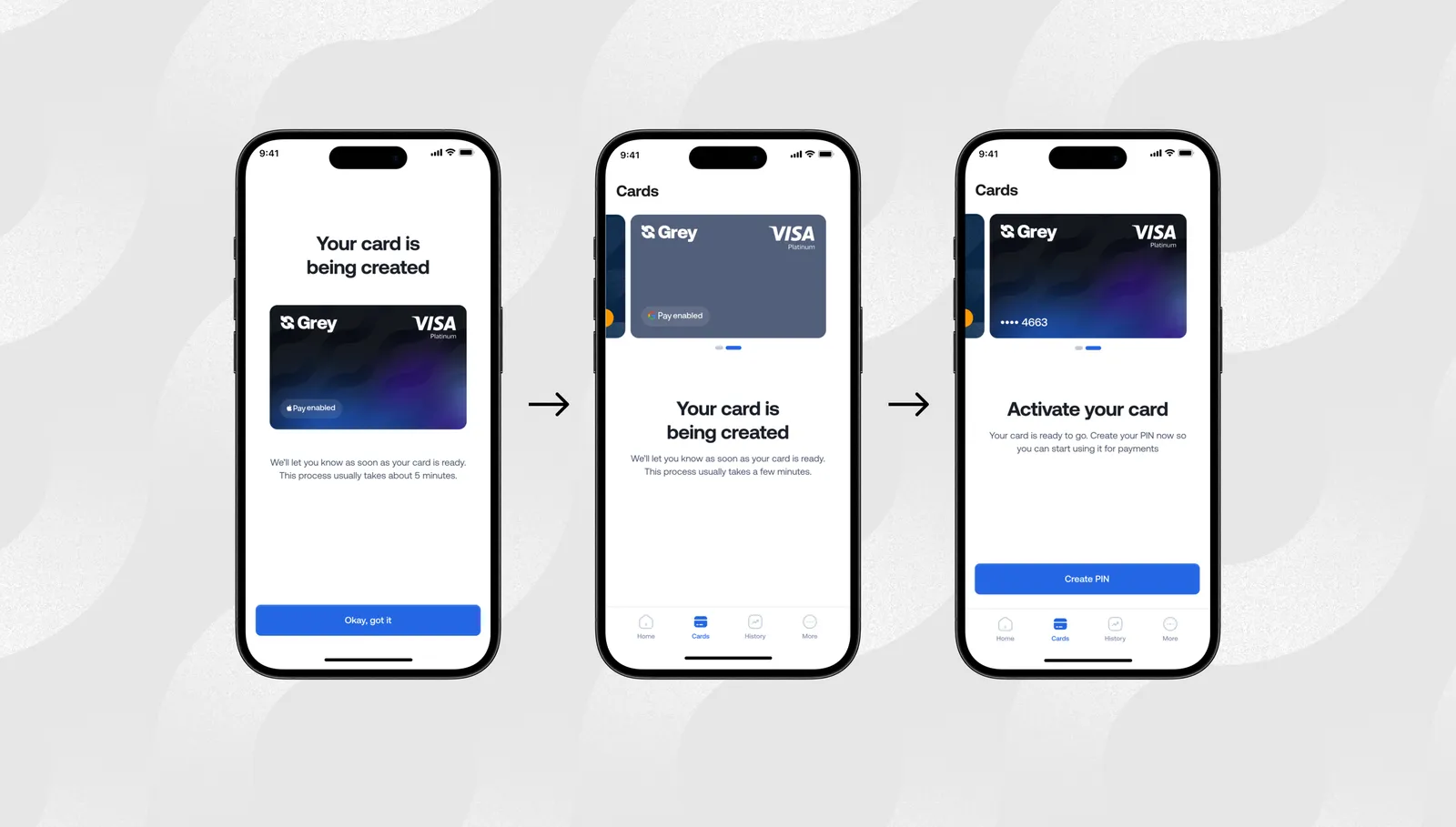
Adding your BoA card to a digital wallet is straightforward and takes a few minutes.

Adding to Apple Pay:

  1. Open the Wallet app on your iPhone or iPad.
  2. Tap the plus icon to add a new card.
  3. Follow the prompts to add a new debit or charge card. You can scan your physical card or type the details manually.
  4. BoA will send a verification code to your registered phone number or email. Enter it to confirm.
  5. Once verified, your card appears in Apple Wallet and is ready for contactless payments in stores, in-app purchases, and on websites with an Apple Pay checkout button.

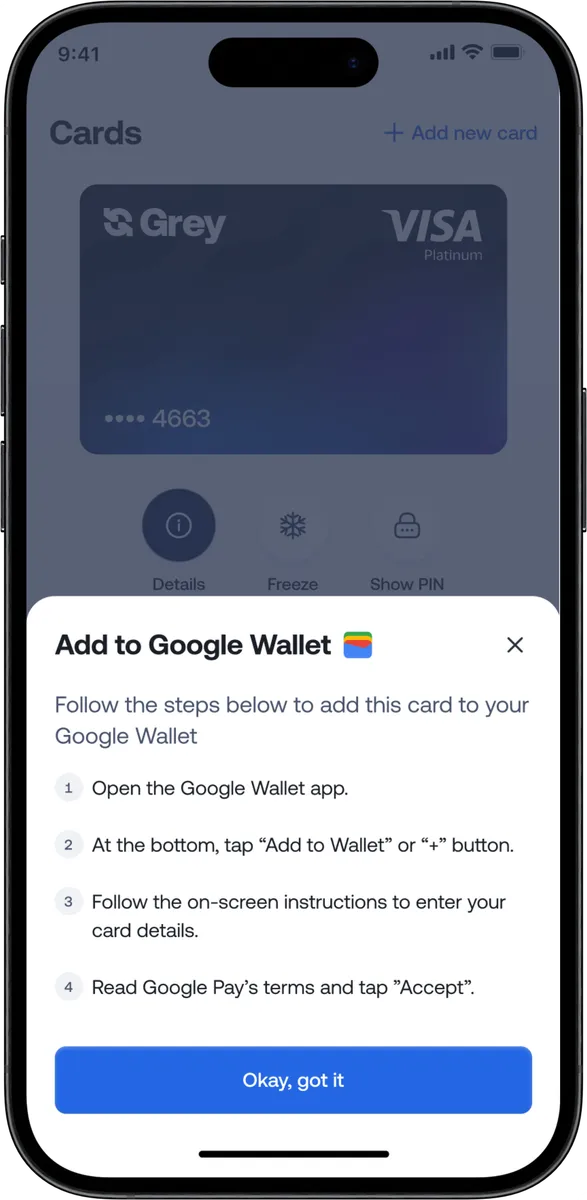
Adding to Google Pay:

  1. Open the Google Wallet app on your Android phone.
  2. Tap "Add to Wallet" and select "Payment card."
  3. Follow the prompts to add your BoA card. You can scan it or enter details manually.
  4. BoA will verify the addition through a code sent to your contact details.
  5. Your card is then available for contactless payments and Google Pay checkouts online.

Adding to Samsung Pay:

The process is similar: open the Samsung Wallet app, add your card, and complete BoA's verification step.

Once set up, tap your phone at any contactless terminal for in-store payments. For online purchases, use the Apple Pay or Google Pay button at checkout where available.

How to find your BoA virtual card number

The virtual card number is located in the Bank of America mobile app, not on any physical card.

Where to look:

  1. Open the BoA mobile app and navigate to the card you want to use.
  2. Look for a virtual card section, sometimes labelled "Virtual card number," "Digital card," or "Shop online."
  3. The screen shows the virtual card number, expiry date, and CVV for that card.
  4. Tap to copy the number, or write it down to use at checkout.

Why the virtual number matters for merchants: Some online merchants require the full Primary Account Number (PAN) to process a payment. The virtual card number functions as this PAN for online purchases. Enter it exactly as displayed in the app.

When the virtual number is not visible: For cards that work exclusively through digital wallets (Apple Pay, Google Pay), no separate virtual number is displayed. Tokenisation happens automatically when you use the card in the wallet. You see only the last four digits of the token in your wallet app.

Bank of America virtual card limitations

The virtual card is useful, but it does not solve every problem.

  • No standalone virtual card numbers: Unlike some banks, Bank of America doesn't let most consumer cardholders generate separate virtual card numbers for online shopping. Instead, it relies on digital wallets like Apple Pay and Google Pay to tokenise your card information.
  • Works only where digital wallets are accepted: To use a tokenised card online, the merchant must support Apple Pay or Google Pay. If a website only accepts manually entered card details, you'll typically need to use your physical card number.
  • Limited in-store use without a digital wallet: Tokenised payments work for contactless purchases only after you've added your card to a supported digital wallet. You can't tap to pay using your physical card details alone.
  • Device-specific protection: The payment token is tied to the device where you added the card. If you get a new phone or reset your wallet, you'll need to add the card again.
  • Standard card fees still apply: Using a tokenised card doesn't remove foreign transaction fees, interest charges, or any other fees associated with your Bank of America card.

Alternatives to BoA virtual cards

If the BoA virtual card does not fit your needs, either because your card is not eligible, because you shop on Safari, which does not support certain wallet integrations, or because you need multi-currency functionality, there are other options.

Other US bank virtual cards

Several major US banks offer their own virtual card number features for online shopping. These are tied to the specific bank account and card.

Capital One Eno generates virtual card numbers visible in the app or via the browser for Capital One cardholders. Chase and Citi Virtual Account Numbers also offer virtual card numbers that protect against data breaches. These are the closest alternatives to what many people expect from a virtual card, but they require accounts with those specific banks.

Fintech virtual cards

If you buy from international merchants, earn in multiple currencies, or want a virtual card that is not tied to an existing US bank account, a fintech virtual card offers more flexibility.

The Grey Plus Card is a virtual Visa card connected to USD, GBP, or EUR balances. Unlike the BoA virtual card, it is independent of any existing bank account and works at any online checkout in any browser. For same-currency purchases, no cross-border conversion fee applies.

See our guide on how Mastercard virtual cards work.

Feature BoA virtual card Grey virtual card
How to get it BoA mobile app (eligible cards only) Sign up with Grey, create instantly
Requires existing BoA card Yes No
Browser support Any browser Any browser
Multi-currency support No (USD only) Yes (USD, GBP, EUR)
Per-merchant unique numbers For some card types No (single reusable number)
Works in-store Via digital wallet Yes (Apple Pay, Google Pay in eligible regions)
One-time setup fee None $5 card creation

Get a Grey virtual card and open a multi-currency account with Grey to hold and spend in USD, GBP, or EUR without cross-currency fees on same-currency purchases.

Frequently asked questions

Is the Bank of America virtual card free?

Yes. Setting up a BoA virtual card through the mobile app or adding a card to a digital wallet does not cost anything beyond your standard account. There are no fees specific to the virtual card feature. Standard account fees, interest, and transaction charges that apply to your physical card continue to apply to purchases made with the virtual number.

Can I use the BoA virtual card abroad?

Yes, for online purchases from international merchants. Enter the virtual number at checkout, just as you would for any other card-not-present purchase. Standard foreign transaction fees that apply to your physical BoA card also apply to international purchases made with the virtual number. These fees are typically 3% on personal cards.

Does the virtual card number change?

For BoA cards that generate a static virtual card number, the number does not change with each purchase. It is a fixed alternative number tied to your account. For cards used through digital wallets, the tokenised device account number is static per device but different from your real card number.

Can I use a BoA virtual card in stores?

No, you can't use a virtual card number in stores. For in-store use, you need to add your BoA card to Apple Pay, Google Pay, or Samsung Pay and use your phone for contactless payment. This is technically a form of tokenisation similar to a virtual card, but the in-store payment process differs from online checkout.

What is the best alternative for international shopping?

For shopping across multiple currencies without paying a 3% foreign transaction fee on each purchase, a multi-currency virtual card is more cost-effective. The Grey Plus Card connects to a USD, GBP, or EUR balance and does not apply a cross-border fee when the purchase currency matches the card's funding currency.

How do I get a Grey virtual card?

Sign up at grey.co or download the mobile app and complete identity verification with a valid ID and proof of address. Open a USD, GBP, or EUR account. Navigate to the Cards section and create the Grey virtual card. A one-time $5 creation fee applies. Card details are available immediately in the app and ready to enter at any online checkout.

Last updated:

October 4, 2026

Open a free Grey account to get startedJoin 1 million digital nomads
IF YOU ENJOYED THIS, CHECK THESE OUT

How to send Canadian dollars (CAD) to Canada with Grey

•

•

2 min read

If you’re planning to send Canadian dollars (CAD) to Canada, you probably have a few questions about how the process works.

With Grey, you can send CAD directly to bank accounts in Canada via  bank transfer or  Interac .

In this guide, we’ll answer the most common questions and show you how to send Canadian dollars with Grey, including fees, transfer limits, timelines, and the details you’ll need before getting started.

Ways to send Canadian dollars to Canada

Grey currently supports two methods for sending Canadian dollars to recipients in Canada: local bank transfers and Interac payments.

Both methods work with personal and business bank accounts across Canada, but they differ in speed and use cases.

Bank transfers

A bank transfer sends money directly to the recipient’s bank account in Canada. It works with all major Canadian banks, which makes it a reliable option for payments like tuition, invoices, or supplier payments.

The cost is 2.50 CAD per transaction, and most transfers arrive within one business day.

There is a daily cutoff time of 18:00 Eastern Time. If you send your payment before this time, it usually begins processing the same day.

Because bank transfers move through the standard banking system, they’re often the best option for larger payments or planned transactions where instant delivery isn’t necessary.

Also read: How to send money to Canada as a freelancer

Interac transfers

Grey also supports Interac transfers, one of the most common ways people send money within Canada.

Interac is a domestic payment system that allows direct bank-to-bank transfers and is widely used across Canada for everyday payments.

Here’s how it works with Grey:

  • Transfer method: In Canada, Interac transfers are typically sent using an email address or phone number. Grey uses bank account details.
  • What you’ll need:
    • Recipient’s full name
    • Account number
    • Institution number
    • Transit number
    • Address (city and postal code)
  • Fees: 3.00 CAD per transaction.
  • Speed: Payments are usually processed in real time, and in many cases, the recipient receives the money within minutes.

Because of this speed, Interac is often the preferred option for urgent transfers or smaller payments.

Supported currencies for CAD transfers

CAD transfers can be made directly from your USD, EUR, GBP, or NGN balances, and Grey will automatically convert the amount during the transfer.

Before confirming the payment, you’ll see the exchange rate, the transfer fee, and the final amount the recipient will receive. This ensures there are no surprises once the payment is completed.

Sending limits

The transfer limits depend on whether you are using a personal Grey account or a Grey Business account.

Individual accounts

For individuals sending money:

  • Minimum: 5 CAD per transaction
  • Maximum: 10,000 CAD per transaction

These limits apply to both bank transfers and Interac transfers.

Grey Business accounts

Businesses sending payments have higher limits to support larger transactions.

Grey Business accounts allow:

  • Minimum: 5 CAD

Maximum per transaction:

  • Interac: 25,000 CAD
  • Bank transfer: 100,000 CAD

These limits make Grey suitable for:

  • vendor payments
  • contractor invoices
  • supplier payments
  • international payroll

How to send Canadian dollars with Grey

Sending CAD to Canada with Grey is simple and can be completed in just a few steps.

First, log in to your Grey account and select the Send option. From there, choose your preferred payment method, either bank transfer or Interac.

__wf_reserved_inherit

Next, select Canada as the destination country and CAD as the payout currency.

__wf_reserved_inherit

You’ll then enter the recipient’s banking details and the amount you want to send.

__wf_reserved_inherit

Before confirming the payment, Grey will display a summary of the transaction, including the transfer fee, exchange rate, and the exact CAD amount the recipient will receive.

Once you confirm the payment, the transfer begins processing immediately. Interac transfers are usually delivered within minutes, while bank transfers typically arrive within one business day.

You may also like: Understanding Canadian dollar transfers to Canada in global transactions

Interac vs bank transfer: which should you choose?

Both transfer methods are reliable, but the right option depends on your needs.

Use Interac when

  • the payment is urgent
  • you want instant delivery
  • you’re sending personal transfers

Use bank transfer when

  • sending large payments
  • paying tuition or invoices
  • transferring business payments

Common mistakes when sending money to Canada

Many payment delays happen because of small errors during the transfer process. The most common ones include:

  • Incorrect banking details: Canadian transfers rely on the correct institution number, transit number, and account number, so it’s important to double-check these before confirming the payment.
  • Submitting transfers after the cutoff time: Transfers initiated after 18:00 Eastern Time may only begin processing the following business day.
  • Overlooking currency conversion: If your balance is not already in Canadian dollars, conversion will apply. Always review the exchange rate before confirming the transaction.

If you're ready to send Canadian dollars to Canada, you can start your transfer from your Grey account today.

Still have questions? We’ve answered some of the most common ones below.

FAQs about sending Canadian dollars to Canada

Do I need a Canadian bank account to send Canadian dollars (CAD)?

No. You only need a Grey account with a supported currency balance. The recipient must have a Canadian bank account to receive the funds.

How long does a CAD transfer take?

Interac transfers are usually delivered within minutes, while bank transfers typically arrive within one business day, depending on the time the transfer was submitted.

What currencies can I send CAD from?

Grey allows CAD transfers from USD, EUR, GBP, and NGN balances, with automatic currency conversion during the payment.

What is the minimum amount I can send?

The minimum transfer amount is 5 CAD per transaction.

What is the maximum transfer amount?

Individuals can send up to 10,000 CAD per transaction, while Grey Business accounts can send 25,000 CAD via Interac or 100,000 CAD via bank transfer.

Can I send money to both personal and business accounts?

Yes. Grey supports transfers to both personal and business bank accounts in Canada.

Now that you know how CAD transfers work, start sending Canadian dollars to Canada from your Grey account.

How to pay online from Algeria

•

•

2 min read

How to pay online from Algeria

You try to subscribe to Netflix. Your CIB card is declined. You try the card from your CPA account. Declined too. You try to pay for a domain name on Namecheap or renew your Adobe subscription. Same result. If you live in Algeria, this experience is familiar.

The problem is not your card in itself. It is that most Algerian bank cards are not set up for international online transactions. Restrictions on foreign currency payments, combined with the technical limitations of some local cards, mean that international sites decline the transaction.

The solution is a card that works in foreign currency. This article explains your options.

Why Algerian cards are declined

Several factors combine. Algerian bank cards are usually domestic cards (CIB) or international cards with very low currency limits. The Bank of Algeria's restrictions on currency transactions apply to card payments. Some international merchants decline cards issued in countries where the fraud risk is considered high. And the fraud detection systems of the Visa and Mastercard networks can block unusual transactions coming from certain regions.

The result: even if you have money in your account, the transaction does not go through. It is not a balance problem; it is a payment infrastructure problem.

Grey virtual card: the direct solution

Grey offers a virtual Mastercard that you can create in a few minutes from the app. The card is linked to your euro (or pounds sterling) balance on Grey. When you pay on an international site, the amount is debited from your currency balance, not from your Algerian bank account.

The Grey card is accepted anywhere Mastercard is accepted online. Here are the most common use cases for Algerian users:

For entertainment subscriptions: Netflix, Spotify, YouTube Premium, Apple Music, Disney+, Amazon Prime Video. The subscription is charged in euros or dollars from your Grey balance.

For work tools: Adobe Creative Cloud (Photoshop, Illustrator, Premiere), Figma, Canva Pro, Microsoft 365, Google Workspace, Notion, Slack, Zoom. If you are a freelancer, designer, developer or content creator, these tools are essential and can only be paid for in foreign currency.

For development and hosting: GitHub Pro, GitLab, AWS, Google Cloud, DigitalOcean, Heroku, Cloudflare, Namecheap, GoDaddy, Vercel. Algerian developers need these services every day.

For education: Coursera, Udemy, Skillshare, edX. IELTS, TOEFL and GRE registration fees are also payable in foreign currency.

For online shopping: Amazon, AliExpress, eBay, Etsy, ASOS. The Grey card works like any Mastercard for international purchases.

For online advertising: Facebook Ads, Google Ads, Instagram, LinkedIn. If you run advertising campaigns for your clients or your own business, the ad platforms require payment in foreign currency.

The card costs $5 to create, with no monthly fees. You can create several cards to keep personal spending separate from business spending.

How to set up your Grey card

Download the Grey app on iOS or Android. Complete identity verification with your Algerian ID card or passport. Go to the Cards section and create your virtual card. The card number, expiry date and CVV are shown immediately.

To use the card, you need a euro balance in your Grey account. You can top up your account in several ways: receive a SEPA transfer from a client or a relative in Europe, or deposit via stablecoins (USDT, USDC). Once the balance is available, the card is ready to use.

Other options for paying online from Algeria

Payoneer card. If you have a Payoneer account funded by platform payments (Upwork, Fiverr), the Payoneer card lets you pay online. The cost is the Payoneer conversion spread.

Prepaid cards. Some international prepaid cards (such as Paysafecard) allow online purchases without a bank card. The options available in Algeria are limited and the amounts are often capped.

Stablecoins. Some services and platforms accept payments in crypto or stablecoins. This is still marginal for consumer services but growing in the tech ecosystem.

The balance question: how to fund your card

This is the practical question everyone asks. To use Grey in Algeria, you need euros in your Grey account. The main sources are:

Payments from European clients: if you are a freelancer and your clients pay you in euros through your Grey IBAN, your balance builds up naturally.

Transfers from relatives in Europe: a family member in France can send a SEPA transfer to your Grey IBAN.

Stablecoins: if you hold USDT or USDC, you can deposit them on Grey and convert them into euros.

If you have none of these currency sources, Grey cannot help you directly, because it is not possible to fund a Grey account with Algerian dinars.

Exchange rates on Grey are variable and include a margin over the interbank rate. Grey does not charge a transfer fee; the cost is reflected in the exchange rate. The virtual card costs $5 with no monthly fees.

Getting started with Grey

Sign up at grey.co or download the Grey app on iOS or Android to create your free multi-currency account.

Frequently asked questions

Does the Grey card work for Netflix in Algeria?

‍Yes. The Grey virtual card is a Mastercard accepted by Netflix and all other streaming services. The subscription is debited from your euro balance with no card decline problems.

How much does a Grey virtual card cost?

‍$5 to create, with no monthly fees. The only recurring cost is what you spend with the card, which is debited directly from your currency balance. If the card is not used, it costs nothing.

Can I use the Grey card in a physical shop?

‍The Grey card is virtual and designed mainly for online payments. However, you can add it to Apple Pay or Google Pay in supported regions, which allows contactless payments in shops. Check the availability of Apple Pay and Google Pay in your region.

How do I fund my Grey account from Algeria?

‍The main methods are: receive a SEPA transfer from a European account (from a client, employer or relative), or deposit stablecoins (USDT, USDC). It is not possible to transfer dinars from an Algerian bank to Grey.

Is the Grey card safe?

‍The Grey card is protected by 3D Secure authentication, which requires confirmation for each transaction. You can freeze and unfreeze the card instantly in the app. Real-time transaction alerts inform you of every payment.

‍

Sending money to Egypt from abroad

•

•

2 min read

Sending money to Egypt from abroad

Sending money to Egypt from abroad is not as simple as it should be. Hidden fees, unclear exchange rates, delays in arrival, and sometimes banking complications make the process frustrating. Whether you are receiving payments from a client in America or Europe, or a family member is sending you money from Saudi Arabia or the UAE, you need to know the options available and the cost of each one clearly.

This guide explains how international transfers to Egypt actually work, compares the real options with specific figures, and helps you choose the method that best suits your situation.

How international transfers to Egypt work

When money is sent from abroad to Egypt, the process goes through several stages. The sender starts with a transfer from their bank or from a money transfer service. The transfer passes through intermediary banks (in the case of SWIFT bank transfers). The amount reaches the receiving bank in Egypt or the recipient's account on the digital platform. The foreign currency is then converted into Egyptian pounds at the prevailing exchange rate.

Each of these steps can add a cost: the transfer fee, intermediary bank fees, and the exchange rate margin. The difference between the cheapest method and the most expensive one can reach thousands of pounds on a single transfer.

Comparing options for sending money to Egypt

International bank transfer (SWIFT): The traditional bank transfer goes through the SWIFT network between banks. The main advantage is that it works with almost any bank in the world. But the cost is high: the transfer fee from the sender's bank (usually $15 to $50), intermediary bank fees ($10 to $30 more in some cases), and the receiving bank's exchange rate, which includes its own margin. The time taken ranges from 3 to 5 working days.

Western Union: Western Union is the most common option for transfers to Egypt, especially from the Gulf states. The advantage is that the amount can be collected in cash from a Western Union branch in Egypt, often the same day. The drawback is that the total cost is high: a fixed sending fee plus a large exchange rate margin. On a transfer of $1,000, you can lose the equivalent of 3% to 7% of the amount between the fees and the exchange rate difference.

PayPal: PayPal is available in Egypt but with restrictions. You can receive money, but the withdrawal options are limited. Withdrawing money to an Egyptian bank takes time and involves a currency conversion fee of between 3% and 4%. PayPal is suitable if your client prefers to pay through it, but it is not the cheapest option for regular transfers.

Wise: Wise offers the real exchange rate (the mid-market rate) with transparent transfer fees shown before confirmation. It is a good option for one-off transfers. But Wise does not offer an Egyptian pound wallet, which means you cannot hold pounds in the app, and the availability of the transfer service to Egypt may change.

Grey: Grey gives you accounts in dollars, euros and pounds sterling, with bank details you can share with your clients or employers. The client sends an ordinary transfer from their side, and the money reaches your Grey account within one to two working days, usually. After that, you choose when to convert into Egyptian pounds. The exchange rate is shown before confirmation. You can withdraw pounds to any major Egyptian bank: Commercial International Bank (CIB), the National Bank of Egypt, Banque Misr, Bank of Alexandria and QNB.

The key advantage is control over timing. Instead of the currency being converted automatically on arrival (as happens with a bank transfer), you can hold the dollars or euros and convert them when the exchange rate suits you.

Exchange rates on Grey are variable and include a margin over the market rate. Grey does not charge a transfer fee; the cost is reflected in the exchange rate. The rate is shown before you confirm any transfer.

Transferring from specific countries

Transferring from Saudi Arabia to Egypt
The largest corridor to Egypt. Western Union is the traditional option, with instant collection but a high cost. Saudi banks (Al Rajhi, Al Ahli) offer direct transfers but at an exchange rate that includes a margin. Grey offers a digital alternative: receive in dollars, then convert and withdraw in Egypt.

Transferring from the UAE to Egypt
‍
Almost the same options. Local money transfer services in the UAE (such as Al Ansari Exchange) offer transfers to Egypt at competitive rates, but only through branches. Grey works entirely digitally.

Transferring from Kuwait to Egypt
‍
Western Union is available. Kuwaiti banks offer SWIFT transfers. Grey accepts transfers from anywhere, as long as the sender can send a bank transfer in dollars or euros.

Transferring from America and the UK

Grey offers accounts with US bank details (routing number + account number) and UK bank details (sort code + account number). The sender uses these details to send an ACH transfer (America) or a Faster Payment (UK). The cost on the sender's side is usually zero or very low.

Getting started with Grey

Sign up at grey.co or download the Grey app on iOS or Android to create your free multi-currency account.

Frequently asked questions

How long do international transfers to Egypt take?‍

The time depends on the method. Western Union: minutes to hours for cash collection. Grey: one to two working days to receive the money, then conversion is instant within the app, and withdrawal to an Egyptian bank takes one to two more days. SWIFT bank transfer: 3 to 5 working days.

What is the cheapest way to send money to Egypt?

‍The total cost includes the sending fee and the exchange rate margin. The cheapest option depends on the amount, the currency and the sending country. For regular transfers (such as freelancers' pay), digital platforms such as Grey or Wise are usually cheaper than Western Union or a bank transfer, because the exchange rate margin is smaller.

Can I receive money in dollars in Egypt without converting it to pounds straight away?

‍Yes. With Grey, you can hold dollars or euros in your account without converting them. This is useful if you want to wait for a better exchange rate, or if some of your spending is in dollars (software subscriptions, online services). You can also spend directly in dollars using the Grey virtual card.

Does PayPal work for receiving money in Egypt?

‍PayPal is available in Egypt but it is not the ideal option for regular transfers. The currency conversion fees are high (3% to 4%), and the options for withdrawing to Egyptian banks are limited. If your client insists on PayPal, you can receive money through it, but for regular transfers, a Grey account with direct bank details costs less.

Which Egyptian banks does Grey support?

‍Grey supports transfers to all the major Egyptian banks, including Commercial International Bank (CIB), the National Bank of Egypt, Banque Misr, Bank of Alexandria and QNB. The time taken for withdrawal is shown in the app before you confirm the transfer.

Are there taxes on money received from abroad in Egypt?

‍Income from foreign sources may be subject to tax in Egypt depending on its nature and amount. We recommend consulting an accountant or a specialist tax advisor to understand your tax obligations. This article does not constitute tax advice.

‍

Euro black market in Algeria: understanding the parallel exchange rate

•

•

2 min read

Euro black market in Algeria: understanding the parallel rate

You receive a payment in euros from a European client, or a relative in France wants to send you money. You open your phone to check today's rate. But which one? The official rate from the Bank of Algeria, the one your bank displays, or the square rate at Port Saïd? In Algeria, these three figures are rarely the same, and the difference can come to thousands of dinars on a single transfer.

This article explains why the parallel market exists, how rates are set there, and what options you have to get the best value between your euros and your dinars without going through the square.

What is the currency black market in Algeria?

The black market, also called the parallel market or the square, is an informal network where foreign currencies are exchanged at a rate different from the official one. In Algiers, the best-known square is at Port Saïd, in the Place du 1er Mai area. Similar markets exist in Oran, Constantine and most of Algeria's large cities.

The way it works is simple: individual money changers buy and sell currency in cash, mainly euros, at a rate set by that day's supply and demand. There is no formal regulation, no receipt, and no protection if something goes wrong. The rate is negotiated on the spot and can vary from one changer to another, sometimes by a few dinars.

The term "black market" is common but slightly misleading. It is not a hidden market: everyone in Algeria knows where it is and how it works. It is more of an unregulated parallel market that runs alongside the official banking system.

Why the parallel rate differs from the official rate

The official euro rate is set by the Bank of Algeria through an interbank fixing system. This rate serves as the reference for commercial banks and official transactions. But it does not necessarily reflect the price the market would be willing to pay for a euro.

The gap comes from a structural imbalance. Demand for foreign currency in Algeria exceeds the supply available in the official banking system. Importers need euros to pay their European suppliers. Students need currency for enrolment fees abroad. Families want to send money to relatives in France or Canada. Businesses need dollars or euros to buy software, equipment and digital services.

When banks cannot meet all of this demand at the official rate, the surplus moves to the parallel market, where the price adjusts freely. The stronger the demand and the more limited the supply, the wider the gap grows between the official rate and the square rate.

This gap can be significant. It is not unusual to see a difference of 30% to 50% between the official rate and the parallel rate. On a transfer of 1,000 euros, that can represent a difference of 50,000 to 80,000 dinars, depending on conditions at the time.

What moves the square rate

The parallel rate is not fixed. It changes daily depending on several factors.

The supply of currency is the first factor. When the Algerian diaspora sends more euros (during the summer holidays or Ramadan, for example), supply rises and the square rate tends to fall. When transfers slow down, the rate goes back up.

Economic policy decisions also play a part. When the Bank of Algeria adjusts the official rate or changes import rules, the parallel market reacts. Loosening capital controls tends to narrow the gap; tightening them tends to widen it.

The general economic situation influences confidence in the dinar. Oil prices (which make up most of Algeria's foreign currency earnings), local inflation, and the Bank of Algeria's foreign exchange reserves are all indicators that participants in the parallel market watch, even informally.

Finally, seasonality matters. Demand for currency rises before the start of the school year (university fees abroad), during the Hajj, and over the summer period when Algerians travel to Europe.

Legal alternatives for converting your euros

The square offers a better rate than the bank, but it carries risks: no traceability, no recourse in the event of a dispute, and large amounts in cash raise security concerns. Several digital alternatives let you manage your euros differently.

Keep your euros in a foreign currency account. Instead of converting your euros into dinars straight away, you can hold them in a foreign currency account. Grey offers a euro account with European bank details. Your client or employer sends a transfer to those details and the euros arrive in your Grey wallet. You then choose when, and whether, you want to convert.

Spend your euros directly with a virtual card. If some of your spending is online (subscriptions, software, purchases on Amazon or AliExpress), you can pay directly in euros from your Grey balance with a virtual Mastercard. The amount is debited in euros without going through the dinar. For someone who earns in euros and also spends in euros on their work tools, this is a way to avoid the exchange rate question altogether.

Use stablecoins. Grey supports stablecoin deposits and withdrawals (USDT, USDC). For users in Algeria, this is an option for storing value in digital dollars and converting it when needed. Stablecoins do not replace a bank account, but they offer extra flexibility in a context where access to traditional currency is limited.

We should be clear on one point: Grey does not offer dinar withdrawals to Algerian banks. If you need dinars in cash, Grey does not solve that problem directly. Grey's value for users in Algeria lies in holding euros, spending online through a virtual card, and access to stablecoins.

Exchange rates on Grey are variable and include a margin over the interbank rate. Grey does not charge a transfer fee; the cost is reflected in the exchange rate. The rate is shown before you confirm any conversion.

Getting started with Grey

Sign up at grey.co or download the Grey app on iOS or Android to create your free multi-currency account.

Frequently asked questions

What is the euro black market rate in Algeria today?The parallel rate fluctuates daily. There is no single official source for this rate, because it is set by informal transactions between individuals. The sites and forums that publish the "square rate" give estimates based on recent transactions, but the rate you actually get depends on the timing, the place and the amount. The Grey converter shows the rate at which you can actually convert on the platform, with the rate displayed before you confirm.

Is the black market legal in Algeria?Exchanging currency outside official banking channels is not permitted under Algerian regulations. The law provides for penalties for unauthorised currency transactions. In practice, the parallel market operates openly, but it is important to understand the legal framework before making your choice.

Why is the gap between the official rate and the square rate so large?The gap reflects the difference between real demand for currency and what the banking system can supply at the official rate. The larger that difference, the wider the gap. Capital controls, import restrictions and the Bank of Algeria's monetary policy are the main structural factors behind it.

How can I access euros without going through the square?Several options exist: a foreign currency account with Grey (with EUR bank details), a Payoneer account (for platform payments), or an international bank transfer to a foreign currency account at an Algerian bank (CPA, BNA). Each option has its own fees and limits. Grey stands out for the ability to hold euros and spend them directly online with a virtual card.

Does Grey show the official rate or the market rate?Grey shows the rate at which you can convert on the platform. This rate includes a margin over the interbank rate and is shown before you confirm the transaction. It is neither the Bank of Algeria's official rate nor the parallel market rate; it is the effective rate you get with Grey.

‍

Grey vs Wise: Which delivers more INR to India?

•

•

2 min read

‍Grey and Wise are both legitimate options for sending money to India from the US, and both position themselves as transparent alternatives to banks and legacy transfer services. But they use different pricing models, support different payout methods, and offer different features beyond the transfer itself. This comparison breaks down how each platform actually works for the US-to-India corridor, what the cost differences look like at common transfer amounts, and which one makes more sense depending on how you send.

The short version: Wise charges a fee based on a percentage of the mid-market exchange rate. Grey charges a flat or tiered fee and offers a competitive exchange rate. At smaller transfer amounts (under $500), the cost difference is often minimal. At larger amounts ($2,000+), the pricing models diverge more significantly because Wise's percentage fee scales with the transfer size. Both platforms support UPI payouts. Both offer multi-currency accounts and virtual cards, but the feature sets differ. The details matter, and they are below.

How the pricing models work

Wise: mid-market rate + percentage fee

Wise gives you the mid-market exchange rate, which is the same rate you see on Google, Reuters, or XE.com. There is zero markup on the rate itself. The cost is entirely the fee, calculated as a percentage of the transfer amount.

For USD-to-INR payments, the fee largely depends on the funding method and transaction size.  The total cost on a $500 conversion is approximately 0.6-0.8% when funded from a US bank account via ACH. Debit card funding is more expensive (around 1.5-1.9%), and credit card funding is higher still (up to 7%). The larger the amount converted, the lower the percentage charged.

The advantage of this model: complete transparency. The rate is the rate. The fee is a separate line item. You know exactly what you are paying, and you can verify the rate against any independent source.

The disadvantage: Although the percentage changes with the transaction value, percentage-based fees still generally scale with transfer size. A 0.8% fee on $500 is $4. 0.6% on $3,000 is $18, and on $10,000, it is $60. For large or frequent transfers, the fee becomes significant even though the rate is at mid-market.

Grey: competitive rate + fee

Grey charges a transfer fee and offers a competitive exchange rate that may differ slightly from the mid-market rate. Both numbers are shown before you confirm the transfer. The rate is not inflated to compensate for a lower fee, and the fee is not artificially reduced to mask a rate markup. Both components are visible.

USD-to-INR conversions incur a 1% conversion fee, and withdrawal fees via UPI and bank transfer are $1.5 per transaction. The total fee incurred on $500 is around $6.50.

The advantage: for smaller transfers, the cost structure may be more favourable than a pure percentage model because the fee does not scale linearly with amount. The rate and fee are both visible before confirmation, so you can compare them directly. A $200 transfer to a loved one in India will cost $ 3.50 on Grey, whereas it would have cost 4% (approximately $8) on Wise.

The disadvantage: the rate is not guaranteed to be mid-market. It may be slightly below on some days, slightly at parity on others. The only way to compare honestly is to check the total INR Grey delivers against the total INR Wise delivers for your specific amount on the day you send. Grey might also be more expensive with the Wise on larger transactions.

Cost comparison at common transfer amounts

This table shows the approximate cost of sending money to India via each platform at three common transfer sizes. All figures assume ACH funding from a US bank account. The INR amounts are illustrative based on a mid-market rate of 85.00 INR/USD.

Transfer amount Wise fee (est.) Grey fee (est.) Wise INR delivered (est.) Grey INR delivered (est.)
$500 $3.92 $6.50 47,271.78 INR 46,905.56 INR
$1,000 $6.85 $11.50 94,638.86 INR 93,811.11 INR
$3,000 $19.62 $31.5 283,626.84 INR 281,433.34 INR

Note: Fees change. These figures are snapshots from 25th May 2026. Always check the live rate on each app before sending.

The comparison should make clear whether the difference is $1 or $15. For a single transfer, $1-$3 is noise. Over 12 monthly transfers, even a $5 difference per transfer is $60/year. The table resolves whether the cost gap is meaningful or marginal.

Also read: Receive ACH payments from US clients in India

Speed and payout methods

Feature Grey Wise
Speed (ACH funded) Minutes after funding clears 1-2 business days for ACH, then instant
Speed (balance funded) Minutes Seconds to minutes
Indian bank account Yes Yes
UPI payout Yes Yes
Cash pickup No No
Funding methods (US) ACH, wire, FedNow, Grey balance ACH, debit card, wire, Wise balance
Debit/credit card funding Not supported Yes (higher fee)

Both platforms are fast once funded. The bottleneck is ACH funding, which takes 1-2 business days from a US bank. Once the money is in your Grey or Wise balance, the transfer to India is minutes (Grey) or seconds to minutes (Wise).

If speed matters for a specific transfer, fund from your existing balance on either platform rather than initiating an ACH pull. Both platforms allow you to maintain a USD balance for this purpose. Wise also accepts debit card funding for faster processing at a higher fee.

Also read: Safe ways to receive international payments in India

Beyond transfers: account features

Both Grey and Wise offer more than a transfer button. They are financial accounts with multi-currency balances, cards, and additional features. The feature sets overlap but are not identical.

Feature Grey Wise
Multi-currency balance USD, GBP, EUR 40+ currencies
Virtual card Yes (Visa) Yes (Visa/Mastercard)
Physical card No Yes
Peer-to-peer transfer GreyTag (free P2P transfers) N/A
Business account Yes (Grey Business) Yes (Wise Business)
Invoicing Yes No (via Wise Business integrations)
Currency count 3 40+

When Grey's feature set matters more

If you primarily transact in USD, GBP, and EUR, Grey's three-currency setup covers the major corridors. The virtual Visa card works with Apple Pay and Google Pay, and you can use it for international subscriptions, online shopping, or ad spend without converting to INR and back to USD. GreyTag lets you send money to other Grey users instantly and for free, which is useful if family members or business contacts also use Grey. Invoicing is built in, which matters for freelancers who receive payments from US or European clients.

When Wise's feature set matters more

If you transact in currencies other than USD, GBP, or EUR, Wise's 40+ currency balances are a genuine advantage. The physical debit card is useful for travel, allowing you to spend in local currencies worldwide at near mid-market rates.

Can you use both?

Yes. There is no exclusivity. Many regular senders maintain both accounts and compare the total INR delivered before each transfer. This takes 60 seconds: open both apps, enter the same amount, and see which one puts more rupees in your recipient's account on that specific day.

A common setup: hold USD in both Grey and Wise balances. Before each transfer, check the rates. Send via whichever platform delivers more INR. Use Grey's virtual card for subscriptions and online purchases. Use Wise's physical card for travel. This dual setup captures the best of both platforms without committing to either exclusively.

Also read: The best app to send money to India from the US

Common mistakes when comparing Grey and Wise

  • Comparing fees without comparing rates. Wise's fee is higher than Grey's in most cases, but Wise uses the mid-market rate. Grey's fee is lower, but the rate may differ slightly. The only fair comparison: total INR delivered for the same USD amount. The fee in isolation is misleading.
  • Assuming the mid-market rate always wins. The mid-market rate is a benchmark, not a guarantee of the lowest cost. If Provider A charges the mid-market rate plus a $15 fee, and Provider B charges a rate that is 0.1% below mid-market plus a $3 fee, Provider B delivers more INR on a $1,000 transfer. The arithmetic matters more than the label.
  • Ignoring funding method costs. ACH is cheapest on both platforms. Debit card on Wise adds 1%+. If you fund via debit card on Wise and ACH on Grey, the comparison is not apples-to-apples. Use the same funding method when comparing.

The bottom line

Both Grey and Wise are transparent, regulated, and competitive for the US-to-India corridor. Neither is categorically cheaper. The better choice depends on the amount, the payout method, and how you use the account beyond transfers.

  • Choose Grey if you need UPI delivery, want a virtual card for USD/GBP/EUR spending, send to other Grey users via GreyTag, or prefer a flat-fee structure that does not scale with transfer size.
  • Choose Wise if: you want the mid-market rate with zero markup, you need 40+ currency balances, you want a physical debit card for international travel, or you value Wise Business integrations with accounting software.
  • Use both if: you send regularly and want to compare rates each time. The 60-second check before each transfer can save $5-$15 per transaction, totaling $60-$180 per year on monthly remittances.

Frequently Asked Questions

1. Is Grey cheaper than Wise for sending money to India?

It depends on the amount and the day. Grey charges a fee with a competitive exchange rate. Wise charges a fee based on a percentage of the mid-market rate. For smaller amounts (under $500), the difference is often $1-$3. For larger amounts ($3,000+), the percentage-based model can result in significantly higher fees. Compare the total INR delivered on both apps for your specific amount.

2. Which has better exchange rates, Grey or Wise?

Wise uses the mid-market rate with zero markup and charges a separate percentage fee. Grey offers a competitive rate that may be slightly below mid-market, with a separate fee. The mid-market rate is not always the cheapest total cost because the fee structure matters. Check total INR delivered rather than comparing rates alone.

3. Should I use Grey or Wise for business payments to India?

Grey Business includes invoicing and multi-currency balances for USD, GBP, and EUR. Wise Business offers 40+ currencies, batch payments, and integrations with Xero and QuickBooks. If you pay Indian contractors and need accounting integrations, Wise Business has broader tool support. If you invoice international clients and need to hold received payments in USD/GBP/EUR, Grey Business handles that workflow natively.

4. Can I hold Indian rupees in Grey or Wise?

Neither platform lets you hold INR balances. Grey holds USD, GBP, and EUR. Wise holds 40+ currencies but does not include INR Both convert from your held currency to INR at the time of transfer. This is standard across transfer platforms because INR is not a freely convertible currency outside India.

5. Is Grey as safe as Wise?

Both are regulated financial services. Grey is registered with FinCEN and holds appropriate money transmitter licenses. Wise is authorised by FinCEN and state regulators across the US. Both use bank-level encryption and require identity verification. Both are backed by institutional investors (Grey by Y Combinator, Wise is publicly traded on the London Stock Exchange).

Grey shows the exchange rate and fee before every transfer. Send money to India at https://grey.co/en-in.

Grey vs Remitly: Which is better for sending money to India?

•

•

2 min read

Grey vs Remitly: Which is better for sending money to India?

Grey and Remitly both send money from the US to India, but they are built for different users and different use cases. Remitly is a dedicated remittance app with tiered delivery: Express costs more but arrives fast, Economy costs less but takes 3-5 business days. Grey is a cross-border payment platform with a single pricing tier that delivers in minutes, plus multi-currency balances, virtual cards, and GreyTag for free peer-to-peer transfers.

For a US resident sending $1,000 to India, Remitly Express might cost $8-$15 in visible fees, plus a 1-2% margin built into the exchange rate, adding another $10-$20 in hidden costs. Total real cost: $18-$35. Remitly Economy is cheaper on fees but takes 3-5 business days to arrive. Grey charges 1% conversion fee, $1.50 for UPI and bank transfers, with a competitive rate shown separately and delivers in minutes. The total cost difference per $1,000 transfer can be $10-$15, which compounds to $120-$180 over a year of monthly sends.

This comparison covers the real cost of each tier, delivery speed, UPI and cash pickup support, account features beyond the transfer, promotional pricing traps, and which app makes more sense depending on your sending pattern. Both apps support UPI transfers to India, so that is not a differentiator here. The differences lie in pricing structure, speed guarantees, and what each app does beyond the individual transfer.

How Remitly's pricing tiers work and why they complicate comparison

Remitly offers two delivery options for India, and each has separate pricing:

  • Express delivery. Faster arrival (minutes to hours). Higher fee. The exchange rate also includes Remitly's margin, which means the fee you see is not the full cost. The advertised fee understates the real cost because the rate spread adds an invisible layer.
  • Economy delivery. Lower fee and sometimes a slightly better exchange rate. But delivery takes 3-5 business days. For time-sensitive needs like rent, medical bills, or tuition deadlines, Economy is not usable.

This two-tier structure makes comparison against Grey harder because you are comparing three things simultaneously: speed, visible fee, and hidden rate margin. Grey has one tier: competitive rate, visible fee, and delivery in minutes. There is no express/economy decision to make, no speed-vs-cost trade-off, and no confusion about which option you are getting.

The practical impact: many Remitly users default to Express because they need the money to arrive quickly. But Express pricing, when you account for both the fee and the rate margin, is typically $10-$20 more expensive per transfer than Grey for the same amount. Users who choose Economy to save money are trading 3-5 business days of wait time for savings that Grey matches at a minute-level speed.

Also read: Receive ACH payments from US clients in India

What does each transfer actually cost? A real comparison

The only honest comparison: check the total INR your recipient receives for the same USD amount on both apps. Not the fee. Not the rate. The final number.

Grey Remitly Express Remitly Economy
Fee ($500 transfer) $5-$7 $3.99 $2.99
Fee ($1,000 transfer) $10-13 $3.99 $2.99
Rate type Competitive + visible fee Includes up to 3% margin Includes margin (smaller)
Speed Minutes Minutes to hours 3-5 business days
Recipient gets ($1,000 INR) 93739.73 INR 91,529.56 INR 94395.96 INR
Total real cost ($1,000) $15-20 $30-$35 $5-$10

Remitly Economy costs calculated based on non-promotional (standard) rate of 1 USD = 94.68 INR as of 25/05/2026, and transaction fee of $2.99.

This Remitly Express calculation accounts for a $3.99 transaction fee deducted from the principal and a 3% markup applied to the standard exchange rate of 94.68 INR/USD as of 25/05/2026. Note that the margin can sometimes be less than 3%. However, the total INR delivered can only be less than what Grey offers if the undisclosed margin is less than 1%  as of now.

Remitly Express is funded using a debit card, credit card, or a prepaid card, which often comes with additional cost, depending on the card service provider.

When these numbers are filled in from a real comparison, the pattern is consistent: Remitly Express delivers less INR than Grey for the same USD amount because Remitly's exchange rate includes a margin that Grey does not include. Remitly Economy delivers slightly more INR than Express, but the 3-5-day wait eliminates the speed advantage most senders need.

The first-transfer promotion trap

Remitly runs frequent promotions for new users: reduced fees, better exchange rates, or both on your first transfer. These promotions are real savings on that single transaction, often $10-$20 off standard pricing. The savings are genuine and worth taking.

The trap is evaluating Remitly based on the promotional rate. Your second transfer and every transfer after it use standard pricing. If you compare Remitly's promotional rate against Grey's standard rate, Remitly looks cheaper. If you compare standard-to-standard (which is what matters for ongoing use), Grey typically delivers more INR per transfer. Evaluate based on Transfer 2, not Transfer 1.

Also read: The best app to send money to India from the US

UPI support: not a differentiator here

Both Grey and Remitly support UPI transfers to India. Your recipient can receive money directly to their UPI-linked account on either platform. This is a shared capability, not an advantage for either app.

Where this matters: if you are comparing Grey against Wise, UPI is a Grey advantage (Wise does not support UPI). But in the Grey vs. Remitly comparison, UPI is a non-factor. Both apps support it.

Cash pickup: where Remitly has a genuine edge

Remitly supports cash pickup at partner agent locations across India. Grey does not offer cash pickup. This is the one functional area where Remitly has a clear, undeniable advantage over Grey.

Cash pickup matters for a specific segment of recipients:

  • Elderly family members who prefer physical cash and are not comfortable with digital banking.
  • Recipients in rural areas or smaller towns with limited bank branch access.
  • Emergency situations where the recipient needs cash in hand within minutes and cannot wait for a bank deposit to process.
  • Recipients who do not have a bank account and have not set up UPI.

For most transfers to India, the recipient has a bank account or UPI (India's financial inclusion has expanded dramatically, with the Jan Dhan Yojana program opening over 500 million bank accounts). For those recipients, bank transfer or UPI is faster, cheaper, and more convenient than agent pickup. But if your recipient falls into the cash-pickup segment, Remitly is the right tool, and Grey is not an alternative for that specific need.

Grey vs Remitly: features beyond the transfer

Feature Grey Remitly
Multi-currency balance Yes (USD, GBP, EUR) No
Virtual cards Yes (Visa, Apple Pay, Google Pay) No
P2P transfers GreyTag (free, instant) No
Cash pickup No Yes (agent locations)
UPI to India Yes Yes
First-transfer promotions No Yes (frequently)
Delivery tiers One tier (minutes) Two tiers (Express, Economy)
Rate transparency Rate + fee shown separately Rate includes margin
Corridors beyond India Africa (Nigeria, Kenya, Ghana, etc.) 50+ countries
Users 3M+ in 80+ countries 5M+ users

Grey is a financial account. Remitly is a transfer pipe. This distinction matters for regular senders. Grey lets you hold USD, GBP, or EUR in your balance and spend directly with a virtual Visa card for international expenses, including SaaS subscriptions, ad spend, supplier payments, and any online purchase in a supported currency. You avoid converting USD to INR and back, saving 2-4% on round-trip conversion costs.

Remitly processes individual transfers with no balance, no card, and no account features beyond the send function. Every transfer starts with your bank account and ends in your recipient's Indian account. There is nothing wrong with this model, but it means Remitly does one thing (transfers), while Grey does transfers plus everyday cross-border financial operations.

When does Remitly's corridor breadth matter?

Remitly supports 50+ destination countries. Grey's primary corridors are India and Africa (Nigeria, Kenya, Ghana, and expanding). If you send money to the Philippines, Mexico, Colombia, or other Latin American countries, Remitly handles them all from one app. Grey does not.

For someone who sends money only to India, corridor breadth is irrelevant. But if you split your remittances between India and, say, the Philippines for a spouse's family, Remitly's broader coverage is a real convenience advantage.

Also read: Best way to receive euros in India

Which setup is right for your situation

If you send to India monthly and want the lowest total cost

Grey. Single pricing tier, no express/economy confusion, delivery in minutes. The multi-currency balance lets you fund with the USD you already hold, avoiding the 1-2-day ACH wait each time. Over 12 months, the per-transfer savings versus Remitly Express compound to $120-$240. That is real money.

If your recipient needs cash pickup in India

Remitly. Grey does not support cash pickup. If physical cash at an agent location is the requirement, Remitly is the only option of the two. No amount of rate comparison changes this.

If you are a first-time sender testing the market

Use Remitly's first-transfer promotion for that one transaction, capture the savings, and then compare standard Remitly pricing against Grey for the second transfer onwards. The promotion is real savings of $10-$20 that you should take. But standard Remitly pricing for ongoing use is typically more expensive than Grey.

If you send to India and Africa

Grey. It handles both corridors from one account with the same pricing transparency. Remitly covers Africa too (limited countries), but Grey's product is more deeply integrated into African financial infrastructure, with local payout options, NGN withdrawals, and established partnerships.

If you want more than just transfers

Grey. Multi-currency balance, virtual Visa cards with Apple Pay and Google Pay, GreyTag for free instant peer-to-peer transfers. If your financial life spans both the US and India (or Africa), Grey handles transfers and everyday financial operations from a single account. Remitly only does transfers.

Common mistakes when choosing between Grey and Remitly

  • Evaluating based on Remitly's promotional rate. The first transfer promotion is real but does not repeat. Standard pricing is what matters for ongoing use. Grey is typically cheaper at standard pricing.
  • Choosing Remitly Economy to save money. Economy saves $3-$5 per transfer compared to Express, but the 3-5 business-day wait time is a real cost. Grey delivers in minutes at a total cost that is competitive with Economy. You are paying for speed without paying extra.
  • Ignoring the rate margin. Remitly's fee looks low, but the exchange rate includes a margin. The total cost is the fee plus the margin. Grey shows both separately. Compare the INR delivered, not the fee.
  • Assuming UPI is a differentiator. Both apps support UPI. If someone told you Grey has UPI and Remitly does not, they are wrong. Both support it.

Frequently Asked Questions

1. Is Grey or Remitly cheaper for sending money to India?

For standard (non-promotional) transfers, Grey is typically $10-$20 cheaper per $1,000 than Remitly Express. Remitly Express includes a margin in the exchange rate that Grey does not embed. Remitly Economy is cheaper but takes 3-5 business days. Grey delivers in minutes at a competitive total cost. Compare the INR your recipient receives on both apps for your specific amount.

2. Does Remitly or Grey have better first-time rates?

Remitly runs frequent promotions for new users (reduced fees, better rates) that are genuine savings of $10-$20 on your first transfer. Grey does not offer first-transfer promotions. For that initial transaction, Remitly's promotional pricing is usually cheaper. For every transfer after that, Grey is typically cheaper at standard pricing.

3. Does Grey support UPI transfers to India?

Yes. Grey supports transfers to both Indian bank accounts and UPI IDs. Remitly also supports UPI. UPI is not a differentiator between these two apps. If you are comparing Grey to Wise, UPI is a Grey advantage (Wise does not support UPI), but against Remitly, both apps offer it.

4. Can I hold a balance in Grey or Remitly?

Grey offers a multi-currency balance (USD, GBP, EUR) where you can hold funds and transfer when ready. Remitly has no balance feature. Every Remitly transfer pulls directly from your US bank account. Grey's balance is an advantage for regular senders because you can fund once, then send multiple transfers without waiting for ACH each time.

5. Which is faster for India: Grey or Remitly?

Grey and Remitly Express both deliver in minutes. Remitly Economy takes 3-5 business days. If speed matters, Grey and Remitly Express are equivalent. The difference is that Grey has one tier at one price, while Remitly charges more for Express speed and less for Economy's slower delivery.

6. Does Grey or Remitly support cash pickup in India?

Remitly supports cash pickup at partner agent locations across India. Grey does not offer cash pickup. Grey delivers to Indian bank accounts and UPI IDs only. For recipients who need physical cash, Remitly is the option. For everyone with a bank account or UPI, Grey is faster and cheaper.

7. Can I use Grey to pay for things in foreign currency?

Yes. Grey offers virtual Visa cards linked to your USD, GBP, or EUR balance for online payments: subscriptions, ad spend, suppliers, and any online purchase. This lets you spend directly from your balance without converting to INR and back, saving 2-4% in round-trip conversion costs. Remitly does not offer cards or spending features. It is transfer-only.

Send money to India at grey.co/en-in.

Arrow (up)

Back to top