What Is SWIFT GPI? How to track an international transfer

Tunde Aladeloba

TABLE OF CONTENT

SHARE THIS POST

International money transfers have made it easier to send funds across borders, but knowing where your money is after hitting the send button remains a common frustration. A payment can leave your bank account without immediately appearing in the recipient's, leaving you wondering whether it's processing, sitting with an intermediary bank, or facing an unexpected delay.

This lack of visibility has long been a challenge in cross-border banking. Unlike local transfers, international payments may pass through several financial institutions, making it difficult for customers to follow their progress or know when to expect delivery.

That's where SWIFT GPI (Global Payments Innovation) makes a difference. Introduced to improve international payment services, it gives participating banks a way to track cross-border transfers from the sending bank to the receiving institution. Each payment receives a unique reference called a UETR (Unique End-to-End Transaction Reference), which works much like a parcel tracking number.

With SWIFT GPI, customers can get better visibility into their payments, identify delays, and know when funds have reached their destination. Most GPI payments are credited within minutes to hours, although processing times vary.

What is SWIFT GPI?

SWIFT GPI (Global Payments Innovation) is an upgraded international payment framework introduced by SWIFT to make cross-border bank transfers faster, more transparent, and easier to track.

Traditional international wire transfers can take several business days to reach their destination, especially when multiple intermediary banks are involved. SWIFT GPI was developed to address these delays by improving how banks process and monitor international payments.

One of its biggest advantages is speed. Most GPI-enabled payments are credited within 30 minutes, although actual processing times depend on the banks, countries, and compliance checks involved.

It also introduces end-to-end payment tracking through a unique reference number called a UETR (Unique End-to-End Transaction Reference). This allows participating banks to follow a payment throughout its journey and provide updates on its status.

Another important feature is transparency. Customers can get better visibility into intermediary bank charges, foreign exchange costs, and the amount received by the beneficiary. Payment information is also preserved throughout the transfer process, reducing the risk of missing or altered remittance details.

The three key features of SWIFT GPI

GPI stands for Global Payments Innovation. It improves the traditional SWIFT network by addressing three major concerns associated with international transfers: delays, hidden charges, and the difficulty of tracking payments. Here are the three features that make it different:

  • Speed: International transfers no longer have to mean waiting several business days. Nearly 60% of payments settle within 30 minutes, while almost all are completed within 24 hours. However, actual processing times depend on the banks, countries, and compliance checks involved.
  • Transparency: Knowing how much money will arrive is just as important as knowing when it will get there. The system provides better visibility into foreign exchange rates and fees deducted by intermediary banks. This helps senders understand the cost of transferring money and gives recipients a clearer picture of what to expect.
  • Tracking: Every payment receives a unique 36-character reference called a UETR (Unique End-to-End Transaction Reference). Participating banks use this number to monitor the transfer from the sending institution to the receiving bank, providing updates on its progress and final credit.

Together, these features make cross-border payments faster, easier to monitor, and more transparent for everyone involved.

How to track a SWIFT GPI transfer

Once an international transfer has been sent, the next thing you probably want to know is whether the money is still moving between banks or has reached the recipient. Fortunately, you don't have to rely entirely on waiting for a confirmation message. You can request a payment trace using your UETR.

Here's how to do it:

  1. Find your UETR: Check your payment confirmation receipt or contact the sending bank to request the 36-character Unique End-to-End Transaction Reference.
  2. Contact your bank: Ask the bank that initiated the transfer to check its SWIFT GPI Tracker using your UETR. Some banks also provide tracking through their online banking portals. You can visit the official SWIFT website to learn more about how the international payment network works.
  3. Review the payment status: Your bank can help you understand where the funds are and whether the transfer has been completed, delayed, or rejected.

What do the different tracking statuses mean?

As you check the payment, you may come across a few common status updates:

  • In Progress: The payment is still moving through the banking network or awaiting confirmation.
  • Completed: The receiving bank has confirmed that the beneficiary's account has been credited.
  • On Hold: The transfer has been paused, possibly because of compliance checks or missing information.
  • Rejected: A bank has declined the payment, and you may need to contact the sender's bank for an explanation.

One important detail: don't confuse your UETR with a SWIFT code. A UETR tracks an individual payment, while a SWIFT/BIC identifies a bank. If you're unsure about the difference, Grey's guide to SWIFT codes, BICs and IBANs breaks down what each one does and when you need it.

How long does a GPI transfer take?

Speed is one of the biggest advantages of SWIFT GPI. Nearly 60% of payments are credited to recipients within 30 minutes, while almost 100% are completed within 24 hours. However, these timelines aren't guaranteed, and certain issues can keep your money in transit longer.

Here are three common reasons for delays:

  • Compliance checks: Banks may pause a transfer for anti-money laundering (AML), sanctions screening, or additional identity verification. Manual reviews can add hours or days.
  • Cut-off times and holidays: Payments sent after banking hours, during weekends, or on public holidays may not be processed until the next working day.
  • Incomplete details: Incorrect account numbers, beneficiary names, or missing intermediary bank information can trigger additional checks.

Currency conversion can also affect how much the recipient receives. Understanding foreign transaction fees helps you prepare for these extra costs.

For UK payments, CHAPS provides another option for time-sensitive, high-value transfers, with same-day settlement when payments are submitted before the bank's cut-off time. You can also read our guide to how CHAPS payments work  to understand the process, key requirements, and when to use this payment method

Sending and tracking transfers with Grey

International transfers involve more than moving money from one bank account to another. Exchange rates, transfer fees, delivery times, and payment visibility all matter, particularly when you're sending money across borders regularly.

Grey simplifies this process by bringing international transfers and multicurrency banking together. Users in the US can send money internationally, including to India through the US-to-India transfer service. Before confirming a transaction, users can review the applicable exchange rate and transfer charges, making it easier to know how much the recipient will receive.

Beyond sending money, Grey's foreign currency accounts provide a place to receive and hold international payments without immediately converting the balances. This is particularly useful for freelancers, remote workers, and businesses dealing with overseas clients.

By bringing these services together, Grey makes it easier to manage international income, handle cross-border payments, and keep money accessible for future transactions.

Frequently asked questions about SWIFT GPI

1. What is SWIFT GPI?

SWIFT GPI is an upgraded international payment framework that makes cross-border bank transfers faster, more transparent, and easier to track. It allows participating banks to monitor payments as they move through the banking network, giving senders and recipients better visibility into transfer progress, processing times, and intermediary bank charges.

2. What does GPI stand for?

GPI stands for Global Payments Innovation. It is a modern payment standard introduced by SWIFT to improve traditional international bank transfers. Its main purpose is to address common problems associated with cross-border payments, including slow processing, limited tracking information, and unclear intermediary bank fees.

3. How do I track a SWIFT payment?

To track an international SWIFT payment, request the 36-character UETR (Unique End-to-End Transaction Reference) from your sending bank. You can then ask the bank to check the payment through its SWIFT GPI tracking system. Some banks also provide tracking through their online banking portals, allowing you to check the transfer's progress.

4. What is a UETR?

A UETR, or Unique End-to-End Transaction Reference, is a 36-character code assigned to an individual international payment. It works much like a parcel tracking number, helping participating banks identify and follow a transaction throughout its journey. Your bank can use this reference to investigate any delays and confirm the progress of your payment.

5. How long does a GPI transfer take?

SWIFT GPI payments are generally faster than traditional international wire transfers. Roughly 60% settle within 30 minutes, while nearly 100% reach their destination within 24 hours. However, these figures aren't guarantees. Compliance reviews, banking holidays, incorrect beneficiary details, and processing by intermediary banks can still cause delays.

6. Can I track my transfer with Grey?

Yes. Grey provides transfer status updates within its platform, helping users follow their transactions. However, if you're tracking an external SWIFT bank transfer, you'll need to obtain the UETR from the sending bank. Grey's transfer tracking and SWIFT's bank-to-bank tracking are separate processes.

Send and track transfers with Grey

International payments don't have to be complicated. With Grey, you can send money across borders, monitor transfers, and manage multiple currencies, all from one platform.
Last updated:

November 19, 2026

Open a free Grey account to get startedJoin 1 million digital nomads
IF YOU ENJOYED THIS, CHECK THESE OUT

What Is SWIFT GPI? How to track an international transfer

•

•

2 min read

International money transfers have made it easier to send funds across borders, but knowing where your money is after hitting the send button remains a common frustration. A payment can leave your bank account without immediately appearing in the recipient's, leaving you wondering whether it's processing, sitting with an intermediary bank, or facing an unexpected delay.

This lack of visibility has long been a challenge in cross-border banking. Unlike local transfers, international payments may pass through several financial institutions, making it difficult for customers to follow their progress or know when to expect delivery.

That's where SWIFT GPI (Global Payments Innovation) makes a difference. Introduced to improve international payment services, it gives participating banks a way to track cross-border transfers from the sending bank to the receiving institution. Each payment receives a unique reference called a UETR (Unique End-to-End Transaction Reference), which works much like a parcel tracking number.

With SWIFT GPI, customers can get better visibility into their payments, identify delays, and know when funds have reached their destination. Most GPI payments are credited within minutes to hours, although processing times vary.

What is SWIFT GPI?

SWIFT GPI (Global Payments Innovation) is an upgraded international payment framework introduced by SWIFT to make cross-border bank transfers faster, more transparent, and easier to track.

Traditional international wire transfers can take several business days to reach their destination, especially when multiple intermediary banks are involved. SWIFT GPI was developed to address these delays by improving how banks process and monitor international payments.

One of its biggest advantages is speed. Most GPI-enabled payments are credited within 30 minutes, although actual processing times depend on the banks, countries, and compliance checks involved.

It also introduces end-to-end payment tracking through a unique reference number called a UETR (Unique End-to-End Transaction Reference). This allows participating banks to follow a payment throughout its journey and provide updates on its status.

Another important feature is transparency. Customers can get better visibility into intermediary bank charges, foreign exchange costs, and the amount received by the beneficiary. Payment information is also preserved throughout the transfer process, reducing the risk of missing or altered remittance details.

The three key features of SWIFT GPI

GPI stands for Global Payments Innovation. It improves the traditional SWIFT network by addressing three major concerns associated with international transfers: delays, hidden charges, and the difficulty of tracking payments. Here are the three features that make it different:

  • Speed: International transfers no longer have to mean waiting several business days. Nearly 60% of payments settle within 30 minutes, while almost all are completed within 24 hours. However, actual processing times depend on the banks, countries, and compliance checks involved.
  • Transparency: Knowing how much money will arrive is just as important as knowing when it will get there. The system provides better visibility into foreign exchange rates and fees deducted by intermediary banks. This helps senders understand the cost of transferring money and gives recipients a clearer picture of what to expect.
  • Tracking: Every payment receives a unique 36-character reference called a UETR (Unique End-to-End Transaction Reference). Participating banks use this number to monitor the transfer from the sending institution to the receiving bank, providing updates on its progress and final credit.

Together, these features make cross-border payments faster, easier to monitor, and more transparent for everyone involved.

How to track a SWIFT GPI transfer

Once an international transfer has been sent, the next thing you probably want to know is whether the money is still moving between banks or has reached the recipient. Fortunately, you don't have to rely entirely on waiting for a confirmation message. You can request a payment trace using your UETR.

Here's how to do it:

  1. Find your UETR: Check your payment confirmation receipt or contact the sending bank to request the 36-character Unique End-to-End Transaction Reference.
  2. Contact your bank: Ask the bank that initiated the transfer to check its SWIFT GPI Tracker using your UETR. Some banks also provide tracking through their online banking portals. You can visit the official SWIFT website to learn more about how the international payment network works.
  3. Review the payment status: Your bank can help you understand where the funds are and whether the transfer has been completed, delayed, or rejected.

What do the different tracking statuses mean?

As you check the payment, you may come across a few common status updates:

  • In Progress: The payment is still moving through the banking network or awaiting confirmation.
  • Completed: The receiving bank has confirmed that the beneficiary's account has been credited.
  • On Hold: The transfer has been paused, possibly because of compliance checks or missing information.
  • Rejected: A bank has declined the payment, and you may need to contact the sender's bank for an explanation.

One important detail: don't confuse your UETR with a SWIFT code. A UETR tracks an individual payment, while a SWIFT/BIC identifies a bank. If you're unsure about the difference, Grey's guide to SWIFT codes, BICs and IBANs breaks down what each one does and when you need it.

How long does a GPI transfer take?

Speed is one of the biggest advantages of SWIFT GPI. Nearly 60% of payments are credited to recipients within 30 minutes, while almost 100% are completed within 24 hours. However, these timelines aren't guaranteed, and certain issues can keep your money in transit longer.

Here are three common reasons for delays:

  • Compliance checks: Banks may pause a transfer for anti-money laundering (AML), sanctions screening, or additional identity verification. Manual reviews can add hours or days.
  • Cut-off times and holidays: Payments sent after banking hours, during weekends, or on public holidays may not be processed until the next working day.
  • Incomplete details: Incorrect account numbers, beneficiary names, or missing intermediary bank information can trigger additional checks.

Currency conversion can also affect how much the recipient receives. Understanding foreign transaction fees helps you prepare for these extra costs.

For UK payments, CHAPS provides another option for time-sensitive, high-value transfers, with same-day settlement when payments are submitted before the bank's cut-off time. You can also read our guide to how CHAPS payments work  to understand the process, key requirements, and when to use this payment method

Sending and tracking transfers with Grey

International transfers involve more than moving money from one bank account to another. Exchange rates, transfer fees, delivery times, and payment visibility all matter, particularly when you're sending money across borders regularly.

Grey simplifies this process by bringing international transfers and multicurrency banking together. Users in the US can send money internationally, including to India through the US-to-India transfer service. Before confirming a transaction, users can review the applicable exchange rate and transfer charges, making it easier to know how much the recipient will receive.

Beyond sending money, Grey's foreign currency accounts provide a place to receive and hold international payments without immediately converting the balances. This is particularly useful for freelancers, remote workers, and businesses dealing with overseas clients.

By bringing these services together, Grey makes it easier to manage international income, handle cross-border payments, and keep money accessible for future transactions.

Frequently asked questions about SWIFT GPI

1. What is SWIFT GPI?

SWIFT GPI is an upgraded international payment framework that makes cross-border bank transfers faster, more transparent, and easier to track. It allows participating banks to monitor payments as they move through the banking network, giving senders and recipients better visibility into transfer progress, processing times, and intermediary bank charges.

2. What does GPI stand for?

GPI stands for Global Payments Innovation. It is a modern payment standard introduced by SWIFT to improve traditional international bank transfers. Its main purpose is to address common problems associated with cross-border payments, including slow processing, limited tracking information, and unclear intermediary bank fees.

3. How do I track a SWIFT payment?

To track an international SWIFT payment, request the 36-character UETR (Unique End-to-End Transaction Reference) from your sending bank. You can then ask the bank to check the payment through its SWIFT GPI tracking system. Some banks also provide tracking through their online banking portals, allowing you to check the transfer's progress.

4. What is a UETR?

A UETR, or Unique End-to-End Transaction Reference, is a 36-character code assigned to an individual international payment. It works much like a parcel tracking number, helping participating banks identify and follow a transaction throughout its journey. Your bank can use this reference to investigate any delays and confirm the progress of your payment.

5. How long does a GPI transfer take?

SWIFT GPI payments are generally faster than traditional international wire transfers. Roughly 60% settle within 30 minutes, while nearly 100% reach their destination within 24 hours. However, these figures aren't guarantees. Compliance reviews, banking holidays, incorrect beneficiary details, and processing by intermediary banks can still cause delays.

6. Can I track my transfer with Grey?

Yes. Grey provides transfer status updates within its platform, helping users follow their transactions. However, if you're tracking an external SWIFT bank transfer, you'll need to obtain the UETR from the sending bank. Grey's transfer tracking and SWIFT's bank-to-bank tracking are separate processes.

Send and track transfers with Grey

International payments don't have to be complicated. With Grey, you can send money across borders, monitor transfers, and manage multiple currencies, all from one platform.

3 ways Grey helps you focus more on work, less on payments

•

•

2 min read

You know what's interesting about modern work? We’ve got these incredible global opportunities, clients from different continents, collaborators across time zones, projects that span multiple currencies. But the money side of things still feels like an old story.

I was chatting with a freelance designer recently who told me she spends about four hours every week just dealing with payment admin. Four… hours… That’s half a working day spent on currency conversions, bank transfers, and chasing payments instead of doing what she’s actually brilliant at.

If that sounds familiar, then we need to talk because there’s a much better way to handle all this financial stuff. One that actually lets you focus on your work instead of constantly managing money logistics. Here are three ways Grey does exactly that, and I think once you see what’s possible, you’ll wonder how you managed without it.

Also read: Why freelancers lose productivity chasing late payments

1. Your banking finally catches up with how you actually work

Your work has gone completely global. You’re probably collaborating with people across different continents, serving clients in multiple countries, maybe even living somewhere different from where you grew up. Your career operates like it’s 2025, but we know many banks haven’t left 1995.

Grey gets this. You can open proper USD, EUR, or GBP accounts in minutes. These are not pretend accounts or complicated wallet things, but actual accounts that understand you live in the modern world and sometimes need to move money between countries without it being treated like a big deal.

Think about all the time you spend each week on money admin. Checking exchange rates, comparing transfer fees, and explaining to customer service why you need to receive payments from multiple countries. With Grey, that time just comes back to you. All that stuff happens automatically in the background whilst you’re getting on with actual work.

2. Your money moves as quickly as your brilliant ideas do

You’ve done the work, sent the invoice, the client’s paid... and then you're sitting there, checking your banking app, hoping today’s the day it finally shows up.

Sound familiar? Of course it does.

Here’s what happens with Grey instead: when your client in New York pays you or that European company finally sorts out your invoice, the money just appears. Properly appears. In your Grey account. Instantly.

You can have separate USD, EUR, and GBP accounts all at once. So when you get paid in dollars, it goes to your dollar account. Euros go to your euro account. Pounds to your pound account. Each currency stays put until you decide what to do with it. No automatic conversions you didn't ask for.

And it does gets better. Do you know how you usually have to sort out conversion rates, bank transfers, and all that admin? With Grey, you can convert between currencies (we’re talking MXN, BRL, PHP, IDR, ZAR, NGN, KES, TZS, GHS, and loads more) and send it straight to your local bank account. No phone calls to explain why you’re receiving international payments. No surprise bank charges.

The mental shift this creates is huge. Instead of having part of your brain constantly occupied with “Has it arrived yet? What’s the exchange rate today? Will there be hidden fees?”, you can actually focus on what you’re supposed to be doing. You know, the work that pays the bills in the first place.

You may also like: The best currencies to hold for global freelancers

3. One virtual card that actually gets on with the job

Alright, let’s talk about your subscription situation. Go on, tell me you don’t have at least three different cards on the go. There’s your main one that works sometimes, the backup one for when the first one gets declined by international sites, and maybe even a third one that you’re not entirely sure why you have, but you're afraid to cancel in case you need it.

Am I close? Thought so.

Grey's virtual USD card basically solves all that. It’s one card that works everywhere. That design software you need at 2 am for a client deadline? Works. Cloud storage that keeps declining your local card? Works. That subscription service that's only available in certain regions? Works perfectly.

The clever bit is that it draws directly from your USD balance, so no surprise charges, no odd conversion rates applied at random moments, no maintenance fees that appear out of nowhere. And because it’s virtual, if you ever need a new card number (maybe you’ve signed up for one too many free trials), you get it instantly. No waiting around for plastic to turn up.

Also read: How to automate your freelance money flow in 2025

‍

LDMAG2

Just sort this out for yourself

If you’re still dealing with payment stress, currency headaches, and banking admin that takes up hours of your week, you’re making your life more complicated than it needs to be.

When Grey users talk about why they love the platform— the speed, the simplicity, how everything just works— what they’re really describing is relief. Relief from complexity, relief from constant low-level worry about money, relief from having to be their own international banking expert.

Set up your Grey account, get your payments flowing smoothly, and give yourself permission to focus on what you’re actually good at. Your productivity and your peace of mind will thank you for it.

Trust me on this one.

‍

How to receive USDC payments on Shopify

•

•

2 min read

If you run a Shopify store and use Shopify Payments in an eligible region, you can now accept USDC payments directly, with no plugins, no crypto expertise, no headaches. This new integration unlocks faster, stable, and borderless payments, giving merchants more control and customers more flexibility.

With Shopify’s recent update, USDC payments are seamlessly integrated into your checkout, allowing customers worldwide to pay with stablecoins using popular crypto wallets.

Why accept USDC payments on Shopify?

Accepting USDC through Shopify Payments comes with key advantages for merchants.

Price stability means you don’t have to worry about the volatility often associated with cryptocurrencies.

Fast, borderless transactions are made possible through Base, Coinbase’s Ethereum Layer 2 network, allowing near-instant settlement.

Customer convenience is enhanced, with shoppers able to pay using popular wallets like Coinbase Wallet, MetaMask, Trust Wallet, and more than 480 others compatible with Base.

Merchant flexibility lets you choose whether to receive payouts in your local currency or directly in USDC to your crypto wallet.

Also read: How to send and receive USDC directly in your USD account

How it works in Shopify

When you enable USDC payments, your store can:

  • Automatically convert USDC to your payout currency (like USD, EUR or GBP) at checkout, with no extra foreign exchange or gas fees.
  • Or, receive USDC directly to your crypto wallet if you prefer.

This means you have full control, from instant fiat payouts to crypto custody, without complicated setup or extra gateways.

How to start accepting USDC on Shopify

  1. Log in to your Shopify admin dashboard.
  2. Go to Settings → Payments**.**
  3. Under Shopify Payments, enable USDC on the Base network.
  4. Choose whether to receive payouts in fiat currency or directly in USDC.
  5. If opting for crypto payouts, go to Finances → Payouts, click Claim, and transfer your USDC to a wallet.

You may also like: How to receive your Shopify earnings using Grey

Important details to consider

Availability and eligibility

USDC payments are currently available in 34+ countries, including the US, much of Europe, and parts of the Asia-Pacific region.

You’ll need to use Shopify Payments in a supported country. Be sure to check your eligibility before setting up.

Customer wallet requirements

Customers must pay using a wallet that supports USDC on the Base network.

If they hold USDC on another chain (like Ethereum, Solana, or Polygon), they’ll need to bridge it to Base before checkout.

Refunds and disputes

USDC payments don’t support disputes via Shopify.

That means you’ll need to manage refunds manually, and subscription payments or upsells in USDC aren’t currently supported.

Fees and incentives

Shopify applies its standard processing fees, but you won’t pay any extra FX or gas fees.

Some merchants in eligible countries may also receive a rebate of up to 0.5% per USDC transaction.

Starting in late 2025, US customers paying with USDC will receive 1% cashback.

Also read: How USDC is revolutionising international money transfers

Managing your USDC payments with Grey

After receiving USDC via Shopify, Grey makes it simple to manage your funds.

So, why combine Shopify with Grey?

  • Your USDC is instantly converted to USD with no hidden fees and no need for 3rd party exchanges.
  • Hold USD alongside EUR, GBP, or other supported fiat balances.
  • Swap currencies instantly within Grey at transparent real time rates.
  • Withdraw to your local bank or send payments to vendors, contractors, or teams internationally.
  • Use the Grey virtual USD card to spend dollars online for tools, ads, or subscriptions, bypassing hidden bank or FX fees.

All of this is managed through one simple app, giving you a seamless way to handle cross-border e-commerce finances.

The future of commerce is stable and borderless

USDC brings instant, flexible payments with the reliability of the US dollar. Shopify now makes it easy for merchants to offer crypto checkout, and Grey gives you the tools to manage your funds efficiently. Open a free account today and enjoy.

‍

Sending money from Europe to Nigeria? Try these 7 apps

•

•

2 min read

Somewhere out there, there is someone trying to pay for a family brunch in Wuse 2 or send euros to a friend in Lagos as a birthday gift. You'd think sending €500 from Paris to Nigeria would be pretty simple. Pick an app, enter the amount, and send.

If you are living in Germany, France, Ireland, the Netherlands, or elsewhere in Europe, try comparing a few services before deciding. Depending on the exchange rates and fees each provider offers, your recipient will receive different amounts in naira when sending euros.

We’ve compared seven of the best apps to send money from Europe to Nigeria. You'll find a breakdown of their fees, transfer times and payout options. We will also show you how much naira €500 can get you, so you can compare before sending.

How to choose an app to send money from Europe to Nigeria

Before downloading another money transfer app, there are a few things worth checking.

  • Exchange rate: How many naira will your recipient get for each euro?
  • Fees: Are there transfer fees, conversion charges, or hidden exchange rate markups?
  • Speed: How long does it take for the money to arrive?
  • Payout options: Can you send directly to a Nigerian bank account, or does the recipient need to collect cash?
  • Availability: Does the app support transfers from your country in Europe?

Here’s something people often overlook: zero transfer fees don’t always mean a cheaper transfer. An app might charge nothing upfront but give you fewer naira per euro.

The easiest way to compare services is to enter the same amount in different apps and check how much your recipient will actually receive.

The 7 best apps to send money from Europe to Nigeria

There are plenty of ways to send money from Europe to Nigeria, but not every app works the same way.

Here’s a quick comparison before we get into the details.

App Fees Delivery time Best for
Grey 1% (capped at $6) EUR to NGN conversion + flat payout fee Typically minutes after funding Receiving, holding and sending money across currencies
LemFi Zero transfer fees on supported routes Usually minutes Regular family transfers
Wise Variable upfront fee, mid-market exchange rate Minutes to working days Transparent exchange rates
Remitly Variable fees; promotional rates available Minutes to several days Flexible payout options
WorldRemit Variable; some zero-fee transfers Minutes to working days International remittances
Western Union Variable fees and exchange rate margin Minutes to several days Cash pickup
MoneyGram Variable fees and exchange rate margin Minutes to working days Bank transfers and cash services
International payment cards +1.5% on base rate +1.5% on base rate +1.5% on base rate
Cash or cheque Free ($0) Free ($0) Free ($0)

Fees and delivery times depend on your country, payment method and transfer amount. Check the final quote before sending.

1. Grey: Best for receiving, holding and sending money across currencies

Getting paid in euros is great. But when you’re living and working in a European city and still handling financial responsibilities in Nigeria, things can get a little complicated.

Grey is built for exactly this kind of situation. Instead of moving money between different apps, you can receive payments in EUR, GBP, or USD, hold your balance in those currencies, and convert to naira whenever you need to send money to Nigeria.

If you receive €1,500 from a client in France, for instance. You don't have to convert everything into naira right away. You can leave €1,000 in your EUR balance for expenses or savings and convert the remaining €500 to send home. Your recipient gets the money directly into their Nigerian bank account, without needing a Grey account.

What are Grey's fees for sending money to Nigeria?

For EUR-to-NGN transfers, Grey charges a 1% conversion fee plus a flat NGN withdrawal fee. If you convert €500, that’s €5 in conversion fees, with the withdrawal fee charged separately.

Receiving money through SEPA also comes with a 0.8% fee, with a €2 minimum and €10 maximum. So, receiving €500 would cost €4.

Before you send, Grey shows you the exchange rate, applicable fees and the final amount your recipient will receive. Once the funds are available in your balance, transfers to Nigerian bank accounts typically arrive within minutes.

Best for: Nigerians in Europe who get paid internationally and want to manage multiple currencies and send money home without constantly switching between platforms.

If you're in Germany, you can send money from Germany to Nigeria using Grey.

2. LemFi: Best for regular transfers to family in Nigeria

If you send money to Nigeria every month, you probably have a familiar routine. Maybe it's money for your parents, school fees for a sibling or a contribution towards household expenses. Whatever the reason, you want an app that makes repeat transfers easy.

LemFi focuses on international money transfers and is particularly popular among Africans living abroad. It supports transfers from several European countries to Nigeria, with recipients receiving naira directly in their bank accounts.

Say you live in the UK and send money to your family in Lagos every month. With LemFi, you can save your recipient's bank details, check the exchange rate and send another transfer without entering everything again.

What are LemFi's fees for sending money to Nigeria?

LemFi offers zero transfer fees on many supported routes, including Nigeria. However, that doesn't automatically mean you’ll receive the best exchange rate.

The amount your recipient gets depends on LemFi's quoted rate at the time of the transaction. For example, if you're sending €500, the app will show how much that converts to in naira before you confirm.

Transfers can arrive within minutes, although processing times depend on the payment method, bank and any additional checks. Availability also varies by European country.

Best for: People in Europe who regularly send money to family or friends in Nigeria and want international transfers.

3. Wise: Best for transparent exchange rates and fees

Ever sent money abroad and wondered why the amount that arrived was lower than you expected? Sometimes the transfer fee looks small, but the exchange rate tells a different story.

Wise makes comparing costs easier by showing its fees separately and using the mid-market exchange rate, the rate you typically see when searching for a currency pair online.

It's particularly useful if you're sending money from Europe and want to understand exactly how much you're paying for the conversion.

For example, if you're sending €500 from Germany to a Nigerian bank account, Wise shows the transfer fee, exchange rate and estimated amount in naira before you pay.

What are Wise’s fees for sending money to Nigeria?

Wise doesn’t charge one fixed fee for every international transfer. Its fees depend on the currencies, amount and payment method.

Bank transfers are often cheaper than using a debit or credit card. The app calculates the total cost before confirmation, so you can compare payment options.

Best for: People who prioritise exchange-rate transparency and want to compare the full cost of international transfers before sending.

4. Remitly: Best for flexible delivery options

Sometimes sending money home isn’t just about finding a good exchange rate. You also want to know when the money will arrive.

Remitly offers different payment and delivery options depending on where you're sending from. It also lets you track the transfer. When sending euros to Nigeria, payouts can be made to local bank accounts and other supported payout methods.

Imagine you're living in France and need to send €300 to your mum in Nigeria. You can enter the amount, choose an available delivery method and see the estimated arrival time before paying. Remitly also lets you track the transfer.

What are Remitly's fees for sending money to Nigeria?

Remitly's fees depend on your sending country, payment method and transfer amount. New customers may qualify for a promotional exchange rate or a fee-free first transfer, but these offers have limits and don't necessarily apply to future payments.

For example, a €500 transfer from France may have a different fee and exchange rate from the same transfer sent from Germany. Paying by card can also affect the total cost.

Before confirming, check the fee, exchange rate and final NGN amount. Some transfers can arrive within minutes, while others take longer depending on the payment and delivery methods.

Best for: Nigerians in Europe who want flexible ways to pay for transfers, track their money and choose from available delivery options.

5. WorldRemit: Best for sending money and mobile airtime

Sometimes your family needs money for groceries or bills. Other times, they just need their phone topped up so they can stay connected. WorldRemit is useful because it offers both international money transfers and mobile airtime top-ups.

You can send money to supported Nigerian bank accounts from several European countries, using the website or mobile app. Depending on the route, you can pay by bank transfer or card.

Say you're living in the Netherlands and want to send €200 to your brother in Nigeria. You can choose a bank deposit, enter his details and check how much he'll receive in naira. If he only needs mobile credit, you can purchase an airtime top-up instead.

What are WorldRemit's fees for sending money to Nigeria?

WorldRemit currently advertises fee-free transfers when sending naira to Nigeria, although the offer and available payout methods should be checked for your particular route.

The exchange rate still matters. Even without a separate transfer fee, the rate offered determines how much naira your recipient receives.

For example, if you're sending €500, compare the NGN amount shown by WorldRemit with the amount offered by other apps for the same €500 payment.

WorldRemit says bank transfers to Nigeria can arrive within an hour, although verification, payment processing and local banking conditions may affect delivery.

Best for: Nigerians in Europe who want to send money to bank accounts and occasionally top up a family member's mobile phone.

6. Western Union: Best for sending money online or in person

Not everyone wants to manage international transfers entirely through an app. Maybe you prefer paying in cash, or you're helping a relative who is more comfortable collecting money in person.

Western Union has been around for generations, and its biggest advantage is flexibility. You can send money to Nigeria online, through its app or at participating agent locations across Europe.

For example, if you're living in Italy and want to send €300 to a relative in Nigeria, you can compare the available payment and delivery methods before choosing one. Depending on the route, you may be able to fund the transfer using a bank account, card or cash.

What are Western Union's fees for sending money to Nigeria?

Western Union doesn't have one standard fee for transfers from Europe to Nigeria. Costs depend on the sending country, amount, payment method and how your recipient receives the money.

For example, sending €500 online from Germany may cost something different from paying €500 in cash at an agent in Italy.

Western Union also earns money through currency conversion, so it's important to check both the transfer fee and the exchange rate. The app shows the estimated amount your recipient will receive before you confirm.

Delivery can take minutes for eligible transfers, but bank deposits and other payment methods may take longer.

Best for: Nigerians in Europe who want the option to send money online or in person, particularly when cash payments or collection options are important.

7. MoneyGram: Best for cash transfers and a large international network

Like Western Union, MoneyGram combines a large international network of physical locations with digital transfers through its website and app.

You can send money from supported European countries to Nigeria, with delivery options that may include bank deposits, cash pickup and mobile wallets, depending on the route.

You can check the available delivery options between both currencies, enter the recipient's details and compare the cost of sending online with the options available at a local MoneyGram location.

What are MoneyGram's fees for sending money to Nigeria?

MoneyGram's fees vary depending on where you're sending from, how much you're transferring, how you pay and how the recipient collects the money.

There's no single fixed fee that applies to every Europe-to-Nigeria transfer.

For example, a €500 bank deposit funded by debit card may have a different total cost from a cash-funded transfer at an agent location. MoneyGram also earns money through currency exchange, so the quoted rate matters.

Before paying, you'll see the transfer fee, exchange rate, estimated delivery time and final amount your recipient should receive.

Some transfers can be available within minutes, while others take longer depending on the delivery method and processing requirements.

Best for: Nigerians in Europe who prefer cash-based transfers or want access to both physical agent locations and digital money transfer services.

Which money transfer app should you choose?

One way to decide is how frequently you would have to send money. If this is a one-time payment, comparing the final payout might be enough. But if you’re regularly receiving euros, holding different currencies, and sending money to Nigeria, other features matter as well.

These options vary as exchange rates fluctuate and are priced by location.

If you want to Consider
Receive euros, hold foreign currency and send NGN Grey
Send money home regularly Grey or LemFi
Compare fees against the mid-market rate Wise
Use a first-transfer promotional rate Remitly
Send money for cash pickup Western Union or MoneyGram

How to send money from Europe to Nigeria with Grey

Sending money from Europe to Nigeria usually takes just a few steps. Here's how to do it with Grey.

  1. Create your Grey account. Sign up and verify your identity.
  2. Set up your EUR account. Users can open a euro account to receive and manage euros.
  3. Add money. Fund your account using a supported method, such as a SEPA transfer.
  4. Choose your recipient. Select an existing beneficiary or add someone new.
  5. Enter the amount. Choose NGN and enter how much you want to send.
  6. Review and confirm. Check the exchange rate, fees and the final amount your recipient will receive.

Once you've confirmed the transfer, you can follow its progress in the app.

If you're in the Netherlands, you can also check how to send money from the Netherlands to Nigeria.

How to get more naira for your euros

Nobody wants to send €500 only to discover they could have got a better deal elsewhere.

Check rates before sending

Exchange rates change, sometimes several times a day. If your transfer isn't urgent, compare a few apps before confirming.

You don't necessarily need to wait for the perfect rate. Just make sure you're comfortable with the amount your recipient will receive.

You can also check official exchange rate information from the Central Bank of Nigeria, although the rate offered by your transfer app may differ.

Watch out for promotional rates

Some apps offer special rates or reduced fees for your first transfer.

That's useful, but if you send money every month, also compare their regular prices. A good first-transfer deal doesn't always mean the best long-term option.

Pay attention to how you fund your transfer

Bank transfers and card payments can have different fees. If you're not in a hurry, check which funding method gives you the best overall price.

And if you send money regularly, even small differences add up. A 1% difference on €500 every month works out to €60 over a year.

Other ways to send money from Europe to Nigeria

Apps are convenient, but they're not your only option.

International bank transfers: You can send money through a European bank using SWIFT, provided the receiving Nigerian account supports the transfer. This can be useful for larger payments or sending foreign currency to a domiciliary account. However, intermediary fees and longer processing times may apply.

Cash pickup: Services such as Western Union and MoneyGram let recipients collect money at eligible locations. This can help when someone doesn't have a suitable bank account, although you'll need to check the available payout currency and identification requirements.

Transfers from the UK: If you're sending from the UK, you'll usually be converting GBP rather than EUR. Fees and rates may be different, so compare the specific corridor. Here's how to send money from the UK to Nigeria.

Send money from Europe to Nigeria with Grey

If you're regularly sending money home, having an app that lets you manage foreign currencies and make transfers can make life easier.

With Grey, you can hold supported foreign currencies, convert funds and send NGN directly to Nigerian bank accounts. You'll see the applicable rate and fees before confirming, so you know what your recipient is expected to receive.

Ready to send? Send money from Europe to Nigeria with Grey.

Frequently asked questions about sending money from Europe to Nigeria

What is the best app to send money from Europe to Nigeria?

Grey is a good choice if you want to manage foreign currencies and send money to Nigerian bank accounts. LemFi, Wise and Remitly are also worth considering. Compare the final NGN amount, fees and transfer speed to find the best option for you.

How long does a transfer from Europe to Nigeria take?

Some transfers arrive within minutes, while others take several working days. The exact time depends on the provider, payment method, verification requirements and receiving bank.

Which app gives the best euro to naira rate?

No single app always offers the best rate. Compare the amount your recipient will receive after fees using the same euro amount across different providers.

Can I send euros to a Nigerian domiciliary account?

Yes, some Nigerian domiciliary accounts accept EUR transfers through supported international banking channels. Check the receiving bank's requirements, SWIFT details and fees before sending.

How much can I send from Europe to Nigeria?

Limits depend on the app, sending country and verification level. Some providers support large transfers, but additional documentation may be required. Check your available limit before sending.

Do I need a European bank account to send money?

Not always. Some apps accept card payments, while services such as Western Union and MoneyGram may support cash-funded transfers at eligible locations. Grey users can fund their accounts through supported payment methods.

What is the currency of Italy? Euro symbol and code

•

•

2 min read

The currency of Italy is the euro, identified by the code EUR and the symbol €. If you are planning a trip to Rome, shopping in Milan or sending money to someone in Italy, understanding the local currency can help you manage your money and avoid unnecessary charges.

Imagine arriving in Italy, ready to wander its historic streets, enjoy a meal at a local restaurant or pay for your hotel. You will need euros for everyday purchases, whether you are paying by card or carrying cash. Euro banknotes come in different denominations, while coins are available in cents and euros. Although cards are widely accepted, having some cash can be useful for smaller purchases and places that prefer cash payments.

Currency exchange fees, ATM charges and your bank's foreign transaction fees can increase your spending without you noticing if you always have to convert. If you need to send money to Italy, exchange rates and transfer fees affect how much your recipient receives. This guide explains the Italy currency, its symbol and code, and practical ways to spend and transfer money while keeping costs down.

What is the currency of Italy?

Italy uses the euro (€) as its official currency. Whether you are visiting Rome, shopping in Milan or paying for accommodation in Venice, you will use euros for everyday transactions. The currency is shared by many European countries, making travel and payments across participating nations more convenient.

The euro’s official currency code is EUR, while its symbol is €. You will see the symbol before prices in many Italian shops, restaurants and online stores. One euro is divided into 100 cents. Euro banknotes are available in different denominations, alongside coins ranging from one cent to two euros, which you can use for smaller purchases.

The European Central Bank (ECB), working with the national central banks of eurozone countries, is responsible for monetary policy and maintaining price stability across the euro area. It helps manage the euro’s value by setting key interest rates and using other monetary policy tools.

Italy is a member of the eurozone, the group of European Union countries that use the euro as their official currency. This means you can generally use the same currency when travelling between Italy and other eurozone destinations, although your bank may still charge fees for certain transactions.

Euro notes and coins in Italy

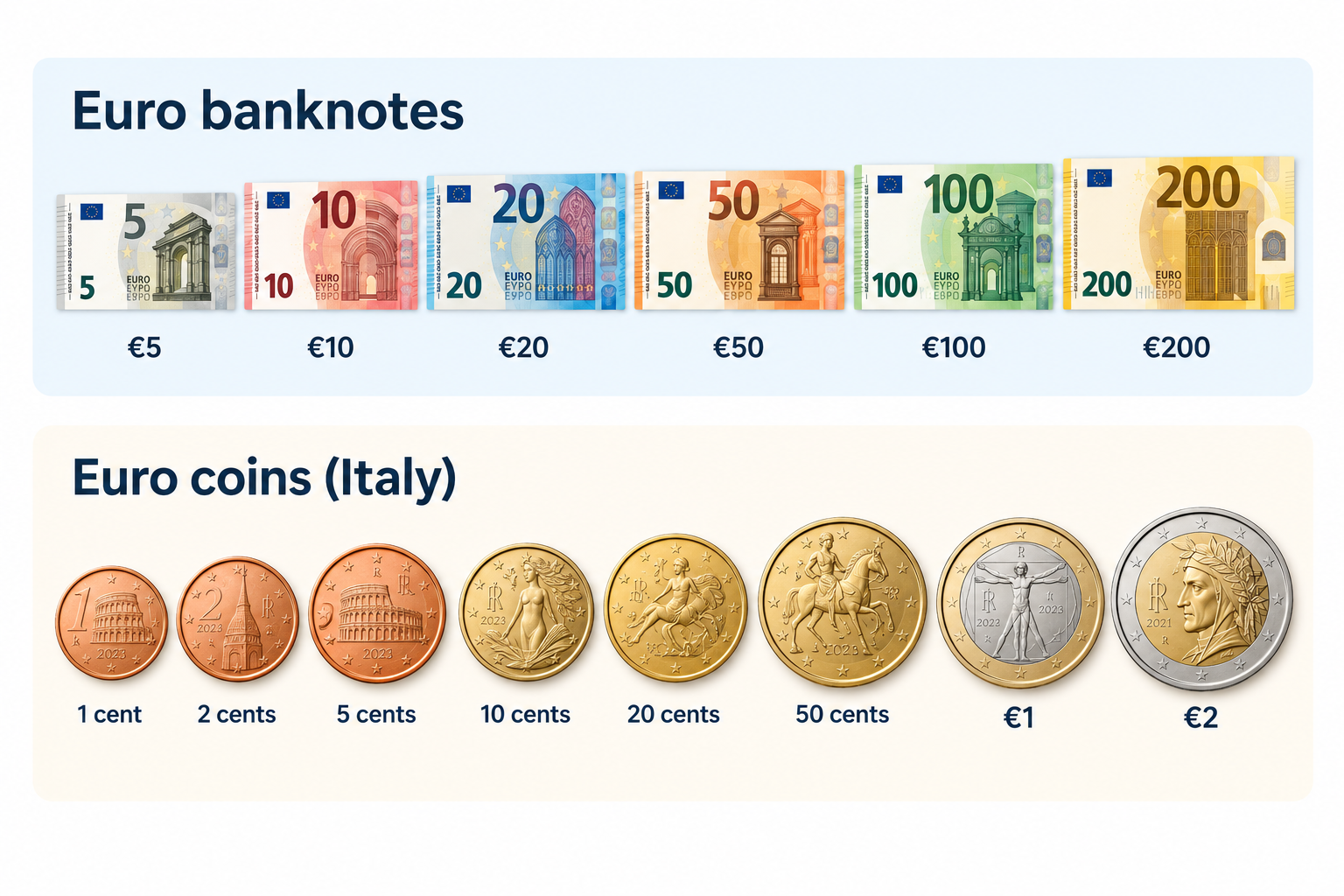
When you visit Italy, you will use euro banknotes and coins for everyday purchases, from buying coffee to paying for meals and transport. Euro banknotes come in denominations of €5, €10, €20, €50, €100 and €200. Although the €500 note is no longer issued, existing notes remain valid. Banknotes share common designs across the eurozone, featuring architectural styles from different periods in European history.

__wf_reserved_inherit

Euro coins come in eight denominations: 1, 2, 5, 10, 20 and 50 cents, plus €1 and €2. Each coin has a common European side and a national side featuring designs selected by its issuing country. All euro coins can be used across the euro area.

Italy’s national coin designs reflect its rich artistic and cultural heritage. The €1 coin features Leonardo da Vinci’s Vitruvian Man, his famous drawing illustrating the proportions of the human body. Other denominations showcase Italian landmarks and masterpieces, including Dante Alighieri, the Colosseum and Sandro Botticelli’s Birth of Venus. These designs celebrate Italy’s contribution to European art and history. The European Central Bank oversees euro banknotes and contributes to maintaining confidence in the currency across participating countries.

Should you pay by cash or card in Italy?

When travelling around Italy, you can pay by card at most hotels, restaurants, supermarkets and shops in major cities, where Visa and Mastercard are widely accepted. However, keeping some euros in your wallet can help when shopping at local markets, making small purchases or visiting places where card payments are unavailable. Before travelling, check your bank’s foreign transaction fees so you know how much you could spend on charges.

You are not expected to tip everywhere in Italy, as tipping is not compulsory, but you can leave a small amount or around 5–10% when you receive particularly good service. Check your bill for any service charge before deciding what to leave.

To manage your spending digitally, you can use a Grey virtual card for eligible purchases in euros, including online bookings and payments at merchants that accept Visa. Depending on your card setup, you may also be able to add it to Apple Pay or Google Pay for contactless payments. Check applicable fees and currency conversion rates before spending.

How to get Euros for a trip to Italy

Before travelling to Italy, decide how you will access euros for meals, transport, shopping and accommodation while keeping exchange costs low. You can exchange money before departure, withdraw euros from ATMs in Italy or use a payment card that supports euro spending.

ATMs operated by established banks are convenient for withdrawing cash, but check your bank’s withdrawal charges and any fee displayed by the ATM before confirming. Exchange bureaux are another option, although you should compare exchange rates and commissions to avoid paying more than necessary.

To avoid unnecessary conversion costs, choose euros rather than your home currency whenever an ATM or card terminal offers dynamic currency conversion. This allows your card provider to handle the conversion instead of accepting the machine’s potentially unfavourable rate. You should also check whether your bank charges foreign transaction fees.

A Grey virtual card offers another way to pay for eligible purchases in euros. Check Grey’s card fees and exchange rates, and compare them with your bank’s charges to find a cost-effective way to spend while travelling.

Also read: Italy digital nomad visa: Requirements, costs and process

How to send money to Italy

Whether you are supporting a family in Italy, paying tuition fees or covering accommodation and other expenses, you need a reliable way to send money in euros without losing track of exchange rates and transfer costs. Grey makes cross-border transfers easier by allowing eligible users to send money from Nigeria to European bank accounts in EUR. You can fund your Grey account, review the available exchange rate and fees, and transfer euros directly to your recipient’s bank account.

Grey is also a multi-currency platform, allowing you to hold and convert supported currencies to manage international payments in one place. This can be useful when you earn in one currency but need to pay expenses in euros. Before confirming a transfer, check the live exchange rate, applicable fees and the final amount your recipient will receive.

Frequently asked questions about the currency of Italy

1. Does Italy use the euro or the lira?

Italy uses the euro (€) as its official currency, not the Italian lira. The lira was replaced by the euro in 1999 for accounting purposes, with euro banknotes and coins entering circulation in 2002. Today, you need euros to pay for everyday purchases, transport, meals and accommodation in Italy.

2. What is the euro symbol and code?

The euro symbol is €, and its official three-letter currency code is EUR. You will see these used on Italian price tags, restaurant menus, receipts and online bookings. One euro is divided into 100 cents. When exchanging money or sending payments to Italy, use EUR to identify the currency correctly.

3. Can you use US dollars in Italy?

US dollars are not generally accepted for everyday purchases in Italy because the euro is the official currency. You should exchange dollars for euros or withdraw euros from an ATM. Some tourist businesses may accept other currencies, but their exchange rates may be unfavourable. Paying in euros usually makes costs easier to compare.

4. Is it better to pay with cash or card in Italy?

Cards are widely accepted in Italian cities, hotels, restaurants and shops, making them convenient for everyday spending. However, carrying some euros is useful for markets, small purchases and places that do not accept cards. Check your bank's foreign transaction fees and choose euros rather than your home currency when prompted at payment terminals.

5. How much cash should you take to Italy?

The amount depends on your travel plans, accommodation and spending habits. For many travellers, carrying around €50–€100 for initial expenses and small purchases is a reasonable starting point, while using a card for larger payments. You can withdraw additional euros as needed, but check ATM charges and your bank's withdrawal limits first.

6. How do you send money to Italy?

You can send money to Italy through a bank transfer or an international money transfer service. Compare exchange rates, transfer fees and delivery times before choosing. Grey supports eligible cross-border transfers and multi-currency services, allowing users to send money in euros to supported destinations. Check availability, fees and recipient requirements before confirming your transfer.

What is the currency of France? Euro symbol and code

•

•

2 min read

The currency in France is the euro, represented by the symbol € and the ISO currency code EUR. If you are travelling to Paris, shopping in Lyon or paying for accommodation in Nice, you will use euros for everyday transactions. France replaced the French franc with euro banknotes and coins in 2002, making the euro its official currency.

The euro is used across mainland France and its outermost regions, including Guadeloupe, Martinique, Réunion, French Guiana and Mayotte. However, not all French territories use the euro. French Polynesia, New Caledonia and Wallis and Futuna use the CFP franc (XPF), a separate currency pegged to the euro at a fixed rate.

When budgeting for a trip, remember that prices are generally displayed in euros, whether you are paying for meals, transport or shopping. If your money is in another currency, check the exchange rate and any conversion fees before making payments. Using a suitable travel card or payment service can also help you manage spending abroad.

What currency does France use?

France uses the euro (€), with the ISO currency code EUR. If you are planning a trip to Paris, visiting the French Riviera or shopping in Marseille, you will pay for most goods and services in euros.

France previously used the French franc as its national currency. The country adopted the euro for electronic and financial transactions in 1999, before euro banknotes and coins entered circulation on 1 January 2002. The franc was then gradually withdrawn, completing France’s transition to the shared European currency.

When checking prices during your visit, look for the € symbol, which usually appears before or after the amount depending on the format. For example, €25 represents twenty-five euros. If you are converting money from naira, pounds or US dollars, the amount you receive will depend on the current exchange rate and any fees charged by your bank or payment provider.

Before travelling, compare conversion costs and payment options so you can manage your spending in France more confidently.

Do the French still use the franc anywhere?

France no longer uses the French franc as its official currency. The euro (€), code EUR, replaced it, with euro banknotes and coins introduced in 2002. However, France still uses a different franc in some of its Pacific territories: the CFP franc (XPF).

If you travel to French Polynesia, New Caledonia or Wallis and Futuna, you will encounter the CFP franc rather than the euro for everyday payments. Although these territories are French, they have a separate currency arrangement suited to their regional economies.

The CFP franc is linked to the euro at a fixed exchange rate of €1 = 119.3317 XPF. This means its value against the euro does not fluctuate with ordinary market exchange-rate movements. However, when converting your money from another currency, such as US dollars or Nigerian naira, the amount you receive can still change with exchange rates and provider fees.

If you are visiting these Pacific territories, check whether your bank card supports local payments and compare conversion charges before travelling. The CFP franc remains distinct from the former French franc, despite sharing the name.

Paying in France: notes, coins, cash and cards

When paying in France, you can use euro banknotes, coins and payment cards. Euro banknotes come in €5, €10, €20, €50, €100 and €200 denominations, while coins range from 1 cent to €2. Prices are displayed in euros, so check the total before paying.

Debit and credit cards are widely accepted in shops, hotels, restaurants and supermarkets. Contactless payments are common, allowing you to tap your card or compatible phone at checkout. However, some transactions may require a PIN, and individual merchants can set minimum card payment amounts where permitted.

Cash remains useful when visiting local markets, buying from smaller vendors, using certain public facilities or making purchases at businesses that do not accept cards. Keeping a little cash available can help you avoid payment difficulties.

If you need a convenient way to pay while travelling, Grey’s virtual card can help you make online and supported card payments in euros. Before your trip, check the card’s currency conversion rates, applicable fees and acceptance conditions so you can plan your spending with confidence.

Also read: Cheapest cities in France for international students

How to get euros for a trip to France

You can get euros for your trip to France through bank ATMs, currency exchange bureaux or your bank before departure. Withdrawing euros from an ATM in France can be convenient, but check your bank’s foreign transaction fees and the ATM operator’s charges. Use ATMs attached to established banks where possible.

Exchange bureaux at airports and tourist areas are easy to find, but they may offer less favourable rates. Compare the final amount you will receive after fees rather than relying only on advertised exchange rates.

When paying by card or withdrawing cash, you may be asked whether you want to pay in euros or your home currency. Choose euros to decline dynamic currency conversion. This usually lets your card provider handle the conversion, which may offer a better rate, although your provider’s fees still apply.

For cross-border payments, Grey offers a way to send money from the US to France. Compare the available exchange rate, transfer fees and delivery times before sending funds, so you can budget for your trip and manage your euros more effectively.

How to send money to France

Whether you are paying rent, covering tuition or supporting family, choosing the right transfer service can help you manage international payments to France. Grey supports cross-border money transfers, allowing you to send money from the UK to France and manage international payments through its platform.

Before sending money, compare exchange rates, transfer fees and delivery times to understand how much your recipient will receive. Bank transfers can include intermediary charges, while card payments may attract foreign transaction fees depending on your provider.

Grey’s multi-currency account helps you hold and manage supported currencies in one place, making it easier to organise international finances. Its virtual card also lets you make eligible online payments and pay for supported purchases in euros. Depending on your card terms and transaction, this may help you avoid certain foreign transaction fees.

Frequently asked questions about the currency of France

1. Does France use the euro or the franc?

France uses the euro as its official currency. The French franc was replaced by euro banknotes and coins in 2002. However, some French Pacific territories still use the CFP franc, a separate currency linked to the euro at a fixed exchange rate.

2. What is the euro symbol and code?

The euro symbol is €, and its three-letter ISO currency code is EUR. You will see the symbol on price tags, receipts and menus across France. For example, €50 means fifty euros. When exchanging money, use EUR to identify the currency correctly.

3. Can you use US dollars in France?

US dollars are not generally accepted for everyday purchases in France. You will usually need euros to pay for meals, transport, shopping and accommodation. Exchange your dollars before travelling or withdraw euros from an ATM. Check conversion rates and fees to manage costs.

4. Is card or cash better in France?

Cards are widely accepted across France, including in hotels, restaurants and shops. Contactless payments are common, making cards convenient for everyday spending. However, cash remains useful at local markets and smaller businesses. Carrying a little of both gives you greater flexibility during your trip.

5. What currency is used in French Polynesia?

French Polynesia uses the CFP franc, abbreviated XPF, rather than the euro for everyday transactions. The currency is pegged to the euro at a fixed rate of €1 = 119.3317 XPF. Check your card’s international payment fees before travelling to the islands.

6. How do you send money to France?

You can send money to France through a bank or an international transfer service. Compare exchange rates, transfer fees and delivery times before choosing. Grey supports cross-border payments, including transfers from the US to France. Confirm service availability and recipient details before sending.

Arrow (up)

Back to top