


What is the currency of Italy? Euro symbol and code

Tunde Aladeloba

TABLE OF CONTENT

SHARE THIS POST

The currency of Italy is the euro, identified by the code EUR and the symbol €. If you are planning a trip to Rome, shopping in Milan or sending money to someone in Italy, understanding the local currency can help you manage your money and avoid unnecessary charges.

Imagine arriving in Italy, ready to explore its historic streets, enjoy a meal at a local restaurant or pay for your hotel. You will need euros for everyday purchases, whether you are paying by card or carrying cash. Euro banknotes come in different denominations, while coins are available in cents and euros. Although cards are widely accepted, having some cash can be useful for smaller purchases and places that prefer cash payments.

Currency exchange fees, ATM charges and your bank's foreign transaction fees can increase your spending without you noticing if you always have to convert. If you need to send money to Italy, exchange rates and transfer fees affect how much your recipient receives. This guide explains the Italy currency, its symbol and code, and practical ways to spend and transfer money while keeping costs down.

What is the currency of Italy?

Italy uses the euro (€) as its official currency. Whether you are visiting Rome, shopping in Milan or paying for accommodation in Venice, you will use euros for everyday transactions. The currency is shared by many European countries, making travel and payments across participating nations more convenient.

The euro’s official currency code is EUR, while its symbol is €. You will see the symbol before prices in many Italian shops, restaurants and online stores. One euro is divided into 100 cents. Euro banknotes are available in different denominations, alongside coins ranging from one cent to two euros, which you can use for smaller purchases.

The European Central Bank (ECB), working with the national central banks of eurozone countries, is responsible for monetary policy and maintaining price stability across the euro area. It helps manage the euro’s value by setting key interest rates and using other monetary policy tools.

Italy is a member of the eurozone, the group of European Union countries that use the euro as their official currency. This means you can generally use the same currency when travelling between Italy and other eurozone destinations, although your bank may still charge fees for certain transactions.

Euro notes and coins in Italy

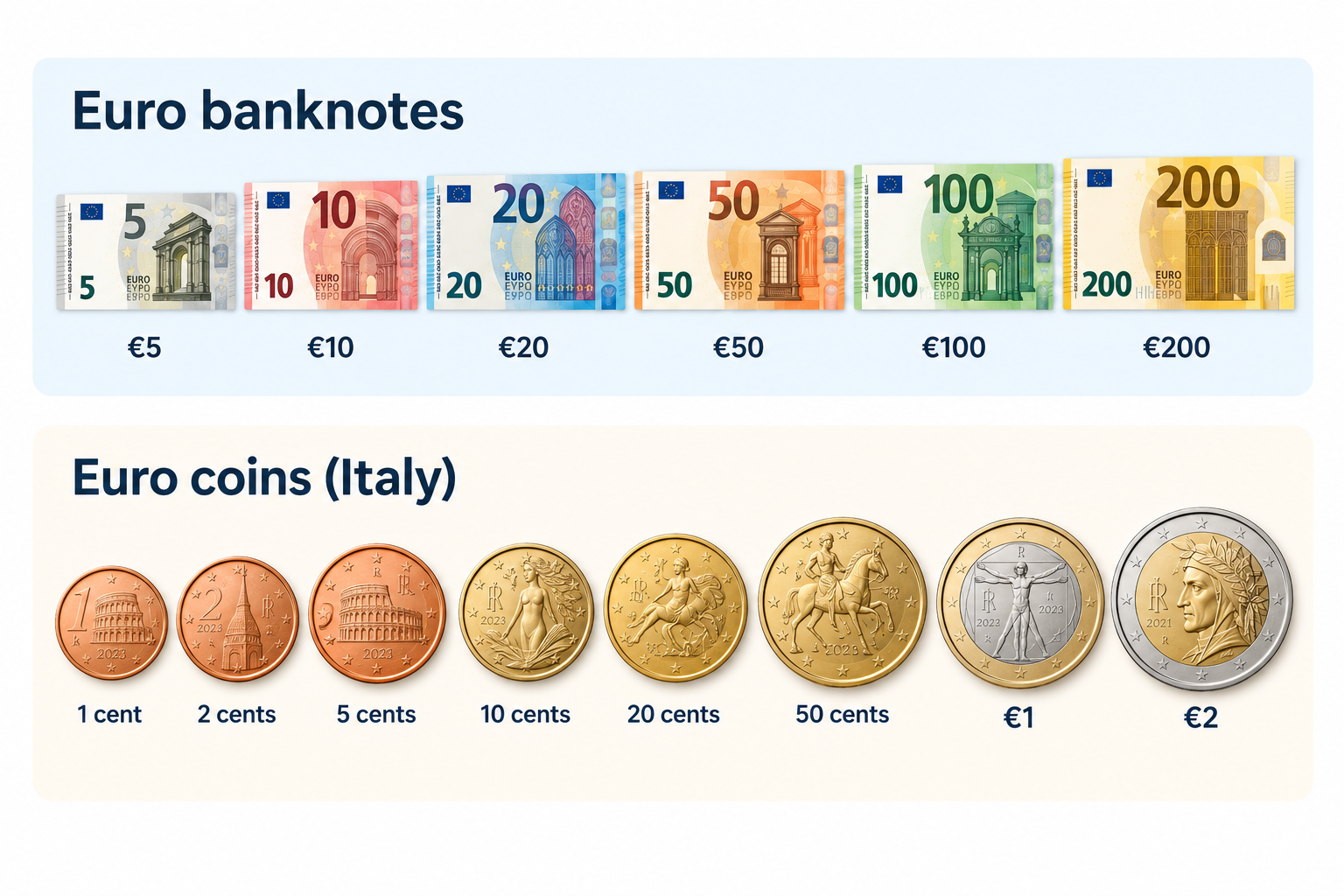
When you visit Italy, you will use euro banknotes and coins for everyday purchases, from buying coffee to paying for meals and transport. Euro banknotes come in denominations of €5, €10, €20, €50, €100 and €200. Although the €500 note is no longer issued, existing notes remain valid. Banknotes share common designs across the eurozone, featuring architectural styles from different periods in European history.

Euro coins come in eight denominations: 1, 2, 5, 10, 20 and 50 cents, plus €1 and €2. Each coin has a common European side and a national side featuring designs selected by its issuing country. All euro coins can be used across the euro area.

Italy’s national coin designs reflect its rich artistic and cultural heritage. The €1 coin features Leonardo da Vinci’s Vitruvian Man, his famous drawing illustrating the proportions of the human body. Other denominations showcase Italian landmarks and masterpieces, including Dante Alighieri, the Colosseum and Sandro Botticelli’s Birth of Venus. These designs celebrate Italy’s contribution to European art and history. The European Central Bank oversees euro banknotes and contributes to maintaining confidence in the currency across participating countries.

Should you pay by cash or card in Italy?

When travelling around Italy, you can pay by card at most hotels, restaurants, supermarkets and shops in major cities, where Visa and Mastercard are widely accepted. However, keeping some euros in your wallet can help when shopping at local markets, making small purchases or visiting places where card payments are unavailable. Before travelling, check your bank’s foreign transaction fees so you know how much you could spend on charges.

You are not expected to tip everywhere in Italy, as tipping is not compulsory, but you can leave a small amount or around 5–10% when you receive particularly good service. Check your bill for any service charge before deciding what to leave.

To manage your spending digitally, you can use a Grey virtual card for eligible purchases in euros, including online bookings and payments at merchants that accept Visa. Depending on your card setup, you may also be able to add it to Apple Pay or Google Pay for contactless payments. Check applicable fees and currency conversion rates before spending.

How to get Euros for a trip to Italy

Before travelling to Italy, decide how you will access euros for meals, transport, shopping and accommodation while keeping exchange costs low. You can exchange money before departure, withdraw euros from ATMs in Italy or use a payment card that supports euro spending.

ATMs operated by established banks are convenient for withdrawing cash, but check your bank’s withdrawal charges and any fee displayed by the ATM before confirming. Exchange bureaux are another option, although you should compare exchange rates and commissions to avoid paying more than necessary.

To avoid unnecessary conversion costs, choose euros rather than your home currency whenever an ATM or card terminal offers dynamic currency conversion. This allows your card provider to handle the conversion instead of accepting the machine’s potentially unfavourable rate. You should also check whether your bank charges foreign transaction fees.

A Grey virtual card offers another way to pay for eligible purchases in euros. Check Grey’s card fees and exchange rates, and compare them with your bank’s charges to find a cost-effective way to spend while travelling.

Also read: Italy digital nomad visa: Requirements, costs and process

How to send money to Italy

Whether you are supporting a family in Italy, paying tuition fees or covering accommodation and other expenses, you need a reliable way to send money in euros without losing track of exchange rates and transfer costs. Grey makes cross-border transfers easier by allowing eligible users to send money from Nigeria to European bank accounts in EUR. You can fund your Grey account, review the available exchange rate and fees, and transfer euros directly to your recipient’s bank account.

Grey is also a multi-currency platform, allowing you to hold and convert supported currencies to manage international payments in one place. This can be useful when you earn in one currency but need to pay expenses in euros. Before confirming a transfer, check the live exchange rate, applicable fees and the final amount your recipient will receive.

Frequently asked questions about the currency of Italy

1. Does Italy use the euro or the lira?

Italy uses the euro (€) as its official currency, not the Italian lira. The lira was replaced by the euro in 1999 for accounting purposes, with euro banknotes and coins entering circulation in 2002. Today, you need euros to pay for everyday purchases, transport, meals and accommodation in Italy.

2. What is the euro symbol and code?

The euro symbol is €, and its official three-letter currency code is EUR. You will see these used on Italian price tags, restaurant menus, receipts and online bookings. One euro is divided into 100 cents. When exchanging money or sending payments to Italy, use EUR to identify the currency correctly.

3. Can you use US dollars in Italy?

US dollars are not generally accepted for everyday purchases in Italy because the euro is the official currency. You should exchange dollars for euros or withdraw euros from an ATM. Some tourist businesses may accept other currencies, but their exchange rates may be unfavourable. Paying in euros usually makes costs easier to compare.

4. Is it better to pay with cash or card in Italy?

Cards are widely accepted in Italian cities, hotels, restaurants and shops, making them convenient for everyday spending. However, carrying some euros is useful for markets, small purchases and places that do not accept cards. Check your bank's foreign transaction fees and choose euros rather than your home currency when prompted at payment terminals.

5. How much cash should you take to Italy?

The amount depends on your travel plans, accommodation and spending habits. For many travellers, carrying around €50–€100 for initial expenses and small purchases is a reasonable starting point, while using a card for larger payments. You can withdraw additional euros as needed, but check ATM charges and your bank's withdrawal limits first.

6. How do you send money to Italy?

You can send money to Italy through a bank transfer or an international money transfer service. Compare exchange rates, transfer fees and delivery times before choosing. Grey supports eligible cross-border transfers and multi-currency services, allowing users to send money in euros to supported destinations. Check availability, fees and recipient requirements before confirming your transfer.

Last updated:

October 23, 2026

Open a free Grey account to get startedJoin 1 million digital nomads
IF YOU ENJOYED THIS, CHECK THESE OUT

What is a virtual wallet? How it compares to a bank account

•

•

2 min read

You've probably tapped your phone at a checkout counter to buy a coffee. That's a virtual wallet in action. But the term covers two fundamentally different things, and the difference matters for whether your money is actually protected.

A virtual wallet is a digital application that stores your payment card details so you can make purchases online or via contactless payment without a physical card. Examples include Apple Pay, Google Pay, and PayPal. Some virtual wallets also hold funds directly, like PayPal or Grey, making them closer to a digital bank account.

Apple Pay doesn't hold a single pound or dollar. It stores a copy of your existing card. PayPal holds actual money you can spend. Grey holds multiple currencies and issues its own card. These are all called "virtual wallets," but they work in completely different ways.

What is a virtual wallet and how does it work?

A virtual wallet stores your payment information digitally so you can pay without carrying a physical card. When you tap your phone at a terminal or select Apple Pay at an online checkout, the wallet sends a tokenised version of your card number to the merchant. The merchant never sees your actual card details.

Tokenisation is the key technology. Your real card number is replaced with a randomly generated token that's unique to that device and transaction. Even if someone intercepts the token, it's useless without the device it was generated on. This makes paying with a virtual wallet generally safer than handing over a physical card, where the actual number is exposed every time. To learn how to set up your wallet, see how to add a virtual card to Apple Pay or Google Pay.

But not all virtual wallets work the same way. The critical distinction is whether the wallet holds your money or simply holds your cards.

Types of virtual wallet: Pass-through vs stored value

This is the distinction most guides skip, and it's the one that matters most for your money's safety.

Pass-through wallets

Apple Pay, Google Pay, and Samsung Pay are pass-through wallets. They store your existing debit or credit cards digitally. No money lives inside the wallet itself. When you pay, the transaction goes through your bank, exactly as it would if you tapped the physical card. The wallet is just a faster way to access the card you already have.

Stored-value wallets

PayPal, Venmo, Cash App, and Grey are stored-value wallets. They hold actual funds in your account. You can receive money into them, hold a balance, and spend from that balance without linking a bank card at all. Some also issue their own virtual cards, which you can add to a pass-through wallet like Apple Pay for contactless payments.

Feature Pass-Through Stored Value
Examples Apple Pay, Google Pay, Samsung Pay PayPal, Venmo, Cash App, Grey
Holds money? No. Charges go to your linked card. Yes. You can hold a balance.
Issues its own card? No. Uses your existing cards. Some do (Grey, Cash App).
Receives payments? No. Yes. Can receive transfers, invoices, salary.
Multi-currency? Depends on your bank card. Some (Grey: USD, GBP, EUR).
Best for Contactless in-store payments. Holding, sending, and spending money.

‍

The distinction matters because it affects whether your money is protected if the wallet provider fails. Pass-through wallets carry no risk here: your money is with your bank, not with Apple or Google. Stored-value wallets are different. Your money sits with the wallet provider, and the level of protection depends on whether that provider holds funds at a regulated, insured institution.

Virtual wallet vs bank account: What is the difference?

A digital wallet vs bank account comparison comes down to four things: where your money is held, whether it's insured, whether it earns interest, and what you can do with it.

Feature Virtual Wallet Bank Account
Deposit insurance Varies. PayPal holds funds at FDIC-insured banks. Others may not. Yes. FDIC (US, $250K) or FSCS (UK, GBP 120K).
Earns interest? Rarely. Most wallets don't pay interest on balances. Yes, especially savings and money market accounts.
Direct debit / standing orders Limited. Some wallets support recurring payments. Yes. Full support.
International transfers Some. PayPal and Grey support cross-border payments. Yes, usually via wire or SWIFT (often expensive).
Physical cash access No. Wallets don't dispense cash. Yes. ATM withdrawals and branch access.
Card issuance Some issue virtual or physical cards. Yes. Debit cards standard.
Regulation Varies by provider and country. Regulated as deposit-taking institution.

‍

The biggest practical difference: bank accounts are regulated deposit accounts with government-backed insurance. If your bank fails, your money (up to the insured limit) is guaranteed. Most virtual wallets don't offer that guarantee directly, though some, like PayPal, hold customer funds at FDIC-insured partner banks.

For most people, the answer isn't one or the other. Use a bank account for savings and salary. Use a virtual wallet for spending, international payments, and everyday convenience. They solve different problems.

Best virtual wallet apps in 2026

Six virtual wallet apps worth considering, sorted by type:

1. Apple Pay (pass-through)

The default wallet on every iPhone. Stores your existing debit and credit cards for contactless payments. No fees, no account needed beyond your Apple ID. Works in-store, in-app, and online wherever Apple Pay is accepted. Doesn't hold funds or issue cards.

2. Google Pay (pass-through)

The Android equivalent. Stores your cards and works at contactless terminals, in apps, and online. Also supports peer-to-peer transfers in some markets. Free to use. Merged with Google Wallet in most countries.

3. PayPal (stored value)

The most widely recognised stored-value wallet globally. Holds funds, sends and receives money, and works with millions of online merchants. Transaction fees apply for business payments and currency conversion. Funds are held at FDIC-insured partner banks in the US.

4. Grey (stored value + multi-currency)

Grey holds USD, GBP, and EUR in one account, issues a virtual debit cardyou can add to Apple Pay or Google Pay, and lets you send money from the US or receive payments from clients worldwide. It's built for people who earn, hold, or spend in more than one currency. For more on the full feature set, see Grey for freelancers.

5. Cash App (stored value)

Popular in the US for peer-to-peer payments. Holds funds, issues a physical and virtual debit card (Cash Card), and supports direct deposit. Also offers stock and Bitcoin buying. Free for standard transfers; instant transfers cost a small fee.

6. Venmo (stored value)

Owned by PayPal, popular for splitting bills and social payments in the US. Holds funds and issues a debit card. The social feed (which shows transactions publicly by default) is either a feature or a privacy concern, depending on your preference. Free for standard transfers.

Open a Grey multi-currency account and get a virtual wallet that holds USD, GBP, and EUR, with a virtual card you can add to Apple Pay or Google Pay.

Are virtual wallets safe?

In most cases, paying with a virtual wallet is safer than paying with a physical card. Three layers of protection make the difference:

Tokenisation. Your real card number is never shared with the merchant. A unique token is generated for each transaction. Even if that token is intercepted, it can't be reused.

Biometric authentication. You must unlock your phone with Face ID, fingerprint, or a PIN before any payment goes through. A stolen phone can't be used to make wallet payments without your face or fingerprint.

Remote deactivation. If your phone is lost or stolen, you can remotely disable your wallet through Find My iPhone (Apple) or Find My Device (Google). Your cards are instantly frozen without needing to call your bank.

The one risk that's less visible: if you use a stored-value wallet and the provider isn't regulated as a bank, your balance may not be insured. Check whether your wallet provider holds customer funds at an FDIC-insured (US) or FSCS-protected (UK) institution before storing large amounts.

Frequently asked questions about virtual wallets

Is a virtual wallet the same as a bank account?

No. A bank account is a regulated deposit account with government-backed insurance (FDIC in the US, FSCS in the UK). A virtual wallet is a digital app that either stores your existing cards (pass-through) or holds funds (stored value). Some stored-value wallets hold funds at insured partner banks, but not all do. A virtual wallet can complement a bank account, but it doesn't replace the regulatory protection.

Can you get scammed using a virtual wallet?

The wallet itself is secure (tokenisation prevents card details from being exposed). The risk is social engineering: someone convincing you to send them money through the wallet, or phishing emails that trick you into entering your wallet credentials on a fake site. The wallet's technology is safe. The human using it is the vulnerability. Never send money to someone you don't know, and never enter your wallet login details on a site you reached via an email link.

What is the safest virtual wallet?

For payment security, Apple Pay and Google Pay are the safest because they don't hold money. Your funds stay with your insured bank. For stored-value wallets, safety depends on whether the provider holds funds at an insured institution. PayPal holds US customer funds at FDIC-insured banks. Check your provider's terms for your specific country.

Can I use a virtual wallet abroad?

Pass-through wallets (Apple Pay, Google Pay) work abroad wherever contactless payments are accepted, and your card issuer supports international transactions. Your bank's foreign transaction fees still apply. Stored-value wallets vary: PayPal works in 200+ countries but charges conversion fees. Grey lets you hold and spend in USD, GBP, and EUR without forced conversion, which avoids the fee on every transaction.

What happens to money in my virtual wallet if the company closes?

For pass-through wallets (Apple Pay, Google Pay), nothing happens to your money because it was never in the wallet. It's in your bank. For stored-value wallets, it depends on regulation. If the provider holds funds at an insured institution, your balance is protected up to the insurance limit. If they don't, you become an unsecured creditor in the company's insolvency, which means you may not get all your money back. This is why it's important to check how your wallet provider safeguards funds before storing large amounts.

Do virtual wallets charge fees?

Pass-through wallets (Apple Pay, Google Pay, Samsung Pay) are free. They don't charge you anything to store cards or make payments. Stored-value wallets vary: PayPal charges fees on business transactions and currency conversion. Cash App and Venmo charge for instant transfers. Grey doesn't charge monthly account fees but applies fees on currency conversion and card transactions. Always check your specific provider's fee schedule.

Open a Grey account and get a virtual wallet that holds USD, GBP, and EUR, with a virtual card you can add to Apple Pay or Google Pay.

Disclaimer: This article is for informational purposes only. Virtual wallet features, fees, and regulatory protections vary by provider and country. Verify current terms with your provider before relying on any wallet for significant funds. Grey is not a bank. Grey is a licensed financial services provider offering multi-currency accounts.

Remitly review 2026: Fees, speed, and reliability

•

•

2 min read

Remitly processes billions of dollars in transfers across 170+ countries every year. It's one of the most downloaded money transfer apps in the world. But popularity doesn't tell you whether you're getting a good deal. Most Remitly reviews list features. This one focuses on the number that actually matters: how much of your money arrives at the other end.

Remitly is a money transfer service that lets you send cash to 170+ countries. Transfer fees start from $0 for economy transfers, with a small exchange rate margin built in. Express transfers arrive within minutes but cost more. Remitly is best for sending to bank accounts or mobile wallets in emerging markets.

This review walks you through Remitly's fees across five major corridors. It compares economy versus express on real transfers, explains where Remitly's reliability holds up and where it doesn't, and shows you how it stacks up against alternatives, including Grey, Wise, and WorldRemit.

How does Remitly work?

Remitly is a digital-first money transfer platform. You don't visit a branch or fill out paper forms. Everything happens in the app or on the website.

Here's the process: create an account (email, phone number, and a government ID for verification). Enter your recipient's details (name, bank account or mobile wallet number, country). Choose between Economy (slower, cheaper) or Express (faster, pricier). Pay by bank transfer, debit card, or credit card. Remitly handles the conversion and delivers to your recipient's bank account, mobile wallet, or a cash pickup location.

First-time transfers require identity verification, which can take a few minutes to a few hours, depending on the documents you submit. Subsequent transfers skip this step. The app supports 18 languages and runs on iOS and Android.

One thing worth knowing: Remitly's fee structure isn't fixed. The fee you pay depends on the corridor, the amount, the payment method, and whether you pick Economy or Express. Two people sending the same amount to the same country can pay very different fees depending on these choices. That variability makes comparing Remitly tricky without looking at specific corridors.

Remitly fees: Full breakdown

Remitly's advertised fees look low. Economy transfers are often listed as "$0 fee." But the real cost of any transfer is the fee plus the exchange rate margin. Remitly builds a margin into the rate it offers, so you're paying even when the stated fee is zero. The margin is wider on Economy transfers and tighter on Express.

Here's what a $500 transfer looks like across Remitly's five most popular US corridors:

Corridor Economy fee Express fee Rate margin (est.) True cost on $500
US to India $0 $1.99 to $3.99 0.5 to 2% $2.50 to $13.99
US to Mexico $0 $3.99 1 to 2.5% $5 to $16.49
US to the Philippines $0 $1.99 to $3.99 0.5 to 2% $2.50 to $13.99
US to Nigeria $0 to $2.99 $3.99 to $5.99 1 to 3% $5 to $20.99
US to Ghana $0 to $2.99 $3.99 1 to 2.5% $5 to $16.49

‍

Focus on the "true cost" column. A $0-fee Economy transfer to Nigeria might look free, but if the rate margin is 2.5%, you're quietly losing $12.50 on a $500 send. Add a $2.99 stated fee on some corridors, and the real cost is over $15.

Remitly also charges a 3% surcharge on some credit card payments, depending on the card provider. Debit card and bank transfer payments don't carry this surcharge. If you're funding with a credit card, factor that in.

New customers often get a promotional rate and a fee-free first transfer. Don't base your long-term cost assessment on the first transfer.

All numbers here are estimates based on publicly available information from mid-2026. Fees and rates shift frequently, so double-check the total cost right before you send.

Remitly transfer times: Economy vs express

Speed is where Remitly genuinely delivers. According to Remitly, 90% of Express transfers arrive within an hour. Economy transfers take longer but cost less. Here's what to expect by corridor and delivery method. For context on how transfer speeds compare across the industry, see how long international wire transfers take.

Corridor Express (bank) Economy (bank) Cash pickup
US to India Minutes 3 to 5 business days Not widely available
US to Mexico Minutes to hours 3 to 5 business days Within hours
US to Philippines Minutes 3 to 5 business days Within hours
US to Nigeria Minutes to hours 3 to 5 business days Within hours
US to Ghana Minutes to hours 3 to 5 business days Within hours

‍

Three things affect delivery speed beyond the Economy/Express choice: your recipient's bank processing time (some Nigerian banks take longer to credit accounts, especially on weekends), first-time KYC verification on your end (can delay the initial transfer by hours or even a day), and public holidays in the recipient country.

Express to India and the Philippines is genuinely fast. Minutes, not hours. Nigeria and Ghana can be slightly slower on the receiving end due to local bank processing, even on Express.

Remitly reliability: What real users say

Remitly holds a 4.6 out of 5 rating on Trustpilot from over 117,000 reviews. More than 80% of reviewers gave it five stars. On the Apple App Store, it holds a similar rating. That's strong for a fintech in the remittance space.

The positive reviews consistently mention speed ("money arrived in minutes"), ease of use ("simple app, took two minutes"), and good coverage of developing-market corridors that other providers don't serve well.

The negative reviews cluster around three issues: transfers delayed without clear explanation (particularly on first transfers where KYC checks are triggered), exchange rates that look worse than competitors on the same corridor at the same time, and customer service that's responsive but sometimes slow to resolve account-level issues like holds or verification blocks.

One pattern worth flagging: several negative reviews describe situations in which a transfer was held for "additional verification" after the funds had already been debited from the sender's account. The sender couldn't cancel, and the money was stuck for days. This appears to be an anti-fraud measure, and it's not unique to Remitly, but it's more frequently reported than with competitors like Wise.

Trustpilot rating and review count verified as of mid-2026. Ratings change over time.

Remitly alternatives worth considering

Remitly isn't the only option, and it's not always the cheapest. Here's how it compares to four alternatives across the dimensions that matter most:

Feature Remitly Grey Wise WorldRemit Western Union
Transfer fee
$0 to $5.99 Flat fee per transfer Low flat fee (varies) $0 to $4.99 $0 to $10+
Rate transparency Margin built into rate Visible rate and fee Mid-market rate shown Margin built into rate Margin built into rate
Express speed
Minutes Minutes Hours to 1 day Minutes to hours Minutes (cash pickup)
Corridors
170+ countries 80+ markets 80+ countries 150+ countries 200+ countries
Recipient holds USD? No (converted to local) Yes (USD, GBP, EUR) Yes (multi-currency) No (converted) No (converted)
Best for Fast transfers to emerging markets Recipients who want to hold USD/GBP Rate-conscious senders Wide corridor coverage Cash pickup globally

‍

Grey's specific advantage is on the receiving side. With Remitly, your recipient gets local currency (naira, pesos, rupees) at whatever rate applies at the moment of conversion. With Grey, the recipient can open a Grey account to receive transfers in USD, hold the dollars, and convert to local currency when the rate is right. For Nigerian recipients in particular, this matters because the naira rate can move significantly within a single week.

If your recipient just needs naira in their account as fast as possible, Remitly Express is hard to beat. If your recipient wants to hold USD and choose when to convert, Grey is the better option. If you're sending to a corridor where every fraction of a per cent matters and you don't need instant delivery, Wise typically offers the tightest rate. For more on sending from the US, see send money from the US.

If your recipient wants to hold USD rather than convert immediately, open a Grey account so they can receive transfers directly, with no forced conversion and no bank delays.

Frequently asked questions about Remitly

Is Remitly safe to use?

Yes. Remitly is licensed and regulated in every country where it operates. In the US, it's registered with FinCEN as a money services business and holds state-level money transmitter licences. In the UK, it's authorised by the FCA. Customer funds are held in trust accounts, separate from Remitly's operating funds. The Trustpilot score (4.6/5 from 117,000+ reviews) suggests the majority of users have positive experiences.

How long does Remitly take to transfer money?

Express transfers to most corridors arrive within minutes to a few hours. Economy transfers take 3 to 5 business days. Cash pickup is typically available within hours of sending. First-time transfers may take longer due to identity verification. Remitly claims 90% of transfers arrive within one hour on Express.

Does Remitly charge fees?

Yes, though the fee structure varies by corridor, amount, and delivery speed. Economy transfers are sometimes listed as $0 fee, but Remitly builds a wider exchange rate margin into Economy transfers, which is effectively a hidden cost. Express transfers charge a stated fee ($1.99 to $5.99 on common corridors) with a tighter rate margin. Credit card payments may incur an additional 3% surcharge. Always check the total cost (fee plus rate) before confirming.

What is the Remitly exchange rate margin?

Remitly doesn't publish a fixed margin. The margin varies by corridor, delivery speed, and market conditions. Based on public comparisons, the margin typically ranges from 0.5% on Express transfers to popular corridors (India, Philippines) to 2-3% on Economy transfers to less-liquid corridors (Nigeria, Ghana). The margin is the difference between Remitly's offered rate and the mid-market rate at the same moment.

Can I cancel a Remitly transfer?

You can cancel a transfer if it hasn't been processed yet. Once processing begins (which can be almost immediately for Express transfers funded by card), cancellation may not be possible. If the transfer is held for verification, you typically can't cancel until the verification is resolved. Refunds for cancelled transfers go back to the original payment method and can take 3 to 10 business days to appear.

Is Remitly better than Western Union?

For digital-first senders who want speed and low fees, Remitly is generally cheaper and faster than Western Union for bank-to-bank and mobile wallet transfers. Western Union's advantage is its physical network: 500,000+ agent locations worldwide for cash pickup and cash-to-cash transfers. If your recipient needs to collect physical cash from a location, Western Union's network is larger. If they have a bank account or mobile wallet, Remitly is usually the better deal. For recipients who want to hold USD, send money internationally with Grey instead.

Open a Grey account and let your recipients receive transfers in USD directly, with no forced conversion and no bank delays.

Disclaimer: This article is for informational purposes only. Fees, exchange rates, transfer speeds, and regulatory status change frequently. All figures cited are estimates based on publicly available data as of mid-2026. Verify current pricing directly with each provider before sending money. Grey is not a bank. Grey is a licensed financial services provider offering multi-currency accounts. This review is not endorsed by or affiliated with Remitly.

How to send money from Nigeria to any country in 2026

•

•

2 min read

Five years ago, sending money out of Nigeria meant a trip to your bank's forex desk, a stack of forms, and a 2 to 5% fee with no guarantee of when the funds would arrive. The apps everyone recommended online were built for the opposite direction: Wise, LemFi, WorldRemit, and Remitly all moved money into Nigeria, not out of it.

That has changed. A handful of fintech apps now support outbound transfers from Nigeria, and the differences between them matter. Some charge a percentage fee. Some claim zero fees but build margin into the exchange rate. Some cover 18 countries; others cover 50. If you are in Lagos, Abuja, or Port Harcourt and need to send money to someone abroad, the options are real, but they are not all the same.

This guide compares every viable option for outbound transfers from Nigeria in 2026, breaks down what each one actually costs, and covers the CBN rules that apply to money leaving the country.

Which apps actually support sending money from Nigeria

Not every transfer app works in the outbound direction. Before comparing fees and features, it helps to know which apps let you initiate a transfer from inside Nigeria and which ones do not.

Apps that support outbound from Nigeria:

Grey supports outbound transfers from Nigeria to 50+ countries via bank transfer, mobile money, and UPI (India). You fund your Grey account in naira, convert to the destination currency, and send directly to your recipient's bank account or mobile wallet. Send money from Nigeria with Grey.

Flutterwave Send supports outbound from Nigeria through its Swap feature, built in partnership with Kadavra BDC and Wema Bank. You convert NGN to USD, GBP, or EUR inside the app, then send to recipients in 30+ countries. The transfer limit is $20,000 per transaction.

Eversend supports outbound from Nigeria to USD, GBP, and EUR bank accounts across 18 countries. It also supports stablecoin wallets (USDC and USDT) and offers a virtual dollar card.

Pesa (formerly Pesapeer) supports outbound from Nigeria to 50+ countries with a multi-currency wallet covering NGN, USD, GBP, EUR, CAD, and AED.

Apps that do NOT support outbound from Nigeria:

Wise does not support NGN as a sending currency. You can receive money in Nigeria through Wise, but you cannot use it to send money out of the country.

LemFi is a diaspora product. It works from the UK, US, Canada, and EU to Nigeria. If you are physically in Nigeria, LemFi does not support outbound transfers.

WorldRemit and Remitly both follow the inbound-only model. They send money to Nigeria from 50+ countries, but do not support the reverse direction.

Zelle and Venmo require both the sender and the receiver to hold US-based bank accounts. Neither works with Nigerian bank accounts in any direction.

OPay is a domestic Nigerian payments app. It handles local transfers, bill payments, and airtime top-ups within Nigeria but does not support international outbound transfers.

Afriex may also support outbound transfers from Nigeria, based on some sources, though the company's website primarily lists sending from the US, UK, Canada, and Europe to African countries. If you are considering Afriex for outbound Nigeria, confirm the available corridors directly in the app before initiating a transfer.

Understanding this split matters because search results and app store listings often recommend Wise, WorldRemit, or Remitly for "Nigerian money transfers" without specifying that they only work inbound. If you need to send money from Nigeria, the confirmed working options are Grey, Flutterwave Send, Eversend, and Pesa.

What each app actually costs on a $500 transfer

Every app handles pricing differently. Some charge a visible transfer fee. Others claim zero fees but build their margin into the exchange rate, which means you receive less at the other end without seeing a separate line item. The only honest comparison is to look at the total cost: transfer fee plus exchange rate markup combined.

Grey: 1% conversion fee, capped at the naira equivalent of $6 for major currency pairs (USD, EUR, GBP, NGN). There is also a flat payout fee that varies by destination. On a $500 transfer to the US, the conversion fee is $5, and there is no separate payout fee for USD destinations. Total visible cost: $5.00. See Grey's fee calculator for exact costs on any corridor.

Flutterwave Send: 1% of the transfer amount for all Nigerian outbound corridors. No published cap. On a $500 transfer, the fee is $5.00. On a $1,000 transfer, the fee is $10.00. On a $2,000 transfer, the fee is $20.00.

Eversend: Business accounts start from 0.49% plus a fixed fee per transfer. Personal account fees are shown in-app before you send but are not published on the website. You can see the exact cost before confirming any transfer, but there is no public fee schedule to compare against in advance.

Pesa: $0 transfer fee. Pesa does not charge a visible fee on any corridor. The cost is embedded in the exchange rate markup, which is not disclosed.

How the fee cap changes the maths on larger transfers

Transfer amount Grey (1%, capped at $6) Flutterwave Send (1%, no cap) Pesa ($0 visible) Eversend
$200 $2.00 $2.00 Hidden in rate Shown in-app
$500 $5.00 $5.00 Hidden in rate Shown in-app
$1,000 $6.00 (cap) $10.00 Hidden in rate Shown in-app
$2,000 $6.00 (cap) $20.00 Hidden in rate Shown in-app
$5,000 $6.00 (cap) $50.00 Hidden in rate Shown in-app

‍

Eversend publishes a 0.49% + fixed fee rate for business accounts but does not publish personal transfer fees. The fee is displayed in-app before you confirm.

On a $5,000 transfer, the difference between Grey and Flutterwave Send is $44. For anyone sending tuition payments, property deposits, or supplier invoices, the cap is a significant cost advantage.

Pesa's column reads "hidden in rate" because the true cost cannot be calculated without comparing the live exchange rate Pesa offers against the mid-market rate at that moment. A $0 transfer fee does not mean a $0 cost. It means the cost is in the rate, and you need to check how much you actually receive compared to what the mid-market rate would deliver.

Where can you send from Nigeria

Grey (50+ countries): Africa (Kenya, Ghana, South Africa, Egypt, Morocco, Algeria, Tanzania, Uganda, Rwanda, Senegal, Cameroon, Ethiopia), Europe (UK, Germany, France, Netherlands, Spain, Belgium, Italy, Ireland, Poland, Austria via SEPA), Asia (India via bank and UPI, Philippines, Indonesia, Bangladesh, Malaysia, UAE, Saudi Arabia), Americas (US via ACH, Canada via bank and Interac, Mexico, Brazil, Argentina, Colombia, Chile), Oceania (Australia).

Pesa (50+ countries): Similar breadth to Grey, with multi-currency wallets supporting NGN, USD, GBP, EUR, CAD, and AED. It recently expanded to the UAE.

Flutterwave Send (30+ countries): Sends from Nigeria, Cameroon, Senegal, Ivory Coast, Ghana, Kenya, South Africa, and Ethiopia.

Eversend (18 countries): Outbound from Nigeria to USD, GBP, and EUR accounts. Narrower coverage but supports stablecoin wallets (USDC, USDT) and intra-African routes like Nigeria to Kenya and Nigeria to Ghana.

How long do transfers take?

Destination Method Speed Available via
India UPI Minutes Grey
India Bank transfer Same day Grey
Kenya Mobile money Same day Grey, Flutterwave Send
Ghana Mobile money Same day Grey, Flutterwave Send
Morocco Bank transfer Instant (before 1 PM GMT) Grey
Canada Interac Instant Grey
US ACH 1-2 business days Grey, Flutterwave, Eversend, Pesa
UK FPS Next business day Grey
Algeria Bank transfer 5 business days Grey
Algeria Mobile money Same day Grey

‍

How to send money from Nigeria step by step

The process is similar across all four apps. Here is how it works with Grey.

Step 1: Open and verify your account. Download the Grey app, sign up, and verify your identity with a government-issued ID (passport, national ID, or driver's licence) and your BVN. Verification typically completes within minutes.

Step 2: Fund your account. Transfer naira from your Nigerian bank account into your Grey wallet. You can hold balances in USD, EUR, and GBP and convert when the rate suits you, or convert at the time of transfer.

Step 3: Convert your currency. Grey converts your naira to the destination currency at the rate shown on the screen. The 1% conversion fee (capped at $6 on major pairs) is displayed before you confirm.

Step 4: Enter recipient details and send. Add your recipient's bank details: sort code and account number for the UK, routing number and account number for the US, UPI ID or bank account for India. Confirm the transfer. Grey processes it, and you both receive a confirmation.

CBN rules for outbound transfers in 2026

The Central Bank of Nigeria regulates all foreign exchange transactions leaving the country. These limits apply regardless of which app you use.

Limit type Amount Notes
Personal travel allowance (Form A) $4,000 to $5,000 per quarter Depends on stated purpose
Business travel allowance $5,000 to $7,500 per quarter
Telegraphic transfers Up to $10,000 per day Via authorised channels
Platform transfer limits $5,000 to $10,000 per month Depends on platform and verification tier
Physical cash (no declaration) Up to $10,000
Physical cash (with Form TE) $10,000 to $50,000 Declaration required at departure
Domestic online ceiling (individual) N25 million Biometric verification above N1 million

‍

Paying for international services directly

Beyond person-to-person transfers, many Nigerians need to pay for international subscriptions, advertising platforms, software, freelancer tools, or online courses. For these recurring payments, a virtual card is more practical than initiating a transfer each time.

Grey offers a Rain card (Visa) for a one-time $4 creation fee plus a $1 funding deduction from your USD balance ($5 minimum balance required). The card works anywhere Visa is accepted online and supports Apple Pay and Google Pay. No monthly fee. For USD merchants, there is no additional charge. For non-USD merchants, a 2% + $0.50 cross-border fee applies. A fuller breakdown is in Grey charges explained.

Eversend also offers a virtual USD card at $0.99 per month or a $2.99 one-time fee, with no FX surcharge on USD transactions. Pesa offers virtual cards as well.

Which app is best for what

There is no single best app for every use case. Here is when each option makes the most sense.

Grey is best for larger transfers and wider destination coverage. The 1% fee capped at $6 means anyone sending above $600 pays less than they would on a straight-percentage platform. Grey also has the widest destination coverage (50+ countries), UPI support for India transfers, and a full-featured Visa virtual card.

Flutterwave Send is best for quick, moderate transfers within Africa. The 1% fee without a cap is competitive on smaller amounts, and the Swap integration makes currency conversion seamless.

Eversend is best for multi-currency holders and stablecoin users. If you hold USDC or USDT and want to convert and send without going through naira first, Eversend's stablecoin wallets are a genuine differentiator.

Pesa is best if you prioritise no visible fees on small transfers. The $0 transfer fee is real. But because the cost is in the exchange rate, you need to compare the rate Pesa offers against the mid-market rate to know what you are actually paying.

Also read: Cheapest way to send money from Nigeria in 2026

Frequently asked questions

Can I use Wise to send money from Nigeria?

No. Wise does not support NGN as a sending currency. Wise suspended USD transfers to Nigeria effective November 1, 2022, and later resumed inbound naira payouts, but outbound from Nigeria remains unsupported. To send money from Nigeria, use Grey, Flutterwave Send, Eversend, or Pesa.

What is the cheapest way to send money from Nigeria abroad?

It depends on the amount. For smaller transfers, Pesa's zero-visible-fee model or Eversend's in-app pricing may work out cheaper depending on the exchange rate offered. For transfers above $600, Grey's 1% fee capped at the naira equivalent of $6 is the lowest published rate among platforms with transparent fee structures. On a $2,000 transfer, Grey charges $6 in conversion fees while Flutterwave Send charges $20. Always compare the total received amount, not just the headline fee.

Can OPay send money internationally?

No. OPay is a domestic Nigerian payments platform. It handles local transfers, bill payments, airtime, and betting deposits within Nigeria. OPay does not support international outbound transfers.

Is Zelle allowed in Nigeria?

No. Zelle requires both the sender and the receiver to hold bank accounts at US-based financial institutions. Nigerian bank accounts are not compatible with Zelle in either direction.

What documents do I need to send money from Nigeria?

You need a valid government-issued ID (international passport, national ID card, or driver's licence) and your Bank Verification Number (BVN) to verify your account. For larger transfers, you may be asked for proof of source of funds in line with CBN anti-money laundering requirements.

How long does it take to send money from Nigeria to India?

With Grey, transfers to India arrive the same day. Both bank transfer (up to INR 450,000) and UPI (up to INR 100,000) are supported, with a flat $1.50 payout fee. UPI transfers can arrive within minutes and are available every day, including weekends.

How long does it take to send money from Nigeria to the US?

Most apps deliver to US bank accounts within 1-2 business days via ACH. Grey, Flutterwave Send, Eversend, and Pesa all support the Nigeria-to-US corridor with similar delivery timeframes.

Is Grey a bank?

No. Grey is a licensed multi-currency account provider that operates through regulated banking partners. Grey offers international transfers, multi-currency accounts, and virtual cards across 80+ countries. It is not a deposit-taking bank.

‍

Related reading

Cheapest way to send money from Nigeria in 2026 compares the exact cost of sending $500, $1,000, and $2,000 with Grey, Flutterwave Send, Pesa, and Eversend.

The easiest way for Nigerians abroad to send US dollars home covers the reverse direction: sending money to Nigeria from the UK, US, or Canada.

Exchange rates on Grey are variable and include a margin over the mid-market rate. Always review the rate before confirming a conversion. Grey is a financial technology company, not a bank. Banking services are provided by licensed banking partners. This article is general information, not financial advice.

Best apps to send money internationally from the US in 2026

•

•

2 min read

If you send money from the United States to family, friends, or business contacts abroad, you have probably noticed that the options have multiplied. Ten years ago, it was Western Union or your bank. Now there are over a dozen apps competing for each transfer, each with a different fee structure, exchange rate approach, and set of destination countries.

The problem is not a lack of options. It is the right app that changes depending on where you are sending, how much you are sending, and how your recipient wants to receive the money. An app that is excellent for sending $500 to India via bank deposit might be a poor choice for sending $200 to Kenya via M-Pesa.

This guide covers six of the best apps for sending money internationally from the US in 2026. For each one, we explain what it actually costs, where it works best, and what to watch out for. If you are looking for a broader overview of sending money from the US with Grey, the corridor hub page covers every supported destination.

How the main apps compare at a glance

App Best for Fee structure Speed Destinations
Grey Larger transfers to Africa and Asia 1% capped at ~$6 + flat payout fee Instant to 1-2 days 50+ countries
Wise Transparent mid-market rate transfers 0.41% to 1.5% (varies by corridor) 1-3 business days 80+ countries
Remitly Family remittances to Asia, Africa, Latin America $0 to $4.99 (varies by speed and corridor) Minutes (Express) to 3-5 days (Economy) 170+ countries
WorldRemit African mobile money corridors $0 to $4.99 (varies by destination) Minutes to 3 days 130+ countries
Sendwave No-fee transfers to Africa and Asia $0 fee (cost in exchange rate) Minutes 50+ countries
Western Union Cash pickup worldwide $2.99 to $14.99+ (varies by amount and method) Minutes to 5 days 200+ countries

‍

Fee ranges are illustrative and vary by corridor, amount, and payment method. Always compare the total amount your recipient receives, not just the headline fee. Last checked: September 2026.

Grey

Grey is a multi-currency account provider that supports transfers from the US to over 50 countries. It is particularly strong on African corridors, where it offers both bank transfer and mobile money delivery, including M-Pesa in Kenya, MTN Mobile Money in Ghana, and direct bank transfers across the continent.

Grey charges a 1% conversion fee on all transfers, capped at the equivalent of $6 on major currency pairs (USD, EUR, GBP). That cap is the differentiator. On a $500 transfer, the fee is $5. On a $1,000 transfer, the fee is $6. On a $5,000 transfer, the fee is still $6. Most other apps charge a percentage that scales with the amount, or a flat fee plus a rate markup that grows with volume. Grey's cap means that anyone regularly sending above $600 pays less per transfer than they would on almost any other platform. Full details on Grey's fee calculator.

On top of the conversion fee, there is a flat payout fee per destination. For the US-to-India corridor, that is $1.50. For Kenya via M-Pesa, it is $0.50. For Ghana via mobile money, it is $1.00. UK destinations carry no separate payout fee.

Grey also provides multi-currency accounts (hold USD, EUR, and GBP), a virtual Visa card for online payments, and UPI delivery to India, which arrives in minutes. The UPI support is unusual among transfer apps and makes Grey a strong option for the US-to-India corridor.

Best for: US-based senders who regularly transfer larger amounts ($600+) to Africa or India and want a transparent, capped fee structure.

Wise

Wise is widely considered the benchmark for transparent international transfers. It uses the mid-market exchange rate with no markup, and the fee is shown upfront before you confirm. For most corridors, the fee ranges from 0.41% to 1.5% of the transfer amount, depending on the destination and payment method.

The advantage of Wise is predictability. The rate you see is the rate you get, and there is no hidden margin. The disadvantage is that the fee is a straight percentage with no cap, so on large transfers, it can add up. A $5,000 transfer at 0.5% costs $25 in fees. With Grey, the same transfer costs $6 in conversion fees plus a flat payout fee that depends on the destination.

Wise supports 80+ destination countries and offers a multi-currency account with a Wise debit card. It is an excellent all-round choice for US senders, particularly for bank-to-bank transfers in Europe and Asia. Its African coverage is solid for bank transfers but less comprehensive for mobile money delivery than Grey or WorldRemit.

Best for: Senders who prioritise exchange rate transparency and send moderate amounts to a wide range of countries.

Remitly

Remitly is built for family remittances. It offers two delivery speeds: Express (arrives in minutes, higher fee) and Economy (arrives in 3 to 5 business days, lower fee). The fee ranges from $0 to $4.99, depending on the corridor, payment method, and delivery speed.

Remitly's strength is its coverage of popular remittance corridors: India, the Philippines, Mexico, Pakistan, Bangladesh, Nigeria, Kenya, and Ghana are all well served. Delivery options include bank deposit, mobile wallet, cash pickup, and door-to-door delivery in some markets. First-time users often receive a promotional rate on their first transfer.

The trade-off is the exchange rate. Remitly does not use the mid-market rate. The rate includes a margin, so the headline fee may look low, but the total cost (fee plus rate) can be higher than Wise's on the same corridor. Always compare the final amount your recipient receives, not just the fee.

Best for: Frequent senders to South Asia, Southeast Asia, and Latin America who value delivery speed and flexibility (bank, wallet, or cash pickup).

WorldRemit

WorldRemit is the strongest app for mobile money transfers to Africa. It supports M-Pesa in Kenya, MTN Mobile Money in Ghana, Airtel Money in Uganda, and mobile wallets across dozens of African countries. If your recipient does not have a bank account or prefers receiving via their phone, WorldRemit covers more African mobile money networks than any other major US-based app.

Fees range from $0 to $4.99, depending on the destination, amount, and delivery method. Like Remitly, WorldRemit includes a margin in the exchange rate, so the headline fee does not tell the full story. Cash pickup is available in some countries through partner agent networks.

WorldRemit also supports airtime top-ups, which let you add mobile credit to your recipient's phone directly. This is a niche feature, but useful for senders supporting family members who need phone credit more than cash.

Best for: Senders to sub-Saharan Africa who need mobile money delivery, particularly to countries with strong M-Pesa or MTN Mobile Money networks.

Sendwave

Sendwave charges no visible transfer fee. The cost is built into the exchange rate, similar to Pesa on the Nigeria corridor. The app specialises in transfers to Africa and parts of Asia, with a simple interface designed for speed.

The appeal is simplicity. You enter an amount, see what your recipient gets, and confirm. There is no fee line item to think about. But as with any zero-fee app, the total cost depends on the exchange rate markup. Compare the amount your recipient receives on Sendwave against what they would receive on Wise or Grey at the same moment to know whether the zero-fee model is actually cheaper.

Sendwave supports mobile money and bank transfer in most African markets. It is owned by WorldRemit's parent company (Zepz), but operates as a separate app with its own rates and fee structure.

Best for: Small, frequent transfers to Africa and Asia, where simplicity and speed matter more than optimising the exchange rate.

Western Union

Western Union has the largest cash pickup network in the world, with over 500,000 agent locations across 200+ countries. If your recipient needs physical cash and does not have a bank account or mobile money wallet, Western Union is often the only practical option.

Fees range from $2.99 to $14.99 or more, depending on the amount, destination, and delivery method. The exchange rate includes a margin. Western Union is rarely the cheapest option for bank-to-bank transfers, but its reach is unmatched for cash pickup in remote locations.

Western Union also offers bank deposit and mobile wallet delivery in many countries, though its digital experience is less polished than purpose-built apps like Wise or Remitly.

Best for: Senders whose recipients need cash pickup at a physical agent location, particularly in countries with limited banking infrastructure.

How to choose the right app for your transfer

The best app depends on three things: where your recipient is, how they want to receive the money, and how much you are sending.

If you send large amounts ($600+) regularly to Africa or India, Grey's $6 fee cap makes it the cheapest published option. On a $2,000 transfer, Grey charges $6 while Wise charges $10 to $30, depending on the corridor, and Remitly's combined fee and rate markup can exceed that.

If you prioritise exchange rate transparency, Wise is the strongest choice. The mid-market rate with no markup means you always know the true cost.

If your recipient needs mobile money in Africa, WorldRemit has the widest mobile money network. Grey covers M-Pesa (Kenya) and MTN Mobile Money (Ghana) well, but WorldRemit reaches more networks across more countries.

If your recipient needs cash pickup, Western Union's 500,000+ agent network is unmatched.

If you send small amounts frequently and want simplicity, Sendwave's zero-fee model removes the decision fatigue, though you should periodically check whether the rate is competitive.

Also read: How to send money from Nigeria to any country in 2026 covers the outbound Nigeria corridor, where the competitive landscape is very different.

Frequently asked questions

What is the cheapest app to send money internationally from the US?

It depends on the amount and destination. For transfers above $600, Grey's 1% fee capped at $6 is the lowest published rate among apps with transparent pricing. For smaller amounts, Wise's percentage-based fee (from 0.41%) or Remitly's Economy tier may be cheaper on specific corridors. Sendwave charges no visible fee but builds cost into the exchange rate. Always compare the final amount your recipient receives.

Is Wise or Remitly better for sending money from the US?

Wise is better for transparency: it uses the mid-market exchange rate with no markup, and the fee is shown upfront. Remitly is better for speed and delivery flexibility: its Express option delivers in minutes and supports bank, mobile wallet, and cash pickup. Wise is usually cheaper on total cost for bank-to-bank transfers. Remitly is stronger for mobile wallet delivery in Asia and Africa.

Can I send money from the US to M-Pesa in Kenya?

Yes. Grey, WorldRemit, and Sendwave all support M-Pesa delivery from the US to Kenya. Grey charges $0.50 per M-Pesa transfer plus a 1% conversion fee capped at $6. The transfer is instant.

What is the cheapest way to send money from the US to India?

Grey offers a $1.50 flat payout fee plus a 1% conversion fee capped at $6, with delivery via UPI in minutes. Wise charges from approximately 0.41% with delivery in 1 to 2 business days. Remitly's Economy option is often competitive for smaller amounts. On a $1,000 transfer, Grey costs $7.50 total (conversion cap + payout fee).

How long does it take to send money from the US internationally?

It depends on the destination and app. Transfers via Grey to India (UPI) and Kenya (M-Pesa) are instant. Transfers to the UK and most of Europe arrive within 1 to 2 business days. Remitly's Express option delivers in minutes on popular corridors. Bank-to-bank transfers via Wise typically take 1 to 3 business days.

Is Grey available in the United States?

Yes. Grey is licensed by FinCEN in the US as a Money Services Business. US residents can open a Grey account, hold multiple currencies, and send money to 50+ countries. Grey also provides virtual Visa cards and multi-currency accounts for receiving international payments.

‍

Related reading

How to send money from Nigeria to any country in 2026 covers the outbound Nigeria corridor, where most competitors do not operate, and Grey's positioning is very different from the US market.

Cheapest way to send money from Nigeria in 2026 compares fees across Grey, Flutterwave Send, Pesa, and Eversend for the Nigeria outbound market.

Exchange rates on Grey are variable and include a margin over the mid-market rate. Always review the rate before confirming a conversion. Grey is a financial technology company, not a bank. Banking services are provided by licensed banking partners. This article is general information, not financial advice.

What is a routing number and where do you find it?

•

•

2 min read

Did you know that 92% of Americans get their pay through direct deposit? Every one of those paychecks relies on a routing number, a simple nine-digit code that quietly does the work of making sure your money ends up in the right place.

A routing number is a nine-digit code that helps identify your bank during financial transactions. You'll usually see it printed at the bottom left of your cheque, right before your account number. These numbers are used for all sorts of things: direct deposits, ACH transfers, and domestic wires. But here's the catch: your bank might use different routing numbers for different types of transfers, such as ACH versus wire transfers.

If you've ever been asked for your routing number and had no idea where to look, don't worry, you're not alone. In this article, we'll explain exactly what a routing number is, how to find yours in less than a minute, and why some banks have more than one.

What is a routing number?

A routing number, sometimes called an ABA routing transit number, is a unique nine-digit code given to every US bank and credit union by the American Bankers Association (ABA). It's basically your bank's address in the world of finance, telling other banks where to send your money.

The first four numbers show which Federal Reserve district and processing centre your bank belongs to. The next four digits point to your specific bank within that district. The last digit is a sort of checksum: it helps make sure the number is valid.

Here's something that surprises a lot of people: your bank might have more than one routing number. That's because banks often use different numbers for different types of transactions, depending on which Federal Reserve network processes them:

  1. ACH routing number: Used for direct deposits, bill payments, and electronic transfers. Processed through FedACH in batches.
  2. Wire routing number: Used for domestic wire transfers. Processed through Fedwire individually in real time.
  3. Cheque routing number: Printed on the bottom of paper cheques. Processed through the Federal Reserve's cheque clearing system.

Some banks keep it simple and use the same routing number for all transactions. Others, like Wells Fargo, have different numbers by state for ACH transactions, while the wire number stays the same across the country. So, always double-check which one you need before you send or receive money.

Where to find your routing number

Here are the three quickest ways to find your routing number, ranked from fastest to slowest:

1. Your bank's mobile app: Just open your banking app, tap on your account, and look for something like "Account Details" or "Routing Number." This is usually the fastest way. Most people can find it in under 20 seconds.

2. On a cheque: If you have a cheque handy, glance at the bottom left corner. The routing number is the first set of nine digits, tucked between two funny-looking symbols (they're called MICR symbols). The next set is your account number, and the smallest set is the cheque number.

3. Your bank's website: Log in to your online banking, head to your account summary, and look for "Routing Number" in your account details. If you're stuck, just type "routing number" into the site's search or help section.

If those options don't work (maybe you don't have a cheque, the app, or online banking), you can always call your bank's customer service (the number is on the back of your debit card). They'll just need to verify who you are before giving you your routing number.

One tip: double-check whether your bank uses different routing numbers for cheques and electronic transfers. The number on your cheque might not be the right one for direct deposit or ACH payments. When in doubt, use the number from your app or online banking.

Routing number vs account number: What is the difference?

You'll usually need both your routing and account numbers for most transactions, but they do different jobs. The routing number identifies your bank, while your account number identifies your specific account at that bank. Here's a quick breakdown:

Routing Number Account Number
9 digits, always 8 to 17 digits (varies by bank)
Identifies your bank Identifies your specific account
Bottom left of the cheque Next to the routing number on the cheque
Same for all customers at the same bank (in the same state) Unique to you
Shared with employers, billers, and transfer recipients Shared with the same parties, but more sensitive
Public (can be looked up online) Private (only you and your bank know it)

‍

The main thing to remember: your routing number is public; anyone can look it up. But your account number is private. Don't share it with just anyone, since someone with both could try to pull money from your account. You need both numbers for ACH and wire transfers, so keep them together.

When do you need a routing number?

You'll need to share your routing number in the following situations:

  1. Setting up direct deposit. Your employer will ask for your routing and account numbers so they can deposit your paycheck directly into your account. Use your ACH routing number (not the wire one) for this.
  2. Sending or receiving a domestic wire transfer. The person sending you money will need your wire routing number (which may differ from your ACH number) and your account number.
  3. Setting up automatic bill payments. When you sign up for recurring payments, like utilities or subscriptions, they'll use your routing and account numbers to take money out via ACH.
  4. Moving money between banks. If you're transferring funds between your accounts at different banks, you'll need the routing numbers for both.

For international wire transfers, you won't use a routing number at all. Instead, the sender will need your bank's SWIFT or BIC code. Want to know more about the difference? Check out our guides on SWIFT codes vs routing numbers andACH vs wire transfers.

Routing numbers for Major US banks

The table below lists primary ACH routing numbers for major US banks, while highlighting where routing numbers may vary by state or account.

Bank ACH primary routing number
Chase 021000021
Citibank 021000089
Bank of America 026009593
US Bank 091000022
Wells fargo Varies by state (e.g., 121000248 for CA).

‍

Routing numbers identify the bank involved in a payment, but the correct number can vary by state and transaction type, so confirm it before sending money.

Frequently asked questions

Is a routing number the same as a sort code?

They're basically the same thing, but for different countries. Routing numbers are for the US (9 digits); sort codes are for the UK (6 digits). Both help identify a bank and a branch when you're making domestic payments. If you're sending money between a US and UK account, you'll use a routing number on the US side and a sort code.

Can two banks have the same routing number?

Nope, each routing number is unique to one bank (or sometimes a specific branch or region). The American Bankers Association assigns them, so no two operating banks will have the same one. If banks merge, the old routing numbers are either phased out or reassigned.

What happens if I give the wrong routing number?

If you give the wrong routing number, your payment might bounce back or go to the wrong bank. If it bounces, you just have to fix the number and try again. If it lands in the wrong bank, your bank will need to work with the other one to get your money back, which can take a while, so it's best to double-check before hitting send.

Where is the routing number on a Bank of America cheque?

Look at the bottom left corner of your Bank of America cheque. The first nine digits are your routing number, then comes your account number, and finally the cheque number. Just remember, Bank of America uses different routing numbers for each state, so the one on your cheque depends on where you opened your account.

Can I find my routing number without a cheque?

Yes! Check your bank's mobile app under Account Details, log in to your bank's website, give customer service a call, or search online for your bank's name plus "routing number." Most banks make these numbers easy to find on their help pages.

Do I need a routing number for Zelle or Venmo?

Not usually. Zelle and Venmo use your email or phone number to send and receive money. But when you first link your bank account, you might need to provide your routing and account numbers to set things up. After that, you just use your email or phone number for transfers.

Not a US bank customer? You can open a Grey account and get your own USD routing and account details, so you can receive payments from US clients or employers, even if you don't have a US address.

Disclaimer: This article is for informational purposes only. Routing numbers, account details, and bank procedures can change over time. Always double-check with your bank before using any number for a financial transaction. Grey isn't a bank. We're a licensed financial services provider offering multi-currency accounts.

WorldRemit vs Remitly: Which is faster and cheaper?

•

•

2 min read

Choosing between WorldRemit and Remitly is a bit like choosing between two airlines that fly the same routes. Both get the money there. The question is which one charges you less for the journey and which one arrives first.

WorldRemit and Remitly are both digital remittance services covering 100+ countries. Remitly typically offers lower fees on popular corridors like the US to India and the US to the Philippines. WorldRemit has broader cash pickup and mobile wallet delivery options. The better choice depends on your specific corridor and how fast you need the money to arrive.

Most comparison articles list features side by side and leave you to guess. This one does the maths on five real corridors. It shows you the actual cost difference on a $500 transfer, which one delivers faster, and whether Grey might be a better option for recipients who'd rather hold USD than accept whatever local rate they get on arrival.

‍WorldRemit vs Remitly: Side-by-Side Comparison

Feature WorldRemit Remitly
Countries supported 150+ 170+
Transfer fee range $0 to $4.99 $0 to $5.99
Rate margin 1 to 3% (varies by corridor) 0.5 to 3% (varies by corridor and speed)
Delivery methods Bank, cash pickup, mobile wallet, airtime top-up Bank, cash pickup, mobile wallet, home delivery
Express speed Minutes to hours Minutes (90% within 1 hour, per Remitly)
Economy speed 1 to 3 business days 3 to 5 business days
Trustpilot score 4.2/5 (check current) 4.6/5 (117K+ reviews)
App rating 4.6+ (iOS and Android) 4.8+ (iOS and Android)
Best for Mobile wallet and airtime top-up corridors Fast bank-to-bank transfers to popular corridors

‍

At a glance, they look similar. Both cover 100+ countries, both charge variable fees, and both offer express and economy options. The differences emerge when you look at specific corridors. For a deeper look at Remitly on its own, see the full Remitly review.

Remitly's Trustpilot score is higher (4.6 vs 4.2), and its app rating edges ahead on both platforms. But ratings don't tell you which is cheaper for your specific transfer. The next section does.

Fees: Which is cheaper?

The only honest answer: it depends on the corridor. Here's what a $500 transfer costs on the five most common corridors, comparing WorldRemit fees and Remitly fees side by side:

Corridor WorldRemit fee WorldRemit
true cost
Remitly fee Remitly
true cost
Cheaper?
US to India $1.99 to $3.99 $7 to $19 $0 to $3.99 $2.50 to $14 Remitly (usually)
US to Nigeria $2.99 to $4.99 $8 to $20 $0 to $5.99 $5 to $21 Close; depends on speed
US to Philippines $1.99 to $3.99 $7 to $18 $0 to $3.99 $2.50 to $14 Remitly (usually)
US to Mexico $0 to $3.99 $5 to $18 $0 to $3.99 $5 to $16 Close; Remitly slightly
UK to Ghana GBP 0 to 2.99 GBP 5 to 17 GBP 0 to 3.99 GBP 5 to 18 Close, WorldRemit slightly

‍

Focus on the "true cost" column, not just the advertised fee. Both services build a margin into the exchange rate. A "$0 fee" transfer that gives you a 2.5% worse exchange rate on $500 quietly costs $12.50. That hidden cost often exceeds the stated fee.

On the most popular corridors (US to India, US to the Philippines), Remitly is typically a few dollars cheaper when you account for both fees and the rate margin. On African corridors (Nigeria, Ghana), the two are close enough that it's worth checking both at the exact moment you're ready to send.

All numbers are estimates based on publicly available information from mid-2026. Both providers change pricing frequently, so double-check right before you send.

Speed: Which is faster?

Remitly claims 90% of Express transfers arrive within one hour. WorldRemit doesn't publish a similar claim, but it delivers express transfers within minutes to hours across most corridors. Here's a corridor-by-corridor breakdown. For context on broader transfer speeds, see how long international wire transfers take.

Corridor WorldRemit Express Remitly Express Winner
US to India Minutes to hours Minutes Remitly (marginally)
US to Nigeria Minutes to hours Minutes to hours Comparable
US to the Philippines Minutes Minutes Comparable
US to Mexico Minutes to hours Minutes to hours Comparable
UK to Ghana Hours to the same day Minutes to hours Remitly (marginally)

‍

On express transfers, the two are close. Remitly has a slight edge in India and Ghana. In terms of economy, WorldRemit typically delivers in 1 to 3 business days versus Remitly's 3 to 5 days, which means WorldRemit's budget option is actually faster.

Three factors affect speed regardless of which provider you use: how you fund the transfer (debit card is fastest, bank transfer adds a day), whether it's your first transfer (KYC verification can add hours or a day), and the recipient's local bank processing time (some Nigerian and Ghanaian banks are slower to credit accounts on weekends).

WorldRemit's airtime top-up option, which lets you load credit directly onto a recipient's phone, is often the fastest delivery method. Neither Remitly nor Grey offers this.

Reliability: What real users say about each

Remitly holds a 4.6 out of 5 rating on Trustpilot based on over 117,000 reviews. WorldRemit holds approximately 4.2 out of 5. Both scores are solid for the remittance sector, but Remitly has a clear lead in customer satisfaction.

Common praise for Remitly: speed ("arrived in minutes"), clean app experience, and good promotional rates for first-time users. Common complaints: transfers held for additional verification with money debited but not yet delivered, and customer service that's responsive but slow to resolve account-level blocks.

Common praise for WorldRemit: broad corridor coverage (especially in Africa), mobile wallet delivery that works well in markets where bank penetration is low, and an easy-to-navigate app. Common complaints: exchange rates that appear less competitive than alternatives on popular corridors, occasional delays without proactive communication, and customer service that can be slow to respond.

Both providers have a pattern of first-transfer friction: new users sometimes experience verification delays that don't recur on subsequent transfers. This is industry-standard anti-fraud behaviour, not unique to either platform. But it's more frequently reported than with providers like Wise, which tends to verify upfront rather than mid-transfer.

Trustpilot scores verified as of mid-2026. Ratings change over time.

WorldRemit vs Remitly vs Grey: Which should you use?

Both WorldRemit and Remitly are sender-side tools. You send money, they convert it, and your recipient gets the local currency at the rate that applies at that moment. The recipient has no say in the timing or the rate.

Grey works differently. Instead of converting and delivering local currency, Grey lets the recipient hold USD, GBP, or EUR in their own account. They see the local rate, and they decide when to convert. If the rate is bad today, they wait. If it's good on Thursday, they convert on Thursday.

Feature WorldRemit Remitly Grey
Sender pays the fee?
Yes ($0 to $4.99) Yes ($0 to $5.99) Yes (flat fee)
Rate margin
1 to 3% 0.5 to 3% Grey rate (visible)
Recipient holds USD?
No (converted on arrival) No (converted on arrival) Yes
Recipient chooses when to convert? No No Yes
Delivery methods Bank, cash, mobile wallet, airtime Bank, cash, mobile wallet, home delivery Account (USD, GBP, EUR)
Best for Cash pickup and mobile wallet corridors Fast bank-to-bank in popular corridors Recipients who want to hold foreign currency

‍

If your recipient needs naira, pesos, or rupees in their bank account today, Remitly or WorldRemit is the right tool. If your recipient wants to hold USD and convert on their terms, open a Grey account to receive transfers and let them decide. If you're looking for the best money transfer service for regular sends, the answer depends on which outcome your recipient prefers.

For the Nigeria corridor specifically, holding USD through Grey can save real money during periods of naira volatility. For the India corridor, where the INR/USD rate is more stable, the speed advantage of Remitly Express may matter more than the rate timing advantage of Grey. See send money from the US for corridor-specific options.

Want your recipient to hold USD rather than accept whatever rate they get on arrival? Open a Grey account and give them the choice to convert whenever the rate looks good.

Frequently asked questions

Is WorldRemit or Remitly cheaper?

On popular corridors (US to India, US to the Philippines), Remitly is typically a few dollars cheaper on a $500 transfer when you account for both the stated fee and the exchange-rate margin. On African corridors (Nigeria, Ghana), the two are close enough that you should check both at the moment you're ready to send. Neither is universally cheaper.

Which is faster, WorldRemit or Remitly?

On Express transfers, they're comparable. Remitly has a slight edge in some corridors (India, Ghana). On Economy transfers, WorldRemit is typically faster: 1 to 3 business days versus Remitly's 3 to 5. WorldRemit's airtime top-up (loading credit directly onto a phone) is the fastest delivery method either provider offers.

Is WorldRemit safe?

Yes. WorldRemit is regulated in every country where it operates. In the UK, it's authorised by the FCA. In the US, it holds state-level money transmitter licenses. The Trustpilot score is approximately 4.2 out of 5. Negative reviews focus on transfer delays and customer service speed, not on security or lost funds.

Does Remitly offer cash pickup?

Yes. Remitly supports cash pickup in many countries through partner networks. Your recipient can collect physical cash from a designated location using an ID and the reference code you receive after sending. Cash pickup availability varies by country. Remitly also offers home delivery in some markets (Mexico, the Philippines), which WorldRemit doesn't offer.

Can I use WorldRemit to send to Nigeria?

Yes. WorldRemit supports transfers to Nigeria via bank deposit, mobile wallet, and cash pickup. Transfer fees from the US to Nigeria typically range from $2.99 to $4.99, with an exchange rate margin of 1 to 3%. Delivery times range from minutes (express bank deposit) to same day (cash pickup).

Which money transfer service has the best exchange rates?

No single provider has the best rate on every corridor at every moment. Wise consistently offers rates closest to mid-market with a transparent flat fee. Remitly offers competitive Express rates on popular corridors but wider margins on Economy. WorldRemit's rates are generally mid-range. Grey lets recipients hold USD and choose when to convert, which sidesteps the rate question entirely. For regular senders, comparing two or three providers at the moment of sending is more useful than choosing one permanently. See send money internationally with Grey for how Grey handles the rate differently.

Open a Grey account and give your recipients the choice to hold USD rather than converting on arrival.

Disclaimer: This article is for informational purposes only. Fees, exchange rates, transfer speeds, and Trustpilot scores change frequently. All figures are estimates based on publicly available data as of mid-2026. Verify current pricing directly with each provider before sending. Grey is not a bank. Grey is a licensed financial services provider offering multi-currency accounts. This review is not endorsed by or affiliated with WorldRemit or Remitly.

Arrow (up)

Back to top

