


<script type="application/ld+json" data-schema-version="grey-blog-v4"> [{"@context":"https://schema.org","@type":"BlogPosting","@id":"https://grey.co/blog/how-to-receive-and-convert-foreign-currencies-to-usdc-in-namibia#article","headline":"How to receive and convert foreign currencies to USDC in Namibia","description":"Learn how freelancers in Namibia can easily receive, send and convert foreign currencies to USDC with Grey","inLanguage":"en","url":"https://grey.co/blog/how-to-receive-and-convert-foreign-currencies-to-usdc-in-namibia","mainEntityOfPage":{"@id":"https://grey.co/blog/how-to-receive-and-convert-foreign-currencies-to-usdc-in-namibia#webpage"},"datePublished":"2024-11-29T10:59:19.322Z","dateModified":"2026-06-15T17:47:23.653Z","author":{"@type":"Person","@id":"https://grey.co/authors/olayoyin-olorunmota#person","name":"Olayoyin Olorunmota","url":"https://grey.co/authors/olayoyin-olorunmota","jobTitle":"Content Writer","sameAs":["http://www.linkedin.com/in/olayoyinolorunmota","http://x.com/yoyin_michael"]},"publisher":{"@type":"Organization","@id":"https://grey.co/#organization","name":"Grey","url":"https://grey.co","logo":{"@type":"ImageObject","url":"https://cdn.prod.website-files.com/6360022338a81bd6fdbb1145/6564ae1077a67e39d3c491a6_Grey%20Logo%20Lockup%20Black.svg"}},"image":{"@type":"ImageObject","@id":"https://grey.co/blog/how-to-receive-and-convert-foreign-currencies-to-usdc-in-namibia#primaryimage","url":"https://cdn.prod.website-files.com/636a85d290ee58e70c17e1c0/6a301890d807c78c444cedf4_6a30188f291eb1c909618f06_how-to-receive-and-convert-foreign-currencies-to-usdc-in-namibia__header-image.webp","contentUrl":"https://cdn.prod.website-files.com/636a85d290ee58e70c17e1c0/6a301890d807c78c444cedf4_6a30188f291eb1c909618f06_how-to-receive-and-convert-foreign-currencies-to-usdc-in-namibia__header-image.webp","width":1200,"height":675}},{"@context":"https://schema.org","@type":"WebPage","@id":"https://grey.co/blog/how-to-receive-and-convert-foreign-currencies-to-usdc-in-namibia#webpage","url":"https://grey.co/blog/how-to-receive-and-convert-foreign-currencies-to-usdc-in-namibia","name":"How to receive and convert foreign currencies to USDC in Namibia","description":"Learn how freelancers in Namibia can easily receive, send and convert foreign currencies to USDC with Grey","inLanguage":"en","primaryImageOfPage":{"@id":"https://grey.co/blog/how-to-receive-and-convert-foreign-currencies-to-usdc-in-namibia#primaryimage"},"breadcrumb":{"@id":"https://grey.co/blog/how-to-receive-and-convert-foreign-currencies-to-usdc-in-namibia#breadcrumb"}},{"@context":"https://schema.org","@type":"BreadcrumbList","@id":"https://grey.co/blog/how-to-receive-and-convert-foreign-currencies-to-usdc-in-namibia#breadcrumb","itemListElement":[{"@type":"ListItem","position":1,"name":"Home","item":"https://grey.co/"},{"@type":"ListItem","position":2,"name":"Blog","item":"https://grey.co/blog"},{"@type":"ListItem","position":3,"name":"How to receive and convert foreign currencies to USDC in Namibia","item":"https://grey.co/blog/how-to-receive-and-convert-foreign-currencies-to-usdc-in-namibia"}]}] </script>

How to receive and convert foreign currencies to USDC in Namibia

Olayoyin Olorunmota

TABLE OF CONTENT

SHARE THIS POST

If you’re a freelancer working with international clients in Namibia, managing your payment process doesn’t need to be hectic. USD Coin (USDC) offers a streamlined, stable solution for this.

This guide explains how freelancers and remote workers in Namibia can efficiently receive foreign currencies, convert them into USDC, and take control of their earnings with Grey.

Also read: How to receive and convert foreign currencies to USDC

Why convert foreign payments to USDC as a freelancer in Namibia?

For freelancers in Namibia working with international clients, converting foreign currencies to USDC offers several advantages:

  • Stable value: USDC is a stablecoin tied to the U.S. dollar, offering predictable value and avoiding the volatility of other cryptocurrencies.
  • Low fees: Compared to traditional bank transfers, USDC transactions come with significantly lower fees.
  • Quick access to funds: Blockchain technology ensures near-instant processing, so you get paid faster.
  • Flexible conversions: You can hold USDC until you get the most favourable exchange rate or convert it to Namibia dollar (NAD) as needed.

Also Read: Send instant USDC payouts to 40+ countries with Grey

How to receive and convert foreign currency to USDC

Grey offers a seamless way to receive and convert foreign currencies into USDC. Here's how:

Open the Grey app

Log in to your Grey account via the app or website to securely access your USD and other currency balances.

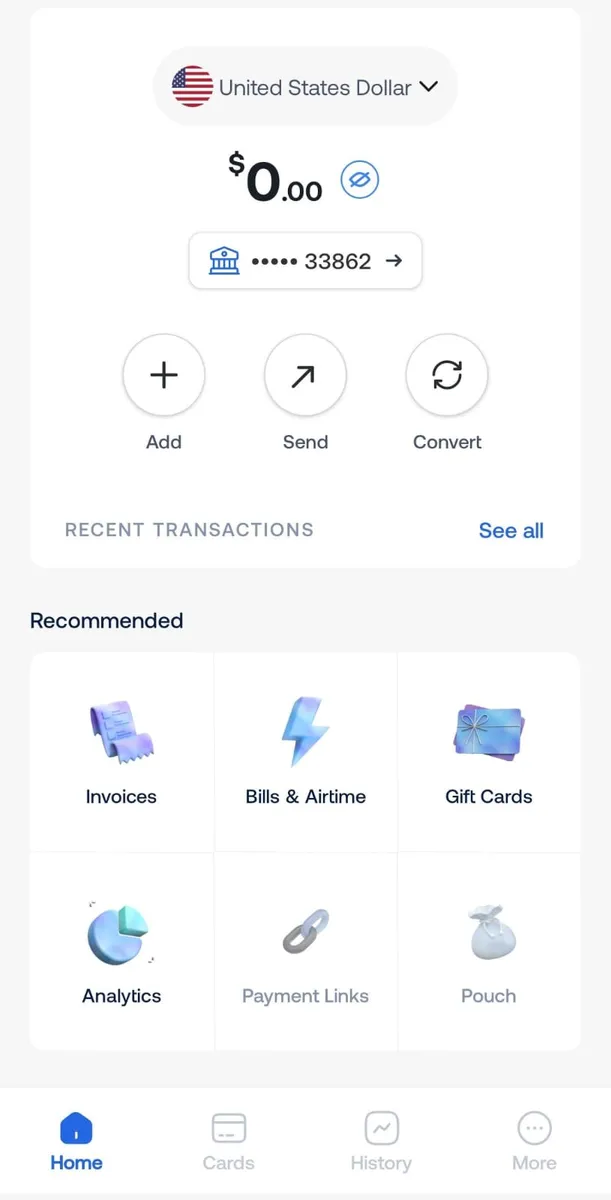
Select your USD balance

Navigate to the “Accounts” section and select your USD balance to initiate a USDC transfer.

Send USDC Grey

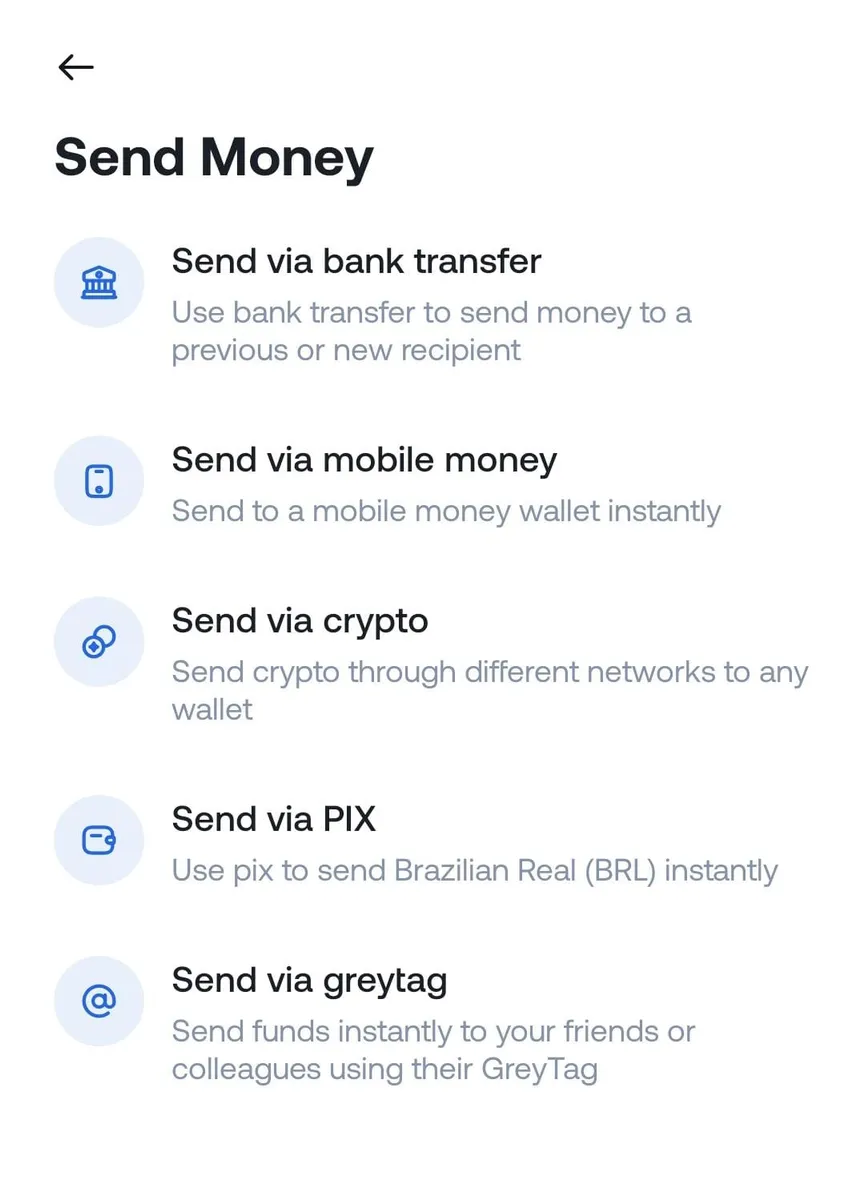
Tap “Send via crypto”

Select “Send money,” then choose “Send via crypto” to begin the process of sending USDC.

673354a9d3571067ebfd359d 6733537b479771f26d7b66b9 send usdc with grey2

Enter transaction details

Carefully input the recipient’s wallet address and choose the correct network (Solana or Binance Smart Chain) to ensure a successful transfer.

Send USDC Grey

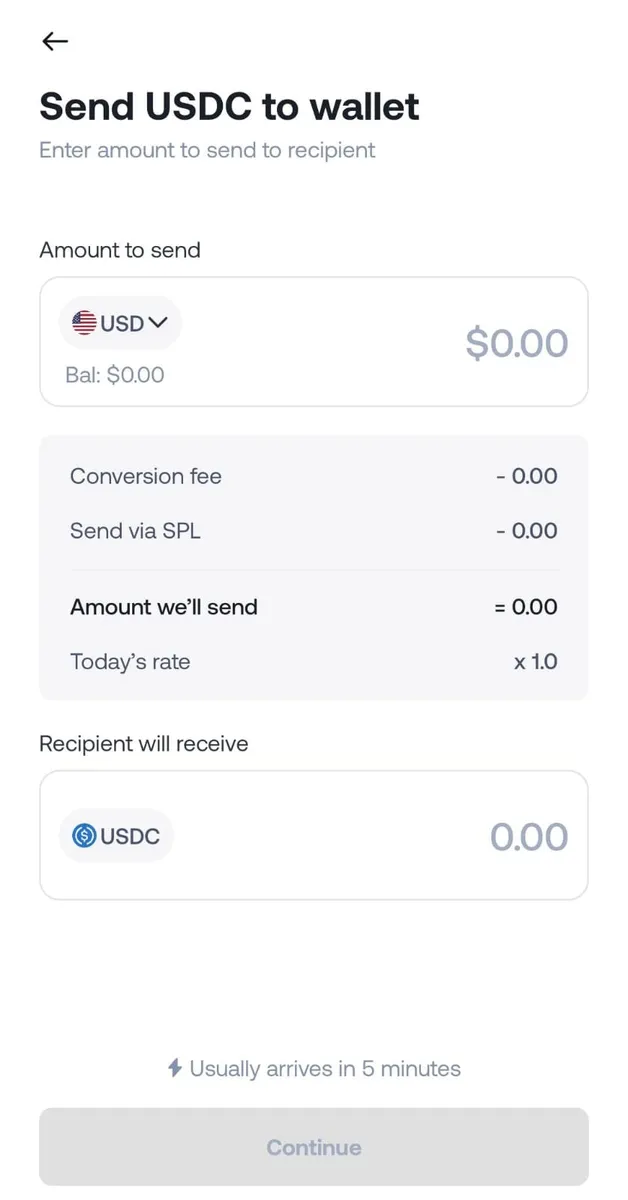
Input the transfer amount and review the details

Enter the amount of USDC to send. Double-check all information, including the wallet address and network, before proceeding.

Send USDC Grey

Confirm and complete the transfer

Once all details are verified, tap “Send” to complete the transaction. Grey will request two-factor authentication (2FA) for added security.

Transaction success

The recipient will receive the USDC shortly after processing. They can hold it, convert it to local currency, or use it for other purposes.

Also Read: How to receive and convert foreign currencies to USDC in the United Arab Emirates

How to convert USDC to Namibia dollars (NAD)

To convert USDC to Namibia dollars, use a crypto exchange or local service that supports USDC-to-NAD transactions. Some platforms allow direct conversions, while others may require intermediary steps involving USD or BTC.

What are the considerations for freelancers holding and converting USDC?

While holding USDC is convenient, here are a few factors to consider:

  • Network compatibility: Ensure the network used for USDC matches your wallet and the conversion service you use.
  • Fee awareness: Although USDC transactions generally have low fees, network charges can vary.
  • Tax compliance: Cryptocurrency is considered an asset in Namibia. Consult a tax advisor to ensure compliance with local regulations.

Also Read: How to receive and convert foreign currencies to USDC in Uganda

Using Grey to simplify USDC management

With Grey, you can send USDC to supported wallets, manage funds with ease, and take advantage of robust security measures like two-factor authentication (2FA).

Create your Grey account today to unlock the full potential of USDC as a freelancer in Namibia.

‍

Last updated:

October 2, 2026

Open a free Grey account to get startedJoin 1 million digital nomads
IF YOU ENJOYED THIS, CHECK THESE OUT

Claude AI subscription pricing: pro, max and team plans compared for 2026

•

•

2 min read

If you are weighing up Claude’s subscription options, pricing is usually the first question. Claude plans range from free to $200 per month, and the right choice depends on how often you use it and whether usage limits are getting in the way of your work.

This guide covers every Claude plan and what each one costs in 2026. It also covers how to pay from Nigeria, India, Ghana, or any country where a local bank card may be declined or marked up on a USD-priced checkout. A Grey virtual card funded in USD handles that cleanly.

All pricing below is sourced from Anthropic’s official pricing page and plan documentation. Verify on claude.ai/pricing before subscribing, as prices are subject to change.

Claude plans at a glance

Plan Monthly price Annual price Usage vs Free Best for
Free $0 $0 Base usage Light personal use
Pro $20/month $17/month ($200/year) 5x more than Free Everyday productivity
Max 5x $100/month Monthly only 5x more than Pro Frequent heavy users
Max 20x $200/month Monthly only 20x more than Pro Daily intensive use
Team (Standard) $25/seat/month $20/seat/month 1.25x more than Pro Teams of 5 or more
Team (Premium) $125/seat/month $100/seat/month 6.25x more than Pro Power users in teams

Pricing and features are subject to change at Anthropic’s discretion. Verify current pricing at claude.ai/pricing.

Free plan

The Free plan is the right starting point if you want to try Claude before committing to a paid subscription. You get access to Claude on web, iOS, Android, and desktop, with the ability to search the web, generate code, write and edit content, create files, and use memory across conversations. Usage is limited compared to paid plans and you may encounter limits during busy periods.

The Free plan does not include Claude Code, Cowork, or Research. Most users who rely on Claude for work find the usage limits restrictive within a few days of regular use.

Pro plan: $20 per month

Pro is the right plan for most people who use Claude regularly for work. It gives you meaningfully more capacity than the Free plan and includes the full Claude toolkit. Monthly billing is $20 per month. The annual subscription brings that down to $17 per month, billed as $200 upfront.

Pro includes everything in the Free plan plus:

  • At least 5x more usage per session than the Free plan
  • Claude Code for terminal-based coding workflows
  • Claude Cowork and Claude Design
  • Access to all available Claude models
  • Access to Research
  • Unlimited projects for organising conversations and documents
  • Priority access during high-traffic periods
  • Early access to new features

Usage limits reset on a session basis (every five hours), and there is also a weekly usage limit across all models. If you regularly hit Pro limits, the Max plan is the next step.

Only credit and debit cards are accepted for Pro plan payments. Apple Pay is available via the iOS App Store, but adds approximately 30 percent to the subscription cost due to Apple’s platform fee.

Max plan: $100 or $200 per month

Max is for users who regularly push through Pro’s limits and need substantially more capacity. If you find yourself waiting for usage to reset or cutting work short because of limits, Max is the upgrade to consider. It comes in two tiers:

Tier Price Usage vs Pro Best for
Max 5x $100/month 5x more than Pro Frequent users who regularly hit Pro limits
Max 20x $200/month 20x more than Pro Daily intensive users who collaborate with Claude for most tasks

Team plan: from $20 per seat per month

The Team plan is the right choice when you need Claude across a group, with centralised billing and admin controls. It requires a minimum of five members and a maximum of 150. It includes all Pro features plus SSO, role-based permissions, and a 200k context window for longer documents and conversations.

Team plans offer two seat types:

Seat typeMonthly priceAnnual priceUsageStandard$25/seat/month$20/seat/month1.25x more per session than ProPremium$125/seat/month$100/seat/month6.25x more per session than Pro

Teams can mix Standard and Premium seats, assigning Premium to power users who need higher capacity. Usage limits are per-member, not shared across the team.

Enterprise plan

Enterprise is the right fit for larger organisations that need security controls, compliance features, and predictable usage-based billing. Unlike Team, the seat fee covers access only and all usage is billed separately at API rates, with no per-seat usage limits. Admins can set spend caps at the organisation and user level to manage costs.

Enterprise adds audit logs, SCIM, custom data retention, compliance and analytics APIs, customer-managed encryption keys, and US-only inference. Self-serve Enterprise requires a minimum of 20 seats. Sales-assisted Enterprise requires a minimum of 50 seats.

Enterprise pricing is not listed publicly. Refer to Anthropic’s pricing page or contact their Sales team for current rates.

Claude API billing

API access is separate from the consumer subscription plans. API usage is billed via prepaid credits, not a monthly subscription. You purchase credits in advance, and they are drawn down as you make API calls. Failed requests are not charged.

Credits expire one year from the purchase date and are non-refundable. Auto-reload can be set to purchase additional credits automatically when your balance falls below a defined threshold. API billing accepts credit and debit cards only.

LDMAG1

How to pay for Claude from Nigeria, India, or Ghana

Claude’s payment page accepts major credit and debit cards in USD. For users in Nigeria, India, Ghana, and most emerging markets, two problems arise commonly:’

  • Your local bank card is declined on a foreign USD checkout
  • Your bank applies a foreign transaction fee of 2 to 5 percent on top of the listed price, making a $20 subscription cost $20.40 to $21

Pay with a Grey virtual card. Grey gives you a virtual card linked to your USD balance. When you subscribe to Claude Pro, Max, or any other USD-priced plan, the charge processes in USD from your Grey account. No foreign transaction markup from a Nigerian or Indian bank, no declined card on a foreign checkout. The card works on Anthropic’s payment page the same way a standard debit card does.

If you subscribe to the annual Pro plan, your Grey card handles the $200 charge in one transaction and renews automatically the following year.

Note: subscribing via the iOS App Store costs approximately 30 percent more due to Apple’s platform fee. The direct web subscription at claude.ai/upgrade is the most cost-effective route for most users.’

Frequently asked questions

How much does Claude Pro cost?

Claude Pro costs $20 per month on a monthly subscription, or $17 per month when billed annually ($200 per year). Prices are in USD and subject to change.

What is the difference between Claude Pro and Max?

Pro provides 5x more usage than the Free plan. Max 5x provides 5x more usage than Pro, and Max 20x provides 20x more usage than Pro. Max also includes higher output limits and earlier access to new features. Max is available at $100 per month (5x) or $200 per month (20x).

Can I pay for Claude with a Nigerian or Indian bank card?

Nigerian and Indian bank cards are sometimes declined on USD-priced foreign checkouts, and may apply a foreign transaction fee of 2 to 5 percent on successful transactions. A Grey virtual card funded in USD processes the payment without those issues.

Is there a free version of Claude?

Yes. Claude’s Free plan is available at claude.ai with no payment required. It includes access to Claude on web, iOS, Android, and desktop, with limited usage compared to paid plans.

Does Claude offer an annual discount?

Yes, for the Pro plan and Team Standard and Premium seats. Annual Pro billing costs $200 per year, equivalent to $17 per month, compared to $20 per month on a monthly basis. Max plans are currently available on monthly billing only.

Can I pay for Claude via Apple Pay or Google Pay?

Apple Pay is available when subscribing via the iOS App Store, but this route adds approximately 30 percent to the cost due to Apple’s platform fee. Anthropic’s direct web payment page accepts credit and debit cards only.

What is the cheapest way to subscribe to Claude from Nigeria?

Subscribe directly at claude.ai/upgrade on the annual Pro plan ($200 per year, $17 per month equivalent). Pay with a Grey virtual card funded in USD to avoid foreign transaction fees from a Nigerian bank card.

Estonia digital nomad visa: How to apply

•

•

2 min read

While under the radar, Estonia is gradually becoming the world’s most advanced digital society. From e-governance to robust support for start-ups like Skype, Wise, and Bolt, Estonia now consistently ranks among the top digital nomad destinations in Europe. Once a country has good infrastructure and tech companies, all that is left for a digital nomad is low living costs and a city to explore.

Estonia launched the world's first digital nomad visa in August 2020, allowing remote workers to live in the country for up to one year. Applicants must earn at least €4,500 per month and work for an employer or clients outside Estonia. The visa gives access to the Schengen Area for the duration of the stay.

This article explores Estonia’s digital nomad visa, the cost, requirements, application process and everything else you need as a digital nomad visiting Estonia.

What is the Estonian digital nomad visa?

Estonia was the first country in the world to introduce a formal digital nomad visa in August 2020. The visa allows non-EU and non-EEA nationals to live and work remotely in Estonia for up to one year, provided their income comes from an employer or clients based outside Estonia.

During the stay, digital nomad visa holders also have access to the broader Schengen Area. So, they can travel freely within the 27 Schengen member states for up to 90 days.

It is important to clarify that the Estonian digital nomad visa is entirely different from Estonia's e-Residency programme. E-Residency is a digital identity programme that allows non-Estonians to register and manage an EU-based company online. It does not grant the right to live in Estonia, travel within the EU, or obtain any form of residence. Many readers searching for the digital nomad visa encounter e-Residency and conflate the two. They serve different purposes and require separate applications.

The digital nomad visa is for physical residence in Estonia. E-Residency is for digital business registration. You can hold one, the other, both, or neither.

Here is a full list of 50 countries offering digital nomad visas.

Estonia digital nomad visa requirements

Here are the requirements to qualify for an Estonian digital nomad visa. These requirements might vary by jurisdiction and specific scenarios. Review the requirements with the consulate in your jurisdiction to understand.

  • Nationality: Non-EU and non-EEA citizens. EU and EEA nationals do not require a visa to live and work in Estonia.
  • Income threshold: A minimum gross monthly income of €4,500 (approximately $5,150 or £3,900 as at June 2026). Income must be location-independent and earned from an employer or clients based outside Estonia.
  • Remote work arrangement: The applicant must demonstrate that their work can be performed from any location, either as a remote employee of a foreign company or as a self-employed professional with clients outside Estonia.
  • Health insurance: Valid comprehensive health insurance covering the Schengen Area for the full duration of the intended stay.
  • Clean criminal record: A criminal background check from the applicant's country of residence and any other country where they have lived for more than 12 months in the past five years.
  • Financial self-sufficiency: Proof that the applicant can support themselves without seeking local Estonian employment or accessing Estonian social benefits.

Required documents

Prepare the following before contacting the Estonian embassy or consulate. Incomplete applications cause delays and may be returned without processing.

  • Valid passport with at least six months of validity beyond the intended end of the stay, and sufficient blank pages for stamps
  • Completed visa application form, available from the Estonian embassy or consulate website
  • Two recent passport-sized photographs meeting the embassy's specifications
  • Proof of income: three to six months of payslips, bank statements demonstrating consistent income above the threshold, or client contracts with payment terms and invoices supporting the stated income level
  • Employer letter or client contracts confirming the remote nature of the work arrangement and that the employer or clients are based outside Estonia
  • Health insurance certificate covering the Schengen Area for the full duration of the intended stay, with a coverage minimum meeting the Schengen standard (currently €30,000)
  • Criminal background check from the relevant authorities in the applicant's country of residence
  • Proof of accommodation in Estonia, such as a signed lease, confirmed rental, or letter of invitation from a host
  • Application fee payment

Self-employed applicants should also include business registration documents, evidence of client relationships, and at least six months of income history demonstrating consistent earnings above the threshold.

Also read: How to open US, UK and Euro bank accounts in Estonia

How to apply: step by step

  1. Confirm eligibility: Check that your income meets the current threshold, your work qualifies as location-independent, and your nationality requires a visa to reside in Estonia. If you are an EU or EEA citizen, you do not need to apply.
  2. Gather all documents: Use the list above as your checklist. Every document should be accurate, complete, and consistent with the others. Income figures on bank statements should match those referenced in employment letters or client contracts.
  3. Contact the Estonian embassy or consulate in your home country: Applications are submitted in person at the Estonian embassy or consulate in the country where you are a citizen or legal resident. Some countries may offer an online pre-application step. Verify from the specific embassy website whether this applies to your location, as the process varies by country.
  4. Submit your application: Attend your appointment, submit all original documents along with copies, and pay the visa fee. The officer may ask questions about your work, client relationships, and plans in Estonia.
  5. Wait for the decision: Processing typically takes 15 to 30 days from the date of submission, though it can be longer during peak periods or if the consulate requests additional documentation. Do not book non-refundable travel until the visa is confirmed.
  6. Travel to Estonia: Upon approval, the entry visa is issued. Once in Estonia, register your address at the local government office. If you intend to stay beyond the initial visa period, you must apply for a temporary residence permit, which carries its own requirements.

See our guide to must-haves for digital nomads before your move.

Costs, duration and what to know about tax

  • Application fee: Approximately €80 to €100, depending on the applicant's nationality. Verify the current fee from your specific embassy before applying, as fees differ by country of origin and may change. The fee is non-refundable if the application is unsuccessful.
  • Duration: The digital nomad visa is issued for up to one year. It is not renewable within Estonia. To return to the same programme, the applicant must leave the Schengen Area and submit a new application from their home country.
  • Schengen travel: During the visa period, holders can travel freely within the Schengen Area. The standard 90-day rule that applies to most non-EU tourists does not apply to digital nomad visa holders during their permitted stay, as the visa grants a right of residence in Estonia.
  • Tax position: Staying in Estonia for more than 183 days in a calendar year may trigger Estonian tax residency under domestic rules, making worldwide income taxable in Estonia. Many digital nomad visa holders plan their stay to remain below that threshold. However, tax residency rules interact with your home country's tax obligations and any applicable tax treaty between Estonia and your home country. This is not legal tax advice. Verify your individual position with a qualified tax adviser familiar with Estonian and international tax rules before committing to a long-term stay.

Managing international income from Estonia is more straightforward with a multi-currency account. Rather than receiving USD or GBP via SWIFT with correspondent bank deductions and conversion at your bank's rate, holding a foreign currency balance and converting to EUR for local spending gives you more control over the conversion rate and timing.

Open a multi-currency account with Grey before you move, and your clients can pay you in their local currency as a domestic transfer. With a Grey virtual Visa card, you complete international payments, whether you are renewing subscriptions, clearing your Amazon shopping cart, or booking an Airbnb. The card also integrates with Apple Pay and Google Pay for contactless payments at malls, on trains, and on buses.

Open a Grey account before you move to Estonia. Hold EUR, USD, and GBP in one place and spend across the Schengen area from day one.

Frequently asked questions

Is Estonia e-Residency the same as the digital nomad visa?

No. They are completely separate programmes. E-Residency is a digital identity programme that allows non-Estonians to register and manage an Estonian company online. It does not provide the right to live in Estonia, travel in the Schengen Area, or hold any form of residence status. The digital nomad visa is a physical residence authorisation that allows you to live in Estonia for up to one year. You can hold both, but they serve entirely different purposes.

Can I travel to other Schengen countries on the Estonia digital nomad visa?

Yes. The visa grants access to the Schengen Area for the duration of your permitted stay. You can travel freely within Schengen member states. Estonia must remain your primary country of residence under the visa, but short stays in other Schengen countries are permitted.

Can I extend the Estonia digital nomad visa?

The digital nomad visa itself is not renewable within Estonia. If you want to remain in Estonia beyond the one-year period, you would need to leave the Schengen Area and apply for a new visa from your home country, or explore other long-stay options available under Estonian immigration law. Check with the Estonian Police and Border Guard Board for any updates to this process.

Can I bring my family on the Estonia digital nomad visa?

Family members cannot automatically accompany the primary visa holder under the digital nomad visa. Spouses and dependants would need to apply for their own appropriate visas to join the primary holder in Estonia. Check with the Estonian embassy in your country for the current options available for family reunification alongside a digital nomad visa.

Do I pay tax in Estonia on the digital nomad visa?

Staying in Estonia for more than 183 days in a calendar year may trigger tax residency under Estonian domestic law. Estonian tax residents are taxed on worldwide income. Staying below 183 days in the calendar year reduces this risk, but tax residency depends on multiple factors, including the structure of your stay and your home country's tax rules. Consult a tax adviser with expertise in Estonian and international tax before making long-stay plans.

Is Estonia a good base for digital nomads?

Estonia consistently ranks among the top digital nomad destinations in Europe. Tallinn offers high-quality internet infrastructure, a dense concentration of tech companies and startups, a compact and walkable old city, and a cost of living meaningfully lower than Western European capitals. The country's digital infrastructure is among the most advanced in the EU, and e-government services are extensive. The winters are cold and dark, which suits some nomads and deters others. Overall, it remains one of the more practical and well-supported environments for remote workers in Europe.

Bali digital nomad visa: Can you actually work legally?

•

•

2 min read

Bali has been one of the world's most popular destinations for remote workers for years. The combination of affordable living, established coworking infrastructure, warm climate, and English-friendly environment has made it a default destination for nomads. The visa situation, however, has always been more complicated than the destination's reputation suggests.

Bali does not have its own visa system. Indonesia launched a Digital Nomad Visa (E33G) in 2023, but uptake has been limited. Most remote workers in Bali use a tourist visa or Social Visa, neither of which officially permits remote work. The E33G visa is the only route that explicitly allows working remotely for foreign employers.

This article covers the four realistic visa options for working remotely in Bali, states clearly what each one permits and does not permit, and explains the only route that provides explicit legal authorisation for remote work. The goal is to give you accurate information so you can make an informed decision rather than a comfortable one.

For a broader comparison of destinations a full list of 50 countries offering digital nomad visas.

Does Bali have a digital nomad visa?

Bali is a province of Indonesia, not an independent country. Indonesia's national visa system applies to Bali, Lombok, Java, and every other island. There is no Bali-specific visa.

Indonesia introduced the E33G Remote Worker Visa, its formal digital nomad visa, in 2024. The E33G is a KITAS (Kartu Izin Tinggal Terbatas), a temporary stay permit, classified under the E33G visa category for remote workers employed by companies outside Indonesia.

The E33G is the only visa in Indonesia's system that explicitly authorises remote work for a foreign employer while residing in Indonesia. All other commonly used visas, including the tourist Visa on Arrival, the Social or Cultural Visa (B211A), and standard business visas, do not explicitly authorise remote work.

In practice, large numbers of foreigners have worked remotely in Bali on tourist visas and Social Visas for years. This was widely tolerated. The enforcement landscape changed significantly in 2025 and 2026. Bali immigration formed a dedicated enforcement task force, and deportations increased substantially, with immigration officers monitoring social media, coworking-space activity, and LinkedIn profiles as evidence for enforcement. The "open secret" that tourist visas were fine for remote work is no longer accurate to describe current conditions.

Your four visa options for working remotely in Bali

Visa Remote work legally permitted Duration Approximate cost Difficulty
Tourist Visa on Arrival (VoA) No 30 days, extendable once to 60 days $35 per entry Low
Social/Cultural Visa (B211A) No Up to 60 days, extendable to 180 days total $50 to $100 for visa; agent fees for sponsor Medium
KITAS (Temporary Stay Permit) Depends on type; general KITAS for employment requires Indonesian employer 1 to 2 years $500 to $2,000+ depending on type High
E33G Remote Worker Visa Yes, explicitly 12 months, non-extendable IDR 7,000,000 (~$430 USD) official fee; $600 to $1,000 with agent and KITAS processing Medium

Tourist Visa on Arrival (VoA)

Available to citizens of most countries on arrival at major Indonesian airports and seaports. Valid for 30 days, extendable once for a further 30 days at an immigration office. No advance application required.

The VoA does not permit remote work for a foreign employer. It is a leisure and short-stay visa. Many remote workers use it anyway. Enforcement risk has increased in 2026, with immigration specifically targeting foreigners working on tourist visas.

Social/Cultural Visa (B211A)

Requires an Indonesian sponsor, a cultural institution, language school, or individual, to provide a letter of sponsorship. The B211A allows stays of up to 60 days, extendable multiple times to a maximum of 180 days total. It does not explicitly permit remote work.

B211A enforcement increased in 2025 and 2026, with deportations specifically citing remote workers on social visas. The B211A remains popular among nomads on longer Bali stays, but it carries a higher enforcement risk than before.

KITAS (Temporary Stay Permit)

The general KITAS is a residency permit for people with legitimate reasons to live in Indonesia long-term, including employment with an Indonesian company, marriage to an Indonesian citizen, or investment. An employment KITAS requires an Indonesian employer and work permit, which is not relevant for remote workers employed abroad.

The E33G is technically classified as a KITAS variant, specifically the E33G Remote Worker KITAS. This is the relevant version for digital nomads.

E33G Remote Worker Visa

The only visa in Indonesia's system that explicitly authorises remote work for a foreign employer while residing in Indonesia. Introduced in 2024, it is valid for 12 months, allows multiple entries, and does not require an Indonesian sponsor.

Indonesia E33G digital nomad visa: requirements

Confirm the current requirements from Indonesia's Directorate General of Immigration at imigrasi.go.id before applying, as they are subject to change.

  • Employment type: You must be employed by a company registered outside Indonesia. The E33G is designed for remote employees, not freelancers. Freelancers with clients outside Indonesia sit in a grey area; consult a licensed Indonesian immigration agent before applying if your income is freelance-based.
  • Minimum annual income: $60,000 per year, or the equivalent in foreign currency, from a foreign employer or clients
  • Bank account balance: Minimum $2,000 USD in a bank account for three consecutive months prior to application
  • Passport validity: At least 18 months of remaining validity and three blank pages.
  • Employment contract: A valid employment contract with a non-Indonesian company confirming a remote work arrangement.
  • Health insurance: Valid health insurance covering Indonesia
  • Criminal record: Clean background check
  • Restricted nationalities: Citizens of certain countries are not eligible; verify the current exclusion list on the official Indonesian immigration website

The E33G does not permit any income-generating work for Indonesian companies or clients. Even consulting for a local business, accepting payment from an Indonesian entity, or providing services to someone who pays you from Indonesia violates the visa terms.

How to apply for the E33G visa: step by step

  1. Confirm eligibility. Verify your income meets the $60,000 annual threshold, your employer is registered outside Indonesia, and your nationality is not on the restricted list. If you are self-employed or freelance, consult an immigration agent before proceeding.
  2. Gather your documents. Passport (all pages), employment contract confirming remote work with a non-Indonesian company, three to six months of bank statements demonstrating consistent income above the threshold, health insurance certificate covering Indonesia, and a criminal background check from your home country.
  3. Choose your application route. Applications can be submitted at an Indonesian embassy or consulate in your home country. Some applicants use licensed Indonesian immigration agents who handle the KITAS processing on arrival. The official fee at the consulate is IDR 7,000,000, approximately $430 USD. Total costs, including KITAS card processing and agent fees, typically run from $600 to $1,000.
  4. Submit the application and pay the fee. Fees are non-refundable regardless of outcome as of May 2025 enforcement changes.
  5. Wait for processing. Processing typically takes 7 to 14 working days. Your application may be approved or may require additional documents.
  6. Enter Indonesia and activate the permit. Enter through an approved port of entry. The E33G sticker is placed in your passport. Complete KITAS card processing at the immigration office in your area of residence in Indonesia, typically within 14 days of arrival. Note: you must enter Indonesia within 90 days of the visa issuance date, or the visa will become void.

See the must-haves for digital nomads before your move.

Costs, practical realities and managing money in Bali

  • Visa cost: IDR 7,000,000 (~$430 USD) official fee, plus an additional $200 to $600 for agent and KITAS card processing. Total first-year cost: $600 to $1,000 depending on how you apply.
  • Cost of living in Bali: Monthly costs vary significantly by lifestyle and area. A realistic mid-range budget covers $400 to $700 for a one-bedroom villa, $200 to $400 for food (a mix of local warungs and occasional restaurants), $100 to $200 for a coworking membership, and $50 to $100 for transport. A comfortable monthly budget runs $1,000 to $2,000, considerably less than most Western cities.
  • Tax position: Staying in Indonesia for more than 183 days in a calendar year triggers Indonesian tax residency under domestic law, which makes worldwide income potentially taxable in Indonesia. Foreign-sourced income remitted to Indonesia may also be subject to tax depending on the bilateral tax treaty between Indonesia and your home country. Many E33G holders plan their annual stay to remain below 183 days in a given calendar year to reduce this exposure. The interaction between home country tax obligations and Indonesian tax residency is complex. Consult a cross-border tax adviser before making long-term plans.
  • Internet: Bali's internet infrastructure is adequate for most remote work in major nomad hubs including Canggu, Seminyak, Ubud, and Sanur. Coworking spaces reliably offer 50 to 100 Mbps. Residential connections are more variable. Most nomads use a combination of home internet and coworking access.
  • Managing USD earnings while spending in IDR: Most digital nomads in Bali earn in USD, GBP, or EUR and spend in Indonesian rupiah. Converting at Bali's money changers produces reasonable rates, but doing large conversions repeatedly adds up. Grey provides multi-currency accounts where you can hold USD or EUR income and use a Grey virtual debit card for daily expenses, avoiding the 2% to 3% foreign transaction fee that standard debit cards add to every IDR charge.

Open a Grey account before you head to Bali. Hold USD, GBP and EUR in one place and spend in IDR locally.

Frequently asked questions

Can I work remotely in Bali on a tourist visa?

Legally, no. The Tourist Visa on Arrival does not authorise remote work for a foreign employer. Enforcement of this rule increased significantly in 2025 and 2026, with Bali immigration conducting active operations in popular nomad areas, including Canggu and Seminyak, and using social media monitoring and LinkedIn activity as evidence of enforcement. The risk of working on a tourist visa in Bali is meaningfully higher in 2026 than it was in the past.

What is the Indonesia E33G digital nomad visa?

The E33G Remote Worker Visa is a temporary stay permit (KITAS) launched by Indonesia in 2024. It is the only visa in Indonesia's system that explicitly authorises remote work for a foreign employer while residing in Indonesia. It is valid for 12 months, allows multiple entries, and requires a minimum annual income of $60,000 from non-Indonesian sources. It does not permit work for Indonesian companies or clients.

How much does it cost to live in Bali as a digital nomad?

A comfortable mid-range monthly budget runs $1,000 to $2,000 depending on accommodation choice, lifestyle, and how much you eat out at tourist-priced restaurants versus local warungs. Accommodation is the largest variable: a basic room in a guesthouse costs $300 to $500 per month, while a private villa with pool access in Canggu or Seminyak costs $700 to $2,000 depending on size and season.

Do I pay tax in Indonesia if I work remotely in Bali?

Staying in Indonesia for more than 183 days in a calendar year triggers Indonesian tax residency, which makes worldwide income potentially subject to Indonesian tax. Foreign-sourced income that is not remitted to Indonesia is generally not taxed under most circumstances, but the rules depend on the specific bilateral tax treaty between Indonesia and your home country. Consult a qualified tax professional before planning an extended stay.

How long can I stay in Bali as a digital nomad?

For a Tourist Visa on Arrival, the maximum stay is 60 days (a 30-day initial visa plus one 30-day extension). On a B211A Social Visa, up to 180 days total across extensions. On the E33G Remote Worker Visa, 12 months with multiple entries. After 12 months on the E33G visa, the visa is non-extendable, and the holder must leave Indonesia and reapply from outside Indonesia.

Can I get internet fast enough to work remotely in Bali?

Yes, in the major nomad hubs. Coworking spaces in Canggu, Seminyak, Ubud, and Sanur consistently offer 50-100 Mbps connections with backup options. Residential internet is more variable, and older properties in less-developed areas may have slower or less reliable connections. For work requiring stable video calls and cloud uploads, coworking is the most reliable option. Mobile data from Telkomsel or XL Axiata provides a usable backup connection.

Georgia digital nomad visa: Everything you need to know

•

•

2 min read

Georgia has become one of the easiest countries in the world for digital nomads to live and work remotely. Even though Portugal, Thailand, and Bali are more popular, Georgia offers low living costs, reliable internet, a simple immigration process, and less rowdiness. Tbilisi, the capital, has developed into a major remote work hub with coworking spaces, international cafes, growing startup activity, and a large expat and freelancer community.

Georgia allows most nationalities to stay for up to 365 days without a visa, making it one of the easiest countries in the world for remote workers. The "Remotely from Georgia" (Remoteli) programme, launched in 2020, was created to formalise this for digital nomads, but it has largely been superseded by Georgia's standard visa-free regime and is now considered nearly obsolete. For most remote workers, the visa-free stay alone is sufficient.

This guide covers everything you need to know about living in Georgia as a digital nomad, including visa rules, taxes, cost of living, internet quality, banking, healthcare, best cities to live in, and how to manage international payments while working remotely from Georgia.

Can you work remotely in Georgia without a visa?

For the vast majority of digital nomads, yes. Georgia offers one of the most generous visa-free entry policies in the world. Citizens of more than 90 countries, including the United States, the United Kingdom, EU member states, Canada, Australia, and several African nations, can enter Georgia and stay for up to 365 days without applying for a visa in advance.

While Georgia does not currently offer a standalone "digital nomad visa" as Portugal or Spain do, its standard visa-free entry effectively serves the same purpose for most nationalities. This visa-free stay allows digital nomads to live in Georgia for up to 12 months, work remotely for foreign employers or clients, travel freely within the country, and access local services. It, however, doesn’t permit you to work for a Georgian employer or earn a local income from within Georgia.

Georgia recently passed amendments in June 2025 introducing mandatory work permits for foreign nationals starting 1 March 2026. This law targets foreign nationals working in Georgia or for Georgian business registrations. Remote workers earning income entirely from abroad, without entering into Georgian employment or local business registration, are generally expected to fall outside this requirement, though the distinction is still being clarified as implementation proceeds. If your situation involves any local Georgian income or employment, verify the current requirements before relying solely on the visa-free stay.

For a wider comparison of options, see our full list of 50 countries offering digital nomad visas.

What is the Georgia Remoteli programme?

The "Remotely from Georgia" programme, often referred to as Remoteli, was launched by the Georgian government in 2020 during the COVID-19 pandemic, when international travel and tourism were heavily disrupted. At the time, it served as a structured pathway for remote workers to enter and reside in Georgia legally while standard tourism was restricted.

The honest, current picture is that the programme has been largely phased out in practice. The return of Georgia's standard one-year visa-free entry for most nationalities has made the programme unnecessary for most remote workers. The official government information about the programme has not been consistently updated, and some online application portals associated with it have been reported as unreliable or non-functional. Georgia's official e-visa website no longer prominently lists the programme as an active offering.

In practice, this means most digital nomads researching "Georgia digital nomad visa" do not need to apply for anything at all if their passport qualifies for the standard visa-free stay. Travelling to Georgia, finding accommodation, and beginning remote work is sufficient for most nationalities for up to 365 days.

The formal route still matters for nationalities not on Georgia's visa-free list, or for remote workers and freelancers who specifically want a more structured immigration document for purposes such as a longer pathway to residency, tax registration, or nationalities requiring more than the standard tourist entry. For these cases, the relevant formal route is the D2 Immigration Visa for freelance and entrepreneurial activity, which is separate from the original COVID-era Remoteli programme and remains an active, processed visa category.

D2 Immigration Visa: requirements for those who need a formal visa

For remote workers who are not eligible for Georgia's visa-free entry, or who want formal documented status from the outset, the D2 Immigration Visa (Freelancer and Entrepreneurial Activity) is the relevant Georgian visa category. Confirm current requirements directly with the Georgian Ministry of Foreign Affairs or the Georgian consulate in your country before applying, as terms are subject to change.

  • Income or savings: A minimum monthly income equivalent to roughly five times the current national subsistence minimum, which is approximately GEL 1,250 (around $480), or sufficient savings to cover your expenses for the duration of stay
  • Remote work status: Proof of remote employment, freelance contracts, or entrepreneurial activity for clients or a business based outside Georgia
  • Valid passport: Valid for at least three months beyond the intended departure date
  • Health insurance: A policy covering the duration of the stay in Georgia
  • Clean criminal record: A background check from the applicant's home country
  • Accommodation proof: A rental agreement or hotel reservation confirming where the applicant will stay
  • Travel itinerary: Flight booking details confirming entry to Georgia

Acceptable documentation for the income or savings requirement typically includes three to six months of bank statements, employment contracts, freelance agreements, or tax returns. Any documents not already in Georgian or English should be officially translated.

Also read: How to receive USD payments on Etsy as a seller in Georgia

How to apply for the D2 visa: step-by-step

  1. Confirm whether you actually need a visa: Check your nationality against Georgia's current visa-free list before applying for anything. Most nomads from major Western countries, as well as many African and Asian countries, do not need to apply for a visa at all.
  2. Gather your documents: You need your passport, proof of remote income or savings, health insurance certificate, criminal background check, proof of accommodation, and travel itinerary.
  3. Apply through the online visa portal or the relevant Georgian consulate: Applications for the D2 visa are submitted online through the official Georgian government visa portal or, in some cases, through a consulate, depending on your location and circumstances.
  4. Pay the consular fee: The standard consular fee for a long-term immigration visa is approximately $20, though this can vary slightly by consulate.
  5. Wait for processing: Processing typically takes 10 to 30 business days, depending on application volume, documentation completeness, and submission method. Apply well in advance of your intended travel date.
  6. Travel to Georgia and register: Once approved, travel to Georgia within the visa's validity window. If you intend to stay long-term, registering your residential address and exploring residency or tax registration options is the practical next step.

Costs, duration, tax and why Georgia is worth considering

  • Costs: The D2 visa carries a standard consular fee of approximately $20. There is no fee for the standard visa-free stay available to most nationalities.
  • Duration: Both the visa-free stay and the D2 visa permit a stay of up to one year. The permit is generally cancelled if the holder is absent from Georgia for 183 or more days within a 12-month period.
  • Tax position: Holding a Georgian visa, whether visa-free entry or the D2 visa, does not automatically make you a Georgian tax resident. Most digital nomads remain taxed only in their home country unless they meet Georgia's tax residency criteria, which is primarily based on staying in Georgia for 183 or more days within a 12-month period.
  • Cost of living in Tbilisi: Georgia's affordability is one of its strongest draws. A comfortable monthly budget in Tbilisi, covering a one-bedroom apartment in a central neighbourhood, food from local markets and restaurants, coworking membership, and local transport, typically runs $800 to $1,200. Many nomads report living comfortably for closer to $1,000 to $1,500 per month, including occasional travel within the country.
  • Banking: Georgia offers exceptionally accessible banking for foreigners, with English-speaking staff at major banks, modern digital banking platforms, and relatively straightforward account opening. Most digital nomads report being able to open a local account in a single visit that takes 30 to 60 minutes, though requirements vary by bank.

Managing your international income while based in Georgia is more straightforward with a multi-currency account that holds your earnings in their original currency before converting to lari. Open a multi-currency account before you move, and your clients can pay you in USD, GBP, or EUR as a domestic transfer in their own country, with no correspondent bank deductions on the way to you.

Open a Grey account before you move to Georgia. Hold USD, GBP and EUR in one place and spend locally from day one. Pair it with a Grey virtual debit card for everyday spending in Tbilisi and beyond.

Frequently asked questions

Do I need a visa to work remotely in Georgia?

For citizens of more than 90 countries, including the US, UK, EU member states, Canada, and Australia, no. Georgia's standard visa-free entry allows a stay of up to 365 days, during which remote work for foreign employers or clients is permitted. If your nationality is not on the visa-free list, the D2 Immigration Visa (Freelancer and Entrepreneurial Activity) is the relevant formal route. Always verify your specific nationality's status against Georgia's current official visa-free list before travelling.

What is the Remoteli programme?

Remoteli, officially "Remotely from Georgia," was a programme launched in 2020 during the COVID-19 pandemic to give remote workers a formal pathway to enter and reside in Georgia while standard tourism was disrupted. The programme has largely been phased out and is considered close to obsolete, as Georgia's standard one-year visa-free entry for most nationalities now serves the same practical purpose without requiring a separate application. The current formal visa route for those who need one is the D2 Immigration Visa.

How much does it cost to live in Tbilisi as a digital nomad?

A comfortable monthly budget in Tbilisi runs $800 to $1,200, covering a one-bedroom apartment in a central area, food, coworking membership, and local transport. This is significantly below most European capitals and even below many other popular nomad destinations in Southeast Asia and Latin America.

Do I pay tax in Georgia on foreign income?

In most cases, no, provided you do not trigger Georgian tax residency, which generally requires staying 183 or more days within a 12-month period. Holding a visa or staying visa-free does not automatically make you a tax resident. For those who do register as tax residents and set up as an Individual Entrepreneur with Small Business Status, Georgia offers a flat 1% tax rate on turnover up to approximately $165,000 annually. This is a complex area; consult a tax adviser familiar with Georgian and your home country's tax rules before making decisions.

Can I open a Georgian bank account as a remote worker?

Yes. Foreigners in Georgia can easily open local bank accounts, with English-speaking staff and digital-first processes at major banks. Most nomads report being able to open an account in a single 30- to 60-minute visit, though specific document requirements vary by bank. Some banks also offer remote account opening via a power-of-attorney service for an additional fee.

Can I bring my family to Georgia on a visa-free stay or the D2 visa?

Family members travelling with the primary applicant generally need to meet the same visa-free or visa requirements as the primary applicant, based on their own nationality. For the D2 visa specifically, confirm with the Georgian consulate whether dependants can be included on the same application or require separate applications, as requirements can vary.

How to Pay for ChatGPT Plus in Nigeria

•

•

2 min read

ChatGPT Plus costs $20 a month. The first problem for most Nigerians is that OpenAI does not accept naira-denominated debit cards, which means your standard Nigerian bank card will be declined at checkout every time.

The solution is a virtual dollar card. With a Grey account, you can create one in minutes and complete the ChatGPT Plus subscription on the same day. This guide covers the full process: what you are paying for, how much it costs in naira, how to set up your Grey card, and exactly how to complete the subscription on desktop and mobile.

What is ChatGPT Plus?

ChatGPT is the AI assistant developed by OpenAI and launched in November 2022. The free version gives you access to a limited version of OpenAI’s models with lower message caps and slower responses during busy periods.

ChatGPT Plus is OpenAI’s paid subscription tier at $20 per month. It gives you significantly more capability across every dimension of the product.

ChatGPT Plus vs Free: what you actually get

Feature Free Plus
GPT-5.5 Instant (standard model) Limited access Expanded access
GPT-5.5 Thinking (reasoning model) Not available Expanded access
Message limits Limited Expanded
Response speed Limited by demand Fast
Voice conversations Yes (basic) Expanded
Voice with video No Yes
Image generation Limited Yes (including with Thinking)
File uploads and data analysis Limited Yes
Deep research and agent mode Limited Expanded
Custom GPT creation No Yes
Tasks and scheduled actions No Yes
Apps connecting to internal tools No Yes
Early access to new features No Yes
Context window (Instant model) 27K tokens (about 12 pages) 54K tokens (about 40 pages)
Price Free $20 per month

Is there a higher-tier plan?

Yes. Above Plus, OpenAI offers ChatGPT Pro at $100 per month (billed in GBP on the UK pricing page; USD equivalent applies for Nigerian users). Pro gives you five to twenty times more usage than Plus, access to GPT-5.5 Pro (the most powerful version), unlimited image generation, maximum deep research and agent mode, and a research preview of new features before they reach Plus.

For most Nigerian users, Plus at $20 per month covers everything. Pro is designed for power users who hit Plus usage limits regularly.

OpenAI does not currently offer annual billing for ChatGPT Plus or Pro. All plans are billed monthly.

How much does ChatGPT Plus cost in naira?

OpenAI charges $20 per month, billed in USD. The naira equivalent shifts with the exchange rate. At typical market rates, $20 works out to roughly N25,000 to N30,000 per month. Verify the current rate in the Grey app before subscribing, since this changes daily.

Because the charge is in USD and your Grey card operates in USD, there is no currency conversion on the ChatGPT transaction itself. You only pay the Grey FX swap fee once, when you convert naira to USD to fund your account.

Why do Nigerian naira cards not work for ChatGPT subscription?

OpenAI processes all payments in USD through Stripe, its payments processor. Stripe requires a card with a valid USD billing relationship. Nigerian naira debit cards issued by local banks are naira-denominated and do not meet this requirement, so they are declined at the payment step regardless of your card balance.

This is not a Grey-specific issue. Any naira card, whether issued by GTBank, Access, Zenith, UBA, First Bank, or any other Nigerian bank, will be declined. The only cards that work are dollar-denominated Visa or Mastercard cards, either physical (from a domiciliary account) or virtual (such as Grey’s virtual dollar card).

OpenAI also does not accept PayPal on the web checkout, gift cards, or prepaid cards without a matching billing address. Apple Pay and Google Pay work on mobile apps only, and only if your Apple or Google account is linked to a valid dollar payment method.

What you need before you subscribe

  • A Grey account (download the Grey app from the App Store or Google Play and complete signup)
  • A Grey virtual dollar card
  • A ChatGPT account, which is free to create at chatgpt.com

Step 1: Create a Grey account

If you already have a Grey account, skip to Step 2.

  1. Download the Grey app from the App Store (iOS) or Google Play (Android).
  2. Open the app and tap Sign Up.
  3. Enter your email address and create a password.
  4. Complete identity verification. Grey requires a valid government-issued ID to comply with financial regulations.
  5. Your account is active once verification is approved.

Step 2: Get a Grey virtual dollar card

If you already have a Grey virtual card, skip to Step 3.

  1. Open the Grey app and tap the Cards section on the dashboard.
  2. Select Create Virtual Card.
  3. Review the card creation fee. A $5 one-time creation fee will be charged. You need a minimum of $5 USD in your account before creating the card.
  4. Confirm, and your card is created immediately. Your card number, expiry date, and CVV appear in the Cards section of the app.

Your Grey virtual dollar card is a Visa card which pulls directly from your USD balance. It’s accepted anywhere Visa is supported internationally, including on ChatGPT and on every major USD-billed subscription platform.

Step 3: Fund your Grey USD balance

You need at least $20 in your USD balance to pay for ChatGPT Plus. The recommended method is to swap naira to USD inside the Grey app.

  1. Open the Grey app and tap “Convert”.
  2. Select NGN to USD and enter the amount. A 1% currency conversion fee (capped at $6) will apply.
  3. Review the rate and confirm. Your USD balance updates immediately.

You can also fund your USD balance via ACH transfer from a US bank account if you have one. The ACH receiving fee is 0.5% (minimum $2, maximum $10). For most Nigerian users, the in-app naira-to-USD swap is the most straightforward route.

Step 4: Subscribe to ChatGPT plus

On a desktop browser (recommended)

  • Go to chatgpt.com and log into your account.
  • Click your profile icon in the bottom-left corner.
  • Select Upgrade Plan.
  • Choose the Plus plan at $20 per month.
  • On the payment screen, enter your Grey virtual card number, expiry date, and CVV. Use the name on your Grey account and any valid billing address.
  • Click Subscribe. Your subscription activates immediately, and $20 is charged to your Grey card balance.

On Android

  • Open the ChatGPT app and go to Settings.
  • Select Upgrade to Plus.
  • Payment is processed through Google Play. Add your Grey virtual card as a payment method on Google Play before proceeding if you have not already done so.

On iOS

  • Open the ChatGPT app and tap the menu at the top.
  • Select Get Plus.
  • Payment goes through Apple’s in-app purchase system. Add your Grey card to your Apple ID payment methods first. You can do this in iPhone Settings under your Apple ID, then Payment and Shipping.

Payment methods: what works and what does not

Method Works? Notes
Grey virtual dollar card (Visa) Yes Recommended. Works on web, Android, and iOS.
Physical dollar card (domiciliary) Yes Works, but requires sourcing USD separately through your bank.
Nigerian naira debit card No OpenAI does not accept naira-denominated cards on any platform.
PayPal Not on web Works on iOS or Android only if PayPal is linked to your Apple or Google account.
Gift cards No OpenAI does not accept gift cards for ChatGPT subscriptions.
Annual billing No OpenAI currently offers monthly billing only for Plus and Pro.

How to manage your ChatGPT subscription

To view your subscription details, invoices, or cancel your plan, log into chatgpt.com, click your profile icon, select Settings, then Account.

To cancel, go to Manage My Subscription and select Cancel Plan. Cancelling stops the next renewal charge. Your Plus access continues until the end of the billing period you have already paid for.

If you subscribed through the iOS app, manage and cancel through iPhone Settings, then your Apple ID, then Subscriptions. The same applies to Android subscriptions managed through Google Play.

What happens at renewal?

ChatGPT Plus renews automatically every month on the same date you first subscribed. OpenAI charges your Grey card for $20 on that date.

If your Grey USD balance is below $20 at renewal time, the charge will fail, and your account will be downgraded to the free plan. You will need to top up your balance and resubscribe. To avoid this, set a reminder to check your Grey balance a few days before each renewal date, or keep a small buffer in your USD balance above the $20 threshold.

OpenAI sends a receipt by email for each billing cycle. If you see an unexpected charge, you can request a refund through OpenAI’s support. Refunds are typically processed within five to ten business days after approval.

Troubleshooting common issues

Payment declined at checkout

  • Check that your Grey USD balance has at least $20 available.
  • Confirm that the card number, expiry date, and CVV are entered correctly from the Grey app.
  • Make sure the billing name matches the name on your Grey account.
  • If using a billing address, use a consistent format. Grey’s registered address works.
  • If the issue persists, contact Grey support through the app.

Subscribed but account still shows “free plan”

  • Log out of ChatGPT on all devices and log back in using the exact email address you used to subscribe.
  • If you subscribed through Apple and used Hide My Email, find the private relay address in your Apple ID settings and use that to sign in.
  • On iOS or Android, go to Settings and tap Restore Purchases to sync your subscription.
  • If none of these work, contact OpenAI support with your receipt or the last four digits of the card charged.

Grey card not accepted on Google Play or Apple

  • On Google Play: go to pay.google.com, add your Grey card as a new payment method, then return to the ChatGPT app to subscribe.
  • On Apple: go to iPhone Settings, tap your name, then Payment and Shipping, and add your Grey card. Once added, it will be available for in-app purchases.

Other USD subscriptions you can pay with your Grey card

Once your Grey virtual dollar card is set up, it works across every major USD-billed subscription platform. You do not need to create a new card for each service.

Service What you can pay for
Adobe Creative Cloud Photoshop, Illustrator, Premiere Pro, Acrobat, the full Creative Cloud suite
Notion AI Notion Plus and AI add-on plans
Canva Pro Canva Pro monthly and annual plans
Spotify Premium Spotify individual and family plans billed in USD
Netflix Netflix plans billed in USD
AWS Amazon Web Services usage and reserved instance billing
Shopify Shopify Basic, Grow, and Advanced plans
Figma Figma Starter and Professional plans
GitHub Copilot GitHub Copilot Individual and Business plans
Midjourney Midjourney AI image generation plans

The smart way to manage dollar subscriptions from Nigeria

A Grey multi-currency account lets you hold a USD balance and spend it directly with a virtual dollar card across all of the above. One account, one card, no currency conversion at the point of payment on any USD-billed service. You convert naira to USD once, at Grey’s 1% rate, and spend from that balance across every subscription you run.

If you also send money internationally, Grey pays out to bank accounts and mobile money in Nigeria, India, Ghana, Kenya, the Philippines, and over 50 other destinations. You can manage everything from one app.

Open a Grey account, create your virtual dollar card, and have ChatGPT Plus running today at grey.co.

Frequently asked questions

Does ChatGPT Plus renew automatically?

Yes. OpenAI charges your card $20 on the same date each month. Make sure your Grey USD balance has at least $20 before each renewal date to avoid the payment failing and your account reverting to free.

Is there a transaction fee when ChatGPT charges my Grey card?

No fee on the card transaction itself. ChatGPT charges in USD, and your Grey card operates in USD, so no currency conversion happens at the point of payment.

What if my card balance is too low at renewal?

OpenAI will attempt the charge. If it fails, your account is downgraded to the free plan. Top up your Grey USD balance and re-subscribe. OpenAI does not automatically retry failed payments, so you need to go back into the subscription flow to reactivate.

Can I use one Grey card for multiple subscriptions?

Yes. Your Grey virtual card is a standard Visa card. Use it for ChatGPT Plus, Adobe, Notion, Canva, AWS, Shopify, and any other USD-billed service simultaneously. There is no limit on the number of services you can subscribe to from one card.

Does the 2% cross-border card fee apply to ChatGPT?

No. The 2% plus $0.50 cross-border card fee applies only when a merchant processes a transaction in a currency other than USD. ChatGPT Plus is billed in USD, so you pay no cross-border fee on this subscription. The same applies to any other service that charges in USD.

Can I get a refund if I cancel ChatGPT Plus?

OpenAI does not automatically refund unused time if you cancel mid-cycle. If you believe you were incorrectly charged, you can submit a refund request through OpenAI’s support pages. Refunds typically take five to ten business days to process after approval.’

Is there a ChatGPT Go plan below Plus?

Yes. OpenAI introduced ChatGPT Go at $7 per month (GBP equivalent on the UK pricing page). Go gives you more access than Free, including more messages and uploads, longer memory, and the ability to create and share custom GPTs. It does not include GPT-5.5 Thinking, deep research tools, or tasks. Go is a middle-ground option if $20 per month is too much. You can pay for it with your Grey card using the same process described in this guide.

Is ChatGPT data private on Plus?

OpenAI may use conversations to improve model performance and safety on all individual plans including Plus. You can opt out of having your data used for training at any time through Settings in your ChatGPT account. Business and Enterprise plans do not use data for training by default.

This article is for general information purposes only. Subscription pricing, plan features, and accepted payment methods are set by OpenAI and may change at any time. Always verify current pricing and terms at chatgpt.com before subscribing. Grey’s fees are accurate as of June 2026; verify current rates in the Grey app before transacting.

11 top countries with digital nomad visas

•

•

2 min read

With more countries now recognising the importance of digital nomads to the local economy and tourism, many have introduced a Visa category to attract more digital nomads. A digital nomad visa lets remote workers live legally in a foreign country while earning income from clients or employers elsewhere. More than 50 countries now offer them, with income requirements ranging from $1,500 to $3,500 per month.

But not all digital nomad visas are equally attractive. Some require very high monthly income thresholds that exclude many freelancers. Others come with complicated tax obligations, expensive healthcare requirements, or difficult renewal processes. A country may look attractive on Instagram but become frustrating in practice if internet reliability is poor, banking is difficult, or the cost of living is higher than expected.

This guide covers 11 of the best countries offering digital nomad visas in 2026, including visa requirements, minimum income thresholds, costs, taxes, internet quality, banking access, and what daily life is actually like for remote workers living there.

What is a digital nomad visa and who qualifies?

A digital nomad visa is a specific immigration category created for remote workers, distinct from both a standard tourist visa and a traditional work permit. A tourist visa generally does not authorise any income-generating activity, even remote work for a foreign employer, while a traditional work permit ties you to local employment with a company based in that country. A digital nomad visa sits between the two: it explicitly authorises you to live in the country while earning income from sources outside it.

The eligibility requirements share a common pattern across most countries that offer one. You must demonstrate remote income, either as an employee of a company based outside the country or as a freelancer with clients based abroad. Most programmes set a minimum monthly or annual income threshold, ranging from roughly $1,500 to $3,500 per month depending on the country's cost of living. Valid health insurance covering your stay is almost universally required. A clean criminal record is standard. Some programmes also require proof of accommodation before or shortly after arrival.

The visas vary considerably in duration, from six months to multiple years, and in whether they offer a pathway toward permanent residency. Understanding these differences before choosing where to apply saves significant time and cost.

11 countries with digital nomad visas

In no specific order, here are 11 countries with great digital nomad visas and the peculiarity of each option.

1. Portugal

Visa name: D8 Digital Nomad Visa

Minimum monthly income: Approximately €3,680/$3,850 (four times the Portuguese minimum wage)

Application cost: Approximately €90 to €180 depending on consulate

Maximum stay: One year initially, renewable up to five years, with a pathway to permanent residency

Standout benefit: Long-term residency pathway within the EU and Schengen Area access

Banking/financial note: Opening a Portuguese bank account requires a NIF (tax identification number), obtainable as a non-resident before arrival

2. Spain

Visa name: Digital Nomad Visa

Minimum monthly income: Approximately €2,849/$3,050 (200% of Spain's minimum wage)

Application cost: Approximately €75 to €100 plus consular fees

Maximum stay: One year initially, renewable up to five years total

Standout benefit: Access to the broader Schengen Area and a clear five-year residency runway

Banking/financial note: A NIE (foreigner identification number) is required for local bank accounts

3. Germany

Visa name: Freiberufler (Freelance) Visa

Minimum monthly income: No fixed minimum, but applicants typically show €750 to €1,000 per month in client income or contracts

Application cost: €75 consular fee, plus €100 for Chamber of Commerce business plan review if applicable

Maximum stay: Up to three years initially, renewable, with a path to permanent residency after five years

Standout benefit: No fixed income threshold and the ability to work in recognised liberal professions such as design, writing, and consulting

Banking/financial note: A German bank account is not required for the initial visa application but is advisable once relocated. See our full Germany digital nomad visa guide for the complete application process.

4. Costa Rica

Visa name: Rentista/Digital Nomad Visa

Minimum monthly income: $3,000 for an individual, $4,000 for a family

Application cost: Approximately $100 to $200 depending on processing route

Maximum stay: One year, renewable for an additional year

Standout benefit: Tax exemption on foreign-sourced income and import tax exemptions on personal equipment such as laptops

Banking/financial note: Local bank accounts require legal residency status and considerable documentation

5. Thailand

Visa name: Destination Thailand Visa (DTV)

Minimum monthly income: No fixed monthly threshold, but applicants must show 500,000 THB (approximately $14,000) in available funds

Application cost: 10,000 THB (approximately $280)

Maximum stay: Five-year multi-entry validity, with 180-day stays per entry

Standout benefit: Long multi-entry validity without needing to reapply annually

Banking/financial note: Opening a local Thai bank account requires a long-stay visa and can involve a lengthy in-branch process

6. Estonia

Visa name: Digital Nomad Visa

Minimum monthly income: €4,500

Application cost: Approximately €80 to €100 depending on nationality

Maximum stay: Up to one year, non-renewable within Estonia

Standout benefit: World's first digital nomad visa, with full Schengen Area access during the stay

Banking/financial note: A local Estonian bank account requires residency status. See our full Estonia digital nomad visa guide for the complete process.

7. Malaysia

Visa name: DE Rantau Nomad Pass

Minimum monthly income: $2,000/month (tech and digital professionals); $5,000/month equivalent (non-tech professionals)

Application cost: Approximately RM 1,000 (around $252) for the principal applicant

Maximum stay: 12 months, renewable once for a total of 24 months

Standout benefit: No Malaysian tax on foreign-sourced income, and a fully online application process

Banking/financial note: Opening a local bank account requires the DE Rantau pass and is relatively straightforward once the pass is issued. See our Malaysia DE Rantau guide for full details.

8. Greece

Visa name: Digital Nomad Visa

Minimum monthly income: €3,500 after taxes (with an additional 20% for a spouse and 15% per child)

Application cost: €75 consular fee

Maximum stay: One year, renewable for an additional two years via residence permit

Standout benefit: A 50% income tax reduction for the first seven years for those who become Greek tax residents.

Banking/financial note: A Greek tax number (AFM) is needed for most financial activity, including opening a bank account.

9. Georgia

Visa name: Standard visa-free entry (effectively functioning as a digital nomad visa for most nationalities); D2 visa for those requiring formal status.

Minimum monthly income: Approximately $2,000 or $24,000 in savings (for the D2 visa route).

Application cost: Free for visa-free entry; approximately $20 for the D2 visa.

Maximum stay: Up to 365 days.

Standout benefit: No visa application required at all for most nationalities, and one of the lowest costs of living among nomad destinations.

Banking/financial note: Georgia is notably accessible for foreigners opening local bank accounts, often completed in a single visit. See our full Georgia Remoteli programme guide for the complete picture.

10. Indonesia (Bali)

Visa name: E33G Remote Worker Visa

Minimum monthly income: $60,000 per year minimum

Application cost: IDR 7,000,000 (approximately $430), plus agent fees typically bringing the total to $600 to $1,000

Maximum stay: 12 months, non-extendable

Standout benefit: The only Indonesian visa category that explicitly authorises remote work for a foreign employer

Banking/financial note: Foreign card withdrawal fees apply at most ATMs; local accounts are difficult to access for short-stay visitors. See our Bali digital nomad visa guide for the full picture, including why most nomads still use tourist or social visas in practice.

11. Mexico

Visa name: Temporary Resident Visa (no dedicated digital nomad category, but functions as the standard nomad pathway)

Minimum monthly income: Approximately $2,600 per month from foreign sources, or savings equivalent

Application cost: Approximately $50 to $60 for the visa, plus residency card fees on arrival

Maximum stay: One to four years depending on the specific permit issued

Standout benefit: 180 days visa-free for most Western passport holders before any visa is even needed, and close time-zone alignment with US clients

Banking/financial note: Local bank accounts require a Temporal or Permanente residency card. See our Mexico Temporary Resident Visa guide for full requirements.

How to manage your money as a digital nomad

Every digital nomad visa helps digital nomads come into the country, settle down, and work with international clients. One thing the visa doesn’t quite solve is how you manage your finances as a digital nomad in a new country. It is important to plan for how your income gets to you and how you spend it once you arrive a new country, because this is where most new nomads lose money without realising it.

Like most digital nomads, you might earn in USD, GBP, or EUR but have to spend in a different local currency. If that income is sent via international wire to a local bank account, it must go through one or more correspondent banks. Each of these banks will deduct a handling fee. Then your local receiving bank converts the USD, EUR, or GBP at their own conversion rate, often 1% to 3% below the mid-market rate. Most of the time, you cannot even be sure how much you are receiving at the end of the day. Then, when you spend locally using a standard foreign debit card, a foreign transaction fee of 1.5% to 3% applies to every single purchase.

The more cost-effective approach is to receive your income into a foreign-currency account, hold it there, and convert only when you need local currency, at a rate you can see before confirming. Grey offers multi-currency accounts in USD, GBP, and EUR, with real foreign bank details. A US client pays via ACH to a real US routing number. A UK client pays via Faster Payments to a real UK sort code. A European client or employer pays via SEPA. The full amount arrives without correspondent bank deductions.

For spending, the Grey virtual debit card connects directly to your foreign currency balances and is accepted wherever Visa is supported internationally, without adding a foreign transaction fee on top for purchases in the card’s native currency. Whether you are in Lisbon, Tbilisi, or Bangkok, the same account and card travel with you.

Explore Grey for digital nomads and see what an ordinary day managing money on the road actually looks like in a day in the life of a digital nomad.

How to choose the right digital nomad visa

The right visa for you depends more on four practical factors than on the country's reputation or scenery.

  • Income level. If your monthly income sits between $1,500 and $2,500, Georgia (visa-free or D2), Malaysia's tech-tier DE Rantau, and Mexico's Temporary Resident Visa are accessible. If your income is above $3,000 per month, Portugal, Spain, Estonia, Greece, and Costa Rica all open up.
  • Preferred region. Portugal, Spain, Germany, Estonia, and Greece keep you within or near the Schengen Area, enabling easy regional travel. Malaysia, Thailand, and Indonesia suit Asia-Pacific time zones. Costa Rica, Mexico, and Georgia each offer distinct regional advantages depending on which clients you serve.
  • Tax implications. Georgia's 1% flat rate for registered Individual Entrepreneurs and Malaysia's exemption on foreign-sourced income are among the most favourable. Greece offers a meaningful tax reduction for new residents. Portugal and Spain have more standard tax exposure once you become a tax resident, which typically happens after 183 days.
  • Length of stay needed. For a short-term trial of nomad life, Georgia's visa-free entry or Thailand's DTV with its flexible multi-entry structure requires the least commitment. For those planning multi-year relocation, Portugal's five-year renewable pathway and Germany's freelance permit, which counts toward permanent residency, are the strongest options.

Frequently asked questions

Can I work remotely on a tourist visa?

In most countries, this exists in a legal grey area. Tourist visas are generally designed for leisure travel and do not explicitly authorise income-generating work, even for a foreign employer. Some countries tolerate this in practice; others, including Indonesia, have significantly increased enforcement in recent years. A dedicated digital nomad visa removes this ambiguity entirely and is the safer route for any extended stay.

How much income do I need for a digital nomad visa?

Thresholds vary from roughly $1,500 to $3,500 per month depending on the country and its cost of living. Lower-cost destinations like Georgia, Malaysia, and Mexico set lower or more flexible thresholds. Higher-cost European destinations like Spain, Portugal, and Greece require higher monthly income to reflect local living costs.

Do digital nomad visas lead to residency?

Some do, some do not. Portugal's D8 visa and Germany's Freiberufler permit both count toward permanent residency after a defined period. Estonia's and Indonesia's nomad visas are explicitly non-renewable within the country and do not lead toward residency. Confirm the specific residency pathway, or lack of one, before choosing a country if long-term settlement is your goal.

Which country has the easiest digital nomad visa to get?

Georgia is the most accessible in practical terms. Most nationalities require no visa application at all for a stay of up to 365 days. For those seeking a formal visa with minimal complexity, Germany's Freiberufler visa has no fixed minimum income threshold, making it more accessible to those with variable or lower freelance income than in countries with strict income floors.

Do I pay tax on a digital nomad visa?

This depends heavily on how long you stay and the specific country's tax residency rules. Most countries trigger tax residency after 183 days within a 12-month period. Below that threshold, most nomads remain taxed only in their home country. Above it, the destination country's tax rules apply, which vary significantly: Georgia and Malaysia offer notably favourable structures for foreign income, while Portugal and Spain apply more standard tax rates once residency is triggered. Always verify your specific position with a cross-border tax adviser.

Arrow (up)

Back to top

