


<script type="application/ld+json" data-schema-version="grey-blog-v4"> [{"@context":"https://schema.org","@type":"BlogPosting","@id":"https://grey.co/blog/how-to-open-us-bank-accounts-in-uganda#article","headline":"How to open US, UK and Euro bank accounts in Moldova","description":"Learn how to easily open a US, UK and EU bank accounts while living and working in Moldova","inLanguage":"en","url":"https://grey.co/blog/how-to-open-us-bank-accounts-in-uganda","mainEntityOfPage":{"@id":"https://grey.co/blog/how-to-open-us-bank-accounts-in-uganda#webpage"},"datePublished":"2024-11-29T06:23:36.460Z","dateModified":"2026-06-15T17:50:00.548Z","author":{"@type":"Person","@id":"https://grey.co/authors/tunde-aladeloba#person","name":"Tunde Aladeloba","url":"https://grey.co/authors/tunde-aladeloba","jobTitle":"Content Writer","sameAs":["https://ng.linkedin.com/in/aladeloba-babatunde-b1114b100"]},"publisher":{"@type":"Organization","@id":"https://grey.co/#organization","name":"Grey","url":"https://grey.co","logo":{"@type":"ImageObject","url":"https://cdn.prod.website-files.com/6360022338a81bd6fdbb1145/6564ae1077a67e39d3c491a6_Grey%20Logo%20Lockup%20Black.svg"}},"image":{"@type":"ImageObject","@id":"https://grey.co/blog/how-to-open-us-bank-accounts-in-uganda#primaryimage","url":"https://cdn.prod.website-files.com/636a85d290ee58e70c17e1c0/6a3018a9b24e8fcf46a14ea3_6a3018a8290dac5576033f3c_how-to-open-us-bank-accounts-in-uganda__header-image.webp","contentUrl":"https://cdn.prod.website-files.com/636a85d290ee58e70c17e1c0/6a3018a9b24e8fcf46a14ea3_6a3018a8290dac5576033f3c_how-to-open-us-bank-accounts-in-uganda__header-image.webp","width":1200,"height":675}},{"@context":"https://schema.org","@type":"WebPage","@id":"https://grey.co/blog/how-to-open-us-bank-accounts-in-uganda#webpage","url":"https://grey.co/blog/how-to-open-us-bank-accounts-in-uganda","name":"How to open US, UK and Euro bank accounts in Moldova","description":"Learn how to easily open a US, UK and EU bank accounts while living and working in Moldova","inLanguage":"en","primaryImageOfPage":{"@id":"https://grey.co/blog/how-to-open-us-bank-accounts-in-uganda#primaryimage"},"breadcrumb":{"@id":"https://grey.co/blog/how-to-open-us-bank-accounts-in-uganda#breadcrumb"}},{"@context":"https://schema.org","@type":"BreadcrumbList","@id":"https://grey.co/blog/how-to-open-us-bank-accounts-in-uganda#breadcrumb","itemListElement":[{"@type":"ListItem","position":1,"name":"Home","item":"https://grey.co/"},{"@type":"ListItem","position":2,"name":"Blog","item":"https://grey.co/blog"},{"@type":"ListItem","position":3,"name":"How to open US, UK and Euro bank accounts in Moldova","item":"https://grey.co/blog/how-to-open-us-bank-accounts-in-uganda"}]}] </script>

How to open US, UK and Euro bank accounts in Moldova

Tunde Aladeloba

TABLE OF CONTENT

SHARE THIS POST

Moldova, with its growing economy is fast becoming home to many freelancers and digital nomads who need efficient solutions for managing international transactions. Grey provides these solutions by offering US, UK, and EU bank accounts that simplify cross-border finances, minimise fees, and streamline global transactions.

This guide explores the benefits of these accounts, who can benefit, and the easy steps to verify your Grey account from Moldova.

Also read: The 5 best countries for European digital nomad visas

Benefits of having US, UK, and EU bank accounts in Moldova

  1. Lower exchange fees: Moldova primarily uses the Moldovan Leu (MDL), but many international clients and businesses often operate in USD, GBP, or EUR. Grey accounts allow you to bypass high conversion fees, keeping more of your earnings.
  2. Global opportunities: With US, UK, and Euro accounts, you can explore global investment and savings options, giving you access to a wider range of financial tools not always available locally.
  3. Seamless global payments: Whether you’re travelling, working, or studying abroad, Grey accounts enable smoother and quicker transactions, making it easier to send or receive payments across borders.

Also read: How to network better as a world-class remote freelancer

Who benefits from US, UK, and EU bank accounts in Moldova?

  1. Remote workers: Moldovan professionals working with international clients can receive payments faster and avoid unnecessary delays or fees.
  2. Business owners: Grey accounts make it easier for Moldovan businesses to pay suppliers or receive payments from partners in the US, UK, or Eurozone.
  3. Students: Those studying or living abroad can manage their funds easily, avoiding the complications of local banking systems while handling foreign currencies.
  4. Tourists: Moldovans who travel frequently can avoid currency conversion headaches and manage their travel expenses in USD, GBP, or EUR without issues.

Also read: How to land digital nomad jobs with no experience

How to open a Grey account

Opening a Grey account is straightforward and can be done in minutes.

  • First, visit grey.co on your browser and sign up by creating an account with your email.
https://cdn.prod.website-files.com/636a85d290ee58e70c17e1c0/671bb64c436b546c4df3ec1a_671bb482c2a42a937d97a4a2_image%2520(10).png
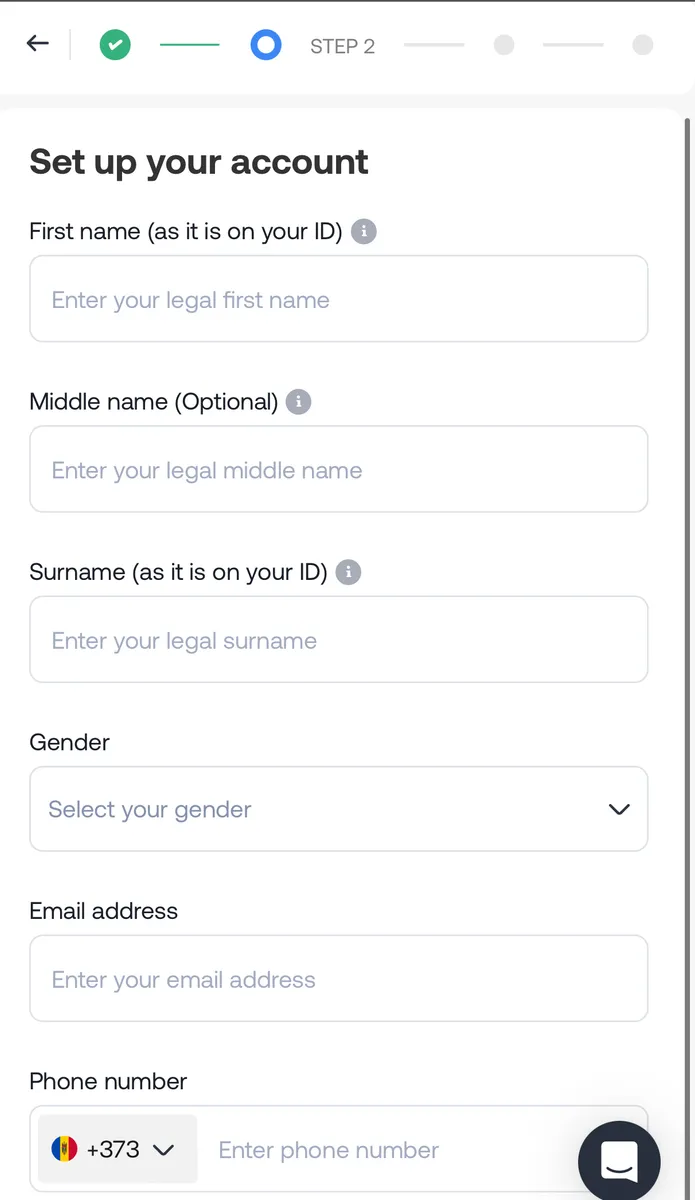
  • Then follow the prompts and ensure you enter your correct details for a seamless setup.
__wf_reserved_inherit
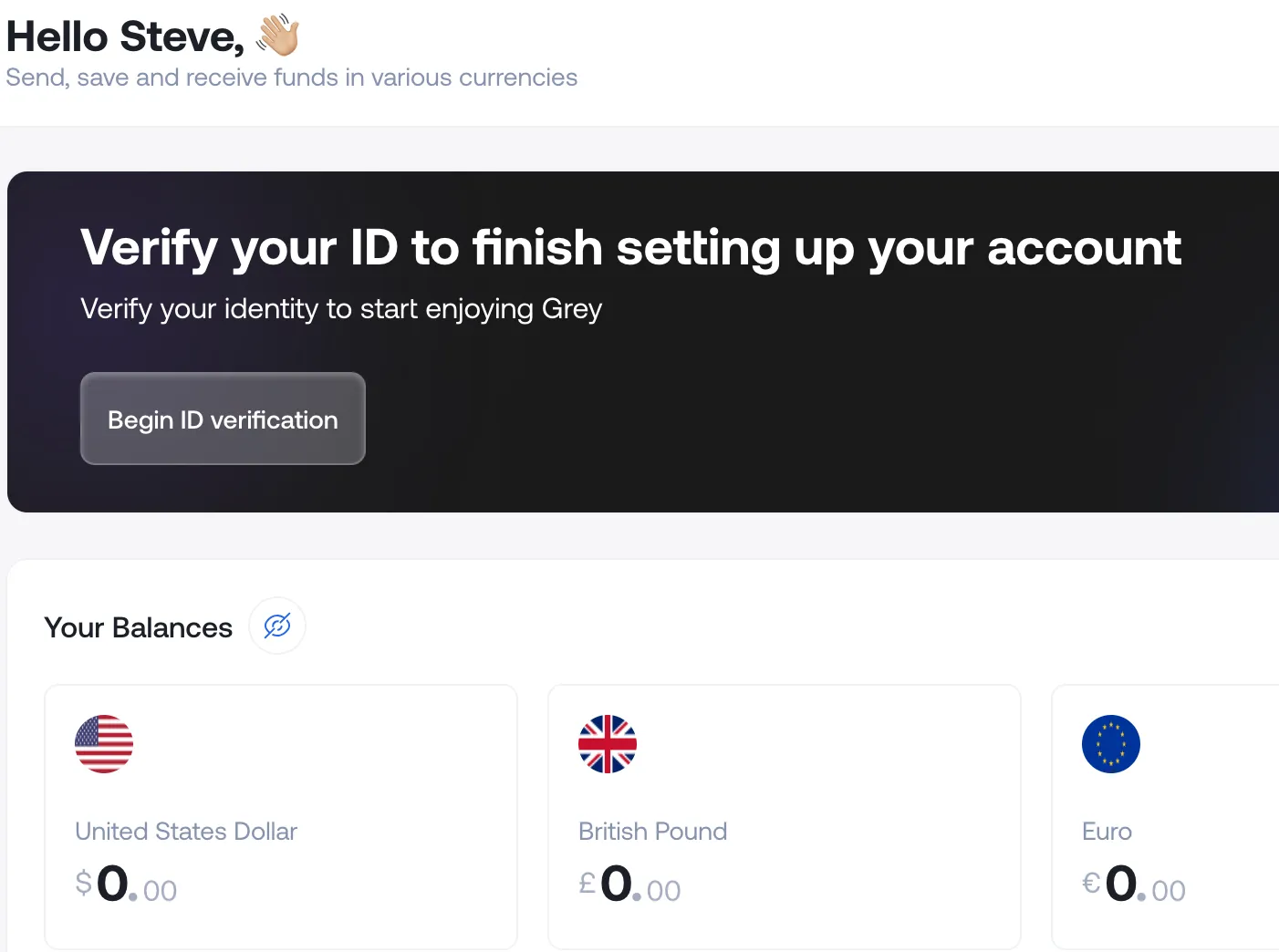
  • Next, you’ll need to verify your identity — a crucial step to comply with regulatory requirements. This process is especially important for non-U.S. residents, as Grey specialises in providing accounts for individuals outside the United States.
__wf_reserved_inherit

How to verify your Grey account in Moldova

  1. Get your documents ready: Prepare a valid ID (like your passport or national ID) and proof of address (utility bill or bank statement).
  2. Upload online: Submit your documents through the Grey platform. Ensure they’re clear and up-to-date to avoid delays.
  3. Wait for Approval: Grey will verify your account within minutes or up to 24 hours.

Start managing your global finances today—open your free Grey account now.

‍

Last updated:

October 2, 2026

Open a free Grey account to get startedJoin 1 million digital nomads
IF YOU ENJOYED THIS, CHECK THESE OUT

11 best virtual mailbox services for digital nomads

•

•

2 min read

A virtual PO box, or virtual mailbox, gives you a real street address where a provider receives your post, scans it and forwards or shreds it on request. Digital nomads use one to keep a stable address for banks, tax letters and deliveries, even when they move between countries.

Without a permanent home, managing important mail can become complicated. You might miss a bank statement, struggle to receive a replacement card or need an address to register a business. A virtual mailbox helps you handle these tasks without relying on friends or family to collect your post.

However, providers differ in their locations, monthly fees, mail-scanning limits, forwarding options and international shipping costs. Some offer additional services, such as check deposits and package consolidation.

This guide covers 11 virtual mailbox services worth considering, helping you compare their features, pricing and availability to find an option that fits your travel routine and mailing needs.

What is a virtual PO box?

A virtual PO box is a mail-handling service that gives you a physical mailing address without requiring you to rent or visit a mailbox in person. As a digital nomad, you can use it to receive letters, bank statements and packages while travelling or living abroad.

Unlike a traditional PO box, a virtual mailbox typically provides a real street address. When you sign up, your provider assigns you an address at its mail-handling facility. You can use this address for eligible correspondence, and the provider receives your mail on your behalf.

Your address may include a private mailbox (PMB) number, such as 123 Main Street, PMB 456. This identifies your individual mailbox within the provider’s facility. The exact format varies by provider, and you should follow its instructions when entering your address on forms.

A USPS PO box, by contrast, is rented directly from the United States Postal Service and usually uses a PO box number rather than a street address. A virtual mailbox may accept deliveries from multiple carriers, depending on its policies, and lets you view scanned mail online, request forwarding or arrange secure shredding.

The 11 best virtual mailbox services

The 11 best virtual mailbox services offer different address locations, mail scanning features, forwarding options and pricing plans. Whether you travel frequently, live abroad or run a remote business, compare each provider’s features to find a mailbox service that fits your needs.

Rank Provider Starting price Address locations Scans included Forwarding cost Best for
1 iPostal1 $9.99/mo 4,250+ locations globally Up to 30 exterior scans; content scans cost $2.25 per envelope for up to 10 pages Carrier rates plus handling fee, varying by location Overall network and local presence
2 Anytime Mailbox 4.98–9.99/mo, depending on address 2,500+ locations globally 30 incoming items and 5 open-and-scan pages monthly on the standard tier Carrier rates plus $5 per shipping bundle Budget and flexibility
3 Traveling Mailbox $15/mo 25+ US locations 35 page scans and 40 incoming envelopes monthly Carrier rates plus $2 per shipment; consolidation is free Digital nomads and RVers
4 PostScan Mail $10/mo 1,000+ locations 30 exterior scans; content scans cost $2 per envelope for up to 10 pages Carrier rates plus $2 for the first item and $0.50 per additional item Mobile app and multiple profiles
5 Physical Address $7.98/mo 6 regional hubs 30 incoming items monthly; unlimited exterior image views Carrier rates plus material costs Extended mail storage
6 US Global Mail 9.95–19.95/mo Locations across 23+ US states Unlimited exterior envelope scans; content scans depend on your plan Discounted carrier rates, advertised savings of up to 80% Expats and check deposits
7 Earth Class Mail 19–39/mo 80–90 US locations Envelope scans included; content scans charged according to volume Carrier rates plus handling charges Businesses and automated workflows
8 Stable Varies Selected premium office locations Custom high-volume limits for business accounts Secure, tracked priority shipping options Tech startups and API integrations
9 SavvyNomad Varies Residential-style addresses Digital envelope scanning and processing included, according to the supplied plan details Custom domestic and international forwarding Expats and financial correspondence
10 Northwest Registered Agent Varies All 50 US states Up to 5 document scans free annually on standard registered-agent plans Forwarding for state and business documents LLC formation and business privacy
11 Alliance Virtual Offices 37–49/mo 1,200+ locations worldwide Mail reception and notification tracking Scheduled forwarding using your chosen carrier Hybrid businesses needing meeting space

‍

How to choose a virtual mailbox

Choosing a virtual mailbox starts with understanding how much mail you receive and how you want to manage it. Compare each provider’s scanning allowance, including the number of incoming envelopes covered and the cost of opening and scanning their contents. If you receive important documents regularly, a plan with generous scanning limits may offer better value than a cheaper subscription with extra fees.

Next, consider forwarding costs. Providers may charge handling fees in addition to postage, and international deliveries can become expensive. Look for options such as mail consolidation, which combines multiple items into one shipment, and check whether storage limits apply before forwarding.

Your address type also matters. A commercial address may suit general correspondence and business mail, but some banks or government agencies require a residential address. Confirm that the address meets the requirements of the organisations where you intend to use it.

Finally, check the provider’s process for USPS Form 1583. This form authorises a commercial mail receiving agency to handle your mail. You generally need to provide identification and complete the required notarisation or identity verification process before your mailbox becomes active.

Also read: Virtual US accounts explained: Who they work for

Can you use a virtual mailbox for banking and business?

Yes, you can use a virtual mailbox for some banking and business purposes, but acceptance depends on the bank, service provider and intended use. Many virtual mailboxes provide a business mailing address for receiving bank statements, tax notices and official correspondence. However, a mailing address is not necessarily accepted as proof of your physical residential address. Before applying, review the bank’s address requirements and its rules for opening a business account.

Banks may flag a virtual mailbox as a commercial mail receiving agency (CMRA), which means it may not satisfy their physical-address verification requirements. This does not automatically prevent you from opening an account, but you must provide accurate details and any additional documents requested.

For business registration, a virtual mailbox may serve as your mailing address, depending on state rules. An LLC may also need a registered agent with a physical address in its state of registration to receive legal notices. Before applying, review this guide on how to open a business bank account and confirm the bank’s requirements.

Managing money while you travel

Managing money while travelling can get complicated when your income, savings and expenses involve different currencies. You might earn dollars from a US client, pay for accommodation in another country and still need money for expenses back home. Keeping track of exchange rates, transfer fees and spending limits can quickly become frustrating.

Grey helps simplify cross-border money management by giving you a way to receive international payments and manage multiple currencies. Instead of constantly converting money whenever you get paid, you can hold supported currencies and exchange them when it suits your needs.

When you need to pay for flights, accommodation or online subscriptions, Grey’s virtual card for spending abroad gives you another way to make international payments. And if you’re travelling while working remotely, you can get paid from the US while abroad by sharing your Grey USD account details with clients. That way, earning and spending across borders becomes easier to manage

Frequently asked questions about virtual mailbox services for digital nomads

1. What is a virtual PO box?

A virtual PO box, also called a virtual mailbox, gives you a mailing address where a provider receives your letters and packages. You can view scanned images of incoming mail online and choose to have items forwarded, stored or shredded. It is useful for travellers, remote workers and businesses that need reliable mail access.

2. Is a virtual mailbox legal?

Yes, virtual mailboxes are legal in the United States when used in accordance with applicable laws and postal regulations. Providers receiving USPS mail on behalf of customers operate as Commercial Mail Receiving Agencies (CMRAs) and must follow USPS requirements. You must provide accurate identification, complete required forms and avoid using the address for unlawful activities.

3. Can you use a virtual mailbox as a permanent address?

You can use a virtual mailbox as a long-term mailing address, even when you travel frequently. However, it may not qualify as your legal residence or physical address for every purpose. Government agencies, banks, insurers and licensing authorities may require a residential address, so check their specific rules before using one.

4. Do banks accept virtual mailbox addresses?

Some banks accept virtual mailbox addresses for mailing statements and correspondence, but others may reject them for account verification. A virtual mailbox is generally a commercial mailing address, not proof of where you live. Banks may require a separate residential or physical business address to meet identity-verification and compliance requirements.

5. What is USPS Form 1583?

USPS Form 1583 is an application that authorises a Commercial Mail Receiving Agency to receive mail on your behalf. You must provide identifying information and acceptable identification documents. Your signature must be witnessed by the provider or an authorised employee, or acknowledged before a qualified notary. Requirements should be confirmed with your mailbox provider.

6. How much does a virtual mailbox cost?

A virtual mailbox typically costs around $5 to $40 per month, depending on the provider, address location and plan features. Basic plans may include limited mail scanning, while higher-priced options offer more scans, storage or business services. Budget for additional charges such as postage, forwarding, document scanning, package handling and international shipping.
What is the currency of France? Euro symbol and code

•

•

2 min read

The currency in France is the euro, represented by the symbol € and the ISO currency code EUR. If you are travelling to Paris, shopping in Lyon or paying for accommodation in Nice, you will use euros for everyday transactions. France replaced the French franc with euro banknotes and coins in 2002, making the euro its official currency.

The euro is used across mainland France and its outermost regions, including Guadeloupe, Martinique, Réunion, French Guiana and Mayotte. However, not all French territories use the euro. French Polynesia, New Caledonia and Wallis and Futuna use the CFP franc (XPF), a separate currency pegged to the euro at a fixed rate.

When budgeting for a trip, remember that prices are generally displayed in euros, whether you are paying for meals, transport or shopping. If your money is in another currency, check the exchange rate and any conversion fees before making payments. Using a suitable travel card or payment service can also help you manage spending abroad.

What currency does France use?

France uses the euro (€), with the ISO currency code EUR. If you are planning a trip to Paris, exploring the French Riviera or shopping in Marseille, you will pay for most goods and services in euros.

France previously used the French franc as its national currency. The country adopted the euro for electronic and financial transactions in 1999, before euro banknotes and coins entered circulation on 1 January 2002. The franc was then gradually withdrawn, completing France’s transition to the shared European currency.

When checking prices during your visit, look for the € symbol, which usually appears before or after the amount depending on the format. For example, €25 represents twenty-five euros. If you are converting money from naira, pounds or US dollars, the amount you receive will depend on the current exchange rate and any fees charged by your bank or payment provider.

Before travelling, compare conversion costs and payment options so you can manage your spending in France more confidently.

Do the French still use the franc anywhere?

France no longer uses the French franc as its official currency. The euro (€), code EUR, replaced it, with euro banknotes and coins introduced in 2002. However, France still uses a different franc in some of its Pacific territories: the CFP franc (XPF).

If you travel to French Polynesia, New Caledonia or Wallis and Futuna, you will encounter the CFP franc rather than the euro for everyday payments. Although these territories are French, they have a separate currency arrangement suited to their regional economies.

The CFP franc is linked to the euro at a fixed exchange rate of €1 = 119.3317 XPF. This means its value against the euro does not fluctuate with ordinary market exchange-rate movements. However, when converting your money from another currency, such as US dollars or Nigerian naira, the amount you receive can still change with exchange rates and provider fees.

If you are visiting these Pacific territories, check whether your bank card supports local payments and compare conversion charges before travelling. The CFP franc remains distinct from the former French franc, despite sharing the name.

Paying in France: notes, coins, cash and cards

When paying in France, you can use euro banknotes, coins and payment cards. Euro banknotes come in €5, €10, €20, €50, €100 and €200 denominations, while coins range from 1 cent to €2. Prices are displayed in euros, so check the total before paying.

Debit and credit cards are widely accepted in shops, hotels, restaurants and supermarkets. Contactless payments are common, allowing you to tap your card or compatible phone at checkout. However, some transactions may require a PIN, and individual merchants can set minimum card payment amounts where permitted.

Cash remains useful when visiting local markets, buying from smaller vendors, using certain public facilities or making purchases at businesses that do not accept cards. Keeping a little cash available can help you avoid payment difficulties.

If you need a convenient way to pay while travelling, Grey’s virtual card can help you make online and supported card payments in euros. Before your trip, check the card’s currency conversion rates, applicable fees and acceptance conditions so you can plan your spending with confidence.

Also read: Cheapest cities in France for international students

How to get euros for a trip to France

You can get euros for your trip to France through bank ATMs, currency exchange bureaux or your bank before departure. Withdrawing euros from an ATM in France can be convenient, but check your bank’s foreign transaction fees and the ATM operator’s charges. Use ATMs attached to established banks where possible.

Exchange bureaux at airports and tourist areas are easy to find, but they may offer less favourable rates. Compare the final amount you will receive after fees rather than relying only on advertised exchange rates.

When paying by card or withdrawing cash, you may be asked whether you want to pay in euros or your home currency. Choose euros to decline dynamic currency conversion. This usually lets your card provider handle the conversion, which may offer a better rate, although your provider’s fees still apply.

For cross-border payments, Grey offers a way to send money from the US to France. Compare the available exchange rate, transfer fees and delivery times before sending funds, so you can budget for your trip and manage your euros more effectively.

How to send money to France

Whether you are paying rent, covering tuition or supporting family, choosing the right transfer service can help you manage international payments to France. Grey supports cross-border money transfers, allowing you to send money from the UK to France and manage international payments through its platform.

Before sending money, compare exchange rates, transfer fees and delivery times to understand how much your recipient will receive. Bank transfers can include intermediary charges, while card payments may attract foreign transaction fees depending on your provider.

Grey’s multi-currency account helps you hold and manage supported currencies in one place, making it easier to organise international finances. Its virtual card also lets you make eligible online payments and pay for supported purchases in euros. Depending on your card terms and transaction, this may help you avoid certain foreign transaction fees.

Frequently asked questions about the currency of France

1. Does France use the euro or the franc?

France uses the euro as its official currency. The French franc was replaced by euro banknotes and coins in 2002. However, some French Pacific territories still use the CFP franc, a separate currency linked to the euro at a fixed exchange rate.

2. What is the euro symbol and code?

The euro symbol is €, and its three-letter ISO currency code is EUR. You will see the symbol on price tags, receipts and menus across France. For example, €50 means fifty euros. When exchanging money, use EUR to identify the currency correctly.

3. Can you use US dollars in France?

US dollars are not generally accepted for everyday purchases in France. You will usually need euros to pay for meals, transport, shopping and accommodation. Exchange your dollars before travelling or withdraw euros from an ATM. Check conversion rates and fees to manage costs.

4. Is card or cash better in France?

Cards are widely accepted across France, including in hotels, restaurants and shops. Contactless payments are common, making cards convenient for everyday spending. However, cash remains useful at local markets and smaller businesses. Carrying a little of both gives you greater flexibility during your trip.

5. What currency is used in French Polynesia?

French Polynesia uses the CFP franc, abbreviated XPF, rather than the euro for everyday transactions. The currency is pegged to the euro at a fixed rate of €1 = 119.3317 XPF. Check your card’s international payment fees before travelling to the islands.

6. How do you send money to France?

You can send money to France through a bank or an international transfer service. Compare exchange rates, transfer fees and delivery times before choosing. Grey supports cross-border payments, including transfers from the US to France. Confirm service availability and recipient details before sending.

Ways remote workers protect income across countries

•

•

2 min read

If it has ever crossed your mind that someone might be spending your income behind your back, then you are not alone. One minute, you get paid, and the next minute, the funds have dried up, and you are looking forward to the next payday. On second thought, there might actually be someone else spending your money. Unfavourable exchange rates, local currency devaluation, high platform charges, and unplanned taxes can affect your income. Here are the most effective ways remote workers protect their income while working across countries.

They separate their income from their spending

Separating your earnings from your spending helps you manage money better. Remote workers would rather take a regular salary, which is a fraction of their income. They receive payments into an account and periodically move the money they need (maybe monthly) to a separate account where they spend it.

They avoid forced conversions

One of the biggest mistakes remote workers make is converting foreign income into local currency immediately, especially with traditional banks. This exposes you to poor exchange rates and removes the flexibility to decide when you want to convert your income. The OG remote workers know to keep income in the currency it is paid in, then convert only when they need to spend locally or when rates are favourable.

Using multi-currency accounts allows them to receive USD, EUR or GBP, hold balances securely and manage conversions strategically. This simple separation alone can preserve a significant portion of income over time.

They avoid dynamic currency conversion

If you use an international ATM with your local card and choose to be debited in your home currency, that is one of your income drains. Dynamic currency conversion automatically converts payments at unfavourable rates. Remote workers would choose to pay or withdraw in the local currency of the transaction, not their home currency, to avoid hidden mark-ups.

They invoice in stable currencies

Remote workers charge in stable currencies like USD, EUR, and GBP. This improves their earning potential and ensures their money is protected from local economic factors and currency fluctuations. Quoting in these currencies also ensures the income value remains predictable. Even if their home currency weakens, their income in stable currencies acts as a hedge against inflation or sudden devaluation.

They plan for taxes across borders

Unplanned taxes are a recipe for financial disaster. Unexpected tax liabilities can wipe out months of earnings. Remote workers who protect their income understand their tax residency, keep accurate records and set aside money regularly for tax obligations.

They track invoices, payment dates and conversions carefully. Even when working in multiple countries, having organised records prevents penalties and reduces stress.

Also read: How to plan your taxes across multiple income sources

They use contracts and clear payment terms

Working without a clear contract can affect your income. Defining payment terms, timelines, currencies, late fees, and dispute processes beforehand helps remote workers manage expectations and financial disruptions. This reduces delayed payments and gives them leverage if issues arise.

They also avoid working extensively without upfront deposits or milestones, especially with new clients.

Also read: Negotiating cross-border freelance contracts: Tips and templates

They have financial discipline

The money you make from remote work can be seasonal. Sometimes, you’re doing great; other times, you are grasping at straws. Remote workers understand their earnings can be irregular, so they maintain emergency funds to cover three to six months of expenses. They’d usually keep part of their money in stable foreign currencies to protect against local economic changes. Financial discipline involves solid financial planning, strict budgeting, expense tracking, compulsory savings, and emergency funds.

Also read: Managing irregular income as a freelancer

Protecting your foreign income with Grey

Protecting your income as a remote worker boils down to smart planning and the right payment solution. Grey is tailored to help remote workers maximise their earnings with their multi-currency accounts. Users can hold their earnings in USD, GBP, and EUR or convert to local currencies at competitive exchange rates.

Sign up on Grey today and download the mobile app to protect your foreign income.

‍

How global workers plan income, location, and lifestyle together

•

•

2 min read

Often, the logistical considerations for global workers can be more exhausting than the job itself. You have to plan your finances, research your destination, and schedule trips while ensuring an optimal work-life balance. It is likely to become so chaotic that you may consider a traditional work structure instead. If you hope to enjoy your global work life, then integrating your financial plan, location, and lifestyle is your surest bet. This article explores how you can piece these work elements together to ensure optimal work performance.

Also read: How global work culture is changing the way we live and earn

Planning your income as a global worker

Your income determines a lot. When people consider becoming a global worker, they think of Dubai first, even though their income should make them think of Mumbai. Experienced digital nomads ensure they have their finances locked in before setting out. If you are an I will figure it out’ kind of person, you might end up stranded in an unfamiliar country because you like the aesthetics. These are some measures for global workers:

  • Detailed research: Before moving, research the cost of living (rent, utilities, food, transport, and leisure) using tools like Numbeo or Expatistan.
  • Track expenses: Use apps like YNAB or simple spreadsheets to monitor spending and adjust accordingly over time.
  • Set a Budget: Follow it strictly. The popular 50/30/20 budget (50% needs, 30% wants, 20% savings) is often recommended.
  • Manage taxes: Understand tax residencies, avoid double taxation, and keep meticulous records. When in doubt, hire a tax expert.
  • Savings and emergency funds: Global workers aim to save 3 to 6 months of their living expenses as a backup in case their income becomes unstable. Set up automatic transfers to a savings account.
  • Contracts: Ensure work contracts clearly define payment methods, payment terms, and currency (use stable currencies like USD, EUR, or GBP).
  • Use multicurrency accounts: These allow them to receive payments globally at low cost and withdraw to local currency at competitive rates

You may also like: Global accounts vs traditional banks: What remote workers should know

Choosing a destination as a global worker

Once your finances are sorted, you can start thinking of locations your income can support. Global workers prioritise destinations with solid Wi-Fi, affordable living, and digital nomad visas that let you stay longer. Evaluate safety, healthcare, and work-life balance. Also, don't forget time zones. For example, if your clients are in the US, avoid places like New Zealand where calls mean midnight meetings.

Being a digital nomad doesn’t mean you are constantly moving around without a plan. Rather than moving impulsively, global workers plan their relocations around times when they have less work. This reduces stress and maximises performance.

Managing lifestyle as a global worker

Managing lifestyle as a global worker requires a strategy that balances your job responsibilities and your personal well-being. Global workers should be clear on what type of life they’d like to experience. It is easy to get carried away with exciting adventures and relax. But there is a job that sponsors this lifestyle, and this should always be at the back of your mind.

Establish work-life boundaries by separating work areas from living areas. Have a clear work structure that defines your working hours and accommodates varying time zones if you’re working with a global team. Regular exercise and sleep are essential for managing stress and improving well-being.

Also read: Financial habits that make global work sustainable

Balancing income, location, and lifestyle as a global worker

Now, let’s piece these elements together.

We have already established that your finances strongly influence your location and lifestyle. It is therefore important to adapt your lifestyle and location choices to fit within your budget while leaving enough for a rainy day. Don’t be afraid to start small and gradually grow.

Mastery in global work is balancing location and lifestyle on your finances while maximising productivity. Grey helps you achieve this balance by streamlining your finances to improve planning. With multicurrency accounts, you can manage USD, EUR, and GBP transactions in one place and withdraw in local currencies at competitive rates. You also avoid losing a chunk of your income to high transaction fees and unfair exchange rates. Grey’s virtual USD debit card gives you more flexibility to make payments as you travel globally.

Sign up on Grey and download the app to manage your finances across borders.

‍

How to convert an eSIM back to a physical SIM

•

•

2 min read

A phone upgrade is usually a straightforward process, until the SIM becomes part of the equation. Let's say the new device supports an eSIM, the number transfers successfully, and everything seems ready to go, then comes a trip abroad, a change of network or an older mobile phone that only accepts a physical SIM card.

At that point, the question is simple: what happens to the eSIM?

Unlike changing a setting on the phone, moving from an eSIM back to a physical SIM is handled by the mobile carrier. The network provider needs to deactivate the existing eSIM and issue a replacement physical SIM linked to the same mobile number. The exact process can vary, but most carriers allow the request through an app, over the phone or at a physical store.

The switch itself is usually straightforward once the replacement SIM arrives. After activation, the physical SIM takes over the number and the old eSIM profile can be removed from the device.

Also read: How to activate an eSIM: Step-by-step guide

Can you convert an eSIM back to a physical SIM?

Yes, you can switch from an eSIM to a physical SIM through your mobile carrier. However, your phone cannot make this conversion on its own. You'll need to contact your carrier to request a physical SIM card and transfer your number to it.

An eSIM is a digital SIM profile stored securely within the phone, while a physical SIM is a separate chip that needs to be issued and activated by the mobile network. Your carrier controls the connection between your mobile number, account and SIM credentials, so the switch has to happen on the network provider’s side.

The process is usually treated as a SIM swap or SIM replacement. Your carrier deactivates the existing eSIM and issues a physical SIM linked to the same number and account. Depending on the provider, the request may be available through its app, customer service team or a physical store.

Once the replacement SIM is activated, the old eSIM can be removed from your device.

How to request a physical SIM from your carrier

Requesting a physical SIM from your mobile carrier usually involves choosing a replacement method, completing an identity check, receiving the SIM and activating it on your existing number.

  1. Request a physical SIM through the carrier app
  2. Open your carrier’s app and look for options such as “Replace SIM”, “SIM swap” or “Get a physical SIM”. Follow the instructions and provide any information requested to verify your account.
  3. Call your carrier’s customer service team
  4. Contact your network provider and explain that you want to switch from an eSIM to a physical SIM while keeping your existing number. The representative will explain the available replacement options and the delivery process.
  5. Visit a carrier store
  6. A nearby carrier shop can process the SIM replacement in person. Bring your phone and a valid form of identification, as the staff may need to confirm that you are the account holder.
  7. Complete the identity checks
  8. Expect security checks before the physical SIM is issued or activated. Depending on the carrier, these may include account details, passwords, identification documents or other verification questions.
  9. Activate the replacement SIM
  10. Once the physical SIM arrives or is issued, follow your carrier’s activation instructions. Your number can then move from the eSIM to the physical SIM.

How to delete the eSIM profile once the physical SIM works

Before removing your eSIM, make sure the replacement physical SIM is fully activated and working. Test it by making a call, sending a text message and checking that mobile data works. Deleting the eSIM too early could leave your phone without cellular service if the physical SIM has not yet been activated.

On iPhone

The wording can vary slightly depending on your iOS version and region:

  1. Open Settings.
  2. Tap Cellular or Mobile Service.
  3. Select the eSIM or cellular plan you want to remove.
  4. Tap "Delete eSIM" or "Remove Cellular Plan".
  5. Confirm the removal when prompted.

On Android

Android settings differ between manufacturers, so the menu names may not be identical on every device:

  1. Open Settings.
  2. Tap Connections or Network & Internet.
  3. Select SIM manager, SIMs or a similar option.
  4. Choose the eSIM profile you want to remove.
  5. Tap Remove, Delete SIM or the equivalent option, then confirm.

Afterwards, check that your physical SIM remains selected for calls, texts and mobile data. If anything stops working, contact your carrier before making further changes.

Also read: eSIM vs Google Fit: Which is better for international travel?

When is a physical SIM the better choice?

Choosing between an eSIM vs a physical SIM often comes down to how, where and why a phone is being used. An eSIM is convenient for digital setup and travel, but a physical SIM still has practical advantages that can make it the better option in certain situations.

Selling or handing down a handset is one example. A physical SIM can simply be removed before the phone changes hands, leaving the new owner to insert their own SIM. This makes the separation between your mobile number and the device straightforward, particularly when the phone is being resold.

Travel is another consideration. Some dual-SIM phones make it easy to combine a physical SIM with an eSIM, allowing a local travel SIM to work alongside a primary number. This can be useful when moving between countries while keeping the main line active.

In some regions, eSIM support remains limited across carriers, plans and devices. A physical SIM can therefore provide greater flexibility when travelling or changing networks. For anyone comparing eSIM vs physical SIM, checking carrier and country compatibility before switching can prevent unexpected connectivity problems.

What it costs and how long it takes

The quickest way to replace your eSIM with a physical SIM is usually a store visit, but ordering online can be more convenient. Here is what you can generally expect from major US carriers:

  • Verizon: A store visit can mean instant activation, usually at $0 at corporate locations, although independent retailers may charge $10–$25. Online orders typically arrive within 3–5 business days, with no standard hardware fee.
  • AT&T: Visiting a corporate store can provide same-day activation, often for $0, although a $5 fee may apply. Online orders generally take 3–5 business days and carry a $5 replacement fee.
  • T-Mobile: In-store replacement can be activated immediately, but costs can reach $60, including the $25 SIM fee and potential $35 assisted-support fee. Ordering online usually takes 2–5 business days and costs $25, without the assisted-support charge.
  • Mint Mobile: There are no dedicated Mint stores, so replacement is handled online. Delivery generally takes 2–5 business days, with replacement costs typically ranging from 0–10.

While ordering your replacement SIM, you may also need to make a payment. Grey can make that easier, with a multi-currency account and virtual card for international payments. If you're travelling, you can also buy an eSIM through Grey and manage your connectivity and spending from the same platform.

Frequently asked questions about converting an eSIM back to a physical SIM

1. Will I lose my number?

No, your phone number remains exactly the same. Your carrier simply transfers your existing mobile account and number from the eSIM to the new physical SIM. Once the replacement card is activated, you can continue making calls, sending messages and using mobile data as before.

2. How much does a replacement cost?

Replacement fees vary by carrier, location and how you request the SIM. In many cases, you may pay between $0 and $25. Some major networks provide replacement cards free at corporate stores, while budget or prepaid providers may charge a separate SIM replacement fee.

3. Can I keep both active?

No, you generally cannot keep both SIM profiles active on the same number. Your carrier links the number to the newly activated SIM during the replacement process, which deactivates the previous eSIM. Your phone may support two SIMs, but they cannot share one number simultaneously.

4. How long does it take?

An in-store SIM replacement can often be completed within 10 to 15 minutes once your identity and account details have been verified. Ordering a physical SIM online usually takes longer, with standard delivery commonly taking around 3 to 5 business days, depending on your carrier.

5. Should I delete the eSIM early?

No. Keep your eSIM active until the replacement physical SIM has arrived, been activated and successfully connects to the network. Deleting the eSIM too early can leave your phone without mobile service, particularly when the new SIM has not yet been activated.

6. Do all carriers issue physical SIMs?

Many carriers still offer physical SIM cards, but availability depends on the network and your device. Before requesting one, check that your handset has a physical SIM tray. Some newer phones, including certain regional models, are designed as eSIM-only devices and cannot accept a physical card.

How to use Google Pay worldwide with your Grey virtual card

•

•

2 min read

I’ve always loved feeling independent, the kind of person who can move through the world without needing to stop and sort out a dozen little hassles. Maybe that’s why tapping my phone to pay has become one of my favourite tiny freedoms.

If you’re anything like me, you know those moments well. Rushing through an airport with no hands to spare. Grabbing breakfast from a food stall because you’re curious about how the locals eat. Signing up for an online tool at midnight because the timing just felt right.

That’s exactly why learning how to use Google Pay worldwide with your Grey virtual card makes such a difference. Once your card sits snugly inside Google Pay, every payment becomes smoother. No digging through bags, topping up a card before paying, and no declines. Just a quick tap and the quiet satisfaction of knowing you’ve sorted it.

And now that the Grey virtual card has officially landed, this is the perfect time to explore everything it can do to keep your days light, easy, and wonderfully yours.

Why the Grey virtual card works so effortlessly with Google Pay

If you’re looking for a simple, reliable way to use Google Pay worldwide, the Grey virtual card makes the process smoother than ever. With our upgraded virtual card experience now live, Google Pay becomes more than a convenient feature. It becomes the easiest way to spend your foreign currency and crypto balances across countries, platforms, and everyday transactions.

Here’s why using Google Pay with your Grey virtual card is such a seamless match:

One card, multiple balances

Your Grey virtual card connects directly to any balance you choose, including USD, GBP, EUR, or crypto like USDC, USDT, or BTC. No manual top-ups. No switching between wallets. Just direct, instant spending power everywhere Google Pay is accepted.

A smoother global experience

Many people switching to the Grey virtual card do so after dealing with cards that fail on international platforms. This upgraded virtual card was designed to remove that frustration. You get fewer random declines, clearer communication, and fast support whenever you need it, making global payments feel more predictable.

Contactless convenience, everywhere

When you combine Google Pay’s tap-to-pay simplicity with Grey’s global card functionality, you get fast, contactless payments across countries, currencies, and online merchants. Whether you’re shopping locally or paying for international services, everything works with a tap.

Stronger security

The Grey virtual card supports 3D Secure (3DS), giving you added protection during online and in-store transactions. It’s a safer way to shop, travel, and pay globally.

Who benefits most from using Google Pay with the Grey virtual card?

If you’ve been searching for a reliable virtual card that works with Google Pay worldwide, this duo is designed exactly for the way modern global citizens live, earn, and spend.

Digital nomads and travellers

Once your Grey virtual card is added to Google Pay, you can tap your way through airports, metros, cafés, supermarkets, and co-working spaces, anywhere contactless payments are accepted.

Crypto enthusiasts

If you hold or earn in crypto, Google Pay becomes your gateway to everyday fiat spending. Link your Grey virtual card to your crypto balances and pay like a local in any country.

Freelancers and remote workers

Whether you earn in USD, work with clients in Europe, or pay for tools hosted abroad, Google Pay + Grey card gives you a consistent and flexible way to manage global payments without failed transactions or confusing restrictions.

Small business owners

Running ads on Meta, TikTok, or X? Paying for global subscriptions and software? Your Grey virtual card helps every payment go through smoothly, without hidden fees or last-minute surprises.

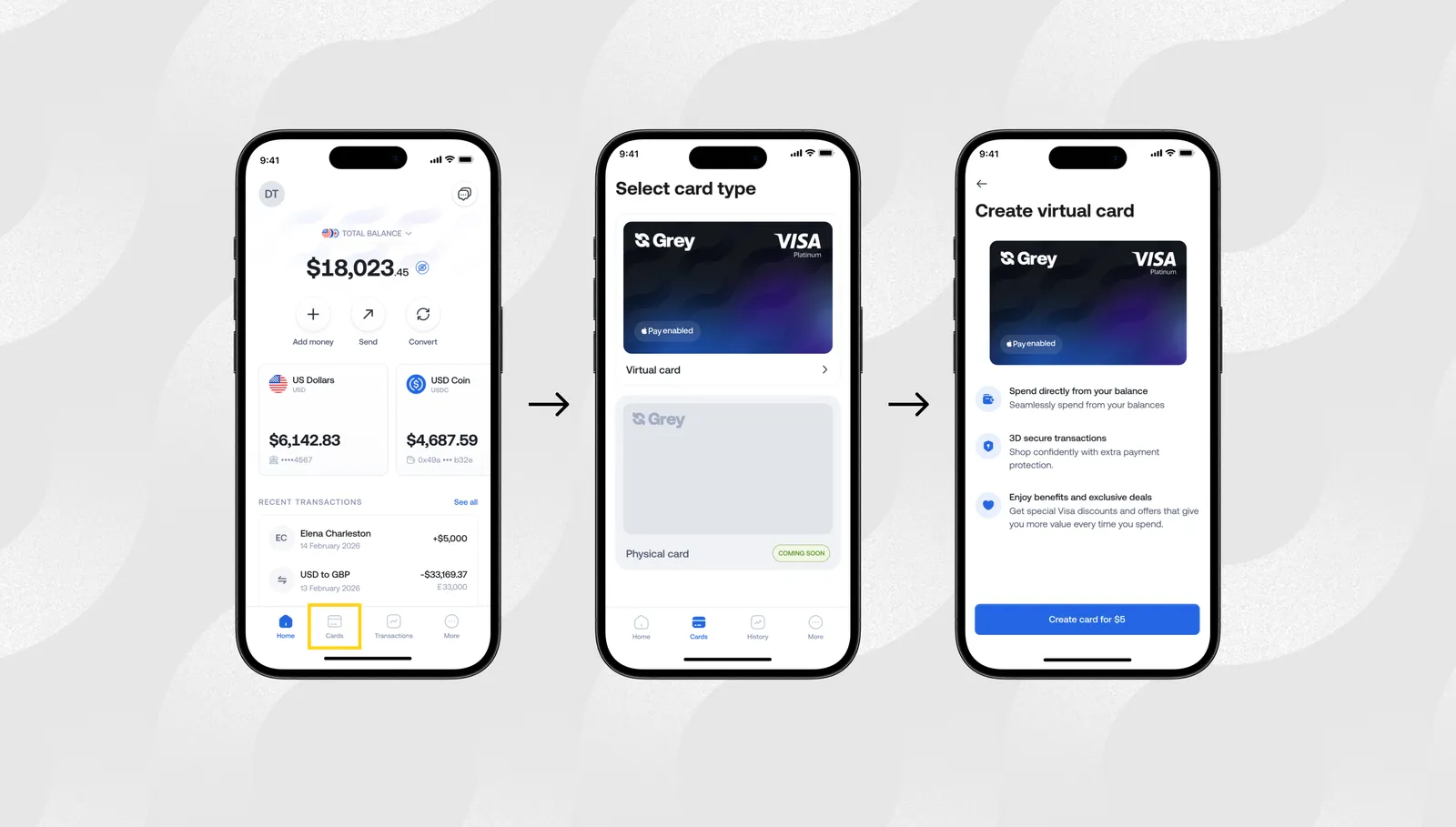
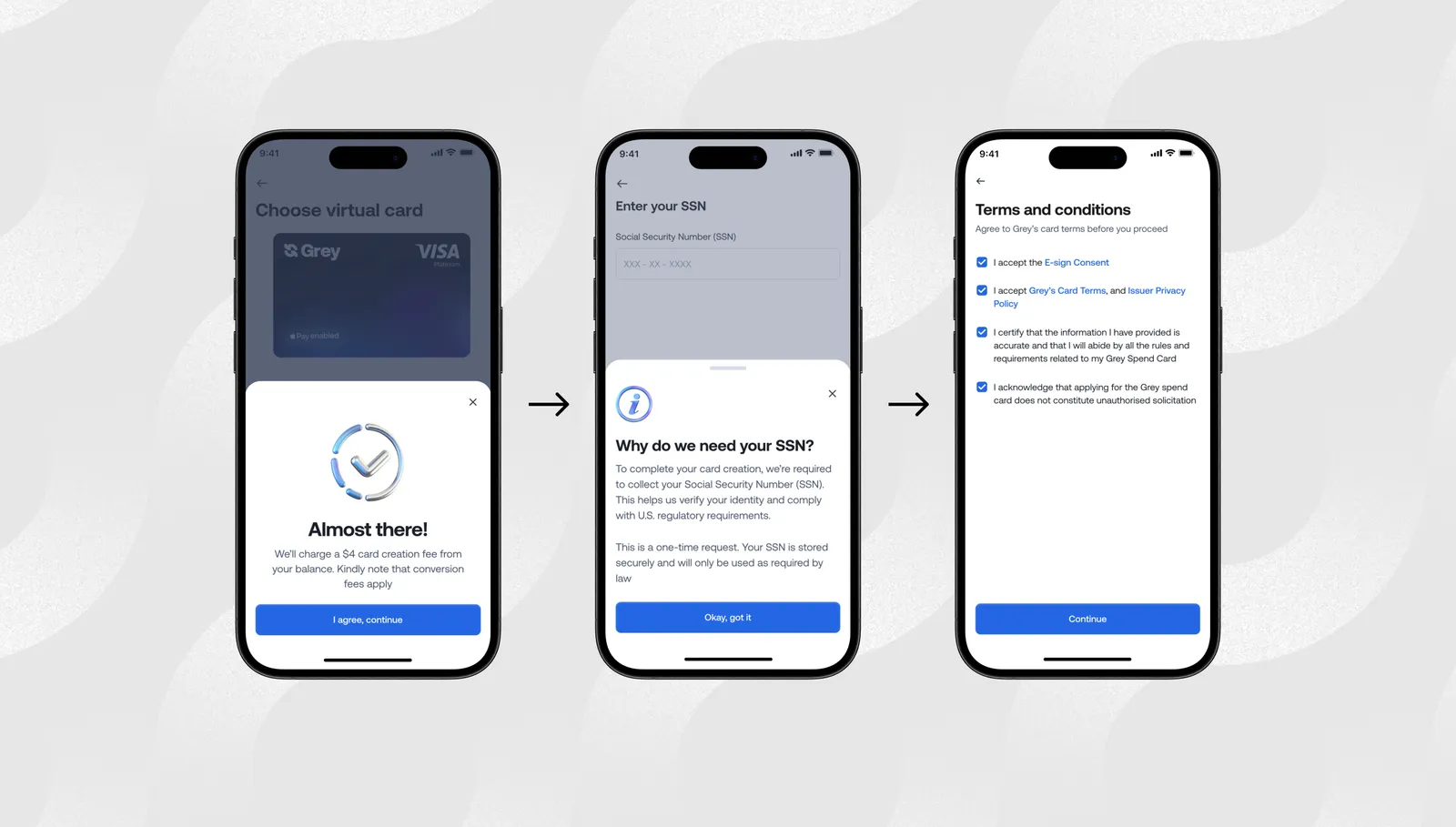
How to create your Grey virtual card and add it to Google Pay

If you’re learning how to use Google Pay with your Grey virtual card, the setup takes just a few seconds:

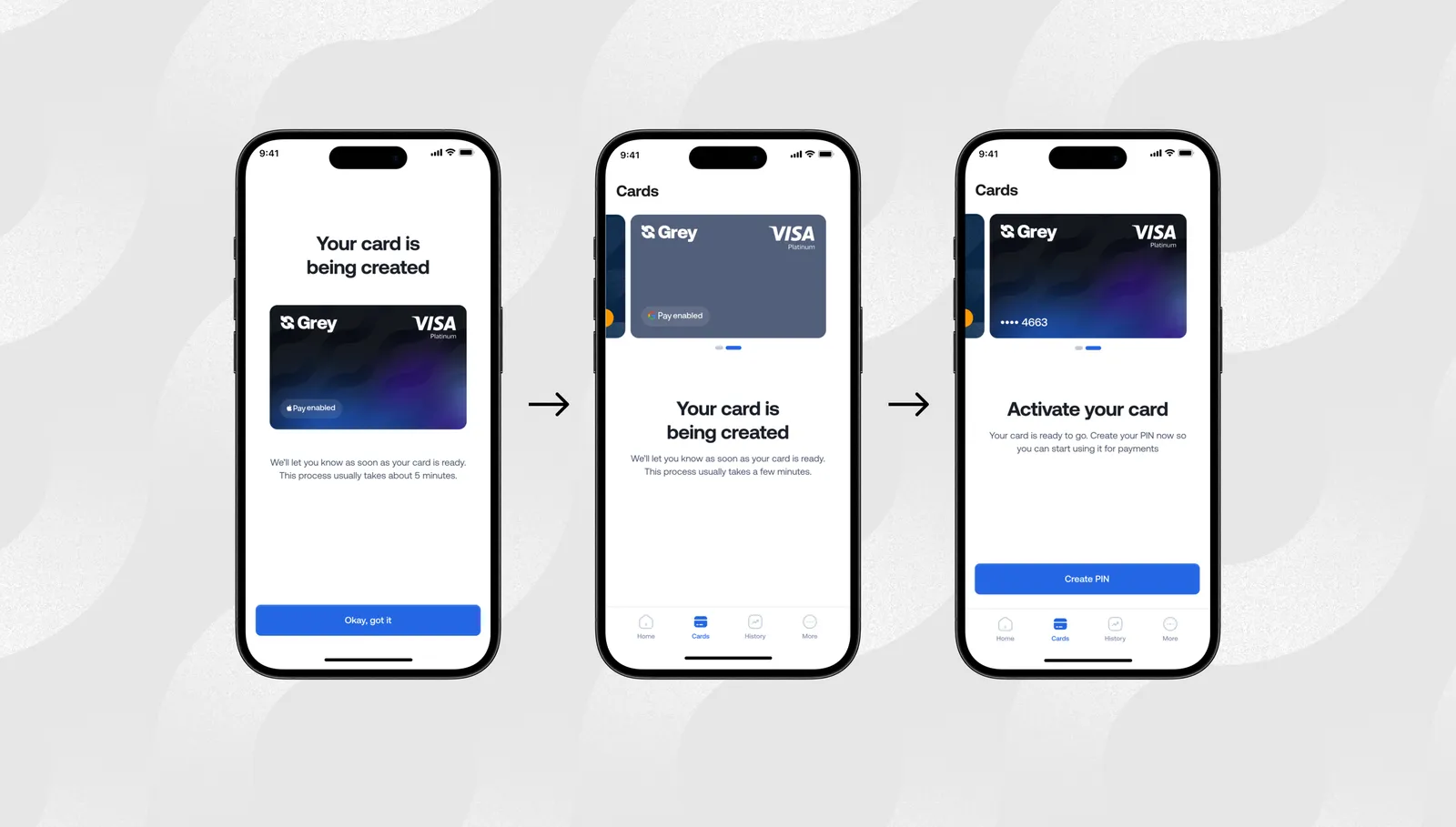
Tap to create your Grey card in the app.

__wf_reserved_inherit

Follow the verification steps.

__wf_reserved_inherit

It usually takes a few hours for the card to be created.

__wf_reserved_inherit

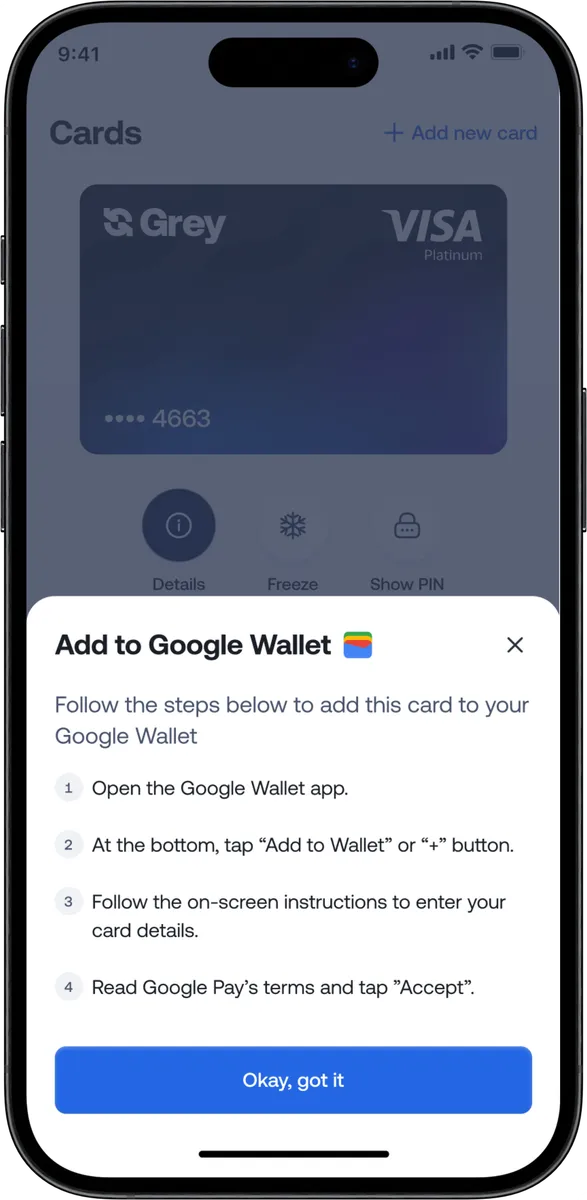
Once your Grey virtual card is ready, you can follow the steps to add it to Google Pay.

__wf_reserved_inherit

Once added, you can use Google Pay for contactless payments, online checkouts, in-app purchases, public transport, and global merchants that support Google Pay.

Where you can use Google Pay with your Grey virtual card worldwide

Google Pay works in dozens of countries and millions of merchant locations. With the Grey virtual card connected, you can:

  • Book international flights
  • Pay for Airbnb and travel bookings
  • Buy coffee and groceries in cities like Barcelona, Nairobi, Accra, Mexico City, or Bali
  • Subscribe to Amazon, Spotify, Canva, YouTube Premium, and more
  • Pay for ad platforms like Meta, TikTok, Google Ads, and X

Your Grey Visa card selects the right balance automatically, while Google Pay makes each payment instant and contactless.

Why this upgrade matters now

For years, users dealt with failed payments, poor international compatibility, and unclear card restrictions. The new Grey virtual card was built to fix these problems and make global payments through Google Pay easier than ever.

This upgrade helps you:

  • Spend globally with fewer limitations
  • Enjoy reliable virtual card functionality
  • Avoid unexpected card blocks or errors
  • Use foreign currency and crypto balances effortlessly
  • Make international purchases with more confidence

It’s all part of our goal to make international spending feel as easy as local shopping.

If you live or work globally, you deserve a payment setup that travels with you. Google Pay paired with the Grey virtual card removes friction from your everyday life so you can focus on what actually matters.

Ready to tap and go anywhere in the world?

Open your Grey app, get your Grey virtual card, and start using Google Pay wherever life takes you.

‍

Arrow (up)

Back to top