


<script type="application/ld+json">[{"@context": "https://schema.org", "@type": "BlogPosting", "@id": "https://grey.co/blog/how-to-receive-usd-payments-on-etsy-as-a-seller-in-ireland#article", "headline": "How to receive USD payments on Etsy as a seller in Ireland", "description": "Learn how Etsy sellers in Ireland can receive payments seamlessly with Grey and grow their creative business on a global scale.", "inLanguage": "en", "url": "https://grey.co/blog/how-to-receive-usd-payments-on-etsy-as-a-seller-in-ireland", "mainEntityOfPage": "https://grey.co/blog/how-to-receive-usd-payments-on-etsy-as-a-seller-in-ireland", "datePublished": "2024-12-18T16:39:06.753Z", "dateModified": "2026-06-15T17:17:09.258Z", "author": {"@type": "Person", "name": "Olayoyin Olorunmota"}, "publisher": {"@type": "Organization", "@id": "https://grey.co/#organization", "name": "Grey", "url": "https://grey.co"}, "image": "https://cdn.prod.website-files.com/636a85d290ee58e70c17e1c0/6a301724b988008f82e1fe1e_6a301723d92fdd315280f537_how-to-receive-usd-payments-on-etsy-as-a-seller-in-ireland__header-image.webp"}, {"@context": "https://schema.org", "@type": "BreadcrumbList", "@id": "https://grey.co/blog/how-to-receive-usd-payments-on-etsy-as-a-seller-in-ireland#breadcrumb", "itemListElement": [{"@type": "ListItem", "position": 1, "name": "Home", "item": "https://grey.co/"}, {"@type": "ListItem", "position": 2, "name": "Blog", "item": "https://grey.co/blog"}, {"@type": "ListItem", "position": 3, "name": "How to receive USD payments on Etsy as a seller in Ireland", "item": "https://grey.co/blog/how-to-receive-usd-payments-on-etsy-as-a-seller-in-ireland"}]}]</script>

How to receive USD payments on Etsy as a seller in Ireland

Olayoyin Olorunmota

TABLE OF CONTENT

SHARE THIS POST

Ireland has rich a history of storytelling through music, art, and craft. Many modern-day Irish creatives have embraced a new way of sharing their talents with the world — through platforms like Etsy.

For Irish sellers, Etsy offers a chance to showcase handcrafted goods, vintage items, and unique creations to a global audience.

This guide will show you how to manage your Etsy payments seamlessly using Grey.

Why Irish sellers should use Etsy

Etsy is a favourite among buyers and sellers for several reasons:

  • Global reach: You can reach millions of buyers worldwide who value handmade and vintage products.
  • Diverse product categories: Etsy caters to nearly every creative niche.
  • Supportive community: Etsy fosters a network of sellers and buyers who appreciate craftsmanship and creativity.

Also read: How to receive payments on Etsy as a seller in Portugal

How to receive payments on Etsy using Grey in Ireland

Grey provides an easy solution for receiving international payments as a Irish Etsy seller. Follow these steps to get started:

1. Open your Grey app

Log in to your Grey account or create one to access your international USD bank account.

2. Link your Grey account to Etsy

__wf_reserved_inherit
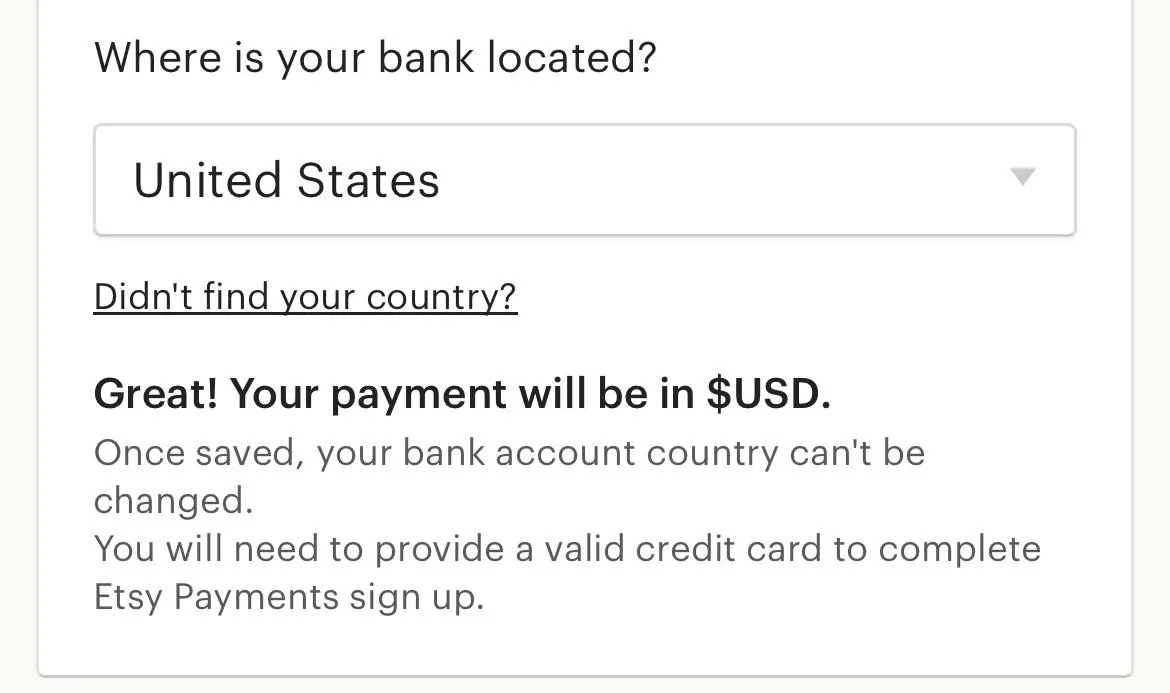
  • Select your bank’s country.
__wf_reserved_inherit
  • Choose whether you’re registering as an individual or a business.
__wf_reserved_inherit
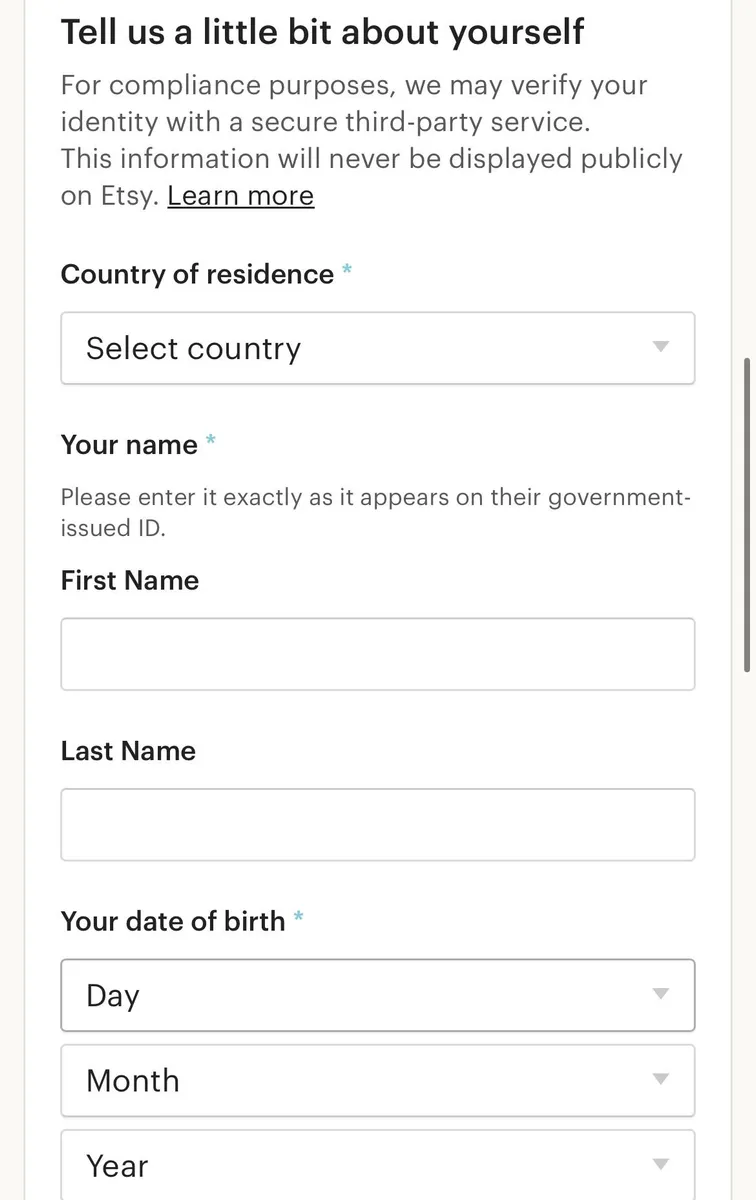
  • Enter your personal information, i.e. name and address.
__wf_reserved_inherit
  • Add your Grey US, EU, or UK bank account details, depending on your preference.
__wf_reserved_inherit
  • Etsy will process payments to your Grey account, making it easy to manage your earnings.

With your Grey account linked, you can receive Etsy payouts directly into your international bank account.

It's important to note that you will have to provide a valid ID and depending on the location you pick, may have to fill in a valid address and social security number for your account to be verified.

Also read: How to receive payments on Etsy as a seller in Greece

Why use Grey for Etsy payments?

Grey simplifies the payment process for Irish Etsy sellers. Here’s why it’s the best choice:

  • Competitive exchange rates: Maximise your earnings when converting to Euro (EUR).
  • Secure transactions: Grey’s robust security features ensure your funds are protected.
  • Hassle-free withdrawals: Transfer your earnings to your local bank account with ease.

Also read: How to withdraw to your local bank account on Grey

Tips for succeeding as a Irish seller on Etsy

  • Optimise your listings: Use high-quality photos and detailed descriptions to make your products stand out.
  • Offer international shipping: Expand your customer base by providing global shipping options.
  • Respond quickly: Engage with buyers by answering queries promptly and addressing concerns professionally.
  • Leverage social media: Promote your products on apps like Instagram and Pinterest to drive traffic to your Etsy shop.

Also read: How to receive payments on Etsy as a seller in Austria

Simplify Etsy payments with Grey

With Grey, you can stop worrying about receiving Etsy payouts or converting your earnings from Etsy. Manage your finances seamlessly and focus on growing your creative business.

Sign up for a Grey account today and unlock a world of possibilities for your Etsy shop in Ireland.

Last updated:

September 19, 2026

Open a free Grey account to get startedJoin 1 million digital nomads
IF YOU ENJOYED THIS, CHECK THESE OUT

What is an IFSC code? Meaning, format, and how it works for international transfers to India

2 min read

An IFSC code (Indian Financial System Code) is an 11-character alphanumeric code that identifies a specific bank branch in India. The Reserve Bank of India assigns one to every branch in the country, and it is required for all electronic fund transfers through NEFT, RTGS, and IMPS. If you are sending money to someone's bank account in India, whether from within the country or from abroad, you need the IFSC code for their branch to complete the transfer.

The code is straightforward once you understand the format, but it causes confusion for two groups of people in particular: those sending money to India from the US, UK, or other countries who encounter IFSC alongside SWIFT and IBAN codes and are not sure which one they need, and Indian freelancers receiving international payments who need to provide their IFSC when withdrawing funds to their local bank account. This guide covers both situations.

What IFSC stands for and how the code is structured

IFSC stands for Indian Financial System Code. Every code is exactly 11 characters long and follows the same structure:

Characters Example What they represent
First 4 (letters) SBIN The bank. SBIN = State Bank of India, HDFC = HDFC Bank, ICIC = ICICI Bank, UTIB = Axis Bank.
5th (always zero) 0 Reserved by the RBI for future use. This character is always zero in every IFSC code.
Last 6 (alphanumeric) 005943 The specific branch. Each branch of a bank has a unique six-character identifier.

So when you see SBIN0005943, you know it is a State Bank of India branch (SBIN), the zero is the standard separator, and 005943 identifies the exact branch. Two ICICI Bank branches in the same city will share the first five characters (ICIC0) but differ in the last six.

This structure means IFSC codes are branch-specific, not account-specific. If you change your branch but keep the same bank, your IFSC code changes. If you change nothing, it stays the same. Your account number and your IFSC code are independent.

Where to find an IFSC code

If you are looking for your own IFSC code (to share with someone sending you money), check any of the following: the top of a cheque leaf from your chequebook, the front page of your bank passbook, your net banking or mobile banking app (usually under account details), or the branch locator tool on your bank's website.

If you are looking for someone else's IFSC code (to send them money), the simplest route is to ask them directly. Sharing an IFSC code is safe. It identifies a bank branch, not an individual account. No one can withdraw money from your account using your IFSC code alone.

You can also look up any IFSC code on the RBI's website or on third-party tools like Razorpay's open-source IFSC toolkit, which covers every active branch in India.

When you need an IFSC code for international transfers to India

This is the part most guides skip. Receiving money from abroad can involve more than one banking code. The one you need depends on how the money is being sent and how it reaches your Indian bank account.

For a traditional international wire sent through the SWIFT network, the sender will typically need your bank's SWIFT/BIC code, along with your account details. A BIC is an international identifier used to identify financial institutions and route financial transactions.

An IFSC code becomes relevant when the payment is routed to your Indian bank account through a domestic payment system, such as NEFT or RTGS. This can happen with international payment services that receive the money abroad and then complete the final payout locally in INR.

Here's the practical difference:

Transfer method Code/details typically needed
International bank transfer via SWIFT SWIFT/BIC + recipient account details
Local INR payout to an Indian bank account Account number + IFSC
NEFT or RTGS transfer Account number + IFSC
UPI payout UPI details requested by the provider

So, if a client is wiring money directly from an overseas bank to your Indian bank through SWIFT, they may ask for your bank's SWIFT/BIC rather than relying on the IFSC. If you're using an international payment provider that converts the funds and sends INR to your Indian account locally, you'll commonly be asked for your account number and IFSC for the final payout.

The important thing is to follow the payment instructions provided by your bank or transfer service. Some international transfers involve both an international leg and a domestic Indian payout, so seeing an IFSC requested for a payment that originated abroad is completely normal.

Sending to an Indian bank account (bank transfer)

You need the recipient's IFSC code and their bank account number. The IFSC tells the payment system which branch to route the funds to. The account number identifies the specific account at that branch. This applies whether you are using a remittance app, a multi-currency account, or a traditional wire transfer.

Some platforms also ask for the recipient's bank name and branch name. These are for display and verification purposes. The IFSC code is what actually routes the payment.

Sending via UPI

UPI (Unified Payments Interface) does not require an IFSC code. You send to the recipient's UPI ID (like name@bankname) or their mobile number linked to UPI. The UPI system handles all the bank routing internally. This is one of the practical advantages of UPI for international transfers to India: fewer details to get wrong.

Grey supports both bank transfer and UPI for INR payouts to India. If your recipient has UPI set up, it is usually the simpler option. If they do not, a bank transfer with IFSC works for every Indian bank account.

Sending via SWIFT or wire transfer

If you are sending a traditional international wire transfer to India through your bank, you need the SWIFT/BIC code (which identifies the bank globally), not the IFSC code. However, your bank may also ask for the IFSC code as an additional routing detail to identify the specific branch. The two codes serve different purposes: SWIFT identifies the bank internationally, and IFSC identifies the branch domestically.

IFSC vs SWIFT vs IBAN: which code do you need?

This comparison causes the most confusion for people involved in cross-border payments to or from India.

Code What it identifies Used for Format
IFSC A specific bank branch in India Domestic transfers (NEFT, RTGS, IMPS) and as additional routing for international transfers to India 11 characters (4 letters + 0 + 6 alphanumeric)
SWIFT/BIC
A bank globally International wire transfers 8 or 11 characters
IBAN A bank account internationally International transfers in Europe, Middle East, and some other regions Up to 34 characters (varies by country)

India does not use IBAN. If a platform asks for an IBAN when you are sending money to India, it is asking for the wrong code. Indian bank accounts use an account number plus IFSC for domestic routing, and a SWIFT code for international identification. For a detailed explanation of SWIFT and IBAN codes and how they apply to Grey accounts, see IBAN vs SWIFT codes: how are they different?

IFSC for Indian freelancers receiving international payments

If you are an Indian freelancer or business owner who receives international payments through a multi-currency account or payment platform, you encounter IFSC at the withdrawal stage. Here is the typical workflow.

Your client pays you in USD, GBP, or EUR into your multi-currency account (like Grey). The funds sit in foreign currency until you are ready to convert. When you withdraw to your Indian bank account, you provide your Indian bank's account number and IFSC code. The platform uses these to route the INR payout to your branch.

If you withdraw via UPI instead, you provide your UPI ID or linked mobile number. No IFSC is needed.

With Grey, INR payouts to India settle instantly via UPI or next business day via bank transfer, both at a flat fee. Once the funds arrive in your Indian bank account, you can request a Foreign Inward Remittance Certificate (FIRC) as proof of the inward remittance, which may be useful for GST refund claims, export documentation, and financial record-keeping.

Common IFSC mistakes when sending money to India

Using an outdated IFSC code after a bank merger. When banks merge (as happened with several Indian public sector banks in recent years), branch IFSC codes change. The old code may stop working or route to a different branch. If your recipient's bank has merged with another bank since you last sent them money, ask for their updated IFSC.

Confusing IFSC with SWIFT. IFSC is 11 characters starting with four letters (the bank code), then a zero, then six characters. SWIFT/BIC codes are 8 or 11 characters with a different structure (bank code + country code + location code + optional branch code). If a transfer form asks for IFSC, do not enter the SWIFT code, and vice versa.

Entering the IFSC for the wrong branch. Two branches of the same bank in the same city have different IFSC codes. If your recipient recently changed their home branch or opened a new account at a different branch, their IFSC may have changed even though their bank name is the same. Always confirm the IFSC with the recipient before sending.

Assuming IFSC is needed for UPI transfers. If you are sending to a UPI ID or a mobile number linked to UPI, no IFSC is required. The UPI infrastructure handles routing internally. Only bank account transfers require IFSC.

Frequently asked questions

What is an IFSC code?

IFSC stands for Indian Financial System Code. It is an 11-character alphanumeric code assigned by the Reserve Bank of India to every bank branch in the country. It is used to identify the destination branch for electronic fund transfers through NEFT, RTGS, and IMPS.

How many digits are in an IFSC code?

An IFSC code has 11 characters: four letters identifying the bank, a zero as a separator, and six alphanumeric characters identifying the specific branch. For example, HDFC0000003 is an HDFC Bank branch where 000003 is the branch code.

Is it safe to share my IFSC code?

Yes. An IFSC code identifies a bank branch, not an individual account. No one can access your money using your IFSC code alone. You can safely share it with anyone who needs to send you a payment.

Do I need an IFSC code to send money to India from abroad?

It depends on the method. For bank transfers to an Indian bank account, yes, you need the recipient's IFSC code along with their account number. For UPI transfers, no IFSC is needed. For traditional SWIFT wire transfers, your bank will primarily use the SWIFT code, though some may also ask for the IFSC as additional routing information.

What is the difference between IFSC and SWIFT code?

IFSC identifies a specific bank branch within India and is used for domestic electronic transfers (NEFT, RTGS, IMPS). A SWIFT code identifies a bank globally and is used for international wire transfers. IFSC is 11 characters (4 letters + 0 + 6 alphanumeric). SWIFT is 8 or 11 characters with a different structure. India does not use IBAN.

Does India use IBAN codes?

No. India does not use IBAN for bank transfers. Indian bank accounts are identified by an account number plus an IFSC code for domestic transfers, and a SWIFT code for international identification. If a platform asks for an IBAN when you are sending money to India, it is requesting the wrong code.

Is the IFSC code the same for all branches of a bank?

No. Every branch has its own unique IFSC code. Two branches of the same bank in the same city will share the first five characters (bank code plus zero) but differ in the last six. If you change your branch, your IFSC changes, even if your account number stays the same.

Can I send money to India without an IFSC code?

Yes, if you use UPI. UPI transfers use the recipient's UPI ID or mobile number and do not require an IFSC code. For bank account transfers through NEFT, RTGS, or IMPS, the IFSC code is mandatory. Grey supports both bank transfer (requires IFSC) and UPI (no IFSC needed) for INR payouts to India.

Grey is a financial technology company, not a bank. Banking services are provided by licensed banking partners. This article is general information, not financial advice.

How long does an international wire transfer take?

2 min read

You’ll often hear that international wire transfers take one to five business days. While that’s technically true, it doesn’t really help if you need to know whether your transfer will arrive tomorrow or by the end of the week.

SWIFT transfers — the kind most people use for sending money abroad — usually take between one and five business days. The exact timing depends on the countries and banks involved, and on whether any intermediary (correspondent) banks are involved along the way. SEPA transfers within Europe are much faster, arriving in just one business day. ACH transfers are only for US domestic payments and take one to three days. If you need your money to arrive even faster, a few specialist services now offer same-day international transfers.

How long your transfer actually takes depends on the payment network, how many banks are involved, and whether anything along the way triggers a compliance check. In this guide, we’ll break down timelines for each network, explain what can slow things down, and point you toward faster options that weren’t available just a few years ago.

International wire transfer times by payment network

Not every international transfer uses the same system. The network your payment travels on affects how fast it arrives, how much it costs, and where you can send money. Here’s a quick comparison:

Network Typical time Cost range Geographic scope Bank account required?
SWIFT
1 to 5 business days $15 to $50+ per transfer Global (200+ countries) Yes (sender and recipient)
SEPA 1 business day (instant SEPA: seconds) Free to low (EUR 0 to 5) Europe (36 countries, EUR only) Yes (IBAN required)
Faster Payments (UK) Seconds to 2 hours Usually free UK only (GBP) Yes (sort code + account number)
ACH (US) 1 to 3 business days (same-day ACH available) Free to $3 US domestic only (USD) Yes (routing + account number)
CHAPS (UK) Same day (by 5:20 pm) GBP 20 to 35 UK only (GBP, same-day guarantee) Yes
Fintech rails
(Grey, Wise, Remitly)
Minutes to hours Varies (typically lower than SWIFT) 80 to 170+ countries No (some deliver to mobile wallets)

Here’s the main thing to know: SWIFT is the only network that works worldwide, but it’s often the slowest and most expensive. SEPA and Faster Payments are much quicker and cheaper, but only work within Europe and the UK. ACH is just for US payments. Newer fintech services help fill in the gaps, using local payment networks on both ends to speed things up. For more about SEPA, check out our SEPA transfer guide.

How long does a SWIFT international wire transfer take?

SWIFT is the backbone of international money transfers. Over 11,000 financial institutions in 200+ countries use it. When someone says "wire transfer," they usually mean SWIFT.

A SWIFT transfer doesn't move money directly from Bank A to Bank B. It sends a secure message between banks, instructing them to move funds. The actual money moves through correspondent banks, which are intermediary institutions that hold accounts with each other.

Here's why the timeline varies so much:

Direct banking relationship: If your bank and the recipient's bank have a direct relationship (they hold accounts with each other), the transfer can settle in 1 to 2 business days. This is common for transfers between major banks in the US, UK, and Europe.

One correspondent bank: If one intermediary is involved (common for transfers to mid-sized banks in developing markets), add 1-2 business days. Total: 2 to 4 business days.

Two or more correspondent banks: If the transfer routes through two intermediaries (common for transfers to smaller banks in less-connected markets), add 2-3 business days. Total: 3 to 5+ business days. Each correspondent bank processes the transfer individually, which is why the time stacks.

Cut-off times matter. Most banks have a daily cut-off for outgoing SWIFT transfers, typically between 2 pm and 4 pm local time. A transfer initiated at 4:30 pm won't process until the next business day. If that's a Friday afternoon, it won't move until Monday.

Geography matters too. Transfers between North America and Europe settle faster because of direct banking connections and overlapping business hours. Transfers between Europe and sub-Saharan Africa take longer due to fewer direct correspondent relationships and additional compliance checks.

How long does an ACH transfer take?

ACH (Automated Clearing House) is a US domestic payment network. It can't be used for international transfers. If you're looking for international wire transfer time, ACH isn't the answer. But it comes up constantly in search because people confuse the two. For a full breakdown, see ACH vs wire transfer explained.

Standard ACH transfers take 1 to 3 business days. Same-day ACH is available (transfers settle the same business day), but not all banks support it, and some charge a fee.

The confusion arises because many US banks use the term "transfer" for both ACH and wire transfers. When you move money between two US bank accounts, you're almost always using ACH. When you send money to a bank account in another country, you're using SWIFT. The processes, speeds, and costs are completely different.

One more distinction: ACH is a batch processing system. Transfers are collected and processed in groups at set times during the day, which is why they take hours or days. SWIFT messages are processed individually, but the correspondent banking chain adds time. Different systems, different bottlenecks.

What causes international wire transfer delays?

If your international wire transfer is taking longer than expected, one of these six factors is almost always the reason:

Correspondent bank routing. Each intermediary bank in the chain processes your transfer individually. If a correspondent bank is slow (common on routes through less-connected markets), the entire transfer stalls. You won't know this is happening because tracking is limited once the transfer leaves your bank.

Cut-off times and time zones. A transfer initiated in New York at 3 pm EST on Friday won't be processed by a London correspondent until Monday morning GMT. That's two business days lost to timing alone.

Compliance and AML screening. Banks screen every international transfer against sanctions lists and anti-money-laundering databases. If your transfer triggers a flag (large, round amounts; first-time transfers to certain countries; or transfers to individuals with common names that match watchlist entries), manual review is required. This can add 1 to 3 business days.

Incorrect recipient details. A wrong account number, a misspelt name, or an invalid SWIFT code doesn't just delay the transfer. It bounces it back. You then need to re-initiate with corrected details, which restarts the clock entirely. This is the single most avoidable cause of delays.

Currency conversion. If your bank doesn't hold the recipient's currency, it needs to source it from a correspondent. Less commonly traded currencies (Nigerian naira, Ghanaian cedi, Kenyan shilling) take longer to source than major currencies (EUR, GBP, JPY).

Public holidays. Banks don't process transfers on public holidays in either the sending or receiving country. A transfer sent on a holiday in Nigeria won't be credited until the next business day there, even if your bank processed it immediately. Some countries observe more bank holidays than others, which catches senders off guard.

Faster alternatives to traditional wire transfers

If 1 to 5 business days is too slow, international money transfer services built on fintech rails offer a different model. Instead of routing through SWIFT and correspondent banks, they use local payment networks on both the sending and receiving sides. This bypasses the bottleneck entirely.

Service Typical time Fee Corridors
Grey Minutes to hours Flat fee per transfer 80+ markets
Wise Hours to 1 business day Low flat fee (varies) 80+ countries
Remitly Minutes (Express) to 5 days (Economy) $0 to $5.99 170+ countries
Western Union Minutes (cash pickup) to 5 days (bank) $0 to $10+ 200+ countries

Grey's specific advantage isn't just speed. It's what happens at the receiving end. With a SWIFT wire, your recipient's bank receives USD, and the funds may take 1 to 2 additional days to credit the account. With Grey, the recipient can open a Grey account to receive international transfers and hold the funds in USD, GBP, or EUR without waiting for a local bank to process anything. The money is available the moment it arrives.

For regular international payments (freelancer income, business invoices, family support), fintech services are faster and cheaper than SWIFT for almost every corridor. SWIFT still makes sense for very large transfers (above $50,000) where the flat fee is a small percentage and the security of the banking network matters.

Skip the SWIFT delays. Send money internationally with Grey so your recipient receives funds in minutes, not days.

Frequently asked questions

Why is my international wire transfer taking so long?

The most common causes are correspondent bank routing (each intermediary adds 1 to 2 business days), cut-off time misses (a transfer initiated after 2 to 4 pm processes the next business day), compliance screening (manual AML review can add 1 to 3 days), and weekends or public holidays in either country. If your transfer has been pending for more than 5 business days, contact your bank with the transfer reference number and ask them to trace it through the SWIFT network.

Can I speed up an international wire transfer?

Partially. Initiate the transfer early in the day (before your bank's cut-off time). Use a debit card or pre-funded account if your bank offers this option (some banks process card-funded transfers faster). Double-check all recipient details before confirming to avoid bouncebacks. And consider using a fintech transfer service instead of SWIFT for corridors where speed matters more than the traditional banking route.

What's the fastest way to send money internationally?

Fintech services like Grey, Wise, and Remitly deliver within minutes to hours on most corridors. Western Union's cash pickup option is also fast (minutes). For bank-to-bank specifically, SEPA Instant (Europe, EUR only) settles in seconds. Faster Payments (UK, GBP only) settle in seconds to 2 hours. SWIFT same-day is available from some banks for a premium fee, but only on a limited number of corridors.

Does a wire transfer go through on weekends?

Traditional SWIFT wire transfers don't process on weekends. If you initiate a transfer on Saturday, it won't begin moving until Monday. Some fintech services process transfers on weekends because they use their own settlement networks rather than relying on banking-hours-only SWIFT rails. If timing is critical, check whether your provider processes weekend transfers before sending.

What happens if a wire transfer is delayed?

Your money isn't lost. It's sitting at one of the banks in the chain, waiting for processing. Contact your bank with the reference number and ask them to send a SWIFT trace (known as a GPI trace if your bank supports SWIFT gpi). This shows exactly where the funds are in the chain. If the delay is due to incorrect details, you may need to amend the transfer or recall it and resubmit. Recalls can take 2 to 4 weeks.

How do I track an international wire transfer?

Ask your bank for the SWIFT reference number (also called the UETR if they use SWIFT gpi). SWIFT gpi provides end-to-end tracking with real-time status updates. Not all banks have adopted GPI yet, in which case tracking is limited to your bank confirming when they sent the message and the recipient bank confirming when they received the funds. For a faster, fully trackable alternative, see send money from the US with Grey.

Open a Grey account and send money internationally in minutes, not business days.

Disclaimer: This article is for informational purposes only. Transfer times, fees, and network availability vary by bank, provider, and corridor. All timelines cited are typical ranges, not guarantees. Verify current processing times with your bank or transfer provider before sending. Grey is not a bank. Grey is a licensed financial services provider offering multi-currency accounts.

What is a foreign currency account? How to open one

2 min read

Getting paid from another country sounds like a good problem to have. But once the money starts coming in, you quickly realise there is more to managing foreign income than simply receiving a payment. You have to think about exchange rates, transfer fees, where to keep your money, and whether you really need to convert everything into your local currency.

A foreign currency account gives you another option. Instead of converting your money as soon as it arrives, you can receive and hold it in the currency you were paid in. This can be useful when you’re a freelancer earning USD, a contractor working with clients abroad, or a business receiving regular payments from international customers.

This guide explains what a foreign currency account is, how it works, and how to open one. You’ll also learn what to consider when choosing an account, including fees, supported currencies, access to your money, and exchange rates.

What is a foreign currency account?

A foreign currency account is an account that lets you receive, hold, send, and sometimes spend money in a currency other than your local currency. Instead of converting every payment as soon as it arrives, you can keep your money in USD, GBP, EUR, or another supported currency until you need to use it.

There are three common types of foreign currency accounts.

  1. Traditional bank foreign currency account: Banks offer these accounts mainly to businesses and customers who regularly handle international payments. They may come with monthly maintenance fees and other transaction charges.
  2. Multi-currency account: FinTech platforms such as Grey or Wise let you hold and manage multiple currencies within one account. This can be useful when you receive payments from clients or businesses in different countries.
  3. Domiciliary account: In Nigeria, a domiciliary account is the local term for a bank account that lets you hold foreign currencies, usually USD, GBP, or EUR.

The right option depends on how you earn, receive, and use foreign currency.

Who needs a foreign currency account?

You may not need a foreign currency account simply because you make an international payment once in a while. It becomes more useful when foreign currency is part of your regular income, spending, or financial commitments.

A foreign currency account can be useful if you are a freelancer earning in USD or EUR, a remote worker paid by a company abroad, or an international student receiving or managing money overseas. It can also help if your business regularly pays overseas suppliers or you send remittances to family in another country.

Take a Nigerian developer working with US clients. Receiving payments into a USD account can allow them to hold their earnings in dollars before deciding when to convert. Similarly, a UK consultant working with clients across Europe may benefit from a EUR account for receiving and managing euro payments.

The common thread is simple: you regularly deal with foreign currency and want more control over how you receive, hold, or send it.

Foreign currency account vs regular bank account

Feature Foreign currency account
(e.g., Wise, Revolut)
Regular bank account
Currency support Hold, send, and receive 40+ currencies in one place. Limited. Typically supports only your home currency.
FX conversion fees Often around 0.4%–1.5%, depending on the provider and currency. Often includes a 1%–3% exchange-rate markup, plus transfer fees.
Monthly fee Usually $0. Many standard accounts have no monthly maintenance fee. Fees may apply depending on the bank and account type.
Card availability Yes. Multi-currency cards can let you spend in supported currencies. Yes. Standard debit/credit cards may charge foreign transaction fees abroad.
IBAN / Routing numbers Yes. Some providers offer local account details for multiple countries. International transfers may require SWIFT.
Who it suits Expats, freelancers, travellers, and businesses dealing with overseas clients. People with mainly local income, bills, and limited international financial needs.

Also read: How to open a UK bank account as a non-resident

How to open a foreign currency account?

You have three main routes to opening a foreign currency account, and the easiest option depends on how you plan to use it.

1. High-street bank

Banks such as Barclays and HSBC offer foreign currency accounts, but eligibility can be more restrictive. For example, HSBC UK requires you to already hold an eligible HSBC current account before applying for its Currency Account. You may also need to provide identification, proof of address, and other information depending on the account.

2. Specialist expat bank

If you live, work, or earn across countries, specialist international banks can provide foreign currency accounts alongside services such as international transfers and overseas banking. These accounts can involve more documentation and eligibility requirements, so check the bank’s requirements before applying.

3. FinTech — Grey

For freelancers, remote workers, and people receiving international payments, a FinTech can be the simplest option. With Grey, you can sign up online without visiting a branch, and create foreign currency accounts from the app. Grey supports multiple currencies, including USD, GBP and EUR.

To open a Grey account:

  • Sign up on the Grey website or download the app.
  • Select your country and provide your details.
  • Complete KYC using a valid government-issued ID.
  • Select Accounts, choose your currency, and tap Get account details.

Frequently asked questions about foreign currency accounts

Is a foreign currency account the same as an offshore account?

No. A foreign currency account lets you hold foreign currencies with a local bank or FinTech. An offshore account is held with a financial institution in another country and may have different legal, tax, and reporting requirements.

Do I pay tax on money in a foreign currency account?

It depends on your tax residency and local laws. Interest earned may be taxable, while gains or losses from currency movements can also have tax implications in some jurisdictions. Check the rules that apply where you are tax resident.

Can I have a foreign currency account as an individual?

Yes. You do not need to own a business to open one. Banks and FinTech platforms offer foreign currency or multi-currency accounts to individuals, although eligibility, supported currencies, fees, and documentation vary between providers and countries.

What currencies can I hold?

The currencies available depend on your bank or provider. Common options include USD, EUR, GBP, CAD, and AUD. Some multi-currency platforms support dozens of currencies, while traditional banks may offer a smaller selection based on their international banking services.

Is a domiciliary account a foreign currency account?

Yes. A domiciliary account is a type of foreign currency account commonly used in countries such as Nigeria. It allows you to receive, hold, and make payments in supported foreign currencies, subject to your bank's requirements and applicable local regulations.

Also read: Offshore bank accounts explained

How to receive an international wire transfer: Fees, timing, and what to tell the sender

2 min read

When someone sends you money from another country, the payment usually travels through the SWIFT network, a messaging system that connects banks globally. The process is straightforward in theory: the sender's bank sends the funds, one or more intermediary banks relay them, and your bank credits your account. In practice, the fees, timing, and information requirements vary by bank and by how you choose to receive.

This guide covers what information you need to provide, what fees to expect, how long the transfer takes, and how receiving into a multi-currency account compares to receiving into a traditional bank.

What information does the sender need?

Before someone can wire you money from abroad, they need your bank's receiving details. The exact fields vary by bank, but the standard set for an international wire transfer is:

Your full legal name as it appears on your bank account. A mismatch between the name on the wire and the name on the account can cause delays or rejection.

Your bank account number. For US accounts, this is typically a 10 to 12-digit number. For UK accounts, it is the account number plus sort code. For European accounts, it is the IBAN.

Your bank's SWIFT/BIC code. This identifies the bank internationally. It is 8 or 11 characters. Your bank can provide it, or you can look it up on the SWIFT directory.

Your bank's name and address. Some sending banks require the full branch address, not just the bank name.

Your address. The address on file with your bank.

Purpose of payment (sometimes). Some countries require the sender to state the reason for the transfer. India, for example, requires an RBI purpose code on every inward remittance.

How international wire transfers work

Most international wires travel through the SWIFT network. SWIFT itself does not move money. It sends standardised messages between banks that instruct them to debit one account and credit another. The actual funds move through correspondent banking relationships.

A typical international wire transfer involves three to four parties: the sender's bank, one to three intermediary (correspondent) banks, and the recipient's bank. Each intermediary can deduct a fee from the transfer amount. This is why the amount your sender sends is sometimes more than the amount that arrives in your account.

The sender can usually choose who pays the intermediary fees by selecting a fee instruction on the wire: OUR (the sender pays all fees), SHA (fees are shared), or BEN (the recipient pays all fees). If you are receiving payment for services rendered, you may want to ask the sender to select OUR so the full invoice amount is credited to your account.

What it costs to receive an international wire transfer

Fees at major US banks

If you receive international wires into a traditional US bank account, your bank may charge a receiving fee on top of whatever intermediary banks deduct in transit.

Bank Incoming international wire fee Notes
Chase $15 per wire (standard checking) $0 for Private Client, Sapphire Banking, and Premier Plus Checking
Wells Fargo $0 (consumer accounts) Analyzed business accounts: $15. Intermediary bank fees still apply.
Bank of America Not published online Call or visit a branch for current fees. Intermediary fees apply.

These fees are for the receiving bank only. On top of this, the sender's bank charges a sending fee (typically $25 to $50 for a US outgoing wire), and one to three intermediary banks may each deduct $10 to $30 from the transfer amount. On a $500 transfer, total fees across all parties can reach $50 to $100.

There is also the exchange rate. If the sender sends in a foreign currency and your bank converts it to USD, the bank typically applies a markup over the mid-market rate. This markup is not disclosed as a "fee" but can add 1% to 4% to the cost of the transfer, depending on the bank and the currency pair.

Fees when receiving into a multi-currency account

Multi-currency accounts like Grey work differently. Instead of receiving through a correspondent banking chain, you receive using local payment rails in the currency of the payment. For USD, you receive via ACH or FedNow using US domestic routing details. For GBP, you receive via FPS using a UK sort code and account number. For EUR, you receive via SEPA using an IBAN.

This avoids the SWIFT intermediary chain entirely for most transfers, which means no intermediary deductions and faster settlement. The receiving fees are typically lower and clearly disclosed.

Currency Method Receiving fee Notes
USD ACH 0.8% (min $2, max $10) Standard for most US transfers
USD FedNow 0.8% (min $2, max $10) Instant if sending bank supports FedNow
USD Fedwire $20 flat ACH recommended for most transfers
GBP FPS 0.8% (min £2, max £10) EEA senders only. No SWIFT on GBP.
GBP BACS £15 flat EEA senders only
GBP CHAPS £25 flat EEA senders only
EUR SEPA 0.8% (min €2, max €10) Standard for EUR transfers within the SEPA network

On a $500 USD transfer received via ACH, the receiving fee is $4 (0.5%). Compare that to a traditional SWIFT wire, where the sender pays $30 to $50 to send, intermediaries deduct $10 to $30 in transit, and the receiving bank charges $0 to $15 on arrival. The total cost difference is significant, especially on regular transfers.

Also read: ACH, SWIFT, Wire and FedNow: What they are and when to use each

How long does it take to receive an international wire transfer?

Through the SWIFT network, most international wire transfers arrive within 1 to 5 business days. The range is wide because timing depends on the sending bank's processing speed, the number of intermediary banks involved, the destination country, and whether the payment is sent on a banking business day.

Through local payment rails (the route used by multi-currency accounts), transfers are typically faster because there are fewer intermediaries. ACH transfers to a Grey USD account arrive the same day. FedNow is instant. GBP via FPS is near-instant. The receiving side is fast; the main variable is how quickly the sender's bank initiates the payment.

How to receive an international payment with Grey

Instead of giving the sender your traditional bank's SWIFT details, you give them your Grey account's local receiving details. Here is the process.

1. Open your Grey account and complete identity verification. Grey provides you with dedicated account details in USD, GBP, and EUR.

2. Share your receiving details with the sender. For USD: your ACH routing number and account number. For GBP: your sort code and account number. For EUR: your IBAN and SWIFT/BIC code. These are the same details you would share from any bank account in those currencies.

3. The sender transfers using their normal banking process. From their perspective, they are making a domestic transfer (ACH in the US, FPS in the UK, SEPA in Europe), not an international wire. This is why there are no intermediary banks and no SWIFT fees on most transfers.

4. The funds arrive in your Grey account in the original currency. You can hold them in USD, GBP, or EUR, convert when you are ready, or withdraw to your local bank account.

5. Withdraw to your local bank. When you are ready to access the funds in your local currency, you can convert and withdraw them. Grey supports withdrawals to bank accounts and mobile money in Nigeria, India, Kenya, Ghana, South Africa, Egypt, and dozens of other countries.

For Indian recipients, the withdrawal generates a  (Foreign Inward Remittance Certificate) on request, which is required for tax filing and GST refund claims.

Common problems when receiving international wire transfers

The received amount is less than expected. This usually means intermediary banks deducted fees in transit. Ask the sender for the MT103 document (the SWIFT payment confirmation), which shows exactly what was sent and any deductions along the way. If the sender selected the SHA or BEN fee instructions, intermediary costs are deducted from the transfer amount.

The transfer is delayed by more than 5 business days. Common causes: incorrect SWIFT code, the sender's bank holding the payment for compliance review, a public holiday in an intermediary country, or the payment arriving after the recipient bank's daily processing cutoff. Contact your bank with the MT103 reference number to trace it.

The sender used the wrong account details. If the sender entered an incorrect account number or SWIFT code, the payment may be rejected or credited to the wrong account. Most banks will attempt to return a misdirected payment, but this can take weeks and may incur additional fees. Double-check all details before the sender initiates the wire.

Your bank asks for documentation. Some banks, especially in regulated markets, may hold incoming international wires until you provide supporting documents: an invoice, a contract, or a letter explaining the source of funds. This is a standard anti-money-laundering procedure. Having your documentation ready before the transfer arrives avoids delays.

Frequently asked questions about international wire transfers

How do I receive an international wire transfer?

Provide the sender with your bank's name and address, your account number, the bank's SWIFT/BIC code, and your full legal name. The sender initiates the wire from their bank, and it typically arrives in 1 to 5 business days through the SWIFT network. Your bank may charge a receiving fee.

How much does it cost to receive an international wire transfer?

It varies by bank. Chase charges $15 per incoming international wire on standard checking accounts. Wells Fargo charges $0 on consumer accounts. In addition, intermediary banks may deduct fees from the transfer amount in transit, and the sending bank charges the sender a separate fee. Total costs across all parties can range from $20 to over $100 on a single transfer.

How long does an international wire transfer take?

Most international wire transfers arrive within 1 to 5 business days. The timing depends on the sending bank, the number of intermediary banks, the destination country, and whether the payment is sent on a business day. Transfers through local payment rails (ACH, FPS, SEPA) are typically faster because they avoid the SWIFT intermediary chain.

Can I receive an international wire transfer without a SWIFT code?

Not through the traditional SWIFT network. However, if the sender can make a domestic transfer in the same currency (for example, a US sender making an ACH transfer to your US-denominated account), no SWIFT code is needed. Multi-currency accounts like Grey provide local account details in USD, GBP, and EUR, allowing the sender to transfer domestically.

What is an MT103 and why does it matter?

An MT103 is the SWIFT payment confirmation document. It shows the amount sent, the sender and recipient details, the intermediary banks involved, and any fees deducted along the way. If your transfer is delayed or the received amount is less than expected, the MT103 is the document you need to trace the payment and identify where fees were deducted.

Do I have to pay tax on money received from abroad?

It depends on the nature of the payment and your country of residence. In the US, personal gifts from abroad are generally not taxable to the recipient, but you may need to report gifts exceeding $100,000 (Form 3520). Payments for services are taxable income. In India, foreign remittances are documented via FIRC and may affect GST and income tax obligations. Consult a qualified tax professional for your specific situation.

Is it cheaper to receive via ACH or SWIFT?

ACH is typically cheaper because it avoids the intermediary bank fees that SWIFT transfers incur. On a Grey USD account, receiving via ACH costs 0.8% (min $2, max $10), while receiving via Fedwire costs $20 flat. For most transfers under $5,000, ACH is the better option. The sender also pays less because ACH transfers are cheaper to initiate than SWIFT wires.

Grey is a financial technology company, not a bank. Banking services are provided by licensed banking partners. Fees are subject to change. This article is general information, not financial or tax advice. Consult a qualified professional for advice specific to your situation. Bank fee data sourced from publicly available information as of September 2026; verify with your bank before relying on these figures.

Offshore bank accounts explained: What they are and how to open one

2 min read

If you earn money from international clients, run a business across borders, or regularly move money between countries, you may have come across the term “offshore bank account.” But what exactly is an offshore account, and do you even need one?

An offshore bank account is a bank account held in a country where you do not live or reside. Countries and financial centres such as Switzerland, Singapore, the Cayman Islands and Jersey are commonly associated with offshore banking. While offshore bank accounts are legal, opening and maintaining one usually involves stricter requirements, reporting obligations and higher costs than a regular bank account.

For many freelancers, remote workers and international businesses, opening a traditional offshore bank account may be more than they need. If your main goal is to receive, hold and spend money in different currencies, a multi-currency account can offer a simpler way to manage international payments without the cost and complexity of traditional offshore banking.

In this guide, you’ll learn how offshore bank accounts work, who can open one, what you need to open an account, and whether a multi-currency account could be a better option for you.

What is an offshore bank account?

An offshore bank account is simply a bank account held in a country where you do not live or are not tax-resident. If your work, savings or business already crosses borders, such an account can give you another place to hold and manage your money.

One reason you might consider one is currency diversification. Holding some of your money in USD, GBP or EUR can reduce your reliance on a single currency, particularly when the currency you normally use is unstable. An offshore account can also provide geographic diversification if political or economic conditions in your home country make you uncomfortable.

International businesses may use offshore accounts to receive payments, pay overseas suppliers and manage money in the currencies they actually trade in.

None of this makes offshore banking illegal. The important part is transparency. Offshore income and accounts may need to be reported to your home tax authority. US citizens, for example, may have additional obligations under FBAR and FATCA. Tax rules vary, so professional advice may be appropriate.

Who actually uses offshore bank accounts?

Let’s say you run a business that pays suppliers overseas. Your clients pay you in USD, your suppliers invoice you in EUR, and your local expenses are in naira. Where do you keep the money between receiving it and paying those bills? An offshore bank account can give you a place to hold foreign currency and manage international payments without converting everything into your local currency first.

Perhaps your situation is different. Maybe you have built up significant savings and do not feel comfortable keeping everything in one country’s banking system. Holding part of your money in another jurisdiction can give you greater geographic and currency diversification. If you live somewhere such as Venezuela, Nigeria or Argentina, where currency instability can be a concern, holding some savings in USD or another stable currency may also make sense.

But an offshore account is not something every person earning internationally needs. If you’re a freelancer or remote worker who mainly needs to receive USD from clients, hold foreign currency and spend online, a foreign currency account such as Grey may give you what you actually need, without the extra paperwork and complexity of traditional offshore banking.

What opening an offshore account actually involves

If you have decided that an offshore bank account makes sense for your finances, the first thing to know is that the process is usually more demanding than opening an account with a bank in your home country. Before you start an application, check the bank’s minimum deposit, the documents it accepts and whether you will need to travel to complete the process, as these requirements can vary considerably between jurisdictions.

The amount needed to open an account can range from around USD 10,000 to USD 250,000 or more, depending on the bank, jurisdiction and type of account you choose. Offshore banking centres such as the Cayman Islands, Switzerland, Singapore, Jersey and the Isle of Man are popular, but each has its own eligibility and documentation requirements.

Expect to provide notarised or certified identity documents, proof of your residential address and evidence showing where your money comes from. A bank may also ask about your employment, business activities, expected transactions and reason for opening the account. Some banks require an in-person visit, while others accept notarised documents by post or through an approved representative, so checking the process before making arrangements can save you unnecessary time and expense.

Best alternatives to traditional offshore accounts

Traditional offshore accounts can offer broad international banking, but they also come with higher entry requirements, paperwork and ongoing costs. Grey takes a more accessible approach for everyday cross-border money management.

Feature Traditional offshore account Grey
Minimum deposit Often $1,000–$10,000+, with premium private banking accounts potentially requiring $250,000+ $0 minimum deposit; no mandatory opening balance
Opening process Usually involves extensive documentation, certified or notarised IDs, proof of address and, in some cases, bank references or an in-person visit Digital onboarding completed online or through the app, subject to identity verification

Currencies supported

Broad range of major and specialist currencies, depending on the bank and jurisdiction USD, GBP and EUR accounts, with access to supported regional currencies

Monthly fees

Some banks charge account maintenance fees, minimum-balance fees or other ongoing charges No recurring monthly maintenance or balance-holding fees

Best suited to
High-net-worth individuals, international businesses and people with complex cross-border banking needs Freelancers, remote workers and global professionals receiving and managing international income
Regulation Directly regulated by the banking authority in the relevant jurisdiction, with protection depending on the bank and local rules Grey is a financial technology platform rather than a bank and works with regulated financial partners; applicable safeguarding and regulatory arrangements depend on the service and jurisdiction

Frequently asked questions about offshore bank accounts

Is it legal to have an offshore bank account?

Yes, holding an offshore bank account is generally legal if the account is opened with a legitimate financial institution and used lawfully. The important part is transparency. Depending on where you live, you may need to declare the account, income earned through it, or transactions to your local tax authorities.

Do I have to declare an offshore bank account?

In many cases, yes. The reporting rules depend on your country of residence, citizenship and the amount held in the account. US citizens, for example, may have FBAR and FATCA obligations. Failing to report an account when required can result in penalties, so checking your local rules is important.

What is the minimum deposit for an offshore account?

There is no universal minimum deposit because every bank sets its own requirements. Some offshore accounts may accept around USD 10,000, while private banking services can require USD 100,000, USD 250,000 or more. The amount can also depend on the jurisdiction, account type and services you want.

Is an offshore account the same as a foreign currency account?

Not necessarily. An offshore account describes where the bank account is located, while a foreign currency account describes the currency you hold. A foreign currency account can be held with a bank in your home country, whereas an offshore account is held in another jurisdiction.

Which countries allow easy offshore account opening?

There is no single country where opening an offshore account is automatically easy. Jurisdictions such as Switzerland, Singapore, the Cayman Islands, Jersey and the Isle of Man have established international banking sectors, but requirements can still be strict. Minimum deposits, documentation, residency rules and in-person verification vary between institutions.

Traditional offshore banking can be useful, but it may be more than you need. Grey gives you a simpler way to manage international money, with multi-currency accounts for holding different currencies and a virtual card for online spending. Sign up for Grey or download the app and manage your money across borders from one place.

How to add a virtual card to Apple Pay or Google Pay

2 min read

How long should it take to add a virtual card to Apple Pay? About 90 seconds. Google Pay? The same. Yet half the people searching for this are stuck on a screen that won't accept their card, with no clear explanation why.

You can add most virtual debit cards to Apple Pay or Google Pay the same way you add a physical card: open the Wallet app or Google Pay, tap Add Card, and enter the card details. The card must be on the Mastercard or Visa network and supported by your device's country and operating system version.

The process is simple when it works. This guide covers the exact steps for both platforms, lists the virtual cards confirmed compatible (including the Grey virtual debit card), and walks through every common reason a card might fail to add.

Can you add a virtual card to Apple Pay and Google Pay?

Yes. Most virtual debit cards on the Mastercard or Visa network can be added to Apple Pay and Google Pay. The card needs three things: a 16-digit card number, an expiry date, and a CVV. If your virtual card has all three (and most do), it's technically compatible.

Grey, Revolut, and Wise virtual cards all support Apple Pay and Google Pay in supported markets. The keyword is "supported markets." Apple Pay and Google Pay availability varies by country. A virtual card that works with Apple Pay in the UK might not work in a country where Apple hasn't launched Apple Pay support for that card issuer.

What makes a virtual card different from a physical one in this context? Nothing, from the payment network's perspective. Apple Pay and Google Pay store a tokenised version of your card number, not the actual number. The process is identical whether the original card is plastic or digital.

How to add a virtual card to Apple Pay: Step by step

These steps work for iPhone, iPad, and Apple Watch. The process takes under two minutes.

  1. Open the Wallet app on your iPhone.
  2. Tap the plus (+) icon in the top right corner.
  3. Select Debit or Credit Card.
  4. Apple will show two options: tap or hold your card near your iPhone to add it, or enter details manually. Since virtual cards don't have a physical form to tap or scan, select Enter Card Details Manually. You'll find your card number, expiry date, and CVV in your card provider's app. In Grey, open the app, go to Cards, tap your virtual card, and the details are right there.
  5. Tap Continue, then tap Next. Apple will contact your card issuer to verify the card.
  6. Accept the terms and conditions from your card issuer.
  7. Complete verification. Some issuers send an SMS code or require you to verify inside their app. Grey may prompt a verification step inside the Grey app. Follow the prompts, and the card will appear in your Wallet within seconds.

Once added, your virtual card works for contactless in-store payments (hold your phone near the terminal), in-app purchases, and online checkout wherever Apple Pay is accepted.

How to add a virtual card to Google Pay: Step by step

These steps work for Android phones and tablets. Google Wallet and Google Pay have merged in most markets, so the app may be labelled either way.

  1. Open Google Wallet (or Google Pay) on your Android device.
  2. Tap Add to Wallet at the bottom of the screen.
  3. Select Payment card.
  4. Tap New credit or debit card.
  5. Enter your virtual card number, expiry, and CVV manually. You'll find these in your card provider's app. In Grey, go to Cards, tap your virtual card, and copy the details.
  6. Tap Save. Google will verify the card with your issuer.
  7. Accept terms and complete any verification step. This might be an SMS code, an email link, or an in-app confirmation from your card provider.

Once added, Google Pay virtual card payments work at contactless terminals, in apps, and at online checkouts. For the best experience, set your virtual card as the default payment method in Google Wallet settings.

Where can you use a virtual card via Apple Pay or Google Pay?

Anywhere that displays the contactless payment symbol, the Apple Pay logo, or the Google Pay logo. In practice, that's three contexts:

In-store contactless. Hold your phone near the card terminal at any retailer, restaurant, supermarket, or transport system that accepts contactless. This works the same as tapping a physical card. The payment goes through your virtual card's network (Mastercard or Visa).

In-app purchases. Many apps let you pay with Apple Pay or Google Pay at checkout: ride-sharing, food delivery, subscriptions, and more. Your virtual card is charged directly.

Online checkout. Websites that show an Apple Pay or Google Pay button at checkout let you complete the purchase without typing your card number. Your tokenised virtual card details are sent to the merchant securely. This is often faster than filling in a card form.

The one place virtual cards via mobile wallets don't work: ATM withdrawals. You'll need a physical card for cash.

Troubleshooting: Why your virtual card might not add

If your card won't add, it's almost always one of these five issues:

Your card issuer doesn't support Apple Pay or Google Pay. Not every fintech or bank has enabled mobile wallet support. Check your provider's help page or app for confirmation. Grey, Revolut, and Wise all support both platforms in their primary markets.

Your device region isn't supported. Apple Pay and Google Pay aren't available everywhere. If your phone's region is set to a country where your card issuer hasn't launched mobile wallet support, the card will be rejected. Changing your device region may resolve this, but check the terms first.

You've already added the card to too many devices. Both Apple and Google limit how many devices can hold the same card. Apple allows up to 8 devices per card. If you've hit the limit, remove the card from an older device first.

Card verification failed. If the SMS code or in-app verification step fails, try again. Ensure your phone number in your card provider's app matches the number to which the verification code is sent. If it doesn't match, update your number in the provider app first.

The card is expired, frozen, or has insufficient funds. A frozen virtual card or one with a $0 balance may fail the verification check. Unfreeze the card and ensure it has at least a small balance before trying again.

Frequently asked questions

Can I add a Grey card to Apple Pay?

Yes. Grey's virtual Mastercard can be added to Apple Pay in supported markets. Open the Grey app, go to Cards, note your card number, expiry, and CVV, then follow the Apple Pay setup steps above. You may need to complete a verification step inside the Grey app during setup. Note: Apple Pay support for Grey cards isn't available in all countries. Check Grey's help centre for your specific market.

Does Apple Pay work with all virtual cards?

Not all. The card must be on the Mastercard or Visa network, and the card issuer must have enabled Apple Pay support. Most major fintechs (Grey, Revolut, Wise, Monzo, Cash App) support Apple Pay, but smaller or regional card issuers may not. Prepaid cards from some providers are also excluded.

Can I use Google Pay with a virtual debit card?

Yes. Google Pay accepts virtual debit cards on Mastercard and Visa networks, as long as the issuer supports it. The setup process is the same as adding a physical card. Enter the card details manually in the Google Wallet app.

Can I add the same virtual card to multiple devices?

Yes. Apple allows a single card on up to 8 devices (iPhones, iPads, Apple Watches). Google doesn't publish a specific limit but supports multiple devices. Each device gets its own token, so removing the card from one device doesn't affect the others.

Does adding a virtual card to Apple Pay or Google Pay cost anything?

No. Adding a card is free on both platforms. Neither Apple nor Google charges a fee for storing your card or making payments. Any fees you see are from your card issuer (such as foreign transaction fees), not from the wallet itself.

What virtual cards are compatible with Apple Pay?

Most Mastercard and Visa virtual cards from major providers: Grey, Revolut, Wise, Monzo, Starling, Cash App, N26, and many traditional banks' virtual card offerings. Compatibility depends on your country and the card issuer's agreement with Apple. For a broader comparison of virtual card options, see best prepaid travel cards.

Open a Grey account, get your virtual card, and add it to Apple Pay or Google Pay in minutes. See Grey for freelancers for the full feature set.

Disclaimer: This article is for informational purposes only. Mobile wallet compatibility, supported markets, and card issuer policies change frequently. Verify compatibility with your card provider before relying on Apple Pay or Google Pay for payments. Grey is not a bank. Grey is a licensed financial services provider offering multi-currency accounts.

Arrow (up)

Back to top