


<script type="application/ld+json" data-schema-version="grey-blog-v4"> [{"@context":"https://schema.org","@type":"BlogPosting","@id":"https://grey.co/blog/everything-you-need-to-know-about-a-mexico-holiday-visa#article","headline":"Everything you need to know about a Mexico holiday visa","description":"Find out all you need to know about obtaining a Mexico holiday visa","inLanguage":"en","url":"https://grey.co/blog/everything-you-need-to-know-about-a-mexico-holiday-visa","mainEntityOfPage":{"@id":"https://grey.co/blog/everything-you-need-to-know-about-a-mexico-holiday-visa#webpage"},"datePublished":"2025-03-18T10:10:07.298Z","dateModified":"2026-06-15T15:05:20.792Z","author":{"@type":"Person","@id":"https://grey.co/authors/tunde-aladeloba#person","name":"Tunde Aladeloba","url":"https://grey.co/authors/tunde-aladeloba","jobTitle":"Content Writer","sameAs":["https://ng.linkedin.com/in/aladeloba-babatunde-b1114b100"]},"publisher":{"@type":"Organization","@id":"https://grey.co/#organization","name":"Grey","url":"https://grey.co","logo":{"@type":"ImageObject","url":"https://cdn.prod.website-files.com/6360022338a81bd6fdbb1145/6564ae1077a67e39d3c491a6_Grey%20Logo%20Lockup%20Black.svg"}},"image":{"@type":"ImageObject","@id":"https://grey.co/blog/everything-you-need-to-know-about-a-mexico-holiday-visa#primaryimage","url":"https://cdn.prod.website-files.com/636a85d290ee58e70c17e1c0/6a3014b00fa5f97252e37a82_6a3014ae65cd5bf0efa6e28a_everything-you-need-to-know-about-a-mexico-holiday-visa__header-image.webp","contentUrl":"https://cdn.prod.website-files.com/636a85d290ee58e70c17e1c0/6a3014b00fa5f97252e37a82_6a3014ae65cd5bf0efa6e28a_everything-you-need-to-know-about-a-mexico-holiday-visa__header-image.webp","width":1200,"height":675}},{"@context":"https://schema.org","@type":"WebPage","@id":"https://grey.co/blog/everything-you-need-to-know-about-a-mexico-holiday-visa#webpage","url":"https://grey.co/blog/everything-you-need-to-know-about-a-mexico-holiday-visa","name":"Everything you need to know about a Mexico holiday visa","description":"Find out all you need to know about obtaining a Mexico holiday visa","inLanguage":"en","primaryImageOfPage":{"@id":"https://grey.co/blog/everything-you-need-to-know-about-a-mexico-holiday-visa#primaryimage"},"breadcrumb":{"@id":"https://grey.co/blog/everything-you-need-to-know-about-a-mexico-holiday-visa#breadcrumb"}},{"@context":"https://schema.org","@type":"BreadcrumbList","@id":"https://grey.co/blog/everything-you-need-to-know-about-a-mexico-holiday-visa#breadcrumb","itemListElement":[{"@type":"ListItem","position":1,"name":"Home","item":"https://grey.co/"},{"@type":"ListItem","position":2,"name":"Blog","item":"https://grey.co/blog"},{"@type":"ListItem","position":3,"name":"Everything you need to know about a Mexico holiday visa","item":"https://grey.co/blog/everything-you-need-to-know-about-a-mexico-holiday-visa"}]}] </script>

Everything you need to know about a Mexico holiday visa

Tunde Aladeloba

TABLE OF CONTENT

SHARE THIS POST

Mexico is one of the world’s most popular travel destinations, attracting millions of visitors every year. In fact, it ranks as the 7th most visited country globally, with over 45 million international tourists annually.  This guide will walk you through the process of obtaining a holiday visa, must-do in Mexico, and tips for managing your finances with Grey.

Also read: How to obtain a Mexico business visa

Mexico holiday visa explained

A holiday visa is an essential travel document that permits foreign nationals to enter Mexico for leisure and tourism. Depending on your nationality, you may be required to obtain a visa before your trip, or you might qualify for a visa exemption.  For travellers who do need a visa, the Mexico holiday visa grants temporary entry for non-business purposes. It allows visitors to explore Mexico’s rich culture, vibrant cities, and stunning landscapes without immigration concerns.

Also read: Mexico visa requirements for UK citizens

Thrilling experiences to enjoy during your holiday in Mexico

  • Explore ancient ruins – Visit Chichén Itzá, one of the New Seven Wonders of the World, or the breathtaking Teotihuacán pyramids.
  • Relax on stunning Beaches – Unwind on the Caribbean shores of Cancún, the hidden gems of Tulum, or the Pacific paradise of Puerto Vallarta.
  • Enjoy Mexican cuisine – Enjoy authentic tacos, tamales, and mole while sipping on a refreshing margarita or mezcal.
  • Mexico City’s culture – Discover the Frida Kahlo Museum, Chapultepec Castle, and the buzzing streets of Roma and Condesa.

Also read: How to apply for a digital nomad visa in Mexico

Steps to apply for a holiday visa in Mexico

  1. Check your visa requirement – Visit the Mexican Embassy’s website to verify whether you need a visa based on your nationality.
  2. Complete the application form – Obtain and fill out the Mexico Tourist Visa Application Form online or at your nearest Mexican consulate.
  3. Gather required documents, including:
    • A valid passport (with at least six months validity from your travel date)
    • A passport-sized photo
    • Proof of financial means (such as bank statements or pay slips)
    • Return flight tickets or a travel itinerary
    • A hotel reservation or invitation letter if staying with a host
  4. Schedule an appointment – Book an appointment at the Mexican consulate or embassy in your country.
  5. Pay the visa Fee – The fee varies depending on your location, typically around £30-£50.
  6. Wait for processing – The visa processing time varies but typically takes 5–10 working days.
  7. Receive your visa & travel – Once approved, collect your visa and start preparing for your Mexican adventure.

Why Grey is perfect for your holiday in Mexico

  • Seamless currency exchange – Convert and send Mexican Peso (MXN) at competitive rates, avoiding high exchange fees at local bureaus.
  • Quick international transfers – Send and receive money effortlessly, whether you need to pay for accommodation, book activities, or split bills with travel companions.
  • Virtual card – Use Grey’s virtual card to make purchases at restaurants, shops, and tourist attractions without worrying about international transaction fees.
  • No more declined payments – Book hotels, excursions, and transportation online without the risk of declined payments due to foreign card restrictions.

Smooth holiday experience with Grey

Whether you’re exploring the streets of Mexico City, lounging on the beaches of Cancún, or visiting ancient ruins, Grey ensures your financial transactions are smooth and hassle-free. From seamless currency exchange to quick international transfers, Grey ensures your money is always within reach, so you can focus on enjoying your trip. Sign up for free or download the Grey app today.

‍

Last updated:

October 2, 2026

Open a free Grey account to get startedJoin 1 million digital nomads
IF YOU ENJOYED THIS, CHECK THESE OUT

How to sell gift cards for cash in the US

•

•

2 min read

If you have a gift card you'll never use, selling it can help you turn that unused balance into cash. Whether you received an unwanted gift card, have leftover shopping credit, or simply need money for something else, there are several ways to sell gift cards in the US. Online gift card exchanges offer convenience, physical kiosks provide quick in-person transactions, and peer-to-peer marketplaces let you negotiate directly with buyers.

The amount you receive depends on the retailer, card balance, demand, and selling method. Some gift cards sell closer to their face value than others, so comparing offers before accepting one can help you get a better deal. Payout times also vary, ranging from immediate payment at some kiosks to several business days for online transactions.

Before choosing where to sell, check the platform's fees, payment options, and verification requirements. Be cautious with private buyers who ask for your card number or PIN before payment, as gift card scams can leave you with nothing.

This guide explains how to sell gift cards safely, compare payout options, and choose the method that best fits your needs.

Where can you sell gift cards for cash?

Typical payouts for selling gift cards range from 60% to 93% of the card’s face value, depending on the retailer, platform, and selling method. Understanding how digital gift cards work can help you choose the right selling method and protect your balance.

1. Dedicated gift card trading apps

Gift card trading apps typically offer around 70% to 85% of your card’s value. You submit your card details, receive an offer, and get paid after verification. Check the app’s fees, supported retailers, and payout methods before accepting an offer.

2. Direct cash-out websites

Specialised websites such as GiftCash may offer payouts of approximately 75% to 93% for eligible cards. Rates depend on demand, brand, and balance. Compare the final offer with other platforms, as the highest advertised rate may not apply to your card.

3. Peer-to-peer marketplaces

P2P marketplaces let you negotiate directly with buyers, with typical returns of 60% to 85% after fees. You may secure a better price, but fraud risks are higher. Use trusted platforms and never share your card's redemption code before payment is secured. If you also need to purchase or keep track of gift cards, buy and manage gift cards with Grey to explore your options.

What rate should you expect when selling gift cards?

The rate you receive depends on the gift card brand, how many buyers want it, and how easily the card can be resold. Amazon, Apple, and Steam gift cards often have strong demand, while cards for less popular or region-specific retailers may sell for less.

A card's resale value is not the same as its face value. If your gift card is worth $100 and a buyer offers 80%, you will receive $80 before any additional fees.

Typical gift card resale rates by brand
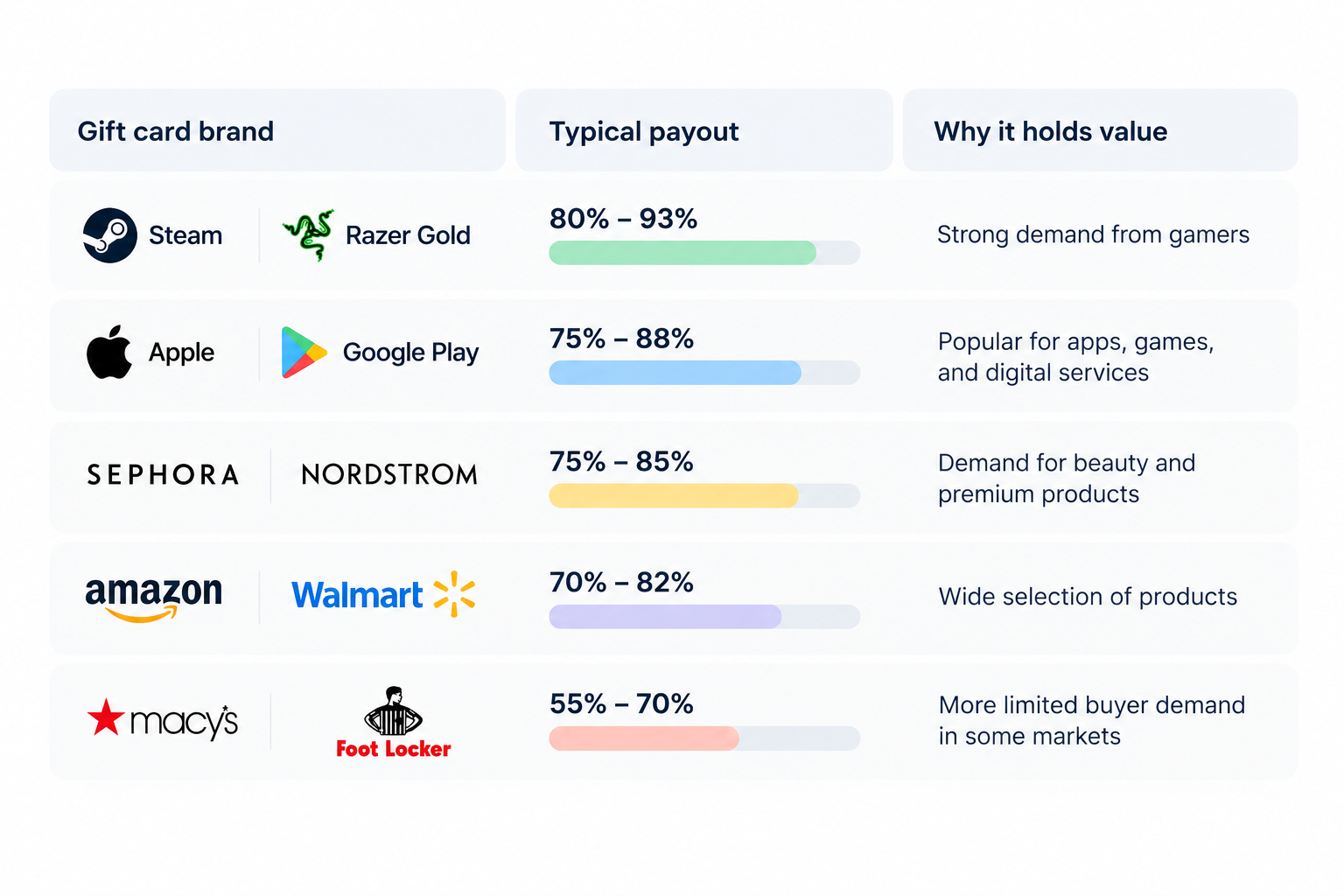
Chart of gift card payout rates by retailer.

‍

Why do gift card rates differ?

  • Brand popularity: More buyers usually mean better resale rates.
  • Ease of resale: Cards that sell quickly may attract higher offers.
  • Card format: Physical cards with receipts may be easier to verify than some digital codes, depending on the buyer.
  • Country and currency: US-issued cards may attract stronger demand than cards restricted to other regions.
  • Fees and verification: Platforms may reduce their offers to cover processing costs and fraud risks.

How to sell a gift card step by step

Follow these steps to turn an unused gift card into cash while reducing the risk of delays, rejected submissions, or scams.

1. Check your balance: Visit the retailer's official website to confirm the remaining balance and make sure the card has been activated.

2. Confirm the card details: Check the brand, issuing country, currency, denomination, and whether you have a physical card or digital code.

3. Keep your proof of purchase: Save the original receipt, activation slip, or purchase confirmation email. Some buyers require proof to verify the card's origin.

4. Compare offers: Check the current payout rate on reputable trading platforms and compare the final amount you will receive after fees.

5. Submit your card: Create an account, select the correct card category, and upload clear images or enter the digital code through the platform's official submission process.

6. Wait for verification: The buyer checks the card's validity and balance. Track your transaction and respond to requests for additional information.

7. Receive your payout: Once approved and marked as paid, withdraw the money using an available payment method. Keep your transaction receipt for your records.

Important: Never share your gift card code with an unverified buyer or send it through public comments or unofficial messages.

How to avoid gift card scams

Selling gift cards for cash can be convenient, but a careless transaction can leave you with an empty balance and no payment. Knowing the warning signs can help you protect your money.

1. Check for drained cards: Confirm your gift card balance on the retailer's official website before trading. Submit it promptly through a trusted platform, as anyone who obtains the code may redeem the balance first.

2. Avoid fake buyers: Be cautious of social media traders promising unusually high rates or instant payments. Use reputable platforms with clear verification procedures and buyer protection where available.

3. Watch for overpayment scams: Never refund an alleged excess payment based on a screenshot or an unverified check. Confirm that funds have actually cleared before releasing your card.

4. Keep your PIN secret: Never share your redemption code, PIN, or photos showing the complete card details with an unverified buyer. Once someone redeems the balance, recovering your money may be difficult.

Always verify the buyer, confirm payment independently, and keep transaction records.

Getting your payout when living abroad

Selling gift cards through US platforms can be useful, but receiving your money while living abroad requires the right payment method. You may not need a US bank account if the platform supports international payouts or allows you to withdraw through an eligible financial service. Before selling, confirm the available payout currencies, withdrawal methods, and account requirements.

If you live in Nigeria, for example, you may want to receive USD and convert it to naira when you need local spending money. Grey supports cross-border transfers, and you can explore how to send money from the US to Nigeria to understand the available transfer options. Check the applicable fees, exchange rate, and delivery time before moving your funds.

You can also open a USD account with Grey to explore options for receiving and managing dollars, subject to eligibility and availability. Keeping funds in USD before converting them may help you choose when to exchange, but always compare the total costs and withdrawal options first.

Frequently asked questions

1. What is the best place to sell gift cards?

The best place to sell gift cards depends on your preferred currency, payout speed, and the card you own. Platforms such as Cardtonic, GiftCardsToNaira, GiftCash, and Gameflip offer different options. Compare their rates, fees, supported brands, and payment methods before choosing where to sell.

2. How much can you get for a gift card?

The amount you receive depends on the card’s brand, value, demand, and resale platform. Some gift cards may sell for 60% to 93% of their face value, but rates vary. Check current offers before selling so you understand how much you will receive.

3. Can you sell a partially used gift card?

You may be able to sell a partially used gift card, depending on the platform’s rules. The marketplace must support the card and allow its remaining balance to be verified. Check the requirements first, and disclose the exact balance to avoid disputes with the buyer.

4. How long does a gift card payout take?

Gift card payout times depend on the platform, verification process, and payment method. Some services process approved transactions quickly, while others may take several hours or longer. Before selling, check the estimated processing time and confirm whether additional identity or card verification is required.

5. Is selling gift cards legal?

Selling gift cards you legitimately own is generally legal, but the rules depend on your location, the card issuer’s terms, and the transaction. Avoid selling cards obtained through fraud or using platforms that facilitate illegal activity. Check local regulations and the marketplace’s terms before completing a sale.

6. How do you sell a US gift card from outside the US?

To sell a US gift card while living abroad, choose a reputable platform that accepts your card brand and country of residence. Check its exchange rate, fees, verification requirements, and payout options. Confirm that you can withdraw the proceeds in your preferred currency before submitting your card details.
11 best virtual mailbox services for digital nomads

•

•

2 min read

A virtual PO box, or virtual mailbox, gives you a real street address where a provider receives your post, scans it and forwards or shreds it on request. Digital nomads use one to keep a stable address for banks, tax letters and deliveries, even when they move between countries.

Without a permanent home, managing important mail can become complicated. You might miss a bank statement, struggle to receive a replacement card or need an address to register a business. A virtual mailbox helps you handle these tasks without relying on friends or family to collect your post.

However, providers differ in their locations, monthly fees, mail-scanning limits, forwarding options and international shipping costs. Some offer additional services, such as check deposits and package consolidation.

This guide covers 11 virtual mailbox services worth considering, helping you compare their features, pricing and availability to find an option that fits your travel routine and mailing needs.

What is a virtual PO box?

A virtual PO box is a mail-handling service that gives you a physical mailing address without requiring you to rent or visit a mailbox in person. As a digital nomad, you can use it to receive letters, bank statements and packages while travelling or living abroad.

Unlike a traditional PO box, a virtual mailbox typically provides a real street address. When you sign up, your provider assigns you an address at its mail-handling facility. You can use this address for eligible correspondence, and the provider receives your mail on your behalf.

Your address may include a private mailbox (PMB) number, such as 123 Main Street, PMB 456. This identifies your individual mailbox within the provider’s facility. The exact format varies by provider, and you should follow its instructions when entering your address on forms.

A USPS PO box, by contrast, is rented directly from the United States Postal Service and usually uses a PO box number rather than a street address. A virtual mailbox may accept deliveries from multiple carriers, depending on its policies, and lets you view scanned mail online, request forwarding or arrange secure shredding.

The 11 best virtual mailbox services

The 11 best virtual mailbox services offer different address locations, mail scanning features, forwarding options and pricing plans. Whether you travel frequently, live abroad or run a remote business, compare each provider’s features to find a mailbox service that fits your needs.

Rank Provider Starting price Address locations Scans included Forwarding cost Best for
1 iPostal1 $9.99/mo 4,250+ locations globally Up to 30 exterior scans; content scans cost $2.25 per envelope for up to 10 pages Carrier rates plus handling fee, varying by location Overall network and local presence
2 Anytime Mailbox 4.98–9.99/mo, depending on address 2,500+ locations globally 30 incoming items and 5 open-and-scan pages monthly on the standard tier Carrier rates plus $5 per shipping bundle Budget and flexibility
3 Traveling Mailbox $15/mo 25+ US locations 35 page scans and 40 incoming envelopes monthly Carrier rates plus $2 per shipment; consolidation is free Digital nomads and RVers
4 PostScan Mail $10/mo 1,000+ locations 30 exterior scans; content scans cost $2 per envelope for up to 10 pages Carrier rates plus $2 for the first item and $0.50 per additional item Mobile app and multiple profiles
5 Physical Address $7.98/mo 6 regional hubs 30 incoming items monthly; unlimited exterior image views Carrier rates plus material costs Extended mail storage
6 US Global Mail 9.95–19.95/mo Locations across 23+ US states Unlimited exterior envelope scans; content scans depend on your plan Discounted carrier rates, advertised savings of up to 80% Expats and check deposits
7 Earth Class Mail 19–39/mo 80–90 US locations Envelope scans included; content scans charged according to volume Carrier rates plus handling charges Businesses and automated workflows
8 Stable Varies Selected premium office locations Custom high-volume limits for business accounts Secure, tracked priority shipping options Tech startups and API integrations
9 SavvyNomad Varies Residential-style addresses Digital envelope scanning and processing included, according to the supplied plan details Custom domestic and international forwarding Expats and financial correspondence
10 Northwest Registered Agent Varies All 50 US states Up to 5 document scans free annually on standard registered-agent plans Forwarding for state and business documents LLC formation and business privacy
11 Alliance Virtual Offices 37–49/mo 1,200+ locations worldwide Mail reception and notification tracking Scheduled forwarding using your chosen carrier Hybrid businesses needing meeting space

‍

How to choose a virtual mailbox

Choosing a virtual mailbox starts with understanding how much mail you receive and how you want to manage it. Compare each provider’s scanning allowance, including the number of incoming envelopes covered and the cost of opening and scanning their contents. If you receive important documents regularly, a plan with generous scanning limits may offer better value than a cheaper subscription with extra fees.

Next, consider forwarding costs. Providers may charge handling fees in addition to postage, and international deliveries can become expensive. Look for options such as mail consolidation, which combines multiple items into one shipment, and check whether storage limits apply before forwarding.

Your address type also matters. A commercial address may suit general correspondence and business mail, but some banks or government agencies require a residential address. Confirm that the address meets the requirements of the organisations where you intend to use it.

Finally, check the provider’s process for USPS Form 1583. This form authorises a commercial mail receiving agency to handle your mail. You generally need to provide identification and complete the required notarisation or identity verification process before your mailbox becomes active.

Also read: Virtual US accounts explained: Who they work for

Can you use a virtual mailbox for banking and business?

Yes, you can use a virtual mailbox for some banking and business purposes, but acceptance depends on the bank, service provider and intended use. Many virtual mailboxes provide a business mailing address for receiving bank statements, tax notices and official correspondence. However, a mailing address is not necessarily accepted as proof of your physical residential address. Before applying, review the bank’s address requirements and its rules for opening a business account.

Banks may flag a virtual mailbox as a commercial mail receiving agency (CMRA), which means it may not satisfy their physical-address verification requirements. This does not automatically prevent you from opening an account, but you must provide accurate details and any additional documents requested.

For business registration, a virtual mailbox may serve as your mailing address, depending on state rules. An LLC may also need a registered agent with a physical address in its state of registration to receive legal notices. Before applying, review this guide on how to open a business bank account and confirm the bank’s requirements.

Managing money while you travel

Managing money while travelling can get complicated when your income, savings and expenses involve different currencies. You might earn dollars from a US client, pay for accommodation in another country and still need money for expenses back home. Keeping track of exchange rates, transfer fees and spending limits can quickly become frustrating.

Grey helps simplify cross-border money management by giving you a way to receive international payments and manage multiple currencies. Instead of constantly converting money whenever you get paid, you can hold supported currencies and exchange them when it suits your needs.

When you need to pay for flights, accommodation or online subscriptions, Grey’s virtual card for spending abroad gives you another way to make international payments. And if you’re travelling while working remotely, you can get paid from the US while abroad by sharing your Grey USD account details with clients. That way, earning and spending across borders becomes easier to manage

Frequently asked questions about virtual mailbox services for digital nomads

1. What is a virtual PO box?

A virtual PO box, also called a virtual mailbox, gives you a mailing address where a provider receives your letters and packages. You can view scanned images of incoming mail online and choose to have items forwarded, stored or shredded. It is useful for travellers, remote workers and businesses that need reliable mail access.

2. Is a virtual mailbox legal?

Yes, virtual mailboxes are legal in the United States when used in accordance with applicable laws and postal regulations. Providers receiving USPS mail on behalf of customers operate as Commercial Mail Receiving Agencies (CMRAs) and must follow USPS requirements. You must provide accurate identification, complete required forms and avoid using the address for unlawful activities.

3. Can you use a virtual mailbox as a permanent address?

You can use a virtual mailbox as a long-term mailing address, even when you travel frequently. However, it may not qualify as your legal residence or physical address for every purpose. Government agencies, banks, insurers and licensing authorities may require a residential address, so check their specific rules before using one.

4. Do banks accept virtual mailbox addresses?

Some banks accept virtual mailbox addresses for mailing statements and correspondence, but others may reject them for account verification. A virtual mailbox is generally a commercial mailing address, not proof of where you live. Banks may require a separate residential or physical business address to meet identity-verification and compliance requirements.

5. What is USPS Form 1583?

USPS Form 1583 is an application that authorises a Commercial Mail Receiving Agency to receive mail on your behalf. You must provide identifying information and acceptable identification documents. Your signature must be witnessed by the provider or an authorised employee, or acknowledged before a qualified notary. Requirements should be confirmed with your mailbox provider.

6. How much does a virtual mailbox cost?

A virtual mailbox typically costs around $5 to $40 per month, depending on the provider, address location and plan features. Basic plans may include limited mail scanning, while higher-priced options offer more scans, storage or business services. Budget for additional charges such as postage, forwarding, document scanning, package handling and international shipping.

What is the currency of France? Euro symbol and code

•

•

2 min read

The currency in France is the euro, represented by the symbol € and the ISO currency code EUR. If you are travelling to Paris, shopping in Lyon or paying for accommodation in Nice, you will use euros for everyday transactions. France replaced the French franc with euro banknotes and coins in 2002, making the euro its official currency.

The euro is used across mainland France and its outermost regions, including Guadeloupe, Martinique, Réunion, French Guiana and Mayotte. However, not all French territories use the euro. French Polynesia, New Caledonia and Wallis and Futuna use the CFP franc (XPF), a separate currency pegged to the euro at a fixed rate.

When budgeting for a trip, remember that prices are generally displayed in euros, whether you are paying for meals, transport or shopping. If your money is in another currency, check the exchange rate and any conversion fees before making payments. Using a suitable travel card or payment service can also help you manage spending abroad.

What currency does France use?

France uses the euro (€), with the ISO currency code EUR. If you are planning a trip to Paris, exploring the French Riviera or shopping in Marseille, you will pay for most goods and services in euros.

France previously used the French franc as its national currency. The country adopted the euro for electronic and financial transactions in 1999, before euro banknotes and coins entered circulation on 1 January 2002. The franc was then gradually withdrawn, completing France’s transition to the shared European currency.

When checking prices during your visit, look for the € symbol, which usually appears before or after the amount depending on the format. For example, €25 represents twenty-five euros. If you are converting money from naira, pounds or US dollars, the amount you receive will depend on the current exchange rate and any fees charged by your bank or payment provider.

Before travelling, compare conversion costs and payment options so you can manage your spending in France more confidently.

Do the French still use the franc anywhere?

France no longer uses the French franc as its official currency. The euro (€), code EUR, replaced it, with euro banknotes and coins introduced in 2002. However, France still uses a different franc in some of its Pacific territories: the CFP franc (XPF).

If you travel to French Polynesia, New Caledonia or Wallis and Futuna, you will encounter the CFP franc rather than the euro for everyday payments. Although these territories are French, they have a separate currency arrangement suited to their regional economies.

The CFP franc is linked to the euro at a fixed exchange rate of €1 = 119.3317 XPF. This means its value against the euro does not fluctuate with ordinary market exchange-rate movements. However, when converting your money from another currency, such as US dollars or Nigerian naira, the amount you receive can still change with exchange rates and provider fees.

If you are visiting these Pacific territories, check whether your bank card supports local payments and compare conversion charges before travelling. The CFP franc remains distinct from the former French franc, despite sharing the name.

Paying in France: notes, coins, cash and cards

When paying in France, you can use euro banknotes, coins and payment cards. Euro banknotes come in €5, €10, €20, €50, €100 and €200 denominations, while coins range from 1 cent to €2. Prices are displayed in euros, so check the total before paying.

Debit and credit cards are widely accepted in shops, hotels, restaurants and supermarkets. Contactless payments are common, allowing you to tap your card or compatible phone at checkout. However, some transactions may require a PIN, and individual merchants can set minimum card payment amounts where permitted.

Cash remains useful when visiting local markets, buying from smaller vendors, using certain public facilities or making purchases at businesses that do not accept cards. Keeping a little cash available can help you avoid payment difficulties.

If you need a convenient way to pay while travelling, Grey’s virtual card can help you make online and supported card payments in euros. Before your trip, check the card’s currency conversion rates, applicable fees and acceptance conditions so you can plan your spending with confidence.

Also read: Cheapest cities in France for international students

How to get euros for a trip to France

You can get euros for your trip to France through bank ATMs, currency exchange bureaux or your bank before departure. Withdrawing euros from an ATM in France can be convenient, but check your bank’s foreign transaction fees and the ATM operator’s charges. Use ATMs attached to established banks where possible.

Exchange bureaux at airports and tourist areas are easy to find, but they may offer less favourable rates. Compare the final amount you will receive after fees rather than relying only on advertised exchange rates.

When paying by card or withdrawing cash, you may be asked whether you want to pay in euros or your home currency. Choose euros to decline dynamic currency conversion. This usually lets your card provider handle the conversion, which may offer a better rate, although your provider’s fees still apply.

For cross-border payments, Grey offers a way to send money from the US to France. Compare the available exchange rate, transfer fees and delivery times before sending funds, so you can budget for your trip and manage your euros more effectively.

How to send money to France

Whether you are paying rent, covering tuition or supporting family, choosing the right transfer service can help you manage international payments to France. Grey supports cross-border money transfers, allowing you to send money from the UK to France and manage international payments through its platform.

Before sending money, compare exchange rates, transfer fees and delivery times to understand how much your recipient will receive. Bank transfers can include intermediary charges, while card payments may attract foreign transaction fees depending on your provider.

Grey’s multi-currency account helps you hold and manage supported currencies in one place, making it easier to organise international finances. Its virtual card also lets you make eligible online payments and pay for supported purchases in euros. Depending on your card terms and transaction, this may help you avoid certain foreign transaction fees.

Frequently asked questions about the currency of France

1. Does France use the euro or the franc?

France uses the euro as its official currency. The French franc was replaced by euro banknotes and coins in 2002. However, some French Pacific territories still use the CFP franc, a separate currency linked to the euro at a fixed exchange rate.

2. What is the euro symbol and code?

The euro symbol is €, and its three-letter ISO currency code is EUR. You will see the symbol on price tags, receipts and menus across France. For example, €50 means fifty euros. When exchanging money, use EUR to identify the currency correctly.

3. Can you use US dollars in France?

US dollars are not generally accepted for everyday purchases in France. You will usually need euros to pay for meals, transport, shopping and accommodation. Exchange your dollars before travelling or withdraw euros from an ATM. Check conversion rates and fees to manage costs.

4. Is card or cash better in France?

Cards are widely accepted across France, including in hotels, restaurants and shops. Contactless payments are common, making cards convenient for everyday spending. However, cash remains useful at local markets and smaller businesses. Carrying a little of both gives you greater flexibility during your trip.

5. What currency is used in French Polynesia?

French Polynesia uses the CFP franc, abbreviated XPF, rather than the euro for everyday transactions. The currency is pegged to the euro at a fixed rate of €1 = 119.3317 XPF. Check your card’s international payment fees before travelling to the islands.

6. How do you send money to France?

You can send money to France through a bank or an international transfer service. Compare exchange rates, transfer fees and delivery times before choosing. Grey supports cross-border payments, including transfers from the US to France. Confirm service availability and recipient details before sending.

How to get an Airtel eSIM

•

•

2 min read

Switching to an Airtel eSIM lets you use your mobile number without inserting a physical SIM card into your phone. Instead, your device stores the SIM profile digitally, making it easier to activate your line on a compatible smartphone and manage your mobile connection.

If you want to convert your existing Airtel SIM to an eSIM, you'll typically need to send a text message, confirm your request and scann a QR code sent to your email address. The exact steps and eligibility requirements may vary depending on your country and Airtel’s current eSIM service.

Before you begin, check that your phone supports eSIM technology and that your Airtel line qualifies for conversion. You should also have access to the email address linked to your request and a reliable internet connection to download your eSIM profile. This guide explains the steps to follow and what to know before switching.

What do you need before converting an Airtel SIM to eSIM?

Before converting your Airtel SIM to an eSIM, make sure you have a compatible smartphone, an active Airtel number and access to a registered email address. These are essential for completing the conversion and receiving the eSIM activation details.

1. An eSIM-compatible smartphone

Your phone must support eSIM technology. Common eSIM-capable devices include the iPhone XS, XS Max and newer models, selected Samsung Galaxy S20 and newer models, Google Pixel 4 and newer models, and certain newer Motorola devices. However, compatibility varies by model, region and carrier, so confirm that your specific handset supports eSIM.

2. A registered email address

You need a working email address to receive the eSIM QR code and activation instructions from Airtel. Check that you can access your inbox before starting the process.

3. An active Airtel number

Keep your existing Airtel SIM active so you can send the conversion request and confirm it when prompted. You may also need your phone to receive verification messages during activation.

Check Airtel’s local requirements before beginning, as procedures differ by country.

How to convert an Airtel SIM to eSIM by SMS

Convert your Airtel SIM to an eSIM by texting Airtel, confirming your request, waiting for activation and scanning the emailed QR code.

Airtel eSIM QR code ready to scan on a phone. Place at the top of the article.
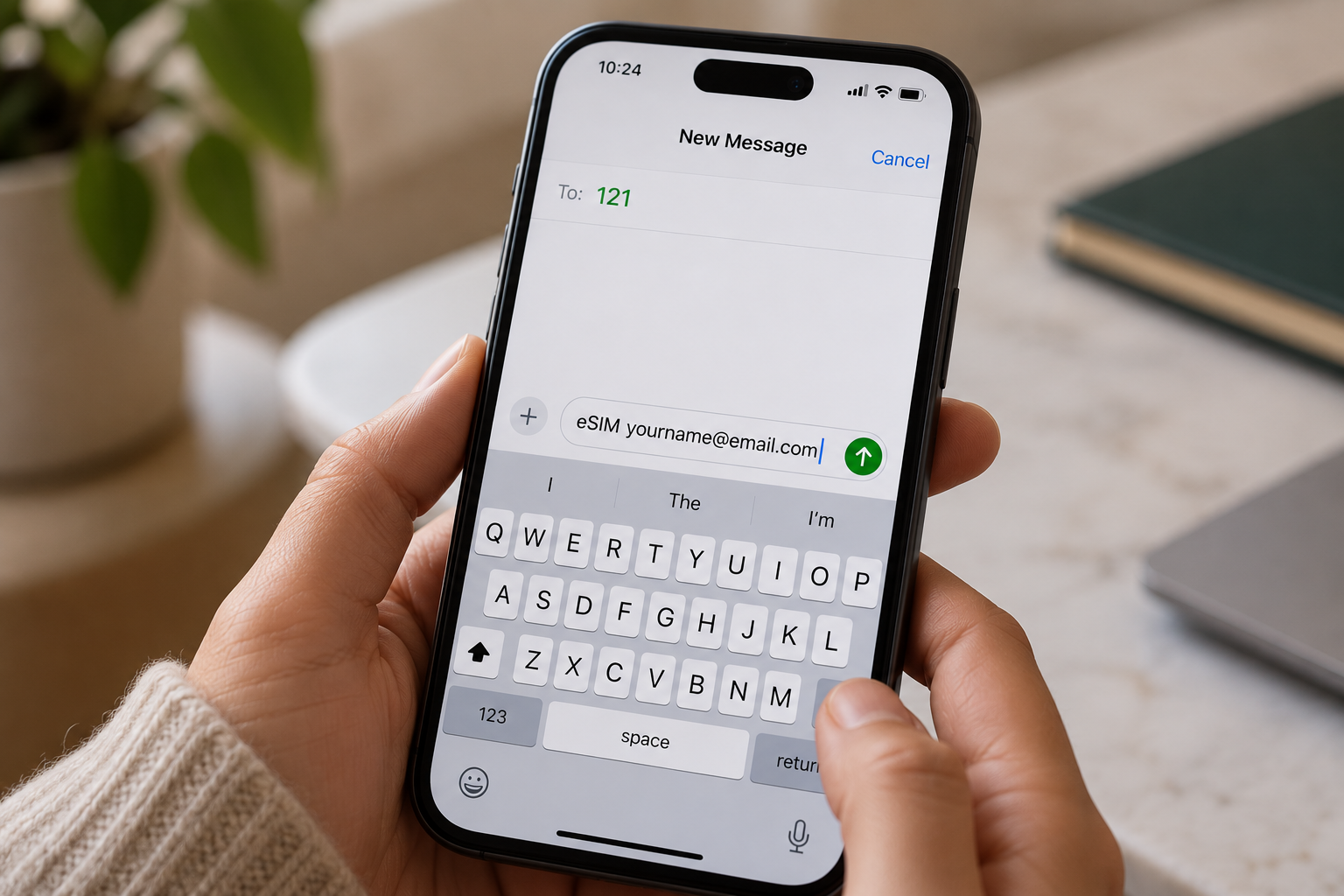
  1. Send an SMS to 121: Open your messaging app and send eSIM followed by your registered email address to 121. Check the spelling of your email before sending the message.
  2. Confirm your request: Airtel should send a confirmation message. Reply with 1 as instructed to authorise the SIM-to-eSIM conversion. Follow any additional prompts provided by Airtel.
  3. Wait for processing: Allow approximately 60 minutes for Airtel to process your request, although activation times may vary. Keep your existing SIM and phone available during this period in case you receive further instructions.
  4. Check your email for the QR code: Airtel will send an eSIM QR code to your registered email address when the process reaches the relevant stage. Check your spam or junk folder if it does not appear in your inbox.
  5. Scan and activate your eSIM: Connect your compatible phone to Wi-Fi, open its mobile network settings and select the option to add an eSIM. Scan the QR code and follow the on-screen instructions to complete activation.

How to convert an Airtel SIM to eSIM in the Airtel Thanks app

You can convert your physical Airtel SIM to an eSIM through the Airtel Thanks app without visiting a store, provided your number and device are eligible. The steps below apply to Airtel India; menu options may vary by app version.

  1. Open the Airtel Thanks app: Install or update the app, then log in using the Airtel number you want to convert. Keep your physical SIM active to receive verification messages.
  2. Find the eSIM option: On the home screen, scroll to Shortcuts, tap More, then select Upgrade to eSIM. If you cannot find it, check the app’s search or help section.
  3. Choose your device: Select "This device" to install the eSIM on your current phone, or choose Another device if that option is available.
  4. Enter your EID. Provide the device’s 32-digit EID when prompted. You can usually find it in your phone’s settings under "About".
  5. Complete verification. Follow the on-screen instructions, including any OTP or confirmation call from Airtel.
  6. Activate the eSIM. Wait for Airtel’s confirmation, then follow the installation prompts on your phone. Processing may take around two hours

How to scan the Airtel eSIM QR code on iPhone and Android

To activate your Airtel eSIM, scan the QR code provided by Airtel using your phone’s mobile network settings. Keep your phone connected to Wi-Fi during setup, as the eSIM profile needs an internet connection to download.

On iPhone

  1. Open Settings and select Cellular or Mobile Service.
  2. Tap Add eSIM, then choose Use QR Code.
  3. Scan your Airtel eSIM QR code using your camera.
  4. Tap Continue and follow the on-screen instructions to install the mobile plan.
  5. Once activated, check that your Airtel line shows a signal and can make calls.

If you’re moving to a new iPhone, follow this guide to transfer an eSIM from one iPhone to another.

On Android

  1. Open Settings and select Connections on Samsung, or Network & Internet on Google Pixel.
  2. Tap SIM manager or Mobile Network.
  3. Select Add eSIM or Add mobile plan.
  4. Choose the QR code option and scan the code from Airtel.
  5. Follow the prompts to download and activate your eSIM.

What happens to your physical SIM?

After the eSIM activates, your physical Airtel SIM for that number is deactivated. You can remove it from your phone. If activation fails, contact Airtel before deleting any installed eSIM profile

Why is my Airtel eSIM not activating?

Your Airtel eSIM may fail to activate because of a problem with your identity verification, phone compatibility, registered email address or activation timing. Identifying the specific issue helps you determine the right fix without unnecessarily repeating the conversion process.

  1. KYC mismatch: Airtel may be unable to verify your identity because your registration details do not match its records. Contact Airtel to confirm your subscriber information and complete any required verification.
  2. Unsupported handset: Your smartphone may not support eSIM technology, or its regional variant may lack eSIM functionality. Check your exact model’s specifications before attempting activation again.
  3. Wrong email address: If you entered an incorrect email address, you may not receive the Airtel eSIM QR code. Verify your registered email and check your spam folder. Contact Airtel if the QR code is missing.
  4. Activation delay: Airtel’s activation process can take up to two hours. Keep your phone connected to the internet and follow the installation instructions. If activation still fails after the waiting period, contact Airtel support or visit an authorised store. Avoid deleting an installed eSIM profile before receiving assistance.

If you need mobile connectivity while travelling, Grey lets you top up airtime and buy eSIMs. You can also manage cross-border expenses by using Grey to send money from the US to India or send money from the UK to India, helping you handle payments while staying connected abroad

Frequently asked questions

1. How long does an Airtel eSIM take to activate?

An Airtel eSIM usually activates within two hours after you download and enable the eSIM profile on your compatible phone. During processing, your physical SIM may continue working. Keep your device connected to Wi-Fi and follow Airtel’s instructions to complete activation. Timings may vary by country and request.

2. Does converting to an Airtel eSIM change my number?

No, converting your existing Airtel physical SIM to an eSIM generally keeps your current mobile number. The process replaces the physical SIM with a digital profile linked to the same line. You can continue using your number for calls, messages and mobile data once activation is complete.

3. Can I convert an Airtel prepaid SIM to eSIM?

Yes, eligible Airtel prepaid customers can convert their physical SIM to an eSIM in supported markets. However, the process differs by country. Airtel India provides an app-based conversion process, while Airtel Nigeria directs customers to a service centre for assistance. Confirm your line’s eligibility before starting.

4. What happens to my physical Airtel SIM after conversion?

Once your Airtel eSIM activates successfully, the physical SIM linked to that number becomes inactive. You can remove it from your phone because the eSIM now provides your mobile connection. Keep the physical SIM in place until activation is confirmed to avoid losing service during the transition.

5. Can I switch an Airtel eSIM back to a physical SIM?

Yes, you can generally switch your Airtel eSIM back to a physical SIM by requesting a SIM replacement. In India and Nigeria, Airtel directs customers to a service centre or showroom for assistance. Bring the required identification and complete any verification steps before using the replacement SIM.

6. Is there a fee to convert an Airtel SIM to eSIM?

The cost depends on your country and Airtel’s current policy. Airtel Nigeria currently states that eSIM activation has no charge, while other SIM replacement services or markets may have different fees. Before converting, check with your local Airtel provider whether activation, replacement or related services incur additional costs.

What is the currency of Italy? Euro symbol and code

•

•

2 min read

The currency of Italy is the euro, identified by the code EUR and the symbol €. If you are planning a trip to Rome, shopping in Milan or sending money to someone in Italy, understanding the local currency can help you manage your money and avoid unnecessary charges.

Imagine arriving in Italy, ready to explore its historic streets, enjoy a meal at a local restaurant or pay for your hotel. You will need euros for everyday purchases, whether you are paying by card or carrying cash. Euro banknotes come in different denominations, while coins are available in cents and euros. Although cards are widely accepted, having some cash can be useful for smaller purchases and places that prefer cash payments.

Currency exchange fees, ATM charges and your bank's foreign transaction fees can increase your spending without you noticing if you always have to convert. If you need to send money to Italy, exchange rates and transfer fees affect how much your recipient receives. This guide explains the Italy currency, its symbol and code, and practical ways to spend and transfer money while keeping costs down.

What is the currency of Italy?

Italy uses the euro (€) as its official currency. Whether you are visiting Rome, shopping in Milan or paying for accommodation in Venice, you will use euros for everyday transactions. The currency is shared by many European countries, making travel and payments across participating nations more convenient.

The euro’s official currency code is EUR, while its symbol is €. You will see the symbol before prices in many Italian shops, restaurants and online stores. One euro is divided into 100 cents. Euro banknotes are available in different denominations, alongside coins ranging from one cent to two euros, which you can use for smaller purchases.

The European Central Bank (ECB), working with the national central banks of eurozone countries, is responsible for monetary policy and maintaining price stability across the euro area. It helps manage the euro’s value by setting key interest rates and using other monetary policy tools.

Italy is a member of the eurozone, the group of European Union countries that use the euro as their official currency. This means you can generally use the same currency when travelling between Italy and other eurozone destinations, although your bank may still charge fees for certain transactions.

Euro notes and coins in Italy

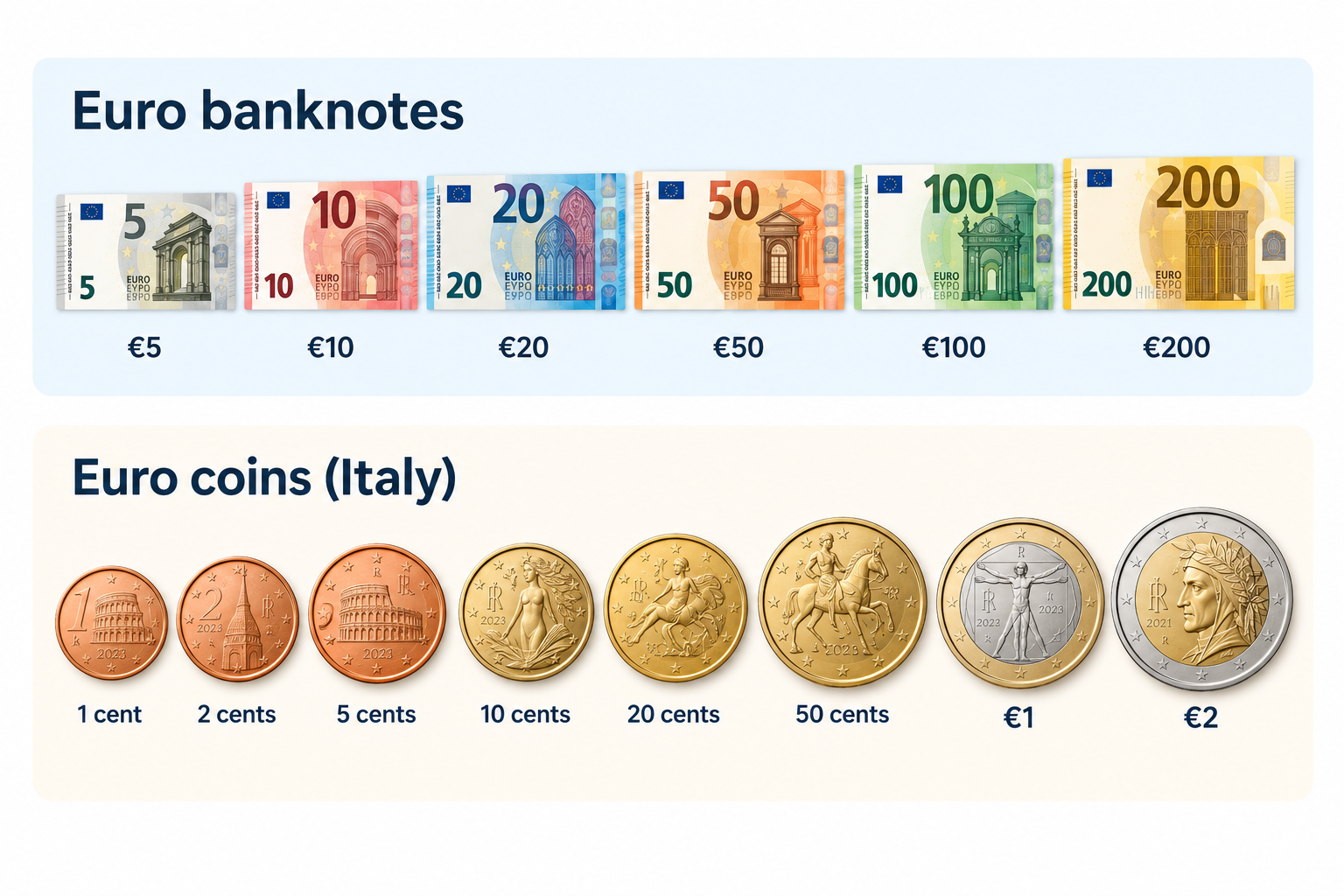
When you visit Italy, you will use euro banknotes and coins for everyday purchases, from buying coffee to paying for meals and transport. Euro banknotes come in denominations of €5, €10, €20, €50, €100 and €200. Although the €500 note is no longer issued, existing notes remain valid. Banknotes share common designs across the eurozone, featuring architectural styles from different periods in European history.

__wf_reserved_inherit

Euro coins come in eight denominations: 1, 2, 5, 10, 20 and 50 cents, plus €1 and €2. Each coin has a common European side and a national side featuring designs selected by its issuing country. All euro coins can be used across the euro area.

Italy’s national coin designs reflect its rich artistic and cultural heritage. The €1 coin features Leonardo da Vinci’s Vitruvian Man, his famous drawing illustrating the proportions of the human body. Other denominations showcase Italian landmarks and masterpieces, including Dante Alighieri, the Colosseum and Sandro Botticelli’s Birth of Venus. These designs celebrate Italy’s contribution to European art and history. The European Central Bank oversees euro banknotes and contributes to maintaining confidence in the currency across participating countries.

Should you pay by cash or card in Italy?

When travelling around Italy, you can pay by card at most hotels, restaurants, supermarkets and shops in major cities, where Visa and Mastercard are widely accepted. However, keeping some euros in your wallet can help when shopping at local markets, making small purchases or visiting places where card payments are unavailable. Before travelling, check your bank’s foreign transaction fees so you know how much you could spend on charges.

You are not expected to tip everywhere in Italy, as tipping is not compulsory, but you can leave a small amount or around 5–10% when you receive particularly good service. Check your bill for any service charge before deciding what to leave.

To manage your spending digitally, you can use a Grey virtual card for eligible purchases in euros, including online bookings and payments at merchants that accept Visa. Depending on your card setup, you may also be able to add it to Apple Pay or Google Pay for contactless payments. Check applicable fees and currency conversion rates before spending.

How to get Euros for a trip to Italy

Before travelling to Italy, decide how you will access euros for meals, transport, shopping and accommodation while keeping exchange costs low. You can exchange money before departure, withdraw euros from ATMs in Italy or use a payment card that supports euro spending.

ATMs operated by established banks are convenient for withdrawing cash, but check your bank’s withdrawal charges and any fee displayed by the ATM before confirming. Exchange bureaux are another option, although you should compare exchange rates and commissions to avoid paying more than necessary.

To avoid unnecessary conversion costs, choose euros rather than your home currency whenever an ATM or card terminal offers dynamic currency conversion. This allows your card provider to handle the conversion instead of accepting the machine’s potentially unfavourable rate. You should also check whether your bank charges foreign transaction fees.

A Grey virtual card offers another way to pay for eligible purchases in euros. Check Grey’s card fees and exchange rates, and compare them with your bank’s charges to find a cost-effective way to spend while travelling.

Also read: Italy digital nomad visa: Requirements, costs and process

How to send money to Italy

Whether you are supporting a family in Italy, paying tuition fees or covering accommodation and other expenses, you need a reliable way to send money in euros without losing track of exchange rates and transfer costs. Grey makes cross-border transfers easier by allowing eligible users to send money from Nigeria to European bank accounts in EUR. You can fund your Grey account, review the available exchange rate and fees, and transfer euros directly to your recipient’s bank account.

Grey is also a multi-currency platform, allowing you to hold and convert supported currencies to manage international payments in one place. This can be useful when you earn in one currency but need to pay expenses in euros. Before confirming a transfer, check the live exchange rate, applicable fees and the final amount your recipient will receive.

Frequently asked questions about the currency of Italy

1. Does Italy use the euro or the lira?

Italy uses the euro (€) as its official currency, not the Italian lira. The lira was replaced by the euro in 1999 for accounting purposes, with euro banknotes and coins entering circulation in 2002. Today, you need euros to pay for everyday purchases, transport, meals and accommodation in Italy.

2. What is the euro symbol and code?

The euro symbol is €, and its official three-letter currency code is EUR. You will see these used on Italian price tags, restaurant menus, receipts and online bookings. One euro is divided into 100 cents. When exchanging money or sending payments to Italy, use EUR to identify the currency correctly.

3. Can you use US dollars in Italy?

US dollars are not generally accepted for everyday purchases in Italy because the euro is the official currency. You should exchange dollars for euros or withdraw euros from an ATM. Some tourist businesses may accept other currencies, but their exchange rates may be unfavourable. Paying in euros usually makes costs easier to compare.

4. Is it better to pay with cash or card in Italy?

Cards are widely accepted in Italian cities, hotels, restaurants and shops, making them convenient for everyday spending. However, carrying some euros is useful for markets, small purchases and places that do not accept cards. Check your bank's foreign transaction fees and choose euros rather than your home currency when prompted at payment terminals.

5. How much cash should you take to Italy?

The amount depends on your travel plans, accommodation and spending habits. For many travellers, carrying around €50–€100 for initial expenses and small purchases is a reasonable starting point, while using a card for larger payments. You can withdraw additional euros as needed, but check ATM charges and your bank's withdrawal limits first.

6. How do you send money to Italy?

You can send money to Italy through a bank transfer or an international money transfer service. Compare exchange rates, transfer fees and delivery times before choosing. Grey supports eligible cross-border transfers and multi-currency services, allowing users to send money in euros to supported destinations. Check availability, fees and recipient requirements before confirming your transfer.

What is the RTP network? Real-time payments in the US

•

•

2 min read

Imagine a US business paying a freelancer on a Friday evening and the freelancer receiving the money within seconds, rather than waiting until the next business day for a traditional bank transfer to clear. That is the kind of experience real-time payments are designed to make possible, and it is where the RTP network comes in.

The RTP network is a US real-time payments system run by The Clearing House that settles payments instantly, 24/7, every day of the year. Funds are available to the recipient within seconds and payments are final. It is used for payroll, bill pay and business-to-business transfers.

For you, the biggest difference is speed. Instead of planning around banking hours, weekends or public holidays, an RTP payment can move whenever the sending and receiving institutions support the network. That makes real-time payments particularly useful when getting paid, settling an urgent bill or moving money between businesses.

What is the RTP Network?

The RTP Network is a US real-time payments network that allows participating banks and financial institutions to send and receive eligible payments within seconds, rather than waiting for traditional banking processing windows. If you are sending money through a participating institution, the payment can move at any time, including nights, weekends and holidays, making it useful when waiting until the next business day is not an option.

The network is operated by The Clearing House, a US payments company owned by a group of major banks. Unlike traditional payment systems that may process transactions in batches, the RTP Network is designed for continuous, real-time processing, so funds can become available to the recipient almost immediately after the payment is sent.

For you, the key features are speed, availability and finality. RTP payments operate 24 hours a day, seven days a week, 365 days a year, and payments sent through the network are generally irrevocable once completed. The network supports use cases including business payments, bill payments, payroll and other account-to-account transfers.

How RTP payments work

An RTP payment can start with a request for payment or a direct credit push, before the network processes and settles the transaction almost immediately.

Request for payment

A request for payment allows the recipient or business to ask you to make a payment electronically. You receive the request through your participating bank or financial institution, review the payment details and authorise it. Once approved, the payment can be sent through the RTP Network without waiting for normal banking hours.

Credit push

A credit push is the more direct option, where you instruct your bank or financial institution to send money to the recipient's account. You provide the required account and payment details, confirm the amount and authorise the transaction. The sending institution then submits the payment through the RTP Network for processing.

Instant settlement

Once the payment is submitted, the RTP Network processes it in real time and settles the transaction between participating financial institutions. The recipient can typically access the funds within seconds, while the payment becomes final after settlement. Because RTP operates continuously, payments can be made on weekends, holidays and outside traditional banking hours.

RTP vs FedNow vs ACH vs wire transfers

This comparison shows how RTP, FedNow, ACH and wire transfers differ across speed, cost, operating hours and payment finality, helping you choose the right rail.

Payment Rail Speed Cost (Network / Retail) Operating Hours Finality (Irrevocability)
RTP Immediate (seconds) Network: $0.045;
Retail: free to low fee
24/7/365 Immediate and final
FedNow Immediate (seconds) Network: $0.045;
Retail: free to low fee
24/7/365 Immediate and final
ACH 1–3 business days Network: <$0.01;
Retail: free to $1.00
Business hours (batches) Reversible
(60-day consumer window)
Wire 1–2 hours Network: Variable;
Retail: 15–50
Varies by institution Generally final

‍

When should you use real-time payments?

You should use real-time payments when you need money to reach someone within seconds, rather than waiting for traditional banking hours or batch processing. They are particularly useful for urgent payments, payroll, bills and business-to-business transfers where immediate access to funds matters.

Payroll

If you run payroll and need employees or contractors to receive their money immediately, real-time payments can shorten the gap between sending funds and availability. This can be particularly useful for urgent payments, off-cycle payroll or businesses paying workers outside traditional banking hours.

Bill payments

Real-time payments can help you settle bills when waiting several business days is not practical. If a payment is due today, sending it through a participating institution can make funds available quickly, helping you avoid delays, missed deadlines or interruptions to important services.

Business-to-business payments

For B2B payments, real-time payments can help you pay suppliers, contractors or business partners without waiting for traditional payment batches. Faster settlement can improve cash flow, speed up fulfillment and give the recipient access to funds almost immediately after the payment is sent.

Also read: How to choose a cross-border payments platform you can trust

How cross-border payments work when domestic instant rails stop at the border

Real-time payment networks such as RTP are built for domestic transfers, which means the speed you experience within the US does not automatically apply when you make a cross-border payment. For example, someone looking to send money from the US to Mexico may still need a different payment route because the transaction involves another country, currency, banking system and regulatory requirements.

That does not mean international transfers have to be difficult. With a multi-currency account, you can receive and hold money in different currencies before deciding when to convert or move it. This gives you more control, particularly when you regularly receive payments from abroad and do not want every transaction converted immediately.

For example, with Grey, you can manage multiple currencies in one account and use supported payment routes for international transfers. Whether you need to send money from the US to Mexico or manage payments across other countries, holding your funds in the currency you receive them in can give you more control over when and how you move your money.

Also read: Best cross-border payment platforms compared 2026

Frequently asked questions about the RTP Network

What is the RTP network?

The RTP network is a US real-time payments system operated by The Clearing House. It allows participating banks and financial institutions to send and receive payments instantly, 24/7, 365 days a year. Unlike traditional payment methods that process in batches, RTP transactions settle individually, with funds available within seconds.

Who runs it?

The RTP network is operated by The Clearing House, a US payments organisation owned by major banks. It provides the infrastructure that participating financial institutions use to send and receive real-time payments. Your bank or payment provider must participate in RTP for you to make or receive an RTP payment.

How fast is it?

RTP payments typically reach the recipient within seconds, rather than taking one or several business days. The network operates continuously, including weekends and public holidays, so you do not have to wait for normal banking hours. Once an RTP payment settles, the funds are generally available to the recipient immediately.

How is RTP different from FedNow?

RTP and FedNow are both US real-time payment networks that enable near-instant transfers 24/7. The main difference is who operates them: The Clearing House runs RTP, while the Federal Reserve operates FedNow. Your choice usually depends on which real-time payment network your bank or financial institution supports.

Is RTP the same as ACH?

No. RTP and ACH are different US payment rails. RTP processes payments individually in real time, allowing recipients to access funds within seconds, while ACH payments are generally processed in batches and can take longer. ACH transactions can also have different rules around reversals and payment processing compared with RTP.

Can I use it internationally?

RTP is primarily designed for domestic payments within the US, so you generally cannot use it as a direct international payment network. Sending money across borders, such as from the US to Mexico, requires a separate international payment route that can handle different currencies, banking systems and regulatory requirements.

Arrow (up)

Back to top

