


Working with international clients: A freelancer's guide to getting paid

Olayoyin Olorunmota

TABLE OF CONTENT

SHARE THIS POST

If you’re a freelancer in 2025, chances are your next client isn’t in your city or your time zone. The rise of remote work, projected to grow at a rate of about 16% from 2025 through 2030, has opened up global opportunities for freelancers in design, tech, writing, marketing, and beyond. But while landing international gigs is exciting, getting paid across borders is where things often get murky.

This guide will cover everything you need to know about working with international clients and getting paid smoothly, no matter where you live.

Why work with international clients in the first place?

Freelancers across Africa, Asia, and Latin America are increasingly looking beyond local borders for work, and it’s not hard to see why.

1. Better pay for the same work

Let’s be honest, the global wage gap is real. By working with international clients, you tap into markets where your skills are more highly valued and usually better compensated. That means higher rates, more savings, and in many cases, the ability to work fewer hours for better income.

2. Global exposure and skill growth

Working with clients from the US, UK, Europe, or Australia exposes you to new standards, processes, and creative approaches. You learn to navigate cross-cultural communication, manage remote teams, and deliver work that meets global expectations. It’s like getting an international education without leaving your desk.

3. Currency strength and economic buffer

You insulate yourself from local economic shocks when paid in USD, GBP, or EUR. In countries where inflation or currency devaluation is a concern, earning in stable currencies can act as a financial cushion. Your income retains its value longer and gives you more spending power when converted to local currency.

4. Access to long-term opportunities

International clients are often looking to build long-term relationships with reliable freelancers. Unlike one-off gigs, these ongoing contracts bring consistency to your workflow and income, allowing you to plan better and grow your freelance business sustainably.

5. A stronger personal brand

Having well-known international brands or startups in your portfolio boosts your credibility. It shows future local and global clients that you can deliver high-quality work.

In short, international clients can mean better money, better opportunities, and a stronger freelance career.

Challenges freelancers face when getting paid by international clients

Despite the perks of remote work, getting paid across borders is often a huge pain point. Here are some of the most common challenges freelancers face:

1. Currency conversion

Getting paid in USD, EUR, or GBP sounds great until your local bank deducts a chunk from your earnings during conversion. Unfavourable exchange rates and hidden markup fees often result in freelancers losing a significant portion of their earnings before they even hit their local account.

2. Platform restrictions and incompatibility

Many global payment platforms, like PayPal or Payoneer, aren’t fully supported in every country. Sometimes, you might be forced to open a foreign bank account or rely on a third-party workaround just to receive your money. That’s not convenient or sustainable.

3. Long payment delays

Waiting days or even weeks for your payment to reflect can be nerve-racking. Delays like this make it nearly impossible to plan your finances or stick to a budget.

4. High transaction and withdrawal fees

Because of deductions from freelance platforms and banks, there is a feeling that everyone takes a bite out of your money. These small deductions can quietly erode your income, especially if you rely on frequent payments.

5. Invoicing, taxes, and compliance confusion

Different clients have different expectations. Some require detailed invoices with specific line items or tax IDs, while others might expect you to comply with their country’s tax laws. Without the right tools or templates, managing this admin can become overwhelming and may even delay payments.

Best ways to receive payments from international clients

The global freelance boom has made it easier than ever to land international clients, but getting paid is where most freelancers have issues.

Let’s explore the most common ways freelancers get paid from abroad, examining the pros and cons and what works best in today’s borderless world.

1. Traditional bank wire transfers (SWIFT)

SWIFT transfers have been the industry standard for decades, and most global companies are familiar with them. But they’re far from efficient for freelancers.

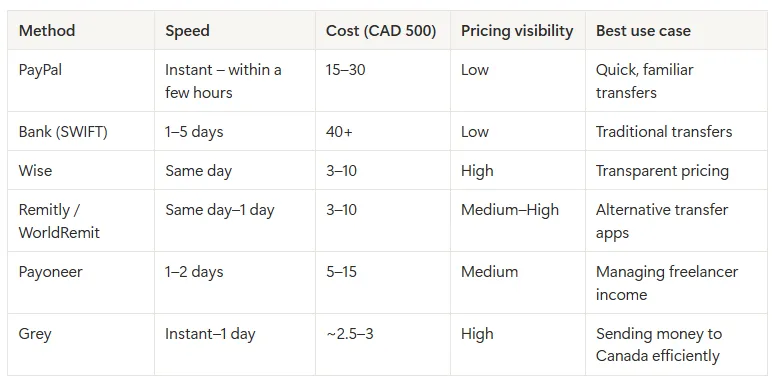
Transfers can take anywhere from 1 to 5 business days to land. You also have to navigate surprise deductions from intermediary banks along the way, so you often don’t receive the exact amount sent.

This method works best for high-value corporate transactions, not quick, recurring freelance payments.

2. PayPal and similar platforms

PayPal, Payoneer, and other digital wallets offer simplicity and speed, but they come at a price. While it’s convenient to invoice and get paid through these platforms, their currency conversion fees can be excessive. You might lose up to 5% of your earnings in charges, and in some regions, withdrawing your funds to a local bank is difficult or delayed.

This route can be more frustrating than helpful for freelancers in countries with limited PayPal withdrawal options.

3. Freelance platforms like Upwork or Fiverr

If you’re just starting, platforms like Upwork, Fiverr, and Toptal provide a built-in payment ecosystem with client protections and milestone tracking. Payments are processed on your behalf and usually reach your account within days.

The downside? These platforms can charge up before any payment even hits your account. Over time, that adds up, especially if you’ve built strong client relationships and could manage payments directly.

Freelance platforms are great for gaining experience and exposure, but may not be sustainable long-term for high-volume freelancers.

4. Global accounts with Grey

A global account is your best bet if you want complete control over your earnings without the usual barriers. Grey offers precisely that.

With Grey, you can open your own USD, GBP, or EUR account and receive international payments like a local. Just send your clients the account details, receive your funds directly, and convert your earnings at some of the best exchange rates in the market.

Even better? You can withdraw to your local bank account or use your funds to create a virtual USD card for global spending. It’s fast, transparent, and built for modern freelancers who work across borders.

How Grey helps you get paid globally

Grey is built for modern freelancers who earn across borders. Here’s what makes it different:

  • Get virtual foreign accounts: Instantly receive USD, GBP, and EUR payments from clients without needing a foreign bank account.
  • Low-fee currency conversion: Convert your earnings at some of the best rates online with no hidden charges.
  • Fast, direct withdrawals: Move money from your Grey account to your local bank without waiting days.
  • Invoicing tool built-in: Generate professional invoices from your Grey dashboard and share them with clients anywhere in the world.

Grey gives you the tools to earn globally and spend locally without the headache.

Tips for getting paid faster and easier

Structure goes a long way, especially when dealing with clients across time zones, currencies, and payment cultures. Here’s how to take control of the process and get your money faster:

1. Set clear payment terms upfront

Before starting any project, make sure payment expectations are on the table. That includes the exact currency you’ll be paid in (e.g. USD, EUR, or GBP), the payment method, invoice schedule, and any penalties for late payments. The more specific you are, the fewer surprises down the line.

Put everything in writing. This will give you something to fall back on if payments go sideways.

2. Use professional invoices

Don’t send a vague “payment reminder”; instead, send a proper invoice with your name, client’s details, a breakdown of work done, the total amount due, payment instructions, and a due date. With Grey, you can create and send professional-looking invoices in just a few clicks.

3. Ask for a deposit

If it’s a new client or a large project, don’t wait till the end to get paid. Ask for a 30–50% deposit before starting work. It’s standard practice, shows professionalism, and protects your time. If a client hesitates at this stage, that’s usually a red flag.

4. Follow up

Even with the best clients, payments sometimes fall through the cracks. Don’t let unpaid invoices pile up. Set reminders and follow up politely but firmly. A simple message like, “Just checking in, your invoice is due this week. Let me know if you need anything from my end”, can nudge things along without sounding aggressive.

5. Convert when rates are favourable

Once the money lands, don’t rush to convert it, especially if the rates aren’t in your favour. With Grey, you can hold multiple currencies (USD, GBP, or EUR) and convert when the exchange rate works in your favour. That means more money is in your account and less is lost to poor FX rates.

How to open your Grey account and get started

It only takes a few minutes to set up your global payment system. Here’s how:

  1. Sign up on grey.co or download the Grey app.
  2. Verify your identity with a government-issued ID and proof of address.
  3. Generate your foreign account(s).
  4. Send your account details to clients to start receiving payments.
  5. Convert and withdraw when you’re ready, all from your dashboard.

Freelancing internationally opens the door to financial freedom, but the logistics of getting paid can be tough. Fortunately, you don’t have to figure it all out alone.

With Grey, you can simplify your global payment process and focus on what matters: doing great work and building your dream career.

Create your Grey account today or download the app to enjoy inclusive global banking designed to carry your dreams across borders.

Last updated:

June 15, 2026

Open a free Grey account to get startedJoin 1 million digital nomads
IF YOU ENJOYED THIS, CHECK THESE OUT

Should you use a business or personal bank account as a freelancer?

2 min read

When I started out as a freelancer, I wasn’t sure if I needed a different bank account for my new “business”, if I could even call it that. I mean, my personal account was right there. Did I really need to do anything more complicated?

Most freelancers are not legally required to use a business bank account unless they are registered as a company. However, keeping freelance income separate from personal spending makes tax reporting significantly easier, reduces errors, and looks more professional to clients. A separate account, whether labelled business or not, is strongly advisable from day one.

In this article, I cover the instances where you may require a business account, what the differences are, and what to look for if you decide to keep your freelance income separate.

Do freelancers need a business bank account?

Whether you are legally required to use a business bank account depends on how your freelance practice is structured.

In the United States, for example, sole proprietors have no legal obligation to maintain a separate business bank account. If you freelance under your own name and haven’t formed a separate legal entity, you and your business are the same entity in the eyes of the law. You can receive client payments into your personal account without violating any rules. If you have formed a Limited Liability Company (LLC), the situation changes. For LLC owners, a separate account is necessary to maintain legal protection.

In the United Kingdom, sole traders face the same position as US sole proprietors: no legal requirement for a business account. HMRC does not mandate one. However, if you operate as a limited company in the UK, your company is a separate legal entity from you as an individual. The company’s money is not your money until you pay yourself a salary or dividend, and mixing the two in a personal account creates both a legal problem and a significant accounting headache.

For freelancers who don’t yet know whether they want to operate as a sole trader or through a limited company, our guide on freelancing vs full-time employment covers how different structures affect your taxes and liability in more detail.

The practical summary: if you’re a sole proprietor or sole trader, you don’t legally need a business account. If you’re a limited company or LLC, you do. Either way, keeping freelance income separate from personal spending is strongly advisable, and the next section explains why.

Business account vs personal account: key differences

If you do open a dedicated account for your freelance income, you’ll face a choice between a traditional business bank account and a personal account used exclusively for freelance purposes.

Feature Traditional business account Personal account (dedicated for freelance)
Monthly fees Often £5–£25/month or higher Usually free
Interest on balance Rarely; some charge for holding funds Often available on personal savings
Overdraft facility Sometimes available; business rates apply Usually available; personal rates apply
Debit card type Business Mastercard or Visa Standard personal debit card
Invoicing tools Some accounts include basic invoicing Usually not included
Accountant access Often available (read-only logins) Rarely offered
IRS / HMRC readiness Transactions clearly categorised as business Requires manual separation
Professional appearance Company or trading name on statements Personal name only
Multi-currency support Limited at traditional banks Limited at traditional banks
Account opening Slower; may require registered company docs Faster; personal ID only

Generally, business accounts at traditional banks cost more, offer fewer consumer protections, and provide features (invoicing tools, accountant access) that most freelancers handle through separate software anyway. The primary advantage of a labelled business account is the psychological and practical clarity that comes from a clean separation between business income and personal spending.

A dedicated personal account used exclusively for freelance income offers most practical benefits at a lower cost, except for company-name branding on statements and the formal accountant access features that some clients or accountants prefer.

Why separating your finances matters even if it is not required

When your freelance income and your personal spending share an account, every bank statement becomes a sorting exercise. Which transactions were business expenses? Which were personal? The takeaway you bought on a Tuesday: was that a client meeting or lunch? The software subscription: was that for client work or personal use? Without separation, these questions require memory, receipts, and time, at exactly the moment when tax season is already stressful.

A separate account means every transaction is cleanly categorised. Income that enters the freelance account is business income. Transfers from the freelance account to your personal account are your pay. Expenses charged to the freelance account are business expenses. The logic is automatic rather than reconstructed retrospectively.

Here’s a simple system that works from day one:

  1. Open a dedicated account for freelance income: This is the account you put on every invoice.
  2. Receive client income into the freelance account: Every payment from every client lands here. If you have international clients paying in different currencies, this account should support multi-currency receipts.
  3. Pay yourself a regular transfer to your personal account: On a fixed date each month, transfer a set amount to your personal account as your salary. This is what you live on. It separates your business cash flow from your personal spending clearly.
  4. Hold tax savings in a third account or Pouch: Set aside a percentage of every payment received for tax. A rough starting point for most freelancers is 20 to 30%, depending on your income level and jurisdiction. Treat this as untouchable until your tax bill arrives.

For guidance on structuring your income before this point, our piece on how to set your freelance rates covers how to price your work to make this system financially viable.

What to look for in a bank account for freelancers

Monthly fees
A freelancer starting out doesn’t need a £15 per month business account. Free accounts exist that provide everything necessary. Monthly fees add up, and a new freelancer spending £180 per year on a bank account that is largely empty in the early months is an unnecessary cost.

Multi-currency support
If any of your clients pay in USD, EUR, GBP, or another currency, you need an account that can receive those payments without forcing an immediate conversion at a poor rate. Most traditional bank accounts convert foreign payments upon receipt at the bank's margin, typically 2 to 4% above the mid-market rate. Multi-currency accounts let you hold income in the currency it arrived in and convert when you choose.

A virtual card for online subscriptions
Many freelancers pay for project management tools, design software, cloud storage, AI subscriptions, and domain hosting. A virtual card linked to your freelance account keeps all of these expenses on one statement, separate from personal card spending, and protects your main account details from exposure on subscription platforms.

Fast account opening with no fixed address requirement
Traditional business accounts often require proof of a registered business address, company documents, and a branch visit. For a freelancer, particularly one who works remotely or lives in multiple places, these requirements are a barrier that digital-first accounts don’t impose.

Invoicing integration or export capability
You don’t necessarily need invoicing built into the account, but your account should be able to export transactions in a format your accounting software can read. Clean data export saves significant time at tax season.

Grey covers all of these for international freelancers. Open a Grey account for your freelance income and receive payments in USD, EUR, and GBP from international clients without losing money on forced conversion.

As the scope of your work expands, you can also open a Grey business account, which gives you both USD and USD accounts, access to bulk payouts, and multiple virtual cards.

Frequently asked questions

Can I use my personal account for freelance work?

Yes, in most cases. Sole proprietors in the US and sole traders in the UK are not legally required to use a separate business account. You can receive client payments into a personal account without breaking any rules. The practical problem is that mixing personal and business transactions in one account makes tax reporting significantly harder and increases the risk of errors. A dedicated account, whether officially labelled business or not, is strongly advisable even if it’s not legally required.

Do I need a business account to invoice clients?

No. You can invoice clients and direct them to pay into any account you hold, including a personal account. Invoices are documents you issue, not something that depends on the type of bank account you hold. What your invoice needs is a valid account number and sort code (or routing number and account number for US payments), your name or trading name, and a unique invoice number. The type of account those details belong to is irrelevant to the invoice’s validity.

What is the best bank account for freelancers?

The best account for a freelancer depends on how they work. For freelancers with only domestic clients in a single currency, a free personal account used exclusively for freelance income covers most practical needs. For freelancers with international clients paying in multiple currencies, a multi-currency account that receives USD, EUR, and GBP without forced conversion is more suitable. Grey provides multi-currency accounts with local banking details (US routing numbers, EUR IBANs, UK sort codes) that let international freelancers receive payments as if they were local vendors in each market.

Can I open a business account without a registered company?

At most traditional banks, a business account requires proof of a registered company: a company registration number, a registered address, and in some cases a minimum trading history. As a sole trader or sole proprietor, you typically cannot open a business account at a traditional bank without a formal business registration. Digital-first accounts and some multi-currency platforms generally have lighter requirements and can be opened by individual freelancers without a registered company.

Is it illegal to use a personal account for business?

For sole traders and sole proprietors, no. There is no law in the UK or US that prohibits receiving business income into a personal account for unincorporated freelancers. Some banks include terms in their personal account agreements that technically restrict business use, but this is a contractual matter rather than a legal one and enforcement is rare. For limited company directors in the UK and LLC members in the US, mixing company and personal funds in a personal account creates legal and tax problems that go beyond a contractual breach.

How do I separate my freelance finances?

The simplest system has three parts: one account that receives all client income and nothing else; one account for personal spending that receives a regular transfer from the freelance account as your salary; and a separate savings balance or account for taxes. Open the freelance account before your first invoice goes out. Put that account number on every invoice from day one. Transfer a set amount to your personal account on a fixed date each month. Set aside a percentage of every payment for tax immediately on receipt. That system, applied consistently, solves the vast majority of freelance financial admin problems.

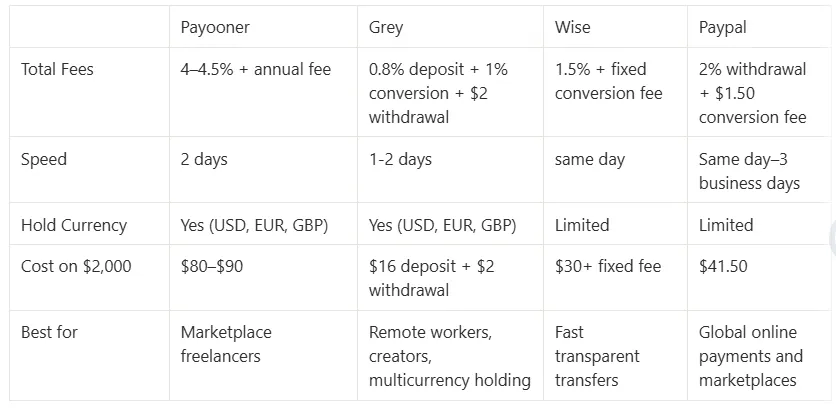
Grey charges fees on deposits, conversions, and withdrawals. Deposits via ACH, SEPA, or FPS incur a 0.8% fee (minimum $2/€2/£2, maximum $10/€10/£10). Currency conversions are charged at 1%, capped at $6. Withdrawal fees vary by currency. Exchange rates are variable and include a margin over the mid-market rate. Always review fees and the rate before confirming a transaction.

Open a Grey account and keep your freelance income separate from day one, in any currency your clients pay in.
How to receive payments from Upwork in Turkey in 2025

2 min read

Freelancing in Turkey is on the rise, with professionals across the country tapping into global markets through platforms like Upwork. From Istanbul's bustling metropolis to the serene towns of Cappadocia, Turkish freelancers are showcasing their skills and creativity to clients worldwide.

But there’s a familiar frustration that often comes with freelancing:  getting paid quickly, securely, and without losing a significant part of your earnings  to fees. Traditional banking methods can be slow and costly, and with PayPal no longer available in Turkey, options feel limited. That’s where Grey steps in, offering freelancers a seamless solution to manage their payments and focus on doing what they love.

Also read: The ultimate guide to choosing the best freelancing platform in 2024

Meet Grey: Your freelancing best friend

If managing payments stresses you out, it’s time to meet Grey. Here’s why it’s the ultimate tool for freelancers in Turkey:

  • Multi-currency accounts: Receive payments in USD, GBP, or EUR directly from Upwork.
  • No more hidden fees: Keep more of your earnings with minimal transaction costs.
  • Fast & secure transfers: Get your money quickly without waiting for days.
  • Good exchange rates: Convert your earnings to Turkish Lira (TRY) at rates you’ll love.

Also read: How to build a personal brand as a freelancer in 2024

How to start using Grey for Upwork payments

1. Create a free Grey account: Head to Grey’s website and sign up for a free account.  Upon completing your KYC verification, you can request for a EU, US, or UK bank account to receive foreign payments

2. Connect Grey to your Upwork account: Log in to your Upwork account, navigate to the "Get Paid" section, select "Direct to Local Bank" or "Wire Transfer. Enter your Grey account details, and complete Upwork’s verification process (typically takes a few days).

3. Start receiving payments: Once verified, your Upwork earnings will flow directly into your Grey account, hassle-free.

4. Convert and withdraw your money: Use Grey to convert USD, GBP, or EUR into Turkish Lira at competitive exchange rates and transfer the funds to your local bank account in Turkey.

Also read: How Fiverr freelancers in Turkey can receive payments easily in 2025

With Grey, you’ll spend less time worrying about transactions and more time building your freelancing profile.  Sign up for Grey today and experience payment freedom made just for Turkish freelancers.

How to receive payments from Upwork in Portugal in 2026

2 min read

Portugal, a land of breathtaking coastlines, rich culture, and warm hospitality, is also home to a growing community of freelancers. For writers, designers, developers, and virtual assistants, platforms like Upwork have become a gateway to international opportunities, connecting them with clients worldwide.

Also read: The ultimate guide to choosing the best freelancing platform in 2024

Yet, despite  the rewards of freelancing, one challenge persists: managing international payments efficiently. This is where ****Grey ****steps in a revolutionary payment solution that simplifies the process, ensuring you get paid faster and keep more of your earnings.

In this guide, we’ll explore how freelancers in Portugal can use Grey to streamline Upwork payments

Why freelancers in Portugal love Upwork

  • Global reach: A chance to collaborate with clients from every corner of the world.
  • Flexibility: Set your schedule and work on projects that excite you.
  • Diverse opportunities: From app development to content creation, there’s something for everyone.

Also read: How to become a registered freelancer on Upwork

Why Grey is the ultimate solution for Portuguese freelancers

Grey provides a cutting-edge way to handle payments, designed with the freelancer in mind. Here’s why it’s the preferred choice:

  • Multi-currency accounts: Receive payments directly in USD, GBP, or EUR.
  • Low fees: Say goodbye to excessive charges and keep more of your earnings.
  • Fast transfers: Get paid quickly, without unnecessary delays.
  • Competitive exchange rates: Convert your earnings to Euros at rates that maximize your income.

Also read: How to open US, UK and Euro bank accounts in Portugal

How to use Grey for Upwork payments in Portugal

1. Create your free Grey account: Visit Grey’s website and register for an account. Upon completing your KYC verification, you can request for a EU, US, or UK bank account to receive foreign payments.

2. Link your Upwork account: Log in to Upwork, navigate to the "Get Paid" section, select "Direct to Local Bank" or "Wire Transfer" as your withdrawal method, and input your Grey account details.

3. Start receiving payments: After verification, Upwork will deposit your earnings directly into your Grey account, ensuring a smooth and reliable transaction process.

4. Convert and withdraw funds: Use Grey to convert USD, GBP, or EUR to Euros at competitive rates and transfer your funds securely and effortlessly to your local bank account in Portugal.

Sign up for Grey today and experience hassle-free payments designed for Portuguese freelancers.

How to receive payments from Upwork in Rwanda in 2025

2 min read

Rwanda, a country known for its innovation and resilience, is rapidly becoming a hotspot for freelancers excelling in writing, design, virtual assistance, and more. Platforms like Upwork offer Rwandan freelancers a global stage to showcase their expertise and connect with clients worldwide.

However, while freelancing on Upwork is incredibly rewarding, managing international payments can often be challenging due to high fees and delays. That’s where Grey steps in, offering a simple, efficient, cost-effective way for freelancers in Rwanda to receive their earnings without hassle.

Also read: How to become a registered freelancer on Upwork

In this guide, we’ll explore how freelancers in Rwanda can use Grey to streamline Upwork payments and focus on what matters most—delivering exceptional work.

Why freelancers in Rwanda choose Upwork

Upwork has transformed freelancing for Rwandans by offering:

  • Global reach: Access to international clients in need of your skills.
  • Flexible work opportunities: Build your schedule and take charge of your career.
  • Diverse projects: From software development to digital marketing, there’s something for every skill set.

Also read: The ultimate guide to choosing the best freelancing platform in 2024

Why Grey is the ultimate solution for Rwandan freelancers

Grey simplifies payment management for freelancers by providing a modern, seamless experience tailored to their needs. Here’s why it’s the preferred choice:

  • Multi-currency accounts: Receive payments directly in USD, GBP, or EUR from Upwork.
  • Low fees: Avoid excessive charges and keep more of your earnings.
  • Fast transfers: Get paid quickly without unnecessary delays.
  • Competitive exchange rates: Convert funds to Rwandan Francs (RWF) at rates that work in your favor.

Also read: How Fiverr freelancers in Rwanda can receive payments easily in 2025

How to use Grey for Upwork payments in Rwanda

1. Create your free Grey account: Visit Grey’s website and sign up for a free account. Upon completing your KYC verification, you can request for a EU, US, or UK bank account to receive foreign payments.

2. Link your Upwork account: Log in to your Upwork account and go to the "Get Paid" section. Select "Direct to Local Bank" or "Wire Transfer" as your payment method and input your Grey account details.

3. Start receiving payments: Once verified, Upwork will deposit your earnings directly into your Grey account, allowing you to track payments in real-time.

4. Convert and withdraw funds: Use Grey to convert your USD to Rwandan Francs at competitive rates. Transfer your funds to your local bank account or mobile money wallet quickly and securely.

With Grey, managing payments becomes effortless, letting you focus on delivering outstanding work. Sign up for Grey today and experience a seamless payment solution designed for Rwandan freelancers.

How to convert and send USD to Ugandan Shillings (UGX) online

2 min read

Managing cross-border payments doesn’t have to be complicated. Whether you’re a freelancer, remote worker, or supporting family in Uganda, converting USD to Ugandan Shilling (UGX) can be quick, secure, and hassle-free with Grey.

This guide shows you how to easily convert and send USD to UGX online, highlighting key benefits, costs, and tips for seamless transactions.

Why use Grey to convert and send USD to UGX?

Grey is a digital banking platform designed for global citizens who want to manage multiple currencies easily. Here’s why Grey is an excellent choice for converting and sending USD to UGX:

  • Competitive exchange rates: Grey offers real-time rates to ensure you get the most value when converting USD to UGX.
  • Low fees: Avoid the high conversion and transfer fees associated with traditional banks.
  • Quick transfers: Funds are processed quickly, ensuring your recipients get the money without delays.
  • User-friendly platform: Grey’s app and website are designed to make international transactions simple and accessible for everyone.

Exchange rates fluctuate for various reasons, so we’ve designed a handy, real time currency converter for you.

Also read: How to convert and send USD with Grey

How to convert and send USD to UGX with Grey

1. Create your Grey account

First, sign up for a free Grey account via the website or app, available on iOS and Android. Registration is straightforward and requires you to:

  • Provide basic personal information.
  • Verify your identity by uploading the required documents.
  • Set up your virtual wallet for multiple currencies, including USD.

2. Add USD to your Grey account

Once your account is active, deposit USD into your Grey wallet. You can do this in several ways:

  • Bank transfer: Link your USD bank account and transfer funds directly.
  • Freelance platforms: Receive payments from platforms like Upwork or Fiverr directly into your Grey USD wallet.
  • Wire transfers: Accept payments from international clients or businesses.

With USD in your account, you can convert it into UGX.

3. Convert USD to Ugandan Shilling with Grey

Follow these steps to convert your USD to UGX:

  1. Log into your account: Open the Grey app or website and sign in.
  2. Navigate to currency exchange: Select the “Convert” option from the dashboard.
  3. Choose currencies: Select USD as the source currency and UGX as the destination currency.
  4. Enter the amount: Specify the amount of USD you want to convert.
  5. Confirm the transaction: Review the exchange rate, fees, and total amount in UGX, then click “Convert.” The converted funds will appear in your UGX wallet instantly.

4. Send UGX to your recipient

Once your USD is converted to UGX, it’s time to transfer the funds to your recipient in Uganda. Here’s how:

1. Navigate to the Send Money section: Choose the “Send” option in the Grey app.

676ec441190ed0b08ba00d26 676ebd9e62b40f1197672db7 send us dollars grey 6

2. Enter the recipient’s details: Add the recipient’s bank account or wallet information. You can also send funds to another Grey user.

676ec442190ed0b08ba00d42 676ebd4d245072006253a99c send us dollars grey 4

3. Choose the amount to send: Enter the amount in USD or your currency (e.g., EUR).

676ec442190ed0b08ba00d3f 676ec3b94c9821344d4d5d63 IMG 0368

4. Review fees and exchange rates: Grey will estimate the fees and exchange rates so you know exactly how much the recipient will receive.

676ec442190ed0b08ba00d79 676ec3c426d44aa2a43d7fc8 IMG 0370

5. Complete the transaction: Confirm the details and authorise the payment. The recipient typically receives the funds in minutes to a few hours, depending on the payment method.

676ec442190ed0b08ba00d45 676ec3d1138ab1eb14571c89 IMG 0371

You may also like: How to convert and send USD to TZS online

Key tips for converting and sending USD to UGX

  1. Monitor exchange rates: Keep an eye on the exchange rate to convert your funds at the best possible time.
  2. Double-check recipient details: Ensure the accuracy of bank account or mobile wallet information to avoid delays.
  3. Use Grey’s multi-currency wallets: Store USD and UGX in your Grey account to avoid frequent conversions and save on fees.
  4. Track your transactions: Grey offers a transaction history feature to easily track conversions and transfers.

Why Grey is the best option for USD to UGX transfers

Grey stands out as a reliable and cost-effective platform for handling international payments. Here’s why it’s a top choice:

  • Speed: Transfers are processed faster than most traditional banks, so your recipients get their money quickly.
  • Savings: With low fees and competitive exchange rates, you keep more of your hard-earned money.
  • Flexibility: Manage multiple currencies from one account and send funds anytime, anywhere.
  • Security: Grey prioritises secure transactions, giving you peace of mind.

Take control of your cross-border payments with Grey

Converting and sending USD to Ugandan Shilling has never been easier. Whether supporting family, paying vendors, or managing personal finances, Grey’s seamless platform saves you time, money, and effort.

Ready to simplify your financial transactions? Sign up with Grey today and enjoy a hassle-free way to convert and send USD to UGX online.

How Fiverr freelancers in the Philippines can receive payments easily in 2026

2 min read

The Philippines, a country celebrated for its culture and workforce, has become a hub for freelancers excelling in writing, design, virtual assistance, and more. Platforms like Fiverr provide Filipino freelancers with global opportunities, connecting them with clients worldwide to showcase their talents.

However, as rewarding as freelancing on Fiverr is, managing international payments can often feel complex due to high fees and delays. That’s where Grey steps in, offering a simple, efficient, cost-effective way for Filipino freelancers to receive their earnings without hassle.

Also read: How to receive payments from freelance platforms easily in 2025

In this guide, we’ll explore how freelancers in the Philippines can use Grey to streamline Fiverr payments and focus on what matters most—delivering exceptional work.

Why freelancers in the Philippines choose Fiverr

Fiverr has become a game-changer for freelancers in the Philippines, offering:

  • Global reach: Access to clients across the globe who need your expertise.
  • Flexible work opportunities: Build your schedule and take control of your career.
  • Diverse projects: From content writing to graphic design, there’s something for every skill.

Also read: The ultimate guide to choosing the best freelancing platform in 2024

Why Grey is the ultimate solution for Filipino freelancers

Grey provides freelancers with a modern, seamless payment experience tailored to their needs. Here’s why it’s the preferred choice:

  • Multi-currency accounts: Receive Fiverr payments directly in USD, GBP, or EUR.
  • Low fees: Avoid excessive charges and keep more of your hard-earned money.
  • Fast transfers: Get paid quickly with no unnecessary delays.
  • Competitive exchange rates: Convert funds to PHP at rates that work in your favour.

Also read: How to receive payments from Upwork in the Philippines in 2025

How to use Grey for Fiverr payments in the Philippines

  1. Create your free Grey account: Visit Grey’s website and sign up for a free account. Once registered, you’ll receive virtual multi-currency account details in USD, GBP, and EUR.
  2. Link your Fiverr account: Log in to your Fiverr account and navigate to the "Earnings" section. Select "Bank Transfer" as your withdrawal option and input your Grey account details.
  3. Start receiving payments: Fiverr will deposit your earnings directly into your Grey account, where you can track real-time payments.
  4. Convert and withdraw funds: Use Grey’s platform to convert USD, GBP, or EUR to EGP at competitive rates. Transfer your funds to your local Philippines bank account quickly and securely.

With Grey, managing your payments becomes one less thing to worry about. Sign up for Grey today and experience seamless, efficient payment solutions designed for Filipino freelancers.

Arrow (up)

Back to top

