


<script type="application/ld+json" data-schema-version="grey-blog-v4"> [{"@context":"https://schema.org","@type":"BlogPosting","@id":"https://grey.co/blog/how-to-receive-payments-from-fiverr-in-nigeria#article","headline":"How to receive payments from Fiverr in Nigeria","description":"Struggling to receive payments from Fiverr in Nigeria? Learn 4 secure ways to withdraw your earnings hassle-free—Fiverr Revenue Card, PayPal, crypto, and more!","inLanguage":"en","url":"https://grey.co/blog/how-to-receive-payments-from-fiverr-in-nigeria","mainEntityOfPage":{"@id":"https://grey.co/blog/how-to-receive-payments-from-fiverr-in-nigeria#webpage"},"datePublished":"2024-03-20T11:50:30.148Z","dateModified":"2026-06-15T19:33:51.302Z","author":{"@type":"Person","@id":"https://grey.co/authors/chioma-mmeje#person","name":"Chioma Mmeje","url":"https://grey.co/authors/chioma-mmeje"},"publisher":{"@type":"Organization","@id":"https://grey.co/#organization","name":"Grey","url":"https://grey.co","logo":{"@type":"ImageObject","url":"https://cdn.prod.website-files.com/6360022338a81bd6fdbb1145/6564ae1077a67e39d3c491a6_Grey%20Logo%20Lockup%20Black.svg"}},"image":{"@type":"ImageObject","@id":"https://grey.co/blog/how-to-receive-payments-from-fiverr-in-nigeria#primaryimage","url":"https://cdn.prod.website-files.com/636a85d290ee58e70c17e1c0/6601a89afcbf5cdb521d5924_How%20to%20Receive%20Payments%20from%20Fiverr%20in%20Nigeria.webp","contentUrl":"https://cdn.prod.website-files.com/636a85d290ee58e70c17e1c0/6601a89afcbf5cdb521d5924_How%20to%20Receive%20Payments%20from%20Fiverr%20in%20Nigeria.webp","width":1200,"height":675}},{"@context":"https://schema.org","@type":"WebPage","@id":"https://grey.co/blog/how-to-receive-payments-from-fiverr-in-nigeria#webpage","url":"https://grey.co/blog/how-to-receive-payments-from-fiverr-in-nigeria","name":"How to receive payments from Fiverr in Nigeria","description":"Struggling to receive payments from Fiverr in Nigeria? Learn 4 secure ways to withdraw your earnings hassle-free—Fiverr Revenue Card, PayPal, crypto, and more!","inLanguage":"en","primaryImageOfPage":{"@id":"https://grey.co/blog/how-to-receive-payments-from-fiverr-in-nigeria#primaryimage"},"breadcrumb":{"@id":"https://grey.co/blog/how-to-receive-payments-from-fiverr-in-nigeria#breadcrumb"}},{"@context":"https://schema.org","@type":"BreadcrumbList","@id":"https://grey.co/blog/how-to-receive-payments-from-fiverr-in-nigeria#breadcrumb","itemListElement":[{"@type":"ListItem","position":1,"name":"Home","item":"https://grey.co/"},{"@type":"ListItem","position":2,"name":"Blog","item":"https://grey.co/blog"},{"@type":"ListItem","position":3,"name":"How to receive payments from Fiverr in Nigeria","item":"https://grey.co/blog/how-to-receive-payments-from-fiverr-in-nigeria"}]},{"@context":"https://schema.org","@type":"ItemList","@id":"https://grey.co/blog/how-to-receive-payments-from-fiverr-in-nigeria#list","name":"How to receive payments from Fiverr in Nigeria","numberOfItems":3,"itemListElement":[{"@type":"ListItem","position":1,"name":"Fiverr Revenue Card"},{"@type":"ListItem","position":2,"name":"PayPal"},{"@type":"ListItem","position":3,"name":"Cryptocurrency"}]}] </script>

How to receive payments from Fiverr in Nigeria

Chioma Mmeje

TABLE OF CONTENT

SHARE THIS POST

With the dwindling state of the economy, unemployment rates have sky-rocketed, and many people have turned to freelancing to take on more jobs to keep up with the cost of living.

Fiverr is a popular freelance marketplace that provides freelancers with opportunities across various fields. However, many Nigerians have had to jump systemic hurdles to receive Fiverr payments due to the limitations on traditional naira cards.

So, in this article, I will take you through receiving payments on Fiverr in Nigeria without breaking a sweat.

There are four significant ways to get paid on Fiverr in Nigeria.

Fiverr Revenue Card:

The Fiverr Revenue Card, available through Payoneer and powered by MasterCard, allows you to withdraw your earnings from Fiverr. With this card, you can spend your dollars online on various platforms and withdraw cash from MasterCard ATMs anywhere. Your earnings will be converted to Naira at the exchange rate determined by the issuing bank, which may differ between banks.

However, this isn’t common among Nigerian freelancers due to the many charges involved. These charges come in the form of card, withdrawal, and account balance check fees, which can deplete your earnings if you are not too careful.

Paypal:

If you have funds available for withdrawal, you can set up a PayPal account to withdraw your earnings. You can withdraw the funds 14 days after an order is marked as completed. Unfortunately, many freelancers have complained about their money being seized on PayPal indefinitely. It may not be wise to leave your money up to chance.

Cryptocurrency:

If you’re familiar with crypto, you can receive your payments via universally accepted coins like Ethereum and Bitcoin. It provides anonymity for freelancers, and the fees are pretty decent. However, navigating cryptocurrencies requires a certain level of expertise, so this may not be a great choice for just anyone.

Also read: Send instant USDC payouts to 40+ countries with Grey!

Third parties (e.g., Grey):

You can create an account with a financial service provider that enables you to withdraw money directly into your account from Fiverr. Fiverr only allows bank transfers in the US, so you need an active US dollar account, which Grey can provide you.

How to withdraw money from Fiverr with Grey

First, you have to open a Grey foreign account and link it to your Fiverr account, use the following steps to withdraw money from your Fiverr to your Grey account.

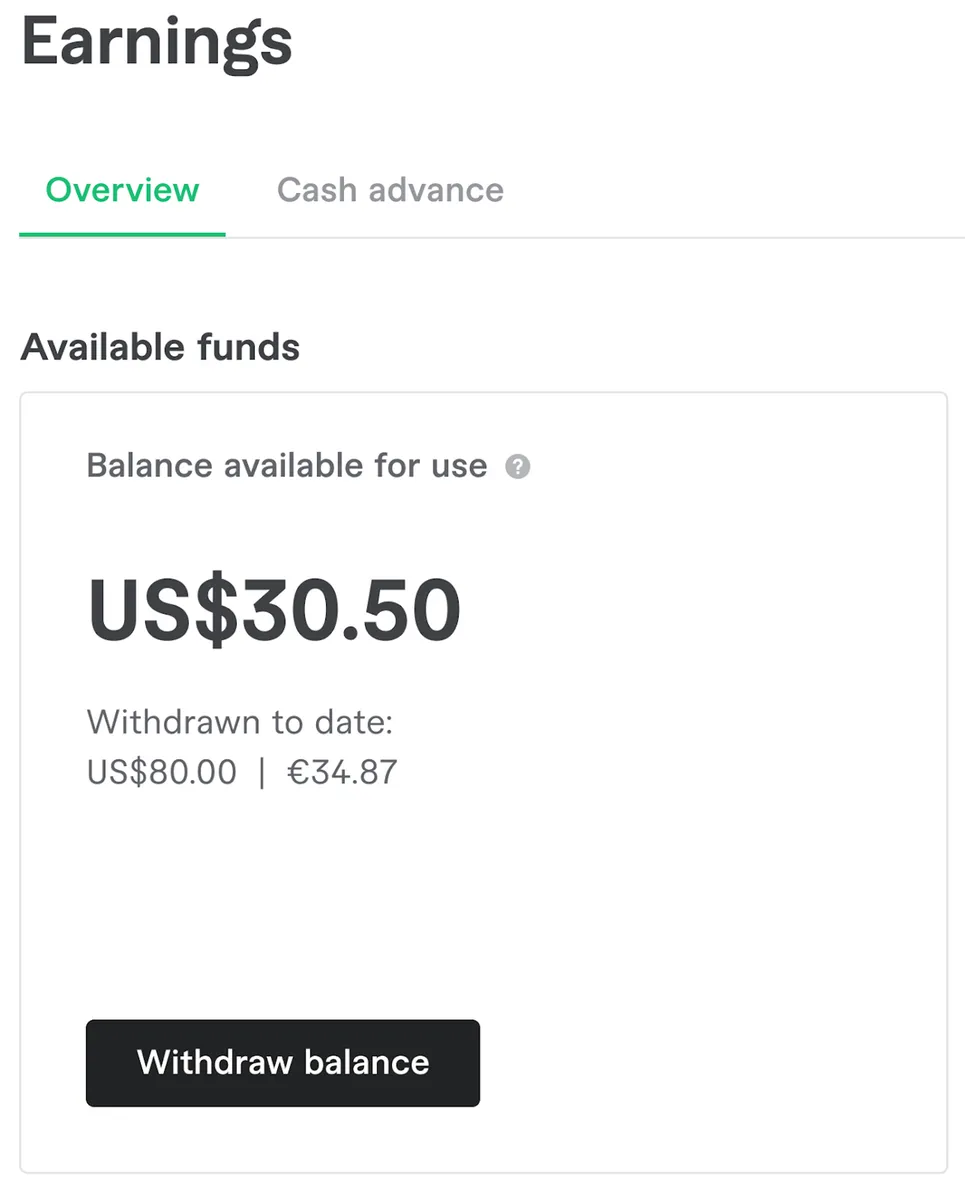
- Log in > click your profile picture > Switch to selling > Earnings.

- If you have money available in the Available funds area, you'll have various withdrawal options.

fiver withdrawal with Grey

- Click Withdraw balance or Manage payout methods > Bank transfer.

withdraw from Fiverr with Grey

- Verify your account and begin your payment process.

Also read: How to receive payments from freelance platforms easily in 2025

Wrapping up

Grey exists to serve freelancers and make your life easier, one payment at a time. You shouldn’t have to stress to reap the fruits of your labour. Open a Grey account today to start receiving the money you worked hard for easily.

‍

Last updated:

October 2, 2026

Open a free Grey account to get startedJoin 1 million digital nomads
IF YOU ENJOYED THIS, CHECK THESE OUT

21 best apps to send money internationally

•

•

2 min read

Sending money internationally can seem fairly simple, well, that's until you reach the payment screen and start comparing fees, exchange rates and delivery times. The app that looks cheapest at first may not be the one that leaves the recipient with the most money.

Your choice can make a noticeable difference, especially when you are sending money regularly to family, paying someone abroad, or moving your own money between countries. Some apps focus on low fees, while others compete on faster delivery, better exchange rates or wider coverage.

The best apps to send money internationally combine low fees, a small exchange rate margin and fast delivery to the country you are sending to. Grey, Wise, Remitly and WorldRemit are strong starting points, but the right option depends on where you are sending money, how much you are transferring and how quickly it needs to arrive.

This guide compares 21 international money transfer apps so you can see what each one offers and choose the option that fits your needs.

How to choose an international money transfer app

Before picking from the best apps for transferring money internationally, check these things:

  • Fees: Look beyond the advertised transfer fee and check the total amount you will pay, including any charges that apply to larger or more frequent transfers.
  • Exchange rate margin: Compare the exchange rate offered with the current market rate, because even a small difference can reduce the amount your recipient receives.
  • Speed: Check how quickly the transfer should arrive, particularly when you are sending money for an urgent bill, family expense, or time-sensitive payment.
  • Payout methods: Check how your recipient can collect the money, whether that means a bank account, mobile wallet, cash pickup, or another available option.
  • Coverage: Make sure the app supports both the country you are sending money from and the destination where your recipient lives.
  • Registration: Check what you need before sending your first transfer, including identity verification, personal information, account details, and any required supporting documents.

The 21 best apps for sending money internationally

These 21 money transfer apps combine lower fees, competitive exchange rates and faster international payments for individuals, freelancers and businesses worldwide

1. Grey

  • Fees: 1% conversion fee capped at $6 for USD/GBP/EUR (uncapped for KES).
  • Rate margin: Competitive real-time market exchange rates with transparent tracking.
  • Speed: Instant for UK/Europe/Kenya; 1–2 business days for US ACH wires.
  • Countries: Supports transfers to 80+ countries including the US, UK, and Eurozone.
  • Best for: Remote workers and freelancers requiring dedicated foreign virtual accounts.

2. Wise

  • Fees: Small variable percentage fee shown upfront.
  • Rate margin: 0% markup using the true mid-market exchange rate.
  • Speed: Real-time processing up to 2 business days.
  • Countries: Operates across 145+ destination countries.
  • Best for: Most affordable bank-to-bank international personal transfers.

3. Remitly

  • Fees: Variable structure tiered by chosen tier (Express vs. Economy).
  • Rate margin: Small retail markup layered on top of mid-market rates.
  • Speed: Instant delivery for Express option; 3 days for Economy.
  • Countries: Sends funds globally to over 150 countries.
  • Best for: Family remittances requiring specific arrival time guarantees.

4. WorldRemit

  • Fees: Flat or percentage fees determined by payout destination.
  • Rate margin: Standard commercial markup added to currency conversions.
  • Speed: Immediate for mobile wallets and physical cash collections.
  • Countries: Extensive coverage across more than 130 countries.
  • Best for: Sending money straight to digital mobile money wallets.

5. LemFi

  • Fees: Zero or ultra-low platform transfer fees.
  • Rate margin: Competitive exchange rates with minimal built-in spread.
  • Speed: Transactions complete within a few minutes.
  • Countries: Diaspora sending from US/UK/Canada to Africa, Asia, and Latin America.
  • Best for: Immigrant communities seeking zero-fee remittance corridors.

6. Eversend

  • Fees: 1.5% to 3.5% currency exchange processing fee.
  • Rate margin: Tight spreads close to official mid-market numbers.
  • Speed: 1-minute mobile money payouts and swift wallet swaps.
  • Countries: Focuses on inter-Africa corridors alongside Western channels.
  • Best for: Managing a robust multi-currency digital wallet in Africa.

7. Revolut

  • Fees: Free standard allowance; weekend currency conversion surcharges apply.
  • Rate margin: Interbank rates with near-zero markups on weekdays.
  • Speed: Instant within network; 1–3 days for traditional banks.
  • Countries: Sends to 160+ countries across 70 currencies.
  • Best for: Tech-forward travelers requiring multi-currency card spending.

8. XE Money Transfer

  • Fees: Free for large transfers; minor fee for small amounts.
  • Rate margin: Tiered markup that drops significantly on massive transactions.
  • Speed: Typically 1 to 4 business days.
  • Countries: Serves over 130 destination countries worldwide.
  • Best for: Tracking live exchange pairs and executing wire transfers.

9. Sendwave

  • Fees: Zero base fee on primary remittance routes.
  • Rate margin: Fixed retail spread built seamlessly into the rate.
  • Speed: Instant delivery directly into recipient mobile wallets.
  • Countries: Sends from North America and Europe to selective target markets.
  • Best for: No-fuss, instant one-way family remittance payments.

10. Western Union

  • Fees: Scale scales with speed, funding source, and destination.
  • Rate margin: Higher combined markup compared to specialised fintechs.
  • Speed: Minutes for agent pickup; days for bank routing.
  • Countries: Unrivaled footprint spanning over 200 countries.
  • Best for: Reaching recipients located in remote, cash-reliant locations.

11. OFX

  • Fees: Fee-free transfers for major commercial volumes.
  • Rate margin: Declining scale margin optimised for larger amounts.
  • Speed: 1 to 4 business days, depending on location.
  • Countries: Covers international payments across more than 170 countries.
  • Best for: High-value corporate transactions or cross-border property acquisitions.
  1. MoneyGram
  • Fees: Highly dynamic rates depending on credit vs. bank funding.
  • Rate margin: Variable retail spread added over global markets.
  • Speed: Cash payouts clear in minutes; wires take 3 days.
  • Countries: Network extends across more than 200 physical countries.
  • Best for: Urgent retail cash collections via global agent stands.

13. Xoom

  • Fees: Flat fees mapped directly to underlying PayPal integrations.
  • Rate margin: Standard commercial percentage markup added to conversions.
  • Speed: Fast execution when utilising debit cards or bank balances.
  • Countries: Sends seamlessly across more than 160 countries.
  • Best for: Existing PayPal account holders prioritising transfer convenience

14. Payoneer

  • Fees: Standard receiving fees scaling up to 3%.
  • Rate margin: Competitive foreign exchange conversion spreads applied.
  • Speed: 1 to 3 business days to hit local bank.
  • Countries: Wide availability across 200+ countries and territories.
  • Best for: Marketplace payouts for e-commerce platforms and global networks.

15. Afriex

  • Fees: Zero platform fees for transactions passing standard guidelines.
  • Rate margin: Low-spread markup integrated into structural transfers.
  • Speed: Settles within minutes to bank rails or wallets.
  • Countries: Connects North America and Europe to key African hubs.
  • Best for: Rapid diaspora money transfers with minimal fee overhead.

16. Geegpay

  • Fees: Around 1% processing charge on incoming wallet setups.
  • Rate margin: Competitive, freelancer-focused retail currency exchange spreads.
  • Speed: Local distributions clear instantly; global wires take 3 days.
  • Countries: Supports Western inbound billing routes for African contractors.
  • Best for: African remote workers billing international clients via foreign bank rails.

17. Chipper Cash

  • Fees: Free peer-to-peer domestic and cross-border app transactions.
  • Rate margin: Variable currency conversion margin added on foreign swaps.
  • Speed: Wallet-to-wallet transactions execute instantly across borders.
  • Countries: Operational across core African nations, the US, and UK.
  • Best for: Quick mobile peer-to-peer payments between supported countries.

18. Atlantic Money

  • Fees: Flat fixed cost of £3 or €3 per transaction.
  • Rate margin: Strict 0% markup utilising true live mid-market rates.
  • Speed: 1 to 3 standard business days to settle.
  • Countries: Focused predominantly on UK and Eurozone banking rails.
  • Best for: High-volume transfers within Europe at flat predictable costs.

19. Airwallex

  • Fees: Clear volume pricing geared toward digital company infrastructure.
  • Rate margin: Commercial interbank spreads tailored for wholesale enterprises.
  • Speed: Real-time processing ranging up to 2 days.
  • Countries: Worldwide operational scale covering over 150 countries.
  • Best for: Tech startups managing multi-currency SaaS billing infrastructure.

20. Send App (by Flutterwave)

  • Fees: Clear flat rates depending on the selected currency pair.
  • Rate margin: Structured retail spread built into regional corridors.
  • Speed: Settles within minutes into standard destination bank accounts.
  • Countries: Channels money from Europe and the US into 30+ destinations.
  • Best for: Quick remittance tracking via a major African gateway engine.

21. Sendcash

  • Fees: Free underlying platform interaction charges.
  • Rate margin: Blended rates calculated through crypto-backed payment rails.
  • Speed: Direct bank settlement within 24 hours.
  • Countries: Inbound global remittances targeted toward the Nigerian market.
  • Best for: Sending funds internationally, utilising underlying digital currency paths seamlessly.

The best apps for each popular money transfer route

The right app depends on where the money is coming from, where it needs to go and whether speed, exchange rates, fees or flexible payment options matter most.

US to Mexico

Top pick: TapTap Send

  • Why it stands out: TapTap Send focuses on international remittances, with fast transfers to supported Mexican bank accounts and cash-pickup locations.

Alternative: Remitly

  • Why consider it: Remitly offers different delivery speeds and cash-pickup options, giving you flexibility when you need to send money from the US to Mexico.

US to Nigeria

Top pick: Grey

  • Why it stands out: Grey gives eligible users a digital way to manage USD and NGN, making it easier to send money from the US to Nigeria while seeing the applicable rate and fees before confirmation.

Alternative: LemFi

  • Why consider it: LemFi focuses on international remittances and offers a straightforward option for sending money from the US to Nigeria.

UK to India

Top pick: Wise

  • Why it stands out: Wise uses the real exchange rate and shows the conversion fee separately, making the cost easier to understand before you complete the transfer.

Alternative: ZoltMoney and Grey

  • Why consider it: ZoltMoney focuses specifically on transfers between the UK and India, so it is worth comparing its live payout against Wise before choosing. Grey also makes it easy to send money from the UK to India, giving you another simple option for the transfer.

Europe to Africa

Top pick: Grey

  • Why it stands out: Grey is useful when you regularly move money between Europe and Africa because eligible users can receive and hold supported currencies, manage international payments and convert funds when needed.

Alternative: Eversend

  • Why consider it: Eversend supports selected Africa-focused corridors and multiple currencies, depending on your destination and payment needs.

How to avoid hidden fees when converting foreign currency

Check the rate before converting.

Do not look at the advertised fee alone. Check the exchange rate you will actually receive. If the market rate is ₦1,350 per dollar but you receive ₦1,327, the difference reduces the amount you receive per conversion. On $500, a ₦23 difference per dollar means you receive ₦11,500 less than the market rate.

Time your conversions.

You do not always have to convert your money as soon as it arrives. If you receive $500 when the rate is ₦1,327 and it later moves to ₦1,350, waiting could give you about ₦11,500 more. Of course, exchange rates can also move in the opposite direction, so timing only makes sense when you can afford to wait.

Understand where you can hold your money.

Holding foreign currency before converting is only possible on platforms that let you maintain a foreign currency balance. With a platform such as Grey, you can receive USD into your account and decide when to convert it. This gives you more control than receiving a foreign currency payment directly into a bank account where the conversion may happen automatically.

Compare the total cost, not just conversion fees.

Different platforms use different fee structures. One may charge a visible conversion fee, while another may build costs into the exchange rate or charge for receiving or withdrawing funds. Look at the receiving fee, conversion fee, exchange rate and withdrawal cost together to see how much you will actually receive.

Also read: Cheapest way to send money from Nigeria in 2026

A $500 example

Here is a simple example of what happens when you compare the full cost of converting and withdrawing $500 using Grey

Grey is built for freelancers and uses a dedicated virtual receiving account model.

  • Receiving fee: $4.00 (0.8% ACH deposit fee), leaving $496.00 in the wallet.
  • Conversion fee: $4.96 (1% flat conversion fee), leaving $491.04 to convert.
  • Exchange rate: ₦1,327.
  • Bank withdrawal fee: ₦35 flat.
  • Amount received: ₦651,575.

The fees are shown as separate costs, so you can see exactly what is deducted before the money reaches your Nigerian bank account.

Is it safe to send money with an app?

Yes, sending money with a reputable app can be safe, but you should check how the platform protects your money and personal information before using it. Start with registration: use the official app or website, create a strong password and complete any identity checks required. Avoid signing up through links sent by unknown people or messages.

Look for security features such as two-factor authentication, transaction notifications, device verification and encryption. It is also worth checking whether the app is regulated or licensed to provide financial services in the countries where it operates. These safeguards can reduce the risk of someone accessing your account or making a transaction without your knowledge.

Scams are often easier to avoid when you slow down before sending money. Check the recipient's details carefully, especially when making a first payment, and never share your password, PIN or one-time verification code. Be cautious of anyone asking you to send money urgently or promising unusually favourable exchange rates. Use the app's official support channels if something looks suspicious.

Frequently asked questions

1. What is the best app to send money internationally?

The best app depends on your destination, transfer speed, fees and how you want the recipient to receive the money. Compare the exchange rate and total cost before choosing. Grey is an option for freelancers who need to receive and manage international payments across currencies.

2. Which money transfer app has the lowest fees?

There is no single app with the lowest fees for every transfer. Costs can change based on the amount, currency and payment method. Compare the total amount the recipient receives, not just the advertised transfer fee, before deciding which app offers better value.

3. What is the fastest way to send money abroad?

The fastest option depends on the currencies, countries and payout method involved. Some apps can deliver money almost instantly, while bank transfers may take longer. Before sending, check the estimated delivery time shown by the app and whether the recipient can receive funds directly into their bank account.

4. Is it safe to send money with an app?

Yes, reputable money transfer apps use security measures such as encryption, two-factor authentication, identity verification and transaction alerts. You should still protect your login details, verify recipient information and only download apps from official sources. Never share your password, PIN or one-time verification code with anyone.

5. How much can I send internationally with an app?

Transfer limits vary between apps and can depend on your country, currency, account verification level and payment method. Some platforms may also set daily or monthly limits. Check the app's sending limits before starting a large transfer, particularly if you need to send money regularly.

6. Do money transfer apps show the exchange rate before I send?

Most reputable apps show the exchange rate and fees before you confirm a transfer. This lets you see how much you will pay and how much the recipient should receive. Grey also shows the applicable exchange rate and fees before you complete your transaction, helping you understand the total cost upfront.

NordVPN subscription pricing: Plans compared for 2026

•

•

2 min read

If you are comparing NordVPN plans, pricing is usually where you start. NordVPN has moved beyond a standalone VPN into a security suite that bundles next-generation antivirus, a password manager, dark web monitoring, and identity protection tools depending on the tier you choose. That makes the plan comparison more involved than a simple price-per-month decision.

This guide breaks down every NordVPN plan and what it costs in 2026. It also covers how to pay from Nigeria, India, Ghana, or any country where a local bank card may be declined or marked up on a USD-priced checkout.

NordVPN plans at a glance

NordVPN offers three tiers. All include a secure high-speed VPN, protection for up to 10 devices, and a Dark Web Monitor for up to 5 emails. The tiers differ in antivirus depth, password management, cloud storage, and identity protection.

Plan 2-year rate Key features added over Basic Best for
Basic $3.49/month VPN, next-gen antivirus, Dark Web Monitor (5 emails), scam call protection, ad and tracker blocker Users who want a VPN with antivirus bundled in
Complete $4.49/month Everything in Basic plus Dark Web Monitor Pro (8 emails, phone, credit card, national ID), unlimited password manager with data breach scanner, 1TB encrypted cloud storage Users who want broader security with password management and cloud storage
Prime $7.49/month Everything in Complete plus identity theft protection ($1M coverage), cyber extortion insurance ($100K coverage), credit monitoring and personal data removal via Incogni Users who want full identity protection on top of the security suite

Two-year rates are the discounted monthly equivalent for the first 27 months (2 years plus 3 bonus months). After that, plans renew at a higher annual rate. All prices in USD. Sales tax may apply.

Monthly plan pricing

The monthly plan has no commitment. It is the most flexible option and the most expensive per month. Worth it for short-term coverage but for consistent use the longer plans are substantially cheaper.

Plan Monthly price Devices Saving vs 2-year
Basic $14.99/month 10 Save ~69% with 2-year
Complete $19.99/month 10 Save ~75% with 2-year
Prime $21.99/month 10 Save ~69% with 2-year

One-year plan pricing

The one-year plan sits between monthly flexibility and two-year value. It reduces the monthly cost significantly and avoids the larger upfront commitment of the two-year plan.

Plan Monthly equivalent Total billed Devices
Basic $5.49/month $65.88/month 10
Complete $6.49/month $77.88/month 10
Prime $8.49/month $101.88/month 10

Two-year plan pricing

The two-year plan delivers the biggest savings and is the best value if you plan to use a VPN consistently. NordVPN adds 3 bonus months on top of the two years, giving you 27 months at the discounted rate.

Plan Monthly rate First 27 months total Then renews at Saving
Basic $3.49/month $94.23 $139.08/year 69%
Complete $4.49/month $121.23 $219.48/year 75%
Prime $6.49/month $175.23 $296.28/year 69%

The renewal rate after the initial 27-month period is significantly higher than the promotional rate. Note the renewal price at checkout and set a reminder before your renewal date.

Feature comparison by plan

Here is how the three tiers compare across every included tool:

Feature Basic Complete Prime
VPN (10 devices, high-speed, all servers) Yes Yes Yes
Next-gen antivirus Yes Yes Yes
Ad and tracker blocker Yes Yes Yes
Scam call protection Yes Yes Yes
Dark Web Monitor (5 emails) Yes Yes Yes
Dark Web Monitor Pro (8 emails, phone, card, ID) No Yes Yes
Password manager with data breach scanner No Yes Yes
1TB encrypted cloud storage No Yes Yes
Identity theft protection ($1M insurance) No No Yes
Cyber extortion insurance ($100K) No No Yes
Credit monitoring and VantageScore No No Yes
Personal data removal (Incogni) Add-on Add-on Add-on
Dedicated IP Add-on Add-on Add-on
30-day money-back guarantee Yes Yes Yes

Incogni and Dedicated IP are available as add-ons at checkout for all three plans. Identity theft protection under Prime is provided by Coveron. Additional terms apply.

Which NordVPN plan should you choose?

The first thing to note is that NordVPN's Basic plan already includes next-gen antivirus, which neither Surfshark nor ExpressVPN Basic includes at the same price point. If antivirus bundled with a VPN is what you need, Basic is competitive value even as the entry tier.

  • Basic: Basic is the right starting point if you want a VPN, built-in antivirus, scam call protection, and Dark Web Monitor for up to 5 emails. It covers the essentials at the lowest price and does not require upgrading just to get the antivirus.
  • Complete: Complete is the most popular tier and the best value for most users. The step up from Basic is $1 per month on the two-year plan and you gain Dark Web Monitor Pro covering 8 emails plus phone, credit card, and national ID numbers, an unlimited password manager with breach scanning, and 1TB of encrypted cloud storage. For users who want one subscription to cover VPN, antivirus, passwords, and cloud storage, Complete is the clear choice.
  • Prime: Prime adds identity theft protection with $1 million in insurance coverage, cyber extortion insurance, and credit monitoring. It is worth it if you specifically want those protections. Most users will find Complete covers everything they need at a significantly lower price.

What payment methods does NordVPN accept?

NordVPN accepts credit and debit cards, PayPal, Amazon Pay, Google Pay, and cryptocurrency payments. A range of regional payment methods are also available depending on your country. For users in Nigeria, India, and Ghana, the question is which of those methods will process without a declined card or a foreign transaction fee added on top of the USD price.

How to pay for NordVPN from Nigeria, India, or Ghana

NordVPN prices its plans in USD. For users whose accounts are in naira, rupees, or cedis, paying a USD-priced subscription can mean a declined card, a foreign transaction fee on top of the stated price, or both.

Pay with a Grey virtual card. Grey gives you a virtual Visa card linked to your USD balance. When you pay for NordVPN, the charge processes in USD from your Grey account, with no foreign transaction markup from a Nigerian or Indian bank and no risk of the card being declined on a foreign checkout. The card works on NordVPN's checkout, on auto-renewals, and on every other USD-priced subscription you use.

Auto-renewal is handled cleanly too: the card stays active for recurring charges without re-entering details at each renewal. Your multi-currency account keeps your USD balance ready for the next billing cycle.

One note: subscribing via the iOS App Store or Google Play uses a different billing flow managed by Apple or Google. Subscribing directly on nordvpn.com gives you more control over billing and is covered by the 30-day money-back guarantee.

Frequently asked questions

What is the cheapest NordVPN plan in 2026?

The Basic plan on the two-year subscription is the lowest monthly equivalent at $3.49 per month, billed $94.23 for the first 27 months. After that, it renews at $139.08 annually.

Is the Complete teir worth the extra cost over the Basic tier?

For most users, yes. The step up is $1 per month on the two-year plan and it adds Dark Web Monitor Pro covering 8 emails plus phone, credit card, and national ID numbers, an unlimited password manager with breach scanning, and 1TB of encrypted cloud storage. Basic only monitors 5 emails and has no password manager or cloud storage.

What is the difference between NordVPN Basic, Plus, and Ultimate?

NordVPN has updated its plan names. The current tiers are Basic, Complete, and Prime. Earlier articles may refer to Basic, Plus, and Ultimate, which were the previous names. Always check nordvpn.com/pricing for current plan names and features.

Can I pay for NordVPN from Nigeria or India?

Yes. NordVPN accepts international cards. If your local bank card is declined or applies a foreign transaction fee on USD checkouts, a Grey virtual card funded in USD processes the payment without those issues.

Does NordVPN offer a money-back guarantee?

Yes. All NordVPN plans include a 30-day money-back guarantee on subscriptions purchased directly on their website. This applies to all three tiers.

What happens when my NordVPN subscription auto-renews?

Subscriptions auto-renew at the renewal rate disclosed at checkout, which is higher than the introductory promotional rate. You can check your renewal date and manage auto-renewal settings in your NordVPN account dashboard.

Is NordVPN's antivirus actually built in or a separate app?

NordVPN's next-gen antivirus is built into the NordVPN app across all three plan tiers. It runs in the background alongside the VPN connection and does not require a separate download or installation.

Choosing the right VPN subscription is an investment in your online security, helping protect your personal data whether you're working, travelling or browsing on public Wi-Fi. Once your digital life is secure, simplify your global finances with Grey. Open a Grey account to receive international payments, manage multiple currencies and spend seamlessly across borders.

‍

Sources last checked: June 2026. NordVPN pricing and plan features change frequently. Always verify on nordvpn.com/pricing before subscribing.

This article is for general information purposes only. NordVPN pricing, features, and availability change at Nord Security's discretion. Grey product features and fees are subject to change. See grey.co/pricing for current Grey rates. This article is not affiliated with or endorsed by Nord Security.

ExpressVPN subscription pricing: Plans compared for 2026

•

•

2 min read

When comparing ExpressVPN plans, pricing is usually the deciding factor. ExpressVPN has moved beyond a standalone VPN into a broader security suite, with three tiers that bundle progressively more tools alongside the core VPN. If you commit to a longer plan, monthly equivalent drops sharply.

This guide breaks down every ExpressVPN plan and what it costs in 2026. It also covers how to pay from Nigeria, India, Ghana, or any country where a local bank card may be declined or marked up on a USD-priced checkout. A Grey virtual card funded in USD handles that cleanly.

Verify current rates on expressvpn.com/order before subscribing, as promotional rates and plan features change.

ExpressVPN plans at a glance

ExpressVPN offers three tiers. All include the full VPN with servers in 105 countries, the Lightway protocol, and post-quantum protection. The tiers differ in the number of devices covered, the depth of threat protection, and the bundled tools included.

Plan Devices 2-year rate Key additions over previous tier
Basic 10 $2.49/month VPN, lite protection (ads and malicious sites), 10 email relay aliases
Advanced 12 $2.99/month Full threat protection (ads, trackers, malicious and adult sites), 100 email relay aliases, unlimited password manager, 5 Identity Defender tools ($3M insurance), 3GB eSIM
Express Pro 14 $5.49/month Dedicated IP included, unlimited email relay, 11 Identity Defender tools ($5M insurance), 3GB eSIM (5 days), 500 private AI chat credits per day

Two-year rates are the discounted monthly equivalent for the first 28 months (2 years plus 4 bonus months). After that, plans renew at a higher annual rate. All prices in USD.

Monthly plan pricing

The monthly plan is the most flexible option with no long-term commitment. It is also the most expensive per month. Worth considering if you need short-term coverage for travel or a specific project, but for regular use the longer plans are significantly cheaper.

Plan Monthly price Devices Saving vs 2-year
Basic $15.99/month 10 Save ~84% with 2-year
Advanced $16.99/month 12 Save ~82% with 2-year
Express Pro $22.99/month 14 Save ~76% with 2-year

One-year plan pricing

The one-year plan sits between monthly flexibility and two-year value. It reduces the monthly cost substantially compared to monthly billing and avoids the larger upfront commitment of the two-year plan.

Plan Monthly equivalent Total billed Devices
Basic $3.99/month $59.85/month 10
Advanced $4.99/month $74.85/month 12
Express Pro $6.99/month $104.85/month 14

Two-year plan pricing

The two-year plan delivers the biggest savings and is the best value for anyone who plans to use a VPN consistently. ExpressVPN extends the subscription to 28 months (2 years plus 4 bonus months) at the discounted rate.

Plan Monthly rate First 28 months total Then renews at Saving
Basic $2.49/month $69.72 $99.95/year 84%
Advanced $2.99/month $83.72 $119.95/year 82%
Express Pro $5.49/month $153.72 $199.95/year 76%

The renewal rate after the initial 28-month period is significantly higher than the promotional rate. If you subscribe for the savings, note the renewal date and price in advance.

Feature comparison by plan

Here is how the three tiers compare across every bundled product:

Feature Basic Advanced Express Pro
VPN (105 countries, Lightway, post-quantum) Yes Yes Yes
Simultaneous devices 10 12 14
Ad and malicious site blocking Yes (lite) Yes (full) Yes (full)
Tracker and adult site blocking No Yes Yes
Dedicated IP Add-on Add-on Included
Email relay aliases (ExpressMailGuard) 10 100 Unlimited
Password manager (ExpressKeys) No Unlimited Unlimited
Identity Defender tools No 5 tools, $3M insurance 11 tools, $5M insurance
eSIM data (holiday.com) No 3GB, valid 3 days 3GB, valid 5 days
Private AI chat credits (ExpressAI) No No 500 credits/day
30-day money-back guarantee See note below See note below See note below

Money-back guarantee note: ExpressVPN offers a 30-day money-back guarantee on direct website subscriptions. This guarantee does not apply to iOS App Store or Google Play purchases. Verify guarantee status at the time of subscribing.

Which plan should you choose?

The choice between tiers comes down to whether you want just a VPN or the broader security bundle.

  • Basic: Basic is the right starting point if a VPN is all you need. Lite protection and 10 email relay aliases are included, but no password manager and no identity protection. At $2.49 per month on the two-year plan it is the lowest-cost entry point.
  • Advanced: Advanced is the most popular tier and the most sensible choice for most users. The step up from Basic is $0.50 per month on the two-year plan and it includes full tracker blocking, an unlimited password manager, and five Identity Defender tools with $3 million in identity theft insurance coverage. For most people the additional value is worth the small price difference.
  • Express Pro: Express Pro is the right choice only if you specifically need a dedicated IP address included in the plan, unlimited email relay, or the higher Identity Defender coverage ($5 million, 11 tools). For most users Advanced covers everything they need at a lower price.

What payment methods does ExpressVPN accept?

ExpressVPN accepts credit and debit cards (Visa, Mastercard, American Express, Discover, and others), PayPal, Apple Pay, and Google Pay. A range of regional payment methods including Boleto, Sepa Direct Debit, and Mercado Pago are also available depending on country.

For users in Nigeria, India, Ghana, and similar markets, the relevant question is which of those methods will actually process without a declined card or a foreign transaction fee added on top of the USD price.

How to pay for ExpressVPN from Nigeria, India, or Ghana

ExpressVPN prices its plans in USD. For users whose accounts are in naira, rupees, or cedis, paying a USD-priced subscription often means a declined card, a foreign transaction fee on top of the stated price, or both.

Pay with a Grey virtual card. Grey gives you a Mastercard virtual card linked to your USD balance. When you pay for ExpressVPN, the charge processes in USD from your Grey account, with no foreign transaction markup from a Nigerian or Indian bank and no risk of the card being declined on a foreign checkout. The card works on ExpressVPN's checkout, on auto-renewals, and across every other USD-priced subscription you use.

Auto-renewal works cleanly too. The card stays active for recurring charges without needing to re-enter details at each renewal. Your multi-currency account keeps your USD balance available so the next renewal goes through without interruption.

One note: subscribing via the iOS App Store or Google Play uses a different billing flow managed by Apple or Google, and those routes do not include ExpressVPN's 30-day money-back guarantee. Subscribing directly on expressvpn.com gives you more control over billing.

Frequently asked questions

What is the cheapest ExpressVPN plan in 2026?

The Basic plan on the two-year subscription is the lowest monthly equivalent at $2.49 per month, billed $69.72 for the first 28 months. After that it renews at $99.95 annually.

Is the Advanced tier worth it over the Basic tier?

For most users, yes. The step up is $0.50 per month on the two-year plan and it adds full tracker blocking, an unlimited password manager, and five identity protection tools including $3 million in identity theft insurance coverage. Basic only includes lite protection and no password manager.

What is the difference between Advanced and Express Pro?

Express Pro adds a dedicated IP included in the plan (not an add-on), unlimited email relay instead of 100, 11 Identity Defender tools instead of 5, $5 million identity theft insurance instead of $3 million, and 500 daily private AI chat credits. The two-year price difference is $2.50 per month. Most users will not need the additional features.

Can I pay for ExpressVPN from Nigeria or India?

Yes. ExpressVPN accepts international cards. If your local bank card is declined or applies a foreign transaction fee on USD checkouts, a Grey virtual card funded in USD processes the payment without those issues.

Does ExpressVPN offer a money-back guarantee?

ExpressVPN offers a 30-day money-back guarantee on subscriptions purchased directly on their website. This does not apply to iOS App Store or Google Play purchases. The guarantee was also suspended during the FIFA World Cup promotional period (June 10 to July 11, 2026). Verify the current guarantee status before subscribing.

What happens when my ExpressVPN auto-renews?

Subscriptions purchased with a credit or debit card, PayPal, Apple Pay, or Google Pay auto-renew by default. The renewal rate is higher than the introductory promotional rate and is disclosed at checkout. Check your renewal date and rate in your ExpressVPN account dashboard.

An ExpressVPN subscription can help protect your privacy and secure your internet connection, whether you're working remotely, travelling or managing clients online. Pair your digital security with smarter financial tools by opening a Grey account to receive international payments, hold multiple currencies and spend globally with ease.

‍

This article is for general information purposes only. ExpressVPN pricing, features, and availability change at ExpressVPN's discretion. Grey product features and fees are subject to change. See grey.co/pricing for current Grey rates. This article is not affiliated with or endorsed by ExpressVPN.

7 best virtual cards in the UK (2026)

•

•

2 min read

Most people only think about getting a virtual card when they need one. You’ve just opened a new account and don’t want to wait three days for the physical card to arrive. You’re about to buy something from a website you’ve never used before and would rather not hand over your main card number. Or you’re tired of one currency quietly costing you more every time you tap to pay.

A virtual card solves all three. It has a full card number, expiry date, and CVV that works immediately. But not every virtual card does the same job. Picking the right one depends on what you need.

1. Monzo

Monzo lets you create a virtual card straight from the app, and it pairs nicely with Pots, Monzo’s sub-account feature. Give your subscriptions their own Pot and card, give travel another, and you’ve got a simple way to keep spending separated without opening several bank accounts. The card spends from your main balance unless you’ve linked it to a specific Pot, and you can add it to Apple Pay or Google Pay as soon as it’s created.

Best for: people who already use Pots for budgeting and want each spending category to have its own card.

2. Starling Bank

Starling does something similar to Monzo, but leans harder into budgeting. You can tie a virtual card directly to a chosen Space, Starling’s version of a sub-account, so money only ever leaves that specific pocket when the card is used. Starling also charges no foreign transaction fees on any plan, and that applies to virtual card spending just as much as to physical card spending.

Best for: anyone who wants a strict split between spending categories, with no foreign exchange fees getting in the way.

3. Revolut

Revolut goes further than the other mainstream UK apps here. Paid plans support multiple virtual cards at once, plus a disposable option that generates a new number for each transaction and can never be reused. That’s a real safety net when you’re buying from a site you don’t fully trust, since a stolen disposable number is worthless the moment you’ve used it once. Revolut also lets you set spending limits and merchant locks on individual cards, something the simpler apps above don’t offer.

Best for: people who want maximum control, including one-time disposable numbers for riskier purchases online.

Also read: South Africa visa requirements for UK citizens

4. Chase UK

Chase’s main card is deliberately numberless, with the actual details only visible in-app after biometric login, but it also lets you create a virtual card for online spending, just like the others. Chase backs this up with 1% cashback on everyday spending, up to £15 a month, something none of the other free accounts on this list currently offer.

Best for: people who want cashback and a working virtual card, rather than choosing a provider for the card alone.

Also read: Mexico visa requirements for UK citizens

5. Wise

Wise’s virtual card is multi-currency by design. It debits the balance in whichever currency matches the transaction, converting at the mid-market rate only if you don’t already hold that currency. That makes it a different kind of card from everything above. It’s less about everyday UK spending and more about removing the friction of being paid in, or regularly spending in, more than one currency.

Best for: freelancers and remote workers who need a card that spends naturally from foreign currency, not just pounds.

6. Curve

Curve doesn’t hold any money at all. You link the debit and credit cards you already own to the Curve app, and one Curve Mastercard, virtual or physical, routes each payment to whichever card you’ve chosen. Its best trick, Go Back in Time, lets you move a transaction to a different linked card after the fact, up to 30 days back on the free plan.

Best for: people who already carry several cards and want one virtual card to manage them, without opening a new account that holds their money.

Also read: How Grey differs from a UK bank

7. Grey

Grey gives UK residents a virtual USD card linked to a dollar balance held directly in the app, alongside GBP and EUR balances linked to their own real account details. You top up the dollar balance by converting from another currency you hold, or by receiving USD payments directly, and the card spends from that balance the same way a normal UK debit card spends from your current account.

That makes it useful for one job in particular: paying for things billed in dollars, subscriptions, software, and online shopping from US retailers, without your everyday bank converting the price at its own rate and tacking on a foreign transaction fee. Creating the card costs a one-time $5 fee, and, interestingly, you can create multiple cards for different purposes and set spending limits on each. You can even freeze your cards entirely for security reasons. For convenience, you can connect your card to Google Pay or Apple Pay so you can tap to pay.

Best for: UK residents who regularly pay for dollar-billed subscriptions or purchases and want to skip their usual bank’s exchange rate and fees on every one of them.

How to choose

If you want a virtual card built into everyday banking with no extra steps, Monzo or Starling both do this naturally if you bank with them already. If you want the most control, including one-time disposable numbers? Revolut is the strongest fit. If currency matters more than UK-specific features, Wise removes a layer of friction that the others don’t touch. If you’d rather not open a new account at all and just want one card sitting on top of the ones you already have, Curve is built specifically for that. And if dollar-billed subscriptions or purchases are a regular cost for you, Grey’s USD card is built around exactly that problem.

Frequently asked questions

How much does it cost to create a Grey virtual card?

There’s a one-time fee of $5 to create the card. There’s no ongoing monthly fee just to hold the card afterwards.’

How do I top up the dollar balance my Grey card spends from?

You can convert money you’re already holding in GBP or EUR into your USD balance at the rate shown in the app, or receive USD directly into that balance, through ACH, FedNow, or Fedwire, if you’re being paid in dollars. The card always spends from your USD balance. If that is exhausted, it pulls from the next highest available balance.

What can I use a Grey virtual card for?

Anything billed in US dollars: subscriptions, software, and online shopping from US retailers. It works on most international subscription platforms, including Netflix, Spotify, ChatGPT Plus, X Premium, Midjourney, and Adobe. Essentially, anywhere Visa is accepted

Is a Grey virtual card as safe as a physical one?

Yes. It runs on the same card network as a physical card, with the same fraud protections, and is further protected by Grey’s own security measures, including two-factor authentication and real-time fraud monitoring. If you ever need to, you can freeze or replace the card instantly from the app, rather than waiting for a physical replacement.

Can I use a Grey virtual card for in-store payments?

Like most virtual cards, it can only be used if it’s been added to a mobile wallet such as Apple Pay or Google Pay, and the terminal accepts contactless. On its own, without sitting in a phone wallet, a virtual card number can’t be tapped or used for chip-and-PIN, since there’s no physical card to hand over.

Does a Grey virtual card work for cash withdrawals?

No. It’s built for online and in-app dollar spending, not for cash machines. If you need physical cash, you’d need a different card entirely.

What happens if my USD balance runs out mid-subscription?

The card will pull from your next highest available balance. It’s worth keeping a small buffer in your USD balance if you’re using the card for recurring subscriptions, to avoid being charged conversion fees when paying from your EUR or GBP accounts.

Surfshark subscription pricing: Plans compared for 2026

•

•

2 min read

Surfshark pricing is organised around two decisions: how long you commit, and which feature tier you want. Get both right, and you pay a fraction of the headline monthly rate. Get them wrong, and you overpay for features you do not use.

This guide breaks down every Surfshark plan and its current pricing, so you know exactly what each option costs before you subscribe. We also cover how to pay for your Surfshark subscription from Nigeria, India, Ghana, or any other country where your bank card may not work smoothly on a USD or GBP-priced checkout. A Grey virtual card solves that problem simply.

Surfshark plan overview

Surfshark is a virtual private network service that offers three plan tiers across three billing periods. Every tier includes full VPN access, unlimited device connections, and the core security features. Higher tiers add antivirus, data breach monitoring, and data removal tools.

Plan tier Core features Added in this tier Best for
Starter VPN, ad blocker, alternative ID Base package Users who only need a VPN
One Everything in Starter Antivirus, data breach alerts, private browsing Users who want security beyond VPN
One+ Everything in One Incogni data removal service Users who want to remove personal data from broker sites

Every plan includes a 30-day money-back guarantee. All pricing below must be verified on Surfshark's official pricing page before purchase, as prices vary by country and change over time.

Monthly plan pricing

The monthly plan has no commitment. You can cancel at any time. It is the most expensive way to subscribe, but the right choice if you need it for a short period.

Plan Monthly price What is included
Starter From $16.45/month VPN, ad blocker, alternative ID
One From $18.95/month Starter features + antivirus, breach alerts + web content blocker
One+ From $21.85/month One features + Incogni data removal + identity theft coverage in some locations

12-month plan pricing

Committing to a year (12 months) cuts the monthly equivalent by up to 80 per cent compared to monthly billing. Surfshark typically includes bonus months on top of the stated period. Verify the current offer on the pricing page when you subscribe.

Plan Monthly equivalent Approximate total
Starter From $3.39/month $50.85 for the first 15 months
One From $3.59/month $53.85 for the first 15 months
One+ From $7.49/month $112.35 for the first 15 months

After the initial period, plans renew at the standard annual rate. Check the renewal price before committing if you intend to subscribe long-term.

24-month plan pricing

The two-year plan is Surfshark's best-value option and typically includes an extra two or three months at the discounted rate. Savings can reach up to 87 per cent compared to monthly billing on the Starter plan.

Plan Monthly equivalent Approximate total
Starter From $2.49/month From ~$67.23 over 27 months
One From $2.79/month From ~$75.33 over 27 months
One+ From $4.49/month From ~$121.23 over 27 months

All two-year prices above are in USD and must be verified on Surfshark's pricing page. Prices shown at checkout vary by country and billing currency.

Which Surfshark plan should you choose?

The decision is simple if you approach it in two steps.

  • Start with the tier. If you only need a VPN, Starter is sufficient. If you want antivirus and breach monitoring bundled in, One is the step up. One+ is only worth the premium if you specifically want the Incogni data removal service.
  • Then choose the billing period. If you intend to use a VPN long-term, the two-year plan saves the most money, and the Starter tier on a two-year plan is the most cost-effective option on the market.
  • Monthly billing makes sense only if you need a VPN for a specific short-term purpose, travel, a work project, or testing the service before committing.

How to pay for Surfshark from Nigeria, India, or Ghana

Surfshark prices its plans in USD, EUR, or GBP depending on your region.
Sometimes, their website may display prices in your local currency for convenience. However, your final checkout and billing will generally be converted to and charged in one of these three main currencies, which can sometimes result in small conversion fees.

For users in Nigeria, India, Ghana, and most emerging markets, paying for a subscription billed in foreign currency comes with two problems.

  • Your local bank card may be declined at checkout
  • The transaction may incur a foreign transaction fee in addition to the stated price.

This is why you might need a virtual card that draws directly from USD or GBP balances. Fintech platforms like Grey. Grey gives you a virtual Visa card linked to your USD, EUR, and GBP balances. When you pay for Surfshark, the charge is processed in the platform’s currency (USD, EUR, or GBP) from your Grey account. It works just as if you are using a debit card from a US or UK bank. This avoids any foreign transaction markup from a Nigerian or Indian bank and is unlikely to be declined at checkout. The card works anywhere Mastercard is accepted online, which includes Surfshark's checkout and every major subscription service.

Here is how to set it up before you subscribe:

  • Open a Grey account if you do not have one. Identity verification is done fully online.
  • Fund your foreign currency account by receiving a direct payment (preferably in Surfshart’s charged currency for your region) or by converting from your local currency in the app.
  • Create your virtual card in the Grey app. The card is issued instantly.
  • Enter the card number, expiry date, and CVV at Surfshark's checkout exactly as you would with a standard debit card.

If you subscribe to the two-year plan, your Grey virtual card handles the recurring annual renewal automatically. You will not need to re-enter card details. Your multi-currency account keeps the USD, EUR, and GBP balances available for the next charge.

Creating a virtual Visa card on Grey costs $5, and the cross-border card fee is 2% + $0.50 on non-USD transactions. USD, EUR, and GBP deposits are charged at 0.8% (minimum: 2 USD/2 GBP/2 EUR; maximum: 10 USD/10 GBP/10 EUR). Currency conversion depends on the corridor and can be capped at $6. See grey.co/blog/fees-and-charges-on-grey for current rates.

Compare the Grey virtual card with other cards.

Frequently asked questions

What is the cheapest Surfshark plan in 2026?

The Starter plan on a two-year subscription is Surfshark's lowest monthly equivalent, from around $1.99 per month. Verify the current price on Surfshark's pricing page before subscribing, as rates change frequently.

Is Surfshark worth it compared to paying monthly?

For long-term VPN users, the two-year plan typically saves more than 80 per cent compared to monthly billing. If you only need a VPN for a short period, the monthly plan is more flexible but significantly more expensive.

Can I pay for Surfshark from Nigeria or India?

Yes. Surfshark accepts international card payments. If your local bank card is declined or charges a foreign transaction fee, a Grey virtual card, funded in USD, processes the payment without those issues.

Does Surfshark offer a free trial?

Surfshark does not offer a free trial but includes a 30-day money-back guarantee on all plans. You can subscribe, test the service, and request a refund within 30 days if it does not meet your needs.

What happens when my Surfshark subscription renews?

Surfshark auto-renews at the standard rate after the introductory period ends. The renewal price is typically higher than the initial promotional rate. Check the renewal terms before subscribing. A Grey virtual card handles the renewal charge automatically if your USD balance is sufficient.

This article is for general information purposes only. Surfshark pricing, plan features, and availability change frequently. Verify all figures on Surfshark's official website before subscribing. Grey product features and fees are subject to change; see grey.co/blog/fees-and-charges-on-grey for current rates.

5 best multi-currency accounts in the UK (2026)

•

•

2 min read

If you’re paid in a foreign currency, travel often, or send money abroad regularly, a multi-currency account can save you a surprising amount. Instead of every payment landing in pounds and being converted straight away, a multi-currency account lets you hold pounds, dollars, euros, and other currencies side by side, in the same app. You decide when to convert, and at what rate, rather than your bank deciding for you.

Not every “international” account actually works this way, though. Some genuinely let you hold a balance in another currency for as long as you like. Others, including a couple of well-known UK banking apps, only convert your money the moment you spend it, and never actually let foreign currency sit in your account at all.

What makes a multi-currency account?

A multi-currency account gives you a separate balance for each currency you hold. If someone pays you in US dollars, that money is added to your dollar balance until you choose to convert it. It doesn’t automatically convert to pounds the moment it arrives.

This is the key difference between a multi-currency account and a travel card. A travel card converts your money every single time you spend, with nothing held back. A real multi-currency account lets you wait for a better rate, or skip converting altogether if you have ongoing costs in that currency.
Here are five of the best multicurrency accounts for UK residents.

1. Wise

Wise is built almost entirely around holding and moving money in different currencies, rather than everyday banking. You can hold balances in more than 40 currencies, and for many of the most popular ones you get local account details too, a UK account number and sort code, a US routing number, or a euro IBAN. That means people can pay you as if you had a local account in their country, instead of sending an expensive international wire.

Most conversions happen at the mid-market rate, the same rate you’d see if you looked it up on Google. Wise’s fee is shown separately and upfront, rather than hidden inside a worse exchange rate. That fee changes slightly depending on the currency and how you’re funding the transfer, but there’s no monthly charge just to hold the account or keep a balance in any currency.

Wise isn’t a traditional bank. It’s a regulated electronic money institution, so your money is kept safe in segregated accounts rather than automatically protected by the Financial Services Compensation Scheme. Wise does offer a separate product, Wise Assets, for anyone who specifically wants that kind of protection.

Best for: freelancers and remote workers paid by international clients who want local receiving details without opening a bank account abroad, and anyone who converts currency often enough that a clear, low fee beats a bank’s hidden margin.

Also read: Open a UK GBP account online from Saudi Arabia without a UK address

2. Revolut

Revolut lets you hold and exchange more than 30 currencies inside the app. Since March 2026, it’s operated under a full UK banking licence, so eligible balances are now protected by the Financial Services Compensation Scheme up to £85,000, a real step up from its earlier status as an e-money provider.

The free Standard plan covers the basics well: holding several currencies, exchanging between them during market hours at the interbank rate, and spending abroad on a linked card. The catch most people miss is the weekend markup. Outside market hours, roughly Friday 5 p.m. to Sunday 6 pm, a fee of around 1% applies to exchanges, because the wholesale currency markets themselves are closed. The free plan also caps fee-free exchanges at £1,000 a month, after which a 1% fee kicks in. Paid plans raise that limit and add perks like travel insurance and airport lounge access, costing anywhere from around £4 to £55 a month.

Where Revolut tends to beat a more focused app like Wise is breadth. Budgeting tools, savings pots, and even stocks and crypto trading sit inside the same app, which suits people who'd rather manage everything from one place.

Best for: people who travel or spend abroad often enough to want one app for currency and everyday spending, and who don't mind working around the weekend FX markup.

Also read: Summer vacation ideas for families in the UK

3. Currencies Direct

Currencies Direct takes a different approach to the accounts above. Rather than positioning itself as an everyday banking app, it’s built around international transfers and currency management, with a dedicated account manager and phone support available alongside the app itself. It’s been around since 1996, has served more than 500,000 customers, and is regulated by the FCA as an electronic money institution.

You can hold several currency wallets, top them up when the rate suits you, and leave the balance there for as long as you want before sending it on or spending it. A linked multi-currency Mastercard draws straight from those balances when you’re spending abroad. There's no fee to open the account or hold it month to month; you only pay when you actually convert or transfer money. The dedicated support and account management make this a better fit for people moving larger sums, such as paying for a property abroad or managing a pension paid in another currency, than for someone who just wants to hold a bit of spare euros for a city break.

Best for: people handling bigger international transactions, like overseas property purchases, relocations, or pension payments, who'd rather have dedicated support than a self-service app alone.

Also read: How to create US and UK bank accounts as a migrant worker in the UK

4. Moneycorp Bank

Moneycorp isn’t as well-known as Wise or Revolut for everyday spending, but it’s a genuine multi-currency account for people who want a higher level of service around larger balances or less common currencies. Its banking arm, regulated in Gibraltar, lets personal customers hold and manage balances in major currencies, with interest paid on larger holdings. Eligible deposits are protected up to £120,000 under the Gibraltar Deposit Guarantee Scheme, which is a higher limit than the UK’s standard FSCS protection.

Separately, Moneycorp also offers a prepaid Explorer Mastercard that lets you load up to 10 currencies for spending and withdrawals abroad, with no Moneycorp fees on those transactions. That card works more like a travel card than a true holding account, since the conversion happens when you load it, not when the money sits and waits.

Best for: people holding larger balances or less common currencies, who want interest on their holdings and stronger deposit protection than the standard FSCS limit.

5. Grey

Grey lets you hold balances in USD, GBP, and EUR, each with its own real account details. That means a US routing number and account number, a UK sort code and account number, and a euro IBAN, so you can receive payments in any of those currencies just as you would with a local account in that country. UK residents can open a Grey account directly, and you can convert between currencies at the rate shown in the app before confirming.

Grey is most useful for moving money across borders rather than for everyday domestic spending. You can receive US dollars via ACH or Fedwire, pounds via Faster Payments, BACS, or CHAPS, and euros via SEPA, all into balances you control, then convert or spend with a linked virtual dollar card whenever you choose. Fees vary by method and currency: receiving USD via ACH or FedNow costs 0.8% (minimum $2, maximum $10), GBP via Faster Payments costs 0.8% (minimum £2, maximum £10), and GBP via BACS or CHAPS costs a flat £15 or £25. There’s no monthly account fee.

Best for: UK residents who regularly receive or hold money in USD, GBP, and EUR and want it all in one place, especially anyone paid by, or paying, clients, family, or contractors across more than one of those currencies.

How to choose between them

If you’re paid by clients abroad and want receive payments to feel local, Wise’s local account details across major currencies make the biggest practical difference, since you skip an expensive SWIFT wire entirely. If you’d rather have one app for everyday spending, currency holding, and a few extra financial tools, Revolut is the stronger fit, as long as you’re comfortable with the weekend FX rule. If you’re moving larger sums and want a dedicated person to call, Currencies Direct or Moneycorp are built for that, rather than everyday spending. And if your money regularly crosses USD, GBP, and EUR, Grey is built around exactly that combination.

Open a free Grey account today or download the app to get started

Frequently asked questions

How many currencies do I actually need to hold?

For most people, two or three: your home currency, plus whichever one you’re paid in or spend in most. Holding ten or twenty currencies you rarely touch doesn’t really add anything and can make it harder to keep track of your money. It’s worth checking which currencies you actually use regularly before choosing a provider.

Can a multi-currency account replace my main bank account?

For most of the accounts above, not entirely. Wise and Currencies Direct are electronic money institutions, so they’re not really built to be your main salary account with the full range of services a bank offers, like overdrafts or certain credit products. Revolut comes closer to replacing a main account, since it now operates as a full UK bank. If you’re thinking about switching entirely, check what the provider actually offers beyond holding currency.

Is my money protected if the provider isn’t a traditional bank?

It depends on how the provider is regulated. Revolut, as a full UK bank, protects eligible balances under the FSCS up to £85,000. Wise and Currencies Direct, as electronic money institutions, keep customer funds in segregated accounts instead, which is a standard and regulated approach, not a sign that your money is unsafe. Moneycorp’s Gibraltar arm protects eligible deposits up to £120,000 under its own deposit guarantee scheme. It’s always worth checking a provider’s specific protection model before holding a large balance with them.

Do I need a different account for spending abroad versus holding currency long-term?

Not necessarily, but it helps to know what a provider is built for. Some accounts are designed purely for spending, giving you a good rate the moment you tap your card, without ever letting the money sit as a foreign balance. Others are built for holding, letting you receive and store currency for as long as you like before converting or spending it. All five accounts above are genuine holding accounts, so they tend to work well for spending, too, but an account built only for spending won’t necessarily work for holding.

Arrow (up)

Back to top