



<script type="application/ld+json" data-schema-version="grey-blog-v4"> [{"@context":"https://schema.org","@type":"BlogPosting","@id":"https://grey.co/blog/why-migrants-and-expatriates-in-asia-are-choosing-grey-for-international-money-transfers#article","headline":"Why migrants and expatriates in Asia are choosing Grey for international money transfers","description":"Discover why Grey is the top choice for migrants and expatriates in Asia for international money transfers. Learn about its multi-currency accounts, competitive exchange rates, low fees, and seamless transfers.","inLanguage":"en","url":"https://grey.co/blog/why-migrants-and-expatriates-in-asia-are-choosing-grey-for-international-money-transfers","mainEntityOfPage":{"@id":"https://grey.co/blog/why-migrants-and-expatriates-in-asia-are-choosing-grey-for-international-money-transfers#webpage"},"datePublished":"2025-01-29T07:27:20.065Z","dateModified":"2026-06-15T17:12:42.127Z","author":{"@type":"Person","@id":"https://grey.co/authors/adeolu-titus-adekunle#person","name":"Adeolu Titus Adekunle","url":"https://grey.co/authors/adeolu-titus-adekunle","jobTitle":"Content Writer","sameAs":["https://www.linkedin.com/in/titusadeoluadekunle/"]},"publisher":{"@type":"Organization","@id":"https://grey.co/#organization","name":"Grey","url":"https://grey.co","logo":{"@type":"ImageObject","url":"https://cdn.prod.website-files.com/6360022338a81bd6fdbb1145/6564ae1077a67e39d3c491a6_Grey%20Logo%20Lockup%20Black.svg"}},"image":{"@type":"ImageObject","@id":"https://grey.co/blog/why-migrants-and-expatriates-in-asia-are-choosing-grey-for-international-money-transfers#primaryimage","url":"https://cdn.prod.website-files.com/636a85d290ee58e70c17e1c0/6799d7bd2587b31240ce72b3_Why%20migrants%20and%20expatriates%20in%20Asia%20are%20choosing%20Grey%20for%20international%20money%20transfers.png","contentUrl":"https://cdn.prod.website-files.com/636a85d290ee58e70c17e1c0/6799d7bd2587b31240ce72b3_Why%20migrants%20and%20expatriates%20in%20Asia%20are%20choosing%20Grey%20for%20international%20money%20transfers.png","width":1200,"height":675}},{"@context":"https://schema.org","@type":"WebPage","@id":"https://grey.co/blog/why-migrants-and-expatriates-in-asia-are-choosing-grey-for-international-money-transfers#webpage","url":"https://grey.co/blog/why-migrants-and-expatriates-in-asia-are-choosing-grey-for-international-money-transfers","name":"Why migrants and expatriates in Asia are choosing Grey for international money transfers","description":"Discover why Grey is the top choice for migrants and expatriates in Asia for international money transfers. Learn about its multi-currency accounts, competitive exchange rates, low fees, and seamless transfers.","inLanguage":"en","primaryImageOfPage":{"@id":"https://grey.co/blog/why-migrants-and-expatriates-in-asia-are-choosing-grey-for-international-money-transfers#primaryimage"},"breadcrumb":{"@id":"https://grey.co/blog/why-migrants-and-expatriates-in-asia-are-choosing-grey-for-international-money-transfers#breadcrumb"}},{"@context":"https://schema.org","@type":"BreadcrumbList","@id":"https://grey.co/blog/why-migrants-and-expatriates-in-asia-are-choosing-grey-for-international-money-transfers#breadcrumb","itemListElement":[{"@type":"ListItem","position":1,"name":"Home","item":"https://grey.co/"},{"@type":"ListItem","position":2,"name":"Blog","item":"https://grey.co/blog"},{"@type":"ListItem","position":3,"name":"Why migrants and expatriates in Asia are choosing Grey for international money transfers","item":"https://grey.co/blog/why-migrants-and-expatriates-in-asia-are-choosing-grey-for-international-money-transfers"}]}] </script>

Why migrants and expatriates in Asia are choosing Grey for international money transfers

Adeolu Titus Adekunle

TABLE OF CONTENT

SHARE THIS POST

International money transfer is one of the bedrocks of the rapidly growing global market. It connects people across countries and continents and makes international trade easy. In today's world, managing cross-border payments with ease is essential for migrants and expatriates in Asia. Whether it's sending money to family back home or receiving payments from abroad, they need a fast, reliable, and cost-effective solution.

For many reasons, Grey is the preferred choice for international money transfers among migrants and expatriates in Asia.

In this article, we explore why migrants and expatriates in Asia are choosing Grey for international money transfers.

The challenges of international money transfers faced by migrants and expatriates in Asia

Migrants and expatriates often face significant challenges when transferring money internationally. Here are some of those challenges.

  • High transaction fees: Traditional banks and remittance platforms charge exorbitant fees, which can eat into the funds sent or received.
  • Unfavourable exchange rates: Many traditional international payment options offer lower value for your money with their unfavourable exchange rates.
  • Slow processing time: International money transfers in Asia require long bureaucratic processes and a ton of paperwork. Sometimes, it might require days to process. This can be inconvenient for urgent payment needs.

Read also: Why is international payment so complex for migrant workers?

Why migrants and expatriates in Asia prefer Grey

Grey's international payment solution addresses these challenges. It offers innovative features and user-friendly services. Here are some reasons migrants and expatriates in Asia are choosing Grey for international money transfers

1. Multi-currency accounts

Grey provides international accounts in USD, GBP, and EUR. A multi-currency account allows users to receive payments directly in foreign currencies. This avoids the hassle of opening local bank accounts in different countries. Migrants and expatriates can hold and manage multiple currencies in a single, convenient app.

2. Competitive exchange rates

Grey offers highly competitive real-time exchange rates. Users can monitor the exchange rates and convert at the best possible rates.

3. Fast and seamless transfers

Grey enables instant international money transfers. You can send funds to family and friends quickly. You can also receive payments from overseas clients without delays.

4. Transparent and low fees

Grey is committed to transparency. It offers low transaction fees for transfers and conversions and no hidden charges.

5. Convenience and accessibility

With Grey, you can manage your finances effortlessly from anywhere and anytime.

6. Register with ease

You can create an account on Grey in a few quick steps. Create an account using the Grey website or download the app. Proceed to complete your Know Your Customer (KYC) verification, and once verified, you can request your multi-currency account.

Read also: Getting your foreign currency account

7. Instant USD card

The instant USD card is one reason why migrants and expatriates in Asia are choosing Grey for international money transfers

You can get a virtual USD card within minutes of creating an account. This USD card integrates seamlessly with any payment platform that allows MasterCard, providing financial flexibility.

Read also: How to get an instant USD debit card online in 2025

Conclusion

Migrants and expatriates in Asia deserve a smarter way to manage their finances. This is why migrants and expatriates in Asia are choosing Grey for international money transfers. Grey combines the power of multi-currency accounts, competitive rates, and fast transfers into one platform.

Create a Grey account today and experience hassle-free international money management.

‍

Last updated:

October 2, 2026

Open a free Grey account to get startedJoin 1 million digital nomads
IF YOU ENJOYED THIS, CHECK THESE OUT

11 best business bank accounts to have in the US

•

•

2 min read

Choosing the right business account in the US can make a real difference in how you manage your company’s money, from receiving customer payments to paying suppliers and tracking everyday expenses. However, with so many banks and financial platforms offering different account types, fees and features, knowing which one fits your business can be difficult.

The best business bank accounts pair low or waivable monthly fees with strong online banking, cards and integrations. The right one depends on your size, transaction volume and whether you handle international payments. Compare fees, minimums and features side by side before opening one.

For example, a freelancer receiving occasional payments may prioritise low fees and simple digital banking, while a growing company may need higher transaction limits, cash deposit options and tools for managing payroll. If you work with international clients or suppliers, access to cross-border payments and multiple currencies may also influence your decision.

This guide compares 11 business bank accounts available in the US, highlighting their fees, minimum balance requirements, key features and suitability to help you choose an account that works for your business.

Also read: Best business bank accounts for an LLC

How to choose a business bank account

Choosing a business bank account starts with understanding how your business earns, spends and manages money. The right account should support your daily operations without adding unnecessary costs or making payments difficult to track.

Fees and charges: Compare monthly maintenance fees, transaction limits, cash deposit charges, wire transfer costs and ATM fees. An account advertised as free may still charge for certain services.

Minimum balance requirements: Check the opening deposit and ongoing balance requirements. If your cash flow fluctuates, choose an account with no minimum balance or an achievable fee waiver.

Banking tools: Look for reliable online banking, mobile cheque deposits, debit cards, accounting software integrations and payment processing. Growing businesses may also benefit from payroll support and cash management tools.

Access and eligibility: Confirm that your business structure qualifies, whether you can apply online and which documents you need. Some providers require a US address, while others have additional residency restrictions.

If you receive international payments, compare foreign exchange rates, supported currencies and transfer fees before deciding. Your account should fit your current needs while leaving room for your business to grow.

11 best business bank accounts in the US

The following comparison ranks 11 business banking options by monthly fees, key features, limitations and suitability, helping you identify the right fit for your company's size, cash flow and banking needs.

Rank Bank / Platform Monthly Fees and waivers Core pros Core cons Best for
1 Chase Business Complete Banking $15; waivable with qualifying balances or activity Card processing, extensive branch network, credit card options Wire fees, cash deposit limits, no interest Storefronts needing branch access
2 Mercury $0 standard tier; paid plans available Digital tools, wire transfers, API integrations No physical cash handling, premium features cost extra Tech startups and online businesses
3 Bluevine $0 Standard plan; paid tiers available Interest potential, sub-accounts, accounting integrations Conditions for earning interest, wire fees Online businesses prioritising interest
4 U.S. Bank Business Essentials $0 monthly fee Branch access, no ongoing maintenance fee Transaction limits, credit approval requirements Small retailers
5 Bank of America Business Advantage $16; waivable with qualifying balance Rewards programme, national network, credit integration Balance requirements, potential extra fees Established businesses
6 American Express Business Checking $0 monthly fee Interest potential, Membership Rewards, support No cash deposits, limited branch access Existing Amex customers
7 Relay $0 basic plan; Pro costs extra Multiple sub-accounts, team access, bill management Some tools require paid plan, ATM fees Growing teams and agencies
8 Novo $0 monthly fee Invoicing tools, ATM fee refunds, online dashboard No built-in interest, limited user controls Freelancers and sole proprietors
9 Wells Fargo Navigate Business Checking Tiered fees; waivers may apply Branch network, cash handling, lending services Fees and service costs vary Cash-heavy businesses
10 Found $0 base tier; paid Plus plan Tax tracking, receipt capture, invoicing Limited international features, fewer team tools Sole proprietors and independent contractors
11 Rho $0 platform fee; service eligibility applies Corporate cards, expense controls, accounts payable US business eligibility restrictions, credit criteria Established companies managing expenses

‍

Traditional banks vs. online providers for your LLC

When choosing a business bank account for your LLC, consider how you receive payments, manage expenses, and access your money. Traditional banks and online providers offer different benefits, so the right choice depends on how your business operates.
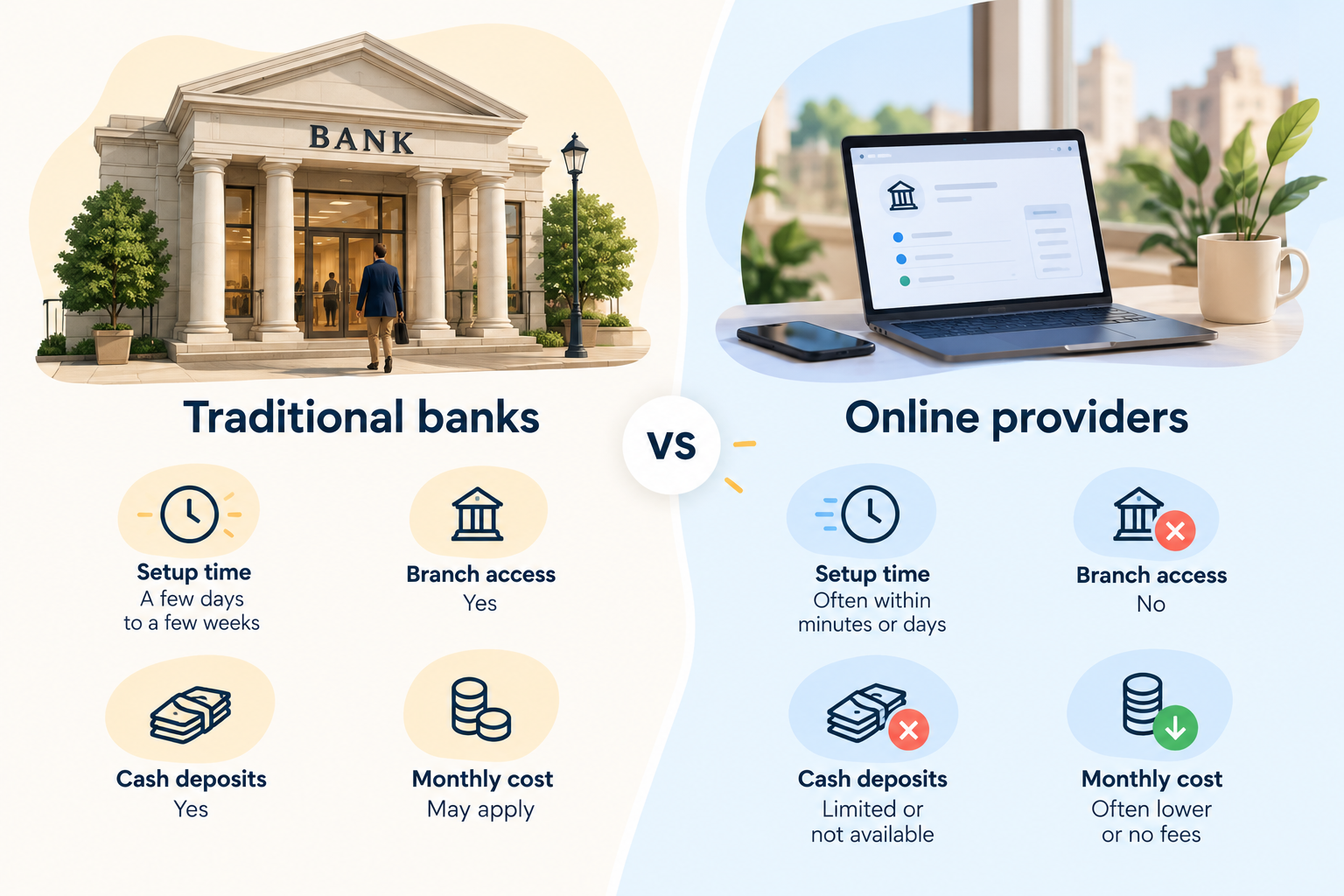
Traditional US banks compared with online business account providers on setup time, branch access and fees.

Traditional banks such as Chase, Bank of America, and U.S. Bank give you access to physical branches. You can deposit cash, speak with bank staff, and explore business loans or other financial services. However, some accounts charge monthly maintenance fees unless you meet specific requirements.

Online providers such as Bluevine, Mercury, Relay, and Grey let you manage your finances digitally. While Bluevine, Mercury, and Relay offer business banking tools, Grey supports cross-border payments, making it useful for businesses that send or receive money internationally. Online providers may offer lower fees, faster account setup, and convenient payment management. However, cash deposits and in-person support may be limited.

Before you decide, compare monthly fees, transaction limits, deposit options, and eligibility requirements. If you need branch access, a traditional bank may suit you better. If you value convenience and digital payments, an online provider may be the better fit.

Also read: Can non-residents open a US bank account online in 2026?

Adding international payments

Opening an LLC in the US can help you establish your business, but what happens when your customers, suppliers, or team are in different countries? You need a simple way to move money across borders without disrupting your day-to-day operations.

That is where Grey comes in. With Grey, you can send and receive money from the US to support international business transactions, whether you are collecting payments from clients or paying partners overseas. Instead of relying on your traditional business bank account for every cross-border transaction, you can add a dedicated payment solution to your setup.

To get started, open a Grey Business account and explore the options available for your business.

Frequently asked questions about the best business bank accounts to have in the US

What is the best business bank account for an LLC?

The best business bank account depends on your LLC’s needs. Chase and Bank of America offer branch access, while Bluevine, Mercury, and Relay provide digital banking tools. Compare fees, transaction limits, payment options, and eligibility requirements to find an account that suits your business.

Which business bank account has the lowest fees?

Online providers such as Bluevine, Mercury, and Relay offer business accounts with no monthly maintenance fees on certain plans. However, other charges may apply for specific transactions or services. Compare each provider’s fee schedule and account requirements before making your decision.

Can I open a business bank account online?

Yes, many banks and online providers let you apply for a business bank account online. You will typically need your LLC formation documents, identification, and business details. Approval times and requirements vary by provider, so check the application process before applying.

Do I need an EIN to open a business bank account?

Many banks require an Employer Identification Number (EIN) to open an LLC business account. Some single-member LLCs may qualify to use other tax identification details, depending on the bank’s policies. Check the provider’s requirements and obtain an EIN from the IRS if needed.

What about international payments for my LLC?

If your LLC works with overseas clients or suppliers, look for accounts that support international transfers and multiple currencies. Grey can complement your business banking setup by helping you send and receive money from the US. Compare transfer fees, exchange rates, supported currencies, and eligibility before choosing a provider.

Are online business bank accounts safe?

Online business accounts can offer strong security features, including encryption, multi-factor authentication, and transaction monitoring. However, protections vary by provider. Check whether deposits are held at an FDIC-insured bank, understand applicable coverage limits, and review the provider’s security policies before opening an account.
How to verify a company EIN number: Free lookup methods

•

•

2 min read

An Employer Identification Number (EIN) is a nine-digit number the IRS assigns to businesses for tax reporting and identification. If you work with a new supplier, verify a company’s tax details, or prepare business documents, you may need to confirm that its EIN is valid.

However, finding a company’s EIN is not always straightforward. The IRS does not provide a public database where anyone can search for any business’s EIN. Your options depend on the type of company and your reason for checking its details.

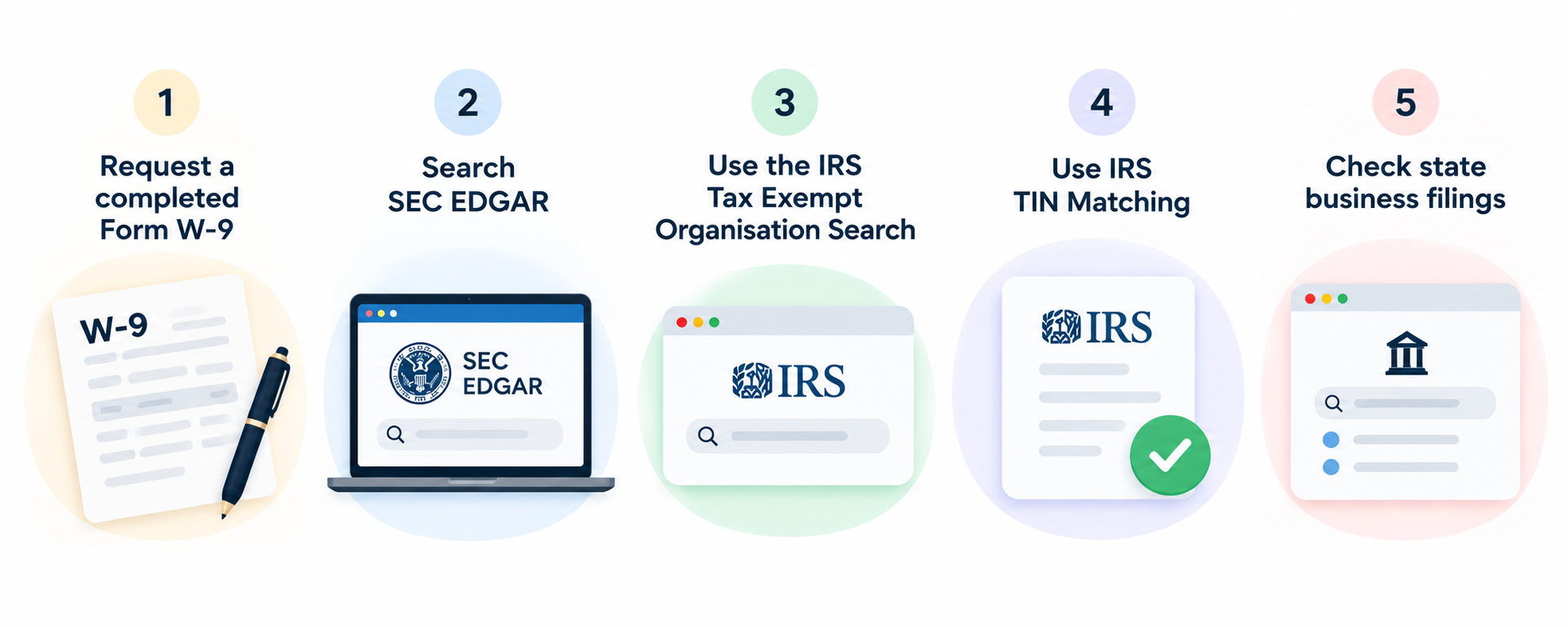
Fortunately, there are several free methods you can use. You can request a signed Form W-9 directly from the business, search SEC EDGAR filings for publicly traded companies, or use the IRS Tax Exempt Organization Search to find eligible nonprofits. If you file information returns, the IRS TIN Matching service may also help you verify taxpayer identification details.

This guide explains how to complete an employer identification number lookup using these methods, what information you can access, and when each option is appropriate.

Can you look up any company's EIN?

No, you can't look up every company's Employer Identification Number (EIN) through a single public database. The IRS does not provide a public search tool that reveals the EIN of every registered business. This restriction helps protect business tax information from unauthorised access and misuse.

However, some EINs are publicly available. For example, you can find tax identification details in certain public company filings on SEC EDGAR or search for eligible nonprofits through the IRS Tax Exempt Organization Search.

Who can verify a company's EIN depends on the situation. Business owners can confirm their EIN through IRS notices and tax records. Banks, employers, and other authorised organisations may verify taxpayer identification details when permitted and necessary for their responsibilities. Businesses can also request a completed Form W-9 from vendors or contractors to confirm the information provided for tax reporting.

If you need to verify an EIN, start by asking the company directly or checking the relevant public records. The appropriate method depends on the company's status and your reason for verification.

Five free ways to verify a company EIN

Five free ways to verify a company EIN.

1. Request a completed Form W-9

Ask the company to provide a signed Form W-9 containing its legal business name and taxpayer identification number. This is one of the simplest ways to obtain an EIN for vendor payments and tax reporting. Compare the details with your business records before proceeding.

2. Search SEC EDGAR

Publicly traded companies may disclose their EINs in regulatory filings. Visit SEC EDGAR and search for the company's name. Review relevant filings, such as annual reports, for available tax identification details. Not every filing includes an EIN.

3. Use the IRS Tax Exempt Organisation Search

If the company is a nonprofit, use the IRS Tax Exempt Organisation Search to find eligible organisations and review their publicly available tax records. This tool is not designed to look up every for-profit business.

4. Use IRS TIN Matching

Businesses authorised to use IRS TIN Matching can check taxpayer identification information against IRS records for eligible payees when filing information returns. This service is restricted to qualifying payers and cannot be used for unrestricted public searches.

5. Check state business filings

Visit the relevant state's official business registry to search for the company's registration details. Some filings may include federal tax identification information, but many do not. Start with the state's official government website, as access and available records vary by state.

Also read: How to complete a W-8BEN form as a non-US resident

How to find your own EIN

If you have misplaced your Employer Identification Number (EIN), you do not need to apply for a new one immediately. There are several ways to recover your existing number, depending on the records you have and whether you have previously used it for business activities.

1. Check your CP 575 confirmation letter. When the IRS assigns your EIN, it sends a confirmation notice called CP 575. Check your business files, emails, or saved documents for this letter, which contains your EIN.

2. Review previous tax returns. Look at your federal business tax returns and other tax documents. Your EIN is typically listed near the top of the relevant forms.

3. Contact your bank. If you used your EIN when opening a business account, your bank may have it on file. Contact your bank and ask how to retrieve your business tax identification details. If you are still setting up your finances, learn how to open a business bank account to understand the documents you may need.

4. Call the IRS. Contact the IRS Business and Specialty Tax Line at 800-829-4933, Monday through Friday, 7 a.m. to 7 p.m. local time. After verifying your identity and authorisation, an IRS representative can help you recover your EIN.

Paying verified vendors and contractors abroad

Paying an overseas contractor involves more than sending money. You also need the right tax documents and a reliable way to deliver their payment. For foreign individuals working outside the US, request Form W-8BEN when applicable to document their foreign status for US tax purposes. Foreign entities may need Form W-8BEN-E instead.

Once you have verified the contractor's details and confirmed the appropriate tax documentation, you can arrange payment. For example, if your LLC hires a developer in the Philippines, you can use Grey to send money from the US to the Philippines and pay them through a supported transfer method.

If you also hire US-based independent contractors, understanding what a 1099 employee is can help you distinguish contractors from employees and understand your reporting responsibilities. The term “1099 employee” is informal; independent contractors are generally not classified as employees for tax reporting.

For businesses managing multiple international payments, you can open a Grey Business account to explore tools for paying vendors and contractors across borders.

Frequently asked questions about a company EIN number

1. Is there a free EIN lookup?

Yes, you can find some company EINs for free through public records. Try SEC EDGAR for publicly traded companies or the IRS Tax Exempt Organisation Search for eligible nonprofits. However, there is no single public IRS database that lists every company's EIN.

2. How do I verify an EIN with the IRS?

If you are an eligible payer filing information returns, you can use the IRS TIN Matching service to check taxpayer identification details. Business owners who have lost their EIN can contact the IRS Business and Specialty Tax Line for assistance after verifying their identity.

3. Can I find a company's EIN online?

Sometimes. Public company filings, nonprofit tax records, and certain business documents may disclose an EIN. Search official sources such as SEC EDGAR or the IRS Tax Exempt Organisation Search. If the number is not publicly available, ask the company directly for a completed Form W-9.

4. How do I find my own EIN?

Check your IRS CP 575 confirmation letter, previous business tax returns, or bank records. If you cannot locate your number, contact the IRS Business and Specialty Tax Line at 800-829-4933. After verifying your identity and authorisation, an IRS representative can help you recover it.

5. Is an EIN public information?

An EIN is not universally public information. Some businesses disclose it in public filings, while other companies' EINs may not be readily available. Although you can access certain tax identification details through official records, the IRS does not provide unrestricted public access to every business's EIN.

6. Is an FEIN the same as an EIN?

Yes, an FEIN (Federal Employer Identification Number) generally refers to the same nine-digit federal tax identification number as an EIN. Businesses use this number for tax reporting, banking, hiring employees, and other official purposes. The term FEIN simply emphasises that the identification number is federal rather than state-issued.

PNC business account: Fees, features and how to open

•

•

2 min read

Choosing the right business bank account can make it easier to manage daily expenses, receive customer payments and keep your business finances organised. However, monthly maintenance fees, transaction limits and minimum balance requirements can affect how much you pay for banking services. If you are considering a PNC Bank business account, understanding these costs and features can help you decide whether it suits your business needs.

PNC offers several business checking accounts designed for businesses with different transaction volumes and banking needs. Each account comes with its own fee structure, transaction allowances and requirements for waiving monthly maintenance fees. Depending on the account you choose, maintaining a qualifying balance may help you avoid these charges.

Opening an account is also relatively straightforward, with options to apply online or visit a branch. You will generally need your employer identification number (EIN), business formation documents and valid identification. This guide covers PNC business account fees, key features, eligibility requirements and how to open an account, helping you understand what to expect before applying.

Also read: Best business bank accounts for an LLC

PNC Business account options: which checking tier fits your business?

PNC offers several business checking options designed for different transaction volumes, cash handling needs and business sizes. Choosing the right tier depends on your monthly activity, available balance and financial management needs.

Business Checking: Best for freelancers, sole proprietors and micro-businesses with fewer transactions. Its $500 balance waiver threshold can help eligible account holders avoid the monthly maintenance fee.

Business Checking Plus: Suits local retailers, storefronts and growing businesses that handle more payments. It accommodates up to 500 monthly items and $10,000 in cash deposits before additional charges may apply.

Treasury Enterprise: Designed for businesses managing multiple entities or accounts. It allows up to four linked accounts to qualify toward a combined $30,000 balance requirement.

Analysis: Best suited to large enterprises with substantial cash flows. Earnings Credits can help offset eligible account service charges, making it worth considering for businesses with complex treasury management needs.

PNC business checking line-up (2026)

Account tier Monthly fee /
waiver minimum
Free transactions Free cash deposits Ideal for
Business Checking $12 / $500 balance 150/month $5,000/month Freelancers, side hustles and startups
Business Checking Plus $22 / $5,000 balance 500/month $10,000/month Growing businesses and local retailers
Treasury Enterprise Plan $50 / $30,000 combined balance Unlimited across linked accounts $50,000/month Established mid-sized businesses
Analysis Business Checking Variable / Earnings Credit Custom Custom Large enterprises with complex cash flows

‍

PNC business account fees and how to avoid them

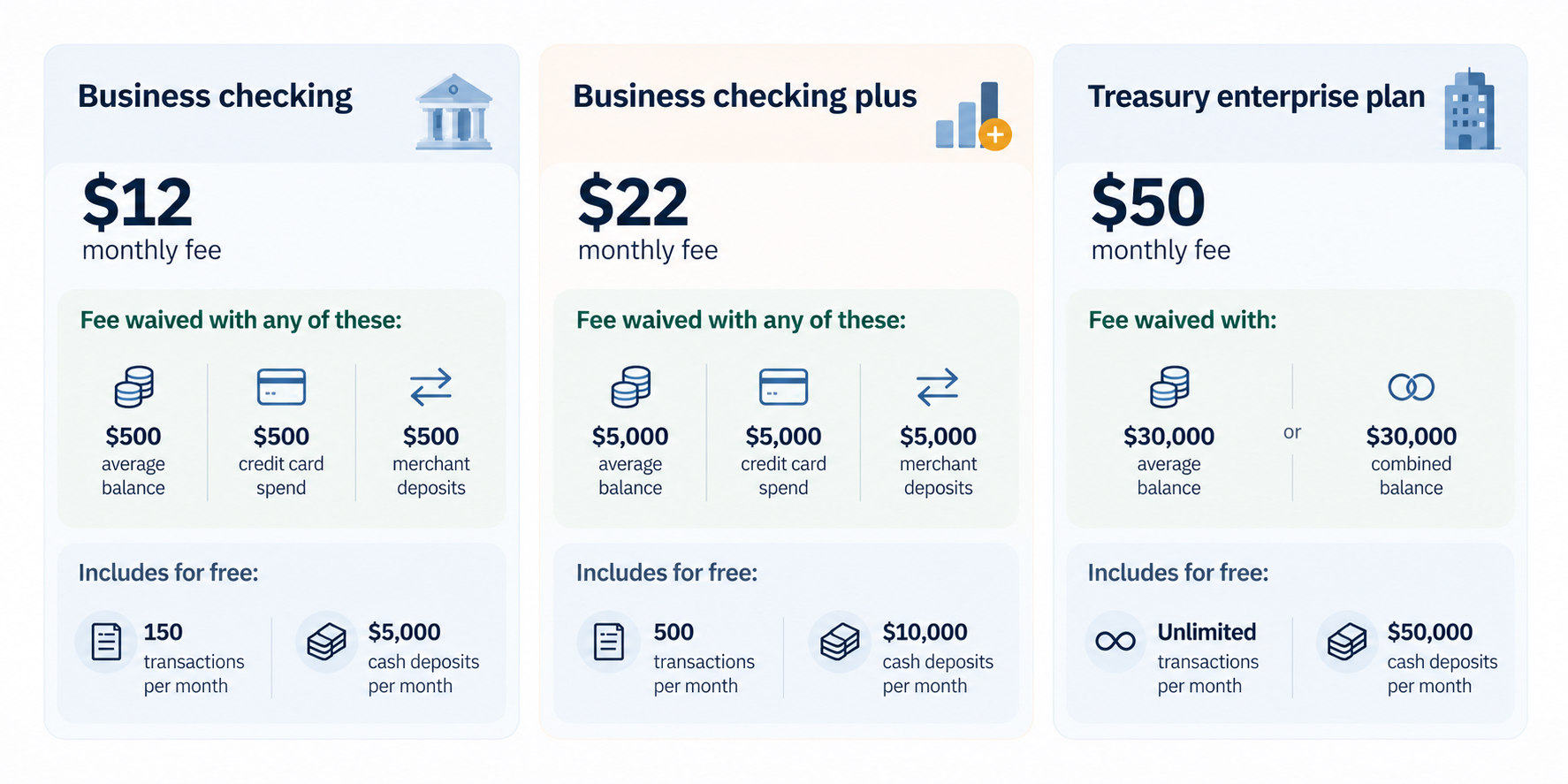
 Graphic showing how a monthly business checking fee can be waived by meeting a balance requirement.

1. Business checking — $12 monthly fee

How to avoid the fee:

  • Maintain a $500 average monthly balance.
  • Spend $500 on a linked PNC Business Credit Card.
  • Process $500 in deposits through a linked PNC merchant account.

How to avoid extra charges:

  • Keep monthly transactions within the 150 free-item limit.
  • Keep monthly cash deposits within the $5,000 free allowance.

2. Business checking plus — $22 monthly fee

How to avoid the fee:

  • Maintain a $5,000 average monthly balance.
  • Maintain a combined $20,000 balance across eligible linked checking and money market accounts.
  • Spend $5,000 on a linked PNC Business Credit Card.
  • Process $5,000 in deposits through a linked PNC merchant account.

How to avoid extra charges:

  • Keep monthly transactions within the 500 free-item limit.
  • Keep monthly cash deposits within the $10,000 free allowance.

3. Treasury enterprise plan — $50 monthly fee

How to avoid the fee:

  • Maintain a $30,000 average monthly balance.
  • Alternatively, maintain a combined $30,000 balance across eligible linked corporate accounts.

How to avoid extra charges:

  • Enjoy unlimited transactions across linked accounts.
  • Keep monthly cash deposits within the $50,000 free allowance.

PNC Business account features and tools

PNC provides digital banking, business debit cards, payment processing and cash management tools to help businesses handle everyday transactions, monitor cash flow and manage finances more efficiently.

Digital tools: PNC Business Online Banking and mobile deposit capabilities help business owners check balances, review transactions, deposit eligible checks and manage accounts without visiting a branch.

Cards: Eligible account holders can access PNC Bank Visa Business Debit cards for convenient business purchases. The Purchase Payback® programme may offer cash-back rewards on qualifying purchases from participating merchants, subject to applicable terms.

Integrations: Businesses with more complex financial needs can use PINACLE®, PNC's treasury management platform, to access cash management services and tools that support cash-flow forecasting, payment management and account visibility.

Payment processing: PNC Merchant Services helps businesses accept customer payments and manage transactions. When used alongside available cash-flow tracking tools, these services can make it easier to monitor incoming payments, reconcile transactions and manage accounts receivable.

Together, these features give businesses tools to manage routine banking, track incoming funds and oversee payments. Availability, eligibility and fees may vary by account type and service, so review PNC's current terms before enrolling.

Also read: How to open a business bank account

Handling international payments

While a PNC business account can help you manage everyday banking in the US, businesses working with international clients, suppliers or remote teams may need additional options for cross-border payments. This is where Grey can complement your banking setup.

With a Grey Business account, eligible businesses can send and receive money from the US, making it easier to manage international payments when working with American clients, paying overseas suppliers or serving customers across borders.

Grey adds a multi-currency layer to your financial operations, helping you handle international transactions alongside your regular business banking. Before choosing a service, review supported currencies, transfer fees, exchange rates and account eligibility to understand the costs involved.

Frequently asked questions

1. What business accounts does PNC offer?

PNC offers several business checking options, including Business Checking, Business Checking Plus, Treasury Enterprise Plan and Analysis Business Checking. Each serves different needs, from freelancers and small businesses to larger companies managing substantial cash flows. The right account depends on your transaction volume, cash deposits and treasury management requirements.

2. What are the fees?

Monthly maintenance fees vary by account tier. Business Checking costs $12, Business Checking Plus costs $22, and Treasury Enterprise Plan costs $50, based on the fee schedule outlined above. Analysis Business Checking has variable fees. Eligible accounts may qualify for waivers by meeting balance or other requirements. Transaction and cash deposit limits may also trigger additional charges.

3. Can I open one online?

Yes, PNC allows eligible customers to apply for certain business checking accounts online. You can also visit a branch to complete the application. Availability may depend on your business structure, location and eligibility. Before applying, review the account requirements and prepare the necessary identification and business documents to help avoid delays.

4. What documents do I need?

PNC generally requires your business Tax Identification Number (TIN), or Social Security number for eligible sole proprietors, business registration documents and proof of authority to operate the business. You will also need identification. Online applicants need a valid email address. Requirements vary by business structure.

5. Is there a minimum balance?

PNC Business Checking has a $100 minimum opening deposit. This differs from the $500 average monthly balance that can waive its $12 maintenance fee. Other account tiers have different waiver requirements. You may avoid monthly fees through qualifying linked credit card purchases or merchant deposits, depending on the account.

6. How do I handle overseas payments?

You can use PNC international wire transfers to send money overseas or receive payments from abroad, although transfer fees and currency conversion costs may apply. For additional cross-border flexibility, eligible businesses can use a Grey Business account to send and receive money from the US. Compare fees and supported currencies before choosing a service.

Independent contractor vs employee: How to tell the difference

•

•

2 min read

A new job offer can feel straightforward until you reach the part of the contract that describes your employment status. The salary may look attractive and the role may seem like the right next step, but being hired as an independent contractor rather than an employee can change what you take home, who handles your taxes and whether you receive benefits such as paid leave or health insurance.

An independent contractor runs their own business and controls how they work, while an employee works under the employer's direction. Employers withhold tax and provide benefits for employees, but not for contractors, who handle their own taxes

The difference is more than a job title, and getting it wrong can leave you with unexpected tax bills or fewer workplace protections than you expected. In this guide, we’ll break down the key differences between an independent contractor and an employee, so you can understand where you stand before signing your next contract.

Independent contractor vs employee: Key differences

This table compares the main differences between contractors and employees, from workplace control and taxes to benefits, job security, tools, and financial risk.

Feature Independent Contractor Employee
Control Dictates own hours, methods, and routine Employer dictates schedule, location, and tasks
Tax Pays own income and self-employment taxes Employer automatically withholds income and payroll taxes
Benefits Responsible for own health insurance and retirement Eligible for company healthcare, 401(k), and PTO
Tools Provides own specialised equipment and software Employer provides necessary tools and equipment
Permanence Defined by project completion or contract end Indefinite, ongoing relationship until termination
Financial Risk Can experience a financial profit or loss Receives a guaranteed wage or salary

‍

What is an independent contractor?

An independent contractor is a self-employed person who provides services to a business or individual under a contract rather than working as a traditional employee. Think of a freelance designer hired to create a company’s new website, a consultant brought in to solve a business problem, or a writer paid to produce a series of articles. They work independently and are generally responsible for deciding how, when, and where the work gets done, as long as they deliver what was agreed in the contract.

In the US, independent contractors are commonly paid as 1099 workers, meaning businesses generally report their payments to the contractor using a Form 1099-NEC when applicable. Unlike employees, contractors typically do not have income tax, Social Security, or Medicare taxes withheld from their payments, so they need to plan for these taxes themselves.

Being an independent contractor also comes with responsibilities beyond completing the work. Contractors usually handle their own tax filings, business expenses, insurance and retirement planning, while keeping records of income and expenses. The trade-off is greater control over how they work and, in many cases, the ability to work with multiple clients.

What is an Employee?

An employee is a person who works for a company or organisation under an employment relationship, where the employer generally controls what work is done, how it is performed and when it is completed. Unlike an independent contractor, an employee works as part of the organisation and is typically entitled to protections and benefits provided under their employment arrangement.

W-2 Pay

In the US, employees are generally paid through payroll and receive a W-2 form from their employer at the end of the tax year. The W-2 reports their wages and the taxes already withheld from their pay.

Tax Withholding

Employers typically withhold federal income tax, Social Security and Medicare taxes from an employee’s wages and send these amounts to the relevant authorities. This means employees do not usually need to set aside the full tax amount themselves.

Employee Benefits

Depending on the employer and role, employees may receive health insurance, retirement plans, paid time off and other benefits. If you encounter the term “what a 1099 employee is,” it is important to understand that a 1099 worker is generally an independent contractor, not an employee.

How the IRS tests classification

The difference between an employee and an independent contractor is not always obvious from a job title or contract. A company might call someone a contractor, but the IRS looks at the actual working relationship to determine how that person should be classified for tax purposes. It generally considers three categories of control.

Behavioral Control

The IRS considers whether the business has the right to direct how, when and where the worker performs their job. Detailed instructions, set working hours, training and supervision can indicate an employee relationship.

Financial Control

The IRS looks at how much control the business has over the worker’s financial and business activities. Factors include who provides tools and equipment, whether expenses are reimbursed, how the worker is paid and whether they can make a profit or experience a loss.

Relationship Factors

The nature of the relationship also matters, including written contracts, employee benefits, how permanent the arrangement is and whether the worker provides services that are a key part of the business. No single factor determines classification; the IRS considers the entire relationship.

How taxes and paperwork differ for Contractors and Employees

Getting paid as a contractor or employee does not just change the amount that lands in your bank account; it also changes the paperwork you receive, who handles your tax withholding and what happens if your worker classification is wrong.

1099 vs. W-2

Employees generally receive a W-2 showing their wages and taxes withheld by their employer, while independent contractors typically receive a 1099-NEC for qualifying payments. Understanding 1099 vs. W-2 can help clarify how each worker is paid, what taxes are withheld, who is responsible for reporting income, and what paperwork to expect.

Self-Employment Tax

Contractors generally have to account for both the employer and employee portions of Social Security and Medicare taxes through self-employment tax, meaning they need to plan for these payments themselves rather than relying on payroll withholding.

Misclassification risk

Calling a worker a contractor does not automatically make them one. If a business treats an employee as an independent contractor, it may face additional taxes, penalties and other consequences, while the worker could miss protections and benefits they should have received.

How to pay contractors in the US and abroad

Paying a contractor can look simple until the person doing the work lives in another country. A US-based company might have a designer in the Philippines, a developer in Nigeria or a marketing consultant in Brazil, and suddenly the payment process involves exchange rates, transfer fees, payment details and waiting times.

This is where Grey can make contractor payments easier. Businesses can use Grey to pay contractors from the US and send payments internationally without having to navigate a complicated process for every contractor. The platform supports transfers across multiple currencies, allowing businesses to hold and convert funds before sending money to contractors in supported countries.

For example, a US company paying a contractor in the Philippines can use Grey to send money from the US to the Philippines, while the contractor receives the funds in the supported local currency. For businesses working with international talent regularly, having one place to manage these payments can make cross-border contracting much simpler.

Frequently asked questions

What is the difference between a contractor and an employee?

An employee works under an employer’s direction and typically receives payroll withholding and benefits, while an independent contractor runs their own business and controls how they complete their work. Contractors generally handle their own taxes, business expenses and insurance, while employees receive greater workplace protections and employer-provided benefits.

How does the IRS decide?

The IRS looks beyond a worker’s job title or contract and examines the actual working relationship. It considers behavioural control, financial control and the relationship between the worker and business. No single factor automatically determines classification, so businesses should consider the full arrangement when deciding whether someone is an employee or contractor.

Do contractors get benefits?

Independent contractors generally do not receive employee benefits such as employer-sponsored health insurance, paid vacation or retirement contributions. Instead, they are responsible for arranging their own insurance, retirement savings and other benefits. However, a contractor’s specific agreement can provide certain perks or payments, depending on what the business and contractor negotiate.

What is misclassification?

Misclassification happens when a business treats a worker as an independent contractor when the person legally qualifies as an employee. This can affect taxes, benefits and workplace protections. For the business, misclassification can lead to unpaid employment taxes, penalties and other costs, while the worker may lose benefits they should have received.

Can someone be both?

Yes, someone can potentially work as an employee for one business while independently contracting for another. For example, a person could have a full-time W-2 job and provide freelance consulting services to separate clients. However, the classification of each working relationship depends on the specific facts and circumstances involved.

How do I pay an overseas contractor?

Paying an overseas contractor typically involves choosing a payment method, confirming the contractor’s banking details and considering currency conversion, transfer fees and tax documentation. Platforms such as Grey can help businesses make international payments, allowing them to send money across borders without relying on traditional bank transfers for every contractor.

How to start an LLC in Texas: Step-by-step guide

•

•

2 min read

Texas has no personal state income tax. That alone makes it one of the most popular states for LLC formation. But Texas does have a franchise tax, and ignoring it is the single most common mistake new LLC owners make. We'll cover that alongside every other step.

The full Texas LLC formation process takes about an hour of your time and $300 in state fees. You can do it entirely online through the Texas Secretary of State's SOSDirect system. No lawyer required for a straightforward single-member or two-member LLC, though complex ownership structures or real estate holdings benefit from legal guidance.

To form an LLC in Texas, choose a registered agent and file a Certificate of Formation with the Secretary of State ($300). Then get an EIN from the IRS, open a business bank account, and apply for any required permits. You can file online through SOSPortal, although processing times vary.

This guide walks through each step in the order you actually do them, with the costs and timelines you'll encounter. For choosing a name, see LLC naming guide.

Step 1: Choose your LLC name

Your Texas LLC name must include "LLC" or "Limited Liability Company" and be distinguishable from any existing entity registered in Texas. Search the Texas Secretary of State's SOSPortal database to check availability. The search is free and returns results instantly.

Texas is relatively lenient on name similarity. "Bright Studio LLC" and "Bright Studios LLC" would likely both be accepted as distinguishable. But being legally distinguishable doesn't mean your customers won't confuse the two. Search broadly and consider trademark implications before committing.

If your name is available but you're not ready to file immediately, Texas allows name reservations for 120 days at $40. This prevents someone else from registering it while you prepare your formation documents.

You can also file a DBA (Assumed Name Certificate) if you want to operate under a different name than your legal LLC name. The DBA filing costs $25 per county where you do business in Texas. This lets "Smith Holdings LLC" operate publicly as "Bright Studio" without changing the legal entity name.

Step 2: Choose a registered agent

Every Texas LLC must have a registered agent with a physical street address in Texas. No PO boxes. The agent receives legal documents (lawsuits, government notices, tax correspondence) on behalf of the LLC. This is a legal requirement, not optional.

Option 1: Be your own agent. Free, but your home address becomes public record on the Texas SOS website. Anyone can look up your LLC and find your personal address. You also must be available at that address during normal business hours to accept documents in person. If you're travelling or working remotely, you can miss a critical legal notice.

Option 2: Use a registered agent service. $50 to $199/year. The service provides a Texas address, forwards documents to you, and ensures nothing gets missed while you're unavailable. Northwest Registered Agent ($125/year) and ZenBusiness ($199/year after the first free year) are popular options. For service comparisons, see best LLC formation services.

Option 3: Use a friend or family member in Texas. Free, but they must be available at the registered address during business hours and they'll see every legal document your LLC receives, including lawsuits. Most people prefer the privacy of a paid service.

Step 3: File the Certificate of Formation

This is the actual formation step. You file the Certificate of Formation (Form 205) with the Texas Secretary of State.

Online filing (recommended): Visit the Texas Secretary of State's SOSPortal and create an account. Complete the Certificate of Formation (Form 205) with your LLC name, registered agent information, management structure, organiser details, and effective date. The filing fee is $300, payable by ACH or credit card, although credit card payments carry an additional convenience fee. Processing times vary, and expedited filing options are available for an additional charge.

Mail filing: Download Form 205, complete it, and mail it with the $300 filing fee to the Texas Secretary of State. Processing times vary, so check the state's current turnaround times before submitting.

The $300 fee is non-refundable. If your filing is rejected (usually because the name is too similar to an existing entity or required information is missing), you can correct and resubmit without paying again, but the original fee isn't returned if you abandon the filing.

Member-managed vs manager-managed: most single-member and small multi-member LLCs choose member-managed, meaning all owners participate in running the business. Manager-managed is for LLCs with passive investors who own a share but don't participate in daily operations. If you're not sure, choose member-managed. You can change this later by filing an amendment ($150).

Step 4: Create an Operating Agreement

Texas doesn't legally require an operating agreement, but you should have one anyway. Banks require it to open a business account. It also protects your personal liability shield: without an operating agreement, a court could argue the LLC isn't a separate entity from you personally (called "piercing the corporate veil"), exposing your personal assets to business debts.

Your operating agreement should cover: ownership percentages, profit and loss distribution, voting rights, member responsibilities, process for adding or removing members, what happens if a member dies or becomes incapacitated, and the process for dissolving the LLC.

For single-member LLCs, the operating agreement is simpler but still essential. It establishes the LLC as a separate entity and documents how the business operates. A basic single-member operating agreement is 3 to 5 pages. Most LLC formation services include a template. Free templates are available from the Texas Secretary of State website and SCORE (SBA's mentoring arm).

Step 5: Get an EIN (Employer Identification Number)

The EIN is free and takes 10 minutes. Apply online at irs.gov/ein. You'll need your LLC's legal name, Texas address, and the responsible party's SSN or ITIN. The EIN is issued immediately upon completion of the online application.

Every LLC needs an EIN, even single-member LLCs. Banks require it to open business accounts. The IRS uses it for tax filings. Vendors and clients use it on W-9 forms. Don't pay an LLC formation service $70 to $99 for this. It's free and faster to do yourself.

One EIN per LLC. If you dissolve and reform, the new LLC needs a new EIN. If you change your LLC's name or address, you keep the same EIN. If you change from single-member to multi-member entity, you keep the same EIN.

Step 6: Open a business bank account

Separate your personal and business finances immediately. Mixing them is the fastest way to lose your personal liability protection. Courts use "commingling of funds" as evidence that the LLC isn't a real separate entity.

What you need to open a business bank account: Certificate of Formation (the approved filing from the Texas SOS), EIN confirmation letter, operating agreement, government-issued ID, and a business address.

Traditional banks: Chase, Bank of America, Wells Fargo all offer business checking in Texas. Expect monthly fees of $10 to $30 (often waivable with minimum balances of $1,500 to $5,000). In-person branch visit required.

Online options: Grey Business lets you open a multi-currency business account in your LLC name with US routing and account details, no branch visit required. You get USD, GBP, and EUR accounts. If your Texas LLC works with international clients or vendors, the multi-currency capability eliminates the need for separate foreign currency accounts or expensive wire transfers for each currency. The Grey conversion fee is 1% capped at $6, compared to bank wire fees of $25 to $50 per international transfer.

Step 7: Texas franchise tax

This is the step most guides bury at the bottom. Don't skip it. Texas LLCs are generally subject to franchise tax rules, but that doesn't mean every LLC owes tax or must file a franchise tax report. Businesses with annualised total revenue at or below the state's no-tax-due threshold generally owe no franchise tax and don't need to file a franchise tax report. However, they must still submit an annual Public Information Report (PIR) or Ownership Information Report (OIR), unless an exception applies.

For 2026 and 2027, the no-tax-due threshold is $2.65 million in annualised total revenue. LLCs at or below this threshold generally owe $0 in franchise tax and no longer need to file a No Tax Due Report. They must still submit the applicable annual information report.

Missing required franchise tax filings or annual information reports can put your LLC's good standing at risk and may lead to forfeiture of its right to transact business in Texas. Even when no franchise tax is owed, it's important to submit the required PIR or OIR on time.

Filing deadlines: the initial franchise tax report is due May 15 of the year after formation. If you form your LLC in September 2026, your first report is due May 15, 2027. Annual reports are due May 15 every year after that. File electronically through the Texas Comptroller's Webfile system.

Tax rates (for LLCs above $2.65 million): 0.375% for retail and wholesale businesses, 0.75% for all other businesses, applied to the LLC's "taxable margin" (roughly, the lesser of total revenue minus cost of goods sold, total revenue minus compensation, 70% of total revenue, or total revenue minus $1 million).

After formation: What comes next

Business licences and permits. Texas doesn't have a general business licence, but specific industries require state or local permits. Food service needs a health department permit. Construction needs a contractor's licence. Check with your city and county clerk for local requirements.

Sales tax permit. If you sell taxable goods or services in Texas, apply for a sales tax permit through the Texas Comptroller. The permit is free. Texas sales tax is 6.25% state rate plus up to 2% local rate (total up to 8.25%). Don't collect sales tax without a permit, and don't sell taxable items without collecting it.

Business insurance. Not legally required for single-member LLCs in Texas (unless you have employees, in which case workers' compensation is recommended but not mandatory in Texas). General liability insurance ($30 to $100/month) protects against third-party claims. Professional liability (errors and omissions) is worth considering if you provide professional services.

Separate credit. Apply for a business credit card in your LLC name to start building business credit. Use it for business expenses and pay in full each month. Business credit is separate from personal credit and can help you secure financing later.

Ready to start your Texas LLC? Open a Grey Business account and get US banking details in your LLC name from day one.

Frequently asked questions about how to start an LLC in Texas

How much does it cost to start an LLC in Texas?

$300 state filing fee for the Certificate of Formation. Optional costs: registered agent service ($50 to $199/year), name reservation ($40), DBA filing ($25 per county), and EIN (free from IRS). Total out-of-pocket for a basic LLC: $300 to $500 in the first year. For cost breakdowns across states, see LLC cost guide.

How long does it take to form a Texas LLC?

Processing times for Texas LLC formation vary depending on the filing method and current workload. Online applications can be submitted through SOSPortal, and expedited same-day or next-day processing is available for an additional fee. Once your LLC is approved, you can apply for an EIN and open a business bank account. The overall timeline depends on how quickly your filing is approved and your bank account is set up.

Does a Texas LLC pay state income tax?

Texas has no personal state income tax, but LLCs are generally subject to the state's franchise tax rules. For 2026 and 2027, LLCs with annualised total revenue of $2.65 million or less generally owe no franchise tax and don't need to file a franchise tax report. However, they must still submit an annual Public Information Report or Ownership Information Report, unless exempt. LLCs above the threshold generally pay 0.375% (retail/wholesale) or 0.75% (other businesses) on their taxable margin, although an alternative EZ computation method is available for eligible businesses. For filing details, see LLC tax guide.

Do I need a lawyer to form an LLC in Texas?

Not for a straightforward single-member or small multi-member LLC. The SOSDirect online filing system is user-friendly and walks you through each section. A lawyer ($500 to $2,000) is worth the cost if your LLC involves complex ownership structures, significant assets, real estate holdings, or multiple members with different contribution levels. For dissolution guidance, see dissolve an LLC.

Can a non-US resident start an LLC in Texas?

Yes. Texas does not require LLC owners to be US citizens or residents. You'll need a registered agent with a Texas address, an EIN from the IRS (apply by mail using Form SS-4 if you don't have a US SSN), and a business bank account that accepts non-resident LLCs. Grey Business serves international founders without requiring a US branch visit.

Start your Texas LLC and open Grey Business for US banking details in your LLC name.

Disclaimer: This article is for informational purposes only. All costs and details are estimates based on mid-2026 data. Verify current information before making decisions. Grey isn't a bank. We're a licensed financial services provider offering multi-currency accounts.

How to dissolve an LLC: Steps and costs

•

•

2 min read

A surprising number of business owners stop operating their LLC but never formally close it. The LLC stays registered, the state keeps expecting filings, and fees or penalties accumulate quietly in the background. In California, that can mean an $800 annual LLC tax for a business you thought you'd already shut down. In Delaware, LLCs generally owe a $300 annual tax until they properly cancel their registration. These obligations don't stop when you stop working.

Don't dissolve if you might restart the business within a year. It's easier and cheaper to keep the LLC dormant (file the required reports, pay any minimum fees) than to dissolve and re-form later. Reforming means new filing fees, a new EIN application, new bank accounts, and updated contracts with every vendor and client.

To dissolve an LLC, you vote to dissolve (if multi-member), settle debts, and distribute remaining assets. Then file Articles of Dissolution with your state, file final tax returns, cancel your EIN, and close all business accounts. The process takes 2 to 8 weeks depending on the state.

This guide covers every step, including the tax obligations most dissolution guides skip. For the formation side, see LLC costs.

Step 1: Vote to dissolve

The following steps outline the general process for dissolving an LLC in the US. However, requirements vary by state, including voting rules, tax obligations, filing documents, and processing times. Always check your state's specific requirements before proceeding.

If your LLC has more than one member, the members must formally vote to dissolve. Check your operating agreement for the voting threshold. Common options are unanimous consent, majority vote, or supermajority (two-thirds). If you don't have an operating agreement, your state's default LLC act applies, which typically requires the majority consent of all members.

For single-member LLCs, you make the decision yourself. Either way, document it in writing. Draft a written resolution that states the LLC name, the date of the vote, the result (unanimously approved, majority approved, etc.), and the signatures of all voting members. Keep this resolution with your LLC records permanently.

This documentation protects you if anyone later disputes whether the dissolution was authorised. It also protects you if creditors challenge the dissolution as fraudulent (attempting to avoid debts). A properly documented vote shows the dissolution was deliberate and orderly, not evasive.

If your operating agreement doesn't address dissolution, draft a simple dissolution resolution. One page is enough. Date it, state the decision, and have every member sign it. This becomes the legal record of consent.

Step 2: Wind up business affairs

Before you file anything with the state, resolve everything the LLC owes and is owed. This is the most time-consuming step and the one most people rush through, leading to problems months or years later.

Pay all debts and obligations. Outstanding invoices, business loans, credit card balances, vendor contracts, lease obligations, and any pending legal claims. If the LLC can't pay all debts from its assets, consult a business attorney before proceeding. Dissolving an LLC while debts are outstanding can expose members to personal liability in some situations, particularly if creditors can argue the dissolution was intended to evade payment.

Collect what's owed to you. Chase outstanding receivables aggressively. Send final invoices immediately. Once the LLC is dissolved, collecting becomes dramatically harder. You may lose standing to sue in the LLC's name. Some states allow a "winding up" period after dissolution during which you can still collect, but this varies. Don't rely on it.

Cancel contracts and subscriptions. Leases, software subscriptions, insurance policies, recurring services, domain registrations, hosting accounts, phone plans, and any other recurring commitments. Notify each provider in writing that the LLC is closing and request written confirmation of cancellation. Keep these confirmations. A verbal cancellation that isn't documented can lead to continued billing.

Notify your customers and clients. If you have ongoing client relationships, give them reasonable notice. Provide referrals to alternative providers if appropriate. This isn't legally required in most states, but it's professional and protects your personal reputation for future ventures.

Distribute remaining assets. After debts are paid and receivables collected, distribute the remaining cash and assets to members according to the operating agreement. If there's no agreement, follow your state's default rules, which typically allocate proportionally based on ownership percentage. Document every distribution with amounts, dates, and member signatures.

Step 3: File final tax returns

Your LLC must file a final tax return for the year it dissolves. Check the "final return" box on the applicable form. The specific form depends on how your LLC is taxed:

Single-member LLC (disregarded entity): Report the business's final income and expenses on Schedule C of your personal Form 1040, if applicable. Schedule C does not have a separate "final return" checkbox.

Multi-member LLC (partnership): File Form 1065, check the "final return" box, and issue final Schedules K-1 to each member. Each member reports their share of the LLC's income and other applicable tax items on their personal return.

LLC taxed as an S corporation: File Form 1120-S and mark it as the final return. If the LLC adopts a plan of corporate dissolution or liquidation, Form 966 is generally required within 30 days of adopting that plan.

LLC taxed as a C corporation: File Form 1120 and mark it as the final return. Form 966 is generally required within 30 days of adopting a plan of corporate dissolution or liquidation.

Don't forget state tax obligations. If your state has a franchise tax, income tax, or sales tax, file final returns with the state as well. In Texas, file a final franchise tax report with the Comptroller. In California, LLCs generally owe the $800 annual tax for their final taxable year, even if they stop operating partway through it. The tax is not normally prorated, although certain exceptions apply. In New York, the filing fee is $0, but you must file a final partnership return. For guidance, see how to file LLC taxes.

Sales tax: if your LLC collected sales tax, file a final sales tax return and remit any remaining tax. Notify your state's revenue department that the sales tax permit should be cancelled.

Payroll taxes: if you had employees, file final Forms 941 (quarterly) and W-2s (annual). Pay any remaining payroll tax deposits. File Form 940 (federal unemployment tax) marked "final."

Step 4: File Articles of Dissolution

File the required dissolution or cancellation documents with your state's Secretary of State or equivalent filing authority. The exact form, filing process, and requirements vary by state. Some states also require tax clearance or additional documentation before the LLC can be formally terminated.

Filing fees vary by state. Some states allow LLCs to dissolve at no charge, while others charge a filing fee. For example, California does not charge a fee for LLC termination filings, while Texas charges $40 for a Certificate of Termination. Check your state's current filing fees before submitting your dissolution documents.

The form is typically short: LLC name, date of formation, reason for dissolution (voluntary), effective date of dissolution, and confirmation that debts have been paid or provisions made for payment. Some states require a tax clearance certificate from the revenue department before accepting the dissolution filing. Ohio, for example, requires a tax clearance letter.

If your LLC operates in multiple states, you must also file for withdrawal (or termination of foreign qualification) in each state where you registered as a foreign LLC. Each state charges its own fee for this. Missing a foreign state registration means that the state keeps expecting filings and fees.

Processing time: 1 to 4 weeks for most states. Expedited processing is available in many states for an additional fee ($50 to $200). Once approved, the state issues a certificate of dissolution or cancellation. Keep this permanently with your LLC records.

Step 5: Cancel your EIN and close accounts

Close your IRS business account. An EIN cannot be permanently cancelled, but you can ask the IRS to close the business tax account associated with it. Send a letter containing the LLC's legal name, EIN, business address, and reason for closure to the Internal Revenue Service, Cincinnati, OH 45999. Include a copy of your EIN assignment notice if available. The IRS will close the account once all required tax returns have been filed and outstanding taxes paid.

Close all business accounts. Bank accounts, credit cards, payment processors (Stripe, PayPal, Square), and any merchant accounts. Transfer any remaining balances to members before closing. Request written confirmation from each institution that the account is closed. A "closed" bank account that still has a $2.50 monthly maintenance fee will eventually go to collections.

Cancel your registered agent service if you were using a professional agent. Cancel any business licences or permits with your city, county, and state. Cancel your DBA (doing business as) registration if you filed one. Update your website to indicate the business is no longer operating, or take it down entirely. Update social media profiles similarly.

Notify creditors formally. Many states require or recommend sending a written notice to known creditors that the LLC is dissolving. This starts a statutory claims period (typically 90 to 120 days) after which creditors who don't file claims lose their right to collect. This is your legal protection against surprise claims years later.

Common dissolution mistakes

1. Not filing Articles of Dissolution. This is the most common and most expensive mistake. The LLC continues to exist in the state's records, annual fees keep accumulating, franchise taxes keep accruing, and your registered agent keeps billing you. Five years of California's $800 annual LLC tax can mean $4,000 in unpaid taxes, plus applicable penalties and interest. The tax can apply even if the LLC earned no income, unless an exemption or exception applies.

2. Not filing final tax returns. The IRS expects a final return. Not filing triggers a substitute return (SFR), which estimates your tax liability, usually too high, and starts penalties and interest from the original due date. State revenue departments are equally aggressive. Don't assume that dissolving the LLC means the tax obligations disappear.

3. Distributing assets before paying debts. Members who receive distributions while debts are outstanding can be held personally liable for those debts, up to the amount they received. This is called a "fraudulent transfer" or "fraudulent conveyance" in legal terms. Pay every creditor first. Distribute to members last.

4. Forgetting state-specific requirements. Some states require additional steps before an LLC can be formally dissolved, including obtaining tax clearance or notifying creditors. These requirements vary, so check the rules in the state where your LLC was formed. Some states have mandatory waiting periods. Check your specific state's requirements before filing.

5. Not cancelling foreign state registrations. If your LLC is registered to do business in three states, you need to file for dissolution in your home state and withdrawal in the other two. Miss one and that state keeps expecting annual reports and fees.

Closing your LLC? Make sure all financial accounts are settled and final returns are filed before you dissolve.

Frequently asked questions about how to dissolve an LLC

How much does it cost to dissolve an LLC?

The cost of dissolving an LLC depends on the state and whether you need professional assistance. Some states charge no filing fee, while others charge $40, $100, or more. For example, California has no filing fee for LLC termination, while Texas charges $40. If you hire an attorney, dissolution service, or accountant, you'll also need to budget for their fees. Outstanding taxes, annual fees, and other obligations can increase the total cost.

How long does LLC dissolution take?

The state filing itself takes 1 to 4 weeks for processing, longer in busy states like California and New York. But the full wind-up process (paying debts, collecting receivables, distributing assets, filing final taxes, notifying creditors) can take 2 to 6 months. Start the wind-up well before you file with the state. The statutory creditor claims period adds 90 to 120 days after filing.

Can I dissolve an LLC with debt?

You can, but you must handle the debt first. The LLC's assets should be used to pay creditors before any distributions to members. If the LLC's assets aren't sufficient to cover all debts, consult a business attorney. Dissolving with unpaid debts can expose members to personal liability in some cases, particularly if creditors argue the dissolution was intended to avoid payment.

What happens to the LLC name after dissolution?

In most states, the name becomes available for others to use after dissolution. The timeline varies: some states release names immediately, others hold them for 1 to 3 years. If you want to protect the name for future use, consider registering it as a federal trademark before dissolving (costs $250 to $350). For starting a new LLC later, see start a Texas LLC or name an LLC.

Do I still need to file taxes after dissolving my LLC?

You must file a final tax return for the year of dissolution. After that, no. But if you didn't file returns for prior years, those obligations survive dissolution. The IRS can pursue unfiled returns against the LLC's former members. Clean up any back filings before or during dissolution.

Starting fresh? Open a Grey Business account for your next venture.

Disclaimer: This article is for informational purposes only. All costs and details are estimates based on mid-2026 data. Verify current information before making decisions. Grey isn't a bank. We're a licensed financial services provider offering multi-currency accounts.

Arrow (up)

Back to top

