<script type="application/ld+json" data-schema-version="grey-blog-v4"> [{"@context":"https://schema.org","@type":"BlogPosting","@id":"https://grey.co/blog/how-to-send-and-receive-euros-in-the-uk#article","headline":"Send and receive euros in the UK: Best ways","description":"How to send and receive euros in the UK without losing money to fees. Compare SEPA, SWIFT and euro accounts, and the cheapest routes. Compare now.","inLanguage":"en","url":"https://grey.co/blog/how-to-send-and-receive-euros-in-the-uk","mainEntityOfPage":{"@id":"https://grey.co/blog/how-to-send-and-receive-euros-in-the-uk#webpage"},"datePublished":"2025-06-16T21:07:36.119Z","dateModified":"2026-09-20T23:08:15.211Z","author":{"@type":"Person","@id":"https://grey.co/authors/adeolu-titus-adekunle#person","name":"Adeolu Titus Adekunle","url":"https://grey.co/authors/adeolu-titus-adekunle","jobTitle":"Content Writer","sameAs":["https://www.linkedin.com/in/titusadeoluadekunle/"]},"publisher":{"@type":"Organization","@id":"https://grey.co/#organization","name":"Grey","url":"https://grey.co","logo":{"@type":"ImageObject","url":"https://cdn.prod.website-files.com/6360022338a81bd6fdbb1145/6564ae1077a67e39d3c491a6_Grey%20Logo%20Lockup%20Black.svg"}},"image":{"@type":"ImageObject","@id":"https://grey.co/blog/how-to-send-and-receive-euros-in-the-uk#primaryimage","url":"https://cdn.prod.website-files.com/636a85d290ee58e70c17e1c0/6a3012647d7161ea68797761_6a3012633b0df799ce8ac242_how-to-send-and-receive-euros-in-the-uk__header-image.webp","contentUrl":"https://cdn.prod.website-files.com/636a85d290ee58e70c17e1c0/6a3012647d7161ea68797761_6a3012633b0df799ce8ac242_how-to-send-and-receive-euros-in-the-uk__header-image.webp","width":1200,"height":675}},{"@context":"https://schema.org","@type":"WebPage","@id":"https://grey.co/blog/how-to-send-and-receive-euros-in-the-uk#webpage","url":"https://grey.co/blog/how-to-send-and-receive-euros-in-the-uk","name":"Send and Receive Euros in the UK: Best Ways | Grey","description":"How to send and receive euros in the UK without losing money to fees. Compare SEPA, SWIFT and euro accounts, and the cheapest routes. Compare now.","inLanguage":"en","primaryImageOfPage":{"@id":"https://grey.co/blog/how-to-send-and-receive-euros-in-the-uk#primaryimage"},"breadcrumb":{"@id":"https://grey.co/blog/how-to-send-and-receive-euros-in-the-uk#breadcrumb"}},{"@context":"https://schema.org","@type":"BreadcrumbList","@id":"https://grey.co/blog/how-to-send-and-receive-euros-in-the-uk#breadcrumb","itemListElement":[{"@type":"ListItem","position":1,"name":"Home","item":"https://grey.co/"},{"@type":"ListItem","position":2,"name":"Blog","item":"https://grey.co/blog"},{"@type":"ListItem","position":3,"name":"Send and receive euros in the UK: Best ways","item":"https://grey.co/blog/how-to-send-and-receive-euros-in-the-uk"}]},{"@context":"https://schema.org","@type":"FAQPage","@id":"https://grey.co/blog/how-to-send-and-receive-euros-in-the-uk#faq","mainEntity":[{"@type":"Question","name":"Can I receive euros in the UK?","acceptedAnswer":{"@type":"Answer","text":"Yes. You can receive euros into eligible UK bank accounts and dedicated euro accounts. However, most accounts may automatically convert incoming euros into pounds. A dedicated euro account with an IBAN lets you hold the euros and decide when to convert them."}},{"@type":"Question","name":"What is a euro IBAN?","acceptedAnswer":{"@type":"Answer","text":"A euro IBAN is an International Bank Account Number used to identify an account for euro payments. It can be used to receive eligible payments through SEPA and provides the account details a sender needs to make a euro transfer."}},{"@type":"Question","name":"Is SEPA cheaper than SWIFT?","acceptedAnswer":{"@type":"Answer","text":"Generally, SEPA transfers are cheaper than SWIFT transfers when both are available for the same euro payment. SEPA is designed for euro payments within the SEPA area, while SWIFT is an international messaging network commonly used for payments that cross different payment networks. The actual cost depends on the banks and providers involved."}},{"@type":"Question","name":"How do I convert euros to pounds cheaply?","acceptedAnswer":{"@type":"Answer","text":"Compare the total cost, not just the advertised transfer fee. Look for a provider that uses a competitive exchange rate and clearly discloses its conversion fee. Holding euros in a euro account until you are ready to convert can also prevent unnecessary conversions."}}]}] </script>

Send and receive euros in the UK: Best ways

Adeolu Titus Adekunle

TABLE OF CONTENT

SHARE THIS POST

A UK-based freelancer receiving payments from European clients through a UK bank must receive the payment via international wire transfer. With deductions from intermediary banks and forced conversion to GBP, what should have been £1,000 ends up being less than £950. The final amount will be different if the freelancer uses a multi-currency account.

To send and receive euros in the UK, you can use a UK bank on the SWIFT or SEPA network, or a multi-currency account that gives you a euro IBAN. Receiving into a euro balance avoids forced conversion, and you convert to pounds later at the real exchange rate when it suits you.

Whether you are a UK-based freelancer invoicing European clients, receiving family support from the eurozone, or need to send euros abroad for whatever reason, understanding your options and how each works can help you reduce losses and save time. This guide clearly shows you how to receive euros and send euros using various options.

Why euro transfers in the UK cost more than they should

In many cases, the cost of sending or receiving euros exceeds the displayed transfer fee, if it is disclosed at all. The biggest losses on each transaction usually come from undisclosed exchange rate margins, intermediary bank charges, and being forced to convert euros into pounds when you receive them.

The GBP/EUR conversion margin

When a bank converts euros to pounds or pounds to euros, it uses an exchange rate that includes a margin above the real, mid-market rate. The mid-market rate is the official exchange rate you find on Google or Xe. Banks usually include a 1% to 4% margin, depending on the bank and transaction size.

This margin is almost never disclosed. It's hidden in the displayed rate. And sometimes platforms claim to charge zero transfer fees, but you end up getting 3% less due to a hidden exchange-rate margin. Comparing how much you end up with at the end of the day is a better way to compare platforms, and not just the disclosed transfer fee.

Fees on international transfers

When a payment is sent through SWIFT, the sending bank, intermediary banks and receiving bank may each charge fees.

The sending bank charges the sender’s balance, not the sent amount. As the money moves from one bank to another, correspondent banks charge an undisclosed handling fee from the transferred amount. And when the money lands in the receiver’s account, some banks also charge a fee before applying the marked-up exchange rate.

These deductions can significantly reduce the final amount received. So, if an international client sends you €1,000, you might end up with €920 to €950 worth of GBP once the exchange rate is applied.

On the other hand, if you have an EUR account in the UK, EUR payments go through SEPA and not SWIFT. SEPA is the Eurozone's local payment system. So, sending and receiving EUR looks more like a domestic transfer, without international wire fees and intermediary banks. You can also hold EUR in this account and convert to GBP whenever you like. The fees are more predictable as there are no hidden fees. Conversions are usually close to the mid-market rate.

Forced conversion on receipt

Many UK banks automatically convert incoming euros to pounds. This conversion usually happens at the bank’s rate, whether or not that is the best time for you to convert. If you plan to spend or hold euros again soon, being forced to convert immediately and then convert back later means paying the conversion margin twice.

Understanding the difference between SEPA and SWIFT helps you decide whether to send and receive euros in the UK. Being able to hold euros rather than being forced to convert makes a significant difference to the overall cost.

How to receive euros into a UK account

Many UK banks can receive euro payments, but what happens after the money arrives depends on the account. Some accounts may convert incoming euros into pounds, while others offer separate foreign-currency or euro accounts. Fees and exchange rates also vary between banks. If the sender uses SWIFT rather than SEPA, correspondent bank deductions may also reduce the amount that arrives.

Instead of receiving euros into a GBP account, a dedicated euro account with its own IBAN (International Bank Account Number) lets you receive and hold euros without automatic conversion. This way, you control the EUR-to-GBP conversion and can see the rate before you confirm.

The sender just needs your account number, IBAN, and other required payment details to pay you in euros. Senders within the eurozone pay via SEPA, which is significantly cheaper and faster than a SWIFT transfer.

How to send euros to the eurozone.

You can send euros using SEPA or an international wire (SWIFT)

Sending euros with SEPA

SEPA is designed for euro payments between the 36  participating countries, making cross-border euro transfers work much like domestic payments. Standard SEPA Credit Transfers generally arrive within one banking business day, while SEPA Instant can arrive within seconds when the banks involved support it.

Sending EUR with an international wire (SWIFT)

When you send money directly from your GBP account to an account in the Eurozone, the transfer typically goes through SWIFT. The money and payment instructions go through several banks, each charging its own fees. This is why this option can be more expensive for small, frequent transfers and may take up to 5 days to complete.

Choosing between SEPA and SWIFT

SEPA transfers are usually completed within one business day, and sometimes instantly with SEPA Instant.  SWIFT transfers can take one to five business days, depending on the number of correspondent banks involved in the routing chain. So, if you are pressed for time, SEPA might be a better option.

SWIFT remains a reliable option for official transactions that need proper documentation and large sum transfers. The total cost might not seem significant for infrequent, high-value transactions.

Sending euros with Grey uses the most efficient available route for your specific transfer, avoiding unnecessary SWIFT routing where a SEPA-equivalent path is available.

Bank vs fintech options

UK traditional banks use SWIFT to manage transactions along the UK-EU corridor. Fintechs offer users virtual EUR accounts that allow them to send and receive EUR via SEPA.

Here is a comparison of both options at a glance.

Feature Standard UK high street bank Fintech offering EUR account with IBAN
Network used SWIFT (usually), forced GBP conversion on receipt SEPA where possible
Typical cost Higher, margin often not disclosed clearly Lower, disclosed conversion fee
Speed 1 to 5 business days Same day for SEPA
Euro-holding capability Limited or none Yes, dedicated euro balance

See our comparison of the best multi-currency accounts for non-residents for a broader look at how these accounts compare across providers.

Holding and converting euros with Grey

Grey provides a Euro account with an IBAN alongside your GBP account. This setup allows you to receive euros directly via SEPA and hold them for as long as you choose, rather than being forced into an immediate conversion. When you do want to convert, Grey shows you the exchange rate and the exact conversion fee before you confirm.

Receiving EUR incurs a 0.8% fee (minimum: 2 EUR, maximum: 10 EUR). EUR-GBP conversion fee is 1% and capped at $6 (EUR/GBP equivalent). So, a 2,000 EUR payment would cost only about 15 EUR in fees, compared to over 50 EUR with SWIFT.

This can be useful if you receive regular euro payments from clients, employers or family members in Europe. You can keep the money in euros and convert it to GBP when you actually need pounds.

For sending, Grey routes euro transfers efficiently, using SEPA where the recipient's location allows it, avoiding the unnecessary cost of SWIFT routing for transfers that do not need it.

Open a euro account with Grey and receive euros in the UK without being forced to convert immediately.

Frequently asked questions about sending and receiving euros in the UK

Can I receive euros in the UK?

Yes. You can receive euros into eligible UK bank accounts and dedicated euro accounts. However, most accounts may automatically convert incoming euros into pounds. A dedicated euro account with an IBAN lets you hold the euros and decide when to convert them.

What is a euro IBAN?

A euro IBAN is an International Bank Account Number used to identify an account for euro payments. It can be used to receive eligible payments through SEPA and provides the account details a sender needs to make a euro transfer.

Is SEPA cheaper than SWIFT?

Generally, SEPA transfers are cheaper than SWIFT transfers when both are available for the same euro payment. SEPA is designed for euro payments within the SEPA area, while SWIFT is an international messaging network commonly used for payments that cross different payment networks. The actual cost depends on the banks and providers involved.

How do I convert euros to pounds cheaply?

Compare the total cost, not just the advertised transfer fee. Look for a provider that uses a competitive exchange rate and clearly discloses its conversion fee. Holding euros in a euro account until you are ready to convert can also prevent unnecessary conversions.

Last updated:

October 3, 2026

Open a free Grey account to get startedJoin 1 million digital nomads
IF YOU ENJOYED THIS, CHECK THESE OUT

11 best LLC formation services: Cheapest ways to file

•

•

2 min read

A business idea can be exciting until the paperwork starts. Choosing a business structure, checking your state’s requirements, paying the filing fee, and making sure everything is submitted correctly can quickly make LLC formation feel more complicated than expected.

The good news is that forming an LLC does not always require paying a company to do it for you. In many cases, you can file directly with your state and pay the required state filing fee. However, handling everything yourself means taking care of the paperwork, registered agent requirements, and other state-specific steps.

For people who prefer convenience, LLC formation services can handle much of this process for an additional fee. Some even advertise free formation, although you may still need to pay the state filing cost and may encounter additional charges for optional services.

With so many providers available, comparing the best LLC formation services means looking beyond the headline price. The registered agent cost, turnaround time, included features, renewal fees, and overall filing process can all affect what you actually pay. This guide compares your options so you can find a formation service that fits your budget and needs.

Also read: How much does it cost to start an LLC?

The cheapest way to form an LLC without paying for extras

Starting an LLC does not have to mean paying a formation company to handle everything for you. The cheapest route is usually filing directly with your state, where your main cost is the required state filing fee. The trade-off is that you are responsible for getting the paperwork right and meeting every state requirement.

When DIY makes sense

Filing yourself can be a good fit when you have a straightforward business and enough time to handle the process. You will typically need to:

  • Choose and check your LLC name.
  • Prepare and file the required formation documents.
  • Appoint a registered agent where required.
  • Pay the state filing fee.
  • Complete any additional state requirements.

When a formation service makes sense

Paying for a service may be worthwhile when you want someone else to handle the filing or help you avoid administrative mistakes. Some providers offer low-cost or free formation packages, although you still pay the state fee and may be charged for extras such as registered agent services or compliance support.

The right choice comes down to whether saving money or saving time matters more for your situation.

The comparison below looks at base pricing, registered agent costs, processing times, and the features that distinguish each LLC formation service.

Also read: Open a USD business account without a US address

11 best LLC formation services compared

LLC formation service Starting base price Registered agent cost Turnaround / filing time Key extras and distinctive traits
Northwest Registered Agent $39 + state fee 1 year included ($125/year renewal) Same-day / 1–6 days Privacy by Default, which uses its office address on public documents; free corporate email and website.
ZenBusiness $0 + state fee Add-on ($199/year) 1–10 days; rush available Beginner-friendly platform, Velo AI assistant, and compliance protection in higher tiers.
Bizee (formerly Incfile) $0 + state fee 1 year included ($119/year renewal) Standard state time; expedited options Free tax consultation and a $0 base plan, with additional services available as paid extras.
LegalZoom $0 + state fee Add-on ($249/year) 5–14 days; expedited options Comprehensive filing workflow, legal subscription plans, and access to attorneys.
Inc Authority $0 + state fee 1 year included ($249/year renewal) 24–48 hours Free EIN and express filing included in the base tier; additional services are offered as paid upgrades.
Swyft Filings $0 + state fee Add-on ($149/year) 1–5 days, plan dependent Phone support and an unbundled service structure, with additional features available at extra cost.
Tailor Brands $0 + state fee Add-on Up to 14 days Built for creators, with logo creation, brand kits, domain registration, and website-building tools.
CorpNet $99 + state fee Add-on ($149/year) 24 hours to 1 week Multi-state entity management, compliance alerts, and support for more complex business structures.
MyCompanyWorks $79 + state fee Add-on ($119/year) Same-day processing Startup wizard checklist, corporate minutes, and free trademark consultations.
FileNow $49 + state fee 1 year included 24-hour processing Fast internal processing, a 15-minute onboarding process, and fewer secondary features.
Harbor Compliance $99 + state fee Add-on (99–125/year) 1–3 days Compliance software designed for growing companies and businesses operating across multiple states.

Also read: How to File Taxes for an LLC: A Step-by-Step Guide

Where can you form an LLC for the least money?

The cost of forming an LLC can change quite a bit depending on where you file. The formation service may advertise a $0 price, but you still have to pay the state filing fee, and some states charge annual fees that can make a cheap setup more expensive over time.

For the lowest upfront cost, look for a provider with a $0 base fee, such as Bizee or ZenBusiness, then compare the government fee and ongoing costs in your state.

Here are four states with some of the lowest government filing costs:

  • Montana: Bizee or ZenBusiness ($0) + $35 state filing fee; $20 annual upkeep.
  • Kentucky: Bizee or ZenBusiness ($0) + $40 state filing fee; $15 annual upkeep.
  • New Mexico: Bizee or ZenBusiness ($0) + $50 state filing fee; $0 annual upkeep.
  • Missouri: Bizee or ZenBusiness ($0) + $50 online filing fee; $0 annual upkeep.

New Mexico and Missouri can be particularly interesting when you look beyond the initial filing cost because there is no annual report or recurring state fee listed here.

Why California can cost much more than it first appears

California is a good example of why the lowest filing fee does not necessarily mean the least expensive LLC to maintain.

The initial state filing fee is $70, and you must also file a Statement of Information within 90 days, which costs $20. The bigger expense is the $800 annual franchise tax. That means the ongoing cost can quickly outweigh what you saved by choosing a $0 formation service.

Before choosing a state, look at the full cost of keeping the LLC active, not just what it costs to file on day one.

What to check before you pay for an LLC formation service

A formation service can look incredibly cheap when you first land on its pricing page. The number that catches your eye may only cover basic filing, while important services are added at checkout or automatically renewed the following year. Before entering your card details, take a few minutes to check what you are actually paying for.

  • Check renewal prices: A registered agent may be free for the first year but costs $100 or more at renewal. Check the recurring price, not just the introductory offer.
  • Look for upsells: EIN applications, operating agreements, compliance services, business licences, and other extras may be presented during checkout. Decide which ones you actually need.
  • Check what the base plan includes: A $0 formation package may only cover the provider’s service fee, while your state filing fee still applies.
  • Review cancellation terms: Find out whether optional services renew automatically and how to cancel them before the next billing date.

The cheapest price at checkout is not always the cheapest cost over the life of your LLC.

Once your LLC is registered, set up how you will receive and spend money

Getting your LLC approved is an important step, but there is still the practical side of running the business. Once the paperwork is done, you need a reliable way to receive payments, manage business income, and access your money when clients start paying you.

For freelancers and business owners working with US clients, a Grey USD account can give you a way to receive USD income without asking clients to deal with unfamiliar international payment processes. Funds can be managed from your Grey account, giving you a clearer way to separate business income from your personal finances.

The Grey virtual card can also help when you need to spend your business funds online or pay for services and subscriptions. Keeping your income and business spending organised from the beginning can make your finances easier to manage as the company grows.

You can sign up for Grey or download the app to get started and set up your account for international payments.

Frequently asked questions

What is the cheapest way to start an LLC?

The cheapest way is usually filing the Articles of Organization yourself through your state's Secretary of State portal and paying only the mandatory state government fee. You avoid the service fee charged by formation companies, although you remain responsible for completing the paperwork and meeting all state requirements.

Are formation services worth it?

They can be useful if you want to save time, keep your home address off public business records where possible, or get help managing compliance requirements. The value depends on what the service includes and what you would otherwise handle yourself. Compare the upfront price with recurring fees and optional add-ons.

Can I form an LLC myself?

Absolutely. You can generally visit your state's official business registration website, complete the required formation documents, and pay the applicable state filing fee. The exact process varies by state, so check the requirements before submitting your application and make sure you understand any follow-up obligations.

What is a registered agent?

A registered agent is a person or company designated to receive legal documents, official notices, and certain government correspondence for your LLC. The agent generally needs a physical address in the state where your LLC is registered and must be available to receive documents during required business hours.

How long does LLC approval take?

The processing time depends on the state and how you file. Online applications can sometimes be processed within a few business days, while paper filings may take longer. Some states offer expedited processing for an additional fee. Check your state's current processing times before submitting your application.

How much does it cost to maintain an LLC?

The ongoing cost depends on your state. Some states charge annual or biennial report fees, franchise taxes, or other recurring charges, while others have little or no annual upkeep. Check your state’s requirements so you know what you will pay after the initial filing.

Can I change my LLC name after forming it?

Yes. Most states allow you to change your LLC’s legal name by filing an amendment with the appropriate state agency and paying a fee. Before making the change, check your state’s naming rules and confirm that your preferred new name is available.
How to name your LLC: Rules, tips and examples

•

•

2 min read

Naming your LLC can feel simple until you start writing down the names you like and realise you have to consider much more than whether a name sounds good. Your choice needs to fit your business, meet your state’s rules, and be available when you are ready to file.

An LLC name must include a designator such as LLC or Limited Liability Company, be unique in your state, and not imply it is a bank or government body. Check availability on your state business registry before filing. Pick a name that is clear, memorable, and works as a domain and social handle.

Before settling on one of your llc company names, think about how it will look on your website, invoices, social media pages, and future marketing. A clever name might sound great today but become limiting if your business expands into new products or services.

The safest approach is to shortlist a few names, check each one against your state’s requirements, and see whether the matching domain and social handles are available. That way, you can choose a name you are confident using long after your LLC is registered.

LLC naming rules you need to check before filing

The name you have in mind may sound perfect, but you still need to make sure it meets your state’s naming rules before putting it on your LLC application. The exact requirements vary by state, but a few rules apply in most places.

Include an LLC designator

Your business name generally needs to show that it is an LLC. Depending on your state, you may use LLC, L.L.C., or Limited Liability Company as part of the name.

Make sure the name is available

Your name must usually be distinguishable from other registered businesses in the state. Search your state’s business registry before filing to see whether your preferred name, or something very similar, is already taken.

Be careful with restricted words

Some words may require additional paperwork, licences, or approval. Terms associated with banking, insurance, universities, or professional services can have specific restrictions depending on your state.

Avoid names that mislead people

Your LLC name should not suggest that your business is a government agency, bank, or another organisation when it is not. Check your state’s rules before filing so you do not have to change the name later.

Tips for choosing a strong LLC company name

Once your name meets the legal requirements, the next question is whether it will actually work for your business. A name can be available and still be difficult to remember, hard to spell, or too limiting as your business grows.

Make it easy to remember

Keep the name simple enough for someone to hear it once and remember it later. Avoid complicated spellings or combinations that people may struggle to pronounce or search for online.

Check the domain and social handles

Before you get attached to a name, search for the matching website domain and social media handles. Having an easy-to-find name online can help customers discover your business.

Leave room to grow

Think about where you want the business to be in a few years. A name tied too closely to one product, location, or service can become restrictive if you expand.

Avoid being too narrow

A name like “Austin Web Design LLC” may work well if you only offer web design in Austin, but it could feel limiting if you later add branding services or work with clients elsewhere.

The strongest LLC company names give you room to build, change, and grow without needing a new identity every time your business evolves.

Also read: LLC vs sole proprietorship: Which is right for you?

What could your LLC name look like in different industries?

The right naming style often depends on what you do, so these hese LLC name ideas show how you can combine different words to create a name that fits your industry and business direction.

\begin{table}[] \begin{tabular}{lllll} \hline \multicolumn{1}{c}{\textbf{Industry}} & \multicolumn{1}{c}{\textbf{Naming pattern}} & \multicolumn{1}{c}{\textbf{What the pattern communicates}} & \multicolumn{1}{c}{\textbf{Example LLC company names}} & \\ \hline \textbf{Real estate} & {[}Location / Street{]} + Holdings / Properties + LLC & Gives the business a sense of stability and connects the name to a property or location. & \textit{\begin{tabular}[c]{@{}l@{}}Oak Street Holdings LLC\\ Pacific Coast Properties LLC\end{tabular}} & \\ \textbf{Consulting \& agency} & {[}Founder Name / Concept{]} + Partners / Advisors + LLC & Creates a professional feel and can emphasise expertise, trust, and collaboration. & \textit{\begin{tabular}[c]{@{}l@{}}Vanguard Tech Advisors LLC\\ Miller \& Partners Consulting LLC\end{tabular}} & \\ \textbf{Retail \& e-commerce} & {[}Brand Name / Vibe{]} + Boutique / Shop / Goods + LLC & Creates a more approachable, consumer-friendly identity that can work across products and online channels. & \textit{\begin{tabular}[c]{@{}l@{}}Blue Wave Goods LLC\\ The Velvet Thread Boutique LLC\end{tabular}} & \\ \textbf{Construction \& trade} & {[}Family Name / Core Value{]} + Contracting / Group + LLC & Uses language associated with reliability, strength, and practical expertise. & \textit{\begin{tabular}[c]{@{}l@{}}Apex Contracting Group LLC\\ Ironwood Builders LLC\end{tabular}} & \\ \textbf{Creative \& media} & {[}Abstract Concept / Word{]} + Studios / Media + LLC & Gives you a memorable identity while leaving room to work across different creative services. & \textit{\begin{tabular}[c]{@{}l@{}}Pixel Craft Studios LLC\\ Neon Horizon Media LLC\end{tabular}} & \\ \hline \end{tabular} \end{table}

Also read: How to File Taxes for an LLC: A Step-by-Step Guide

How to check whether your LLC name is available before filing

Finding a name you like is only the first step. Before you pay a filing fee, take a few minutes to make sure the name is actually available and will not create problems for your business later.

Start with your state business registry

Search your state’s Secretary of State or business registration website for the exact name you want. Look for businesses with identical or confusingly similar names, since your LLC generally needs to be distinguishable from existing entities.

Search the trademark database

A name being available in your state does not automatically mean you are free to use it as a brand. Search the USPTO trademark database for similar names, including different spellings and businesses offering related goods or services.

Check your domain and social handles

Search for the matching website domain and social media usernames before you file. A business name may be legally available but difficult to build an online presence for if someone else already controls the digital identity.

Once you have completed these checks, you can move on to comparing the best LLC formation services and choose how you want to file.

What to do after choosing your LLC name

Once you have settled on a name and confirmed it is available, the next step is to get your LLC ready to operate. File your Articles of Organisation, or the equivalent formation document, with your state and pay the required filing fee. After your LLC is approved, apply for an Employer Identification Number (EIN) through the IRS. You may need an EIN for tax purposes, hiring employees, and opening business accounts.

With the legal setup out of the way, think about how clients will pay your business, especially when you work with customers outside the US. A Grey USD account lets you receive eligible USD payments and manage your international business income. You can sign up for Grey or download the app to create your account and start receiving international payments.

Frequently asked questions

Does an LLC name have to include LLC?

Yes. Most states require your formal LLC name to include a designator such as “LLC,” “L.L.C.,” or “Limited Liability Company.” The exact naming rules vary by state, so check your state’s requirements before filing. The designator must form part of the registered legal business name.

Can two LLCs have the same name?

Generally, no. Your LLC name must usually be distinguishable from other registered business entities in your state. Even small differences may not be enough if the names are considered confusingly similar. Check your state’s business registry before filing to make sure your preferred name is available.

Can I change my LLC name later?

Yes. You can generally change your LLC’s legal name after formation by filing an amendment with your state and paying the required processing fee. Before changing it, check your state’s requirements and make sure the new name is available. You may also need to update your business records.

What is a DBA or trade name?

A DBA, or “Doing Business As” name, allows your LLC to operate under a name different from its registered legal name. This can be useful when you want a more customer-friendly brand without changing the LLC’s official name. DBA registration requirements vary by state and locality.

How do I protect my name nationally?

Registering an LLC generally protects your business name only within the state where you form the company. If you want broader brand protection, you can consider applying for a federal trademark through the USPTO. Trademark rights depend on the application, registration, and how the mark is used.

11 best business bank accounts to have in the US

•

•

2 min read

Choosing the right business account in the US can make a real difference in how you manage your company’s money, from receiving customer payments to paying suppliers and tracking everyday expenses. However, with so many banks and financial platforms offering different account types, fees and features, knowing which one fits your business can be difficult.

The best business bank accounts pair low or waivable monthly fees with strong online banking, cards and integrations. The right one depends on your size, transaction volume and whether you handle international payments. Compare fees, minimums and features side by side before opening one.

For example, a freelancer receiving occasional payments may prioritise low fees and simple digital banking, while a growing company may need higher transaction limits, cash deposit options and tools for managing payroll. If you work with international clients or suppliers, access to cross-border payments and multiple currencies may also influence your decision.

This guide compares 11 business bank accounts available in the US, highlighting their fees, minimum balance requirements, key features and suitability to help you choose an account that works for your business.

Also read: Best business bank accounts for an LLC

How to choose a business bank account

Choosing a business bank account starts with understanding how your business earns, spends and manages money. The right account should support your daily operations without adding unnecessary costs or making payments difficult to track.

Fees and charges: Compare monthly maintenance fees, transaction limits, cash deposit charges, wire transfer costs and ATM fees. An account advertised as free may still charge for certain services.

Minimum balance requirements: Check the opening deposit and ongoing balance requirements. If your cash flow fluctuates, choose an account with no minimum balance or an achievable fee waiver.

Banking tools: Look for reliable online banking, mobile cheque deposits, debit cards, accounting software integrations and payment processing. Growing businesses may also benefit from payroll support and cash management tools.

Access and eligibility: Confirm that your business structure qualifies, whether you can apply online and which documents you need. Some providers require a US address, while others have additional residency restrictions.

If you receive international payments, compare foreign exchange rates, supported currencies and transfer fees before deciding. Your account should fit your current needs while leaving room for your business to grow.

11 best business bank accounts in the US

The following comparison ranks 11 business banking options by monthly fees, key features, limitations and suitability, helping you identify the right fit for your company's size, cash flow and banking needs.

Rank Bank / Platform Monthly Fees and waivers Core pros Core cons Best for
1 Chase Business Complete Banking $15; waivable with qualifying balances or activity Card processing, extensive branch network, credit card options Wire fees, cash deposit limits, no interest Storefronts needing branch access
2 Mercury $0 standard tier; paid plans available Digital tools, wire transfers, API integrations No physical cash handling, premium features cost extra Tech startups and online businesses
3 Bluevine $0 Standard plan; paid tiers available Interest potential, sub-accounts, accounting integrations Conditions for earning interest, wire fees Online businesses prioritising interest
4 U.S. Bank Business Essentials $0 monthly fee Branch access, no ongoing maintenance fee Transaction limits, credit approval requirements Small retailers
5 Bank of America Business Advantage $16; waivable with qualifying balance Rewards programme, national network, credit integration Balance requirements, potential extra fees Established businesses
6 American Express Business Checking $0 monthly fee Interest potential, Membership Rewards, support No cash deposits, limited branch access Existing Amex customers
7 Relay $0 basic plan; Pro costs extra Multiple sub-accounts, team access, bill management Some tools require paid plan, ATM fees Growing teams and agencies
8 Novo $0 monthly fee Invoicing tools, ATM fee refunds, online dashboard No built-in interest, limited user controls Freelancers and sole proprietors
9 Wells Fargo Navigate Business Checking Tiered fees; waivers may apply Branch network, cash handling, lending services Fees and service costs vary Cash-heavy businesses
10 Found $0 base tier; paid Plus plan Tax tracking, receipt capture, invoicing Limited international features, fewer team tools Sole proprietors and independent contractors
11 Rho $0 platform fee; service eligibility applies Corporate cards, expense controls, accounts payable US business eligibility restrictions, credit criteria Established companies managing expenses

‍

Traditional banks vs. online providers for your LLC

When choosing a business bank account for your LLC, consider how you receive payments, manage expenses, and access your money. Traditional banks and online providers offer different benefits, so the right choice depends on how your business operates.

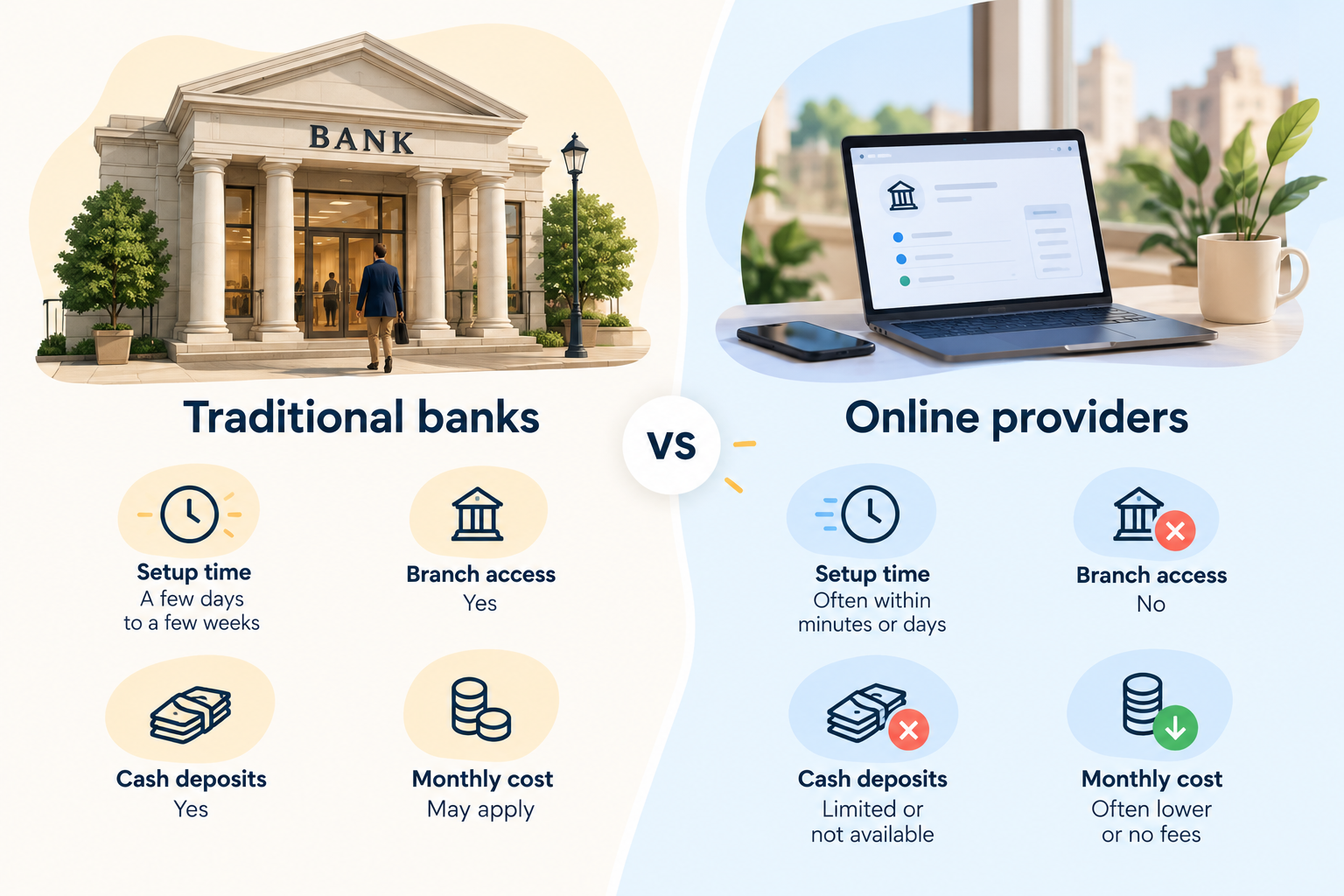
Traditional US banks compared with online business account providers on setup time, branch access and fees.

Traditional banks such as Chase, Bank of America, and U.S. Bank give you access to physical branches. You can deposit cash, speak with bank staff, and explore business loans or other financial services. However, some accounts charge monthly maintenance fees unless you meet specific requirements.

Online providers such as Bluevine, Mercury, Relay, and Grey let you manage your finances digitally. While Bluevine, Mercury, and Relay offer business banking tools, Grey supports cross-border payments, making it useful for businesses that send or receive money internationally. Online providers may offer lower fees, faster account setup, and convenient payment management. However, cash deposits and in-person support may be limited.

Before you decide, compare monthly fees, transaction limits, deposit options, and eligibility requirements. If you need branch access, a traditional bank may suit you better. If you value convenience and digital payments, an online provider may be the better fit.

Also read: Can non-residents open a US bank account online in 2026?

Adding international payments

Opening an LLC in the US can help you establish your business, but what happens when your customers, suppliers, or team are in different countries? You need a simple way to move money across borders without disrupting your day-to-day operations.

That is where Grey comes in. With Grey, you can send and receive money from the US to support international business transactions, whether you are collecting payments from clients or paying partners overseas. Instead of relying on your traditional business bank account for every cross-border transaction, you can add a dedicated payment solution to your setup.

To get started, open a Grey Business account and explore the options available for your business.

Frequently asked questions about the best business bank accounts to have in the US

What is the best business bank account for an LLC?

The best business bank account depends on your LLC’s needs. Chase and Bank of America offer branch access, while Bluevine, Mercury, and Relay provide digital banking tools. Compare fees, transaction limits, payment options, and eligibility requirements to find an account that suits your business.

Which business bank account has the lowest fees?

Online providers such as Bluevine, Mercury, and Relay offer business accounts with no monthly maintenance fees on certain plans. However, other charges may apply for specific transactions or services. Compare each provider’s fee schedule and account requirements before making your decision.

Can I open a business bank account online?

Yes, many banks and online providers let you apply for a business bank account online. You will typically need your LLC formation documents, identification, and business details. Approval times and requirements vary by provider, so check the application process before applying.

Do I need an EIN to open a business bank account?

Many banks require an Employer Identification Number (EIN) to open an LLC business account. Some single-member LLCs may qualify to use other tax identification details, depending on the bank’s policies. Check the provider’s requirements and obtain an EIN from the IRS if needed.

What about international payments for my LLC?

If your LLC works with overseas clients or suppliers, look for accounts that support international transfers and multiple currencies. Grey can complement your business banking setup by helping you send and receive money from the US. Compare transfer fees, exchange rates, supported currencies, and eligibility before choosing a provider.

Are online business bank accounts safe?

Online business accounts can offer strong security features, including encryption, multi-factor authentication, and transaction monitoring. However, protections vary by provider. Check whether deposits are held at an FDIC-insured bank, understand applicable coverage limits, and review the provider’s security policies before opening an account.

PNC business account: Fees, features and how to open

•

•

2 min read

Choosing the right business bank account can make it easier to manage daily expenses, receive customer payments and keep your business finances organised. However, monthly maintenance fees, transaction limits and minimum balance requirements can affect how much you pay for banking services. If you are considering a PNC Bank business account, understanding these costs and features can help you decide whether it suits your business needs.

PNC offers several business checking accounts designed for businesses with different transaction volumes and banking needs. Each account comes with its own fee structure, transaction allowances and requirements for waiving monthly maintenance fees. Depending on the account you choose, maintaining a qualifying balance may help you avoid these charges.

Opening an account is also relatively straightforward, with options to apply online or visit a branch. You will generally need your employer identification number (EIN), business formation documents and valid identification. This guide covers PNC business account fees, key features, eligibility requirements and how to open an account, helping you understand what to expect before applying.

Also read: Best business bank accounts for an LLC

PNC Business account options: which checking tier fits your business?

PNC offers several business checking options designed for different transaction volumes, cash handling needs and business sizes. Choosing the right tier depends on your monthly activity, available balance and financial management needs.

Business Checking: Best for freelancers, sole proprietors and micro-businesses with fewer transactions. Its $500 balance waiver threshold can help eligible account holders avoid the monthly maintenance fee.

Business Checking Plus: Suits local retailers, storefronts and growing businesses that handle more payments. It accommodates up to 500 monthly items and $10,000 in cash deposits before additional charges may apply.

Treasury Enterprise: Designed for businesses managing multiple entities or accounts. It allows up to four linked accounts to qualify toward a combined $30,000 balance requirement.

Analysis: Best suited to large enterprises with substantial cash flows. Earnings Credits can help offset eligible account service charges, making it worth considering for businesses with complex treasury management needs.

PNC business checking line-up (2026)

Account tier Monthly fee /
waiver minimum
Free transactions Free cash deposits Ideal for
Business Checking $12 / $500 balance 150/month $5,000/month Freelancers, side hustles and startups
Business Checking Plus $22 / $5,000 balance 500/month $10,000/month Growing businesses and local retailers
Treasury Enterprise Plan $50 / $30,000 combined balance Unlimited across linked accounts $50,000/month Established mid-sized businesses
Analysis Business Checking Variable / Earnings Credit Custom Custom Large enterprises with complex cash flows

‍

PNC business account fees and how to avoid them

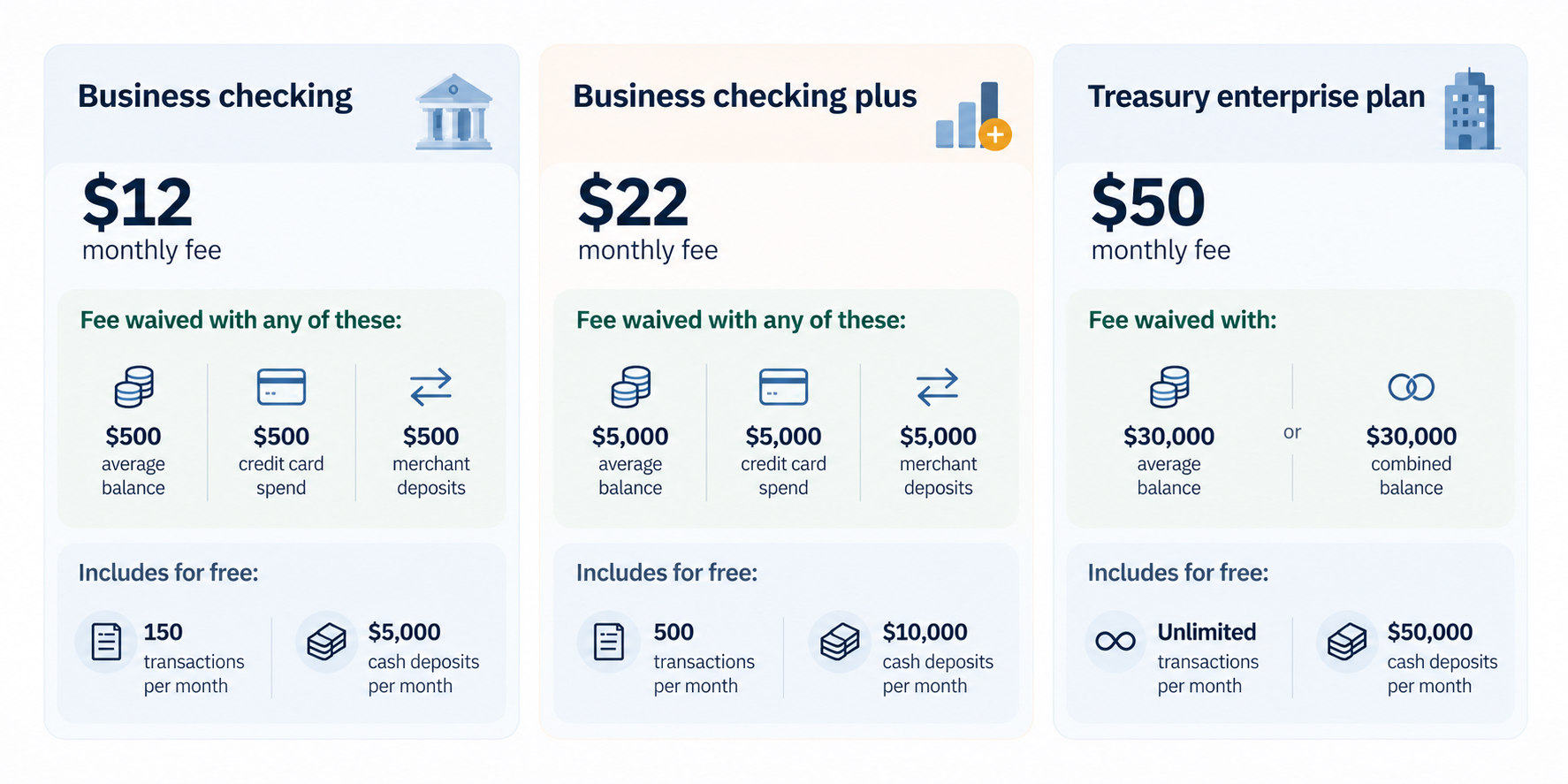
 Graphic showing how a monthly business checking fee can be waived by meeting a balance requirement.

1. Business checking — $12 monthly fee

How to avoid the fee:

  • Maintain a $500 average monthly balance.
  • Spend $500 on a linked PNC Business Credit Card.
  • Process $500 in deposits through a linked PNC merchant account.

How to avoid extra charges:

  • Keep monthly transactions within the 150 free-item limit.
  • Keep monthly cash deposits within the $5,000 free allowance.

2. Business checking plus — $22 monthly fee

How to avoid the fee:

  • Maintain a $5,000 average monthly balance.
  • Maintain a combined $20,000 balance across eligible linked checking and money market accounts.
  • Spend $5,000 on a linked PNC Business Credit Card.
  • Process $5,000 in deposits through a linked PNC merchant account.

How to avoid extra charges:

  • Keep monthly transactions within the 500 free-item limit.
  • Keep monthly cash deposits within the $10,000 free allowance.

3. Treasury enterprise plan — $50 monthly fee

How to avoid the fee:

  • Maintain a $30,000 average monthly balance.
  • Alternatively, maintain a combined $30,000 balance across eligible linked corporate accounts.

How to avoid extra charges:

  • Enjoy unlimited transactions across linked accounts.
  • Keep monthly cash deposits within the $50,000 free allowance.

PNC Business account features and tools

PNC provides digital banking, business debit cards, payment processing and cash management tools to help businesses handle everyday transactions, monitor cash flow and manage finances more efficiently.

Digital tools: PNC Business Online Banking and mobile deposit capabilities help business owners check balances, review transactions, deposit eligible checks and manage accounts without visiting a branch.

Cards: Eligible account holders can access PNC Bank Visa Business Debit cards for convenient business purchases. The Purchase Payback® programme may offer cash-back rewards on qualifying purchases from participating merchants, subject to applicable terms.

Integrations: Businesses with more complex financial needs can use PINACLE®, PNC's treasury management platform, to access cash management services and tools that support cash-flow forecasting, payment management and account visibility.

Payment processing: PNC Merchant Services helps businesses accept customer payments and manage transactions. When used alongside available cash-flow tracking tools, these services can make it easier to monitor incoming payments, reconcile transactions and manage accounts receivable.

Together, these features give businesses tools to manage routine banking, track incoming funds and oversee payments. Availability, eligibility and fees may vary by account type and service, so review PNC's current terms before enrolling.

Also read: How to open a business bank account

Handling international payments

While a PNC business account can help you manage everyday banking in the US, businesses working with international clients, suppliers or remote teams may need additional options for cross-border payments. This is where Grey can complement your banking setup.

With a Grey Business account, eligible businesses can send and receive money from the US, making it easier to manage international payments when working with American clients, paying overseas suppliers or serving customers across borders.

Grey adds a multi-currency layer to your financial operations, helping you handle international transactions alongside your regular business banking. Before choosing a service, review supported currencies, transfer fees, exchange rates and account eligibility to understand the costs involved.

Frequently asked questions

1. What business accounts does PNC offer?

PNC offers several business checking options, including Business Checking, Business Checking Plus, Treasury Enterprise Plan and Analysis Business Checking. Each serves different needs, from freelancers and small businesses to larger companies managing substantial cash flows. The right account depends on your transaction volume, cash deposits and treasury management requirements.

2. What are the fees?

Monthly maintenance fees vary by account tier. Business Checking costs $12, Business Checking Plus costs $22, and Treasury Enterprise Plan costs $50, based on the fee schedule outlined above. Analysis Business Checking has variable fees. Eligible accounts may qualify for waivers by meeting balance or other requirements. Transaction and cash deposit limits may also trigger additional charges.

3. Can I open one online?

Yes, PNC allows eligible customers to apply for certain business checking accounts online. You can also visit a branch to complete the application. Availability may depend on your business structure, location and eligibility. Before applying, review the account requirements and prepare the necessary identification and business documents to help avoid delays.

4. What documents do I need?

PNC generally requires your business Tax Identification Number (TIN), or Social Security number for eligible sole proprietors, business registration documents and proof of authority to operate the business. You will also need identification. Online applicants need a valid email address. Requirements vary by business structure.

5. Is there a minimum balance?

PNC Business Checking has a $100 minimum opening deposit. This differs from the $500 average monthly balance that can waive its $12 maintenance fee. Other account tiers have different waiver requirements. You may avoid monthly fees through qualifying linked credit card purchases or merchant deposits, depending on the account.

6. How do I handle overseas payments?

You can use PNC international wire transfers to send money overseas or receive payments from abroad, although transfer fees and currency conversion costs may apply. For additional cross-border flexibility, eligible businesses can use a Grey Business account to send and receive money from the US. Compare fees and supported currencies before choosing a service.

Getting paid from Europe and the US while living in India

•

•

2 min read

Earning in euros or dollars while living in India is a common goal for many remote workers, digital nomads, and expats. This often translates to higher earning potential, especially when converted to rupees. Unfortunately, high fees, payment delays, complex paperwork and forced currency conversions often make getting paid from Europe and the US while living in India very challenging.

However, there are various ways to manage international payments seamlessly while working in India. Here is how professionals in India efficiently receive payments from Europe and the US, and keep more of their earnings.

Why getting paid from Europe and the US can be tricky

Most traditional Indian banks are designed for just domestic transactions rather than foreign payments. When payments arrive via international wire, they may pass through multiple intermediary banks and incur extra charges. On top of that, you are forced to convert from EUR or USD to INR immediately the money lands in your accounts, and the rates are often not that great.

Due to processing and the transaction network, it may take a few days for the payment to reach your account. Lack of control over fees, transaction speed, and conversion can be frustrating for many professionals. The uncertainties make financial planning somewhat difficult.

Also read: Why Bengaluru is India’s unofficial capital for remote work and startups

How to get paid from Europe and the US while living in India

Here are the popular options for managing international payments from Europe and the US while living in India

Bank transfers and SWIFT payments

Many European and US companies opt for international bank transfers via SWIFT because it is reliable. This method is widely trusted and works well for both large payments and regular salaries. However, it has drawbacks. Transfers may take several business days, and fees are deducted before the money even gets to your account. You may also need to provide additional documentation to access your earnings, which can be cumbersome.

While SWIFT transfers are acceptable for occasional payments, they are rarely the most cost-effective option for frequent international income.

Using digital payment platforms

Platforms such as PayPal, Payoneer and Skrill are popular because they are easy for foreign clients to use. Payments arrive quickly, and you can withdraw funds to your Indian bank account.

However, convenience comes at a cost. You need to be mindful of platform fees, withdrawal charges, and currency conversion mark-ups that can significantly reduce your earnings. Some users also experience account limitations or compliance reviews that temporarily restrict access to funds. This is why it is best to compare options before choosing a digital payment solution.

  • Payoneer: Ideal if you work through international freelance marketplaces like Upwork or Fiverr. It provides multi-currency accounts and integrates seamlessly with these platforms, making withdrawals straightforward.
  • Razorpay: An India-based payment gateway that allows businesses and some freelancers to accept international card payments in over 130 currencies directly into their Indian bank account.
  • PayPal: Widely used and trusted by global clients. However, while PayPal supports swift transfers, it comes at a higher cost.

Also read: Payment methods Indians often miss: alternatives beyond PayPal and bank transfers

Multi-currency accounts

For many Indians earning from Europe and the US, multi-currency accounts have become the most efficient payment solution. These payment platforms help you open accounts in various currencies such as USD, EUR, and GBP. This way, clients can pay you as if they were making a local transfer within their country.

LDMAG1

You also don’t have to convert your earnings to INR immediately, as a multi-currency account allows you to hold foreign currency and convert when exchange rates are favourable. You can also spend foreign currencies directly to pay for your subscriptions, trips, and online purchases. This level of control protects your income because fees are typically low, transactions are swift, and there are no hidden fees.

  • Grey: Tailored to remote workers in India with international clients. Users can access USD, EUR, and GBP account details for international payments within minutes. Transaction fees are generally low with mid-market exchange rates, and transactions are nearly instant. You can also get a USD debit card for your online payments and automated invoicing to streamline your finances. Grey also integrates seamlessly with global freelancing platforms (like Fiverr and Upwork) and online marketplaces (like Etsy and Amazon), allowing you to access your earnings without delay.
  • Wise: Offers local account details (USD, EUR, GBP) so clients can pay you via a local transfer, avoiding SWIFT fees. Funds are converted at the mid-market exchange rate with low, transparent fees, ensuring you keep more of your earnings.
  • Winvesta: A fintech company providing cross-border payments and multi-currency accounts for Indians. Users can manage payments in USD, EUR, GBP and other foreign currencies.

Also read: How remote workers in India can switch from traditional banks to Grey.

Managing your global income with Grey

Getting paid from Europe and the US while living in India does not have to be stressful. With the right tools, you can maximise your earnings and streamline your finances. Grey provides multi-currency accounts supporting USD, EUR, and GBP. This allows professionals in India to receive payments from Europe and the US easily. You can hold foreign currency, convert at competitive rates, and withdraw to your Indian bank account when it suits you.

Sign up on Grey today or download the app to get started.

‍

How Egyptians earn foreign currencies online

•

•

2 min read

Egyptians are increasingly expanding beyond local employment as remote work and digital income opportunities reshape how people earn. Across the country, more professionals, students, and creatives are targeting foreign currency earnings as a way to improve financial stability. With global connectivity improving, it is now common for Egyptians to earn in USD, EUR, or GBP without ever leaving the country. These incomes come from clients in the Gulf, Europe, the United States, and beyond, powered by freelance platforms, remote job boards, and digital marketplaces.

Below are the most practical and widely used ways Egyptians are earning foreign currency online today, along with what it takes to succeed in each path.

Also read: How Egypt is becoming a MENA hub for remote workers

Content creation and monetisation

Content creation has become one of the most visible ways Egyptians earn foreign income. Platforms like YouTube, TikTok and Instagram allow creators to monetise attention through ads, brand partnerships, affiliate marketing, and subscriptions. Egyptian creators span comedy, lifestyle, tech, gaming, and education, proving there is no single path to success. The key is consistency and audience targeting rather than location.

Creators earn mainly in USD through platform monetisation systems and sponsorship deals with international brands. While competition is high, creators who focus on niche topics or global audiences often scale faster. Monetisation also extends beyond ads into memberships, Patreon-style support, and paid collaborations, giving creators multiple income streams rather than relying on a single platform.

Freelancing for international clients

Freelancing remains the most direct and scalable way to earn foreign currency online. Egyptians offer services in software development, graphic design, copywriting, digital marketing, SEO, video editing, data analysis, and customer support. Platforms such as Upwork, Fiverr, and Freelancer connect them to clients worldwide, while LinkedIn and cold outreach help secure higher-paying direct contracts.

Success in freelancing depends on positioning and specialisation. Generalists often struggle, while specialists in high-demand skills like AI development, UI/UX design, and performance marketing command higher rates. Payments are typically received in USD or EUR, giving freelancers access to stronger earning power compared to local currency jobs.

Also read: Opportunities for Egyptian remote workers in the Middle East

Remote jobs with international companies

Remote employment has become one of the most stable ways Egyptians earn foreign income. Instead of project-based work, professionals secure full-time or long-term contracts with foreign companies in tech, finance, customer support, operations, and marketing. These roles provide predictable monthly salaries paid in foreign currency.

Unlike freelancing, remote jobs offer structure, benefits, and long-term stability. Many companies hiring remotely look for English proficiency, technical skills, and time zone flexibility. With the rise of distributed teams, Egyptians can now work for companies in Europe, the US, or the Gulf without relocating.

Online businesses and digital products

Another growing path is building online businesses that sell globally. Egyptians are creating e-commerce stores, SaaS platforms, digital templates, courses, ebooks, and subscription communities. Platforms like Shopify, Amazon, Etsy, and Gumroad make it easier to reach international buyers and collect payments in USD.

Digital products are especially attractive because they scale without physical inventory. A single course, template, or software tool can generate recurring income over time. Many creators also combine content creation with product sales, turning audiences into customers through email lists and social media funnels.

Tutoring, coaching, and consulting

Online tutoring/coaching is another strong income stream. Egyptians teach languages, academic subjects, fitness, business skills, and professional certifications to global students. Platforms like Preply, Italki, and Zoom-based private sessions allow educators to charge hourly rates in foreign currency.

Consulting is the higher-income version of this path. Professionals with experience in marketing, finance, HR, or tech offer advisory services to international startups and small businesses. These services often pay significantly more per hour than traditional jobs in Egypt.

Also read: How to open a UK bank account remotely from Egypt

How to receive money online from Egypt

Payoneer

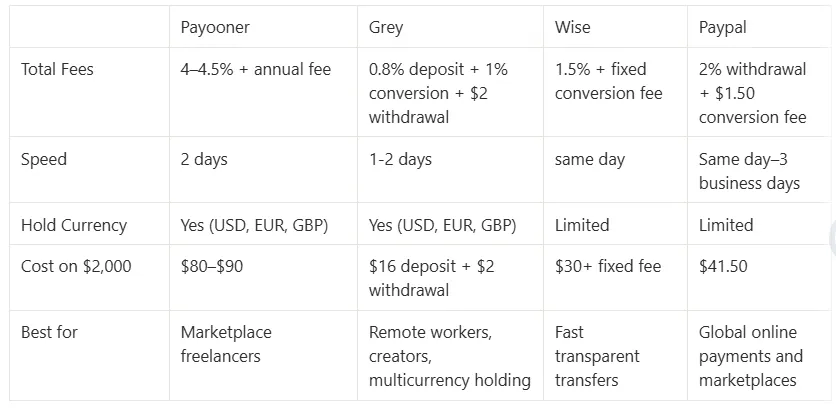
Payoneer remains one of the most widely used payment platforms among Egyptian freelancers and remote workers. It provides users with virtual receiving accounts in USD, EUR, and GBP, making it easier to receive payments from international clients, freelance marketplaces, and global companies. Funds can then be withdrawn directly into Egyptian bank accounts. Payoneer typically applies combined conversion and withdrawal charges of about 4–4.5%, which can significantly affect larger payouts over time. The platform also charges an annual maintenance fee of $29.95, although this fee is waived for users processing at least $100 in yearly transactions. Its global acceptance remains one of its strongest advantages for freelancers earning internationally.

Grey

Grey is becoming increasingly popular among Egyptians receiving payments from abroad because of its multicurrency flexibility and cleaner fee structure. Users can receive, hold, and manage USD, EUR, or GBP balances within one account before sending to their local accounts when they prefer. This gives users greater control over exchange timing instead of relying on automatic bank conversions. Grey charges a 0.8% deposit fee depending on funding method, while currency conversion costs 1%, capped at $6. Compared to traditional banking routes, this structure makes costs more predictable for freelancers, creators, remote workers, and online business owners receiving regular international payments from clients and global platforms.

Wise

Wise is widely recognised for transparent pricing and exchange rates that closely match the real mid-market rate. Egyptians can receive payments in foreign currencies such as USD and transfer funds directly into local bank accounts with fewer hidden markups than many traditional providers. Wise generally charges around 1.5% plus a small fixed conversion fee depending on the currency route and payout method selected. One of its strongest advantages is clarity, allowing users to see the exact conversion rate and total charges before confirming transactions. This makes Wise particularly attractive to freelancers, consultants, and remote professionals who prioritise predictable international payment costs and fast transfer processing.

PayPal

PayPal remains one of the most globally recognised online payment platforms and is commonly used by freelancers, online sellers, and creators receiving international payments. However, withdrawing funds into Egyptian bank accounts can become expensive due to combined withdrawal and conversion costs. PayPal charges approximately 2% for withdrawals, while USD account conversion fees can add another $1.50, and exchange rate markups can reduce the final amount received. Despite these costs, many people still use PayPal because of its global acceptance and compatibility with international websites, marketplaces, and digital services. It is especially common among beginners entering freelance or online business work for the first time.

How the platforms compare

__wf_reserved_inherit

The cheapest platform is not always the one with the lowest visible fee. Focus on how much finally reaches your Egyptian account after conversion, withdrawal, and hidden FX costs. If you receive payments regularly, even small percentage differences across platforms can save or cost you hundreds of dollars yearly.

Also read: How freelancers in Egypt earn and store foreign currency

How to avoid losing money when receiving payment online in Egypt

Look at what you actually receive

Do not focus on “zero fee” claims when receiving money online in Egypt. Many platforms hide costs inside exchange rates. A service may charge no visible fee but apply a 2%–3% conversion margin, reducing your final USD value more than a small fixed charge. Always compare the actual amount credited to your account from the same payment.

Watch the conversion rate before cashing out

Money received online is often held in USD before conversion into Egyptian pounds. Rates change daily, and timing affects your payout. On a $1,000 payment, even a 1% difference equals $10 lost or gained. If your platform allows holding balances, compare rates before converting instead of accepting automatic conversion.

Use timing to your advantage when converting funds

If your platform allows you to hold funds in USD or other currencies, avoid immediate conversion. Waiting for better rates before withdrawing into Egyptian pounds can improve your final payout. For regular online earners, this simple timing habit reduces long-term losses without needing to predict currency movements.

Frequently asked questions

What is the cheapest way to receive money online in Egypt?

The cheapest option depends on volume and frequency. For larger incoming payments (around $1,000+), platforms that offer low conversion fees and capped charges like Grey can reduce total cost because the effective percentage drops. For smaller or frequent receipts, instant platforms like Wise or PayPal alternatives may feel easier, but exchange rate margins often determine the real cost. Always compare the final USD or EGP amount credited, not just the fee.

How long does it take for international payments to reach Egypt?

Speed depends on the provider and payout method. Fintech platforms like Wise typically settle within minutes to 1 business day. Grey processes payments within 1–2 business days, depending on the route used. Traditional SWIFT bank transfers can take 2–5 business days due to intermediary banks and compliance checks. Cash-based services like Western Union can be instant, but are less common for online earnings.

Can I receive money in USD and convert it later in Egypt?

Yes, but only with certain platforms. Many services convert funds immediately into Egyptian pounds upon receipt, limiting control over timing. Platforms like Grey allow you to hold USD, EUR, or GBP balances before converting. This gives you the flexibility to choose better exchange rates instead of accepting automatic conversion at a weaker rate, improving your final payout.

What documents do I need to receive international payments in Egypt?

For most online payment platforms, basic KYC is required, such as a national ID and proof of address. For higher-value or frequent transactions, providers may request additional information like the source of funds, invoices, or the purpose of payment. This ensures compliance with international AML rules and Egyptian banking regulations governing foreign currency inflows.

Why do two people receiving the same amount get different payouts in Egypt?

Because payment routes differ. One transaction may pass through SWIFT banks with FX spreads and intermediary deductions, while another uses fintech platforms with tighter rates. Timing also matters, exchange rates fluctuate daily. Even when the original amount is identical, the final EGP or USD received can vary based on fees, conversion points, and processing channels.

Also read: Freelance platforms with high payout rates in Egypt

Managing online earnings with Grey

Earning foreign currency is only half the equation. You need to find a way to manage your international earnings without incurring high transfer fees or forced conversions when receiving payments through traditional banks or some digital wallets. Grey is a leading payment platform that helps Egyptians earn globally by offering foreign currency accounts, competitive exchange rates, and easy local withdrawals. You can also get a virtual USD debit card to manage your online payments without stress.

Sign up on Grey or download the app to manage your foreign currency payments and protect your income.

Grey charges fees on deposits, conversions, and withdrawals. Deposits via ACH, SEPA, or FPS incur a 0.8% fee (minimum $2/€2/£2, maximum $10/€10/£10). Currency conversions are charged at 1%, capped at $6. Withdrawal fees vary by currency: ₦35 for NGN, 0.5% for EUR/GBP (minimum €2/£2, maximum €10/£10), and $2 for Egypt. Cross-border card transactions (non-USD purchases on a USD card) incur a 2% fee plus $0.50. Exchange rates are variable and include a margin over the mid-market rate. Always review fees and the rate before confirming a transaction. Visit grey.co/pricing for current rates.

‍

Arrow (up)

Back to top