






Switching to an Airtel eSIM lets you use your mobile number without inserting a physical SIM card into your phone. Instead, your device stores the SIM profile digitally, making it easier to activate your line on a compatible smartphone and manage your mobile connection.
If you want to convert your existing Airtel SIM to an eSIM, you'll typically need to send a text message, confirm your request and scann a QR code sent to your email address. The exact steps and eligibility requirements may vary depending on your country and Airtel’s current eSIM service.
Before you begin, check that your phone supports eSIM technology and that your Airtel line qualifies for conversion. You should also have access to the email address linked to your request and a reliable internet connection to download your eSIM profile. This guide explains the steps to follow and what to know before switching.
What do you need before converting an Airtel SIM to eSIM?
Before converting your Airtel SIM to an eSIM, make sure you have a compatible smartphone, an active Airtel number and access to a registered email address. These are essential for completing the conversion and receiving the eSIM activation details.
1. An eSIM-compatible smartphone
Your phone must support eSIM technology. Common eSIM-capable devices include the iPhone XS, XS Max and newer models, selected Samsung Galaxy S20 and newer models, Google Pixel 4 and newer models, and certain newer Motorola devices. However, compatibility varies by model, region and carrier, so confirm that your specific handset supports eSIM.
2. A registered email address
You need a working email address to receive the eSIM QR code and activation instructions from Airtel. Check that you can access your inbox before starting the process.
3. An active Airtel number
Keep your existing Airtel SIM active so you can send the conversion request and confirm it when prompted. You may also need your phone to receive verification messages during activation.
Check Airtel’s local requirements before beginning, as procedures differ by country.
How to convert an Airtel SIM to eSIM by SMS
Convert your Airtel SIM to an eSIM by texting Airtel, confirming your request, waiting for activation and scanning the emailed QR code.
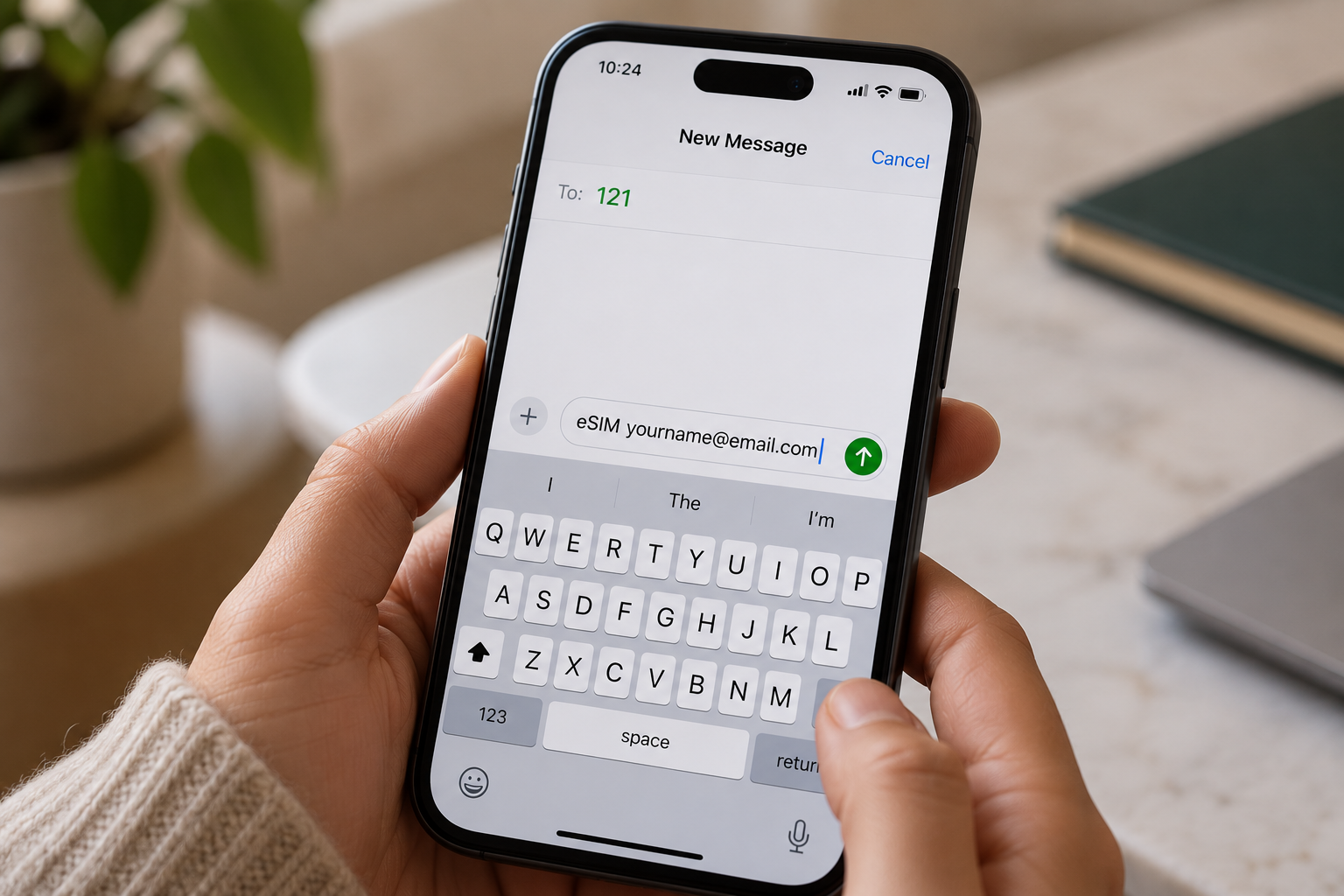
- Send an SMS to 121: Open your messaging app and send eSIM followed by your registered email address to 121. Check the spelling of your email before sending the message.
- Confirm your request: Airtel should send a confirmation message. Reply with 1 as instructed to authorise the SIM-to-eSIM conversion. Follow any additional prompts provided by Airtel.
- Wait for processing: Allow approximately 60 minutes for Airtel to process your request, although activation times may vary. Keep your existing SIM and phone available during this period in case you receive further instructions.
- Check your email for the QR code: Airtel will send an eSIM QR code to your registered email address when the process reaches the relevant stage. Check your spam or junk folder if it does not appear in your inbox.
- Scan and activate your eSIM: Connect your compatible phone to Wi-Fi, open its mobile network settings and select the option to add an eSIM. Scan the QR code and follow the on-screen instructions to complete activation.
How to convert an Airtel SIM to eSIM in the Airtel Thanks app
You can convert your physical Airtel SIM to an eSIM through the Airtel Thanks app without visiting a store, provided your number and device are eligible. The steps below apply to Airtel India; menu options may vary by app version.
- Open the Airtel Thanks app: Install or update the app, then log in using the Airtel number you want to convert. Keep your physical SIM active to receive verification messages.
- Find the eSIM option: On the home screen, scroll to Shortcuts, tap More, then select Upgrade to eSIM. If you cannot find it, check the app’s search or help section.
- Choose your device: Select "This device" to install the eSIM on your current phone, or choose Another device if that option is available.
- Enter your EID. Provide the device’s 32-digit EID when prompted. You can usually find it in your phone’s settings under "About".
- Complete verification. Follow the on-screen instructions, including any OTP or confirmation call from Airtel.
- Activate the eSIM. Wait for Airtel’s confirmation, then follow the installation prompts on your phone. Processing may take around two hours
How to scan the Airtel eSIM QR code on iPhone and Android
To activate your Airtel eSIM, scan the QR code provided by Airtel using your phone’s mobile network settings. Keep your phone connected to Wi-Fi during setup, as the eSIM profile needs an internet connection to download.
On iPhone
- Open Settings and select Cellular or Mobile Service.
- Tap Add eSIM, then choose Use QR Code.
- Scan your Airtel eSIM QR code using your camera.
- Tap Continue and follow the on-screen instructions to install the mobile plan.
- Once activated, check that your Airtel line shows a signal and can make calls.
If you’re moving to a new iPhone, follow this guide to transfer an eSIM from one iPhone to another.
On Android
- Open Settings and select Connections on Samsung, or Network & Internet on Google Pixel.
- Tap SIM manager or Mobile Network.
- Select Add eSIM or Add mobile plan.
- Choose the QR code option and scan the code from Airtel.
- Follow the prompts to download and activate your eSIM.
What happens to your physical SIM?
After the eSIM activates, your physical Airtel SIM for that number is deactivated. You can remove it from your phone. If activation fails, contact Airtel before deleting any installed eSIM profile
Why is my Airtel eSIM not activating?
Your Airtel eSIM may fail to activate because of a problem with your identity verification, phone compatibility, registered email address or activation timing. Identifying the specific issue helps you determine the right fix without unnecessarily repeating the conversion process.
- KYC mismatch: Airtel may be unable to verify your identity because your registration details do not match its records. Contact Airtel to confirm your subscriber information and complete any required verification.
- Unsupported handset: Your smartphone may not support eSIM technology, or its regional variant may lack eSIM functionality. Check your exact model’s specifications before attempting activation again.
- Wrong email address: If you entered an incorrect email address, you may not receive the Airtel eSIM QR code. Verify your registered email and check your spam folder. Contact Airtel if the QR code is missing.
- Activation delay: Airtel’s activation process can take up to two hours. Keep your phone connected to the internet and follow the installation instructions. If activation still fails after the waiting period, contact Airtel support or visit an authorised store. Avoid deleting an installed eSIM profile before receiving assistance.
If you need mobile connectivity while travelling, Grey lets you top up airtime and buy eSIMs. You can also manage cross-border expenses by using Grey to send money from the US to India or send money from the UK to India, helping you handle payments while staying connected abroad
Frequently asked questions
1. How long does an Airtel eSIM take to activate?
An Airtel eSIM usually activates within two hours after you download and enable the eSIM profile on your compatible phone. During processing, your physical SIM may continue working. Keep your device connected to Wi-Fi and follow Airtel’s instructions to complete activation. Timings may vary by country and request.
2. Does converting to an Airtel eSIM change my number?
No, converting your existing Airtel physical SIM to an eSIM generally keeps your current mobile number. The process replaces the physical SIM with a digital profile linked to the same line. You can continue using your number for calls, messages and mobile data once activation is complete.
3. Can I convert an Airtel prepaid SIM to eSIM?
Yes, eligible Airtel prepaid customers can convert their physical SIM to an eSIM in supported markets. However, the process differs by country. Airtel India provides an app-based conversion process, while Airtel Nigeria directs customers to a service centre for assistance. Confirm your line’s eligibility before starting.
4. What happens to my physical Airtel SIM after conversion?
Once your Airtel eSIM activates successfully, the physical SIM linked to that number becomes inactive. You can remove it from your phone because the eSIM now provides your mobile connection. Keep the physical SIM in place until activation is confirmed to avoid losing service during the transition.
5. Can I switch an Airtel eSIM back to a physical SIM?
Yes, you can generally switch your Airtel eSIM back to a physical SIM by requesting a SIM replacement. In India and Nigeria, Airtel directs customers to a service centre or showroom for assistance. Bring the required identification and complete any verification steps before using the replacement SIM.
6. Is there a fee to convert an Airtel SIM to eSIM?
The cost depends on your country and Airtel’s current policy. Airtel Nigeria currently states that eSIM activation has no charge, while other SIM replacement services or markets may have different fees. Before converting, check with your local Airtel provider whether activation, replacement or related services incur additional costs.
.svg)


