


<script type="application/ld+json" data-schema-version="grey-blog-v4"> [{"@context":"https://schema.org","@type":"BlogPosting","@id":"https://grey.co/blog/how-to-get-an-instant-usd-debit-card-in-switzerland#article","headline":"How to get an instant USD debit card in Switzerland","description":"Learn how to get an instant USD debit card in Switzerland with Grey. Enjoy global transactions, low fees, and secure payments.","inLanguage":"en","url":"https://grey.co/blog/how-to-get-an-instant-usd-debit-card-in-switzerland","mainEntityOfPage":{"@id":"https://grey.co/blog/how-to-get-an-instant-usd-debit-card-in-switzerland#webpage"},"datePublished":"2024-12-19T08:12:44.483Z","dateModified":"2026-06-15T17:16:09.783Z","author":{"@type":"Person","@id":"https://grey.co/authors/adeolu-titus-adekunle#person","name":"Adeolu Titus Adekunle","url":"https://grey.co/authors/adeolu-titus-adekunle","jobTitle":"Content Writer","sameAs":["https://www.linkedin.com/in/titusadeoluadekunle/"]},"publisher":{"@type":"Organization","@id":"https://grey.co/#organization","name":"Grey","url":"https://grey.co","logo":{"@type":"ImageObject","url":"https://cdn.prod.website-files.com/6360022338a81bd6fdbb1145/6564ae1077a67e39d3c491a6_Grey%20Logo%20Lockup%20Black.svg"}},"image":{"@type":"ImageObject","@id":"https://grey.co/blog/how-to-get-an-instant-usd-debit-card-in-switzerland#primaryimage","url":"https://cdn.prod.website-files.com/636a85d290ee58e70c17e1c0/6a30170420f2e168df5c6247_6a301703d9ff3c2eeb43e332_how-to-get-an-instant-usd-debit-card-in-switzerland__header-image.webp","contentUrl":"https://cdn.prod.website-files.com/636a85d290ee58e70c17e1c0/6a30170420f2e168df5c6247_6a301703d9ff3c2eeb43e332_how-to-get-an-instant-usd-debit-card-in-switzerland__header-image.webp","width":1200,"height":675}},{"@context":"https://schema.org","@type":"WebPage","@id":"https://grey.co/blog/how-to-get-an-instant-usd-debit-card-in-switzerland#webpage","url":"https://grey.co/blog/how-to-get-an-instant-usd-debit-card-in-switzerland","name":"How to get an instant USD debit card in Switzerland","description":"Learn how to get an instant USD debit card in Switzerland with Grey. Enjoy global transactions, low fees, and secure payments.","inLanguage":"en","primaryImageOfPage":{"@id":"https://grey.co/blog/how-to-get-an-instant-usd-debit-card-in-switzerland#primaryimage"},"breadcrumb":{"@id":"https://grey.co/blog/how-to-get-an-instant-usd-debit-card-in-switzerland#breadcrumb"}},{"@context":"https://schema.org","@type":"BreadcrumbList","@id":"https://grey.co/blog/how-to-get-an-instant-usd-debit-card-in-switzerland#breadcrumb","itemListElement":[{"@type":"ListItem","position":1,"name":"Home","item":"https://grey.co/"},{"@type":"ListItem","position":2,"name":"Blog","item":"https://grey.co/blog"},{"@type":"ListItem","position":3,"name":"How to get an instant USD debit card in Switzerland","item":"https://grey.co/blog/how-to-get-an-instant-usd-debit-card-in-switzerland"}]}] </script>

How to get an instant USD debit card in Switzerland

Adeolu Titus Adekunle

TABLE OF CONTENT

SHARE THIS POST

If you've ever faced difficulties with making international transactions, you’d know how valuable  having a USD  debit card can be. Whether you're a freelancer or remote worker with global clients, a digital nomad exploring Switzerland, or someone who frequently shops from overseas, a USD debit card offers unmatched convenience  for managing  international transactions.

Also read: How to get an instant USD debit card online in 2025

Getting one, however, usually involves  cumbersome application processes, hidden charges, local  regulations, and the hassle of funding the card in your local currency. But, with reliable digital banking and cross-border payment solutions like Grey, you can get an instant USD debit card in Switzerland.

Here’s everything you need to know about why it’s essential and how to get one.

Why a USD debit card is a must-have

  1. Global shopping convenience: Easily shop on international websites without the hassle of currency conversion.
  2. Save on fees: Avoid costly currency conversion fees by paying directly in USD.
  3. Travel-friendly: Simplify payments for flights, accommodations, and other travel expenses without worrying about exchange rate fluctuations.
  4. Easy subscriptions: Manage payments for services like Netflix, Spotify, and Adobe that charge in USD.

Grey makes acquiring a USD debit card fast, easy, and stress-free. Follow these steps to get started:

Steps to set up a Grey USD debit card from Switzerland

Step 1: Register and complete Know Your Customer (KYC) verification

Start by signing up for a Grey account. You can do this on the Grey app or the website. Once your account is created, you’ll need to verify your identity by uploading a valid government-issued ID, proof of your address and a picture as part of the KYC process.

Tip: Learn how to troubleshoot common KYC verification issues.

Step 2: Request and fund a foreign account

After completing the KYC process, simply request a foreign account with Grey. You can choose a US, UK, or EU account based on your needs. This account allows you to receive payments in foreign currencies. Fund your foreign account easily via local bank transfer, giving you peace of mind and confidence in your financial management.

Step 3: Get your USD debit card

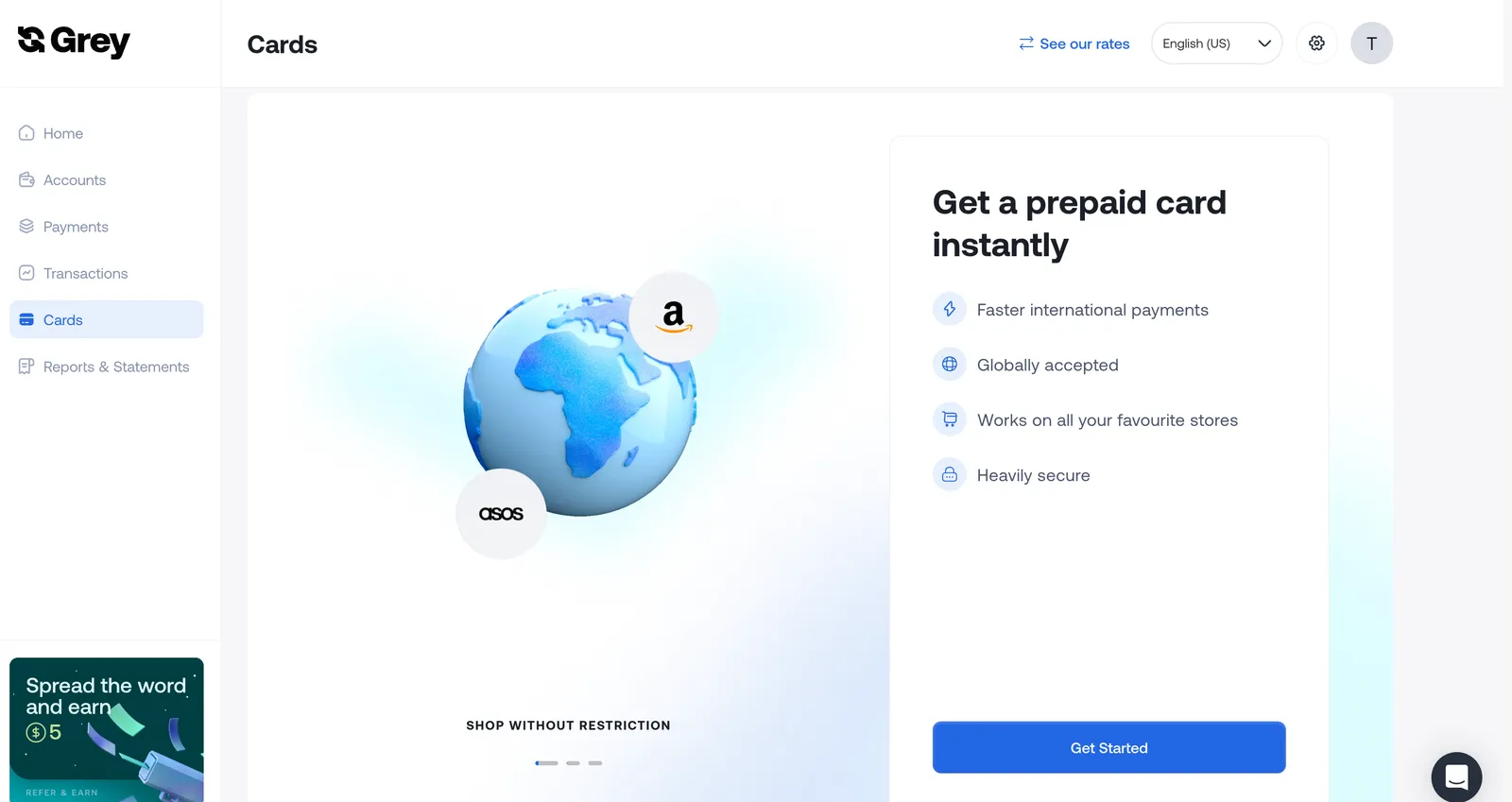
Once your foreign account is funded, you can request a virtual USD debit card. Log in to your Grey account, go to the “Card” section, and follow the prompts to create your card.

__wf_reserved_inherit

You’ll need to pay a one-time creation fee of $4, with an additional $1 deducted to fund your card. Once set up, your USD debit card is ready for immediate use, enabling you to transact globally without delays.

Why choose the Grey USD debit card?

  1. Instant access: Get your USD card instantly after setup, with no waiting period.
  2. Worldwide usability: Shop, subscribe, and pay on platforms that accept MasterCard.
  3. Easy funding: fund your card conveniently from your Grey foreign account.
  4. Low, transparent fees: Avoid hidden costs and enjoy competitive rates for your transactions.
  5. Secure payments: Grey ensures your transactions are protected with advanced security measures.

Read more: How to shop online using the Grey virtual card.

Conclusion

Getting an instant USD debit card with Grey and managing international transactions from Switzerland is easier than ever. Whether for travel, online shopping, or subscription payments, the Grey USD debit card gives you the flexibility and security you need.

With instant access, worldwide usability, simple funding, low, transparent fees, and secure payments,  Grey's virtual USD debit card is your key to global financial control. Get started today and take control of your global finances with your instant virtual USD card.

‍

Last updated:

October 2, 2026

Open a free Grey account to get startedJoin 1 million digital nomads
IF YOU ENJOYED THIS, CHECK THESE OUT

Independent contractor vs employee: How to tell the difference

•

•

2 min read

A new job offer can feel straightforward until you reach the part of the contract that describes your employment status. The salary may look attractive and the role may seem like the right next step, but being hired as an independent contractor rather than an employee can change what you take home, who handles your taxes and whether you receive benefits such as paid leave or health insurance.

An independent contractor runs their own business and controls how they work, while an employee works under the employer's direction. Employers withhold tax and provide benefits for employees, but not for contractors, who handle their own taxes

The difference is more than a job title, and getting it wrong can leave you with unexpected tax bills or fewer workplace protections than you expected. In this guide, we’ll break down the key differences between an independent contractor and an employee, so you can understand where you stand before signing your next contract.

Independent contractor vs employee: Key differences

This table compares the main differences between contractors and employees, from workplace control and taxes to benefits, job security, tools, and financial risk.

Feature Independent Contractor Employee
Control Dictates own hours, methods, and routine Employer dictates schedule, location, and tasks
Tax Pays own income and self-employment taxes Employer automatically withholds income and payroll taxes
Benefits Responsible for own health insurance and retirement Eligible for company healthcare, 401(k), and PTO
Tools Provides own specialised equipment and software Employer provides necessary tools and equipment
Permanence Defined by project completion or contract end Indefinite, ongoing relationship until termination
Financial Risk Can experience a financial profit or loss Receives a guaranteed wage or salary

‍

What is an independent contractor?

An independent contractor is a self-employed person who provides services to a business or individual under a contract rather than working as a traditional employee. Think of a freelance designer hired to create a company’s new website, a consultant brought in to solve a business problem, or a writer paid to produce a series of articles. They work independently and are generally responsible for deciding how, when, and where the work gets done, as long as they deliver what was agreed in the contract.

In the US, independent contractors are commonly paid as 1099 workers, meaning businesses generally report their payments to the contractor using a Form 1099-NEC when applicable. Unlike employees, contractors typically do not have income tax, Social Security, or Medicare taxes withheld from their payments, so they need to plan for these taxes themselves.

Being an independent contractor also comes with responsibilities beyond completing the work. Contractors usually handle their own tax filings, business expenses, insurance and retirement planning, while keeping records of income and expenses. The trade-off is greater control over how they work and, in many cases, the ability to work with multiple clients.

What is an Employee?

An employee is a person who works for a company or organisation under an employment relationship, where the employer generally controls what work is done, how it is performed and when it is completed. Unlike an independent contractor, an employee works as part of the organisation and is typically entitled to protections and benefits provided under their employment arrangement.

W-2 Pay

In the US, employees are generally paid through payroll and receive a W-2 form from their employer at the end of the tax year. The W-2 reports their wages and the taxes already withheld from their pay.

Tax Withholding

Employers typically withhold federal income tax, Social Security and Medicare taxes from an employee’s wages and send these amounts to the relevant authorities. This means employees do not usually need to set aside the full tax amount themselves.

Employee Benefits

Depending on the employer and role, employees may receive health insurance, retirement plans, paid time off and other benefits. If you encounter the term “what a 1099 employee is,” it is important to understand that a 1099 worker is generally an independent contractor, not an employee.

How the IRS tests classification

The difference between an employee and an independent contractor is not always obvious from a job title or contract. A company might call someone a contractor, but the IRS looks at the actual working relationship to determine how that person should be classified for tax purposes. It generally considers three categories of control.

Behavioral Control

The IRS considers whether the business has the right to direct how, when and where the worker performs their job. Detailed instructions, set working hours, training and supervision can indicate an employee relationship.

Financial Control

The IRS looks at how much control the business has over the worker’s financial and business activities. Factors include who provides tools and equipment, whether expenses are reimbursed, how the worker is paid and whether they can make a profit or experience a loss.

Relationship Factors

The nature of the relationship also matters, including written contracts, employee benefits, how permanent the arrangement is and whether the worker provides services that are a key part of the business. No single factor determines classification; the IRS considers the entire relationship.

How taxes and paperwork differ for Contractors and Employees

Getting paid as a contractor or employee does not just change the amount that lands in your bank account; it also changes the paperwork you receive, who handles your tax withholding and what happens if your worker classification is wrong.

1099 vs. W-2

Employees generally receive a W-2 showing their wages and taxes withheld by their employer, while independent contractors typically receive a 1099-NEC for qualifying payments. Understanding 1099 vs. W-2 can help clarify how each worker is paid, what taxes are withheld, who is responsible for reporting income, and what paperwork to expect.

Self-Employment Tax

Contractors generally have to account for both the employer and employee portions of Social Security and Medicare taxes through self-employment tax, meaning they need to plan for these payments themselves rather than relying on payroll withholding.

Misclassification risk

Calling a worker a contractor does not automatically make them one. If a business treats an employee as an independent contractor, it may face additional taxes, penalties and other consequences, while the worker could miss protections and benefits they should have received.

How to pay contractors in the US and abroad

Paying a contractor can look simple until the person doing the work lives in another country. A US-based company might have a designer in the Philippines, a developer in Nigeria or a marketing consultant in Brazil, and suddenly the payment process involves exchange rates, transfer fees, payment details and waiting times.

This is where Grey can make contractor payments easier. Businesses can use Grey to pay contractors from the US and send payments internationally without having to navigate a complicated process for every contractor. The platform supports transfers across multiple currencies, allowing businesses to hold and convert funds before sending money to contractors in supported countries.

For example, a US company paying a contractor in the Philippines can use Grey to send money from the US to the Philippines, while the contractor receives the funds in the supported local currency. For businesses working with international talent regularly, having one place to manage these payments can make cross-border contracting much simpler.

Frequently asked questions

What is the difference between a contractor and an employee?

An employee works under an employer’s direction and typically receives payroll withholding and benefits, while an independent contractor runs their own business and controls how they complete their work. Contractors generally handle their own taxes, business expenses and insurance, while employees receive greater workplace protections and employer-provided benefits.

How does the IRS decide?

The IRS looks beyond a worker’s job title or contract and examines the actual working relationship. It considers behavioural control, financial control and the relationship between the worker and business. No single factor automatically determines classification, so businesses should consider the full arrangement when deciding whether someone is an employee or contractor.

Do contractors get benefits?

Independent contractors generally do not receive employee benefits such as employer-sponsored health insurance, paid vacation or retirement contributions. Instead, they are responsible for arranging their own insurance, retirement savings and other benefits. However, a contractor’s specific agreement can provide certain perks or payments, depending on what the business and contractor negotiate.

What is misclassification?

Misclassification happens when a business treats a worker as an independent contractor when the person legally qualifies as an employee. This can affect taxes, benefits and workplace protections. For the business, misclassification can lead to unpaid employment taxes, penalties and other costs, while the worker may lose benefits they should have received.

Can someone be both?

Yes, someone can potentially work as an employee for one business while independently contracting for another. For example, a person could have a full-time W-2 job and provide freelance consulting services to separate clients. However, the classification of each working relationship depends on the specific facts and circumstances involved.

How do I pay an overseas contractor?

Paying an overseas contractor typically involves choosing a payment method, confirming the contractor’s banking details and considering currency conversion, transfer fees and tax documentation. Platforms such as Grey can help businesses make international payments, allowing them to send money across borders without relying on traditional bank transfers for every contractor.

Grey Business vs Grey personal banking

•

•

2 min read

“Should I be using Grey Business, or is my personal Grey account enough?”

It’s a common question, especially once your income starts growing.

At the beginning, everything feels simple. You get paid and you withdraw your money easily. But as your work evolves, whether that’s taking on more clients, earning from multiple platforms, or starting a company, the way you manage money needs to evolve too.

Grey offers two account types for this exact reason: Grey Personal and Grey Business. They are not better or worse than each other. They are built for different stages of your earning process.

This guide breaks down the differences, including fees, features, and when to switch, so you can choose the right setup without second-guessing.

‍Also read: Receiving foreign income as a solo founder

What is a Grey personal account?

A Grey personal account is designed for individuals who receive and manage international payments.

If you are a freelancer, remote worker, or creator earning from global clients or platforms, this is the account you are expected to use.

With a personal account, you can open USD, GBP, and EUR balances with real banking details. This allows clients to pay you as if they were making a local transfer in their own country. Instead of receiving an expensive international wire, you receive money through local rails like ACH, SEPA, and FPS.

Once the money arrives, you can hold it in foreign currency, convert it when the rate works for you, or withdraw it to your local bank account. You can also spend directly using your Grey virtual card without needing to manually move funds around.

The focus here is simplicity. You are managing your own income, and the account is designed to make that as flexible as possible.

What fees does Grey Personal charge?

Understanding fees is where most people get confused, so here’s how it actually works.

When you receive money through ACH, SEPA, or FPS, Grey charges a 0.8% fee, with a minimum of $2, €2, or £2 and a maximum of $10, €10, or £10. This means larger payments become proportionally cheaper because of the cap.

Currency conversion depends on the currency pair. Some routes are free, while others range from 0.5% to 1%. For certain major pairs, the fee is capped at $6. The important detail is that Grey shows the rate before you confirm, so there are no hidden charges after the fact.

Withdrawals vary depending on the country, but for major currencies like EUR and GBP, the fee is typically 0.5%, with a minimum and maximum cap. Other corridors may use fixed fees instead.

For less common deposit methods like Fedwire, BACS, or CHAPS, fixed fees apply. These are generally used less often, since local rails like ACH or FPS are cheaper.

Read more: Grey charges explained: what every transaction costs

What is Grey Business?

Grey Business is designed for companies rather than individuals.

If you are running a registered business, working under a company name, or managing revenue that belongs to a business entity, this is the account structure you need.

Unlike a personal account, a Grey Business account is built for your company. This means you can receive payments on behalf of the business, manage funds at a company level, and keep financial records properly organised for accounting and compliance.

The functionality goes beyond receiving payments. Grey Business allows you to manage team access, assign roles, and give multiple people control over finances without sharing a single login.

You can also pay contractors globally, send payments in local currencies, and handle bulk payouts by uploading recipient details. This becomes important as soon as you are working with a team or scaling operations.

The goal of Grey Business is not just to receive money, but to structure how your business handles it.

What fees does Grey Business charge?

Grey Business follows the same core pricing model as personal accounts.

Receiving payments still comes with the 0.8% fee capped at $10. Conversion fees follow the same tiered structure, and withdrawals depend on the payout country.

The difference is not in lower fees, but in what the account enables.

With Grey Business, you are paying for structure, team management, and the ability to operate at scale without mixing personal and company finances.

Grey Personal vs Grey Business: what is the difference?

The main difference comes down to ownership.

A personal account is for money that belongs to you as an individual. A business account is for money that belongs to a company.

Everything else builds from that.

Grey Personal is simpler, quicker to set up, and designed for individuals managing their own income. Grey Business requires verification of a registered company but provides tools to manage payments, teams, and operations effectively.

If you are working alone and getting paid for your own work, a personal account is enough. If you are invoicing as a company, hiring people, or managing shared finances, you need a business account.

‍Also read: Can non-residents open a US bank account online in 2026?

When should you use Grey for personal use?

You should use a personal account if you are earning in your own name.

This includes freelancers, remote employees, and creators earning from platforms like YouTube, TikTok, or Upwork. At this stage, your income is still personal, even if it comes from multiple sources.

A personal account keeps things simple.

When should you use Grey Business?

You should use Grey Business when your income is no longer just yours.

If you have registered a company, invoice under a business name, or manage revenue that belongs to a business entity, a personal account is no longer the right structure.

This is especially important if you are paying contractors, working with a team, or preparing financial records for accounting and tax purposes.

Can you have both Grey for personal use and Grey Business?

Yes, and in many cases, this is the best setup.

If you run a company but also earn income personally, keeping both accounts separate helps avoid confusion. Your business transactions stay within the business account, while your personal income remains separate.

This makes accounting cleaner and reduces the risk of mixing funds.

Grey for personal use vs Grey Business: key differences

Feature Grey Personal Grey Business
Who it’s for Individuals (freelancers, creators, remote workers) Registered companies, startups, agencies
Account ownership Personal use Business entity
Currencies supported USD, GBP, EUR, USDC USD, USDC (business-focused)
Receiving payments Yes (ACH, SEPA, FPS) Yes (for business transactions)
Team access No Yes (multi-user access with roles)
Bulk payouts No Yes (CSV uploads supported)
Virtual cards Yes (for personal use) Yes (multiple cards for teams, tools, ads)
Best use case Getting paid individually Managing company finances and scaling operations
Setup process Fast (ID verification) More detailed (business verification required)

So, which Grey account should you choose?

Most people overthink this decision, but it comes down to one simple question:

Who does the money belong to?

If you’re earning as an individual, whether that’s freelancing, remote work, or content creation, a Grey Personal account is the right fit. It keeps things simple and flexible while giving you full access to international payments.

If you’re operating as a registered business, invoicing clients under a company name, or managing team payments, Grey Business is the structure you need. It helps you separate finances properly and handle growth without creating confusion later.

If you’re in between, which is common, you can start with a personal account and move to business when your setup requires it. Many users also keep both, using one for personal income and the other for company operations.

The goal isn’t to pick the most advanced option. It’s to choose the one that fits how you earn today and won’t slow you down as you grow.

Getting started with Grey

Opening a Grey Personal account takes just a few minutes. You can sign up in under 5 minutes, and once your identity is verified, you can usually start receiving payments the same day.

Opening Grey Business takes a bit longer because it involves business verification. You’ll need to submit your company registration and ownership details, and approval typically takes 1 to 3 business days, depending on the documents provided. This ensures your account is set up correctly from the start.

Frequently asked questions

What is the difference between Grey for persona use and Grey Business?

Grey Personal is for individuals receiving and managing their own income, such as freelancers, creators, and remote workers. Grey Business is for registered companies that need to manage business revenue, pay contractors, and give team members access to finances.

The main difference is ownership. Personal accounts are for your money. Business accounts are for company funds.

Can I use a Grey Personal account for business payments?

You can use a personal account while you are freelancing under your own name. However, once you register a company or start invoicing under a business name, it is better to switch to Grey Business.

Using a personal account for business transactions can create confusion with accounting, taxes, and financial tracking.

Does Grey Business have different fees from Grey Personal?

Grey Business follows the same core pricing structure as personal accounts. Receiving fees are typically 0.8% with a cap, and conversion fees depend on the currency pair.

The main difference is not pricing, but functionality. Grey Business adds tools for team access, bulk payments, and structured financial management.

Can I have both a Grey Personal and Grey Business account?

Yes. Many users have both accounts.

This is useful if you have personal income, such as freelance work or creator earnings, and also run a registered business. Keeping them separate makes accounting cleaner and easier to manage.

When should I switch from Grey Personal to Grey Business?

You should consider switching when your income becomes business revenue instead of personal income.

This usually happens when you register a company, start invoicing clients as a business, hire contractors, or need proper financial records for tax and reporting purposes.

What documents are required to open a Grey Business account?

To open a Grey Business account, you will need to provide company registration documents, ownership details, and verification information about the business.

The process is more detailed than a personal account because it involves verifying a legal entity.

Is Grey Personal enough for freelancers and creators?

Yes. For most freelancers, remote workers, and creators, Grey Personal is more than enough.

It allows you to receive international payments, hold foreign currency, convert when needed, and withdraw locally without needing business-level setup.

Can I receive USD, GBP, and EUR with both accounts?

Yes. Both Grey Personal and Grey Business support multi-currency functionality.

Personal accounts focus on individual income, while business accounts structure those same capabilities for company use.

Which Grey account is better?

Neither is better. They are designed for different use cases.

Grey Personal is better for individuals managing their own income. Grey Business is better for companies managing business finances and scaling operations.

Ready to get started?

Open your Grey Personal account to start receiving international payments as an individual, or set up Grey Business if you’re managing company finances and need a more structured setup.

How distributed teams manage expenses with virtual cards

•

•

2 min read

When your designers are in Lagos, your developers are in Bangalore, your marketing lead is in Lisbon, and your finance manager is in Toronto, managing expenses across such a distributed team might be complicated.  The usual approach of handing out a company card and collecting receipts at the end of the month, as in physical offices, doesn’t work when the team is spread across the globe.

Distributed teams definitely need better ways to manage expenses across board, and virtual cards seem like a promising solution. How virtual cards fit into that system? Can they solve this problem effectively? This article explains how distributed teams can manage their expenses with virtual cards.

What are the problems distributed teams face when managing expenses?

Before we show you how virtual cards work for distributed teams, it is important to understand the scope of the problem.

  • Access barriers: Imagine a physical card stuck with the CEO in Berlin, while a marketer in Manila tries to pay for a software subscription at midnight. The purchase either gets delayed or someone uses their personal card and submits a claim later.
  • Reimbursement problems: Employees pay bills on personal accounts, then wait days or weeks for reimbursement. The accounting team ends up with cash-flow disruptions, piles of receipts, and endless reconciliation work.
  • Oversight and security headaches: Issuing multiple physical cards across countries makes tracking who spent what, when, and whether it was approved nearly impossible. Cards get lost, compromised, or misused. Replacing them across borders is a logistical nightmare.
  • Currency conversion issues: A distributed team spends in multiple currencies. When accounting, the company would have to convert each local purchase back to its base currency at the card network’s prevailing rate at the time of the transaction. This already sounds like an accounting nightmare.

This is why virtual cards make a lot of sense. But are virtual cards really a magic bullet for international teams?

Also read: How to pay for ads easily with your Grey card

What is a virtual card, and how does it work?

A virtual card is a payment card that exists entirely in digital form. It has a card number, an expiry date, and a CVV, exactly like a physical card. Still, it is issued instantly, managed through software, and can be created, modified, or cancelled without any physical infrastructure involved.

The payment process with virtual cards is the same as with physical cards. When a team member uses a virtual card to pay for a Figma subscription or a Google Workspace licence, the card network (Visa or Mastercard, depending on the issuing platform) sends an authorisation request to the issuing institution. The institution checks whether the transaction is permitted on the card and approves or declines in real time. This should be done within minutes or a couple of days.

What can you do with a virtual card?

Virtual cards give you more control, which comes in handy when managing a distributed team. Here are some things you can set on a virtual card:

  • Spending limits. Each virtual card can be issued with a maximum spend per transaction, per day, or per month. A card issued to a freelance designer for paying Figma has a $20 monthly limit. A card issued for running Facebook Ads campaigns has a $5,000 monthly limit. Neither card can be used to spend beyond those limits, regardless of who holds it, unless it is reviewed.
  • Merchant category locking. Most virtual card platforms let you restrict a card to specific merchant category codes (MCCs), which are the classification codes assigned to every business type by card networks. A card created for software subscriptions can be locked to the MCC codes for software and SaaS. If a transaction is initiated from a restaurant or retail store, it will be declined automatically because the card’s configuration prevents it.
  • Single-use cards. For one-off purchases, such as a team member booking a flight ticket, a single-use virtual card can be generated. This card is used once and automatically cancelled. The card number is useless after the transaction completes, so it cannot be used fraudulently even if it is intercepted or exposed in a data breach.
  • Recurring subscription cards. This is the direct opposite of single-use cards. You can link a card to recurring expenses, such as subscriptions. One can be a card for Notion and another for Slack or the team’s design tool. If any of those subscriptions is cancelled or the service provider is changed, the card is cancelled without affecting any other card in the system. More than you realise, many teams keep paying for subscriptions they no longer need, which can be avoided by using dedicated cards for recurring costs.
  • Real-time visibility. Every transaction on every virtual card is displayed on the platform’s dashboard as it happens, without waiting for a monthly statement or financial report. This means errors can be detected in real time and sorted immediately.

Also read: How virtual cards can simplify your life abroad

How can distributed teams set up their virtual cards?

The way a team structures its virtual cards depends on team size, spending volume, and the degree of freedom individual team members have over work expenses.

  • Per-person cards: Each team member receives their own virtual card with a monthly spending limit tailored to their role and budget. A developer might have $200 per month for tools and learning resources. A marketing manager might have $2,000 per month for ads and marketing software. This approach works well for teams where individuals manage their own tooling.
  • Per-project cards: A single virtual card is created for each active project, depending on the budget. All spending related to that project is charged to that card. At the end of the project, the card is cancelled, and the spending is reconciled against the project budget.
  • Service cards: You can have one card per recurring vendor. All work-related tools and services from Notion and Slack to AWS, GitHub, Figma, and Loom can get their own card with the exact subscription amount as the limit. This removes the risk of vendor overcharging and makes subscriptions easier to manage. If you want to cancel a subscription, you can cancel the card.
  • Contractor cards: When a contractor is hired for a specific project and needs to make purchases on the company’s behalf, like paying for tools or running ads, they can be issued a virtual card with a defined budget and a defined expiry date. The card stops working once the project is completed or the budget is exhausted.

Managing foreign exchange problems with virtual cards

Distributed teams spend in multiple currencies, which creates a cost that is easy to underestimate when it is buried in card network conversion rates.

When a virtual card denominated in USD is used to pay for a subscription charged in EUR, the card network applies a foreign exchange conversion at the time of the transaction. Most card networks apply the Visa or Mastercard daily rate, which typically has a 1% to 1.5% markup above the mid-market rate. On top of that, the card issuing platform may add a cross-border transaction fee of 1% to 3%.

On a single $50 subscription, a 2.5% markup costs $1.25. While this might seem small, in the long run, across teams and campaigns, the cost might turn out significant.

A solution for high-volume distributed teams is to keep money in the currencies they use for payments and issue cards that draw from those balances rather than converting during payments. If a card is being funded from an EUR balance to pay EUR subscriptions, there is no conversion or conversion markup.

Maximising virtual cards across teams

Virtual cards solve a lot of problems for dispersed teams. But they still have their limitations. The company still needs to put measures in place to maximise the benefits and avoid loopholes.

  • Receipts: It is still important to collect receipts to help the finance team balance their accounting books and manage tax deductions.
  • Approvals: Even when cardholders can initiate transactions, approvals should still be in place. Teams that need pre-approval workflows where a manager signs off before a purchase is made, rather than reviewing it after.
  • Regular reviews: While it is easy to track spending across cards on most platforms, it can only work if someone is actually looking at it. Regularly review card spending against budgets and check for unused subscriptions, inconsistent transactions, and budget excesses.

Virtual card options for distributed teams

Here are some of the top virtual card recommendations for distributed teams managing international payments:

  • Airwallex: built for businesses that spend internationally. It issues virtual USD, EUR, and GBP cards, supports multi-currency accounts in over 23 currencies, and integrates with major accounting platforms. The foreign exchange rates are competitive relative to traditional bank cards. It is primarily designed for businesses rather than individuals, which makes it better suited to teams with formal company structures.
  • Deel: manages contractor payments and expense cards for distributed teams in a single platform. For teams already using Deel for international payroll, the expense card functionality extends naturally from the same infrastructure.
  • Brex/Ramp: are US-based corporate card platforms that have expanded their virtual card capabilities significantly. Both offer per-card limits, merchant restrictions, and real-time visibility. International use is more limited outside the US market, and both require a US entity for full access.
  • Grey: a FinCEN and FINTRAC-regulated payment platform that issues a virtual Visa card that connects directly to your available Grey multi-currency account (USD, EUR, and GBP). When a transaction is initiated, such as the engineering team paying for AWS cloud hosting in GBP, the card automatically debits the GBP currency balance, without requiring a manual top-up beforehand. The card supports Apple Pay and Google Pay, which means contactless payments online and in-store. Users can create multiple virtual cards for different purposes with their own limits and settings.

Manage international spending with Grey

Grey’s virtual card gives individuals and distributed team members a card that draws directly from a multicurrency balance rather than converting from a local currency at the point of purchase. This avoids top-ups and conversion markups. It takes only a few minutes to get a Grey virtual card:

  • Install the Grey app and create your account.
  • Complete the KYC verification.
  • Navigate to ‘Cards’ and select ‘Virtual Card’.
  • Follow the prompts and agree to terms.
  • Fund your account to complete the request. A one-time creation fee of $5 is typical ($4 for the card and $1 credited to the balance)

Grey cards are secure with built-in 3DS protection and encryption, ensuring you verify transactions yourself, automatically flag suspicious activity, and prevent fraudulent transactions. It works with Google Pay and Apple Pay for online and contactless payments.

Grey offers a unique way for distributed teams to manage expenses with a virtual card that simplifies cross-border payments. Download the app today to get started and create your cards.

‍

What is a domiciliary account? How it works in Nigeria and better alternatives

•

•

2 min read

For a long time, a domiciliary account was the go-to answer for Nigerians who needed to hold or receive foreign currency. If you had reasons to manage USD, GBP, or EUR, you would need to visit a Nigerian bank and complete the rigorous paperwork to open a domiciliary account at a local bank. Despite the transaction delays and restricted access to foreign currency, it seemed like the best thing since sliced bread. Dom accounts were all we had, and we had to make do with them.

Things have now changed. We have better options for managing foreign currency and many Nigerians are looking away from dom accounts. This article explores the alternatives, what each offers, and helps you pick the right one for how you earn and spend.

What is a domiciliary account?

A domiciliary account is a foreign currency account offered by Nigerian commercial banks. It lets you hold USD, GBP, or EUR without immediate conversion to naira, and receive international transfers directly into a local account.

On paper, that sounds like a reasonable way to manage international payments. In practice, the experience rarely matches the description.

Opening a dom account typically requires a visit to a physical branch, a referee who already holds an account at the bank, a utility bill, a passport photograph, and, depending on the bank, an opening deposit of $100 to $200. The process can take days or longer. If you need to start receiving international payments urgently, going the dom account route means you are standing on a long thing.

Then there are the costs. SWIFT transfers to a domiciliary account incur charges on both the sending and receiving ends. The sender's bank charges a fee, intermediary banks take their cut ($15 to $50 is common), and your own bank charges a receiving fee on top. By the time the money settles, you could be looking at $30 to $70 less than what was sent, with no clear line-item breakdown of why. Some banks also impose monthly maintenance fees, withdrawal limits (both cash and transfers), and minimum balance requirements, which add friction to every interaction.

Despite the downsides, dom accounts still make sense for certain situations. If you are receiving large, infrequent wire transfers, or you want to hold a significant USD balance long-term under the regulation and deposit protection of a licensed Nigerian bank, a dom account serves that purpose. But for freelancers, remote workers, and entrepreneurs managing regular international income, the costs and friction add up quickly. That is where the alternatives come in.

Also read: Managing foreign currency earnings as a remote worker in Nigeria

What are the alternatives to dom accounts in Nigeria?

Here are the real options, with enough detail on each to make a decision.

Virtual foreign currency accounts

This is where most Nigerians who have moved away from dom accounts have landed, and the reasons are straightforward.

Platforms like Grey give you real USD, EUR, and GBP account details, including routing numbers, account numbers, and IBANs. These work the same way as foreign bank accounts from the sender's perspective. When your client in New York pays you via ACH using your Grey USD account details, it looks like a standard domestic transfer on their end. There is no SWIFT involved, which means no intermediary bank fees eat into your payment. The funds arrive in your Grey wallet, typically the same day for ACH transfers, and you can see the balance in the app immediately.

From there, you have options. You can hold the dollars in your wallet and convert to naira when the rate works for you, rather than being forced to convert at your bank's rate on the day the transfer arrives. You can spend the dollars directly using a Grey virtual card on subscriptions, software, advertising, or anything else that charges in USD. The card works everywhere Visa is accepted and supports Apple Pay and Google Pay, so you can tap to pay at physical stores in supported regions. Or you can withdraw to your Nigerian bank account when you need naira.

Virtual foreign currency accounts open in minutes, completely online. There is no branch visit, no referee, and no minimum deposit. You see the exchange rate before you confirm a conversion, so you know exactly what you are paying. This is the biggest contrast with dom accounts, where SWIFT fees and conversion costs are often opaque until after the transaction has settled.

Grey is the platform on which this article is published, so take that into account. Other platforms in this category include Geegpay (popular with freelancers, offers USD/GBP/EUR wallets and a virtual dollar card), Eversend (multi-currency wallets across several African countries), and Cleva (US-based USD account with FinCEN registration). Each has a slightly different fee structure, supported currencies, and feature set. Compare them based on the currencies you need, the exchange rate spread, and how quickly you can access your funds.

Best for: Freelancers, remote workers, consultants, and anyone receiving regular international payments from clients or employers. This is the most direct replacement for a dom account for day-to-day use.

Also read: How Nigerian freelancers scale income beyond one platform

Wise

Wise (formerly TransferWise) is one of the most well-known names in international money movement, and many Nigerians use it. You can open a Wise account from Nigeria and get USD, GBP, and EUR account details for receiving payments. Wise's biggest selling point is that it uses the mid-market exchange rate with a transparent fee on top, rather than hiding the cost in the rate spread. For outbound transfers, this is genuinely cheaper than most alternatives.

However, Wise has significant limitations for Nigerian residents that are worth understanding before you rely on it as your primary account.

No physical card in Nigeria. The Wise multi-currency card is not available for Nigerian residents, which limits your spending options to transfers and online payments.

Service disruptions. Wise has periodically adjusted its operations in Nigeria. In 2022, it suspended USD transfers to Nigeria due to infrastructure constraints. These disruptions can be disruptive if Wise is your only receiving option.

Strict anti-crypto policy. Wise prohibits transactions related to cryptocurrency. If the platform detects a transfer to or from a crypto exchange, it may permanently close your account. For Nigerian professionals who also deal in stablecoins, this is a real risk.

Not a bank. Wise is an Electronic Money Institution, not a bank. Your funds are held in safeguarding accounts, not in a bank account in your name. This is a technical distinction, but it matters if you are considering where to hold a large balance in the long term.

Best for: One-off or occasional international transfers where you want the best exchange rate. Less suitable as a primary account for Nigerian residents who need a card, regular access, or crypto flexibility.

Payoneer

Payoneer is an option many Nigerian freelancers encounter first, largely because of its strong integration with major international platforms. Upwork, Fiverr, Amazon, and dozens of other marketplaces offer Payoneer as a payout option. If your income comes primarily through those platforms, Payoneer remains a viable option.

However, Payoneer's conversion rates are not as transparent as those of newer platforms. There are also annual fees for accounts that do not meet certain activity thresholds, relatively high transaction charges compared to fintech alternatives, and an occasionally frustrating customer support experience. The NGN withdrawal rate is not always the best either; you may find better naira conversion rates on platforms like Grey or Geegpay.

Payoneer works best when your income flows through freelancing platforms that have native Payoneer integration. For direct client payments where you control the payment method, a virtual foreign currency account is typically a better option.

Best for: Freelancers receiving payouts from Upwork, Fiverr, Amazon, and other marketplaces that integrate Payoneer natively.

Also read: Top PayPal and Payoneer alternatives for African freelancers

Stablecoins and crypto

Despite the evolving regulatory landscape around crypto in Nigeria, stablecoins remain a practical option for professionals who know how to use them. Some Nigerian freelancers and entrepreneurs receive payments in USDT or USDC because they retain their dollar value, transactions settle in minutes, and fees are low.

The challenge is not in holding stablecoins. It is in the off-ramp: converting USDC or USDT back to naira. Peer-to-peer conversions are popular but carry counterparty risk if the buyer is not trustworthy. Exchange platforms offer more structure but may have their own fees and verification requirements. Some fintech platforms, including Grey, support USDC alongside their multi-currency offering, which bridges the gap between the crypto and traditional banking worlds.

One important note for 2026: under the new Nigeria Tax Act, stablecoin payments are treated as foreign income. If you receive $1,000 in USDC on a given date, that income must be converted to naira at the CBN exchange rate on the date of receipt for tax purposes. The same self-declaration and filing obligations that apply to USD bank transfers apply to crypto income. This does not make stablecoins impractical, but it means you need to track your receipts the same way you would track any other foreign income.

Best for: Crypto-native professionals, developers in the Web3 space, and anyone whose clients or platforms pay in stablecoins. Not a replacement for a bank account or virtual foreign account for most people, but a useful complement.

How the alternatives compare

Here is a side-by-side comparison of the key factors that matter when choosing how to manage foreign currency in Nigeria.

Table comparing domiciliary accounts, Grey, Payoneer, Wise and stablecoins

Which is right for you?

You earn regularly from international clients or an employer. A virtual foreign currency account is your best option. You get foreign bank details to share with clients, control over when you convert, and a card to spend directly in USD. This replaces a dom account for most day-to-day use cases.

Your income comes through Upwork, Fiverr, or Amazon. Start with Payoneer since these platforms integrate it natively. If you find the conversion rates eating into your earnings, consider adding a Grey or similar account and routing future direct client payments there instead.

You need to send a one-off international transfer and want the best rate. Wise is hard to beat on exchange rates for single transactions. Just be aware of its limitations as a full-time financial tool for Nigerian residents.

You receive large, infrequent transfers and want to hold USD for the long term. A dom account at a reputable Nigerian bank still works for this. The setup friction is a one-time cost, and the banking regulation provides a level of institutional protection that fintech platforms do not.

You are paid in crypto or stablecoins. Hold your stablecoins and use a platform that supports USDC conversion to naira when you need to spend locally. Track your receipts for tax purposes under the 2026 NRS rules.

Most Nigerians managing regular international income end up using a combination of methods. A virtual foreign account for the majority of their income, Payoneer for platform payouts, and occasionally a dom account or Wise for specific transactions. The key is to stop defaulting to the dom account for everything, because for regular use, the alternatives are faster, cheaper, and more flexible.

Manage your international income with Grey

Grey gives you USD, EUR, GBP, and USDC account details to receive international payments, a virtual Visa card with Apple Pay and Google Pay support for spending, a built-in invoicing tool for billing clients, and naira withdrawals to your Nigerian bank account. Sign up at grey.co or download the app to get started.

Note: Exchange rates on Grey are variable and include a margin over the mid-market rate. Always review the rate before confirming a conversion.

Frequently asked questions

Is a domiciliary account still worth it in 2026?

For specific use cases, yes. If you receive large wire transfers infrequently, want to hold a significant USD balance under banking regulation, or need the institutional credibility of a commercial bank account, a dom account still serves those purposes. For regular freelance income and everyday USD spending, virtual foreign accounts are more practical.

Can I receive USD in Nigeria without a domiciliary account?

Yes. Virtual foreign currency accounts from platforms like Grey, Geegpay, and Cleva give you USD account details that work as US bank accounts from the sender's perspective. Your client pays via ACH or wire, and the funds are deposited into your wallet without ever touching a Nigerian bank.

What is the cheapest way to receive dollars in Nigeria?

Virtual foreign currency accounts that support ACH transfers are typically the cheapest because they avoid SWIFT intermediary fees entirely. The main cost is the exchange rate spread when you convert to naira, which varies by provider (typically 1% to 3%).

Is Wise or Grey better for Nigerian freelancers?

They serve different needs. Wise offers the mid-market exchange rate, which is excellent for occasional transfers, but it has no card in Nigeria and has periodically disrupted its services in Nigeria. Grey offers a virtual card, Apple Pay/Google Pay, USDC support, and an invoicing tool, making it more practical for Nigerian residents managing regular international income. Many freelancers use both.

Are stablecoins legal in Nigeria?

The regulatory landscape around crypto in Nigeria is evolving. Holding stablecoins is not illegal, and many professionals use them for international payments. Under the 2026 Nigeria Tax Act, stablecoin income is treated as foreign income and must be declared. The main risk is in the off-ramp: converting to naira through unregulated channels can expose you to fraud or compliance issues.

Do I need a Dom account to receive a wire transfer?

Not necessarily. A virtual foreign currency account with SWIFT or wire receiving capability can also receive wire transfers. However, some senders (particularly corporate treasury departments) may prefer to send to a traditional bank account. Check with your payment source whether they accept fintech account details.

Ready to move beyond the dom account? Sign up at grey.co and get your USD, EUR, and GBP account details in minutes.

How to receive Stripe payments in Nigeria with a free USD account

•

•

2 min read

Stripe is one of the most widely used payment platforms in the world. It serves as the checkout option for many platforms, and many international clients and businesses use it to pay vendors, contractors, and service providers. But Nigerians cannot create a Stripe account to receive payments directly. It is a frustrating reality for many Nigerian freelancers and entrepreneurs who must resort to workarounds or lose money.

But while you might not be able to create a Stripe account, you can still receive money from clients who pay through Stripe. This article shows you how, with four different approaches depending on your situation.

How Stripe payouts actually work

Before jumping into the workarounds, it helps to understand what Stripe is actually doing with your money. This makes the solutions below make a lot more sense.

Stripe sits between your customer (or your client's customer) and your bank account. When someone pays via Stripe, the money is deposited into a Stripe-held balance. Stripe then pays out that balance to a connected bank account on a schedule, typically every 2 to 7 business days depending on the country and account history.

The problem for Nigerians is at that last step. Stripe requires you to connect a bank account in a country where it operates. Nigeria is listed as an "Extended Network" country through Paystack, which means you can accept payments from Nigerian customers through Stripe, but you cannot receive Stripe payouts to a Nigerian bank account. Your options are to either give Stripe a foreign bank account to pay into, use a platform that handles Stripe on your behalf, or register a business in a country where Stripe fully operates.

Also read: Receiving foreign income as a solo founder

Receive payment into a foreign currency account

This is the most straightforward method and works best for freelancers and contractors whose clients pay them via Stripe.

The idea is simple: you get USD, GBP, or EUR account details from a fintech platform and either share them directly with your client or add them as your Stripe payout bank account. When the client initiates the payment through Stripe, the funds land in your foreign currency wallet. From there, you choose when to convert to naira and at what rate.

Here is how it works step by step:

1. Sign up with a platform that gives you foreign currency account details. Platforms like Grey provide USD, EUR, and GBP accounts with routing numbers, account numbers, and SWIFT/IBAN details.

2. Share your USD account details with your client, or if you have access to a Stripe dashboard (through a client's connected account), add these details as the payout bank account.

3. When the client pays, or Stripe processes the payout, the funds arrive in your foreign currency wallet. To the client or to Stripe, it looks like a standard domestic transfer in their country.

4. Hold the foreign currency in your wallet, convert to naira when the rate is right, or spend directly using a virtual dollar card on tools and subscriptions.

Best for: Freelancers, contractors, and remote workers who receive payments from clients that use Stripe. This method does not require you to have your own Stripe account.

Limitations: This does not give you your own Stripe checkout. If you need to accept payments from customers through a Stripe-powered checkout page (for a SaaS product, e-commerce store, or subscription service), you will need one of the other options below.

Use a platform that integrates with Stripe

Another popular option is to use platforms that already integrate Stripe on your behalf or work like Stripe. These platforms act as intermediaries, enabling users in countries without full Stripe access to receive payments through their infrastructure. The right choice depends on what you are building.

For freelancers and contractors: Payoneer

Payoneer integrates with a wide range of international platforms and supports Nigerian users. If your client's platform supports Payoneer as a payout option alongside Stripe, this is a reasonable route. The major downsides are the conversion rates and transaction costs, which can eat into your earnings. Payoneer works best when your income comes from freelancing platforms (Upwork, Fiverr, Toptal) that have native Payoneer integration, rather than from direct client payments.

For SaaS and digital product businesses: Paddle and Lemon Squeezy

If you are selling a software product, digital download, or subscription service, you do not necessarily need your own Stripe account. Merchant of Record (MoR) platforms like Paddle and Lemon Squeezy handle the entire checkout process, collect payment from your customers, manage taxes and compliance, and then pay you.

Paddle is established and widely used in the SaaS world. It handles everything from payment processing to sales tax collection across jurisdictions, thereby removing a significant administrative burden. Paddle pays you directly, so you never touch Stripe yourself.

Lemon Squeezy is a more recent alternative that has gained traction, particularly among indie developers and creators. Interestingly, Stripe acquired Lemon Squeezy in 2024, but the two platforms still operate separately. Lemon Squeezy uses Stripe as its underlying payment processor but handles the merchant relationship, so Nigerian creators can sell through it without needing their own Stripe account.

Also read: Managing foreign currency earnings as a remote worker in Nigeria

For businesses accepting local Nigerian payments: Paystack

Stripe acquired Paystack in 2020 specifically to serve the African market. If you are a Nigerian business that needs to accept payments from Nigerian customers (in naira), Paystack is the natural choice. It supports card payments, bank transfers, USSD, and mobile money.

The important caveat: even if you accept payments in USD through Paystack, payouts are only in naira. This means Paystack converts your USD earnings to naira at their rate, on their schedule. You lose control over the timing and the rate of conversion, which is the same problem you would have with a Nigerian bank SWIFT transfer. For businesses with primarily Nigerian customers, this is fine. For businesses earning in USD and wanting to hold dollars, this is a significant limitation.

Register a business in a country where Stripe works

If you are a startup founder or business owner who genuinely needs your own Stripe account, with your own checkout, your own dashboard, and your own payout controls, the most direct path is to register a business in a country that Stripe fully supports.

This is much more expensive and administratively tedious than the other options. It is like using a mallet to kill a mosquito. But for the right use case, it makes sense.

Stripe Atlas

Stripe Atlas is Stripe's own product for this exact situation. For a one-time fee of $500, Atlas will incorporate a Delaware LLC or C-Corporation for you, obtain an Employer Identification Number (EIN), set up a US bank account (typically with Mercury), and give you immediate access to a full Stripe account. The entire process takes about 2 weeks, though Stripe claims most founders can start accepting payments within 2 business days of application.

Before you jump in, understand the ongoing costs and obligations:

US tax filing: A foreign-owned single-member LLC must file Form 5472 with the IRS annually. The penalty for not filing is $25,000. This is not optional, and you cannot ignore it because you live in Nigeria.

Delaware franchise tax: Approximately $175 per year for an LLC, more for a C-Corp, depending on structure.

Registered agent fee: $100 to $300 per year, after the first year (included in the Atlas fee).

Accounting: You will likely need a US-based CPA or accountant familiar with foreign-owned LLCs. Budget: $500- $2,000 per year, depending on complexity.

Best for: SaaS founders, marketplace operators, and subscription businesses that genuinely need the full Stripe product, including Stripe Checkout, Stripe Billing, Stripe Connect, or Stripe's fraud detection tools. If your business model requires Stripe as your payment processor, not just as a method for clients to pay you, Atlas is the right path.

Not worth it for: Freelancers who just need to receive client payments. The foreign account option (Option 1) solves that problem at a fraction of the cost and complexity.

Receive Stripe payments with Grey

If you are a freelancer, contractor, or remote worker whose clients pay via Stripe, Grey gives you the simplest path to receiving those payments. Sign up at grey.co or on the Grey app, complete verification, and you will have USD, EUR, and GBP account details within minutes.

Share your Grey USD account details with your client. When they process your payment through Stripe, the funds are routed to your Grey wallet as a standard US bank transfer. You can hold the dollars, convert to naira when the rate works for you, or spend directly using your Grey virtual card on subscriptions, software, or advertising. You can also add the card to Apple Pay or Google Pay for contactless payments in supported regions.

For Nigerian founders who went the Stripe Atlas route, Grey can also serve as your secondary account for holding and managing your USD earnings. Transfer from your Stripe-connected US bank account to your Grey wallet when you want to convert or send funds to Nigeria.

Note: Exchange rates on Grey are variable and include a margin over the mid-market rate. Always review the rate before confirming a conversion.

Which option is right for you?

The right approach depends on what you are trying to do. Here is the quick version:

You are a freelancer or contractor receiving client payments. Your client uses Stripe to pay you. You do not need your own Stripe account. Get a foreign currency account (Grey, Wise, or similar), share the details with your client, and receive payments directly. This is Option 1.

You sell a digital product or SaaS and need a checkout page. Use a Merchant of Record platform like Paddle or Lemon Squeezy. They handle checkout, tax collection, and payouts without you needing a Stripe account. This is Option 2.

You are building a startup and need the full Stripe product. Register a US LLC through Stripe Atlas. Be prepared for $500 upfront plus $500 to $2,000 per year in ongoing compliance costs. Only worth it if your business genuinely requires Stripe's infrastructure. This is Option 3.

You need to accept payments from Nigerian customers in naira. Use Paystack. It is purpose-built for this. Just know that payouts are naira-only, so you lose control over USD conversion timing.

Frequently asked questions

Does Stripe work in Nigeria?

Partially. Nigeria is listed as an "Extended Network" country, which means businesses can accept payments from Nigerian customers through Stripe via Paystack. However, Nigerians cannot create a standard Stripe account to receive payouts directly.

Can I create a Stripe account from Nigeria?

Not directly. You need a business registered in a country where Stripe operates fully (like the US, UK, or Canada), along with a bank account in that country. Stripe Atlas can help you set this up, but it comes with ongoing costs and tax obligations.

Is Paystack the same as Stripe?

Paystack is a Stripe subsidiary (acquired in 2020) that serves the African market. It shares some underlying technology but operates as a separate platform with its own dashboard, pricing, and payout structure. The biggest difference for Nigerians is that Paystack only pays out in naira.

How long do Stripe payouts take?

Stripe payouts to a US bank account typically take 2 business days for established accounts. New accounts may have a 7 to 14-day holding period. If you are receiving funds into a foreign currency account (like Grey), the Stripe payout lands as a standard bank transfer, and arrival time depends on the transfer method (ACH is usually same-day to next-day).

Do I need a US LLC to use Stripe?

Only if you need your own Stripe account with checkout, billing, and dashboard access. If you are a freelancer receiving payments from clients who use Stripe, you do not need an LLC. A foreign currency account where clients can send their payment is sufficient.

Can I receive Stripe payments into a Nigerian bank account?

Not directly through Stripe's payout system. Stripe does not support Nigerian bank accounts as payout destinations. You need an intermediary: a foreign currency account, a Merchant of Record platform, or a US-registered business with a US bank account.

Need a place to receive your Stripe payments? Sign up at grey.co and get your USD account details in minutes.

How Nigerians get paid from Upwork, Fiverr, Amazon, and other global platforms

•

•

2 min read

From building products to writing copies, designing brands, developing software, selling on Amazon, and delivering work for clients across the world, Nigerians are everywhere on the internet. We have the global talent. What we don’t really have is a reliable payment infrastructure to support our cross-border payements the problem. Getting paid, however, has always been a different conversation.

International marketplaces pay out in USD, GBP, or EUR. Nigerian banks were not exactly built for that. And the available options come with downsides. If you have ever lost a chunk of your earnings to conversion fees or waited three business days for money you already earned, you know exactly what this article is about.

Here is a breakdown of the main ways Nigerians receive money from international marketplaces, and what you should know before committing to any of them.

1. Domiciliary accounts

A dom account is a foreign currency account offered by Nigerian commercial banks. It lets you hold and receive USD, GBP, or EUR in a local bank account without immediately converting to naira.

On paper, it sounds like the obvious solution, but in reality,  it is fraught with problems. Opening one typically requires a physical visit to the bank, a referee, a utility bill, and sometimes a minimum opening balance. International wire transfers to domestic accounts also attract SWIFT fees, which can be deducted from your inbound payment before it even arrives.

For people receiving large and infrequent transfers, such as a one-off project payment from a foreign company, a dom account can work. But for freelancers receiving regular payments from platforms like Upwork or Fiverr, the setup process and transaction cost.

2. Grey

Grey is a digital financial platform that provides foreign bank accounts to freelancers, remote workers, and businesses in Nigeria and other countries. Users can instantly generate bank details in USD, GBP, and EUR. These accounts allow Nigerians to receive payments from international marketplaces like Upwork and Fiverr as if they had a local bank account in those regions. Grey provides virtual debit cards for international online shopping and subscription payments

Also read: How Nigerian freelancers get international clients.

3. Deel

Deel is not a marketplace, but it deserves a mention here because of how many Nigerians now receive international income through it. If you are hired as a remote contractor or employee by a foreign company, your employer may use Deel to handle payroll and compliance.

Deel is particularly strong for ongoing, contract-based arrangements. It handles payment processing, tax documentation, and in many cases, deposits directly into a Nigerian bank account. You do not necessarily need a domiciliary account or a virtual foreign account to receive through Deel.

The limitation is that it is less suited to the traditional freelancer model, short, one-off gigs from multiple clients. It is better thought of as a payroll tool for structured remote work than a payment tool for marketplace sellers.

4. Wise

Wise built its reputation on transparent fees and mid-market exchange rates, and in many parts of the world, it remains a popular tool for sending and receiving international payments.

For Nigerian users, however, Wise has become increasingly limited. It currently does not support USD transfers to Nigeria due to compliance and regulatory challenges. If you have come across guides recommending Wise for Nigerian freelancers, it is worth double-checking whether those restrictions still apply before building it into your payment workflow.

5. Payoneer

Payoneer is one of the most widely used payment platforms among Nigerian freelancers, largely because of its integration with major marketplaces. If you are on Upwork, Fiverr, Amazon, or eBay, Payoneer is often the default payout option.

It provides virtual accounts in multiple currencies and allows withdrawals to Nigerian bank accounts. The integration with marketplace platforms is its strongest suit. You can set it up once and receive payouts automatically.

Payoneer charges additional fees, such as the annual card and account maintenance fee. Its exchange rates and withdrawal fees can also eat into your earnings, and assessing customer support can be frustrating.

Also read: Global accounts vs traditional exchange houses: which is better?

Receive international payments seamlessly with Grey

Grey gives Nigerians access to USD, EUR, and GBP accounts that work like real foreign bank accounts. You can receive payments from clients, platforms, and marketplaces, convert at competitive rates, and withdraw to your local Nigerian bank account, often within minutes.

There are no hidden charges, no minimum balance, and no paperwork. Just an account built for people who earn globally and live locally.

Sign up on Grey or download the app to get started today.

‍

Arrow (up)

Back to top