<script type="application/ld+json" data-schema-version="grey-blog-v4"> [{"@context":"https://schema.org","@type":"BlogPosting","@id":"https://grey.co/blog/usd-account-is-back#article","headline":"USD account update","description":"Your new USD account is a checking account that only supports Wire and ACH transfers.","inLanguage":"en","url":"https://grey.co/blog/usd-account-is-back","mainEntityOfPage":{"@id":"https://grey.co/blog/usd-account-is-back#webpage"},"datePublished":"2022-11-30T17:29:54.076Z","dateModified":"2022-11-30T17:29:54.076Z","author":{"@type":"Person","@id":"https://grey.co/authors/ngozi#person","name":"Ngozi Enelamah","url":"https://grey.co/authors/ngozi"},"publisher":{"@type":"Organization","@id":"https://grey.co/#organization","name":"Grey","url":"https://grey.co","logo":{"@type":"ImageObject","url":"https://cdn.prod.website-files.com/6360022338a81bd6fdbb1145/6564ae1077a67e39d3c491a6_Grey%20Logo%20Lockup%20Black.svg"}},"image":{"@type":"ImageObject","@id":"https://grey.co/blog/usd-account-is-back#primaryimage","url":"https://cdn.prod.website-files.com/636a85d290ee58e70c17e1c0/638ce8539bf138402ee83e98_Blogpost_USD-update-1-2-1024x536.webp","contentUrl":"https://cdn.prod.website-files.com/636a85d290ee58e70c17e1c0/638ce8539bf138402ee83e98_Blogpost_USD-update-1-2-1024x536.webp","width":1200,"height":675}},{"@context":"https://schema.org","@type":"WebPage","@id":"https://grey.co/blog/usd-account-is-back#webpage","url":"https://grey.co/blog/usd-account-is-back","name":"USD account update","description":"Your new USD account is a checking account that only supports Wire and ACH transfers.","inLanguage":"en","primaryImageOfPage":{"@id":"https://grey.co/blog/usd-account-is-back#primaryimage"},"breadcrumb":{"@id":"https://grey.co/blog/usd-account-is-back#breadcrumb"}},{"@context":"https://schema.org","@type":"BreadcrumbList","@id":"https://grey.co/blog/usd-account-is-back#breadcrumb","itemListElement":[{"@type":"ListItem","position":1,"name":"Home","item":"https://grey.co/"},{"@type":"ListItem","position":2,"name":"Blog","item":"https://grey.co/blog"},{"@type":"ListItem","position":3,"name":"USD account update","item":"https://grey.co/blog/usd-account-is-back"}]}] </script>

USD account update

Ngozi Enelamah

TABLE OF CONTENT

SHARE THIS POST

In this post, we’ll walk you through the changes and what you can expect while transacting with your new virtual USD accounts. 

Updated Account Numbers and Account Type

Your new USD account is a checking account that only supports Wire and SWIFT transfers. This account will not have ACH routing, and merchants like Wise, Fargo, and Paypal, who allow only ACH routing, might reject your account. 

For now, only platforms that support SWIFT and Wire transfers can accept these new USD accounts. It’s also why your account number might contain some letters of the alphabet. However, we are working closely with our payment partners to ensure everyone can use our USD accounts across all platforms.

This new account number will not be changing anytime soon. And if we have to update it again, we’ll send out clear notifications ahead of time.

Receiving USD Payments Without ACH Routing

You can still receive payments with Grey if you use a merchant like Wise that doesn’t support the new USD accounts. 

If you use Wise or any other multi-currency merchants, you can convert your funds on Wise (and other merchants) to either Euros or Pounds and send them to your Grey EUR or GBP accounts (you can request this account if you haven’t yet). 

After this, you can swap to USD to hold in your balance or withdraw to your local bank account or supported mobile money wallet.

Please note that you can only receive GBP and EUR payments from the UK and countries within the EEA region. You can see the list of countries in this region here. 

Also, DO NOT directly send USD payments into your GBP or EUR accounts, as this is not supported. 

You can also receive deposits directly into your bank account without third-party merchants. 

Things That Haven’t Changed

While there are a lot of changes to your account, some things remain the same. For one, there are no changes in transaction fees and limits.

The standard timeline for receiving payments is pretty much the same. Wire transfers within the US will take 24-48 business hours, while SWIFT transfers will take 4-5 working days.

You can start receiving payments to your updated USD accounts right away. We’re back and will continue to improve our services to be better.

Last updated:

October 2, 2026

Open a free Grey account to get startedJoin 1 million digital nomads
IF YOU ENJOYED THIS, CHECK THESE OUT

What’s new when you send money with Grey

•

•

2 min read

Every time you send money, you already have a plan in mind. You know who you're paying, how much you want to send, and what you want them to receive.

That’s why we’ve redesigned the send flow to work the way you naturally think about transfers. Our previous send flow asked you to start somewhere else. Before choosing a recipient, you first had to pick a send option based on the payment network behind the scenes. It worked, but it didn't match the way most people think about sending money.

Now, you’ll start with your recipient, see only the payment options available for that transfer, and move through the rest of the process with fewer choices along the way.

Start with who you're sending money to

__wf_reserved_inherit

When you're sending money, the first question is usually simple: Who am I sending this to?

That's now the first step in the app.

Instead of choosing a send option first, you'll begin by selecting who you want to send money to. If you're sending money to someone from your transfer history, you can skip the payment method and enter the amount. If it's a new recipient, Grey will show only the payment options available for your chosen currency and destination.

That means you spend less time sorting through options and more time completing your transfer.

Payment options now match your transfer

__wf_reserved_inherit

Previously, every send option was displayed upfront, even though some of them only worked for specific currencies.

Now the Grey filters those choices for you.

When you send money to a new recipient, you'll only see the payment methods that support the currency and destination you've selected. That means a shorter, clearer list, making it quicker to choose the right option and complete your transfer.

Save recipients for faster transfers

__wf_reserved_inherit

When you regularly send money to the same people, keeping your recipient list organised makes every transfer faster.

As you add a recipient, you can now save them as a beneficiary. Beneficiaries appear at the top of your recipient list, making it quicker to find the people you send money to most.

Whether it's family, friends, clients, or suppliers, your most important recipients are always within easy reach, so you can start repeat transfers even faster.

Choose how you want to calculate your transfer

__wf_reserved_inherit

People don't all send money the same way.

Sometimes you know exactly how much you want your recipient to receive. Other times, you know the amount you want to send and want to see what arrives after fees and conversion.

The updated amount screen makes both options simple. You can edit either amount field, and the transfer updates instantly, so it's easier to understand exactly what you're sending and what your recipient will receive.

Clearer guidance from start to finish

You'll also notice a different tone throughout the flow.

Instead of presenting technical terms first, the app now guides you with questions that mirror the decisions you're already making:

  • Who do I want to send money to?
  • How do I want to send it?
  • What currency should my recipient receive?

It makes the process easier to follow without needing to think about the payment infrastructure behind the scenes.

A simpler way to send money

This update is all about making sending money feel easier.

Starting with your recipient, filtering payment options automatically, remembering the people you send money to most, and making transfer amounts easier to understand all help make the experience feel smoother from beginning to end.

The next time you send money with Grey, you'll notice that the process will feel more familiar: choose who you're paying, enter the amount, confirm the details, and you’re done.

Update your Grey app to start sending money with a simpler, more intuitive way to send money from the very first tap.

You can now send money to Türkiye and Saudi Arabia with Grey

•

•

2 min read

Maybe you’re visiting family in Türkiye, paying a freelancer you work with, or taking care of an expense while you’re abroad. Maybe you’re heading to Saudi Arabia for Hajj or Umrah and need to sort out accommodation and transport.

Whatever the reason, you can now send money to Türkiye and Saudi Arabia directly from Grey, in Turkish lira (TRY) and Saudi riyal (SAR).

Whether you’re managing work across borders or you simply need to get money to someone in either country, you can now do it from Grey without moving money between multiple services.

Sending money to Türkiye just got easier

If you have someone to pay in Türkiye, you can now send Turkish lira directly to their local bank account from Grey.

You could be visiting for a holiday, supporting family, paying a freelancer or vendor, or handling an expense from abroad. With Grey, you can now send TRY directly to bank accounts across Türkiye. Transfers are supported across operating banks in Türkiye for both personal and business accounts.

The fee is $1.50 + 0.10% per transfer, and you can send between TRY 10 and TRY 200,000 at a time.

Transfers are processed within 24 hours from Monday to Friday, with a 13:00 GMT cut-off time. So, once you have the recipient’s bank details, you can send the money without needing them to sign up for Grey or use a separate wallet.

You can also send Saudi riyals directly to a bank account

We’ve added Saudi Arabia too.

You can now send Saudi riyals directly to personal and business bank accounts across operating banks in the country.

This can come in handy in plenty of situations. You might need to send money to someone living in Saudi Arabia, cover part of a family member’s expenses or pay someone you work with there.

Each transfer costs a flat $3.50, with a minimum of SAR 1 and a maximum of SAR 20,000 per transaction.

Transfers are processed within 24 hours from Monday to Friday, with a 10:00 GMT cut-off time.

Start with the money you already have in Grey

You don’t need to hold Turkish lira or Saudi riyals in your Grey account before you send money.

If you already have money in a supported Grey balance, you can use it to send TRY or SAR to the recipient.

Simply choose the destination, add the recipient’s bank details and enter how much you want to send. You’ll be able to see the transfer details before confirming.

The person receiving the money doesn’t need a Grey account. The money goes to their local bank account in Türkiye or Saudi Arabia.

So when your money needs to reach someone in Türkiye or Saudi Arabia, you can send it directly from Grey.

Open Grey and send TRY or SAR directly to a bank account today.

Frequently asked questions about sending money to Türkiye and Saudi Arabia

Can I send Turkish lira with Grey?

Yes. You can send Turkish lira (TRY) directly to personal and business bank accounts in Türkiye.

How much does it cost to send money to Türkiye?

Grey charges $1.50 + 0.10% per transaction. The 0.10% fee has a minimum of $0.80. You’ll see the fee and exchange rate before you confirm your transfer.

How much TRY can I send?

You can send between TRY 10 and TRY 200,000 in a single transaction.

Can I send Saudi riyals with Grey?

Yes. You can send Saudi riyals (SAR) directly to personal and business bank accounts in Saudi Arabia.

How much does it cost to send money to Saudi Arabia?

Each transfer to Saudi Arabia costs a flat $3.50.

How much SAR can I send?

You can send from SAR 1 up to SAR 20,000 in a single transaction.

How long do transfers to Türkiye and Saudi Arabia take?

Transfers to both countries are processed within 24 hours from Monday to Friday. Cut-off times apply: 13:00 GMT for Türkiye and 10:00 GMT for Saudi Arabia.

Does the person receiving the money need a Grey account?

No. You send the money directly to their local bank account, so they don’t need to have a Grey account to receive it.

You can now send CNY to China with Grey

•

•

2 min read

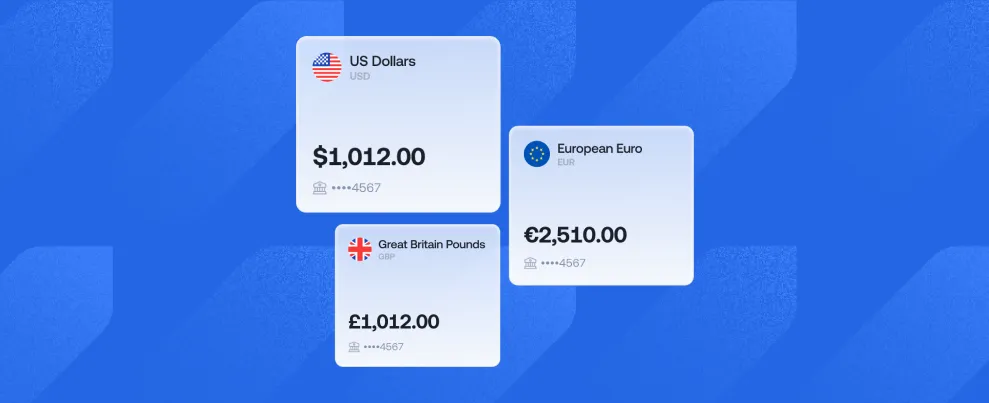
Your Grey balance just got a new destination. Send CNY directly to personal and business bank accounts in China using the USD, EUR, GBP, or stablecoins you already have in Grey.

We will handle the conversion, and you’ll see all the details before you send.

Here’s what you need to know before making your first transfer.

Send CNY directly to Chinese bank accounts

With the new CNY transfer option, you can send money straight to your recipient’s bank account in China.

Bank transfers are available for both personal and business accounts across operating banks in the country. So, you can use Grey to send money to friends and family, pay for services, or make payments to businesses in China.

And because you can send from a balance you already have in Grey, there’s no need to convert your money to CNY somewhere else first.

How much does it cost to send CNY with Grey?

Each CNY bank transfer costs a flat $2.80.

There’s no percentage-based transfer fee, so the cost stays the same regardless of how much you send within the available limits.

Before you confirm your transfer, you’ll see the exchange rate, fee and how much your recipient will get. This way, you know exactly what to expect before the money leaves your account.

How much CNY can you send?

You can send from 50 CNY up to 21,000 CNY in a single bank transfer.

It's enough flexibility for everything from paying a contractor to sending money to someone back home. How long does it take to send CNY to China?

CNY bank transfers are typically completed within 24 hours, Monday to Friday.

There’s a 10:00 GMT cutoff time, so keep this in mind if you need your money to arrive by a particular day. Transfers made after the cutoff may take longer to reach the recipient.

Processing times can also vary depending on banking days and other factors outside Grey’s control.

Which Grey balances can you send from?

You don’t need to hold CNY before sending money to China.

You can make your transfer using money from your USD, EUR, GBP or stablecoin balance.

Choose the balance you want to use, enter the amount you’d like your recipient to get in CNY and review the conversion before confirming.

It’s a simple way to use money you already have in Grey to send money to China.

How to send CNY to China with Grey

Sending CNY takes just a few steps:

  1. Log in to your Grey account and go to Send money.
  2. Select CNY as the currency you want to send.
  3. Choose bank transfer.
  4. Add your recipient’s bank details and the amount you want to send.
  5. Choose the Grey balance you want to send from.
  6. Review the exchange rate, fees, and the amount your recipient will receive.
  7. Confirm your transfer.

Once everything looks right, confirm your transfer, and Grey will take it from there.

Send money to China from your Grey account

Your Grey balance can now take you one country further.

You can send CNY directly to Chinese suppliers, contractors, and partners in China from your USD, EUR, GBP, or stablecoin balance, at a flat $2.80 transfer fee. If you live and work outside China, you can also use CNY payouts to send money directly to family and friends in China.

So the next time you need to send money to China, you can do it while keeping your money and your payments in one place.

Open Grey and make your first CNY transfer today.

Send money to Rwanda, Cameroon, Senegal and Côte d’Ivoire with Grey

•

•

2 min read

You already use Grey to receive, hold and manage your money. Now, we’re giving you more places to send it too.

Have family in Rwanda? Someone you need to pay in Cameroon? Or maybe you regularly send money to Senegal or Côte d’Ivoire?

You can now do it directly from Grey.

We’ve added Rwandan francs (RWF), Central African CFA francs (XAF) and West African CFA francs (XOF), so you can send money to people in these four countries using their local bank account or mobile money wallet, depending on the destination.

It’s one more way to use the money you already have in Grey, without having to move it somewhere else first.

Here’s where you can send money and how.

Send Rwandan francs directly to a bank account

Need to send money to someone in Rwanda? You can now send Rwandan francs (RWF) from Grey directly to their local bank account.

Bank transfers are available to personal and business accounts across operating banks in Rwanda, so your recipient can get the money in the account they already use.

Transfers cost a flat $1.30 and are processed within 24 hours.

You can send between RWF 1,000 and RWF 5,000,000 in a single transaction.
That gives you plenty of flexibility, from sending a little money home to covering a larger expense or paying someone you work with.

Send money to mobile wallets in Cameroon

In Cameroon, mobile money is part of everyday life. So instead of asking someone to use a different way to receive your money, you can send it to a wallet they already use.

Grey now lets you send Central African CFA francs (XAF) to:

  • MTN Mobile Money
  • Orange Money

Transfers are almost instant and cost a flat $1.80.

You can send from XAF 500 up to XAF 400,000 in a single transaction.

So, if your family needs money for an urgent expense or you need to pay someone in Cameroon, you can send it straight to their mobile wallet without waiting for a traditional international bank transfer.

More ways to send money to Senegal

If you’re sending money to Senegal, you can now choose between a bank account and several popular mobile money wallets.

You can now send West African CFA francs (XOF) to personal and business accounts across operating banks in Senegal.

You can also send money to:

  • E-Money
  • Free
  • Expresso
  • Orange
  • Wave
  • Wizall Money

Bank transfers cost a flat $2, while mobile money transfers cost $3.

Mobile money transfers are almost instant. Bank transfers are processed on the same business day, Monday to Friday, when sent before the 12:00 GMT cut-off time.

You can send between XOF 1,000 and XOF 1,500,000 per transaction.

That means the person receiving your money can choose what works best for them, rather than having to open a new account or change how they normally manage their money.

Send money to Côte d’Ivoire by bank or mobile money

Grey is also making it easier to send West African CFA francs (XOF) to Côte d’Ivoire.

You can send directly to a local bank account or choose one of these mobile money options:

  • MTN
  • Orange
  • Moov

Mobile money transfers cost a flat $1.80 and are almost instant. Bank transfers cost $2 and are processed on the same business day from Monday to Friday when sent before the 12:00 GMT cut-off time.

The minimum amount is XOF 1,000, and you can send up to XOF 1,500,000 per transaction.

So, from helping family with everyday expenses to sending money to someone you work with, you have different ways to get it to them.

Send from the money you already have in Grey

You don’t need to already have RWF, XAF or XOF in your Grey account before sending.

You can start with money in your USD, EUR or GBP balance, choose who you want to send money to and enter the amount. Grey converts it into the recipient’s local currency as part of the process.

Before you confirm, you’ll be able to review the details of your transfer.

This means the money you receive and keep in Grey can now go further across Africa, without needing to move it through several different services first.

More places, more ways to send with Grey

Your next transfer could be for family, work or something that wasn’t even on your radar yesterday. Whatever takes your money across borders, you now have more ways to send it with Grey.

With RWF, XAF and XOF now supported, you can send money to Rwanda, Cameroon, Senegal and Côte d’Ivoire through local bank accounts or mobile money, depending on the destination.

Open Grey and make your first transfer today.

Frequently asked questions

Can I send money to Rwanda with Grey?

Yes. You can send Rwandan francs (RWF) directly to personal and business bank accounts in Rwanda. Transfers cost $1.30 and are processed within 24 hours.

Can I send money to Cameroon with Grey?

Yes. You can send Central African CFA francs (XAF) to MTN and Orange mobile money wallets in Cameroon. Transfers cost $1.80 and are almost instant.

How can I send money to Senegal with Grey?

You can send West African CFA francs (XOF) to a local bank account or mobile money wallet in Senegal. Supported mobile money options include E-Money, Free, Expresso, Orange, Wave and Wizall Money.

How can I send money to Côte d’Ivoire with Grey?

You can send West African CFA francs (XOF) directly to a local bank account or to MTN, Orange or Moov mobile money wallets.

Do I need to have RWF, XAF or XOF in my Grey account first?

No. You can send using money from your supported Grey balances, including USD, EUR and GBP. The money is converted into the local currency when you send it.

How long does it take for the money to arrive?

It depends on the country and how you send it. Mobile money transfers to Cameroon, Senegal and Côte d’Ivoire are almost instant. Bank transfers to Rwanda are processed within 24 hours, while eligible bank transfers to Senegal and Côte d’Ivoire are processed on the same business day, subject to the stated weekday cut-off time.

How much does it cost to send money?

Fees depend on the destination and how the recipient gets the money. Rwanda bank transfers cost $1.30, Cameroon mobile money transfers cost $1.80, and transfers to Senegal and Côte d’Ivoire range from $1.80 to $3.

You’ll be able to review your transfer details before confirming.

How USDC is revolutionising international money transfers

•

•

2 min read

‍

Historically, sending money across countries has been slow and expensive. USD Coin (USDC) is changing the game. It’s a stable, fast, and low-cost digital currency tied to the U.S. dollar.

Since it has become more widely adopted, it’s helped make international transactions seamless, especially for freelancers, remote workers, and businesses handling global payments.

With Grey, you can transfer USDC payouts to over 70 countries.

Also read: Secure ways to receive international payments in Egypt

Why is USDC changing the way we send money internationally?

Unlike traditional bank transfers, which can take days and charge excessive fees, USDC leverages blockchain technology to offer instant, transparent, and cost-effective transactions. Here’s why USDC is gaining popularity:

  • Stable value: Unlike volatile cryptocurrencies, USDC is pegged to the U.S. dollar, maintaining consistent value.
  • Lower fees:  No more expensive wire transfers — USDC transactions cost significantly less.
  • Faster processing: Traditional bank transfers can take 2–5 days; USDC payments settle in minutes.
  • Global access: USDC allows anyone, anywhere, to send and receive funds without banking restrictions.
  • Security & transparency:  Every USDC transaction is recorded on the blockchain, reducing fraud and increasing accountability.

Also read: Best apps for sending money to Morocco

Who benefits the most from USDC transfers?

Here are some of the people who benefit from USDC transfers the most.

  • Freelancers & remote workers:  They can get paid instantly by international clients without dealing with currency conversion delays.
  • Businesses & startups: Companies can pay global employees and contractors with fewer restrictions and lower costs.
  • Expats & families: Send money home effortlessly without the hefty fees of traditional remittance services.
  • Investors & traders: It’s a great way to hold a stable digital asset without exposure to crypto market volatility.

Also read: Best virtual Mastercards for online payments in Egypt

How to send USDC with grey

  1. Open the Grey app: Log in to your account to access your USD and multi-currency balances.
  2. Select your USD balance: Navigate to “Accounts” and select your USD balance to initiate a transfer.
  3. Tap ‘Send via Crypto’:  Choose the USDC transfer option.
  4. Enter transaction details: Input the recipient’s wallet address and select the correct network (Solana (SOL) or Binance Smart Chain (BEP-20)).
  5. Confirm & complete the transfer: Double-check details, enter your two-factor authentication (2FA), and send.
  6. Transaction success: The recipient receives USDC within minutes.

Things to consider when using USDC for payments

While USDC offers a convenient and secure alternative to traditional money transfers, there are a few things to keep in mind:

  • Network compatibility: Ensure that both sender and recipient are using the same blockchain network to avoid lost funds.
  • Transaction fees: While significantly lower than bank fees, blockchain network fees can vary.
  • Tax implications: Some countries classify stablecoins as taxable assets. If you’re holding USDC, check local regulations.

Why USDC is the future of international money transfers

With its speed, low costs, and global accessibility, USDC is reshaping international payments. Platforms like Grey are leading the way by making stablecoin transactions easy, secure, and efficient for freelancers, businesses, and individuals worldwide.

Create your Grey account today or download the app to enjoy inclusive global banking, designed to carry your dreams across borders.

‍

Send instant USDC payouts to 70+ countries with Grey!

•

•

2 min read

At Grey, we’re committed to making globalisation a reality to simplify and connect your financial life. And today, we’re excited to announce that you can now easily send money using USDC in over 70 countries with Grey!

Cryptocurrency, particularly the USD Coin (USDC), is quickly becoming a top choice for global transactions as a secure and reliable currency. So, whether you’re a freelancer, digital nomad, or remote worker, we designed this update with you in mind. Now, managing your international transactions and payments has gotten even easier.

For example, a freelancer in Vietnam working remotely for a UK company can convert their earnings in pounds to USDC with just a few taps in the Grey app. Transfer the USDC to your cryptocurrency wallet, then trade it for Vietnamese Dong or any other local currency you need. It’s now that simple to manage your money across borders!

Why choose Grey for USDC payouts?

  • Instant transfers: Your USDC transactions are sent instantly, so your funds arrive without delay.
  • No extra charges: We don’t charge extra withdrawal charges. You are only required to pay the network fee.‍
  • Secure and reliable: Your funds are always protected with industry-standard measure‍
  • Global accessibility: You can send USDC to over 70 countries, making it easier to manage your finances globally. These countries include:
Grey USDC payout countries

Get started

Whether handling your business payments or managing your freelance earnings, Grey is here to make your global transactions as smooth as possible.

We’re excited for you to experience seamless and borderless banking with our USDC feature. To get started, open your free Grey account today.

Welcome to the future of global banking, designed for you!

Grey UK, U, US bank accounts
Arrow (up)

Back to top