<script type="application/ld+json" data-schema-version="grey-blog-v4"> [{"@context":"https://schema.org","@type":"BlogPosting","@id":"https://grey.co/blog/how-to-receive-payments-on-etsy-as-a-seller-in-mexico#article","headline":"How to receive payments on Etsy as a seller in Mexico","description":"Learn how Mexican Etsy sellers can receive payments seamlessly with Grey and grow their creative business on a global scale.","inLanguage":"en","url":"https://grey.co/blog/how-to-receive-payments-on-etsy-as-a-seller-in-mexico","mainEntityOfPage":{"@id":"https://grey.co/blog/how-to-receive-payments-on-etsy-as-a-seller-in-mexico#webpage"},"datePublished":"2024-12-10T05:37:47.351Z","dateModified":"2026-06-15T17:28:42.463Z","author":{"@type":"Person","@id":"https://grey.co/authors/olayoyin-olorunmota#person","name":"Olayoyin Olorunmota","url":"https://grey.co/authors/olayoyin-olorunmota","jobTitle":"Content Writer","sameAs":["http://www.linkedin.com/in/olayoyinolorunmota","http://x.com/yoyin_michael"]},"publisher":{"@type":"Organization","@id":"https://grey.co/#organization","name":"Grey","url":"https://grey.co","logo":{"@type":"ImageObject","url":"https://cdn.prod.website-files.com/6360022338a81bd6fdbb1145/6564ae1077a67e39d3c491a6_Grey%20Logo%20Lockup%20Black.svg"}},"image":{"@type":"ImageObject","@id":"https://grey.co/blog/how-to-receive-payments-on-etsy-as-a-seller-in-mexico#primaryimage","url":"https://cdn.prod.website-files.com/636a85d290ee58e70c17e1c0/6a3017cb291eb1c90961040e_6a3017cab24e8fcf46a0bd3e_how-to-receive-payments-on-etsy-as-a-seller-in-mexico__header-image.webp","contentUrl":"https://cdn.prod.website-files.com/636a85d290ee58e70c17e1c0/6a3017cb291eb1c90961040e_6a3017cab24e8fcf46a0bd3e_how-to-receive-payments-on-etsy-as-a-seller-in-mexico__header-image.webp","width":1200,"height":675}},{"@context":"https://schema.org","@type":"WebPage","@id":"https://grey.co/blog/how-to-receive-payments-on-etsy-as-a-seller-in-mexico#webpage","url":"https://grey.co/blog/how-to-receive-payments-on-etsy-as-a-seller-in-mexico","name":"How to receive payments on Etsy as a seller in Mexico","description":"Learn how Mexican Etsy sellers can receive payments seamlessly with Grey and grow their creative business on a global scale.","inLanguage":"en","primaryImageOfPage":{"@id":"https://grey.co/blog/how-to-receive-payments-on-etsy-as-a-seller-in-mexico#primaryimage"},"breadcrumb":{"@id":"https://grey.co/blog/how-to-receive-payments-on-etsy-as-a-seller-in-mexico#breadcrumb"}},{"@context":"https://schema.org","@type":"BreadcrumbList","@id":"https://grey.co/blog/how-to-receive-payments-on-etsy-as-a-seller-in-mexico#breadcrumb","itemListElement":[{"@type":"ListItem","position":1,"name":"Home","item":"https://grey.co/"},{"@type":"ListItem","position":2,"name":"Blog","item":"https://grey.co/blog"},{"@type":"ListItem","position":3,"name":"How to receive payments on Etsy as a seller in Mexico","item":"https://grey.co/blog/how-to-receive-payments-on-etsy-as-a-seller-in-mexico"}]}] </script>

How to receive payments on Etsy as a seller in Mexico

Olayoyin Olorunmota

TABLE OF CONTENT

SHARE THIS POST

Etsy is an online marketplace for creatives, a platform to sell unique, handcrafted items and vintage goods to a global audience.

This guide will show you, an Etsy seller from Mexico, how to streamline your Etsy payments and manage your finances seamlessly using Grey.

Why selling on Etsy is worth it

Etsy is a favourite among buyers and sellers for several reasons:

  • Global reach: Access millions of buyers worldwide who value handmade and vintage products.
  • Diverse product categories: From jewellery and clothing to art and home decor, there’s space for nearly every creative passion.
  • Supportive community: Etsy provides a network of sellers and buyers who appreciate craftsmanship.

How to receive Etsy payments as a seller in Mexico

Grey provides an easy solution for receiving international payments as a Mexican Etsy seller. Follow these steps to get started:

1. Open your Grey app

Log in to your Grey account to access USD, GBP, or EUR international bank accounts.

2. Link your Grey account to Etsy

__wf_reserved_inherit
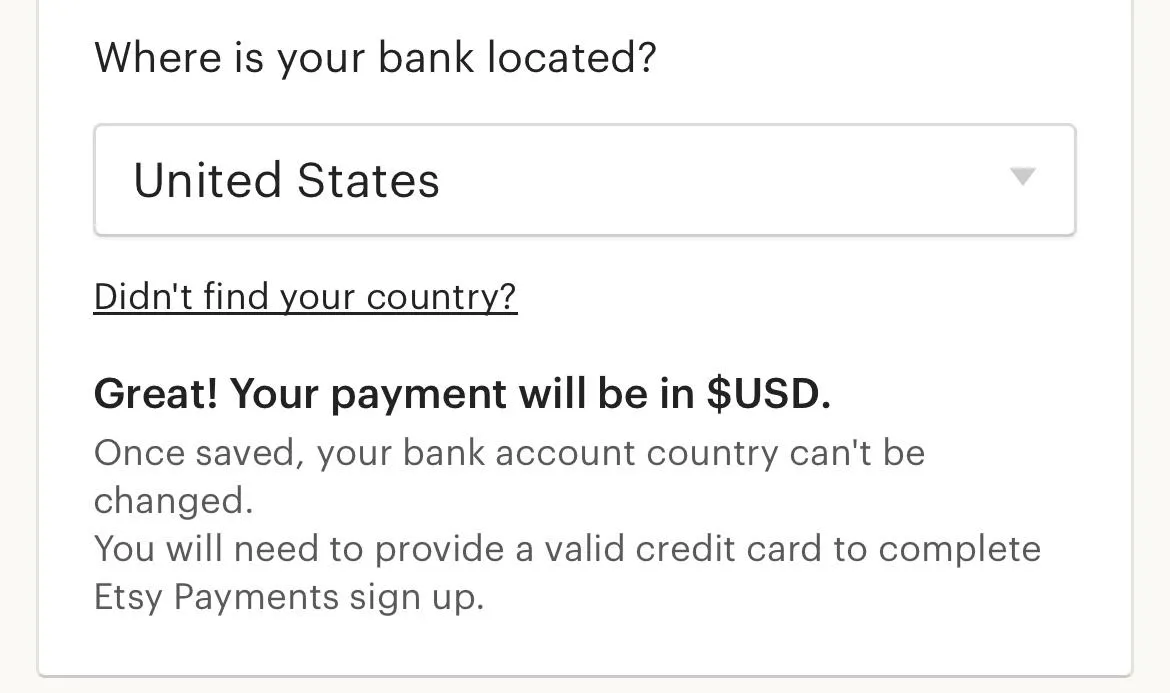
  • Select your bank’s country
__wf_reserved_inherit
  • Choose whether you’re registering as an individual or a business
__wf_reserved_inherit
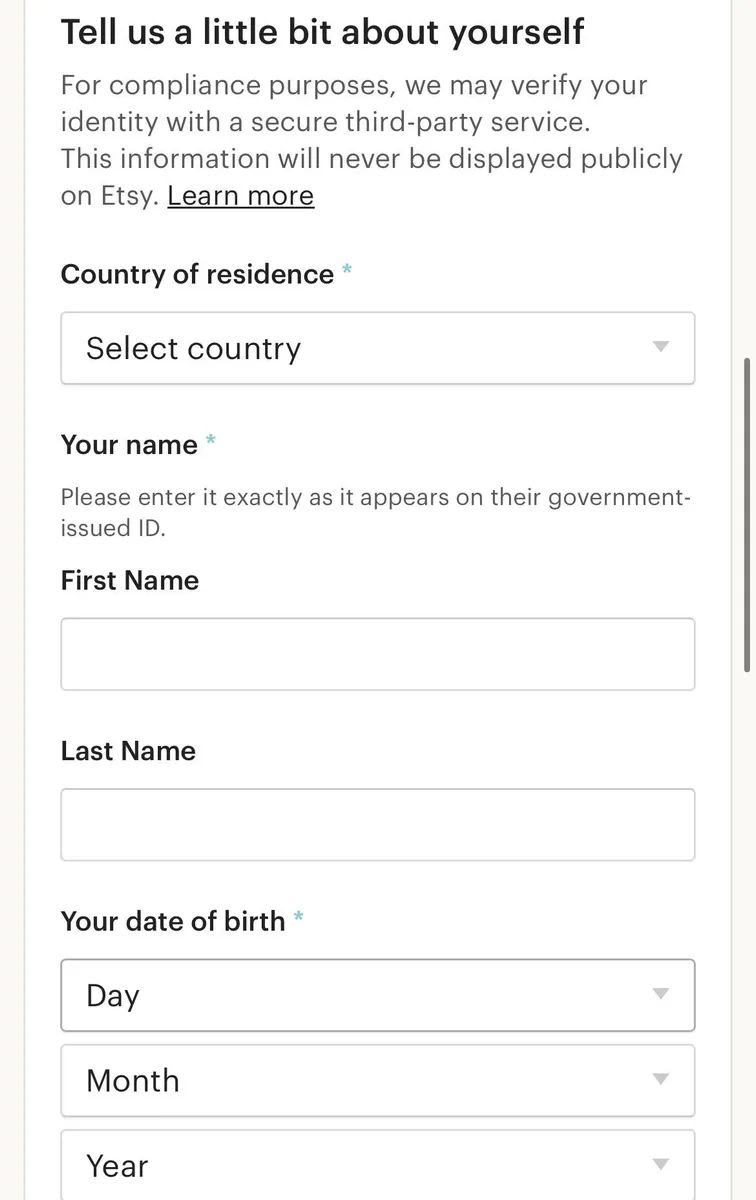
  • Enter your personal information, i.e. name and address.
__wf_reserved_inherit
  • Add your Grey US, EU, or UK bank account details, depending on your preference.
__wf_reserved_inherit
  • Etsy will process payments to your Grey account, making it easy to manage your earnings.

With your Grey account linked, you can receive Etsy payouts directly into your international bank account.It is important to note that depending on the location you pick, you may need to provide a valid address and social security number for your account to be verified.

Why use Grey for Etsy payments?

Grey simplifies the payment process for Mexican Etsy sellers. Here’s why it’s the best choice:

  • Access to multiple currencies: Receive payments in USD, GBP, or EUR depending on your buyers’ preferences.
  • Competitive exchange rates: Maximise your earnings when converting to Mexican peso (MXN).
  • Secure transactions: Grey’s robust security features ensure your funds are protected.
  • Hassle-free withdrawals: Transfer your earnings to your local bank account with ease.

Also read: How to withdraw to your local bank account on Grey

Tips for succeeding as a Mexican seller on Etsy

  • Optimise your listings: Use high-quality photos and detailed descriptions to make your products stand out.
  • Offer international shipping: Expand your customer base by providing global shipping options.
  • Respond quickly: Engage with buyers by answering queries promptly and addressing concerns professionally.
  • Leverage social media: Promote your products on platforms like Instagram and Pinterest to drive traffic to your Etsy shop.

Simplify Etsy payments with Grey

With Grey, you can stop worrying about receiving payments or converting your earnings from Etsy. Manage your finances seamlessly and focus on growing your creative business.

Sign up for a Grey account today and unlock a world of possibilities for your Etsy shop in Mexico.

‍

Last updated:

October 2, 2026

Open a free Grey account to get startedJoin 1 million digital nomads
IF YOU ENJOYED THIS, CHECK THESE OUT

How to send money from the US to the Philippines in 2026

•

•

2 min read

The Philippines receives more remittances from the United States than from any other country. Over four million Filipino Americans send money home regularly to cover everything from monthly household expenses and school fees to hospital bills and property payments. The Bangko Sentral ng Pilipinas (BSP) reported record remittance inflows in recent years, with the US remaining the largest source.

The good news is that sending money from the US to the Philippines has become significantly cheaper and faster than it was even five years ago. The bad news is that the cheapest option depends on how your recipient wants to receive: bank transfer, mobile wallet (GCash, Maya), or cash pickup. This guide covers the fees, speed, and delivery methods available in 2026, so you can find the right option for your specific situation. If you also send to other countries, see our broader guide to sending money abroad.

What it costs to send money from the US to the Philippines with Grey

Grey charges a 1% conversion fee when converting USD to PHP, plus a $0.85 payout fee. The payout fee is the same whether you send the money to a Philippine bank account or a supported mobile wallet.

Here’s what the total fees look like at different transfer amounts:

Transfer amount Conversion fee (1%) Payout fee Total fees
$500 $5.00 $0.85 $5.85
$1,000 $10.00 $0.85 $10.85
$2,000 $20.00 $0.85 $20.85

‍

For example, sending $500 costs $5 to convert USD to PHP, plus the $0.85 payout fee, bringing the total fees to $5.85.

You can send PHP by bank transfer or mobile money. Grey supports wallets including GCash and Maya, and both bank and mobile money transfers are typically completed instantly or up to 1 business day. Processing can occasionally take longer depending on the recipient's bank or network conditions.

Bank transfer or mobile wallet: how your recipient gets the money

Bank transfer

Grey delivers PHP to all major Philippine banks. Your recipient needs a peso bank account, and you need their full name (as it appears on the account), the bank name, and the account number. The funds arrive as a standard deposit.

Bank transfer is the right choice for larger payments: hospital bills, tuition fees, property transactions, or any amount where the recipient needs the funds in their bank account. There are no receiving limits on the bank side beyond whatever the bank itself imposes.

Mobile wallets: GCash and Maya

If your recipient uses GCash or Maya, you can send directly to their mobile wallet using their registered name and mobile number. Mobile wallet delivery is often faster than bank transfer for smaller amounts and more convenient for recipients who do not use a bank account regularly.

Mobile wallets typically have per-transaction and monthly receiving limits set by the wallet provider. For larger medical bills or tuition payments, a bank transfer is usually the better option. For regular household support, groceries, or smaller medical expenses, a mobile wallet is practical and fast.

Also read: Best apps to send money internationally from the US in 2026

What Filipino Americans are sending money home for

Understanding the common use cases helps you choose the right delivery method and timing.

Monthly family support. Regular transfers to parents, siblings, or extended family can help cover household expenses, groceries, utilities, and daily needs. Grey charges a 1% conversion fee when converting USD to PHP, plus a $0.85 payout fee. Before sending, you can review the fees and the final PHP amount your recipient will receive.

Medical bills. Philippine hospital bills are typically paid to the hospital's bank account. Ask the hospital for their full business name, bank name, and account number. Send the exact PHP amount of the bill so the hospital receives the full payment without any shortfall from fees. Grey shows the exact amount your recipient will receive before you confirm, so you can match it to the billing statement.

Education and tuition. Philippine universities and schools accept bank transfers. Tuition payments tend to be large and time-sensitive (with fixed due dates). Send via bank transfer and keep the transaction receipt as proof of payment.

Property and investments. Buying property, paying mortgage instalments, or investing in the Philippines from the US can involve larger transfers. For these payments, it helps to check the exchange rate, fees, and recipient details carefully before confirming the transfer.

Emergency expenses. Typhoons, medical emergencies, or unexpected costs. Speed matters. Check whether mobile wallet delivery is instant and whether it fits within the amount limits. For larger emergency amounts, a bank transfer with confirmed delivery timing is more reliable.

How to send money from the US to the Philippines with Grey

1. Open your Grey account. Download the Grey app, sign up, and verify your identity. US residents need a government-issued ID. Grey is licensed by FinCEN as a Money Services Business.

2. Fund your account. Transfer USD from your US bank account into your Grey wallet. You can fund via ACH (free, arrives same day) or wire transfer.

3. Choose your destination. Tap Send, select PHP (Philippine Peso), and choose bank transfer or mobile wallet.

4. Enter your recipient's details. For bank transfer: their full name, bank name, and account number. For mobile wallet: their registered name and mobile number. Grey shows the exchange rate, conversion fee, payout fee, and the exact PHP amount your recipient will receive before you confirm.

5. Confirm and send. Review the summary and confirm with your PIN. Your recipient does not need a Grey account. The funds arrive as a standard deposit in their bank account or mobile wallet.

Three ways to save on US-to-Philippines transfers

Check the total cost before you send. Grey charges a 1% conversion fee when converting USD to PHP, plus a $0.85 payout fee. Before confirming your transfer, you can review the exchange rate, fees, and exact PHP amount your recipient will receive, so there are no surprises after you send.

Use ACH to fund your Grey account. ACH transfers from your US bank to your Grey wallet are free and arrive the same day. Wire transfers cost $25 (SWIFT) and are unnecessary for most users. Fund via ACH unless you need to move a very large sum urgently.

Send the exact PHP amount for bills. When paying a hospital bill, tuition fee, or any fixed-amount obligation, enter the amount in PHP rather than USD. Grey will calculate exactly how much USD is needed to deliver that PHP amount after all fees. This ensures the recipient receives the full bill amount with no shortfall.

You may also like: How to receive an international wire transfer: Fees, timing, and what to tell the sender

Frequently asked questions about sending money from the US to the Philippines

What is the cheapest way to send money from the US to the Philippines?

The cheapest option depends on the amount, exchange rate, fees, and delivery method. With Grey, USD-to-PHP conversions have a 1% conversion fee, plus a $0.85 payout fee. Before confirming, you can see the applicable fees and final PHP amount your recipient will receive, making it easier to compare the total cost with other transfer options.

How long does it take to send money from the US to the Philippines?

Bank transfers to the Philippines typically arrive within 1 to 2 business days. Mobile wallet transfers, including GCash and Maya, may arrive faster. Actual delivery times can vary depending on the recipient’s bank or mobile wallet provider and network conditions.

Can I send money from the US to GCash in the Philippines?

Yes. Grey supports delivery to GCash using the recipient's registered name and mobile number. Per-transaction and monthly limits may apply based on GCash's own policies.

How do I pay a hospital bill in the Philippines from the US?

Ask the hospital for their full business name, bank name, and bank account number. Send the exact PHP amount of the bill through Grey, using the hospital's bank details as the recipient. Grey shows the exact PHP amount your recipient will receive before you confirm, so you can match it to the billing statement. Keep the transaction receipt as proof of payment.

Do I need to pay tax on money sent to the Philippines from the US?

Personal remittances sent from the US to the Philippines are generally not taxable for the sender. The US does not tax outgoing personal transfers. However, if you send more than $16,000 to a single individual in a calendar year, you may need to file a gift tax return (IRS Form 709), though no tax is typically owed until you exceed the lifetime exemption. Consult a tax professional for your specific situation.

What exchange rate does Grey use for USD to PHP?

The exchange rate available for USD to PHP is shown in the Grey app before you confirm the conversion. Grey charges a 1% conversion fee, and you can review the rate, applicable fees, and final PHP amount before completing the transaction.

Exchange rates on Grey are variable and include a margin over the mid-market rate. Always review the rate before confirming a conversion. Grey is a financial technology company, not a bank. Banking services are provided by licensed banking partners. This article is general information, not financial or tax advice. Consult a qualified professional for tax questions.
How to send money from the US to Africa in 2026

•

•

2 min read

Africa receives more remittances from the United States than from any other single country. Nigerian Americans, Ghanaian Americans, Kenyan Americans, Ethiopian Americans, and communities from across the continent send billions of dollars home every year to support families, pay school fees, cover medical costs, and invest in property.

The challenge has always been cost. The World Bank has consistently found that sub-Saharan Africa is the most expensive region in the world to send money to, with average fees exceeding 7% of the transfer amount. Part of that cost is structural: many African recipients rely on mobile money or cash pickup rather than bank accounts, and some corridors require multiple intermediaries to complete a transfer.

A new generation of transfer apps has dramatically reduced fees across most US-to-Africa corridors. This guide covers how to send money from the US to Africa in 2026, what each major destination costs, how long transfers take, and which apps work best for different African countries.

What it costs and how long it takes, country by country

The table below covers the most common US-to-Africa corridors on Grey. Fees shown are Grey's payout fees per transaction, on top of the standard 1% conversion fee (capped at the equivalent of $6 on major currency pairs).

Destination Delivery method Payout fee Speed Total cost on $500
Kenya M-Pesa (Safaricom, Airtel) $0.50 Instant $5.50
Kenya Bank transfer $0.65 Instant $5.65
Nigeria Bank transfer NGN 35 flat Same day / next day ~$5.02
Ghana Mobile money (MTN) $1.00 Same day $6.00
Ghana Bank transfer $1.20 Same day $6.20
South Africa Bank transfer $1.80 1-2 business days $6.80
Egypt Bank transfer $1.70 T+1 (before 1 PM GMT, Sun-Thu) $6.70
Egypt Mobile money $1.70 Same day $6.70
Morocco Bank transfer $2.00 Instant (before 1 PM GMT) $7.00
Algeria Mobile money (Ooredoo, Mobilis, Djezzy) $2.50 Same day $7.50
Algeria Bank transfer $2.50 5 business days $7.50
Tanzania Bank transfer $1.50 Same day $6.50
Uganda Bank transfer $1.50 Same day $6.50
Cameroon Bank/mobile $2.00 Same day $7.00
Senegal Bank transfer $2.00 Same day $7.00
Ethiopia Bank transfer $1.80 1-2 business days $6.80

‍

Total cost on $500 = $5 conversion fee (1% of $500) + payout fee. On transfers above $600, the conversion fee is capped at the equivalent of $6, so the total cost grows only by the payout fee. Grey fee data from support.grey.co, September 2026.

A few patterns stand out. East African corridors (Kenya, Tanzania, Uganda) are the cheapest and fastest, with instant M-Pesa delivery to Kenya at just $0.50 per transfer. North African corridors (Egypt, Morocco, Algeria) carry slightly higher payout fees and, in Algeria's case, longer bank settlement times. West African corridors (Ghana, Nigeria, Senegal, Cameroon) fall in between.

On transfers above $600, the conversion fee caps at the equivalent of $6 regardless of the amount. That means a $2,000 transfer to Kenya via M-Pesa costs $6.50 total ($6 conversion + $0.50 payout), not the $20 to $40 you might pay through a bank wire or a percentage-based app.

Mobile money or bank transfer: How African recipients prefer to get paid

One of the biggest differences between sending money to Africa and sending to Europe or Asia is how recipients access their funds. In much of Africa, mobile money is more widely used than traditional bank accounts.

Kenya is the most mobile-money-dominant market in the world. Over 30 million Kenyans use M-Pesa daily for everything from groceries to rent. If you are sending to Kenya, M-Pesa is almost always the right choice. It is cheaper ($0.50 versus $0.65 for bank transfer), equally fast (instant), and more convenient for your recipient. Send money from the US to Kenya.

Ghana has strong mobile money adoption through MTN Mobile Money. Grey supports mobile money delivery to Ghana at $1.00 per transfer, compared to $1.20 for a bank transfer. Both arrive on the same day. Send money from the US to Ghana.

Nigeria is primarily bank-transfer-based. Mobile money adoption is growing with platforms like OPay, but most Nigerians still receive international transfers into their bank accounts. Grey delivers to all major Nigerian banks.

Egypt supports both bank transfer and mobile money. Bank transfers settle in one business day (processed before 1 PM GMT, Sunday to Thursday). Mobile money arrives the same day.

South Africa is bank-transfer only on Grey. Transfers arrive within 1 to 2 business days.

Algeria is the exception to speed. Bank transfers take five business days due to settlement infrastructure constraints in the Algerian banking system. Mobile money via Ooredoo, Mobilis, or Djezzy is same-day. If your recipient can use mobile money, choose that option to avoid the five-day wait.

Which app is best for sending money from the US to Africa

Several apps serve the US-to-Africa corridors well, but their strengths differ by country and delivery method.

How to send money from the US to Africa with Grey

The process is the same regardless of which African country you are sending to. Here is how it works.

1. Open your Grey account. Download the Grey app, sign up, and verify your identity. US residents need a government-issued ID. Grey is licensed by FinCEN as a Money Services Business.

2. Fund your account. Transfer USD from your US bank account into your Grey wallet. You can fund via ACH (free, arrives same day) or wire transfer.

3. Choose your destination. Tap Send, select the destination currency (KES for Kenya, GHS for Ghana, NGN for Nigeria, ZAR for South Africa, etc.), and choose bank transfer or mobile money.

4. Enter your recipient's details. For mobile money, you need their phone number and the network (Safaricom, Airtel, MTN, etc.). For a bank transfer, you need the bank name and account number. Grey shows the exchange rate, conversion fee, payout fee, and the exact amount your recipient will receive before you confirm.

5. Confirm and send. Review the summary and confirm with your PIN. For Kenya M-Pesa, the money arrives instantly. For most other African destinations, it arrives the same day or within 1 to 2 business days.

Your recipient does not need a Grey account. The funds arrive as a standard deposit in their bank account or mobile money wallet.

Three ways to save on US-to-Africa transfers

Use mobile money when available. M-Pesa in Kenya ($0.50) is cheaper than a bank transfer ($0.65). MTN Mobile Money in Ghana ($1.00) is cheaper than a bank transfer ($1.20). If your recipient can receive via mobile money, it is usually the cheaper and faster option.

Batch your transfers to benefit from the fee cap. If you send $500 monthly, you pay $5 in conversion fees each time ($60 per year). If you send $1,500 quarterly instead, you pay $6 each time ($24 per year). The cap at the equivalent of $6 rewards larger, less frequent transfers.

Avoid Algeria bank transfers if speed matters. Algerian bank transfers take five business days. If your recipient has access to Ooredoo, Mobilis, or Djezzy mobile money, use that instead for same-day delivery at the same cost.

Also read: Best apps to send money internationally from the US in 2026 for a broader comparison, including European and Asian destinations.

Frequently asked questions

What is the cheapest way to send money from the US to Africa?

For transfers above $600, Grey's 1% conversion fee capped at the equivalent of $6 is the lowest published rate among apps with transparent pricing. On a $1,000 transfer to Kenya via M-Pesa, the total cost is $6.50 ($6 conversion + $0.50 payout). Apps like Sendwave charge no visible fee but embed cost in the exchange rate. Always compare the amount your recipient actually receives.

How long does it take to send money from the US to Africa?

It depends on the destination and delivery method. Kenya via M-Pesa is instant. Ghana via mobile money arrives the same day. Nigeria via bank transfer is same day or next day. South Africa and Ethiopia are 1 to 2 business days. Algeria via bank transfer takes 5 business days, though mobile money is same-day.

Can I send money from the US to M-Pesa in Kenya?

Yes. Grey supports M-Pesa delivery to Kenya from the US via both Safaricom and Airtel. The payout fee is $0.50 per transfer and delivery is instant. Your recipient receives the money in their M-Pesa wallet and can spend, send, or withdraw it immediately.

Which African countries can I send money to from the US with Grey?

Grey supports transfers from the US to Kenya, Nigeria, Ghana, South Africa, Egypt, Morocco, Algeria, Tanzania, Uganda, Rwanda, Senegal, Cameroon, Ethiopia, and additional African destinations. Both bank transfer and mobile money are available in most markets.

Is it cheaper to send via mobile money or bank transfer to Africa?

Mobile money is usually slightly cheaper. In Kenya, M-Pesa costs $0.50 per transfer versus $0.65 for bank transfer. In Ghana, mobile money costs $1.00 versus $1.20 for bank transfer. Both options are equally fast in most countries. Mobile money is also more convenient for recipients who do not use a bank account regularly.

Do I need to pay tax on money sent to Africa from the US?

Personal remittances sent from the US to Africa are generally not taxable for the sender. The US does not tax outgoing personal transfers. However, if you send more than $16,000 to a single individual in a calendar year, you may need to file a gift tax return (IRS Form 709), though no tax is typically owed until you exceed the lifetime exemption. Consult a tax professional for your specific situation.

‍

Related reading

Best apps to send money internationally from the US in 2026 is the broader comparison covering all destinations, not just Africa.

How to send money from Nigeria to any country in 2026 is the outbound Nigeria guide, where the competitive landscape is very different from US-to-Africa.

Exchange rates on Grey are variable and include a margin over the mid-market rate. Always review the rate before confirming a conversion. Grey is a financial technology company, not a bank. Banking services are provided by licensed banking partners. This article is general information, not financial or tax advice. Consult a qualified professional for tax questions.

SWIFT code vs routing number: What is the difference?

•

•

2 min read

Someone asks for your "routing number." Someone else asks for your "SWIFT code." They sound like they might be the same thing, and the confusion costs people real money. Use the wrong code and your transfer fails, you get charged a fee for the failed attempt, and the money sits in limbo for days while the banks sort it out.

A routing number is a 9-digit code that identifies a US bank for domestic transfers such as ACH and direct deposit. A SWIFT code (also called a BIC) identifies a bank internationally for cross-border transfers. Use a routing number for US payments and a SWIFT code for international payments. Some transactions, like receiving a wire from abroad into a US bank, require both.

The distinction is simple once you see it. This guide covers both codes, shows you exactly when to use each, and explains what to do when someone abroad needs to pay you.

What is a routing number?

A routing number is a 9-digit code assigned by the American Bankers Association (ABA) to every US bank and credit union. It identifies which financial institution holds your account. The system has been in use since 1910, originally designed to process paper cheques. Today it's used for every domestic electronic transfer.

Format: always exactly 9 digits, always numeric. No letters. Example: Wells Fargo California is 121042882. JPMorgan Chase New York is 021000021. Large banks have different routing numbers for different states because they acquired regional banks over the decades and kept the existing infrastructure.

When you need it: setting up direct deposit with your employer, paying bills online, transferring money between US bank accounts (ACH), receiving tax refunds, linking your bank to payment apps (Venmo, Cash App, PayPal). Essentially, any time money moves domestically within the US banking system, a routing number is involved.

Where to find it: bottom left of a paper cheque (first 9 digits in MICR font), in your bank's mobile app under Account Details, on your bank's website, or by calling customer service. For a complete state-by-state list for one of the largest US banks, see "Find a Bank Routing Number".

Key point: routing numbers only work within the United States. They have no function in international transfers. If someone outside the US asks for your routing number, they probably need your SWIFT code instead (or both, if they're sending a wire to your US bank account).

What is a SWIFT/BIC code?

A SWIFT code (also called a BIC, Bank Identifier Code) is an 8 or 11-character alphanumeric code that identifies a specific bank on the global SWIFT network. SWIFT stands for Society for Worldwide Interbank Financial Telecommunication. The network connects over 11,000 financial institutions across 200+ countries and handles the messaging layer for most international wire transfers.

Format: 8 or 11 characters, mixing letters and numbers. The structure tells you exactly what bank, in what country, at what location:

Characters 1 to 4: bank code (letters). Characters 5 to 6: country code (letters). Characters 7 to 8: location code (letters or numbers). Characters 9 to 11 (optional): branch code.

Example: WFBIUS6S is Wells Fargo. WF = Wells Fargo bank code, BI = part of the bank identifier, US = United States, 6S = San Francisco location. CHASUS33 is JPMorgan Chase: CHAS = Chase, US = United States, 33 = New York.

When you need it: sending money from the US to another country, receiving money from someone abroad, making international wire transfers, receiving freelance payments from overseas clients. Any time money crosses a national border via the banking system, a SWIFT code is involved.

Where to find it: your bank's website (usually in the wire transfer or international payments section), on your bank statement, by calling customer service, or by searching the official SWIFT directory at swift.com. Not every bank has a SWIFT code. Smaller credit unions and online-only banks may not participate in the SWIFT network, which can complicate the receipt of international payments.

SWIFT code vs routing number: Side by side

Here's the difference between SWIFT codes and routing numbers at a glance:

Feature Routing Number SWIFT/BIC Code
Purpose Identifies US banks for domestic transfers Identifies banks globally for international transfers
Format 9 digits (numeric only) 8 or 11 characters (letters + numbers)
Scope United States only 200+ countries worldwide
Issued by American Bankers Association (since 1910) SWIFT network (since 1973)
Used for ACH, direct deposit, bill pay, domestic wires International wire transfers, cross-border payments
Example 121042882 (Wells Fargo CA) WFBIUS6S (Wells Fargo)
Where to find Cheque, bank app, bank website Bank website, statements, swift.com
International use None Primary code for cross-border banking

‍

The simplest way to remember: routing number = US domestic, SWIFT code = international. If money stays inside the US, you need a routing number. If money crosses a border, you need a SWIFT code. If money is sent from abroad to a US bank account, the sender usually needs both your SWIFT code (to identify your bank internationally) and your account number (to identify your specific account).

Which do you need for your transfer?

The answer depends entirely on where the money is going and where it's coming from.

Sending money within the US

You need the recipient's routing number and account number. This covers ACH transfers, domestic wire transfers, direct deposit setup, online bill payments, and linking bank accounts to apps. No SWIFT code needed. For domestic-only tasks like filling out payment forms, see how to fill out a money order.

Sending money from the US to another country

You need the recipient's SWIFT code (or BIC) and their account number (or IBAN for European recipients). Your bank initiates the transfer through the SWIFT network. You'll pay an outgoing wire fee ($25 to $50 at most US banks). If something goes wrong, see how to cancel a wire transfer. You can also send money internationally with Grey, which bypasses SWIFT entirely and uses its own transfer rails at lower cost.

Receiving money from abroad into a US bank account

The sender needs your bank's SWIFT code plus your account number. Some sending banks also ask for your bank's routing number as a secondary reference. Provide both to avoid delays. Your bank may charge an incoming wire fee ($10 to $20).

Receiving money from abroad without a US bank

If you're outside the US and need to receive USD, GBP, or EUR from international clients, you don't need a US bank's SWIFT code or routing number. Grey provides account details for each currency: a US routing number + account number for USD, a UK sort code + account number for GBP, and an IBAN for EUR. Your clients send the funds to those details through their normal banking channels, and the money arrives in your Grey account. No SWIFT fees, no intermediary deductions.

Receiving international payments with Grey

The SWIFT code vs routing number question usually comes up when someone abroad is trying to pay you. The traditional answer is: give them your SWIFT code and account number, wait 1 to 5 days, and accept whatever intermediary fees get deducted along the way.

Grey simplifies this. When you open a Grey account, you receive real account details for each currency you hold:

USD: ACH routing number + account number. Clients in the US pay you via ACH (free or near-free for them, no SWIFT involved).

‍GBP: UK sort code + account number. Clients in the UK pay you via Faster Payments (arrives in minutes).

‍EUR: IBAN. Clients in Europe pay you via SEPA (funds arrive within 1 business day).

Each payment arrives through local payment rails, not SWIFT. That means no intermediary bank deductions, no $15 incoming wire fees, and no 3- to 5-day wait. Your clients don't need to know your SWIFT code because they're sending payments through their country's domestic payment system. The money lands in your Grey account in the currency you chose, and you decide when to convert. You can also hold what you receive in multiple currencies.

Receive international payments with a Grey account. Get your own USD routing number, UK sort code, and EUR IBAN. No SWIFT fees, no intermediary deductions.

Frequently asked questions

Is a SWIFT code the same as a routing number?

No. A SWIFT code identifies a bank internationally for cross-border transfers. A routing number identifies a US bank for domestic transfers. They serve similar purposes (identifying the right bank) but operate in different systems. SWIFT codes are 8 or 11 alphanumeric characters long and are used across 200+ countries. Routing numbers are 9 digits long and are used only within the US.

Do I need both a SWIFT code and a routing number?

It depends on the transfer. For US domestic transfers, you only need a routing number. For international transfers from the US, you only need the recipient's SWIFT code. To receive international wires into a US bank account, the sender usually needs your SWIFT code and account number. Some sending banks also request the routing number as a secondary reference. Provide both to avoid delays.

Where do I find my SWIFT code?

Check your bank's website (usually in the international transfers or wire transfer section), your bank statement, your mobile banking app, or search the official SWIFT directory at swift.com. You can also call your bank's customer service. Note that smaller credit unions and some online-only banks may not have a SWIFT code.

Can I use a SWIFT code for domestic US transfers?

No. SWIFT codes are not used for domestic US transactions. For any transfer within the US, including ACH, direct deposit, bill payments, and domestic wires, you need the bank's routing number and the recipient's account number.

What happens if I use the wrong code?

The transfer will typically fail and the money will be returned to the sender, but this can take days. Some banks charge a fee for failed transfers ($10 to $25). In rare cases, the money could be routed to the wrong account. Always double-check the code before confirming any transfer. Verify the SWIFT code or routing number directly with the recipient rather than relying on third-party lookup sites.

Can I receive international payments without a SWIFT code?

Yes. Services like Grey provide local account details (US routing number, UK sort code, EUR IBAN) that your international clients can use to pay via their own domestic payment systems. The payment never touches the SWIFT network, so there are no SWIFT fees or intermediary deductions. This is the simplest way to receive international payments without dealing with SWIFT codes.

Receiving money from abroad? Open a Grey account and share your details to get paid, without the guesswork.

Disclaimer: This article is for informational purposes only. SWIFT codes and routing numbers should be verified directly with your bank before use. Grey isn't a bank. We're a licensed financial services provider offering multi-currency accounts.

How to sell gift cards for cash in the US

•

•

2 min read

If you have a gift card you'll never use, selling it can help you turn that unused balance into cash. Whether you received an unwanted gift card, have leftover shopping credit, or simply need money for something else, there are several ways to sell gift cards in the US. Online gift card exchanges offer convenience, physical kiosks provide quick in-person transactions, and peer-to-peer marketplaces let you negotiate directly with buyers.

The amount you receive depends on the retailer, card balance, demand, and selling method. Some gift cards sell closer to their face value than others, so comparing offers before accepting one can help you get a better deal. Payout times also vary, ranging from immediate payment at some kiosks to several business days for online transactions.

Before choosing where to sell, check the platform's fees, payment options, and verification requirements. Be cautious with private buyers who ask for your card number or PIN before payment, as gift card scams can leave you with nothing.

This guide explains how to sell gift cards safely, compare payout options, and choose the method that best fits your needs.

Where can you sell gift cards for cash?

Typical payouts for selling gift cards range from 60% to 93% of the card’s face value, depending on the retailer, platform, and selling method. Understanding how digital gift cards work can help you choose the right selling method and protect your balance.

1. Dedicated gift card trading apps

Gift card trading apps typically offer around 70% to 85% of your card’s value. You submit your card details, receive an offer, and get paid after verification. Check the app’s fees, supported retailers, and payout methods before accepting an offer.

2. Direct cash-out websites

Specialised websites such as GiftCash may offer payouts of approximately 75% to 93% for eligible cards. Rates depend on demand, brand, and balance. Compare the final offer with other platforms, as the highest advertised rate may not apply to your card.

3. Peer-to-peer marketplaces

P2P marketplaces let you negotiate directly with buyers, with typical returns of 60% to 85% after fees. You may secure a better price, but fraud risks are higher. Use trusted platforms and never share your card's redemption code before payment is secured. If you also need to purchase or keep track of gift cards, buy and manage gift cards with Grey to see your options.

What rate should you expect when selling gift cards?

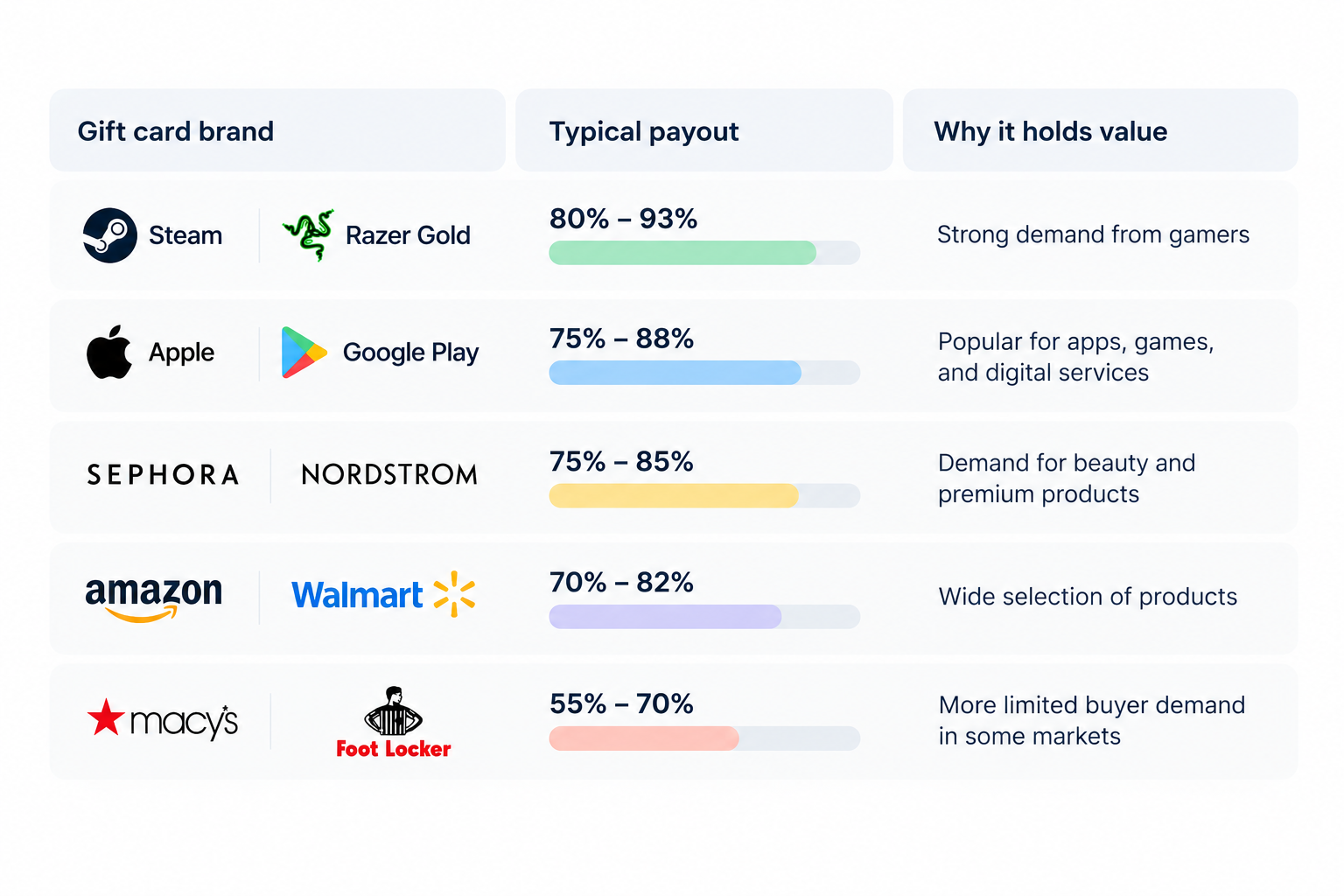
The rate you receive depends on the gift card brand, how many buyers want it, and how easily the card can be resold. Amazon, Apple, and Steam gift cards often have strong demand, while cards for less popular or region-specific retailers may sell for less.

A card's resale value is not the same as its face value. If your gift card is worth $100 and a buyer offers 80%, you will receive $80 before any additional fees.

Typical gift card resale rates by brand

Chart of gift card payout rates by retailer.

‍

Why do gift card rates differ?

  • Brand popularity: More buyers usually mean better resale rates.
  • Ease of resale: Cards that sell quickly may attract higher offers.
  • Card format: Physical cards with receipts may be easier to verify than some digital codes, depending on the buyer.
  • Country and currency: US-issued cards may attract stronger demand than cards restricted to other regions.
  • Fees and verification: Platforms may reduce their offers to cover processing costs and fraud risks.

How to sell a gift card step by step

Follow these steps to turn an unused gift card into cash while reducing the risk of delays, rejected submissions, or scams.

1. Check your balance: Visit the retailer's official website to confirm the remaining balance and make sure the card has been activated.

2. Confirm the card details: Check the brand, issuing country, currency, denomination, and whether you have a physical card or digital code.

3. Keep your proof of purchase: Save the original receipt, activation slip, or purchase confirmation email. Some buyers require proof to verify the card's origin.

4. Compare offers: Check the current payout rate on reputable trading platforms and compare the final amount you will receive after fees.

5. Submit your card: Create an account, select the correct card category, and upload clear images or enter the digital code through the platform's official submission process.

6. Wait for verification: The buyer checks the card's validity and balance. Track your transaction and respond to requests for additional information.

7. Receive your payout: Once approved and marked as paid, withdraw the money using an available payment method. Keep your transaction receipt for your records.

Important: Never share your gift card code with an unverified buyer or send it through public comments or unofficial messages.

How to avoid gift card scams

Selling gift cards for cash can be convenient, but a careless transaction can leave you with an empty balance and no payment. Knowing the warning signs can help you protect your money.

1. Check for drained cards: Confirm your gift card balance on the retailer's official website before trading. Submit it promptly through a trusted platform, as anyone who obtains the code may redeem the balance first.

2. Avoid fake buyers: Be cautious of social media traders promising unusually high rates or instant payments. Use reputable platforms with clear verification procedures and buyer protection where available.

3. Watch for overpayment scams: Never refund an alleged excess payment based on a screenshot or an unverified check. Confirm that funds have actually cleared before releasing your card.

4. Keep your PIN secret: Never share your redemption code, PIN, or photos showing the complete card details with an unverified buyer. Once someone redeems the balance, recovering your money may be difficult.

Always verify the buyer, confirm payment independently, and keep transaction records.

Getting your payout when living abroad

Selling gift cards through US platforms can be useful, but receiving your money while living abroad requires the right payment method. You may not need a US bank account if the platform supports international payouts or allows you to withdraw through an eligible financial service. Before selling, confirm the available payout currencies, withdrawal methods, and account requirements.

If you live in Nigeria, for example, you may want to receive USD and convert it to naira when you need local spending money. Grey supports cross-border transfers, and you can see how to send money from the US to Nigeria to understand the available transfer options. Check the applicable fees, exchange rate, and delivery time before moving your funds.

You can also open a USD account with Grey to receive and manage dollars, subject to eligibility and availability. Keeping funds in USD before converting them may help you choose when to exchange, but always compare the total costs and withdrawal options first.

Frequently asked questions

1. What is the best place to sell gift cards?

The best place to sell gift cards depends on your preferred currency, payout speed, and the card you own. Platforms such as Cardtonic, GiftCardsToNaira, GiftCash, and Gameflip offer different options. Compare their rates, fees, supported brands, and payment methods before choosing where to sell.

2. How much can you get for a gift card?

The amount you receive depends on the card’s brand, value, demand, and resale platform. Some gift cards may sell for 60% to 93% of their face value, but rates vary. Check current offers before selling so you understand how much you will receive.

3. Can you sell a partially used gift card?

You may be able to sell a partially used gift card, depending on the platform’s rules. The marketplace must support the card and allow its remaining balance to be verified. Check the requirements first, and disclose the exact balance to avoid disputes with the buyer.

4. How long does a gift card payout take?

Gift card payout times depend on the platform, verification process, and payment method. Some services process approved transactions quickly, while others may take several hours or longer. Before selling, check the estimated processing time and confirm whether additional identity or card verification is required.

5. Is selling gift cards legal?

Selling gift cards you legitimately own is generally legal, but the rules depend on your location, the card issuer’s terms, and the transaction. Avoid selling cards obtained through fraud or using platforms that facilitate illegal activity. Check local regulations and the marketplace’s terms before completing a sale.

6. How do you sell a US gift card from outside the US?

To sell a US gift card while living abroad, choose a reputable platform that accepts your card brand and country of residence. Check its exchange rate, fees, verification requirements, and payout options. Confirm that you can withdraw the proceeds in your preferred currency before submitting your card details.

How to redeem an Amazon gift card

•

•

2 min read

A friend in the US sends you a $50 Amazon gift card by email. You want it on your account before the next sale ends, but the code looks like a random string of letters and numbers, and you're not sure where to apply it or whether it works outside the US. This guide shows how to redeem an Amazon gift card, how to fix the usual errors, and what changes if you're outside the US.

Go to amazon.com/gc/redeem, sign in, enter the claim code exactly as printed and select Apply to Your Balance. The value is added to your Amazon gift card balance and applies automatically to your next eligible order, so you don't need to enter the code again.

How do you redeem an Amazon gift card?

You redeem an Amazon gift card by entering its claim code at amazon.com/gc/redeem, or in the Amazon app under Gift Card Balance, and selecting Apply to Your Balance. A claim code is 14 or 15 characters, a mix of letters and numbers, and sits under a peel-off sticker or a scratch-off strip on the back of a physical card. Electronic cards have no code to type: you open the email, text or link and select Apply to your Amazon Account. Amazon’s own gift card redemption page is the place to start from either route.

You need an Amazon account first. If you were hoping to redeem an Amazon gift card without an account, that isn’t possible because Amazon stores redeemed funds in an account. Create one before you apply the code.

Redeem on a computer

  1. Sign in at amazon.com with the account that should receive the funds.
  2. Go to amazon.com/gc/redeem, or hover over Account & Lists, select Account, then Gift Cards and Redeem a Gift Card.
  3. Type the claim code exactly as printed.
  4. Select Apply to Your Balance.

Redeem in the Amazon app

  1. Open the Amazon app and tap the user icon in the bottom bar.
  2. Scroll to Gift Card Balance and tap Redeem Gift Card.
  3. Tap Scan Your Claim Code and point your camera at the card, or tap Enter Claim Code and type it.
  4. Tap Apply to Your Balance.

Redeem an electronic gift card

  1. Sign in to the Amazon account that should receive the funds.
  2. Open the email, text or link the card came in.
  3. Select Apply to your Amazon Account, and sign in again if Amazon asks.

If you haven’t redeemed a physical card by the time you check out, you can also select “Use a gift card, voucher, or promo code” on the payment page, enter the claim code, and select Apply.

If you give gift cards as well as receive them, you can buy, send and manage gift cards with Grey.

How to check your Amazon gift card balance

On a computer, go to Account & Lists, then Account, then Gift Cards to see your current balance; in the Amazon app, tap the user icon and look under Gift Card Balance. The balance is stored on your account, not on the card or the email, so it appears here once the code has been redeemed.

To check your Amazon gift card balance and see where it went, open the balance history. It lists the date each code was claimed, the last four digits of the code, and the items the balance paid for. That makes it the first place to look when Amazon says a code has already been redeemed, because the funds may already be sitting in your account.

Amazon applies the balance automatically to your next eligible order, so you don’t need to select it at checkout.

Why isn’t my Amazon gift card working?

An Amazon gift card most often stops working because the code is being applied to the wrong account or Amazon store, or because it has already been redeemed. Those two causes are the quickest to rule out, so check them first. Confirm which email address you’re signed in with, then open your gift card balance and balance history to see whether the code has already been claimed.

If neither explains it, find your symptom in the table below.

What you see Likely cause What to do
The code is rejected as invalid A typing mistake, or characters that look alike Re-enter the code slowly. A physical card's claim code has 14 or 15 characters, so count them. In the app, try scanning it instead
The code is rejected as already redeemed It was claimed earlier, possibly by you on another account Open Your Gift Card Balance and check the history for the last four digits. Then check any other Amazon accounts you own
The code is accepted but the balance isn't there You're signed in to a different account Sign out, sign in with the account you meant to use, and open the Gift Cards page
The card won't work on your local Amazon site A card issued for amazon.com only works on amazon.com Shop on amazon.com, or ask the sender for a card issued for your country's store
The code is a promotional certificate Promotional credits come with conditions, such as eligible items or an end date Read the terms shown with the offer before you rely on it
The sticker is scratched or the code is unreadable The card is damaged Look for the 16- or 30-digit serial number on the back and give it to Amazon customer service
You can't pay for a gift card with your balance
Gift card balance can't buy other gift cards Pay for the gift card with another payment method

‍

If you type a code by hand, copy it from the original email whenever possible, or use the camera scan in the app for a physical card. Both cut out typing mistakes. If the card still won’t work after these checks, contact Amazon customer service and have the card’s serial number ready.

One safety point: never read a claim code out to someone who contacts you first and asks for it. Anyone holding the code can spend the balance.

Can you combine multiple gift cards?

Yes. Every code you redeem is added to the same Amazon gift card balance on your account, so you don’t need to merge cards yourself. If you hold three cards, redeem each code in turn, and the balance page shows the running total, with each claim listed in your balance history.

Amazon applies that balance to your next eligible order automatically. If an order costs more than your balance, you can pay the difference with another payment method on your account.

Two limits matter once the money is in:

  • You can’t transfer it: A balance can’t be moved to another Amazon account, so a code redeemed on a family member’s account stays there.
  • You can’t take it back out: Amazon doesn’t let you cash out or resell a redeemed balance, and a gift card balance can’t be used to buy another gift card.

Because redeeming is a one-way step, hold off on redeeming a card you’re not sure you’ll spend. A card that’s still unredeemed can be sold, and this guide explains how to sell a gift card for cash instead.

Redeeming a US Amazon gift card from outside the US

A US Amazon gift card is tied to Amazon’s US store, so you apply the code on amazon.com, and the balance only pays for orders there. It doesn’t carry over to a local Amazon site such as Amazon.co.uk, and Amazon doesn’t let you move a redeemed balance from one country’s store to another. If someone sends you a US card while you’re abroad, check this before you redeem it, because the balance can’t be moved afterwards.

What the balance can buy depends on what amazon.com will deliver to where you live. Eligible items, shipping options, and import costs vary by country, so check the delivery options on a product page before relying on a card to pay for it. A gift card also can’t be turned into cash, so it’s the wrong tool if what you need is money in your bank account.

That situation comes up often in Nigeria, where a relative or client in the US sometimes sends an Amazon card because it's the simplest thing to hand over. If the goal is to get money to you, you can send money from the US to Nigeria instead, and spend it anywhere once it arrives.

If you’d rather shop on amazon.com without a gift card, you can spend online with a Grey virtual card. You create the card in the Grey app and fund it with your USD balance, and Amazon is one of the merchants where it works. Creating a card costs a one-time $5, with no monthly fee. Because amazon.com charges in dollars, the 2% plus $0.50 charge on non-USD card purchases doesn’t apply. If you start from naira, converting to dollars carries a 1% fee, capped at $6, plus the exchange-rate margin shown in the app before you confirm.

Frequently asked questions about how to redeem an Amazon gift card

Do Amazon gift cards expire?

Standard Amazon gift cards don’t carry an expiry date, but promotional credits and certificates can have an end date. Check the terms shown with the offer, and redeem any promotional code before that date.

Can you redeem an Amazon gift card without an Amazon account?

No. Amazon stores the value of a gift card as a balance on an account, so you need to sign in or create an account before you can apply the code. Once the balance is on your account, it applies to your next eligible order.

What happens if you enter the wrong claim code too many times?

Amazon can temporarily stop further attempts if a code keeps failing, and it doesn’t publish how many tries it allows. Stop after a couple of failed tries, check the code character by character, and contact Amazon customer service with the card’s serial number if you’re still blocked.

Can you use an Amazon gift card to buy another gift card?

No. A gift card balance can’t be used to buy another gift card, so you need another payment method for that purchase. Your balance still covers eligible physical and digital items.

Is it safe to buy a discounted Amazon gift card from a reseller?

It’s risky. Discounted cards sold on social media or by unknown sellers are a common route for scams, and the code may already be used or may have been obtained fraudulently. Buy from Amazon or from a retailer you trust, and check that the code works as soon as you receive it.

Can you redeem a US Amazon gift card on Amazon.co.uk?

No. A card issued for amazon.com only works on amazon.com, and Amazon doesn’t move a redeemed balance between country stores. To spend in pounds on Amazon.co.uk, you need a card issued for that store.

Open a Grey account and spend your balance online with a virtual card.

How to send money from Nigeria to any country in 2026

•

•

2 min read

Five years ago, sending money out of Nigeria meant a trip to your bank's forex desk, a stack of forms, and a 2 to 5% fee with no guarantee of when the funds would arrive. The apps everyone recommended online were built for the opposite direction: Wise, LemFi, WorldRemit, and Remitly all moved money into Nigeria, not out of it.

That has changed. A handful of fintech apps now support outbound transfers from Nigeria, and the differences between them matter. Some charge a percentage fee. Some claim zero fees but build margin into the exchange rate. Some cover 18 countries; others cover 50. If you are in Lagos, Abuja, or Port Harcourt and need to send money to someone abroad, the options are real, but they are not all the same.

This guide compares every viable option for outbound transfers from Nigeria in 2026, breaks down what each one actually costs, and covers the CBN rules that apply to money leaving the country.

Which apps actually support sending money from Nigeria

Not every transfer app works in the outbound direction. Before comparing fees and features, it helps to know which apps let you initiate a transfer from inside Nigeria and which ones do not.

Apps that support outbound from Nigeria:

Grey supports outbound transfers from Nigeria to 50+ countries via bank transfer, mobile money, and UPI (India). You fund your Grey account in naira, convert to the destination currency, and send directly to your recipient's bank account or mobile wallet. Send money from Nigeria with Grey.

Flutterwave Send supports outbound from Nigeria through its Swap feature, built in partnership with Kadavra BDC and Wema Bank. You convert NGN to USD, GBP, or EUR inside the app, then send to recipients in 30+ countries. The transfer limit is $20,000 per transaction.

Eversend supports outbound from Nigeria to USD, GBP, and EUR bank accounts across 18 countries. It also supports stablecoin wallets (USDC and USDT) and offers a virtual dollar card.

Pesa (formerly Pesapeer) supports outbound from Nigeria to 50+ countries with a multi-currency wallet covering NGN, USD, GBP, EUR, CAD, and AED.

Apps that do NOT support outbound from Nigeria:

Wise does not support NGN as a sending currency. You can receive money in Nigeria through Wise, but you cannot use it to send money out of the country.

LemFi is a diaspora product. It works from the UK, US, Canada, and EU to Nigeria. If you are physically in Nigeria, LemFi does not support outbound transfers.

WorldRemit and Remitly both follow the inbound-only model. They send money to Nigeria from 50+ countries, but do not support the reverse direction.

Zelle and Venmo require both the sender and the receiver to hold US-based bank accounts. Neither works with Nigerian bank accounts in any direction.

OPay is a domestic Nigerian payments app. It handles local transfers, bill payments, and airtime top-ups within Nigeria but does not support international outbound transfers.

Afriex may also support outbound transfers from Nigeria, based on some sources, though the company's website primarily lists sending from the US, UK, Canada, and Europe to African countries. If you are considering Afriex for outbound Nigeria, confirm the available corridors directly in the app before initiating a transfer.

Understanding this split matters because search results and app store listings often recommend Wise, WorldRemit, or Remitly for "Nigerian money transfers" without specifying that they only work inbound. If you need to send money from Nigeria, the confirmed working options are Grey, Flutterwave Send, Eversend, and Pesa.

What each app actually costs on a $500 transfer

Every app handles pricing differently. Some charge a visible transfer fee. Others claim zero fees but build their margin into the exchange rate, which means you receive less at the other end without seeing a separate line item. The only honest comparison is to look at the total cost: transfer fee plus exchange rate markup combined.

Grey: 1% conversion fee, capped at the naira equivalent of $6 for major currency pairs (USD, EUR, GBP, NGN). There is also a flat payout fee that varies by destination. On a $500 transfer to the US, the conversion fee is $5, and there is no separate payout fee for USD destinations. Total visible cost: $5.00. See Grey's fee calculator for exact costs on any corridor.

Flutterwave Send: 1% of the transfer amount for all Nigerian outbound corridors. No published cap. On a $500 transfer, the fee is $5.00. On a $1,000 transfer, the fee is $10.00. On a $2,000 transfer, the fee is $20.00.

Eversend: Business accounts start from 0.49% plus a fixed fee per transfer. Personal account fees are shown in-app before you send but are not published on the website. You can see the exact cost before confirming any transfer, but there is no public fee schedule to compare against in advance.

Pesa: $0 transfer fee. Pesa does not charge a visible fee on any corridor. The cost is embedded in the exchange rate markup, which is not disclosed.

How the fee cap changes the maths on larger transfers

Transfer amount Grey (1%, capped at $6) Flutterwave Send (1%, no cap) Pesa ($0 visible) Eversend
$200 $2.00 $2.00 Hidden in rate Shown in-app
$500 $5.00 $5.00 Hidden in rate Shown in-app
$1,000 $6.00 (cap) $10.00 Hidden in rate Shown in-app
$2,000 $6.00 (cap) $20.00 Hidden in rate Shown in-app
$5,000 $6.00 (cap) $50.00 Hidden in rate Shown in-app

‍

Eversend publishes a 0.49% + fixed fee rate for business accounts but does not publish personal transfer fees. The fee is displayed in-app before you confirm.

On a $5,000 transfer, the difference between Grey and Flutterwave Send is $44. For anyone sending tuition payments, property deposits, or supplier invoices, the cap is a significant cost advantage.

Pesa's column reads "hidden in rate" because the true cost cannot be calculated without comparing the live exchange rate Pesa offers against the mid-market rate at that moment. A $0 transfer fee does not mean a $0 cost. It means the cost is in the rate, and you need to check how much you actually receive compared to what the mid-market rate would deliver.

Where can you send from Nigeria

Grey (50+ countries): Africa (Kenya, Ghana, South Africa, Egypt, Morocco, Algeria, Tanzania, Uganda, Rwanda, Senegal, Cameroon, Ethiopia), Europe (UK, Germany, France, Netherlands, Spain, Belgium, Italy, Ireland, Poland, Austria via SEPA), Asia (India via bank and UPI, Philippines, Indonesia, Bangladesh, Malaysia, UAE, Saudi Arabia), Americas (US via ACH, Canada via bank and Interac, Mexico, Brazil, Argentina, Colombia, Chile), Oceania (Australia).

Pesa (50+ countries): Similar breadth to Grey, with multi-currency wallets supporting NGN, USD, GBP, EUR, CAD, and AED. It recently expanded to the UAE.

Flutterwave Send (30+ countries): Sends from Nigeria, Cameroon, Senegal, Ivory Coast, Ghana, Kenya, South Africa, and Ethiopia.

Eversend (18 countries): Outbound from Nigeria to USD, GBP, and EUR accounts. Narrower coverage but supports stablecoin wallets (USDC, USDT) and intra-African routes like Nigeria to Kenya and Nigeria to Ghana.

How long do transfers take?

Destination Method Speed Available via
India UPI Minutes Grey
India Bank transfer Same day Grey
Kenya Mobile money Same day Grey, Flutterwave Send
Ghana Mobile money Same day Grey, Flutterwave Send
Morocco Bank transfer Instant (before 1 PM GMT) Grey
Canada Interac Instant Grey
US ACH 1-2 business days Grey, Flutterwave, Eversend, Pesa
UK FPS Next business day Grey
Algeria Bank transfer 5 business days Grey
Algeria Mobile money Same day Grey

‍

How to send money from Nigeria step by step

The process is similar across all four apps. Here is how it works with Grey.

Step 1: Open and verify your account. Download the Grey app, sign up, and verify your identity with a government-issued ID (passport, national ID, or driver's licence) and your BVN. Verification typically completes within minutes.

Step 2: Fund your account. Transfer naira from your Nigerian bank account into your Grey wallet. You can hold balances in USD, EUR, and GBP and convert when the rate suits you, or convert at the time of transfer.

Step 3: Convert your currency. Grey converts your naira to the destination currency at the rate shown on the screen. The 1% conversion fee (capped at $6 on major pairs) is displayed before you confirm.

Step 4: Enter recipient details and send. Add your recipient's bank details: sort code and account number for the UK, routing number and account number for the US, UPI ID or bank account for India. Confirm the transfer. Grey processes it, and you both receive a confirmation.

CBN rules for outbound transfers in 2026

The Central Bank of Nigeria regulates all foreign exchange transactions leaving the country. These limits apply regardless of which app you use.

Limit type Amount Notes
Personal travel allowance (Form A) $4,000 to $5,000 per quarter Depends on stated purpose
Business travel allowance $5,000 to $7,500 per quarter
Telegraphic transfers Up to $10,000 per day Via authorised channels
Platform transfer limits $5,000 to $10,000 per month Depends on platform and verification tier
Physical cash (no declaration) Up to $10,000
Physical cash (with Form TE) $10,000 to $50,000 Declaration required at departure
Domestic online ceiling (individual) N25 million Biometric verification above N1 million

‍

Paying for international services directly

Beyond person-to-person transfers, many Nigerians need to pay for international subscriptions, advertising platforms, software, freelancer tools, or online courses. For these recurring payments, a virtual card is more practical than initiating a transfer each time.

Grey offers a Rain card (Visa) for a one-time $4 creation fee plus a $1 funding deduction from your USD balance ($5 minimum balance required). The card works anywhere Visa is accepted online and supports Apple Pay and Google Pay. No monthly fee. For USD merchants, there is no additional charge. For non-USD merchants, a 2% + $0.50 cross-border fee applies. A fuller breakdown is in Grey charges explained.

Eversend also offers a virtual USD card at $0.99 per month or a $2.99 one-time fee, with no FX surcharge on USD transactions. Pesa offers virtual cards as well.

Which app is best for what

There is no single best app for every use case. Here is when each option makes the most sense.

Grey is best for larger transfers and wider destination coverage. The 1% fee capped at $6 means anyone sending above $600 pays less than they would on a straight-percentage platform. Grey also has the widest destination coverage (50+ countries), UPI support for India transfers, and a full-featured Visa virtual card.

Flutterwave Send is best for quick, moderate transfers within Africa. The 1% fee without a cap is competitive on smaller amounts, and the Swap integration makes currency conversion simple.

Eversend is best for multi-currency holders and stablecoin users. If you hold USDC or USDT and want to convert and send without going through naira first, Eversend's stablecoin wallets are a genuine differentiator.

Pesa is best if you prioritise no visible fees on small transfers. The $0 transfer fee is real. But because the cost is in the exchange rate, you need to compare the rate Pesa offers against the mid-market rate to know what you are actually paying.

Also read: Cheapest way to send money from Nigeria in 2026

Frequently asked questions

Can I use Wise to send money from Nigeria?

No. Wise does not support NGN as a sending currency. Wise suspended USD transfers to Nigeria effective November 1, 2022, and later resumed inbound naira payouts, but outbound from Nigeria remains unsupported. To send money from Nigeria, use Grey, Flutterwave Send, Eversend, or Pesa.

What is the cheapest way to send money from Nigeria abroad?

It depends on the amount. For smaller transfers, Pesa's zero-visible-fee model or Eversend's in-app pricing may work out cheaper depending on the exchange rate offered. For transfers above $600, Grey's 1% fee capped at the naira equivalent of $6 is the lowest published rate among platforms with transparent fee structures. On a $2,000 transfer, Grey charges $6 in conversion fees while Flutterwave Send charges $20. Always compare the total received amount, not just the headline fee.

Can OPay send money internationally?

No. OPay is a domestic Nigerian payments platform. It handles local transfers, bill payments, airtime, and betting deposits within Nigeria. OPay does not support international outbound transfers.

Is Zelle allowed in Nigeria?

No. Zelle requires both the sender and the receiver to hold bank accounts at US-based financial institutions. Nigerian bank accounts are not compatible with Zelle in either direction.

What documents do I need to send money from Nigeria?

You need a valid government-issued ID (international passport, national ID card, or driver's licence) and your Bank Verification Number (BVN) to verify your account. For larger transfers, you may be asked for proof of source of funds in line with CBN anti-money laundering requirements.

How long does it take to send money from Nigeria to India?

With Grey, transfers to India arrive the same day. Both bank transfer (up to INR 450,000) and UPI (up to INR 100,000) are supported, with a flat $1.50 payout fee. UPI transfers can arrive within minutes and are available every day, including weekends.

How long does it take to send money from Nigeria to the US?

Most apps deliver to US bank accounts within 1-2 business days via ACH. Grey, Flutterwave Send, Eversend, and Pesa all support the Nigeria-to-US corridor with similar delivery timeframes.

Is Grey a bank?

No. Grey is a licensed multi-currency account provider that operates through regulated banking partners. Grey offers international transfers, multi-currency accounts, and virtual cards across 80+ countries. It is not a deposit-taking bank.

‍

Related reading

Cheapest way to send money from Nigeria in 2026 compares the exact cost of sending $500, $1,000, and $2,000 with Grey, Flutterwave Send, Pesa, and Eversend.

The easiest way for Nigerians abroad to send US dollars home covers the reverse direction: sending money to Nigeria from the UK, US, or Canada.

Exchange rates on Grey are variable and include a margin over the mid-market rate. Always review the rate before confirming a conversion. Grey is a financial technology company, not a bank. Banking services are provided by licensed banking partners. This article is general information, not financial advice.

Arrow (up)

Back to top