


<script type="application/ld+json" data-schema-version="grey-blog-v4"> [{"@context":"https://schema.org","@type":"BlogPosting","@id":"https://grey.co/blog/grey-p2p#article","headline":"Introducing Grey P2P: A faster way to transact","description":"We're finally excited to announce that you can now send payments instantly with Grey's P2P transfers for free.","inLanguage":"en","url":"https://grey.co/blog/grey-p2p","mainEntityOfPage":{"@id":"https://grey.co/blog/grey-p2p#webpage"},"datePublished":"2022-11-30T17:29:58.270Z","dateModified":"2022-11-30T17:29:58.270Z","author":{"@type":"Person","@id":"https://grey.co/authors/winner#person","name":"Winner Ajibola","url":"https://grey.co/authors/winner"},"publisher":{"@type":"Organization","@id":"https://grey.co/#organization","name":"Grey","url":"https://grey.co","logo":{"@type":"ImageObject","url":"https://cdn.prod.website-files.com/6360022338a81bd6fdbb1145/6564ae1077a67e39d3c491a6_Grey%20Logo%20Lockup%20Black.svg"}},"image":{"@type":"ImageObject","@id":"https://grey.co/blog/grey-p2p#primaryimage","url":"https://cdn.prod.website-files.com/636a85d290ee58e70c17e1c0/6a301c66db937e572b44967c_6a301c64db937e572b449518_grey-p2p__header-image.webp","contentUrl":"https://cdn.prod.website-files.com/636a85d290ee58e70c17e1c0/6a301c66db937e572b44967c_6a301c64db937e572b449518_grey-p2p__header-image.webp","width":1200,"height":675}},{"@context":"https://schema.org","@type":"WebPage","@id":"https://grey.co/blog/grey-p2p#webpage","url":"https://grey.co/blog/grey-p2p","name":"Introducing Grey P2P: A faster way to transact","description":"We're finally excited to announce that you can now send payments instantly with Grey's P2P transfers for free.","inLanguage":"en","primaryImageOfPage":{"@id":"https://grey.co/blog/grey-p2p#primaryimage"},"breadcrumb":{"@id":"https://grey.co/blog/grey-p2p#breadcrumb"}},{"@context":"https://schema.org","@type":"BreadcrumbList","@id":"https://grey.co/blog/grey-p2p#breadcrumb","itemListElement":[{"@type":"ListItem","position":1,"name":"Home","item":"https://grey.co/"},{"@type":"ListItem","position":2,"name":"Blog","item":"https://grey.co/blog"},{"@type":"ListItem","position":3,"name":"Introducing Grey P2P: A faster way to transact","item":"https://grey.co/blog/grey-p2p"}]}] </script>

Introducing Grey P2P: A faster way to transact

Winner Ajibola

TABLE OF CONTENT

SHARE THIS POST

Over the last few months, we’ve worked hard to simplify sending and receiving payments on Grey. We remain committed to improving our processes by creating new solutions for our users. And so, after working on a popular request from our users, we’re finally excited to announce that you can now send money faster with Grey’s P2P transfers.

How Does the Grey P2P Transfer Work?

With a GreyTag, you can now send and receive payments instantly on Grey. You no longer have to send your banking details for international transactions. By simply sharing your GreyTag, anyone with a Grey account can send you USD, EUR, GBP, KES, Tsh, UGX, NGN, and our other acceptable currencies.

This also makes sending money abroad easy. Employees, friends, and family members can get your payments faster when you send money via a GreyTag.

Why Should You Send Money Via a GreyTag?

This is arguably one of the best transfer methods available on Grey, and here’s why;

1. Instantaneous transfers: Sending and receiving money via this option is instantaneous. Since there are no banks and the need for long reconciliation processes, your recipients will immediately get the payment in their Grey balance.

2. Free transfers: You don’t have to pay additional charges to send money abroad. P2P transfers on Grey are absolutely free.

3. Security: Every user on Grey undergoes a thorough verification process. Every GreyTag is unique, so you’re 100% sure you’re sending funds to the right person.

How to Send Money Using the Grey P2P Option

To use the Grey P2P transfer option, simply follow these few steps.

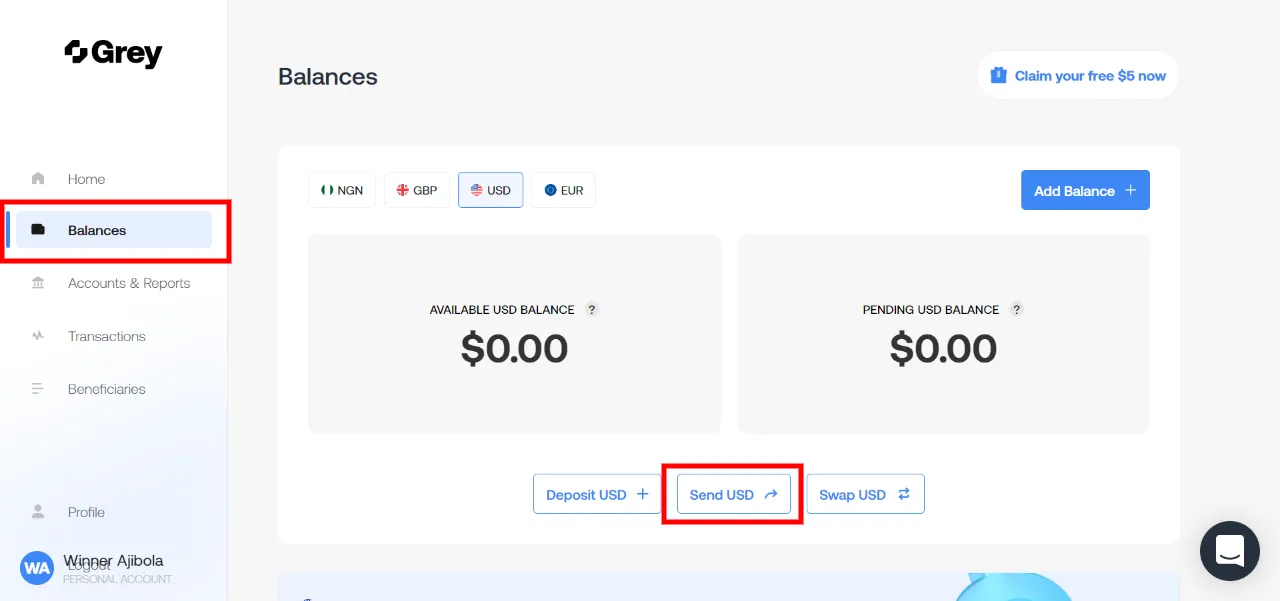
  • Log in to your Grey account.
  • Under the balance of any currency you’d like to send, tap on ‘Send XXX’ (in this example, we’ll be using the USD balance)
grey-balance
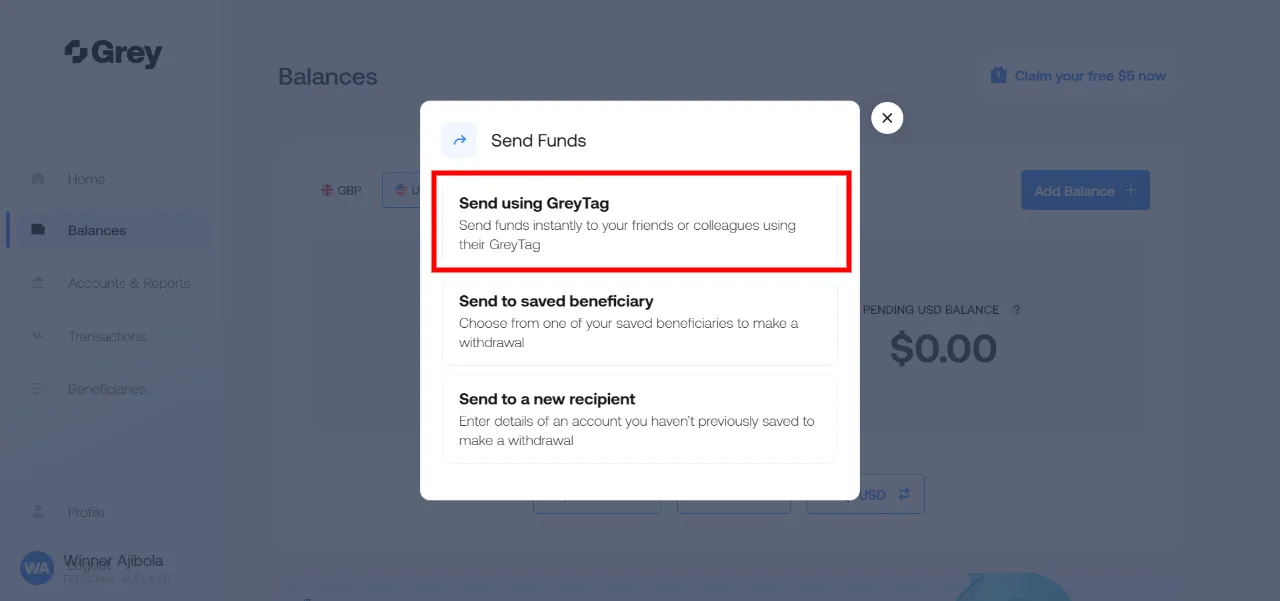
  • Select the ‘Send using GreyTag’ option
grey-p2p
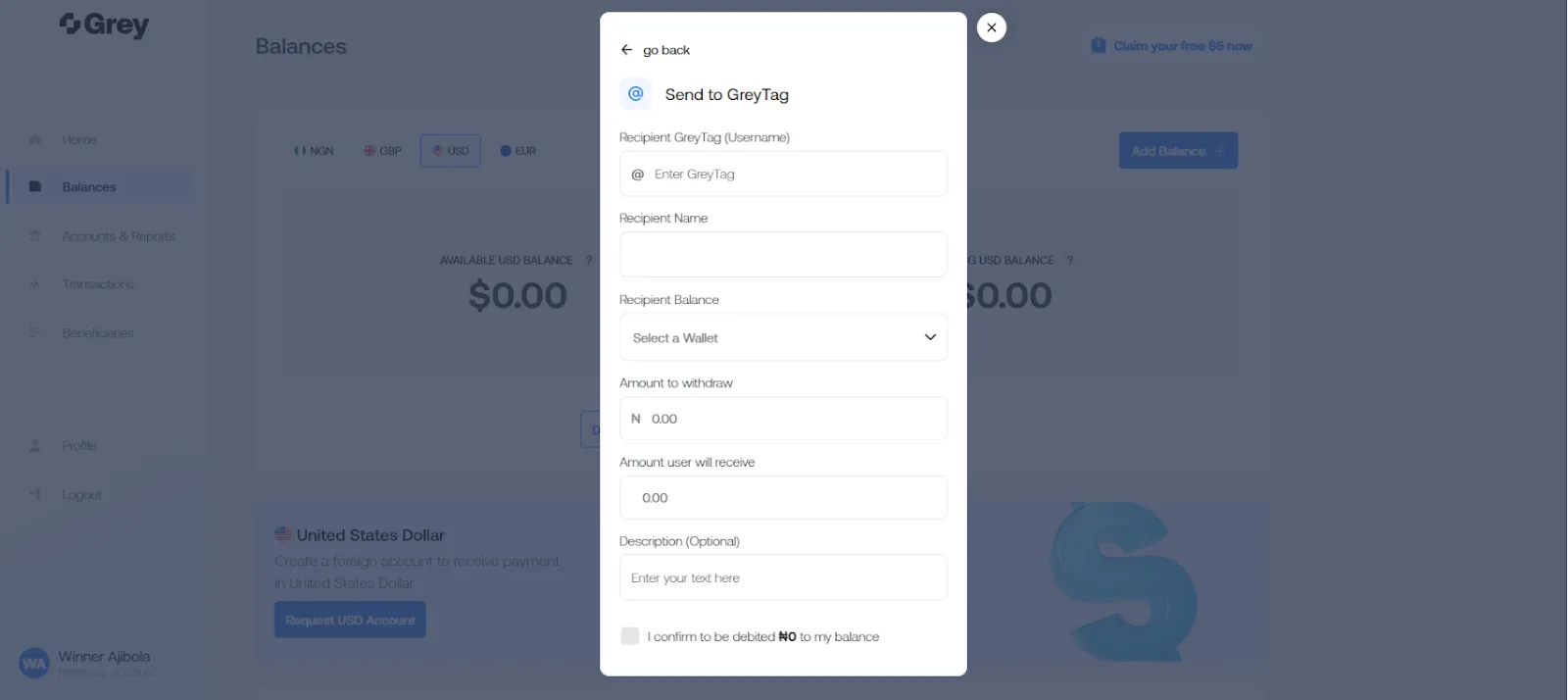
  • Fill out the form with the correct information and click on ‘proceed.’
send-to-greytag
  • Your recipient will immediately receive the money in their available balance.

For a better experience, we recommend downloading the mobile app. You can get it on Playstore and the iOS app store. We’re constantly looking for ways to improve our users’ experience, so when you make any P2P transactions on Grey, do leave us a kind review, so we know how to serve you better.

Last updated:

October 2, 2026

Open a free Grey account to get startedJoin 1 million digital nomads
IF YOU ENJOYED THIS, CHECK THESE OUT

Grey now supports transfers to Argentina, Thailand, Ethiopia, and Chile

•

•

2 min read

One of the most common requests from our community has been for more ways to send money directly to local bank accounts around the world. We're happy to say those options have just expanded.

Starting today, you can send money to Argentina, Chile, Thailand, and Ethiopia directly from your Grey balance. Whether you're supporting family, paying contractors, or sending business payments abroad, your money arrives the way it's actually used on the other side, in local currency and through local payment rails.

Fees start from $1, and the rate you see is exactly what your recipient receives.

Sending money to Argentina

Argentina is one of the most requested destinations among our community, but sending money there hasn't always offered many good options. Wise and Revolut don't currently support transfers in Argentine pesos, while a $500 transfer through Western Union can cost around $24.99 in fees. Grey fills that gap, giving you a direct way to send ARS with transparent pricing and local currency delivery.

You can send from your USD, EUR, or GBP balance directly to any operating bank in Argentina, personal or business. The fee is $2 plus 0.20% per transaction, which works out to around $3 on a $500 transfer. Transfers process instantly on weekdays before 18:00 GMT, with a minimum of 1,000 ARS and a maximum of 7,000,000 ARS per transaction.

How to send money to Argentina on Grey:

  • Open the Grey app and go to Send Money
  • Select Argentina as your destination
  • Enter your recipient's bank details
  • Enter the amount you want to send
  • Review the fee and exchange rate
  • Hit Send. Your recipient gets the money in minutes

Start sending money to Argentina

Sending money to Thailand

Thailand is home to one of the largest freelance and digital nomad communities in the world. Annual remittances to the country now exceed $12.3 billion and continue to grow. As more people work, hire, and do business across borders, the need for simple, affordable transfers continues to grow. With Grey, you can now send Thai baht directly to local bank accounts.

You can send from your USD, EUR, or GBP balance to any operating bank in Thailand, personal or business, for a flat fee of $1.80 per transfer. That is 93% cheaper than Western Union and 69% cheaper than Wise on a $500 transfer. Transfers arrive the next business day before 18:00 local time, with a minimum of 10 THB and a maximum of 49,999 THB per transaction.

How to send money to Thailand on Grey:

  • Open the Grey app and go to Send Money
  • Select Thailand as your destination
  • Enter your recipient's bank details
  • Enter the amount you want to send
  • Review the fee and exchange rate
  • Hit Send. Your recipient receives the money the next business day

Start sending money to Thailand

Sending money to Ethiopia

More people than ever are sending money to Ethiopia. The country receives over $6 billion in remittances each year, with volumes growing by 50% year on year. From supporting family back home to paying freelancers and business partners, Grey now lets you send money directly to Ethiopia.

What makes Grey's Ethiopia transfer particularly useful is mobile money support. In addition to bank transfers, you can send directly to Telebirr and Safaricom M-Pesa, and those payments settle in real time. For families and individuals who rely on mobile wallets for everyday spending, this makes a real difference.

The fee is a flat $2 per transfer for both bank and mobile money transfers, which is 83% cheaper than Wise and up to 92% cheaper than a bank wire. The minimum transfer is 100 ETB and the maximum is 150,000 ETB per transaction.

How to send money to Ethiopia on Grey:

  • Open the Grey app and go to Send Money
  • Select Ethiopia as your destination
  • Choose whether you want to send to a bank account or a mobile money wallet
  • For mobile money, enter your recipient's Telebirr or Safaricom M-Pesa number. For bank transfers, enter their bank details
  • Review the fee and exchange rate
  • Hit Send. Mobile money transfers arrive in real time. Bank transfers arrive the next business day

Start sending money to Ethiopia

Sending money to Chile

Chile has become an important destination for remote work, freelancing, and international business. As more money moves between Chile and the rest of the world, Grey now gives you a direct way to send Chilean pesos to local bank accounts.

You can send from your USD, EUR, or GBP balance to any operating bank in Chile, personal or business, for a flat fee of just $1 per transfer. That is the lowest fee in this launch, 87% cheaper than Western Union and 85% cheaper than Wise on a $500 transfer. Transfers arrive the next business day before 18:00 local time, with a minimum of 100 CLP and a maximum of 4,500,000 CLP per transaction.

How to send money to Chile on Grey:

  • Open the Grey app and go to Send Money
  • Select Chile as your destination
  • Enter your recipient's bank details
  • Enter the amount you want to send
  • Review the fee and exchange rate
  • Hit Send. Your recipient receives the money the next business day

Start sending money to Chile

Why Grey for international transfers?

Grey was built for people who live and work across borders. Every transfer shows you the real rate and the exact fee before you confirm. No surprises, no percentage markups on top of a hidden spread.

With these four new currencies, Grey now covers even more of the world's most important money corridors. Whether you are a business paying global contractors or an individual sending money home, you keep more of what you earn.

Start sending today. Open your Grey account or update the app to access all four new currencies.

Frequently asked questions

Can I send to both personal and business bank accounts?Yes. All four currencies support transfers to personal and business bank accounts.

Are there any hidden fees on top of the flat rate?No. The fee shown before you confirm is the only fee Grey charges. The exchange rate you see is the rate your recipient receives.

What currencies can I send from?You can send from your USD, EUR, or GBP balance on Grey.

How do I send to a mobile money account in Ethiopia?Select Ethiopia as your destination, choose mobile money as the transfer method, and enter your recipient's Telebirr or Safaricom M-Pesa number. Mobile money transfers settle in real time.

Do transfers happen on weekends?All four currencies process on business days, Monday to Friday. Transfers submitted after the daily cut-off time or over the weekend will be processed on the next business day.

Exchange rates are indicative and change in real time. Always check the Grey app for the live rate before sending.

‍

Receive USD payments in seconds with FedNow on Grey

•

•

2 min read

At Grey, we’re constantly looking for ways to remove the small delays and frustrations that come with moving money internationally.

That’s why we’re excited to announce something new for USD transfers.

You can now receive USD payments instantly with FedNow on Grey. This means your money arrives in seconds, not days and it’s available any time of the day, including weekends and holidays

Why Grey added FedNow for faster USD payments

For many people using Grey, international payments are tied to real-life moments that cannot always wait until “business hours”. Freelancers need access to funds before deadlines. Businesses need to pay for tools, ads, suppliers, or contractors quickly. Travellers and remote workers may need to move money while on the go.

This update is part of our ongoing effort to make global banking feel more responsive, more flexible, and more aligned with real life.

How to send money with FedNow with Grey

FedNow works automatically in the background for eligible USD transfers, so there’s nothing new you need to set up or enable on your Grey account.

  • Make sure your sender uses a bank that supports FedNow (e.g. Lead Bank, Chase, Wells Fargo) to send USD.
  • When they send, your Grey US account receives the funds instantly.
  • You don't have to take any extra step to send money via FedNow, it just works automatically.

How much do FedNow transfers cost on Grey?

FedNow transfer fees on Grey are the same as Grey's standard ACH transfer fees.

Account type Fee
Individual accounts 0.8% per transaction (minimum $2, maximum $10)
Business accounts Flat $2 per transaction

Faster access to your USD payments

Faster USD transfers are part of Grey’s effort to make global money movement quicker and more accessible. As more financial institutions adopt FedNow, eligible USD payments sent to your Grey account can arrive in seconds, any time of the day.

Ready to receive USD payments faster? Open your free Grey account or sign in to start managing funds like a local.

‍

Send Canadian dollars with Grey

•

•

2 min read

Everything we do at Grey is aimed at making it easier for you to make global payments.

We’re excited to announce that Grey now supports Canadian dollars (CAD) payments, which means you can send money to Canada directly from your Grey account via Interac e-Transfer.

You can pay freelancers, send money to family, or make cross-border payments to Canadian businesses right from your phone.

What exactly does this mean for you?

Send money to Canada easily‍

Because we’ve integrated with Interac e-Transfer, you can send money directly to any Canadian bank account. You’ll only pay a flat $3 fee, regardless of how much you’re sending.

Expand your global operations with less friction

‍CAD joins our growing list of supported currencies, giving you more flexibility when operating across borders.

No additional setup required

‍It’s the same Grey account you already have. Sending CAD works exactly like sending any other currency through Grey. There’s no confusion about exchange rates and no need for the recipients to sign up for anything.

How does sending CAD work with Grey?

We’ve kept things simple. Here’s how to send Canadian Dollars using Grey:

  1. Log in to your Grey account.
    ‍
  2. Click “Send”.
Send Canadian dollars with Grey

‍

2. On the “Send Money” tab, select “Send via Interac”.

Send Canadian dollars with Grey

‍

3. Select Canada as the destination and choose CAD as the currency.

Send Canadian dollars with Grey

4. Enter the recipient’s details and confirm the transfer.

Send Canadian dollars with Grey

Enjoy global payments with Grey

At Grey, our mission is to make globalisation work for everyone. Supporting payments in Canadian Dollars takes us closer towards achieving that goal.

We want more freelancers, businesses, and remote workers to operate internationally without friction.

More currencies, more countries, and more ways to manage money across borders, that’s where we’re headed.

Open a free Grey account today, or download the app to get started.

‍

How to pay for ads easily with your Grey card

•

•

2 min read

Last month, my friend called me in a panic. He’d just launched a big Meta Ads campaign. He’d spent days tweaking it, and right in the middle of a strong performance spike, the worst thing happened. His payment failed.

Meta paused the entire campaign, and he lost momentum, leads, and a potential client renewal. All because his bank randomly declined an international payment at 2 am.

If you’ve ever run ads before, you know this story almost too well.

There are a few things a paid ads manager dislikes more than payments disrupting their ads. Even for creators, freelancers, and small businesses who depend on continuous campaigns, this is annoying and expensive.

This is exactly where the Grey card becomes a practical lifesaver, and I’ll explain here.

Why paying for ads can be difficult sometimes

People don’t always talk about it, but most ad buyers run into the same problems:

1. International cards get declined

Many local bank cards struggle with platforms like Google Ads or Facebook because they’re billed in USD or EUR, depending on your country.

2. Currency headaches

If you earn in your local currency, say naira, but pay for ads in dollars, fees and conversion delays can throw off your budget.

3. Too many campaigns, one payment method

Freelancers running multiple client campaigns often use a single card, which can become a budgeting nightmare.

4. Ad platforms are strict

If your payment fails, the platform pauses your campaign immediately. You lose reach, data, and momentum.

The Grey Visa card was made to solve these exact pain points.

How your Grey helps you run ads without stress

Spend directly from your available balances

Your Grey card automatically pulls funds from your available accounts in the order USD → USDC → the next highest currency, eliminating the need for manual top-ups or wallet selection.

For example, if an ad platform charges $50, the payment is automatically deducted from the available balance, ensuring campaigns run uninterrupted.

Supports Apple Pay and Google Pay

For people who prefer not typing their card details into every ad account, this is a blessing. Just tap, approve, and your campaign goes live.

Create multiple cards to stay organised

You can create separate cards for:

  • Google Ads
  • Meta Ads
  • TikTok
  • LinkedIn
  • Client-specific campaigns

Multiple cards now still work seamlessly from the same unified wallet structure, so you don’t have to worry about linking different currencies or crypto separately.

This makes reconciliation significantly easier and provides peace of mind if one card needs to be frozen or replaced.

Instant freeze/unfreeze and spending limits

If you want to pause a campaign, you can freeze the card without accessing the ad platform. To control costs, you can simply set a monthly limit.

LDMAG1

How to start paying for ads with your Grey card

1. Get your Grey card

You can sign up on Grey, go to the cards section and create your card. This will cost $5.

2. Add it to your ad account

Link it to Google Ads, Meta, TikTok, LinkedIn or wherever you run campaigns.

3. Set a spending limit

This helps with client budgets, personal campaigns, or one-off experiments.

4. Track your payments in the Grey app

Every charge, every retry, every refund is neatly organised right on the app.

Tips to run ads more smoothly with Grey

  • Use separate cards for each client or campaign category.
  • Freeze cards to instantly pause campaigns when needed.
  • Add your card to Apple Pay or Google Pay for fast approvals.

Your ads deserve stability

Running ads is stressful enough. You shouldn’t also have to worry about whether your card will work when Meta tries to charge you at dawn.

If you’re ready for smoother campaigns, fewer declines, and easier budgeting, you can create your Grey Visa card and set up your first ad payment in minutes.

‍

Meet Grey’s new homepage

•

•

2 min read

Grey is built to support the way you manage money across borders. That’s why we’ve redesigned the homepage to make things easier to follow and quicker to act on.

The new design brings clearer balances, guided actions, and important updates right where you need them.

What’s new on Grey’s homepage

One total balance, upfront

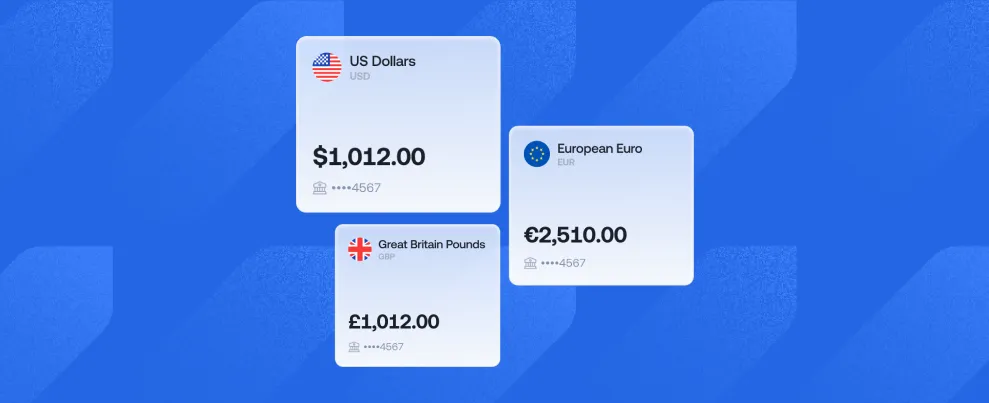
Instead of jumping between wallets, you now see your total funds across all wallets in one place, with a clear breakdown by fiat, stablecoins, and cards. No more switching screens to get the full picture.

__wf_reserved_inherit

Wallet cards for faster scanning

Wallet cards now give you a quick visual view of your active balances across currencies and assets, making it easier to spot what’s available and where. Think of it as a snapshot of everything that’s currently in use, without digging through menus.

__wf_reserved_inherit

Guided onboarding for new users

New onboarding banners include a simple to-do checklist that guides you through key steps like verifying your email, completing KYC, creating a card, or making your first transaction.

If you’re just getting started on Grey, the new homepage won’t leave you guessing.

‍

More transparency around KYC

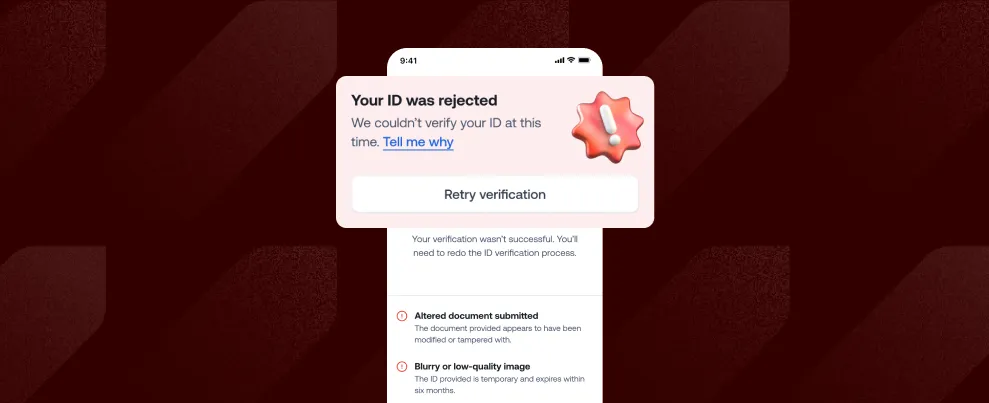
If your KYC is rejected, a new “Tell me why” banner helps you understand the issue. Instead of hitting a wall or immediately contacting support, you’ll be able to understand what happened and what needs fixing.

__wf_reserved_inherit

Clearer transaction tracking

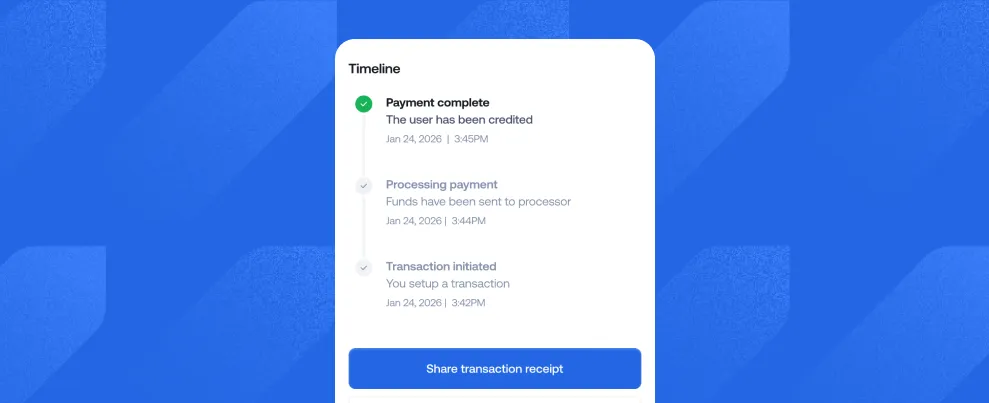
With the new homepage experience, transactions now show a clear timeline and cycle, so you can see what stage your transfer is in and what’s happening behind the scenes. It gives you more control and helps Support resolve issues faster when needed.

__wf_reserved_inherit

In-app alerts that stand out

The new homepage introduces in-app banners for alerts, errors, and status updates, so you don’t miss critical information about your account or transactions.

Clear messages, right when they matter, mean fewer surprises and faster resolutions.

A simpler way to manage your money

The new Grey homepage is designed to make managing your money clearer, faster, and more intuitive.

Everything you need is right where you expect it. Update your Grey app and explore the new experience.

‍

How to spend globally with the new Grey Virtual Card

•

•

2 min read

What should a truly modern global card feel like?

That question guided every decision behind the new Grey virtual card. We wanted to raise the bar of what your card can do and make everyday spending feel lighter, faster, and more intuitive.

Grey’s new card was designed to simplify global payments, connect directly to your foreign currency balances, enhance security, and seamlessly integrate with Apple Pay and Google Pay.

If your life spans different countries and currencies, this card was built with you in mind.

What makes the new virtual card better

This card was built for the way global citizens actually move, earn, and spend. Here’s what makes it quietly powerful.

Spend directly from your balance

Gone are the days of pausing mid-payment to top up your virtual card.

Your Grey card is automatically connected to your available balances. When you pay, it pulls straight from the right currency, whether that’s USD, EUR, GBP, or NGN. If the funds are there, the payment goes through.

You can book a flight, pay for software, grab lunch abroad, or renew your favourite subscription; your card keeps up without asking you to do extra work.

Add your card to Apple Pay or Google Pay

You can now use Apple Pay and Google Pay (in supported regions) with your Grey Plus Card. That means fast, secure, contactless payments online and in-store, everywhere Visa is accepted.

Tap to pay for groceries.

Tap to board public transport.

Tap to check out online.

Wherever life takes you next, your virtual card is always with you, in your smartphone.

Create multiple spend cards for different needs

You use your money in different ways, so your card should work for all of them.

With Grey, you can create multiple virtual cards for:

  • Travel
  • Business expenses
  • Subscriptions
  • Ad spend
  • Budgeting and personal controls

Each card can have its own limits and settings, helping you manage your money with clarity and confidence.

Built-in 3D Secure (3DS) protection

With 3D Secure, you’ll be asked to verify transactions yourself, making it much harder for anyone else to use your card without permission. It helps block suspicious activity, prevent fraud, and keep your money protected, all while giving you more control over your payments.

Accepted everywhere Visa works

And of course, the Plus Card is globally accepted, online, on apps, and in physical stores.

You also get access to Visa’s global protections and benefits.

Whether your day involves an airport lounge, an online meeting, or a street market in a city you’re just getting to know, your virtual card is ever ready to complete payments.

Designed with you at the centre

More than anything, this new card reflects how we build at Grey: by listening, improving, and creating tools that match the pace of the world you live in. Your feedback helped shape this upgrade. Your experience guided every decision.

The result is a card that feels lighter, smarter, and more flexible, ready for your next move, whatever and wherever it may be.

Pay from anywhere, in anything

Your new Grey card was made for the kind of days that don’t fit neatly into one country. Maybe you’re earning in dollars this morning, shopping in another currency by lunch, and racing through a couple of airports before dinner. It bends with your plans, slips easily into your routine, and crosses borders as much as you do.

Request your Grey card and enjoy how easy global spending can be.

‍

Arrow (up)

Back to top