
Algeria’s emerging remote work culture: challenges and opportunities

Adeolu Titus Adekunle

TABLE OF CONTENT

SHARE THIS POST

Thanks to the country’s robust digital infrastructure, its talented and youthful population, and multilingualism, Algeria is developing an emerging remote work culture. This shift is further fueled by the ‘Algeria Digital 2030’ Strategy, which emphasises the integration of digital skills into the country’s economy. The emergence of remote work in Algeria has opened doors to global opportunities as a great talent market.

The growth in the digital workspace hasn’t been without some bumps. With uneven access to quality digital infrastructure, limited payment options, and a lack of a regulatory framework, significant improvements are needed. This article explores Algeria’s emerging remote work culture, its challenges, and the opportunities it presents.

Also read: How to withdraw your freelancing money in Algeria

Challenges of remote work in Algeria

Here are some of the problems associated with remote work in Algeria

1. Uneven digital infrastructure

While urban centres like Algiers enjoy excellent internet speeds and other digital infrastructure, those in rural communities like the Sahara don’t have that luxury.

2. Limited payment options

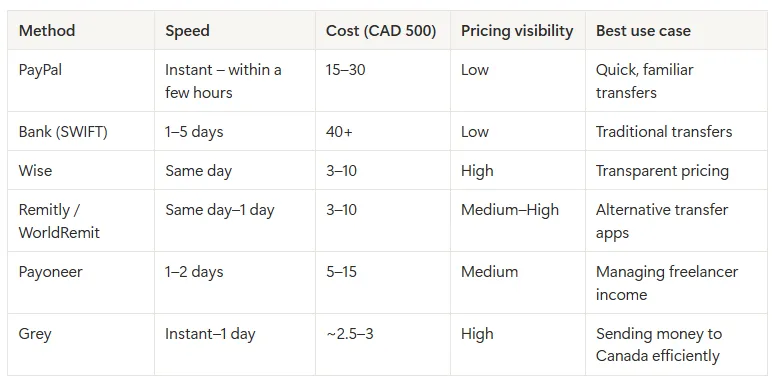
Accessing international payments remains a major hurdle for many remote workers in Algeria. Many global platforms don’t support direct withdrawals to Algerian banks. This forces freelancers to depend on costly traditional banks and other indirect payout options.

LDMAG1

3. Lack of regulatory framework

There is little clarity in Algerian labour laws regarding remote contracts, cross-border taxation, and freelance rights. This makes it difficult for freelancers to scale their businesses and gives room for exploitation.

Also read: How freelancers in Algeria can receive payments from US, UK & EU clients

Opportunities in remote work for Algerians

Remote work offers immense opportunities for professionals in Algeria.

  1. International access: Digital work ensures better exposure to global companies and international clients, removing the geographical location barrier and reducing unemployment..
  2. Earning in a foreign currency: Working with international clients could mean earning in USD, GBP or EUR, which offer more stability and great value when converted to Algerian dinar (DZD).
  3. Improved work-life balance: Remote work offers the opportunity to save time and money on commuting, especially for those living outside major cities with high living costs. Working from their homes in different regions of the country allows professionals to remain productive while enjoying a better work-life balance.
  4. Economic diversification and skill development: The growth of remote work has encouraged digital skills development among the youthful Algerian population. This has led to economic diversification, increased productivity, and economic growth.
  5. Growth of local businesses: Remote work contributes to the local economies. The demand for cafes and workspaces is growing. These co-working spaces provide opportunities for networking, collaboration, and training, especially for young professionals and entrepreneurs. Stores selling or fixing remote work gadgets are also experiencing a business boom.

Also read: Algeria’s remote tech talent and opportunities abroad

Managing international payments in Algeria

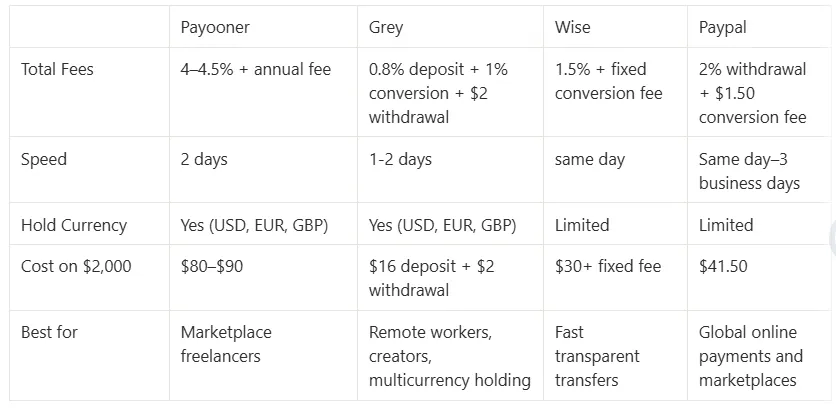
International payments remain a major pain point for remote workers in Algeria. They face high transaction costs, unfair exchange rates, and delayed payments. Grey is designed to help remote workers in Algeria process international payments swiftly and affordably. Users can manage transactions in USD, EUR, and GBP seamlessly. These accounts also integrate smoothly with freelancing platforms.

Get started on Grey today to enjoy seamless international payments in Algeria.

Last updated:

June 15, 2026

Open a free Grey account to get startedJoin 1 million digital nomads
IF YOU ENJOYED THIS, CHECK THESE OUT

How Fiverr freelancers in Egypt can receive payments easily in 2026

2 min read

Updated: January 2026

Egypt’s rich legacy of innovation continues to thrive in the digital age, with Egyptian freelancers leveraging Fiverr’s global platform to showcase their skills in writing, design, programming, and more. But while Fiverr connects freelancers to international clients with ease, receiving payments can sometimes be a challenge, as traditional payout options aren’t always the most convenient or cost-effective.

In this guide, we’ll show you how Grey can simplify the process of receiving Fiverr payments, making it seamless and hassle-free, so you can focus on growing your freelance business.

Also read: How to receive payments from freelance platforms easily in 2025

Why freelancers in Egypt should use Grey

Grey eliminates these hurdles, offering a seamless payment experience for Egyptian freelancers. Here’s why Grey stands out:

  • Multi-Currency accounts: Receive payments in USD, GBP, or EUR directly from Fiverr.
  • Competitive exchange rates: Convert your earnings into Egyptian pounds (EGP) at rates that maximise your income.
  • Affordable fees: Save more of your earnings with Grey’s low transaction costs.
  • Fast transfers: Access your funds quickly, without unnecessary delays

Also read: How to receive payments on Etsy as a seller in Egypt

How to receive Fiverr payments with Grey in Egypt

  1. Create your free Grey account
    • Visit Grey’s website and sign up for a free account.
    • Once registered, you’ll receive virtual multi-currency account details in USD, GBP, and EUR.
  2. Link your Fiverr account
    • Log in to your Fiverr account and navigate to the "Earnings" section.
    • Select "Bank Transfer" as your withdrawal option and input your Grey account details.
  3. Start receiving payments
    • Fiverr will deposit your earnings directly into your Grey account, where you can track payments in real time.
  4. Convert and withdraw funds
    • Use Grey’s platform to convert USD, GBP, or EUR to EGP at competitive rates.
    • Transfer your funds to your local Egyptian bank account quickly and securely.

If you’re a freelancer in Egypt looking to simplify your payment process, it’s time to make the switch. Sign up for Grey today and experience a better way to manage your Fiverr earnings in 2026.

How to convert and send US dollars (USD) with Grey

2 min read

As a digital nomad your finances should work as flexibly as you do. With Grey, converting and sending USD becomes effortless, no matter where you are. From managing payments with US clients to handling multiple income streams, Grey makes accessing and transferring your funds quick, affordable, and hassle-free.

In this guide, we’ll walk you through effortlessly converting and sending US dollars with Grey, revealing how to maximise savings, cut through complexity, and make global financial management a breeze.

Why Grey is perfect for sending and converting US dollars

Managing your finances can be challenging, especially when working with clients or employers in different currencies. Whether you’re based in Asia, Europe, or anywhere else, having a platform that supports multi-currency accounts and provides transparent exchange rates is essential.

Grey offers several advantages for digital nomads and remote workers:

  • Multi-currency accounts: Grey lets you hold and manage funds in multiple currencies, including USD, EUR, GBP, and more, making it easy to convert and send money.
  • Low fees and competitive rates: Grey provides low conversion fees and competitive exchange rates, ensuring that more of your earnings stay with you.
  • Global accessibility: Whether in Bali, Mexico, or Spain, Grey’s mobile app allows you to manage your finances anywhere with an internet connection.
  • Seamless transfers: Sending USD or any other currency is fast and simple. Grey allows instant transfers to various bank accounts and wallets globally.
  • Easy account integration: You can link your Grey account to platforms like Amazon, freelance job sites, and other payment systems, simplifying the process of receiving and sending payments.

Exchange rates often fluctuate for several reasons, so we’ve created a special currency converter for you.

The benefits of converting and sending USD with Grey

Before diving into the conversion and sending process, let’s take a moment to explore why Grey is a great option for converting USD into local currencies or sending it to other accounts.

  1. Competitive exchange rates

Grey offers competitive exchange rates compared to traditional banks and other payment platforms. While rates vary based on market conditions, Grey provides real-time rates with a transparent view of conversion fees.

  1. Low conversion fees

Grey’s conversion fees are designed to be transparent and affordable.

  1. Efficient cross-border transfers

Fast and secure transfers are key when working internationally. Grey enables you to send USD to international accounts almost instantly. This feature is particularly useful for remote workers who must pay international invoices or send money to family members in other countries.

Grey also allows for quick transfers between different currency accounts, so if you need to convert USD into GBP, EUR, or any other supported currency, you can do so easily.

  1. Global accessibility

Since Grey is a fully digital platform, you can access it from anywhere in the world. This is particularly advantageous for digital nomads who frequently travel or live abroad, as it provides a consistent and reliable way to manage your finances regardless of location.

Step-by-step guide: How to convert and send USD with Grey

Now that you understand the benefits of using Grey, let’s walk through the detailed process of converting USD to another currency and sending it to a recipient, whether for personal or business reasons.

Step 1: Sign up for a Grey account

If you haven’t already, the first step is to create an account with Grey. Visit Grey’s website or download the app from the App Store or Google Play. The sign-up process is straightforward and typically takes just a few minutes.

To start, you’ll need to provide personal details, verify your identity, and set up your account.

Step 2: Deposit USD into your Grey account

Once you’ve created your account, you can deposit USD into your Grey account. You can do this through several methods:

  • Bank transfer: Link your bank account to Grey and deposit funds directly into your USD account.
  • Payment platforms: If you receive payments from platforms like PayPal, Stripe, or other freelance networks, you can transfer your earnings directly to your Grey account.
  • Wire transfer: If you’re working with clients or employers who prefer wire transfers, you can provide them with your Grey account details so they can receive USD payments.

You can begin the conversion process after depositing USD into your Grey account.

Step 3: Convert USD to another currency

To convert USD into another currency, follow these steps:

  1. Open the Grey app: Log into your Grey account and navigate to the currency conversion section.
  2. Select the currencies: Choose USD as the source currency and select the destination currency (e.g., EUR, GBP, ZAR).
  3. Check the exchange rate: Grey will display the current exchange rate for the conversion, along with the conversion fees.
  4. Confirm the conversion: Once you’re satisfied with the rate and fees, confirm the transaction. Your funds will be converted and reflected in your Grey account in the new currency.

Step 4: Send USD or converted funds to a recipient

To send funds to another individual or account, you’ll need to:

1. Navigate to the Send Money section: Choose the “Send” option in the Grey app.

__wf_reserved_inherit

2. Enter the recipient’s details: Add the recipient’s bank account or wallet information. You can also send funds to another Grey user.

__wf_reserved_inherit

3. Choose the amount to send: Enter the amount in USD or your currency (e.g., EUR).

__wf_reserved_inherit

4. Review fees and exchange rates: Grey will estimate the fees and exchange rates so you know exactly how much the recipient will receive.

__wf_reserved_inherit

5. Complete the transaction: Confirm the details and authorise the payment. The recipient typically receives the funds in minutes to a few hours, depending on the payment method.

__wf_reserved_inherit

Convert and send USD: Key tips for remote workers

  1. Minimise fees: Always review Grey’s exchange rates and conversion fees before confirming any transaction. While Grey offers competitive rates, you may still want to plan your conversions to avoid unnecessary fees, especially if you’re sending large sums.
  2. Use local currency accounts: If you’re working in a country with a stable currency, consider holding a local currency account to avoid frequent conversions and fees.
  3. Monitor exchange rates: Grey updates its exchange rates in real time. If you’re converting large sums, it may be worth monitoring rates for a few days to ensure you get the best deal.
  4. Use Grey’s app for convenience: Grey’s mobile app allows you to convert and send USD or other currencies from anywhere in the world, which is a huge advantage for digital nomads who need to manage their finances on the go. Download Grey now and get started.

Simplify converting and sending USD with Grey

Converting and sending USD with Grey is an efficient and cost-effective way for remote workers and digital nomads to manage their finances. With competitive exchange rates, low fees, and the convenience of a fully digital platform, Grey provides a seamless solution for handling cross-border transactions.

Ready to start using Grey? Sign up today and take control of your global finances.

How to convert and send USD to Ugandan Shillings (UGX) online

2 min read

Managing cross-border payments doesn’t have to be complicated. Whether you’re a freelancer, remote worker, or supporting family in Uganda, converting USD to Ugandan Shilling (UGX) can be quick, secure, and hassle-free with Grey.

This guide shows you how to easily convert and send USD to UGX online, highlighting key benefits, costs, and tips for seamless transactions.

Why use Grey to convert and send USD to UGX?

Grey is a digital banking platform designed for global citizens who want to manage multiple currencies easily. Here’s why Grey is an excellent choice for converting and sending USD to UGX:

  • Competitive exchange rates: Grey offers real-time rates to ensure you get the most value when converting USD to UGX.
  • Low fees: Avoid the high conversion and transfer fees associated with traditional banks.
  • Quick transfers: Funds are processed quickly, ensuring your recipients get the money without delays.
  • User-friendly platform: Grey’s app and website are designed to make international transactions simple and accessible for everyone.

Exchange rates fluctuate for various reasons, so we’ve designed a handy, real time currency converter for you.

Also read: How to convert and send USD with Grey

How to convert and send USD to UGX with Grey

1. Create your Grey account

First, sign up for a free Grey account via the website or app, available on iOS and Android. Registration is straightforward and requires you to:

  • Provide basic personal information.
  • Verify your identity by uploading the required documents.
  • Set up your virtual wallet for multiple currencies, including USD.

2. Add USD to your Grey account

Once your account is active, deposit USD into your Grey wallet. You can do this in several ways:

  • Bank transfer: Link your USD bank account and transfer funds directly.
  • Freelance platforms: Receive payments from platforms like Upwork or Fiverr directly into your Grey USD wallet.
  • Wire transfers: Accept payments from international clients or businesses.

With USD in your account, you can convert it into UGX.

3. Convert USD to Ugandan Shilling with Grey

Follow these steps to convert your USD to UGX:

  1. Log into your account: Open the Grey app or website and sign in.
  2. Navigate to currency exchange: Select the “Convert” option from the dashboard.
  3. Choose currencies: Select USD as the source currency and UGX as the destination currency.
  4. Enter the amount: Specify the amount of USD you want to convert.
  5. Confirm the transaction: Review the exchange rate, fees, and total amount in UGX, then click “Convert.” The converted funds will appear in your UGX wallet instantly.

4. Send UGX to your recipient

Once your USD is converted to UGX, it’s time to transfer the funds to your recipient in Uganda. Here’s how:

1. Navigate to the Send Money section: Choose the “Send” option in the Grey app.

676ec441190ed0b08ba00d26 676ebd9e62b40f1197672db7 send us dollars grey 6

2. Enter the recipient’s details: Add the recipient’s bank account or wallet information. You can also send funds to another Grey user.

676ec442190ed0b08ba00d42 676ebd4d245072006253a99c send us dollars grey 4

3. Choose the amount to send: Enter the amount in USD or your currency (e.g., EUR).

676ec442190ed0b08ba00d3f 676ec3b94c9821344d4d5d63 IMG 0368

4. Review fees and exchange rates: Grey will estimate the fees and exchange rates so you know exactly how much the recipient will receive.

676ec442190ed0b08ba00d79 676ec3c426d44aa2a43d7fc8 IMG 0370

5. Complete the transaction: Confirm the details and authorise the payment. The recipient typically receives the funds in minutes to a few hours, depending on the payment method.

676ec442190ed0b08ba00d45 676ec3d1138ab1eb14571c89 IMG 0371

You may also like: How to convert and send USD to TZS online

Key tips for converting and sending USD to UGX

  1. Monitor exchange rates: Keep an eye on the exchange rate to convert your funds at the best possible time.
  2. Double-check recipient details: Ensure the accuracy of bank account or mobile wallet information to avoid delays.
  3. Use Grey’s multi-currency wallets: Store USD and UGX in your Grey account to avoid frequent conversions and save on fees.
  4. Track your transactions: Grey offers a transaction history feature to easily track conversions and transfers.

Why Grey is the best option for USD to UGX transfers

Grey stands out as a reliable and cost-effective platform for handling international payments. Here’s why it’s a top choice:

  • Speed: Transfers are processed faster than most traditional banks, so your recipients get their money quickly.
  • Savings: With low fees and competitive exchange rates, you keep more of your hard-earned money.
  • Flexibility: Manage multiple currencies from one account and send funds anytime, anywhere.
  • Security: Grey prioritises secure transactions, giving you peace of mind.

Take control of your cross-border payments with Grey

Converting and sending USD to Ugandan Shilling has never been easier. Whether supporting family, paying vendors, or managing personal finances, Grey’s seamless platform saves you time, money, and effort.

Ready to simplify your financial transactions? Sign up with Grey today and enjoy a hassle-free way to convert and send USD to UGX online.

How Fiverr freelancers in the Philippines can receive payments easily in 2026

2 min read

The Philippines, a country celebrated for its culture and workforce, has become a hub for freelancers excelling in writing, design, virtual assistance, and more. Platforms like Fiverr provide Filipino freelancers with global opportunities, connecting them with clients worldwide to showcase their talents.

However, as rewarding as freelancing on Fiverr is, managing international payments can often feel complex due to high fees and delays. That’s where Grey steps in, offering a simple, efficient, cost-effective way for Filipino freelancers to receive their earnings without hassle.

Also read: How to receive payments from freelance platforms easily in 2025

In this guide, we’ll explore how freelancers in the Philippines can use Grey to streamline Fiverr payments and focus on what matters most—delivering exceptional work.

Why freelancers in the Philippines choose Fiverr

Fiverr has become a game-changer for freelancers in the Philippines, offering:

  • Global reach: Access to clients across the globe who need your expertise.
  • Flexible work opportunities: Build your schedule and take control of your career.
  • Diverse projects: From content writing to graphic design, there’s something for every skill.

Also read: The ultimate guide to choosing the best freelancing platform in 2024

Why Grey is the ultimate solution for Filipino freelancers

Grey provides freelancers with a modern, seamless payment experience tailored to their needs. Here’s why it’s the preferred choice:

  • Multi-currency accounts: Receive Fiverr payments directly in USD, GBP, or EUR.
  • Low fees: Avoid excessive charges and keep more of your hard-earned money.
  • Fast transfers: Get paid quickly with no unnecessary delays.
  • Competitive exchange rates: Convert funds to PHP at rates that work in your favour.

Also read: How to receive payments from Upwork in the Philippines in 2025

How to use Grey for Fiverr payments in the Philippines

  1. Create your free Grey account: Visit Grey’s website and sign up for a free account. Once registered, you’ll receive virtual multi-currency account details in USD, GBP, and EUR.
  2. Link your Fiverr account: Log in to your Fiverr account and navigate to the "Earnings" section. Select "Bank Transfer" as your withdrawal option and input your Grey account details.
  3. Start receiving payments: Fiverr will deposit your earnings directly into your Grey account, where you can track real-time payments.
  4. Convert and withdraw funds: Use Grey’s platform to convert USD, GBP, or EUR to EGP at competitive rates. Transfer your funds to your local Philippines bank account quickly and securely.

With Grey, managing your payments becomes one less thing to worry about. Sign up for Grey today and experience seamless, efficient payment solutions designed for Filipino freelancers.

How Fiverr freelancers in UAE can receive payments easily in 2026

2 min read

With over 11.2 million residents and a growing digital economy, the UAE is home to professionals who use platforms like Fiverr to connect with international clients. Fiverr’s flexibility has empowered graphic designers in Dubai, content writers in Abu Dhabi, and tech experts across the Emirates to showcase their skills to a global audience.

However, while Fiverr makes finding work seamless, receiving payments remains a challenge for many freelancers in the UAE. Traditional payment methods can be slow, expensive, and inconvenient, creating unnecessary hurdles for those who thrive in the gig economy.

Also read: How to start your freelancing career with Fiverr: A comprehensive guide

However, with  Grey, you can receive, manage, and access your Fiverr earnings quickly and affordably, empowering you to focus on growing your freelance career. In this guide, we show you how to easily set up your Grey account to receive Fiverr payments.

How Fiverr is transforming freelance work in the UAE

Fiverr has become the go-to platform for UAE freelancers to showcase their skills and connect with international clients. Here’s why it’s so popular:

  • Global access: Work with clients in the US, Europe, and across the world.real-time
  • Diverse opportunities: Choose from gigs in design, writing, tech, and more.
  • Flexible income streams: Earn in multiple currencies, including USD and EUR.

Also Read: Upwork vs Fiverr - Which Freelancing Platform is the Best?

Why freelancers in the UAE should use Grey

  • Multi-currency accounts: Get free USD, EUR, or GBP accounts to receive payments directly.
  • Cost-effective transfers: Move your Fiverr earnings to your UAE bank account with lower fees.
  • Instant access: Receive your funds faster than traditional methods.
  • Favourable rates: Convert your earnings to AED at competitive rates.

Also read: How to receive payments on Etsy as a seller in the UAE

Steps to receive Fiverr payments using Grey

  1. Create your free Grey account
    • Visit Grey’s website and sign up for a free account.
    • Once registered, you’ll receive virtual multi-currency account details in USD, GBP, or EUR, making it easy to accept international payments from Fiverr clients.
  2. Set up your Fiverr payment method
    • Log in to your Fiverr account and go to the "Earnings" section.
    • Enter your Grey account details (e.g., USD, GBP, or EUR) for Fiverr to process payments directly to your Grey account.
  3. Verify your payment details
    • Fiverr will verify your bank account details to ensure they match your Grey account information. Once verified, you can start receiving your Fiverr payments directly into Grey without delays.
  4. Access your funds on Grey
    • Log in to your Grey dashboard to view your earnings in real-time.
    • Convert your earnings from USD, GBP, or EUR to AED at competitive exchange rates or withdraw them to your local bank account in the UAE.

Also read: How to receive payments from freelance platforms easily in 2025

Freelancing in the UAE has never been more rewarding, and with platforms like Fiverr, the world is your marketplace. Sign up for Grey and take charge of your Fiverr income like never before.

How to receive payments from Upwork in Portugal in 2026

2 min read

Portugal, a land of breathtaking coastlines, rich culture, and warm hospitality, is also home to a growing community of freelancers. For writers, designers, developers, and virtual assistants, platforms like Upwork have become a gateway to international opportunities, connecting them with clients worldwide.

Also read: The ultimate guide to choosing the best freelancing platform in 2024

Yet, despite  the rewards of freelancing, one challenge persists: managing international payments efficiently. This is where ****Grey ****steps in a revolutionary payment solution that simplifies the process, ensuring you get paid faster and keep more of your earnings.

In this guide, we’ll explore how freelancers in Portugal can use Grey to streamline Upwork payments

Why freelancers in Portugal love Upwork

  • Global reach: A chance to collaborate with clients from every corner of the world.
  • Flexibility: Set your schedule and work on projects that excite you.
  • Diverse opportunities: From app development to content creation, there’s something for everyone.

Also read: How to become a registered freelancer on Upwork

Why Grey is the ultimate solution for Portuguese freelancers

Grey provides a cutting-edge way to handle payments, designed with the freelancer in mind. Here’s why it’s the preferred choice:

  • Multi-currency accounts: Receive payments directly in USD, GBP, or EUR.
  • Low fees: Say goodbye to excessive charges and keep more of your earnings.
  • Fast transfers: Get paid quickly, without unnecessary delays.
  • Competitive exchange rates: Convert your earnings to Euros at rates that maximize your income.

Also read: How to open US, UK and Euro bank accounts in Portugal

How to use Grey for Upwork payments in Portugal

1. Create your free Grey account: Visit Grey’s website and register for an account. Upon completing your KYC verification, you can request for a EU, US, or UK bank account to receive foreign payments.

2. Link your Upwork account: Log in to Upwork, navigate to the "Get Paid" section, select "Direct to Local Bank" or "Wire Transfer" as your withdrawal method, and input your Grey account details.

3. Start receiving payments: After verification, Upwork will deposit your earnings directly into your Grey account, ensuring a smooth and reliable transaction process.

4. Convert and withdraw funds: Use Grey to convert USD, GBP, or EUR to Euros at competitive rates and transfer your funds securely and effortlessly to your local bank account in Portugal.

Sign up for Grey today and experience hassle-free payments designed for Portuguese freelancers.

Arrow (up)

Back to top