




Running a business across borders used to mean opening multiple bank accounts, waiting days for international payments and juggling expensive transfer fees. Today, business owners expect one platform that can receive payments, pay suppliers, manage team expenses and hold multiple currencies without unnecessary complexity. That's why digital business accounts have become increasingly popular with freelancers, startups and growing companies.
Among the biggest names in this space is Revolut Business. Built for modern businesses, it combines multi-currency accounts, international transfers, expense management and accounting software integrations into a single platform. For many companies, it has become an attractive alternative to traditional business banking.
But is Revolut Business the right fit for your company? The answer depends on how you get paid, where your customers are and which features you actually use. This guide explains Revolut Business fees, key features, limitations and the types of businesses that benefit most from the platform.
What is Revolut Business and who is it for?
Businesses no longer need separate banking tools for receiving payments, paying suppliers and managing multiple currencies. As more companies sell internationally, the demand has shifted towards digital platforms that simplify cross-border finance. Revolut Business was created to meet that need, giving businesses one place to manage global payments and day-to-day financial operations.
Revolut Business is a digital financial platform designed for freelancers, small businesses, startups and larger companies. It allows businesses to hold, exchange and transfer money in more than 30 currencies, while sending payments to suppliers in over 150 countries. It is available in several markets, including the United Kingdom, the European Economic Area (EEA), the United States, Australia, Singapore and India, with availability depending on your business location.
In the United Kingdom, Revolut is regulated by the Financial Conduct Authority (FCA) for relevant financial services. Rather than replacing every traditional banking service, Revolut Business serves as a central platform for managing international transactions, multi-currency balances, corporate spending and cross-border business payments from one account.
Key features of a Revolut Business account
Revolut Business combines banking, payments and expense management into one platform, helping businesses manage domestic and international finances more efficiently.
- Multi-currency accounts: Hold, receive and exchange more than 30 currencies from one account, making it easier to work with international clients, suppliers and business partners across different markets.
- International transfers: Send payments to businesses and suppliers in over 150 countries, with competitive exchange rates and faster cross-border transfers than many traditional business banking services.
- Expense cards: Issue physical and virtual expense cards to employees, set spending limits, monitor transactions in real time and maintain better control over company expenses.
- Accounting integrations: Connect directly with Xero and QuickBooks to automatically sync transactions, simplify bookkeeping and reduce the amount of manual financial administration required.
- Payment links: Create secure payment links that allow customers to pay online without requiring a website, making it easier for businesses to collect payments from anywhere.
- Bulk payments: Upload multiple payments at once instead of sending them individually, saving time when paying suppliers, contractors, employees or other business expenses.
Revolut Business account fees and pricing plans
Revolut Business offers four pricing plans, with each tier increasing your free allowances for transfers, foreign exchange and business features before additional fees apply.
| Feature | Basic | Grow | Scale | Enterprise |
|---|---|---|---|---|
| Best for | Freelancers and small businesses |
Growing businesses | Established businesses | Large organisations |
| Monthly fee |
£10 | £30 | £90 | Custom |
| Free local transfers | 10/month | 100/month | 1,000/month | Bespoke |
| Free international transfers | 0/month | 5/month | 25/month | Bespoke |
| Free FX exchange |
Up to £1,000/month | Up to £15,000/month | Up to £60,000/month | Negotiated limits |
Additional fees
| Fee | Charge |
|---|---|
| Excess local transfers | £0.20 per transfer |
| Excess international transfers | £5.00 per transfer (or local currency equivalent) |
| Excess FX exchange | 0.6% markup above your monthly allowance |
| Weekend currency exchange | 1.0% markup |
| ATM cash withdrawals | 2% fee |
Revolut Business reviews: What real users actually think
Revolut Business receives strong ratings on independent review platforms, but user experiences are far more balanced once you look beyond marketing pages.
The positives
- Excellent user experience: Many users describe the mobile and web apps as intuitive, modern and easy to navigate, making day-to-day banking straightforward.
- Strong multi-currency features: Businesses that work internationally value the ability to hold, exchange and spend multiple currencies from one account.
- Fast onboarding: Many reviewers report opening an account quickly and sending or receiving international payments without the lengthy setup associated with traditional banks.
The negatives
- Account freezes: The most common criticism is automated compliance reviews that can temporarily freeze accounts or funds after unusually large or unexpected transactions.
- Customer support delays: Users on forums such as Reddit frequently mention difficulty reaching specialist compliance teams, especially when urgent account issues arise.
- Extra charges: Some businesses report unexpected costs after exceeding monthly allowances for transfers or foreign exchange, making it important to understand the pricing structure before choosing a plan
Also read: Best USD Accounts for UK Residents: 7 Options Compared
Who should use Revolut Business?
Revolut Business works best for companies operating in supported markets with regular international payments.
Best suited for
- UK and EU freelancers earning from overseas clients and managing payments in multiple currencies.
- Startups with international customers in developed markets that need fast cross-border payments and multi-currency business accounts.
- Small teams looking for employee expense cards, spending controls and accounting integrations in one platform.
May not be the best fit
- Businesses operating in or regularly paying into markets ****where Revolut's business services and local payment capabilities are more limited such as Nigeria, Pakistan and Egypt, .
- Companies needing broader emerging-market coverage, particularly those with customers, suppliers or contractors in countries where Revolut Business has limited support or functionality.
Best alternatives to Revolut Business
| Platform | Inbound fee | Currency conversion fee | Weekend FX penalty | Best for |
|---|---|---|---|---|
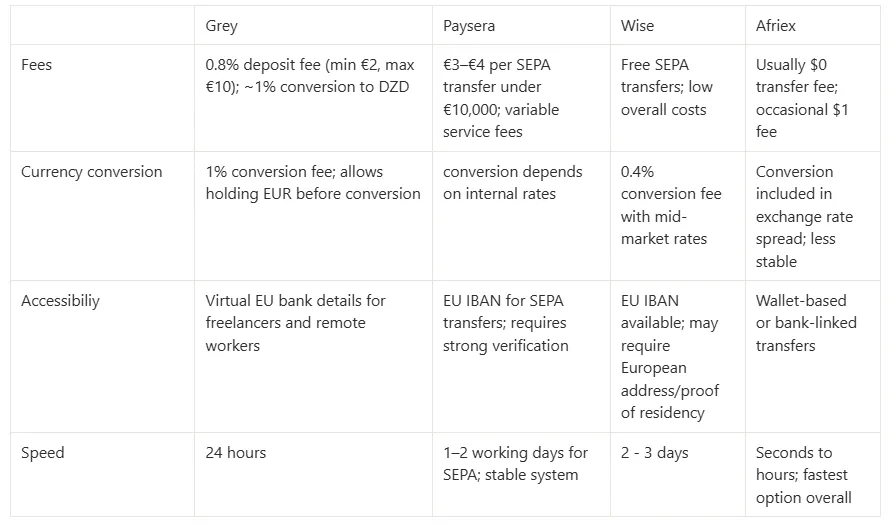
| Grey Business | 0.8% (capped at $10) | 1.0% (capped at $6) | None | Businesses receiving and sending money across Africa, Asia and other emerging markets with predictable, low-cost pricing |
| Revolut Business | Free (with paid plan) | 0.6% after free allowance | 1.0% | Teams needing corporate cards, expense management and banking in supported markets |
| Wise Business | Variable | 0.4%–0.5% (uncapped) | None | Businesses making frequent international contractor and supplier payments |
| Payoneer | 1.0% | 0.5%–2.0% | None | Sellers receiving payments from global marketplaces like Amazon, Fiverr and Upwork |
Also read: Grey Business vs Grey personal banking
Frequently asked questions
Does Revolut Business support all countries?
No. Revolut Business is available only in selected markets and primarily supports businesses incorporated in countries such as the United Kingdom, the European Economic Area (EEA), the United States, Australia, Singapore and India. If your business is registered outside supported regions, you may need to consider an alternative provider.
What is the cheapest Revolut Business plan?
The Basic plan is Revolut Business's lowest-priced option, costing £10 per month. It includes limited free local transfers, no free international transfers and a small monthly foreign exchange allowance. Businesses with higher transaction volumes may find better value in one of the higher-tier plans.
Can sole traders use Revolut Business?
Yes. Revolut Business is available to eligible freelancers, sole traders and self-employed professionals, allowing them to separate business and personal finances. Users can receive international payments, hold multiple currencies, issue invoices and manage business spending from a dedicated account.
Does Revolut Business charge for incoming international transfers?
Incoming transfers are not always free. Costs depend on the payment method, currency and your pricing plan. Some transfer types are included within monthly allowances, while others may attract additional charges after you exceed your plan's limits. Always review the latest pricing before receiving payments.
Is Revolut Business safe?
Yes. Revolut Business operates under financial regulations in the markets where it is licensed and uses encryption, fraud monitoring and security controls to protect customer accounts. Like other regulated financial platforms, it also carries out compliance checks that may occasionally require additional account verification.
What is the best Revolut Business alternative for emerging markets?
If your business regularly sends or receives payments across Africa or Asia, Grey Business is an ideal alternative. It provides global accounts for receiving foreign currencies, transparent pricing and cross-border payment tools without requiring your business to be incorporated in Western markets.
Choosing the right business account depends on where your customers are, how you receive payments and the markets you serve. If your business operates across Africa, Asia or other global markets, open a Grey Business account to simplify cross-border payments and manage foreign currencies seamlessly.
.svg)


