




One of the earliest challenges remote workers face when working with international clients is how to receive their payments. While you are sure you don’t want to use your Opay, you are not certain your GTB account would work either. You might even have been jumping from one platform to another, only to get disappointed. Maybe you are even considering PayPal now with their recent announcement of partnering with Paga.
Earning in foreign currency has become one of the biggest advantages of remote work for Nigerians. It often means higher purchasing power and better income stability than earning in naira. However, earning in foreign currency is only half the story. How you manage that income determines whether you truly benefit from it or lose a lot to fees, poor exchange rates, and inefficiencies.
This article breaks down how Nigerian remote workers can manage foreign currency income more effectively.
Also read: Top sites to get international remote jobs in Nigeria
Understanding the Nigerian context
Nigeria’s financial system makes foreign income management a bit of a struggle. Traditional banks don’t manage inbound international payments efficiently, especially for individuals. Payments are delayed, and when they finally arrive, funds are usually converted immediately to naira at unfavourable rates.
By the time you add the high transfer fees and intermediary charges, you can easily relate to the frustration of many remote workers. This environment has pushed experienced freelancers and remote employees to reconsider how they manage their earnings.
How to manage your foreign currency earnings as a remote worker in Nigeria
To ensure you maximise your earnings and have firm control over your cash flow, here are some measures to put in place to manage your foreign currency earnings as a remote worker in Nigeria
Receive income in foreign currency first
You deserve some control over your foreign income. One of the most important principles is avoiding immediate conversion to naira. When your income is converted the moment it arrives, you lose control over timing and exchange rates.
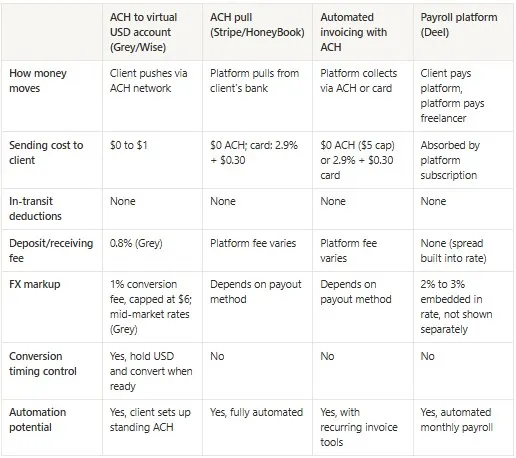
This is why many remote workers are turning to multi-currency accounts that allow them to receive and hold USD, GBP, or EUR directly. This approach offers flexibility. You decide when to convert, how much to convert, and whether to spend directly in foreign currency instead of converting at all. And with the way naira is behaving, keeping your earnings in a stable foreign currency helps preserve its value. Here are some of your options
- Grey: This platform offers multi-currency accounts supporting USD, EUR, and GBP with low transaction fees, no hidden charges, swift payment processing, and easy withdrawal to a naira account at competitive rates. You can also get a virtual dollar card for your online payments and integrate your bank accounts seamlessly with global freelancing platforms
- Cleva: Cleva is a platform that provides Nigerian freelancers with a US-based bank account to receive USD payments from clients, Upwork, or Deel. While it doesn't support receiving payments in EUR and GBP, it features swift USD conversion to Naira, virtual USD cards, and low fees.
- Raenest: You might have heard about them before as Geegpay. They offer USD, GBP, and EUR accounts to Nigerian freelancers and a virtual dollar card.
- Crypto: If your client is familiar with crypto, it is a viable alternative to traditional banks for payments. Payment is instant, and the fee is typically lower than that of traditional banks. Some fintech platforms like Grey support stablecoins like USDC, which helps you streamline your income.
Separate your earnings, savings, and spending
Managing foreign income becomes easier with some structure. Keeping earnings in foreign currency keeps you safe from whatever the naira and the country’s economic policies are up to. Ensure that you convert only what they need for monthly naira expenses. Automate your savings, and this separation improves discipline and reduces the pressure to convert funds impulsively.
Plan your conversion
Exchange rates will always fluctuate, and this should inform how you manage your conversion. Don’t convert money out of urgency or fear because you are more likely to lose more money than you had. Here are some suggestions that can help:
- Monitor exchange rate trends
- Convert money in smaller batches (especially when the rates don’t look great) rather than all at once
- Only convert when you actually need naira
- Avoid exchanging during the weekends and in emergency situations
Pay for global tools in foreign currency
Many remote workers don’t realise they're losing money when they pay for international tools and subscriptions in naira. If you earn in USD, pay for these tools directly. It makes sense to pay directly in foreign currency. Virtual USD debit cards like Grey’s make this possible and reduce unnecessary conversion costs.
Also read: How Nigerian freelancers scale income beyond one platform
Managing foreign currency earnings with Grey
Managing foreign currency earnings might be unfamiliar territory for many Nigerian remote workers and freelancers. With the right system in place, you can minimise losses and payment delays. With multi-currency accounts for USD, GBP, and EUR, competitive exchange rates, virtual USD cards, and fast local withdrawals, Grey helps Nigerian remote workers receive, manage, and protect their foreign income without unnecessary hassles.
Download the mobile app to sign up for Grey today and manage your foreign currency without stress.
.svg)


