
How consultants structure international client payments
Adeolu Titus Adekunle
TABLE OF CONTENT
SHARE THIS POST
A consultant who sends a rough invoice three weeks late tells a different story than one who has clear terms, structured milestones, and a payment setup that works seamlessly regardless of the client's location. Being your own boss is cool and all, but there are other responsibilities you might not have been informed about. If you work with global clients, you need to manage foreign income. How well you do this can make or mar your experience. So, getting that structure right matters. It is not just about the money coming in, but also how it makes you appear to clients who are constantly evaluating your professionalism. This article covers structuring international client payments for consultants.
One of the biggest mistakes consultants make with international clients is waiting until invoicing to think about payment. By that time, key decisions have already been missed, which can cause problems starting work. Make sure your contract clearly states the billing currency, payment schedule, payment method, what happens if a payment is late, and who covers any transaction or conversion fees.
Most international consultants bill in USD, EUR, or GBP. Choose your currency based on where most of your clients are, which currency you prefer to hold or convert, and which gives you the clearest pricing when converting to your local currency. You can bill in your local currency, but this can make things harder for international clients, especially if your currency is unstable or unfamiliar. Billing in a major foreign currency and converting when you withdraw, using a platform with good rates, usually gives you more control and predictability over your earnings.
Decide on your payment structure
Payment structures consultants commonly use include
Full upfront payment
This means the client pays the full fee before any work starts. It is most common for short, clearly defined projects, such as a one-day workshop, a strategy review, or a specific deliverable with a fixed scope.
With international clients, upfront payment removes the risk of not getting paid and makes administration easier. However, not all clients will agree to this, especially for bigger projects or if they have not worked with you before. You need enough credibility and a proven track record to ask for full payment upfront.
Deposit plus balance
A more common setup for mid-sized projects is to take a deposit, usually 30% to 50% of the total fee, before starting work. The rest is paid at a set time, often on delivery or a specific date.
This approach balances risk for both sides. The consultant gets some payment before putting in a lot of work, and the client does not pay for something they have not received yet. For international projects, this is a practical default that most clients know and accept.
LDMAG1
Milestone-based payments
Longer projects can be divided into phases, and sometimes, your role is a long-term arrangement. Milestone-based payments usually make the most sense for such projects. You get paid after each phase is finished. This ensures money keeps coming without waiting until the end. It also gives both you and the client regular points to check progress.
Monthly retainer
For ongoing advisory or long-term consulting relationships, a monthly retainer is a great structure. The client pays you a fixed monthly amount to cover a set number of hours, calls, or deliverables. Retainers are excellent for consultants because they provide a predictable income stream. They are also attractive to clients who want reliable access to expertise without having to go through a scoping and contracting process every time they need something. A payment setup that supports recurring payments can eliminate the back-and-forth of invoicing for every interaction.
Other things consultants should note while setting their payment structure
Net terms. You might have heard of Net 15, Net 30, and Net 45. These are the number of days the client has to pay an invoice from the date it is issued. For international clients, shorter terms are better. Net 30 is a reasonable standard. For new clients, consider offering Net 14 or Net 15.
Late payment clauses. Your contract should specify what happens when an invoice is not paid on time. Your options include a late payment fee, interest on the outstanding balance, or the right to pause work until you receive the payment.
Currency fluctuation. If you are billing in a foreign currency and the engagement spans several months, it is worth deciding in advance how to handle exchange rate movements.
Transaction costs. International transfers often come with fees on both ends. Be specific about who pays what. A common approach is to specify that the client is responsible for ensuring the full invoiced amount arrives, net of any fees — meaning they cover the sending fees on their end.
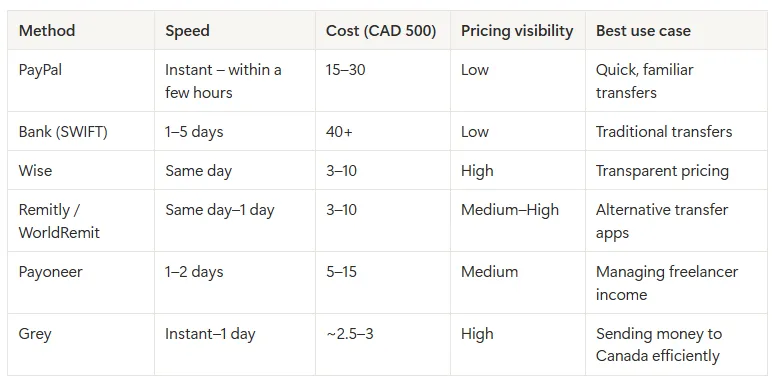
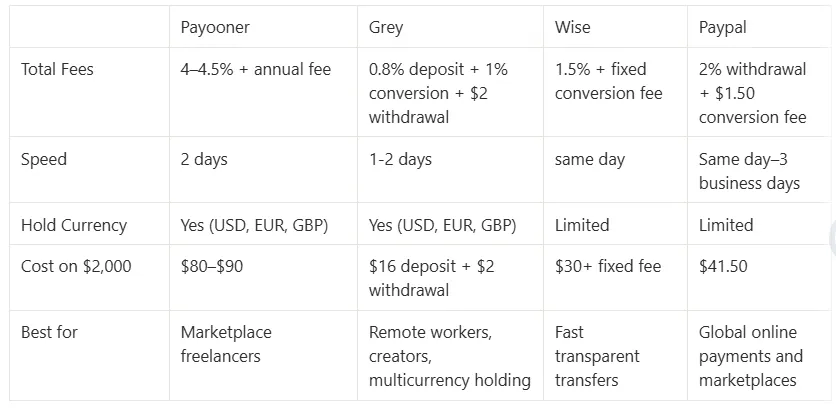
You need to choose a payment option that is convenient for you and your clients while maximising your income. An account that supports multi-currency payments at low transaction fees should be a priority. Your choice should also support withdrawals in local currency at competitive exchange rates, without unnecessary cost or delay.
Digital payment platforms like Grey offer USD, EUR, and GBP account details that you can include directly on your invoices. Your client pays as though they are making a local transaction, which is often faster and cheaper for them. The money arrives in your account in the foreign currency, and you convert and withdraw to your local bank when you are ready.
Automate your invoicing
Automating your invoicing on platforms like Grey gives your operation a professional touch. You also don’t have to think too much about that happening for long-term projects. For international clients, the invoice should include all the details they need to make a transfer.
Grey provides consultants with virtual USD, EUR, and GBP accounts that come with real foreign account details. You can put these details directly on your invoice, making it easy for clients to pay. Payments arrive quickly, conversion rates are good, and you can withdraw to your local bank in minutes. With virtual cards that simplify online payments, you can easily pay for your tools, travels, online shopping, and subscriptions.
Egypt’s rich legacy of innovation continues to thrive in the digital age, with Egyptian freelancers leveraging Fiverr’s global platform to showcase their skills in writing, design, programming, and more. But while Fiverr connects freelancers to international clients with ease, receiving payments can sometimes be a challenge, as traditional payout options aren’t always the most convenient or cost-effective.
In this guide, we’ll show you how Grey can simplify the process of receiving Fiverr payments, making it seamless and hassle-free, so you can focus on growing your freelance business.
Once registered, you’ll receive virtual multi-currency account details in USD, GBP, and EUR.
Link your Fiverr account
Log in to your Fiverr account and navigate to the "Earnings" section.
Select "Bank Transfer" as your withdrawal option and input your Grey account details.
Start receiving payments
Fiverr will deposit your earnings directly into your Grey account, where you can track payments in real time.
Convert and withdraw funds
Use Grey’s platform to convert USD, GBP, or EUR to EGP at competitive rates.
Transfer your funds to your local Egyptian bank account quickly and securely.
If you’re a freelancer in Egypt looking to simplify your payment process, it’s time to make the switch. Sign up for Grey today and experience a better way to manage your Fiverr earnings in 2026.
As a digital nomad your finances should work as flexibly as you do. With Grey, converting and sending USD becomes effortless, no matter where you are. From managing payments with US clients to handling multiple income streams, Grey makes accessing and transferring your funds quick, affordable, and hassle-free.
In this guide, we’ll walk you through effortlessly converting and sending US dollars with Grey, revealing how to maximise savings, cut through complexity, and make global financial management a breeze.
Why Grey is perfect for sending and converting US dollars
Managing your finances can be challenging, especially when working with clients or employers in different currencies. Whether you’re based in Asia, Europe, or anywhere else, having a platform that supports multi-currency accounts and provides transparent exchange rates is essential.
Grey offers several advantages for digital nomads and remote workers:
Multi-currency accounts: Grey lets you hold and manage funds in multiple currencies, including USD, EUR, GBP, and more, making it easy to convert and send money.
Low fees and competitive rates: Grey provides low conversion fees and competitive exchange rates, ensuring that more of your earnings stay with you.
Global accessibility: Whether in Bali, Mexico, or Spain, Grey’s mobile app allows you to manage your finances anywhere with an internet connection.
Seamless transfers: Sending USD or any other currency is fast and simple. Grey allows instant transfers to various bank accounts and wallets globally.
Easy account integration: You can link your Grey account to platforms like Amazon, freelance job sites, and other payment systems, simplifying the process of receiving and sending payments.
Exchange rates often fluctuate for several reasons, so we’ve created a special currency converter for you.
The benefits of converting and sending USD with Grey
Before diving into the conversion and sending process, let’s take a moment to explore why Grey is a great option for converting USD into local currencies or sending it to other accounts.
Competitive exchange rates
Grey offers competitive exchange rates compared to traditional banks and other payment platforms. While rates vary based on market conditions, Grey provides real-time rates with a transparent view of conversion fees.
Low conversion fees
Grey’s conversion fees are designed to be transparent and affordable.
Efficient cross-border transfers
Fast and secure transfers are key when working internationally. Grey enables you to send USD to international accounts almost instantly. This feature is particularly useful for remote workers who must pay international invoices or send money to family members in other countries.
Grey also allows for quick transfers between different currency accounts, so if you need to convert USD into GBP, EUR, or any other supported currency, you can do so easily.
Global accessibility
Since Grey is a fully digital platform, you can access it from anywhere in the world. This is particularly advantageous for digital nomads who frequently travel or live abroad, as it provides a consistent and reliable way to manage your finances regardless of location.
Step-by-step guide: How to convert and send USD with Grey
Now that you understand the benefits of using Grey, let’s walk through the detailed process of converting USD to another currency and sending it to a recipient, whether for personal or business reasons.
Step 1: Sign up for a Grey account
If you haven’t already, the first step is to create an account with Grey. Visit Grey’s website or download the app from the App Store or Google Play. The sign-up process is straightforward and typically takes just a few minutes.
To start, you’ll need to provide personal details, verify your identity, and set up your account.
Step 2: Deposit USD into your Grey account
Once you’ve created your account, you can deposit USD into your Grey account. You can do this through several methods:
Bank transfer: Link your bank account to Grey and deposit funds directly into your USD account.
Payment platforms: If you receive payments from platforms like PayPal, Stripe, or other freelance networks, you can transfer your earnings directly to your Grey account.
Wire transfer: If you’re working with clients or employers who prefer wire transfers, you can provide them with your Grey account details so they can receive USD payments.
You can begin the conversion process after depositing USD into your Grey account.
Step 3: Convert USD to another currency
To convert USD into another currency, follow these steps:
Open the Grey app: Log into your Grey account and navigate to the currency conversion section.
Select the currencies: Choose USD as the source currency and select the destination currency (e.g., EUR, GBP, ZAR).
Check the exchange rate: Grey will display the current exchange rate for the conversion, along with the conversion fees.
Confirm the conversion: Once you’re satisfied with the rate and fees, confirm the transaction. Your funds will be converted and reflected in your Grey account in the new currency.
Step 4: Send USD or converted funds to a recipient
To send funds to another individual or account, you’ll need to:
1. Navigate to the Send Money section: Choose the “Send” option in the Grey app.
2. Enter the recipient’s details: Add the recipient’s bank account or wallet information. You can also send funds to another Grey user.
3. Choose the amount to send: Enter the amount in USD or your currency (e.g., EUR).
4.Review fees and exchange rates: Grey will estimate the fees and exchange rates so you know exactly how much the recipient will receive.
5. Complete the transaction: Confirm the details and authorise the payment. The recipient typically receives the funds in minutes to a few hours, depending on the payment method.
Convert and send USD: Key tips for remote workers
Minimise fees: Always review Grey’s exchange rates and conversion fees before confirming any transaction. While Grey offers competitive rates, you may still want to plan your conversions to avoid unnecessary fees, especially if you’re sending large sums.
Use local currency accounts: If you’re working in a country with a stable currency, consider holding a local currency account to avoid frequent conversions and fees.
Use Grey’s app for convenience: Grey’s mobile app allows you to convert and send USD or other currencies from anywhere in the world, which is a huge advantage for digital nomads who need to manage their finances on the go. Download Grey now and get started.
Simplify converting and sending USD with Grey
Converting and sending USD with Grey is an efficient and cost-effective way for remote workers and digital nomads to manage their finances. With competitive exchange rates, low fees, and the convenience of a fully digital platform, Grey provides a seamless solution for handling cross-border transactions.
Ready to start using Grey? Sign up today and take control of your global finances.
Managing cross-border payments doesn’t have to be complicated. Whether you’re a freelancer, remote worker, or supporting family in Uganda, converting USD to Ugandan Shilling (UGX) can be quick, secure, and hassle-free with Grey.
This guide shows you how to easily convert and send USD to UGX online, highlighting key benefits, costs, and tips for seamless transactions.
Why use Grey to convert and send USD to UGX?
Grey is a digital banking platform designed for global citizens who want to manage multiple currencies easily. Here’s why Grey is an excellent choice for converting and sending USD to UGX:
Competitive exchange rates: Grey offers real-time rates to ensure you get the most value when converting USD to UGX.
Low fees: Avoid the high conversion and transfer fees associated with traditional banks.
Quick transfers: Funds are processed quickly, ensuring your recipients get the money without delays.
User-friendly platform: Grey’s app and website are designed to make international transactions simple and accessible for everyone.
Exchange rates fluctuate for various reasons, so we’ve designed a handy, real time currency converter for you.
First, sign up for a free Grey account via the website or app, available on iOS and Android. Registration is straightforward and requires you to:
Provide basic personal information.
Verify your identity by uploading the required documents.
Set up your virtual wallet for multiple currencies, including USD.
2. Add USD to your Grey account
Once your account is active, deposit USD into your Grey wallet. You can do this in several ways:
Bank transfer: Link your USD bank account and transfer funds directly.
Freelance platforms: Receive payments from platforms like Upwork or Fiverr directly into your Grey USD wallet.
Wire transfers: Accept payments from international clients or businesses.
With USD in your account, you can convert it into UGX.
3. Convert USD to Ugandan Shilling with Grey
Follow these steps to convert your USD to UGX:
Log into your account: Open the Grey app or website and sign in.
Navigate to currency exchange: Select the “Convert” option from the dashboard.
Choose currencies: Select USD as the source currency and UGX as the destination currency.
Enter the amount: Specify the amount of USD you want to convert.
Confirm the transaction: Review the exchange rate, fees, and total amount in UGX, then click “Convert.” The converted funds will appear in your UGX wallet instantly.
4. Send UGX to your recipient
Once your USD is converted to UGX, it’s time to transfer the funds to your recipient in Uganda. Here’s how:
1. Navigate to the Send Money section: Choose the “Send” option in the Grey app.
2. Enter the recipient’s details: Add the recipient’s bank account or wallet information. You can also send funds to another Grey user.
3. Choose the amount to send: Enter the amount in USD or your currency (e.g., EUR).
4.Review fees and exchange rates: Grey will estimate the fees and exchange rates so you know exactly how much the recipient will receive.
5. Complete the transaction: Confirm the details and authorise the payment. The recipient typically receives the funds in minutes to a few hours, depending on the payment method.
Monitor exchange rates: Keep an eye on the exchange rate to convert your funds at the best possible time.
Double-check recipient details: Ensure the accuracy of bank account or mobile wallet information to avoid delays.
Use Grey’s multi-currency wallets: Store USD and UGX in your Grey account to avoid frequent conversions and save on fees.
Track your transactions: Grey offers a transaction history feature to easily track conversions and transfers.
Why Grey is the best option for USD to UGX transfers
Grey stands out as a reliable and cost-effective platform for handling international payments. Here’s why it’s a top choice:
Speed: Transfers are processed faster than most traditional banks, so your recipients get their money quickly.
Savings: With low fees and competitive exchange rates, you keep more of your hard-earned money.
Flexibility: Manage multiple currencies from one account and send funds anytime, anywhere.
Security: Grey prioritises secure transactions, giving you peace of mind.
Take control of your cross-border payments with Grey
Converting and sending USD to Ugandan Shilling has never been easier. Whether supporting family, paying vendors, or managing personal finances, Grey’s seamless platform saves you time, money, and effort.
Ready to simplify your financial transactions? Sign up with Grey today and enjoy a hassle-free way to convert and send USD to UGX online.
The Philippines, a country celebrated for its culture and workforce, has become a hub for freelancers excelling in writing, design, virtual assistance, and more. Platforms like Fiverr provide Filipino freelancers with global opportunities, connecting them with clients worldwide to showcase their talents.
However, as rewarding as freelancing on Fiverr is, managing international payments can often feel complex due to high fees and delays. That’s where Grey steps in, offering a simple, efficient, cost-effective way for Filipino freelancers to receive their earnings without hassle.
In this guide, we’ll explore how freelancers in the Philippines can use Grey to streamline Fiverr payments and focus on what matters most—delivering exceptional work.
Why freelancers in the Philippines choose Fiverr
Fiverr has become a game-changer for freelancers in the Philippines, offering:
Global reach: Access to clients across the globe who need your expertise.
Flexible work opportunities: Build your schedule and take control of your career.
Diverse projects: From content writing to graphic design, there’s something for every skill.
How to use Grey for Fiverr payments in the Philippines
Create your free Grey account: Visit Grey’s website and sign up for a free account. Once registered, you’ll receive virtual multi-currency account details in USD, GBP, and EUR.
Link your Fiverr account: Log in to your Fiverr account and navigate to the "Earnings" section. Select "Bank Transfer" as your withdrawal option and input your Grey account details.
Start receiving payments: Fiverr will deposit your earnings directly into your Grey account, where you can track real-time payments.
Convert and withdraw funds: Use Grey’s platform to convert USD, GBP, or EUR to EGP at competitive rates. Transfer your funds to your local Philippines bank account quickly and securely.
With Grey, managing your payments becomes one less thing to worry about. Sign up for Grey today and experience seamless, efficient payment solutions designed for Filipino freelancers.
With over 11.2 million residents and a growing digital economy, the UAE is home to professionals who use platforms like Fiverr to connect with international clients. Fiverr’s flexibility has empowered graphic designers in Dubai, content writers in Abu Dhabi, and tech experts across the Emirates to showcase their skills to a global audience.
However, while Fiverr makes finding work seamless, receiving payments remains a challenge for many freelancers in the UAE. Traditional payment methods can be slow, expensive, and inconvenient, creating unnecessary hurdles for those who thrive in the gig economy.
However, with Grey, you can receive, manage, and access your Fiverr earnings quickly and affordably, empowering you to focus on growing your freelance career. In this guide, we show you how to easily set up your Grey account to receive Fiverr payments.
How Fiverr is transforming freelance work in the UAE
Fiverr has become the go-to platform for UAE freelancers to showcase their skills and connect with international clients. Here’s why it’s so popular:
Global access: Work with clients in the US, Europe, and across the world.real-time
Diverse opportunities: Choose from gigs in design, writing, tech, and more.
Flexible income streams: Earn in multiple currencies, including USD and EUR.
Once registered, you’ll receive virtual multi-currency account details in USD, GBP, or EUR, making it easy to accept international payments from Fiverr clients.
Set up your Fiverr payment method
Log in to your Fiverr account and go to the "Earnings" section.
Enter your Grey account details (e.g., USD, GBP, or EUR) for Fiverr to process payments directly to your Grey account.
Verify your payment details
Fiverr will verify your bank account details to ensure they match your Grey account information. Once verified, you can start receiving your Fiverr payments directly into Grey without delays.
Access your funds on Grey
Log in to your Grey dashboard to view your earnings in real-time.
Convert your earnings from USD, GBP, or EUR to AED at competitive exchange rates or withdraw them to your local bank account in the UAE.
Freelancing in the UAE has never been more rewarding, and with platforms like Fiverr, the world is your marketplace. Sign up for Grey and take charge of your Fiverr income like never before.
Portugal, a land of breathtaking coastlines, rich culture, and warm hospitality, is also home to a growing community of freelancers. For writers, designers, developers, and virtual assistants, platforms like Upwork have become a gateway to international opportunities, connecting them with clients worldwide.
Yet, despite the rewards of freelancing, one challenge persists: managing international payments efficiently. This is where ****Grey ****steps in a revolutionary payment solution that simplifies the process, ensuring you get paid faster and keep more of your earnings.
In this guide, we’ll explore how freelancers in Portugal can use Grey to streamline Upwork payments
Why freelancers in Portugal love Upwork
Global reach: A chance to collaborate with clients from every corner of the world.
Flexibility: Set your schedule and work on projects that excite you.
Diverse opportunities: From app development to content creation, there’s something for everyone.
1. Create your free Grey account: Visit Grey’s website and register for an account. Upon completing your KYC verification, you can request for a EU, US, or UK bank account to receive foreign payments.
2. Link your Upwork account: Log in to Upwork, navigate to the "Get Paid" section, select "Direct to Local Bank" or "Wire Transfer" as your withdrawal method, and input your Grey account details.
3. Start receiving payments: After verification, Upwork will deposit your earnings directly into your Grey account, ensuring a smooth and reliable transaction process.
4. Convert and withdraw funds: Use Grey to convert USD, GBP, or EUR to Euros at competitive rates and transfer your funds securely and effortlessly to your local bank account in Portugal.
Sign up for Grey today and experience hassle-free payments designed for Portuguese freelancers.