


<script type="application/ld+json" data-schema-version="grey-blog-v4"> [{"@context":"https://schema.org","@type":"BlogPosting","@id":"https://grey.co/blog/how-autogirl-breaks-gender-stereotypes-and-thrives-in-nigerias-difficult-transport-industry#article","headline":"How AutoGirl breaks gender stereotypes and thrives in Nigeria’s difficult transport industry","description":"Discover how AutoGirl, led by Arinze Chinazom, breaks gender stereotypes and excels in Nigeria's transport industry, providing innovative vehicle rental services and empowering communities.","inLanguage":"en","url":"https://grey.co/blog/how-autogirl-breaks-gender-stereotypes-and-thrives-in-nigerias-difficult-transport-industry","mainEntityOfPage":{"@id":"https://grey.co/blog/how-autogirl-breaks-gender-stereotypes-and-thrives-in-nigerias-difficult-transport-industry#webpage"},"datePublished":"2024-05-23T15:27:42.044Z","dateModified":"2026-06-15T19:27:43.345Z","author":{"@type":"Person","@id":"https://grey.co/authors/toluwani-omotesho#person","name":"Toluwani Omotesho","url":"https://grey.co/authors/toluwani-omotesho"},"publisher":{"@type":"Organization","@id":"https://grey.co/#organization","name":"Grey","url":"https://grey.co","logo":{"@type":"ImageObject","url":"https://cdn.prod.website-files.com/6360022338a81bd6fdbb1145/6564ae1077a67e39d3c491a6_Grey%20Logo%20Lockup%20Black.svg"}},"image":{"@type":"ImageObject","@id":"https://grey.co/blog/how-autogirl-breaks-gender-stereotypes-and-thrives-in-nigerias-difficult-transport-industry#primaryimage","url":"https://cdn.prod.website-files.com/636a85d290ee58e70c17e1c0/664f6054ed0b1f13cb077477_Arinze-Chinazom-Founder-Autogirl-1.jpg","contentUrl":"https://cdn.prod.website-files.com/636a85d290ee58e70c17e1c0/664f6054ed0b1f13cb077477_Arinze-Chinazom-Founder-Autogirl-1.jpg","width":1200,"height":675}},{"@context":"https://schema.org","@type":"WebPage","@id":"https://grey.co/blog/how-autogirl-breaks-gender-stereotypes-and-thrives-in-nigerias-difficult-transport-industry#webpage","url":"https://grey.co/blog/how-autogirl-breaks-gender-stereotypes-and-thrives-in-nigerias-difficult-transport-industry","name":"How AutoGirl breaks gender stereotypes and thrives in Nigeria’s difficult transport industry","description":"Discover how AutoGirl, led by Arinze Chinazom, breaks gender stereotypes and excels in Nigeria's transport industry, providing innovative vehicle rental services and empowering communities.","inLanguage":"en","primaryImageOfPage":{"@id":"https://grey.co/blog/how-autogirl-breaks-gender-stereotypes-and-thrives-in-nigerias-difficult-transport-industry#primaryimage"},"breadcrumb":{"@id":"https://grey.co/blog/how-autogirl-breaks-gender-stereotypes-and-thrives-in-nigerias-difficult-transport-industry#breadcrumb"}},{"@context":"https://schema.org","@type":"BreadcrumbList","@id":"https://grey.co/blog/how-autogirl-breaks-gender-stereotypes-and-thrives-in-nigerias-difficult-transport-industry#breadcrumb","itemListElement":[{"@type":"ListItem","position":1,"name":"Home","item":"https://grey.co/"},{"@type":"ListItem","position":2,"name":"Blog","item":"https://grey.co/blog"},{"@type":"ListItem","position":3,"name":"How AutoGirl breaks gender stereotypes and thrives in Nigeria’s difficult transport industry","item":"https://grey.co/blog/how-autogirl-breaks-gender-stereotypes-and-thrives-in-nigerias-difficult-transport-industry"}]}] </script>

How AutoGirl breaks gender stereotypes and thrives in Nigeria’s difficult transport industry

Toluwani Omotesho

TABLE OF CONTENT

SHARE THIS POST

The transport and logistics sector is known to be male-dominated, not just in Nigeria but around the world. Arinze Chinazom, however, is challenging this stereotype with her vehicle rental company, AutoGirl.

AutoGirl, founded in 2017, is a peer-to-peer vehicle rental and car-sharing business that gives Nigerians affordable luxury transportation.

Arinze tells us that AutoGirl didn’t start as a car rental company but as a dealership. She explains, “I started selling vehicles for different car dealers and eventually transitioned into renting cars”. This shift was inspired by her time arranging transportation for her fellow students at Babcock University. Many students needed to travel from Ogun state to Lagos on weekends and holidays, and she arranged this service for them. “That was my first experience making money in the transport industry”, she adds.

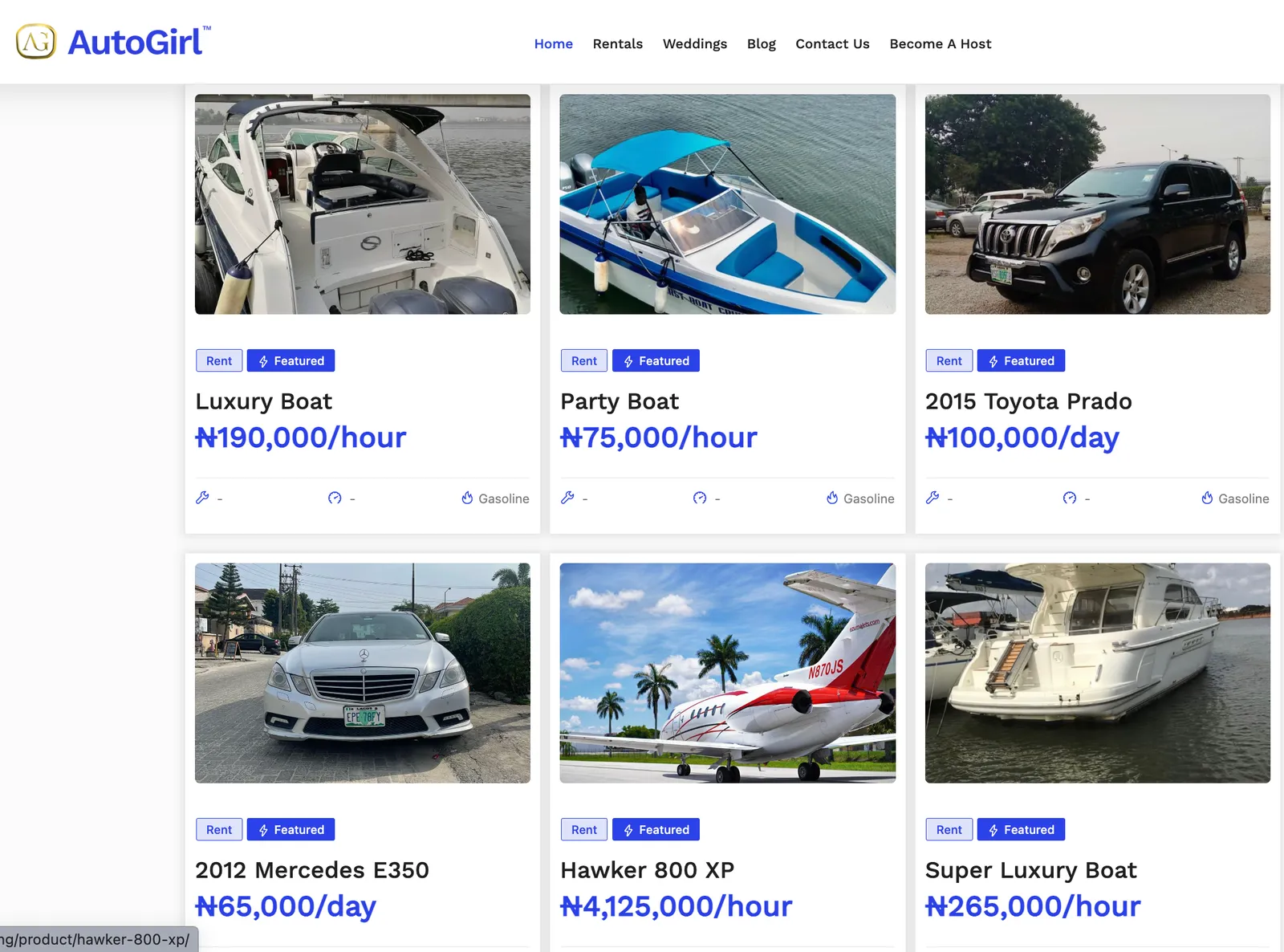
After graduation, she moved to Abuja state and continued the business. Seven years later, AutoGirl has expanded its services to Lagos, Asaba, Port Harcourt and Enugu. In addition to car rentals, she now rents boats and jets.

AutoGirl web page

But AutoGirl’s journey hasn’t always been a smooth trip

At first, many people didn’t take AutoGirl seriously,  “I think this would have been different if it was a “macho” mechanic man behind the brand,” Arinze says. But, the sentiment quickly changed once she demonstrated she could structure the business for growth. In Arinze’s words, “We started showing workings.”

In recent times, though, while AutoGirl has managed to build credibility as a brand, it continues to face a significant challenge: surviving Nigeria’s unstable economy.

In a country always at risk of a random fuel scarcity crisis, AutoGirl has found ways to make sure business continues. She says, “As an automobile business, our functionality depends on fuel. So we have a full reserve that we use on rainy days.” Arinze believes that there’s always a way to solve issues, and a true entrepreneur is proactive enough to innovate around problems without complaining too much.

AutoGirl does more than vehicle rentals.

Beyond rentals, AutoGirl is trying to make accessible income opportunities in the automotive space. She says, “I believe my purpose in life is to make people rich, and God has put AutoGirl in my hands to achieve this.”

AutoGirl has created a system where anyone with a good car can earn a good income and change their lives. “We’re trying to make people earn from our platform the same way they did with Uber and AirBnB”, she adds.

Also read: Foods by Far: How a picky eater built a thriving food business

Plans for the future

In the next five years, AutoGirl plans to be in at least 16 African countries, with over 150,000 car owners and 500,000 customers.

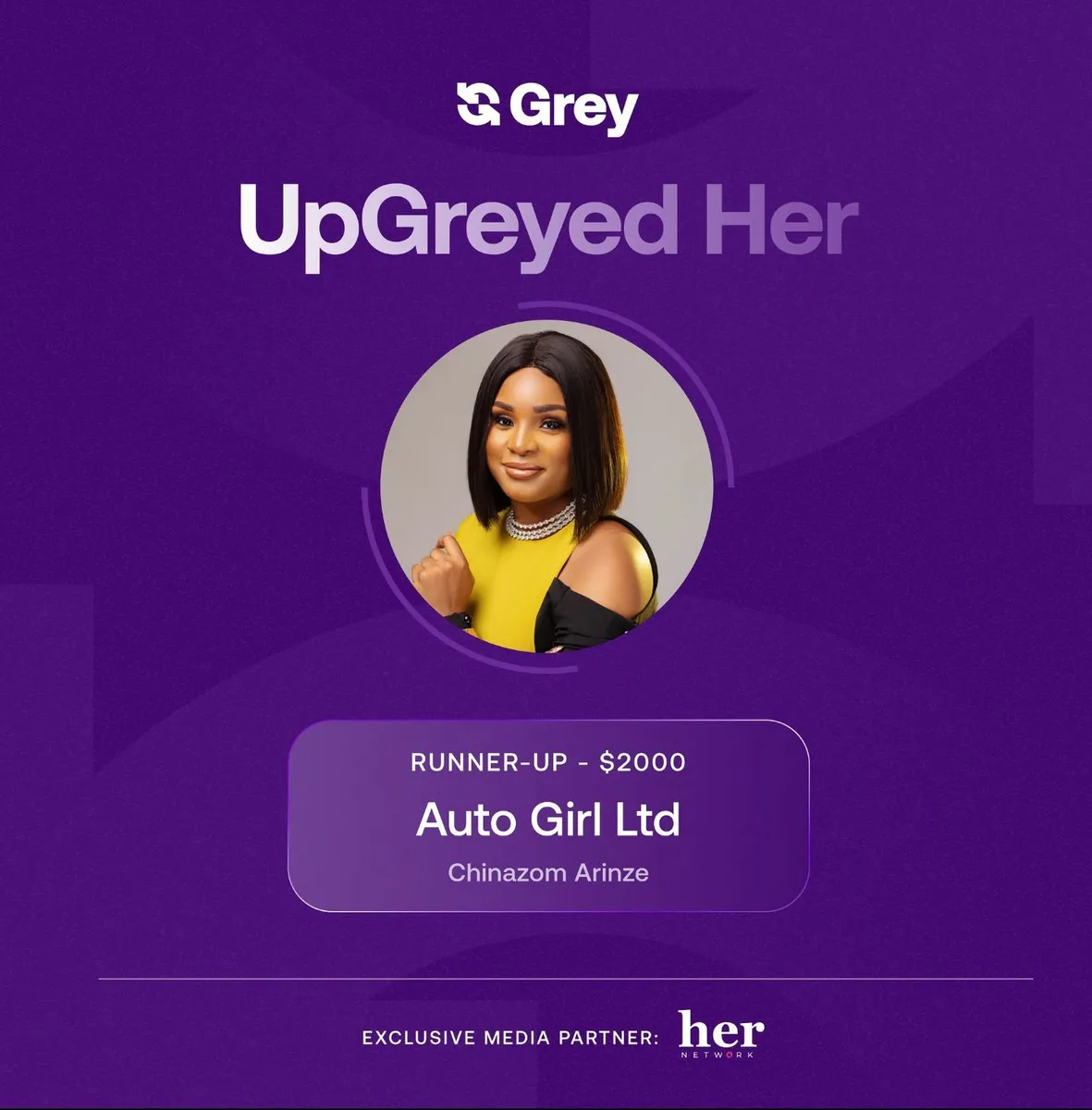
Arinze shares that becoming an UpGreyed Her runner-up came at the perfect time. She says excitedly,  “I was so happy when I found out I won. We’ve been trying to acquire an asset for our platform, and the prize money got us 95% closer to what we needed. It felt really amazing. Many thanks to Grey for helping African women-owned businesses to thrive.”

Arinze Chinazom AutoGrl UpGreyed Her runnerup

Arinze advises other female entrepreneurs to be consistent and never slow down. ”You have to keep going. Keep putting in your best and pushing to get results, not just from your staff but also from yourself.” she adds.

Last updated:

October 2, 2026

Open a free Grey account to get startedJoin 1 million digital nomads
IF YOU ENJOYED THIS, CHECK THESE OUT

How to budget in foreign currencies using the Grey card

•

•

2 min read

Budgeting used to be simple. You earned money, spent money, and tracked what was left. At that time, you had only one account with one currency, which required just one mental model.

Then remote work happened.

Now you might earn in EUR, pay for tools in USD, and travel in between. Discipline isn’t enough for budgeting anymore; you need structure. Without the right structure, even the most careful spender can lose track of where their money is going.

The Grey card comes in as a practical budgeting tool for people who live and spend across borders. I’ll explain.

Why budgeting in multiple currencies breaks down so easily

Most people don’t overspend because they’re irresponsible. Rather, they overspend because their money isn’t organised in a way that reflects how they live.

Here’s what usually goes wrong.

You’re spending across platforms, clients, and countries, but everything is tied to one card. Subscriptions, ads, one-off purchases, and travel expenses all blur together. When something goes wrong, such as a spike in ad spend or an unexpected renewal, it’s challenging to pinpoint the cause quickly.

Add foreign currencies to the mix, and it gets worse. The charges don’t always settle immediately, and these small amounts seem harmless until they quietly add up.

At that point, your budget is broken.

Also read: How to use your Grey card to manage all your subscriptions

What should budgeting look like when you earn and spend globally?

Clarity, separation, and control are the most crucial factors when budgeting across multiple currencies. You should be able to:

  • See exactly what each type of spending is costing you.
  • Stop or pause spending instantly when needed.
  • Protect one part of your budget from another.
  • Make changes without disrupting everything else.

The Grey card is designed around solving these exact needs.

How does the Grey card help with budgeting?

Use multiple cards to separate your spending

One of the most effective budgeting habits is separation. Instead of using a single card for everything, you can create multiple cards with clear purposes.

For example, you can create:

  • One card for subscriptions and recurring tools
  • One card for ads and growth experiments
  • One card for travel or everyday spending
  • One card per client or project

Each card acts like its own budget lane. You don’t need to guess where the money went; you already know.

This is especially useful if you freelance, manage ads, or run multiple income streams. When spending is separated, budgeting becomes more straightforward.

Also read: How to pay for ads easily with your Grey card

Freeze cards instantly when spending goes off-track

Budgets fail when you can’t act fast enough.

With the Grey card, you can instantly freeze or unfreeze any card in the app. If an ad campaign starts burning cash, freeze the card. If a subscription you forgot about renews unexpectedly, freeze the card. If you’re travelling and want to lock down non-essential spending, freeze the card.

Freezing a card doesn’t affect your other cards or balances. It simply stops that specific spending lane, which is precisely how budgeting should work.

Set limits that protect your budget

Budgets can fail when they’re too rigid. Grey’s spending limits work more like guardrails.

You can set daily or monthly limits per card, receive alerts when you’re approaching your limit, and still stay flexible. The goal isn’t to punish spending. I mean, who wants that? It’s to keep you aware before things drift too far.

For shared cards or subscriptions, limits are especially useful. You know exactly how much can be spent, and nothing sneaks past unnoticed.

Track spending clearly in one place

When you’re budgeting across currencies, visibility matters more than perfection. Every Grey card transaction appears clearly in your app, linked to the card you used. That means you’re not just seeing how much you spent, but why you spent it.

When budgeting time comes around, you’re no longer reconstructing your month from memory. The structure is already there.

Spend confidently across borders

Trust helps with budgeting too. When you’re shopping internationally, paying for ads, or travelling, declined payments and unexpected charges can throw everything off. The Grey Card works across global merchants and even supports Apple Pay and Google Pay, so everyday spending feels normal, even when you’re far from home.

LDMAG1

A quick note on protection when spending abroad

An often-overlooked aspect of budgeting is preparing for contingencies in case things go wrong.

When you pay with your Grey card, you have access to Visa benefits, including purchase protection, extended warranties, and price protection, depending on the transaction and your activation status. It’s not something you think about daily, but it adds a layer of reassurance when you’re buying electronics, booking travel, or shopping internationally.

It’s one less thing to worry about while managing money across borders.

Also read: How to claim your Visa card benefits

What budgeting in foreign currencies is like with the Grey card

When your card and your accounts are aligned, budgeting stops being guesswork. You know what you’re spending, which currency it’s coming from and more importantly, when something changes.

Instead of constantly reacting to your balance, you’re now making decisions with clarity. And that’s what good budgeting should be like, whether you’re at home, travelling, or working remotely.

If you’re ready to make your budget work wherever you are, create or update your Grey card and start spending and budgeting in the ways that matter to you.

‍

How to use your Grey card to manage all your subscriptions

•

•

2 min read

I was so shocked when I saw the news. “Netflix to Acquire Warner Bros.” It’s the kind of industry shift that usually comes with new bundles, price changes, region-specific catalogues, and the inevitable “Your plan has been updated” email.

If you’re already juggling multiple subscriptions, such as streaming platforms, cloud storage, creative tools, productivity apps, and gaming services, any minor hiccup with your payment method can cause everything to collapse at once. A low balance here, a declined international charge there, and suddenly Netflix stops streaming, Spotify logs you out, and your work tools start sending warnings.

Now, where subscription prices keep changing, platforms keep merging, and foreign services dominate the apps we use daily, the real need isn’t more subscriptions; it’s a card that can keep up with them. The Grey card is perfect for this. It’s a flexible and reliable way to manage all your subscriptions, without worrying about currencies, top-ups, or unexpected declines.

Why do subscriptions fail in the first place?

Before discussing the solution, it helps to understand the problem. Most subscription failures come down to:

1. Cards that don’t support international merchants

Some platforms, especially those based in the US or EU, automatically reject certain cards.

2. Low or inconsistent balance

Most cards require you to have the exact amount ready before the subscription date. If you forget to top up, your subscription will pause.

3. Currency conversion issues

If your card is billed in one currency and the service charges are in a different currency, the payment may fail due to delays or conversion errors.

4. Tracking too many subscriptions at once

When everything runs on one card, it’s easy to lose control of what’s being billed and when.

Grey’s card helps smooth out each of these challenges.

Also read: How to use Google Pay worldwide with your Grey virtual card

LDMAG1

How does your Grey card make subscription management easier?

The card is designed to handle everyday payments, recurring charges, and international subscriptions without requiring you to jump through hoops. Here’s how it helps:

Spend from different currency wallets

This is one of the biggest advantages. Most cards are linked to a single currency, but your Grey card isn’t.

Although the card is primarily a USD card, the payment flow depends on the available balance: USD → USDC → the next-highest available balance (GBP or EUR).

Multiple cards for easy organisation

Instead of one card for everything, you can create two or three:

  • one for entertainment subscriptions
  • one for work tools
  • one for shared family plans

This makes it easy to track what’s coming out where, and freeze or cancel only the card linked to a specific group of subscriptions.

Accepted by most global platforms

The Grey card works across major international merchants, streaming services, cloud storage providers, gaming platforms, and productivity tools, so you don’t need multiple payment methods.

Add to Apple Pay or Google Pay

If you prefer not to type card details into every website, you can simply add the card to your mobile wallet and pay securely.

Instant freeze and unfreeze

If one subscription starts misbehaving or you just want to take a break, you can temporarily freeze the card.

Also read: How to pay for ads easily with your Grey card

How to set up your subscriptions with Grey

1. Create or activate your card

If you already have a Grey account, getting a card is simple. Simply go to the cards section to request a card for $5.

2. Add your card to your subscriptions

It could be Netflix, Figma, or iCloud. Simply enter your card details or pay via Apple Pay / Google Pay.

3. Set up spending limits

A small monthly limit can help you stay in control, especially for family or shared cards.

4. Create additional cards if needed

I like to think of them like folders. Each card can represent a spending category.

Enjoy stress-free subscription management

There’s something about managing subscriptions that makes them seem a lot like admin work. Your Grey card helps keep everything organised.

Whenever you’re ready to try it (which I hope will be soon), create your card, link your first subscription, and enjoy the peace of mind that comes with everything just working.

Create your Grey account today to get started.

‍

Can foreigners open a UK bank account without proof of address?

•

•

2 min read

If you’re planning to move to the UK, study there, or work remotely for UK clients, you almost certainly will need a UK bank account. For most people, they’ll quickly contact a few UK banks to open an account, and almost immediately, they hit the same wall: “Do you have proof of UK address?”

Most people don’t.

This could be because you’re not living in the UK yet, or you’re based abroad but need UK banking access. After explaining this, the conversation usually ends there. The bank says they can’t help without proof of address. You’ve failed before you’ve even started. Okay, maybe saying you’ve failed is a bit of an exaggeration, but you get my point.

So, can foreigners open a UK bank account without proof of address? Yes, but only if you know what to do.

Let's explain why UK banks require proof of address, your realistic options, and how to navigate UK banking as a foreigner without the usual documentation.

Why do UK banks ask for proof of address?

UK banks aren’t asking for proof of address to be difficult. I know, I know it can be a bit annoying. They’re in fact required by law to verify customer identities and addresses as part of KYC (Know Your Customer) and AML (Anti-Money Laundering) regulations.

These regulations exist to prevent financial crime, especially across borders. Banks must confirm you are who you say you are and that you have a verifiable connection to the address you’ve provided. This helps prevent fraud, money laundering, and identity theft.

For people already living in the UK, this is straightforward. You can provide a utility bill, council tax statement, or rental agreement showing your name and UK address. For foreigners who don’t live in the UK yet, or who live abroad permanently but need UK banking, these requirements pose a barrier.

LDMAG1

Can foreigners open a UK bank account without proof of address?

Technically, yes, but it depends entirely on which type of account you’re trying to open and with whom.

Traditional high-street banks almost always require proof of address in the UK. Their systems and compliance processes are built around this expectation. Applying to these banks without a UK address usually results in automatic rejection.

Some traditional banks offer international or expat banking services for high-net-worth individuals or specific professional categories (students, employees of multinational companies). These accounts sometimes accept foreign proof of address, but they often come with high minimum balance requirements, monthly fees, or qualifying restrictions.

Digital banks and fintech companies operate differently. Many were built specifically to serve people who don’t meet traditional banking criteria, including foreigners without UK addresses. These companies use technology to verify identity without always requiring physical UK residency.

Also read: Choosing the right payment setup for UK freelancers

Digital banks and fintech alternatives

Digital banks and fintech companies built their businesses around serving people that traditional banks aren't capable of serving.

These services typically verify your identity using your passport or national ID card, along with proof of address from your home country. They don’t require you to live in the UK. Once verified, you receive UK banking details that function as traditional UK bank accounts for receiving and sending payments.

However, they don’t offer full high-street bank services like mortgages, loans, or overdrafts (though some are expanding into these areas) and physical branch access (because they’re fully digital)

For foreigners who need UK banking access but do not live in Britain, these alternatives are often the only realistic options.

Also read: How to create US and UK bank accounts as a migrant worker in the UK

How does Grey help you open UK accounts?

If you live and work outside the UK but earn money from UK clients, or run a business that needs UK banking, or simply need UK account details without moving to the UK, Grey provides a practical solution.

You don’t need UK proof of address to open a Grey account. Verification is done using your existing identity documents and proof of address from where you currently live. Once verified, you receive UK banking details (sort code and account number) that your clients, employers, or customers can pay into as if you had a traditional UK bank account.

Grey also offers GBP, EUR, and USD accounts, meaning you can receive payments in multiple currencies without forced conversion. You control when to convert money and at what rates. For freelancers, remote workers, and businesses operating internationally, this flexibility matters.

Grey isn’t trying to replace your local bank. It’s a layer that sits alongside your existing banking, giving you access to UK (and other) banking infrastructure without needing to physically live in those countries.

Also read: How Grey differs from a UK bank

Can foreigners open a UK bank account without proof of address?

If you need UK banking to receive payments, hold pounds, and manage money digitally, fintech alternatives work well.

Grey gives you GBP, EUR, and USD accounts with UK banking details, no UK address required. Verify your identity using documents from your home country, receive your UK sort code and account number, and start enjoying truly inclusive global banking

Open your free Grey account today or download the app and access the UK banking infrastructure you need, without the residency requirements you don’t have.

‍

eSIM vs Google Fit: Which is better for international travel?

•

•

2 min read

Before comparing these two options, I need to clarify something. Google Fi and a travel eSIM are not different technologies. Google Fi is a US mobile carrier plan that can run on an eSIM. A travel eSIM is a prepaid data plan from a different provider, also delivered as an eSIM.

The choice you have to make is between staying on your existing Google Fi plan while travelling internationally, versus buying a separate prepaid travel eSIM for the trip. That distinction shapes everything about the comparison: cost, coverage, your US phone number, and whether you need to think about your phone plan at all while you’re abroad.

What is the difference between Google Fi and a travel eSIM?

Google Fi is a US mobile carrier that roams internationally on partner networks in over 200 countries, keeping your US number active the entire time. A travel eSIM, on the other hand, is a prepaid, data-only plan purchased specifically for travel that gives you a local or regional data connection without affecting your existing carrier plan.

Google Fi can itself be delivered as an eSIM. If your phone supports eSIM and you activate Fi that way, you’re using an eSIM for your primary carrier plan. A travel eSIM would then be a second eSIM profile loaded alongside that primary eSIM, which is possible on many modern smartphones that support dual eSIM.

So while Google Fi roaming keeps your US number for calls and texts, charges within your existing monthly plan, and requires no setup before you travel. A travel eSIM gives you a separate data connection, usually at a lower per-gigabyte cost for the trip, but doesn’t carry your US number for incoming calls.

How Google Fi works abroad

Google Fi’s Unlimited Premium and Flexible plans include international data in over 200 destinations, with 5G speeds available in 110+ countries on compatible phones, tablets, laptops, and other devices.

Here’s how the plans break down for international use.

Flexible plan ($20/month base + $10/GB)

International data is included in 200+ destinations at the same $10/GB rate as domestic data. Bill Protection caps your total data charges at $60 per month, regardless of usage, so heavy data months cost at most $80 ($20 base + $60 data cap). This makes the Flexible plan surprisingly competitive for moderate users who don’t stream heavily.

Unlimited Standard (from $35/month)

Unlimited Standard supports data, calls and texts within the US, Canada and Mexico. International data beyond Canada and Mexico is not included.

Unlimited Premium ($65/month for one line)

The Unlimited Premium plan caps high-speed international roaming data at 50 GB per billing cycle, after which speeds reduce to 256 Kbps. You can pay a flat rate of $10 per gigabyte to restore unthrottled speeds before the billing cycle resets.

Unlimited Essentials

On Unlimited Essentials, international data coverage is not available. If you’re on this plan and travelling outside North America, you’ll need to either upgrade or buy a travel eSIM for data.

Extended international use

One important limitation applies to all Fi plans: extended international travel can trigger data suspension. Google Fi is designed as a US plan with international roaming, not a plan for people living abroad. Using it as your primary data source for more than 60 days continuously can result in a review of your account. This makes it excellent for trips but unsuitable as a long-term solution for digital nomads or expats.

Cost comparison for a one-week and one-month trip

The cost comparison depends on how much data you use, which plan you’re on, and where you’re travelling.

For travel eSIM pricing, verified current rates show that regional data eSIMs for popular destinations typically cost $5 to $15 for 1 GB (seven days), $15 to $30 for 5 GB (30 days), and $25 to $50 for 10 GB (30 days), depending on the region. Europe and Southeast Asia tend to be cheaper than Africa, the Middle East, and some parts of Latin America.

Scenario Google Fi Flexible Google Fi Unlimited Premium Typical travel eSIM
One-week trip, 2 GB data
$20 base + $20 data = $40 $65 (plan includes data) $8–$20 for 2 GB/7 days
One-week trip, 5 GB data $20 base + $50 data = $70
(or $80 with Bill Protection cap)
$65 (included) $15–$35 for 5 GB/7 days
One-month trip, 10 GB data
$80 (Bill Protection cap) $65 (included) $25–$50 for 10 GB/30 days
One-month trip, 20 GB data
$80 (Bill Protection cap) $65 (included) $35–$70 for 20 GB/30 days
US number kept for calls/texts Yes, included Yes, included No (data only)
Setup required before trip No No Yes (must purchase and install eSIM)

‍

Prices are indicative ranges based on current market pricing. Exact cost depends on provider, destination, and data package chosen.

For a one-week trip using moderate data, a travel eSIM is often cheaper than Google Fi Flexible. For a one-month trip using heavy data, Unlimited Premium at $65 flat becomes competitive.

The comparison also shifts depending on whether you use a Grey virtual card for spending abroad: paying for your travel eSIM in USD from a Grey balance avoids conversion fees on the purchase if you’re buying internationally.

Is Google Fi better than a travel eSIM?

It depends on your trip type. There’s no universal answer, but the decision framework is clear.

When Google Fi is the better choice:

It’s a great option if you want zero setup and is ideal for business travellers and people who change plans at the last minute. This frictionless experience is worth the price premium.

A travel eSIM typically covers one country or region. So, for example, if you’re crossing from France to Morocco to Portugal in two weeks, it is much simpler with Google Fi than with multiple travel eSIMs.

If you need your US number to be active for incoming calls, two-factor authentication, or banking apps that send SMS codes to your US number, then Google Fi is the better option. Travel eSIMs are data-only and won’t receive your US calls or texts.

Google Fi is also a better choice if you’re on Unlimited Premium and using enough data to justify the plan cost. At $65/month for 50 GB of international data, it competes well with travel eSIMs for heavy users.

When a travel eSIM is the better choice:

I’ll recommend a travel eSIM if you’re going to a single destination for a specific trip. A 10-day trip to Japan on a 5 GB travel eSIM costs $15-$25. The same trip on Google Fi Flexible costs $20 + data, and on Unlimited Premium, you’re paying $65 for a monthly plan when you only need it for 10 days.

If you’re on Unlimited Standard or Unlimited Essentials and don’t want to upgrade your whole plan for one trip, a travel eSIM can work. It lets you add international data for the trip without changing your underlying Fi plan.

Budget-conscious heavy data users will also prefer a travel eSIM. A 20 GB regional eSIM for Southeast Asia costs less than $40 from most providers. On Google Fi Flexible, 20 GB abroad costs $200 before Bill Protection kicks in.

Another scenario is when you’re travelling to a country where Fi’s partner network is weak. In some destinations, the local network Fi roam on is slower than what a local travel eSIM would give you, because travel eSIM providers can partner with multiple networks in each country rather than being tied to a single roaming agreement.

For trips that span multiple countries and involve heavy data use, buying a travel eSIM on Grey gives you a straightforward data option without committing to a full monthly plan upgrade.

How to use both: keep your number and add local data

The most practical setup for frequent international travellers is to use Google Fi and a travel eSIM simultaneously.

Most modern smartphones support dual eSIM, which means two eSIM profiles can be active simultaneously. You keep your Google Fi eSIM active for US calls, texts, and two-factor authentication codes. You activate a travel eSIM for data, which gives you faster or cheaper local connectivity without changing your primary number.

In practice, data is routed through the travel eSIM, and Calls and SMS default to your Fi number. When someone calls your US number, it rings on your phone even though your data is running on a separate line. Banking apps that send SMS codes to your US number continue to work normally.

This dual approach costs slightly more than either option alone, but solves the two main problems simultaneously: you don’t lose your number, and you don’t overpay for data in countries where local connectivity is cheap.

To set this up, you install the travel eSIM before departing (most scan a QR code in under two minutes), then in your phone’s settings assign data to the travel eSIM and calls to Fi. For detailed instructions on managing multiple eSIM profiles on an iPhone, see our guide on how to transfer an eSIM between iPhones.

Frequently asked questions about eSIM and Google Fit

Does Google Fi work internationally?

Yes. The Unlimited Premium and Flexible plans include international data in over 200 destinations. Unlimited Standard covers Canada and Mexico only. Unlimited Essentials has no international data. On Flexible, international data costs $10/GB, the same as domestic. On Unlimited Premium, up to 50 GB of high-speed international data is included, with speeds dropping to 256 Kbps after that.

Is Google Fi an eSIM?

Google Fi can be activated as an eSIM on compatible devices, but it doesn’t have to be. You can also use Google Fi with a physical SIM card. Whether Fi runs as an eSIM or a physical SIM doesn’t affect its international functionality. The relevant question for most travellers is whether to use Fi’s built-in international roaming or add a separate travel eSIM for data.

Is a travel eSIM cheaper than Google Fi?

For short trips with moderate to heavy data use, a travel eSIM is usually cheaper than Google Fi’s per-gigabyte rate on the Flexible plan. A 5 GB regional eSIM for Europe or Southeast Asia typically costs $15 to $35, while 5 GB on Google Fi Flexible costs $50 in data plus the $20 base fee. Google Fi Unlimited Premium at $65/month is more competitive for longer trips with heavy data use, as it includes 50 GB of international data.

Can I use Google Fi and a travel eSIM together?

Yes, on phones that support dual eSIM. You keep your Google Fi eSIM active for calls, texts, and your US number. You activate a travel eSIM for data. In your phone settings, you assign which line handles calls and which handles data. This gives you the best of both options: a US number that stays active for incoming calls and authentication codes, plus cheaper local data from the travel eSIM.

Does Google Fi slow data abroad?

The Unlimited Premium plan caps high-speed international roaming data at 50 GB per billing cycle, after which speeds reduce to 256 Kbps. On the Flexible plan, data continues at full speed until the Bill Protection cap is reached. In some countries, the speed you experience depends on which local network Fi is roaming on, which varies by destination and is outside Fi’s direct control. In markets where Fi’s partner network is congested or slower than alternatives, a travel eSIM on a stronger local network can be meaningfully faster.

Which is better for a long trip?

For trips longer than 30 days, Google Fi Unlimited Premium at $65/month offers 50 GB of included international data, which suits most travellers who aren’t constantly streaming video. However, Google Fi’s extended international use policy means it’s not suitable as a permanent international solution: sustained use as a primary international data source for 60+ days can trigger account review. For long-term nomads or expats, a travel eSIM renewed regularly, or a local SIM in each country, is more practical than relying on Fi as a permanent international data source.

Buy a travel eSIM in the Grey app

How to Pay for ChatGPT Plus in Nigeria

•

•

2 min read

ChatGPT Plus costs $20 a month. The first problem for most Nigerians is that OpenAI does not accept naira-denominated debit cards, which means your standard Nigerian bank card will be declined at checkout every time.

The solution is a virtual dollar card. With a Grey account, you can create one in minutes and complete the ChatGPT Plus subscription on the same day. This guide covers the full process: what you are paying for, how much it costs in naira, how to set up your Grey card, and exactly how to complete the subscription on desktop and mobile.

What is ChatGPT Plus?

ChatGPT is the AI assistant developed by OpenAI and launched in November 2022. The free version gives you access to a limited version of OpenAI’s models with lower message caps and slower responses during busy periods.

ChatGPT Plus is OpenAI’s paid subscription tier at $20 per month. It gives you significantly more capability across every dimension of the product.

ChatGPT Plus vs Free: what you actually get

Feature Free Plus
GPT-5.5 Instant (standard model) Limited access Expanded access
GPT-5.5 Thinking (reasoning model) Not available Expanded access
Message limits Limited Expanded
Response speed Limited by demand Fast
Voice conversations Yes (basic) Expanded
Voice with video No Yes
Image generation Limited Yes (including with Thinking)
File uploads and data analysis Limited Yes
Deep research and agent mode Limited Expanded
Custom GPT creation No Yes
Tasks and scheduled actions No Yes
Apps connecting to internal tools No Yes
Early access to new features No Yes
Context window (Instant model) 27K tokens (about 12 pages) 54K tokens (about 40 pages)
Price Free $20 per month

Is there a higher-tier plan?

Yes. Above Plus, OpenAI offers ChatGPT Pro at $100 per month (billed in GBP on the UK pricing page; USD equivalent applies for Nigerian users). Pro gives you five to twenty times more usage than Plus, access to GPT-5.5 Pro (the most powerful version), unlimited image generation, maximum deep research and agent mode, and a research preview of new features before they reach Plus.

For most Nigerian users, Plus at $20 per month covers everything. Pro is designed for power users who hit Plus usage limits regularly.

OpenAI does not currently offer annual billing for ChatGPT Plus or Pro. All plans are billed monthly.

How much does ChatGPT Plus cost in naira?

OpenAI charges $20 per month, billed in USD. The naira equivalent shifts with the exchange rate. At typical market rates, $20 works out to roughly N25,000 to N30,000 per month. Verify the current rate in the Grey app before subscribing, since this changes daily.

Because the charge is in USD and your Grey card operates in USD, there is no currency conversion on the ChatGPT transaction itself. You only pay the Grey FX swap fee once, when you convert naira to USD to fund your account.

Why do Nigerian naira cards not work for ChatGPT subscription?

OpenAI processes all payments in USD through Stripe, its payments processor. Stripe requires a card with a valid USD billing relationship. Nigerian naira debit cards issued by local banks are naira-denominated and do not meet this requirement, so they are declined at the payment step regardless of your card balance.

This is not a Grey-specific issue. Any naira card, whether issued by GTBank, Access, Zenith, UBA, First Bank, or any other Nigerian bank, will be declined. The only cards that work are dollar-denominated Visa or Mastercard cards, either physical (from a domiciliary account) or virtual (such as Grey’s virtual dollar card).

OpenAI also does not accept PayPal on the web checkout, gift cards, or prepaid cards without a matching billing address. Apple Pay and Google Pay work on mobile apps only, and only if your Apple or Google account is linked to a valid dollar payment method.

What you need before you subscribe

  • A Grey account (download the Grey app from the App Store or Google Play and complete signup)
  • A Grey virtual dollar card
  • A ChatGPT account, which is free to create at chatgpt.com

Step 1: Create a Grey account

If you already have a Grey account, skip to Step 2.

  1. Download the Grey app from the App Store (iOS) or Google Play (Android).
  2. Open the app and tap Sign Up.
  3. Enter your email address and create a password.
  4. Complete identity verification. Grey requires a valid government-issued ID to comply with financial regulations.
  5. Your account is active once verification is approved.

Step 2: Get a Grey virtual dollar card

If you already have a Grey virtual card, skip to Step 3.

  1. Open the Grey app and tap the Cards section on the dashboard.
  2. Select Create Virtual Card.
  3. Review the card creation fee. A $5 one-time creation fee will be charged. You need a minimum of $5 USD in your account before creating the card.
  4. Confirm, and your card is created immediately. Your card number, expiry date, and CVV appear in the Cards section of the app.

Your Grey virtual dollar card is a Visa card which pulls directly from your USD balance. It’s accepted anywhere Visa is supported internationally, including on ChatGPT and on every major USD-billed subscription platform.

Step 3: Fund your Grey USD balance

You need at least $20 in your USD balance to pay for ChatGPT Plus. The recommended method is to swap naira to USD inside the Grey app.

  1. Open the Grey app and tap “Convert”.
  2. Select NGN to USD and enter the amount. A 1% currency conversion fee (capped at $6) will apply.
  3. Review the rate and confirm. Your USD balance updates immediately.

You can also fund your USD balance via ACH transfer from a US bank account if you have one. The ACH receiving fee is 0.5% (minimum $2, maximum $10). For most Nigerian users, the in-app naira-to-USD swap is the most straightforward route.

Step 4: Subscribe to ChatGPT plus

On a desktop browser (recommended)

  • Go to chatgpt.com and log into your account.
  • Click your profile icon in the bottom-left corner.
  • Select Upgrade Plan.
  • Choose the Plus plan at $20 per month.
  • On the payment screen, enter your Grey virtual card number, expiry date, and CVV. Use the name on your Grey account and any valid billing address.
  • Click Subscribe. Your subscription activates immediately, and $20 is charged to your Grey card balance.

On Android

  • Open the ChatGPT app and go to Settings.
  • Select Upgrade to Plus.
  • Payment is processed through Google Play. Add your Grey virtual card as a payment method on Google Play before proceeding if you have not already done so.

On iOS

  • Open the ChatGPT app and tap the menu at the top.
  • Select Get Plus.
  • Payment goes through Apple’s in-app purchase system. Add your Grey card to your Apple ID payment methods first. You can do this in iPhone Settings under your Apple ID, then Payment and Shipping.

Payment methods: what works and what does not

Method Works? Notes
Grey virtual dollar card (Visa) Yes Recommended. Works on web, Android, and iOS.
Physical dollar card (domiciliary) Yes Works, but requires sourcing USD separately through your bank.
Nigerian naira debit card No OpenAI does not accept naira-denominated cards on any platform.
PayPal Not on web Works on iOS or Android only if PayPal is linked to your Apple or Google account.
Gift cards No OpenAI does not accept gift cards for ChatGPT subscriptions.
Annual billing No OpenAI currently offers monthly billing only for Plus and Pro.

How to manage your ChatGPT subscription

To view your subscription details, invoices, or cancel your plan, log into chatgpt.com, click your profile icon, select Settings, then Account.

To cancel, go to Manage My Subscription and select Cancel Plan. Cancelling stops the next renewal charge. Your Plus access continues until the end of the billing period you have already paid for.

If you subscribed through the iOS app, manage and cancel through iPhone Settings, then your Apple ID, then Subscriptions. The same applies to Android subscriptions managed through Google Play.

What happens at renewal?

ChatGPT Plus renews automatically every month on the same date you first subscribed. OpenAI charges your Grey card for $20 on that date.

If your Grey USD balance is below $20 at renewal time, the charge will fail, and your account will be downgraded to the free plan. You will need to top up your balance and resubscribe. To avoid this, set a reminder to check your Grey balance a few days before each renewal date, or keep a small buffer in your USD balance above the $20 threshold.

OpenAI sends a receipt by email for each billing cycle. If you see an unexpected charge, you can request a refund through OpenAI’s support. Refunds are typically processed within five to ten business days after approval.

Troubleshooting common issues

Payment declined at checkout

  • Check that your Grey USD balance has at least $20 available.
  • Confirm that the card number, expiry date, and CVV are entered correctly from the Grey app.
  • Make sure the billing name matches the name on your Grey account.
  • If using a billing address, use a consistent format. Grey’s registered address works.
  • If the issue persists, contact Grey support through the app.

Subscribed but account still shows “free plan”

  • Log out of ChatGPT on all devices and log back in using the exact email address you used to subscribe.
  • If you subscribed through Apple and used Hide My Email, find the private relay address in your Apple ID settings and use that to sign in.
  • On iOS or Android, go to Settings and tap Restore Purchases to sync your subscription.
  • If none of these work, contact OpenAI support with your receipt or the last four digits of the card charged.

Grey card not accepted on Google Play or Apple

  • On Google Play: go to pay.google.com, add your Grey card as a new payment method, then return to the ChatGPT app to subscribe.
  • On Apple: go to iPhone Settings, tap your name, then Payment and Shipping, and add your Grey card. Once added, it will be available for in-app purchases.

Other USD subscriptions you can pay with your Grey card

Once your Grey virtual dollar card is set up, it works across every major USD-billed subscription platform. You do not need to create a new card for each service.

Service What you can pay for
Adobe Creative Cloud Photoshop, Illustrator, Premiere Pro, Acrobat, the full Creative Cloud suite
Notion AI Notion Plus and AI add-on plans
Canva Pro Canva Pro monthly and annual plans
Spotify Premium Spotify individual and family plans billed in USD
Netflix Netflix plans billed in USD
AWS Amazon Web Services usage and reserved instance billing
Shopify Shopify Basic, Grow, and Advanced plans
Figma Figma Starter and Professional plans
GitHub Copilot GitHub Copilot Individual and Business plans
Midjourney Midjourney AI image generation plans

The smart way to manage dollar subscriptions from Nigeria

A Grey multi-currency account lets you hold a USD balance and spend it directly with a virtual dollar card across all of the above. One account, one card, no currency conversion at the point of payment on any USD-billed service. You convert naira to USD once, at Grey’s 1% rate, and spend from that balance across every subscription you run.

If you also send money internationally, Grey pays out to bank accounts and mobile money in Nigeria, India, Ghana, Kenya, the Philippines, and over 50 other destinations. You can manage everything from one app.

Open a Grey account, create your virtual dollar card, and have ChatGPT Plus running today at grey.co.

Frequently asked questions

Does ChatGPT Plus renew automatically?

Yes. OpenAI charges your card $20 on the same date each month. Make sure your Grey USD balance has at least $20 before each renewal date to avoid the payment failing and your account reverting to free.

Is there a transaction fee when ChatGPT charges my Grey card?

No fee on the card transaction itself. ChatGPT charges in USD, and your Grey card operates in USD, so no currency conversion happens at the point of payment.

What if my card balance is too low at renewal?

OpenAI will attempt the charge. If it fails, your account is downgraded to the free plan. Top up your Grey USD balance and re-subscribe. OpenAI does not automatically retry failed payments, so you need to go back into the subscription flow to reactivate.

Can I use one Grey card for multiple subscriptions?

Yes. Your Grey virtual card is a standard Visa card. Use it for ChatGPT Plus, Adobe, Notion, Canva, AWS, Shopify, and any other USD-billed service simultaneously. There is no limit on the number of services you can subscribe to from one card.

Does the 2% cross-border card fee apply to ChatGPT?

No. The 2% plus $0.50 cross-border card fee applies only when a merchant processes a transaction in a currency other than USD. ChatGPT Plus is billed in USD, so you pay no cross-border fee on this subscription. The same applies to any other service that charges in USD.

Can I get a refund if I cancel ChatGPT Plus?

OpenAI does not automatically refund unused time if you cancel mid-cycle. If you believe you were incorrectly charged, you can submit a refund request through OpenAI’s support pages. Refunds typically take five to ten business days to process after approval.’

Is there a ChatGPT Go plan below Plus?

Yes. OpenAI introduced ChatGPT Go at $7 per month (GBP equivalent on the UK pricing page). Go gives you more access than Free, including more messages and uploads, longer memory, and the ability to create and share custom GPTs. It does not include GPT-5.5 Thinking, deep research tools, or tasks. Go is a middle-ground option if $20 per month is too much. You can pay for it with your Grey card using the same process described in this guide.

Is ChatGPT data private on Plus?

OpenAI may use conversations to improve model performance and safety on all individual plans including Plus. You can opt out of having your data used for training at any time through Settings in your ChatGPT account. Business and Enterprise plans do not use data for training by default.

This article is for general information purposes only. Subscription pricing, plan features, and accepted payment methods are set by OpenAI and may change at any time. Always verify current pricing and terms at chatgpt.com before subscribing. Grey’s fees are accurate as of June 2026; verify current rates in the Grey app before transacting.

How to protect your USD income during year-end currency changes

•

•

2 min read

The end of the year is usually fraught with currency fluctuations. It is one of the most volatile periods in the currency markets, due to holiday spending, reduced trading volume, and companies working through their balance sheets. It is important to protect your USD income to avoid losses from year-end currency fluctuations. This article explains how you can protect your USD income during this period.

Also read: Freelancer's guide to handling currency fluctuations

Invoice in USD

Why worry much about year-end currency changes when you can easily shift the burden? The simplest way to shift exchange rate risk is to price all your goods and services in US dollars. This transfers the risk to your international customers or clients.

Hold earnings in USD

Keeping your income in USD until you need to spend it is often the smartest defensive move. If you have a USD account, you can wait for favourable rates instead of being forced to convert immediately. This is where multi-currency accounts on platforms like Grey are especially useful, and they also allow you to spend directly in USD.

Also read: Best USD savings accounts for freelancers and remote workers

Avoid converting all your USD at once

One of the most common mistakes is converting a large sum of USD income into a single transaction. If the exchange rate is unfavourable on that day, you will be losing a lot of money. It is better to convert smaller amounts over several weeks to smooth out currency fluctuations and reduce exposure to short-term volatility. This strategy is particularly effective when rates are unpredictable, like in December.

Convert when you need to

Instead of following your emotions, convert based on actual needs. If your rent, bills, or planned expenses fall in January or February, there may be no urgency to convert everything in December. Ensure there is a genuine reason or expenses for converting to avoid impulsive decisions and panic conversions that can lead to losses. It also makes budgeting more straightforward because every conversion is accounted for.

LDMAG1

Diversify your portfolio

Putting all your eggs in one basket can be tricky, especially with the year-end currency changes. Diversifying your assets helps you reduce the risk and loss. Put your money into low-risk investments that yield enough to hedge against currency fluctuations.

Use cards and payment services offering good rates

When spending directly from your USD balance, ensure your card provider uses mid-market rates without hidden markups. Also, avoid dynamic currency conversion and opt to pay in your local currency where available. Grey offers USD debit cards that make online payments more affordable and seamless.

Also read: How virtual cards can simplify your life abroad

Protecting your USD earnings with Grey

While you cannot control year-end currency volatility, you can protect your USD earnings. Using a Grey multi-currency account lets you manage USD, EUR, and GBP in one place and convert your USD income at competitive rates. This gives you greater control over your finances, even in the face of uncertainty. You can always hold your earnings in USD and convert when the rates are favourable. Grey also offers USD debit cards that allow you to spend directly in USD without worrying about conversion fees, especially with international payments.

Get started by signing up on Grey’s website or downloading the mobile app today to protect your earnings.

‍

Arrow (up)

Back to top

