


<script type="application/ld+json" data-schema-version="grey-blog-v4"> [{"@context":"https://schema.org","@type":"BlogPosting","@id":"https://grey.co/blog/grey-virtual-card#article","headline":"Grey virtual cards are here!","description":"The Grey virtual card is a digital USD Mastercard that allows you to make payments online directly from your USD balance.","inLanguage":"en","url":"https://grey.co/blog/grey-virtual-card","mainEntityOfPage":{"@id":"https://grey.co/blog/grey-virtual-card#webpage"},"datePublished":"2022-12-01T10:41:53.728Z","dateModified":"2026-06-15T19:37:05.522Z","author":{"@type":"Person","@id":"https://grey.co/authors/winner#person","name":"Winner Ajibola","url":"https://grey.co/authors/winner"},"publisher":{"@type":"Organization","@id":"https://grey.co/#organization","name":"Grey","url":"https://grey.co","logo":{"@type":"ImageObject","url":"https://cdn.prod.website-files.com/6360022338a81bd6fdbb1145/6564ae1077a67e39d3c491a6_Grey%20Logo%20Lockup%20Black.svg"}},"image":{"@type":"ImageObject","@id":"https://grey.co/blog/grey-virtual-card#primaryimage","url":"https://cdn.prod.website-files.com/636a85d290ee58e70c17e1c0/6a301c5dd807c78c444e0cc4_6a301c5bd807c78c444e0b85_grey-virtual-card__header-image.webp","contentUrl":"https://cdn.prod.website-files.com/636a85d290ee58e70c17e1c0/6a301c5dd807c78c444e0cc4_6a301c5bd807c78c444e0b85_grey-virtual-card__header-image.webp","width":1200,"height":675}},{"@context":"https://schema.org","@type":"WebPage","@id":"https://grey.co/blog/grey-virtual-card#webpage","url":"https://grey.co/blog/grey-virtual-card","name":"Grey virtual cards are here!","description":"The Grey virtual card is a digital USD Mastercard that allows you to make payments online directly from your USD balance.","inLanguage":"en","primaryImageOfPage":{"@id":"https://grey.co/blog/grey-virtual-card#primaryimage"},"breadcrumb":{"@id":"https://grey.co/blog/grey-virtual-card#breadcrumb"}},{"@context":"https://schema.org","@type":"BreadcrumbList","@id":"https://grey.co/blog/grey-virtual-card#breadcrumb","itemListElement":[{"@type":"ListItem","position":1,"name":"Home","item":"https://grey.co/"},{"@type":"ListItem","position":2,"name":"Blog","item":"https://grey.co/blog"},{"@type":"ListItem","position":3,"name":"Grey virtual cards are here!","item":"https://grey.co/blog/grey-virtual-card"}]}] </script>

Grey virtual cards are here!

Winner Ajibola

TABLE OF CONTENT

SHARE THIS POST

At Grey, we are committed to making working and living easier for remote workers or digital nomads. So while at work, we understand that you might want to bop to your favorite playlist on Spotify. 

At the end of a long day, you’re probably also looking forward to watching a nice movie on Netflix. But, to enjoy these, you need an easier way to pay for stuff online.

This is why we’re super excited to announce that we’re launching Grey Virtual Cards! Now you can shop, stream, subscribe, and pay for any online transaction in the world.

How Does the Grey Virtual Card Work?


The Grey virtual card is a digital USD Mastercard that allows you to make payments online directly from your USD balance.

If you don’t have a Dollar account on Grey, you can simply top up in your local currency and swap it to the USD equivalent - which will be automatically stored in your USD balance.

You can fund your card with Dollars and spend in any currency. You can also use it online wherever Mastercards are accepted globally. Like a physical card, you’ll get a card number, expiry date, and CVV whenever you need to make a purchase.

So whether you’d like to pay for an online course or streaming services like HBO, book a flight, pay for your Shopify store or splurge on ASOS, Zara, and more, there’s a Grey Card to the rescue. 

Cool Feature: Temporarily freeze and unfreeze your card whenever you lose it or want to limit your spend

How to Create Your Grey Virtual Card

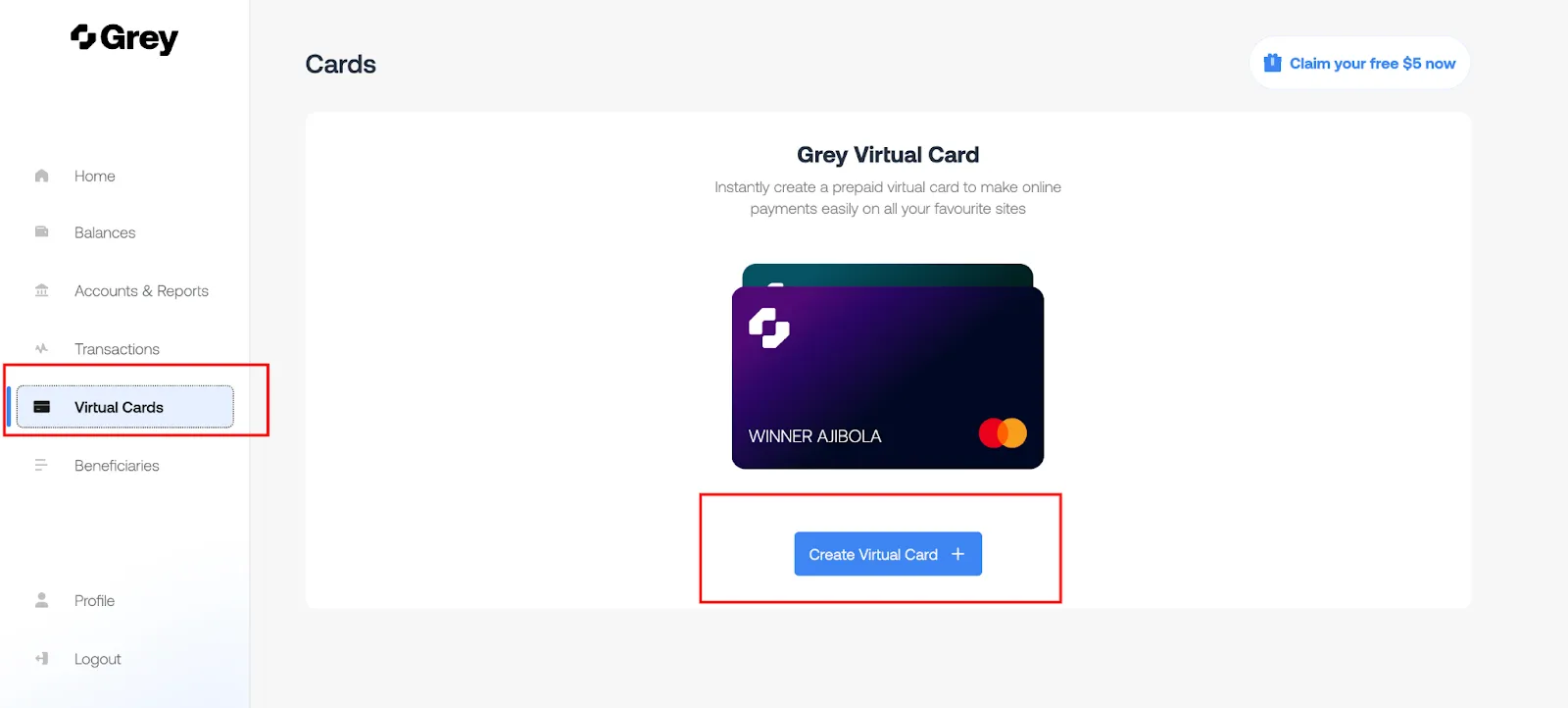
Ready to get your card on Grey? Simply follow the steps below;

create-virtual-card
  • Follow the subsequent steps and get your card

If you’d like to know more about the virtual cards on Grey, visit our FAQ page here.‍

‍

So are you ready to enjoy the new payment experience on Grey? Download the mobile app on Playstore or App Store to get your Grey virtual card today.

Last updated:

October 2, 2026

Open a free Grey account to get startedJoin 1 million digital nomads
IF YOU ENJOYED THIS, CHECK THESE OUT

How to spend globally with the new Grey Virtual Card

•

•

2 min read

What should a truly modern global card feel like?

That question guided every decision behind the new Grey virtual card. We wanted to raise the bar of what your card can do and make everyday spending feel lighter, faster, and more intuitive.

Grey’s new card was designed to simplify global payments, connect directly to your foreign currency balances, enhance security, and seamlessly integrate with Apple Pay and Google Pay.

If your life spans different countries and currencies, this card was built with you in mind.

What makes the new virtual card better

This card was built for the way global citizens actually move, earn, and spend. Here’s what makes it quietly powerful.

Spend directly from your balance

Gone are the days of pausing mid-payment to top up your virtual card.

Your Grey card is automatically connected to your available balances. When you pay, it pulls straight from the right currency, whether that’s USD, EUR, GBP, or NGN. If the funds are there, the payment goes through.

You can book a flight, pay for software, grab lunch abroad, or renew your favourite subscription; your card keeps up without asking you to do extra work.

Add your card to Apple Pay or Google Pay

You can now use Apple Pay and Google Pay (in supported regions) with your Grey Plus Card. That means fast, secure, contactless payments online and in-store, everywhere Visa is accepted.

Tap to pay for groceries.

Tap to board public transport.

Tap to check out online.

Wherever life takes you next, your virtual card is always with you, in your smartphone.

Create multiple spend cards for different needs

You use your money in different ways, so your card should work for all of them.

With Grey, you can create multiple virtual cards for:

Each card can have its own limits and settings, helping you manage your money with clarity and confidence.

Built-in 3D Secure (3DS) protection

With 3D Secure, you’ll be asked to verify transactions yourself, making it much harder for anyone else to use your card without permission. It helps block suspicious activity, prevent fraud, and keep your money protected, all while giving you more control over your payments.

Accepted everywhere Visa works

And of course, the Plus Card is globally accepted, online, on apps, and in physical stores.

You also get access to Visa’s global protections and benefits.

Whether your day involves an airport lounge, an online meeting, or a street market in a city you’re just getting to know, your virtual card is ever ready to complete payments.

Designed with you at the centre

More than anything, this new card reflects how we build at Grey: by listening, improving, and creating tools that match the pace of the world you live in. Your feedback helped shape this upgrade. Your experience guided every decision.

The result is a card that feels lighter, smarter, and more flexible, ready for your next move, whatever and wherever it may be.

Pay from anywhere, in anything

Your new Grey card was made for the kind of days that don’t fit neatly into one country. Maybe you’re earning in dollars this morning, shopping in another currency by lunch, and racing through a couple of airports before dinner. It bends with your plans, slips easily into your routine, and crosses borders as much as you do.

Request your Grey card and enjoy how easy global spending can be.

‍

How to pay for ads easily with your Grey card

•

•

2 min read

Last month, my friend called me in a panic. He’d just launched a big Meta Ads campaign. He’d spent days tweaking it, and right in the middle of a strong performance spike, the worst thing happened. His payment failed.

Meta paused the entire campaign, and he lost momentum, leads, and a potential client renewal. All because his bank randomly declined an international payment at 2 am.

If you’ve ever run ads before, you know this story almost too well.

There are a few things a paid ads manager dislikes more than payments disrupting their ads. Even for creators, freelancers, and small businesses who depend on continuous campaigns, this is annoying and expensive.

This is exactly where the Grey card becomes a practical lifesaver, and I’ll explain here.

Why paying for ads can be difficult sometimes

People don’t always talk about it, but most ad buyers run into the same problems:

1. International cards get declined

Many local bank cards struggle with platforms like Google Ads or Facebook because they’re billed in USD or EUR, depending on your country.

2. Currency headaches

If you earn in your local currency, say naira, but pay for ads in dollars, fees and conversion delays can throw off your budget.

3. Too many campaigns, one payment method

Freelancers running multiple client campaigns often use a single card, which can become a budgeting nightmare.

4. Ad platforms are strict

If your payment fails, the platform pauses your campaign immediately. You lose reach, data, and momentum.

The Grey Visa card was made to solve these exact pain points.

How your Grey helps you run ads without stress

Spend directly from your available balances

Your Grey card automatically pulls funds from your available accounts in the order USD → USDC → the next highest currency, eliminating the need for manual top-ups or wallet selection.

For example, if an ad platform charges $50, the payment is automatically deducted from the available balance, ensuring campaigns run uninterrupted.

Supports Apple Pay and Google Pay

For people who prefer not typing their card details into every ad account, this is a blessing. Just tap, approve, and your campaign goes live.

Create multiple cards to stay organised

You can create separate cards for:

  • Google Ads
  • Meta Ads
  • TikTok
  • LinkedIn
  • Client-specific campaigns

Multiple cards now still work seamlessly from the same unified wallet structure, so you don’t have to worry about linking different currencies or crypto separately.

This makes reconciliation significantly easier and provides peace of mind if one card needs to be frozen or replaced.

Instant freeze/unfreeze and spending limits

If you want to pause a campaign, you can freeze the card without accessing the ad platform. To control costs, you can simply set a monthly limit.

LDMAG1

How to start paying for ads with your Grey card

1. Get your Grey card

You can sign up on Grey, go to the cards section and create your card. This will cost $5.

2. Add it to your ad account

Link it to Google Ads, Meta, TikTok, LinkedIn or wherever you run campaigns.

3. Set a spending limit

This helps with client budgets, personal campaigns, or one-off experiments.

4. Track your payments in the Grey app

Every charge, every retry, every refund is neatly organised right on the app.

Tips to run ads more smoothly with Grey

  • Use separate cards for each client or campaign category.
  • Freeze cards to instantly pause campaigns when needed.
  • Add your card to Apple Pay or Google Pay for fast approvals.

Your ads deserve stability

Running ads is stressful enough. You shouldn’t also have to worry about whether your card will work when Meta tries to charge you at dawn.

If you’re ready for smoother campaigns, fewer declines, and easier budgeting, you can create your Grey Visa card and set up your first ad payment in minutes.

‍

Meet Grey’s new homepage

•

•

2 min read

Grey is built to support the way you manage money across borders. That’s why we’ve redesigned the homepage to make things easier to follow and quicker to act on.

The new design brings clearer balances, guided actions, and important updates right where you need them.

What’s new on Grey’s homepage

One total balance, upfront

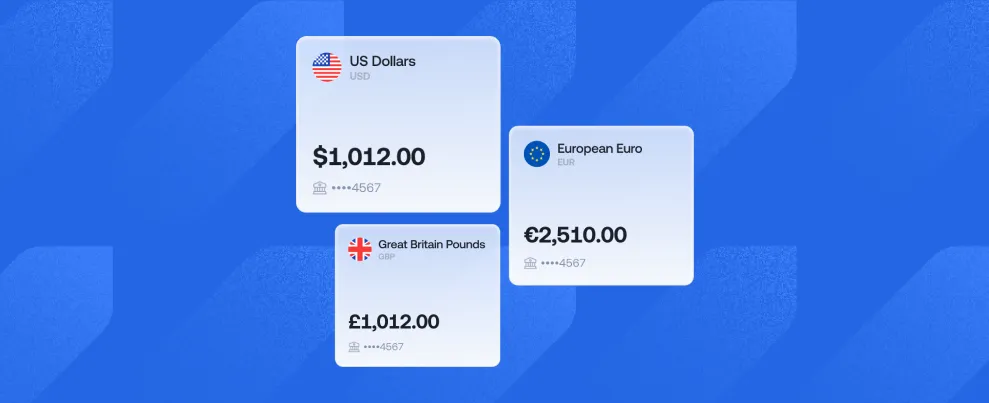
Instead of jumping between wallets, you now see your total funds across all wallets in one place, with a clear breakdown by fiat, stablecoins, and cards. No more switching screens to get the full picture.

__wf_reserved_inherit

Wallet cards for faster scanning

Wallet cards now give you a quick visual view of your active balances across currencies and assets, making it easier to spot what’s available and where. Think of it as a snapshot of everything that’s currently in use, without digging through menus.

__wf_reserved_inherit

Guided onboarding for new users

New onboarding banners include a simple to-do checklist that guides you through key steps like verifying your email, completing KYC, creating a card, or making your first transaction.

If you’re just getting started on Grey, the new homepage won’t leave you guessing.

‍

More transparency around KYC

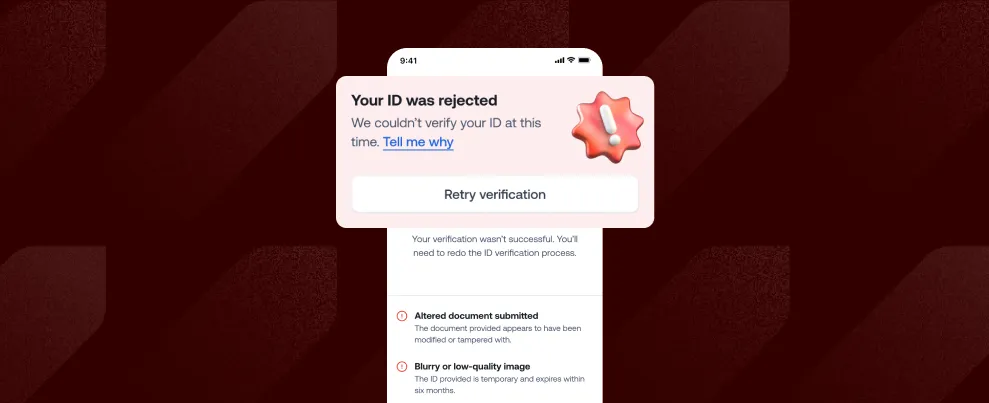
If your KYC is rejected, a new “Tell me why” banner helps you understand the issue. Instead of hitting a wall or immediately contacting support, you’ll be able to understand what happened and what needs fixing.

__wf_reserved_inherit

Clearer transaction tracking

With the new homepage experience, transactions now show a clear timeline and cycle, so you can see what stage your transfer is in and what’s happening behind the scenes. It gives you more control and helps Support resolve issues faster when needed.

__wf_reserved_inherit

In-app alerts that stand out

The new homepage introduces in-app banners for alerts, errors, and status updates, so you don’t miss critical information about your account or transactions.

Clear messages, right when they matter, mean fewer surprises and faster resolutions.

A simpler way to manage your money

The new Grey homepage is designed to make managing your money clearer, faster, and more intuitive.

Everything you need is right where you expect it. Update your Grey app and explore the new experience.

‍

You can now send money to Türkiye and Saudi Arabia with Grey

•

•

2 min read

Maybe you’re visiting family in Türkiye, paying a freelancer you work with, or taking care of an expense while you’re abroad. Maybe you’re heading to Saudi Arabia for Hajj or Umrah and need to sort out accommodation and transport.

Whatever the reason, you can now send money to Türkiye and Saudi Arabia directly from Grey, in Turkish lira (TRY) and Saudi riyal (SAR).

Whether you’re managing work across borders or you simply need to get money to someone in either country, you can now do it from Grey without moving money between multiple services.

Sending money to Türkiye just got easier

If you have someone to pay in Türkiye, you can now send Turkish lira directly to their local bank account from Grey.

You could be visiting for a holiday, supporting family, paying a freelancer or vendor, or handling an expense from abroad. With Grey, you can now send TRY directly to bank accounts across Türkiye. Transfers are supported across operating banks in Türkiye for both personal and business accounts.

The fee is $1.50 + 0.10% per transfer, and you can send between TRY 10 and TRY 200,000 at a time.

Transfers are processed within 24 hours from Monday to Friday, with a 13:00 GMT cut-off time. So, once you have the recipient’s bank details, you can send the money without needing them to sign up for Grey or use a separate wallet.

You can also send Saudi riyals directly to a bank account

We’ve added Saudi Arabia too.

You can now send Saudi riyals directly to personal and business bank accounts across operating banks in the country.

This can come in handy in plenty of situations. You might need to send money to someone living in Saudi Arabia, cover part of a family member’s expenses or pay someone you work with there.

Each transfer costs a flat $3.50, with a minimum of SAR 1 and a maximum of SAR 20,000 per transaction.

Transfers are processed within 24 hours from Monday to Friday, with a 10:00 GMT cut-off time.

Start with the money you already have in Grey

You don’t need to hold Turkish lira or Saudi riyals in your Grey account before you send money.

If you already have money in a supported Grey balance, you can use it to send TRY or SAR to the recipient.

Simply choose the destination, add the recipient’s bank details and enter how much you want to send. You’ll be able to see the transfer details before confirming.

The person receiving the money doesn’t need a Grey account. The money goes to their local bank account in Türkiye or Saudi Arabia.

So when your money needs to reach someone in Türkiye or Saudi Arabia, you can send it directly from Grey.

Open Grey and send TRY or SAR directly to a bank account today.

Frequently asked questions about sending money to Türkiye and Saudi Arabia

Can I send Turkish lira with Grey?

Yes. You can send Turkish lira (TRY) directly to personal and business bank accounts in Türkiye.

How much does it cost to send money to Türkiye?

Grey charges $1.50 + 0.10% per transaction. The 0.10% fee has a minimum of $0.80. You’ll see the fee and exchange rate before you confirm your transfer.

How much TRY can I send?

You can send between TRY 10 and TRY 200,000 in a single transaction.

Can I send Saudi riyals with Grey?

Yes. You can send Saudi riyals (SAR) directly to personal and business bank accounts in Saudi Arabia.

How much does it cost to send money to Saudi Arabia?

Each transfer to Saudi Arabia costs a flat $3.50.

How much SAR can I send?

You can send from SAR 1 up to SAR 20,000 in a single transaction.

How long do transfers to Türkiye and Saudi Arabia take?

Transfers to both countries are processed within 24 hours from Monday to Friday. Cut-off times apply: 13:00 GMT for Türkiye and 10:00 GMT for Saudi Arabia.

Does the person receiving the money need a Grey account?

No. You send the money directly to their local bank account, so they don’t need to have a Grey account to receive it.

Plan ahead with Pouch, spend and earn with Lifestyle

•

•

2 min read

Money can mean different things. It might be your next flight, this month’s bills, an emergency fund, or something you’ve been saving toward for months.

Until now, Grey has been the place your money passes through. Now, you can do more with it while it’s here, with Pouch and Lifestyle.

Lifestyle brings everyday services and rewards into one place, while Pouch gives you a simple way to split your balance and organise your money around your plans. Together, they give you more to do with your Grey balance, from spending and earning rewards to preparing for what’s next.

More ways to spend and earn with Lifestyle

Lifestyle brings everyday digital services and rewards together in the Grey app.

Instead of only using Grey to receive, send, and spend money, you can now use your balance for more of the things you need day to day. From the Lifestyle tab, you can get eSIMs and, where available, buy airtime and data or pay supported bills.

__wf_reserved_inherit

Your spending can also earn you rewards. Eligible Grey card payments earn points you can track directly in Lifestyle and redeem for available rewards.

So, the next time you need data for your phone, an eSIM for a trip, or want to check the rewards you’ve earned from using your Grey card, you can find it all in Lifestyle.

Services vary by location, so check the Lifestyle tab in your Grey app to see what’s available to you.

Give every goal its own Pouch

Maybe you’re planning your next adventure, building an emergency fund, buying something special, or preparing for future investments.

Create different Pouches for the things that matter to you, give each one a name, and choose how much you want to keep aside. Having separate spaces for different goals makes it easier to see what you’re working on and stay connected to your plans.

Instead of looking at one balance and trying to remember what you can and can’t spend, you can split your balance and give each amount a purpose. And because plans change, your money isn’t locked away. You can move it back to your Grey balance when you need it.

__wf_reserved_inherit

Hold funds in dollars, pounds and euros

For people who earn, spend, or move money across currencies, you can also decide what works best for you. If you receive money in USD, EUR, or GBP, you can create a Pouch in that same currency without converting first.

Use your USD for your next adventure, your EUR for a big purchase, or keep your GBP ready for something important you’re planning.

Put Round-ups on autopilot

Sometimes the easiest way to reach a goal is to make it part of something you already do.

With Round-ups, the spare change from eligible Grey card payments can automatically go into a Pouch you choose. Every time you use your Grey card, you can put a little extra aside for your goal.

For example, if you spend $8.60 on your Grey card, your payment is rounded up to $9, and the remaining $0.40 goes into your Pouch.

Small amounts, collected over time, can help you keep moving closer to the things you want.

Everything you need, in one place

Grey already helps you receive, hold, send, and spend money across currencies. Now, Pouch and Lifestyle give you even more ways to use and manage your money without needing a separate app.

So whether you’re keeping money ready for what’s next, getting connected in a new city, paying a bill back home, or picking up something you need, you can do more of it without leaving Grey.

Your money can stay where it is, while more of your life happens around it.

Open your Grey app to explore Lifestyle and create your first Pouch today.

Frequently Asked Questions

What is Pouch?

Pouch is a Grey feature that helps you set aside money for specific goals. You can create separate Pouches for your plans, choose your preferred currency, and track your progress in one place.

Which currencies can I use for Pouch?

You can create Pouches in USD, EUR, and GBP.

Can I create more than one Pouch?

Yes. You can create multiple Pouches for different goals, such as travel, an emergency fund, a big purchase, or future plans.

Does Pouch earn interest?

Not yet. Pouch currently holds your funds separately and does not earn interest.

What are Round-ups?

Round-ups automatically move the spare change from eligible Grey card payments into a Pouch you choose. It’s a simple way to make progress as you spend.

Do I need a new Grey account to use Pouch?

No. Pouch is already part of the Grey app, so you can use it with your existing account.

Can I keep money without converting my currency?

Yes. With Pouch, you can hold funds in USD, EUR, or GBP, so you can set aside money in the currency you already hold.

Can I take money out of a Pouch whenever I want?

Yes, you can.

What is Lifestyle on Grey?

Lifestyle is a space in the Grey app where you can access everyday services and rewards. Depending on availability in your location, you can get eSIMs, buy airtime and data, pay supported bills, and access rewards.

How do Grey points work?

You can earn points on eligible Grey card payments. You can view your points balance in Lifestyle and redeem them for available rewards.

Is Lifestyle available everywhere?

Availability varies by service and location. Open the Lifestyle tab in your Grey app to see the services currently available to you.

What’s new when you send money with Grey

•

•

2 min read

Every time you send money, you already have a plan in mind. You know who you're paying, how much you want to send, and what you want them to receive.

That’s why we’ve redesigned the send flow to work the way you naturally think about transfers. Our previous send flow asked you to start somewhere else. Before choosing a recipient, you first had to pick a send option based on the payment network behind the scenes. It worked, but it didn't match the way most people think about sending money.

Now, you’ll start with your recipient, see only the payment options available for that transfer, and move through the rest of the process with fewer choices along the way.

Start with who you're sending money to

__wf_reserved_inherit

When you're sending money, the first question is usually simple: Who am I sending this to?

That's now the first step in the app.

Instead of choosing a send option first, you'll begin by selecting who you want to send money to. If you're sending money to someone from your transfer history, you can skip the payment method and enter the amount. If it's a new recipient, Grey will show only the payment options available for your chosen currency and destination.

That means you spend less time sorting through options and more time completing your transfer.

Payment options now match your transfer

__wf_reserved_inherit

Previously, every send option was displayed upfront, even though some of them only worked for specific currencies.

Now the Grey filters those choices for you.

When you send money to a new recipient, you'll only see the payment methods that support the currency and destination you've selected. That means a shorter, clearer list, making it quicker to choose the right option and complete your transfer.

Save recipients for faster transfers

__wf_reserved_inherit

When you regularly send money to the same people, keeping your recipient list organised makes every transfer faster.

As you add a recipient, you can now save them as a beneficiary. Beneficiaries appear at the top of your recipient list, making it quicker to find the people you send money to most.

Whether it's family, friends, clients, or suppliers, your most important recipients are always within easy reach, so you can start repeat transfers even faster.

Choose how you want to calculate your transfer

__wf_reserved_inherit

People don't all send money the same way.

Sometimes you know exactly how much you want your recipient to receive. Other times, you know the amount you want to send and want to see what arrives after fees and conversion.

The updated amount screen makes both options simple. You can edit either amount field, and the transfer updates instantly, so it's easier to understand exactly what you're sending and what your recipient will receive.

Clearer guidance from start to finish

You'll also notice a different tone throughout the flow.

Instead of presenting technical terms first, the app now guides you with questions that mirror the decisions you're already making:

  • Who do I want to send money to?
  • How do I want to send it?
  • What currency should my recipient receive?

It makes the process easier to follow without needing to think about the payment infrastructure behind the scenes.

A simpler way to send money

This update is all about making sending money feel easier.

Starting with your recipient, filtering payment options automatically, remembering the people you send money to most, and making transfer amounts easier to understand all help make the experience feel smoother from beginning to end.

The next time you send money with Grey, you'll notice that the process will feel more familiar: choose who you're paying, enter the amount, confirm the details, and you’re done.

Update your Grey app to start sending money with a simpler, more intuitive way to send money from the very first tap.

Arrow (up)

Back to top