<script type="application/ld+json" data-schema-version="grey-blog-v4">
[{"@context":"https://schema.org","@type":"BlogPosting","@id":"https://grey.co/blog/changing-money-in-morocco-digital-vs-bureau-de-change#article","headline":"Changing money in Morocco: digital vs bureau de change","description":"Changing money in Morocco? Compare digital payments and bureau de change options to find the safest, cheapest, and most convenient way to exchange currency","inLanguage":"en","url":"https://grey.co/blog/changing-money-in-morocco-digital-vs-bureau-de-change","mainEntityOfPage":{"@id":"https://grey.co/blog/changing-money-in-morocco-digital-vs-bureau-de-change#webpage"},"datePublished":"2026-03-31T15:36:06.940Z","dateModified":"2026-06-15T14:18:54.492Z","author":{"@type":"Person","@id":"https://grey.co/authors/tunde-aladeloba#person","name":"Tunde Aladeloba","url":"https://grey.co/authors/tunde-aladeloba","jobTitle":"Content Writer","sameAs":["https://ng.linkedin.com/in/aladeloba-babatunde-b1114b100"]},"publisher":{"@type":"Organization","@id":"https://grey.co/#organization","name":"Grey","url":"https://grey.co","logo":{"@type":"ImageObject","url":"https://cdn.prod.website-files.com/6360022338a81bd6fdbb1145/6564ae1077a67e39d3c491a6_Grey%20Logo%20Lockup%20Black.svg"}},"image":{"@type":"ImageObject","@id":"https://grey.co/blog/changing-money-in-morocco-digital-vs-bureau-de-change#primaryimage","url":"https://cdn.prod.website-files.com/636a85d290ee58e70c17e1c0/6a3009ced63db472293f7ccd_6a3009cd6ab44a5de30cb1e9_changing-money-in-morocco-digital-vs-bureau-de-change__header-image.webp","contentUrl":"https://cdn.prod.website-files.com/636a85d290ee58e70c17e1c0/6a3009ced63db472293f7ccd_6a3009cd6ab44a5de30cb1e9_changing-money-in-morocco-digital-vs-bureau-de-change__header-image.webp","width":1200,"height":675}},{"@context":"https://schema.org","@type":"WebPage","@id":"https://grey.co/blog/changing-money-in-morocco-digital-vs-bureau-de-change#webpage","url":"https://grey.co/blog/changing-money-in-morocco-digital-vs-bureau-de-change","name":"Changing money in Morocco: digital vs bureau de change","description":"Changing money in Morocco? Compare digital payments and bureau de change options to find the safest, cheapest, and most convenient way to exchange currency","inLanguage":"en","primaryImageOfPage":{"@id":"https://grey.co/blog/changing-money-in-morocco-digital-vs-bureau-de-change#primaryimage"},"breadcrumb":{"@id":"https://grey.co/blog/changing-money-in-morocco-digital-vs-bureau-de-change#breadcrumb"}},{"@context":"https://schema.org","@type":"BreadcrumbList","@id":"https://grey.co/blog/changing-money-in-morocco-digital-vs-bureau-de-change#breadcrumb","itemListElement":[{"@type":"ListItem","position":1,"name":"Home","item":"https://grey.co/"},{"@type":"ListItem","position":2,"name":"Blog","item":"https://grey.co/blog"},{"@type":"ListItem","position":3,"name":"Changing money in Morocco: digital vs bureau de change","item":"https://grey.co/blog/changing-money-in-morocco-digital-vs-bureau-de-change"}]}]
</script>
Grey Guides
•
March 31, 2026
•
8 min read
Changing money in Morocco: digital vs bureau de change
Tunde Aladeloba
TABLE OF CONTENT
SHARE THIS POST
Changing money in Morocco can seem straightforward at first, withdraw cash, pay for meals, or shop in the souks. But the method you choose can make a big difference. Digital solutions promise speed and convenience, while traditional bureaux de change offer a familiar, face-to-face experience.
Each comes with its own trade-offs. Digital platforms make transfers and currency conversion instant at competitive exchange rates. Bureaux de change give you certainty and personal interaction, yet long lines, limited hours, and slower processing can cost you time and flexibility. Choosing the wrong method can turn a simple transaction into a frustrating experience.
In this guide, we explore the pros and cons of digital vs bureau de change in Morocco, helping travellers and residents alike make informed choices
Digital exchange in Morocco allows individuals and businesses to convert, send, and receive foreign currencies using online platforms instead of traditional banks. These platforms link users directly to the currency market or licensed intermediaries, offering real-time exchange rates and faster transactions than conventional methods. Users can access digital exchange services via websites or mobile apps, making it convenient to manage funds from anywhere.
To use a digital exchange, you first create an account and complete the required KYC verification, providing identification and sometimes proof of residence. Once verified, you can deposit local currency (MAD) into the platform and convert it to a foreign currency, such as USD, EUR, or GBP. Many platforms allow instant transfers to international bank accounts or digital wallets, often at lower fees than traditional banks.
Digital exchanges also monitor transactions for compliance with Morocco’s foreign exchange regulations, ensuring that all transfers meet legal requirements. This protects both users and the platform while enabling secure, traceable, and efficient movement of money across borders.
Understanding bureaux de change operations across Morocco
Bureaux de change in Morocco are licensed currency exchange offices where individuals and businesses can buy and sell foreign currencies like USD, EUR, or GBP. These offices operate in cities, airports, and tourist areas, providing a convenient alternative to banks for exchanging cash. Exchange rates are set daily and may vary slightly between bureaux, depending on demand and market conditions. Customers present their identification, such as a passport or national ID, and the bureau converts the funds instantly, often charging a small commission or including a margin in the rate.
Many bureaux also offer additional services, including cash withdrawals, remittances, and travel money solutions. While transactions are quick and physical, customers should compare rates between locations to get the best value. Compliance with Morocco’s foreign exchange regulations ensures that all transactions are legal, secure, and traceable, protecting both the client and the operator.
Complexities of using bureaux de change in Morocco
In Morocco, Bureaux de Change handle foreign currency exchanges, but complexities can impact how residents and businesses receive payments or manage earnings.
1. Fluctuating exchange rates
Exchange rates in Moroccan bureaux change daily, influenced by market demand and central bank policies. For freelancers, exporters, or businesses receiving foreign payments, this volatility can reduce earnings unexpectedly, meaning timely exchanges are critical to protect income and ensure predictable cash flow.
2. Fees and commissions
Bureaux often embed fees or margins into exchange rates. For individuals and small businesses in Morocco, repeated conversions or large transfers can erode profits, reducing the net amount received and affecting budgeting for payments, salaries, or operational costs.
3. Regulatory compliance
Moroccan bureaux must follow strict currency laws. Large payments or business receipts require identification and documentation, which can delay access to funds. Freelancers, exporters, and employees may face slower processing times, impacting their ability to pay bills or reinvest earnings promptly.
4. Limited services
Not every bureau in Morocco supports all currencies, bulk transfers, or remittances. Businesses and residents may struggle to access the right service at convenient times, potentially delaying payments, increasing costs, or forcing multiple trips to complete necessary transactions.
Advantages of choosing digital exchange in Morocco
Digital exchange in Morocco offers faster, more convenient currency transfers, helping residents and businesses manage earnings, pay contractors, and send money internationally efficiently.
1. Speed
Digital exchange platforms allow users in Morocco to convert and send currencies instantly or within hours. Freelancers, exporters, and remote workers can access funds quickly without visiting physical offices, ensuring timely payments and reducing delays in receiving earnings from abroad.
2. Better rates
Unlike traditional bureaux, digital exchanges often offer mid-market rates with lower margins. For Moroccans receiving international payments, this means more of their earnings are preserved, increasing net income and making it cost-effective for repeated transactions or large sums.
3. Transparency
Digital platforms provide clear breakdowns of fees, conversion rates, and transaction statuses. Users in Morocco can monitor every transfer in real-time, reducing uncertainty and giving businesses and freelancers confidence that payments are accurate and traceable.
4. Multi-currency support
Digital exchanges let Moroccan users hold, send, and receive multiple currencies from one platform. This flexibility benefits freelancers, small businesses, and remote workers who deal with USD, EUR, or GBP, eliminating the need for multiple accounts or trips to physical bureaux.
Top digital exchange solutions in Morocco
Grey: Offers virtual accounts in GBP, EUR, and USD, letting freelancers receive international payments, convert currencies instantly, and benefit from competitive rates with transparent, low-cost fees.
Wise: Provides multi-currency accounts for sending and receiving money, offering low-fee conversions at competitive mid-market rates, making international payments simple, fast, and cost-effective for individuals and businesses.
CashPlus & Wafacash: Popular in Morocco for remittances, currency exchange, and mobile wallet management, enabling users to send, receive, and access funds conveniently across local and international networks.
LDMAG1
Managing currency exchange with Grey
In Morocco, digital exchange is the most efficient way to convert and send money, offering speed, convenience, and security. Among options, Grey stands out with competitive exchange rates, multi-currency support, and transparent fees.
Whether you’re a freelancer, remote worker, or sending funds abroad, Grey ensures your money moves quickly, safely, and with minimal loss. Sign up or download the Grey app to exchange funds without stress.
Often, the logistical considerations for global workers can be more exhausting than the job itself. You have to plan your finances, research your destination, and schedule trips while ensuring an optimal work-life balance. It is likely to become so chaotic that you may consider a traditional work structure instead. If you hope to enjoy your global work life, then integrating your financial plan, location, and lifestyle is your surest bet. This article explores how you can piece these work elements together to ensure optimal work performance.
Your income determines a lot. When people consider becoming a global worker, they think of Dubai first, even though their income should make them think of Mumbai. Experienced digital nomads ensure they have their finances locked in before setting out. If you are an I will figure it out’ kind of person, you might end up stranded in an unfamiliar country because you like the aesthetics. These are some measures for global workers:
Detailed research: Before moving, research the cost of living (rent, utilities, food, transport, and leisure) using tools like Numbeo or Expatistan.
Track expenses: Use apps like YNAB or simple spreadsheets to monitor spending and adjust accordingly over time.
Set a Budget: Follow it strictly. The popular 50/30/20 budget (50% needs, 30% wants, 20% savings) is often recommended.
Manage taxes: Understand tax residencies, avoid double taxation, and keep meticulous records. When in doubt, hire a tax expert.
Savings and emergency funds: Global workers aim to save 3 to 6 months of their living expenses as a backup in case their income becomes unstable. Set up automatic transfers to a savings account.
Contracts: Ensure work contracts clearly define payment methods, payment terms, and currency (use stable currencies like USD, EUR, or GBP).
Use multicurrency accounts: These allow them to receive payments globally at low cost and withdraw to local currency at competitive rates
Once your finances are sorted, you can start thinking of locations your income can support. Global workers prioritise destinations with solid Wi-Fi, affordable living, and digital nomad visas that let you stay longer. Evaluate safety, healthcare, and work-life balance. Also, don't forget time zones. For example, if your clients are in the US, avoid places like New Zealand where calls mean midnight meetings.
Being a digital nomad doesn’t mean you are constantly moving around without a plan. Rather than moving impulsively, global workers plan their relocations around times when they have less work. This reduces stress and maximises performance.
Managing lifestyle as a global worker
Managing lifestyle as a global worker requires a strategy that balances your job responsibilities and your personal well-being. Global workers should be clear on what type of life they’d like to experience. It is easy to get carried away with exciting adventures and relax. But there is a job that sponsors this lifestyle, and this should always be at the back of your mind.
Establish work-life boundaries by separating work areas from living areas. Have a clear work structure that defines your working hours and accommodates varying time zones if you’re working with a global team. Regular exercise and sleep are essential for managing stress and improving well-being.
Balancing income, location, and lifestyle as a global worker
Now, let’s piece these elements together.
We have already established that your finances strongly influence your location and lifestyle. It is therefore important to adapt your lifestyle and location choices to fit within your budget while leaving enough for a rainy day. Don’t be afraid to start small and gradually grow.
Mastery in global work is balancing location and lifestyle on your finances while maximising productivity. Grey helps you achieve this balance by streamlining your finances to improve planning. With multicurrency accounts, you can manage USD, EUR, and GBP transactions in one place and withdraw in local currencies at competitive rates. You also avoid losing a chunk of your income to high transaction fees and unfair exchange rates. Grey’s virtual USD debit card gives you more flexibility to make payments as you travel globally.
If it has ever crossed your mind that someone might be spending your income behind your back, then you are not alone. One minute, you get paid, and the next minute, the funds have dried up, and you are looking forward to the next payday. On second thought, there might actually be someone else spending your money. Unfavourable exchange rates, local currency devaluation, high platform charges, and unplanned taxes can affect your income. Here are the most effective ways remote workers protect their income while working across countries.
They separate their income from their spending
Separating your earnings from your spending helps you manage money better. Remote workers would rather take a regular salary, which is a fraction of their income. They receive payments into an account and periodically move the money they need (maybe monthly) to a separate account where they spend it.
They avoid forced conversions
One of the biggest mistakes remote workers make is converting foreign income into local currency immediately, especially with traditional banks. This exposes you to poor exchange rates and removes the flexibility to decide when you want to convert your income. The OG remote workers know to keep income in the currency it is paid in, then convert only when they need to spend locally or when rates are favourable.
Using multi-currency accounts allows them to receive USD, EUR or GBP, hold balances securely and manage conversions strategically. This simple separation alone can preserve a significant portion of income over time.
They avoid dynamic currency conversion
If you use an international ATM with your local card and choose to be debited in your home currency, that is one of your income drains. Dynamic currency conversion automatically converts payments at unfavourable rates. Remote workers would choose to pay or withdraw in the local currency of the transaction, not their home currency, to avoid hidden mark-ups.
They invoice in stable currencies
Remote workers charge in stable currencies like USD, EUR, and GBP. This improves their earning potential and ensures their money is protected from local economic factors and currency fluctuations. Quoting in these currencies also ensures the income value remains predictable. Even if their home currency weakens, their income in stable currencies acts as a hedge against inflation or sudden devaluation.
They plan for taxes across borders
Unplanned taxes are a recipe for financial disaster. Unexpected tax liabilities can wipe out months of earnings. Remote workers who protect their income understand their tax residency, keep accurate records and set aside money regularly for tax obligations.
They track invoices, payment dates and conversions carefully. Even when working in multiple countries, having organised records prevents penalties and reduces stress.
Working without a clear contract can affect your income. Defining payment terms, timelines, currencies, late fees, and dispute processes beforehand helps remote workers manage expectations and financial disruptions. This reduces delayed payments and gives them leverage if issues arise.
They also avoid working extensively without upfront deposits or milestones, especially with new clients.
The money you make from remote work can be seasonal. Sometimes, you’re doing great; other times, you are grasping at straws. Remote workers understand their earnings can be irregular, so they maintain emergency funds to cover three to six months of expenses. They’d usually keep part of their money in stable foreign currencies to protect against local economic changes. Financial discipline involves solid financial planning, strict budgeting, expense tracking, compulsory savings, and emergency funds.
Protecting your income as a remote worker boils down to smart planning and the right payment solution. Grey is tailored to help remote workers maximise their earnings with their multi-currency accounts. Users can hold their earnings in USD, GBP, and EUR or convert to local currencies at competitive exchange rates.
I’ve always loved feeling independent, the kind of person who can move through the world without needing to stop and sort out a dozen little hassles. Maybe that’s why tapping my phone to pay has become one of my favourite tiny freedoms.
If you’re anything like me, you know those moments well. Rushing through an airport with no hands to spare. Grabbing breakfast from a food stall because you’re curious about how the locals eat. Signing up for an online tool at midnight because the timing just felt right.
That’s exactly why learning how to use Google Pay worldwide with your Grey virtual card makes such a difference. Once your card sits snugly inside Google Pay, every payment becomes smoother. No digging through bags, topping up a card before paying, and no declines. Just a quick tap and the quiet satisfaction of knowing you’ve sorted it.
And now that the Grey virtual card has officially landed, this is the perfect time to explore everything it can do to keep your days light, easy, and wonderfully yours.
Why the Grey virtual card works so effortlessly with Google Pay
If you’re looking for a simple, reliable way to use Google Pay worldwide, the Grey virtual card makes the process smoother than ever. With our upgraded virtual card experience now live, Google Pay becomes more than a convenient feature. It becomes the easiest way to spend your foreign currency and crypto balances across countries, platforms, and everyday transactions.
Here’s why using Google Pay with your Grey virtual card is such a seamless match:
One card, multiple balances
Your Grey virtual card connects directly to any balance you choose, including USD, GBP, EUR, or crypto like USDC, USDT, or BTC. No manual top-ups. No switching between wallets. Just direct, instant spending power everywhere Google Pay is accepted.
A smoother global experience
Many people switching to the Grey virtual card do so after dealing with cards that fail on international platforms. This upgraded virtual card was designed to remove that frustration. You get fewer random declines, clearer communication, and fast support whenever you need it, making global payments feel more predictable.
Contactless convenience, everywhere
When you combine Google Pay’s tap-to-pay simplicity with Grey’s global card functionality, you get fast, contactless payments across countries, currencies, and online merchants. Whether you’re shopping locally or paying for international services, everything works with a tap.
Stronger security
The Grey virtual card supports 3D Secure (3DS), giving you added protection during online and in-store transactions. It’s a safer way to shop, travel, and pay globally.
Who benefits most from using Google Pay with the Grey virtual card?
If you’ve been searching for a reliable virtual card that works with Google Pay worldwide, this duo is designed exactly for the way modern global citizens live, earn, and spend.
Digital nomads and travellers
Once your Grey virtual card is added to Google Pay, you can tap your way through airports, metros, cafés, supermarkets, and co-working spaces, anywhere contactless payments are accepted.
Crypto enthusiasts
If you hold or earn in crypto, Google Pay becomes your gateway to everyday fiat spending. Link your Grey virtual card to your crypto balances and pay like a local in any country.
Freelancers and remote workers
Whether you earn in USD, work with clients in Europe, or pay for tools hosted abroad, Google Pay + Grey card gives you a consistent and flexible way to manage global payments without failed transactions or confusing restrictions.
Small business owners
Running ads on Meta, TikTok, or X? Paying for global subscriptions and software? Your Grey virtual card helps every payment go through smoothly, without hidden fees or last-minute surprises.
How to create your Grey virtual card and add it to Google Pay
If you’re learning how to use Google Pay with your Grey virtual card, the setup takes just a few seconds:
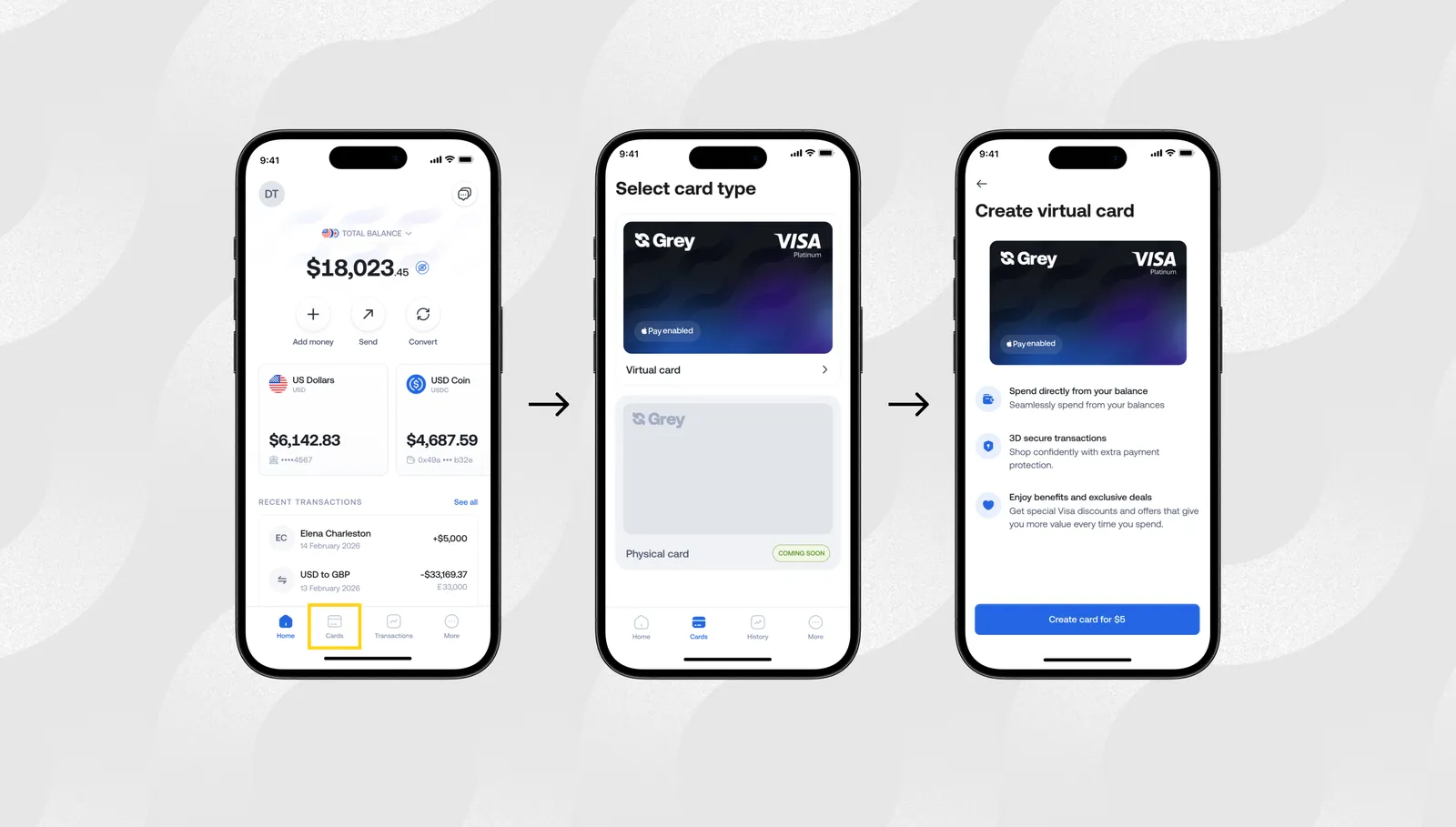
Tap to create your Grey card in the app.
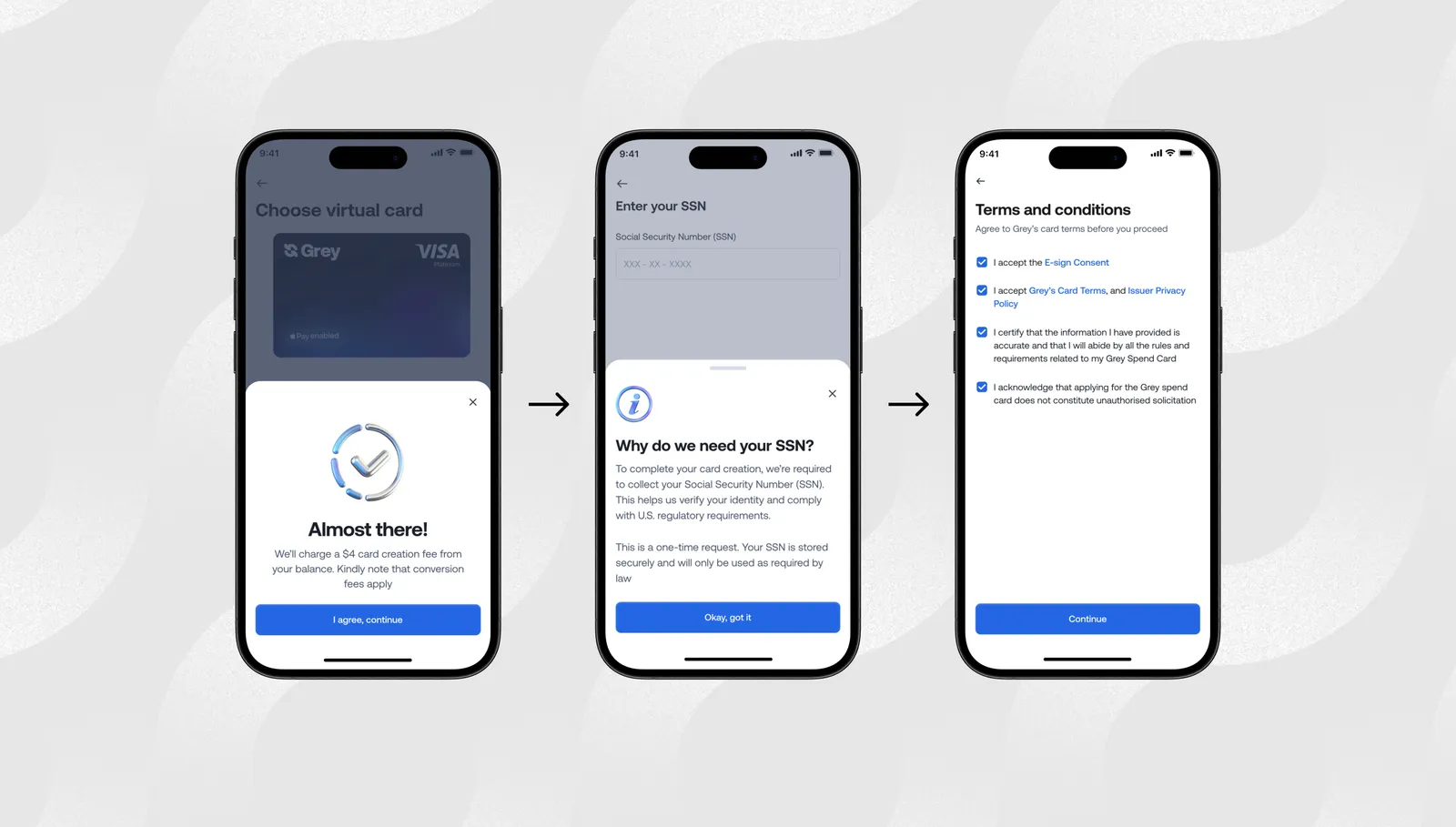
Follow the verification steps.
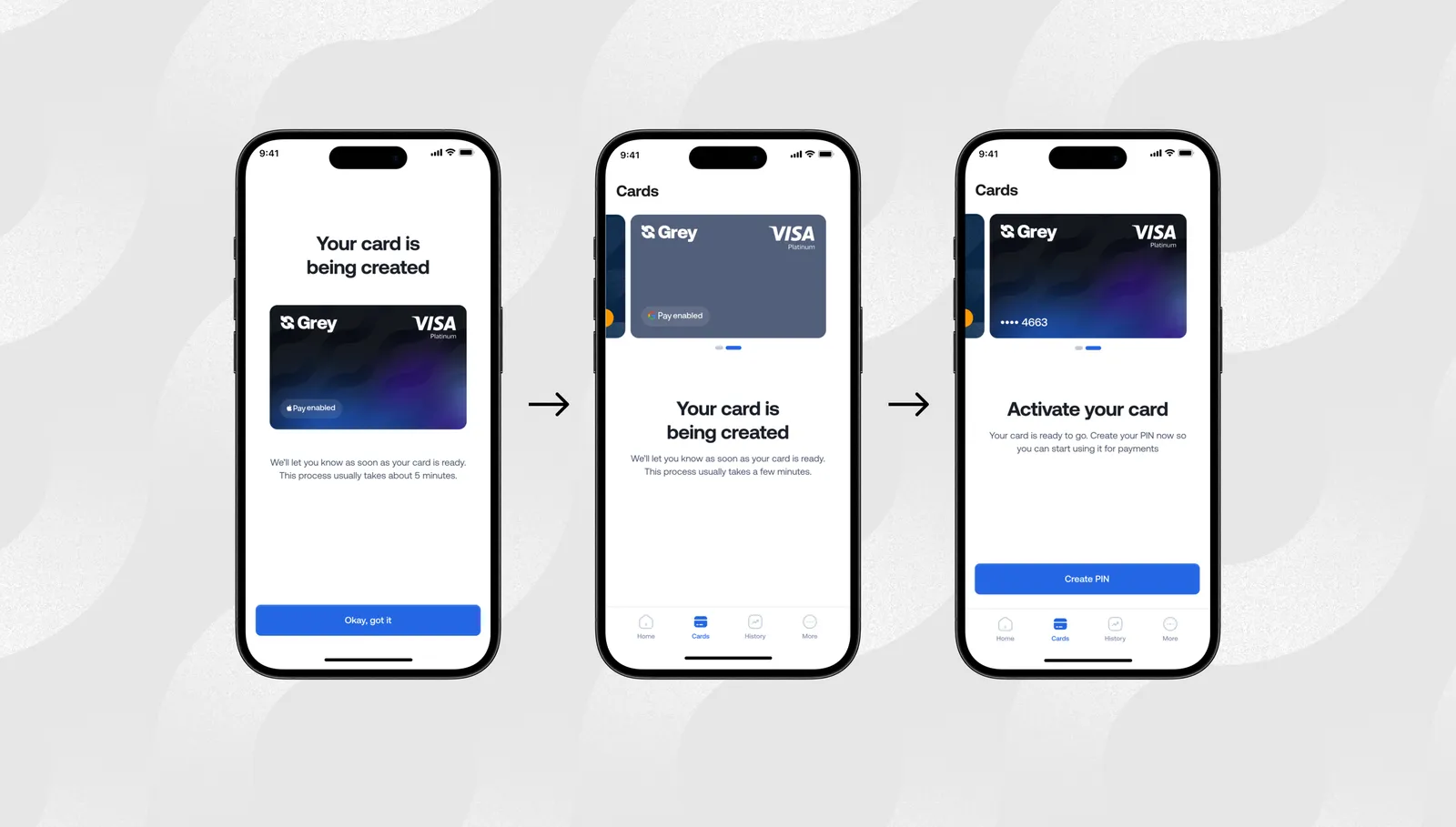
It usually takes a few hours for the card to be created.
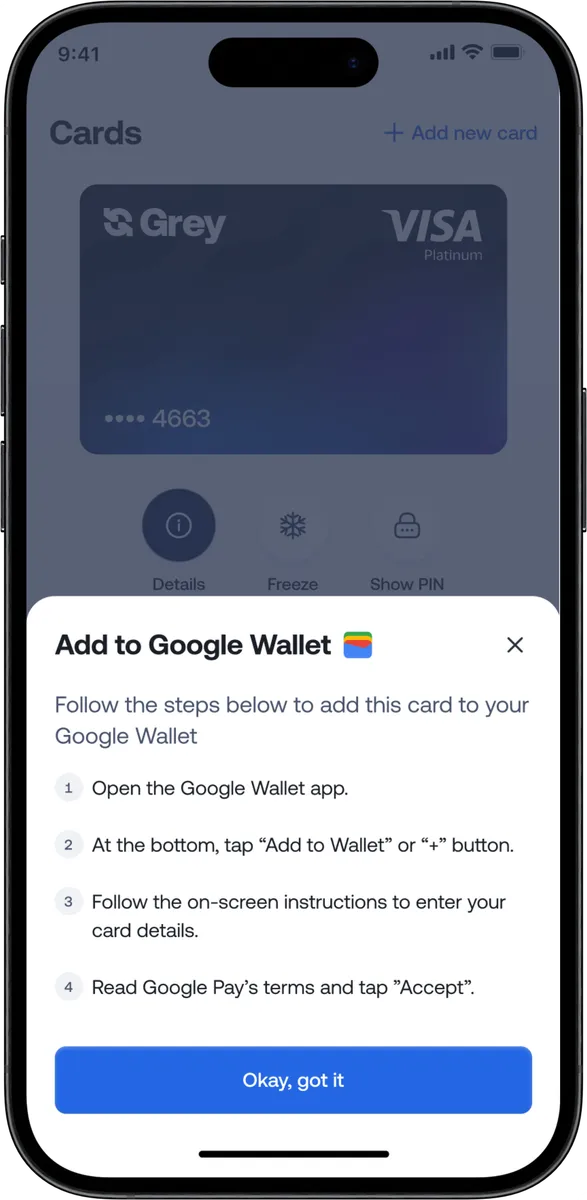
Once your Grey virtual card is ready, you can follow the steps to add it to Google Pay.
Once added, you can use Google Pay for contactless payments, online checkouts, in-app purchases, public transport, and global merchants that support Google Pay.
Where you can use Google Pay with your Grey virtual card worldwide
Google Pay works in dozens of countries and millions of merchant locations. With the Grey virtual card connected, you can:
Book international flights
Pay for Airbnb and travel bookings
Buy coffee and groceries in cities like Barcelona, Nairobi, Accra, Mexico City, or Bali
Subscribe to Amazon, Spotify, Canva, YouTube Premium, and more
Pay for ad platforms like Meta, TikTok, Google Ads, and X
Your Grey Visa card selects the right balance automatically, while Google Pay makes each payment instant and contactless.
Why this upgrade matters now
For years, users dealt with failed payments, poor international compatibility, and unclear card restrictions. The new Grey virtual card was built to fix these problems and make global payments through Google Pay easier than ever.
This upgrade helps you:
Spend globally with fewer limitations
Enjoy reliable virtual card functionality
Avoid unexpected card blocks or errors
Use foreign currency and crypto balances effortlessly
Make international purchases with more confidence
It’s all part of our goal to make international spending feel as easy as local shopping.
If you live or work globally, you deserve a payment setup that travels with you. Google Pay paired with the Grey virtual card removes friction from your everyday life so you can focus on what actually matters.
Everyone talks about the earning part. YouTube money, TikTok coins, Patreon memberships, Gumroad sales. Nobody talks about the part where Google asks for SWIFT details your GTBank account does not have, or TikTok wants a US routing number you have never seen before, or your Patreon balance just sits there because none of the withdrawal options seem to work from Nigeria.
That gap between earning USD and actually holding USD is where Nigerian creators lose money, lose time, and sometimes lose entire payouts. Each platform has its own payout method, thresholds, and account requirements. YouTube pays via wire transfer. TikTok pays via ACH. Patreon offers three different options. Affiliate programmes vary by network. What works for one person does not necessarily work for another, and the wrong setup can lead to delayed payments, rejected transfers, or funds stuck in a dashboard you cannot access.
This guide covers the full payment chain for Nigerian creators earning in USD: how each major platform actually pays out and what account details it requires, which account options exist and what they cost, how to manage your dollars once they arrive, and what the 2026 Nigeria Tax Act means for your creator income. If you are earning from one platform or six, the mechanics start here.
How creator platforms actually pay you
Before choosing a payment account, you need to understand how each platform handles payouts. The payout method determines which account you need, so getting this right first saves you from signing up for one that does not work with your primary income source.
YouTube pays through Google AdSense, which offers two payout methods for Nigerian creators: wire transfer to a bank account or Western Union. The minimum payout threshold is $100. Once you reach it, AdSense processes payment around the 21st of the following month. Wire transfers require a bank account that can receive international SWIFT payments in USD. For Nigerian creators, this means either a domiciliary account at a commercial bank or a virtual USD account from a fintech provider. AdSense does not support Payoneer or PayPal as direct payout methods. The wire transfer takes 3 to 7 business days to arrive after AdSense initiates it. Google deducts a small wire fee (typically around $5) from each payout. If you choose Western Union, you pick up cash at a local branch, but the limit is $5,000 per transaction, and you have to visit in person each time, which is impractical for a regular monthly income.
TikTok Creator Rewards
TikTok requires a US bank account or PayPal to receive Creator Rewards payouts. The minimum withdrawal is $10, and payments are processed within 15 business days. This is the platform that causes the most confusion for Nigerian creators because a regular Nigerian bank account does not qualify. You need a virtual USD account that provides a US routing number and account number (ACH details). Several fintech platforms offer this. When you enter your payout details in TikTok, use the ACH option and input the routing and account numbers from your virtual USD account exactly as they appear in your provider's dashboard. Name mismatches between your TikTok profile and your bank account are the most common reason payouts fail, so confirm both match before submitting.
Instagram and Facebook (Meta)
Meta pays creators through in-stream ads, bonuses, and subscriptions. Payouts go through Meta's payment settings, which accept a US bank account (ACH), PayPal, or a direct deposit to a supported bank. For Nigerian creators, the most reliable method is adding your virtual USD account's ACH details under Payout Settings. The minimum payout is $100, and Meta pays monthly. Processing typically takes 3 to 5 business days after the payout date.
Patreon
Patreon processes payouts on the 1st to 5th of each month and offers several options: direct deposit (ACH to a US bank), PayPal, or Payoneer. Nigerian creators can use either a virtual USD account (via ACH) or Payoneer. Patreon takes a platform fee of 5% to 12%, depending on your plan, plus payment processing fees of around 2.9% + $0.30 per transaction. If you use Payoneer as your payout method, Payoneer charges its own withdrawal and conversion fees on top of the fees it charges. The direct deposit option to a virtual USD account bypasses the Payoneer layer entirely, typically saving 1% to 2% on each payout.
Gumroad pays via direct deposit (ACH to a US bank) or PayPal. Gumroad's platform fee is 10% of each sale. Payouts are processed every Friday for balances above $10. Selar, which is popular among Nigerian creators, pays out in both USD and naira. For USD payouts, Selar transfers to your bank account or virtual USD account. Selar's fee is 3.5% to 5% per transaction, depending on payment method. If you sell digital products through Selar, you can receive naira directly into your local bank account, avoiding conversion entirely for domestic sales. For international sales, the USD payout to a virtual account gives you control over when and at what rate you convert.
Affiliate programmes
Amazon Associates pays via direct deposit (ACH), Amazon gift card, or cheque. The minimum payout for direct deposit is $10. Impact, ShareASale, and CJ Affiliate also pay via ACH or PayPal. Commission rates vary widely, from 1% to 50%, depending on the programme and product category. Amazon Associates pays at the end of the month following the month the commission was earned, with a 60-day holding period. Most affiliate programmes process payouts monthly. For a detailed walkthrough of receiving affiliate earnings in Nigeria, Grey has a dedicated guide to affiliate marketing payouts that covers programme-specific setup.
What account do you need to receive creator payouts
Almost every platform described above requires either a US bank account (ACH or Fedwire details) or a PayPal account. A regular Nigerian bank account, whether it is a savings account at GTBank, Access Bank, or Zenith, does not provide a US routing number and account number. A domiciliary account at a Nigerian bank can receive SWIFT wire transfers (which works for YouTube AdSense), but it does not provide the ACH or Fedwire details that TikTok, Meta, Patreon, and Gumroad require. This is why most Nigerian creators end up using a virtual USD account from a fintech provider.
A virtual USD account gives you a US-based routing number and account number that functions like a local US bank account from the platform's perspective. When TikTok, Patreon, or Gumroad sends your payout via ACH or Fedwire, it arrives in your virtual account just as it would arrive in a Chase or Bank of America account. You then convert to naira and withdraw to your Nigerian bank, or hold the USD and spend it directly using a virtual dollar card.
For a step-by-step walkthrough of setting up your USD account for creator payouts specifically, Grey published a detailed setup guide for Nigerian creators that covers the exact process for each platform.
How the main account options compare
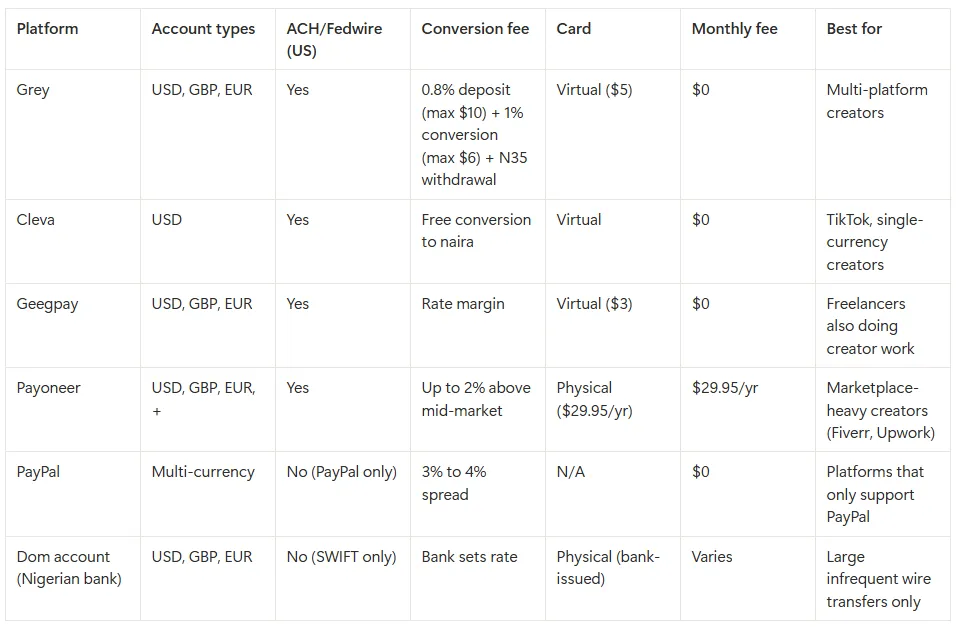
The choice depends on where your income comes from. If you earn primarily from YouTube and only need to receive monthly AdSense wire transfers, a domiciliary account works, though the setup requires a branch visit, paperwork, and sometimes a minimum balance. If you earn from TikTok, Patreon, Meta, Gumroad, or affiliate programmes, you need ACH or Fedwire capability, which means a virtual USD account. If you earn from multiple platforms (which most established creators do), a multi-currency virtual account covers the widest range of payout methods from a single provider.
Managing your USD once it arrives
Getting paid is step one. What you do with the money after it lands in your account determines how much of it you actually keep. Nigerian creators who earn in USD have three broad options: convert to naira immediately, hold in USD and convert strategically, or spend directly in USD. Each has trade-offs.
Converting immediately is the simplest approach, but it locks you into the exchange rate available that day. If the rate moves in your favour a week later, you have already lost the upside. Holding in USD gives you control over timing, which matters when the naira is volatile. If your creator expenses (subscriptions, tools, ad spend, hosting) are priced in USD, holding and spending directly avoids conversion entirely. A virtual dollar card lets you pay for Adobe Creative Cloud, Canva Pro, Google Workspace, domain registrations, and ad campaigns directly from your USD balance without converting to naira first.
For a deeper look at conversion timing, fee reduction, and practical strategies for Nigerian remote workers managing foreign currency, Grey's guide to managing foreign currency earnings covers the specifics.
Invoicing direct brand deals and sponsorships
Platform payouts are automatic, but brand deals and sponsorships require you to invoice the client and provide payment details. This is where many Nigerian creators lose money or create delays. A brand in the US will expect to pay via ACH or Fedwire to a routing number and account number. A brand in the UK will expect to pay via FPS or BACS to a sort code and account number. A brand in Europe will expect to pay via SEPA to an IBAN. If you send your Nigerian bank's naira account details instead, the payment may be rejected, delayed, or converted at a poor rate by an intermediary bank.
The cleaner approach is to include the correct Grey account details on your invoice based on where the client is paying from: your USD routing number and account number for US clients (they pay a domestic ACH or Fedwire transfer), your GBP sort code and account number for UK clients (they pay via FPS or BACS), or your EUR IBAN for European clients (they pay via SEPA). In each case, the client makes what appears to be a local transfer on their end, which arrives faster and avoids SWIFT intermediary fees. On the invoice itself, state your preferred payment currency, include a scope summary matching any purchase order the brand issued, and specify payment terms (Net 14 or Net 21 for new clients; Net 30 for established relationships). For detailed guidance on structuring invoices and choosing tools, Grey has a comparison of invoicing tools for freelancers that covers Grey Invoice, Wave, FreshBooks, Zoho, and others.
What the 2026 tax rules mean for Nigerian creators earning in USD
This is the section that every other creator payment guide skips. The 2026 Nigeria Tax Act changed how foreign income is treated for Nigerian tax residents, and if you earn from YouTube, TikTok, Patreon, or any other international platform, it applies to you.
Under the reformed rules, if you spend 183 days or more in Nigeria over a 12-month period (which most Nigerian-based creators do), you are a Nigerian tax resident, and your worldwide income may be taxable. This includes platform payouts from YouTube AdSense, TikTok Creator Rewards, Patreon membership income, Gumroad sales, affiliate commissions, and brand deal payments. Personal remittances (money sent to you as a gift or family support) are not taxable, but creator income is classified as earned income from a trade or vocation.
The practical details: the first N800,000 of annual income is tax-free. Above that threshold, progressive tax bands apply, starting at 15% and increasing to 25% at higher income levels. Foreign income must be converted to naira at the CBN official rate on the date you receive the payment, not the rate you actually converted at. You are required to register for a Tax Identification Number (TIN) and file your annual return by March 31. Penalties for non-registration start at N50,000 for the first month, and penalties for non-filing start at N100,000 for the first month.
If you also pay tax in another country on the same income (for example, US withholding tax deducted from your YouTube AdSense earnings), Nigeria has double taxation agreements with several countries, including the UK, Canada, and South Africa. You can claim a credit for tax paid abroad to avoid being taxed twice on the same income.
Deductible expenses include tools and software you use for content creation (Adobe, Canva, cameras, microphones, lighting), internet costs, workspace expenses, and platform fees. Keeping records of these expenses reduces your taxable income.
This is general guidance, not professional tax advice. The 2026 reforms are new and implementation details are still being clarified. Consult a certified tax professional for your specific situation.
Grey provides virtual USD, GBP, and EUR accounts with the specific details each platform and payment method requires: a US routing number and account number (for ACH or Fedwire) on the USD account, a sort code and account number on the GBP account (for FPS, BACS, or CHAPS), and an IBAN and SWIFT/BIC code on the EUR account (for SEPA transfers). The setup is fully digital: download the Grey app or sign up at grey.co, complete KYC verification with your Nigerian ID (typically takes a few minutes), and your account details are available immediately. You then add the relevant details as your payout method on each platform.
When payouts arrive via ACH or Fedwire, Grey charges a 0.8% deposit fee (minimum $2, maximum $10). The funds then sit in your Grey USD wallet. You can convert to naira and withdraw to any Nigerian bank account (GTBank, Access, Zenith, UBA, First Bank, and others are all supported), or hold in USD if you prefer to convert later. Converting USD to naira incurs a 1% fee capped at $6 per transaction, and the conversion rate is displayed before you confirm, so you see exactly what you will receive. Withdrawing naira to your bank account costs a flat N35 and arrives instantly. Grey also offers virtual dollar cards for spending directly in USD on subscriptions, tools, and ad platforms without converting to naira first. The card costs $5 to create with no monthly maintenance fee, and it supports Apple Pay and Google Pay in supported regions. Transactions on USD-priced sites incur no additional fee; purchases on non-USD websites (EUR, GBP) carry a 2% + $0.50 cross-border fee.
If you invoice brands or clients directly, Grey's built-in invoicing tool lets you generate and send invoices linked to your Grey account. The client pays your Grey USD account details, and the funds arrive without an intermediary.
Grey charges a 0.8% fee on deposits (minimum $2, maximum $10), a 1% conversion fee (capped at $6), and a withdrawal fee that varies by currency (N35 for naira to a Nigerian bank account). Exchange rates on Grey are variable and include a margin over the mid-market rate. Cross-border card transactions on non-USD websites incur a 2% + $0.50 fee. Always review fees and the conversion rate before confirming a transaction.
Frequently asked questions
Can I receive YouTube AdSense payments directly to my Nigerian bank account?
Only if your bank account can receive international SWIFT wire transfers in USD, which typically means a domiciliary account at a commercial bank like GTBank, Access, or Zenith. A regular naira savings or current account will not work. An alternative is using a virtual USD account that supports incoming wire transfers, which avoids the branch visit and paperwork required for a dom account. Google deducts a small wire fee (around $5) from each AdSense payout regardless of which account type you use.
How do I set up TikTok payouts without a US bank account?
TikTok requires ACH bank details (a US routing number and account number). You can get these from a virtual USD account provider like Grey, Cleva, or Geegpay. Once you have your ACH details, enter them in TikTok's payout settings. Make sure the name on your TikTok account matches the name on your virtual USD account exactly, as mismatches cause payouts to fail. Processing typically takes up to 15 business days after you request a withdrawal.
Do Nigerian creators have to pay tax on USD income from platforms?
Under the 2026 Nigeria Tax Act, if you spend 183 days or more in Nigeria in a 12-month period, your worldwide income (including creator earnings from international platforms) is taxable. The first N800,000 annually is tax-free. Above that, progressive bands apply from 15% to 25%. You need a TIN and must file by March 31 each year. This is general guidance; consult a tax professional for your specific situation.
Which is cheaper for regular creator payouts: Payoneer or a virtual USD account?
For creators receiving monthly platform payouts, a virtual USD account is typically cheaper. Payoneer charges an annual fee of $29.95 and applies conversion spreads of up to 2% above mid-market when you withdraw to naira. Grey charges no annual fee; the costs are a 0.8% deposit fee (capped at $10) when your payout arrives, a 1% conversion fee (capped at $6) when you convert USD to naira, and a flat N35 for the naira withdrawal. On a $500 monthly payout, Grey’s total cost is roughly $10 (deposit) + $5 (conversion) + N35, compared to Payoneer’s $2.50 annual fee equivalent plus up to $10 in conversion spread. Run the numbers for your typical payout amount using Grey’s pricing calculator before committing.
Can I use the same USD account for YouTube, TikTok, and Patreon?
Yes. Grey's USD account provides both ACH and Fedwire routing details, which covers YouTube (wire transfer), TikTok, Meta, Patreon, and Gumroad (ACH direct deposit). If you also receive payments from UK or European clients, your Grey GBP account has a sort code and account number for FPS/BACS payments, and your EUR account has an IBAN for SEPA transfers. All payouts across these currencies arrive in one Grey account.
Should I convert my USD to naira immediately or hold it?
That depends on your expenses. If most of your spending is in naira (rent, food, transport), converting when the rate is favourable makes sense. If you have significant USD expenses (software subscriptions, ad spend, online tools, domain renewals), holding in USD and paying directly with a virtual dollar card avoids double conversion. Many Nigerian creators use a hybrid approach: convert enough naira for monthly living expenses and keep the rest in USD for business costs.
Ready to set up your creator payout account? Sign up at grey.co or download the Grey app at https://onelink.to/grey to create your virtual USD account and start receiving platform payouts.
A client in the US pays you $500 through PayPal for a design project. You log in, see the balance, and feel good for about three seconds. Then you try to withdraw it to your Ghanaian bank account. PayPal converts your USD to cedis at its own exchange rate, which includes a 3% to 4% spread above the mid-market rate. By the time the money lands in your account, you have lost $15 to $20 on that single transaction, and that is before your bank applies its own charges on the incoming transfer.
Over a year of regular freelance income, those conversion costs add up to hundreds of dollars. The frustration is not that PayPal is a bad platform. It is reliable, widely accepted, and many international clients prefer it. The problem is that PayPal’s default withdrawal path is one of the most expensive ways to convert USD to cedis. There are better routes, and this guide walks through each of them with real numbers so you can pick the one that makes sense for your situation.
Before looking at alternatives, it is worth understanding exactly where the money goes when you withdraw from PayPal in Ghana. There are typically two layers of cost.
PayPal’s conversion spread: When you withdraw your USD balance to a Ghanaian bank account, PayPal converts the currency using its own exchange rate, which includes a spread of approximately 3% to 4% above the wholesale mid-market rate. On a $1,000 withdrawal, that means $30 to $40 in conversion fees alone. PayPal does not display this as a separate fee; it is baked into the rate you see at the time of withdrawal, which makes it easy to overlook.
Bank receiving charges: Your Ghanaian bank may also apply incoming transfer fees or its own conversion margin on international transfers. These vary by bank and account type, but can add another 1% to 2% to the total cost.
Combined, a freelancer withdrawing $1,000 from PayPal directly to a Ghanaian bank account might lose $40 to $60 in total conversion and transfer costs. That is 4% to 6% of the payment. For someone earning $2,000 to $3,000 a month, the annual cost ranges from $960 to $2,160.
The good news is that none of this is inevitable. The methods below reduce or restructure these costs so you keep more of what you earn.
Xoom is a money transfer service owned by PayPal that lets you send funds from your PayPal balance directly to a Ghanaian bank account or mobile money wallet (MTN MoMo, Vodafone Cash, AirtelTigo Money). Because Xoom is integrated with PayPal, you do not need to set up a separate account; you can initiate the transfer directly within PayPal.
The conversion rate Xoom offers is typically better than PayPal’s standard withdrawal rate, though it still includes a margin above the mid-market rate. Transfer fees vary by amount and delivery method, but for PayPal-funded transfers to Ghana, they are often waived or minimal. Delivery to bank accounts takes 1 to 3 business days; mobile money transfers can arrive within minutes.
Best for: freelancers who want the simplest path from PayPal to cedis without setting up additional accounts. It is not the cheapest option, but it is the most straightforward.
Limitation: you still convert USD to GHS through PayPal/Xoom’s rate, so you have limited control over timing. If the rate is unfavourable on the day you need to withdraw, you cannot hold your USD and wait for a better rate.
Withdraw to a multi-currency USD account first
This is the approach that gives you the most control over your money, and it is the one that typically results in the lowest total cost. Instead of converting your PayPal balance directly to cedis, you withdraw it in USD to a multi-currency account with a provider like Grey. The key difference is that the money arrives in your account still in dollars. You then choose when to convert to cedis, at a rate you can see and confirm before the conversion happens.
The process works like this. You link your Grey USD account details to PayPal as a bank account (Grey provides a US routing number and account number). PayPal sends a small verification deposit, you confirm it, and the link is established. After that, you can withdraw your PayPal balance to Grey in USD with no conversion at the PayPal stage. Once the dollars are in your Grey wallet, you convert to cedis when the rate suits you and withdraw to your Ghanaian bank account or mobile money.
Best for: freelancers who earn regularly in USD and want to control when they convert. This method separates the act of withdrawing from PayPal from the conversion to cedis, so you are not forced to accept whatever rate PayPal offers on the day you need cash.
Limitation: requires setting up a Grey account and linking it to PayPal, which takes a few minutes but is an extra step compared to Xoom.
First National Bank Ghana offers a Foreign Currency Account (FCA) that lets you hold USD in a traditional bank account. If you receive regular payments in dollars, an FNB CFC account means the money lands in your account at the original USD value rather than being auto-converted to cedis. You then convert on your own schedule at the bank’s rate.
The advantage is that your earnings are protected from conversion until you are ready. The disadvantage is that FNB’s conversion rate still includes a bank margin, and the process of opening and maintaining a CFC account involves branch visits, documentation, and potentially minimum balance requirements. It is a traditional banking solution in a world where fintech providers have made the same capability available from a phone app.
Best for: freelancers who prefer a traditional bank and want to hold USD locally. Useful if you also need a bank statement showing USD holdings for business or visa purposes.
Limitation: bank conversion rates are often less favourable than those of fintech providers, and the account setup process is slower. Monthly maintenance fees may apply.
Spend USD directly with a virtual card
If some of your expenses are priced in USD (software subscriptions, online tools, advertising spend, domain registrations), you do not need to convert to cedis at all. You can fund a virtual dollar card from your PayPal balance (via your Grey USD account) and spend directly in dollars. This eliminates the conversion cost entirely for those transactions.
For example, if you earn $500 from a client and $150 of that goes to Adobe, Figma, and hosting costs, you can pay those directly from your USD balance using a Grey virtual card on the Visa network. Only the remaining $350 needs to be converted to cedis. On the portion you spend in USD, you save the full 3% to 6% conversion cost.
Best for: freelancers and creators whose expenses include USD-priced tools and services. The more of your spending that stays in USD, the less you lose to conversion.
Withdrawal methods compared
How to withdraw PayPal funds using a Grey account
Here is the step-by-step process for linking PayPal to Grey and withdrawing your balance in USD.
Step 1: Create your Grey account. Download the Grey app or sign up at grey.co. Select Ghana as your country of residence and complete KYC verification using your Ghana Card or passport. This takes a few minutes.
Step 2: Get your USD account details. Once verified, go to your account section in the Grey app. You will see USD, EUR, and GBP account details, including US routing numbers and account numbers. These are the details you will link to PayPal.
Step 3: Link Grey to PayPal. Log in to PayPal, go to the Wallet section, and select “Link a Bank Account.” Enter the routing number and account number from your Grey USD account. PayPal will send two small verification deposits to your Grey account (typically a few cents each). Check your Grey account for the deposits, then go back to PayPal and confirm the amounts to complete the link.
Step 4: Withdraw your PayPal balance to Grey. Once the link is verified, go to your PayPal balance, select “Transfer to bank,” and choose your Grey account. The funds transfer in USD, so PayPal does not apply its conversion spread. The transfer typically takes 1 to 3 business days.
Step 5: Convert and withdraw to your Ghanaian bank or mobile money. When the USD arrives in your Grey wallet, you can convert to cedis at a time that works for you. The exchange rate is shown before you confirm, so you know exactly what you will receive. Withdraw to your Ghanaian bank account (Ecobank, GCB, Stanbic, Absa, CalBank, Fidelity, and others) or to mobile money.
You can also skip the conversion step for any expenses priced in USD by using your Grey virtual card to pay directly from your dollar balance.
Exchange rates on Grey are variable and include a margin over the mid-market rate. Grey does not charge transfer fees; the cost is reflected in the exchange rate. Always review the rate before confirming a conversion.
Tips for getting a better rate on your withdrawals
Batch your withdrawals. If you receive multiple small PayPal payments throughout the month, let them accumulate and withdraw once. This reduces the number of times you pay transfer fees on the receiving end, and it lets you pick a day when the USD/GHS rate is favourable rather than converting every time a payment arrives.
Keep what you can in USD. If you pay for Canva, ChatGPT, hosting, domains, or any other tool priced in dollars, spend from your USD balance with a virtual card instead of converting to cedis and paying with a local card. Every dollar you spend in USD is a dollar you do not lose 3% to 6% on in conversion.
Check the rate before you convert. With Grey, the exchange rate is displayed before you confirm. If the rate is not where you want it, you can wait. This is the core advantage of holding USD in a multi-currency account rather than letting PayPal auto-convert at the time of withdrawal.
Can I withdraw PayPal funds to mobile money in Ghana?
Not directly from PayPal, but you can through Xoom (PayPal’s transfer service), which supports MTN MoMo, Vodafone Cash, and AirtelTigo Money in Ghana. Alternatively, you can withdraw to a Grey account in USD, convert to cedis, and then transfer the funds to your mobile money wallet via Grey. The Xoom route is faster for small amounts; the Grey route gives you more control over the conversion rate.
How much does PayPal charge to withdraw to a Ghanaian bank?
PayPal does not charge a flat withdrawal fee for standard bank transfers in most markets, but it applies a currency conversion spread of approximately 3% to 4% above the mid-market rate when converting USD to GHS. On a $1,000 withdrawal, that conversion cost is roughly $30 to $40. Your Ghanaian bank may also charge fees for incoming transfers, which vary by bank.
Is it legal to use a multi-currency account to receive PayPal funds in Ghana?
Yes. Linking a US-denominated account to your PayPal is a standard feature of the platform. Grey provides legitimate US bank details (routing and account numbers) through its licensed banking partners. The funds move through standard banking rails. There is nothing unusual or restricted about this process.
How long does it take to withdraw from PayPal to Grey?
Standard PayPal bank transfers to a linked US account typically take 1 to 3 business days. Once the USD is in your Grey wallet, conversion to cedis and withdrawal to your Ghanaian bank account typically takes 1 to 2 additional business days. Mobile money transfers from Grey are generally faster.
Can I hold my PayPal earnings in USD and convert later?
Not within PayPal itself for Ghanaian accounts, because PayPal auto-converts to your default currency on withdrawal. However, if you withdraw to a Grey USD account, the funds remain in dollars until you convert. This lets you time your conversion for when the USD/GHS rate is favourable, which can make a meaningful difference over the course of a year.
Does Grey support withdrawals to all Ghanaian banks?
Grey supports local fiat withdrawal to Ghanaian bank accounts. Major banks, including Ecobank, GCB Bank, Stanbic, Absa, CalBank, and Fidelity Bank, are supported. Grey also supports mobile money withdrawals. Check the Grey app for the full list of supported banks and mobile money providers in Ghana.
Ready to keep more of your PayPal earnings? Sign up at grey.co or download the Grey app to get your USD account details and link to PayPal in minutes.
Upwork is one of the world’s leading freelance platforms, connecting professionals with clients across countries and industries. From designers and writers to developers and consultants, freelancers use Upwork to find steady work, build lasting client relationships, and earn in strong currencies. The platform is easy to register on, simple to navigate, and trusted by businesses seeking reliable talent, making it a top choice for freelancers at every stage.
If you’re already on Upwork, you’ve likely noticed that fees can quietly reduce your earnings. This blog shows simple ways to receive your payments without losing money to unnecessary fees along the way.
Upwork has become a go-to platform for freelancers worldwide, making it easier to find clients, get paid securely, and build a professional reputation without the usual hassles.
Global clients
Imagine landing clients from New York, London, or Tokyo without leaving your home. Upwork opens doors to global businesses, giving freelancers exposure they couldn’t easily access otherwise. This means more opportunities, diverse projects, and higher-paying gigs. Freelancers can work across time zones, explore different industries, and grow an international client base, all from a single platform.
Security
Freelancers often worry about getting paid on time. Upwork removes that stress by holding client funds in escrow before work begins. Once the project is completed and approved, the money is released. This system protects both sides, ensuring clients get quality work while freelancers receive guaranteed payments, creating trust and a safer environment for online collaboration worldwide.
Easy project access
Finding projects can be overwhelming, but Upwork simplifies the process. Freelancers can browse opportunities tailored to their skills, submit proposals, and start working without endless outreach. By reducing the need for cold pitching, Upwork allows professionals to focus on work they excel at, turning the platform into a curated marketplace where opportunity meets preparation.
Inbuilt invoicing
Managing invoices and payments can slow freelancers down, but Upwork handles this automatically. Every completed project generates invoices, tracks payments, and ensures timely delivery to your account. Freelancers don’t have to worry about chasing clients or missing deadlines, allowing them to stay organised, professional, and focused entirely on delivering high-quality work to their global clients.
Your Upwork profile tells a story of experience, reliability, and skill. Ratings, reviews, and badges make it easy for clients to trust you. Over time, freelancers with strong reputations attract higher-paying projects, repeat clients, and long-term contracts. This built-in credibility transforms your profile into a marketing tool, helping your freelance career grow steadily and consistently across international markets.
Best methods to receive Upwork payment from clients
Getting paid on Upwork should be simple, but choosing the right method can make a big difference. Here’s a breakdown of the best ways to receive your money and make the most of your earnings.
Direct to local bank (Outside U.S.)
Upwork lets you send your earnings directly to your local bank if you live outside the U.S. For just $0.99 per transfer, your dollars are converted to local currency and deposited straight into your account. Many freelancers prefer this because it’s straightforward, avoids extra steps, and ensures your Upwork payments land safely where you can use them immediately.
Instant pay (U.S. only)
If you’re in the U.S., Upwork’s Instant Pay is perfect for when you need funds quickly. By connecting your debit card, you can transfer earnings for $2 per transaction, and the money appears instantly. This is ideal for freelancers who want to access their Upwork payments immediately without waiting for standard processing times, keeping cash flow smooth and predictable.
PayPal
Upwork integrates seamlessly with PayPal, making it a popular option for freelancers worldwide. Your payments move quickly from Upwork into your PayPal wallet, giving you flexibility to hold, spend, or transfer the money to your bank. For many, this method is convenient and familiar, especially if you already use PayPal for online purchases or other freelance work outside of Upwork.
Payoneer
Freelancers using Upwork can link Payoneer to receive payments in multiple currencies. This is especially useful if you have clients in different countries and want to manage your earnings in one place. Once received, you can withdraw to your local bank or card, making Payoneer a flexible and reliable way to handle your Upwork funds across borders.
Grey
Grey works directly with your Upwork account to make receiving payments seamless. Your earnings arrive in USD, and you can convert them to your local currency at competitive rates. With fast transfers and multi-currency support, Grey ensures your Upwork income reaches you safely and efficiently, giving freelancers full control over their money every step of the way.
Grey gives you US, UK, and EU bank accounts, so you can receive payments from Upwork without losing fees. Here’s how to get started:
Set up Grey: Create and verify your account on the Grey app or website. Once done, you’ll have access to multicurrency accounts ready to receive international payments.
Get your bank details: In the Grey app, select the currency account you want to use, like USD. You’ll see your account number and ACH routing number, this is what Upwork needs to send your funds.
Link to Upwork: On Upwork, go to Settings > Get Paid > Add Method. This is where your Grey account becomes your payment bridge.
Select payment method: Choose “Direct to U.S. Bank” (or the relevant currency for GBP/EUR). This tells Upwork exactly where to send your earnings.
Enter details: Copy the account number and routing information from Grey into Upwork. Double-check each number to avoid delays.
Verify your name: Ensure the name on your Grey account matches your Upwork profile. A mismatch can cause holds or delays in receiving your money.
LDMAG1
Freelancers on Upwork want to receive their funds without losing a dime, because nothing beats getting paid in full when clients settle up. Grey makes this possible, giving you multi-currency accounts, zero hidden charges, and a simple way to transfer your earnings to your local currency. Ready to take full control of your Upwork payments? Sign up on Grey today





.svg)


