
<script type="application/ld+json" data-schema-version="grey-blog-v4"> [{"@context":"https://schema.org","@type":"BlogPosting","@id":"https://grey.co/blog/best-platforms-to-earn-us-dollars-in-the-philippines#article","headline":"Best platforms to earn US dollars in the Philippines","description":"Discover the best platforms for Filipinos to earn in USD and get paid securely using Grey","inLanguage":"en","url":"https://grey.co/blog/best-platforms-to-earn-us-dollars-in-the-philippines","mainEntityOfPage":{"@id":"https://grey.co/blog/best-platforms-to-earn-us-dollars-in-the-philippines#webpage"},"datePublished":"2025-10-27T09:24:30.703Z","dateModified":"2026-06-15T14:39:04.121Z","author":{"@type":"Person","@id":"https://grey.co/authors/tunde-aladeloba#person","name":"Tunde Aladeloba","url":"https://grey.co/authors/tunde-aladeloba","jobTitle":"Content Writer","sameAs":["https://ng.linkedin.com/in/aladeloba-babatunde-b1114b100"]},"publisher":{"@type":"Organization","@id":"https://grey.co/#organization","name":"Grey","url":"https://grey.co","logo":{"@type":"ImageObject","url":"https://cdn.prod.website-files.com/6360022338a81bd6fdbb1145/6564ae1077a67e39d3c491a6_Grey%20Logo%20Lockup%20Black.svg"}},"image":{"@type":"ImageObject","@id":"https://grey.co/blog/best-platforms-to-earn-us-dollars-in-the-philippines#primaryimage","url":"https://cdn.prod.website-files.com/636a85d290ee58e70c17e1c0/6a300e883b0df799ce877aba_6a300e875ed0b9ead3eceb01_best-platforms-to-earn-us-dollars-in-the-philippines__header-image.webp","contentUrl":"https://cdn.prod.website-files.com/636a85d290ee58e70c17e1c0/6a300e883b0df799ce877aba_6a300e875ed0b9ead3eceb01_best-platforms-to-earn-us-dollars-in-the-philippines__header-image.webp","width":1200,"height":675}},{"@context":"https://schema.org","@type":"WebPage","@id":"https://grey.co/blog/best-platforms-to-earn-us-dollars-in-the-philippines#webpage","url":"https://grey.co/blog/best-platforms-to-earn-us-dollars-in-the-philippines","name":"Best platforms to earn US dollars in the Philippines","description":"Discover the best platforms for Filipinos to earn in USD and get paid securely using Grey","inLanguage":"en","primaryImageOfPage":{"@id":"https://grey.co/blog/best-platforms-to-earn-us-dollars-in-the-philippines#primaryimage"},"breadcrumb":{"@id":"https://grey.co/blog/best-platforms-to-earn-us-dollars-in-the-philippines#breadcrumb"}},{"@context":"https://schema.org","@type":"BreadcrumbList","@id":"https://grey.co/blog/best-platforms-to-earn-us-dollars-in-the-philippines#breadcrumb","itemListElement":[{"@type":"ListItem","position":1,"name":"Home","item":"https://grey.co/"},{"@type":"ListItem","position":2,"name":"Blog","item":"https://grey.co/blog"},{"@type":"ListItem","position":3,"name":"Best platforms to earn US dollars in the Philippines","item":"https://grey.co/blog/best-platforms-to-earn-us-dollars-in-the-philippines"}]},{"@context":"https://schema.org","@type":"ItemList","@id":"https://grey.co/blog/best-platforms-to-earn-us-dollars-in-the-philippines#list","name":"Best platforms to earn US dollars in the Philippines","numberOfItems":8,"itemListElement":[{"@type":"ListItem","position":1,"name":"Upwork"},{"@type":"ListItem","position":2,"name":"Fiverr"},{"@type":"ListItem","position":3,"name":"Toptal"},{"@type":"ListItem","position":4,"name":"Onlinejobs.ph"},{"@type":"ListItem","position":5,"name":"YouTube"},{"@type":"ListItem","position":6,"name":"Etsy"},{"@type":"ListItem","position":7,"name":"Shopee"},{"@type":"ListItem","position":8,"name":"App reviews"}]}] </script>

Best platforms to earn US dollars in the Philippines

Tunde Aladeloba

Tunde Aladeloba

TABLE OF CONTENT

SHARE THIS POST

Many Filipinos no longer need to move abroad to earn in dollars. With remote work on the rise, global marketplaces expanding, and digital skills in high demand, professionals across the Philippines are tapping into international clients and projects, all from home.

Earning in USD offers a significant financial advantage: a higher income, stronger savings, and more freedom to invest in personal and professional growth. From freelance platforms to remote roles with global companies, opportunities are everywhere. The key is choosing platforms with fair rates, transparent fees, and reliable payments. With the right strategy and consistency, Filipino freelancers and remote workers can grow their income, sharpen their skills, and enjoy the flexibility of a truly global career.

Read also: How to send US dollars to the Philippines from anywhere

Why are Filipinos seeking to earn in USD?

For you as a Filipino professional, sure the prestige is great, but earning in USD  is about stability, opportunity, and financial freedom. As global work becomes more accessible, here’s why chasing dollar income makes sense:

  • Stronger purchasing power: Because the US dollar is stronger than the peso, you can earn more and still enjoy lower living costs locally.
  • Financial security: Getting paid in USD protects your income from inflation and currency drops, helping you save and invest with confidence.
  • Access to global opportunities: Working with international clients lets you grow your skills, build credibility, and expand your career.
  • Remote work freedom: With dollar-paying jobs online, you can work from anywhere on your own terms and at your own pace.

Read also: Easiest way to send USD from the Philippines to the USA

Best platforms for Filipinos to earn in USD online

Upwork

Upwork is one of the most trusted freelance platforms for Filipinos. You can find clients worldwide offering projects in writing, design, marketing, and tech. Payments are made securely in USD, and you can set your own rates. With a strong profile and great reviews, you can build a steady stream of international clients.

Fiverr

Fiverr is perfect if you want to sell your skills as digital services. Each gig is priced upfront in USD, giving you control and clarity. With consistency and creativity, you can attract repeat buyers and grow your income without worrying about delayed payments or hidden fees.

Toptal

For experienced professionals in tech, finance, or design, Toptal offers access to premium clients who pay top rates in USD. The platform vets freelancers carefully, so once accepted, you join an exclusive network of experts. It’s ideal if you want to work on high-value projects and earn well above average freelance rates.

Onlinejobs.ph

Built for Filipino talent, OnlineJobs.ph connects remote professionals with global employers offering long-term roles paid in USD. Whether you’re a virtual assistant, copywriter, or developer, it’s a great place to find stable, remote work with transparent pay. You communicate directly with employers and there are no middlemen or high commission fees.

YouTube

If you love creating videos, YouTube is one of the best ways to earn in USD from the Philippines. With engaging content and consistent uploads, you can monetise your channel through ad revenue, brand partnerships, and memberships. Once you hit the required watch hours and subscribers, your creativity can start paying off in dollars.

Etsy

Etsy is perfect if you’re into handmade crafts, digital designs, or printables. You can sell your creations to a global audience and receive payments in USD. It’s a great way to turn your hobbies into income, all while working from the comfort of your home.

Shopee

Through Shopee’s Global Sellers Program, Filipinos can reach international buyers and earn in foreign currencies, including USD. By listing products in high-demand categories like beauty, lifestyle, or electronics, you can grow your business beyond local borders and enjoy steady USD earnings through cross-border sales.

App reviews

Platforms like UserTesting and Testbirds pay you in USD to test apps, websites, and digital products. You share honest feedback on usability and experience, helping companies improve their products. It’s flexible, simple, and a great side income option, especially if you already spend time exploring new apps or sites.

Read also: How to convert US dollars to Philippine pesos

Why Grey is the best choice for receiving USD in the Philippines

With Grey, you can open a free USD account without leaving the Philippines. This way, you can receive payments from global clients and platforms effortlessly, just as if you were working from the US.

  • Best rates: Get paid at real, transparent exchange rates without hidden markups, so you always know exactly what you’re earning.
  • Low fees: Say goodbye to hefty transfer charges; Grey keeps transaction costs minimal so more of your money stays with you.
  • Secure payments: Your funds and data are protected with top-level security, ensuring every transaction is safe and reliable.
  • Withdraw in pesos: Easily convert your USD to pesos anytime and withdraw directly to your local bank or mobile wallet.

Seamless USD payments for Filipino freelancers

Living abroad isn’t a requirement to earn like a global professional. What matters most is choosing platforms that match your skills and ensuring your payments come through without hidden fees or unnecessary deductions. With the right tools, you can maximise your earnings, save more, and focus on growing your career from the Philippines.

Open your free USD account on Grey or download the app today to start receiving payments in dollars smoothly.

‍

Last updated:

October 7, 2026

Open a free Grey account to get startedJoin 1 million digital nomads
IF YOU ENJOYED THIS, CHECK THESE OUT

15 best apps for freelancers to get paid internationally

•

•

2 min read

A freelance developer in Lagos may finish a project for a client in London, while a virtual assistant (VA) in Nairobi could be waiting for payment from a company in New York. Both have completed their work, but getting the money into their local accounts can be a different challenge altogether. Between currency conversion, international transfer fees, delayed payments and limited withdrawal options, receiving money across borders is not always straightforward.

That is why choosing the right apps for freelancers to get paid internationally matters just as much as finding clients. Some platforms let you hold multiple currencies, send professional invoices and receive payments directly from overseas clients, while others offer convenient local withdrawals. However, not every app supports every country or currency, and the cheapest option is not always the most convenient.

To help you make the right choice, we have rounded up 15 apps for freelancers to get paid internationally, comparing their payment options, fees, currency support and accessibility. Whether you work with clients across continents or manage projects for a few overseas businesses, this guide will help you find an option that makes getting paid easier.

How do freelancers get paid by international clients?

Freelancers generally receive international payments through three main routes: freelance marketplaces, virtual foreign bank accounts, and direct bank transfers or payment links. Each route offers a different level of convenience, payment protection and control over how money moves from the client to the freelancer.

1. Global freelancing marketplaces

Freelance marketplaces provide an all-in-one environment where freelancers find clients, agree on project terms, submit completed work and receive payments. Platforms such as Upwork and Fiverr collect payments from clients and release the funds according to their payment policies. Some also offer escrow protection, which helps reduce the risk of working with clients who refuse to pay after receiving completed work.

The main advantage is that freelancers do not have to negotiate international payment arrangements with every new client. However, marketplace service fees and withdrawal charges can reduce earnings, and freelancers have less control over the payment process.

2. Virtual foreign bank accounts

Virtual foreign bank accounts allow freelancers to receive money in currencies such as US dollars, euros and British pounds without necessarily having a physical bank account in those countries. Providers such as Payoneer, Wise, Grey and Geegpay offer different types of foreign currency receiving details that clients can use to send payments through supported banking networks.

This route is particularly useful for freelancers who work with multiple international clients outside freelancing marketplaces. Instead of asking every client to arrange an international wire transfer, they can provide suitable receiving account details. However, currency conversion, account eligibility and withdrawal options vary by provider and country.

3. Direct bank transfers and payment links

Freelancers who find clients independently can collect payments through traditional international bank transfers or online payment links. With a bank transfer, the client sends money directly to the freelancer's designated account, sometimes through the SWIFT network. Payment links offer another option, allowing clients to pay invoices using supported debit or credit cards.

Services such as Stripe, Paystack and Flutterwave make it easier to collect digital payments, depending on the freelancer's country and account eligibility. This approach gives freelancers greater control over their client relationships and payment terms, although transfer charges, card processing fees and currency conversion costs can affect the final amount received.

Comparison of the three international payment routes

Payment route Common platforms Typical fees and speed Best for
Freelance marketplaces Upwork, Fiverr Service fees and withdrawal charges; varies by platform and payment method New client relationships requiring escrow protection
Virtual foreign bank accounts Payoneer, Grey, Geegpay, Wise Receiving and currency conversion fees vary; often 1–3 business days Direct clients paying in supported foreign currencies
Direct transfers and payment links SWIFT, Paystack, Flutterwave, Stripe Wire, card processing and conversion fees vary; often 2–5 business days Established clients, high-value projects and recurring retainers

‍

Multi-currency accounts

A multi-currency account allows freelancers to receive, hold and manage money in different currencies, particularly USD, GBP and EUR. Instead of having every international payment converted automatically into naira or another local currency, you receive the money in the currency your client sends.
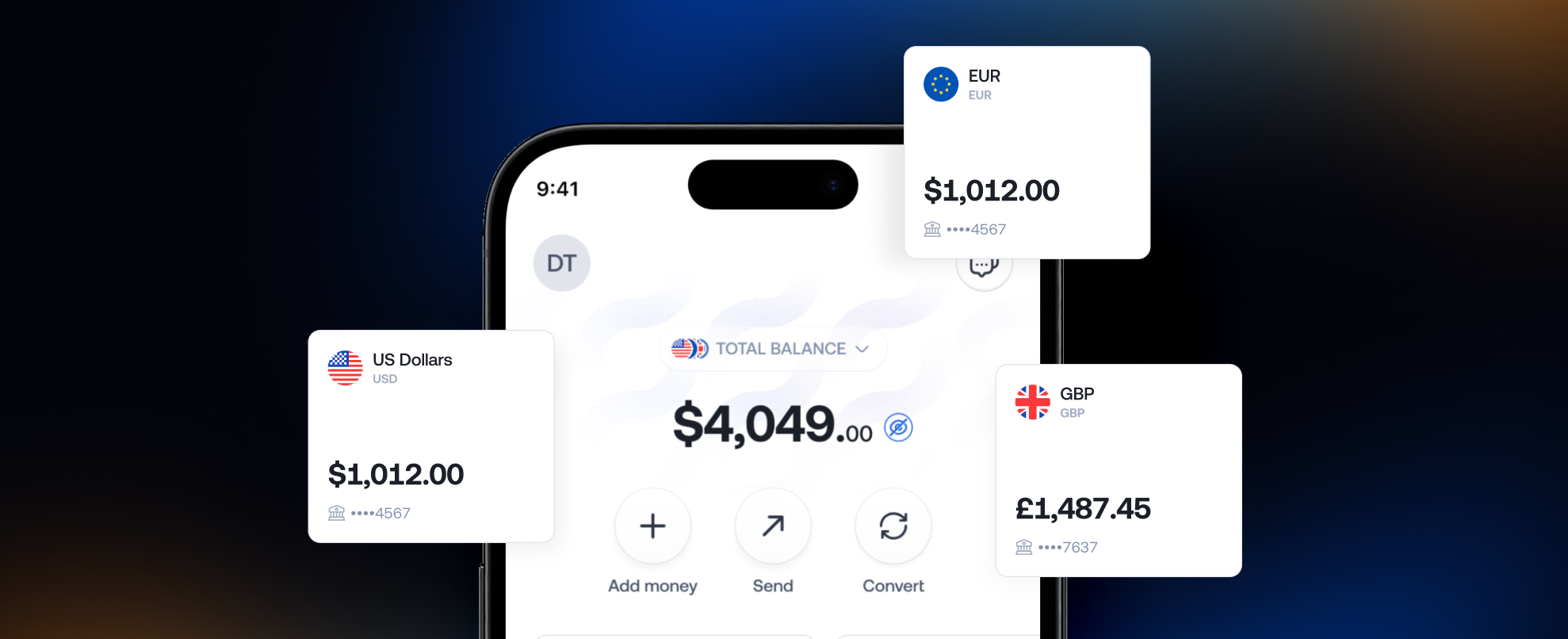
Grey app showing USD, GBP and EUR account balances.

For example, a client in the US can pay you in dollars using your USD receiving details, while a UK client can send pounds to your GBP account. The same applies to euros from eligible European clients.

This is different from receiving international payments directly into a regular local bank account, where:

  • Automatic conversion: Your bank may convert incoming foreign currency into your local currency immediately.
  • Exchange-rate markups: Your bank may offer a less favourable exchange rate, reducing the amount you receive.
  • Less control: You cannot always choose when to convert your earnings or hold them for future expenses.

With a multi-currency account, you can keep your money in its original currency and convert it when needed. This gives you more control over exchange rates and helps avoid unnecessary conversion losses.

Grey makes this easier by offering a multi-currency account where freelancers can manage USD, GBP and EUR balances from one place. You can find out what to look for in a multi-currency account and see how features such as transparent fees, currency support and conversion flexibility can help you manage international earnings more effectively.

Invoicing and payment request apps

These apps help freelancers create professional invoices, send payment requests and collect money from international clients without handling every transaction manually.

1. Payoneer: Sends professional payment requests and allows freelancers to receive international payments through virtual bank details and multiple supported currencies.

2. Paystack: Lets Nigerian freelancers create branded payment links and collect international card payments directly from clients through a simple checkout process.

3. Flutterwave: Supports multi-currency payment links and invoicing, allowing freelancers to bill overseas clients and collect payments through supported international payment methods.

4. Grey: Allows freelancers to create foreign currency invoices and receive payments through USD, GBP and EUR virtual accounts with local banking details.

5. Geegpay: Helps African freelancers create professional invoices, share payment requests and receive international payments through supported foreign currency virtual accounts.

6. Wise: Enables freelancers to request payments, share account details and receive money in multiple currencies through supported international and local banking networks.

7. Stripe: Offers hosted invoices and payment links that allow freelancers to collect international payments through cards and supported bank payment methods.

8. PayPal: Allows freelancers to create and send customised invoices that international clients can pay using their PayPal balances or eligible cards.

9. Deel: Provides contractor invoicing and payment management, helping freelancers submit invoices and receive earnings from international companies through supported withdrawal methods.

10. Wave: Offers free invoicing software that helps freelancers create estimates, send professional invoices, track payments and accept online payments.

11. FreshBooks: Combines invoicing, expense tracking and accounting tools, allowing freelancers to send payment requests and manage client transactions in one place.

12. Zoho Invoice: Provides free invoicing tools for creating customised invoices, automating payment reminders and collecting payments through supported third-party payment gateways.

13. Bonsai: Combines invoicing, contracts, proposals and client management tools, helping freelancers organise projects and collect payments through integrated payment processors.

14. HoneyBook: Helps freelancers manage client bookings, send invoices, automate payment reminders and collect payments through an integrated client management platform.

15. Square Invoices: Allows freelancers to create digital invoices, send payment reminders and collect payments online through supported card and payment methods.

Read also: Best free invoicing tools

Fees and exchange rates

The amount an international client sends is not always the amount that reaches your local bank account. Payment apps charge different fees for receiving money, processing card payments and converting foreign currencies. Some advertise low receiving fees but make their money through exchange-rate markups, while others charge a higher upfront fee with more competitive conversion rates.

The table below compares the estimated costs of popular payment apps, including the additional charges freelancers should consider before choosing one.

App Receiving / card fee FX markup Estimated total cost
Wise 0% for local receiving details 0.4%–1.2% 0.6%–1.2%
Grey 0.8% (capped at $10) ~1% (capped at $6) + ₦35 payout 1.4%–1.8%
Geegpay 0.7%–0.8% (capped at $12) 1%–1.5% + ₦12 payout 1.7%–2.3%
Deel $0 to freelancer 1%–2% on NGN withdrawal 1%–2%
Paystack 3.9% + ₦100 (international cards) 1%–2% 4.9%–5.9%
Flutterwave 3.8%–4.8% + VAT 1%–2% 4.8%–6.8%
Payoneer 0%–1% (ACH); 3.99% (card) Up to 3.5%–4.5% 4.5%–8.5%
Stripe 2.9% + $0.30 + 1.5% (international cards) 1%–2% 5.4%–6.4%
PayPal 4.49% + fixed fee 3%–4% 7.5%–8.5%
Wave 2.9% + $0.60 (cards) 1%–3% 4%–6.5%
FreshBooks 2.9%–3.5% + $0.30 1%–3% 4%–6.5%
Zoho Invoice Depends on payment gateway Depends on payment gateway Depends on payment gateway
Bonsai Standard Stripe or PayPal processing fees 1%–3% 4%–6.5%
HoneyBook 2.9% + $0.25 (cards) 1%–3% 4%–6.5%
Square Invoices 3.3% + $0.30 (online invoices) 1%–3% 4.3%–6.5%

‍

Choosing a payment app by client location

The easiest way to choose a payment app is to consider where your client is based and how they prefer to send money. Not every client wants to make an international bank transfer, especially when they can pay through a familiar local banking method. Choosing an app that supports your client's local payment network can help reduce transfer fees, delays and payment difficulties.

Also read: ACH, SWIFT, Wire and FedNow: What they are and when to use each

1. United States: ACH and domestic bank transfers

If most of your clients are in the US, consider Grey, Geegpay or Payoneer. These services offer eligible freelancers USD receiving details that allow US clients to pay through domestic ACH transfers rather than expensive international wires. This makes payment more familiar and convenient for American businesses.

2. UK and Europe: Faster Payments and SEPA

For clients in the UK or Europe, Wise, Grey and Geegpay are worth considering. They provide eligible freelancers with GBP or EUR receiving details, allowing clients to pay through UK Faster Payments or SEPA bank transfers. These local payment methods are generally cheaper and simpler than sending money internationally.

3. International clients who prefer card payments

Some clients would rather pay an invoice using a debit or credit card than arrange a bank transfer. In this case, Paystack and Flutterwave offer payment links that let clients pay online without setting up a bank transfer. This is particularly useful when working with multiple clients who have different banking preferences.

Frequently asked questions about the best apps for freelancers to get paid internationally

1. What is the cheapest way for freelancers to get paid abroad?

Virtual multi-currency accounts are often among the cheapest options, especially when clients can pay through local bank transfers. Services such as Grey, Wise and Geegpay offer foreign currency receiving options. Compare receiving, conversion and withdrawal fees before choosing.

2. Can I receive USD without a US bank account?

Yes. You can use virtual USD receiving accounts from providers such as Grey, Payoneer and Geegpay, subject to eligibility. These accounts provide US banking details that eligible international clients can use to send payments without you owning a physical US bank account.

3. How long do international freelance payments take?

Payment times depend on the app and transfer method. Local bank transfers can arrive within hours or 1–3 business days, while international SWIFT transfers may take 2–5 business days. Card payments and marketplace withdrawals also have different processing and settlement periods.

4. Do I pay tax on foreign client payments?

Yes, foreign freelance income may be taxable in your country of residence, even when clients pay you in another currency. Your tax obligations depend on local regulations, income thresholds and applicable exemptions. Keep invoices and payment records to support accurate tax reporting.

5. Which app is best for African freelancers?

Grey, Payoneer and Geegpay are worth considering because they offer foreign currency receiving options for eligible African freelancers. The best choice depends on your country, supported currencies, withdrawal methods and transaction fees. Check local availability before opening an account.

6. Can I invoice in one currency and receive in another?

Yes. Some invoicing and payment platforms allow you to bill clients in USD, GBP or EUR and receive the converted amount in your local currency. The conversion may happen automatically or when you withdraw, depending on the provider and account settings.

Egypt visa requirements for US citizens

•

•

2 min read

From the Great Pyramid of Giza and the Nile River to the temples of Luxor and the beaches of Sharm El Sheikh, Egypt remains one of the world’s most visited destinations. Every year, thousands of US citizens, all drawn by the country’s rich history and growing hospitality sector, travel to Egypt for tourism, business, study, and cultural experiences.

However, before booking your flight, it is important to understand Egypt’s visa requirements for US citizens. Entry rules vary depending on the purpose and duration of your stay, and travellers may need an e-visa, visa on arrival, or other supporting travel documents before entering the country.

Understanding the process early helps you avoid airport delays, rejected applications, or unexpected immigration issues. This guide explains Egypt visa requirements for US citizens, including documents, visa options, processing times, fees, and other important travel considerations before your trip.

Also read: How to get an instant USD debit card in Egypt

Why do US citizens need visas for Egypt?

Egypt requires visas from US citizens as part of its national security and immigration control policies. Like many countries, Egypt monitors who enters and exits its borders to reduce security risks, track foreign visitors, and ensure travellers meet legal entry requirements before arrival.

Visa systems also help Egyptian authorities manage immigration records, prevent overstays, and verify the purpose of travel, whether for tourism, business, study, or work. During the application process, travellers may be required to provide passport details, travel plans, accommodation information, or supporting documents to confirm their identity and intended stay.

For US citizens, the visa process is generally straightforward, with options including e-visas, visas on arrival, and embassy applications depending on travel circumstances. Applying correctly before departure helps avoid delays, denied boarding, or entry complications at Egyptian airports and border checkpoints

Also read: Egypt visa requirements for EU citizens

Egypt visa types for US citizens

US citizens travelling to Egypt can choose between short-term tourist visas and long-term visas, depending on the purpose of their stay. While Egypt offers relatively accessible visa options for Americans, understanding the right category before travelling helps avoid delays, overstays, or immigration issues after arrival.

1. Tourist visas

A. Visa on arrival

US citizens can obtain a visa on arrival at major Egyptian international airports, including Cairo International Airport. This remains one of the most convenient options for tourists visiting Egypt for short stays, vacations, or family visits.

Validity: 30 days (single-entry)

Cost: $30, paid in cash at the bank counters before passport control. At Cairo International Airport the visa on arrival is now a QR code costing $36 ($30 plus a $6 processing fee), bought by card at self-service machines in the arrivals hall.

Best for: Short tourism trips and flexible travel plans

Requirements

  • A US passport valid for at least six months from the arrival date
  • At least one blank passport page
  • Proof of onward or return flight ticket
  • Hotel booking or accommodation details may sometimes be requested

Outside Cairo, carry US dollars in cash for the bank counters. At Cairo, bring a card for the QR code machines instead. While the process is generally straightforward, queues can become long during peak tourism seasons.

Also read: Legal alternatives to black market exchange rates in Egypt

B. Egypt e-Visa

The Egypt e-Visa allows US citizens to complete the visa application process online before departure, reducing airport processing time after arrival. Many travellers prefer this option because approval arrives digitally through email before travelling.

Validity:

  • 30-day single-entry visa
  • Multiple-entry options also available

Cost:

  • $30 (single-entry)
  • $65 (multiple-entry)

Fees are listed on the official portal, visa2egypt.gov.eg, and were checked on 27 November 2026. Egypt has also announced a visa fee rise from 1 January 2027, and travel agents expect the single-entry visa to reach $33.

Requirements

  • Passport valid for at least six months
  • Scanned passport bio page
  • Digital passport photograph
  • Valid email address
  • A Visa, Mastercard or other debit card for payment

Processing time

Most e-Visas are approved within 3 to 5 business days, and the portal asks you to apply at least seven days before departure in case additional verification is required.

The e-Visa is often the smoother option for families, business travellers, and first-time visitors who want fewer airport formalities.

Also read: Egypt visa requirements for UK citizens

2. Long-term visas

US citizens planning to stay in Egypt beyond tourism must apply for a long-term visa in a work, study, or residency category.

A. Work visa

Foreign nationals cannot legally work in Egypt using a tourist visa. US citizens intending to work must secure sponsorship from an Egyptian employer before applying.

Requirements

  • Valid employment contract
  • Employer sponsorship
  • Ministry of Labour approval
  • Educational and professional certificates
  • Medical examination
  • Police clearance certificate

Work visa approval may take several weeks because Egyptian authorities carefully review foreign employment applications.

B. Student visa

US citizens studying Arabic, Islamic studies, archaeology, medicine, or other academic programmes in Egypt must apply for a student visa through an accredited institution.

Requirements

  • Official admission letter
  • Proof of tuition payment or financial support
  • Medical examination report
  • Police clearance certificate
  • Valid passport

Many universities assist international students during the visa process after admission is confirmed.

C. Residence visa

Residence visas apply to retirees, dependents, investors, or foreigners joining family members already living in Egypt.

Requirements

  • Proof of financial stability
  • Health insurance coverage
  • Accommodation details
  • Police clearance certificate
  • Valid passport

Approval length varies depending on the residency category and supporting documentation submitted during application.

Also read: Planning a summer trip to Egypt? Avoid currency exchange traps

D. Sinai resort permission

US citizens visiting only the Sinai resort areas of Sharm El Sheikh, Dahab, Nuweiba, or Taba for short stays do not need a full Egyptian tourist visa. Instead, travellers receive a free Sinai entry permission stamp upon arrival.

Validity: Up to 15 days

Cost: Free

Best for: Beach vacations and short resort stays in Sinai

Requirements

  • US passport valid for at least six months
  • Confirmed accommodation within Sinai resort areas
  • Return or onward travel ticket

This permission is valid only within the Sinai Peninsula resort zone. Travellers who plan to visit Cairo, Luxor, Alexandria, or other Egyptian cities outside Sinai must obtain a regular tourist visa or e-Visa before travelling beyond the permitted region

Frequently asked questions

Can US citizens enter Egypt without a visa?

Yes, but only under specific conditions. US citizens visiting Sinai resort areas like Sharm El Sheikh, Dahab, Taba, or Nuweiba for less than 15 days can receive a free Sinai entry stamp. Travelling outside these areas, including Cairo or Luxor, requires a standard Egyptian tourist visa or e-Visa.

Is the Egypt e-Visa better than a visa on arrival?

For many travellers, yes. The e-Visa reduces airport waiting time and provides approval before departure, which lowers the risk of entry issues after landing. Visa on arrival remains convenient, but long queues, payment rules that differ by airport, or documentation checks can slow the process at busy airports.

How long does Egypt visa processing take for US citizens?

Tourist e-Visas are usually processed within 3 to 5 business days, although delays can happen during peak travel periods or additional verification checks. Long-term visas such as work or residence permits may take several weeks because they involve background reviews, sponsorship approvals, and immigration documentation requirements.

Can US citizens extend their stay after arriving in Egypt?

Yes, extensions are possible. Travellers usually need a valid passport, visa copies, passport photos, and proof of accommodation. Approval is not automatic, and overstaying without extension approval may result in fines, departure delays, or future travel restrictions into Egypt.

What happens if my passport expires soon before travelling to Egypt?

Egypt requires US passports to remain valid for at least six months from the arrival date. Airlines may refuse boarding if the passport validity is shorter. Even with an approved visa, immigration officers can deny entry if passport validity requirements are not fully satisfied upon arrival.

Managing travelling funds with Grey

Travelling to Egypt becomes easier when you understand visa rules, entry options, and the documents required before arrival. From e-Visas and visa on arrival to Sinai entry permissions, choosing the right option helps you avoid delays and entry issues at the border. Once in Egypt, managing your money efficiently is just as important as planning your trip.

Grey helps you hold USD and convert to Egyptian pounds when needed, giving you more control over your spending and reducing unnecessary currency loss. Sign up or download the app to get started and manage your money more smoothly while in Egypt.

Grey charges fees on deposits, conversions, and withdrawals. Deposits via ACH, SEPA, or FPS incur a 0.8% fee (minimum $2/€2/£2, maximum $10/€10/£10). Currency conversions are charged at 1%, capped at $6. Withdrawal fees vary by currency: ₦35 for NGN, 0.5% for EUR/GBP (minimum €2/£2, maximum €10/£10), and $2 for Egypt. Cross-border card transactions (non-USD purchases on a USD card) incur a 2% fee plus $0.50. Exchange rates are variable and include a margin over the mid-market rate. Always review fees and the rate before confirming a transaction. Visit our guide to fees and charges on Grey for current rates.

‍

Easiest way to send USD from the Philippines to the USA

•

•

2 min read

The easiest way to send USD from the Philippines to the US depends on one thing: whether your money is already in dollars. If it is, a transfer from a USD account to the recipient's US bank account is the simplest and usually the cheapest route. If you're starting with pesos, a digital money transfer service that converts PHP to USD and pays a US bank account directly will beat a traditional bank wire on fees in most cases.

That matters because the fees you can see are only half the cost. The exchange rate, a correspondent bank charge or a 4% conversion spread can quietly take more than the transfer fee itself. Below, we compare the realistic options with the fees each provider published when we checked on 26 November 2026, so you can see the total before you send.

The quick answer

  • You already hold US dollars (for example, freelance income paid into a USD account): send them by local US bank transfer (ACH). There's no currency conversion, so you only pay the transfer fee.
  • You're starting with pesos and want the lowest fee: use a digital transfer service that converts PHP to USD and pays out to a US bank account, such as Wise. Grey fits only once you hold dollars, because it doesn't accept peso deposits.
  • The recipient needs cash today: Western Union offers cash pick-up at agent locations in the US.
  • You're moving a large sum and want to stay with your bank: a telegraphic transfer (SWIFT wire) from your Philippine bank works, but fixed fees add up: Security Bank, for example, charges $20, plus $15 if you also cover the US bank's charges.

Your options compared

Here's what each option cost to send about PHP 50,000 (roughly $784 at the PHP 63.76 per dollar mid-market rate Wise's calculator showed) to a US bank account.

OptionPublished fees on about PHP 50,000 (USD)Exchange rateTypical speed
Grey, sending from a USD balanceAbout $3.92 (ACH fee of 0.5%, minimum $2, maximum $10)No conversion needed1 to 2 business days
WiseAbout $3.53 (PHP 225.18, paying by bank transfer)Mid-market rateConversion can take up to 2 working days
PayPal (personal payment)About $36.36 ($4.99 fee plus a 4% conversion spread)PayPal's rate plus the 4% spreadInstant to the recipient's PayPal account
Bank wire (Security Bank example)About $37.35 ($20 commission, $15 correspondent charge if you pay all fees, and PHP 150 documentary stamp tax)The bank's selling rateNot published
Western UnionShown in its estimator, varies by payment and payout methodWestern Union's rateCash pick-up can be ready in minutes

Fees and rates checked on 26 November 2026. Sources: Grey's published fees, Wise Philippines, PayPal Philippines fees, Security Bank telegraphic transfer charges and Western Union. Grey and Wise figures exclude any difference between their rate and the mid-market rate.

Two things stand out. If you already have dollars, nothing beats skipping the conversion. If you're starting in pesos, the gap between the cheapest and the most expensive option on the same PHP 50,000 is more than $30.

1. Grey: best if you already earn or hold US dollars

Grey lets people in the Philippines open a free USD account with US account details, which is how many Filipino freelancers get paid by foreign clients. Once dollars are in that account, you can send them straight to any US bank account by ACH, without converting to pesos and back again.

Grey's fee page lists outgoing USD ACH transfers at 0.5%, with a $2 minimum and a $10 maximum, and the app shows the exact fee before you confirm. On $784, that's about $3.92. The recipient doesn't need a Grey account, only a US bank account.

Grey doesn't accept peso deposits. In the Philippines, pesos are a payout currency on Grey: you can convert dollars to pesos and withdraw them, but you can't fund your account in pesos. Once your dollars are in Grey, sending them on to the US is covered on the Philippines to US page. If you're starting with pesos, use one of the options below.

How to send USD to the US with Grey

  1. Sign up on the Grey app or website and verify your identity with a valid Philippine government-issued ID or passport.
  2. Get dollars into your USD account, for example by giving a client your US account details.
  3. Tap Send, choose USD and Send via bank transfer, then pick ACH as the payment scheme.
  4. Enter the recipient's details, review the fee and confirm with your PIN or 2FA code.
Sending USD from the Philippines to a US bank account in the Grey app

Transfers usually arrive in 1 to 2 business days.

2. Wise: lowest published fee when you start in pesos

Wise converts at the mid-market rate and shows its fee upfront. On PHP 50,000 paid by bank transfer, its calculator showed PHP 225.18 in fees, about 0.45%.

The trade-off is timing: Wise says conversion can take up to 2 working days. Wise is a strong choice for one-off peso transfers, but you still need a separate account if you also want to receive dollars from clients.

3. PayPal: convenient, but the most expensive app here

PayPal is instant if your recipient already uses it. For a Philippine account sending a personal payment to the US, PayPal charges $4.99 when funded from your balance or bank, and $4.99 plus 3.4% plus $0.30 when funded by card.

The bigger cost is the 4% conversion spread PayPal adds when it converts your pesos to dollars. On PHP 50,000, that alone is about $31. Use PayPal when speed or convenience matters more than cost, or when you already hold a USD balance in PayPal.

4. Bank wire (SWIFT telegraphic transfer)

Philippine banks such as BDO, BPI, Metrobank and Security Bank send USD abroad by telegraphic transfer. Security Bank, for example, charges a USD 20 commission, a USD 15 correspondent charge if you choose to pay all fees ("OUR"), and documentary stamp tax of PHP 0.60 per PHP 200 when the transfer is funded in pesos.

That's about $37 on PHP 50,000, before the bank's exchange rate. Because most of it is fixed, a wire makes more sense for large amounts, and less sense for regular small transfers. If you already hold dollars in a Philippine USD savings account, sending from that account avoids Security Bank's peso-funding tax.

5. Western Union: when the recipient needs cash

Western Union is the option to pick when your recipient in the US needs cash in hand, since it can pay out at agent locations. You can also send to a US bank account, but you'll need the recipient's SWIFT/BIC code.

Western Union lets you send up to $15,000 equivalent in PHP per transfer, or $7,500 to US Southwest Border states. It earns money on the exchange rate as well as fees, so check the total in its estimator.

A common mistake: picking an app that only sends into the Philippines

Some remittance apps that send money into the Philippines don't support sending money out of it. WorldRemit, for example, says it only offers airtime top-up when you send from the Philippines. Before you sign up anywhere, check that the Philippines is listed as a sending country and the US as a destination.

What you need before you send

For a US bank transfer by ACH, you'll need the recipient's:

  • Full name and street address, city, state and ZIP code
  • Bank name
  • Account number and account type (checking or savings)
  • Routing number (nine digits)

A wire usually needs the bank's SWIFT code as well. If you're not sure which to use, here's how ACH and wire differ on speed and fees.

Paying a US business instead of a person?

If you're paying a US school, landlord or online service, you may not need a transfer at all. Many US businesses accept card payments, and a USD card lets you pay in dollars directly.

Frequently asked questions

Does the recipient need a Grey account?

No. Grey pays out to the recipient's US bank account in USD, so they only need a US bank account. You need a verified Grey account to send.

What is the cheapest way to send money from the Philippines to the US?

If you already hold US dollars, sending them by ACH from a USD account is cheapest because there's no conversion. If you're starting with pesos, Wise had the lowest published fee in our 26 November 2026 check, so compare the final amount on the day you send. Grey doesn't accept peso deposits, so it only helps once you hold dollars.

How long does a transfer from the Philippines to the US take?

With Grey, it typically takes 1 to 2 business days from a funded USD balance. Wise says conversion can take up to 2 working days, and Western Union cash pick-up can be ready within minutes.

Is there a limit on how much I can send?

Yes, and it depends on the provider. Western Union allows up to $15,000 equivalent per transfer, and Grey's limit depends on your verification level and is shown in the app.

The cheapest transfer is often the one that skips a conversion you didn't need. If you're paid in dollars, keep them in dollars until they reach the US. Open a free Grey account and check today's USD to PHP rate before you send.

Egypt visa requirements for UK citizens: The complete 2026 guide

•

•

2 min read

Egypt remains one of the most visited destinations for UK travellers, from the Red Sea resorts to Cairo and the Nile. The entry rules are more nuanced than most guides suggest: there is a visa-free route that only applies to part of the country, a visa on arrival that must be paid in cash, an e-Visa, and a consulate route with a little-known free visa for travellers of Egyptian origin.

This guide covers every route for UK citizens in 2026: who genuinely does not need a visa, what each option costs, how to avoid being overcharged at the airport, the border crossing rules from Israel and Jordan, and the money rules that determine how you should carry and spend funds in Egypt.

And because Egypt is a largely cash-based economy with strict limits on its own currency, we also cover the practical side: how a multi-currency account handles GBP to EGP without airport exchange desks.

Do UK citizens need a visa for Egypt?

Yes, in most cases. UK passport holders normally need a visa to enter Egypt. There is one genuine exception: if you arrive by air at Sharm El-Sheikh and stay for less than 15 days within the Sinai resorts of Sharm El Sheikh, Dahab, Nuweiba, or Taba, you receive a free entry permission stamp on arrival and do not need a visa.

The exemption is strictly limited. If you plan to travel outside those resorts, take a Nile cruise, visit Cairo or Luxor, or stay longer than the permitted period, you must get a visa. You can buy one at Sharm El-Sheikh Airport or apply online before travelling.

Your four visa options compared

Route Cost Validity Best for
Sinai free entry stamp Free Up to 15 days, Sinai resorts only Resort-only holidays via Sharm El-Sheikh
e-Visa (online) $30 single / $65 multiple Tourist e-visas valid up to 3 months Most travellers; avoids airport queues
Visa on arrival $30 cash at bank kiosks; $36 QR code by card at Cairo airport Up to 30 days, single entry Last-minute trips; bring exact USD cash
Consulate (London) £32 single / £53 multiple tourist 6 months validity; 30 days stay (single) or 90 days collective (multiple) Long stays, work, study, non-tourist purposes

Two warnings for the airport route. First, outside Cairo the visa on arrival is paid in cash at the bank kiosks before the immigration counters, so bring the exact amount in US dollars. At Cairo International it is now a QR code costing $36 ($30 plus a $6 processing fee), bought by card at self-service machines in arrivals. Second, you do not need to buy your visa from an agent. Agents in arrival halls often charge well above the $30 official price. If an agent harasses you, report it to the tourist police in the terminal.

The e-Visa is paid online in US dollars, which means a UK debit card adds a foreign transaction fee on top of the visa cost. Paying with a Grey virtual card from a USD balance avoids that markup.

Fees are due to rise on 1 January 2027. Egypt has raised a fixed fee built into tourist visas from that date, and travel agents expect the single-entry visa to reach $33 and Cairo's QR code visa $39. Fees in the table were checked on 27 November 2026 on the official e-Visa portal.

Free multiple-entry visa for travellers of Egyptian origin

Applicants of Egyptian origin, or applicants married to an Egyptian national, can obtain a multiple-entry visa free of charge through the consulate by providing official proof: an Egyptian ID if you are of Egyptian origin, or your spouse's Egyptian ID plus your marriage certificate if your spouse is Egyptian.

For the large UK-Egyptian community visiting family, this changes the calculation entirely. A free multiple-entry visa, valid 6 months with up to 90 days of collective stay, makes frequent trips realistic, and it shifts the real planning question from paperwork to money, which we cover below.

Also read: Step-by-step guide to applying for an Egypt visit visa

Applying through the Egyptian Consulate in London

  • A passport valid for at least 6 months on the date the visa is issued
  • Two recent coloured passport photographs (45mm x 35mm) on a white background, with your name written on the back
  • A completed application form per applicant
  • Card payment when applying in person; postal order with a pre-paid return envelope when applying by post
  • Business visa applications: a company letter stating the purpose of the visit and the name and address of the organisation being visited in Egypt

Collection takes 5 to 7 business days once all documents are provided, and passports must be collected in person if you applied in person. One passport covers children under 16 added to it; children with their own passports, including babies, need their own visa.

Visa extensions and overstays

You can apply for an extension at the Egyptian Passport and Immigration Offices in-country. Do not leave it late: if you try to leave Egypt on a visa that has expired by more than 14 days, you will get a fine and face difficulties at departure. If you are hospitalised or delayed, start the extension process before your visa lapses.

Long-term visas: work, study, and residency

Work visa

Working in Egypt requires a job offer from an Egyptian employer, who sponsors the work permit application through the Egyptian Ministry of Labour. Expect background checks and medical tests, and note one requirement that surprises people: you must show HIV test results to apply for a work permit. Work permits can only be obtained from the local authorities in Egypt, not from the consulate in London.

Student visa

Students need an official letter of acceptance from a recognised Egyptian institution, proof of funds for tuition and living costs, and medical clearance. Visas generally run for the duration of the course.

Residency

Retirees, entrepreneurs, and long-stay residents apply for a residence permit, which can only be applied for and obtained within Egypt. Requirements include proof of sufficient income, a rental contract or property ownership, and a UK police clearance certificate.

Also read: Egypt visa requirements for US citizens

Crossing into Egypt by land or sea

If you are combining Egypt with Israel or Jordan, the border arithmetic matters, because everything is paid in US dollars cash.

From Israel at Taba

  • Staying in Taba only: $20 border tax for a 15-day entry stamp
  • Travelling within Sinai (including Sharm El-Sheikh): $120 border tax for a 15-day stamp
  • Travelling beyond Sinai (including flying from Cairo or Hurghada): $120 border tax plus a $30 entry visa plus a letter of guarantee from a travel agent, around $20
  • Crossing by car: an additional charge of around $100, plus parking fees

The FCDO recommends bringing at least 170 US dollars in cash per person, with extra to cover changes, because charges at Taba have been increasing at short notice since March 2026. The ATMs at the crossing are unreliable and frequently empty, so obtain your dollars before travelling. Border officials may also ask travellers to remove hats, coats, or other items of clothing, including religious clothing, as they pass through the terminal.

From Jordan by ferry

Ferries run from Aqaba to Taba Heights and Nuweiba. If you will stay beyond 15 days or travel past Sinai, an entry visa costs $35 at Taba Heights or $30 at Nuweiba, purchased at the port terminal, again usually in cash.

Health and entry conditions

You must show a yellow fever vaccination certificate if arriving from a country listed as a transmission risk; direct arrivals from the UK are not normally affected, but transit routes can trigger it. Check TravelHealthPro's Egypt guide for recommended vaccinations before you travel.

Two further conditions worth knowing. Egypt may deny entry if your gender expression or appearance does not match the sex marker or photograph in your passport. And high-value electronics and recording equipment should be declared on arrival; satellite phones and radio communications equipment are likely to be confiscated without prior clearance from the Ministry of Telecommunications.

Taking money into Egypt: the rules

Egypt's currency rules shape how you should carry funds. You can bring no more than 5,000 Egyptian pounds into or out of the country, which makes it pointless to buy EGP in the UK in any quantity. There is no limit on foreign currency, but you must declare anything worth more than 10,000 US dollars on arrival.

The practical setup for a UK traveller is foreign currency in and digital money throughout. A Grey multi-currency account lets you hold GBP, USD, and EUR and convert as you spend, at rates that beat airport exchange desks, with a virtual card for hotel and flight bookings. Keep some US dollars in cash for visa fees and border charges, and handle the rest digitally.

Sending money from the UK to Egypt before you travel

For the UK-Egyptian community, trips home usually come with money to move: support for parents, contributions to family costs, payments ahead of arrival. Rather than carrying declared cash, you can send money to Egypt before you travel. Grey pays out to banks operating in Egypt and to mobile money, with mobile money arriving same-day.

Combined with the free multiple-entry visa for travellers of Egyptian origin, a standing GBP to EGP setup means each trip starts with the paperwork and the money already handled. Opening an account takes minutes and you can do it before you fly.

Frequently asked questions

Do UK citizens need a visa for Egypt?

Yes, normally. The exception is arriving by air at Sharm El-Sheikh and staying under 15 days within the Sinai resorts of Sharm El Sheikh, Dahab, Nuweiba, or Taba, where you receive a free entry stamp.

Is Sharm El Sheikh visa-free for UK citizens?

Yes, for stays under 15 days within the Sinai resorts, arriving by air at Sharm El-Sheikh. Travelling beyond the resorts, including Cairo, Luxor, or a Nile cruise, requires a visa.

How much is the Egypt visa on arrival for UK citizens?

30 US dollars in cash at the official bank kiosks before immigration, or $36 by card as a QR code at Cairo International. Do not buy from agents in the arrival hall, who often charge more than the official price.

How much does the Egypt e-Visa cost for UK citizens?

$30 for single entry and $65 for multiple entry, paid online by card. Tourist e-visas are valid for up to 3 months. Verify current fees on the official portal before applying.

How long does the Egypt e-Visa take?

Typically 3 to 5 business days. Apply at least a week before travel to allow for delays or additional checks.

Can people of Egyptian origin get a free visa?

Yes. Applicants of Egyptian origin, or those married to an Egyptian national, can obtain a free multiple-entry visa through the consulate with official proof such as an Egyptian ID or a spouse's ID plus marriage certificate.

What happens if I overstay my Egypt visa?

You can apply for an extension at the Egyptian Passport and Immigration Offices. Leaving on a visa expired by more than 14 days risks a fine and difficulties at departure.

How much cash can I take into Egypt?

You can bring a maximum of 5,000 Egyptian pounds in or out. Foreign currency is unlimited but amounts worth over 10,000 US dollars must be declared on arrival.

What is the best way to manage money in Egypt as a UK visitor?

Carry some US dollars in cash for visa fees and border charges, and use a Grey multi-currency account for the rest: hold GBP, convert at competitive rates, and pay with a virtual card.

Understanding Egypt's visa requirements before you travel can help you avoid unnecessary delays and ensure a smoother journey from the UK. Once your travel plans are in place, open a Grey account to pay for visa fees, manage travel expenses in multiple currencies and spend abroad with greater convenience and competitive exchange rates.

‍

This article is for general information purposes only and does not constitute legal or immigration advice. Visa requirements and entry rules change frequently. Always verify current information with the Egyptian Consulate General in the UK or GOV.UK before travelling. Note that the FCDO advises against all travel to some parts of Egypt and against all but essential travel to others; check current travel advisories before booking.

Grey virtual card vs Chipper, Geegpay and others: fees compared

•

•

2 min read

If you live in Nigeria and want a virtual dollar card for regular online spending, the fee that matters most is the one you pay every time you use the card, not the one you pay to open it. Grey charges a one-time $5 to create its Visa card and nothing per payment. Raenest (formerly Geegpay) charges $3 to create plus $0.70 on every successful payment, and Chipper's Nigerian USD card charges $5, then $0.90 per payment and $1 a month.

That sounds like small change, until you add up a year of subscriptions. Every figure below comes from each provider's own pricing or help pages, checked on 26 November 2026, so you can see the source and check it yourself.

A lot has changed since this comparison was first published. Grey's card for Nigeria, Ghana and Kenya is now Visa, Raenest has moved to a new Visa card that spends straight from your balances, and Chipper now offers two different USD cards in Nigeria.

Grey vs Raenest vs Chipper: card fees side by side

Here are the published fees for the three virtual dollar cards most people in Nigeria compare. Where a provider's own pages don't state a fee, the table says so rather than guessing.

Fee or featureGrey Visa cardRaenest Visa cardChipper NG-USD cardChipper US-USD card
Creation fee (USD)$5 one-time$3 one-time$5$5
Fee per successful payment (USD)None$0.70$0.90Not stated
Monthly fee (USD)NoneNone$1$1
Non-US merchant feeUp to 2% + $0.502% + $0.40Not statedNot stated
Decline for insufficient fundsNot listed$0.40₦250Not stated
FundingSpends from your Grey balances, no top-upSpends from USD, GBP, EUR or NGN balancesAdd funds from Chipper, no funding feeNot stated
Spending limits (USD)$10,000 a day, $50,000 a monthUp to $20,000 a day, $60,000 a month (by KYC level)Not stated$2,000 per transaction

Fees and rates checked on 26 November 2026. Sources: Grey card fees and limits from Grey's support centre, Raenest virtual card charges, Chipper NG-USD card and Chipper US-USD card.

What a year of subscriptions costs on each card

Creation fees get the attention, but per-payment fees decide the real cost. Take a common pattern: 10 card payments a month on US websites, such as streaming, cloud storage, design tools and ad top-ups, all paid from a USD balance.

CardFirst month (USD)First year (USD)Each year after (USD)
Grey Visa card$5$5$0
Raenest Visa card$10$87$84
Chipper NG-USD card$15$125$120

Fees and rates checked on 26 November 2026. The example assumes US merchants and a USD balance, so no cross-border or conversion fees apply.

Raenest's lower creation fee only wins if you make two payments or fewer in total. By the third payment, $3 plus three $0.70 charges ($5.10) already costs more than Grey's one-off $5.

When the merchant is outside the US

Grey and Raenest both pass on a cross-border fee when you pay a merchant outside the US or in a currency other than USD. On a $20 payment to a non-US website, Grey's fee is up to 2% plus $0.50, so up to $0.90. Raenest charges 2% plus $0.40 ($0.80) on top of its $0.70 transaction fee, so $1.50 in total.

Chipper's Nigerian help pages don't publish a cross-border fee, so check the in-app fee screen before you rely on it for non-US merchants. If you shop on UK or European sites often, our guide to shopping abroad covers how to keep those charges down.

Paying from a naira, pound or euro balance

If your card payment comes from a balance that isn't USD, there's a conversion step. Grey charges 1% for currency conversion, capped at $6, at the rate shown in the Grey app at the time of the payment. Raenest says its conversion fee applies only when a purchase is funded from a non-USD wallet and links to a separate conversion fee page that doesn't publish a fixed percentage.

LDMAG1

Grey virtual card: what you pay and what you get

Grey's card is a debit card, so there's no credit check and nothing to repay. It spends straight from your available Grey balance, so you never top up the card itself.

  • Network: Visa. Grey's support centre lists Nigeria, Ghana and Kenya among the countries that can create the Visa card. Grey Mastercard creation is now limited to specific regions such as India, Turkey and Vietnam.
  • Cost: a one-time $5 creation fee, and you need at least $5 in your USD balance to create it. Grey charges no card maintenance, transaction or funding fees.
  • Balances: pay from USD, EUR, GBP or your local currency. Non-USD balances are converted at 1%, capped at $6.
  • Cross-border fee: up to 2% plus $0.50 on non-USD card payments. It also applies to refunds from non-USD merchants, and conversion fees aren't refunded.
  • Limits: up to $10,000 a day and $50,000 a month.
  • Multiple cards: create as many as you need, each with its own limits, and pause any card from the app.
  • Where it works: online, in apps and in stores wherever Visa is accepted, plus Apple Pay and Google Pay in supported regions. It can't be used for cash withdrawals.

Separate cards make it easier to see where your money goes, for example one for subscriptions and one for ads. Our Grey card budgeting guide shows how people set that up.

One rule worth knowing: if a card's balance goes negative and the shortfall reaches $50, Grey automatically terminates that card. Keep your balance above your recurring charges.

Raenest (formerly Geegpay) virtual card

Raenest's help centre introduced its new Visa card in August 2026. The card now spends directly from your USD, GBP, EUR or NGN balance, so there's no separate card funding step.

  • Cost: $3 to create, free funding and no monthly fee, then $0.70 on every successful transaction.
  • Non-US merchants: 2% plus $0.40 for purchases or refunds on non-US websites.
  • Declines and disputes: $0.40 when a payment is declined for insufficient balance, and $50 to process a chargeback or dispute.
  • Limits: up to $20,000 a day and $60,000 a month, depending on your verification level.
  • Physical card: Raenest's cards page says a physical card is available on request.

Raenest is the stronger pick if you need a physical card or daily limits above $10,000. For frequent small payments, the $0.70 charge on each one makes it more expensive than Grey within a few transactions.

Chipper Cash USD cards

Chipper now offers two USD cards in Nigeria, and they work differently. Its help pages don't name the card network for either.

Chipper NG-USD card

  • Cost: $5 to create, $0.90 on every successful transaction, and a $1 monthly maintenance fee charged on the 28th.
  • Declines: a non-refundable ₦250 fee for each transaction that fails for insufficient funds. Chipper cut this from ₦500.
  • Funding: no fee to add or withdraw funds, and naira to dollar conversions use Chipper's real-time rate. Money sent to the card from external sources, such as Visa Direct, carries a 1% fee.

Chipper US-USD card

  • Cost: $5 to create and $1 a month, charged on the 28th.
  • Limit: $2,000 maximum per transaction.
  • Use: issued through a US partner, with wider acceptance on international platforms, and it can be used for some financial service transactions where the merchant supports them. Issuance can take up to 48 hours.

If you already keep money in Chipper and only pay for something occasionally, the NG-USD card is convenient. For regular spending, the per-payment fee, the monthly charge and the ₦250 decline fee add up quickly.

Can you get a Wise or Payoneer card in Nigeria?

Wise's card is not currently available to residents of Nigeria, Ghana or Kenya. Wise's own card availability list doesn't include them and offers a waitlist instead.

Payoneer says card availability depends on each customer's eligibility and jurisdiction. Where it is offered, its fees page lists a $29.95 annual card fee and up to 3.5% on card transactions with currency conversion, which makes it a costly card for everyday spending.

If you mainly want a card for receiving and converting freelance income, the cards matter less than the account behind them. Our receiving fees comparison covers that side.

Which virtual card should you choose?

  • Lots of small USD payments every month (subscriptions, software, ads): Grey, because there's no per-payment or monthly fee.
  • You need a physical card or limits above $10,000 a day: Raenest.
  • You already use Chipper and pay for something now and then: Chipper's NG-USD card, as long as you budget for the $1 monthly fee and avoid declines.
  • You want to compare more options: see our wider list of virtual dollar cards available in Nigeria.

Whichever you pick, keep enough in your balance to cover recurring charges. Declines cost money on Raenest and Chipper, and a declined subscription can lock you out of a service you rely on.

Frequently asked questions

Is the Grey virtual card free?

No. Grey charges a one-time $5 fee to create the card and no monthly, funding or per-transaction fees after that. You may pay a cross-border fee of up to 2% plus $0.50 on non-USD payments, and 1% (capped at $6) if the payment is converted from a non-USD balance.

Is the Grey card Visa or Mastercard in Nigeria?

Visa. Grey's support centre lists Nigeria, Ghana and Kenya among the countries that can create the Visa card, while Grey Mastercard creation is now limited to specific regions such as India, Turkey and Vietnam.

Which virtual dollar card has the lowest fees in Nigeria?

Of the three cards compared here, Grey costs the least for regular spending because it has no per-transaction or monthly fee. Raenest has the lowest creation fee at $3, but its $0.70 per-transaction fee overtakes Grey's $5 by the third payment.

Is Geegpay the same as Raenest?

Yes. Geegpay renamed itself Raenest, and its help centre still describes the product as Raenest (formerly Geegpay).

Can I get a Wise card in Nigeria?

Not at the moment. Wise's list of countries where personal customers can get its card doesn't include Nigeria, Ghana or Kenya, and Wise offers a waitlist for unlisted countries.

The price on the box is the creation fee, but the price you actually pay is what the card charges every time you use it. If most of your spending is regular USD payments, create a Grey card in the app and see the fee before you confirm.

How to withdraw PayPal money in Morocco: 3 ways and what each costs

•

•

2 min read

You can withdraw PayPal money in Morocco in three ways: to a Moroccan bank account, to an eligible card, or instantly to the CashPlus app. All three pay out in dirhams, so PayPal converts your dollars or euros first and adds a 3% conversion fee on top of its base exchange rate, according to PayPal's Morocco fee page.

The route you choose changes the fixed fee and the speed, but not that 3%. Below are the real costs of each route, the one check that saves you 30 MAD every time, why linking a foreign account rarely works for a Moroccan PayPal account, and how freelancers can pay about half as much on future client payments.

PayPal withdrawal options in Morocco compared

RouteWhere the money landsPayPal withdrawal fee (MAD)Currency conversionSpeed
CashPlus appYour CashPlus wallet, in MADNot published; check the quote in the appConverted to MAD; the app shows the amount before you confirmInstant
Moroccan bank accountYour bank account, in MADFree above 2,000 MAD; 30 MAD belowPayPal base rate plus 3%Business days, depending on your bank
Eligible cardThe card account linked to PayPal48 MAD per withdrawalPayPal base rate plus 3%Depends on the card issuer

Fees and rates checked on 26 November 2026, from PayPal's Morocco consumer fee page (last updated 28 October 2026) and the CashPlus and PayPal launch announcement.

One detail in that table is easy to miss. The bank route costs 30 MAD at most, and the card route costs 48 MAD every time, so on PayPal's own fees the card never beats the bank.

Before you withdraw: three checks

  • Names match. PayPal says the name on the bank account must match the name on your PayPal account, or the link fails.
  • Your account is not limited. If PayPal has limited your account or has it under review, you may not be able to withdraw by any route until you resolve it.
  • The amount clears 2,000 MAD. Bank withdrawals below that cost 30 MAD. If you are not in a hurry, let your balance build up and withdraw once.

Option 1: withdraw to CashPlus (fastest)

In September 2025, CashPlus and PayPal launched digital PayPal withdrawals in dirhams through the CashPlus Mobile app, with no branch visit and no paperwork, according to the joint announcement. CashPlus is a payment institution licensed by Bank Al-Maghrib and says it is the only Moroccan provider offering digital PayPal withdrawals.

  1. Install CashPlus Mobile, open an account and complete the identity check in the app.
  2. Find the PayPal withdrawal option and connect your PayPal account. You approve the connection on PayPal's own login screen.
  3. Enter the amount you want to withdraw and read the dirham amount and any fee on screen.
  4. Confirm. The money arrives in your CashPlus wallet in MAD, ready to spend or move on.

Neither company published fees or limits at launch. Before you confirm, compare the dirham amount CashPlus shows with what the bank route would give you for the same balance, and pick the bigger number.

LDMAG1

Option 2: withdraw to a Moroccan bank account

PayPal only links a bank account held in the same country as your PayPal account and in the local currency, according to its help centre. For a Moroccan PayPal account, that means a dirham account at a Moroccan bank, in your own name.

  1. Log in to PayPal and open your Wallet.
  2. Choose to link a bank account and enter the details exactly as your bank shows them.
  3. Once the bank is confirmed, choose Transfer money, then transfer to your bank.
  4. Enter the amount, check the dirham figure PayPal shows, and confirm.

Withdrawals above 2,000 MAD are free and smaller ones cost 30 MAD, but PayPal's 3% conversion fee applies either way. To see what that 3% costs you, compare PayPal's rate with the live USD to MAD mid-market rate before you confirm.

If PayPal will not accept your bank, check the name first. PayPal also says it may not support some banks, including most online-only or prepaid accounts.

Option 3: withdraw to an eligible card

PayPal also lets Moroccan accounts withdraw to an eligible card, for a fixed 48 MAD per withdrawal plus the same 3% conversion fee. It can suit you if your bank account will not link, but on fees alone it is the most expensive of the three routes.

Can you withdraw PayPal money to a USD account or to Grey?

This is where many Moroccan freelancers get stuck. PayPal's rule is that you can add a bank account from the country where your PayPal account is registered, or a US bank account in some countries only.

Moroccan users in PayPal's community forum report that the option to add a US bank does not appear for them, only the option to add a card. Grey's US accounts are also not currently offered to residents of Morocco, according to Grey's help centre. So withdrawing from a Moroccan PayPal account to Grey is not a working route today, and our guide to the foreign bank account rules explains which PayPal countries it does work for.

Worked example: €1,000 from a client in France

Say a client in France owes you €1,000. Here is what the known fees look like if they pay through PayPal and you withdraw to your bank, compared with the client paying by bank transfer into a Grey EUR account.

Cost itemPayPal to Moroccan bank (EUR)Grey EUR account to Moroccan bank (EUR or USD)
Receiving the €1,000Any seller fee PayPal deducts on a commercial payment€8 (0.8% by SEPA, capped at €10)
Converting to MAD€30 (3% on top of PayPal's base rate)$6 (1%, capped at $6)
Withdrawing to your bank€0 (above 2,000 MAD)$2, delivered the next business day
Known fees in total€30 or more€8 plus $8, about €15

Fees and rates checked on 26 November 2026, from PayPal's Morocco consumer fee page and Grey's published fees.

Both routes still convert at an exchange rate, so the honest comparison is the final dirham amount each one quotes. Check today's EUR to MAD rate to see how close each quote sits to the mid-market rate.

How to stop losing 3% on every client payment

PayPal is easy for clients, which is why it is hard to leave. But if your clients are in Europe or the UK, they can pay you by ordinary bank transfer instead.

With Grey, Moroccan freelancers can open EUR and GBP accounts with their own account details in minutes. A client in Paris pays your EUR account by SEPA, a client in London pays your GBP account by Faster Payments, and you convert to dirhams in the app and withdraw to your Moroccan bank for a flat $2. Grey is a financial technology company, not a bank.

Our guide to receiving euros walks through the client side, and if you are still weighing platforms, see how PayPal compares with Wise and Payoneer. Keep PayPal for the clients who insist on it, and withdraw from it in fewer, larger amounts.

Frequently asked questions

Can I withdraw PayPal money to my Moroccan bank account?

Yes. Link a dirham account at a Moroccan bank in the same name as your PayPal account, then transfer from your PayPal Wallet. It is free above 2,000 MAD and costs 30 MAD below that, plus PayPal's 3% conversion fee.

How much does PayPal charge to withdraw in Morocco?

PayPal's Morocco fee page lists 30 MAD for bank withdrawals under 2,000 MAD, nothing above that, and 48 MAD for each card withdrawal. A 3% conversion fee is added to PayPal's base exchange rate whenever your balance is converted to dirhams.

Can I keep my PayPal money in dollars when I withdraw?

Not to a Moroccan bank. PayPal links Moroccan bank accounts in the local currency, so the money leaves PayPal as dirhams. If you want to hold dollars or euros, the money has to reach you outside PayPal.

Is CashPlus cheaper than withdrawing to a bank?

It depends on the quote. CashPlus and PayPal did not publish fees at launch, so compare the dirham amount the app shows with the bank route for the same balance before you confirm.

The cheapest PayPal withdrawal in Morocco is the one you make less often: batch it above 2,000 MAD, avoid the card route, and move the clients you can to bank transfers. Download the Grey app to get your EUR and GBP details and see how it works.

Arrow (up)

Back to top