<script type="application/ld+json" data-schema-version="grey-blog-v4"> [{"@context":"https://schema.org","@type":"BlogPosting","@id":"https://grey.co/blog/how-to-send-money-to-nigeria-in-time-for-christmas#article","headline":"How to send money to Nigeria in time for Christmas","description":"A bank wire sent December 20 may not arrive before Christmas. Wise takes 1 day. Western Union takes minutes. Grey GreyTag is instant. Here are your deadlines and what each costs on £500.","inLanguage":"en","url":"https://grey.co/blog/how-to-send-money-to-nigeria-in-time-for-christmas","mainEntityOfPage":{"@id":"https://grey.co/blog/how-to-send-money-to-nigeria-in-time-for-christmas#webpage"},"datePublished":"2022-11-30T17:29:50.185Z","dateModified":"2026-05-30T23:21:24.248Z","author":{"@type":"Person","@id":"https://grey.co/authors/ngozi#person","name":"Ngozi Enelamah","url":"https://grey.co/authors/ngozi"},"publisher":{"@type":"Organization","@id":"https://grey.co/#organization","name":"Grey","url":"https://grey.co","logo":{"@type":"ImageObject","url":"https://cdn.prod.website-files.com/6360022338a81bd6fdbb1145/6564ae1077a67e39d3c491a6_Grey%20Logo%20Lockup%20Black.svg"}},"image":{"@type":"ImageObject","@id":"https://grey.co/blog/how-to-send-money-to-nigeria-in-time-for-christmas#primaryimage","url":"https://cdn.prod.website-files.com/636a85d290ee58e70c17e1c0/638ceb6cb3321718d7761fe4_How-to-receive-money-in-time-for-christmas-1024x536.webp","contentUrl":"https://cdn.prod.website-files.com/636a85d290ee58e70c17e1c0/638ceb6cb3321718d7761fe4_How-to-receive-money-in-time-for-christmas-1024x536.webp","width":1200,"height":675}},{"@context":"https://schema.org","@type":"WebPage","@id":"https://grey.co/blog/how-to-send-money-to-nigeria-in-time-for-christmas#webpage","url":"https://grey.co/blog/how-to-send-money-to-nigeria-in-time-for-christmas","name":"How to send money to Nigeria in time for Christmas","description":"A bank wire sent December 20 may not arrive before Christmas. Wise takes 1 day. Western Union takes minutes. Grey GreyTag is instant. Here are your deadlines and what each costs on £500.","inLanguage":"en","primaryImageOfPage":{"@id":"https://grey.co/blog/how-to-send-money-to-nigeria-in-time-for-christmas#primaryimage"},"breadcrumb":{"@id":"https://grey.co/blog/how-to-send-money-to-nigeria-in-time-for-christmas#breadcrumb"}},{"@context":"https://schema.org","@type":"BreadcrumbList","@id":"https://grey.co/blog/how-to-send-money-to-nigeria-in-time-for-christmas#breadcrumb","itemListElement":[{"@type":"ListItem","position":1,"name":"Home","item":"https://grey.co/"},{"@type":"ListItem","position":2,"name":"Blog","item":"https://grey.co/blog"},{"@type":"ListItem","position":3,"name":"How to send money to Nigeria in time for Christmas","item":"https://grey.co/blog/how-to-send-money-to-nigeria-in-time-for-christmas"}]},{"@context":"https://schema.org","@type":"FAQPage","@id":"https://grey.co/blog/how-to-send-money-to-nigeria-in-time-for-christmas#faq","mainEntity":[{"@type":"Question","name":"What is the latest date I can send money from the UK to Nigeria and have it arrive before Christmas?","acceptedAnswer":{"@type":"Answer","text":"It depends on the method. Bank wire: December 15 (allow 5 to 7 business days with holiday delays). Wise: December 20 (1 to 2 business days, may slow around December 23 to 26). Remitly Economy: December 18. Remitly Express: December 23 (minutes to hours, higher fee). Western Union cash pickup: December 24 (available in minutes at agent locations). Grey GreyTag: December 24 (instant between Grey accounts)."}},{"@type":"Question","name":"Do exchange rates get worse around Christmas?","acceptedAnswer":{"@type":"Answer","text":"The mid-market rate itself does not follow a seasonal pattern. However, the rates applied by banks and some platforms can be less favourable during holiday periods when currency trading desks operate with reduced staff. Platforms that apply the mid-market rate with a disclosed fee, like Wise, are less affected by this than banks that set their own internal rates. Always check the rate and total naira received before confirming, regardless of the time of year."}},{"@type":"Question","name":"What happens if my transfer is delayed over Christmas?","acceptedAnswer":{"@type":"Answer","text":"Most platforms let you track the transaction status in-app or via email. If delayed, contact the platform's support with your transaction reference number. Established platforms like Wise, Remitly, and Western Union offer support during the holiday period, though response times may be slower. If a transfer fails, funds are typically returned to the sender's account within 3 to 5 business days."}},{"@type":"Question","name":"Can my family in Nigeria receive money without a bank account?","acceptedAnswer":{"@type":"Answer","text":"Yes, through cash pickup. Western Union and MoneyGram have extensive agent networks across Nigeria. The recipient collects cash by presenting a valid ID and the transfer reference number (MTCN for Western Union). For areas with limited bank access or unreliable crediting, cash pickup removes the final settlement step that creates delays."}},{"@type":"Question","name":"Is Grey GreyTag really free?","acceptedAnswer":{"@type":"Answer","text":"Yes. Transfers between two Grey accounts via GreyTag are instant and free. No deposit fee, no transfer fee. The recipient pays the standard 1% conversion fee (capped at $6) when converting to naira, and ₦35 to withdraw to their Nigerian bank account. For a £500 transfer, the total cost to the recipient is approximately £4.70 in conversion fees + ₦35 in withdrawal fees. The sender pays nothing. —"}},{"@type":"Question","name":"Sending money home for Christmas?","acceptedAnswer":{"@type":"Answer","text":"Sign up at grey.co or download the Grey app. Get your GBP, USD, or EUR account details, share them with your family abroad, and receive transfers with a 0.8% deposit fee capped at £10 and 1% conversion fee capped at $6."}}]}] </script>

How to send money to Nigeria in time for Christmas

Ngozi Enelamah

TABLE OF CONTENT

SHARE THIS POST

The Christmas air and energy in Nigeria feel different from those of any other season in the world and are mostly centred on reuniting with family members and old friends. And whenever there is such a gathering in Nigeria, there is food, hearty laughs, premium gossip, and gift exchange. To spice things up, there are "knockouts" or "bangers," disco lights, and fireworks to interrupt the peace at night and light up the skies.

Christmas also comes with serious spending. These celebrations start as early as the first week of December and overlap with New Year. Behind the scenes, money has been changing hands and moving between accounts months before the season starts properly.

For the Nigerian diaspora in the UK, US, Europe, and Canada, the weeks before Christmas are the busiest period for sending money home. A transfer initiated on December 22, which normally takes 3 to 5 business days, may not arrive until December 29 or later. Payment delays that are merely annoying in March can be genuinely disruptive in December. Banks worldwide operate with fewer staff, the payment window narrows around public holidays, and transaction volumes spike.

This article covers the deadlines for each transfer method, the cost per £500 transfer, and which options are reliable under the Christmas time pressure.

Also read: How digital nomads celebrate the holidays abroad

Why timing is harder in December than in any other month

International transfers processed between December 20 and January 2 are affected by several simultaneous issues. US, UK, and European banks operate on reduced staff and shortened processing hours around Christmas and New Year. Public holidays in multiple countries fall within the same window, and transfers are not processed on non-business days. Transaction volumes spike globally as remittances and gift transfers rise, potentially slowing processing at correspondent banks. Nigerian banks also operate on modified schedules around the Christmas period, adding delays even after a transfer has cleared internationally.

A transfer that normally takes 2 business days can take 4 or 5 if it spans a public holiday in both the sending and receiving countries. The practical rule for Christmas remittances: initiate at least 5 to 7 business days before you need the money to arrive, and choose a method that gives you confirmation of receipt, not just confirmation of sending.

Christmas 2026 send-by deadlines

These are the latest dates you should initiate a transfer to have a reasonable expectation of the money arriving before December 25. They account for typical processing times plus the holiday slowdown.

Feature Grey Traditional Nigerian banks
How money is received Via foreign account details (USD, GBP, EUR) using local rails (ACH, SEPA, Faster Payments) Via SWIFT wire into domiciliary or naira account
Intermediary bank fees None (when using local rails) $15–$60 deducted by correspondent banks
Deposit / receiving fee ~0.8% (min $2, capped at $10) Usually hidden in transfer chain or charged as processing fees
FX rate used Mid-market rate Bank’s internal rate (typically 2%–4% worse than mid-market)
Conversion fee ~1% (capped at $6 per transaction) Embedded spread (2%–4%) with no clear breakdown
Control over conversion timing Yes, you choose when to convert No, conversion often happens automatically on receipt
Transparency Upfront breakdown before conversion Opaque — final amount only known after settlement
Processing time Within hours (depending on rail) 2–5 business days
Ability to hold USD Yes Limited (domiciliary accounts only, with restrictions)
Typical total cost on $1,000 ~$10–$20 equivalent ~$40–$100+ (fees + FX loss combined)
Best use case Freelancers, remote workers, recurring payments Large, infrequent transfers, corporate payments

The safest approach: send before December 18, regardless of method. If you are reading this on December 22, your realistic options are Remitly Express, Western Union cash pickup, or Grey GreyTag (if both you and the recipient have Grey accounts).

How to send money to Nigeria from abroad

Traditional bank wire (SWIFT)

You can initiate a payment from your bank, whether it is Lloyds, Wells Fargo, or Deutsche Bank. International bank wires use the SWIFT system, where the payment passes through one or more correspondent banks before reaching Nigeria. Each correspondent bank can deduct £10 to £25 in transit. Neither you nor the recipient knows the exact amount that will arrive until it lands.

Cost on £500: Sender fee £15 to £30, plus £10 to £50 in intermediary deductions, plus 2% to 5% conversion spread at the Nigerian bank. Total cost: £50 to £90, or 10% to 18% of the transfer.

Timeline: 3 to 5 business days in normal conditions. During the Christmas period, allow 5 to 7 business days.

How to send: Get the recipient's name, account number, bank name, and SWIFT/BIC code. Log in to your bank's online portal or visit a branch. Select "International Transfer" or "Wire Transfer." Enter the recipient's account details and the amount. Confirm and pay the transfer fees.

Bank wires make sense for large amounts sent early (before December 15). For smaller amounts or anything after December 18, the cost and timing make this the least practical option.

Remittance services (Remitly, WorldRemit)

Remittance platforms bypass the SWIFT network entirely. They maintain accounts in both the sending and receiving countries. When you send £500, GBP is sent to the platform's UK account, and the naira equivalent is credited to the recipient from the platform's Nigerian account. Two domestic transactions, no international wire, no correspondent bank fees.

Remitly: Economy transfers cost £2-£4 and take 3-5 business days. Express transfers cost £5 to £10 and arrive within minutes to a few hours. For Christmas, Economy transfers should be sent by December 18. Express can be sent as late as December 23.

WorldRemit: Fees are typically £0.99 to £1.99, depending on the delivery option. Bank transfers arrive within 1 to 3 business days. Cash pickup and mobile money can be faster.

How to send: Register on the platform. Enter the Nigerian bank details or select cash pickup/mobile money. Enter the amount. The platform shows the exact naira the recipient will receive before you confirm. Pay via SEPA, Faster Payments, or card.

Tip: Fund via SEPA or Faster Payments rather than card. Card funding often incurs a 1% to 2% surcharge on top of the platform's fee.

Also read: How freelancers in Nigeria can receive payments from US, UK & EU clients

Cash pickup (Western Union, MoneyGram)

Cash pickup is the most reliable option for last-minute transfers and for recipients without bank accounts. Western Union has 50,000+ agent locations in Nigeria. Transfers can be available for pickup within minutes.

Cost on £500: Fees range from £3.99 (online) to over £8 (agent location). The exchange rate includes a margin, typically 2% to 5% above the mid-market rate. On £500, the total cost is approximately £15 to £35, depending on the method and rate.

How to send: Create a profile on westernunion.com or the WU app. Select Nigeria and enter the amount. Choose cash pickup as the delivery method. Enter the recipient's full name (as on their ID). Pay via card, Sofort/Klarna, or bank transfer. Share the MTCN (Money Transfer Control Number) with the recipient. They collect the cash at the nearest agent with a valid ID and the MTCN.

Western Union is the only option in this comparison that works on December 24 and delivers cash in hand. For urgent Christmas transfers, this is the fallback.

Multi-currency accounts (Grey, Wise)

Multi-currency accounts change the transfer model. Instead of converting and sending in one step, they separate the receipt from the conversion. The sender transfers GBP, USD, or EUR to the recipient's multi-currency account via the domestic payment network (Faster Payments, ACH, or SEPA). The recipient holds the foreign currency and converts it to naira at their discretion.

Grey: The recipient creates a free Grey account and gets GBP, USD, or EUR account details. The sender in the UK transfers GBP to the recipient's Grey GBP account via Faster Payments (free, settles in seconds from the sender's bank). The GBP arrives in the recipient's Grey balance with a 0.8% deposit fee (minimum £2, maximum £10). The recipient converts to naira at 1%, capped at $6 (approximately £4.70). Withdrawals to a Nigerian bank cost ₦35 and are instant.

Cost on £500 via Grey: £4 deposit fee (0.8%) + approximately £4.70 conversion (capped at $6) + ₦35 withdrawal = approximately £8.70 total, or 1.7%. Compare that to £50-£90 via bank wire.

Grey GreyTag: If both the sender and recipient have Grey accounts, the sender transfers directly using the recipient's GreyTag. This is instant and free. No deposit fee, no transfer fee, no waiting. The recipient can convert to naira at their discretion. This is the only method in this comparison that works on December 24 at zero cost.

Wise: Wise applies the mid-market exchange rate with a transparent fee of approximately 0.4% to 1.5%, depending on the corridor and amount. For £500, the fee is approximately £2-£7.50. Transfers to Nigerian bank accounts typically settle within 1 business day. For Christmas, send by December 20 to allow for holiday delays.

Also read: Grey vs. local banks: Where to exchange currency in Nigeria for the best rates

Cost and timing comparison on a £500 transfer to Nigeria

Feature Grey Traditional Nigerian banks
How money is received Via foreign account details (USD, GBP, EUR) using local rails (ACH, SEPA, Faster Payments) Via SWIFT wire into domiciliary or naira account
Intermediary bank fees None (when using local rails) $15–$60 deducted by correspondent banks
Deposit / receiving fee ~0.8% (min $2, capped at $10) Usually hidden in transfer chain or charged as processing fees
FX rate used Mid-market rate Bank’s internal rate (typically 2%–4% worse than mid-market)
Conversion fee ~1% (capped at $6 per transaction) Embedded spread (2%–4%) with no clear breakdown
Control over conversion timing Yes, you choose when to convert No, conversion often happens automatically on receipt
Transparency Upfront breakdown before conversion Opaque — final amount only known after settlement
Processing time Within hours (depending on rail) 2–5 business days
Ability to hold USD Yes Limited (domiciliary accounts only, with restrictions)
Typical total cost on $1,000 ~$10–$20 equivalent ~$40–$100+ (fees + FX loss combined)
Best use case Freelancers, remote workers, recurring payments Large, infrequent transfers, corporate payments

The annual cost difference matters beyond Christmas. A family sending £500 monthly via bank wire loses £600 to £1,080 per year to fees and conversion spread. The same transfers via Grey cost approximately £104 per year. Via Wise, approximately £24 to £90. Choosing the right method for Christmas is the starting point; keeping it for the rest of the year is where the real savings compound.

How to send money to Nigeria with Grey

Grey works differently from remittance services. Instead of the sender converting and sending naira, the recipient holds a foreign-currency account with Grey and receives the funds in the original currency. The sender initiates a domestic transfer (Faster Payments in the UK, ACH in the US, SEPA in Europe), which is faster, cheaper, and avoids the SWIFT network entirely.

If the recipient has a Grey account (recommended for families who receive money regularly):

  1. The recipient signs up at grey.co or downloads the Grey app and completes verification.
  2. The recipient opens a GBP, USD, or EUR account and shares the account details (sort code and account number for GBP, routing and account number for USD, IBAN for EUR) with the sender.
  3. The sender transfers from their UK, US, or European bank to the recipient's Grey account details via domestic transfer. This costs the sender nothing (Faster Payments is free from UK banks).
  4. The GBP, USD, or EUR arrives in the recipient's Grey balance. Deposit fee: 0.8% (minimum £2/€2/$2, maximum £10/€10/$10).
  5. The recipient converts to naira within the Grey app. Conversion fee: 1%, capped at $6. The rate is shown before they confirm.
  6. The recipient withdraws naira to their Nigerian bank account. Fee: ₦35 per transaction. Transfer is instant.

If both sender and recipient have Grey accounts:

Use GreyTag. The sender transfers directly to the recipient's GreyTag. This is instant and free. No deposit fee, no transfer fee, no processing delay. The recipient converts and withdraws at their discretion. This is the fastest and cheapest option in the entire comparison, and it works on December 24.

Note: Exchange rates on Grey are variable and include a margin over the mid-market rate. The rate is always shown before you confirm a conversion. Deposits via ACH, SEPA, or FPS incur a 0.8% fee (minimum $2/€2/£2, maximum $10/€10/£10). Conversions are charged at 1%, capped at $6. Withdrawal to a Nigerian bank costs ₦35. For current pricing, visit grey.co/fee-calculator.

Frequently asked questions

What is the latest date I can send money from the UK to Nigeria and have it arrive before Christmas?

It depends on the method. Bank wire: December 15 (allow 5 to 7 business days with holiday delays). Wise: December 20 (1 to 2 business days, may slow around December 23 to 26). Remitly Economy: December 18. Remitly Express: December 23 (minutes to hours, higher fee). Western Union cash pickup: December 24 (available in minutes at agent locations). Grey GreyTag: December 24 (instant between Grey accounts).

Do exchange rates get worse around Christmas?

The mid-market rate itself does not follow a seasonal pattern. However, the rates applied by banks and some platforms can be less favourable during holiday periods when currency trading desks operate with reduced staff. Platforms that apply the mid-market rate with a disclosed fee, like Wise, are less affected by this than banks that set their own internal rates. Always check the rate and total naira received before confirming, regardless of the time of year.

What happens if my transfer is delayed over Christmas?

Most platforms let you track the transaction status in-app or via email. If delayed, contact the platform's support with your transaction reference number. Established platforms like Wise, Remitly, and Western Union offer support during the holiday period, though response times may be slower. If a transfer fails, funds are typically returned to the sender's account within 3 to 5 business days.

Can my family in Nigeria receive money without a bank account?

Yes, through cash pickup. Western Union and MoneyGram have extensive agent networks across Nigeria. The recipient collects cash by presenting a valid ID and the transfer reference number (MTCN for Western Union). For areas with limited bank access or unreliable crediting, cash pickup removes the final settlement step that creates delays.

Is Grey GreyTag really free?

Yes. Transfers between two Grey accounts via GreyTag are instant and free. No deposit fee, no transfer fee. The recipient pays the standard 1% conversion fee (capped at $6) when converting to naira, and ₦35 to withdraw to their Nigerian bank account. For a £500 transfer, the total cost to the recipient is approximately £4.70 in conversion fees + ₦35 in withdrawal fees. The sender pays nothing.

—

Sending money home for Christmas?

Sign up at grey.co or download the Grey app. Get your GBP, USD, or EUR account details, share them with your family abroad, and receive transfers with a 0.8% deposit fee capped at £10 and 1% conversion fee capped at $6.

‍

Last updated:

October 2, 2026

Open a free Grey account to get startedJoin 1 million digital nomads
IF YOU ENJOYED THIS, CHECK THESE OUT

Global bank accounts vs offshore accounts: what’s the difference

•

•

2 min read

These two terms are used so interchangeably that it is easy to assume they mean the same thing. They do not. Global bank accounts and offshore accounts are built for different purposes, serve different types of people, and come with very different practical requirements. The fact that both involve holding money outside your immediate local banking system is about where the similarity ends.

If you have been trying to figure out which one you actually need, or whether the distinction matters in your situation, this article clears it up.

Also read: Offshore accounts vs international bank accounts explained

What is an offshore account?

An offshore account is a bank account held in a country where you do not reside, specifically chosen for the financial or legal advantages that jurisdiction offers. The classic offshore destinations are places like Switzerland, the Cayman Islands, the British Virgin Islands, Singapore, and Luxembourg, and they are not random. They are chosen because of low or zero tax on foreign income, strong financial privacy laws, political and economic stability, or all of the above.

Offshore accounts are traditional bank accounts in every structural sense. They are held at licensed banks, regulated by the financial authorities of their host country, and designed primarily for wealth management. Holding assets in a politically stable jurisdiction, protecting wealth from economic instability at home, estate planning, and international investment — these are the use cases offshore banking was built around.

Opening one is not straightforward. Depending on the bank and jurisdiction, you may need to travel in person, provide extensive documentation, make a minimum deposit of tens of thousands of dollars, and undergo a compliance review that can take weeks. Some banks only accept referrals from existing clients.

A common misconception is that offshore accounts are inherently secretive, illegal, or used for money laundering. They are not. Offshore accounts are entirely legal, but they must be declared to the relevant tax authority in your country of residence. Failing to do so is where people get into trouble, not the act of holding the account itself.

LDMAG1

What is a global bank account?

Whether you call it a global bank account, an international account, or a multi-currency account, it is designed to address a different problem entirely. Where offshore banking is about where wealth is held, global banking is about how money moves.

A global bank account lets you hold, receive, send, and spend money in multiple currencies from a single account. It is built for people who operate across borders as a practical matter — freelancers receiving payments from international clients, remote workers on foreign payroll, students managing tuition and living costs in a different country, travellers spending across multiple currencies, and businesses transacting globally.

These accounts are typically offered by international banks or fintech platforms rather than traditional private banks. The emphasis is on accessibility, speed, and convenience. You can usually open one entirely online, often within minutes, without proof of residency in any particular country and without a minimum deposit.

Multi-currency support is central to the product. A global account might let you hold USD, EUR, and GBP simultaneously, receive payments with local account details in each currency, convert between them at competitive rates, and withdraw to a local bank account in your home country — all without touching a traditional bank at any point in the process.

Also read: Best countries to open an offshore bank account (with low tax benefits!)

Global bank accounts vs offshore accounts: what's the difference

Here are the key differences between global accounts and offshore accounts.

  • Purpose: Offshore accounts are designed for wealth protection, asset management, and tax planning. Global accounts are designed for everyday cross-border transactions like receiving payments, converting currencies, and making international transfers.
  • Who they serve: Offshore banking is typically for high-net-worth individuals, business owners with international holdings, and people with complex estate or tax planning needs. Global accounts are built for freelancers, remote workers, international students, travellers, and anyone who regularly transacts across currencies.
  • How you open one: Offshore accounts usually require an in-person visit or a formal application process, extensive documentation, and often a significant minimum deposit. Global accounts are typically opened online in minutes with a government-issued ID.
  • Cost of access: Offshore accounts can carry high minimum balances, monthly maintenance fees, and compliance-related costs. Global accounts are generally low-fee or fee-free to open, with transparent transaction charges.
  • What you can do with it: Offshore accounts offer access to investment products, private banking services, and sometimes credit facilities. Global accounts are focused on multi-currency holding, transfers, conversions, and spending.
  • Regulation: Offshore accounts are regulated by the financial authorities of the host jurisdiction. Global accounts, when provided by fintech platforms, are regulated by the financial authorities of the countries in which the platform operates and are typically partnered with licensed banks to hold customer funds.

Also read: The easiest way to open an offshore bank account online for free

Managing your global finances with Grey

Grey offers virtual USD, EUR, and GBP accounts for people who need to transact globally without the barriers of traditional banking. You can open your account in minutes, receive international payments with real foreign account details, convert currencies at competitive rates, and withdraw to your local bank account quickly and affordably.

Sign up on Grey or download the app to get started.

‍

How to open a US bank account from India (even as a non-resident)

•

•

2 min read

If you live in India and earn, plan to earn, or want to invest in US dollars, you’ve probably searched:Can I open a US bank account from India?

Do I need a US address?

Can I open a US account without an SSN?

Is there a way to receive USD without high fees?

Let’s answer this clearly.

Yes, it’s possible to get access to US banking details from India without flying to the United States. But the method you choose determines how complex, expensive, or practical it will be.

Here’s what actually works in 2026.

TL;DR

You can get US banking details from India without visiting the US, without an SSN, and without a US address. If you're a freelancer or remote worker who just needs to receive USD, you probably don't need a traditional US bank account at all. A fintech platform like Grey gives you a US account and routing number, supports ACH payments, and sets up in minutes. Get started here.

Also read: How freelancers in India can receive payments from the US, UK & EU clients

Why Indians look for a US bank account

Opening a US bank account from India usually comes down to one of these reasons:

  • You work remotely for an international company
  • You freelance on platforms that pay in USD
  • You sell on Amazon US, Stripe, or Shopify
  • You want to avoid high international wire fees
  • You want to hold USD instead of converting to INR immediately

India has one of the largest overseas populations in the world, with millions of Indians living and working abroad. But in recent years, you no longer have to leave India to build an international career. With global companies increasingly open to remote hiring, more professionals are earning in USD while staying at home.

A US account makes it easier to receive ACH payments, get paid like a local in the US, avoid expensive SWIFT transfer fees, and access USD-based financial services without unnecessary delays or complications.

Traditional US banks are built with US residents in mind, which makes opening an account as a non-resident significantly more complex.

You may also like: How to create US and UK bank accounts as a migrant worker in India

Can you really open a US bank account from India online?

Yes. But not all “US accounts” are the same.

There are two main categories:

  1. Traditional US bank accounts
  2. Digital USD accounts with US banking details

Understanding the difference is critical. Many people searching “open US bank account from India without SSN”, “US bank account for non-residents”, or “open US bank account from India without visiting” are actually looking for a way to receive USD payments easily. In many cases, that solution does not require a traditional US bank account at all.

The biggest myths about opening a US bank account from India

Let’s clear up a few common misconceptions:

Myth 1: You must visit the US

Many digital providers allow fully remote setup.

Myth 2: You need an SSN

Traditional banks do. Many fintech platforms don’t.

Myth 3: You need a US address

Some banks require one. Others accept international applicants.

Myth 4: It takes months

With the right provider, it can take days.

Choosing the right route makes all the difference.

Worth a look: Top platforms to earn US dollars in India

3 ways to open a US bank account from India

There are three realistic routes.

1. Through Indian banks with US partnerships

Some Indian banks help you open a linked US account. This route may feel familiar but often requires higher balances and longer processing times.

2. Apply directly to a US bank as a non-resident

Some US banks allow international applicants. You may need a passport, ITIN, proof of income, and sometimes a US mailing address. This route works best if you’re relocating permanently.

3. Use a fintech platform that provides US banking details

This is the most practical solution for freelancers and remote workers. Platforms like Grey provide a US account and routing number, allow ACH payments, and complete onboarding entirely online.

If your goal is simply to receive USD efficiently, this is usually the fastest and simplest option.

Backing up the impact: real context for Indian earners

To give you a sense of scale, thousands of Indian freelancers and remote professionals have used Grey to open USD accounts and receive payments internationally. Many complete onboarding in under 20 minutes — far faster than traditional banking alternatives that can take weeks or months.

That speed and accessibility matter because the world of cross-border work is growing rapidly. Outward remittances under the Liberalised Remittance Scheme (LRS) (including payments for education, freelancing, travel, and services) have been expanding year over year, reflecting the rising number of Indians earning and spending abroad. Referencing this growth helps anchor how relevant cross-border finances are to your career and income goals.

Step-by-step: how to open a US bank account from India remotely

Here’s what the process typically looks like, especially if you choose a digital solution.

Step 1: Research platforms that support non-residents

Look for providers that explicitly allow Indian residents to open USD accounts remotely. Check whether they support ACH payments and provide US account and routing numbers.

Step 2: Review eligibility and requirements

Confirm whether an SSN, ITIN, or US address is required. Many digital platforms do not require these.

Step 3: Prepare your documents

You’ll usually need:

  • A valid passport or government-issued ID
  • Proof of address
  • Basic identity verification (selfie or video KYC)

Traditional banks may require additional documentation such as tax forms or income proof.

Step 4: Complete the online application

Fill in your personal details, upload documents, and submit verification. With fintech platforms, this is fully online and often takes minutes to complete.

Step 5: Wait for approval

Approval times vary. Traditional banks can take weeks. Digital platforms are often much faster.

Step 6: Fund and activate your account

Once approved, you may need to fund the account. After that, you can start sharing your US account details to receive payments.

You might find this useful: Getting paid from Europe and the US while living in India

A simpler alternative: open a USD account from India with Grey

If you’re earning in dollars from India, opening a US bank account sounds like a big step.

But what really matters is how it would change the way you get paid, convert money, and manage your earnings.

If you freelance for US clients on Upwork, Fiverr or directly

Before:

Your client asks for US bank details. You scramble. You consider PayPal. You worry about fees. You lose a chunk of your earnings in hidden conversions.

With Grey:

You get US account and routing numbers in your name, fully online, without an SSN or US address. You share those details like any US-based freelancer would. You receive USD like a local, and the money lands in your USD balance.

If you sell on Amazon US, Stripe or Shopify

Before:

Payouts bounce between platforms, gateways, and expensive currency conversions. Your margins quietly shrink.

With Grey:

You receive your USD payouts directly into your USD account. When you’re ready, you convert to INR and transfer to your Indian bank account. Not when a platform decides. When you decide.

That timing control alone can make a difference in how much you actually keep.

If you want clarity on fees and exchange rates

Before:

You receive $1,000. You expect ₹X. You get ₹X minus a mystery.

With Grey:

Pricing is transparent and exchange rates are competitive. You see what you’re converting and what you’re receiving. No guessing and no decoding complicated fee structures.

If you spend in USD for tools, ads or subscriptions

Before:

You use your Indian debit card for SaaS, ads, or hosting. International charges. Extra fees. Declines. Frustration.

With Grey:

You can use a virtual card linked to your USD balance. Pay for software, ads, subscriptions, or global purchases directly in dollars, without unnecessary cross-border charges.

If you’re tired of juggling multiple apps and workarounds

Before:

One app to receive. Another to convert. Another to track. Screenshots everywhere.

With Grey:

You manage your USD balance, convert to INR whenever you want, track transactions, and handle payments in one place. Built specifically for freelancers, remote workers, founders, and online sellers who earn across borders.

How Grey compares to other options

If you’re researching this seriously, you’ve probably come across names like Wise, Payoneer, or Zolve. Here’s a practical side-by-side comparison to help you understand the differences.

__wf_reserved_inherit

What this means in practice

  • Wise is strong for multi-currency use and global transfers, especially if you operate in several currencies.
  • Payoneer is widely used by marketplace sellers but fee structures can vary depending on how you withdraw.
  • Zolve focuses more on helping Indians build US credit history and access US credit products.
  • Grey is built specifically for people earning in USD across borders who want US banking details, ACH support, controlled conversion to INR, and integrated spending tools.

Set up your US account details from India in under 10 minutes. Start here.

FAQ

  1. Q: Can I open a US bank account from India without an SSN?Yes. Traditional US banks typically require a Social Security Number, but fintech platforms like Grey allow Indian residents to open a USD account with just a passport and proof of address. No SSN or ITIN is needed.
  2. Q: Do I need a US address to open a US bank account from India?Not with every provider. Traditional banks often require a US mailing address. Grey typically serve non-US residents and accept an Indian address during onboarding.
  3. Q: What documents do I need to open a US bank account from India?Most digital platforms like Grey require a valid passport or government-issued ID, proof of Indian address, and basic identity verification such as a selfie or video KYC. Traditional banks may also ask for an ITIN, tax forms, or proof of income.
  4. Q: How long does it take to open a US bank account from India?With Grey, the process can take as little as a few minutes for account setup, with full activation within 1 to 3 business days. Traditional US banks can take several weeks, especially if additional verification or physical mail is involved.
  5. Q: Can I receive ACH payments in a US account opened from India?Yes, Grey gives you a US account number and routing number. ACH payments are the standard method for domestic US transfers, and platforms like Grey support them for Indian users. This means US clients can pay you the same way they'd pay a US-based contractor.
  6. Q: Is it legal for Indian residents to hold a US bank account?Yes. Under the Reserve Bank of India's Liberalised Remittance Scheme (LRS), Indian residents can remit up to $250,000 per financial year for permitted purposes, including maintaining foreign bank accounts. Opening a US account from India is fully compliant with RBI guidelines.

‍

Virtual cards in Egypt for online payments

•

•

2 min read

It is one thing to have the funds for online payments; it is another thing to have the means to complete the payment without getting frustrated. Managing international payments in Egypt can be quite a hassle. If you’ve tried paying for an international subscription, a work tool, online shopping, or an online course from Egypt, perhaps you can relate to the struggle. Local Egyptian bank cards are often restricted from international transactions, offer poor exchange rates, or aren’t supported by global platforms.

Virtual cards exist mostly to solve these problems, and they have become one of the most efficient options for anyone who shops online, pays for subscriptions, or needs a reliable way to spend in foreign currency without the limitations of a standard local bank card.

This article explains how virtual cards work, who they are for, and the main options available to people in Egypt right now.

What is a virtual card, and how does it work?

A virtual card is a digital payment card that works just like a traditional debit or credit card, except it exists only electronically. Instead of receiving a plastic card, you get the card details instantly on your phone or computer, including the card number, expiration date, and CVV security code.

Because virtual cards are issued digitally, they are typically available within minutes, unlike physical cards that must be printed and delivered.

Most virtual cards operate as prepaid or debit cards, meaning you spend funds you already have. In many cases, the card is connected to a multi-currency account, so payments are deducted directly from your balance in currencies such as USD, GBP, or EUR. This eliminates the need to manually top up the card before each purchase.

For example, Grey virtual cards are linked directly to your foreign currency balance, allowing you to pay online or in apps without transferring funds to the card first.

In practice, using a virtual card is no different from using a physical one. You simply enter the card details at checkout when making online payments, subscriptions, or international purchases. Many virtual cards can also be added to Apple Pay or Google Pay, enabling secure contactless payments with your phone wherever mobile wallets are supported.

Also read: Managing USD income as a remote worker in Egypt

What to look for when choosing

Not all virtual cards work the same way. The best option for you will depend on how you plan to use it, which currencies you deal with most often, and how frequently you make international payments. Before choosing a provider, it’s worth looking closely at a few key factors.

Currency support. Many virtual cards are designed primarily for USD payments, but international platforms often charge in other currencies such as EUR or GBP. If you regularly use services based in Europe or the UK, a card that supports multiple currencies can help you avoid additional conversion fees. Choosing a provider with a multi-currency account allows you to hold and spend different currencies more efficiently.

Funding options. Different platforms allow you to add funds in different ways. Some accept local bank transfers, others allow crypto deposits such as USDT, and some link directly to a multi-currency account balance, like Grey. Before signing up, check that the funding method available actually works for your situation and location.

Platform compatibility. Not every virtual card works equally well across all international platforms. Some services, particularly advertising platforms or large marketplaces, may reject certain cards depending on the issuing network or region. If you plan to use your card for a specific purpose, such as paying for Google Ads or cloud hosting, it’s worth confirming that the card is widely accepted on those platforms.

Fees and exchange rates. Virtual card costs can vary significantly between providers. Some charge a card creation fee, others add transaction fees, and most apply a small markup on currency conversions. A card that appears free at first glance may become more expensive if the exchange rate spread is high. Always look at the total cost of using the card, not just the upfront fee.

Security and regulation. Security should always be a priority when choosing a financial platform. Look for providers that follow proper identity verification processes and operate with licensed financial partners. Features such as two-factor authentication, transaction alerts, spending limits, and the ability to instantly freeze your card add an important layer of protection.

Contactless payments. Some virtual cards can be added to mobile wallets like Apple Pay or Google Pay, allowing you to make contactless payments with your phone. This can be particularly useful when travelling or making in-store purchases abroad. If this feature matters to you, make sure the card supports mobile wallet integration in your region.

Taking a few minutes to compare these factors can help you choose a virtual card that fits your spending habits and avoids unnecessary fees or payment issues later.

The top virtual cards in Egypt for online payments

While cards issued by local banks work well for domestic spending, they are not always reliable for international payments. Here is a list of the top virtual cards in Egypt for online payments.

Grey

Grey offers virtual cards linked to a multi-currency account that supports USD, EUR, and GBP. You can create multiple cards for various uses to properly plan your finances. One card can be for online shopping while another could be for subscriptions and or online course. Grey cards are globally accepted and works with the full range of international platforms

You can receive international payments into your Grey USD, GBP, or EUR account or fund your account in EGP and convert to USD to spend on your cards directly.

Fees: Grey virtual USD cards cost a one-time creation fee of $4, plus a minimum of $1 to fund the card, totalling $5 to get started. There are no monthly maintenance fees.

EverTry

EverTry offers a solution for international payment restrictions in Egypt through their virtual dollar card platform. It allows Egyptian users to pay for global services that often decline local bank cards. It supports funding in local currency and USDT, making it accessible to users who are comfortable with crypto. The card works across a wide range of international platforms, including Netflix, Spotify, AWS, DigitalOcean, Namecheap, Facebook Ads, and Google Ads.

Fees: Card creation typically costs $2.5, with no monthly maintenance fees.

Card-Y

Card-Y is a fintech platform that offers multi-currency global accounts with a linked virtual card, designed for Egyptian freelancers and remote workers. It offers USD and EUR account details for receiving international payments, with a free virtual card included that draws from those account balances. It also issues local Egyptian bank cards to subscribers.

Fees: Card-Y offers virtual Mastercard issuance for a $20 USD fee, which is valid for one year and does not add to the card balance. The service features a $1 monthly maintenance fee, a 1% USD transaction fee ($1 min/$5 max), and a 1.5% foreign currency conversion fee.

Fyatu

Fyatu provides instant virtual Mastercards with support for multiple currencies, aimed at users who need to make global payments and manage international subscriptions. Onboarding is digital, and card issuance is immediate. It is a straightforward option for users whose primary need is an international spending card rather than a full suite of banking features.

Fees: Fyatu virtual card costs include a 1.5% fee for card usage (for either withdrawal or payments), with card replacement fees of $5 for World cards and $10 for Platinum cards. A $1.00 fee applies to declined transactions. Funding methods vary, with fees such as 3% for MTN MoMo and various percentages for online wallets like PayPal (3.5% + $0.30).

AstroPay

AstroPay is a globally recognised digital wallet and virtual card platform, available in over 150 countries, including Egypt. It has been around since 2009 and has a particularly strong footprint in emerging markets across Africa, Latin America, and Asia. The platform supports more than 50 currencies, issues virtual prepaid cards instantly, and does not require a traditional bank account to sign up.

For Egyptian users, AstroPay works as a prepaid spending tool. You load funds onto your wallet using a local payment method, then use the virtual card for international purchases on platforms that accept Visa or Mastercard. Card details are issued instantly through the app, and the platform supports one-time or multi-use cards depending on the denomination.

However, bank withdrawals from AstroPay can attract fees of up to 6% depending on the institution. There is a margin of 1% to 3% on exchange rate.

Fees: No card purchase or maintenance fee. No annual fee. Transaction fees of 2–5% depending on the payment method used. FX markup of approximately 1–3% on non-native currency transactions. Withdrawals to a bank account: up to 6%.

Comparison of the top virtual cards in Egypt

Before exploring each option in detail, the table below summarises some of the key differences between the most popular virtual cards available to users in Egypt, including supported currencies, card type, and typical fees.

Table comparing virtual cards from Grey, EverTry, Card-Y, Fyatu and AstroPay

Quick recommendations

If you’re not sure which virtual card to choose, here’s a quick guide based on common use cases in Egypt.

Table recomending different cards for each need

For most freelancers, remote workers, and online entrepreneurs in Egypt, a virtual card linked to a multi-currency account is often the most practical option. It allows you to receive money from abroad, hold foreign currencies, and pay for global services without converting funds every time you make a transaction.

Also read: Grey card vs other virtual cards: What you should know

Make international payments with Grey

The advent of virtual cards has brought significant flexibility to managing international payments. Grey gives Egyptians a virtual card linked to your multi-currency account. This allows you to receive international payments and spend internationally from the same platform. Whether you are paying for software subscriptions, running digital ads, shopping on international platforms, or managing online tools for your work, Grey's virtual card is accepted globally and straightforward to set up.

Ready to get your virtual card? Sign up on Grey and download the app to create your virtual USD card in minutes.

‍

How Amazon sellers in Ghana receive USD payouts

•

•

2 min read

Many Amazon sellers in Ghana find the first international sale exciting, until it’s time to get paid. What should be a simple payout often turns into delays, unexpected fees, and confusing bank requirements. You’ve done the work, made the sale, but accessing your earnings becomes the real challenge.

Some sellers start with local bank options, only to realise the conversion rates are poor and charges quickly add up. Others explore alternative solutions that let them receive USD directly, giving them more control over when and how they convert their money. Over time, the difference in cost and speed becomes impossible to ignore.

This article breaks down how Amazon sellers in Ghana receive USD payouts today, the options available, and what to consider when choosing the right setup for your business.

Also read: How to receive Amazon payments in Ghana

How do Amazon USD payments work in Ghana?

Understanding how Amazon payouts work is key to avoiding unnecessary delays and costs. After a sale is made, Amazon doesn’t send the money immediately. Instead, it holds the funds, calculates what you’ve truly earned, and then releases the balance on a schedule.

Before any payout is made, Amazon deducts its fees, this includes referral fees, fulfilment costs, refunds, and other charges tied to your sales. What remains is your net earnings. This amount is what gets paid out, so what you see in sales isn’t always what lands in your account.

Payouts are typically made every 14 days, depending on your account health and marketplace. Most Ghanaian sellers earning in USD receive payments from marketplaces like the US, but if your bank account is in a different currency, conversion happens automatically, often at a cost.

This is why your payment setup matters. Where and how you choose to receive your USD determines how much you keep, how quickly you access it, and how smoothly your business runs.

Also read: How to receive payments from the US marketplaces as a Ghanaian seller

Challenges Ghanaian sellers face when receiving USD payouts

Receiving USD payouts as a Ghanaian Amazon seller comes with hurdles that can delay funds, reduce earnings, and complicate financial management. Understanding these challenges helps sellers prepare and choose better solutions.

  • High conversion fees: Many local banks automatically convert USD payouts to Ghanaian cedis. This process often comes with unfavourable exchange rates and hidden charges, reducing the amount sellers actually receive and affecting profit margins, especially when dealing with frequent or high-value transactions.
  • Delayed payment processing: Traditional bank transfers can take several days to reflect in Ghanaian accounts. Combined with Amazon’s bi-weekly disbursement schedule, this delay can create cash flow issues for sellers who rely on timely access to funds.
  • Bank account requirements: To receive USD payments, sellers often need specific bank account types or international banking capabilities. Not all Ghanaian banks provide this, and setting up the correct account can be time-consuming and require extensive documentation.
  • Limited payment options: Some sellers rely on costly wire transfers or third-party intermediaries due to lack of direct access to USD accounts. This adds extra fees, complexity, and risks to managing international earnings efficiently.

Best platforms for Ghanaian sellers to receive Amazon payments

Ghanaian Amazon sellers must use global payout platforms to receive earnings efficiently. Here are four reliable options, with fees, currency support, and easy access to your funds.

Payoneer

Payoneer offers direct Amazon payout receiving accounts and integration for multiple marketplaces. Fees can include around 0.5% on Amazon payouts (promotional) and currency conversion spreads; withdrawing to local banks may incur additional charges. Great for USD/GBP/EUR payments and working capital options for sellers.

WorldFirst

WorldFirst allows Ghanaian Amazon sellers to receive USD payouts directly into a multi‑currency account with no fees to receive funds. You only pay a foreign exchange fee when converting USD to GHS or another currency, often lower than traditional banks. Once in your account, you can withdraw USD or convert at your chosen time, helping protect earnings from unfavourable rates. WorldFirst’s platform also offers easy online account setup and a dashboard to track balances.

Tazapay

Tazapay gives sellers named USD virtual accounts so Ghana‑based Amazon sellers can collect Amazon payouts in USD without needing a US entity or address. USD stays in your Tazapay balance until you choose to convert or withdraw, and the platform provides clear pricing and transaction visibility. This makes it easier to manage and time your conversions, helping you avoid poor rates and giving better control over your USD earnings before bringing them into local currency.

Grey

Grey enables Ghanaian sellers to receive USD Amazon payouts into virtual accounts with authentic USD bank details. You can hold USD, convert when rates are favorable, or withdraw to Ghanaian bank accounts or mobile wallets. Because the account supports a real USD balance, you avoid early forced conversions and high bank fees.

LDMAG1

Linking your Grey account to Amazon seller Ghana

Once your Grey foreign currency account is set up, Ghanaian sellers can connect it to Amazon Seller Central in just a few steps:

  1. Log in to Amazon Seller Central.
  2. Go to Settings > Account Info > Payment Info > Bank Account Info.
  3. Select Add new deposit method or Replace an existing account.
  4. Choose the bank location matching your Grey account currency
  5. Enter your Grey account details.
  6. Verify the account using a bank statement or proof of ownership, usually done within four working days.

This process makes it seamless for Ghanaian sellers to receive Amazon payouts in USD without relying on local banks for conversion.

Managing Amazon payments with Grey

Managing Amazon payments in Ghana shouldn’t be complicated or costly. With Grey, you can simplify payouts, reduce currency conversion fees, and focus on growing your business. Whether you’re an experienced Amazon seller or just starting, Grey gives you the tools to handle international payments like a pro.

Ready to streamline your Amazon earnings? Sign up for Grey today or download the app to manage your payouts from Ghana.

‍

How to convert an eSIM back to a physical SIM

•

•

2 min read

A phone upgrade is usually a straightforward process, until the SIM becomes part of the equation. Let's say the new device supports an eSIM, the number transfers successfully, and everything seems ready to go, then comes a trip abroad, a change of network or an older mobile phone that only accepts a physical SIM card.

At that point, the question is simple: what happens to the eSIM?

Unlike changing a setting on the phone, moving from an eSIM back to a physical SIM is handled by the mobile carrier. The network provider needs to deactivate the existing eSIM and issue a replacement physical SIM linked to the same mobile number. The exact process can vary, but most carriers allow the request through an app, over the phone or at a physical store.

The switch itself is usually straightforward once the replacement SIM arrives. After activation, the physical SIM takes over the number and the old eSIM profile can be removed from the device.

Also read: How to activate an eSIM: Step-by-step guide

Can you convert an eSIM back to a physical SIM?

Yes, you can switch from an eSIM to a physical SIM through your mobile carrier. However, your phone cannot make this conversion on its own. You'll need to contact your carrier to request a physical SIM card and transfer your number to it.

An eSIM is a digital SIM profile stored securely within the phone, while a physical SIM is a separate chip that needs to be issued and activated by the mobile network. Your carrier controls the connection between your mobile number, account and SIM credentials, so the switch has to happen on the network provider’s side.

The process is usually treated as a SIM swap or SIM replacement. Your carrier deactivates the existing eSIM and issues a physical SIM linked to the same number and account. Depending on the provider, the request may be available through its app, customer service team or a physical store.

Once the replacement SIM is activated, the old eSIM can be removed from your device.

How to request a physical SIM from your carrier

Requesting a physical SIM from your mobile carrier usually involves choosing a replacement method, completing an identity check, receiving the SIM and activating it on your existing number.

  1. Request a physical SIM through the carrier app
  2. Open your carrier’s app and look for options such as “Replace SIM”, “SIM swap” or “Get a physical SIM”. Follow the instructions and provide any information requested to verify your account.
  3. Call your carrier’s customer service team
  4. Contact your network provider and explain that you want to switch from an eSIM to a physical SIM while keeping your existing number. The representative will explain the available replacement options and the delivery process.
  5. Visit a carrier store
  6. A nearby carrier shop can process the SIM replacement in person. Bring your phone and a valid form of identification, as the staff may need to confirm that you are the account holder.
  7. Complete the identity checks
  8. Expect security checks before the physical SIM is issued or activated. Depending on the carrier, these may include account details, passwords, identification documents or other verification questions.
  9. Activate the replacement SIM
  10. Once the physical SIM arrives or is issued, follow your carrier’s activation instructions. Your number can then move from the eSIM to the physical SIM.

How to delete the eSIM profile once the physical SIM works

Before removing your eSIM, make sure the replacement physical SIM is fully activated and working. Test it by making a call, sending a text message and checking that mobile data works. Deleting the eSIM too early could leave your phone without cellular service if the physical SIM has not yet been activated.

On iPhone

The wording can vary slightly depending on your iOS version and region:

  1. Open Settings.
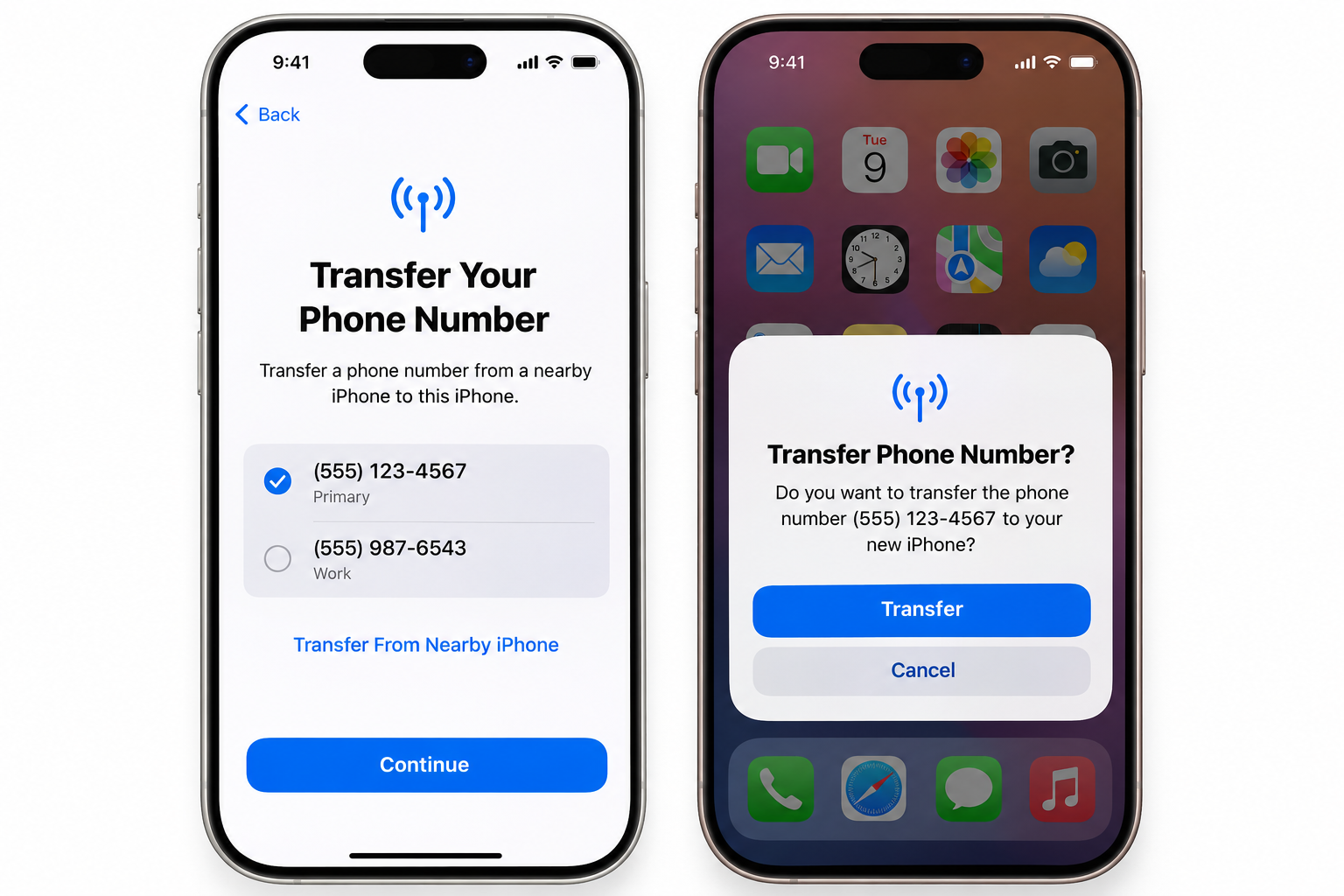
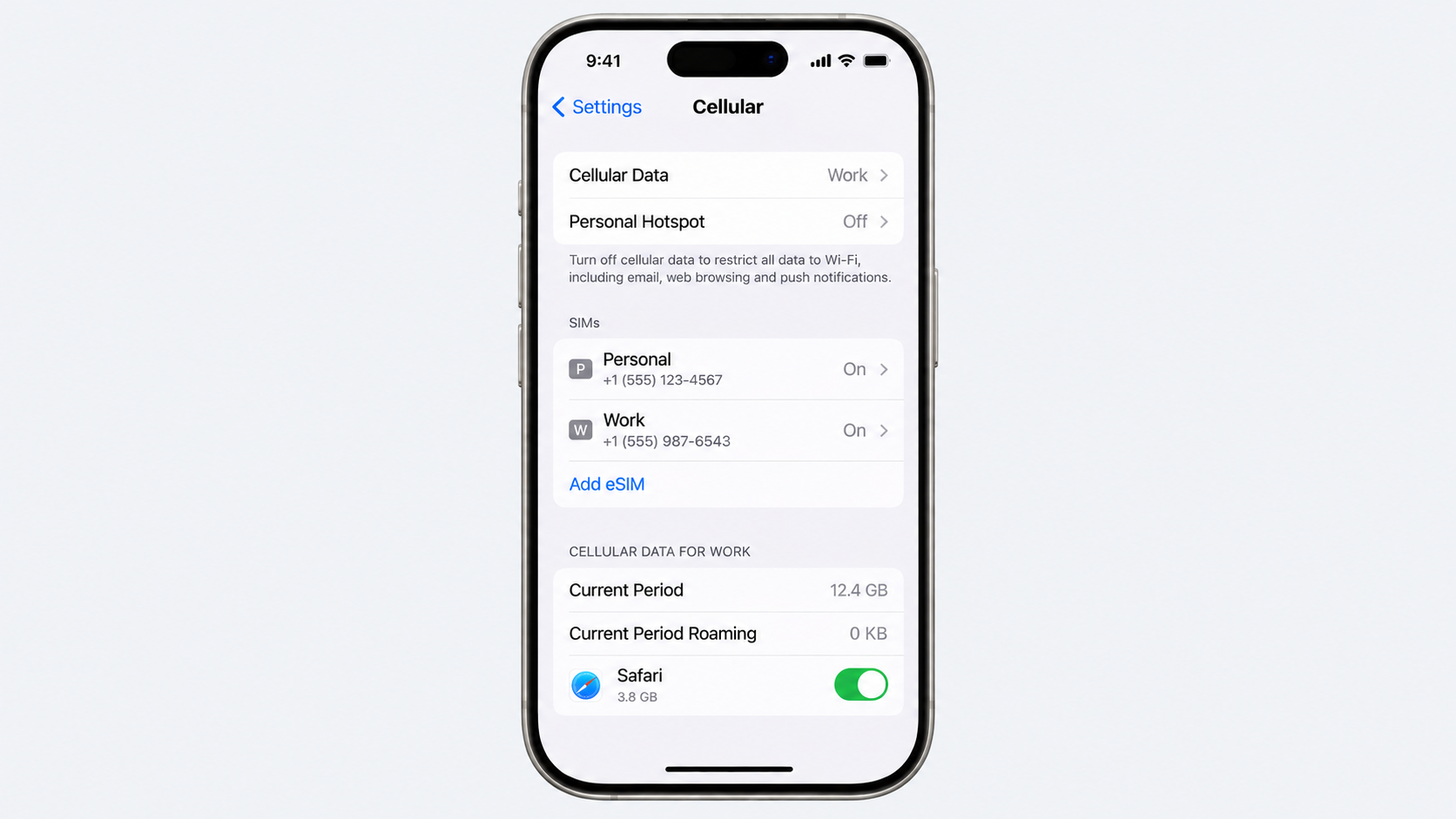
  2. Tap Cellular or Mobile Service.
  3. Select the eSIM or cellular plan you want to remove.
  4. Tap "Delete eSIM" or "Remove Cellular Plan".
  5. Confirm the removal when prompted.

On Android

Android settings differ between manufacturers, so the menu names may not be identical on every device:

  1. Open Settings.
  2. Tap Connections or Network & Internet.
  3. Select SIM manager, SIMs or a similar option.
  4. Choose the eSIM profile you want to remove.
  5. Tap Remove, Delete SIM or the equivalent option, then confirm.

Afterwards, check that your physical SIM remains selected for calls, texts and mobile data. If anything stops working, contact your carrier before making further changes.

Also read: eSIM vs Google Fit: Which is better for international travel?

When is a physical SIM the better choice?

Choosing between an eSIM vs a physical SIM often comes down to how, where and why a phone is being used. An eSIM is convenient for digital setup and travel, but a physical SIM still has practical advantages that can make it the better option in certain situations.

Selling or handing down a handset is one example. A physical SIM can simply be removed before the phone changes hands, leaving the new owner to insert their own SIM. This makes the separation between your mobile number and the device straightforward, particularly when the phone is being resold.

Travel is another consideration. Some dual-SIM phones make it easy to combine a physical SIM with an eSIM, allowing a local travel SIM to work alongside a primary number. This can be useful when moving between countries while keeping the main line active.

In some regions, eSIM support remains limited across carriers, plans and devices. A physical SIM can therefore provide greater flexibility when travelling or changing networks. For anyone comparing eSIM vs physical SIM, checking carrier and country compatibility before switching can prevent unexpected connectivity problems.

What it costs and how long it takes

The quickest way to replace your eSIM with a physical SIM is usually a store visit, but ordering online can be more convenient. Here is what you can generally expect from major US carriers:

  • Verizon: A store visit can mean instant activation, usually at $0 at corporate locations, although independent retailers may charge $10–$25. Online orders typically arrive within 3–5 business days, with no standard hardware fee.
  • AT&T: Visiting a corporate store can provide same-day activation, often for $0, although a $5 fee may apply. Online orders generally take 3–5 business days and carry a $5 replacement fee.
  • T-Mobile: In-store replacement can be activated immediately, but costs can reach $60, including the $25 SIM fee and potential $35 assisted-support fee. Ordering online usually takes 2–5 business days and costs $25, without the assisted-support charge.
  • Mint Mobile: There are no dedicated Mint stores, so replacement is handled online. Delivery generally takes 2–5 business days, with replacement costs typically ranging from 0–10.

While ordering your replacement SIM, you may also need to make a payment. Grey can make that easier, with a multi-currency account and virtual card for international payments. If you're travelling, you can also buy an eSIM through Grey and manage your connectivity and spending from the same platform.

Frequently asked questions about converting an eSIM back to a physical SIM

1. Will I lose my number?

No, your phone number remains exactly the same. Your carrier simply transfers your existing mobile account and number from the eSIM to the new physical SIM. Once the replacement card is activated, you can continue making calls, sending messages and using mobile data as before.

2. How much does a replacement cost?

Replacement fees vary by carrier, location and how you request the SIM. In many cases, you may pay between $0 and $25. Some major networks provide replacement cards free at corporate stores, while budget or prepaid providers may charge a separate SIM replacement fee.

3. Can I keep both active?

No, you generally cannot keep both SIM profiles active on the same number. Your carrier links the number to the newly activated SIM during the replacement process, which deactivates the previous eSIM. Your phone may support two SIMs, but they cannot share one number simultaneously.

4. How long does it take?

An in-store SIM replacement can often be completed within 10 to 15 minutes once your identity and account details have been verified. Ordering a physical SIM online usually takes longer, with standard delivery commonly taking around 3 to 5 business days, depending on your carrier.

5. Should I delete the eSIM early?

No. Keep your eSIM active until the replacement physical SIM has arrived, been activated and successfully connects to the network. Deleting the eSIM too early can leave your phone without mobile service, particularly when the new SIM has not yet been activated.

6. Do all carriers issue physical SIMs?

Many carriers still offer physical SIM cards, but availability depends on the network and your device. Before requesting one, check that your handset has a physical SIM tray. Some newer phones, including certain regional models, are designed as eSIM-only devices and cannot accept a physical card.

Grey Business vs Grey personal banking

•

•

2 min read

“Should I be using Grey Business, or is my personal Grey account enough?”

It’s a common question, especially once your income starts growing.

At the beginning, everything feels simple. You get paid and you withdraw your money easily. But as your work evolves, whether that’s taking on more clients, earning from multiple platforms, or starting a company, the way you manage money needs to evolve too.

Grey offers two account types for this exact reason: Grey Personal and Grey Business. They are not better or worse than each other. They are built for different stages of your earning process.

This guide breaks down the differences, including fees, features, and when to switch, so you can choose the right setup without second-guessing.

‍Also read: Receiving foreign income as a solo founder

What is a Grey personal account?

A Grey personal account is designed for individuals who receive and manage international payments.

If you are a freelancer, remote worker, or creator earning from global clients or platforms, this is the account you are expected to use.

With a personal account, you can open USD, GBP, and EUR balances with real banking details. This allows clients to pay you as if they were making a local transfer in their own country. Instead of receiving an expensive international wire, you receive money through local rails like ACH, SEPA, and FPS.

Once the money arrives, you can hold it in foreign currency, convert it when the rate works for you, or withdraw it to your local bank account. You can also spend directly using your Grey virtual card without needing to manually move funds around.

The focus here is simplicity. You are managing your own income, and the account is designed to make that as flexible as possible.

What fees does Grey Personal charge?

Understanding fees is where most people get confused, so here’s how it actually works.

When you receive money through ACH, SEPA, or FPS, Grey charges a 0.8% fee, with a minimum of $2, €2, or £2 and a maximum of $10, €10, or £10. This means larger payments become proportionally cheaper because of the cap.

Currency conversion depends on the currency pair. Some routes are free, while others range from 0.5% to 1%. For certain major pairs, the fee is capped at $6. The important detail is that Grey shows the rate before you confirm, so there are no hidden charges after the fact.

Withdrawals vary depending on the country, but for major currencies like EUR and GBP, the fee is typically 0.5%, with a minimum and maximum cap. Other corridors may use fixed fees instead.

For less common deposit methods like Fedwire, BACS, or CHAPS, fixed fees apply. These are generally used less often, since local rails like ACH or FPS are cheaper.

Read more: Grey charges explained: what every transaction costs

What is Grey Business?

Grey Business is designed for companies rather than individuals.

If you are running a registered business, working under a company name, or managing revenue that belongs to a business entity, this is the account structure you need.

Unlike a personal account, a Grey Business account is built for your company. This means you can receive payments on behalf of the business, manage funds at a company level, and keep financial records properly organised for accounting and compliance.

The functionality goes beyond receiving payments. Grey Business allows you to manage team access, assign roles, and give multiple people control over finances without sharing a single login.

You can also pay contractors globally, send payments in local currencies, and handle bulk payouts by uploading recipient details. This becomes important as soon as you are working with a team or scaling operations.

The goal of Grey Business is not just to receive money, but to structure how your business handles it.

What fees does Grey Business charge?

Grey Business follows the same core pricing model as personal accounts.

Receiving payments still comes with the 0.8% fee capped at $10. Conversion fees follow the same tiered structure, and withdrawals depend on the payout country.

The difference is not in lower fees, but in what the account enables.

With Grey Business, you are paying for structure, team management, and the ability to operate at scale without mixing personal and company finances.

Grey Personal vs Grey Business: what is the difference?

The main difference comes down to ownership.

A personal account is for money that belongs to you as an individual. A business account is for money that belongs to a company.

Everything else builds from that.

Grey Personal is simpler, quicker to set up, and designed for individuals managing their own income. Grey Business requires verification of a registered company but provides tools to manage payments, teams, and operations effectively.

If you are working alone and getting paid for your own work, a personal account is enough. If you are invoicing as a company, hiring people, or managing shared finances, you need a business account.

‍Also read: Can non-residents open a US bank account online in 2026?

When should you use Grey for personal use?

You should use a personal account if you are earning in your own name.

This includes freelancers, remote employees, and creators earning from platforms like YouTube, TikTok, or Upwork. At this stage, your income is still personal, even if it comes from multiple sources.

A personal account keeps things simple.

When should you use Grey Business?

You should use Grey Business when your income is no longer just yours.

If you have registered a company, invoice under a business name, or manage revenue that belongs to a business entity, a personal account is no longer the right structure.

This is especially important if you are paying contractors, working with a team, or preparing financial records for accounting and tax purposes.

Can you have both Grey for personal use and Grey Business?

Yes, and in many cases, this is the best setup.

If you run a company but also earn income personally, keeping both accounts separate helps avoid confusion. Your business transactions stay within the business account, while your personal income remains separate.

This makes accounting cleaner and reduces the risk of mixing funds.

Grey for personal use vs Grey Business: key differences

Feature Grey Personal Grey Business
Who it’s for Individuals (freelancers, creators, remote workers) Registered companies, startups, agencies
Account ownership Personal use Business entity
Currencies supported USD, GBP, EUR, USDC USD, USDC (business-focused)
Receiving payments Yes (ACH, SEPA, FPS) Yes (for business transactions)
Team access No Yes (multi-user access with roles)
Bulk payouts No Yes (CSV uploads supported)
Virtual cards Yes (for personal use) Yes (multiple cards for teams, tools, ads)
Best use case Getting paid individually Managing company finances and scaling operations
Setup process Fast (ID verification) More detailed (business verification required)

So, which Grey account should you choose?

Most people overthink this decision, but it comes down to one simple question:

Who does the money belong to?

If you’re earning as an individual, whether that’s freelancing, remote work, or content creation, a Grey Personal account is the right fit. It keeps things simple and flexible while giving you full access to international payments.

If you’re operating as a registered business, invoicing clients under a company name, or managing team payments, Grey Business is the structure you need. It helps you separate finances properly and handle growth without creating confusion later.

If you’re in between, which is common, you can start with a personal account and move to business when your setup requires it. Many users also keep both, using one for personal income and the other for company operations.

The goal isn’t to pick the most advanced option. It’s to choose the one that fits how you earn today and won’t slow you down as you grow.

Getting started with Grey

Opening a Grey Personal account takes just a few minutes. You can sign up in under 5 minutes, and once your identity is verified, you can usually start receiving payments the same day.

Opening Grey Business takes a bit longer because it involves business verification. You’ll need to submit your company registration and ownership details, and approval typically takes 1 to 3 business days, depending on the documents provided. This ensures your account is set up correctly from the start.

Frequently asked questions

What is the difference between Grey for persona use and Grey Business?

Grey Personal is for individuals receiving and managing their own income, such as freelancers, creators, and remote workers. Grey Business is for registered companies that need to manage business revenue, pay contractors, and give team members access to finances.

The main difference is ownership. Personal accounts are for your money. Business accounts are for company funds.

Can I use a Grey Personal account for business payments?

You can use a personal account while you are freelancing under your own name. However, once you register a company or start invoicing under a business name, it is better to switch to Grey Business.

Using a personal account for business transactions can create confusion with accounting, taxes, and financial tracking.

Does Grey Business have different fees from Grey Personal?

Grey Business follows the same core pricing structure as personal accounts. Receiving fees are typically 0.8% with a cap, and conversion fees depend on the currency pair.

The main difference is not pricing, but functionality. Grey Business adds tools for team access, bulk payments, and structured financial management.

Can I have both a Grey Personal and Grey Business account?

Yes. Many users have both accounts.

This is useful if you have personal income, such as freelance work or creator earnings, and also run a registered business. Keeping them separate makes accounting cleaner and easier to manage.

When should I switch from Grey Personal to Grey Business?

You should consider switching when your income becomes business revenue instead of personal income.

This usually happens when you register a company, start invoicing clients as a business, hire contractors, or need proper financial records for tax and reporting purposes.

What documents are required to open a Grey Business account?

To open a Grey Business account, you will need to provide company registration documents, ownership details, and verification information about the business.

The process is more detailed than a personal account because it involves verifying a legal entity.

Is Grey Personal enough for freelancers and creators?

Yes. For most freelancers, remote workers, and creators, Grey Personal is more than enough.

It allows you to receive international payments, hold foreign currency, convert when needed, and withdraw locally without needing business-level setup.

Can I receive USD, GBP, and EUR with both accounts?

Yes. Both Grey Personal and Grey Business support multi-currency functionality.

Personal accounts focus on individual income, while business accounts structure those same capabilities for company use.

Which Grey account is better?

Neither is better. They are designed for different use cases.

Grey Personal is better for individuals managing their own income. Grey Business is better for companies managing business finances and scaling operations.

Ready to get started?

Open your Grey Personal account to start receiving international payments as an individual, or set up Grey Business if you’re managing company finances and need a more structured setup.

Arrow (up)

Back to top